

Page 1
L
L
M
M
U--
U
4
4
0
0
0
0
0
0
Haarrdd
H
nssttaallllaattiioo
IIn
Guuiiddee
G
waarree
w
Version 1.0
July 2005
n
n
Copyright ©TechnoCom Corporation 2005 TechnoCom Proprietary & Confidential
Page 2

LMU-4000 Hardware Installation Guide 1.0
License Agreement
FOR SOFTWARE, APPLICATION PROGRAMING INTERFACES (APIS) & DOCUMENTATION
IMPORTANT
HAVE READ AND AGREED TO THIS LICENSE AGREEMEET.
This is a legal agreement between you, the Customer, and TechnoCom Corporation ("TechnoCom"). By installing
and/or using the software or documentation you are consenting to the terms of this License. If you do not agree to the
terms of this non-exclusive License Agreement, DO NOT INSTALL OR USE THE SOFTWARE, APIs OR
DOCUMENTATION. For a full refund, return the unused media package and all accompanying materials within seven
(7) days to TechnoCom. Where there is no packaging or media, use of the software and/or documentation
constitutes acceptance.
EFINITIONS: As used in this License Agreement, "Software" means TechnoCom’s LM Exchange™, LMU Manager™,
D
LapTop Locator™, LMU Application/Programmable Event Generator™, CDMA LMU Provisioning Tool, GPRS LMU
Provisioning Tool, iDen™ Provisioning Tool, LMU Status, Clone Config, Hex Dump, LM Exchange™ Traffic Monitor,
Freewave Base Station Config, Remote Serial Port, App Watcher Service and/or other software products licensed by
TechnoCom for use in computer applications development or integration including the computer programs, libraries
and related materials either contained on the media provided to you by or from TechnoCom, or which you have
received or downloaded electronically. "Application" means a compiled or executable software program created by
Developer that uses some or all of the functionality of the Software. "Software Copies" means the actual copies of all
or any portion of the Software including backups, updates, merged or partial copies permitted hereunder or
subsequently licensed to you. "Documentation" means the non-Software information contained on the media
provided with this package or downloaded and which is used with and describes the operation and use of the
Software. "Documentation Copies" means the actual copies of all or any portion of the Documentation including
backups, updates, merged or partial copies permitted hereunder or subsequently provided to you. "Related Materials"
means all other materials and whatever is provided by or from TechnoCom, and the non-Software and nonDocumentation contained on the media supplied, downloaded, or otherwise supplied by or from TechnoCom for use
with the Software and Documentation. "Server" means a single, networked computer that is accessible to other client
machines on the network. "User" means (i) a single person using an Application for his/her internal, use or (ii) a single
terminal or a single workstation of a computer used only by a person (and not accessed otherwise) for accessing an
Application. "Use License" means limited rights granted by TechnoCom for deployment of a single Application to a
User. "Developer" means a single programmer developing an Application. "Developer License" means the grant of
certain limited rights to use and maintain the Software, Software Copies, Documentation, Documentation Copies and
Related Materials in development of Applications.
ACKGROUND: A Developer License is required for each Developer who uses the Software in building Application(s).
B
A Use License is required and must be purchased by Customer for each User to which Customer provides access to
an Application (unless a Server or Site license for unlimited or a specified number of users has been purchased).
Each Use License is specific to one client-side Application only and may not be used for any other client-side
Application. Each Server license is limited to Server-based Applications deployed on that Server for which the license
has been purchased as specified in a TechnoCom License Certificate. The Software is licensed on a per Developer,
and on a per User, per Application basis. In order to preserve and protect its rights under applicable law, TechnoCom
is not selling you ownership rights to Software or Documentation (owned by or licensed to TechnoCom). TechnoCom
specifically retains title to all TechnoCom Software, Documentation and Related Materials and TechnoCom licensors
retain title to items owned by them.
URATION: This License Agreement is effective from the day you install or start using the Software, or receive or
D
download it electronically, and continues until terminated. If you fail to comply with any provision of the License,
termination is automatic, without notice from TechnoCom and without the necessity for recourse to any judicial
authority. Upon termination, you must destroy the Related Materials, the Software, Documentation and all Software
and Documentation copies. TechnoCom can also enforce its other legal and equitable rights.
EVELOPER LICENSE ONLY—USES PERMITTED: Software and Documentation may be used for the sole purpose of
D
developing Applications and only by a licensed Developer. Software and Documentation may be installed onto a hard
Copyright ©TechnoCom Corporation 2005 - ii - TechnoCom Proprietary & Confidential
: DO NOT INSTALL OR USE THE SOFTWARE OR DOCUMENTATION UNTIL YOU
Page 3

LMU-4000 Hardware Installation Guide 1.0
disk drive or a Server, access to which is restricted to Developers for which a Developer License has been purchased
and may also be stored or installed on a storage device such as a network server, used only to install or access the
Software or Documentation on your other computers over an internal network; however, you must have acquired a
license for each separate computer on which the Software or Documentation is installed or accessed from the
storage device. A Developer License may not be shared or used concurrently on different computers. One backup
copy may be made for each legally obtained media copy or electronic copy you have received, provided that all
TechnoCom and third party licensor information — including copyright notices — are maintained and possession of
the copy is retained in a secure location. In addition, you agree to use reasonable efforts to protect the Software and
Documentation from unauthorized use, reproduction, distribution or publication. All rights not specifically granted in
this License are reserved by TechnoCom.
Customer agrees to include the notice "Copyright © 1999 - 2005 TechnoCom Corporation, All Rights Reserved" in
Applications developed with the Software. Customer agrees to include the following TechnoCom Copyright and
Government Restricted Use notice in all documentation and in any Application on-line help or readme file.
"Portions of this computer program are owned by TechnoCom Corporation, Copyright © l999 - 2005,
TechnoCom Corporation, All Rights Reserved. Use, duplication or disclosure by the Government is subject
to restrictions as set forth in subparagraph (c)(1)(ii) of the Rights in Technical Data and Computer Software
clause at DFARS 252.227-7013 or subparagraphs (c)(l) and (2) of the Commercial Computer SoftwareRestricted Rights at 48 CFR 52.227-19, as applicable. Manufacturer is TechnoCom Corporation, 16133
Ventura Boulevard, Suite 640, Encino, CA 91436. Rights are reserved under copyright laws of the United
States with respect to unpublished portions of the Software."
EVELOPER(S) LICENSE—USES NOT PERMITTED: UNLESS OTHERWISE AGREED TO IN WRITING WITH TECHNOCOM, YOU MAY
D
NOT (1) Make derivative works including but not limited to translations, adaptations, arrangements or any other
alteration (each of which would become the property of TechnoCom or its licensors, as applicable) or make copies of
the Software or Documentation except as permitted above; (2) Make copies of the Related Materials; (3) Use any
TechnoCom product to translate the product of another licensor unless you have the legal right to do so; (4) Allow a
greater number of Developers to access the Software at any one time than the total number of Developer licenses for
which you have paid; (5) Rent, lease, sublicense or lend the Software, Software Copies, Documentation,
Documentation Copies, Related Materials or your rights under this License or allow access to the Software for
unlicensed users; (6) Alter, decompile (except to the limited extent that decompilation by the licensed Developer only
is necessary as the only available way to achieve interoperability with other programs and, in that situation, any
resulting information cannot be used in developing, producing or marketing any software substantially similar in
expression to the Software), disassemble or reverse engineer the Software; (7) Make any attempt to unlock or
bypass any initialization system or encryption techniques utilized by the Software or Documentation; (8) Alter, remove
or obscure any proprietary legend, copyright or trademark notice contained in or on Software, Documentation or
Related Materials; or (9) use the Software to create an Application intended solely to duplicate functionality of an
existing TechnoCom end user software product.
SE LICENSES: For each Server or Site License purchased, TechnoCom grants the Customer the right to distribute
U
Applications on a single Server or at a single Site, as the case may be, accessible to the number of individual users
(not concurrent users) for which the Server or Site License has been purchased as evidenced by a TechnoCom
License Certificate. For each Use License purchased, as evidenced by a TechnoCom License Certificate,
TechnoCom grants the Customer the right to distribute a single Application to a single User. In no circumstance may
Customer distribute an Application under a site license or concurrent use license unless a comparable license has
been purchased for the Software as evidenced by a TechnoCom License Certificate. Customer agrees that
distribution of an Application to a User will in all cases be accompanied by a license agreement containing at a
minimum terms and conditions substantially similar to and at least as restrictive as the following:
The User may not
arrangements or any other alteration of the Application or make copies of the Application, except one
backup copy may be made for each legally obtained copy of the Application, provided that all TechnoCom
and third party licensor information — including copyright notices — are maintained and possession of the
copy is retained in a secure location; (2) Allow access to the Application for unlicensed users; (3) Rent,
lease, sublicense or lend the Application or its rights under the license; (4) Alter, decompile, disassemble
or reverse engineer the Application; (5) Make any attempt to unlock or bypass any initialization system or
encryption technique utilized by the Application; or (6) Alter, remove or obscure any proprietary legend,
copyright or trademark notice contained in or on the Application.
(1) Make derivative works including but not limited to translations, adaptations,
Copyright ©TechnoCom Corporation 2005 - iii - TechnoCom Proprietary & Confidential
Page 4

LMU-4000 Hardware Installation Guide 1.0
The User agrees to use reasonable efforts to protect the Application from unauthorized use, reproduction,
distribution or publication.
AUDIT: Customer shall keep records of all transactions involving Software for five (5) years after the transaction.
TechnoCom shall have the right upon written notice to audit Customer's records to verify compliance with this License
including the number of Use Licenses granted by Customer. Audit may take place at Customer's place or business
during normal working hours. In the event that there is a discrepancy in excess of five percent (5%) between the
number of Use Licenses granted and the number paid for, Customer shall pay all costs related to performing the audit
in addition to remitting payment for those licenses granted in excess of those paid for as evidenced by a TechnoCom
License Certificate.
ENERAL: This Agreement represents our entire understanding and agreement regarding the Software, Software
G
Copies, Documentation, Documentation Copies and Related Materials and supersedes any prior purchase order,
communication, advertising or representation and may only be modified in a written amendment signed by an
authorized TechnoCom representative or by a specific prior or subsequent written agreement between the parties. If
any provision of this Agreement shall be unlawful, void or for any reason unenforceable, that provision shall be
deemed severable from, and shall in no way affect the validity or enforceability of, the remaining provisions.
Copyright ©TechnoCom Corporation 2005 - iv - TechnoCom Proprietary & Confidential
Page 5

LMU-4000 Hardware Installation Guide 1.0
Limited Warranty
OVERING THE PHYSICAL MEDIA AND PRINTED MATERI ALS: TechnoCom warrants to you, the original licensee, that the
C
media on which the Software is recorded are free from defects in materials and workmanship under normal use and
service FOR A PERIOD OF NINETY (90) DAYS FROM THE DATE OF DEVELOPER LICENSE PURCHASE.
TechnoCom's entire liability and your exclusive remedy as to defective media, Documentation or Related Material(s)
shall be replacement of the media, Documentation or Related Material(s) by TechnoCom. Each defective item, along
with proof of license purchase and date, must be sent in a traceable manner to: TechnoCom Corporation, 16133
Ventura Boulevard, Suite 640, Encino, CA 91436.
ISCLAIMER REGARDING THE SOFTWARE, DOCUMENTATIONS AND RELATED MATERIALS: THE SOFTWARE,
D
DOCUMENTATION AND RELATED MATERIALS ARE PROVIDED "AS IS." EXCEPT AS MAY OTHERWISE BE
EXPRESSLY SET FORTH HEREIN, TECHNOCOM MAKES NO REPRESENTATIONS OR WARRANTIES,
EXPRESS OR IMPLIED, WITH RESPECT TO THE SOFTWARE, DOCUMENTATION OR RELATED MATERIALS
INCLUDING BY WAY OF EXAMPLE, AND NOT LIMITATION, THE IMPLIED WARRANTIES OF
MERCHANTABILITY AND FITNESS FOR A PARTICULAR PURPOSE. BY WAY OF FURTHER EXAMPLE AND
NOT LIMITATION, TECHNOCOM MAKES NO REPRESENTATIONS OR WARRANTIES, EXPRESS OR IMPLIED,
WITH RESPECT TO THE ACCURACY, RELIABILITY OR COMPLETENESS OF THE DOCUMENTATION OR THE
RELATED MATERIALS. THE ENTIRE RISK AS TO THE USE OF THE SOFTWARE, DOCUMENTATION AND
RELATED MATERIALS IS ASSUMED BY YOU. IN NO EVENT SHALL TECHNOCOM BE LIABLE TO YOU OR ANY
OTHER PERSON, REGARDLESS OF THE CAUSE, FOR THE EFFECTIVENESS OR ACCURACY OF THE
SOFTWARE, DOCUMENTATION OR RELATED MATERIALS OR FOR ANY SPECIAL, INDIRECT, INCIDENTAL
OR CONSEQUENTIAL DAMAGES ARISING FROM OR OCCASIONED BY YOUR USE OF THE SOFTWARE,
DOCUMENTATION OR RELATED MATERIALS, EVEN IF ADVISED OF THE POSSIBILITY OF SUCH DAMAGES.
IN THE EVENT THE FOREGOING IS FOUND BY A COURT OF COMPETENT JURISDICTION TO BE
INEFFECTIVE, YOU HEREBY AGREE THAT TECHNOCOM'S MAXIMUM LIABILITY FOR ANY CLAIM ARISING IN
CONNECTION WITH THE SOFTWARE, DOCUMENTATION AND/OR RELATED MATERIALS (WHETHER IN
CONTRACT, TORT, INCLUDING NEGLIGENCE, PRODUCT LIABILITY OR OTHERWISE) SHALL NOT EXCEED
THE LICENSE FEES PAID BY YOU WITH RESPECT TO THE SOFTWARE, DOCUMENTATION AND/OR
RELATED MATERIALS AT ISSUE. SOME STATES DO NOT ALLOW THE LIMITATION OR EXCLUSION OF
INCIDENTAL OR CONSEQUENTIAL DAMAGES, SO THE FOREGOING PROVISION, WITH RESPECT TO
EXCLUDING OR LIMITING SUCH DAMAGES, MAY NOT APPLY TO YOU.
CKNOWLEDGEMENT: You acknowledge that you have read this LIMITED WARRANTY, understand it and agree to be
A
bound by its terms and conditions. You also agree that: (1) No oral or written information or advice given by
TechnoCom, its dealers, distributors, agents or employees shall in any way increase the scope of this Limited
Warranty and you may not rely on any such information or advice; (2) Unless a written governing agreement signed
by you and TechnoCom exists, this License Agreement is the complete and exclusive statement of agreement
between TechnoCom and you regarding the licensing of the Software, Documentation and Related Materials and
supersedes all proposals, oral or written, and any other communications you may have had prior to purchasing your
license; (3) Except for the price and delivery terms agreed upon by both parties, the terms and conditions of this
License Agreement shall supersede those set forth in any purchase order where the purchase order conflicts or is
inconsistent with or adds to the terms and conditions of this License and those superseded purchase order terms and
conditions shall be null and void; (4) You agree to assure that copies of this License Agreement are distributed, read
and agreed to by each Developer using the Software and/or Documentation.
G
OVERNING LAW: This Agreement shall be governed by the laws of the State of California, United States, excluding its
conflicts of law principles and excluding the United Nations Convention on Contracts for the International Sale of
Goods. You agree to exclusive jurisdiction of California State federal and state courts, San Diego County, for
resolution of any dispute related to this Agreement.
GOVERNMENT PROTECTED RIGHTS: The Software Documentation and Related Materials are provided with
U.S.
RESTRICTED RIGHTS. Use, duplication or disclosure by the Government is subject to restrictions as set forth in
subparagraph (c)(1)(ii) of the Rights in Technical Data and Computer Software clause at DFARS 252.227-7013 or
subparagraphs (c)(1) and (2) of the Commercial Computer Software-Restricted Rights at 48 CFR 52.227-19, as
Copyright ©TechnoCom Corporation 2005 - v - TechnoCom Proprietary & Confidential
Page 6

LMU-4000 Hardware Installation Guide 1.0
applicable. Manufacturer is TechnoCom Corporation, 16133 Ventura Boulevard, Suite 640, Encino, CA 91436. Rights
are reserved under copyright laws of the United States with respect to unpublished portions of the Software.
Copyright ©TechnoCom Corporation 2005 - vi - TechnoCom Proprietary & Confidential
Page 7

LMU-4000 Hardware Installation Guide 1.0
Regulatory Information
Human Exposure Compliance Statement
Pursuant to 47 CFR § 24.52 of the FCC Rules and Regulations, personal communications
services (PCS) equipment is subject to the radio frequency radiation exposure requirements
specified in § 1.1307(b), § 2.1091 and § 2.1093, as appropriate.
TechnoCom Corp. certifies that it has determined that the LMU-4000 complies with the RF
hazard requirements applicable to broadband PCS equipment operating under the authority
of 47 CFR Part 24, Subpart E of the FCC Rules and Regulations. This determination is
dependent upon installation, operation and use of the equipment in accordance with all
instructions provided.
The LMU-4000 is designed for and intended to be used in fixed and mobile applications.
"Fixed" means that the device is physically secured at one location and is not able to be
easily moved to another location. "Mobile" means that the device is designed to be used in
other than fixed locations and generally in such a way that a separation distance of at least 20
cm is normally maintained between the transmitter's antenna and the body of the user or
nearby persons. The LMU-4000is not designed for or intended to be used in portable
applications (within 20 cm of the body of the user) and such uses are strictly prohibited.
To ensure that the LMU-4000 complies with current FCC regulations limiting both
maximum RF output power and human exposure to radio frequency radiation, a separation
distance of at least 20 cm must be maintained between the unit's antenna and the body of
the user and any nearby persons at all times and in all applications and uses. Additionally, in
mobile applications, maximum antenna gain must not exceed 3 dBi.
Copyright ©TechnoCom Corporation 2005 - vii - TechnoCom Proprietary & Confidential
Page 8

LMU-4000 Hardware Installation Guide 1.0
Table of Cont e n t s
LICENSE AGREEMENT...................................................................................................................................................................................... ii
LIMITED WARRANTY ......................................................................................................................................................................................... v
REGULATORY INFORMATION........................................................................................................................................................................ vii
Human Exposure Compliance Statement.......................................................................................................... vii
TABLE OF CONTENTS ....................................................................................................................................................................................viii
INTRODUCTION.................................................................................................................................................................................................... 1
About This Manual.................................................................................................................................................1
Revision History ..................................................................................................................................................1
About The Reader...................................................................................................................................................1
About TechnoCom..................................................................................................................................................2
About the TechnoCom Location Messaging Unit-4000™ (LMU-4000™).........................................................2
SECTION 1 — SYSTEM OVERVIEW ................................................................................................................................................................3
Overview..................................................................................................................................................................3
Component Descriptions ........................................................................................................................................4
Backend Software ................................................................................................................................................4
LMU Manager......................................................................................................................................................4
LM Direct Server .................................................................................................................................................5
Wireless Data Network ........................................................................................................................................5
LMU-4000 ...........................................................................................................................................................5
Host Device – Laptop/PDA or MDT ...................................................................................................................5
Wireless Data Primer .............................................................................................................................................6
iDEN ....................................................................................................................................................................6
SMS (Short Message Service) .............................................................................................................................6
GPRS (General Packet Radio Service) ................................................................................................................6
CMDA 1xRTT .....................................................................................................................................................7
SECTION 2 — HARDWARE OVERVIEW ........................................................................................................................................................8
Location Messaging Unit-4000 (LMU-4000) ........................................................................................................8
Environmental Specifications ..............................................................................................................................8
Physical Specifications ........................................................................................................................................9
Primary Connector .............................................................................................................................................10
Standard Wiring Harness ...................................................................................................................................11
Expansion Interface............................................................................................................................................11
GPS Receiver .....................................................................................................................................................11
Available Radio Interfaces.................................................................................................................................11
RF Connector .....................................................................................................................................................11
SECTION 3 — CONFIGURATION AND INSTALLATION ............................................................................................................................ 12
Configuration Quick Start Guides ......................................................................................................................12
Quick Start — General Config...........................................................................................................................12
Quick Start — CDMA2000 1x LMU-4000 .......................................................................................................14
Quick Start — GPRS LMU-4000 ......................................................................................................................16
Quick Start — iDEN LMU-4000.......................................................................................................................18
Installation Notes ..................................................................................................................................................19
I/O Descriptions ....................................................................................................................................................21
Copyright ©TechnoCom Corporation 2005 - viii - TechnoCom Proprietary & Confidential
Page 9

LMU-4000 Hardware Installation Guide 1.0
Outputs...............................................................................................................................................................21
Ignition and Inputs .............................................................................................................................................21
Status LEDs .......................................................................................................................................................23
Installation Verification........................................................................................................................................23
Comm Verification ............................................................................................................................................23
GPS Verification................................................................................................................................................24
Inbound Verification..........................................................................................................................................24
APPENDIX A — HYPERTERMINAL CONFIGURATION ............................................................................................................................26
APPENDIX B — INSTALL NEW MODEM ..................................................................................................................................................... 29
APPENDIX C — CONFIGURING DIAL-UP NETWORKING...................................................................................................................... 32
Create a New Connection.....................................................................................................................................32
Configure the Connection ....................................................................................................................................34
Connecting to the LMU-4000...............................................................................................................................36
APPENDIX D — MOUNTING TEMPLATE ..................................................................................................................................................... 37
Copyright ©TechnoCom Corporation 2005 - ix - TechnoCom Proprietary & Confidential
Page 10

LMU-4000 Hardware Installation Guide 1.0
Introduction
Welcome to the LMU-4000 Hardware and Installation Guide. This manual is intended to
give you information on the basic setup and installation of the TechnoCom LMU-4000
products including hardware descriptions, environmental specifications, wireless network
overviews and device programming.
About This Manual
The LMU-4000 is one of the most flexible fleet management hardware products available. In
order to accurately describe the functionality of these units we have broken this manual into
the following sections:
Section 1 — System Overview - A basic description of a TechnoCom LMU-4000
based fleet management system. This includes a description of roles and responsibilities
of each of the TechnoCom components as well as a brief overview of each of the
wireless data technologies used by the LMU-4000.
Section 2 — Hardware Overview - Describes the physical characteristics and interfaces
of the LMU-4000.
Section 3 — Installation - Provides several quick start guides for each version of the
LMU-4000 which describe how to get the LMU-4000 provisioned and reporting to a
given server.
Revision History
Version Date Author Description
1.0 05/24/2005 STP Initial Release
About The Reader
In order to limit the size and scope of this manual, the following assumptions have been
made about the reader.
You are familiar with IP networking concepts such as ports and IP addresses
You are familiar with GPS concepts and terminology
You have some experience with installing equipment in vehicles
Copyright ©TechnoCom Corporation 2005 - 1 - TechnoCom Proprietary & Confidential
Page 11

LMU-4000 Hardware Installation Guide 1.0
About TechnoCom
TechnoCom is a privately held company, founded in 1995 and a leading-edge provider of solutions
to enable wireless location services and assure their ongoing performance. We offer location
support, mobile resource management and advanced telematics solutions combined with related
professional services to wireless operators, service providers, system integrators and government
agencies. These solutions enable customers to manage their wireless location infrastructures and
services, reduce operating and capital costs, deliver superior levels of service, increase productivity
and rapidly deploy new revenue-generating services. In both 2003 and 2004, TechnoCom was
named by Deloitte & Touche as one of the “Technology Fast 50” in the Los Angeles area, giving
recognition to the fact we are an able competitor in the high technology sector — despite the
challenges of a rapidly evolving industry and marketplace.
About the TechnoCom Location Messaging Unit-4000™ (LMU-4000™)
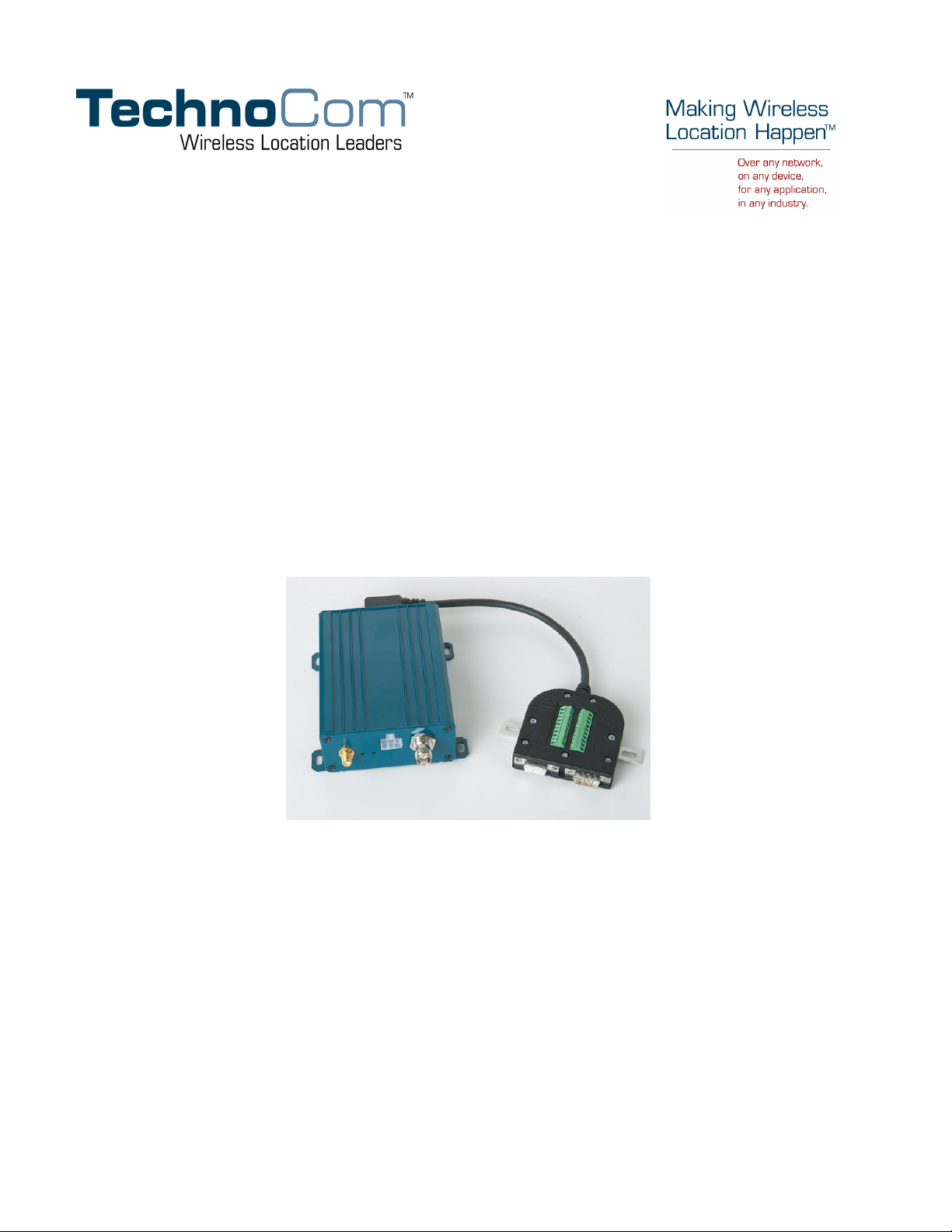
The TechnoCom Location and Messaging Unit-4000™ (LMU-4000™) is a mobile device that
resides primarily in commercial or government vehicles. The LMU-4000 is a single box enclosure
incorporating a processor, a GPS receiver, a wireless data modem, and a vehicle-rated power supply.
The LMU-4000 also supports inputs and outputs to monitor and react to the vehicular environment
and/or driver actions.
The LMU-4000 collects, stores and transmits vehicular and location data over a designated wireless
network including iDEN™, CDMA2000 1x, GPRS, 900 MHz wireless, and others via IP/UDP.
Vehicular and location data are transmitted to a customized software application that has been
designed to receive, acknowledge, process, store, and respond to this data.
Unit location and vehicular information is sent at pre-determined intervals, on demand, or when
pre-programmed vehicular conditions are met. Transmission of data are sent immediately when in
wireless network coverage and stored for later transmission when out of the wireless coverage area.
SMS messaging can be used as an alternative or redundant communication backup.
The LMU-4000 is designed to support a variety of custom fleet applications starting with basic
automatic vehicle location and including applications requiring more sophisticated features such as
geo-fencing, speed and mileage monitoring, third party security monitoring, dynamic reporting
routines, and an array of exception alerts.
LMU-4000s are sold exclusively to authorized systems integrators, software firms, and service
providers who have developed their offering around the capabilities of the LMU-4000. Customers
are trained by TechnoCom to integrate the mobile device with their system and to assist in support
and maintenance of the devices.
Installations of LMU-4000s are performed by TechnoCom customers or contracted installers.
Typical installations include hook-up to power, ignition, and ground. LMU-4000s and the
corresponding wiring are almost always hidden from view and general access. Placement of the units
is usually under dashboards, in trunks or in compartments.
Copyright ©TechnoCom Corporation 2005 - 2 - TechnoCom Proprietary & Confidential
Page 12

LMU-4000 Hardware Installation Guide 1.0
Section 1 — System Overview
Overview
The entire purpose behind a fleet management system is to be able to remotely contact a
vehicle, determine its location or status, and do something meaningful with that information.
This could include displaying the vehicle location on a map, performing an address look-up,
providing real-time driving directions, updating the vehicles ETA, monitoring vehicle and
driver status or dispatching the vehicle to its next pick up.
These functions, of course, are completely dependant on the capabilities of the vehicle
management application. The role of the TechnoCom LMU-4000 is to deliver the location
information when and where it is needed.
A typical fleet management system based on a TechnoCom device includes the following
components:
Backend mapping and reporting software which typically includes mapping and
fleet reporting functions
LMU Manager™
An LM Direct™ communications server
A wireless data network
An LMU-4000
Mobile Data Terminal (MDT)
In-vehicle laptop (LMU Status™)
Copyright ©TechnoCom Corporation 2005 - 3 - TechnoCom Proprietary & Confidential
Page 13

LMU-4000 Hardware Installation Guide 1.0
LMU Manager
Mapping Application
Component Descriptions
LM Direct Server
Laptop/PDA or MDT
Internet / Wireless Network
Network Base Station
LMU-4000
Backend Software
Backend software is a customer provided software application. Regardless of its purpose one
of its primary functions is to parse and present data obtained from the LM Direct server.
This allows the application to do any of the following:
Display location data base on reports received from the LMU-4000 in a variety of
formats.
Present historic information received from the LMU-4000 typically in a
report/chart style format
Request location updates from one or more LMU-4000s
Update and change the configuration of one or more LMU-4000s
LMU Manager
LMU Manager is the primary support and configuration tool in the TechnoCom system. It
allows access to almost every feature available to the LMU-4000. Unlike the backend
software, it has the option of talking directly to an LMU-4000 or making a request
forwarded by the LM Direct server.
Copyright ©TechnoCom Corporation 2005 - 4 - TechnoCom Proprietary & Confidential
Page 14

LMU-4000 Hardware Installation Guide 1.0
For further details on using LMU Manager, please refer to the LMU Manager Users Guide.
LM Direct Server
LM Direct is a message interface specification detailing the various messages and their
contents the LMU-4000 is capable of sending and receiving. This interface allows System
Integrators to communicate directly with LMU-4000’s.
Sample code is available to system integrators upon request to aid in the development of an
LM Direct Server.
Wireless Data Network
The Wireless Data Network provides the information bridge between the LM Direct server
and the LMU-4000s. Wireless data networks can take a variety of forms, such as cellular
networks, satellite systems or local area networks. At this point in time, the networks
available to the LMU-4000 are:
iDEN™
GPRS
CDMA2000 1x
LMU-4000
The LMU-4000 is responsible for delivering the location and status information when and
where it is needed. Data requests can come from any of the following sources:
PEG™ script within the LMU-4000
A location or status request from the LM Direct server
A location or status request from LMU Manager
A request made from a host device such as a laptop, PDA or MDT
Host Device – Laptop/PDA or MDT
In some cases, it is necessary to run an application in the vehicle while it is being tracked by
the backend software. Such examples could include instant messaging between vehicles or a
central office, in-vehicle mapping or driving directions, email or database access. In most of
these cases you will be using the LMU-4000 as a wireless modem as well as a vehicle-location
device.
Copyright ©TechnoCom Corporation 2005 - 5 - TechnoCom Proprietary & Confidential
Page 15

LMU-4000 Hardware Installation Guide 1.0
Wireless Data Primer
This section is meant to give an overview of the wireless data technologies employed by the
TechnoCom location products.
iDEN
iDEN is a digital wireless communications technology developed by Motorola based on
TDMA principles intended to increase capacity on existing analog SMR networks. The time
slot spacing allows iDEN providers to offer such services as dispatch, interconnect phone,
data, and text messaging. Data/Internet capable iDEN mobiles offer data rates of
approximately 9600 bps.
Further information on iDEN can be found on the Motorola website:
http://www.motorola.com/LMPS/iDEN/
SMS (Short Message Service)
“The Short Message Service (SMS) is the ability to send and receive text messages to and
from mobile telephones. The text can comprise of words or numbers or an alphanumeric
combination. SMS was created as part of the GSM Phase 1 standard.”
1
SMS message are typically text based, though binary messages are possible and can range in
size from 140 characters to 256 characters depending on the network being used.
GPRS (General Packet Radio Service)
“The General Packet Radio Service (GPRS) is a new non-voice value-added service that
allows information to be sent and received across a GSM mobile telephone network. It
supplements today's Circuit Switched Data and Short Message Service. GPRS is NOT
related to GPS (the Global Positioning System), a similar acronym that is often used in
mobile contexts.”
2
GPRS is being deployed in its initial stages in approximately 52 countries around the world.
Keep in mind that GSM frequencies change depending on where you are. In Europe, GSM
sits in both the 900Mhz and 1.8GHz bands. In North America it sits in the 1.9GHz and 850
MHz bands. This means, that in order to roam with your GSM/GPRS mobile between
countries, it needs to be able to operate on multiple frequencies.
1
Excerpt taken from the GSM World website (http://www.gsmworld.com/technology/sms/intro.shtml#1)
2
Excerpt taken from the GSM World website (http://www.gsmworld.com/technology/gprs.html)
Copyright ©TechnoCom Corporation 2005 - 6 - TechnoCom Proprietary & Confidential
Page 16

LMU-4000 Hardware Installation Guide 1.0
CMDA 1xRTT
“CDMA2000 1X technology supports both voice and data services over a standard (1X)
CDMA channel, and provides many performance advantages over other technologies. First,
it provides up to twice the capacity of earlier CDMA systems (with even bigger gains over
TDMA and GSM), helping to accommodate the continuing growth of voice services as well
as new wireless Internet services. Second, it provides peak data rates of up to 153 kbps (and
up to 307 kbps in the future), without sacrificing voice capacity for data capabilities.
CDMA2000 1X phones also feature longer standby times. And because it's backwardscompatible with earlier CDMA technology, CDMA2000 1X provides an easy and affordable
upgrade path for both carriers and consumers.”
3
3
Excerpt taken from the Qualcomm website (http://www.qualcomm.com/cdma/3g.html)
Copyright ©TechnoCom Corporation 2005 - 7 - TechnoCom Proprietary & Confidential
Page 17

LMU-4000 Hardware Installation Guide 1.0
Section 2 — Hardware Overview
Location Messaging Unit-4000 (LMU-4000)
Environmental Specifications
The LMU-4000 is designed to operate in environments typically encountered by fleet
vehicles, including wide temperature extremes, voltage transients, and potential interference
from other vehicle equipment.
To ensure proper operation in such an environment, LMU-4000s were subjected to standard
tests defined by the Society of Automotive Engineers (SAE). The specific tests included
temperature, shock, vibration, and EMI/EMC. These tests were performed by independent
labs and documented in a detailed test report. In accordance with Appendix A of SAE J1113
Part 1, the Unit is considered a “Functional Status Class B, Performance Region II” system
that requires Threat Level 3 Testing.
The following shows the environmental conditions the LMU is designed to operate in and
the relevant SAE tests that were performed. No formal altitude tests were conducted.
Temperature
CDMA2000 1x Operating Temperature Range: -20o C to 60o C
GSM Operating Temperature Range: -30
iDEN Operating Temperature Range: -25
Storage Temperature Range: -40
SAE Test: SAE J1455
Humidity
5% to 95% relative humidity, non-condensing
SAE Test: SAE J1455
Altitude
Operates at altitudes of up to 10,000 feet and can be stored safely up to 40,000 feet
Shock and Vibration
Ground vehicle environment with associated shock and vibration
SAE Test: SAE J1455
Mil Standard 202G and 810F
o
C to 80o C
o
C to 60o C
o
C to 60o C
Copyright ©TechnoCom Corporation 2005 - 8 - TechnoCom Proprietary & Confidential
Page 18

LMU-4000 Hardware Installation Guide 1.0
Bench-Handling (Non-Operating)
4 inch pivot drops on each of the faces on which it may be placed for servicing or
installation.
SAE Test: SAE J1455
Mil Standard 810F
Electromagnetic Compatibility (EMC)
EMC compliant for a ground vehicle environment
SAE Test: SAE J1113 Parts 2, 12, 21 and 41
Operating Voltage Range
The LMU-4000 supports vehicles with 12 or 24 VDC systems including transients
and electrical system noise.; this includes ranges from 8.5 to 30 VDC.
SAE Test: SAE J1455
Backup Battery
The LMU-4000 supports a backup battery input to be used when primary power is
lost; the supported voltage range is 9 to 16 VDC
Transient Protection
Input voltage transients typical of large trucks
SAE Test: SAE J1113 Part 11
Electrostatic Discharge (ESD)
No damage or performance degradation after the ESD disturbance.
SAE Test: SAE J1113 Part 13
Power Consumption
Average: 100mA at 13.8 VDC
Peak: 200mA for 50ms transmit burst (0.1% transmit duty cycle typical)
Stand By 10mA
Physical Specifications
Size
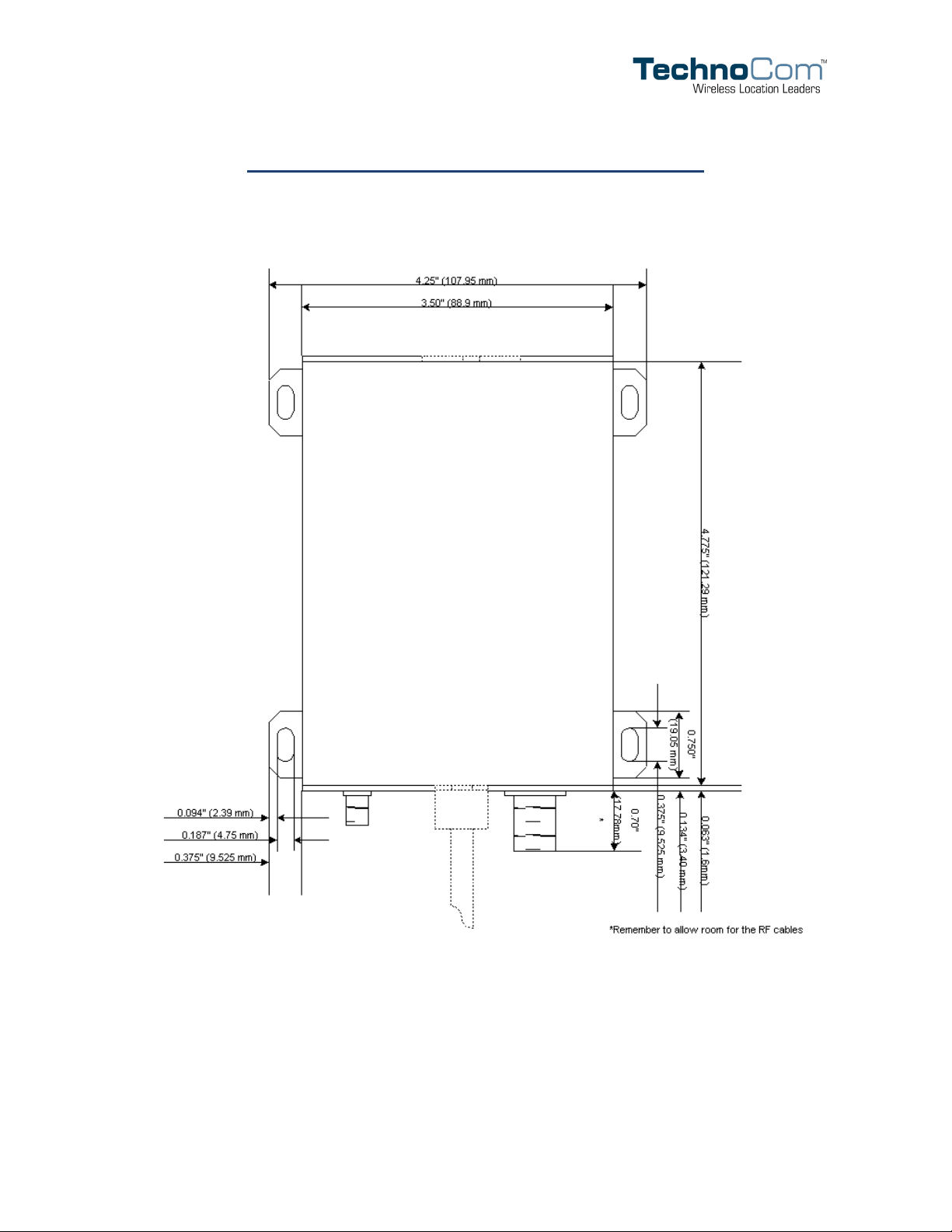
4.775" long x 3.5" wide x 1.5" high
Weight
3/4 lbs.
Copyright ©TechnoCom Corporation 2005 - 9 - TechnoCom Proprietary & Confidential
Page 19
LMU-4000 Hardware Installation Guide 1.0
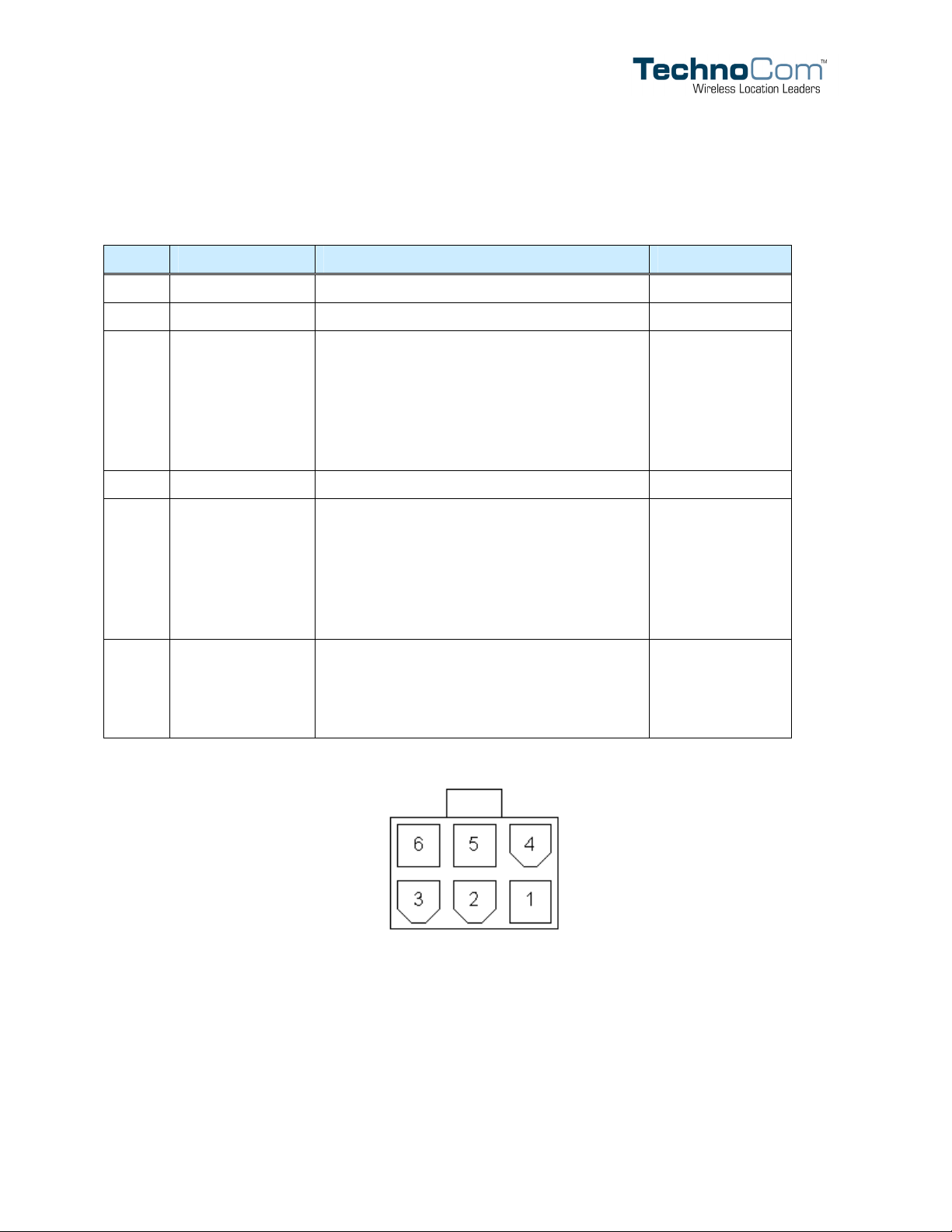
Primary Connector
The primary power and I/O functions are provided on the DF dual row 2 x 3 connector pin
(male) located on the front side of the LMU-4000.
PIN Signal Name Description Input/Output
1 Power Primary power to the LMU 12V Nominal Input
2 Ignition Ignition/Input 0 Input
3 GPIO 1 Input 1 / Output 1
• 0, 12V level
• Input/Output function software
selectable
• Active High/Low software selectable
• 10K Ohm impedance
4 Ground Vehicle or Chassis Ground --
5 GPIO 2 Input 2 / Output 2
• 0, 12V level
• Input/Output function software
selectable
• Active High/Low software selectable
• 10K Ohm impedance
6 Output 0 Output 0:
• 0, 12V level
• Open Collector Active Low
• 150mA Current limited
Input or Output
Input or Output
Output
Copyright ©TechnoCom Corporation 2005 - 10 - TechnoCom Proprietary & Confidential
Page 20
LMU-4000 Hardware Installation Guide 1.0
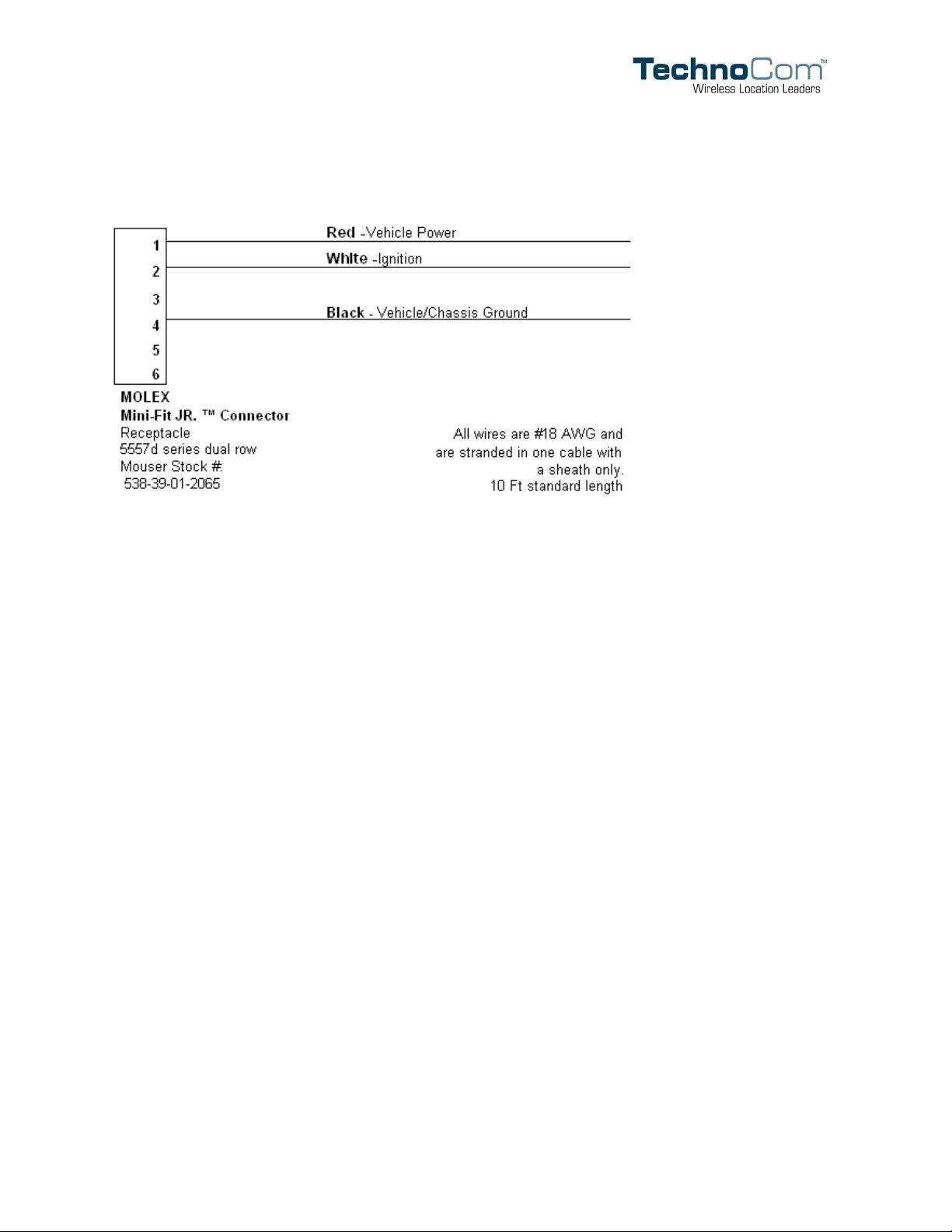
Standard Wiring Harness
Expansion Interface
The expansion interface located on the back of the LMU-4000 is used to extend I/O
functions and provide serial access to the LMU-4000. It should only be used with
TechnoCom expansion harnesses.
GPS Receiver
16 channel GPS receiver
Accuracy: 5 meter CEP (with SA off)
Antenna connector: SMA
Note that the TechnoCom LMU-4000 requires an antenna amplifier that operates
at 3VDC; 5VDC amps will not work.
Available Radio Interfaces
CDMA 1xRTT
GPRS
iDEN
RF Connector
The LMU-4000’s RF connector is TNC.
The impedance is 50 Ohms nominal.
Copyright ©TechnoCom Corporation 2005 - 11 - TechnoCom Proprietary & Confidential
Page 21

LMU-4000 Hardware Installation Guide 1.0
Section 3 — Configuration and Installation
Configuration Quick Start Guides
This section details how to quickly get an LMU-4000 provisioned and configured to point at
a specific server. It is assumed that the default PEG script is sufficient for initial integration.
This script sends an event report to the server every 60 seconds or every 1000 meters.
Please note that this section describes the manual provisioning process. In many cases a
provisioning tool is available for the LMU-4000. Please refer to the provisioning tool’s user
manual for details.
We are making three assumptions to simplify the setup process:
1. You have installed and configured a server to receive messages from the LMU-4000.
2. You are using the standard wiring harness from TechnoCom and the serial port expansion
harness.
3. You have created a hyperterminal session as described in Appendix A.
Quick Start — General Config
All LMU-4000s must go through a common set of steps during the configuration and
provisioning process. These common steps are:
Choosing a reporting format (LM Exchange or LM Direct)
Pointing the LMU to the LM Exchange/LM Direct server, either via IP or a
4
URL
This configuration process is accomplished via a series of AT Commands.
1. Power up the LMU-4000
2. Plug the serial cable into your laptop
3. Open a terminal session to the LMU-4000
4. Choose the reporting format to be used
LM Exchange users will enter the following command: AT$APP INBOUND LMX
LM Direct users will enter: AT$APP INBOUND LMD
4
This feature has been used and tested on CDMA 1xRTT, GPRS and iDEN networks throughout North and South America.
Copyright ©TechnoCom Corporation 2005 - 12 - TechnoCom Proprietary & Confidential
Page 22

LMU-4000 Hardware Installation Guide 1.0
In both cases the LMU-4000 will respond with: OK
5. Next enter the location of the LM Exchange/LM Direct server. Again, this command will
differ depending which messaging interface was selected.
LM Exchange users will use: AT$APP INBOUND ddd.ddd.ddd.ddd:20300
LM Direct users will enter: AT$APP INBOUND ddd.ddd.ddd.ddd:20500
where ddd.ddd.ddd.ddd is the publicly addressable IP address of the server.
The LMU-4000 will respond with: OK
6. If a URL has not be set up to point at the server address, the Inbound URL field must be
cleared from the LMU-4000 with: AT$APP PARAM 2319,0,””
The LMU-4000 will respond with: OK
7. Alternatively if a URL has been set up it may be programmed with:
AT$APP PARAM 2319,0,”myURL.MyCompany.Com”
Where “myURL.MyCompany.com” is the URL assigned to the server, the LMU-4000
will issue a response of: OK
The next step is to configure the LMU-4000 to allow it to register to the desired wireless
network.
Copyright ©TechnoCom Corporation 2005 - 13 - TechnoCom Proprietary & Confidential
Page 23

LMU-4000 Hardware Installation Guide 1.0
Quick Start — CDMA2000 1x LMU-4000
In order to use the CDMA2000 1x LMU-4000 you will need a CDMA2000 1x data account.
When service is acquired, four pieces of information for each activation should be provided:
A phone number (aka MIN)
An SPC value (optional)
A network username generally in the form of:
<phonenumber>@MyCDMAProvider.com
A network password
1. Connect the LMU-4000 as discussed above (i.e., power, GPS and RF antennas, serial cables,
hyperterminal)
2. The first step is to program in the LMU-4000’s phone number. This can be accomplished
with: AT$APP MODEM MIN <phoneNumber> <SPC>
The LMU will respond with: OK
If the <SPC> value is omitted, the LMU-4000 will use 000000.
3. Next program the Username: AT$APP PPP USER
Again the response should be: OK
Lastly enter the network password: AT$APP PPP PASSWORD “myPassword
The LMU-4000’s response should again be: OK
4. Once configured, verify that the LMU-4000’s modem has registered to the CDMA network.
Enter: AT$APP COMM STATUS?
The response should be similar to:
CDMA Registered: Yes
Connection: Yes
RSSI: -80 dBm
Channel: 0
Band:Side: Unsupported:A
Base Station ID: 0
Network ID: 0
System ID: 34463
Copyright ©TechnoCom Corporation 2005 - 14 - TechnoCom Proprietary & Confidential
Page 24

LMU-4000 Hardware Installation Guide 1.0
ESN (Modem S/N: 2676319948 [9F8566CC]
Phone Number: 1234567890
If the CDMA registered value is No and/or the Connection value is No, it may be necessary
to contact the CDMA provider to verify coverage, 1xRTT data service availability and
account status.
Copyright ©TechnoCom Corporation 2005 - 15 - TechnoCom Proprietary & Confidential
Page 25

LMU-4000 Hardware Installation Guide 1.0
Quick Start — GPRS LMU-4000
In order to use the GPRS LMU-4000 a GPRS service account is needed. When service is
acquired the GSM/GPRS operator should provide a SIM card, possibly an SIM PIN
number and an APN name. The SIM must be inserted into the LMU before the
provisioning process can begin.
1. Connect the LMU-4000 as discussed above (i.e., power, GPS and GPRS antennas)
2. If one has been provided, the first step is to program the LMU with the SIM PIN:
AT$APP PIN 0000
Where 0000 is the PIN value as set by your GPRS operator, the LMU will respond
with: PIN: 0 OK
3. Next program in our APN value. This is done with:
AT$APP GPRS CONTEXT 0 “IP:<apn name>”
Again the response should be: OK
Note that a second APN can be programmed in with:
AT$APP GPRS CONTEXT 1 “IP:<apn name>”
Also note that the IP portion must be in upper case.
4. Lastly verify that the LMU-4000’s modem has registered to the GPRS network. Enter:
AT$APP COMM STATUS?
The response should be similar to:
GSM Registered: Yes
GPRS Registered: Yes
Connection: Yes
RSSI: -70 dBm
BER: 0
Channel: 0
Cell ID: 0
Base Station ID: 0
Local Area Code: 0
Network Code: 0
Country Code: 310
IMEI (Modem S/N): 500167110060440
IMSI (SIM S/N): 310230100521849
Phone Number:
GPRS APN: IP:INTERNET3.VOICESTREAM.COM
Copyright ©TechnoCom Corporation 2005 - 16 - TechnoCom Proprietary & Confidential
Page 26

LMU-4000 Hardware Installation Guide 1.0
Quality of Srvc: 1,0,0,3,0,0
GSM Class: B
If the Registered value is No and the GPRS APN value is correct it may be
necessary to contact the GSM/GPRS operator to verify coverage and that the
account is active.
Copyright ©TechnoCom Corporation 2005 - 17 - TechnoCom Proprietary & Confidential
Page 27

LMU-4000 Hardware Installation Guide 1.0
Quick Start — iDEN LMU-4000
The iDEN LMU-4000 does not require any service specific provisioning parameters. Once
service has been acquired, the only step needed is to verify activation.
1. Connect the LMU-4000 as discussed above (i.e., power and GPS antenna)
2. Verify that the modem has registered to the wireless network using:
AT$APP COMM STATUS?
The response should be similar to:
IDEN Service: Yes
Packet Service: Available, Registered, Idle
Connection: Yes
RSSI: -92 dBm
SQE: 26
Channel: 2468
Color: 2
Phone Number: 7604970444
CodePlug Ver: 0x0012
If the Connection value is No it may be necessary to contact the iDEN service
provider to verify coverage and that the account is active.
Copyright ©TechnoCom Corporation 2005 - 18 - TechnoCom Proprietary & Confidential
Page 28

LMU-4000 Hardware Installation Guide 1.0
Installation Notes
When installing the LMU-4000 into a vehicle, there are several factors to address. In general,
installers will want access to the following pieces of equipment:
The LMU-4000
GPS Antenna - Through-hole or magnetic mount
Cellular/PCS Antenna (LMU-4000 only) - 3dB gain whip, with either NMO or
magnetic mount
Standard wiring harness
Optional I/O wire - 24 AWG, minimum (optional)
Installation Tools – Tie wraps, wire nuts and electrical tape
Serial port expansion cable
Laptop or PC to configure the LMU-4000
Vehicle wiring layout
First, verify that the power is configured correctly. It is essential that the power input (red
wire) be connected to a constant (un-switched) +12 VDC or +24 VDC supply and that the
ignition input (white wire) is connected to the vehicle ignition or another appropriate key
operated line, such as ACCESSORY. Failure to do so may result in discharge of the vehicle
battery.
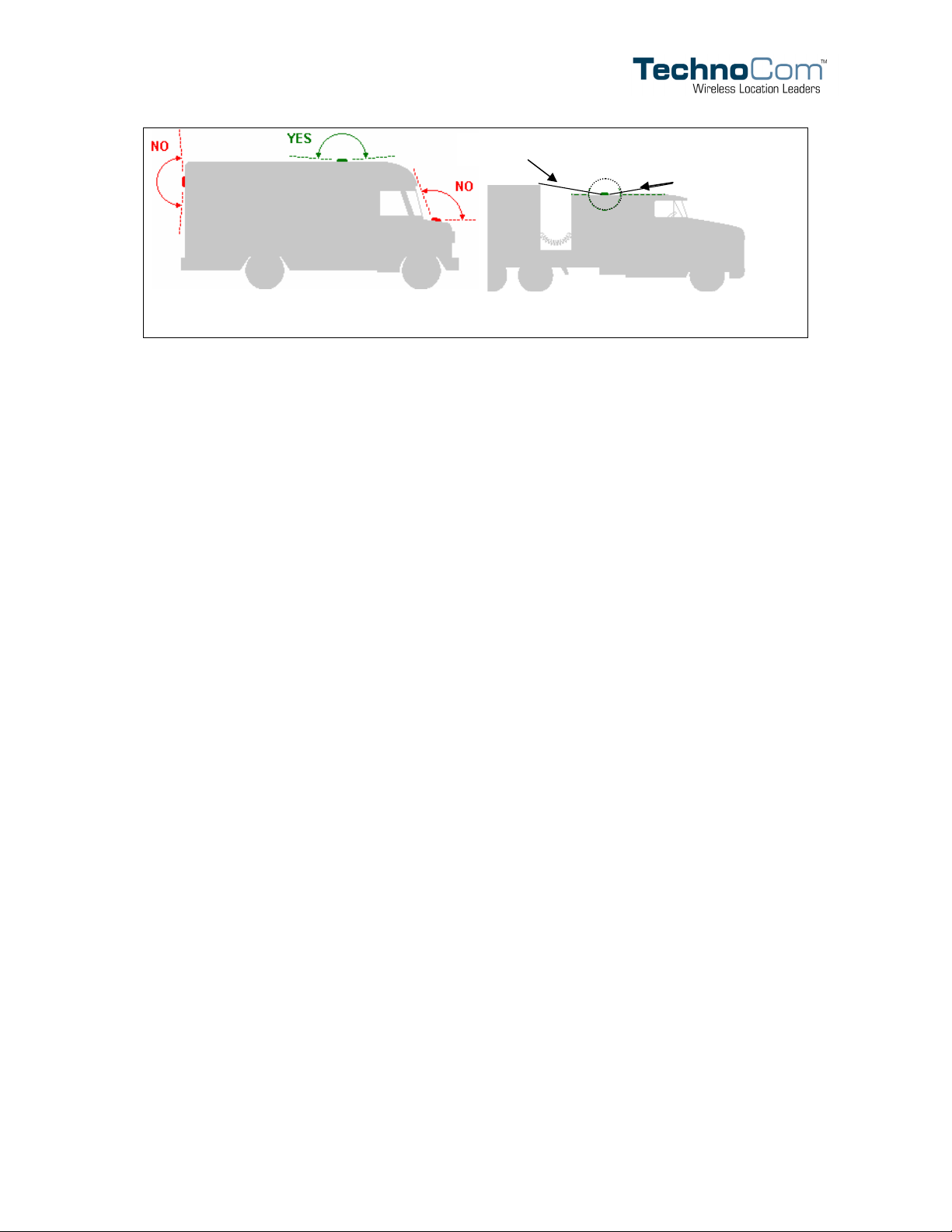
Once power has been confirmed, install the GPS antenna. Placement of the GPS antenna is
critical to proper operation of the LMU-4000. For the GPS receiver to accurately compute
its location, its antenna must have a clear view of the sky. The best place to mount the GPS
is usually on the vehicle’s highest point (e.g., the roof of a car).
When installing the GPS antenna on a vehicle, make sure there are no obstructions close to
the antenna that might block the view 360° to the horizon. Equipment such as an air horn or
maker lights should not block the antenna beyond 5° above the horizon. The best location is
usually near the center of the roof; however it is also desirable to locate the cellular antenna
as far from the GPS antenna as is practical. The latter, of course, assumes that separate GPS
and cellular antennas are used. Obviously that rule does not apply to combination antennas.
Copyright ©TechnoCom Corporation 2005 - 19 - TechnoCom Proprietary & Confidential
Page 29
LMU-4000 Hardware Installation Guide 1.0
Antenna far away from lights and air horns
No Blockage
above 5°
Examples of good and poor GPS antenna placement
The received signal levels at the GPS antenna from the satellites are very low in power
(approximately -136 dBm), so any blockage of the antenna can affect the quality of the
location computed by the receiver. Kinks or tight knots in the antenna cable can also
prevent the GPS receiver from operating properly. When laying out the antenna cable, care
should be taken so that the cable is not subjected to crushing or strain.
The cellular antenna used by the LMU for wireless service is a standard 3-dB gain whip. It
mounts with standard mounts (i.e., through hole or magnetic mount) and requires a ground
plane to work properly. If possible, it should be located at least 3 feet from the GPS antenna.
Ensure that the cable does not get crushed during installation.
Typical installations will place the LMU-4000 under the vehicle dash board, in the trunk or
in areas otherwise obscured from view. Keep in mind it is desirable to locate the LMU-4000
conveniently to allow future access after installation in case it is necessary to touch the unit.
Installation positioning should also take into account the need for extra I/O, or if the LMU4000 is to be connected to an MDT, PDA or laptop. To assist in mounting the LMU-4000, a
simple template can be found in Appendix E.
Once the unit is placed, connect the antennae and harness in the following order:
1. Attach the GPS antenna to the SMA connector
2. If you’re using an LMU-4000, attach the cellular antenna to the TNC connector
3. Finally, plug in the 37 pin D-series connector
Copyright ©TechnoCom Corporation 2005 - 20 - TechnoCom Proprietary & Confidential
Page 30
LMU-4000 Hardware Installation Guide 1.0
I/O Descriptions
Outputs
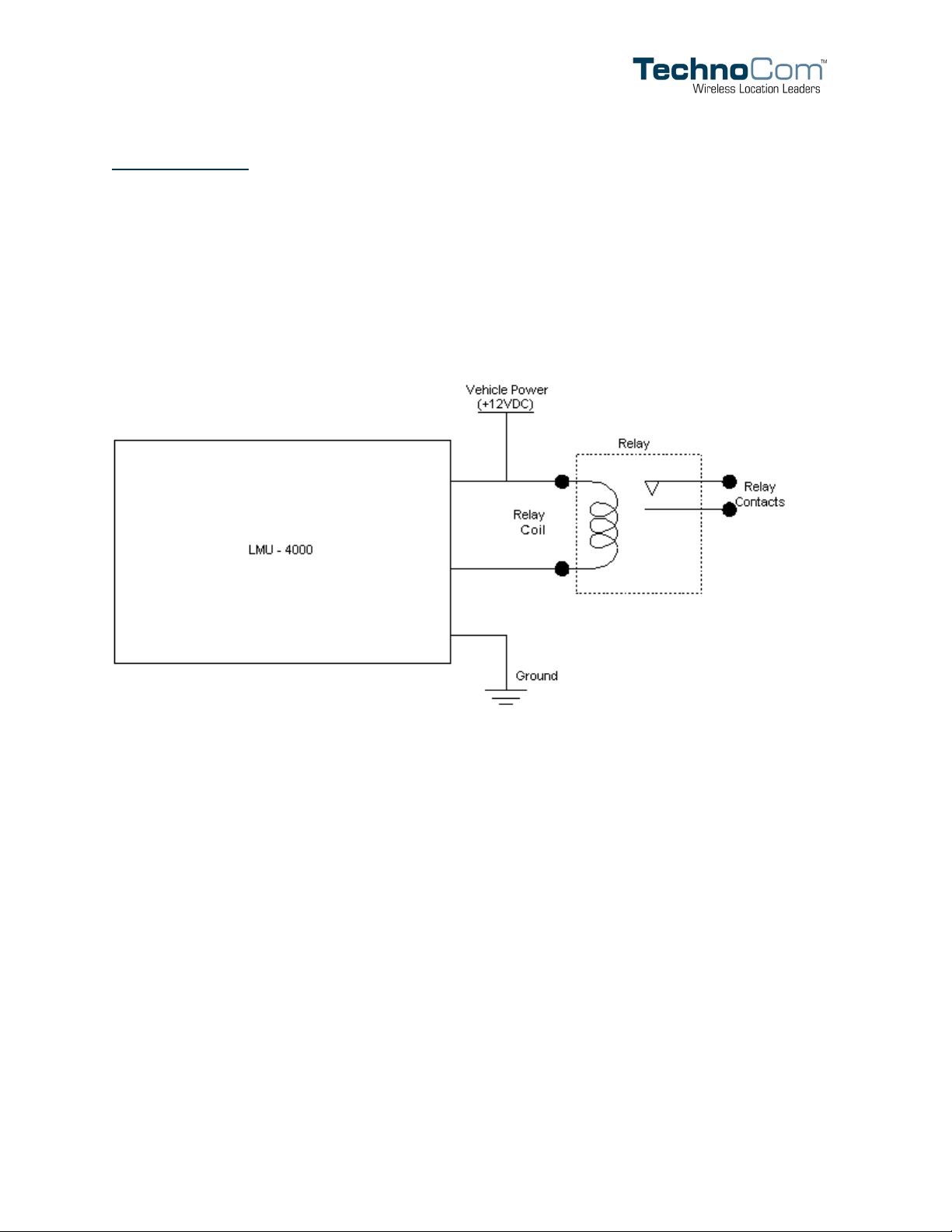
Pins 4, 5 and 6 provide outputs designed to drive external relays. These outputs provide a
high-current, open-collector driver that can sink up to 150 mA each. These drivers may be
used to drive external relays that can then control vehicle functions such as door locks, fuel
shut-off valves, sirens and lights. If additional current is required to drive the relays, external
circuitry can be added to source the current. This diagram is a typical use of a an output to
drive a relay.
Ignition and Inputs
The LMU-4000 provides up to 3 inputs. These inputs are protected from typical vehicle
transients and can be directly connected to most vehicle level logical inputs from 4 volts up
to the vehicle power input level (typically 12 VDC). Their input impedance is approximately
10K Ω. One of these inputs is dedicated to sensing the vehicle’s ignition status to provide
for flexible power management. The other two inputs may be used to sense vehicle inputs
such as cooling unit operation, a hidden driver “Panic” switch or taxi on-duty/off-duty
meter status.
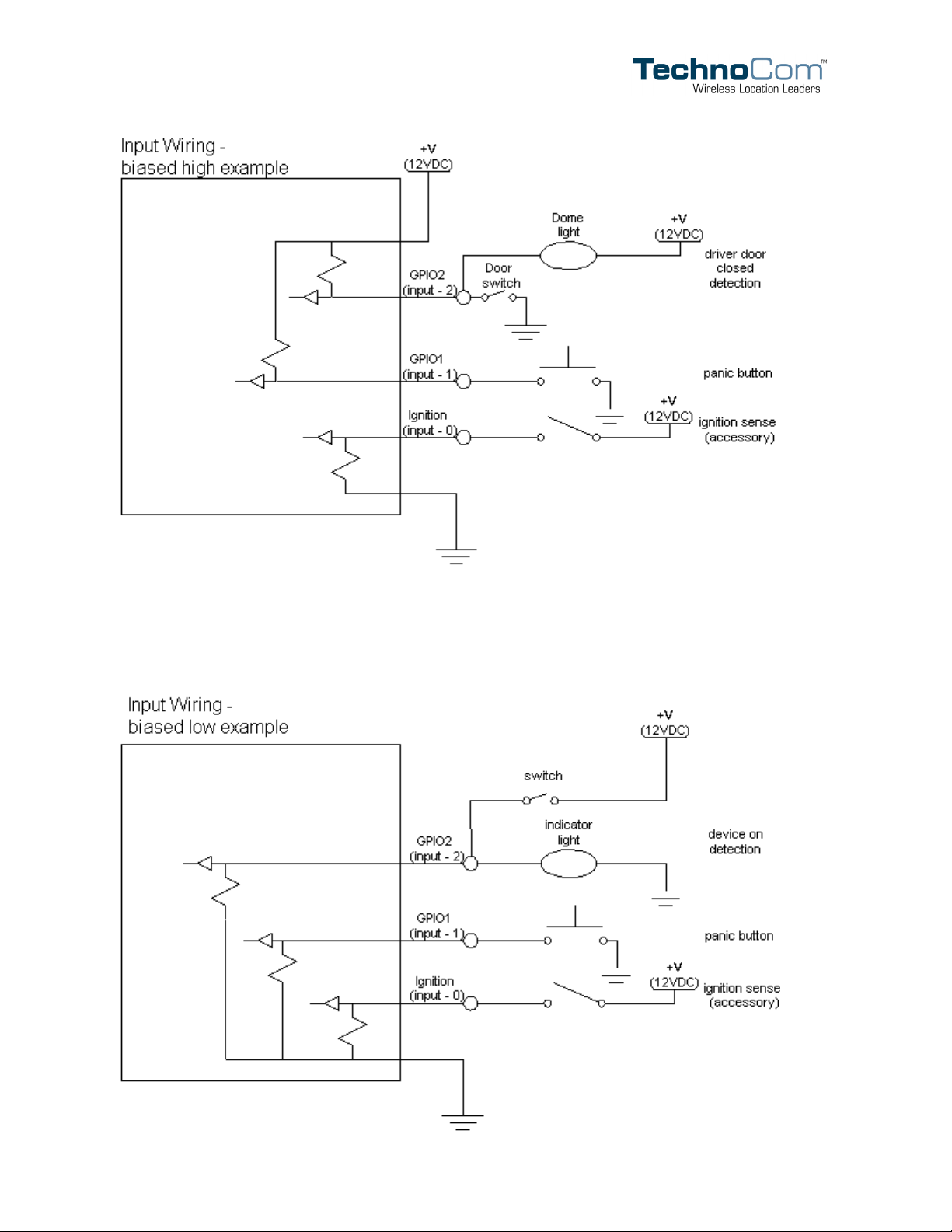
The ignition input (pin 3) is pulled to ground through the 10k resistance, where the other
two inputs (pins 5 and 6) can be configured to be normally High or Low. The diagrams
below show how to connect the inputs in both a high- and low-biased configuration:
Copyright ©TechnoCom Corporation 2005 - 21 - TechnoCom Proprietary & Confidential
Page 31
LMU-4000 Hardware Installation Guide 1.0
Copyright ©TechnoCom Corporation 2005 - 22 - TechnoCom Proprietary & Confidential
Page 32
LMU-4000 Hardware Installation Guide 1.0
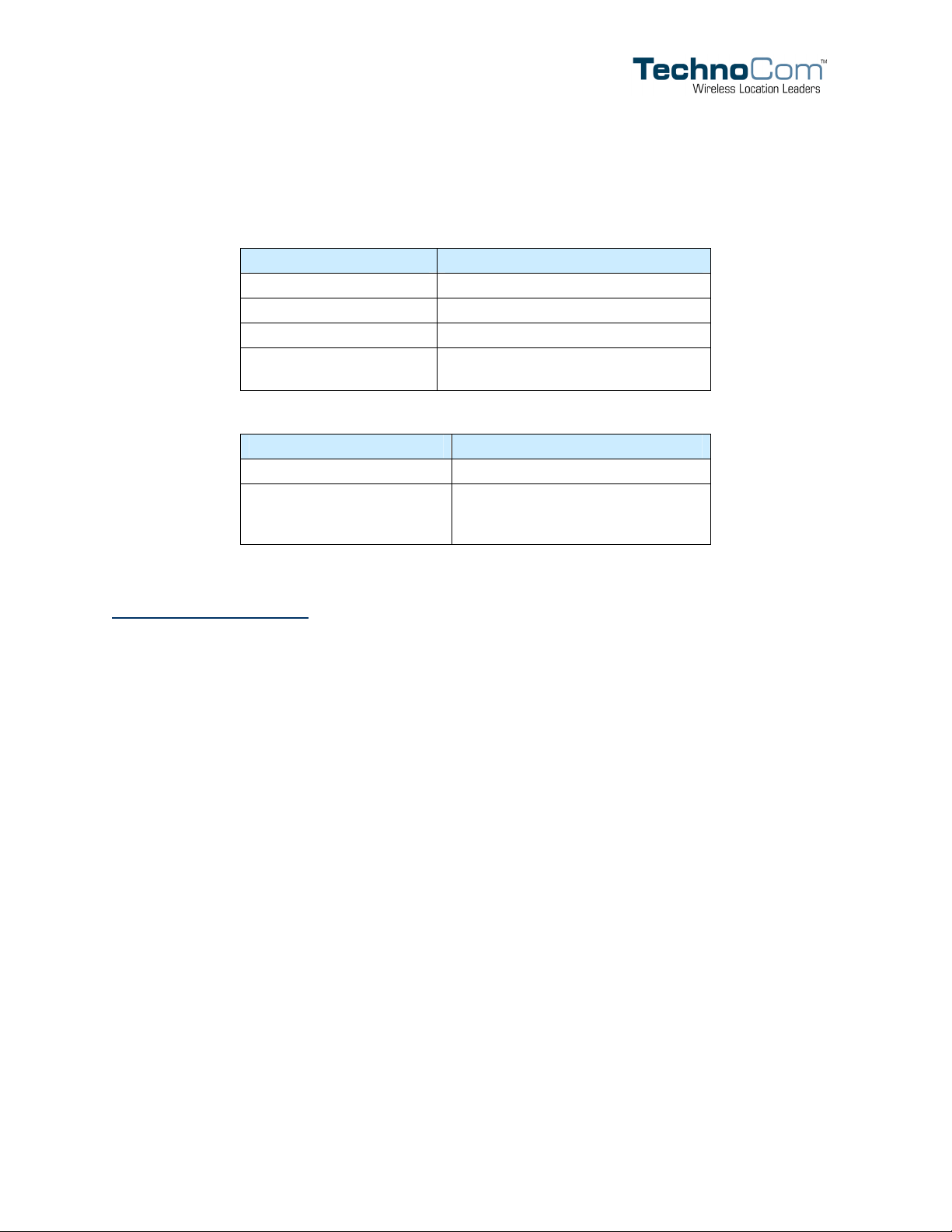
Status LEDs
The LMU-4000 is equipped with two Status LEDs, one for GPS and one for COMM
(wireless network status). The LEDs use the following blink patterns to indicate service:
LED #1 (Comm LED) Definitions
Condition LED 1
Modem Off Off
Comm On - Searching Slow Blinking
Network Available Fast Blinking
Registered and
Connected
LED #2 (GPS LED) Definitions
Condition LED 1
GPS No-Fix Off
GPS Fix
Solid
Blink followed by N short blinks,
where N is the number of Satellites
being tracked
Installation Verification
In many cases it is desirable to verify that an installed LMU-4000 is working properly. That
is, installers should verify that the GPS and communications functions of the LMU-4000 are
working properly before departing the installation site. In more robust cases, some key
configuration settings such as the Inbound Address and URL should also be verified.
Note that these processes are all based on issuing AT Commands to the LMU-4000. It is
expected that installers will have access to a serial port expansion cable and a laptop or PDA
capable of a terminal connection.
Comm Verification
Installers should first verify that the LMU-4000 has been acquired and has registered to the
wireless network. This may be verified in one of two ways. First, installers may look at the
Comm LED (i.e., the one closest to the TNC antenna connector). If this LED is solid, then
the LMU has registered to the network and established a data session.
If the LED is not visible, then Comm may be verified using an AT Command:
AT$APP COMM?
Depending on the wireless network being used, one of the following responses should
appear:
iDEN RSSI:-91 Comm
Copyright ©TechnoCom Corporation 2005 - 23 - TechnoCom Proprietary & Confidential
Page 33

LMU-4000 Hardware Installation Guide 1.0
GSM RSSI:-69 Comm
CDMA RSSI:-64 Comm
If any of the responses return Not-Acquired or Not-Registered, the wireless
network operator should be contacted for further troubleshooting.
Please note that it may take several seconds for the LMU-4000 to communicate with the
modem and acquire the wireless network.
GPS Verification
The next step is to verify that the GPS receiver is seeing enough satellites to obtain a valid
GPS position. Again, installers have two choices on how to perform this verification. First,
like the Comm Verification, there is a GPS status LED (i.e., the one closest to the SMA
connector). If this LED is blinking, then the LMU has found GPS service.
If the LED is not visible then GPS service may be verified using an AT Command:
AT$APP GPS?
The response should be similar to:
Lat=3304713, Lon=-11727730, Alt=0
Hdg=113 Spd=0 3D-RTIME HDOP=130 nSats=7
Installers are looking for the 3D-RTIME setting along with a valid Lat, Long pair (i.e.
something other than 0). If the GPS receiver does not have a valid lock within 2-3 minutes,
installers should check antenna placement (see the Installation Notes section for placement
suggestions), the antenna connector and that the antenna has a clear view of the sky. For
further troubleshooting, installers should contact TechnoCom Support
([email protected]
)
Inbound Verification
The last item to verify is that the LMU-4000 is sending data to the correct server. In general,
this is a two-step process that will need the aid of an observer on the back end. That is, a
technician will have to be logged in so they can monitor data coming into the backend
mapping/vehicle management application.
First, verify that the LMU-4000 is using the correct Inbound IP address by using:
AT$APP INBOUND?
The response should be similar to:
INBOUND LMD 63.200.203.51:20500
Copyright ©TechnoCom Corporation 2005 - 24 - TechnoCom Proprietary & Confidential
Page 34

LMU-4000 Hardware Installation Guide 1.0
The installer will need to verify with the backend technician that the reporting type (LM
Direct, vs. LM Exchange), IP address (<ddd.ddd.ddd.ddd>) and port (<ppppp>) are
correct.
The second step is to verify that the LMU-4000 is sending data. The best way to do this is to
force the LMU-4000 to send in an Event Report (i.e., its current GPS location) with the
following command: AT$APP PEG SUNRPT 255
The LMU-4000 will respond with: OK
The backend monitor must then be contacted to confirm that they received an Event Report
with Event Code 255.
Assuming that all three sections have passed, the installation can be considered to be
complete.
Copyright ©TechnoCom Corporation 2005 - 25 - TechnoCom Proprietary & Confidential
Page 35
LMU-4000 Hardware Installation Guide 1.0
Appendix A — HyperTerminal Configuration
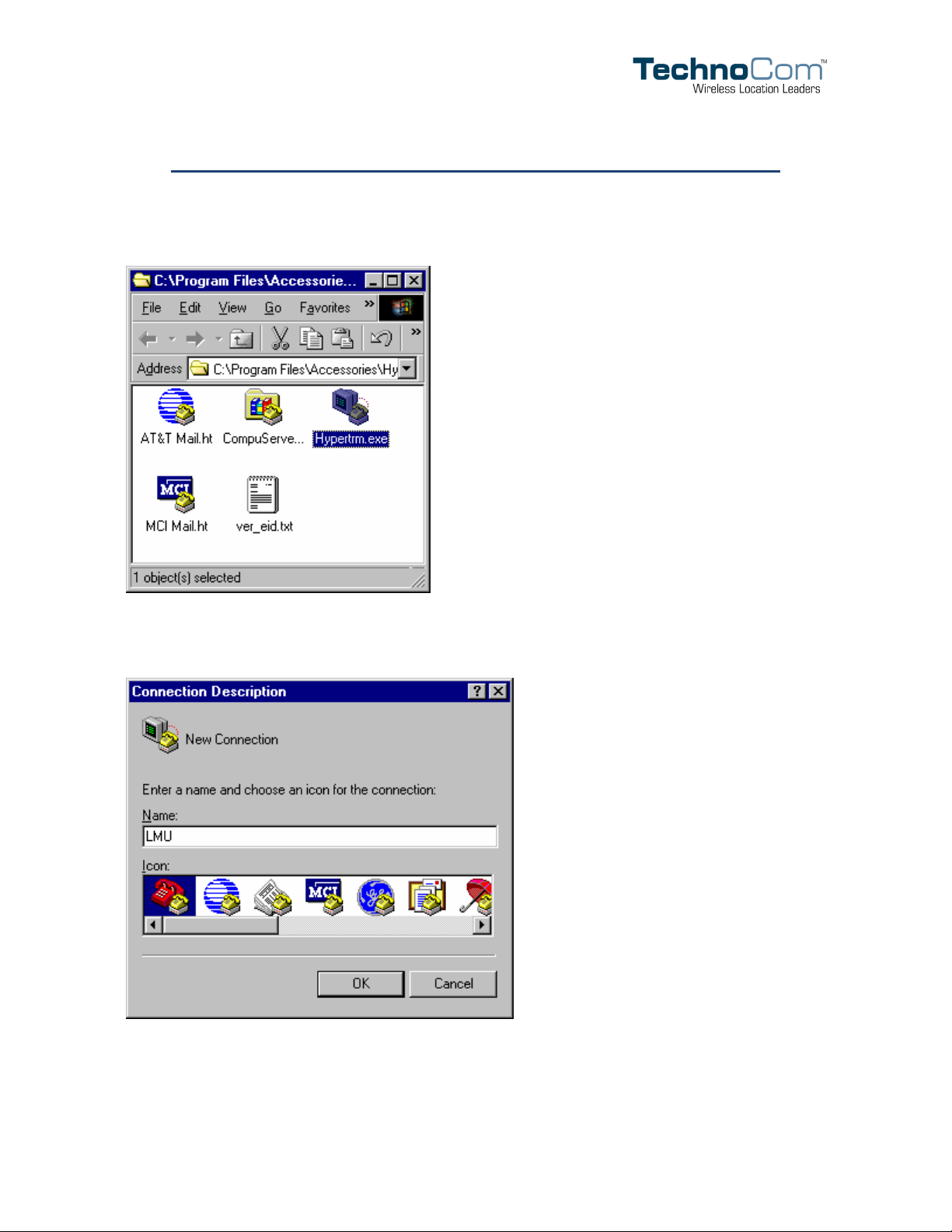
Click the Start button, go to Programs, Accessories and Communications.
Click the Hyper Terminal folder.
Double click the Hypertrm.exe icon
Name the connection LMU
Click OK.
Copyright ©TechnoCom Corporation 2005 - 26 - TechnoCom Proprietary & Confidential
Page 36
LMU-4000 Hardware Installation Guide 1.0
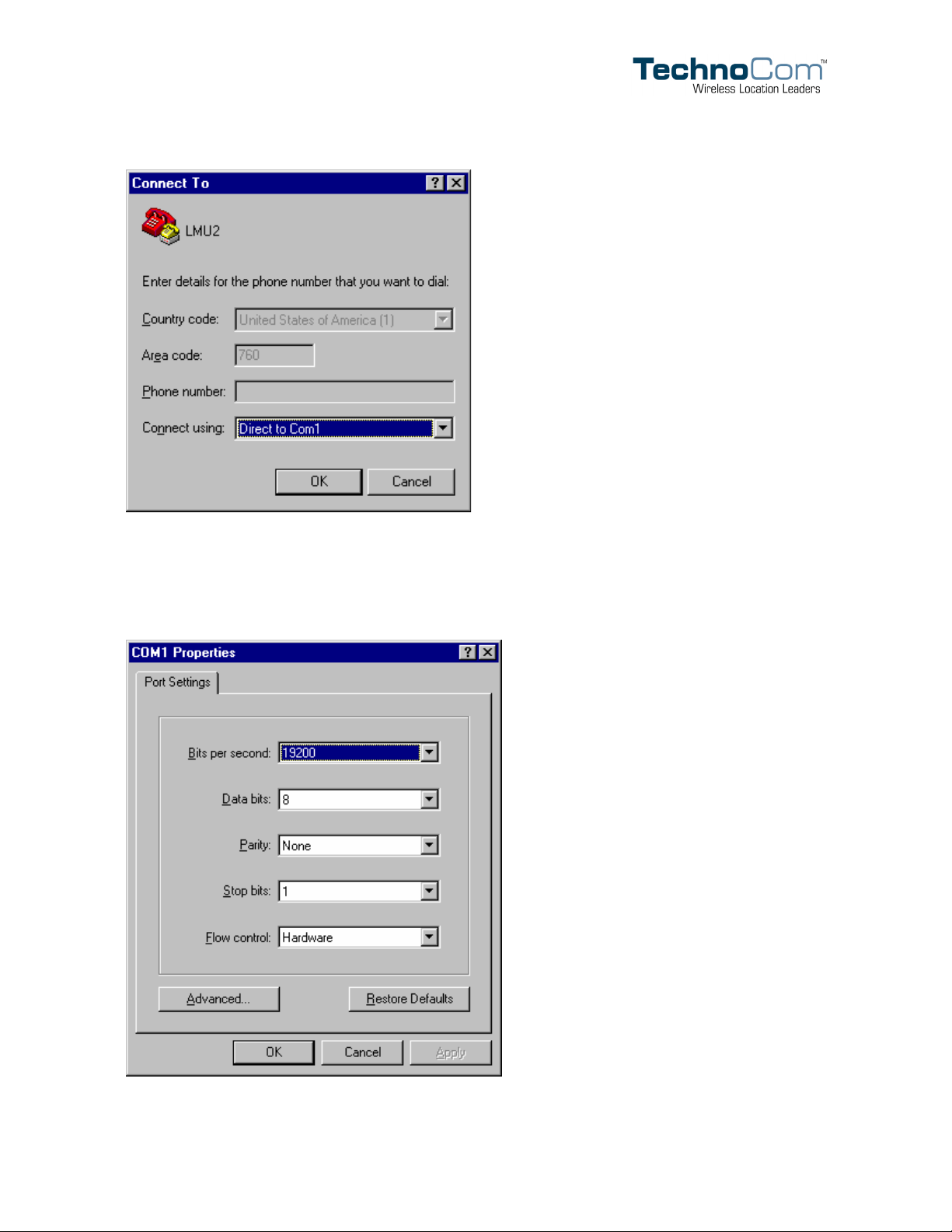
Change Connect using to read Direct to ComX. Where X is the Com port that the LMU4000 is attached to. This will probably be Com1.
Click OK.
Copyright ©TechnoCom Corporation 2005 - 27 - TechnoCom Proprietary & Confidential
Page 37

LMU-4000 Hardware Installation Guide 1.0
Change Bits per second to read 19200.
Click OK.
You should now be connected directly to the LMU-4000.
Copyright ©TechnoCom Corporation 2005 - 28 - TechnoCom Proprietary & Confidential
Page 38
LMU-4000 Hardware Installation Guide 1.0
Appendix B — Install New Modem
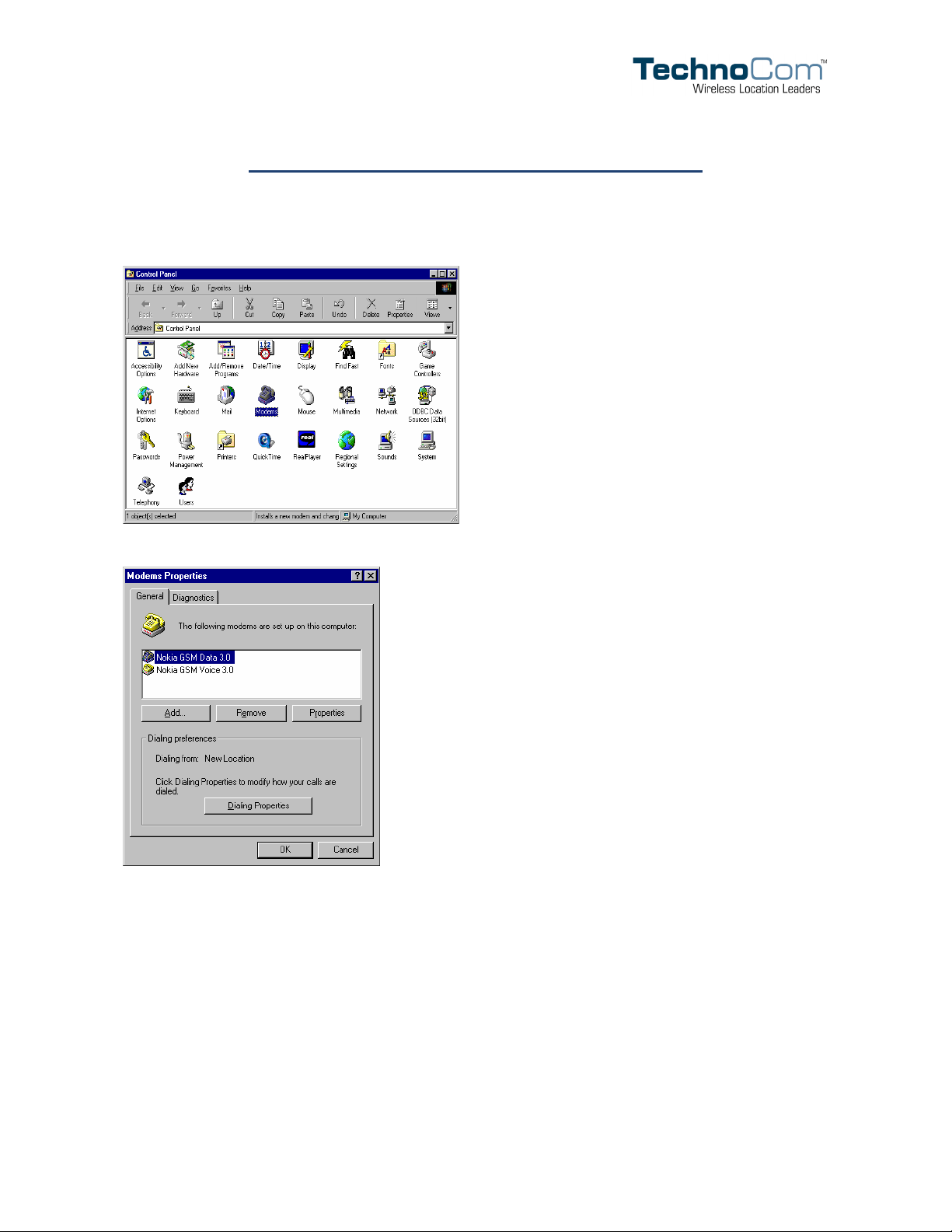
Click the Start button, go to Settings and click Control Panel. Double click the
Modems icon.
Click the Add… button
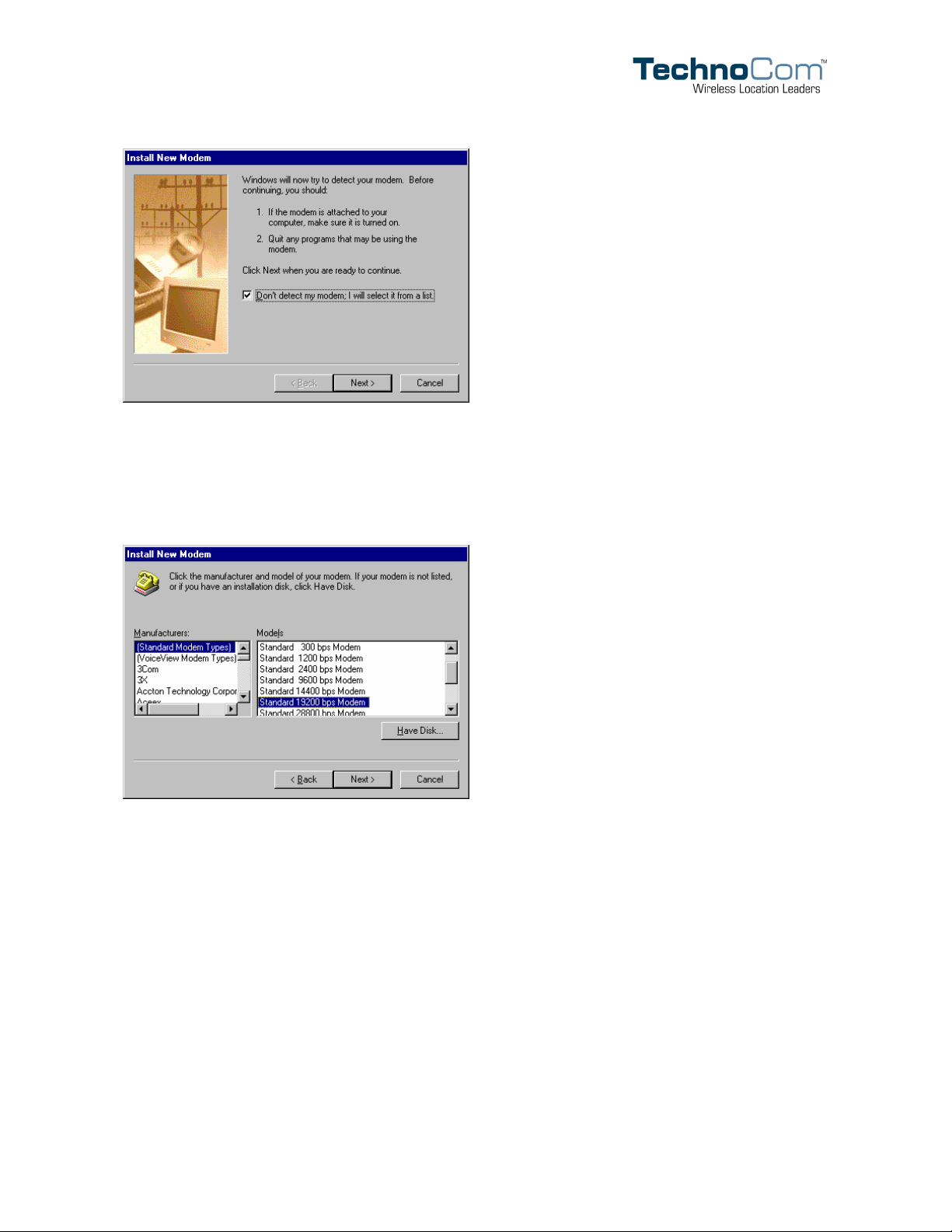
Check Don’t detect my modem; I will select it from a list.
Copyright ©TechnoCom Corporation 2005 - 29 - TechnoCom Proprietary & Confidential
Page 39
LMU-4000 Hardware Installation Guide 1.0
Click the Next > button.
Under Manufacturers choose: (Standard Modem Types)
From Models select: Standard 19200 bps Modem.
Click Next >
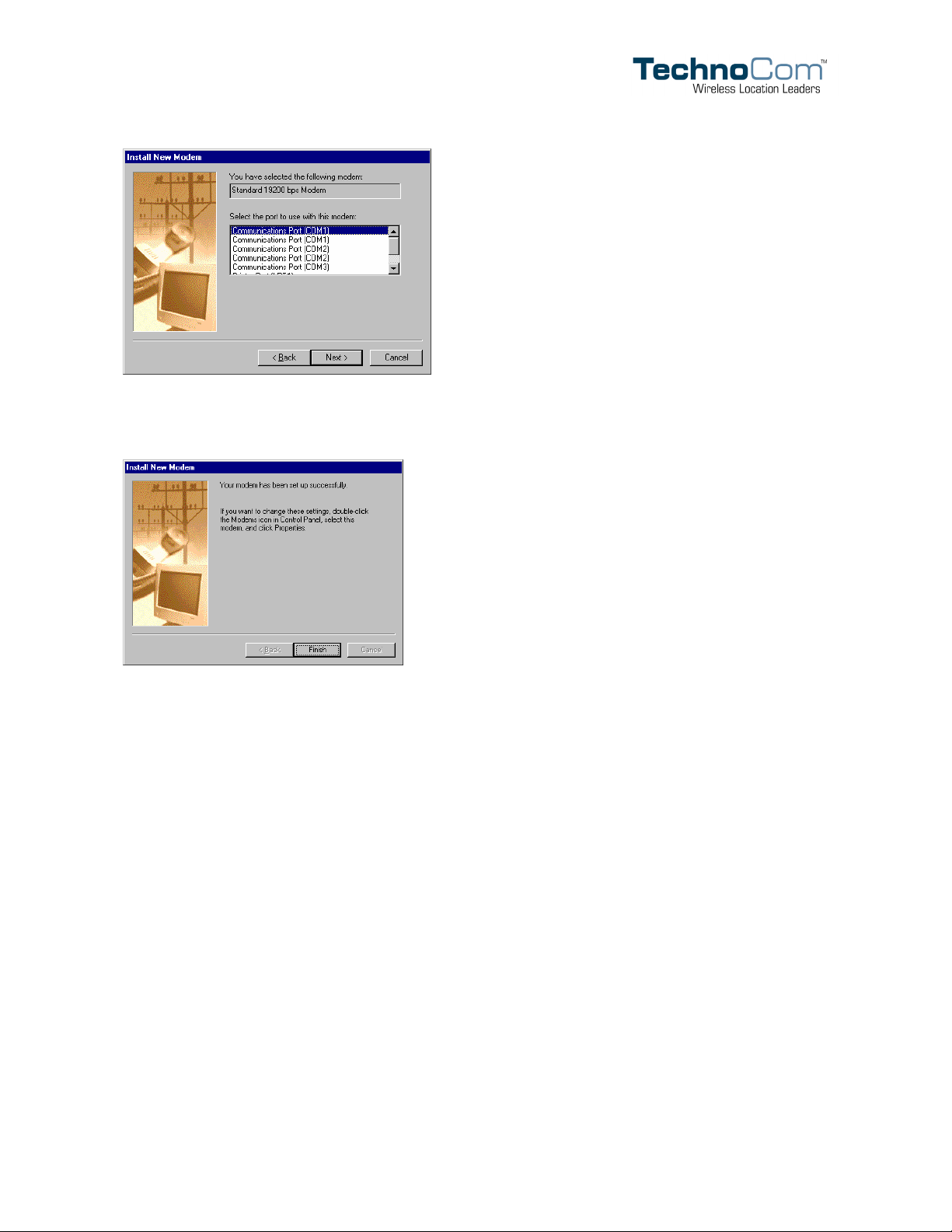
Select the Communications Port that will be used by the LMU-4000 (the most likely will
be COM 1)
Copyright ©TechnoCom Corporation 2005 - 30 - TechnoCom Proprietary & Confidential
Page 40
LMU-4000 Hardware Installation Guide 1.0
Click Next >.
When Windows has completed installing the modem, click Finish.
Copyright ©TechnoCom Corporation 2005 - 31 - TechnoCom Proprietary & Confidential
Page 41
LMU-4000 Hardware Installation Guide 1.0
Appendix C — Configuring Dial-Up Networking
Create a New Connection
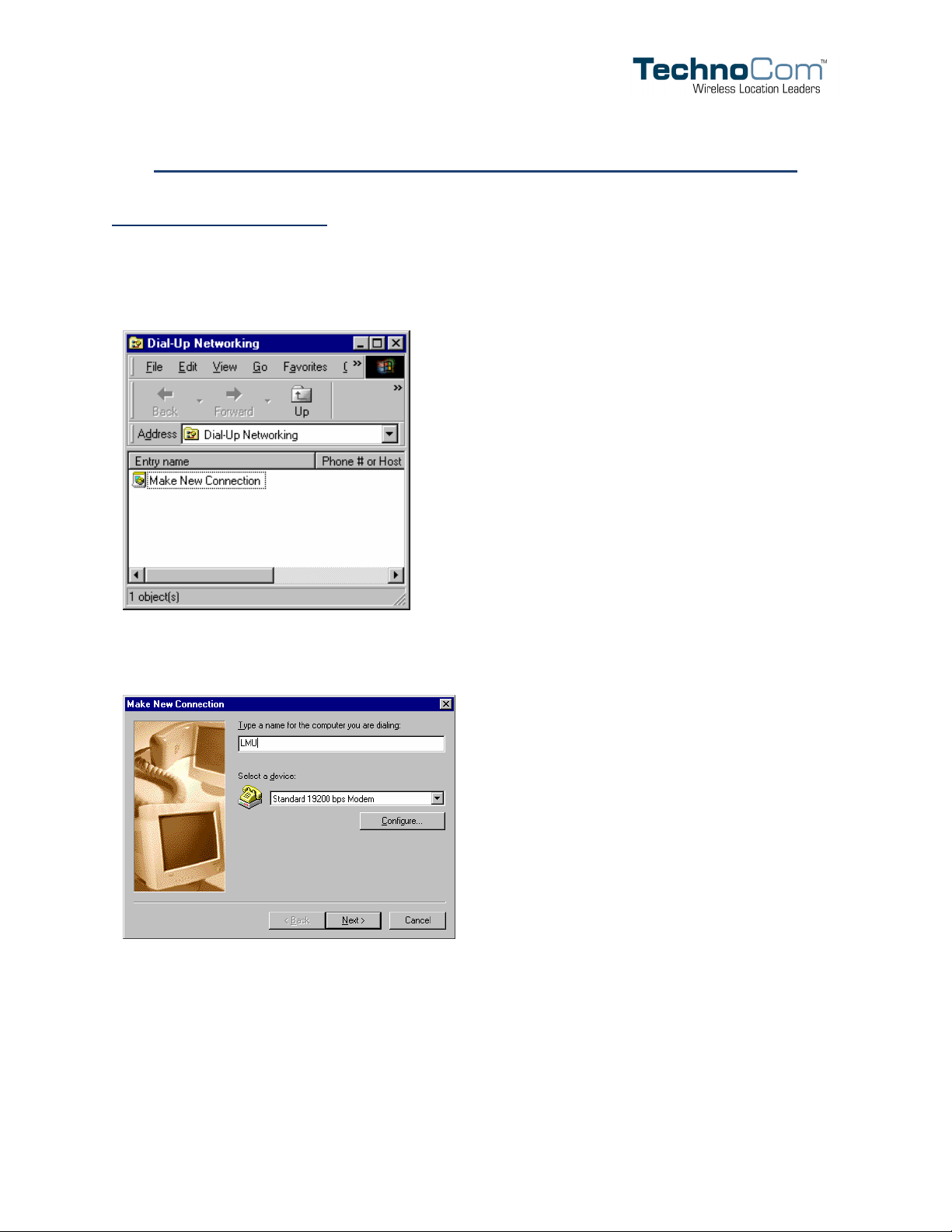
Go to Start, Programs, Accessories, Communications, and click Dial-Up
Networking.
In the Dial-Up Networking window, double click the Make New Connection icon.
Name the connection LMU and select Standard 19200 bps Modem from the Select a
device list.
Click Next >.
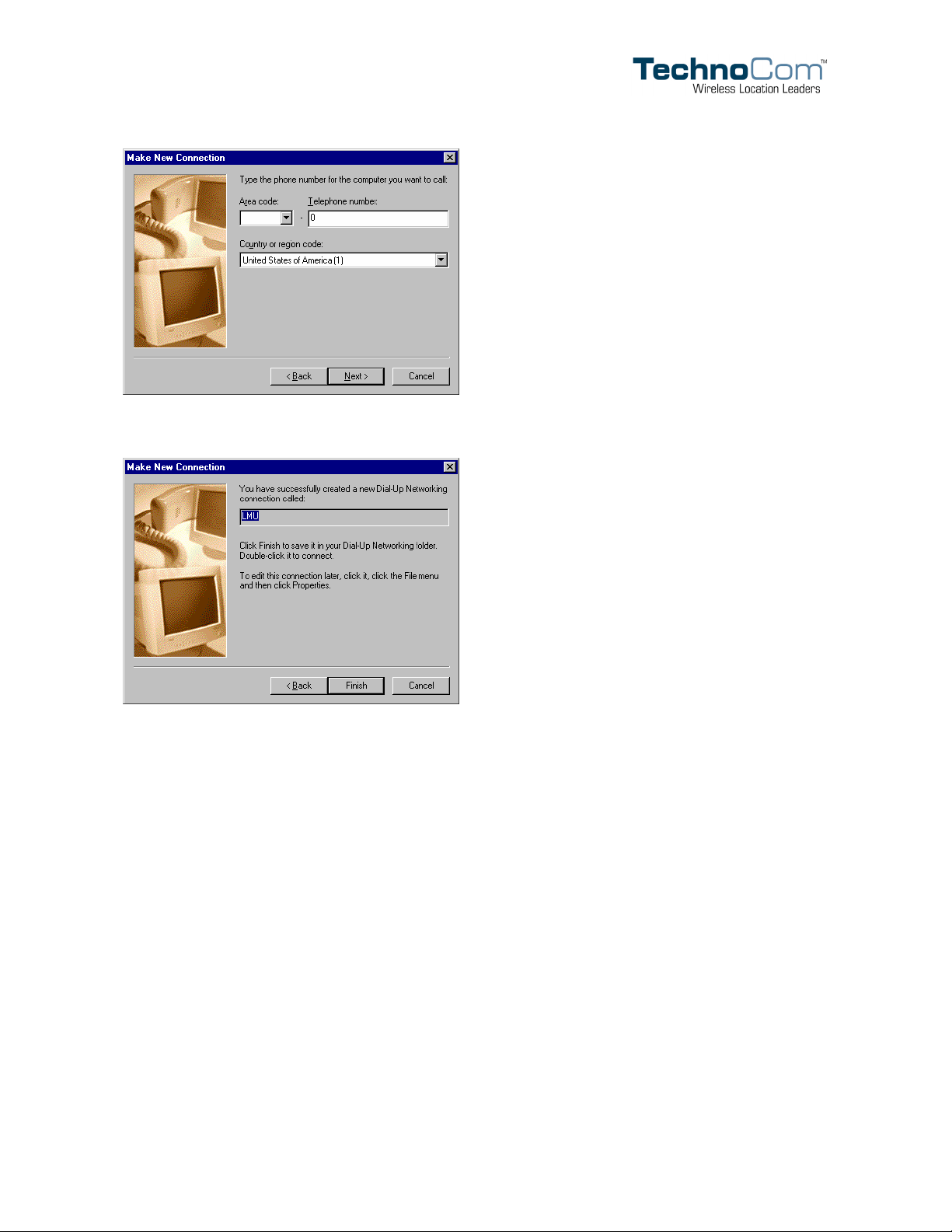
Enter a telephone number of 0. Ignore both the Area code and Country or region code.
Copyright ©TechnoCom Corporation 2005 - 32 - TechnoCom Proprietary & Confidential
Page 42
LMU-4000 Hardware Installation Guide 1.0
Click Next >.
Click Finish.
Copyright ©TechnoCom Corporation 2005 - 33 - TechnoCom Proprietary & Confidential
Page 43
LMU-4000 Hardware Installation Guide 1.0
Configure the Connection
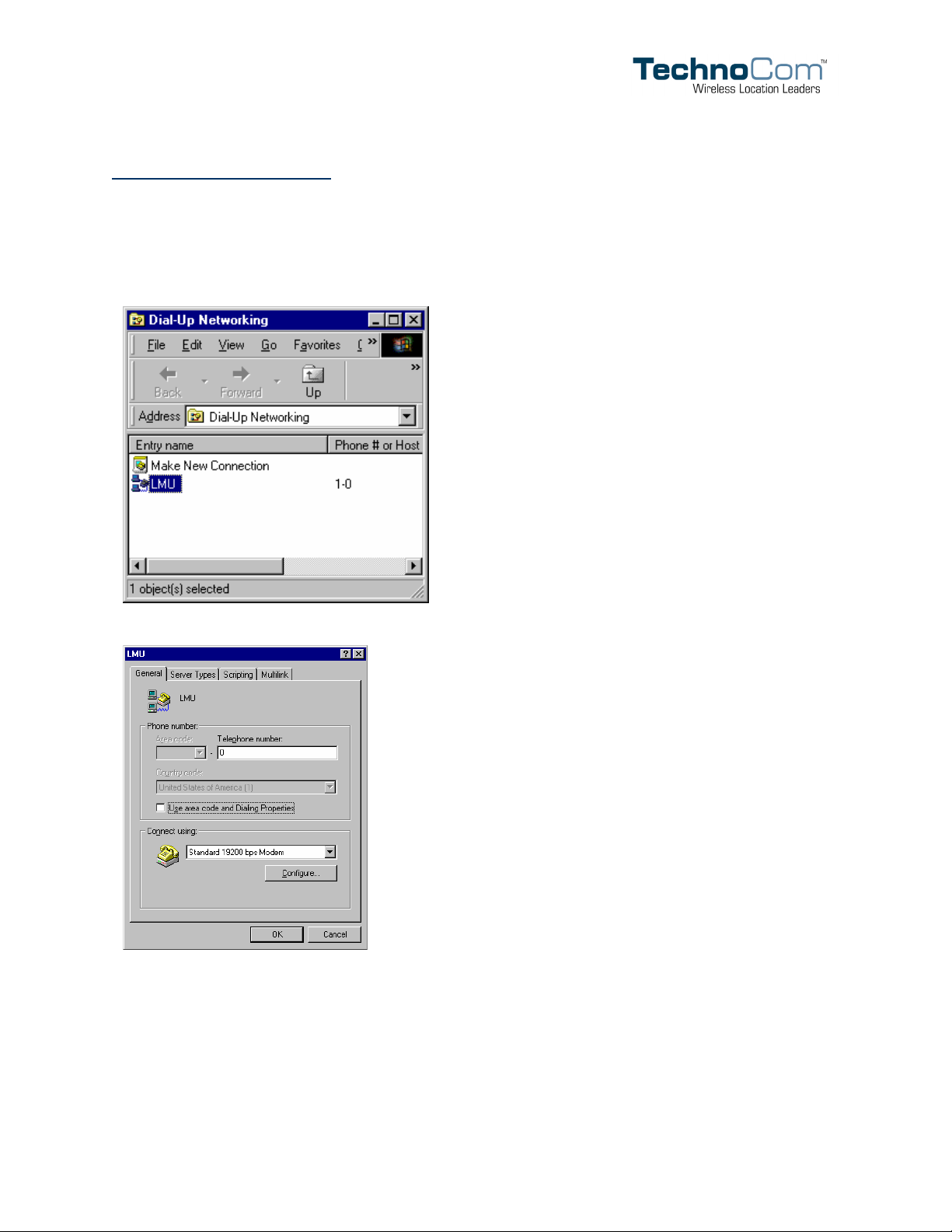
In the Dial-Up Networking window, right click LMU and choose Properties.
Uncheck Use area code and Dialing Properties
Click the Server Types tab.
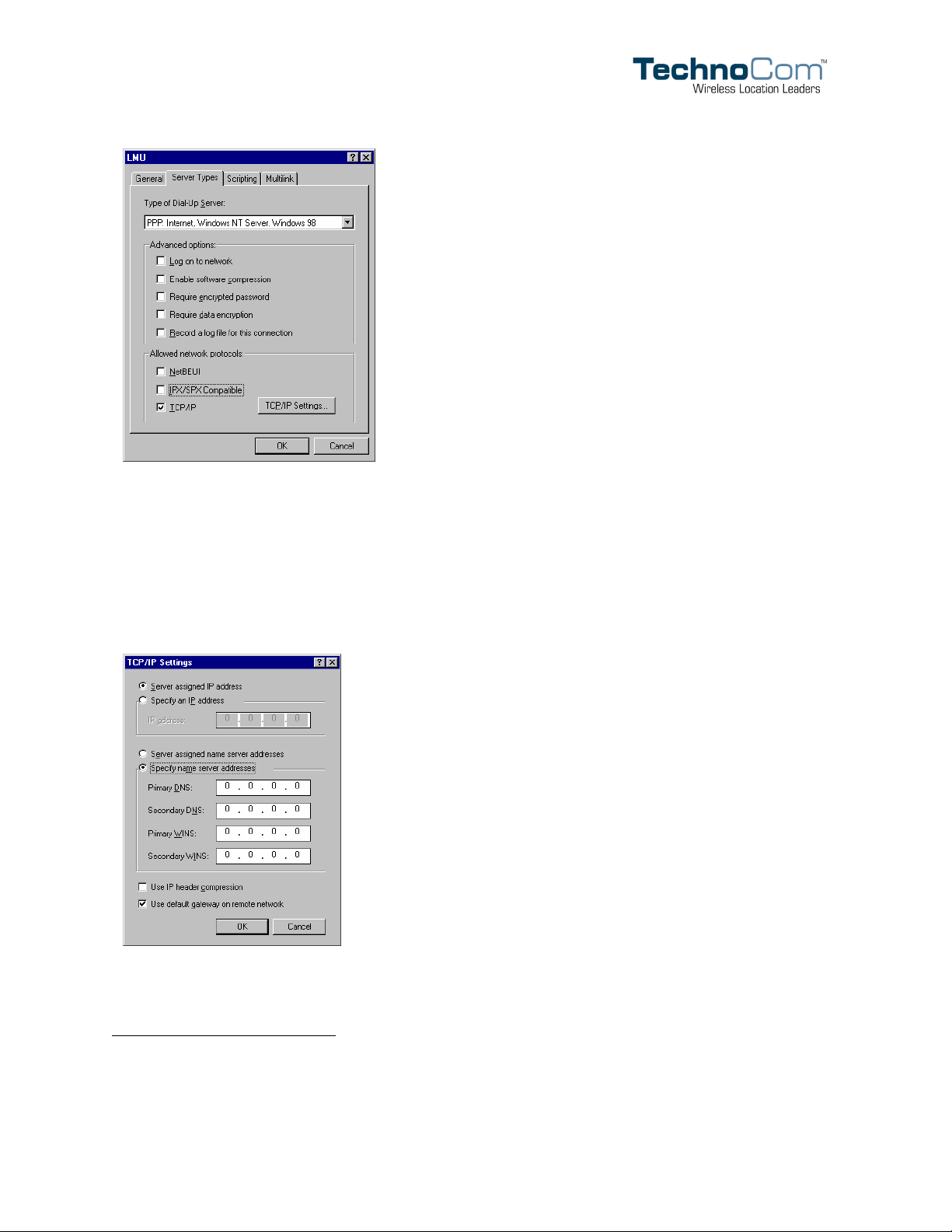
Choose PPP: Internet, Windows NT Server, Windows 98 as the Type of Dial-Up
Server.
For Advanced options and Allowed network protocols, check only TCP/IP.
Copyright ©TechnoCom Corporation 2005 - 34 - TechnoCom Proprietary & Confidential
Page 44
LMU-4000 Hardware Installation Guide 1.0
Click the TCP/IP Settings… button.
Click Server Assigned IP Address.
Click Specify name server addresses
5
.
If available, enter the Primary and Secondary DNS.
Uncheck Use IP header compression.
Click OK.
Click OK to close the LMU window.
5
The LMU-4000 was not intended to be an Internet access device, though it can be used as such. In order to accomplish this, at
least a Primary DNS addresses is necessary. DNS addresses are generally supplied by the wireless service provider.
Copyright ©TechnoCom Corporation 2005 - 35 - TechnoCom Proprietary & Confidential
Page 45
LMU-4000 Hardware Installation Guide 1.0
Connecting to the LMU-4000
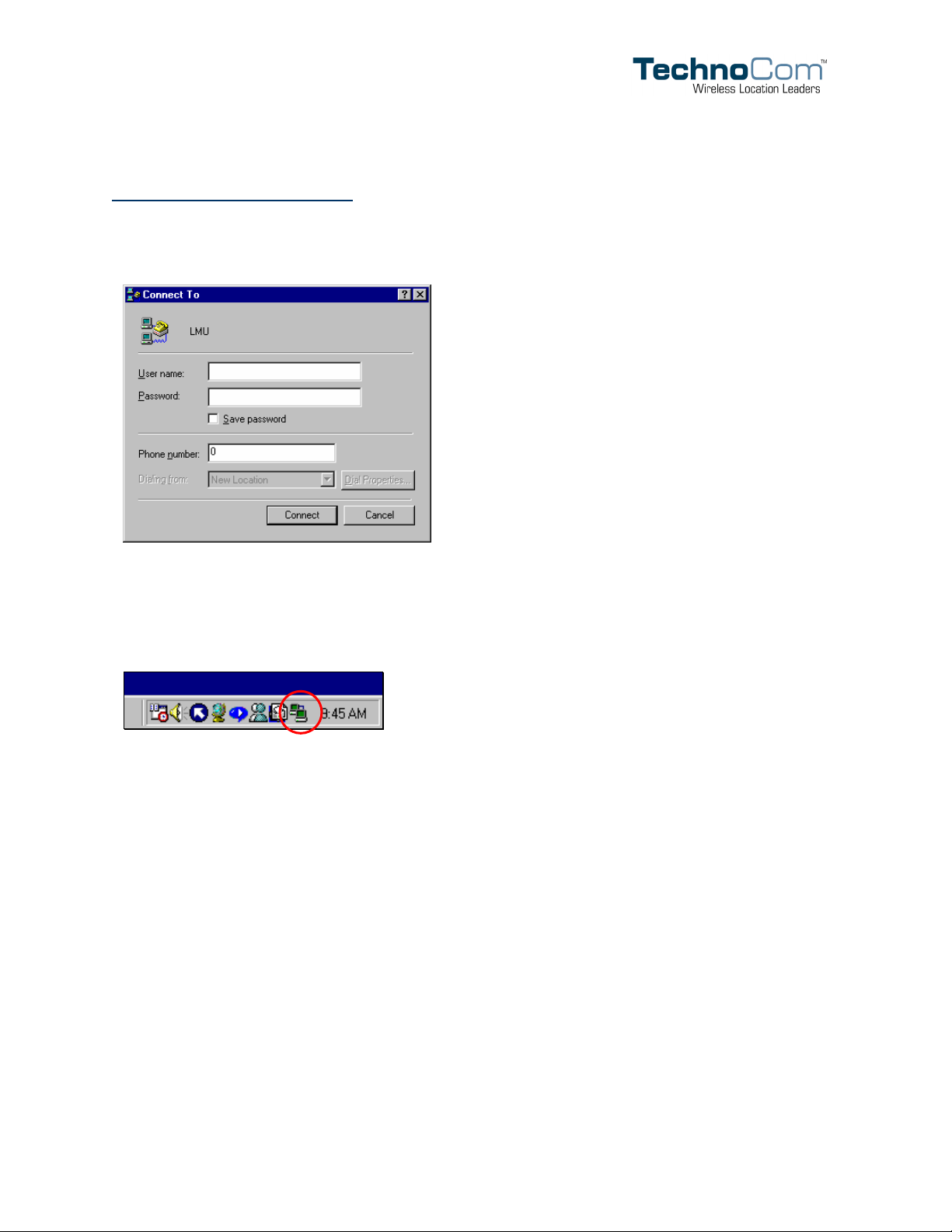
In the Dial-Up Networking window, double click the LMU icon and click Connect.
The User name and Password are not needed.
The connection should establish almost immediately.
To verify the connection is active, look for the Dial-Up Networking icon in the Task Tray.
Copyright ©TechnoCom Corporation 2005 - 36 - TechnoCom Proprietary & Confidential
Page 46
LMU-4000 Hardware Installation Guide 1.0
Appendix D — Mounting Template
Copyright ©TechnoCom Corporation 2005 - 37 - TechnoCom Proprietary & Confidential
 Loading...