

Page 1

LoRaWA N Air quality (PM) sensor
User manual
OY1700
Version 0.2
December 2019
Page 2

2
Table of Contents
1 Disclaimer .............................................................................................................................. 3
1.1 Technical support ...................................................................................................................... 3
1.2 EU Declaration of conformity .................................................................................................... 3
2 Warnings ............................................................................................................................... 3
3 Environmental ....................................................................................................................... 4
4 Product Description .............................................................................................................. 5
5 Installation and activation ..................................................................................................... 6
5.1 LoRaWAN Configuration ............................................................................................................ 8
5.2 Sensor states and state check .................................................................................................... 8
5.2.1 Re-join functionality ............................................................................................................ 10
6 Specification ........................................................................................................................ 11
7 Security ................................................................................................................................ 13
8 Protocol ............................................................................................................................... 13
8.1 LoRaWAN standard commands ............................................................................................... 13
8.2 Unsolicited uplink status commands ....................................................................................... 13
8.3 Periodic measurement reports ................................................................................................ 14
8.3.1 Periodic measurement report .............................................................................................. 14
8.3.2 Measurement value ............................................................................................................. 14
8.3.3 Example: Measurement report ................................................ Error! Bookmark not defined.
8.4 Downlink commands and queries ........................................................................................... 16
8.4.1 Measurement interval ......................................................................................................... 18
8.4.2 Reset device ......................................................................................................................... 18
8.5 Uplink query response ............................................................................................................. 18
OY1700 LoRaWAN Air quality (PM) sensor, User manual, Version 0.1
Page 3

3
1 Disclaimer
This document represents information on products at the time of publication and is subject to
change without prior notice due to product improvements or other reasons. Talkpool makes
no warranties based on the accuracy or completeness of the contents of this document and
reserves the right to make changes to specifications and product descriptions at any time
without notice. Talkpool reserves all rights to this document and the information contained
herein.
1.1 Technical support
Please visit www.talkpool.io for additional information, or contact [email protected]
1.2 EU Declaration of conformity
EC DECLARATION OF CONFORMITY
certify that the design and manufacturing of this product
WIRELESS CO2 SENSOR /
FUNK-CO2 SENSOR /
TRÅDLÖS CO2 SENSOR /
TRÅDØS CO2 SENSOR /
DRAADLOZE CO2 SENSOR
conforms to the following directives and standards
The Radio Equipment Directive (2014/53/EU),
EN 300 220-1 V2.4.1, EN 300220-2 V2.4.1,
EN 301 489-1 V1.9.2, EN 301 489-3 V2.1.1,
EN 60950-1:2006+A11+A1+A12+A2
This product was CE marked in year -19
2019-09-10 ___________________
Managing Director Stefan Lindgren
OY1210 EU868
EN 62479:2010
RoHS Directive 2011/65/EU
2 Warnings
The following safety precautions must be observed during all phases of the operation, usage,
service or repair of this Talkpool product.
• Read the product manual.
• Do not modify the product.
• The product should not be exposed to extreme heat or open flame.
• The device must not be exposed to harsh chemical agents or solvents.
• The labelling of the product may not be changed, removed or made unrecognizable.
OY1700 LoRaWAN Air quality (PM) sensor, User manual, Version 0.1
Page 4

4
3 Environmental
This symbol on the product or on its packaging indicates that this product must not be
disposed of with your other household waste. Instead, it is your responsibility to dispose of
your waste by taking it to a collection point designated for the recycling of electrical and
electronic appliances. Separate collection and recycling of your waste at the time of disposal
will contribute to conserving natural resources and guarantee recycling that respects the
environment and human health. For further information concerning your nearest recycling
center, please contact your nearest local authority/town hall offices, your household waste
collection company or the shop where you bought the product.
OY1700 LoRaWAN Air quality (PM) sensor, User manual, Version 0.1
Page 5
5
4 Product Description
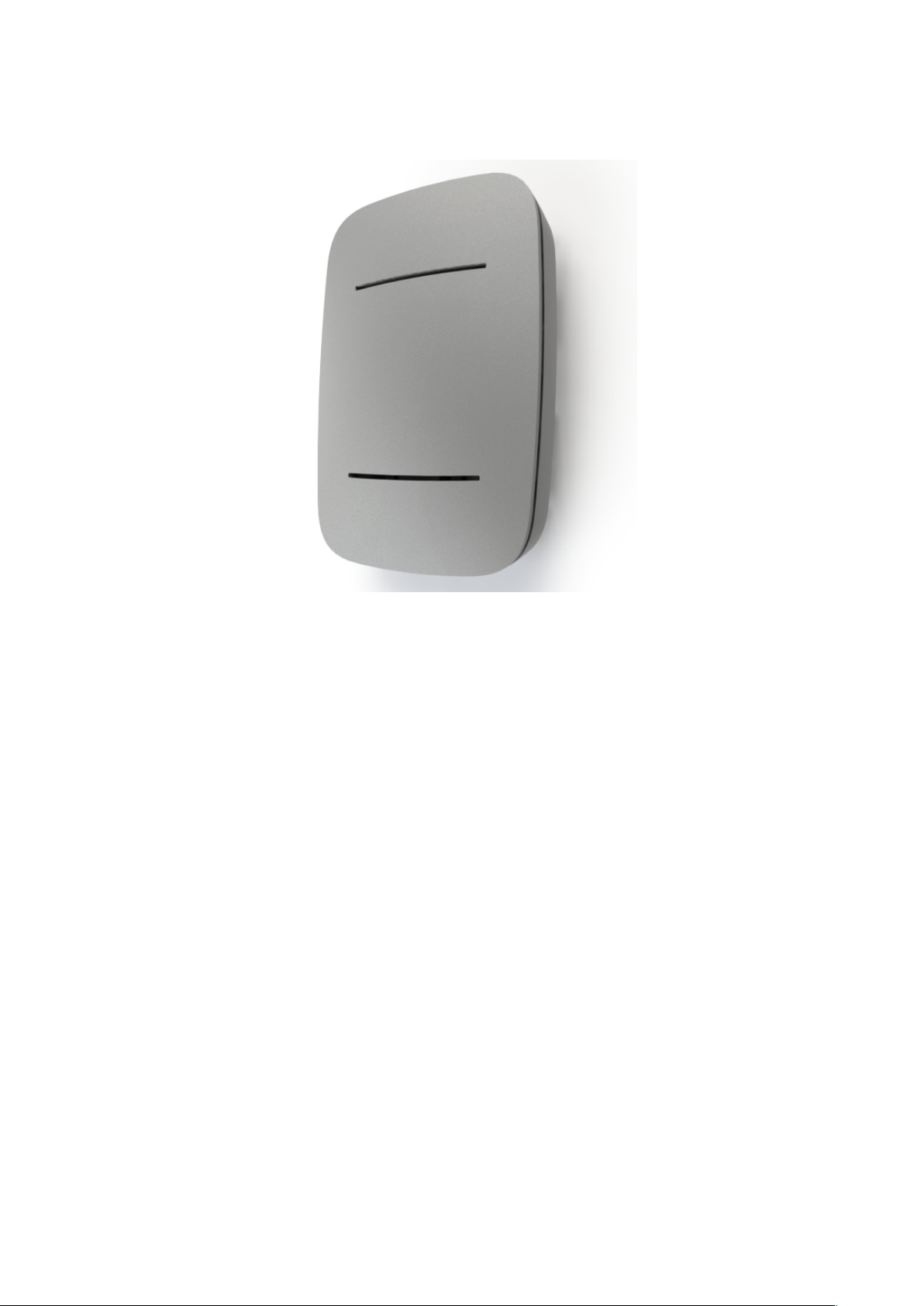
The OY1700 LoRaWAN Air quality (PM) sensor is designed to measure PM1.0, PM2.5,
PM10, temperature and humidity in indoor environments. The sensor is intended for indoor
climate control and monitoring indoor air quality. It is optimized for reliable and secure
operations.
The standard measurement and reporting interval are every 20 minutes, other reporting
intervals can be configured over the air.
OY1700 LoRaWAN Air quality (PM) sensor, User manual, Version 0.1
Page 6
6
5 Installation and activation
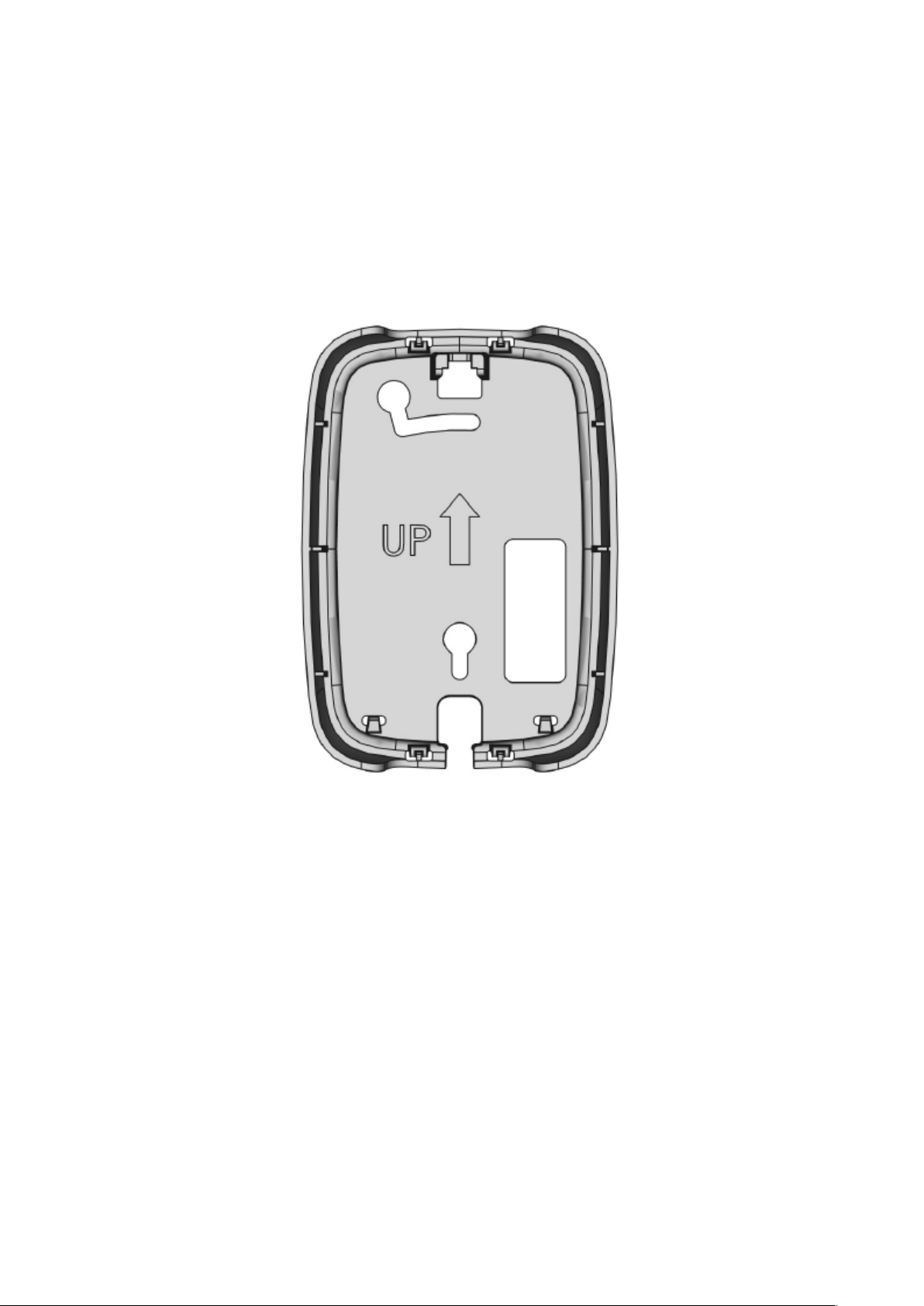
The sensor consists of a bottom piece, the electronic board and the top cover. Remove the top
cover by pressing it upwards and outwards. The electronics are removed by releasing the
plastic latch on the top.
The bottom piece is mounted on the wall with the “UP” arrow upwards. It can be mounted
either with screws or adhesive tape both included in the package. The hole pattern matches
standard junction box.
OY1700 LoRaWAN Air quality (PM) sensor, User manual, Version 0.1
Page 7
7
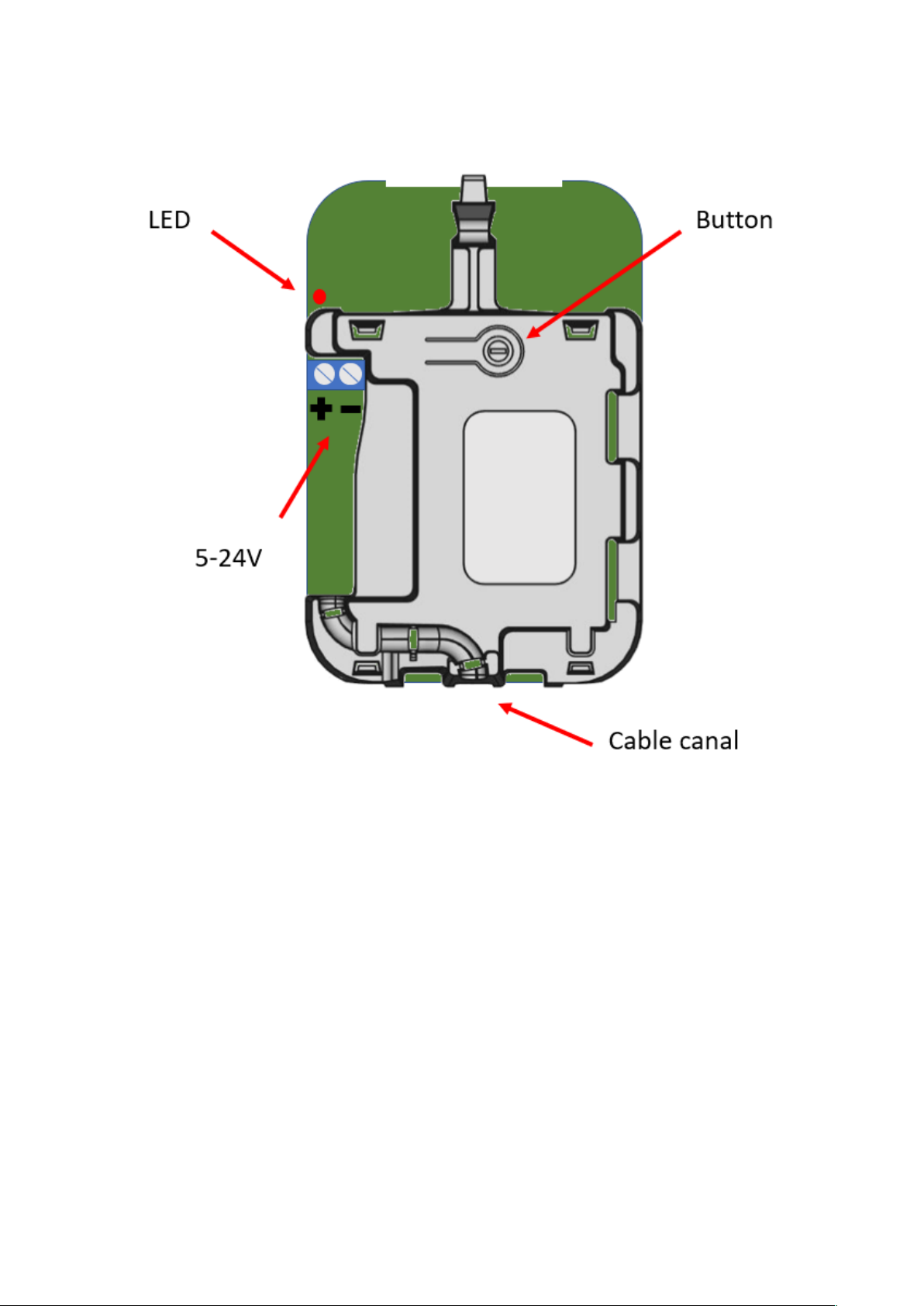
Configure the device in the LoRaWAN server, according to chapter 5.1, and power the device
with 5-24 VDC power, e.g. USB charger or 24 VDC. The cable can be routed through the
cable canal or through the electronic board for junction box mount. The sensor starts and
flashes 8 times during the boot-up sequence and starts the join sequence to the LoRaWAN
network
When the device has successfully joined the LoRaWAN network there will be a 2-second
long flash.
Attach the electronic board to the bottom piece and attach the plastic cover.
OY1700 LoRaWAN Air quality (PM) sensor, User manual, Version 0.1
Page 8

8
5.1 LoRaWAN Configuration
Configuration on the network server is done with
AppEUI: 70-B3-D5-D7-2F-F8-17-00 (a.k.a. JoinEUI)
It is possible to order a batch of devices configured with a customer unique AppEUI from the
Talkpool OUI range.
The device is configured with device unique DevEUI and AppKey. The DevEUI is printed on
device box and the AppKey is distributed by the sales team. The device is default configured
for OTA provisioning. Contact the Talkpool team for ABP configuration. The device follows
the LoRaWAN standard related Join configuration parameters, such as RX1 and RX2
windows, RX2 downlink frequency etc.
The default setting is ADR enabled.
5.2 Sensor states and state check
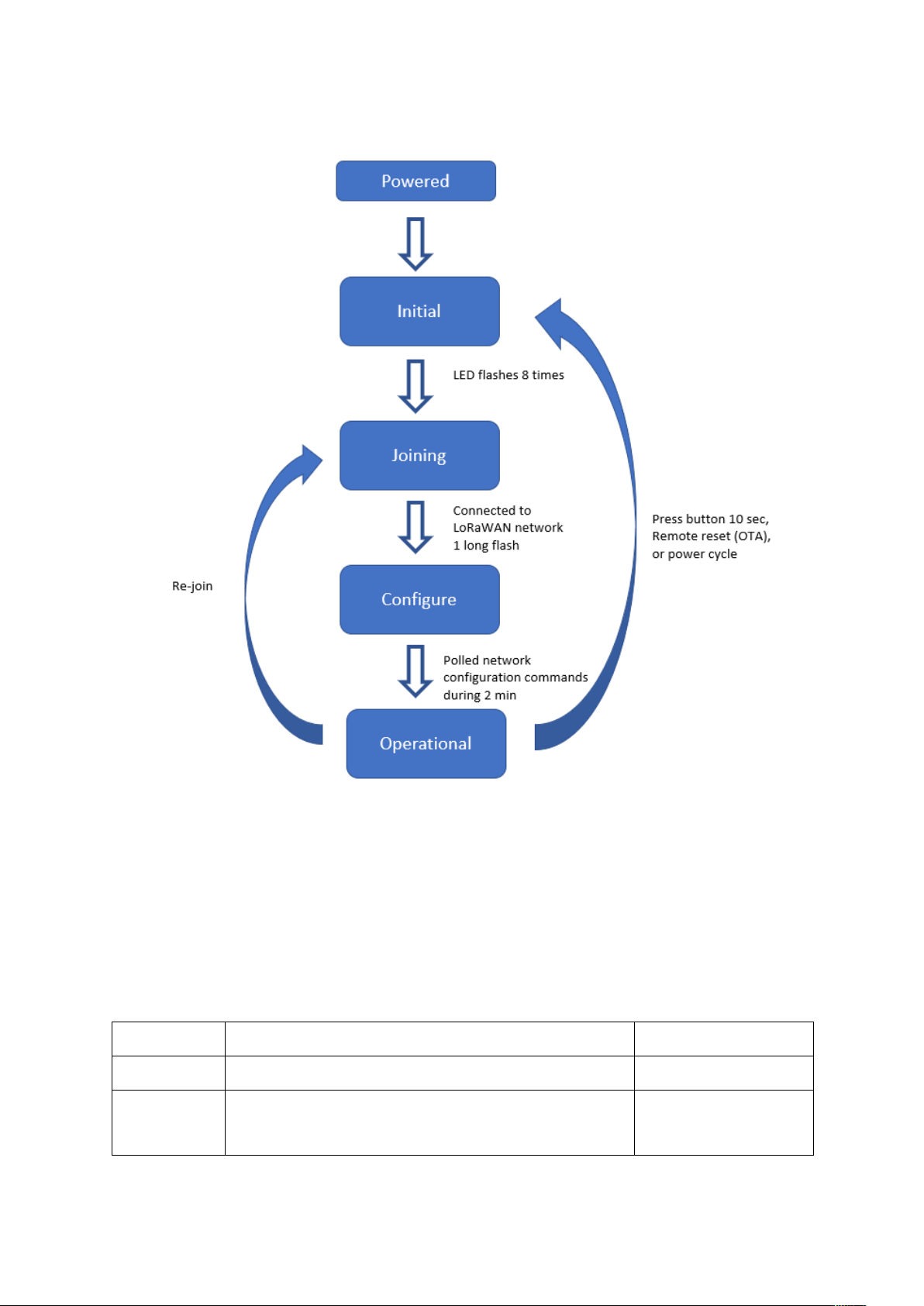
The sensor has four states: Initial, Joining, Configure and Operational state.
OY1700 LoRaWAN Air quality (PM) sensor, User manual, Version 0.1
Page 9
9
Figure 1 Device states
State
Description
LED response
Initial
Low power state after initial boot. Radio not active.
1 short flash (0.5 sec)
Joining
Trying to join a LoRaWAN network. The device
will remain in this state until successfully joined a
LoRaWAN network
2 short flash (0.5 sec)
When the unit is initially powered, it flashes 8 time with the LED, and tries to join the
LoRaWAN network. A successful join is indicated with a 2 sec long flash.
To check the device state, press the button and hold it pressed until the red LED starts
flashing after 0.5s.
OY1700 LoRaWAN Air quality (PM) sensor, User manual, Version 0.1
Page 10

10
Configure
Enables quick over-the-air configuration, by polling
server after configuration commands for 2 minutes.
This is done by sending uplink status command
(0x20).
1 long flash (2 sec)
Operational
Joined to a LoRaWAN network, measures
temperature and humidity periodically, and sends
measurement reports toward a LoRAWAN network.
1 long flash (2 sec)
5.2.1 Re-join functionality
The device supervises its connectivity to the network, by monitoring that periodic downlink
messages are received.
The device tries to re-join the network if it has not heard anything from the network for 288
uplinks (3 days @ 15-minute message interval). The device requests and normally gets a
downlink ever 64th uplink due to the ADRAckReq functionality.
OY1700 LoRaWAN Air quality (PM) sensor, User manual, Version 0.1
Page 11

11
6 Specification
Operating principle
Laser scattering Yes
Accuracy and range
Temperature accuracy ± 0,2 °C (conditions 0 °C to +50 °C)
Temperature range -20 °C to +60 °C
Humidity accuracy ± 2% (conditions 10-90% RH)
Humidity range 0% to 100% non-condensing
Particulate matters ranges PM
1.0
, PM
, PM10
2.5
Connectivity
Network LoRaWAN
Frequency bands 868 MHz
Provisioning Over the air & personalization
Size
Size 111 x 77 x 26 mm
Weight 75g
Security
Algorithms AES-128
Hardware Cryptographic co-processor
Features Secure boot
Secure firmware upgrade
Hardware based ultra secure key storage
Power
DC power 5-24 V
AC power Via USB charger (not included)
OY1700 LoRaWAN Air quality (PM) sensor, User manual, Version 0.1
Page 12

12
Configuration
Measurement intervals 15 minutes, configurable over the air
Transmission intervals 15 minutes, configurable over the air
Unique App EUI available upon request
Enclosure
IP30
Certifications (To be done)
RoHS compliant
CE
LoRaWAN
OY1700 LoRaWAN Air quality (PM) sensor, User manual, Version 0.1
Page 13

13
7 Security
The device has the following security features:
• Cryptographical coprocessor for ultra-secure hardware based key storage
• Secure boot
• Encrypted FW
• Message encryption (AES-128 bit)
• Message integrity (MIC AES-128 bit)
• No port access to device.
8 Protocol
The protocol consists of different types of data
- LoRaWAN v.1.0.2 standard commands
- Unsolicited uplink status commands during configure state
- Periodic measurement reports
- Downlink commands and queries
- Uplink query response
Note 0x denotation means hexadecimal encoded.
8.1 LoRaWAN standard commands
All standard LoRaWAN v 1.0.2 are supported. Please refer to the LoRaWAN standard for the
protocol definition.
8.2 Unsolicited uplink status commands
The sensor polls the server for configuration parameters the during the Configure state. This
is done by sending unsolicited uplink status report (0x20). This gives quick feedback to the
installer that the installation has been successful and enables downlink configuration
commands to be sent. After approximately 2 minutes the device changes to Operational
state. See chapter 6.5 for details of the Status report.
Port: Port 1
Payload 0x01 20 00
0x01: Data type
0x20: Status command
OY1700 LoRaWAN Air quality (PM) sensor, User manual, Version 0.1
Page 14

14
0x00: bit0 =0 => Normal startup
bit1 =0 => No boot problem
bit2-7 reserved
The expected behavior is 0x01 20 00. If not contact support.
8.3 Periodic measurement reports
8.3.1 Periodic measurement report
The default configuration is that particles, temperature and humidity are measured and
transmitted every 15th minute. The data is packed into minimal number of bytes to minimizing
interference.
Port: Port 2
Payload: Measurement value (see chap 8.3.2)
Size: 5 Bytes
8.3.2 Measurement value
The measurement value for each measurement
Byte 0: Temperature, bit 11 – bit 4
Byte 1: Relative humidity, bit 11 – bit4
Byte 2:
bit 7-4: Temperature, bit 3 – bit 0
bit 3-0: Relative humidity, bit 3 – bit 0
Byte 3-4: PM1.0 sent as an unsigned 16-bit integer
Byte 5-6: PM2.5 sent as an unsigned 16-bit integer
Byte 7-8: PM10 sent as an unsigned 16-bit integer
8.3.2.1 Temperature conversion
The temperature measurement is transmitted using an unsigned 12-bit value. The scaling is
1/10 °C and the offset is 80 °C, which means the received value should be subtracted by 800
and then divided with 10 to get it in °C.
OY1700 LoRaWAN Air quality (PM) sensor, User manual, Version 0.1
Page 15

15
8.3.2.2 Relative humidity conversion
The relative humidity (RH) measurement is transmitted using an unsigned 12-bit value. The
scaling is 1/10 % RH and the offset is 25 % RH, which means the received value should be
subtracted by 250 and then divided with 10 to get it in % RH.
8.3.2.3 Particulate Matter (PM) conversion
The Particulate Matter of different sizes PM1.0, PM2.5 and PM10 are measurement in partsper-million (ppm – 1 x 10⁻⁶), is transmitted using an un-signed 16 bit integer.
8.3.1 Example: Measurement report
Measurement data is sent on LoRaWAN port 2
3e 44 1d 01 12 01 34 02 1b
(3e1)
(44d)
(0112)
(0134)
(021b)
HEX
: (1101)
HEX
HEX
HEX
HEX
: (993)
: (274)
: (308)
: (539)
=> 993/10 -80°C => 19.3 gradC
DEC
DEC
DEC
DEC
DEC
=> 1101/10 – 25% => 85.1 % RH
=> 274 ppm PM1.0
=> 308 ppm PM2.5
=> 539 ppm PM10
OY1700 LoRaWAN Air quality (PM) sensor, User manual, Version 0.1
Page 16
16
8.4 Downlink commands and queries
Downlink command network => device
Field
Bytes
Value
Description
Note
Type
1
xx
0x01: Set
0x02: Query
0x03: Action
Index
1
xx
Command Index
Data
As defined for Command Index only applicable for set-commands
To control the sensor application, in-band commands and queries can be sent from the server
application. Contact your LoRaWAN network provider for in-band application API.
All downlink application communication is done on LoRaWAN port 1.
OY1700 LoRaWAN Air quality (PM) sensor, User manual, Version 0.1
Page 17

17
Port
Index
Description
Uplink
Datatype
response
Encoding
Valid range
Access
Unsolicited
Description
Note
1
0x03
FW build hash
6 x Uint8
Query
No
Unique number that identifies the
firmware version
1
0x05
Device reset
Action
No
Reset of device
1
0x06
CPU voltage
Uint8
25mV/
LSB
0-3.6V
Query
No
Read CPU voltage. Max/min ranges
depend on battery chemistry.
1
0x0A
CPU temperature
Uint16
Big endian
50C - 0.01C /
LSB
-50- +125 C
Query
No
Temperature from CPU sensor with 50
°C offset. Approximately 5 °C
accuracy.
1
0x20
Status
Uint8
Bitfield
Query
Yes
Should be 0, otherwise contact support
with error code information.
Cleared through
reset
1
0x23
Measurement
interval
Uint16
Big endian
Minutes
1-10080
Query
Set
No
Measurement interval in minutes
Setting
measurement
interval resets the
measurement
timer.
2 - Data
[ Uint12,
Uint12,
Uint16,
Uint16,
Uint16 ]
(°C + 80)*10
(% RH
+25)*10
(ppm PM1.0)
(ppm PM2.5)
(ppm PM10)
0 – 3800
0 – 1500
0 – 65535
0 – 65535
0 - 65535
-
Yes
Current temperature, humidity, PM1.0,
PM2.5 and PM10.
See Ch 8.4.3
OY1700 LoRaWAN Air quality (PM) sensor, User manual, Version 0.1
Page 18

18
8.4.1 Measurement interval
Uplink command device => network
Field
Bytes
Value
Description
Note
Type
1
xx
0x01: Data
0x02: Command NACK
Index
1
xx
Command Index
Data
As defined for Command Index (only for Type: Data)
The measurements are done periodically. The interval time is controlled by the configuration
parameter Measurement Interval. The default setting is 15 minutes.
The measurement interval can be set between 1 and 65534 minutes (~1.5 months).
It is also possible to order a batch of OY1700 with a different default setting.
Example
Set measurement interval to 5 minutes: Port 1: 01230005
Set measurement interval to 15 minutes: Port 1: 0123000F
8.4.2 Reset device
The device can be remotely reset and forced into Joining state. All settings are back to
factory default.
Example: Remote device reset: Port 1: 0305
8.4.3 Measurement report
Measurement data is sent on LoRaWAN port 2
3e 44 1d 01 12 01 34 02 1b
(3e1)
(44d)
(0112)
(0134)
(021b)
HEX
: (1101)
HEX
HEX
HEX
HEX
: (993)
: (274)
: (308)
: (539)
=> 993/10 -80°C => 19.3 gradC
DEC
=> 1101/10 – 25% => 85.1 % RH
DEC
=> 274 ppm PM1.0
DEC
=> 308 ppm PM2.5
DEC
=> 539 ppm PM10
DEC
8.5 Uplink query response
When communication on LoRaWAN port 1 the following header is used:
OY1700 LoRaWAN Air quality (PM) sensor, User manual, Version 0.1
Page 19

19
Example:
Port 1: Payload 0x01 20 00
0x01: Data type
0x20: Status command
0x00: Normal startup
The expected behavior is 0x01 20 00. If not contact support.
OY1700 LoRaWAN Air quality (PM) sensor, User manual, Version 0.1
 Loading...