

Page 1
GUIDE TO THE
PTC-710
Page 2

Page 3

Guide to the
PTC-710
Part Num ber: 13977-000-03-004
Re lease Date: Nov. 2000
Page 4

Symbol is a reg is tered trade mark of Sym bol Tech nol ogies,
Inc.
The in for ma tion con tained in this man ual is sub ject to
change with out no tice.
Symbol shall not be li a ble for tech ni cal or ed i to rial omis sions or mis takes in this man ual nor shall it be li a ble for in ci den tal or con se quen tial dam ages re sult ing from your use of
the in for ma tion con tained in this man ual.
This man ual con tains con fi den tial and pro pri etary in for ma tion and is copy righted. All rights are re served. No part of
this man ual may be pho to cop ied or re pro duced in any form
with out the prior writ ten con sent of Symbol.
© Copy right Sym bol Tech nol ogies, Inc., 1990
All Rights Re served.
Page 5

Con tents
Un packing the PTC-710 ............. 1
Be fore You Use the PTC-710 .......... 2
Charge the Nickel-Cadmium Bat teries ....... 2
Turn on the Backup Bat tery ............ 3
Over view of the PTC-710 ............ 5
Parts ....................... 6
Dis play ....................... 6
Key board ...................... 6
In ter nal Mo dem (Op tional) ............. 6
RJ-11 Socket (Op tional) .............. 8
Bar-Code Reader and Holder (Op tional) ...... 8
Bar-Code Reader Socket .............. 8
25-Pin Con nec tor .................. 8
Acous tic Cou pler .................. 8
Elas tic Strap .................... 9
Bat teries ...................... 9
Ap pli ca tion ROM Car tridge (ARC) ........ 10
Fea tures .................... 11
Power Backup Sys tem .............. 11
Clock and Cal en dar ................ 11
Au to matic Off ................... 11
Au to matic Re turn At On ............. 11
Han dling and Main taining
the PTC-710 ..................... 12
Use and Stor age .................. 12
Ca bles and Ac ces sories .............. 12
Cleaning ...................... 13
Ser vice ....................... 13
........................... 13
Re placing Al ka line Bat teries ......... 14
The PTC-710 / i
Page 6

To Re move the Bat teries: ............. 14
To Re place the Bat teries: ............. 15
Charging Nickel-Cadmium Bat teries ..... 16
Con necting and Re moving
Ac ces sories ..................... 17
To Con nect an Ac ces sory: ............ 17
To Re move an Ac ces sory: ............ 18
Scanning Bar-Code La bels .......... 19
Attaching the Acous tic Cou pler
to a Tele phone Re ceiver .............. 20
Con necting the In ter nal Mo dem
to a Tele phone Line ................ 21
Trou ble shooting ................ 22
If the PTC Does Not Start: ............ 22
If the PTC Shows the Mes sage “BACKUP BAT -
TERY FAULT”: .................... 22
If the Bar-Code Reader Does Not Read a La bel: 22
ii / The PTC-710
Reg u la tions .................. 23
FCC (United States) ................ 23
De part ment of Com mu ni ca tions (Can ada) .... 23
Page 7

Un packing the PTC-710
When you re ceive the PTC-710, the pack age should con tain
the fol low ing:
• PTC-710
• bat tery charger (if the PTC-710 was or dered with
nickel-cadmium bat ter ies)
• bar-code reader (if or dered)
The PTC-710 / 1
Page 8
Be fore You Use the PTC-710
Charge the Nickel-Cadmium Bat teries
Fol low these steps only if your PTC-710 con tains
nickel-cadmium bat ter ies.
CAU TION! Do not con nect a bat tery charger to a
PTC-710 that con tains al ka line bat ter ies. At tempting to
charge al ka line bat ter ies can cause them to burst, which
can re sult in equip ment dam age.
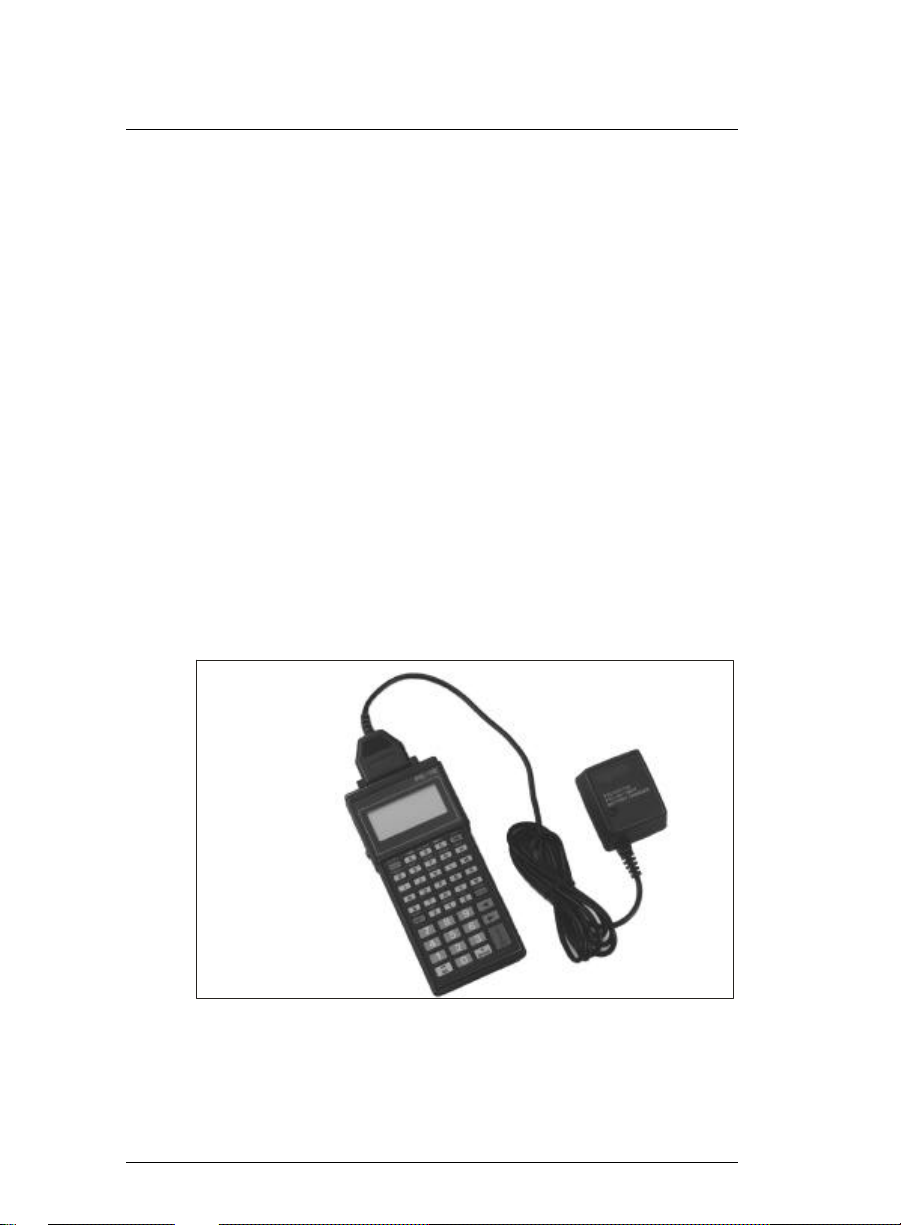
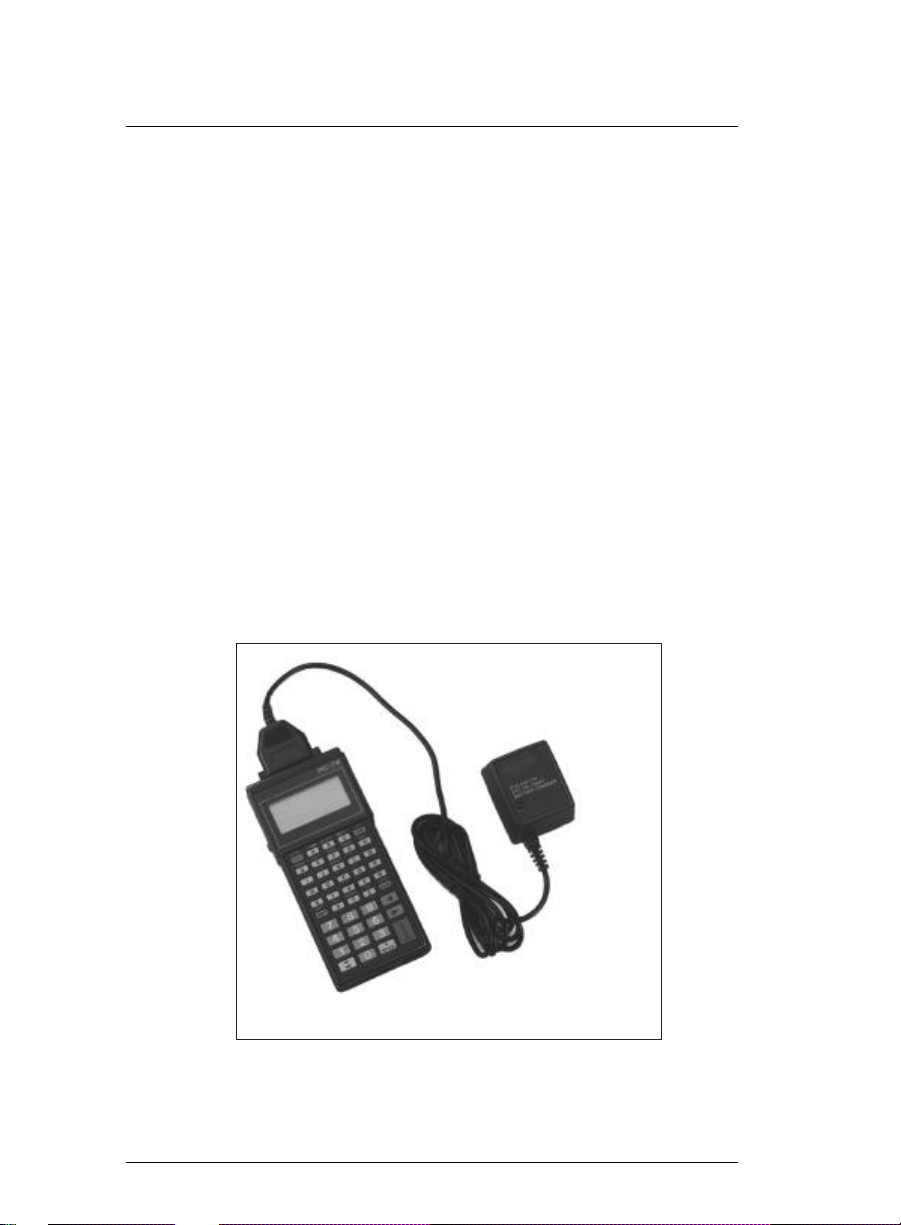
1. Con nect the bat tery charger to the PTC-710’s 25-pin
con nec tor (see Fig ure 1).
2. Plug the bat tery charger into a stan dard 110-volt elec tri cal out let. The charger’s red in di ca tor light shows that
the bat ter ies are charg ing.
Note: 220-volt out lets, used out side North Amer ica,
re quire a dif fer ent bat tery charger than that shown in
2 / The PTC-710
Fig ure 1. Con necting the Bat tery Charger
Page 9
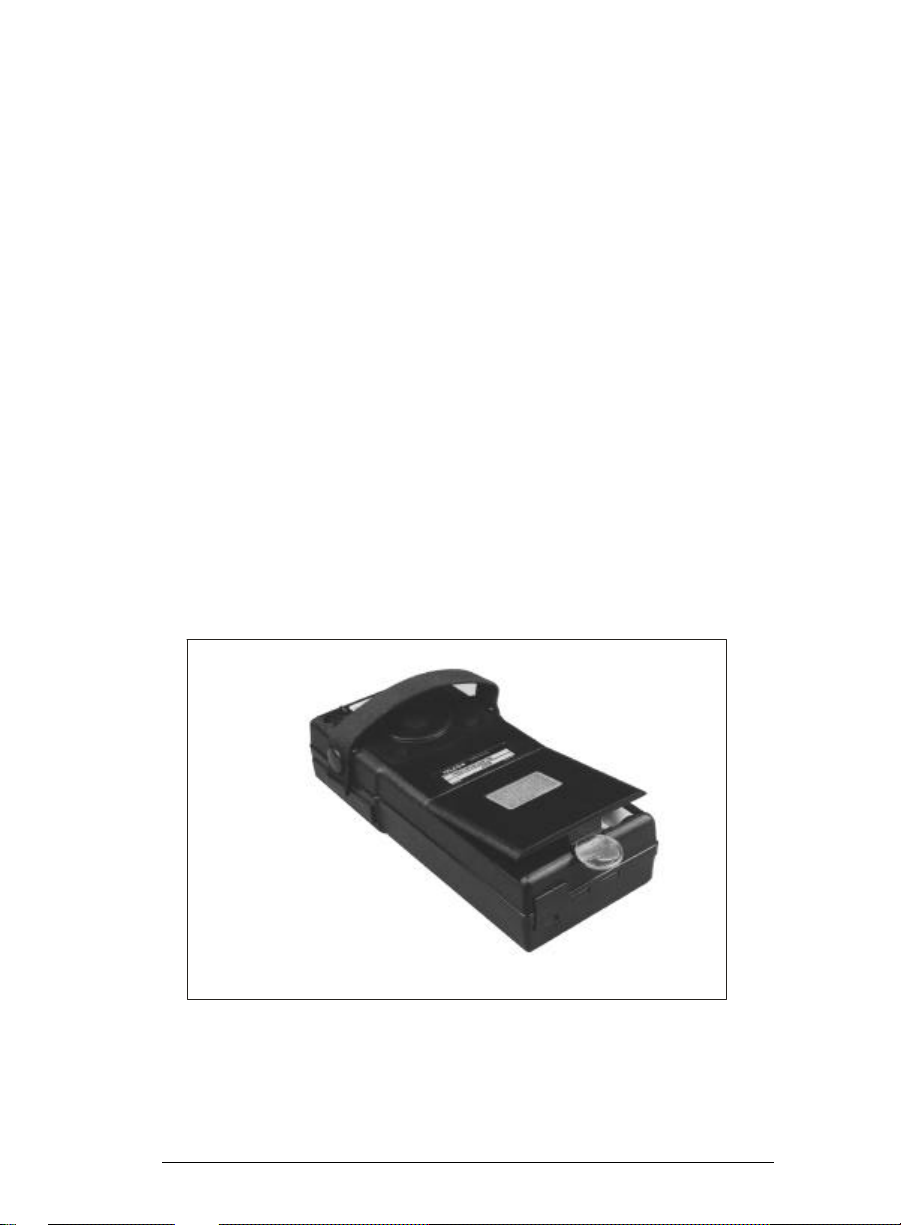
Fig ure 1; see your Symbol sales rep re sen ta tive for or der ing in for ma tion.
3. Al low the bat ter ies to charge for 12 to 14 hours. Af ter -
ward, un plug the bat tery charger from the elec tri cal out let, then dis con nect it from the PTC.
Turn on the Backup Bat tery
1. Re move the bat tery com part ment cover by in sert ing a
coin in the slot at the bot tom of the bat tery com part ment
cover and ap ply ing light pres sure to the coin (see Fig ure
2). The cover will pop up.
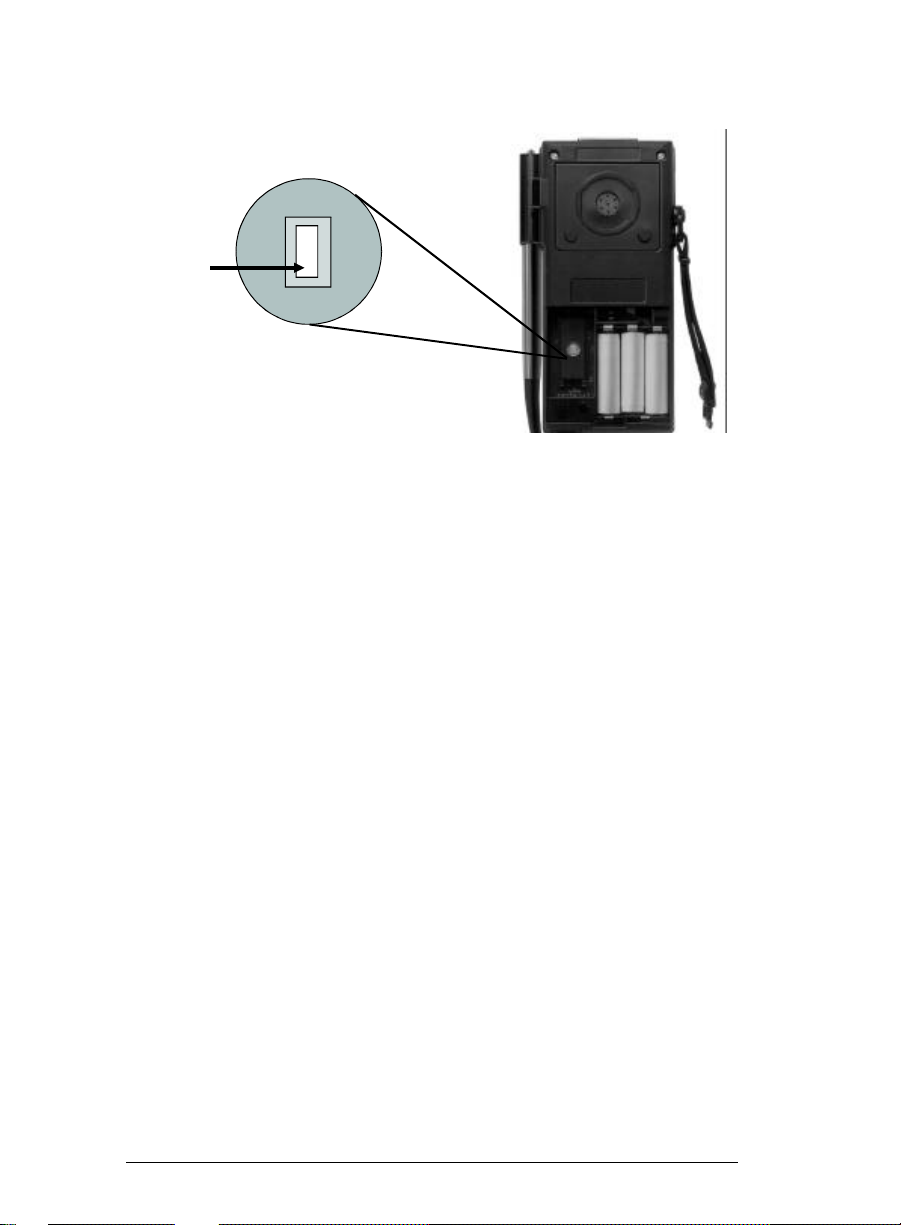
2. Using the tip of a pen or pen cil, de press the backup bat tery
switch (see Fig ure 3).
3. Re place the bat tery com part ment cover. Line up the bat -
tery com part ment cover so the re cessed edge on the top
of the cover is un der the flange of the PTC’s case. Press
down lightly on the cover un til it snaps into place.
Fig ure 2. Re moving the Bat tery Com part ment
Cover
The PTC-710 / 3
Page 10
PRESS
DOWN
BACKUP BAT TERY
SWITCH
Fig ure 3. Turn ing on the Backup Bat tery
4 / The PTC-710
Page 11
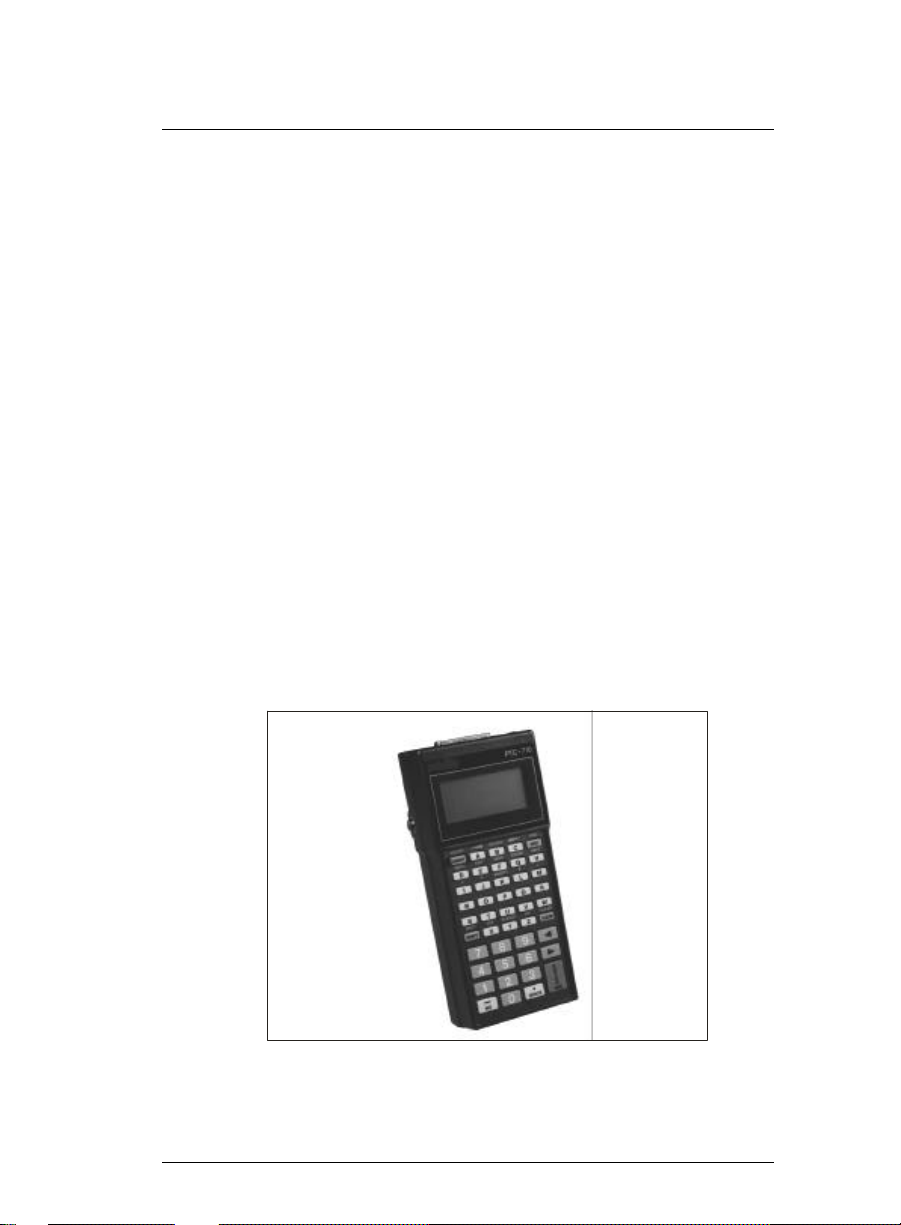
Over view of the PTC-710
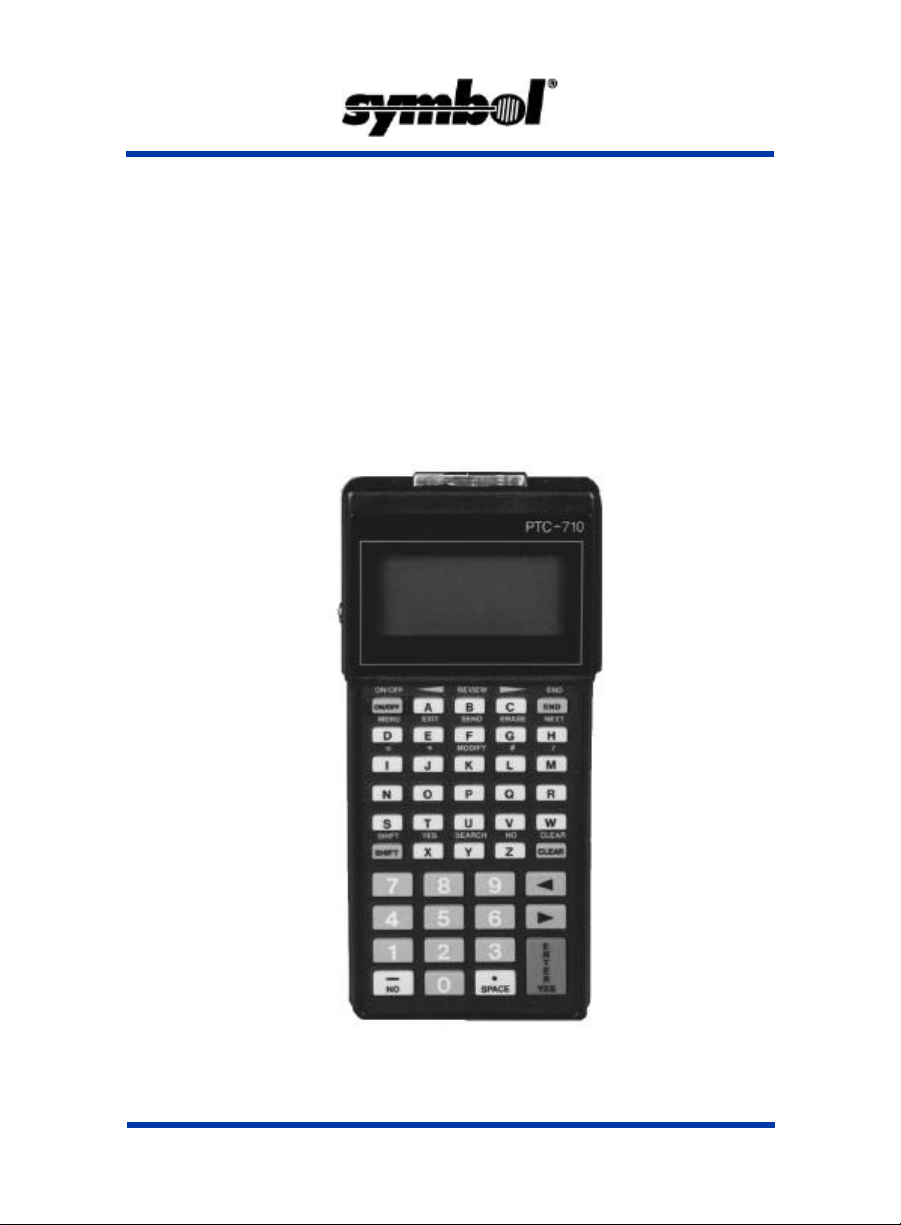
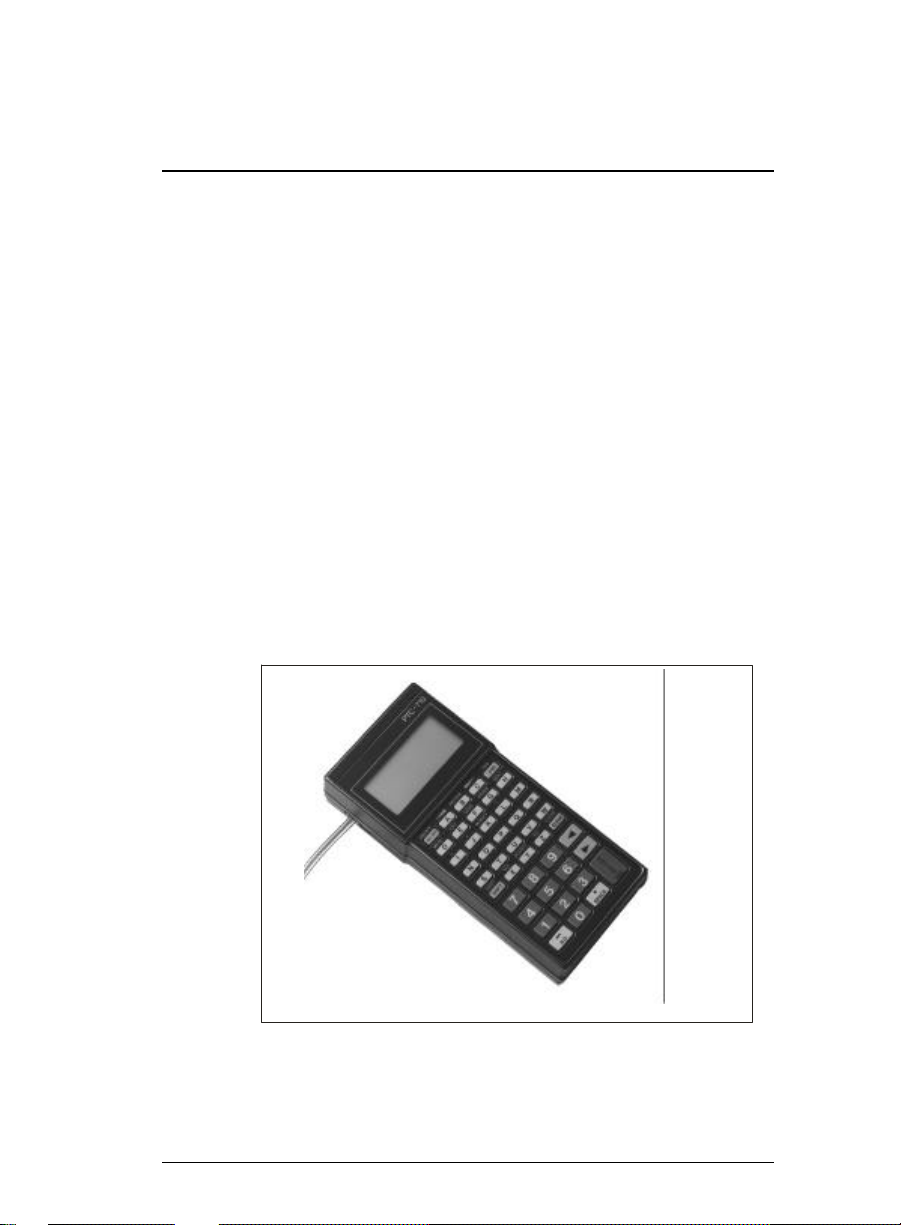
The PTC-710 (see Fig ure 4) is a bat tery-powered, hand-held
com puter that you use to col lect, store, and send data. PTC
ac ces so ries are avail able for scan ning bar codes, print ing
data, and send ing data to a main com puter.
The PTC runs a pro gram spe cif i cally de signed to col lect data
for your or ga ni za tion. This pro gram leads you through the
data col lec tion pro ce dure with a se ries of prompts, beeps,
and mes sages. Prompts are words and sym bols that tell you
when to en ter data and what type of data to en ter. Mes sages
and beeps tell you when you make er rors or com plete cer tain
op er a tions. They can also pro vide in for ma tion on the sta tus
of the PTC and its pro gram.
You can en ter data into the PTC by typ ing in for ma tion on the
key board or by scan ning bar-code la bels.
Af ter you en ter the data, the PTC must ei ther send the data to
a main com puter for pro cess ing, or send it to a printer for a
printed copy, or both, to make the data use ful to you and
your or ga ni za tion.
Fig ure 4. The PTC-710
The PTC-710 / 5
Page 12

Parts
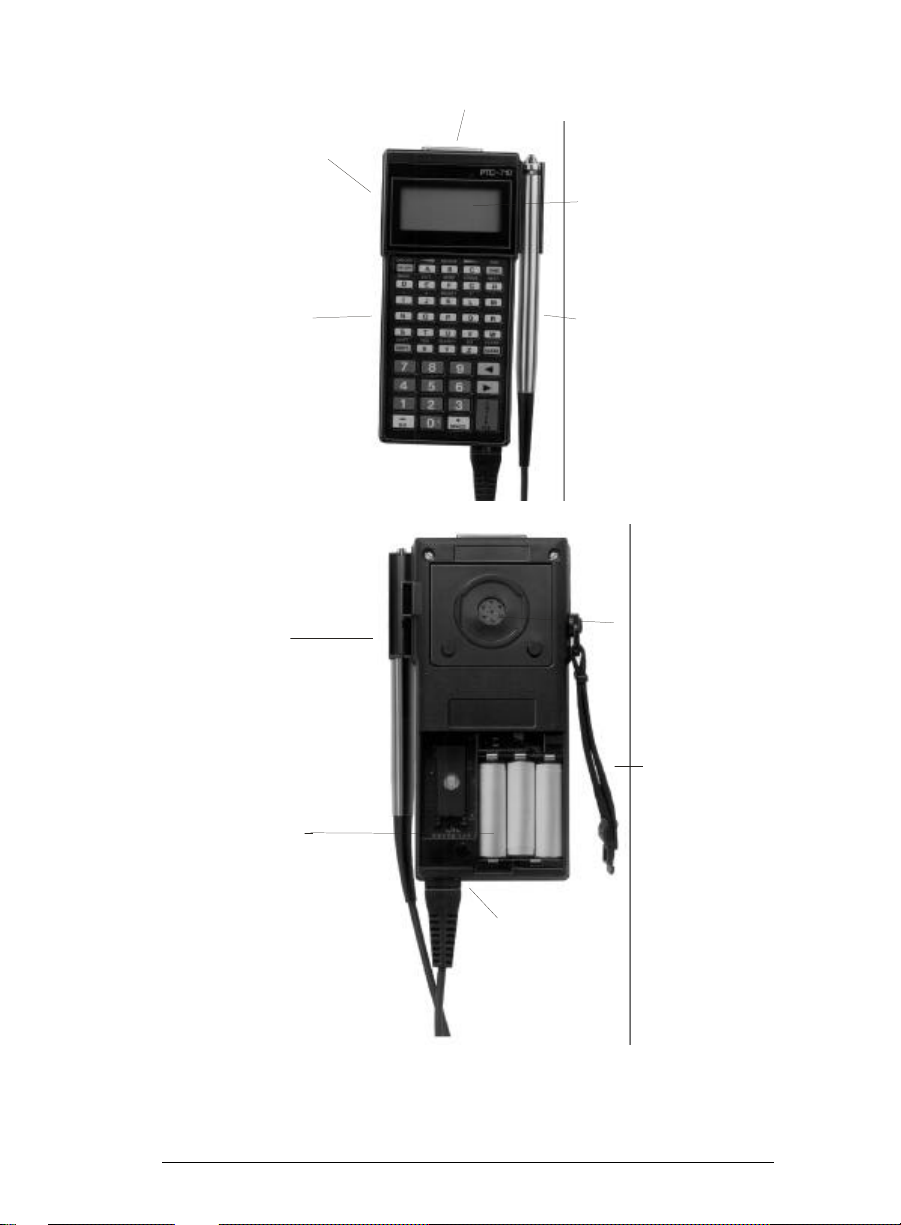
Fig ure shows the lo ca tions of the PTC-710’s main parts.
Dis play
The PTC-710’s four-line dis play shows prompts and mes sages that tell you when to en ter data and what type of data
to en ter. Each line of the dis play can show up to 16 let ters,
num bers, or sym bols.
Key board
The PTC-710 key board has data keys and func tion keys.
The data keys con sist of the let ter keys (A-Z), the num ber
keys (0-9), and the sym bol keys. You use the data keys to
en ter in for ma tion into the PTC. The func tion keys per form a
spe cific pro ce dure. For ex am ple, your pro gram may use one
func tion key to send the PTC’s data to a main com puter and
an other to erase the PTC’s data. You ac ti vate and de ac ti vate
the func tion keys by press ing the PTC-710’s SHIFT key.
Your PTC’s pro gram may turn off cer tain keys at se lected
points in the pro gram to pre vent you from ac ci den tally eras ing data or end ing an op er a tion too soon. When you press a
key that the pro gram has turned off, the key will have no ef fect.
In ter nal Mo dem (Op tional)
The PTC-710’s in ter nal mo dem con verts data into elec tronic
sig nals that can be trans mit ted over a tele phone line.
6 / The PTC-710
Page 13
RJ-11 SOCKET
25-PIN CONNECTOR
DISPLAY
KEYBOARD
HOLDER
BATTERIES
BAR-CODE
READER
ACOUS TIC
COUPLER
ELAS TIC
STRAP
BAR-CODE READER
SOCKET
Fig ure 5. Parts of the PTC-710
The PTC-710 / 7
Page 14

RJ-11 Socket (Op tional)
The PTC-710’s RJ-11 socket lets you con nect the in ter nal
mo dem di rectly to a tele phone wall jack with a stan dard tele phone ca ble. A rub ber flap pro tects the RJ-11 socket when
the socket is not in use.
Bar-Code Reader and Holder (Op tional)
Your PTC may have an op tional bar-code reader that lets you
en ter data into the PTC by scan ning bar-code la bels. Your
PTC pro gram de ter mines the type(s) of bar-code la bels you
can scan.
If your PTC-710 was or dered with a pen cil wand bar-code
reader, the PTC will come with a holder at tached to its right
side.
Bar-Code Reader Socket
The bar-code reader plugs into the PTC-710 through the
bar-code reader socket. If your PTC-710 was or dered with out a bar-code reader, there will be a plas tic cover over this
socket. Do not re move the plas tic cover ex cept to con nect a
bar-code reader to your PTC-710.
25-Pin Con nec tor
Most of the PTC-710’s ac ces so ries con nect to the PTC’s
25-pin con nec tor (the bar-code reader is an ex cep tion).
Some ac ces so ries con nect di rectly to the 25-pin con nec tor;
oth ers con nect to it with a ca ble.
Acous tic Cou pler
The PTC-710’s acous tic cou pler changes the PTC’s data into
sounds that the tele phone sys tem can trans mit to a main
com puter. You con nect the acous tic cou pler to a tele phone
re ceiver. De pending on your PTC’s pro gram, the acous tic
8 / The PTC-710
Page 15

cou pler may also au to mat i cally dial the tele phone num ber of
the main com puter.
Elas tic Strap
The PTC’s elas tic strap se cures the PTC to the palm of your
hand for data en try. It also se cures a tele phone re ceiver to the
acous tic cou pler for data com mu ni ca tion.
Bat teries
The PTC-710 uses three AA-size re charge able
nickel-cadmium bat ter ies as the stan dard source of power
(PTCs or dered with these bat ter ies also in clude a bat tery
charger). As an op tion, the PTC-710 can also use three
AA-size al ka line bat ter ies.
The PTC tells you when the bat ter ies are go ing dead by
beep ing five times and show ing a “LOW BAT TERY” mes sage
on the dis play. When this hap pens, ei ther charge the bat ter ies (if your PTC con tains nickel-cadmium bat ter ies) or replace the bat ter ies (if your PTC con tains al ka line bat ter ies).
Note: When bat ter ies are ex tremely weak, the PTC-710 does not
op er ate, beep, or show the “LOW BAT TERY” mes sage. In this
event, charge or re place the bat ter ies im me di ately.
CAU TION! If your PTC-710 con tains nickel-cadmium bat ter ies, do not store it for more than one month with out charg ing
the bat ter ies. If your PTC-710 con tains al ka line bat ter ies, do
not store it for more than two months with out re plac ing the
bat ter ies. Oth er wise, your data or pro gram may be lost.
The PTC-710 / 9
Page 16

Ap pli ca tion ROM Car tridge (ARC)
The ap pli ca tion ROM car tridge (ARC) con tains the PTC’s
pro gram. The ARC de ter mines the PTC’s key func tions, the
prompts and mes sages on the dis play, and the pro ce dures for
send ing, re ceiv ing, and print ing data.
ARCs are re mov able and in ter change able, al though dur ing
nor mal use there is no need to re move or change an ARC.
10 / The PTC-710
Page 17

Fea tures
Power Backup Sys tem
The power backup sys tem in the PTC-710 pro tects data, the
clock, and pro grams for 800 hours af ter you re move the
bat ter ies.
Clock and Cal en dar
A clock and cal en dar are built into the PTC-710. De pending
on your pro gram, the PTC may use the clock and cal en dar to
show the time and date on the dis play or to re cord the time
and date of data en tries.
Au to matic Off
To con serve bat tery power, the PTC-710 au to mat i cally
switches off af ter about one min ute of in ac tiv ity. The ex act
length of time de pends on your PTC’s pro gram.
Au to matic Re turn At On
When you turn the PTC-710 off, or when it turns it self off, it
“re mem bers” where it was in the pro gram. When you turn
the PTC-710 back on, it re turns to that same point in the pro gram. You do not need to re view what you have done so far
to find your place.
The PTC-710 / 11
Page 18

Han dling and Main taining
the PTC-710
Fol low these sug ges tions to keep your PTC in top work ing
con di tion.
Use and Stor age
• Pro tect the PTC and its ac ces so ries from harsh, dirty en -
vi ron ments and from ex ces sive heat, cold, and mois ture.
• Do not use the PTC for more than 10 min utes in tem per a tures
be low 32°F (0°C) or above 120°F (49°C).
• Do not store the PTC in tem per a tures be low -20°F
(-29°C) or above 160°F (71°C).
• If your PTC-710 con tains nickel-cadmium bat ter ies and
you store it in be low-freezing tem per a tures for more than
one hour, do not charge the bat ter ies un til the PTC
reaches nor mal room tem per a ture. Do not store the PTC
for more than one month with out charg ing the bat ter ies.
• If your PTC con tains al ka line bat ter ies, do not store the
PTC for more than two months with out re plac ing the
bat ter ies.
Ca bles and Ac ces sories
• Do not in sert any for eign ob ject into the 25-pin con nec tor
or the bar-code reader socket.
• En sure that all ac ces so ries are con nected cor rectly and
those with locks are locked into place.
• Do not at tempt to con nect any de vice that is not part of
your PTC-710 sys tem to the PTC-710.
12 / The PTC-710
Page 19

Cleaning
• Clean the PTC by slightly moist en ing a clean, soft,
Ser vice
• Do not at tempt to ser vice the PTC. Only a trained tech ni -
lint-free cloth with a mild, non-abrasive plas tic cleaner
and wip ing the out side sur faces. Do not soak the cloth,
and do not spray or pour clean ing liq uids di rectly on the
PTC.
cian may ser vice the PTC.
The PTC-710 / 13
Page 20
Re placing Al ka line Bat teries
To Re move the Bat teries:
1. Be sure the PTC is off.
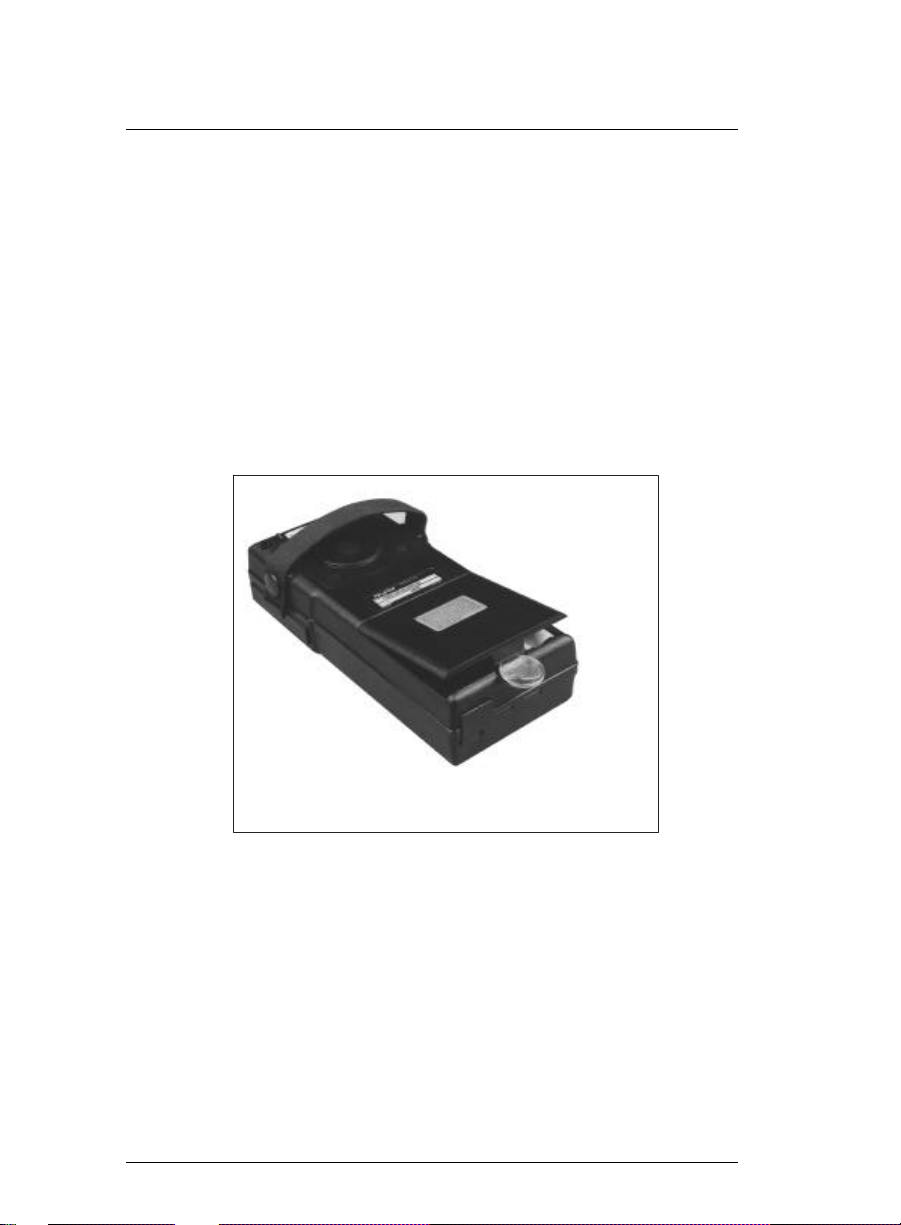
2. In sert a coin in the slot at the bot tom of the bat tery com part ment cover (see Fig ure 6).
3. Ap ply light pres sure to the coin and the cover will pop
up. Re move the cover from the case.
4. Re move the bat ter ies with your fin gers. Be care ful not
to dam age the bat tery con tacts.
14 / The PTC-710
Figure 6. Removing the Battery
Compartment Cover
Page 21
To Re place the Bat teries:
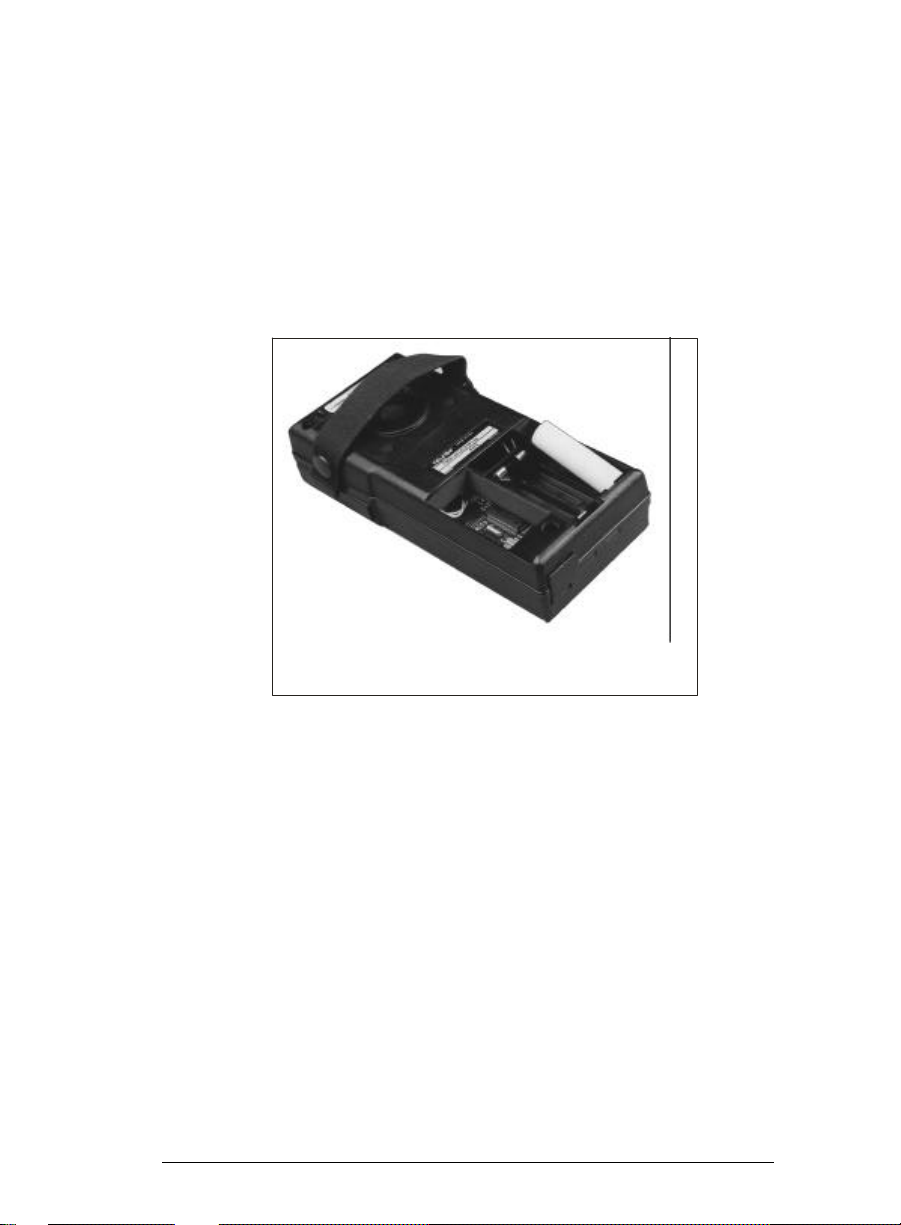
1. In sert the new bat ter ies ac cord ing to the di a gram in side
the bat tery case (see Fig ure 7).
2. Line up the bat tery com part ment cover so that the re -
cessed edge on the top of the cover is un der the flange of
the PTC’s case.
3. Press down lightly on the cover to snap it into place.
Figure 7. Replacing Alkaline Batteries
The PTC-710 / 15
Page 22
Charging Nickel-Cadmium Bat teries
CAU TION! Do not con nect a bat tery charger to a PTC-710
that con tains al ka line bat ter ies. At tempting to charge al ka line
bat ter ies can cause them to burst, which can re sult in equip ment dam age.
1. Con nect the bat tery charger to the PTC-710’s 25-pin
con nec tor (see Fig ure 8).
2. Plug the bat tery charger into a stan dard 110-volt elec tri cal out let. The charger’s red in di ca tor light shows that
the bat ter ies are charg ing.
Note: 220-volt out lets, used out side North Amer ica, re quire a
dif fer ent bat tery charger than that shown in Fig ure 8; con tact
your Sym bol sales rep re sen ta tive for or der ing in for ma tion.
3. Al low the bat ter ies to charge for 12 to 14 hours. Af ter ward, un plug the bat tery charger from the elec tri cal out let, then dis con nect it from the PTC.
16 / The PTC-710
Figure 8. Connecting the Battery Charger
Page 23
Con necting and Re moving
Ac ces sories
PTC-710 ac ces so ries in clude print ers, bat tery charg ers, and
ca bles.
To Con nect an Ac ces sory:
1. Turn the PTC-710 off.
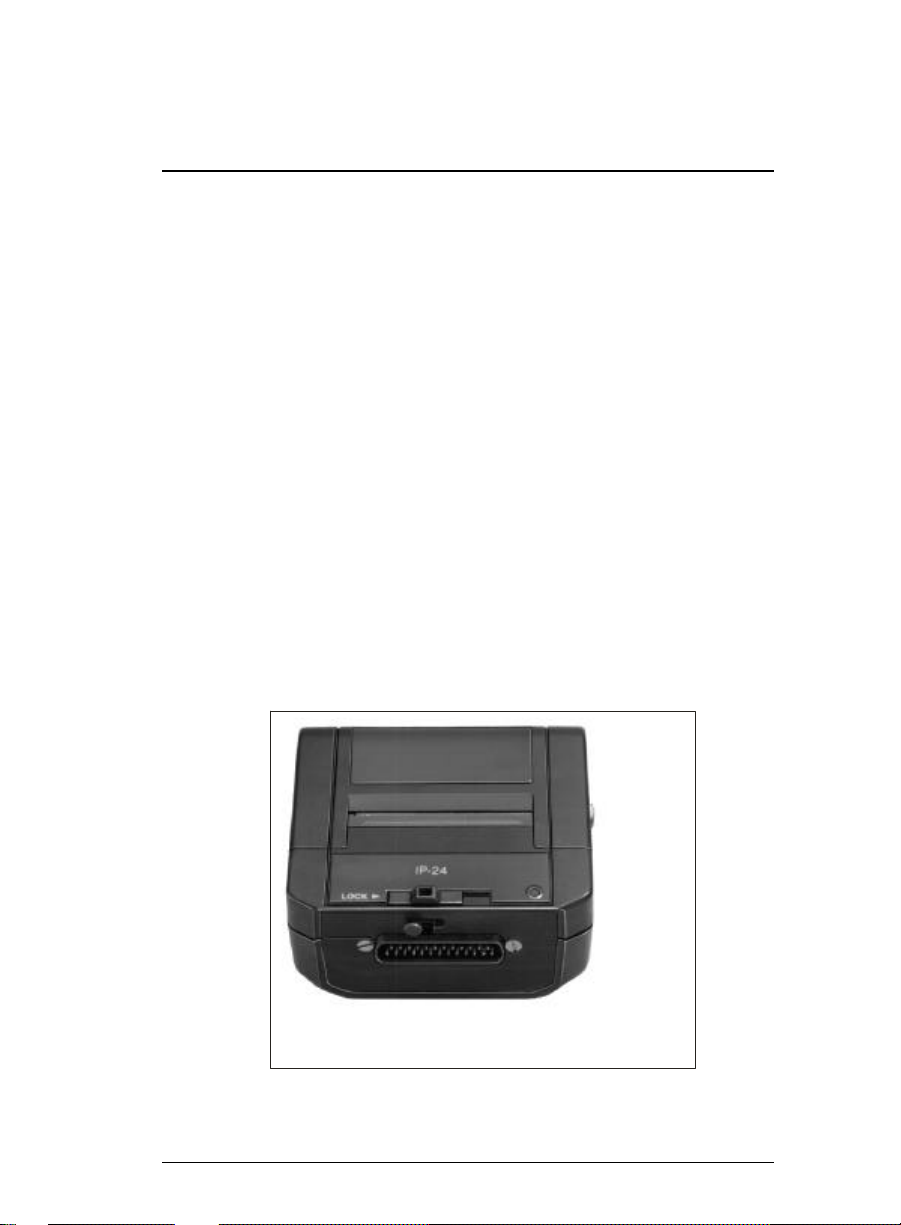
2. Line up the pins on the end of the ac ces sory ca ble (or the
25-pin con nec tor on the ac ces sory) with the holes in the
PTC-710’s 25-pin con nec tor. If the ac ces sory has a lock ing
latch, be sure the latch is in the un locked (far left) po si tion
(see Fig ure 9).
3. Press the ca ble’s con nec tor or the ac ces sory firmly onto
the PTC-710’s 25-pin con nec tor. Do not use a rock ing
or twist ing ac tion. If you are con nect ing an ac ces sory
di rectly, slide the ac ces sory’s lock ing latch to the locked
(far right) po si tion.
Figure 9. Accessory Locking Latch
The PTC-710 / 17
Page 24

4. If you are con nect ing a ca ble, fol low the pro ce dure in
Step 2 to con nect the other end of the ca ble to the
ac ces sory.
To Re move an Ac ces sory:
1. Turn the PTC-710 off.
2. If you are re mov ing an ac ces sory that con nects di rectly
to the PTC-710, slide the ac ces sory’s lock ing latch to the
un locked (far left) po si tion (see Fig ure 9).
CAU TION! When re mov ing a ca ble from the
PTC-710, grasp the ca ble con nec tor head to re move
the ca ble. Pulling on the ca ble can break the wir ing
near the ca ble con nec tor head.
3. Pull the ca ble con nec tor or the ac ces sory straight away
from the PTC’s 25-pin con nec tor.
18 / The PTC-710
Page 25

Scanning Bar-Code La bels
Fol low this pro ce dure if you are scan ning la bels with a pen cil wand bar-code reader. If you are us ing an other type of
reader, see the in struc tions shipped with the reader.
1. Place the tip of the bar-code reader at the be gin ning of
the bar-code la bel. Make sure the reader touches the
la bel and is within 30 de grees of ver ti cal in any di rec tion
(see Fig ure 10).
2. Draw the reader across the la bel with a smooth, quick
mo tion. The PTC beeps when the reader suc cess fully
reads the la bel.
Note: Do not draw the reader across the la bel too slowly.
More fail ures oc cur from scan ning too slowly than from scan ning too quickly.
If the bar-code reader fails to read the la bel, the la bel may be
worn or dirty. Wipe off the la bel and try again.
If the bar-code reader still fails to read the la bel, try scan ning
from the top or bot tom of the bars in the bar code. If nec es sary, wipe off the tip of the bar-code reader.
Figure 10. Scanning Bar-Code Labels
The PTC-710 / 19
Page 26
Attaching the Acous tic Cou pler
to a Tele phone Re ceiver
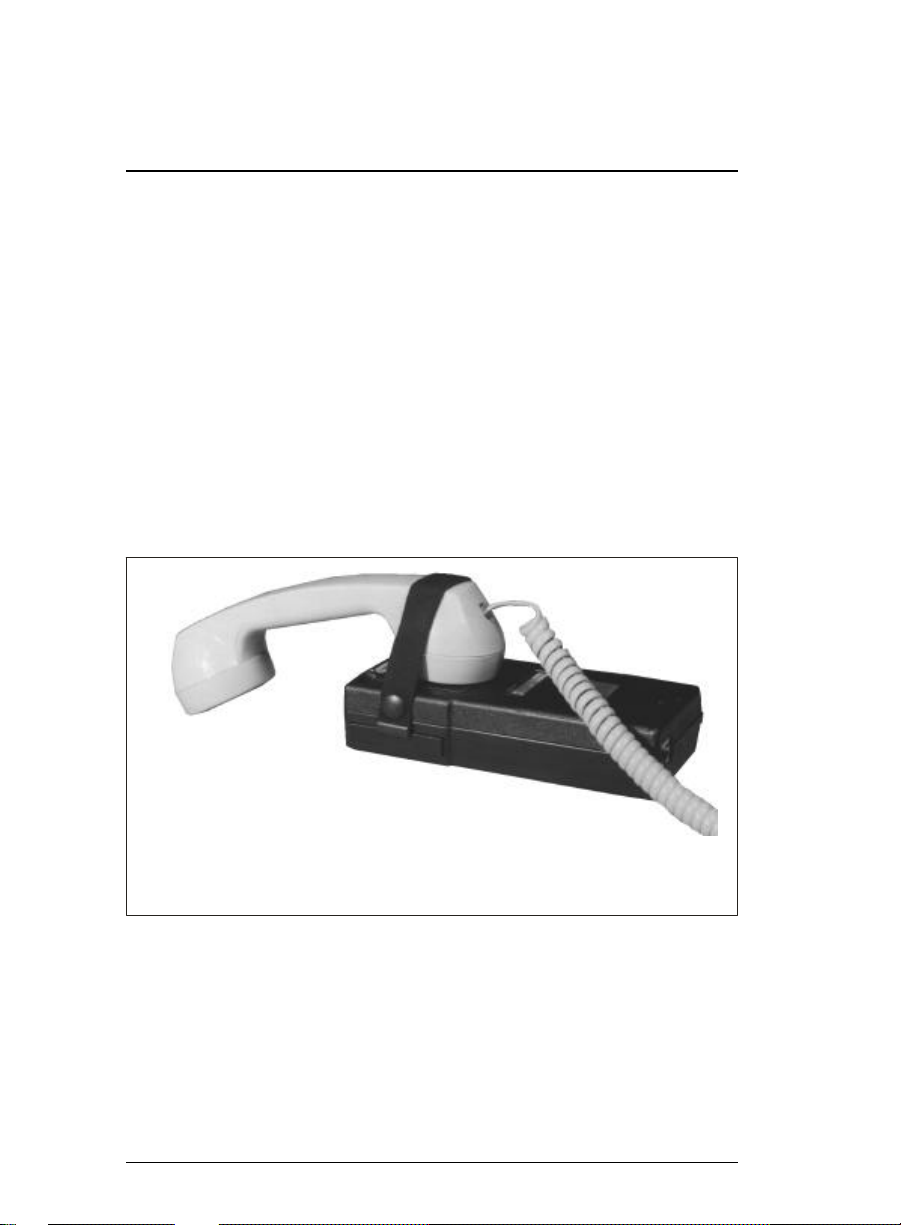
1. Dis con nect one end of the elas tic strap from the PTC.
2. Place the acous tic cou pler over the mouth piece of the tele -
phone re ceiver (see Fig ure 11). Make sure the re ceiver is cen tered over the acous tic cou pler.
3. Stretch the elas tic strap across the re ceiver and snap it
onto the PTC to hold the re ceiver in place.
For in for ma tion on send ing and re ceiv ing data, see the in struc tions pro vided by your or ga ni za tion for your PTC
sys tem.
Fig ure 11. Attaching the Acous tic Cou pler to a Re ceiver
20 / The PTC-710
Page 27
Con necting the In ter nal Mo dem
to a Tele phone Line
1. Lift the rub ber flap from the PTC’s RJ-11 socket.
2. Plug a stan dard tele phone cord into the RJ-11 socket (see
Fig ure 12).
3. Plug the other end of the cord into an RJ-11 tele phone
wall jack.
For more in struc tions on send ing and re ceiv ing data, see the
in struc tions pro vided by your or ga ni za tion for your PTC
sys tem.
Fig ure 12. Con necting the In ter nal Mo dem to a
Phone Line
The PTC-710 / 21
Page 28

Trou ble shooting
If the PTC Does Not Start:
• Charge the bat ter ies if they are nickel-cadmium; re place
them if they are al ka line.
• Re place the nickel-cadmium bat ter ies.
• Check any ac ces sory con nec tions.
If the PTC Shows the Mes sage “BACKUP BAT TERY
FAULT”:
• Make sure the backup bat tery is switched to the ON po si -
tion. If the PTC still will not turn on, con tact your
Symbol ser vice rep re sen ta tive.
If the Bar-Code Reader Does Not Read a La bel:
• Try scan ning across the top or bot tom of the bars in the
la bel.
• Make sure the bar-code reader is con nected se curely to
the PTC-710.
• Wipe off the bar-code la bel.
• Wipe off the tip of the pen cil wand.
22 / The PTC-710
Page 29

Reg u la tions
FCC (United States)
This equip ment gen er ates, uses, and can ra di ate ra dio fre quency en ergy and if not in stalled and used in ac cor dance
with this op er a tor’s guide, may cause in ter fer ence to ra dio
com mu ni ca tions. It has been tested and found to com ply
with the lim its for a Class A com put ing de vice pur su ant to
Subpart J of Part 15 of FCC rules, which are de signed to pro vide rea son able pro tec tion against such in ter fer ence when
op er ated in a com mer cial en vi ron ment. Op er ating this
equip ment in a res i den tial area is likely to cause in ter fer ence
in which case the user at his own ex pense will be re quired to
take what ever mea sures may be re quired to cor rect the in ter fer ence.
Ac cord ing to 47 C.F.R. Part 68, Sec tion 68.106 (1983) of
FCC reg u la tions, the cus tomer must no tify the tele phone
com pany be fore con nect ing the mo dem to the tele phone line
for the first time, and also when per ma nently re mov ing the
mo dem from ser vice. Such no tice must in clude the FCC
Reg is tra tion Num ber of the mo dem. For the PTC-710’s in ter nal mo dem, the Reg is tra tion Num ber is
BC5USA60772DTE.
De part ment of Com mu ni ca tions (Can ada)
NO TICE: The Ca na dian De part ment of Com mu ni ca tions
la bel iden ti fies cer ti fied equip ment. This cer tif i ca tion means
that the equip ment meets cer tain tele com mu ni ca tions net work pro tec tive, op er a tional, and safety re quire ments. The
De part ment does not guar an tee the equip ment will op er ate to
the user’s sat is fac tion.
Be fore in stall ing this equip ment, us ers should en sure that it
is per mis si ble to be con nected to the fa cil i ties of the lo cal
tele com mu ni ca tions com pany. The equip ment must also be
in stalled us ing an ac cept able method of con nec tion. In some
The PTC-710 / 23
Page 30

cases, the com pany’s in side wir ing as so ci ated with a sin gle
line in di vid ual ser vice may be ex tended by means of a cer ti fied con nec tor as sem bly (tele phone ex ten sion cord). The
cus tomer should be aware that com pli ance with the above
con di tions may not pre vent deg ra da tion of ser vice in some
sit u a tions.
Re pairs to cer ti fied equip ment should be made by Sym bol.
Any re pairs or al ter ations made by the user to this equip ment, or equip ment mal func tions, may give the tele com mu ni ca tions com pany cause to re quest the user to dis con nect
the equip ment.
Users should en sure for their own pro tec tion that the elec tri cal ground con nec tions of the power util ity, tele phone lines
and in ter nal me tal lic wa ter pipe sys tem, if pres ent, are con nected to gether. This pre cau tion may be par tic u larly im por tant in ru ral ar eas.
CAU TION! Users should not at tempt to make such con nec tions them selves, but should con tact the ap pro pri ate elec tric
in spec tion au thor ity, or elec tri cian, as ap pro pri ate.
The Load Num ber (LN) as signed to each ter mi nal de vice de notes the per cent age of the to tal load to be con nected to a
tele phone loop which is used by the de vice, to pre vent over load ing. The ter mi na tion on a loop may con sist of any com bi na tion of de vices sub ject only to the re quire ment that the
to tal of the Load Num bers of all the de vices does not ex ceed
100. An al pha betic suf fix is also spec i fied in the Load Num -
ber for the ap pro pri ate ring ing type (A or B), if ap pli ca ble.
For ex am ple, LN = 20 A des ig nates a Load Num ber of 20
and an “A” type ringer.
For the PTC-710, the Load Num ber is 4, with no al pha betic
suf fix.
24 / The PTC-710
Page 31

Page 32

Sym bol Tech nol ogies, Inc. / One Sym bol Plaza Holtsville New York 11742-1300
Part No. 13977-000-03-004 Printed in U.S.A.
 Loading...