

Page 1
Symbol LS3578
Quick Start Guide
http://www.symbol.com/barcode
See Product Reference Guide for more information
POST IN WORK AREAPOST IN WORK AREA
3
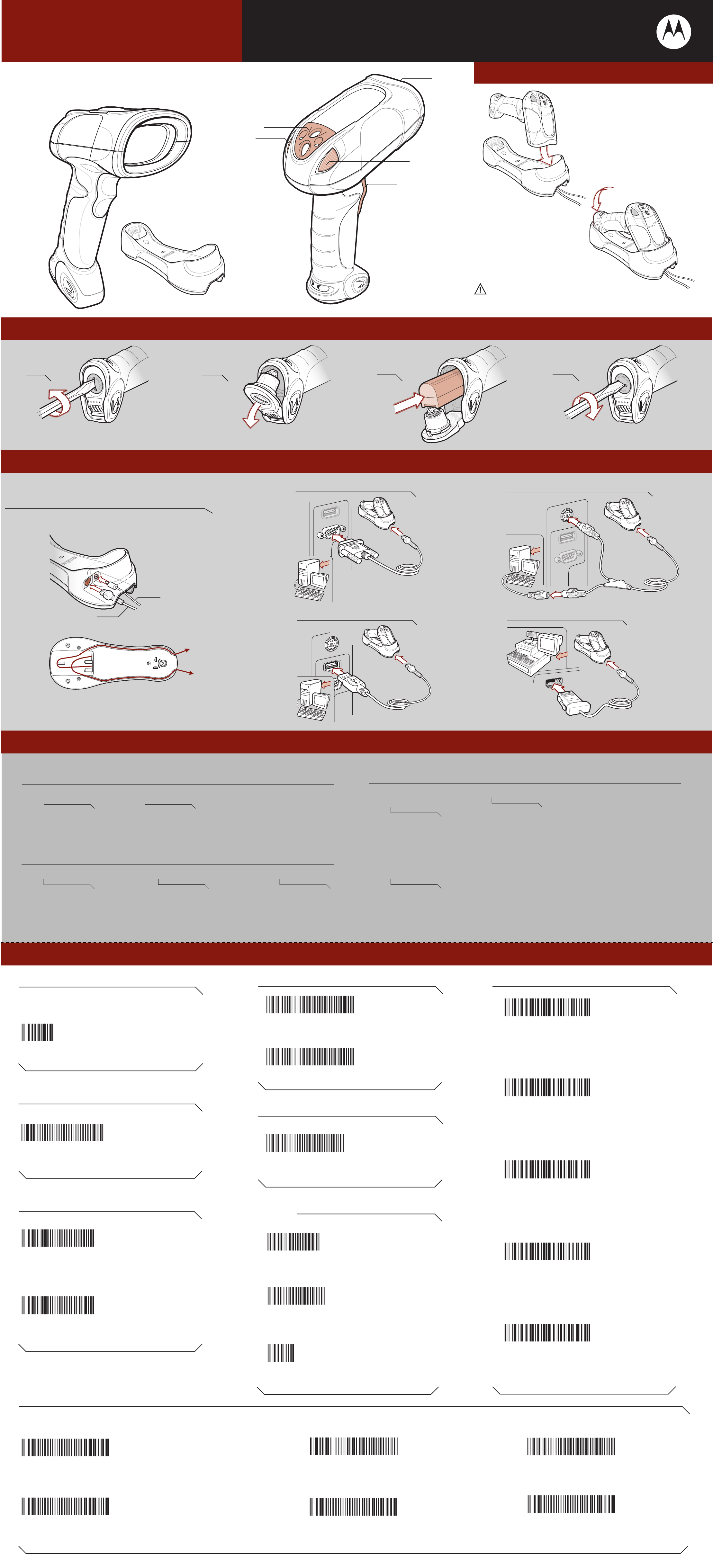
Cradle Insertion
1
2
2
4
Battery Insertion/Removal
1
Or use coin Or use coin
1 Tether Plate
2 LED Indicators
3 Scan Window
4 Scan Trigger
2
3
Caution: Symbol LS3478 cordless scanners are incompatible with
Symbol STB3508/3578 cradles. Symbol LS3578 cordless scanners are
incompatible with Symbol STB3408/3478 cradles.
4
Host Interfaces
NOTE: Cables may vary depending on configuration. When using an external power supply, insert the
cable into the cradle first, then insert host cable. Connect power last.
Cable Connection at Cradle
Power
Host
RS-232
USB
Keyboard Wedge
IBM 46XX
Troubleshooting
Please refer to the Symbol LS3578 Product Reference Guide Troubleshooting section for further information.
Scanner not working
No power to scanner
Check battery
Scanner decoding bar code, but data not transmitting to host
Scanner not paired to host-connected cradle
Pair the scanner to the cradle (using the
PAIR bar code on the cradle)
If data is still not transmitting to host, it may be necessary to recycle power on the cradle
End cap not secured correctly
Turn end cap to secure
Cradle not programmed for correct host interface
Check scanner host parameters or
edit options
Interface cable is loose
Check for loose cable
connections
Scanner not decoding bar code
Scanner not programmed
for bar code type
Ensure scanner is programmed
to read type of bar code being
scanned
Bar code unreadable
Ensure bar code is not defaced;
try scanning test bar code of same
bar code type
Scanned data incorrectly displayed on host
Paired cradle host communication parameters do not match the host’s parameters
Check cradle host parameters or edit options
Symbol LS3578 Programming Bar Codes
Set Defaults
Note: The scanner connection to the cradle
is dissolved when Set Defaults is scanned.
SET DEFAULTS
Unpairing/Disconnection
IBM 46XX Host Types Radio Communications Host Types
PORT 5B
PORT 9B
CRADLE HOST
SERIAL PORT PROFILE (SLAVE)
Keyboard Wedge Host Types
UNPAIR/DISCONNECT
USB Host Types
HID KEYBOARD EMULATION
IBM HAND-HELD USB
IBM PC/AT and IBM PC COMPATIBLE
HID PROFILE (SLAVE)
Carriage Return/Line Feed
SCAN OPTIONS
SERIAL PORT PROFILE (MASTER)
<DATA><SUFFIX>
RS-232 Host Types
STANDARD RS-232
ICL RS-232
ENTER
NIXDORF RS-232 MODE B
FUJITSU RS-232
HID PROFILE (MASTER)
NIXDORF RS-232 MODE A
OPOS/JPOS
Page 2
Symbol LS3578
Quick Start Guide
11
22
POST IN WORK AREAPOST IN WORK AREA
33
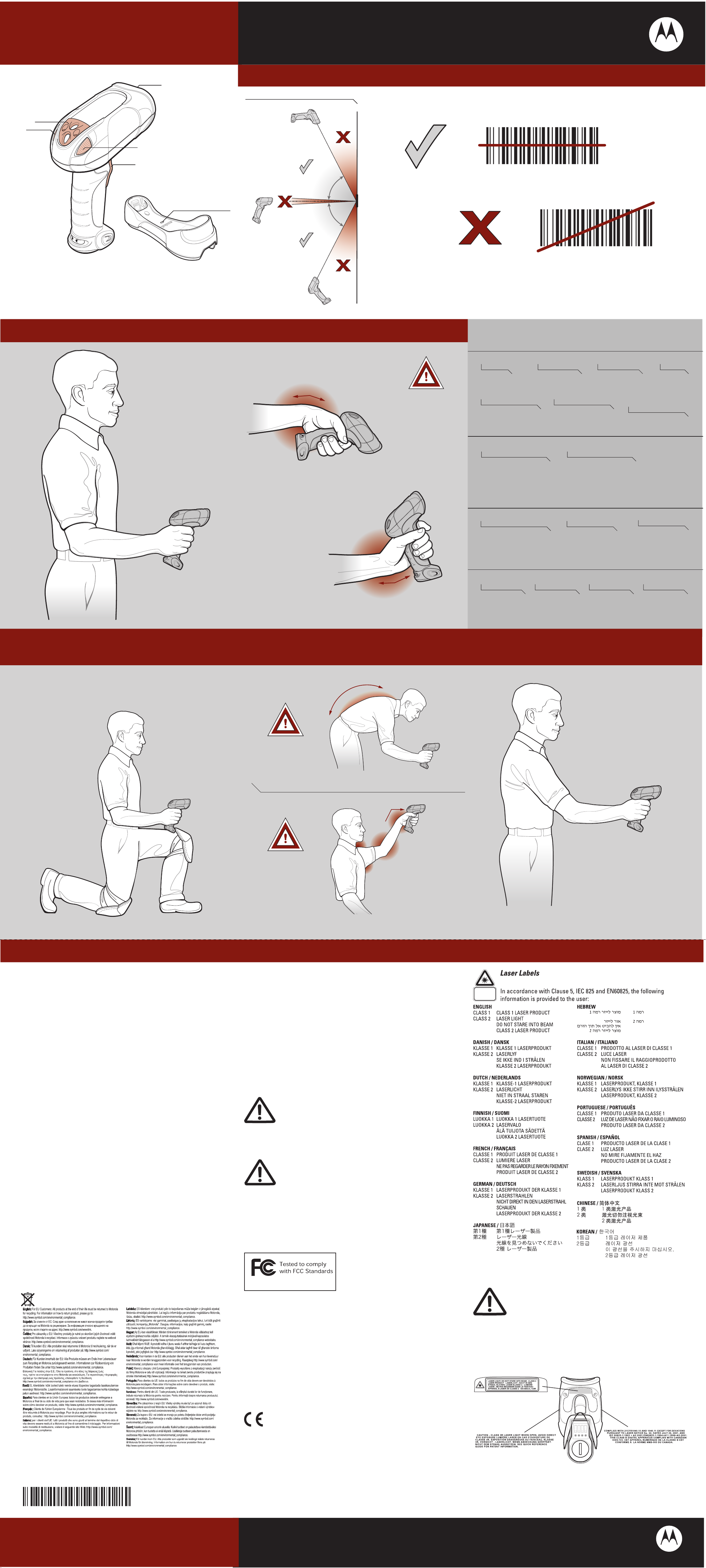
Optimum Scanning Positions
Aiming
22
44
0 1 2 3 4 50 1 2 3 4 5
LED Indicator
0 1 2 3 4 50 1 2 3 4 5
1 Tether Plate
2 LED Indicators
3 Scan Window
4 Scan Trigger
Optimum Upright Body Posture Avoid Extreme Wrist Angles
ALTERNATE LEFT AND RIGHT HANDSALTERNATE LEFT AND RIGHT HANDS
TAKING BREAKS AND TASK ROTATION RECOMMENDEDTAKING BREAKS AND TASK ROTATION RECOMMENDED
Beeper Indications
Standard Use
AVOID EXTREME
WRIST ANGLES
Low-medium-high beeps
Power up
Short low-high beeps
Scanner has paired with
the cradle
Parameter Menu Scanning
High-low-high-low beeps
Normal beep
Bar code decoded [if
decode beeper enabled]
Short high-low beeps
Scanner has unpaired
with the cradle
Long low-high beeps
4 long low beeps
Transmission error
detected; data is ignored
4 short high beeps
Low battery
indication
Long low-high beeps or
Long low-high-low-high beeps
Unsuccessful pairing attempt
Optimum Body Posture
Successful program exit with change
in the parameter setting
Input error, incorrect programming
sequence,or Cancel bar code scanned
LED Indications
Standard Use
Off
No power applied to scanner (battery
discharged or removed), or scanner
is in low power and ready to scan
Charging Use
Green Slow Flash
Scanner charging at
a slow rate (used
when cradle is
powered by host cable)
Green Fast Flash
Scanner charging at a
fastrate (used when
cradleis powered from
external power supply)
Optimum Body Posture for
Green
Bar code successfully
decoded
Red Flash
Charging problem
See Product Reference
Guide for more
information
Red
Data transmission
error or scanner malfunction
or Symbol LS3578 scanner
inserted into an STB3478
cradle
Red and Green Flash
Temperature fault
for Low Scanning
Extended Range Scanning
ALTERNATE LEFT
AND RIGHT KNEES
AVOID BENDING
Regulatory Information
© MOTOROLA, INC. 2007 All rights reserved.
No part of this publication may be reproduced or used in any form, or by any electrical or mechanical means,
without permission in writing from Motorola. This includes electronic or mechanical means, such as
photocopying, recording, or information storage and retrieval systems. The material in this manual is subject to
change without notice. The software is provided strictly on an “as is” basis. All software, including firmware,
furnished to the user is on a licensed basis. Motorola grants to the user a non-transferable and non-exclusive
license to use each software or firmware program delivered hereunder (licensed program). Except as noted
below, such license may not be assigned, sublicensed, or otherwise transferred by the user without prior written
consent of Motorola. No right to copy a licensed program in whole or in part is granted, except as permitted
under copyright law. The user shall not modify, merge, or incorporate any form or portion of a licensed program
with other program material, create a derivative work from a licensed program, or use a licensed program in a
network without written permission from Motorola. The user agrees to maintain Motorola’s copyright notice on
the licensed programs delivered hereunder, and to include the same on any authorized copies it makes, in whole
or in part. The user agrees not to decompile, disassemble, decode, or reverse engineer any licensed program
delivered to the user or any portion thereof. Motorola reserves the right to make changes to any software or
product to improve reliability, function, or design. Motorola does not assume any product liability arising out of,
or in connection with, the application or use of any product, circuit, or application described herein.
No license is granted, either expressly or by implication, estoppel, or otherwise under any Motorola intellectual
property rights. An implied license only exists for equipment, circuits, and subsystems contained in Motorola
products.
MOTOROLA and the Stylized M Logo and Symbol and the Symbol Logo are registered in the US Patent &
Trademark Office. All other product or service names are the property of their respective owners.
Motorola, Inc., One Motorola Plaza, Holtsville, N.Y. 11742-1300, http://www.symbol.com
AVOID REACHING
Country Approval
Regulatory markings are applied to the device signifying the radio (s) are approved for use in the
following countries: United States, Canada, Australia, Japan & Europe1.
Please refer to the Symbol Declaration of Conformity (DoC) for details of other country markings.
This is available at http://www2.symbol.com/doc/.
Note1: For 2.4GHz Products: Europe includes, Austria, Belgium, Bulgaria, Czech Republic, Croatia,
Cyprus, Denmark, Estonia, Finland, France, Germany, Greece, Hungary, Iceland, Ireland, Italy,
Latvia, Liechtenstein, Lithuania, Luxembourg, Malta, Netherlands, Norway, Poland, Portugal,
Romania, Slovak Republic, Slovenia, Spain, Sweden, Switzerland and the United Kingdom.
Radio Modules
The Symbol LS3578 Scanners contain an approved radio module.
This module is the Symbol Bluetooth radio Type: LMX5452
Bluetooth Devices
This product is an approved Bluetooth device. BT ID: B02793
Operation of the device without regulatory approval is illegal
Warranty
Subject to the terms of Motorola's hardware warranty statement, the Symbol LS3578 hand held scanner
products are warranted against defects in workmanship and materials for a period of three years from the date
of shipment. The Liquid Polymer scan element includes an unprecedented limited lifetime warranty. For the
complete Motorola hardware product warranty statement, go to: http://www.symbol.com/warranty
Patents
This product is covered by one or more of the patents listed on the website: www.symbol.com/patents
Ergonomic Recommendations
Caution: In order to avoid or minimize the potential risk of ergonomic injury follow the recommendations below.
Consult with your local Health & Safety Manager to ensure that you are adhering to your company's safety
programs to prevent employee injury.
educe or eliminate repetitive motion • Reduce or eliminate vibration
• R
• Maintain a natural/neutral position • Reduce or eliminate direct pressure
• Reduce or eliminate excessive force • Provide adjustable workstations
• Keep objects that are used frequently • Provide adequate clearance
within easy reach • Provide a suitable working environment
• Perform tasks at correct heights • Improve work procedures
Service Information
Before using the unit, it must be configured to operate in your facility’s network and run your applications. If you
have a problem with your equipment, contact Motorola Enterprise Mobility Support for your region. Contact
information is available at: http://www.symbol.com/customersupport. If you purchased your Enterprise Mobility
business product from a Motorola business partner, contact that business partner for support. Before
contacting, have the model number and serial number at hand. If your problem cannot be solved by Motorola
Enterprise Mobility Support, you may need to return your equipment for servicing and will be given specific
directions. Motorola is not responsible for any damages incurred during shipment if the approved shipping
container is not used. Shipping the units improperly can possibly void the warranty
For the latest version of this guide go to: http://www.symbol.com/manuals.
Waste Electrical and Electronic Equipment (WEEE)
Power Supply
Use only an approved power supply 50-14000-239R output rated 9 VDC and minimum 2 A.
The power supply is certified to EN60950 with SELV outputs. Use of alternative power supply
will invalidate any approval given to this device and may be dangerous.
FCC / E
Safety Information
The device complies with internationally recognized standards covering Specific Absorption
Rate (SAR) related to human exposure to electromagnetic fields from radio devices.
Reducing RF Exposure – Use Properly
It is advisable to use the device only in the normal operating position.
Hand Held Devices:
U RF Exposure Guidelines
Radio Frequency Interference Requirements
Radio Transmitters (Part 15)
This device complies with Part 15 of the FCC Rules.
Operation is subject to the following two conditions:
(1) This device may not cause harmful interference, and
(2) this device must accept any interference received,
FOR HOME OR OFFICE USE
including interference that may cause undesired operation.
Radio Frequency Interference Requirements – Canada
Radio Transmitters
This device complies with RSS 210 of Industry & Science Canada. Operation is subject to the following
two conditions: (1) this device may not cause harmful interference and (2) this device must accept any
interference received, including interference that may cause undesired operation.
Label Marking: The Term "IC:" before the radio certification only signifies that Industry
Canada technical specifications were met.
Radio Frequency Interference Requirements – Brazil
Declarações Regulamentares para Symbol LS3578 BRAZIL
NOTA: A marca de certificação se aplica ao Equip. de Radiação Restrita, modelo Symbol LS3578.
Este equipamento opera em caráter secundário, isto é, não tem direito a proteção contra interferência
prejudicial, mesmo de estações do mesmo tipo, e não pode causar interferência a sistemas operando
em caráter primário.”
Para maiores consultas sobre ANATEL consulte o site: www.anatel.gov.br
Laser Devices
Symbol products using lasers comply with US 21CFR1040.10, and
IEC825-1:1993, EN60825-1:1994+A11:1996. The laser classification is
marked on one of the labels on the device.
Class 1 Laser devices are not considered to be hazardous when used for their
intended purpose. The following statement is required to comply with US and
international regulations:
Caution: Use of controls, adjustments or performance of procedures other than those specified herein
may result in hazardous laser light exposure.
Class 2 laser scanners use a low power, visible light diode. As with any very bright light source, such as
the sun, the user should avoid staring directly into the light beam. Momentary exposure to a Class 2 laser
is not known to be harmful.
Scanner Labeling
Regulatory Information
Symbol Technologies, Inc., the Enterprise Mobility business of Motorola, Inc. (”Motorola”).
All Symbol devices are designed to be compliant with rules and regulations in locations they are sold and
will be labeled as required. Any changes or modifications to Symbol equipment, not expressly approved
by Symbol, could void the user's authority to operate the equipment. Translated Regulatory Information is
available in on the Web site: http: //www.symbol.com/manuals and look for your specific product.
72-93587-01 Revision A April 2007
Symbol LS3578
Recommended Usage Guide
Marking and European Economic Area (EEA)
Bluetooth for use through the EEA have the following restrictions
• Maximum radiated transmit power of 10mW EIRP in the frequency range 2.400 -2.4835 GHz
• Belgium outside usage, the equipment is restricted to 2.460 -2.4835 GHz frequency range
• Italy requires a user license for outside usage.
Statement of Compliance
Symbol Technologies, Inc., hereby, declares that this device is in compliance with the essential
requirements and other relevant provisions of Directives 1999/5/EC, 89/336/EEC and 73/23/EEC.
Declaration of Conformities may be obtained from http://www2.symbol.com/doc/
http://www.symbol.com/barcode
MOTOROLA, INC. One Motorola Plaza Holtsville, New York 11742-1300
 Loading...