

Page 1
RX-905
GAMING
Gaming Optical Mouse
USER’S MANUAL
www.sven.fi
Page 2

ENG
User's Manual
Thank you for purchasing SVEN PC mouse!
Please read the following instructions carefully before connecting, operating
or adjusting this product. Besides, please keep this manual in a safe place
for future reference.
COPYRIGHT
© 2011. SVEN Company Ltd. Version 1.0 (V 1.0). This manual and information
contained in it are copyrighted. All rights reserved.
TRADEMARKS
All trademarks are the property of their legal holders.
NOTICE OF RESPONSIBILITY RESTRICTION
Despite the exerted efforts to make this manual more exact, some
discrepancies may occur. The information of this manual is given on «as is»
terms. The author and the publisher do not bear any liability to a person or
an organization for loss or damages which have arisen from the information
contained in the given manual.
СОДЕРЖАНИЕ
ENG ........................................................................
1. SPECIAL FEATURES ..................................................
2. PACKAGE CONTENTS ................................................
3. SYSTEM REQUIREMENTS ..........................................
4. DESCRIPTION CONSTRUCTION ...................................
5. CONNECTION ..........................................................
6. SOFTWARE INSTALLATION ..........................................
7. SOFTWARE INTERFACE INSTRUCTIONS .........................
8. TROUBLE SHOOTING ........................................ ........
9. TECHNICAL SPECIFICATION ........................................
Тechnical support is on www.sven.fi
RX-905 GAMING
1
1
2
2
2
3
3
4
7
8
9
Page 3

ENG
Gaming Optical Mouse
1. SPECIAL FEATURES
• High-precision optical technology
• Elegant and ergonomic shape of mouse case
• High sensitivity and operation speed (3600 fps)
• 16 bit path for data transfer
• Full Speed USB
• Tracking speed up to 170 cm/sec
• Effective on most surfaces
• 4 programmable buttons
• 400/800/1600/2400 dpi switchable (max. 3200 dpi enhanced by software)
• Rubber coating of mouse case
• Wheel LED for different resolution modes
• Drivers installation not required for Windows XP/Vista/7
2. PACKAGE CONTENTS
• Optical gaming mouse — 1 pc
• Software CD disk — 1 pc
• User’s manual — 1 pc
• Warranty card — 1 pc
3. SYSTEM REQUIREMENTS
• Windows 2000/XP/Vista/7 or higher, Mac OS 10.4 or higher, Linux.
• Free USB port.
2
Page 4
ENG
User's Manual
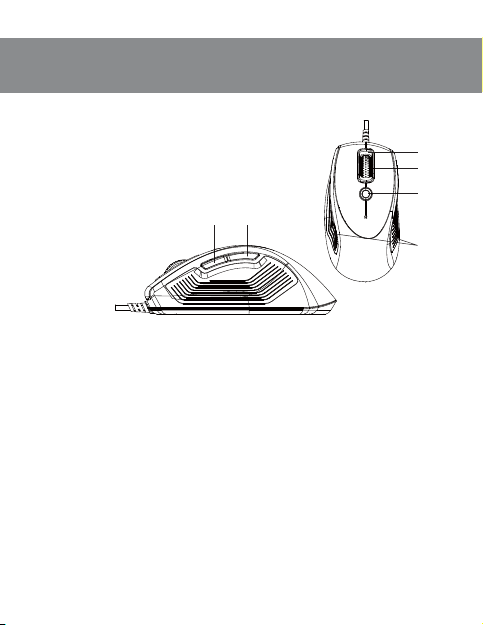
4. DESCRIPTION CONSTRUCTION
a Scroll wheel lighting
b Scroll wheel
c DPI switch (400/800/1600/2400 dpi)
d Rubber coating
e Gaming button 1
f Gaming button 2
5. CONNECTION
• Switch on your PC.
• Connect mouse to PC USB port*.
* Users need to wait for around 10-15 seconds before moving cursor at the
first time usage.
• Press dpi switch button c to change for different resolution.
• Wheel light indicator has different colors for different resolution modes:
– 400 dpi: Light off;
– 800 dpi: Green light on;
– 1600 dpi: Blue light on (on default);
– 2400 dpi: Red light on.
• Users can change dpi setting from 400 to 3200 dpi installed on default with
the software included.
RX-905 GAMING
ef
Fig. 1
a
b
c
d
3
Page 5
ENG
Gaming Optical Mouse
Tips for gamers
•
Try default settings in practice before changing these settings.
•
Practice using dpi switch button before engaging in a serious combat.
•
In first-person shooter games it is better to program mouse only for two
resolution modes, this way it will work better than using three or more. For
shooting use smaller resolution (e.g., 400 dpi), and higher resolution
(e.g., 2400 dpi) for quicker games.
•
Customize dpi setting for each game according to your specific sensitivity switching needs.
6. SOFTWARE INSTALLATION
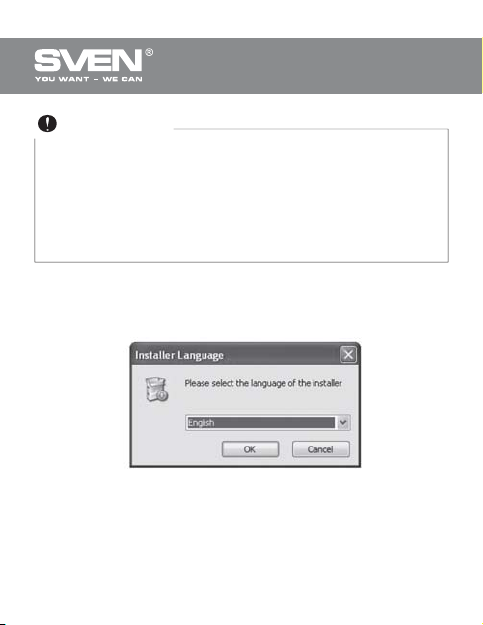
Put Software CD disk into CD-ROM. In the coming up window (see Fig. 2)
select language and click «OK».
Fig. 2
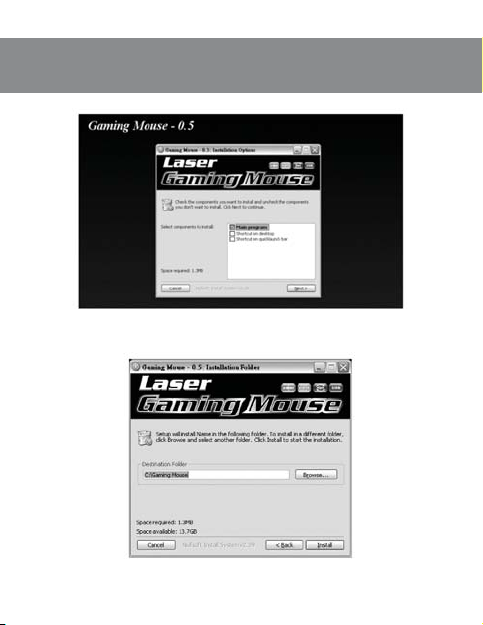
• Select driver installation in «Gaming Mouse» window and click «NEXT».
4
Page 6
ENG
User's Manual
• Find destination folder and press «Install».
RX-905 GAMING
Fig. 3
Fig. 4
5
Page 7
ENG
Gaming Optical Mouse
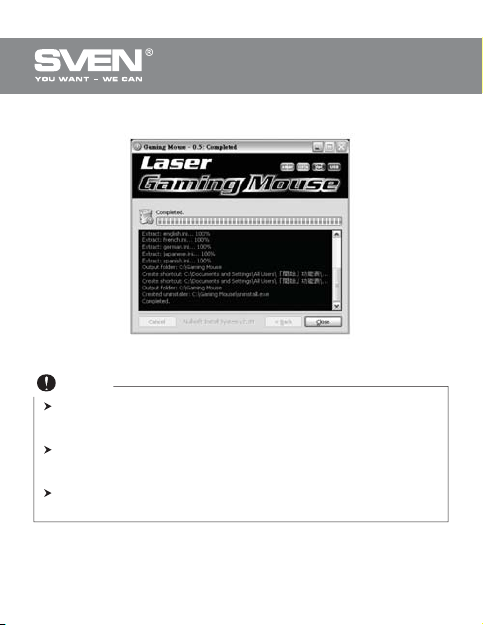
• After successful installation click «Close».
Fig. 5
Notes
During software installation close Language Input Method. To avoid
possible program conflicts, uninstall other mouse drivers before
software installation.
Gaming software automatically detects mouse connected to PC.
After connecting mouse to PC, mouse picture appears in upper right
corner.
After successful software installation, quick launch icon appears in
lower right corner.
6
Page 8
ENG
User's Manual
7. SOFTWARE INTERFACE INSTRUCTIONS
Buttons setting
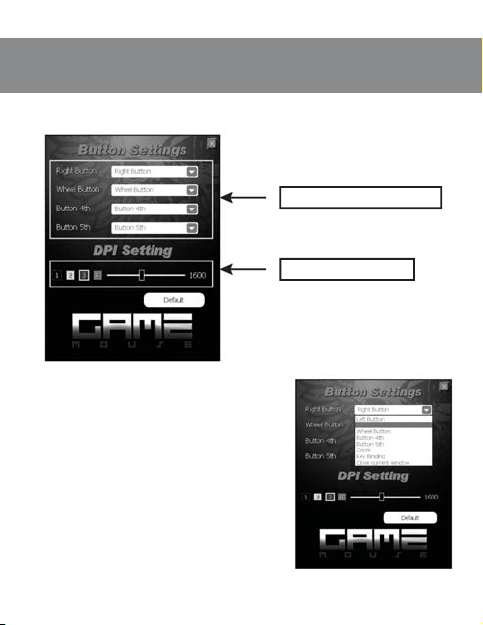
• Gaming mouse has 4 buttons for setting.
• Move cursor of the mouse to Button
Setting area and set up function of every
button given in the menu (see Fig. 7).
RX-905 GAMING
Fig. 6
Fig. 7
Button Settings Window
Dpi Setting Window
7
Page 9
ENG
Gaming Optical Mouse
• After saving functions, PC automatically saves new settings to the mouse.
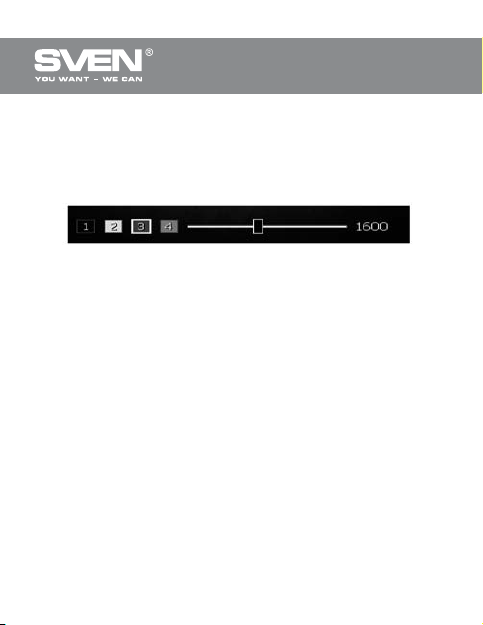
Sensitivity level setting
• Gaming mouse has 4 levels of sensitivity: 400/800/1600/2400 dpi. User
can choose resolution from 400 dpi to 3200 dpi and assign it to corresponding sensitivity level (see Fig. 8).
Fig. 8
8. TROUBLE SHOOTING
If some problems occur with mouse, please check for the fol- lowing:
• If there is no external damage, address authorized service center.
• Protect mouse from direct sunlight, moisture, dirt, excessive heat and
abrasive chemical detergents.
• If water accidentally gets on the surface of mouse, turn off mouse
immediately and address authorized service center. Refrain from using mouse
until you receive consultation from qualified specialist.
8
Page 10
ENG
User's Manual
9.
TECHNICAL SPECIFICATION
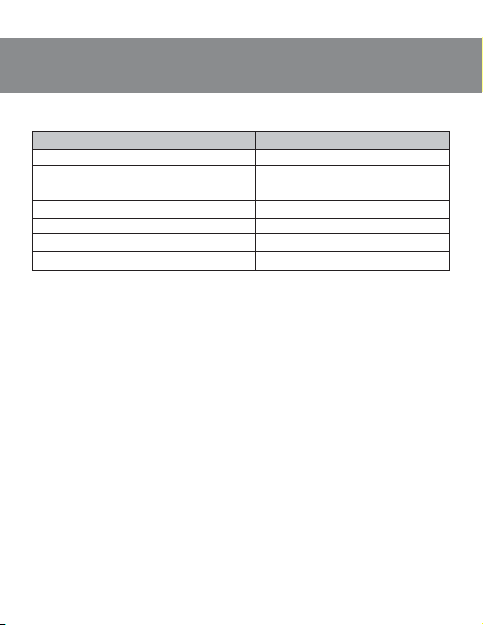
Parameter, measurement unit
OS required
Resolution, dpi
Q-ty of buttons
Interface
Conformity with
Weight, g
RX-905 GAMING
Value
Windows 2000/XP/Vista/7
400/800/1600/2400 (max. up to
3200 enhanced by software)
5 + 1 (scroll wheel)
USB
FCC, CE
124
Notes:
• Technical specification given in this table is supplemental
information and can not give occasion to claims.
• Technical specification is subject to change without notice due
to improvement of SVEN production.
9
Page 11

Gaming Optical Mouse
Модель:
RX-905 Gaming
Импортер в России: ООО «СКАНДИТРЕЛ»,
111024, РФ, г. Москва,
ул. Авиамоторная, д. 65, стр. 1.
Уполномоченная организация в России:
ООО «РТ-Ф», 105082, г. Москва, ул. Фридриха
Энгельса, д. 75, стр. 5.
Условия гарантийного обслуживания смотрите
в гарантийном талоне или на сайте www.sven.fi
Гарантийный срок: 12 мес.
Срок службы: 2 года.
Произведено под контролем «Свен Скандинавия
Лимитед», 48310, Финляндия, Котка
Котолахдентие, 15. Сделано в Китае.
Модель:
RX-905 Gaming
Постачальник/імпортер в Україні: ТО В «СВЕН
Центр». Київська область, м. ПереяславХмельницький, вул. Героїв Дніпра, 31.
Призначення, споживчі властивості та відомості
про безпеку товару див. у керівництві
користувача.
Умови гарантійного обслуговування дивіться в
гарантійному талоні або на сайті www.sven.fi
Гарантійний термін: 12 міс.
Строк служби: 2 роки.
Товар сертифіковано/має гігієнічний висновок.
Шкідливих речовин не містить.
Зберігати в сухому місці.
Виготовлено під контролем «Свен Скандинавія
Лімітед», 48310, Фінляндія, Котка , Котолахдентіє,
15. Зроблено в Китаї.
Produced under the control of Oy Sven Scandinavia
Ltd. 15, Kotolahdentie, KOTKA, Finland, 48310.
Made in China.
® Registered Trademark of Oy SVEN
Scandinavia Ltd. Finland.
,
RX-905
GAMING
 Loading...