

Page 1

www.sven.fi
USER’S MANUAL
Wired Optical Mouse
RX-440
Page 2

Technical support: www.sven.fi
ENG
1
User’s Manual
2
2
2
2
2
3
3
Congratulations on purchasing the SVEN PC mouse!
Please read the following User’s Manual carefully before connecting,
operating or adjusting this product. Besides, please keep this Manual in a
safe place for future reference.
COPYRIGHT
© 2014. SVEN PTE. LTD. Version 1.0 (V 1.0).
This Manual and information contained in it are copyrighted. All rights
reserved.
TRADEMARKS
All trademarks are the property of their legal holders.
NOTICE OF RESPONSIBILITY RESTRICTION
Despite the exerted efforts to make this Manual more exact, some
discrepancies may occur. The information of this Manual is given on “as is”
terms. The author and the publisher do not bear any liability to a person or
an organization for loss or damages which have arisen from the information
contained in the given Manual.
СОДЕРЖАНИЕ
1. SPECIAL FEATURES ..................................................
2. PACKAGE CONTENTS ................................................
3. SYSTEM REQUIREMENTS ..........................................
4. DESCRIPTION .........................................................
5. INSTALLATION .........................................................
6. TROUBLESHOOTING .................................................
7. TECHNICAL SPECIFICATIONS ......................................
RX-440
Page 3
ENG
2
Wired Optical Mouse
a
b
1. SPECIAL FEATURES
• Full-sized mouse
• BlueLED advanced optical technology
• Soft Touch coating
• Ergonomic mouse shape comfortable for the hand
• Effective on most surfaces
• High operating speed
• Two additional Forward and Back navigation buttons
• 800 dpi resolution
• USB interface
• No drivers required for Windows XP/Vista/7/8
2. PACKAGE CONTENTS
• Optical mouse — 1 рс
• User’s Мanual — 1 рс
• Warranty card — 1 рс
3. SYSTEM REQUIREMENTS
• Windows XP/Vista/7/8.
• Free USB port.
4. DESCRIPTION
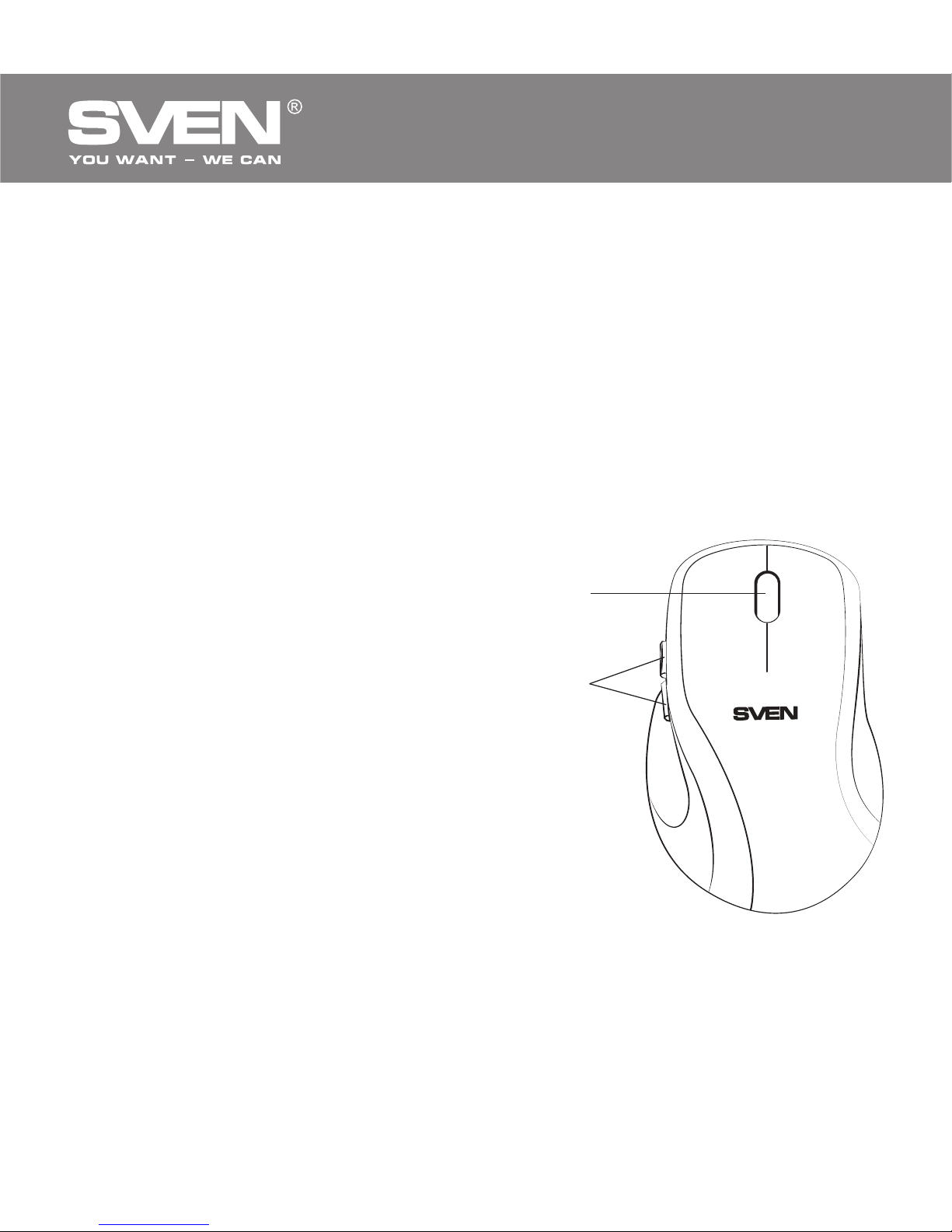
a Scroll wheel
b Additional Forward and Back
navigation buttons
5. INSTALLATION
• Connect the mouse to an available USB port of your PC.
• Installation of the mouse is automatic after its connection to the PC USB
port.
Fig. 1. Top view
Page 4

Problem
The mouse is not
working.
Solution
1. Disconnect the mouse from your PC and check
the connector pins for possible damage. If there
is no external damage found and the connector
pins are OK, connect the mouse to your PC again.
2. Address your nearest authorized service center.
6. TROUBLESHOOTING
7.
TECHNICAL SPECIFICATIONS
Parameter, measurement unit
OS compatibility
Resolution, dpi
Q-ty of buttons
Interface
Dimensions, mm
Weight, g
Value
Windows XP/Vista/7/8
800
4 + 1 (scroll wheel)
USB
75 × 40 × 115
83
Notes:
• Technical specifications given in this table are supplemental infor-
mation and cannot give occasion to claims.
• Technical specifications are subject to change without notice due to
improvement of SVEN production.
ENG
3
User’s Manual
RX-440
Page 5
Модель:
RX-440
Импортер в России: ООО «СКАНДИТРЕЛ», 111024,
РФ, г. Москва, ул. Авиамоторная, д. 65, стр. 1.
Уполномоченная организация в России:
ООО «РТ-Ф», 105082, г. Москва, ул. Фридриха
Энгельса, д. 75, стр. 5.
Условия гарантийного обслуживания смотрите
в гарантийном талоне или на сайте www.sven.fi.
Гарантийный срок: 12 мес. Срок службы: 2 года.
Производитель: «СВЕН ПТЕ. Лимитед»,
176 Джу Чиат Роуд, № 02-02, Сингапур, 427447.
Произведено под контролем «Свен Скандинавия
Лимитед», 48310, Финляндия, Котка,
Котолахдентие, 15. Сделано в Китае.
Manufacturer: SVEN PTE. LTD., 176 Joo Chiat Road,
№ 02-02, Singapore, 427447. Produced under the
control of Oy Sven Scandinavia Ltd. 15, Kotolahdentie,
Kotka, Finland, 48310. Made in China.
® Registered Trademark of Oy SVEN
Scandinavia Ltd. Finland.
RX-440
Wired Optical Mouse
 Loading...