

Page 1

www.sven.ѵ
OPERATION
MANUAL
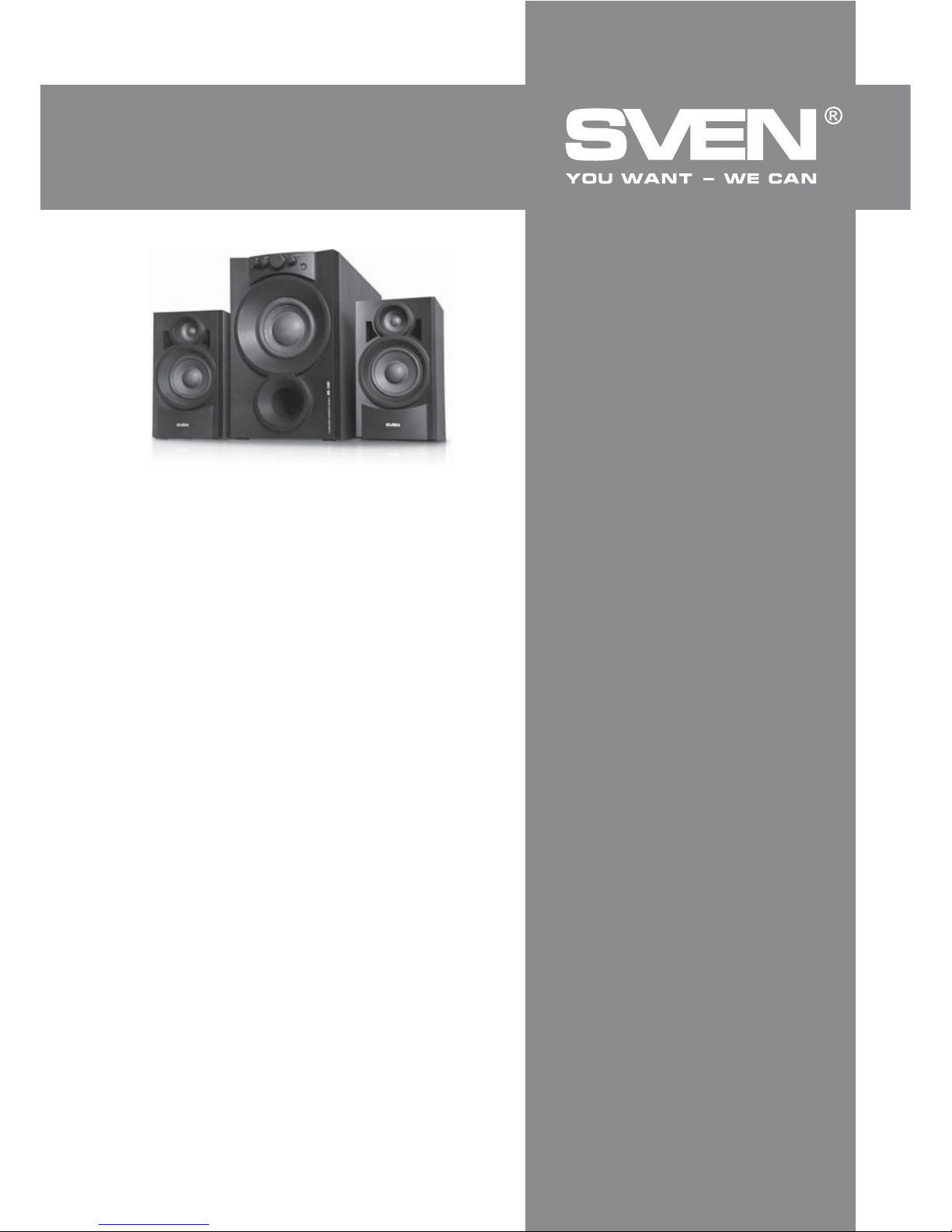
2.1 Multimedia Speaker System
MS-340
Page 2

Congratulations on your purchase of the Sven speaker system!
COPYRIGHT
© 2014. SVEN PTE. LTD. Version 1.0 (V 1.0).
This Manual and information contained in it are copyrighted. All rights reserved.
TRADEMARKS
All trademarks are the property of their legal holders.
NOTICE OF RESPONSIBILITY RESTRICTION
Despite the exerted eԚorts to make this Manual more exact, some discrepancies may occur. The
information in this Manual is given on «as is» terms. The author and the publisher do not bear any
liability to a person or an organization for loss or damage which has arisen from the information
contained in this Manual.
CONTENTS
1. BUYER RECOMMENDATIONS ..................................................
.............
2. PACKAGE CONTENTS.............................................................
............
3. SAFETY PRECAUTIONS ..................................................
...................
4. TECHNICAL DESCRIPTION ....................................................
................
5. PREPARATION AND OPERATION ..........................................
......................
6. TROUBLESHOOTING.................................
.............................................. .
7. TECHNICAL SPECIFICATIONS ....................................................
...........
1
2
2
2
3
5
5
1. BUYER RECOMMENDATIONS
• Unpack the device carefully. Make sure there are no accessories left in the box. Check up the
device for damage; if the product was damaged during transportation, address the ԛrm which
carried out the delivery; if the product functions incorrectly, address the dealer at once.
• Check up the package contents and availability of the warranty card. Make sure the warranty
card has a shop stamp, a legible signature or the seller’s stamp and purchase date, and the goods
number corresponds to that in the warranty card.
• Do not switch on the speaker system immediately after you bring it into a room from environment
with negative temperature! After unpacking, the speaker system should be kept in conditions of
room temperature for at least 4 hours.
• Before installing and using the speaker system, read this Manual carefully and keep it for future
reference.
Technical support is on www.sven.Н
ENG
1
Operation Manual
MS-340
Page 3
2. PACKAGE CONTENTS
• Subwoofer — 1 pc
• Satellites — 2 pcs
• 2RCA to mini-jack (Ø 3.5 mm) signal cable — 1 pc
• ƴudio cable — 2 pcs
• Mini-jack (Ø 3.5 mm) to 2RCA adapter — 1 pc
• Operation manual — 1 pc
• Warranty card — 1 pc
3. SAFETY PRECAUTIONS
• To avoid electric shock, do not open the MSS and do not perform repairs by yourself. Service and
repairs should be performed only by qualiԛed specialists in an authorized service center. The list of
authorized service centers is available on www.sven.Н
• Do not allow the circuit of wires (including the grounded ones) between the speakers, on the
power ampliԛer or the ground, for it causes damage to the power ampliԛer output stage.
• Do not touch the MSS power cord plug pins for 2 seconds after unplugging it from the mains.
• Disconnect the MSS from the mains system during a fuse replacement. Use fuses of the same
type and rated value. Do not use hand-made fuses.
• Do not put foreign objects inside the holes of the MSS.
• Protect the MSS from high humidity, water and dust.
• Protect the MSS from heating: do not place it closer than 1 m from a heat source. Do not expose
it to direct sunlight.
• Do not place any open Ԝame sources on or close to MSS.
• Do not place the MSS in poorly ventilated areas. Leave an air gap of 10 cm or more. When
operating the MSS, do not put any devices on it, do not cover it with cloth or other objects preventing it from cooling.
• Do not use any chemical agents for cleaning. Clean it with dry soft cloth only.
4. TECHNICAL DESCRIPTION
MS-340 Multimedia Speaker System 2.1 (MSS) is designed to play music and sound games,
movies etc. The MSS has a built-in ampliԛer, due to which it can be connected to virtually any audio
source (CD/DVD-player, TV, PC, etc.) without using an additional power ampliԛer.
Special features
• Built-in transformer power supply
• Built-in headphone power ampliԛer
• Separate master volume control, treble and bass control, headphone volume control knobs
• Speaker system is compatible with PCs, DVD/Media-players, mobile devices and other sound
sources
• Headphone jack on the front panel
• Magnetic shielding
• MDF subwoofer and satellites cabinets
Caution! High voltage inside! To avoid the risk of electric
shock do not open or touch elements inside.
ENG
2
2.1 Multimedia Speaker System
Page 4
j
g
h
i
k
L
R
AU
DIO OU
T
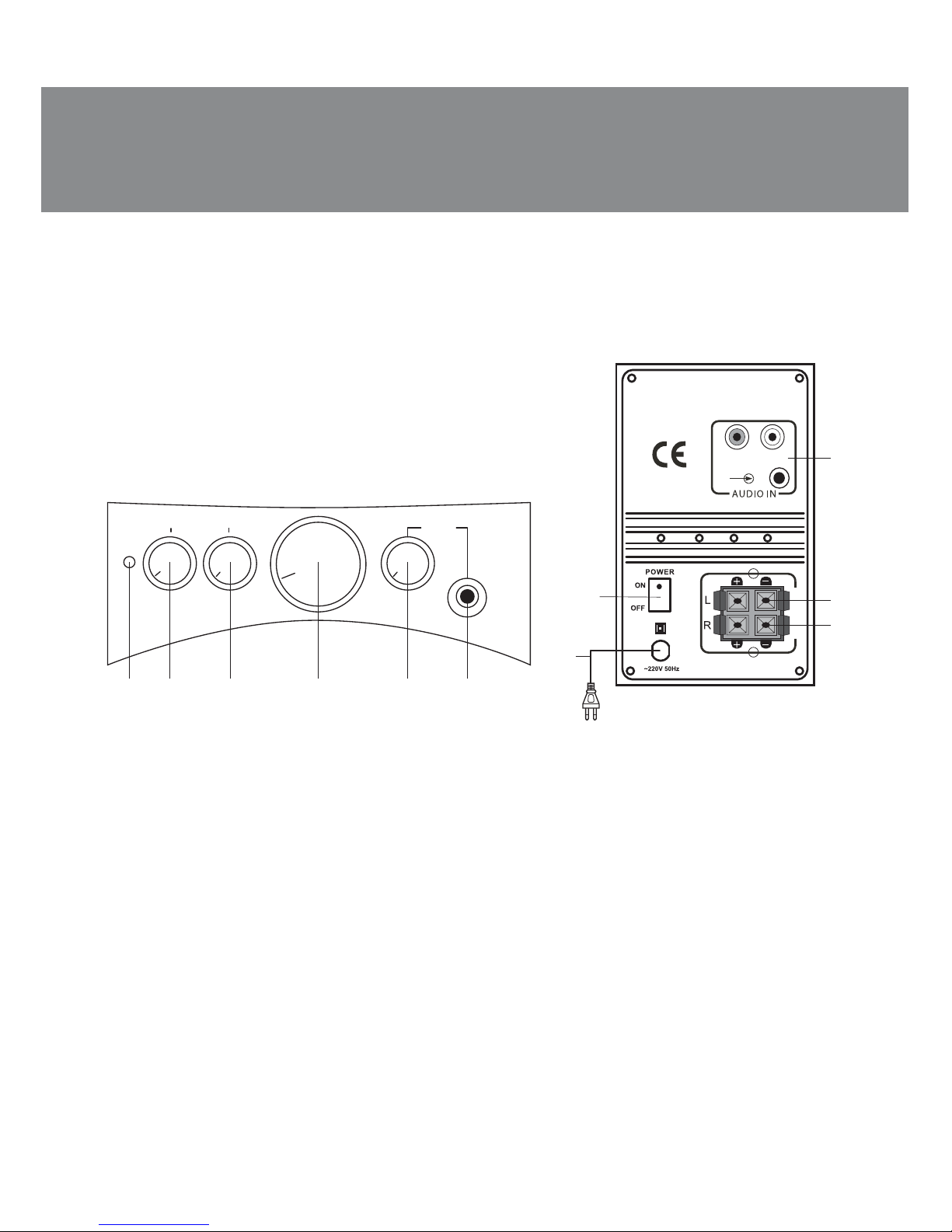
Front and rear subwoofer panels
a LED power
b BASS: bass control knob
c TREBLE: treble control knob
d Master volume control knob
e PHONES: headphone volume control knob
f Headphone jack
g AUDIO IN: audio source input
h L: left satellite output
i R: right satellite output
j POWER ON/OFF: power switch
k Power cord
Fig. 1. Subwoofer control panel Fig. 2. Subwoofer rear panel
cdefba
PHONES
TREBLE
BASS
5. PREPARATION AND OPERATION
Speaker placement
• Place the speakers symmetrically to the listener at the distance not less than one meter. The
subwoofer emits non-directional sound, therefore it can be located in any place of the room, where
it will sound to the best advantage.
• Place MSS far away from monitors and TV sets, as insigniԛcant image distortion in these super-
sensitive devices is possible.
MSS ǥonnecting and control
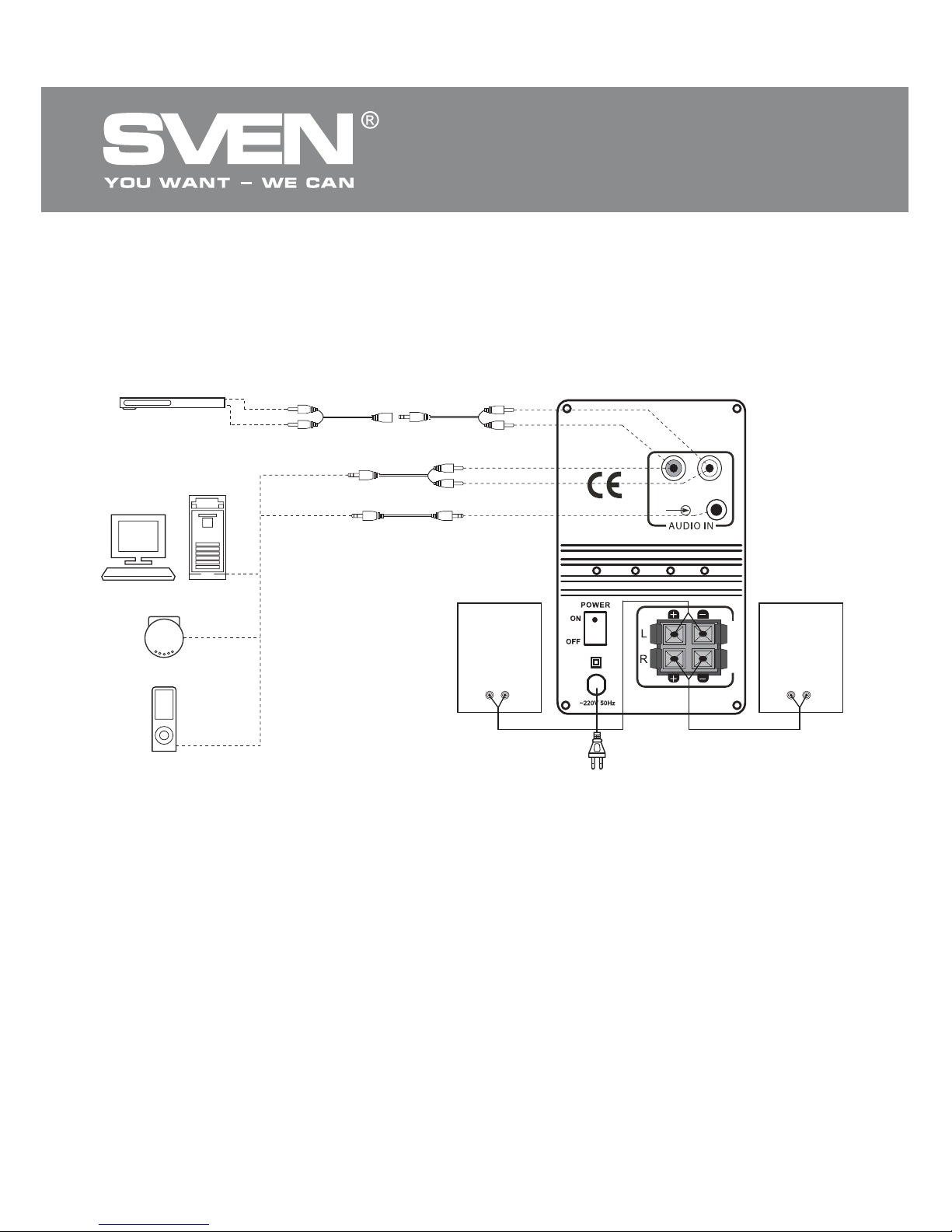
MS-340 multimedia speaker system can be connected to virtually any audio source: DVD / CD, PC
sound card, etc. (see connection diagram, Fig. 3).
• Before connecting, make sure that the MSS is switched oԚ. Then, observing polarity (see Fig. 3),
connect the acoustic cables ԛrst to the jacks, and then to AUDIO OUT of the subwoofer: the left
speaker to L output h, the right speaker to R output i.
Note. Sound quality is directly affected by correctness and reliability of the connection of
cables. It is recommended to use cables that are included in the package contents of the
MSS. Usually, the right channel is marked in red, and the left channel is marked in white.
ENG
3
Operation Manual
MS-340
Page 5
Mini-jack to mini-jack
signal cable
Left
speaker
L
R
A
U
DIO OU
T
2RCA to mini-jack
signal cable
Fig. 3. Connection diagram
2RCA to mini-jack signal cable
+ mini-jack to 2RCA adapter
• To connect the MSS to LINE OUT port of the PC sound card, use a mini-jack to mini-jack signal cable,
if it is available.
• Adjust master volume control knob d on the subwoofer to its minimum (by turning the knob
counterclockwise as far as it would go), then connect the subwoofer to a mains outlet via the built-in
power cord k.
• Switch on the subwoofer by shifting POWER switch j into ON position, power LED a lights up. Then
turn on the audio source and adjust the subwoofer volume level by master volume control knob d, bass
level and treble level by BASS control knob b and TREBLE control knob c respectively.
• If headphones are connected, level of their volume can be adjusted by PHONES knob e on the
subwoofer control panel.
Notes:
• If you aren’t using the MSS for a long time, please mind to switch it off j (position OFF)
on the subwoofer rear panel and unplug it k.
• To enhance sound quality, use Line-Out output of the sound card.
• For correct operation of the MSS connect only one audio source at a time!
Power
cord
Audio cableAudio cable
Right
speaker
PC
PLAYER
CD
DVD
• Connect the included 2RCA jacks of the signal cable to AUDIO IN g L and R jacks of the sub-
woofer, and insert the mini-jack (Ø 3.5 mm) of the signal cable into LINE OUT port of your PC sound
card or OUTPUT of your DVD/CD/ǀDŽ3-player. To connect the device to OUTPUT of the DVD/CD/
MP3-player or TV, use the 2RCA to mini-jack signal cable + mini-jack to 2RCA adapter (included) or
a 2RCA to 2RCA signal cable (not included).
ENG
4
2.1 Multimedia Speaker System
Page 6
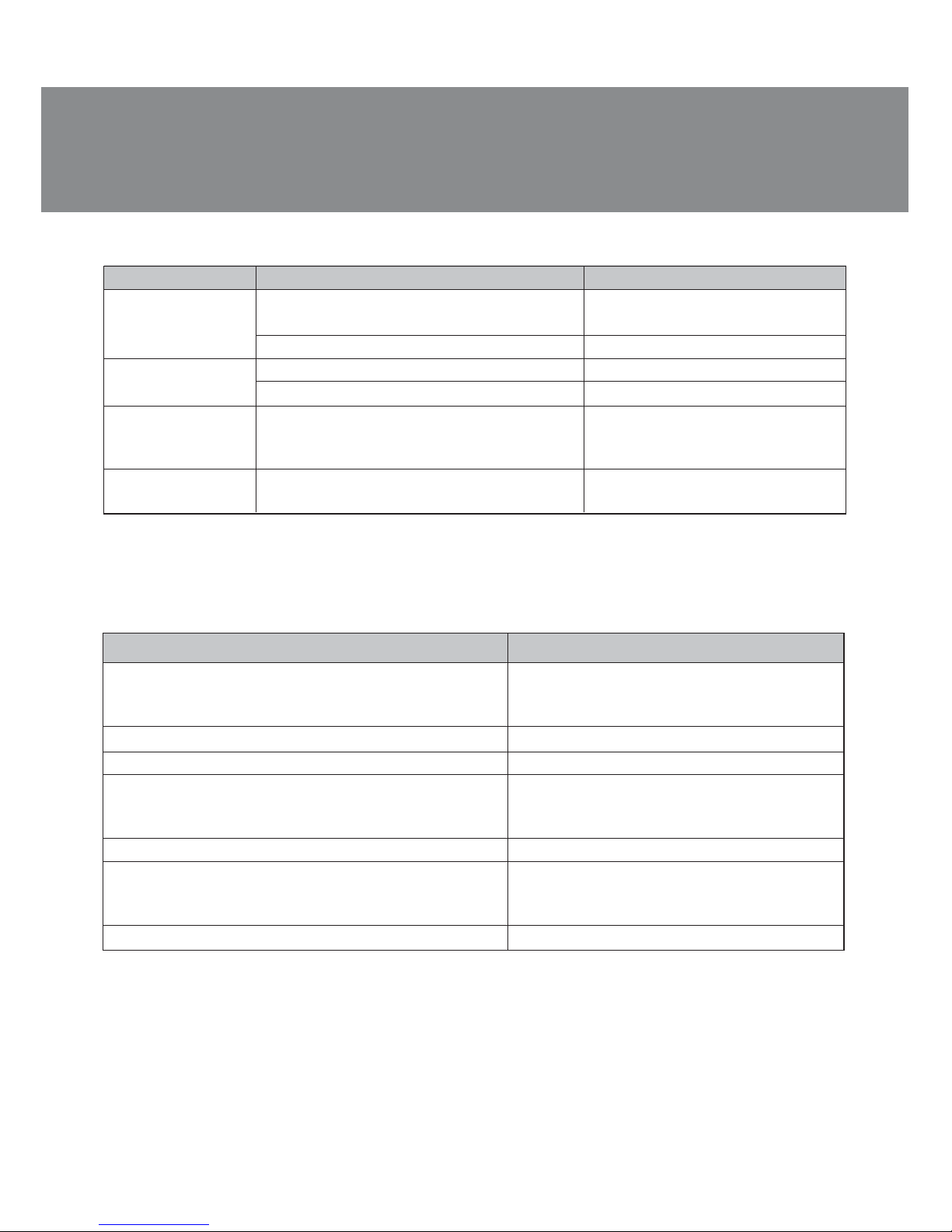
If none of the above methods can solve the problem, please seek professional advice at your
nearest service center. Never attempt to repair the product yourself.
Parameter, measurement unit
Output power (RMS), W
subwoofer
satellites
Frequency range, Hz
S/N ratio, dB
Speaker dimensions, mm
subwoofer
satellites (tweeter + midrange)
Power supply, V / Hz
Dimensions (W × H × D), mm
subwoofer
satellites (one satellite)
Weight, kg
Value
36 (20 + 2 × 8)
20
2 × 8
20 – 20 000
ѐ 65
Ø 125
Ø 38 + Ø 88
~220/50
200 × 320 × 360
130 × 230 × 134
7.8
6. TROUBLESHOOTING
7. TECHNICAL SPECIFICATIONS
Notes:
• Technical speciНcations given in this table are supplemental information and cannot give
occasion to claims.
• Technical speciНcations are subject to change without notice due to the improvement of
SVEN production.
Problem
The MSS does not
turn on.
No sound.
The sound of
speakers is too
quiet.
Distortion of
sound.
Cause
The MSS is not connected to the mains
outlet.
Power switch is oԚ.
Volume level is set at minimum value.
The audio source is improperly connected.
Volume level is set at minimum value.
Large amplitude of the input signal.
Solution
Check the connection.
Turn on the switch.
Adjust the volume control knob.
Connect audio sources correctly.
Adjust the volume control knob.
Turn down the source volume
and MSS volume.
ENG
5
Operation Manual
MS-340
Page 7
ǀǢǘǙǟǰ: MS-340
ƼǠǣǢǤǦǙǤ ǖ DŽǢǥǥǜǜ: ǂǂǂ «DžƾƴǁƸƼdžDŽƹƿ», 111024,
DŽLj, Ǘ. ǀǢǥǞǖǔ, ǧǟ. ƴǖǜǔǠǢǦǢǤǡǔdz, ǘ. 65, ǥǦǤ. 1.
LJǣǢǟǡǢǠǢǫǙǡǡǔdz ǢǤǗǔǡǜǛǔǪǜdz ǖ DŽǢǥǥǜǜ:
ǂǂǂ «DŽdž-Lj», 105082, Ǘ. ǀǢǥǞǖǔ,
ǧǟ. LjǤǜǘǤǜǩǔ ǑǡǗǙǟǰǥǔ, ǘ. 75, ǥǦǤ. 5.
LJǥǟǢǖǜdz ǗǔǤǔǡǦǜǝǡǢǗǢ ǢǕǥǟǧǚǜǖǔǡǜdz ǥǠǢǦǤǜǦǙ
ǖ ǗǔǤǔǡǦǜǝǡǢǠ ǦǔǟǢǡǙ ǜǟǜ ǡǔ ǥǔǝǦǙ www.sven.ѵ
ƷǔǤǔǡǦǜǝǡǯǝ ǥǤǢǞ: 12 ǠǙǥ. DžǤǢǞ ǥǟǧǚǕǯ: 5 ǟǙǦ.
ǃǤǢǜǛǖǢǘǜǦǙǟǰ: «Džƶƹǁ ǃdžƹ. ƿǜǠǜǦǙǘ»,176
Ƹǚǧ NjǜǔǦ DŽǢǧǘ, д 02-02, DžǜǡǗǔǣǧǤ, 427447.
ǃǤǢǜǛǖǙǘǙǡǢ ǣǢǘ ǞǢǡǦǤǢǟǙǠ «DžǖǙǡ DžǞǔǡǘǜǡǔǖǜdz
ƿǜǠǜǦǙǘ», 48310, Ljǜǡǟdzǡǘǜdz, ƾǢǦǞǔ,
ƾǢǦǢǟǔǩǘǙǡǦǜǙ, 15. DžǘǙǟǔǡǢ ǖ ƾǜǦǔǙ.
Manufacturer: SVEN PTE. LTD., 176 Joo Chiat Road,
д 02-02, Singapore, 427447. Produced under the
control of Oy Sven Scandinavia Ltd. 15, Kotolahdentie,
Kotka, Finland, 48310. Made in China.
® Registered Trademark of Oy SVEN
Scandinavia Ltd. Finland.
2.0 Multimedia Speaker System
Automatic Voltage Regulator
DžǦǔǕǜǟǜǛǔǦǢǤ ǡǔǣǤdzǚǙǡǜdzDžǦǔǕǜǟǜǛǔǦǢǤ ǡǔǣǤdzǚǙǡǜdz
Automatic Voltage Regulator
2.0 Multimedia Speaker System 2.0 Multimedia Speaker System
SPS-619
MS-340
2.1 Multimedia Speaker System
 Loading...