

Page 1
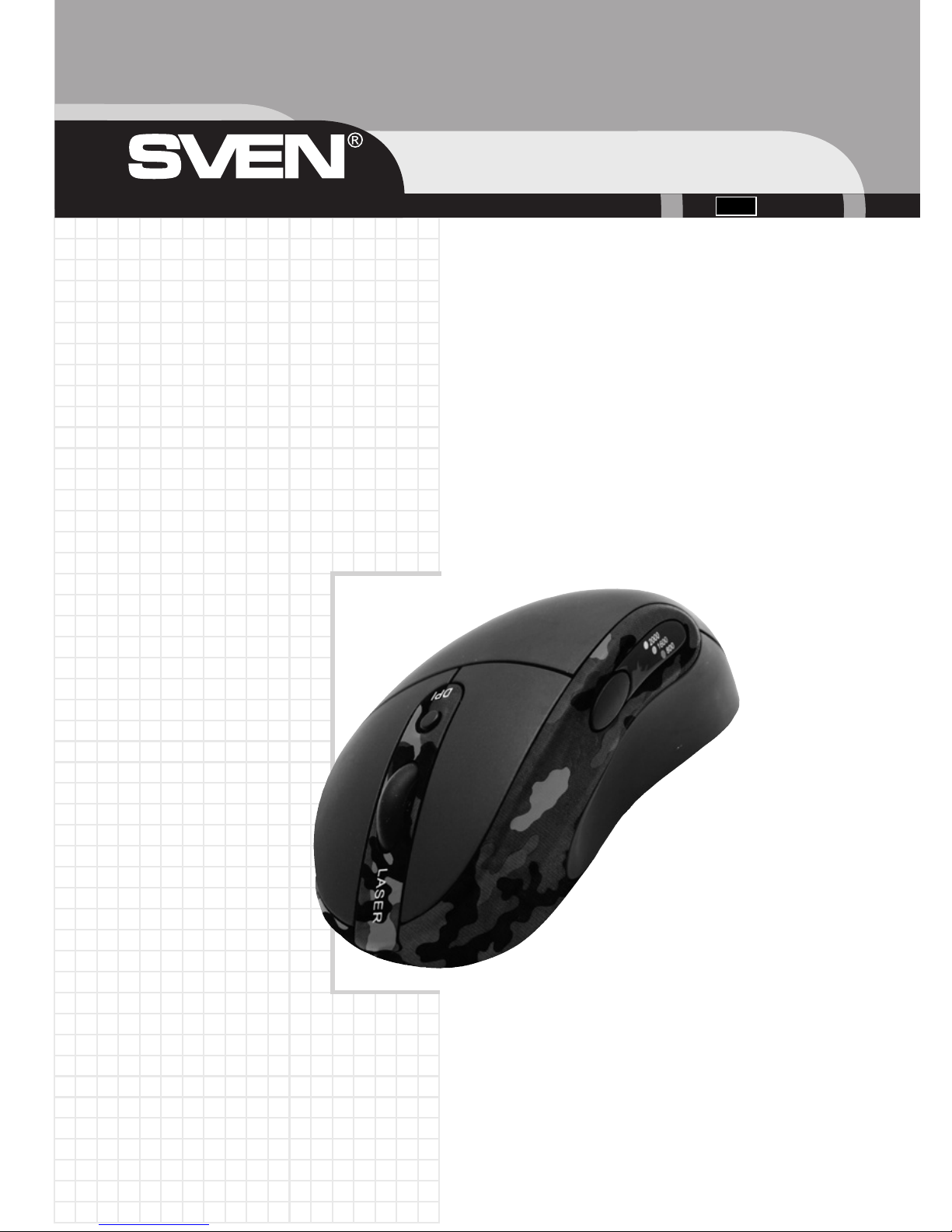
Лазерная игровая
мышь
с USBинтерфейсом
Sven ML2000
Destroyer
Руководство пользователя
ML-2000
Перед эксплуатацией внимательно ознакомьтесь
с настоящим руководством и сохраните его на весь период использования.
Ðóñ
Page 2

Благодарим Вас за покупку мыши торговой марки SVEN!
Мышь Sven ML-2000 — отличный выбор для самых взыскательных геймеров и обычных пользователей. Вертикальная форма позволяет расширить диапазон перемещения и удобна для запястья и кисти.
АВТОРСКОЕ ПРАВО
© Sven Company Ltd, 2007. Версия 1.0 (V 1.0).
Данное руководство и содержащаяся в нем информация защищены авторским правом.
Все права оговорены.
ТОРГОВЫЕ МАРКИ
Все торговые марки являются собственностью их законных владельцев.
ПРЕДУПРЕЖДЕНИЕ ОБ ОГРАНИЧЕНИИ ОТВЕТСТВЕННОСТИ
Информация, содержащаяся в этом документе, тщательно проверена, однако нет 100%-ной гарантии, что она будет соответствовать описанию конфигурации аппаратной части и программного обеспечения (ПО) конкретной системы. В содержание руководства могут быть внесены
изменения без предварительного извещения.
Внимание!
Это оборудование вырабатывает сигналы с частотами, перекрывающими частично радиодиапазоны. Поэтому при неправильной установке и эксплуатации оборудование может служить
причиной помех телерадиоприему. Оборудование было испытано и соответствует компьютерным устройствам класса «В» раздела 15 Правил FCC, которые разработаны с целью обеспечения достаточной защиты от такого рода помех при установке в жилых помещениях. Если всетаки возникают помехи радиосвязи, то пользователю необходимо принять следующие меры:
• Переориентировать или переместить приемную антенну приемника сигналов телерадиоаппаратуры или переместить компьютер.
• Включить компьютер так, чтобы приемник сигналов телерадиоаппаратуры и компьютер питались от разных ответвлений электропроводки.
• Проконсультироваться у опытного специалиста по устранению помех.
• Для уменьшения радиопомех пользуйтесь экранированным силовым и интерфейсным кабелем и не вносите изменения в конструкцию данного устройства без согласия производителя.
Данное оптическое устройство соответствует международному стандарту IEC 60825-1; 2001-08
на лазерный продукт класса 1, а также соответствует требованиям директив 21 CFR 1040.10 и
1040.1, с учетом исключений, упомянутых в уведомлении Laser Notice Nr. 50, от 26 июля 2001 г.:
• параллельный пучок излучается в невидимом инфракрасном диапазоне;
• максимальная мощность на несущей частоте 716 мкВт, длина волны 832–865 нм;
• рабочая температура от 0 до 40 °С.
Данное оптическое устройство не содержит обслуживаемых компонентов. Использование элементов управления, настроек, а также выполнение процедур, отличающихся от описанных в
данном документе, может привести к возникновению опасного излучения.
Техническая поддержка размещена на сайте: http://www.sven.ru
Здесь же Вы сможете найти обновленную версию данного руководства.
Руководство пользователя
2
Page 3

СОДЕРЖАНИЕ
1. Меры предосторожности........................................................................................................ 4
2. Особенности ............................................................................................................................ 4
3. Комплектация .......................................................................................................................... 4
4. Требования к системе ............................................................................................................. 4
5. Установка ПО ........................................................................................................................... 5
6. Работа мыши ............................................................................................................................ 5
7. Решение возможных проблем .............................................................................................. 7
8. Технические характеристики ............................................................................................... 7
Ðóñ ML-2000
3
Page 4

1. МЕРЫ ПРЕДОСТОРОЖНОСТИ
Лазерные устройства класса 1 безопасны при работе в обычных условиях, включая такое использование оптических приборов, при котором инфракрасное излучение направлено непосредственно в глаз человека. Рекомендуется соблюдать следующие меры предосторожности:
~
Не направляйте инфракрасный пучок в глаза.
~
Если возникли неполадки, и устранить их не удалось, выключите устройство и обратитесь
в службу технической поддержки Sven.
~
Не разбирайте устройство, за исключением случаев утилизации по окончании срока службы.
~
Не допускайте попадания на изделие жидкости и не храните во влажном помещении.
~
Не используйте устройство, если температура ниже 0 °С или выше 40 °С.
Примечание.
Если температура окружающей среды выходит за границы указанного диапазона, выключите
устройство и, прежде чем начать с ним работать, дождитесь, пока температура стабилизируется в надлежащих границах.
2.ОСОБЕННОСТИ
~
Вертикальный эргономичный корпус
~
Оптический сенсор — 6,4 мегапиксела
~
Максимальное ускорение — 20 G
~
Обработка изображения — 7080 кадров в секунду
~
Уровни разрешения — 400/800/1600/2000 dpi
~
Переключатель разрешающей способности
~
Прорезиненное покрытие
~
Колесико прокрутки
~
4 перепрограммируемые клавиши
~
USB-интерфейс
~
Совместимость с операционными системами Windows 98SE/Mе/2000/XP
3. КОМПЛЕКТАЦИЯ
1) Ìûøü — 1 øò.
2) Программное обеспечение (компакт-диск) — 1 шт.
3) Руководство пользователя — 1 шт.
4. ТРЕБОВАНИЯ К СИСТЕМЕ
~
IBM-совместимый персональный компьютер с процессором Pentium 233 или выше
~
Не менее 64 Мб оперативной памяти
~
Операционная система Windows 98SE/Me/2000/XP
~
Microsoft Internet Explorer версии 5.5 или выше
~
CD/DVD-дисковод
~
USB-интерфейс (Для реализации всех преимуществ мыши интерфейс должен быть USB 2.0.)
Руководство пользователя
4
Page 5
5. УСТАНОВКА ПО
Подключите мышь к USB-гнезду системной платы компьютера. Установите драйвер мыши, вставив диск с программным обеспечением в дисковод, запустите setup.exe и выполните инструкции программы установки, появляющиеся на экране.
Примечание. Если программное обеспечение не устанавливать, то мышь будет работать как
стандартная трехкнопочная мышь с колесом прокрутки.
6. РАБОТА МЫШИ
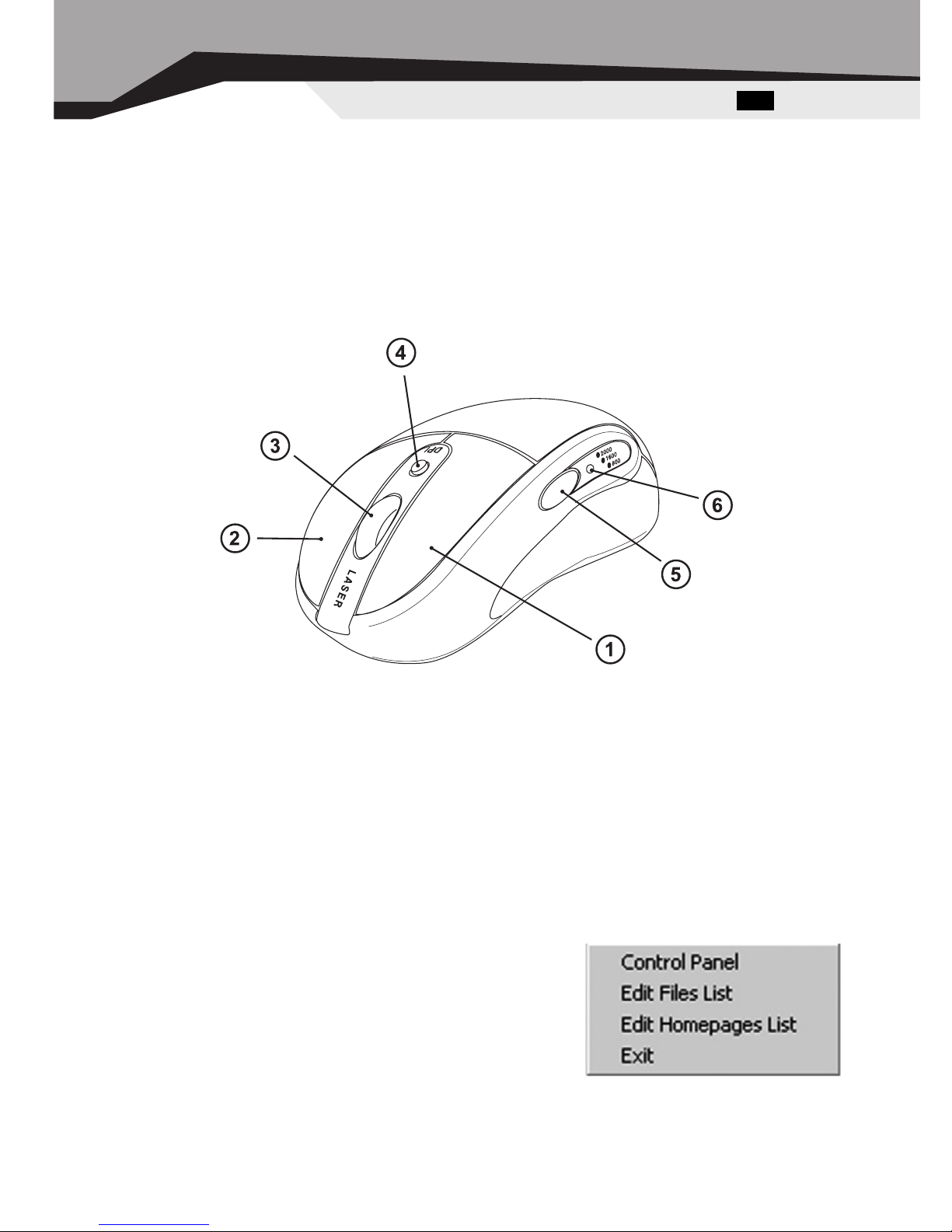
Назначение клавиш мыши
a Перепрограммируемая левая клавиша мыши.
b Перепрограммируемая правая клавиша мыши.
c Колесико прокрутки, совмещенное с перепрограммируемой третьей клавишей мыши.
Прокрутите колесико вверх для прокрутки окна вверх, прокрутите колесико вниз для прокрутки вниз. При нажатии на колесико срабатывает третья клавиша.
d Кнопка переключения разрешающей способности во время работы или игры.
e Перепрограммируемая четвертая клавиша мыши. По умолчанию это клавиша Назад
интернет-браузера или другого аналогичного приложения.
f Светодиодный индикатор разрешающей способности. Разрешающая способность
по умолчанию 400 dpi – в этом случае индикатор не светится. При разрешающей способности
800 dpi цвет свечения индикатора – красный, при 1600 dpi – зеленый, а при 2000 dpi – оранжевый.
Настройка ПО мыши
Щелкните правой кнопкой мыши на значок на панели задач
Windows, чтобы активизировать настройку программного
обеспечения мыши ML-2000. При этом появится окошко с
надписями Control Panel (Панель управления), Edit Files List
(Редактирование списка файлов), Edit Homepages List (Редактирование списка сайтов) и Exit (выход из программы).
Ðóñ ML-2000
5
Page 6
6
Настройка клавиш мыши
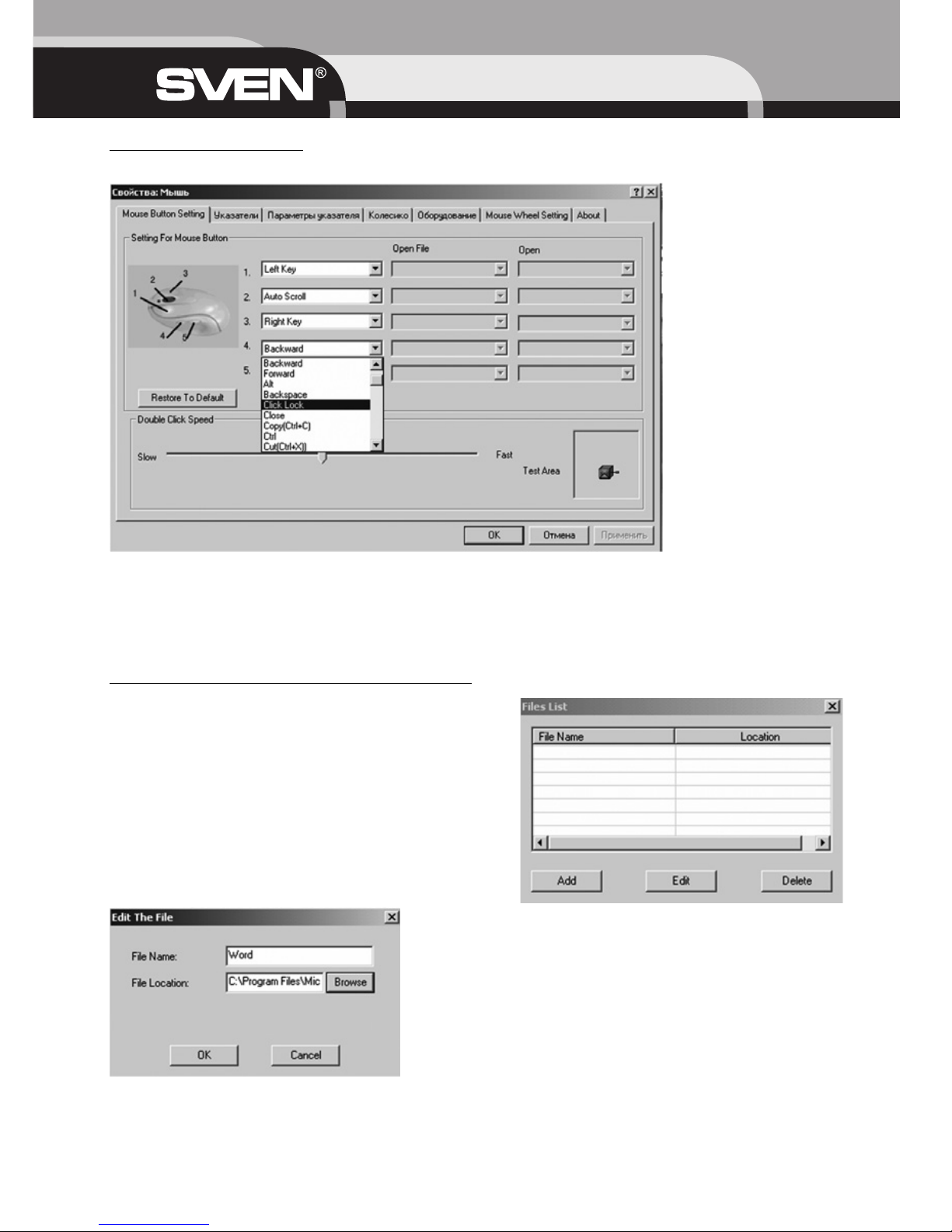
Выберите опцию Control Panel (Панель управления), на экране появится окно.
Курсором мыши нажмите кнопку окошка настройки клавиш и выберите необходимую из 52
представленных функций, затем нажмите кнопку Применить (Apply) и кнопку OK. При выборе
функций Open the File (Открытие файла) и Open the Homepage (Открытие сайта) необходимо провести настройку пути к файлу или адреса сайта через опции Edit Files List (Редактирование
списка файлов), Edit Homepages List (Редактирование списка сайтов)
Edit Files List (Редактирование списка файлов)
При выборе опции Edit Files List (Редактирование
списка файлов) на экране появится окошко File
List (Список файлов) Для настройки открытия файлов нажмите кнопку Add (Добавить) или Edit (Îò-
редактировать).
Появится окошко редактирования. Занесите в строку File Name (Имя файла) название файла (напри-
мер,Word) и с помощью кнопки Browse (Обзор)
пропишите путь к файлу в строке File Location (Расположение файла), затем нажмите кнопку ÎÊ.
Руководство пользователя
Page 7
Edit Homepages List (Редактирование списка сайтов)
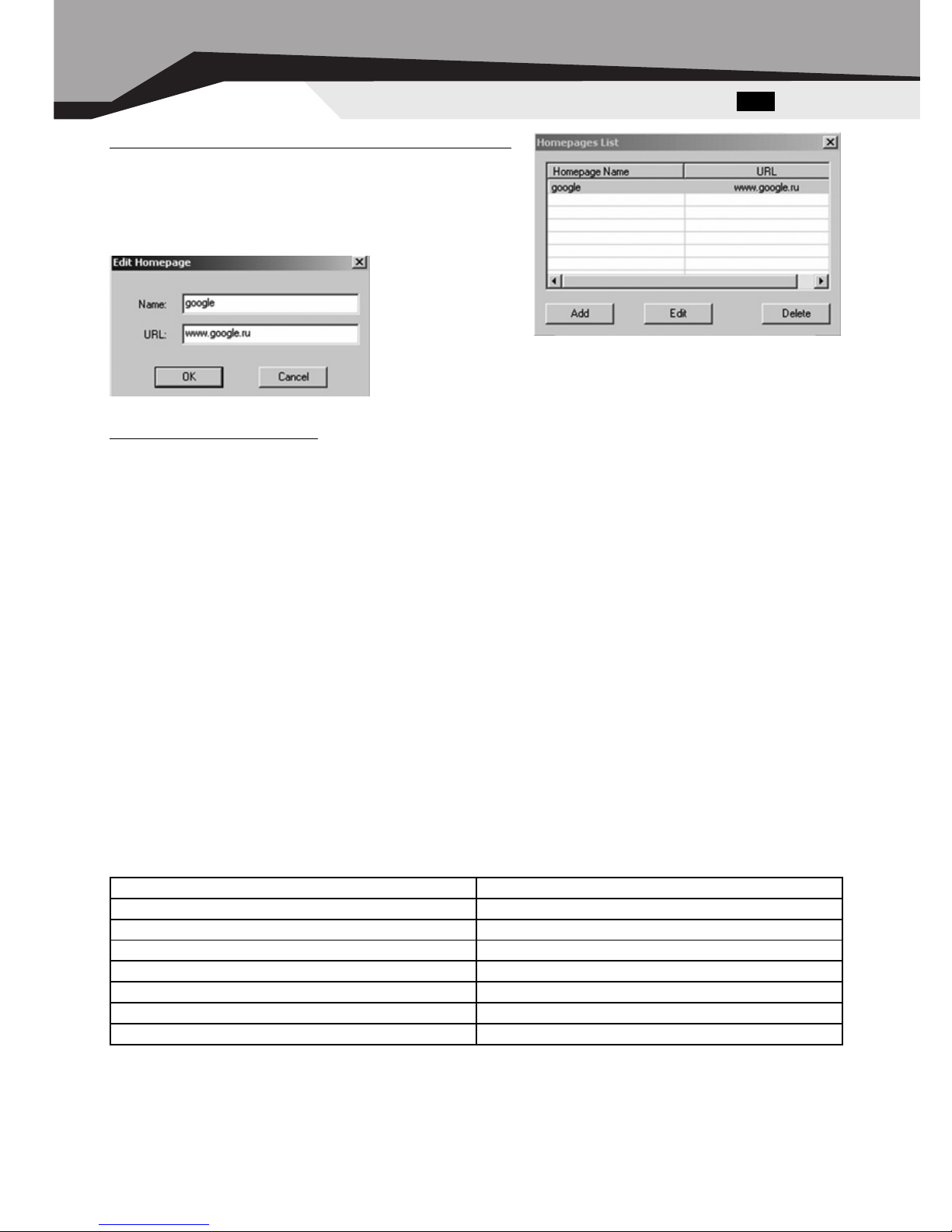
Эту опцию настраивают аналогично предыдущей. Окно настройки сайтов/веб-страниц имеет вид.
Окно редактирования адреса сайта/веб-страницы
открывается при нажатии на кнопку Add (Добавить)
èëè Edit (Отредактировать).
Адрес сайта/веб-страницы заносится в строку URL.Google взят для примера.
Exit (Выход из программы)
При выборе опции Exit, ПО мыши удалит из памяти компьютера. Если хотите снова загрузить
ПО мыши, перезагрузите вашу систему или в меню Ïóñê, выберите Программы и запустите
ПО мыши.
7. РЕШЕНИЕ ВОЗМОЖНЫХ ПРОБЛЕМ
В случае возникновения каких-либо проблем с мышью, пожалуйста, проверьте следующее:
1. Отсоедините мышь от ПК и проверьте контакты разъемов на предмет их возможного повреждения. Если никаких внешних повреждений не обнаружено и контакты кажутся исправными, попробуйте соединить мышь с ПК еще раз.
2. Проверьте, что BIOS ПК имеет настройки USB-контроллера для работы по умолчанию.
3. При возникновении проблем с использованием дополнительных клавиш мыши, убедитесь,
что ее драйвер установлен корректно. Также проверьте, соответствует ли аппаратное и программное обеспечение ПК требованиям, указанным в данном руководстве пользователя.
4. Оберегайте мышь от прямых солнечных лучей, влаги, грязи, чрезмерного нагревания и абразивных химических (моющих) веществ.
5. Если на мышь случайно попадет какая-либо жидкость, немедленно выключите мышь и обратитесь к дилеру или в сервис-центр. Воздержитесь от использования мыши до тех пор, пока не
получите консультацию специалистов.
8. ТЕХНИЧЕСКИЕ ХАРАКТЕРИСТИКИ
Примечание.
1) Технические характеристики, приведенные в таблице, справочные и не могут служить основанием для претензий.
2) Продукция торговой марки SVEN постоянно совершенствуется. По этой причине технические характеристики могут быть изменены без предварительного уведомления.
Ðóñ ML-2000
Совместимость с ОС Windows 98SE/Me/2000/XP
Тип мыши лазерная
Разрешающая способность 400/800/1600/2000 DPI
Количество клавиш 4
Разъем подключения USB
Соответствие стандартам FCC, CE
Размеры, мм 125 x 60 x 50
Масса, г 160
7
Page 8
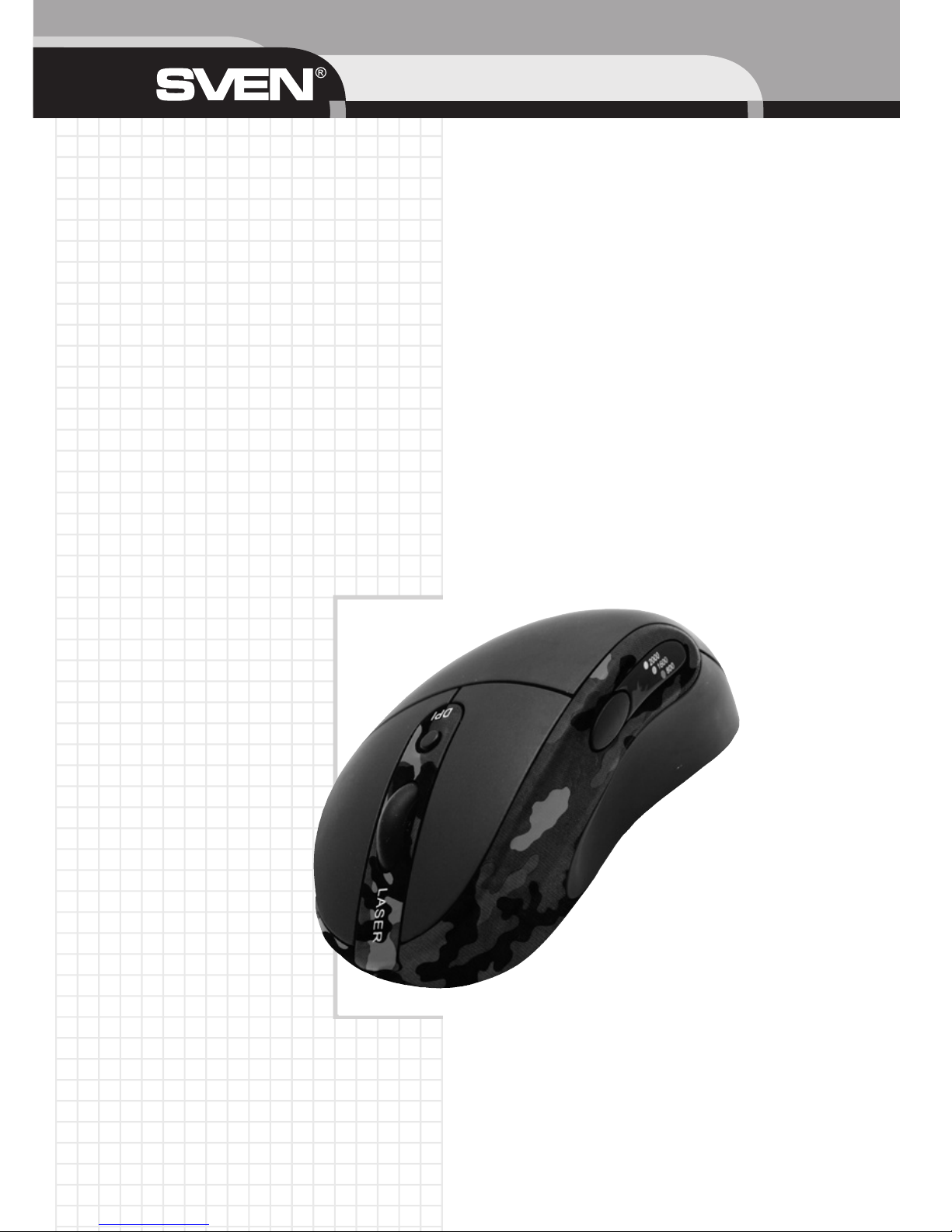
USER’S MANUAL
8
Top game
laser USB mouse
ML2000 Destroyer
Please read this instruction manual completely before connecting and operating the machine for best
performance and safety.
Page 9

Thank you for purchasing the SVEN mouse.
Conform to ergonomic theory vertical mouse is designed with humanized concept according to the
ergonomic theory, arms are completely relaxed and the moving scope is extended. Humanized model
breaks from traditional concept of mouse. The special shape can ease arms to be natural.
COPYRIGHT
© Sven Company Ltd, 2007 (v.1.0).
This document contains proprietary information protected by copyright. All rights are reserved. No
part of this manual may be reproduced by any mechanical, electronic or other means, in any form, without prior written permission of the manufacturer.
TRADEMARKS
All trademarks and registered trademarks are the property of their respective owners.
ABOUT THIS MANUAL
This manual is designed to assist you in installing and using the mouse. Information in this document
has been carefully checked for accuracy; however, no guarantee is given to the correctness of the contents. The information in this document is subject to change without notice.
Technical support is on http://www.sven.ru
FEDERAL COMMUNICATIONS COMMISSION STATEMENT
This Equipment has been tested and found to comply with the limits for a class B digital device, pursuant
to Part 15 of the Federal Communications Commission (FCC) rules. These limits are designed to provide reasonable protection against harmful interference in a residential installation. This equipment generates, uses, and can radiate radio frequency energy and, if not installed and used in accordance with
the instructions, may cause harmful interference to radio communications. However, there is no guarantee that interference will not occur in a particular installation. If this equipment does cause harmful interference to radio or television reception, which can be determined by turning the equipment off and on,
the user is encouraged to try to correct the interference by one or more of the following measures:
* Reorient or relocate the receiving antenna.
* Increase the separation between the equipment and receiver.
* Connect the equipment into and outlet on a circuit different from that to which the receiver is connected.
* Consult the dealer or an experienced radio/TV technician for help.
This device complies with Part 15 of the FCC rules. Operation is subject to the following two conditions: (1) this device may not cause harmful interference, and (2) this device must accept any interference that may cause undesired operation.
Notice 1
You are cautioned that changes or modifications not expressly approved by the part responsible for
compliance could void the user’s authority to operate the equipment.
Notice 2
This equipment has been tested and found to comply with the limits for a Class B digital device, pursuant to part 15 of the FCC rules. These limits are designed to provide reasonable protection against
harmful interference in a residential installation. This equipment generates, uses and can radiate radio
frequency energy and, if not installed and used in accordance with the instructions, may cause harmful interference to radio communications.
Eng ML-2000
9
Page 10

CAUTION:
Change or modifications not expressly approved by the manufacturer responsible for compliance
could void the user’s authority to operate the equipment.
INTERNATIONAL STANDARTS AND SAFETY.
This optical device complies with International Standard IEC 60825-1:2001 -08, Class 1 Laser Product,
and also complies with 21 CFR 1040.10 and 1040.1, except for deviations pursuant to Laser Notice
Nr. 50, dated July 26,2001:
* Emission of a parallel beam of infrared user-invisible light;
* Maximum power of 716 microwatts CW, wavelength range 832 - 865 nanometers;
* Operating temperature between 0 °C (32 °F) to 40 °C (104 °F).
TABLE OF CONTENTS
1. Safety and Usage Guidelines ................................................................................................... 11
2. Features of the mouse .............................................................................................................. 11
3. Completeness of delivery ........................................................................................................ 11
4. System Requirements .............................................................................................................. 11
5. Software installation ................................................................................................................. 11
6. Using Mouse .............................................................................................................................. 12
7. Troubleshooting ........................................................................................................................ 14
8. Specification .............................................................................................................................. 15
USER’S MANUAL
10
Page 11

1. SAFETY AND USAGE GUIDELINES
This optical device has no serviceable parts. Use of controls or adjustments or performance of procedures other than those specified herein may result in hazardous radiation exposure.
~
Do not point infrared beam at eye.
~
In the absence of proper operation and if customer-initiated troubleshooting is unsuccessful, switch
off device and call Sven technical support.
~
Do not disassemble your product or expose it to liquid, humidity, moisture, or temperatures outside
the specified operating range of 0 °C (32 °F) to 40 °C (104 °F).
~
If your product is exposed to out-of-range temperatures, switch it off and allow the temperature to
return to the normal operating range.
2. FEATURES OF THE MOUSE
~
Vertical ergonomic mouse design
~
Optical 6.4 mega pixels sensor
~
Amazing 20 G acceleration
~
7080 frames per second picture sample rate
~
Sensitivity controlling technology: shift 400/800/1600/2000 dpi
~
Special sweat-proof material, prevent hand’s slippage
~
Scroll wheel for comfortable use
~
4 buttons reprogrammable design provides powerful custom function
~
USB port
~
Fully Windows Plug and Play
3. COMPLETENESS OF DELIVERY
1) Mouse — 1 pc
2) Software (CD-disk) — 1 pc
3) User’s manual — 1 pc
4. SYSTEM REQUIREMENTS
Before installing the mouse, please make sure that the following hardware and software components
are installed and correctly set up. The following system specifications are required:
~
Pentium 233 or higher processor
~
Microsoft Windows 98SE/ME/2000/XP operating system or later
~
Microsoft Internet Explorer 5.5 or later
~
64 MB of RAM is recommended
~
CD-ROM, DVD drives
~
USB compatible
5. SOFTWARE INSTALLATION
Connect the mouse to the USB-socket of your computer system board.. Insert the CD with software
into CD-ROM to install the mouse driver, start setup.exe and follow on-screen installation program instructions.
Note: If software is not installed, than the mouse will work in a standard (3 buttons and 1 wheel) PC
mouse mode.
Eng ML-2000
11
Page 12
6. USING MOUSE
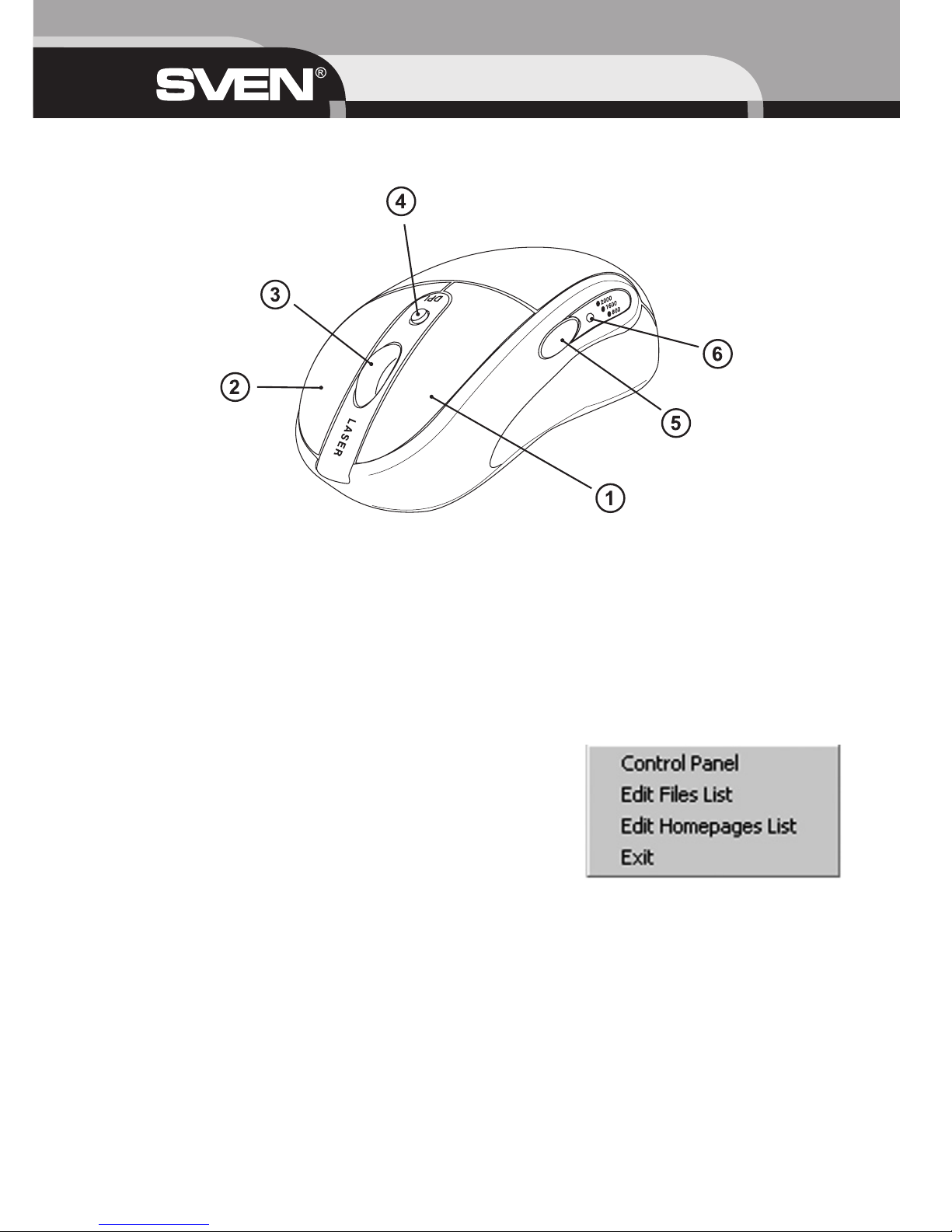
Mouse buttons function
a Reprogrammable left mouse button.
b Reprogrammable right mouse button.
c Wheel combined with the reprogrammable third mouse button
Scroll the wheel upwards for scrolling the window upwards; scroll the wheel downwards for scrolling
the window downwards. At wheel click the third button turns on.
d Resolution shift knob during work or game.
e The reprogrammable fourth mouse button. On default it is the key Back of internet-browser or
other similar applications.
f Resolution LED indicator. Default resolution is 400 dpi – in this case the indicator light does not
shine. At 800 dpi resolution the red light will shine, at 1600 dpi – the green light will shine, and at 2000
dpi – the orange light will shine.
Software setting
Right click the icon on Windows operational panel to activate
the mouse ML-2000 software setting, the window appears:
With inscriptions Control Panel, Edit Files List, Edit Homepages
List and Exit.
USER’S MANUAL
12
Page 13
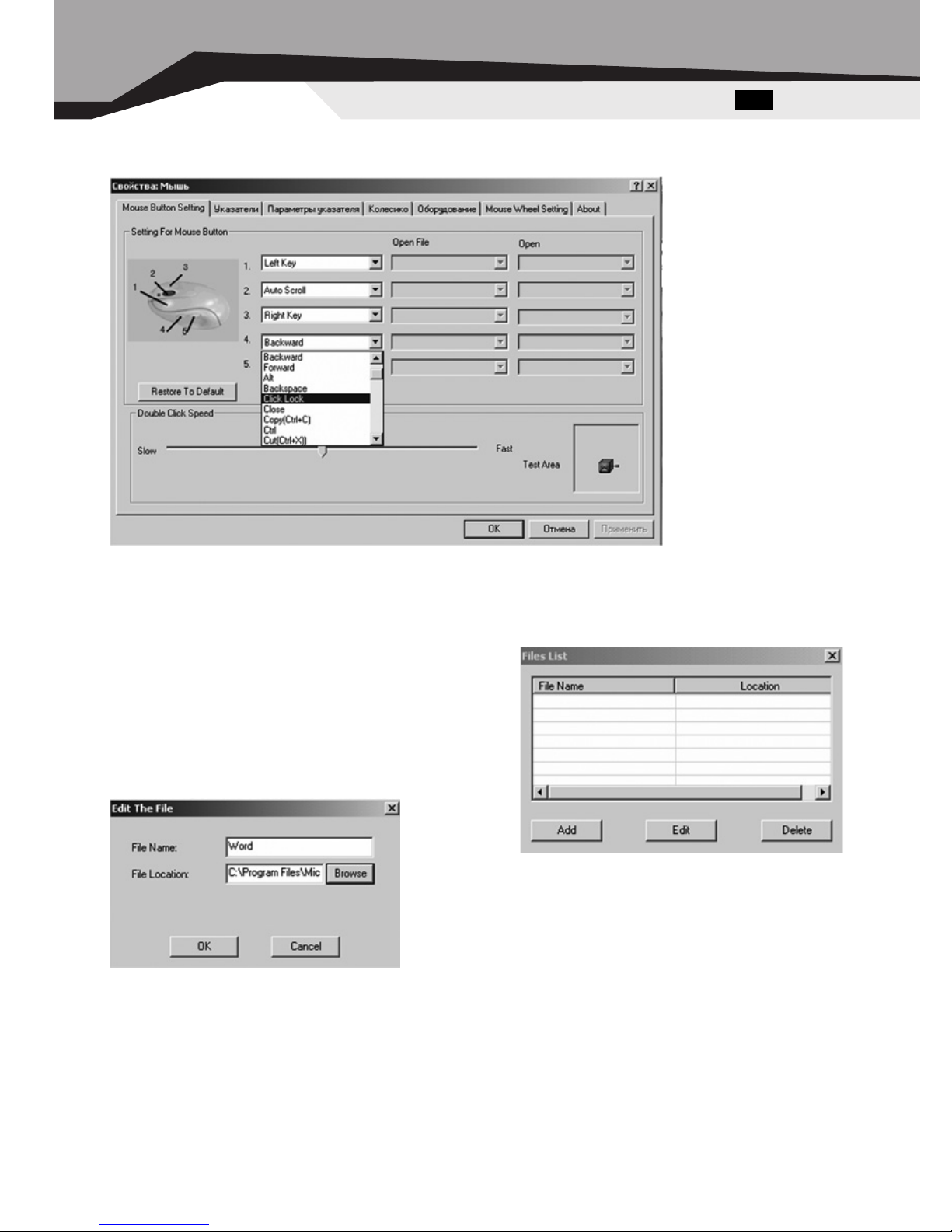
Setting for mouse buttons
Choose Control Panel option, on the screen the window appears
In this mode you can reprogram the functions of the mouse buttons. Click the window of setting the
mouse buttons and choose the necessary one among 52 functions, then click Apply and OK. If you
choose the function Open the File and Open the Homepage it is necessary to set the file path or
homepage address through the options: Edit Files List, Edit Homepages List.
Edit Files List
If you choose the option Edit Files List on the screen
the window File List will appear. For setting the files
opening click Add or Edit.
The edit window will appear. Enter File Name (for
example, Word) and with the help of Browse write the
file path in the line File Location and then click ÎÊ.
Eng ML-2000
13
Page 14
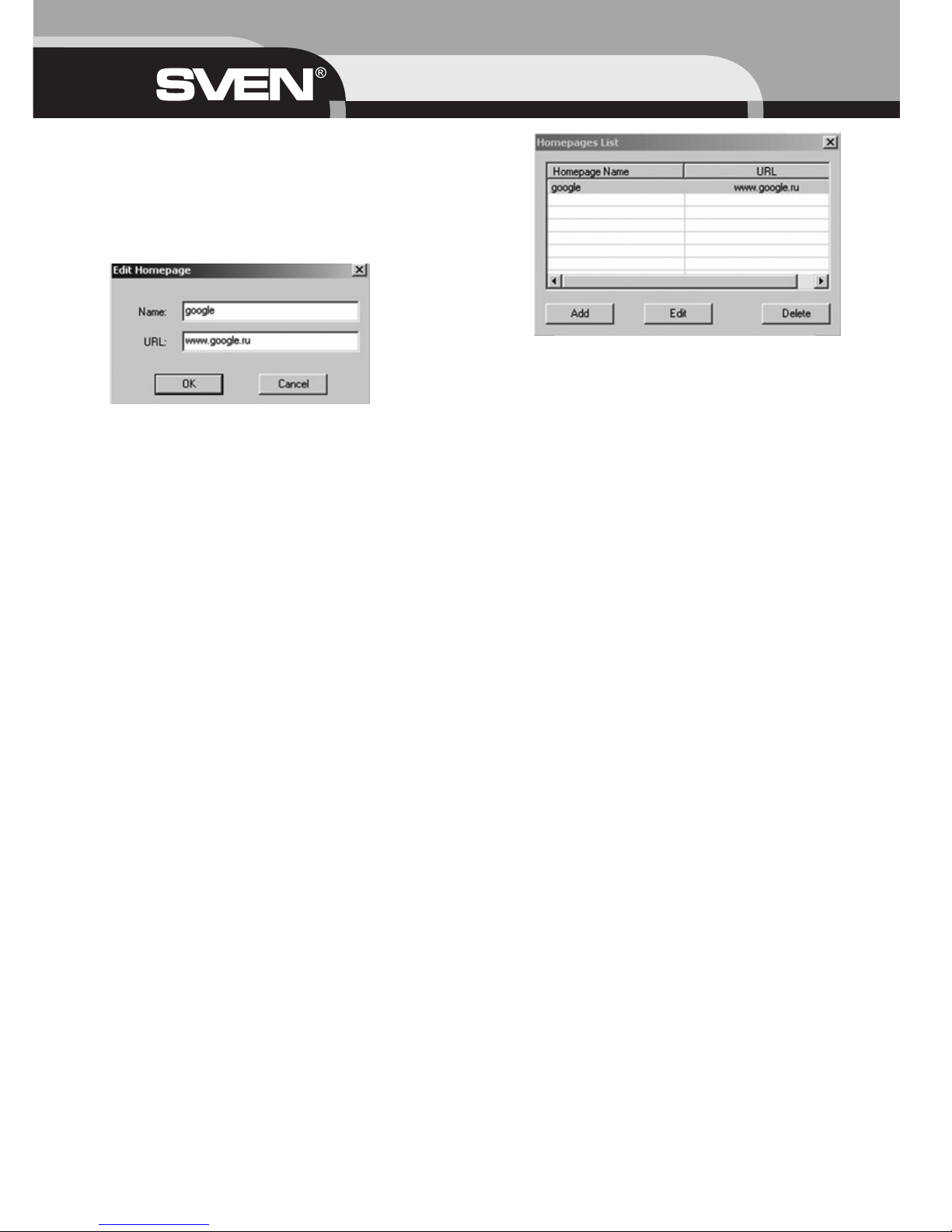
Edit Homepages List
This option is set the same way as previous one.
Homepages setting window looks the following way:
Edit homepages window is opened if you click Add or Edit.
Homepage address is entered to URL line. Google is
taken as an example.
Exit
When you choose the option Exit, the mouse software will be erased from your computer memory. If
you wish to load the mouse software again, reload your system and in Start menu, choose Programs,
and start the mouse software.
7. TROUBLESHOOTING
In case of occurrence of any problems with the mouse, please, about trust the following:
1. Disconnect the mouse from the personal computer and check up contacts for their possible damage. If any external damages it is not revealed also contacts seem serviceable, try to connect a receiver to the personal computer once again.
2. If BIOS the personal computer has options for the USB-controller, be convinced, that they are
adjusted by default.
3. At occurrence of problems with use of additional keys of the mouse, check up that the driver of the
mouse is established correctly. Also check up, whether corresponds hardware and the software of the
personal computer to the requirements specified in the given user’s guide.
4. Preserve all components of the given complete set against direct solar beams, moisture, dirties, excessive heating, abrasive and chemical substances.
5. In case on the mouse any liquid will casually get, immediately switch off the mouse and address to
the dealer or in the service-center. Refrain from use of the given complete set until receive consultation of experts.
USER’S MANUAL
14
Page 15
8. SPECIFICATION
Notes:
1) Given specifications may not serve the basis for claims.
2) Sven production is constantly developed. That’s why the specifications may be changed without preliminary notice.
Eng ML-2000
15
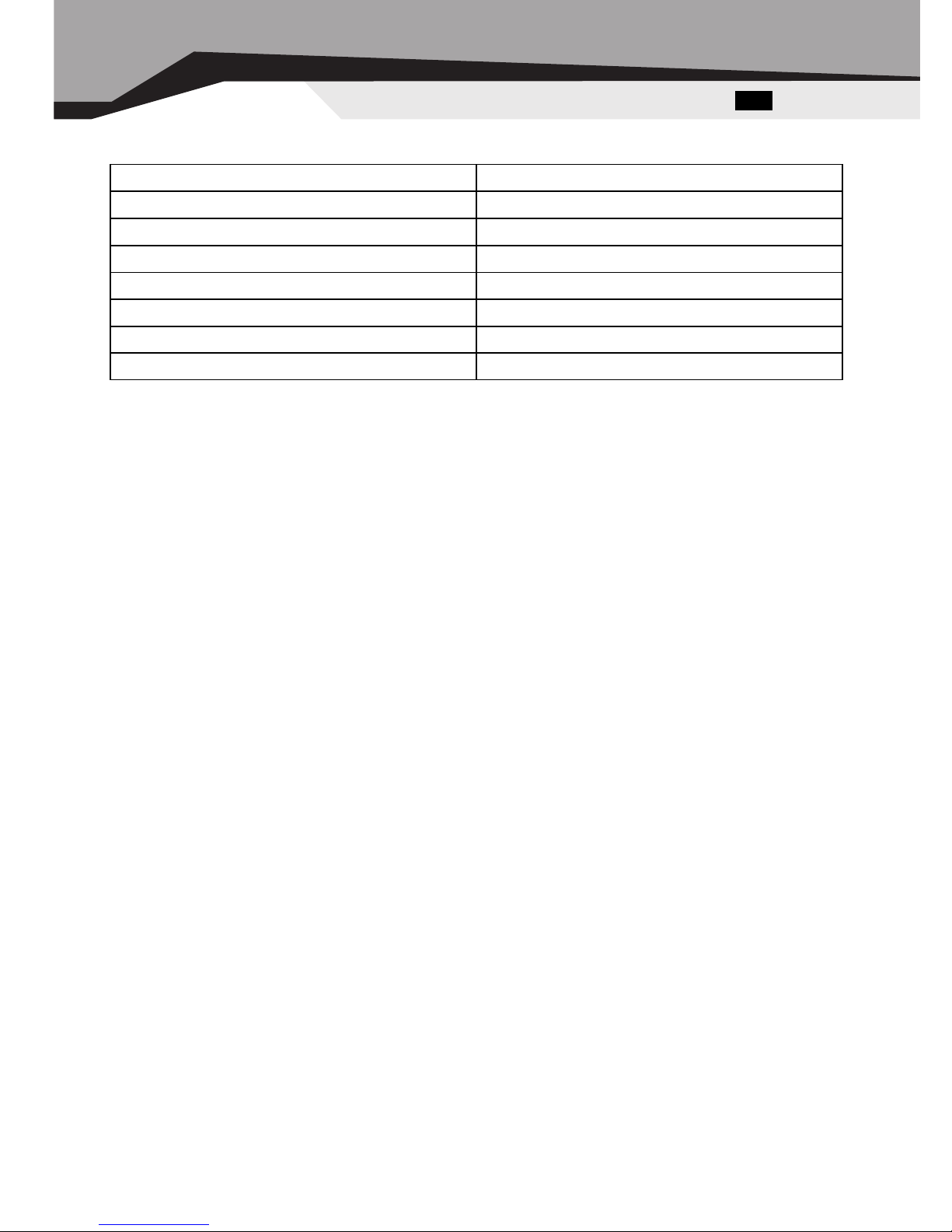
OS Compatibility Windows 98SE/Me/2000/XP
Mouse laser
Resolution 400/800/1600/2000 DPI
Bottons 4
Connector USB
Agency Approvals FCC, CE
Dimension, mm 125 x 60 x 50
Weight, g 160
Page 16
 Loading...