

Page 1

USB 3.0 Front Panel Hub + Card
Reader Combo
User Manual
Ver. 1.00
All brand names and trademarks are properties of their
respective owners.
Page 2

Contents:
Chapter 1: Introduction ...................................................... 3
1.1 Product Introduction .................................................... 3
1.2 Features ........................................................................ 4
1.3 System Requirements .................................................. 5
1.4 Package Contents ......................................................... 5
Chapter 2: Getting Started ................................................. 5
2.1 Hardware Layout ......................................................... 5
2.2 Hardware Installation .................................................. 7
2.3 Driver Installation ...................................................... 11
MN3000000080 Page 2
Page 3

Chapter 1: Introduction
different types of memory cards such
1.1 Product Introduction
This USB 3.0 Front Panel Hub + Card Reader Combo let you get
the fastest way to connect up to USB 3.0 devices quickly and easily. It
built-in two USB 3.0 Super-Speed ports and one USB 2.0 High Speed
port, and it is also integrated with one slot card reader. This internal
USB 3.0 Front Panel Hub + Card Reader Combo device fits into 3.5’’
or 5.25’’ drive bay to save the desktop space, and it works seamlessly
with all USB 1.1 and USB 2.0 devices.
With 10 times faster throughput than USB 2.0 standard and
backward compatible with current USB device features, you can enjoy
fast access for high-bandwidth device such as External hard drives,
High resolution webcams, Video display solutions, Blu-Ray drives, and
all other USB devices.
This USB 3.0 Front Panel Hub + Card Reader is also supports
SD/mini-SD/Micro-SD/SDHC/micro-SDHC/SDXC/SD 3.0 UHS-I,
MS/MS-PRO/MS Duo/MS-PRO Duo/Micro-MS(M2)/MSPRO-HD
MN3000000080 Page 3
Page 4

Duo (8-bit)/Memory Stick XC, MultiMediaCard™ (MMC), and more
Provides two USB 3.0, one USB 2.0 ports and one USB 2.0
bit)/Memory Stick
Supports simultaneous operation of multiple USB 3.0, USB 2.0
1.2 Features
multi-port SD/MMC/MS card reader
Works with high-bandwidth SuperSpeed USB 3.0 devices, such
as external hard disks, memory card readers, high resolution
webcams, camcorders, digital video cameras, multi-channel
audio, and more
Support SD/mini-SD/Micro-SD/SDHC/micro-SDHC/SDXC/SD
3.0 UHS-I, MS/MS-PRO/MS Duo/MS-PRO
Duo/Micro-MS(M2)/MSPRO-HD Duo (8-
XC, MultiMediaCard™ (MMC), and more
Compliant with Universal Serial Bus 3.0 specifications
and USB 1.1 devices
Up to 5Gbps data transfer rate
Hot-swapping feature allows you to connect/disconnect devices
without powering down the system
MN3000000080 Page 4
Page 5

LED to indicate power and activity for memory card
No device drivers required for hardware installation
1.3 System Requirements
Windows® XP/Vista/7 (32/64 bit)
Desktop PC with an available USB port (USB 3.0 recommended)
One available 3.5’’ or 5.25’’ drive bay
1.4 Package Contents
1 x USB 3.0 Front Panel Hub + Card Reader Combo
1 x User Manual
1 x USB 3.0 Cable
1 x 5.25’’ bay mounting kit (optional)
Note: Contents may vary depending on country/market.
Chapter 2: Getting Started
2.1 Hardware Layout
MN3000000080 Page 5
Page 6
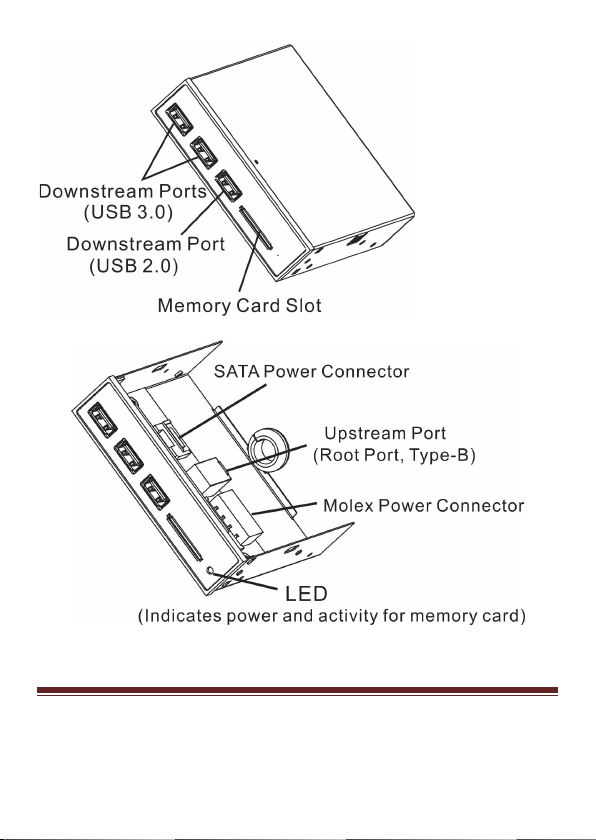
Figure 1. Hub + Card Reader Layout
MN3000000080 Page 6
Page 7

2.2 Hardware Installation
Important: The USB 3.0 Front Panel Hub + Card Reader Combo only
works at USB 3.0 Super-Speed when connected to a USB 3.0 host
controller. Otherwise it will work as a USB 2.0 or USB 1.1 hub when
connected to USB 2.0 or USB 1.1 host controller, respectively.
In order for the USB 3.0 Front Panel Hub + Card Reader Combo to
work as a USB 3.0 hub, the driver for your existing USB 3.0 host
controller has to be properly installed. This hub will automatically be
detected and installed when connected to the USB 3.0 port.
1. Turn off the power to your computer.
2. Unplug the power cord and remove your computer’s cover.
3. Select an available 3.5’’ drive bay for the USB 3.0 Front Panel
Hub + Card Reader Combo, remove the cover plate from the
selected drive bay.
4. Connect the Type-B connector of the included USB 3.0 cable into
the Upstream port of the USB 3.0 Front Panel Hub + Card Reader
Combo.
MN3000000080 Page 7
Page 8
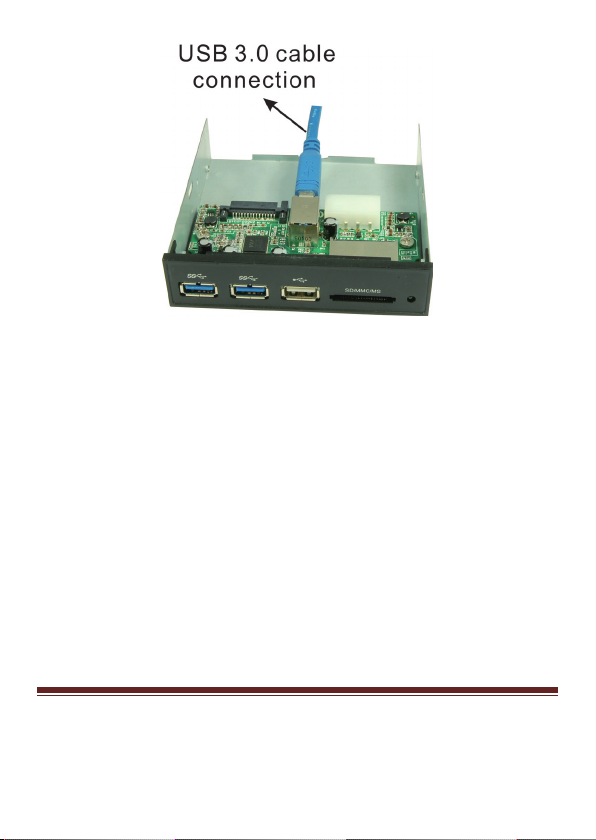
Figure 2. Connecting the USB 3.0 Cable
5. Plug in either the SATA Power Connector* or Molex Power
Connector* from the system power supply to the USB 3.0 Front
Panel Hub + Card Reader Combo.
*Warning: Only connect one power connector. Connecting both
will result in system damage.
MN3000000080 Page 8
Page 9
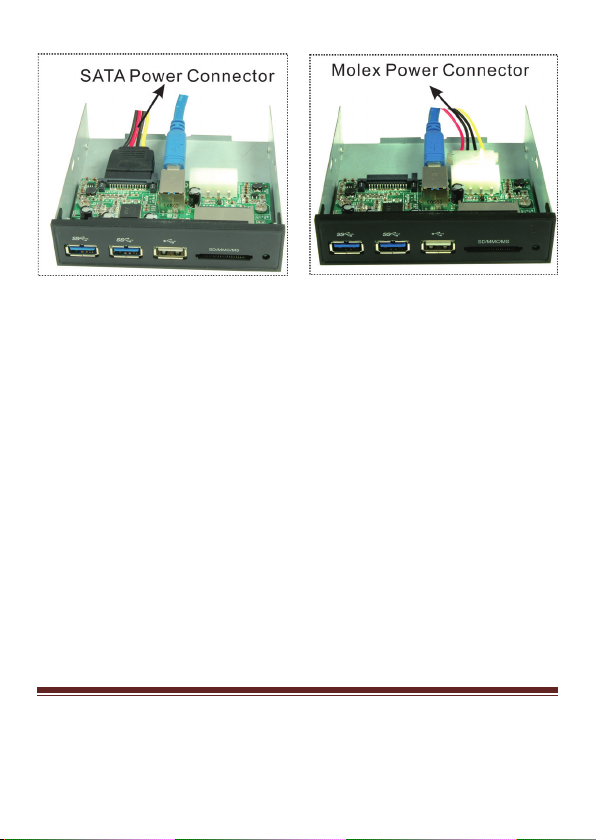
Figure 3. Connecting the Power Cable
6. Carefully thread the cables through the drive bay opening the push
the hub assembly into the drive bay. Align the hub’s screw holes
with the appropriate holes in the drive bay, then carefully attach
the USB 3.0 Front Panel Hub + Card Reader Combo to the case
using the included mounting screws. Be careful not to over tighten
the mounting screws.
MN3000000080 Page 9
Page 10
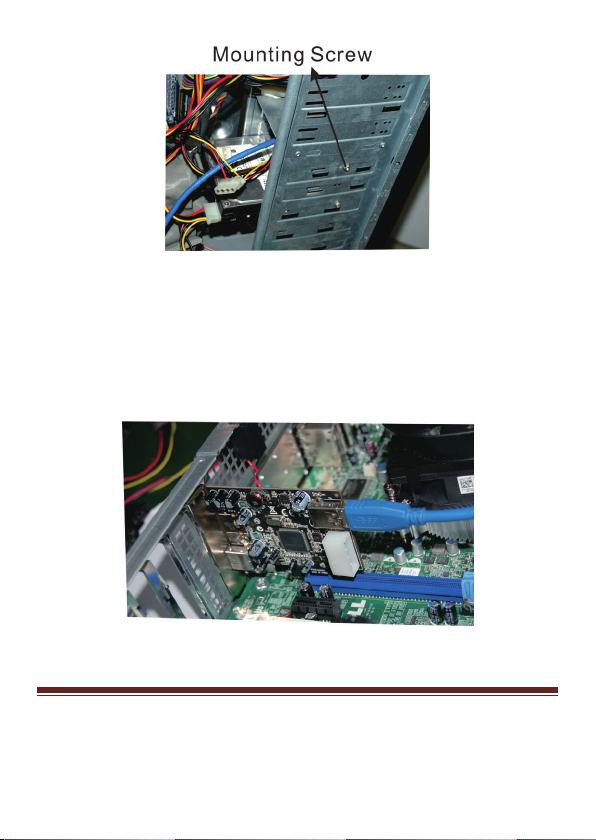
Figure 4. Mounting the Hub + Card Reader Combo
7. Connect the Type-A connector of the included USB 3.0 cable to
the internal Type-A USB port (USB 3.0 recommended) in your
system.
Figure 5. Internal USB Connection
MN3000000080 Page 10
Page 11

8. Replace the computer cover and reconnect the power cord, then
turn the system on.
2.3 Driver Installation
Windows will automatically detect and install the drives for the drivers
for the USB 3.0 Front Panel Hub + Card Reader Combo, no additional
drive installation is needed.
MN3000000080 Page 11
 Loading...