

Page 1

Shanghai Sunmi Technology Co., Ltd. Sweeping Development
Sunmi Scanner User Guide
Page 2

Shanghai Sunmi Technology Co., Ltd. Sweeping Development
- 1 -
Document Update Description
Number
Update date
Version
Update content
Author
1.0.0
2018/04/24
v1.1.6
Original Version.
Darren、Arthur
1.0.1
2018/06/07
v1.1.19
Increase access to sweep dock
type interface.
Darren、Arthur
1.0.2
2018/11/23
v2.1.x
Add code system detail settings.
Increase suffix settings.
Add advanced formatting.
Increase virtual button settings.
Add clear configuration menu.
Increase no direct output.
Increase output code type ID.
Correction section description.
Darren、Arthur
1.0.3
2019/03/09
v2.3.x
Add suffixes to support "\xxx"
escaping.
Add advanced format support
"\xxx" escaping.
Add broadcast output to support
raw byte array.
Modify some descriptions and
captions.
Darren、Arthur
Page 3

Shanghai Sunmi Technology Co., Ltd. Sweeping Development
- 2 -
1. Introduction
Sunmi L2, P2Lite and other scan code special equipment, can be used for commercial
super, industrial, medical, agricultural trade, law enforcement, etc., L2 has two kinds of scan
specs:
NewLand:New NewLand Sweeping Pier, support code see Schedule 1;
Zebra:Zebra Sweeping Pier, support code see Schedule 1;
Honeywell: Honeywell Sweeping Pier, support code see Schedule 1;
Scan Engine is a development-free scanning device. By default, the side key triggers the
scan code function. There are three scan code output results. The default is the analog
keyboard output. The user opens any edit box. After the scan is successful, the scan result is
automatically entered in the edit box.
If the user needs the software to trigger the scan code or needs to customize the scan
code button, it can be set through the interface provided by the scan code service.
The following describes the interface documentation related to the scan code service
(currently support Aidl way and service connection).
Page 4

Shanghai Sunmi Technology Co., Ltd. Sweeping Development
- 3 -
2. Connect Service(AIDL)
2.1. AIDL
AIDL is the abbreviation of Android Interface Definition language. It is a description
language of Android's internal process communication interface. Through it, we can define the
communication interface between processes.
2.2. Use AIDL
Establishing a connection can be divided into the following 5 steps:
1. Add the AIDL file included in the resource file to your project.
2. Implement ServiceConnection in the code class that controls scan code.
3. Call ApplicationContext.bindService() and pass it in the ServiceConnection
implementation. Note: bindservice is a non-blocking call, meaning that the call is not
completed immediately after the call is completed. ServiceConnected must prevail.
4. In the ServiceConnection.onServiceConnected() implementation, you receive an IBinder
instance (the invoked Service). Call IScanInterface.Stub.asInterface(service) to convert
the argument to IScanInterface type.
5. Now you can call the methods defined in the IScanInterface interface.
Binding service example:
private static ServiceConnection conn = new ServiceConnection() {
@Override
public void onServiceConnected(ComponentName name, IBinder service) {
scanInterface = IScanInterface.Stub.asInterface(service);
Log.i("setting", "Scanner Service Connected!");
}
@Override
public void onServiceDisconnected(ComponentName name) {
Log.e("setting", "Scanner Service Disconnected!");
scanInterface = null;
}
};
public void bindScannerService() {
Page 5

Shanghai Sunmi Technology Co., Ltd. Sweeping Development
- 4 -
Intent intent = new Intent();
intent.setPackage("com.sunmi.scanner");
intent.setAction("com.sunmi.scanner.IScanInterface");
bindService(intent, conn, Service.BIND_AUTO_CREATE);
}
Page 6

Shanghai Sunmi Technology Co., Ltd. Sweeping Development
- 5 -
2.3. AIDL Interface
No.
Fuction
1
void sendKeyEvent(KeyEvent key)
Custom the trigger key
2
void scan()
start scan
3
void stop()
stop scan
4
int getScannerModel()
Get scanner type
Custom the trigger key
fuction:void sendKeyEvent(KeyEvent key)
parameter:
key → KeyEvent
action=KeyEvent.ACTION_UP:start scan
action=KeyEvent.ACTION_DOWN:stop scan
Example:
@Override
public boolean dispatchKeyEvent(KeyEvent event) {
// Example: Use the X key value as the trigger sweep key.
if (event.getKeyCode() == x) {
scanInterface.sendKeyEvent(event);
}
return super.dispatchKeyEvent(event);
}
Start scan
fuction:void scan( )
Note:Need to work with the stop() method to start identifying scan codes.
Example:
scanInterface.scan();
Page 7

Shanghai Sunmi Technology Co., Ltd. Sweeping Development
- 6 -
Stop scan
fuction:void stop( )
Note:Need to work with the scan() method to stop identifying scan codes.
Example:
scanInterface.stop();
Get scan type
fuction:int getScannerModel( )
Return:Type:
100 → NONE
101 → P2Lite/V2Pro/P2Pro(em1365/BSM1825)
102 → L2-newland(EM2096)
103 → L2-zabra(SE4710)
104 → L2-HoneyWell(N3601)
105 → L2-HoneyWell(N6603)
106 → L2-Zabra(SE4750)
107 → L2-Zabra(EM1350)
Example:
scanInterface.getScannerModel();
Page 8
Shanghai Sunmi Technology Co., Ltd. Sweeping Development
- 7 -
3. Setting
3.1. Clear configuration
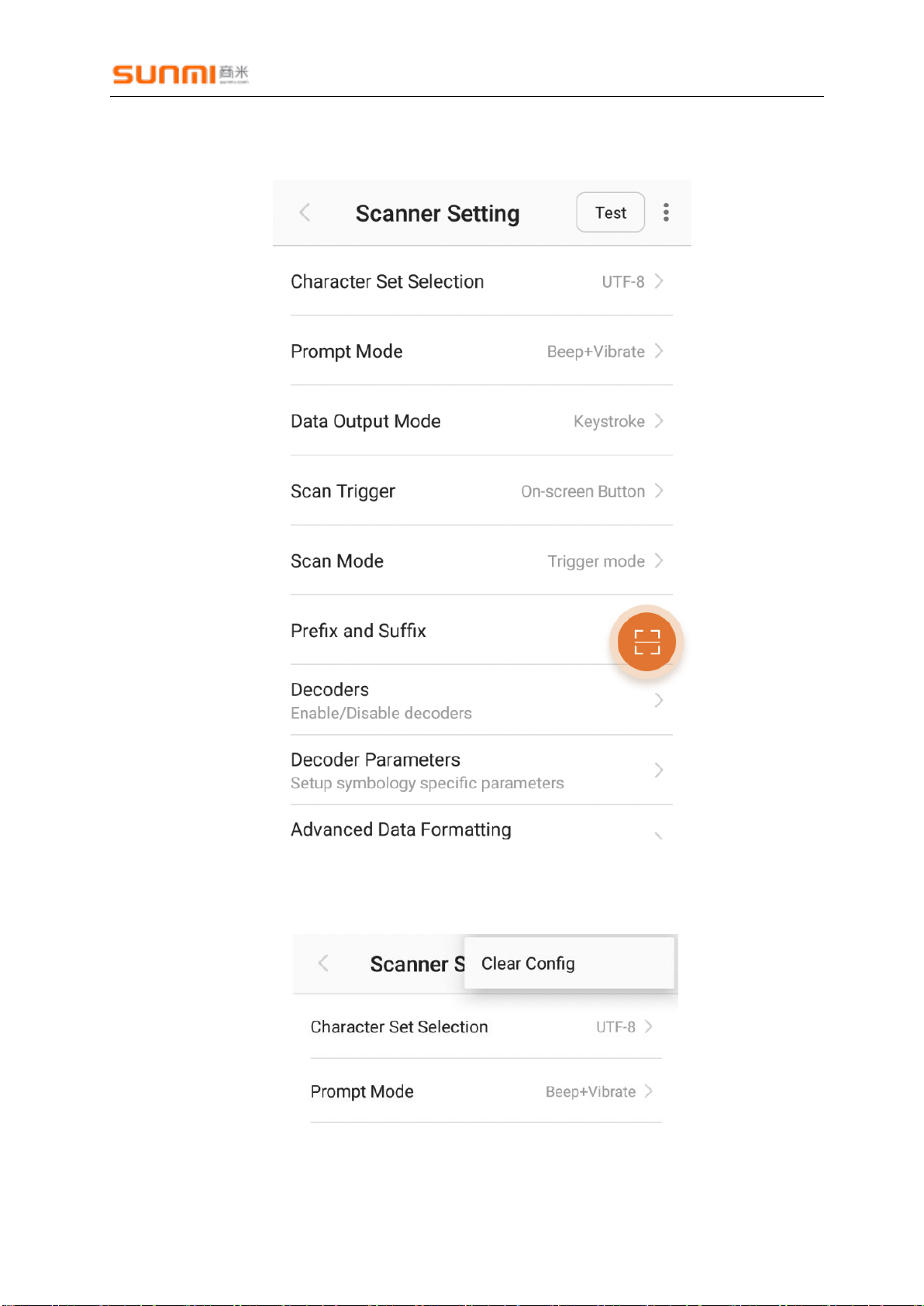
Click the menu icon in the top right corner, then click "Clear Config", as shown below:
Page 9
Shanghai Sunmi Technology Co., Ltd. Sweeping Development
- 8 -
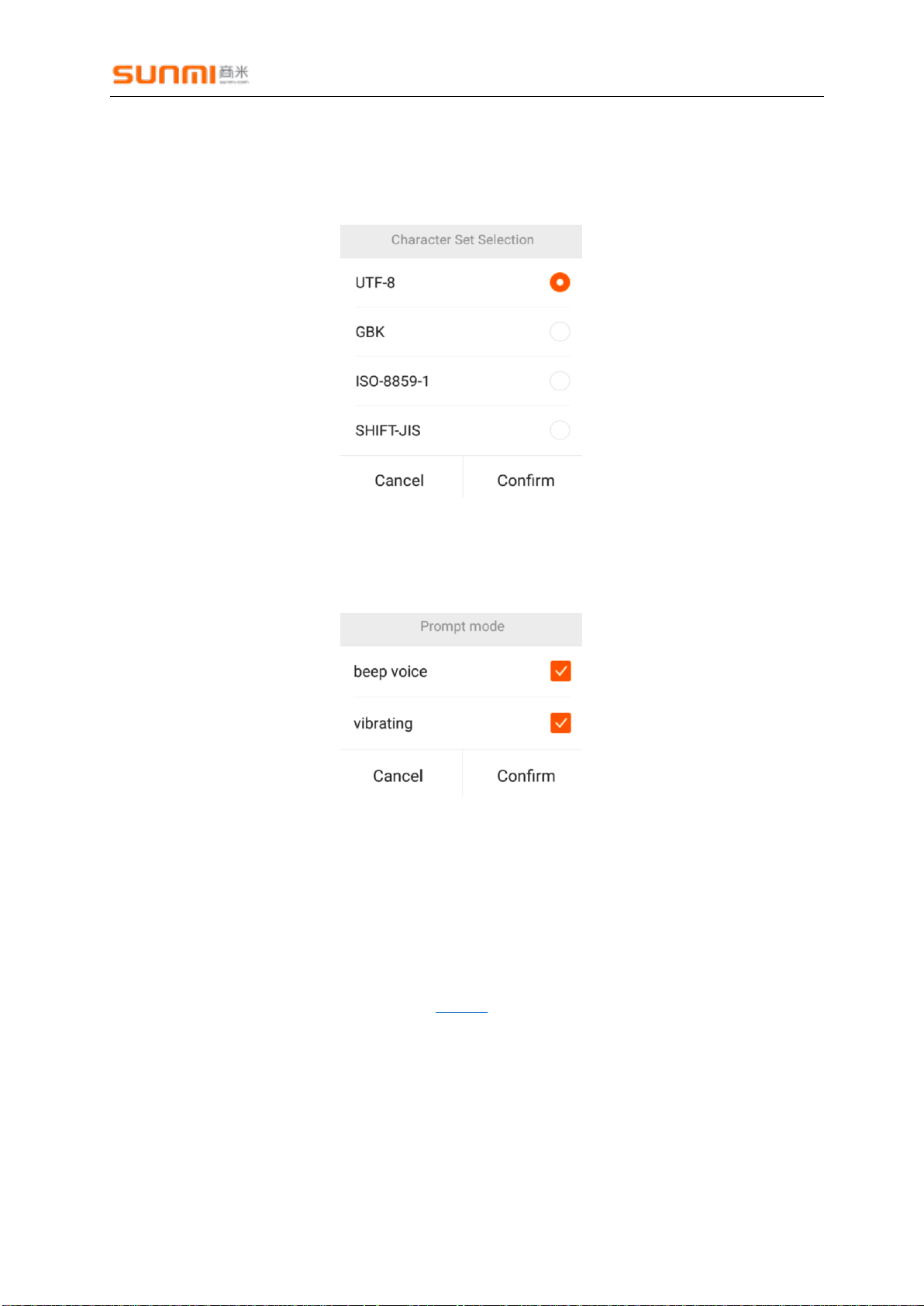
3.2. Character set selection
Default:UTF-8
Options:UTF-8,GBK,ISO-8859-1,SHITF-JIS
3.3. Prompt mode
Acoustic and vibration alerts are turned on by default.
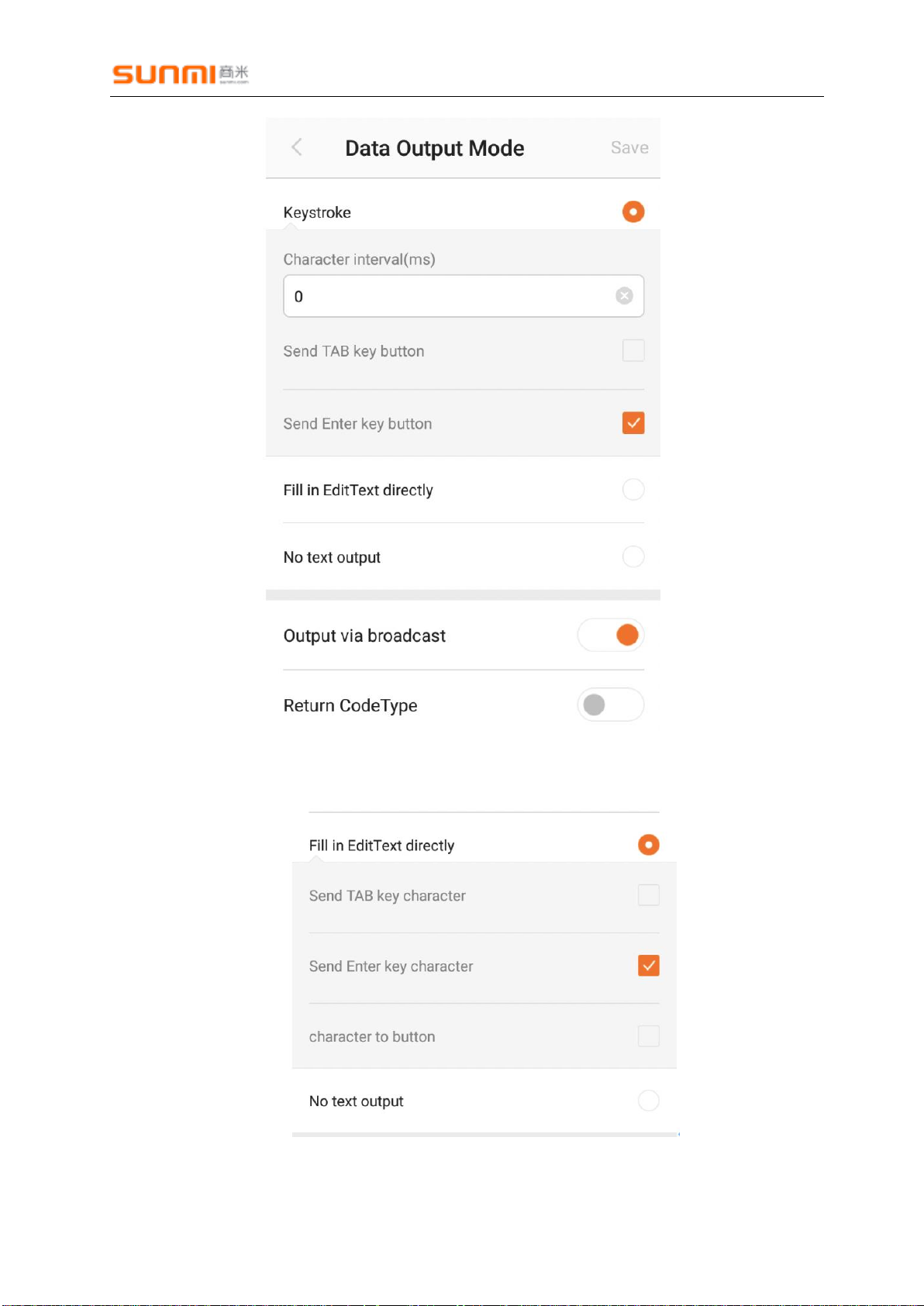
3.4. Data Output mode
1. Setting
Simulated keyboard output is selected by default.
Broadcast output is turned on by default.
Barcode type is not output by default. Refer to CodeID for details.
Page 10
Shanghai Sunmi Technology Co., Ltd. Sweeping Development
- 9 -
Fill in EditText directly, select the “character to button” (output the end character as an
analog button)
Page 11

Shanghai Sunmi Technology Co., Ltd. Sweeping Development
- 10 -
2. Brocadcast introduce
Listening broadcast:"com.sunmi.scanner.ACTION_DATA_CODE_RECEIVED"
Field description:
data: character data;
source_byte: Byte array raw data (Excluding the basic settings such as End Character,
CodeID, suffix and advanced settings, etc., requires version 2.3.1 or higher);
Example:
private static final String ACTION_DATA_CODE_RECEIVED =
"com.sunmi.scanner.ACTION_DATA_CODE_RECEIVED";
private static final String DATA = "data";
private static final String SOURCE = "source_byte";
private BroadcastReceiver receiver = new BroadcastReceiver() {
@Override
public void onReceive(Context context, Intent intent) {
String code = intent.getStringExtra(DATA);
String arr = intent.getByteArrayExtra(SOURCE);
if (code != null && !code.isEmpty()) {
mCode.setText(code);
}
}
};
private void registerReceiver() {
IntentFilter filter = new IntentFilter();
filter.addAction(ACTION_DATA_CODE_RECEIVED);
registerReceiver(receiver, filter);
}
3.5. Scan Trigger
The default hover button is off.
Page 12

Shanghai Sunmi Technology Co., Ltd. Sweeping Development
- 11 -
3.6. Scan mode
Default:trigger mode
3.7. Prefix and suffix settings
The suffix and suffix function is disabled by default. It supports "\n", "\t", "\xxx" (three-digit
ASCII decimal value 0-255, requires version 2.2.2 or higher) special characters, if you need to
add "\" please enter"\\":
Can be turned on manually, up to 10 digits
Page 13

Shanghai Sunmi Technology Co., Ltd. Sweeping Development
- 12 -
3.8. Decoders
The user can choose to enable or disable the identification code in setting .
Default :fully enabled.
3.9. Doceder Parameterx
Find "Scanner Setting -> Decoder Parameters" from the sweep dock settings to enter the
code system settings page, as follows:
Page 14

Shanghai Sunmi Technology Co., Ltd. Sweeping Development
- 13 -
Click on one of the code systems, such as "Code 39", as shown below:
Page 15

Shanghai Sunmi Technology Co., Ltd. Sweeping Development
- 14 -
3.10. Advanced Data Formatting
Advanced Data Formatting – Character Replacement, as shown below:
Advanced Data Formatting, default is off, It is turned off by default and can be manually
turned on. It can support up to 10 rules. You can edit and delete the rules. Click “Add” to add,
as shown below:
Supports up to 20 characters, supports "\n", "\t", "\xxx" (three-digit ASCII decimal value 0255, requires version 2.2.5 or higher) special characters, if you need to add "\" please enter"\\".
Page 16

Shanghai Sunmi Technology Co., Ltd. Sweeping Development
- 15 -
4. Appendices
4.1. table1
Codes
Newland
(2096)
Zebra
(1350)
Zebra
(4710/4750)
Fp(1825)
NL(1365)
Honeywell
(3601/6603)
Code128
√ √ √ √
√
UCC·EAN12(GS1)
√ √ √ √ √
ISBT 128
√
√
√
EAN8
√ √ √ √ √
EAN13
√ √ √ √ √
UPC-E
√ √ √ √ √
UPC-E1
√
√
√
UPC-A
√ √ √ √ √
Interleaved 2 of 5
(ITF)
√ √ √ √ √
Matrix 2 of 5
√ √ √ √ √
Code39
√ √ √ √ √
Codabar
√ √ √ √ √
Code93
√ √ √ √ √
GS1 DataBar(RSS)
√ √ √
√
Composite-UCC
√
√
Composite-UPC
√
√
Code11
√ √ √ √ √
ISBN
√ √ √ √
Industrial 2 of 5
√
√
√
Standard 2 of
5(IATA)
√
√
√
Discrete 2 of 5
(DTF)
√
√
Page 17

Shanghai Sunmi Technology Co., Ltd. Sweeping Development
- 16 -
Chinese 2 of 5
√
√
Korea 3 of 5
√
√
Plessey
√
√
MIS-Plessey(MSI)
√ √ √ √ √
Composite A/B
√
Composite C
√
ISSN EAN
√ √ √
PDF417
√ √
√
QR Code
√ √
√
Aztec
√
√
DataMatrix
√ √
√
汉信码
√ √
√
MaxiCode
√
√
AustralinPostal
√
√
US Postnet
√
√
US Planet
√
√
Uk Postal
√
√
Japan Postal
√
√
Canadian Post
√
KIX(Netherlands) Post
√
Korea Post
√
China
Post(HongKong 2of5)
√
Telepen
√
Grid Matrix
√
Codablock
√
Code 32
√
Coupon Code
√
Page 18

Shanghai Sunmi Technology Co., Ltd. Sweeping Development
- 17 -
TLC 39
√
 Loading...