

Page 1
User manual for M1-H0401
1 - 10
User Manual
For
M1-TKH0401 MDVR
Mobile Digital Video Recorder
Copyright 2017-2019, Streamax Technology Co., Ltd
All Rights Reserved
For more information, please visit our website www.en.streamax.com
Page 2

User manual for M1-H0401
2 - 10
Notice
The information in this manual was current when published. The manufacturer reserves the right to
revise and improve its products. All specifications are therefore subject to change without any notice.
The purpose of this manual is to kindly aid the user for the operation for our MDVR. The user should
have a basic understanding of computer operation and basic knowledge of how to connect peripherals
and make some settings.
Copyright
Under copyright laws, the content of this manual may not be copied, photocopied, reproduced,
translated or reduced to any electronic medium or machine- readable form, in whole or in part, without
prior written consent of Streamax Technology Co., Ltd. Copyright (2017-2019)
Label
This device complies with part 15 of the FCC Rules. O peration is subject to the following two conditions:
(1) This device may not cause harmful interference, and (2) this device must accept any interference
received, including interf erence that may cause undesired operation.
FCC warning:
Any Changes or modifications not expressly approved by the party responsible for compliance could
void the user's authority to operate the equipment.
Note: This equipment has been tested and found to comply with the limits for a Class B digital device,
pursuant to part 15 of the FCC Rules. These limits are designed to provide reasonable protection
against harmful interference in a residential installation. This equipment generates uses and can radiate
radio frequency energy and, if not installed and used in accordance with the instructions, may cause
harmful interference to radio communications. However, there is no guarantee that interference will not
occur in a particular installation. If this equipment does cause harmful interference to radio or television
reception, which can be d eterm ined by tur ning t he equi pment o f f and on, the u ser is e ncour aged t o tr y t o
correct the interference by one or m or e of the following measures:
-Reorient or relocate the receiving antenna.
-Increase the separation b et w een the equipment and receiver.
-Connect the equipment int o an out let on a circuit different from that to which the receiver is connected.
-Consult the dealer or an experienced radio/TV technician for help.
This equipment complies with FCC radiation exposure limits set forth for an uncontrolled environment.
This equipment should be installed and operated with minimum distance 20cm between the radiator &
your body.
For more information, please visit our website
www.en.streamax.com
Page 3

User manual for M1-H0401
3 - 10
Guarantee & Warnings
1) Electrical Apparatus Safety
All installation and operation sho uld comply with local electric al safety norms.
2) Transportation
In the process of transportat ion, storag e and install ation, pleas e avoid heav y stress, v iolent vibrati on,
impact and water splashin g.
3) Installation
Install the equipment in ac cordan ce w ith the re qu ireme nts, handl e car eful ly. Do not heav ily pr ess t he
equipment before the MDVR installation is finished.
4) Requirem e nts on En gin eer s & Techni cia ns
All the work of checking and maintenance should be done by qualified technicians and engineers.
We do not undertake any responsibility caused by unauthorized modifications .
5) Requirem e nts on Env i ro nme nt
The equipment should be installed and stored in a cool and dry place, away from direct sunlight,
flammable or explosive substances, etc. Keep gaps not less than 3cm around the device to f aci litate
ventilation for cooling.
6) Accessories
Make sure to use accessories from the manufacturer recommended in the atta chment.
Insulate circuit ground an d metal shell for all the peripherals.
Before installation, plea se open the package and ensure t hat all parts are included.
If there are any problems, ple ase c ontact us as soon as possible.
For more information, please visit our website www.en.streamax.com
Page 4
User manual for M1-H0401
4 - 10
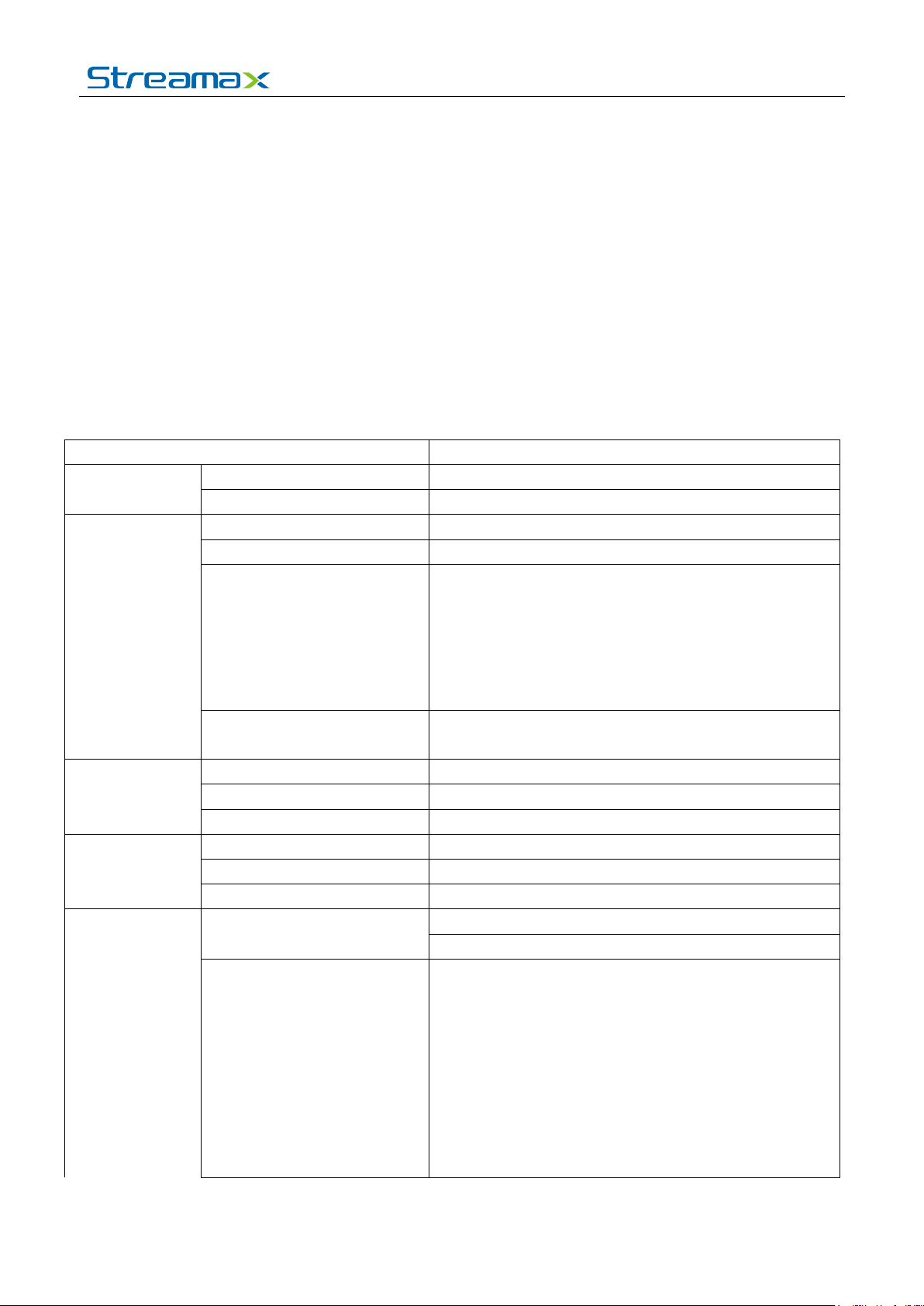
Function Overview
Control Mode
CP4, mouse, EasyCheck, networ k (3G/4G/WIFI)
Input
4 channels AHD(1080P)+1 channel IPC(1080P)
Output
1 channel
PAL:
or4*1080P@15fps(AHD)+1*1080P@30fps(IPC)
Optional NTSC/PAL
Input
5channels (1 channel IPC audio input)
Output
1channel
Audio Signal St a ndard
Electrical level: 2Vpp Input impedance: 4.7kΩ
Analog:
1. Product Characteristics
1.1. Overview
Streamax M1-TKH0401 is a functional Mobile Digital Video Recorder specially designed for vehicle
video surveillance. It has a high-speed processor and embedded operating system, combining with the
most advanced H.265 video compression / decompression technology, GPS positioning technology. It
supports video recording in 1080P, 720P, WD1, WHD1, W CIF, D1, HD1 and CIF formats. It is easy to
use with simple design, multi-functions, super ior anti-vibration, flexible installation and high reliability.
1.2. Specifications
System
Video
Audio
Display
OS Linux 3.18.20
Total Resource
Video Signal S t an dard
Display Split 1/4/9
OSD GPS information, alar m, vehicle No., speed, date/ti me
Operation Interface Semi-transparent GUI
Video/Audio Compr ession
Preview, Recording, Playb ack, Network, Locating
4*720P@25fps(AHD)+1*1080P@30fps(IPC)
or4*1080P@10fps(AHD)+1*1080P@30fps(IPC)
NTSC:
4*720P@30fps(AHD)+1*1080P@30fps(IPC)
Electrical level: 1Vpp Impedance: 75Ω
Video: H.264/H.265
Audio: ADPCM, G.711U
Recording
For more information, please visit our website www.en.streamax.com
Image Resolution
PAL:
1080P(1920X1080), 720 P(1280X720),
WD1(928X576), WHD1(928X288) , WCIF(464X 288),
D1(704X576), HD1(704x288), CIF(352x288)
NTSC:
1080P(1920X1080), 720 P(1280X720),
WD1(928X480), WHD1(928X240) , WCIF(464X240) ,
D1(704x480), HD1(704 x240),CIF(352x240);
Page 5
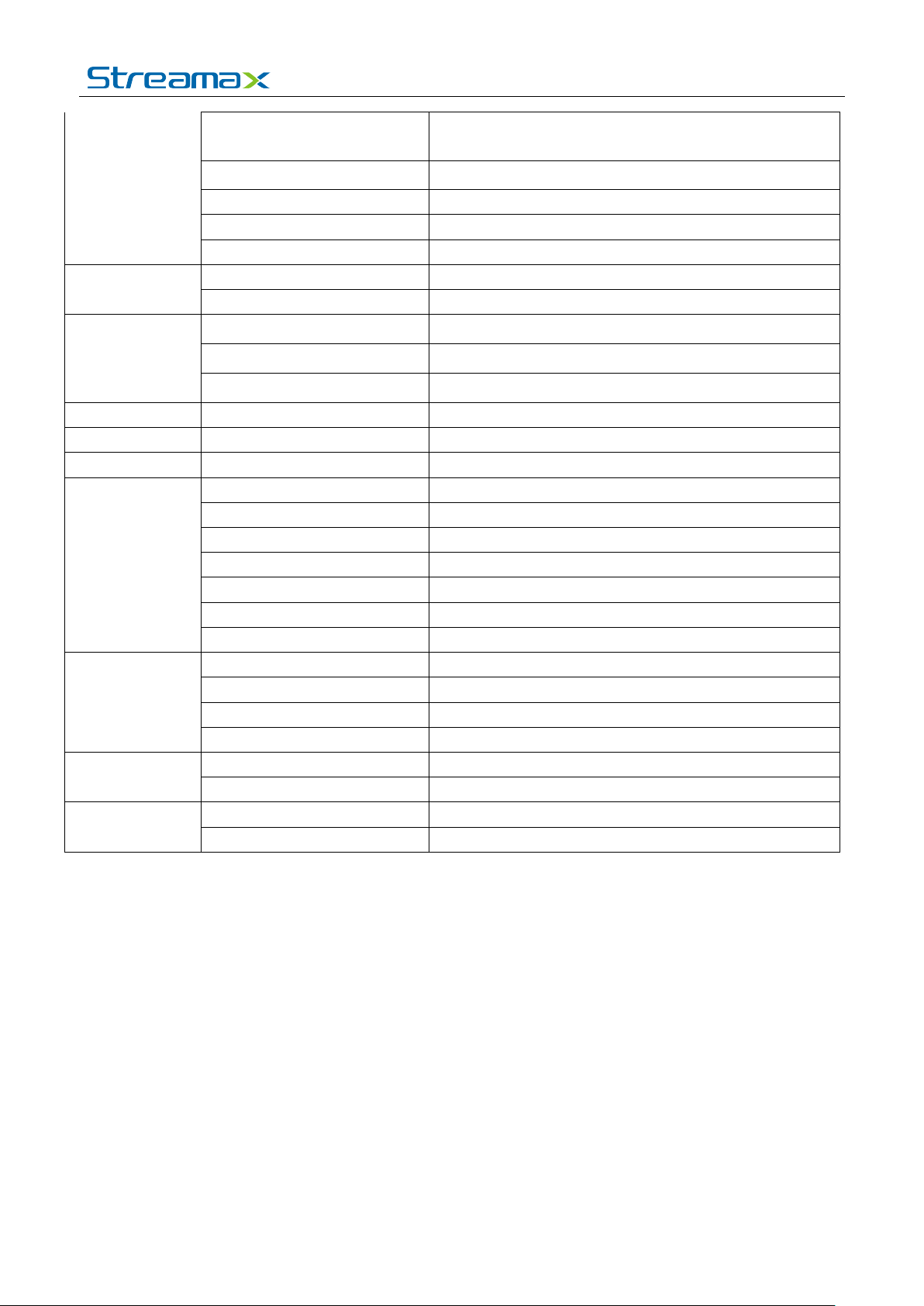
5 - 10
1080P(1920X1080), 720 P(1280X720)
Post-recording
0-30 minutes
Playback
Playback Channel
1 channel by local playback
Search Mode
Date/time, channel, event
Locating
GPS
Location tracking, speed d et ection and time sync
Sensor
G-Sensor
Built-in three-ax is i ner t ia s ens or
Storage
SD
SD card slot x 2
Intercommunication
1 MIC port(CP4)
Input
DC8-36V
Output
5V@500mA
Max Power Consumption
29W
Standby Power Consumpt ion
≈0W
User manual for M1-H0401
Digital:
Image Quality 1-8 levels adjustable (1 is the best)
Recording Mode Boot up/Schedule/Alar m
Pre-recording 0-60minutes
Network
Interface
Power
Physical
Characteristic
Environment
IPC Ethernet 6-pin M12(100M x 1, PON power supply)
WIFI/BT4.0 Support
4G Support
USB USB2.0 x 1
RS232 RS232 × 2
Sensor 8 inputs, 2 outputs
Speed 1 channel pulse speed detect ion
CAN 1×CAN
Control Panel Optional CP4
Dimension (L x W x H)(mm) 167.3 x 146.3 x 54.1
Weight 0.83Kg
Operating Temperature
-40℃
~ +70℃
Operating Relative Hum id ity 8%-90% (No Condense)
For more information, please visit our website www.en.streamax.com
Page 6
User manual for M1-H0401
6 - 10
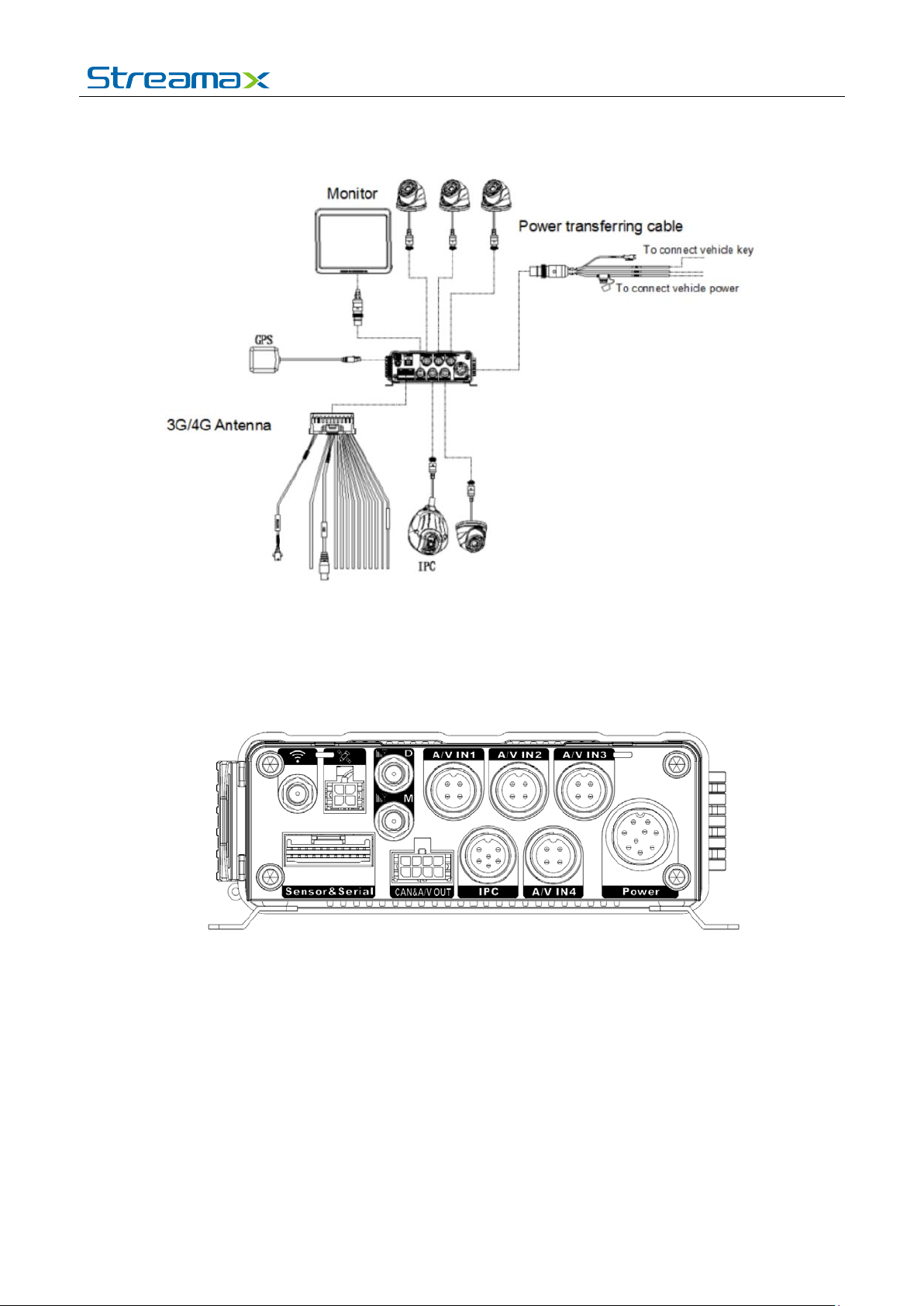
1.3. System Diagram
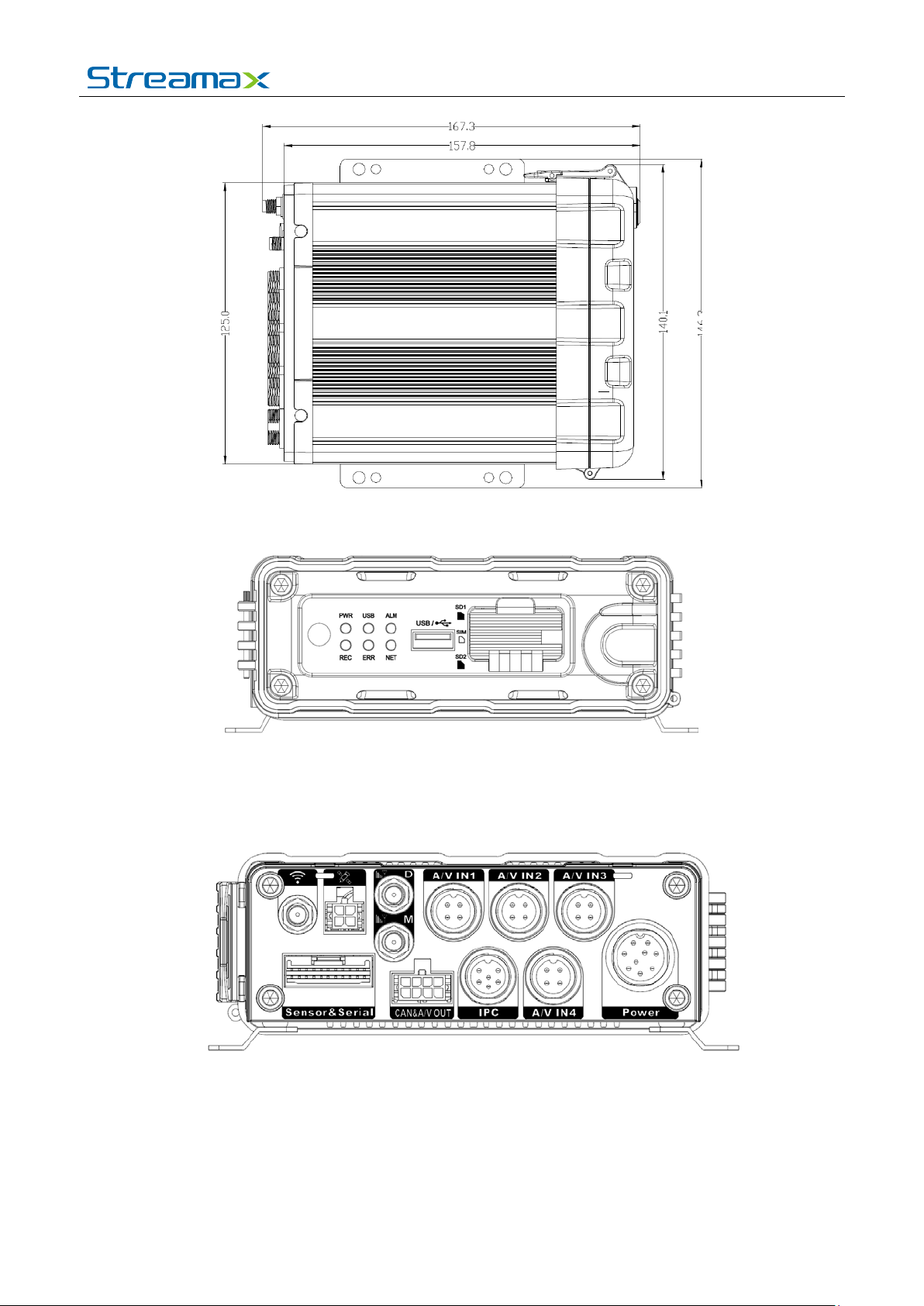
1.4. External Interface
Dimension (Unit: mm)
For more information, please visit our website www.en.streamax.com
Page 7
7 - 10
Front Panel
User manual for M1-H0401
Rear Panel
For more information, please visit our website www.en.streamax.com
Page 8
User manual for M1-H0401
8 - 10
Serial No.
Print
Description
1 Power DC 8-36 V power input
2 Sensor&Serial Interfaces of serial port and sensor
3 AHD1~4 Analog Audio & Video input 1-4
4 A/V OUT&CAN Analog Audio & Video output&CAN inter face
5 IPC Interface of PON power supply
6
7
8
9
GPS
WIFI
M
D
GPS antenna interface
WIFI antenna interface
4G main antenna interface
4G sub antenna interface
warning:
External antennas are only suitable for ante nnas of t ype C 6D-3000TKX placed in ac cess ories bo xes,
and other external antennas are prohibited from use. BT, WIFI supports a maximum antenna gain of 5
dBi. 4G band 2 supports a maximu m antenna gain of -2.17 dBi, 4G band 4 supports a maximum antenna
gain of 0.26 dBi, 4G band 5 supports a maximum antenna gain of 0.01 dBi, 4G band 12 supports a
maximum antenna gain of -1.72 dBi, 4G band 13 supports a maximum antenna gain of 0.08 dBi, 4G
band 14 supports a maximum antenna gain of 0.36 dBi, 4G band 66 supports a maximum antenna gain
of 0.26 dBi, 4G band 71 supports a maximum antenna gain of -1.72 dBi,
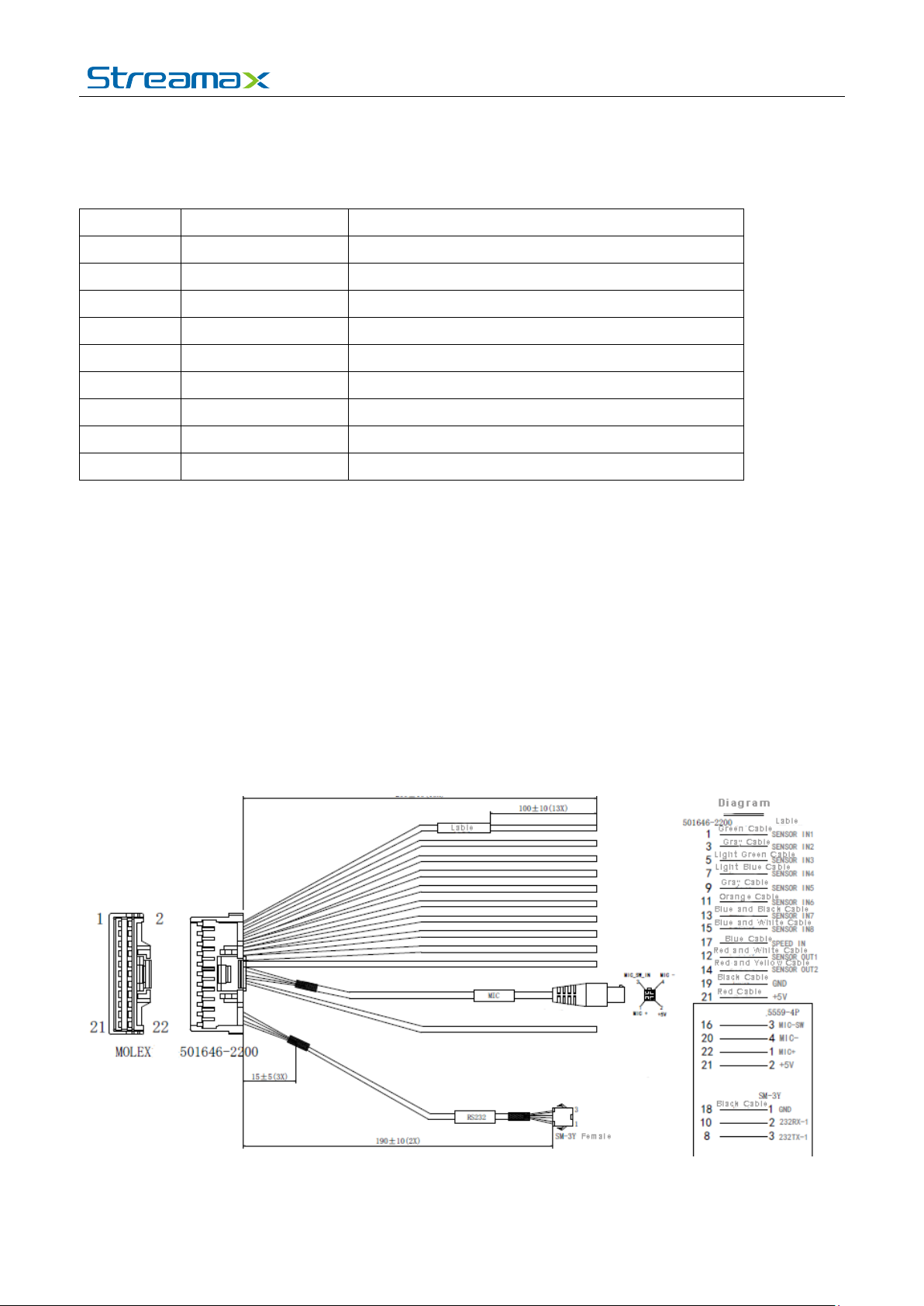
1.5. Definition a nd Pict ures of External Cables
Alarm Cable Definition
For more information, please visit our website www.en.streamax.com
Page 9

User manual for M1-H0401
9 - 10
2. FAQ
1) The system can’t start?
Usually this problem results from the incorrect power connection. Please follow below steps to
check the power connect i on:
1. Check the input power, whether the power wire is connected correctly, whether the ground wire is
connected back to the bat t er y, and whether the fuse on the power wire is in good condition.
2. Check whether the ACC si gnal wire input to the power is with voltage higher than 7 V.
3. Check whether the device key is closed.
2) The MDVR restarts uninterruptedly?
Please follow below st eps to check it:
1. Check whether the voltage of MDVR is insufficient. If the voltage is less than the start-up voltage of
the device, the device would alw ays restart.
2. The problem in hard disk/SD card may c ause th e fai lure to start. Take off the storage part and check
whether it is broken down.
3) The device can’t record?
Usually this problem results from the storage disk or camera. Please follow below steps to check it:
1. Check whether the storage disk is installed, whether it is in good contact, and whether the disk can
be read normally in comp ut er.
2. Check whether the storage disk is formatted. The storage disk should be formatted before normally
storing record files.
3. Check whether there is video signal input into the device from camera, and whether there is
video/image on the screen.
4) There is no voice i n r e cord file?
Please follow below st eps to check it:
1. Check whether there is an external pickup, or whether the camera features with the function of
audio collection.
2. Access to Video Channel Settings, check if Audio is set on.
3. There must be video input into the channel for recor din g and it must record normally.
5) The GPS works a bnormally?
Please follow below st eps to check it:
1. Check whether the GPS antenna is installed correctly. There is a silk print logo on the G PS antenna
holder behind the host dev ice.
2. Check whether the antenna receiver is sheltered. It should not be covered by any stuff, which may
cause it not to receive signals.
3. Environmental influence such as tree shades, being inside tunnel, driving near tall building or
elevated roads, thunderstorms or other weather influence, etc. can also cause signal loss or
receiving wrong signals.
6) The device can’ t s hutdown in i gnition switch mode?
For more information, please visit our website www.en.streamax.com
Page 10

User manual for M1-H0401
10 - 10
1. Check if the ACC line connection mode is correct; and check whether there is voltage on ACC
yellow line when the key is t ur ned off.
2. If the device has been set with schedule rec ording, it can’t s hut dow n if it i s sti ll durin g recor di ng time
of the task table.
For more information, please visit our website www.en.streamax.com
 Loading...