

Page 1
OUTLOOK
Manual and Preset Lighting Control
Features:
❏ Simple network control wiring
❏ Each system can control up to 16 rooms
❏ 8 Preset scenes plus On and Off per room
❏ Manual sliders for direct control of individual circuits
❏ Choice of 3, 6, 9 or 12 control channels per room
❏ Record facility to store slider settings for future pushbutton recall
❏ LCD Display Station for custom preset labels
❏ 1, 4 and 8 Preset Remote Pushbutton station options
❏ Audio Visual Interface and Infra Red Remote Controls
❏ Programmable fade times of between 0 and 4 minutes
❏ Record Lockout facility for playback-only operation
❏ Room Combine Stations for room partitioning
❏ Portable station options
❏ Designed for use with Digital Environ, LD90, CD80SV and SLD dimmers
❏ Digital Network Interface available for using Outlook with other dimmers
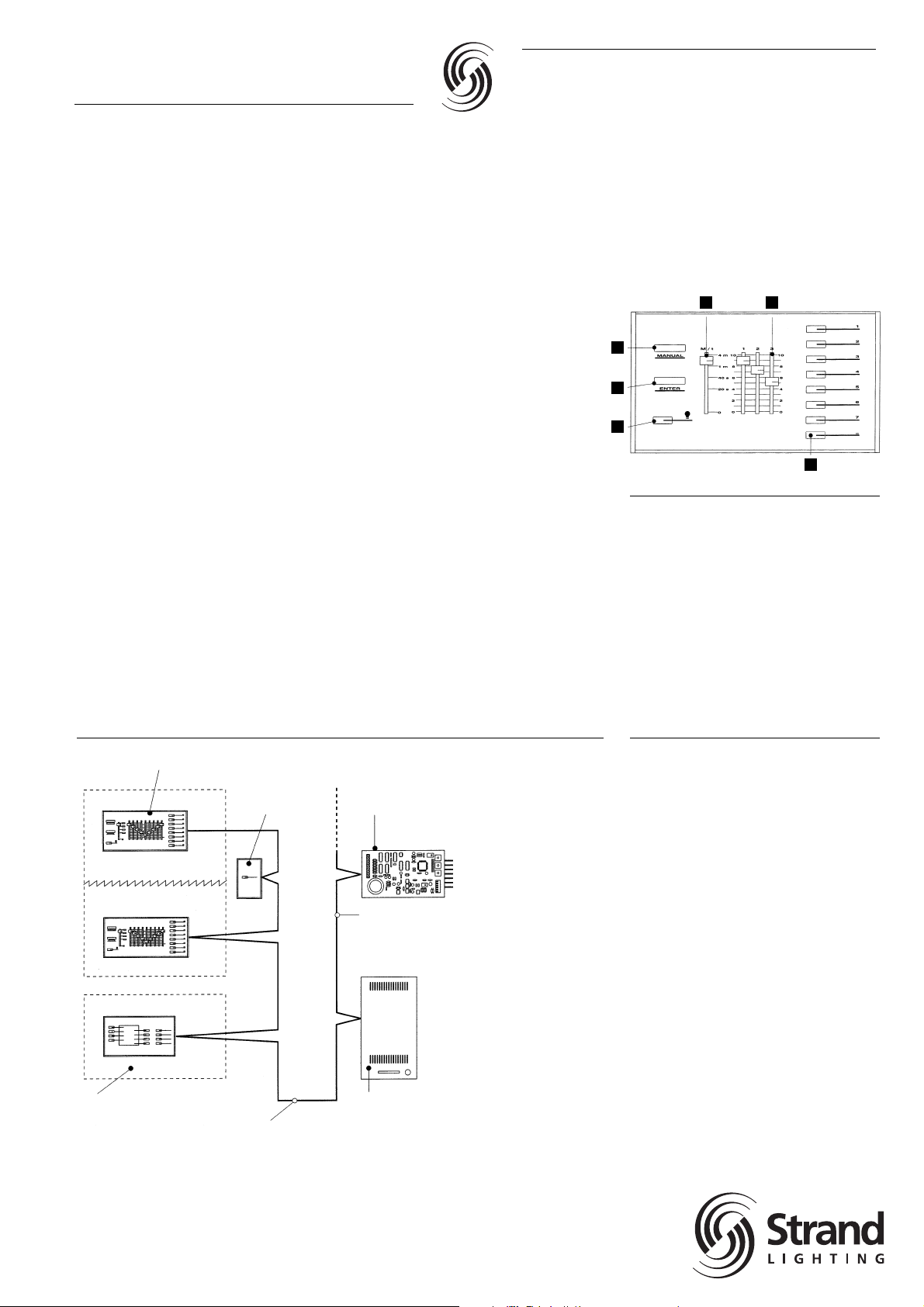
Outlook Typical Schematic
Choice of 20 control stations
Room Combine
Station
Room 2
Room 1
Room 3
Up to 16 independent
rooms each with up to
12 control channels
Simple network
wiring between
control stations
Choice of Strand Dimmers
equipped with Digital Network
Control including Digital Environ,
LD90, CD80SV and SLD.
Digital Network
Control cable
Digital Network
Interface for controlling
equipment accepting
0 to +10V control
Room 1
Partition
A
B
C
D E
F
Outlook Master Station
A Manual – Activates local sliders
B Enter – Records slider settings
into a preset
C Off – Selects black-out
D Master Slider – Overall control of slider
levels and for setting fade times
E Channel Sliders – Individual control
of lighting levels
F Preset Pushbuttons – For recall of
8 preset lighting scenes with fade times
A Guide to Outlook
Outlook is a comprehensive family of control
stations designed for architectural applications where a simple, flexible control solution
with minimal installation and cabling cost is
needed. Outlook is specifically designed for
use with Strand Lighting Digital Environ™,
LD90™, CD80SV™ and SLD dimmer
cabinets.
The control stations access, modify and
recall lighting levels stored in the dimmer
cabinets via a common digital communication network cable without the need for an
external central processor.
Control stations are available in various configurations and can be used in any combination to suit the user’s requirements. During
installation, an internal 16 position switch on
the station determines the room to be controlled. Each of the possible 16 rooms can
have up to 12 channels of control and 8 preset lighting scenes in addition to On and Off
functions.
Outlook
Strand Architectural Controls
Page 2
Master Stations
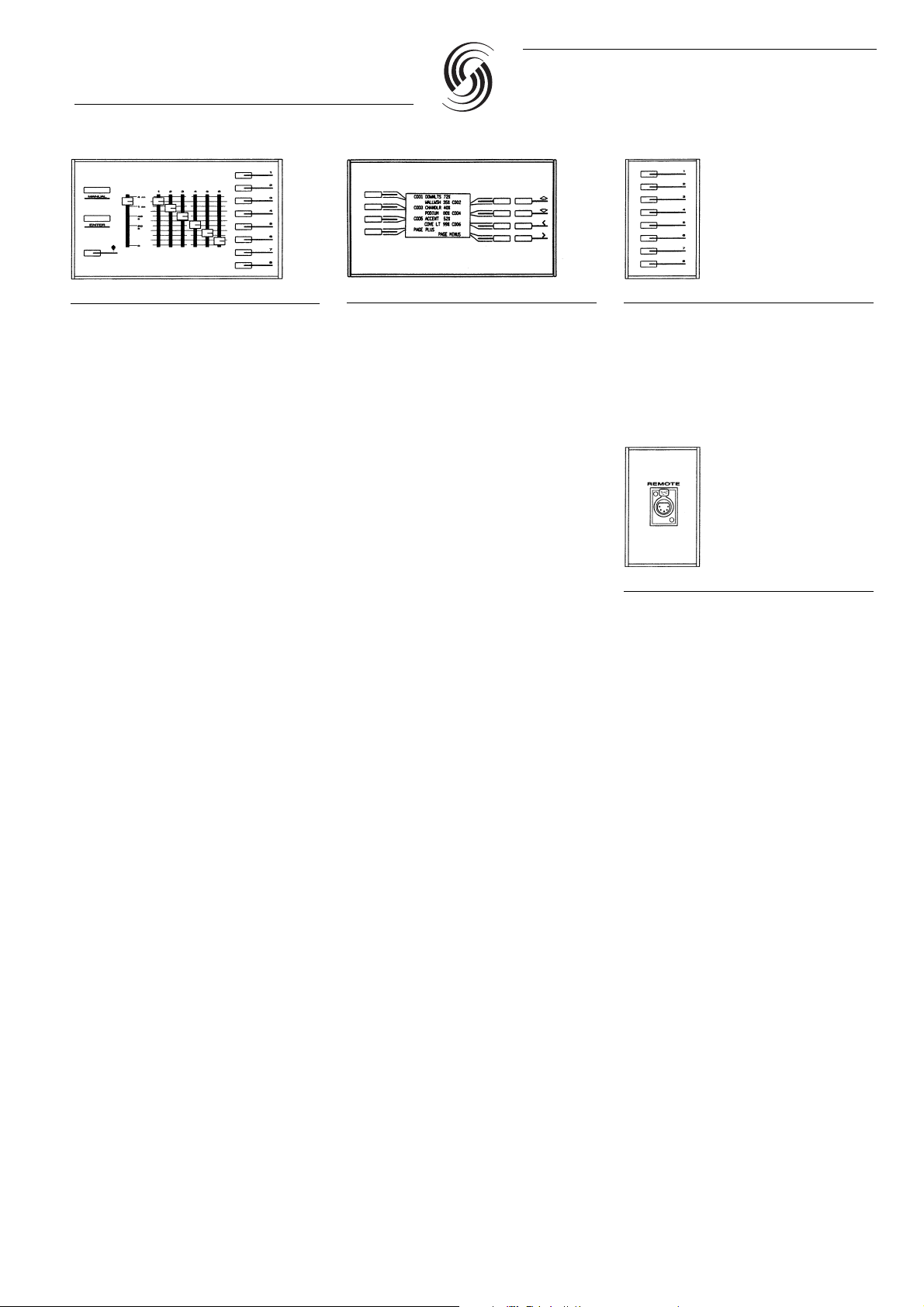
The Master Station is the most versatile station in the Outlook range combining the benefits of both preset and slider control.
Master Stations have 3, 6, 9 or 12 sliders
plus proportional master, activated by a
Manual button, providing full control of the
lighting.
8 Preset pushbuttons enable the recall of 8
presets with programmable fade times up to
4 minutes. There is also the provision of an
Off button.
An Enter button enables the slider settings
and fade time to be recorded into a preset.
Master Stations provide the following additional functions:
❏ Record Lockout – to prevent unauthorized
modification of presets from the local station
❏ Total Lockout – for disabling all other sta-
tions in the same room except the local
station to prevent changes to the lighting.
❏ Preset Mastering – to proportionally mas-
ter the level of a selected preset.
❏ Manual Fade Time – programmed for
each room. When selecting Manual, the
lighting fades to the levels set on the local
sliders.
❏ Record Blind – to set up and record a pre-
set lighting state from the manual slider
settings without modifying the current
lighting levels.
Display Station
The Outlook Display Station has 8 backlit
LCD display used for labeling adjacent pushbutton functions.
The station has a “Set-up” or “Configuration”
menu for selecting one of two* modes of
operation during installation:
1. Preset Recall
Pushbuttons enable the recall of 8 labeled
presets with programmed fade times. Raise
and Lower buttons provide proportional mastering of the current preset, and an Off button fades lights off.
In this mode of operation, the Display Station
provides the following additional functions:
❏ Custom label editing – 11 character labels
for presets and 7 character labels for
channels can be locally programmed.
❏ Channel level control – channel levels can
be modified prior to recording a preset.
❏ Fade time programming – a fade time up
to 4 minutes can be programmed for each
preset.
❏ Record Lockout – to prevent local unau-
thorized modification of presets.
❏ Total Lockout – for disabling all other sta-
tions within the same room to prevent
changes to the lighting.
❏ Clone – for copying labels to other Display
Station in the same room to minimize programming.
2. Room Combination
Pushbuttons with custom room labels enable
the user to combine, cancel and preview
room combinations. Up and Down scroll buttons allow up to 16 rooms to be accessed.
In this mode of operation, the Display Station
provides the following additional functions:
❏ Custom label editing – 11 character labels
for rooms can be locally programmed.
❏ Clone – for copying room labels to other
Display Station in this mode of operation
to minimize programming.
A third operational mode configures the station for “System Wide Control” operation.
Refer to the
“System Wide Control” Datasheet
for further information.
Slider Stations
Slider Stations allow manual control of 3, 6,
9 or 12 channels with Manual (“take control”)
function to allow control to be switched from
one slider station to another within a room.
These stations also feature On and Off buttons for switching lights instantly to full or
fading lights off respectively.
Remote Preset Stations
Preset Stations are available in versions with
1, 4 or 8 preset pushbuttons, for simple recall
of pre-programmed lighting scenes within a
room. Each pushbutton can be toggled to
fade between its preset and Off.
Receptacle Station
The Receptacle Station provides a socket
to connect a portable Master, Remote
Preset, or Slider Station to the communication network.
Infra-Red Remote Controls
Infra-Red Remote Control provides the
facility to control lighting from any position
within a room up to 50ft (15m) from a
Receiver Station. The hand held control unit
has 8 pushbuttons for selection of presets
1 – 7 and Off.
Outlook
Strand Architectural Controls
Page 3
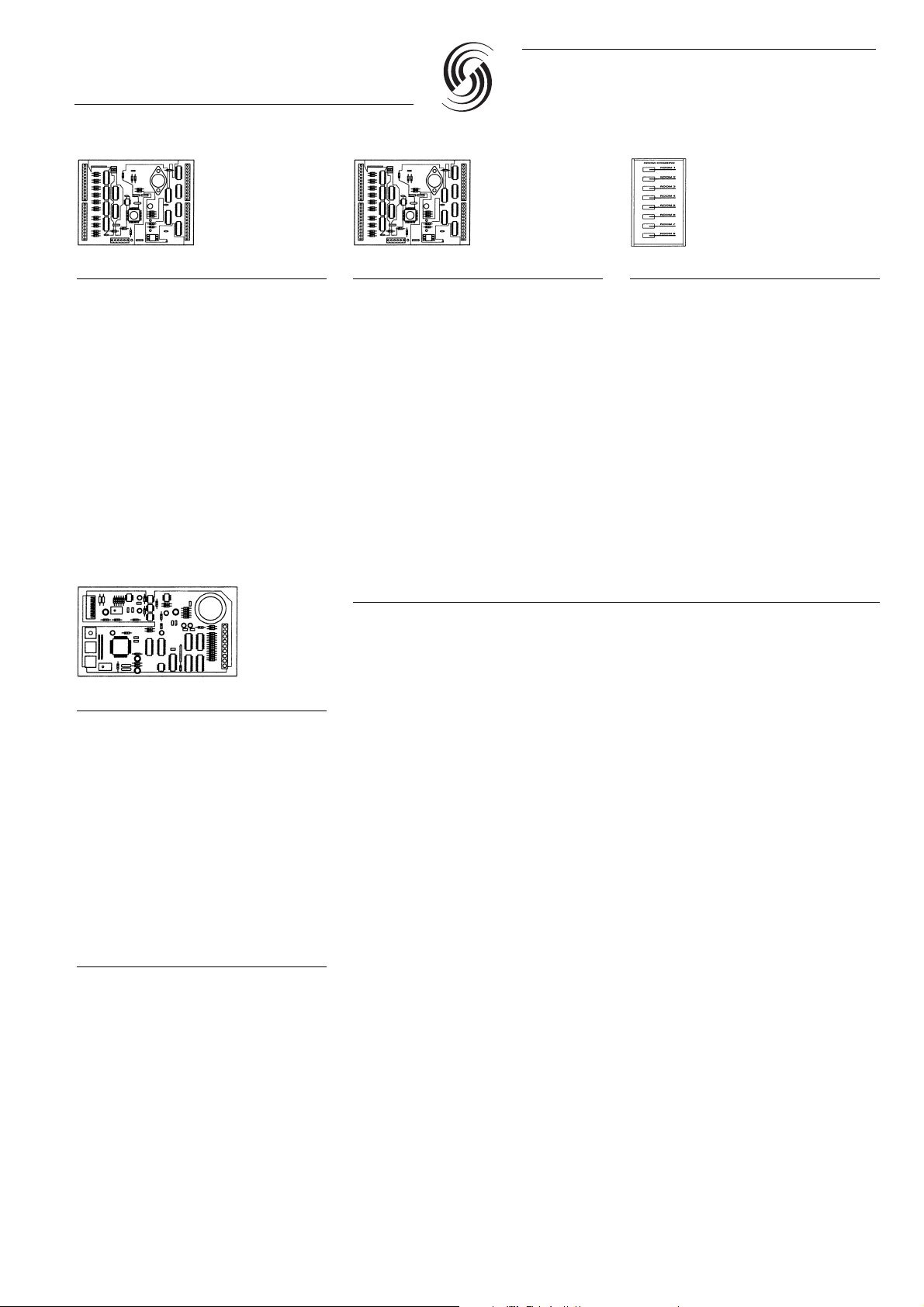
Audio Visual Interface
The A/V interface allows lighting presets
to be selected automatically from external
equipment such as slide projector controls,
and sound systems. Each A/V Interface has
10 inputs with mimic outputs that accept a
momentary contact closure to select one of
the 8 presets, Off or On.
An additional input accepts a maintained
contact closure to select the Total Lockout
function (used to temporarily disable control
from other stations within the room).
The A/V Interface is supplied as a printed
circuit board for installation in equipment
enclosures or with custom control panels.
An external 18-24 volt dc power supply is
required for the A/V Interface.
Room Combine Interface
The Room Combine Interface is supplied
as a printed circuit board which can be
used either:
1. With partition switches, to automatically
combine rooms when partitions are moved.
2. With a custom control and mimic panel for
manually selecting, cancelling and previewing multiple combinations of rooms.
An external 18-24 volt dc power supply is
required for the Room Combine Interface.
Room Combine Stations
Room Combine Stations for 2, 3 or 8 rooms,
allow the user to combine, cancel and preview a combination.
Digital Network Interface
The Digital Network Interface enables the
Outlook range of control stations to be used
with dimming systems that do not directly
support Outlook’s Digital Network Control
protocol. Each interface provides the necessary support for Outlook stations and so may
be used for stand alone operation. The interface provides 6 analog 0 to +10 volt dc
outputs for controlling external equipment.
Refer to the “Outlook Digital Network
Interface” Data Sheet for further details
and a full specification.
Room Combination
Ballroom and meeting areas in Hotels and
Conference Centers often have the requirement to partition the space to create different
combinations of rooms. For lighting control
to accommodate partitioning of the space
and provide both separate room control and
control of combined areas, a Room Combine
Station or Interface is also required. Refer
also to the “Display Station” which can be
used for room combination.
Dimming Options and Configuration with Outlook
Lighting Loads
Outlook Control Stations are designed for use with Digital Environ, LD90, CD80SV and SLD
dimmer cabinets which have the capability of providing intensity control for tungsten, tungsten
halogen, low voltage (transformer fed), fluorescent, neon and cold cathode lighting loads.
Dimmers should be selected appropriate to the type of light source, load rating and the installation requirements. Alternative dimmers may be controlled from Outlook via the Digital Network
Interface.
Strand Lighting Fact Sheets available include: “A Guide to Fluorescent Dimming” and
“Dimming Transformer Fed Loads”.
Note: Digital Environ and CD80SV are designed to North American standards, LD90 is designed to
European standards. SLD meets all global standards.
Digital Environ, LD90, CD80SV and SLD Dimmers
Using the dimmer cabinet keypad and display during set-up, each individual dimmer circuit is
assigned to a control channel in one of the possible 16 rooms.
A Power Supply (Part No. 66100 or 66101) is required when using Outlook control stations
with LD90 dimmers.
Digital Environ has a power supply for up to 20 Outlook stations fitted as standard.
Outlook
Strand Architectural Controls
Page 4
A
D E F
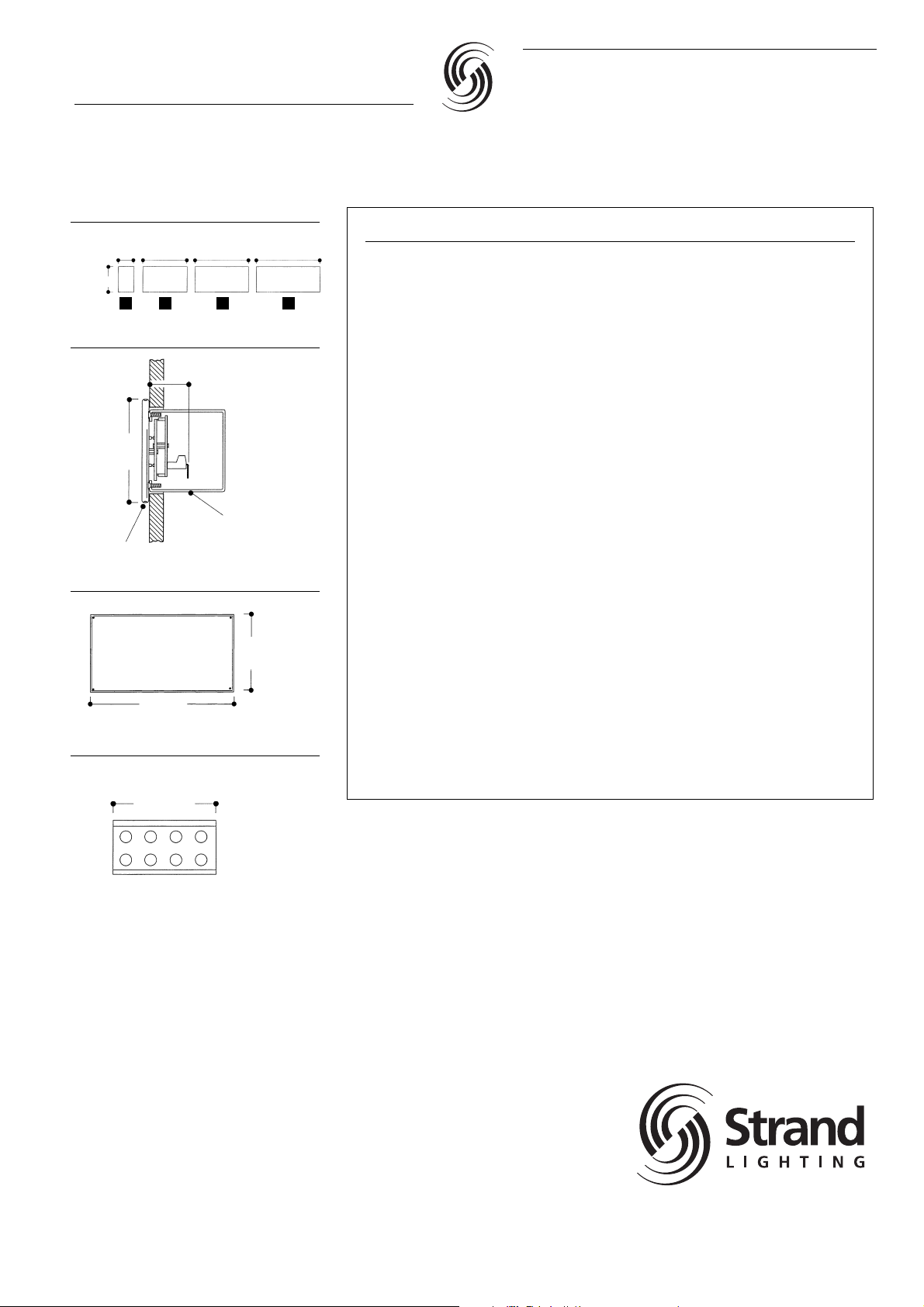
Faceplate Sizes
3.0”
(76mm)
4.72”
(120mm)
8.44”
(214mm)
10.25”
(260mm)
12.07”
(306mm)
Faceplate/
Cat. No. Description Back box
63003 Outlook – 3 Channel D
Master Station
63006 Outlook – 6 Channel D
Master Station
63009 Outlook – 9 Channel E
Master Station
63012 Outlook – 12 Channel F
Master Station
63030 Outlook – Display Station D
63021 Outlook – 1 Preset A
Remote Station
63024 Outlook – 4 Preset A
Remote Station
63028 Outlook – 8 Preset A
Remote Station
63041 Outlook – Receptacle A
Station
63044 Outlook – Audio Visual –
Interface (excludes back
box or custom enclosure)
63031 Outlook – 2 Room A
Combine Station
63033 Outlook – 3 Room A
Combine Station
63038 Outlook – 8 Room A
Combine Station
63039 Outlook – Room Combine
Interface (excludes back
box or custom enclosure)
Faceplate/
Cat. No. Description Back box
66100 Outlook/Microcontrol –
Power Supply with
Enclosure
66101 Outlook (DIN Rail) Power –
Supply (LD90)
66711 Portable Enclosure Kit –
(A-size)
66714 Portable Enclosure Kit –
(D-size)
66715 Portable Enclosure Kit –
(E-size)
66716 Portable Enclosure Kit –
(F-size)
66800 † 1-Gang Masonry –
Back Box (A-size)
66804 † 4-Gang Masonry –
Back Box (D-size)
66805 † 5-Gang Masonry –
Back Box (E-size)
66806 † 6-Gang Masonry –
Back Box (F-size)
63040 Digital Network Interface –
• Stations supplied with back box to order only.
• Bronze tinted Plexiglass locking covers are
available to order for all Outlook Stations.
† Portable Enclosure kits enable standard sta-
tions to be converted to portable units. Kits
are supplied complete with 25ft (8m) cable
and mating connectors.
*Note: Back boxes are subject to regional
supply variations. Dimensions given are for
guidance only and refer to Raco 690/960 series.
Refer to your local Strand Representative for
further details.
Ordering Information
Supplementary Power Supply Unit
(Cat. No. 66100)
8”
(230mm)
13”
(330mm)
Depth 4”
(102mm)
Back Box Sizes
All masonry back boxes are 3.5” (89mm)
deep and all are 3.75” (95.3mm) high.
7.4”
(188mm)
D
4–Gang
Faceplate Side Detail
1.75” MAX
(45mm)
4.72”
(120mm)
Hex
Screw
Earthed/Grounded
Backbox
A* 1-Gang 1.97” (50mm)
D 4-Gang 7.4” (188mm)
E 5-Gang 9.22” (234mm)
F 6-Gang 11.03” (280mm)
Outlook
Strand Architectural Controls
BERLIN • HONG KONG • LONDON • LOS ANGELES • MOSCOW • NEW YORK • PARIS • ROME • TORONTO www.strandlighting.com
Strand Lighting Ltd
Unit 3 Hammersmith Studios, Yeldham Road,
Hammersmith, London W6 8JF United Kingdom
Tel: +44 (020) 8735 9790
Fax +44 (020) 8735 9799
Strand Lighting GmbH
Ullsteinstrasse 114-142 D-12109
Berlin, Germany
Tel: +49 (0) 30/70 79 51 0
Fax: +49 (0) 30/70 79 519 9
Strand Lighting Italia srl
Via delle Gardenie 33 00040
Pomezia-Roma, Italy
Tel: +39 06 919631
Fax: +39 06 9147136
Strand Lighting Asia
20/F Delta House, 3 On Yiu Street
Shatin, N.T. Hong Kong
Tel: (852) 2757 3033
Fax: (852) 2757 1767
The Company reserves the right to make any variation in
design or construction to the equipment described.
© Strand Lighting Ltd. 2002
Strand™, Strand Lighting™, Strand Quartzcolor™ are trade-
marks of Strand Lighting Limited and Strand Lighting Inc.
 Loading...