

Page 1

Manufactured in North America
COMFORT PLUS
Model 3120
with ECM Variable Speed
Blower System
Quick Reference Installation Guide
1 2
PLACEMENT AND CLEARANCES
D
606015
A
M
P
M
M
STEFFES
C
Front View
A
Top View
1. Remove heating elements from base
2. Place system in desired location.
3. Adjust leveling legs to prevent
4. Remove painted front panel of brick
E
F
B
5. Position element wiring harnesses to
6. Remove galvanized front panel.
G
WARNINGWARNING
WARNING
WARNINGWARNING
The area in which the
Comfort Plus is installed
must remain free of debris
and room air should be
maintained at less than
85oF.
A Back = zero clearance
B Front = 36 inches (for servicing)
C Right Side = 8 inches (from combustible
material)
D Top = 8 inches (from combustible material)
E Left Side = 4 inches
F Outer Sides of Return and Supply Ducts =
zero clearance
7. Starting at bottom, lift and drape
8. Remove front air channel by pulling
9. Remove the electrical panel cover
G Bottom = zero clearance
DO remove the Comfort Plus
3
BRICK LOADING
DO NOT extend leveling legs more
Starting at the back of the brick
core, load bricks one row at a time
using left side, right side, center
DO use and follow generally
pattern. Place bricks with grooved
side facing up, notch facing forward,
and ridges on left and right.
Remove loose brick
NOTCH IN BRICK
DO have equipment installed by a
debris from brick.
Brick rows MUST line
up front to back
and side to side.
T
I
N
U
F
O
T
N
O
R
F
Reference Owners and Installers
SET-UP
of system.
rocking.
storage cabinet.
avoid damage during brick loading.
insulation blankets over top of
system.
out at bottom.
and locate element screw kit and
outdoor sensor.
WARNINGWARNING
WARNING
WARNINGWARNING
system from its shipping pallet
before installing.
than one inch.
accepted safety practices when
handling insulation material.
qualified technician in compliance with all applicable local,
state and national codes and
regulations.
Manual for complete safety,
installation, and operation
instructions.
Page 2
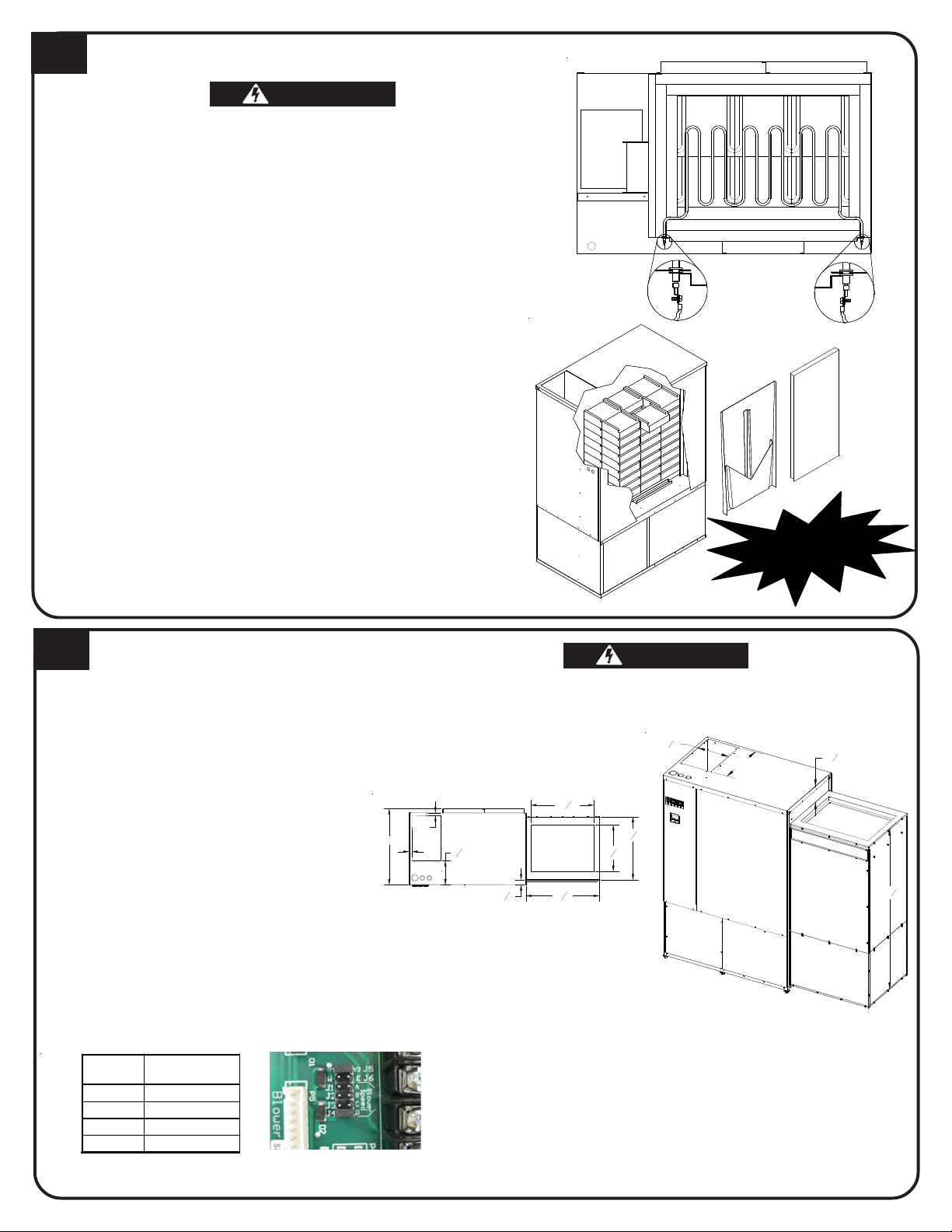
HEATING ELEMENT AND AIR CHANNEL INSTALLATION
½ HP Variable
4
WARNINGWARNING
WARNING
WARNINGWARNING
HAZARDOUS VOLTAGE: Risk of electric shock. Can cause
injury or death.
DO NOT remove electrical panel cover while system is ener-
gized.
Elements MUST be positioned properly to avoid short circuit-
ing them against any surfaces within system.
Use care when making connections to avoid element dam-
age.
1. Insert heating elements between brick layers until element ends
embed into side cutouts of brick cavity. The threaded screw tabs on
wire connection terminals should point forward.
2. Install air channel with air deflectors (arrow shaped pieces) facing
inward and narrow ends of deflectors pointing up. Place top of air
channel in first.
3. Lower insulation blankets back into position, one at a time. Tuck
sides into edges, corners and around exposed portions of heating
elements.
4. Install galvanized panel. Slide the top inside the upper lip of top
painted panel. Bottom rests on the outside of the brick cavity.
5. Connect wiring harnesses to heating elements using screws in
element screw kit. Install screws with heads up and threads pointing
down. Tighten screws to 14 in·lbs.
6. Check non-insulated element connections to make sure they do not
come within 1/2" of any surface.
7. Install painted front panel.
Element-to-Wiring
Harness Connections
n
n
a
h
C
r
i
A
t
n
o
r
F
e
d
i
S
k
c
i
r
B
m
o
t
t
o
B
IMPORTANT
l
e
t
n
o
r
F
DUCTING
5
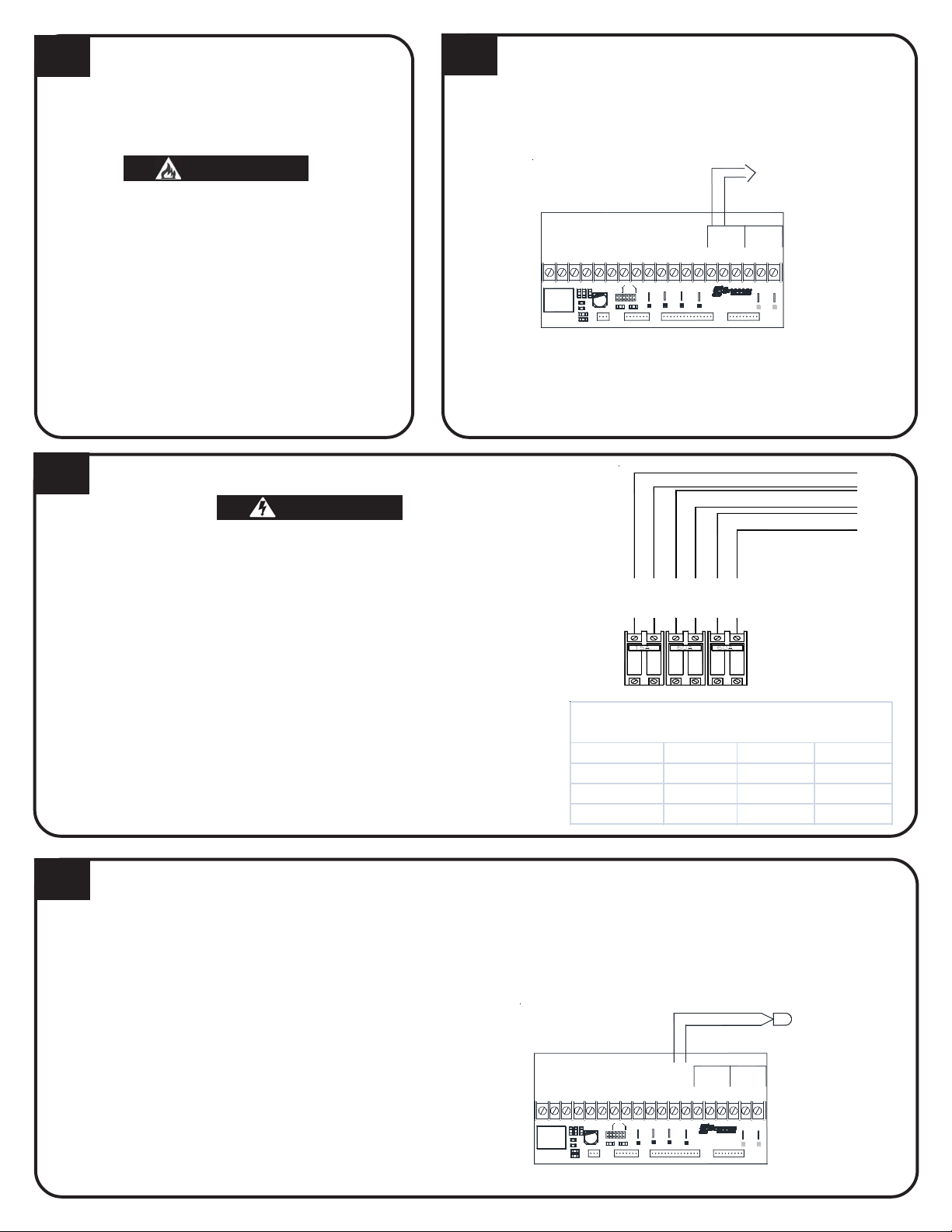
1. Assemble factory supplied return air plenum
per the instructions provided with the plenum.
2. Once assembled, set plenum on right side of
HAZARDOUS VOLTAGE: Risk of electric shock. Can cause injury
or death. DO NOT operate the Comfort Plus heating system
without ducting installed to both the air inlet and outlet.
the system with air filter and indoor coil access
covers facing forward. Line up predrilled holes
on system with holes in flanges of plenum and
attach using screws provided in plenums
hardware package.
NOTE: The 3100 series is factory config-
ured for a right-to-left airflow.
1"
27"
1
1"
"
8
2
3. Insert air filter into filter rack.
4. Connect return air duct to top of plenum.
5. Connect supply air duct in structure directly to
systems air outlet.
6. If necessary, adjust supply air blower speed by
using the chart below.
7. The W/E jumper MUST be in the ON position or
the blower will not operate with an E call from
the thermostat.
External static pressure should not exceed .75 inches water column.
Jumper
Spee d CFM
A 1000
B 1200
C 1400
D 1600
WARNINGWARNING
WARNING
WARNINGWARNING
1
10
"
Top of
System
7
1
8
16"
7
"
22
16
5
"
22
16
7
"
16
16
1
"
26
"
8
8
3
5
"
8
When interfacing with a heat pump, the A-Coil MUST
be placed on the return air side.
To maintain a room temperature of 85
mechanical room, a 24" x 24" opening can be installed in the area or a 6" x 6" non-closing register
can be cut into the return air duct. Refer to Placement and Clearance Requirements section of
Owners and Installers Manual for more information.
o
F or less in the
5
53
"
8
Page 3
6
AIR CONDITIONER/HEAT
PUMP INTERFACE
When interfacing a heat pump with the Comfort Plus,
the A-coil MUST be placed in the return air plenum.
WARNINGWARNING
WARNING
WARNINGWARNING
Risk of fire. Any one ducting system MUST
NOT contain more than one air handling
(blower) system.
The 3120 Comfort Plus heating system can accommodate most heat pump or air conditioner indoor
coils up to a 3 1/2 ton capacity provided the heat
pump or air conditioner is sized in accordance to
supply air delivery rates of the Comfort Plus.
The maximum coil size the factory supplied return air
plenum can accomodate through the front access is
25.5" (W) x 22" (D) x 29.93" (H). The inner dimensions
of the coil area are 26" (W) x 22" (D) x 30.96" (H).
7
LOW VOLTAGE PEAK CONTROL
CONNECTIONS
1. Route low voltage wire from load control device to terminal
block.
2. Connect field wiring to RP and P positions.
Dry Contact Peak
Control Switch
Aux.
Peak
Relay
P2
To Control Board
Inputs
COM
Comfort Plus
P7
To Control Board
P8
R C
NCAPNO
P9
Outdoor
Outdoor
P1
Air
LV Circuit Board
W/
Y1AUX Y2 G
P11
RLY1
Fid 2
O
H/E2Y1CO22RP P
R
D3D7D5
Blower
J5
J6
P4
Speed
C3
C
A
B
R1
R2
D6
D4
D
W E
J3J1J2
J4
Y1 Y2
D2
D1
P10
P5
Blower
Y2
P3
Water
P6
If utilizing a Steffes Time Clock Module or Power Line
Carrier control, refer to the instructions shipped with that
device for installation information.
8
LINE VOLTAGE ELECTRICAL CONNECTIONS
WARNINGWARNING
WARNING
WARNINGWARNING
HAZARDOUS VOLTAGE: Risk of electric shock. Can cause injury or
death. Do not energize the Comfort Plus heating system until installation is complete.
1. Route all line voltage wires through knockout(s) and into electrical panel.
2. Make proper field wiring connections, phasing circuits as shown.
Reference the Unit Identification label for circuit information.
To ensure proper operation and safety, all line voltage circuits
must be segregated from low voltage wiring.
To reduce electromagnetic fields associated with electrical
circuits and to avoid induced voltage on sensors and electronic
devices, the circuit phases MUST be alternated as shown.
DO NOT install any wiring in the line voltage compartment of
the Comfort Plus heating system unless it is rated for line
voltage.
9
LOW VOLTAGE OUTDOOR SENSOR CONNECTIONS
The outdoor temperature sensor can be installed by wiring it
directly to the system or to the Steffes power line carrier (PLC)
system.
Direct Wired:
If connecting to the Steffes power line carrier system, follow the installation instructions in the PLC
systems Owners and Installers Guide.
1. Mount outdoor sensor in a location where it can accurately
sense outdoor temperature.
2. Route low voltage wire from outdoor sensor to electrical
compartment:
Outdoor sensor wire MUST NOT be combined with other
control wiring in a multi-conductor cable.
Seal external wall openings.
Outdoor sensor lead can be extended to 250 ft.
Unshielded Class II (thermostat) wire can be used
provided it is segregated from any line voltage wiring.
3. Connect outdoor sensor wires to the two "OUTDOOR" posi-
AUX
W/
Y1
P11
RLY1
Fid 2
tions of the low voltage terminal block.
BLOWERS/CO NTROLS CIRCUIT
CHARGE CIRCUIT #1
CHARGE CIRCUIT #2
LINE 2
LINE 1
LINE 2
LINE 1
C ircu it B re a ke rs
LINE 1
LINE 2
Full Load Current
Shown for 240VAC only. Circuit deration not included.
Model Control Crct Chrg Crct #1 Chrg Crct #2
3120 - 14.0kW 6.00 29.17 29.17
3120 - 17.0kW 6.00 36.46 36.46
3120 - 21.6kW 6.00 45.00 45.00
Outdoor Sensor
Aux.
Peak
Relay
P2
To Control Board
Inputs
COM
Comfort Plus
P7
To Control Board
P8 P9
R C
NCAPNO
Outdoor
Outdoor
P1
Air
LV Circuit Board
O
Y2 G
H/E2Y1CO22RP P
R
D3D7D5
Blower
J5
J6
Speed
C3
C
A
B
R1
R2
D6
D4
D
W E
J3J1J2
J4
Y1 Y2
D1
P10
P5
Blower
Y2
P3
P4
Water
D2
P6
To Service (Breaker) Panel
Page 4
10
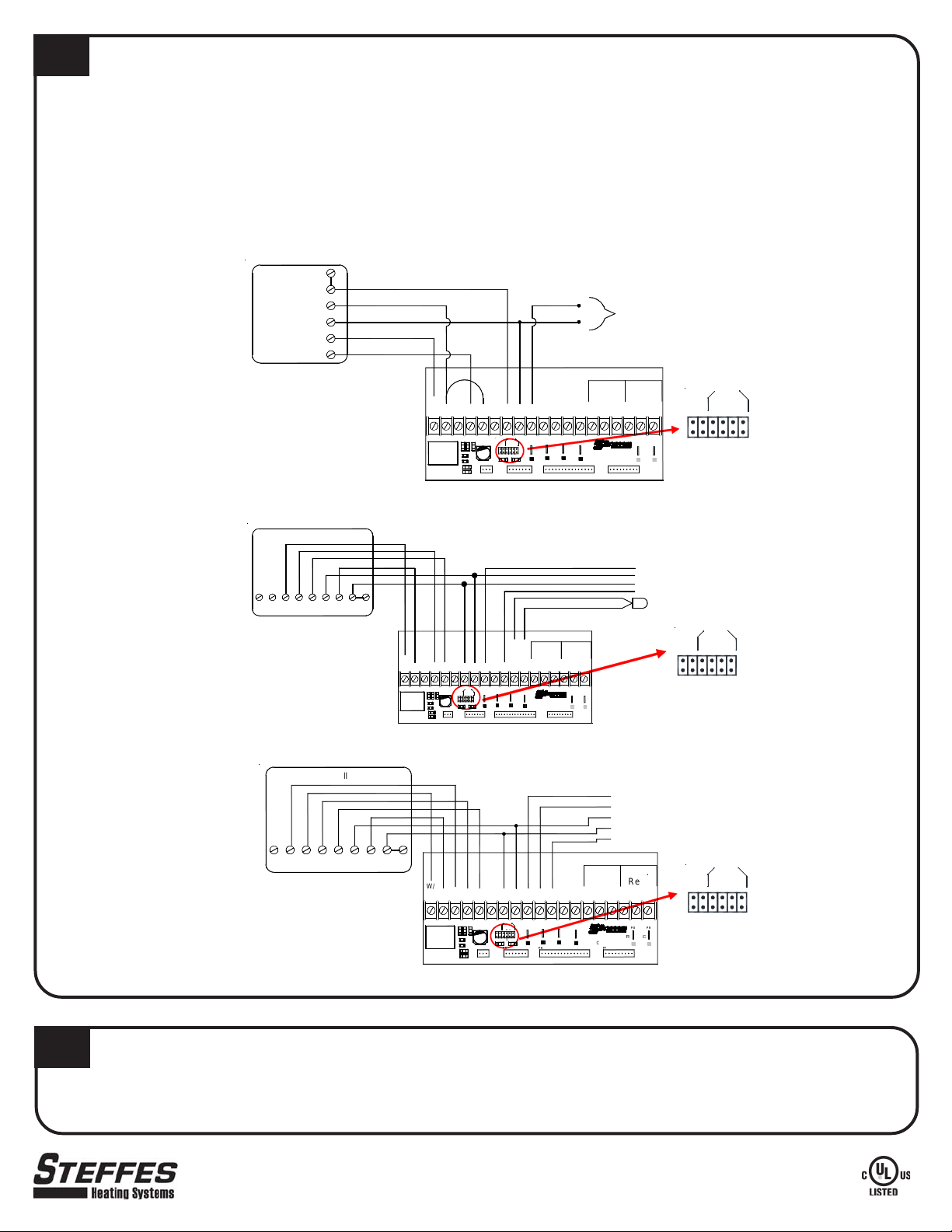
LOW VOLTAGE ROOM THERMOSTAT CONNECTIONS
A 24 VAC thermostat must be used (digital recommended).
1. Disconnect power to the Comfort Plus system.
2. Route low voltage wires from the thermostat to the Comfort Plus System.
3. Insulate thermostat wire wall opening if necessary and attach thermostat to the wall. When using a mechanical
thermostat or thermostat with anticipator, resistor kit #1190015 must be installed to ensure proper operation.
4. Connect low voltage wires from thermostat into terminal block as shown.
NOTE: For detailed heat call information, reference the Owner's and Installer's Manual.
Stand Alone Furnace Application with Uncontrolled Air Conditioning
Honeywell
TH5110D
cR
R
Y
C
W
Y
Air Conditioner
C
(If being used in the
Connections
application)
G
IMPORTANT
The Y1/Y2 Jumper must be installed
The W/E Jumper must be installed
Single Stage Heat Pump Application
Honeywell TH5220D
Aux
ELCG O/B RYRc
IMPORTANT
The Y1/Y2 Jumper must be installed
The W/E Jumper must be installed
Two Stage Heat Pump Application
Honeywell TH5320U
Aux
Y2
IMPORTANT
The Y1Y2 Jumper must be removed
The W/E Jumper must be installed
W/
Y1AUX G OY2 Y1
P11
D5 D7 D3
R1
R2
D6
RLY1
D4
Fid 2
W/
RRYCO/BG
H/E
Y1AUX OGY2 Y12Y222O
P11
RLY1
cL
RC
D5 D7 D3
Blower
J6
J5
Speed
C3
CBA
R1
W E
J3J2J1
Y1 Y2
R2
P10
D1
P5
D6
D4
Fid 2
AUX
Blower
W/
Y2 GY1
P11
D3
D7D5
R1
R2
D6
RLY1
D4
Fid 2
Aux.Peak
Relay
To Control Board
Outdoor
Air
P1
Outdoor
LV Circuit Board
Inputs
Comfort Plus
P7
APPRP
To Control Board
COM
NC
P8 P9
RC
NO
H/E
C3
P10
D1
RC
Blower
J6
J5
Speed
W E
Y1 Y2
P5
Blower
Y2
2O22
P3 P2
P4
CBA
D
J3J2J1D2J4
Water
P6
Blower
Speed
W / E
ABC
J6
J1J2J3
D
J4
Y1 / Y2
J5
To Heat Pump
Y - Compressor
C - Low Voltage Common
R - Low Voltage Hot
O - Reversing Valve
Outdoor Sensor
Blower
Peak Aux.
Inputs Relay
APPRP
Outdoor
Outdoor
COMNCNO
P2P3
P4
D
J4
P1
Air
Water
D2
P6
To Control Board
Comfort Plus
LV Circuit Board
P7
To Control Board
P8
P9
CR
Speed
W / E
ABC
J1J2J3
J6
D
J4
Y1 / Y2
J5
To Heat Pump
Y1 - Compressor Stage 1
Y2 - Compressor Stage 2
C - Low Voltage Common
R - Low Voltage Hot
O - Reversing Valve
Aux.
Peak
Inputs
H/E
O
J5
J6
C3
W E
Y1 Y2
D1
P10
O
Y2Y1
CR
Blower
P4
Speed
DAB
C
J4
J1J2J3
D2
Blower
Water
22
P3
P2
To Control Board
Outdoor
P1
Air
Outdoor
RP2APP
Comfort Plus
LV Circuit Boar d
To Control Board
Relay
COM
NO
NC
Blower
Speed
W / E
ABC
J6
J1J2J3
D
J4
Y1 / Y2
J5
11
SOFTWARE CONFIGURATION AND INSTALLERS FINAL CHECKOUT
To ensure proper operation, the system software must be configured for the application. Refer to the Configuration Menu
in the Owner's and Installer's Manual or to the Configuration Guide provided by your local power company. Also, complete the
Installer's Final Checkout Procedure found in the Owner's and Installer's Manual.
3050 Hwy 22 North w Dickinson, ND 58601-9413 w www.steffes.com
Part No. 1200285-6
 Loading...