

Page 1

LifeKeeper® for Linux v4.5.0
Logical Volume Manager (LVM) Recovery Kit
Administration Guide
Revision A
06/2004
Page 2

The product described in this book is a licensed product of SteelEye® Technology, Inc.
SteelEye, SteelEye Technology, and LifeKeeper are registered trademarks of SteelEye
Technology, Inc.
Linux is a registered trademark of Linus Torvalds.
Other brand and product names used herein are for identification purposes only and may be
trademarks of their respective companies.
It is the policy of SteelEye Technology, Inc. to improve products as new technology,
components, software, and firmware become available. SteelEye Technology, Inc., therefore,
reserves the right to change specifications without prior notice.
To maintain the quality of our publications, we need your comments on the accuracy, clarity,
organization, and value of this book.
Address correspondence to:
Copyright © 2003-2004
By SteelEye Technology, Inc.
Mountain View, CA U.S.A.
All Rights Reserved Worldwide.
Page 3

Table of Contents
Introduction...................................................................................................................................................................3
Document Contents................................................................................................................................................3
Documentation and References..............................................................................................................................4
Requirements.................................................................................................................................................................5
Hardware Requirements.........................................................................................................................................5
Software Requirements..........................................................................................................................................5
Overview.......................................................................................................................................................................6
LVM Operation......................................................................................................................................................6
LifeKeeper for Linux LVM Recovery Kit .............................................................................................................6
LVM Recovery Kit Notes and Restrictions............................................................................................................7
Linux Boot Script Modifications.....................................................................................................................7
Support for Raw I/O and Entire Disks............................................................................................................7
Volume Group Activation...............................................................................................................................7
LVM Version Support.....................................................................................................................................8
LifeKeeper LVM Hierarchy Creation and Administration............................................................................................9
Hierarchy Creation Procedure................................................................................................................................9
Using LVM with LifeKeeper Data Replication ...................................................................................................11
Volume Group Reconfiguration...........................................................................................................................12
Troubleshooting...........................................................................................................................................................16
Error Messages.....................................................................................................................................................16
Common Error Messages..............................................................................................................................16
Hierarchy Creation........................................................................................................................................16
Hierarchy Extension......................................................................................................................................17
Hierarchy Restore..........................................................................................................................................18
Resource Monitoring.....................................................................................................................................18
LVM Recovery Kit Error Messages..............................................................................................................18
LifeKeeper for Linux 1
Page 4

2 LVM Recovery Kit Administration Guide
Page 5

Introduction
LVM Recovery Kit Administration Guide
Introduction
The LifeKeeper for Linux Logical Volume Manager (LVM) Recovery Kit provides logical volume
support for other LifeKeeper recovery kits. Thus, LifeKeeper-protected applications can take advantage
of the benefits offered by the Logical Volume Manager, including simplified storage management and the
ability to dynamically re-size volumes as needs change.
The LVM Recovery Kit is different from most other LifeKeeper recovery kits in that it is never used
alone, but always as a dependency of another LifeKeeper resource. As such, many of the operations
typically associated with a LifeKeeper recovery kit – for example, creating a hierarchy – are not directly
applicable to the LVM Recovery Kit.
Document Contents
This guide explains the following topics:
• Documentation and References. Provides a list of related LifeKeeper for Linux documents
and where to find them, along with references to a number of helpful documents about the
LVM product.
Requirements. Describes the hardware and software necessary to properly setup, install, and
•
operate the LVM Recovery Kit. Refer to the LifeKeeper for Linux Planning and Installation
Guide for specific instructions on how to install or remove LifeKeeper for Linux software.
•
Overview. Provides a general description of the LVM recovery kit and corresponding
resource types.
LifeKeeper LVM Hierarchy Creation and Administration. Includes a detailed
•
description of LVM recovery kit administration tasks through LifeKeeper.
Troubleshooting. Provides a list of informational and error messages with recommended
•
solutions.
LifeKeeper for Linux 3
Page 6

Introduction
Documentation and References
The following LifeKeeper documentation is available from SteelEye Technology, Inc.:
• LifeKeeper for Linux Release Notes
• LifeKeeper for Linux Online Product Manual (available from the Help menu within the
LifeKeeper GUI)
• LifeKeeper for Linux Planning and Installation Guide
This documentation, along with documentation associated with other LifeKeeper recovery kits, is
available on the LifeKeeper Documentation CD that is shipped with your software.
The latest versions of LifeKeeper for Linux documentation are also provided on the SteelEye
Technology, Inc. website at:
www.steeleye.com/support/documentation.
For information on LVM, refer to LVM HowTo, Revision 0.4, December 2002; AJ Lewis,
Maintainer; Copyright ©2002 Sistina Software, Inc., available at
tldp.org/HOWTO/LVM-HOWTO/
SuSE has also produced a very good technical white paper titled “The Logical Volume Manger”
that is available at
www.sistina.com/downloads/whitepapers/LVM_WP.pdf
4 LVM Recovery Kit Administration Guide
Page 7

Requirements
Your LifeKeeper configuration must meet the following requirements prior to the installation of
the LifeKeeper for Linux LVM Recovery Kit. Please see the LifeKeeper for Linux Planning and
Installation Guide for specific instructions regarding the configuration of your LifeKeeper
hardware and software.
Hardware Requirements
• Servers. This recovery kit requires two or more computers configured in accordance with the
requirements described in the LifeKeeper Release Notes and the LifeKeeper Planning and
Installation Guide, which are shipped with the product media.
• Data Storage. The LVM Recovery Kit can be used in conjunction both with shared storage
and with replicated storage provided by the LifeKeeper Data Replication product. It cannot
be used with network attached storage (NAS). Otherwise, the kit has no specific
requirements on storage configurations beyond the requirements of the recovery kit
protecting the application sitting on top of the logical volume(s).
Requirements
Software Requirements
• Operating System. LVM is included in all major Linux distributions. See the LifeKeeper
Release Notes for a list of supported distributions and LVM versions.
• Logical Volume Manager. The recovery kit installation requires that the lvm rpm package
be installed. This release of the LifeKeeper Logical Volume Manager Recovery Kit supports
LVM version 1. The specific versions of LVM supported are those delivered by the Linux
distributions.
• LifeKeeper Software. You must install the same version of LifeKeeper core software and
any recovery kits, including the LVM Recovery Kit, and any patches on each server. Please
refer to the LifeKeeper Release Notes for specific LifeKeeper requirements.
• LifeKeeper for Linux Logical Volume Manager Recovery Kit. The Logical Volume
Manager Recovery Kit is provided on a CD. It is packaged, installed and removed via the
Red Hat Package Manager, rpm. The following rpm file is supplied on the LifeKeeper for
Linux LVM Recovery Kit CD: steeleye-lkLVM-<Version>.rpm
During package installation, checks are made to ensure that supported versions of both the
LifeKeeper Core package and the LVM package are present on the system where the LVM
Recovery Kit is being installed. The LifeKeeper for Linux Release Notes contains information on
the required versions of these packages.
Refer to the LifeKeeper for Linux Planning and Installation Guide for instructions on how to
install or remove the LifeKeeper Core software and the LVM Recovery Kit.
The LVM Recovery Kit must be installed on each server in the cluster on which LVM is being
used to manage disk resources that are to be protected by LifeKeeper.
The LVM Recovery Kit must be installed prior to the hierarchy creation and extension of
applications that sit on top of an LVM volume.
LifeKeeper for Linux 5
Page 8
Overview
Overview
LVM Operation
LVM is currently the standard volume management product included with all of the major Linux
distributions. LVM allows multiple physical disks and/or disk partitions to be grouped together
into entities known as volume groups. Volume groups may then be divided or partitioned into
logical volumes. Logical volumes are accessed as regular block devices, and as such may be used
by file systems or any application that can operate directly with a block device.
Logical volume managers are principally used to simplify storage management. Logical volumes
can be resized dynamically as storage requirements change, and volume groups and logical
volumes can be sensibly named with identifiers chosen by the administrator, rather than physical
disk or partition names such as sda or sdc1.
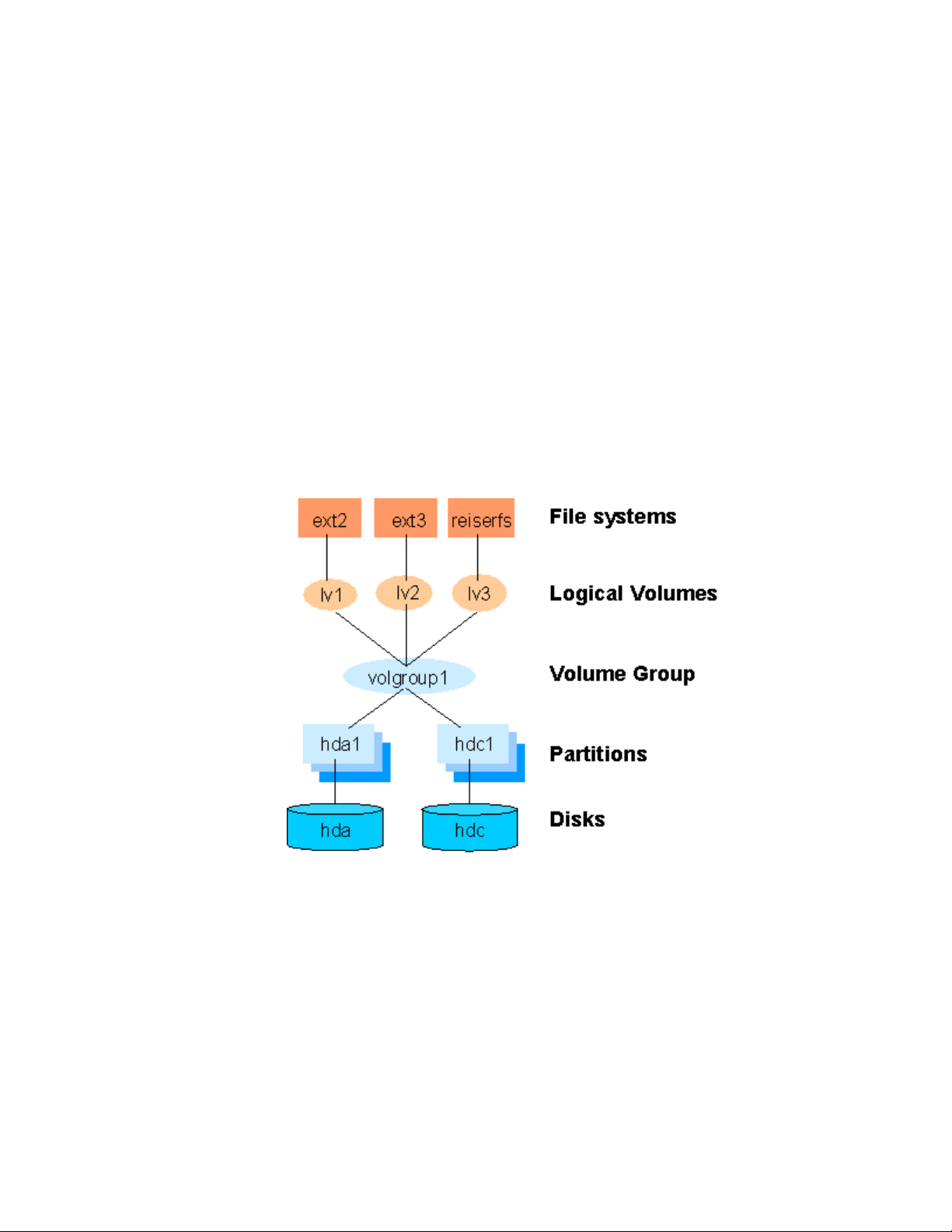
The following diagram shows the relationship of the LVM entities. File systems or applications
use logical volumes. Logical volumes are created by partitioning volume groups. Volume groups
consist of the aggregation of one or more physical disk partitions or disks.
Figure 1: Logical Volume Manager entity relationships
LifeKeeper for Linux LVM Recovery Kit
The LifeKeeper LVM Recovery Kit provides the support needed to allow other LifeKeeper
recovery kits to operate properly on top of Linux logical volumes. To accomplish this support,
the LVM Recovery Kit installs two new resource types: lvmlv and lvmvg which correspond to
logical volumes and volume groups respectively. The lvmlv and lvmvg resources exist solely for
internal use so that other LifeKeeper resources can operate.
6 LVM Recovery Kit Administration Guide
Page 9

As shown in Figure 1, each volume group has one or more logical volumes that depend on it.
Conversely, each logical volume must have a volume group on which it depends. A typical
LifeKeeper hierarchy containing these two LVM resources looks much like the relationships
shown in Figure 1. Refer to Figure 2 in the
Administration section for an example of an actual LifeKeeper hierarchy.
The LVM Recovery Kit uses the commands provided by the lvm package to manage the volume
group and logical volume resources in a LifeKeeper hierarchy. Volume groups and logical
volumes are configured (or activated) when a hierarchy is being brought in-service during a
failover or switchover operation, and are unconfigured when a hierarchy is being taken out-ofservice.
LifeKeeper LVM Hierarchy Creation and
LVM Recovery Kit Notes and Restrictions
The following notes and restrictions apply to this version of the LVM Recovery Kit.
Linux Boot Script Modifications
The Linux distributions that include LVM have also included modifications to their system boot
scripts to activate LVM volume groups and logical volumes. Because LifeKeeper expects to
always control the state of any volume groups and logical volumes that it is managing, the LVM
Recovery Kit installation performs modifications to the system boot script to prevent it from
activating volume groups and logical volumes that are controlled by LifeKeeper. The boot script
is modified to call a command provided by the LVM Recovery Kit, /sbin/vgactivate, rather than
the vgchange utility provided by the lvm package. The vgactivate command simply calls the
lvm vgchange command with the appropriate arguments to individually activate all volume
groups that are not under LifeKeeper control. In some recent distributions, the lvm package now
includes a mechanism for limiting the set of volume groups to be activated at boot time, using an
entry in the configuration file /etc/sysconfig/lvm. The LifeKeeper vgactivate command also
checks for and honors these settings.
Overview
Support for Raw I/O and Entire Disks
While Figure 1 shows logical volumes residing below various file systems and volume groups on
top of disk partitions, it is important to note that the LVM Recovery Kit can support raw access to
logical volumes when used in conjunction with the LifeKeeper Raw I/O Recovery Kit, and can
manage volume groups that are composed of one or more entire disks (e.g. /dev/sdc) rather than
disk partitions (e.g. /dev/sdc1).
Also see the section
of LVM.
Using LVM with LifeKeeper Data Replication for a further option in the use
Volume Group Activation
In the current LVM 1.x implementations, when a volume group is activated, all logical volumes
associated with that volume group are also activated automatically. For LifeKeeper, this means
that there will be times when a logical volume is active despite the fact that its associated
resource instance is still marked as being Out-of-Service (OSU). In a typical failover or
switchover operation, LifeKeeper will attempt to bring the logical volumes in service
immediately after the volume groups anyway, and the resulting calls to the restore script will
LifeKeeper for Linux 7
Page 10

Overview
return immediately with a success indication. This unneeded attempt to bring the logical
volumes in service has no usability impact.
LVM Version Support
As stated previously, this release of the LVM kit has been tested and is being released only
against LVM version 1. Sistina recently announced the release of LVM version 2, known as
LVM2. The LVM kit does not support LVM2. This restriction likely will be removed in the
future, however.
8 LVM Recovery Kit Administration Guide
Page 11
LifeKeeper LVM Hierarchy Creation and Administration
LifeKeeper LVM Hierarchy Creation and
Administration
LifeKeeper LVM hierarchies are created automatically during the hierarchy creation process for
resources that sit on top of logical volumes. The creation and extension of hierarchies containing
the LVM resource types will always be driven by the create and extend processes of a higherlevel resource type, likewise the delete and unextend.
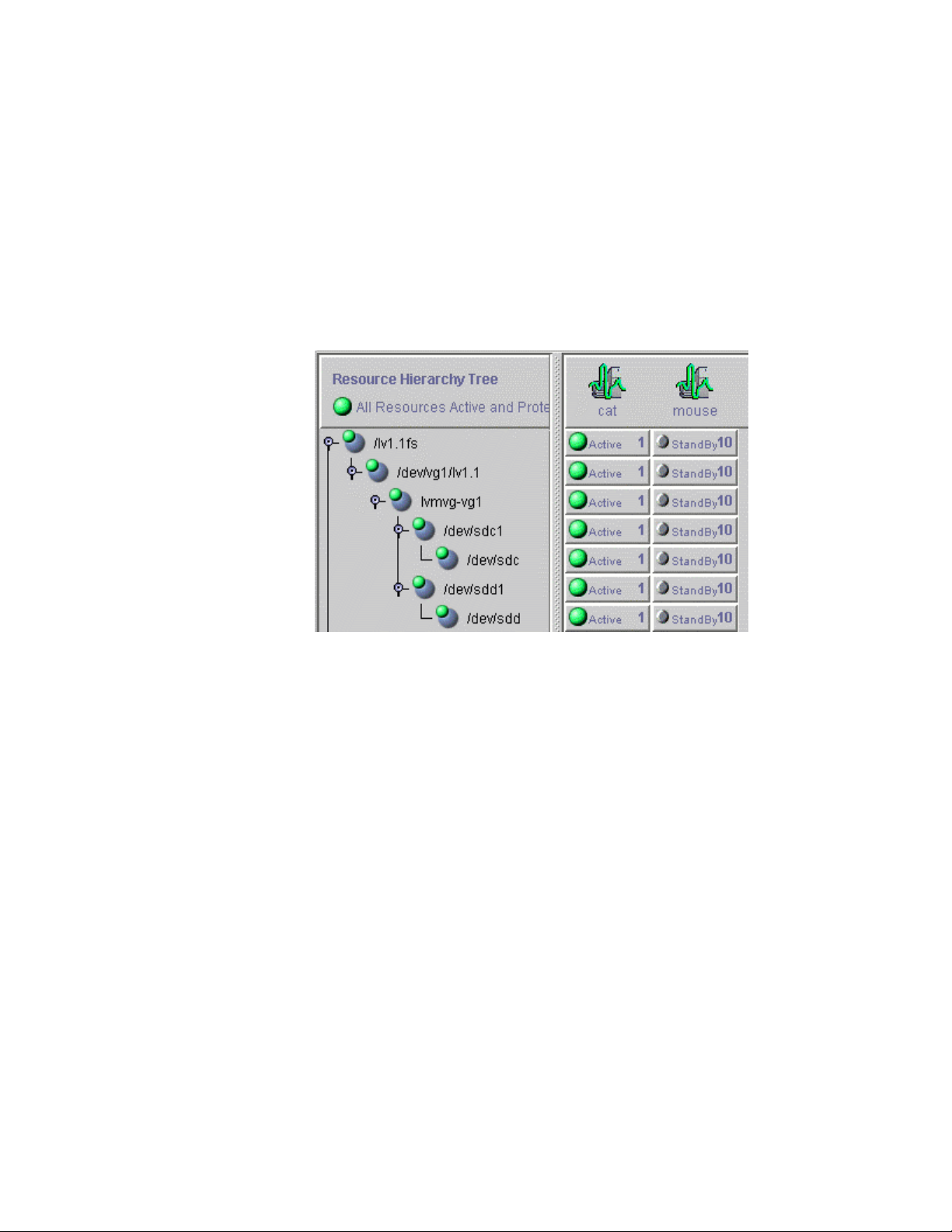
The figure below is a LifeKeeper GUI screen shot showing a complete hierarchy containing LVM
resources. Note that the resources in the hierarchy are displayed by their LifeKeeper IDs for
clarity, rather than the default display by tags.
Figure 2: LifeKeeper hierarchy containing LVM resources
The hierarchy pictured in Figure 2 is a file system hierarchy, created by selecting the File System
recovery kit under the Edit > Resource > Create Resource Hierarchy menu selection. It
consists of a file system resource, /lv1.1fs, mounted on an LVM logical volume, /dev/vg1/lv1.1.
That logical volume is a part of the vg1 volume group, represented with the LifeKeeper ID
lvmvg-vg1. The volume group vg1 is composed of two physical disk partitions, /dev/sdc1 and
/dev/sdd1. The hierarchy also includes the underlying disk devices, /dev/sdc and /dev/sdd,
below each of the disk partitions.
Hierarchy Creation Procedure
To create a hierarchy in which a file system or higher-level application uses an LVM logical
volume, the following high-level procedure should be followed.
1. Determine the desired configuration of your LVM volume groups and logical volumes. In
doing this, keep in mind the following points.
• All of the disk resources associated with a given volume group must move together from
one server to another in the LifeKeeper cluster.
• All of the logical volumes associated with a given volume group (and any file systems or
applications which use them) must move together from one server to another in the
LifeKeeper cluster.
LifeKeeper for Linux 9
Page 12

LifeKeeper LVM Hierarchy Creation and Administration
2. On the system which is to be the primary server for your application, create and activate the
desired volume groups and logical volumes using the tools provided by the LVM package,
and described in the LVM HowTo document referenced in the
section above.
If you are using shared storage, you must ensure that all physical volumes assigned to a
volume group are properly shared between the machines in the LifeKeeper cluster on which
you intend to run the protected application. If you intend to use LVM with LifeKeeper Data
Replication, see the
Using LVM with LifeKeeper Data Replication section below.
3. Create file systems on each of the logical volumes. If instead you intend to use raw I/O, bind
a raw device to each of the logical volume devices.
4. Configure the protected application on the file systems, following the configuration
instructions in the administration guide for the LifeKeeper recovery kit associated with the
application.
5. Create and extend the application hierarchy following the instructions in the appropriate
application recovery kit administration guide.
6. IMPORTANT: Perform manual in-service operations to temporarily move the application
hierarchy to each of the cluster nodes to which the hierarchy has been extended. This step
must be done once prior to any node failover operations, in order for the LVM subsystem on
each cluster node to know about the configuration of the new volume groups and logical
volumes. After you have performed these manual switchovers, move the application
hierarchy back to the desired primary cluster node.
Documentation and References
10 LVM Recovery Kit Administration Guide
Page 13
LifeKeeper LVM Hierarchy Creation and Administration
Using LVM with LifeKeeper Data Replication
The LVM Recovery Kit currently supports the use of LVM “above” LifeKeeper Data Replication
(LKDR), but not LKDR “above” LVM. In other words, the kit can support a configuration in
which the physical volume components of a volume group are LKDR devices, but it cannot
support a configuration in which the source and/or target volumes of an LKDR mirror are defined
as LVM logical volumes.
To build a hierarchy with LVM above LKDR, a two-phase hierarchy creation process must be
used. The LKDR devices (i.e. hierarchies) must be configured using the LKDR “Data
Replication Resource” option, prior to the creation of the LVM volume groups and logical
volumes on the primary server. Once the desired volume groups and logical volumes have been
created, the remainder of the hierarchy is created according to the configuration instructions for
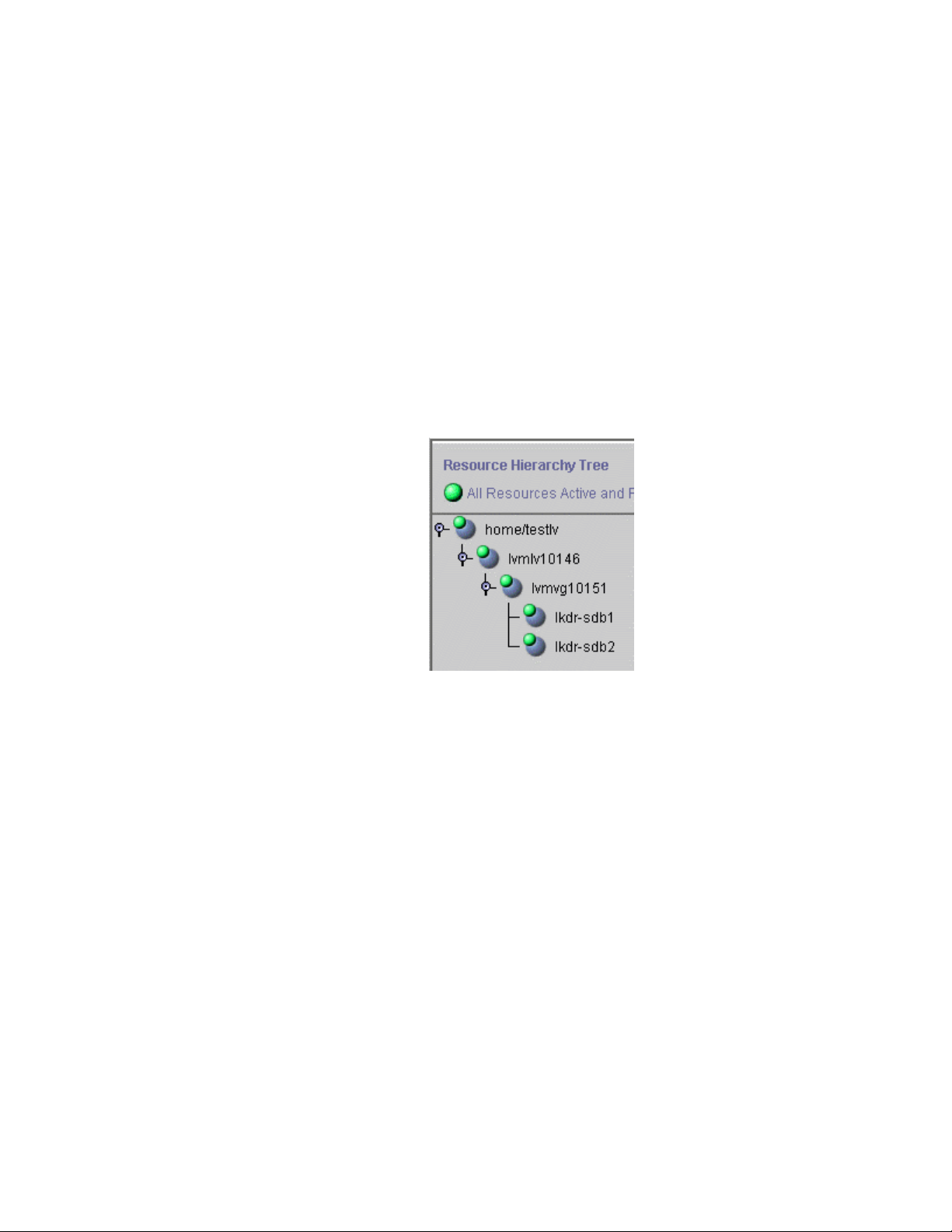
the recovery kit associated with the application to be protected. The resulting hierarchy will look
something like the one shown in Figure 3 below.
Figure 3: Hierarchy with LVM above LKDR
LifeKeeper for Linux 11
Page 14
LifeKeeper LVM Hierarchy Creation and Administration
Volume Group Reconfiguration
One of the primary benefits of using a logical volume manager is the ability to dynamically resize
logical volumes as storage requirements change. Because this may involve adding or deleting
physical partitions or disks from an LVM volume group definition, the LVM Recovery Kit
includes a mechanism for modifying an existing resource hierarchy to reflect such a change.
All volume group, logical volume, and file system reconfiguration should be performed outside
of LifeKeeper prior to modifying the LifeKeeper hierarchy to reflect the changes. Refer to the
LVM HowTo document referenced in the
about how this is done. If any of the steps require you to unmount or unconfigure a resource that
is being protected by LifeKeeper, be sure to use the LifeKeeper GUI to do so, using the Out of
Service operation.
To update a LifeKeeper hierarchy following these changes, first access the Resource Properties
dialog for the modified volume group, either by right-clicking on the active volume group
resource and selecting Properties, or by using the Edit > Resource > Properties menu selection
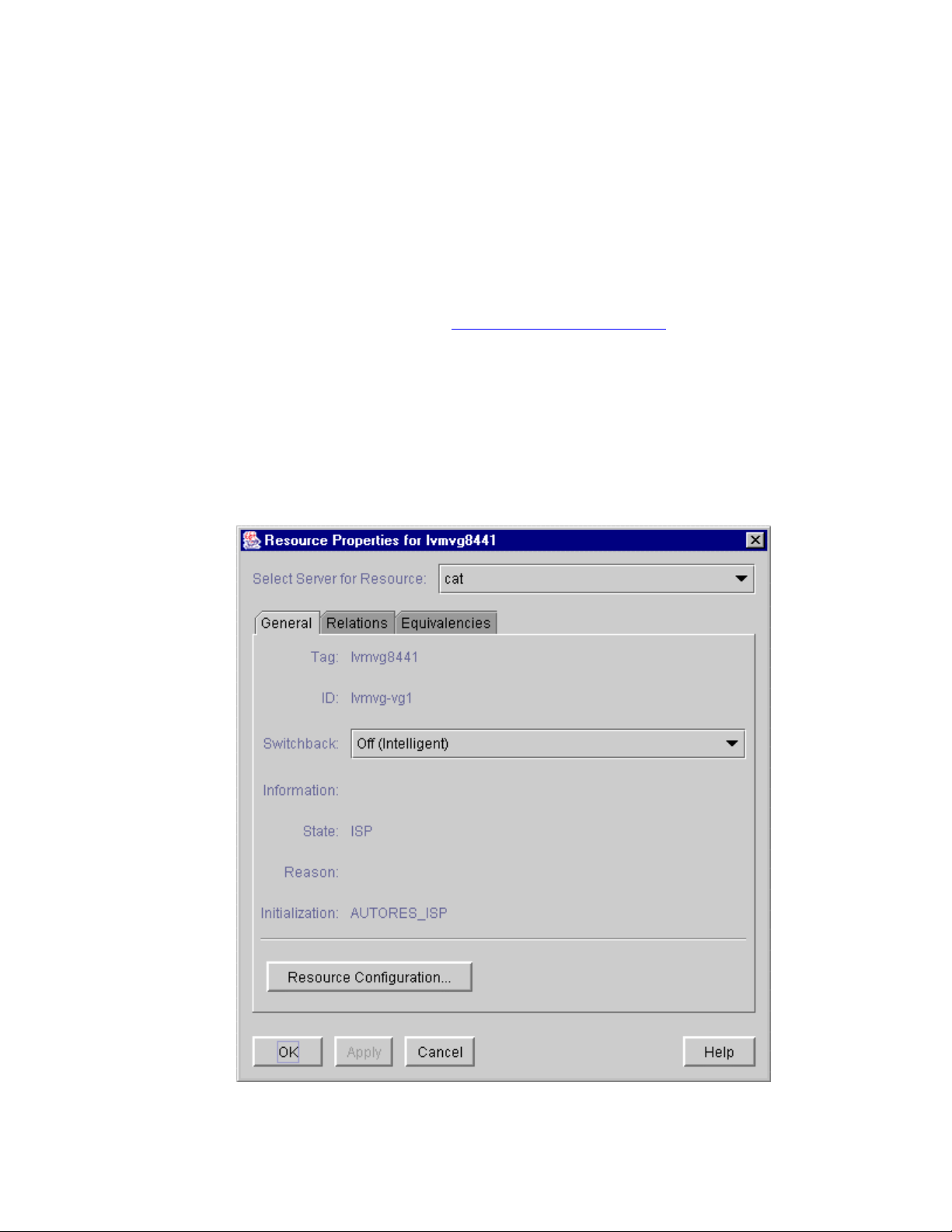
and selecting the appropriate volume group resource in the Select Resource field. The resulting
Resource Properties dialog should look like the one pictured in Figure 4 below, including the
Resource Configuration button near the bottom.
Documentation and References section for information
Figure 4: LVM volume group Resource Properties dialog
12 LVM Recovery Kit Administration Guide
Page 15
LifeKeeper LVM Hierarchy Creation and Administration
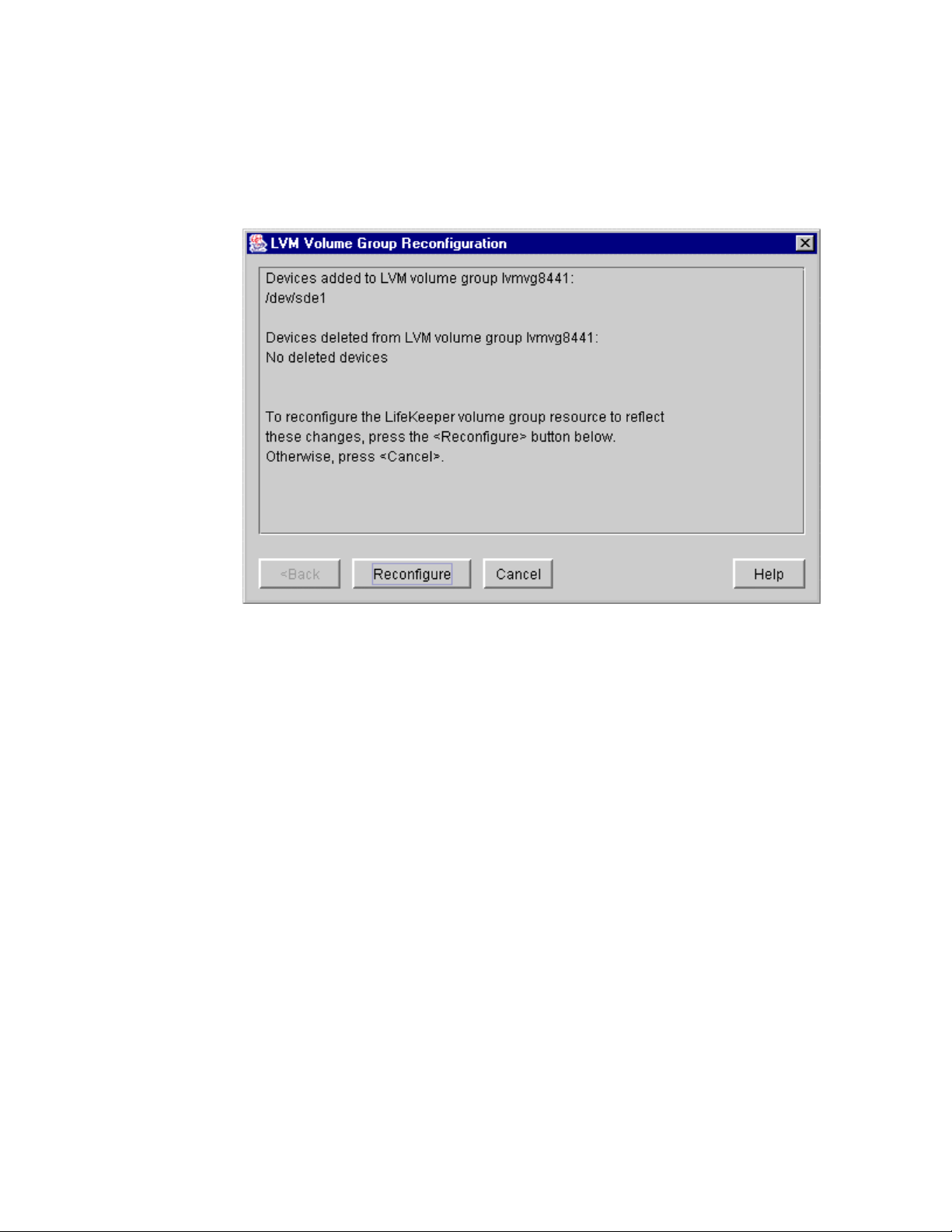
Clicking the Resource Configuration button initiates the mechanism for reconfiguring your
hierarchy to reflect any modifications to the volume group resource. After a brief pause, an
information box will display the volume group modifications that LifeKeeper has detected.
Figure 5 below shows an example in which a single disk partition has been added to a volume
group.
Figure 5: LVM volume group reconfiguration for added device
As stated in the information box, to reconfigure the LifeKeeper volume group to reflect the
changes that have been detected, simply click the Reconfigure button. If you do not wish to
proceed with the LifeKeeper hierarchy modification, click Cancel.
LifeKeeper for Linux 13
Page 16
LifeKeeper LVM Hierarchy Creation and Administration
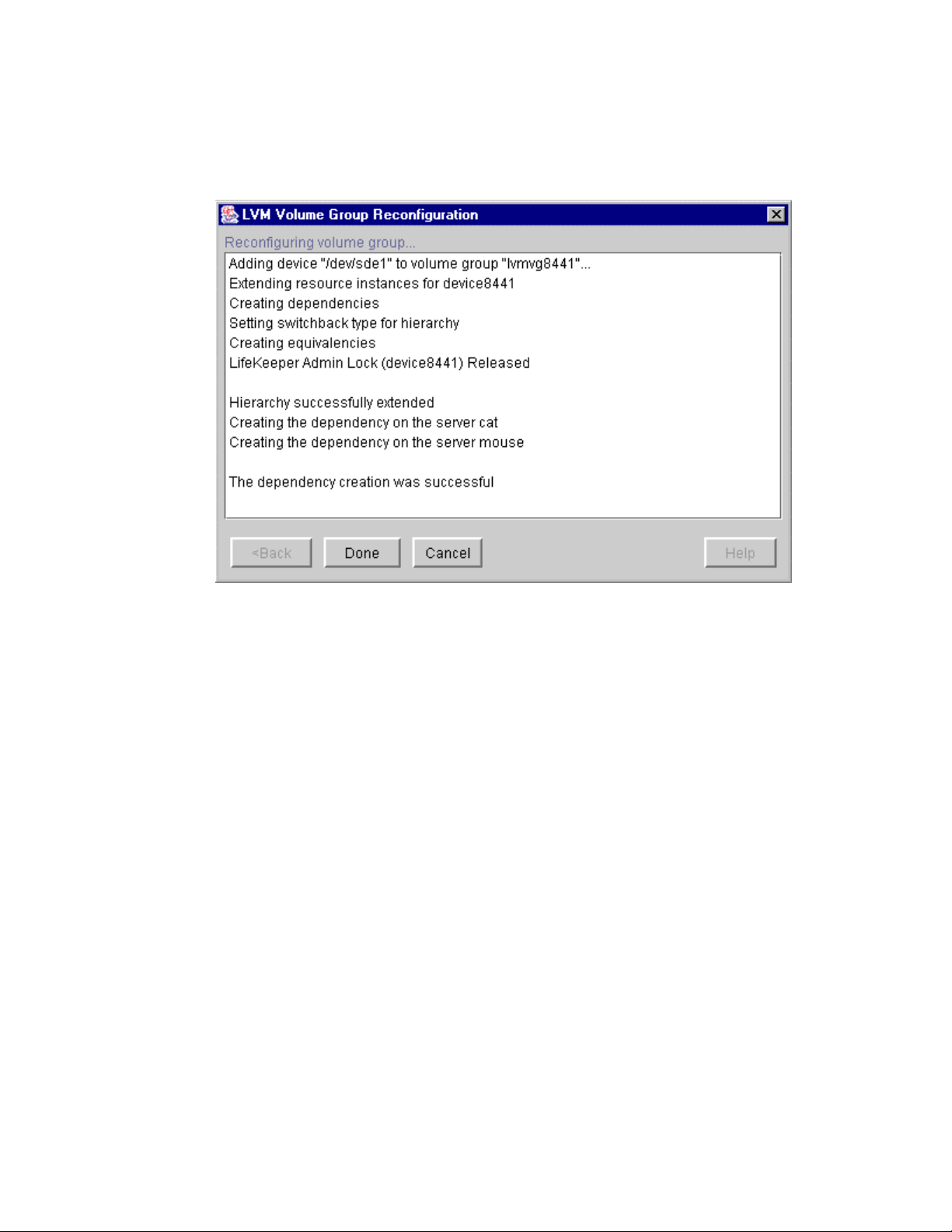
After clicking the Reconfigure button, an information box will appear, showing the progress of
the reconfiguration procedure, as shown in Figure 6 below. When the process has been
completed successfully, the Done button will become enabled. Clicking Done will close the
information box and return you to the display of the Resource Properties dialog.
Figure 6: LVM volume group reconfiguration for added device
14 LVM Recovery Kit Administration Guide
Page 17
LifeKeeper LVM Hierarchy Creation and Administration
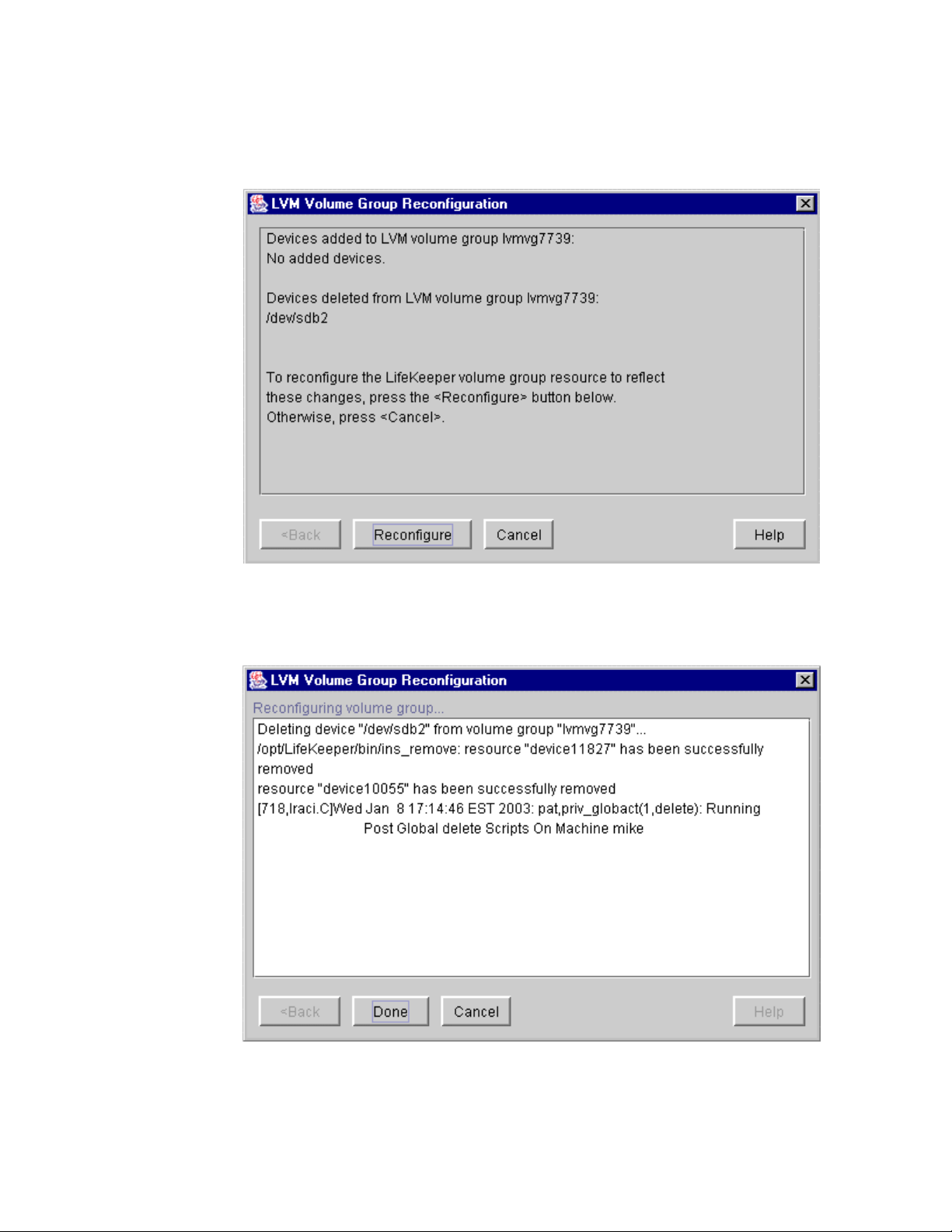
The following two figures show examples of the information boxes that would be displayed
during the reconfiguration process when a device partition has been removed from a volume
group.
Figure 7: LVM volume group reconfiguration for deleted device
Figure 8: LVM volume group reconfiguration for deleted device
LifeKeeper for Linux 15
Page 18

Troubleshooting
Troubleshooting
Error Messages
This section provides a list of messages that you may encounter with the use of the LifeKeeper
LVM Recovery Kit. Where appropriate, it provides an additional explanation of the cause of an
error and necessary action to resolve the error condition.
Because the LVM Recovery Kit relies on other LifeKeeper components to drive the creation and
extension of hierarchies, messages from these other components are also possible. In these cases,
please refer to the documentation for the appropriate LifeKeeper component.
Messages in this section fall under these topics:
• Common Error Messages
• Hierarchy Creation
• Hierarchy Extension
• Hierarchy Restore
• Resource Monitoring
• LVM Recovery Kit Error Messages
Common Error Messages
Error Number Error Message
000002 Usage error
000010 Error getting resource information
000011 Both Tag and ID name not specified
000019 Resource not found on local server
000022 END failed hierarchy <tag name> in service on server
<server name>
000026 END failed ACTION for <tag name> on server <server
name> due to <signal> signal
Hierarchy Creation
Error Number Error Message
000012 Switchback type not specified
000013 Usage error
000014 Resource with either matching tag <tag name> or ID exists
000015 ins_create failed on server <server name>
000018 Error creating resource <tag name> on server <server
name>
000021 Removing resource instance < tag name> from server
<server name> due to an error during creation
16 LVM Recovery Kit Administration Guide
Page 19

Troubleshooting
Error Number Error Message
000023 Error bringing resource < tag name> in service on server
<server name>
000024 Failed resource creation of resource < tag name> on
server <server name>
000027 Removing file system dependency from <parent tag> to
<child tag> on server <server name> due to an error
during creation
000028 Removing file system hierarchy <filesys tag> created by
<parent tag> on server <server name> due to an error
during creation
000029
000030 create: tag name not specified
Switchback type mismatch between parent <parent tag>
and child <child tag> on server <server name>
Action: Switchback mismatches can lead to unexpected
behavior. You can manually alter switchback types for
resources using the ins_setas command to eliminate this
mismatch.
or
extend: tag name not specified
Hierarchy Extension
Error Number Error Message
000003 Template resource < tag name> on server <server name>
does not exist
000004 Template resource < tag name> cannot be extended to
server <server name> because it already exists there
000005 Cannot access canextend script on server <server name>
000006 Cannot access extend script <path to extend> on server
<server name>
000007 Cannot access depstoextend script <path to depstoexend>
on server <server name>
000008 Cannot extend resource < tag name> to server <server
name>
000009 Either <templatesys> or <templatetag> argument missing
000014 Resource with either matching tag < tag name> or ID exists
000015 ins_create failed on server <server name>
000018 Error creating resource < tag name> on server <server
name>
000025 END failed resource extension of < tag name> on server
<server name> due to a "<signal>" signal - backing out
changes made to server
000030 create: tag name not specified
or
extend: tag name not specified
LifeKeeper for Linux 17
Page 20

Troubleshooting
Hierarchy Restore
Error Number Error Message
000023 Error bringing resource < tag name> in service on server
Resource Monitoring
Error Number Error Message
000001 Calling sendevent for resource < tag name> on server <server
LVM Recovery Kit Error Messages
Error Number Error Message
110000
110001
110002
110003
110004
110005
110006
110007
110008
110009
<server name>
name>
<LVM resource type> resource type is not installed on
<LifeKeeper server name>.
Action: Install the LVM Recovery Kit on the identified system.
This script must be executed on <LifeKeeper server name>.
Failed to create <device name> hierarchy.
Failed to create dependency <resource tag>-<resource tag> on
machine <LifeKeeper server name>.
LifeKeeper internal ID <resource ID> already in use.
<LVM resource type> constructor requires a valid argument.
Usage: adddelpv <VG tag> [addlist|dellist]
WARNING: Failure in updating list of LifeKeeper-controlled
volume groups (/etc/lkvgs).
WARNING: The device hierarchy for <device name>, with tag
<device resource tag>, cannot be extended automatically.
Action: If the device hierarchy is not already extended, extend it
using the LifeKeeper GUI. Then create a dependency from the
volume group resource to the device hierarchy.
Failed to create a dependency between volume group resource
<volume group tag> and device resource <device tag>.
Action: Create the dependency using the LifeKeeper GUI.
18 LVM Recovery Kit Administration Guide
 Loading...