

Page 1

SPEEDATA SD60
Quick Start Guide
Page 2
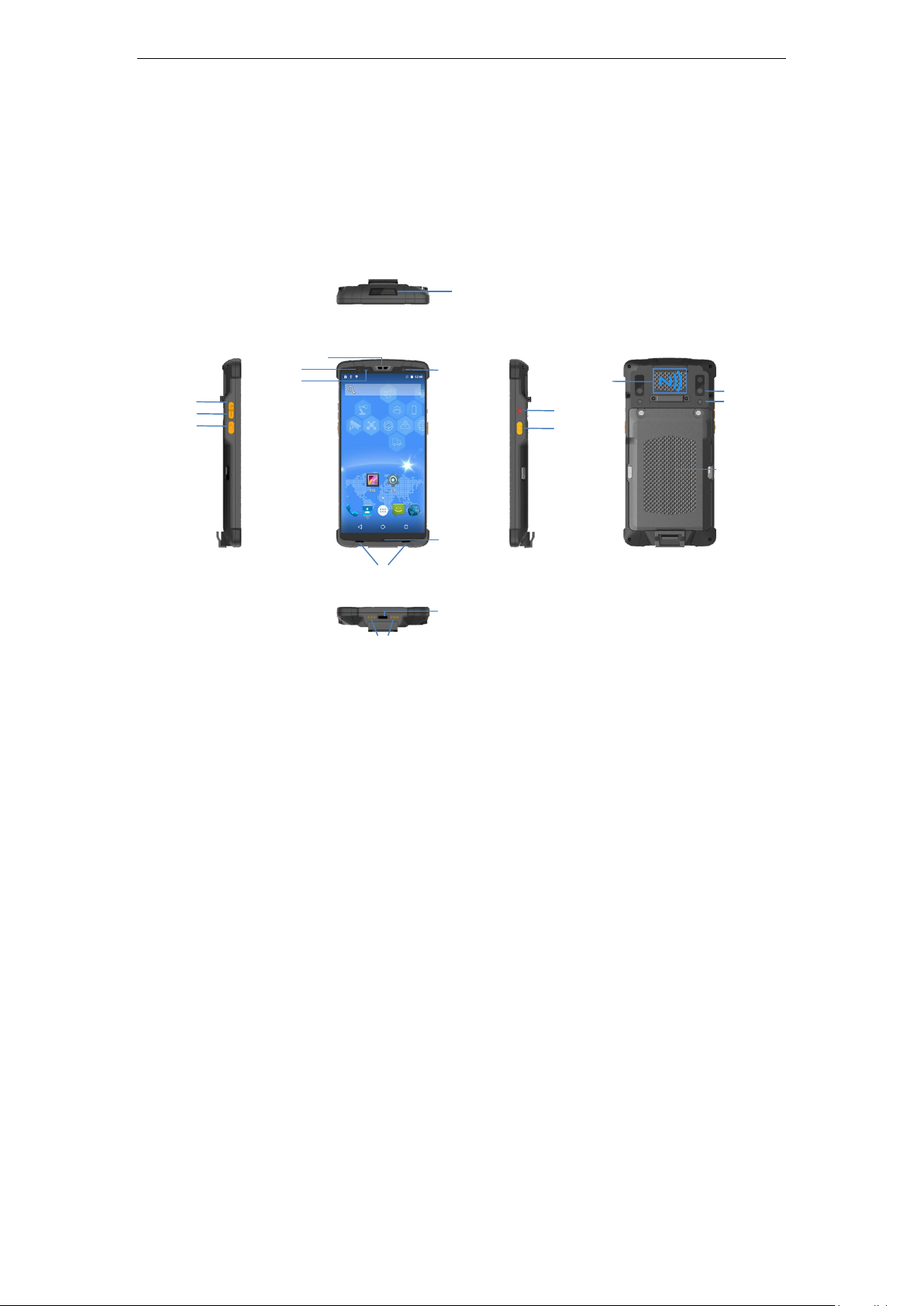
Appearance and Keypad
Volume -
Scanning
Hot key
Scan engine
Pilot lamp
Earpiece
Front camera
Microphone
Dual speakers
Charging base contact
USB-C
Power
Scanning
Hot key
Rear camera
Flash
Large-capacity
Removable Li-ion
Battery 6000mAh
NFC
Light sensor
Volume +
SD55LG Quick start guide_Beta_V1.0
第 2 页,共 10 页
Page 3
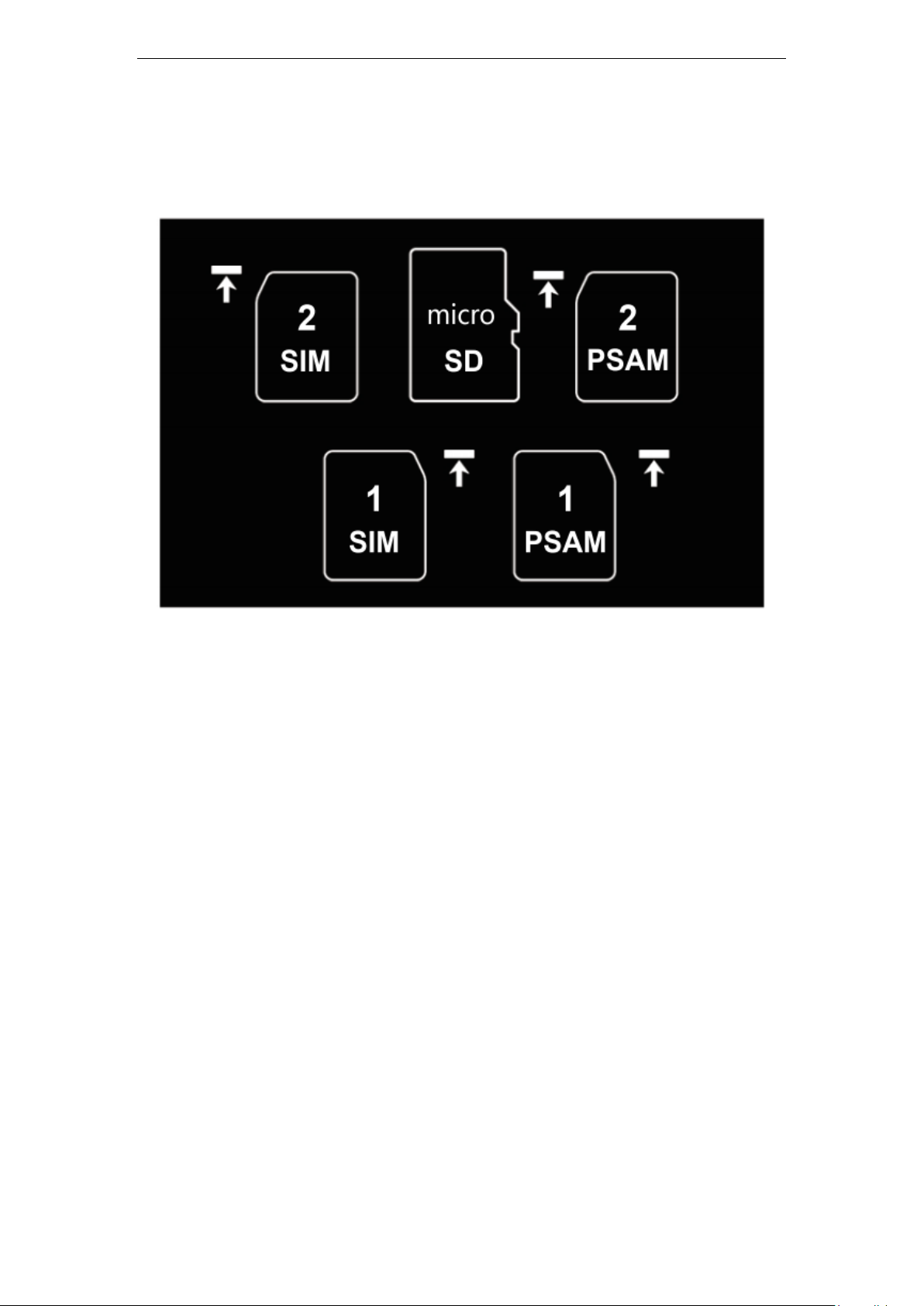
SIM Card
SD55LG Quick start guide_Beta_V1.0
1 Both SIM cards use standard Nano-SIM cards. Please use professional
equipment to open the SIM card warehouse, so as not to damage the
equipment and affect the protection performance.
2 When the SIM1 card is placed, the SIM1 card is placed horizontally in the
upper right corner of the second layer of the slot, which is flat with the slot,
and the SIM1 card is successfully placed.
3 When the SIM2 card is placed, the SIM2 card is placed horizontally in the
upper left corner of the first layer of the slot, which is flat with the slot, and the
SIM2 card is successfully placed.
4 Memory card slot, maximum expandable 128G memory card.
5 Double PSAM Intelligent Encryption Card.
第 3 页,共 10 页
Page 4

SD55LG Quick start guide_Beta_V1.0
WIFI & Network
Connect to a Wi-Fi network
1 Swipe down from the status bar to open the notification panel.
2 Press to enter the WLAN settings interface.
3 Turn on the WLAN switch. The system will list the detected WLAN networks
in tabular form.
4 Click on the WLAN network to connect. If you have selected an encrypted
network, you need to enter an access password connection.
Connect mobile data networks
1 Swipe down from the status bar to open the notification panel.
2 Click to open mobile data network.
3 When you do not use a mobile network, please turn off the mobile data
service in time to save data traffic and extend standby time.
Change default language
1 The default display language of the system is English. After the factory
settings or firmware upgrade, the system display language is restored to
English.
2 Click Settings,Click System > Languages & input > Languages > + Add a
language, Select the language you want to add. Drag , drag the language
you want to change to the top, and the change is complete.
第 4 页,共 10 页
Page 5

SD55LG Quick start guide_Beta_V1.0
Barcode Scanning
1 Click Settings,Scan,Check “Enable Scan”, hold down the scanner key
on both sides of the fuselage, and you can use the quick scan.
2 Display Scan result: Check this option, the barcode results can be output at
the cursor focus after the bar code scanning is completed.
3 Scan warning tone: Check this option, can make a prompt tone after the
bar code scanning is finished. Select your favorite prompt tone in the “Scan
Audio” below, select the prompt tone. You need to re-check “Enable Scan”
4 Scan vibrate: Check this option, a vibrating alert can be sent after the
barcode scanning is completed.
5 Scan mode: The device has three built-in scanning modes, and you can
select your favorite quick scan mode. You need to re-check "Enable Scan"
again.
(1) Long Press Scan: In this mode, press and hold the scan button to turn
on the scanning laser, release the auto-shutdown laser, and if the bar
code is successfully scanned when the scan button is pressed, the
scanning laser will automatically turn off.
(2) Single Scan: In this mode, press the scan button to turn on the
scanning laser. If the bar code is successfully scanned, the scanning
laser will automatically turn off. If the bar code is not scanned within
10 seconds of releasing the scan button, the scanning laser will
automatically turn off.
(3) In this mode, press the scan button to turn on the scanning laser. After
successfully scanning the bar code, the scanning light will not turn off,
trigger continuous scanning, and press the scan button again to turn
off the scanning laser.
第 5 页,共 10 页
Page 6
SD55LG Quick start guide_Beta_V1.0
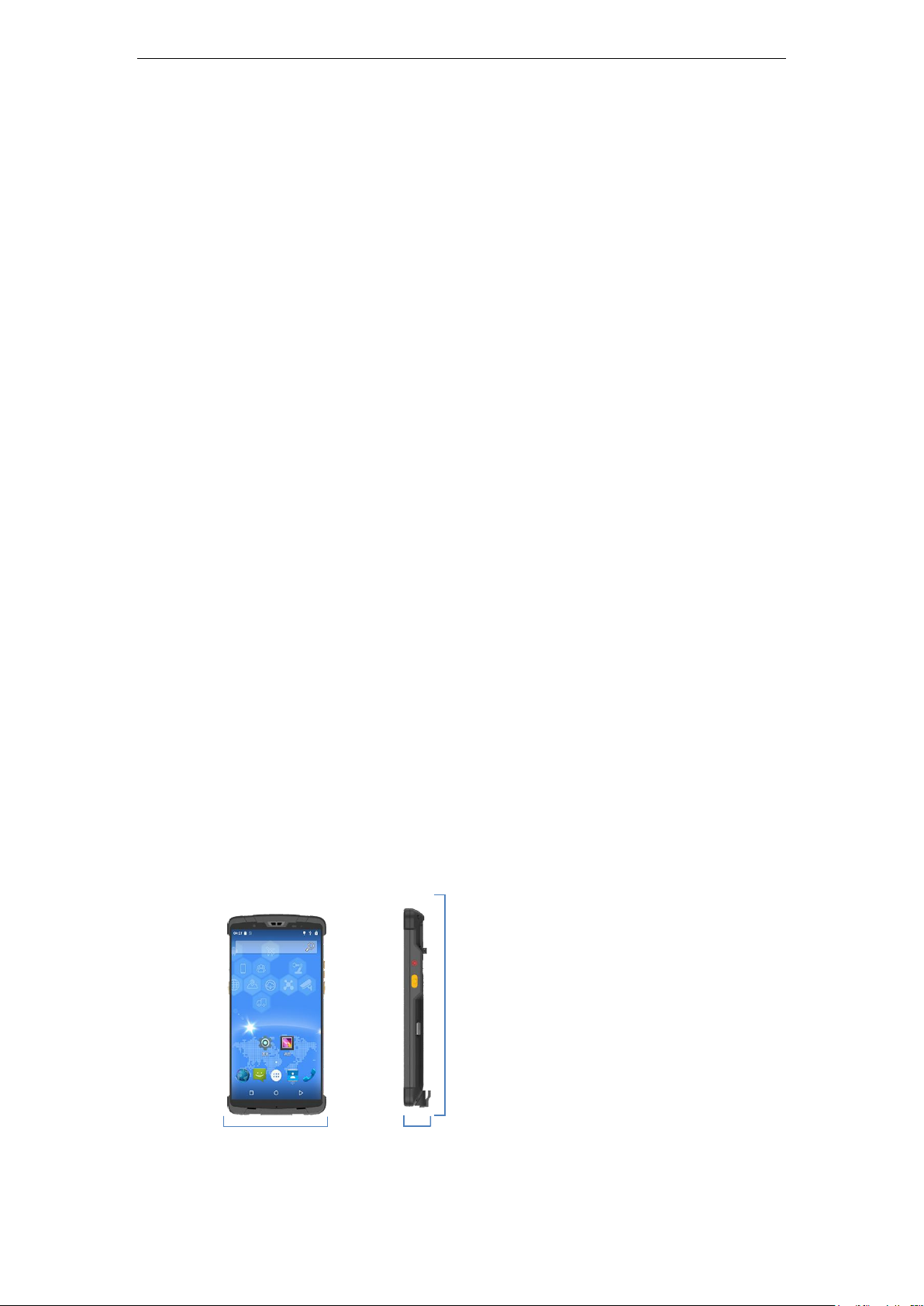
Width: 80mm
Length: 160mm
Thickness: 15.8mm
Charging & attention
1 Please use the supplied charger and USB (Type-C) cable. Otherwise, the
fast charging mode cannot be enabled. Using a non-original charger and a
USB charging cable may result in long charging time and repeated restarts,
and affect the battery life.
2 It is recommended not to operate the devices while charging, and not to
cover objects on the device and charger.
3 When the device is in low power, there will be an indicator light and a
desktop pop-up reminder. Please charge as soon as possible to avoid
affecting normal use.
4 Please ensure that the power is about 50% when store the equipment for a
long time. Please place the equipment in a suitable environment with dry
temperature to avoid equipment failure caused by long-term storage.
5 In case of damage to the battery, charging head and charging cable, please
contact us in time to purchase, do not repair it yourself, so as to avoid danger
and cause extra loss.
Product parameters
Size
第 6 页,共 10 页
Page 7

SD55LG Quick start guide_Beta_V1.0
Weight
About 310g (with battery)
(Note: Differences in different functional modules will cause actual
weight differences, please refer to the actual product.)
IP Code
IP65
Color
Black
Screen
Size: 6 inches, 18:9
Resolution: 1080 * 2160
Type: IPS
Touch screen: 5-point touch screen
Processor
CPU: Octa-core, 8*2.0 GHz
OS
Android 8.1
Memory
RAM: 4GB
ROM: 32GB
Micro SD:Extension max128GB
Battery
6000mAh(Typical value)
Charging: 2.0 fast charging, full no more than 4 hours
Camera
第 7 页,共 10 页
Page 8

SD55LG Quick start guide_Beta_V1.0
Rear camera: 1300MP,AF
Front camera: 500MP,FF
WWAN
Dual SIM dual standby single pass, support for Nano SIM card
FDD-LTE:B1/B3/B5/B7
TDD-LTE:B38/B39/B40/B41
TDSCDMA:B34/B39
WCDMA:B1/B2/B5/B8
GSM:B2/B3/B5/B8
CDMA:1x/CDMA2000 BC0
Data connect
WI-FI: 802.11a/b/g/n,2.4G & 5G
WI-FI hotspot: support
NFC: Support card reader mode, peer-to-peer mode, card emulation
mode(14443A/B, ISO 15693, NFC)
Bluetooth: BT 4.0 (BLE)
USB: Type-C, OTG, USB tethering, USB fast charging
Location
GPS/GLONASS /Beidou
Barcode
Barcode engine model: Honeywell N6603
Symbologies:
Linear: UPC/EAN/JAN, GS1 DataBar, Code 39, Code 128, Code 32, Code 93,
Codabar/NW7, Interleaved 2 of 5,
Code 2 of 5, Matrix 2 of 5, MSI, Telepen, Trioptic, China Post
第 8 页,共 10 页
Page 9
SD55LG Quick start guide_Beta_V1.0
Standard Range (SR) Optics
Symbology/X-Dim
100% U.P.C
5 mil Code 39
10 mil Code 39
6.7 mill PDF 417
10 mill Data Matrix
Typical Range*
46 mm – 419 mm (1.8” – 16.5”)
64 mm - 163 mm (2.5" - 6.4")
28 mm – 338 mm (1.1” – 13.3”)
46 mm - 185 mm (1.8" - 7.3")
53 mm – 203 mm (2.1” – 8.0”)
Resolution, linear barcodes: 0.127 mm (5.0 mil)
Resolution, 2D matrix codes: 0.169 mm (6.7 mil)
* Performance may be impacted by barcode quality and environmental condition.
2D Stacked: PDF417, MicroPDF417, GS1 Composite
2D Matrix: Aztec Code, Data Matrix, QR Code, Micro QR Code, MaxiCode, Han
Xin Code
Postal: Intelligent Mail Barcode, Postal-4i, Australian Post, British Post,
Canadian Post, Japanese Post,
Netherlands (KIX) Post, Postnet, Planet Code
OCR Option: OCR-A, OCR-B, E13B (MICR)
Sensor
Gravity sensor
Light sensor
Gyroscope sensor
Geomagnetic sensor
Packing list
Standard:
SD55LG (with battery) X 1
Power Adapter X 1
USB Type-C cable X 1
Instruction manual X 1
第 9 页,共 10 页
Page 10
SD55LG Quick start guide_Beta_V1.0
CONTACT US
Phone: 86-0755-8279 7385
E-mail: [email protected]
Website:www.speedatagroup.com
www.speedata.cn
Beijing Headquarters:
Building, No.28 Shangdi Sixth Street, Haidian District, Beijing, China,100085
Shanghai Office:
Room 406,No.145, Street 1399,Hu Song Road, Songjiang District, Shanghai, China,
201615
Shenzhen Office:
Building 609, Block E, Bantian International Center, No.5 Huancheng South Road,
Bantian Street, Longgang District, Shenzhen, China, 518129
USA Solutions Office:
150 E Colorado Blvd, Suite 211, Pasadena, California,
91105China,518129
第 10 页,共 10 页
 Loading...