

Page 1
SOREX wireless Solutions GmbH
Technologie- und Forschungszentrum
Viktor-Kaplan-Straße 2,B
2700 Wiener Neustadt, Österreich
UID ATU57865279
Bank Raiffeisenbank Pittental
IBAN AT223264700000052324
BIC RLNWATW1647
T +43 2622 320130
F +43 2622 3201315
@
w³ www.sorex-schliesssystem.com
SOREX wireless Solutions GmbH
Technologie- und Forschungszentrum
Viktor-Kaplan-Straße 2,B
2700 Wiener Neustadt, Österreich
UID ATU57865279
PayPal [email protected]
Bank Raiffeisenbank Pittental
IBAN AT223264700000052324
BIC RLNWATW1647
Wir möchten Ihnen Türen öffnen
T +43 2622 32013-0 F -15
@
w³ www.sorex-schliesssystem.co m
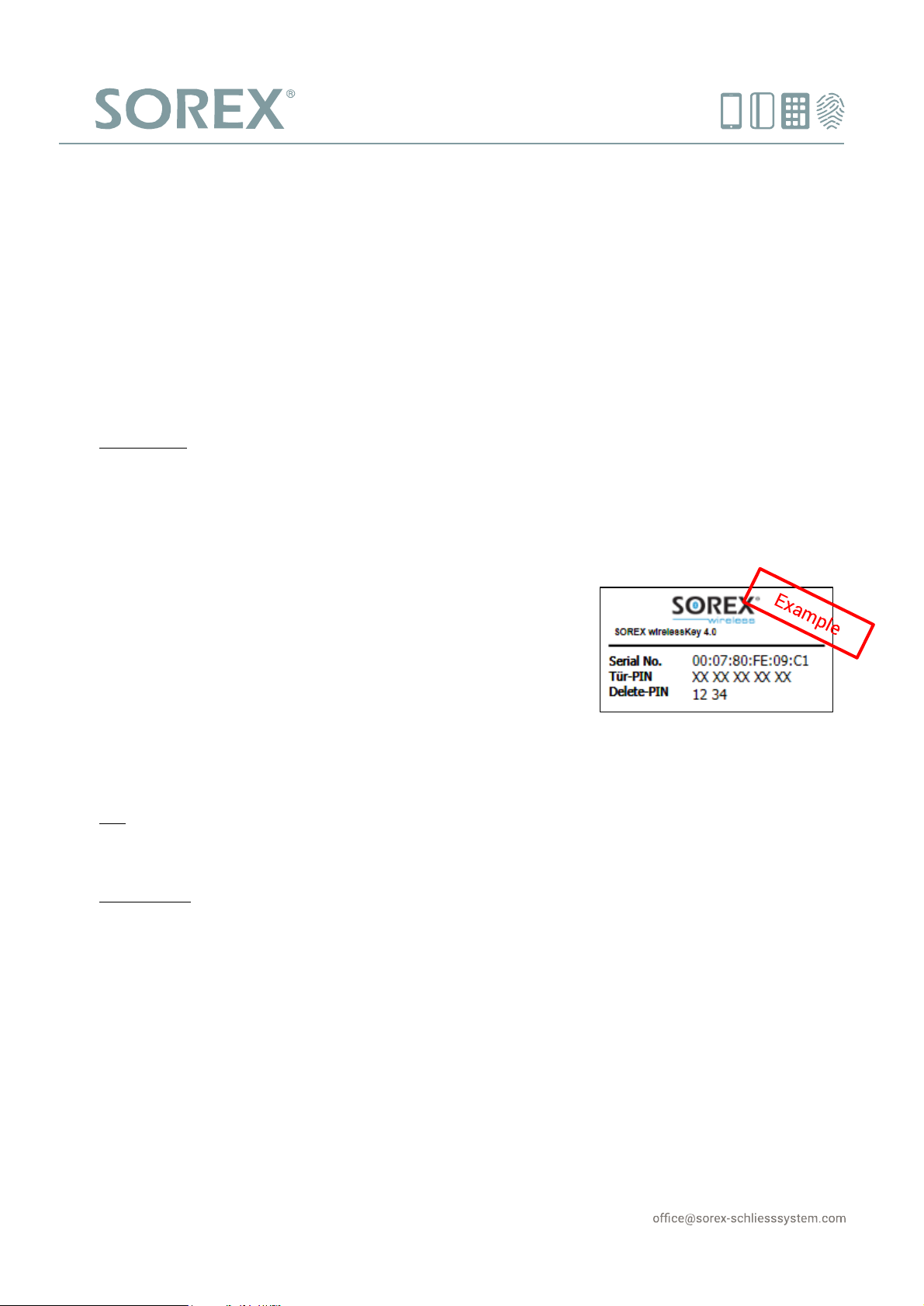
Figure 1: Exemplary sticker of
Tür-PIN
SOREX wirelessKey 4.0
Quick starting guide
This quick starting guide explains the pairing process for a mobile phone with the installed wirelessKey
module and how to connect it to door opening systems. For installation advice and other instructions, please
refer to the user manual, which is available through our website www.sorex.eu or via the QR-Code above.
Pairing a mobile phone:
1. Switch Bluetooth of your mobile phone to on and set it to visible.
Please note: With some mobile phones it is necessary to remain in the Bluetooth settings and/or switch to
security mode.
2. Hold your mobile phone close to the SOREX wirelessKey 4.0 outdoor unit for at least 10 seconds.
After approximately 10 seconds, an incoming connection „add.SOREX-w.Key" or „Headset" will appear.
3. Enter your Tür-PIN
Enter the 10-digit Tür-PIN, which can be found on the sticker in the
enclosed envelope (see Figure 1), to build up a connection with
"add.SOREX-w.Key" or “Headset". After entering the Tür-PIN, your
mobile phone is paired with the SOREX wirelessKey 4.0.
4. Final step
Your mobile phone is now entitled to open your door. Some devices
ask to build up a connection automatically. This has to be confirmed.
Tip: Use the free smartphone-app “SOREX Bluetooth Door Opener” to set your smartphone’s Bluetooth to
visible quickly and easily, by simply opening the app.
Please note: To connect portable transmitters and RFID media with the SOREX wirelessKey 4.0, the
management software has to be used. Mobile phones can also be paired via the management software.
Page 2
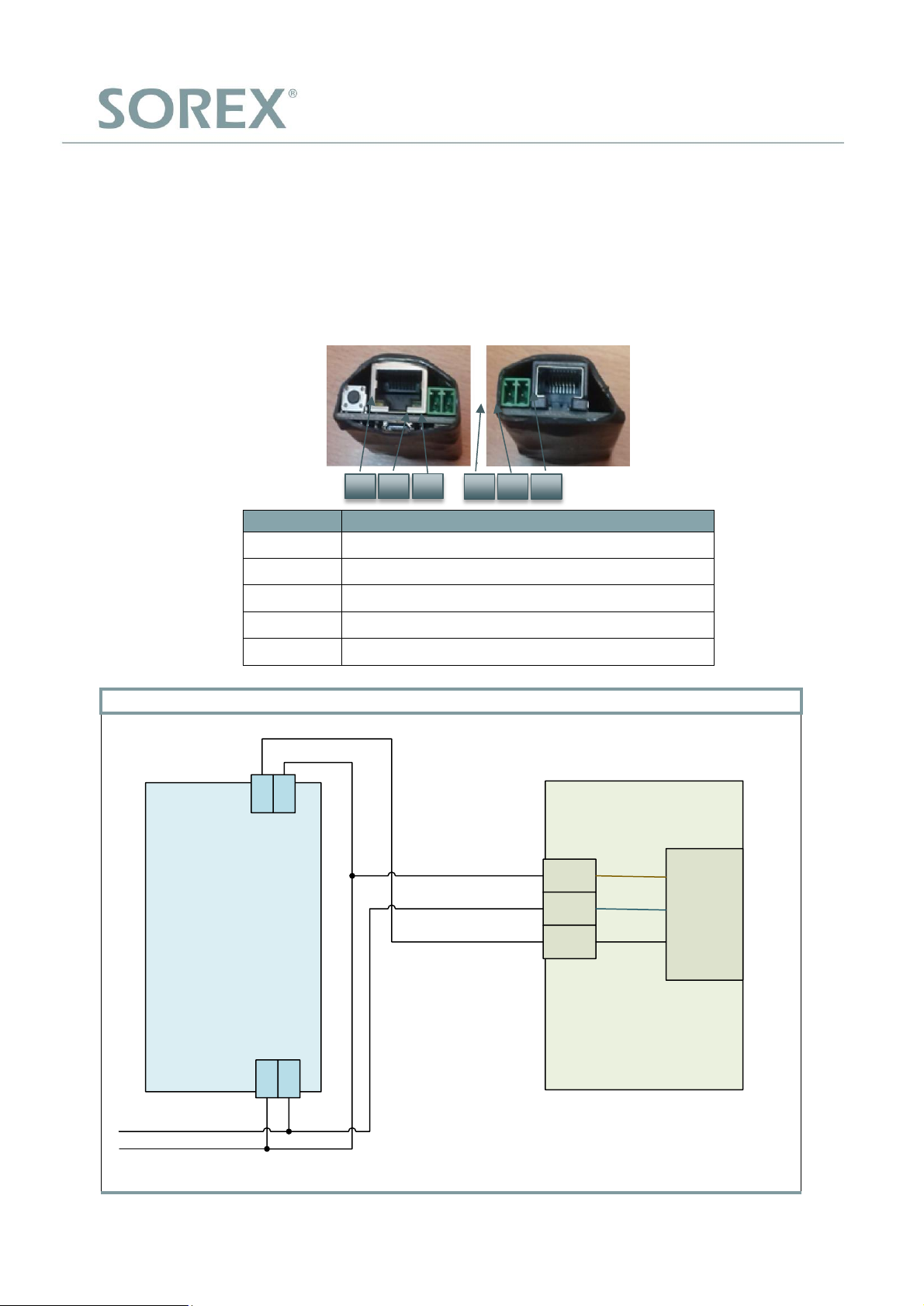
Nummer
Funktion
1
Jack for LAN-Connection
2
Positive pole
3
Ground
4/5
Potentialfree contact
6
Jack for connection to outdoorunit
SOREX wirelessKey 4.0 with GU-BKS A-opener
SOREX wirelessKey 4.0
Indoorunit
5
+ UB
GND
Signal
GU-BKS
A-Opener
Older versions of A-Openers
operate at 12V, newer ones at
24V. Please consult the manual
of the A-Opener
brown
blue o r gray
black
4
32
9-24VDC / 9-12VAC
GND
1 2 3 4 5
6
SOREX wirelessKey 4.0
Wiring Plan
For pinnumber and –function of the SOREX wirlessKey 4.0 refer to the table and the picture below. The wiring
with common door opening systems is depicted on the following pages
Page 3
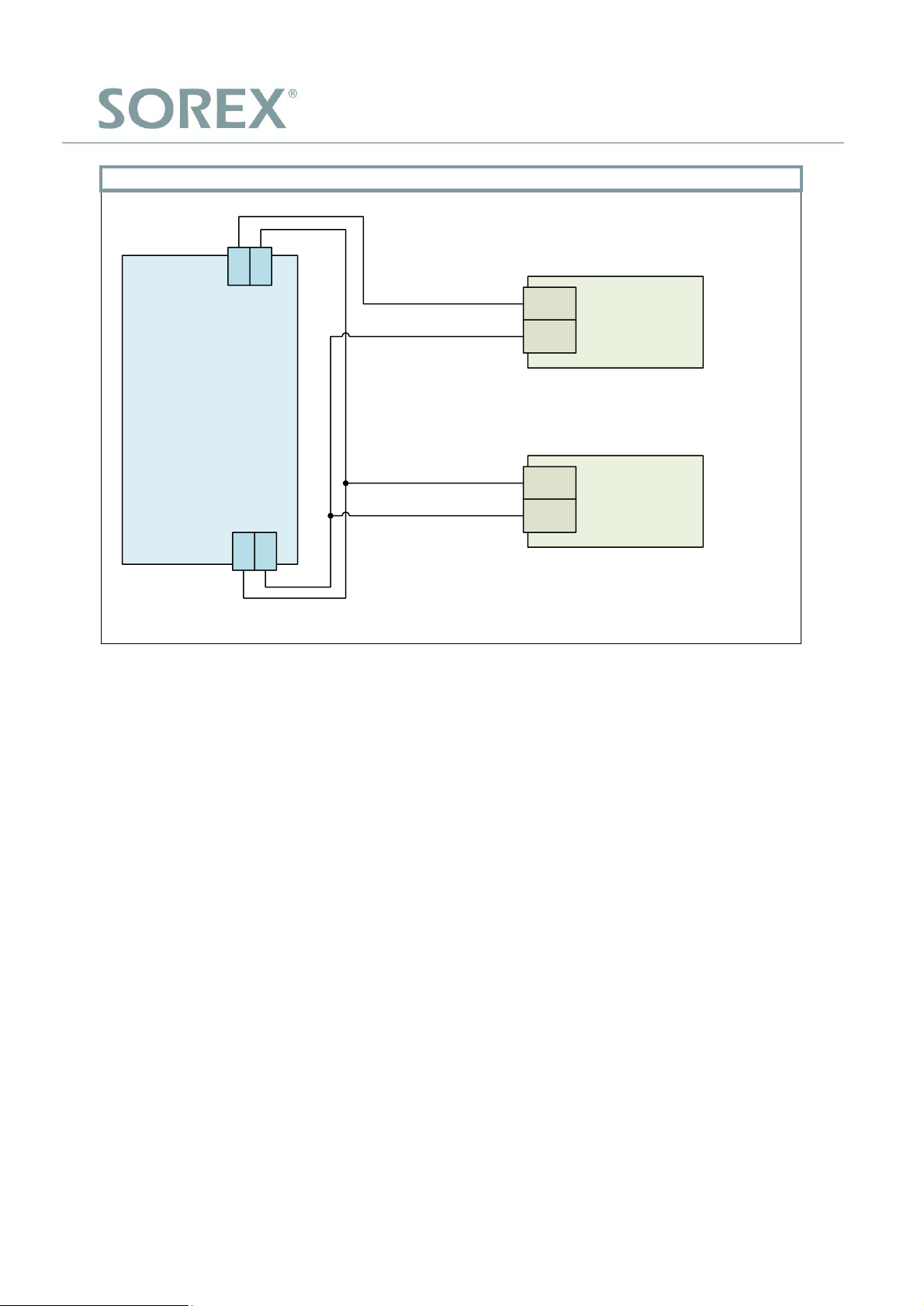
SOREX wirelessKey 4.0 with electronic opener
SOREX wirelessKey 4.0
Indoorunit
54
32
+
-
+
-
Powersupply
9V – 24V DC
or
9V – 12V AC
Dooropener
max. 500mA
 Loading...