

Page 1

SONY
Cordless Telephone
SPP-71^/73
Operating Instructions
Before operating the unit, please read this manual
thoroughly and retain it for future reference.
Manual de instrucciones
Antes de utilizar la unidad, lea detenidamente este
manual de instrucciones, y consérvelo para futuras
referencias.
3-758-444-21 (1)
1994 by Sony Corporation Printed in Hong Kong
UDSY01314ZZ
Page 2

For your convenience, SONY ELECTRONICS INC. has established telephone numbers for frequent
ly asked questions:
To locate the servicer or dealer nearest you, call:
1-(800)-342-5721
For service assistance or resolution of a service problem, call:
SONY CUSTOMER RELATIONS CENTER
For Prrxiuct information or operation, call:
TELECOMMUNICATIONS HELPLINE
or wnte to:
Sony Customer Information Center
Park Ridge, New Jersey 07656-8003
For an accessory or part not available from your authorized dealer, call;
Para su comodidad, SONY ELECTRONICS INC. ha dispuesto números de teléfono a fin de con
testar a las preguntas más frecuentes:
Para localizar el reparador o distribuidor de Sony más cercano, llame a:
Para solicitar asistencia técnica o la solución de algún problema técnico, lame a:
SONY CUSTOMER RELATIONS CENTER
Con respecto a la información u operación de productos, llame a:
1-(8001-282-2848
(2011-391-6111
One Sony Drive
1-(800)-488-SONY (7669)
1-800-342-5721
1-800-282-2848
TELECOMMUNICATIONS HELPLINE
o escriba a:
Sony Customer Information Center
Park Ridge, New Jersey 07656-8003
Con respecto a la información sobre accesorios o piezas que no ofrezca el proveedor autorizado,
llame a;
201-391-6111
One Sony Drive
1-800-488-S0NY (76691
Page 3

SONY ELECTRONICS INC ("SONY") warrants this Product (including any accessories) against
defects in material or workmanship as follows:
1. LABOR: For a period of one (1) year from the date of purchase; if this Product is deter
mined to be defective Sony will repair the Product at no charge or pay the labor charges to any
SONY authorized service facility. After the Warranty Period, you must pay for all labor charges.
2. PARTS: In addition, SONY, will supply, at no charge new or rebuilt replacements in ex
change for defective parts for a period of one (1) year. After the warranty period, you must pay
for all parts costs.
3. ACCESSORIES: Parts and labor for all accessories are for one (1) year.
lb obtain warranty service you must take the Product, or deliver the Product freight prepaid, in
either its original packaging or packaging affording an equal degree of protectioa to any autho
rized SONY service facility.
This warranty does not cover customer instruction, installation, set up adjustments or signal
reception problems.
This warranty does not cover cosmetic damage or damage due to acts of God, accident misuse
abuse negligence commercial use or modification of, or to any part of the Product including the
antenna. This warranty does not cover damage due to improper operation or maintenance con
nection to improper voltage supply, or attempted repair by anyone other than a facility authorized
by Sony to service the Product. This warranty does not cover Products sold AS IS or WITH ALL
FAULTS, or consumables (such as fuses or batteries). This warranty is valid only in the United
States.
Proof of purchase in the form of a bill of sale or receipted invoice which is evidence that the unit
is within the Warranty period must be presented to obtain warranty service
This warranty is invalid if the factory applied serial number has been altered or removed from the
Product.
REPAIR OR REPLACEMENT AS PROVIDED UNDER THIS WARRANTY IS THE EXCLUSIVE REMEDY OF THE CONSUMER. SONY SHALL NOT BE LIABLE FOR ANY INCIDENTAL OR CONSE
QUENTIAL DAMAGES FOR BREACH OF ANY EXPRESS OR IMPLIED WARRANTY ON THIS
PRODUCT. EXCEPT TO THE EXTENT PROHIBITED BY APPLICABLE LAW, ANY IMPLIED WAR
RANTY OF MERCHANTABILITY OR FITNESS FOR A PARTICULAR PURPOSE ON THIS PRODUCT
IS UMITED IN DURATION TO THE DURATION OF THIS WARRANTY.
Some states do not allow the exclusion or limitation of incidental or consequential damages, or
allow limitations on how long an implied warranty lasts, so the above limitations or exclusions
may not apply to you. In addition, if you enter into a service contract with the Sony Partnership
wKhin 90 days of the date of sale; the limitation on how long an implied warranty lasts does not
apply to you. This warranty gives you specific legal rights, and you may have other rights which
vary from state to state.
FOR FREQUENTL Y CALLED TELEPHONE NUMBERS, PLEASE SEE THE RIGHT BELOW.
Page 4

information contact Sony Telecommunications Helpline (201)391-6111
re is not reason why your model (SPP-71 PlITi) should ever cause harm to the
vork. If such harm does occur, the telephone company shall, where practicable, notify
, the customer, that temporcuy discontinuance of service may be required; however,
»e prior notice is not practicable, the telephone company may temjxjrarily
ontinue service forthwith, if such action is reeisonable in circumstances. In case of
1 temporary discontinuance, the telephone compsmy shall (1) promptly notify you,
customer, of such temp>orary discontinuance (2) afford you, the customer, the
ortunity to correct the situation which gave rise to the tempjorary discontinuance, and
nform you, the customer, of your right to bring a complaint to the Commission
;uant to the procedures set forth in the Rules.
edirres for filing the complaints can be obtained from your local dealer, or if
ssary, by writing directly to the manufacturer.
/CLING NICKEL-CADMIUM BATTERIES
NICKEL-CADMIUM BATTERY.
MUST BE DISPOSED OF PROPERLY.
Nickel-Cadmium batteries are recyclable. You can help preserve our
environment by returning your unwanted batteries to your nearest Sony
-Cd
Service Center or Factory Service Center for collection, recycling or proper
disposal. Note: In some areas the disposal of nickel-cadmium batteries in
household or business trash may be prohibited.
te Sony Service Center nearest you call 1-800-222-SONY (United States only)
le Factory Service Center nearest you call 416-499-SONY (Canada only)
on: Do not handle damaged or leaking nickel-cadmium batteries.
ning: This telephone operates as a radio transmitter. Conversations over this cordless
lone may be heard by others on radios within the area of its range of transmission."
Page 5

IMPORTANT INSTRUCTIONS TO USERS
Your model (SPP-71/72/73) has been approved by the Federal Communications
Commission (FCC) as not being harmful to the telephone network when connected
directly to the telephone lines. In order to fully comply with the Rules of the FCC, the
following instructions should be read carefully and followed completely where
applicable:
1 The FCC Rules require that all direct connection to the telephone lines must be made
through standard plugs and jacks as called out in the Rules.
No connection can be made to party lines or coin lines.
a. Upon request from your telephone company, you must provide the 14 digit FCC
Registration Number and Ringer Equivalence Number (REN), both of which are on
a label located on the outer surface of your telephone.
b. Inform your local telephone company that the jack (connector) required for your
device is USOC RJllC.
c. After the telephone company has installed the jack listed above, you can connect
your model (SPP-71/72/73) by inserting the mating plug of your equipment into
the jack.
d. The REN is useful to determine the quantity of devices you may connect to your
telephone line and still have all of those devices ring when your number is called.
In most, but not all areas, the sum of the RENs of all devices should not exceed five
(5.0). To be certain of the number of devices you may connect to your line, as
determined by the REN, you should call your local telephone company to
determine the maximum REN for your calling area.
e. All repairs must be accomplished as described in the "Service requirements".
2 If it appears that your model (SPP-71/72/73) is malfunctioning, it should be
disconnected from the telephone line until it can be determined if your equipment or
the telephone line is the source of the trouble. If your equipment needs repair, it
should not be reconnected until such repairs are made.
SERVICE REQUIREMENTS
If your model (SPP-71/72/73) should malfunction, all repairs will he performed by an
authorized Sony service representative.
This equipment has been registered with the FCC for direct connection to the telephone
network. Under the FCC Program, no customer is authorized to repair this equipment.
This applies to equipment both in and out of warranty. If such unauthorized repair is
performed, the registration of the equipment for direct connection to the net\\'ork will be
null and void. If the equipment is still in warranty, the remainder of the warranty period
will also be null and void. It is the responsibility of users requiring service to report the
need for ser\'ice to Sony dealer.
In the event that equipment must be returned for repair as determined by an authorized
agent, instruction.s for return of equipment will be furnished by Sony Electronics Inc. or
authorized agent. If the equipment is out of warranty, a nominal fee will be charged for
repair.
Page 6

Unplug this product from the wall outlet and refer servicing to qualified service
12.
personnel under the following conditions;
A. When the power cord or plug is damaged or frayed.
If liquid has been spilled into the product.
B.
If the product has been exposed to rain or water.
C.
If the product does not operate normally by following the operating instructions.
D.
Adjust only those controls that are covered by the operating instructions because
improper adjustment of other controls may result in damage and will often
require extensive work by a qualified technician to restore the product to normal
operation.
E. If the product has been dropped or the cabinet has been damaged.
F. If the product exhibits a distinct change in performance.
Avoid using a telephone (other than a cordless type) during an electrical storm.
13.
There may be a remote risk of electric shock from lightning.
14.
Do not use the telephone to report.a gas leak in the vicinity of the leak.
SAVE THESE INSTRUCTIONS
CAUTION: TO REDUCE THE RISK OF FIRE OR INJURY TO PERSONS BY BATTERY,
READ AND FOLLOW THESE INSTRUCTIONS.
1. Use only the following type and size battery pack: SONY BP-T16.
2. Do not dispose of the battery pack in a fire. The cell may explode. Check with local
codes for possible special disposal instructions.
3. Do not open or mutilate the battery pack. Released electrolyte is corrosive and may
cause damage to the eyes or skin. It may be toxic if swallowed.
4. Exercise care in handling battery in order not to short the battery with conducting
materials such as rings, bracelets, and key. The battery or conductor may overheat
and cause burns.
5. Charge the battery pack provided with or identified for use with this product only in
accordance with the instructions and limitations specified in the instruction manual
provided for this product.
6. Observe proper polarity orientation between the battery pack and battery charger.
CAUTION
You are cautioned that any changes or modifications not expressly approved in this
manual could void your authority to operate this equipment.
Page 7

Owner's Record
Tlie model and (ho serial numbots are loeated at the bottom o( tJie unit. Record the serial
number in the space prov ided below. Refer to these numbers whenever you call upon
your Sony dealer regarding this product
Model No. SPP-.
Serial No.
IMPORTANT SAFETY INSTRUCTIONS
When using your telephone equipment, basic safety precautions should always be
followed to reduce the risk of fire, electric shock and injury to persons, including the
following:
1. Read and understand all instructions.
2. Follow all warnings and instructions marked on the product.
3. Unplug this product from the wall outlet before cleaning. Do not use liquid cleaners
or aerosol cleaners. Use a damp cloth for cleaning.
4. Do not use this product near water, for example, near a bath tub, wash bowl, kitchen
sink, or laundry tub, in a wet basement, or near a swimming pool.
5. Do not place this product on an unstable cart, stand, or table. The product may fall,
causing serious damage to the product.
6. Slots and openings in the cabinet and the back or bottom are provided for
ventilation. To protect it from overheating, these openings must not be blocked or
covered. The openings should never be blocked by placing the product on the bed,
sofa, rug, or other similar surface. This product should never be placed near or over
a radiator or heat register. This product should not be placed in a built-in installation
unless proper ventilation is provided.
7. This product should be operated only from the type of p>ower source indicated on the
marking label. If you are not sure of the type of power supply to your home, consult
your dealer or local power company.
8. Do not allow anything to rest on the power cord. Do not locate this product where
the cord will be abused by persons walking on it.
9. Do not overload wall outlets and extension cords as this can result in the risk of fire
or electric shock.
10. Never push objects of any kind into this product through cabinet slots as they may
touch dangerous voltage points of short'out parts that could result in a risk of fire or
electric shock. Never spill liquid of any kind on the product.
11. To reduce the risk of electric shock, do not disassemble this product, but take it to a
qualified service persoimel when some serv'ice or repair work is required. Opening
or removing covers may expose you to dangerous v'oltages or other risks. Incorrect
reassembly can cause electric shock u'hen the appliance is subsequently used.
Page 8
ЕЭ
Page 9
Wall plate
Placa mural
ET
AC adaptor cord
Cable del
adaptador de CA
3
Telephone line
cord
Cable para línea
telefónica
Black Red
Page 10

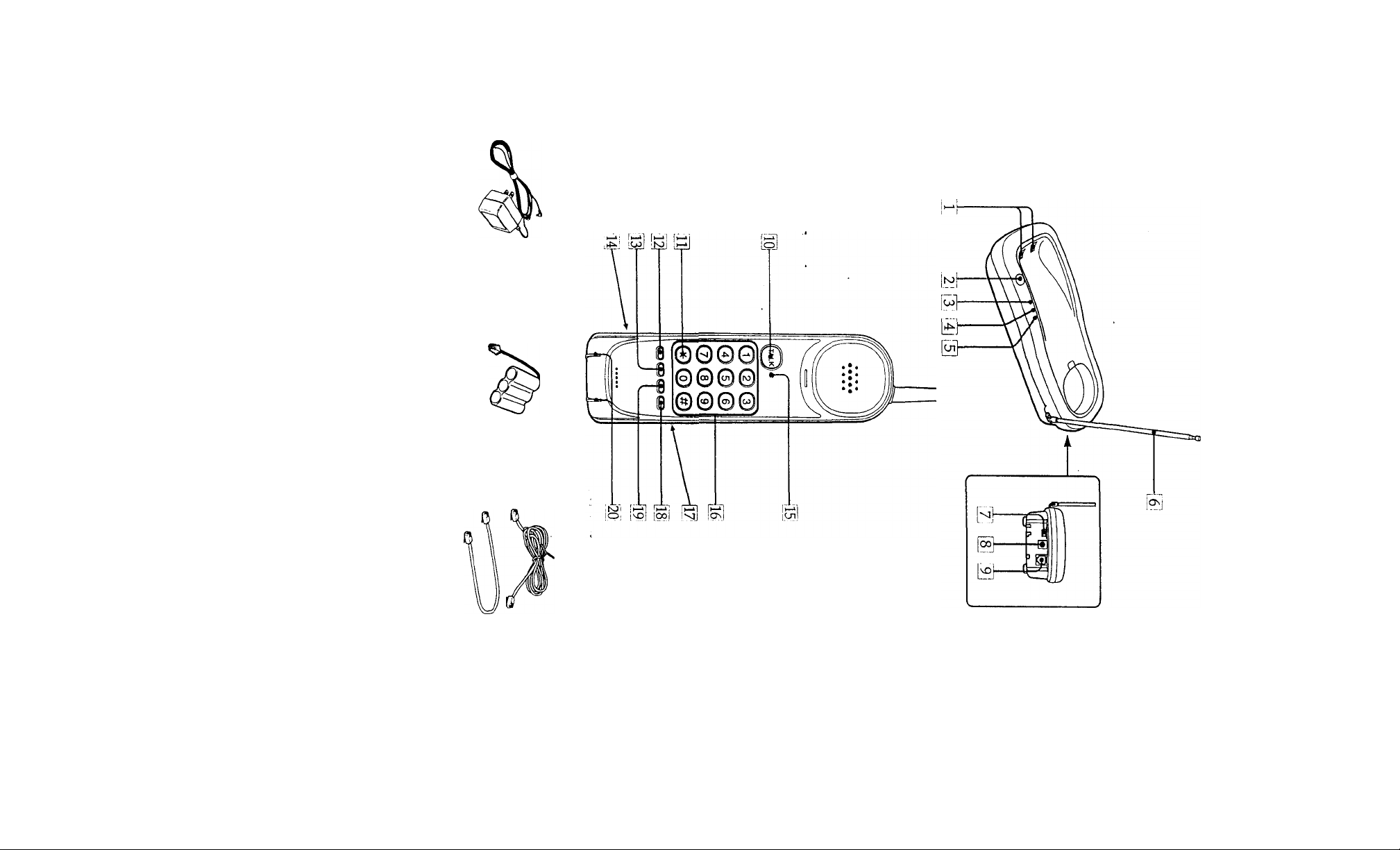
Identifying the
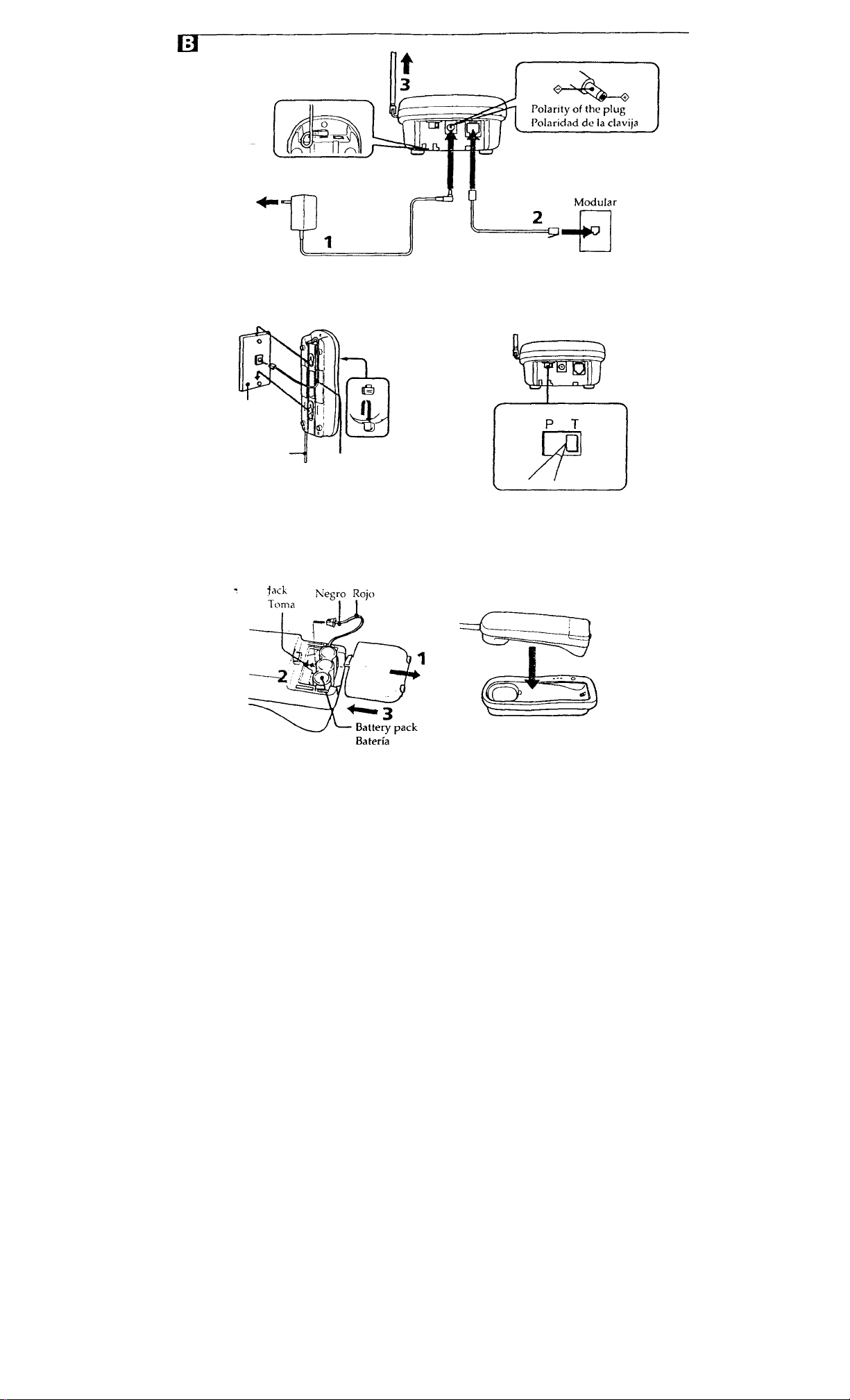
Connecting the base
parts □
Base unit
|T1 Charging terminals
[U PAGE button (SPP-73 only)
Hj CHARGE lamp
[U LINE lamp
[U POWER lamp
Antenna
[tj dial mode switch
[8j DC IN 9V jack
@ TEL LINE jack
Handset
[hi TALK button
[Hi TONE(*) button'
il^ CHANNEL button
[H SPEED DIAL/PROGRAM button
(SPP-72/73 only)
MUTE button (SPP-71 only)
H3 RING ON/BATT SAVE switch
HH TALK/BATT LOW lamp
(T^ Dialing keys
[T^ Battery compartment
Hi FLASH button
M REDIAL/PAUSE button
Charging terminals
Supplied accessories
AC power adaptor (AC-T48/T48A) (l)_aj
Rechargeable battery pack (BP-T16) (l)/b]
Telephone line cord (short 1, long 1)| c
Directory (2)
unit B
_________________
1 Connect one end of the AC
power adaptor (supplied) into
the DC IN 9V jack, and the other
end into an AC outlet.
To avoid accidental disconnection, be
sure to pass the AC power adaptor
cord around the hook as shown in the
illustration,
2 Plug one end of the telephone
line cord (supplied) into the TEL
LINE jack, and the other end into
a telephone outlet.
3 Fully extend the antenna.
Make sure it points toward the ceiling.
Notes on connecting
• Use only the AC power adaptor supplied.
Do not use any other AC power adaptor.
• Connect the AC power adaptor to a
continuous power supply.
• If your phone jack is not modular, contact
your telephone service company for
assistance.
■ To hang the base unit on a wall
Q
Choose an appropriate wall surface that
can support the total weight of the base
unit and the handset. ,
Attach the hanger-piece upside down.
Choosing tone or pulse dialing E
For the telephone to work correctly, you
must .set it to the type of your dialing
system: tone or pulse dialing.
Set the DIAL MODE switch to:
"T" (Tone) if your dialing system is
tone.
"P" (Pulse) if your dialing system
is pulse.
_______
Page 11

■ If you are not sure
1 Make a trial call with the DIAL MODE
switch set to "T".
2 If the call is connected, leave the switch
at “T".
Otherwise, set the switch to "P".
Charging the battery
pack B
* •
! If the battery becomes completely
discharged
Tile digital sc\:urity ccxie will be erased and all
programmed numbers will be lost from
memory.
In this case, first recharge the battery for more
than 12 hours, then store the numbers into the
memory for speed dialing again (see
".Memory dialing"). The security c<xle will be
automatically set when you replace the
handset onto the base unit.
The handset operates on the battery pack.
The supplied battery pack must be charged
before you can use it. Allow the battery
pack to charge for about 12 hours.
Notes on charging
• Make sure the CHARGE lamp on the base
unit lights when you place the handset onto
the base unit. If the CHARGE lamp remains
off, charging cannot start.
• Tlie CHARGE lamp still lights after charging
is completed.
• After you have completed a telephone
conversation, replace the handset onto the
base unit.
■ How to determine battery
damage
If the battery duration becomes extremely
short after you have charged the batterj' for
o\’er 12 hours, the battery is probably
damaged. See your dealer or contact a
Sony Serx'ice Center for battery
replacement.
■ Battery duration
See "Specifications".
■ When the battery becomes low
during conversation
The Ta\LK/BATT LOW lamp flashes and
the phone will beep every three seconds. If
this happens, disconnect the line and
replace the handset onto the base unit to
charge the battery pack for a while.
Making/Receiving calls
1 To make or receive calls, press
TALK.
To make calls, wait until the TALK/
ВАТТ LOW lamp lights and you hear a
dial tone. Then dial a phone number.
2 When you finish talking, replace
the handset onto the base unit, or
press TALK again.
! If fi\'e short error beeps sound and the line is
not disconnected when you press TALK,
mo\ e closer to the base unit and press TALK
again, or replace the handset onto the base
unit.
! Do not remove the battery pack from the
handset while you are talking on the phone.
Иле line may remain connected.
! If electric interruption cKcurs during
telephone conversation and you cannot
disconnect tire line on the handset, remove the
battery pack once and install it again
■ If interference occurs during
conversation
First, bring the handset closer to the base
unit. If interference still persists, press
CHANNEL.
The phone will switch to another channel.
! II \4>u try to change the channel when the
handsel is t<Ki f.u from the base unit, five
short error hc4'ps will sound and the channel
леМ1 not change.
Page 12

■ To turn the ringer off
If you do not want to be disturbed by
telephone calls, you can turn the ringer off.
Move the RING ON/BATT SAVE switch
to:
• RING ON to turn the ringer on.
• ВАТТ SAVE to turn the ringer off to save
battery power. In this setting, the
handset does not ring when a call
comes in. Tbis is useful if you use this
cordless telephone as an extension
telephone and you can hear the other
phone ring.
Redialing
You can redial the last number called with
just one touch of the REDIAL button.
The number must not be longer than 32
digits (the tone and pause digits are each
counted as one digit).
1 Press TALK.
2 Press REDIAL/PAUSE.
■ To erase the last phone number
dialed
While the phone is not in use, press
REDIAL/PAUSE twice.
3 Dial the phone number you wish
to store.
Do not enter a memory dialing number
that exceeds 16 digits (the tone and
pause digits are each counted as one
digit).
4 Press SPEED DIAL/PROGRAM
again.
You will hear a confirmation beep.
■ If you use a Private Branch
Exchange(PBX)
You need to dial a digit (such as 9) to access
an outside line before you dial a phone
number.
To store the phone number:
1 Enter the outside line access digit.
2 Press REDIAL/PAUSE to enter a pause
(to allow the phone time to access the
outside line).
3 Enter the phone number you want to
store.
■ To change a stored number
If you store a new number in the speed
dialing button that already has a number
stored in it, the old number will be erased.
Making memory dialing calls
1 Press TALK.
Memory dialing
(for SPP-72/73 only)
You can store up to ten numbers you
frequently call into the memory for speed
dialing. While storing numbers, you
cannot receive calls.
k.
Storing numbers
1 Press SPEED DIAiyPROGRAM.
2 Press a dialing key between 0 and
9.
You will hoar a confirmation bcvp.
2 Press SPEED DIAL/PROGRAM.
3 Press the desired speed dialing
button (0 to 9).
. The phone number stored in the button
will be dialed.
Page 13

Putting a call on mute
(for SPP-71 only)
! If you have not subscribed to "call waiting"
service, pressing FLASH will disconnect the
call.
Press MUTE.
You can hear the other party but the other
party cannot hear you, TheTALK/BATT
LOW lamp flashes during mute.
To resume the conversation, press MLJTE
again.
Using touch-tone sen^ices
(for pulse dialing systems only)
Some serx’ices require you to use touchtone. This is not a problem if your phone
already uses tone dialing. If your phone
uses pulse dialing, however, you need to
follow the steps below to use these services.
1 Dial the service number.
2 When connected to the service,
press TONE(*).
3 Press the dialing keys as required.
! You only need to press TONE once to turn
dialing to tone; this will remain effective until
the call is disconnected.
Using "call waiting"
service!
If you ha\’e subscribed to "call waiting"
serx'ice, you can continue recei\'ing calls
while talking on the phone.
1 When a new call comes in while
you are talking, press FLASH.
The current call is put on hold and you
can answer the new call.
2 When you want to switch back to
the first caller, press FLASH again.
Pressing I'LASH lets you switch
between the two calls.
Paging (for spp-73 only)
You can page the handset from the base
unit. Paging is useful when you want to
find out where the handset is.
Press PAGE on the base unit.
The handset rings. The handset continues
to ring as long as you keep PAGE pressed.
! The handset does not ring in the ВАТТ SAVE
mode.
! Paging is not possible when the handset is
engaged in conversation.
Precaution
On installation
• Do not expose the base unit or handset to
heat sources such as radiators or air
ducts, extremely low temperatures,
direct sunlight, excessive dust, moisture
or rain, mechanical vibration or shock
inclined position, devices (such as
speaker, TV or personal computer)
which contain magnets or generate
magnetic fields.
• Place the base unit in a high location
. (such as on a table) near the center of the
room.
• The range of the cordless telephone will
vary depending upon the environment
in which the phone is used.
• If the handset is used too far from the
base unit, telephone conversations
cannot be made, and the beeps will be
heard. If this happens, move the handset
closer to the base unit; otherwise the call
will be disconnected.
Page 14

Maintenance
• Clean the cabinets with a soft cloth
slightly moistened with water or mild
detergent solution. Do not use any type
of abrasive pad, scouring powder or
solvent such as alcohol or benzine as
they may damage the finish of the
cabinet.
• Regularly clean the charging terminals
on the base unit and the handset with a
dry, soft cloth. If the terminals are soiled,
the battery pack may not be charged.
On the security code
The digital security code is automatically
set when you initially charge the battery
pack arid place the handset onto the base
unit. If you wish to change the security
code:
. Set the handset in ВАТТ SAVE mode.
While holding FLASH down, move the
RING ON/BAIT SAVE switch to RING
ON. A confirmation beep will sound.
Replace the handset onto the base unit.
Base unit
Power source
Dimensions
Mass
Design and specifications are subject to change
without notice.
Troubleshooting
You hear no dial tone when you
press TALK.
DC 9V from AC power
adaptor
Approx. 93 X 50.8 x 231 mm
(w/h/d) (3 V-ix2x9 V«
inches), antenna excluded
Anteruia 173 mm (6
inches)
Approx. 280 g (10 oz)
* •
• Make sure the base unit is connected to
an AC outlet.
• Make sure the base unit is connected to a
telephone outlet.
• The battery pack may be discharged.
Charge the battery pack for about 12
hours.
• Move the handset closer to the base unit.
Specifications
General
Frequency control
Crystal-controlled PLL
Operation mode FM, duplex
Operation frequency
Base unit: 46 MHz
Handset: 49 MHz
Handset
Power source Rechargeable battery pack
BP-T16
Battery charging time
Approx. 12 hours
Battery life Standby: approx. 336 hours
(14 days)
Talk: approx. 6 hours
Dimensions Approx. 59 x 203 x 58 mm
(w/h/d) (2 ''/i X 8 X 2 Vs
inches), antenna excluded
Antenna 1(X).4 mm (4 inches)
Mass Approx. 255 g (9 oz), battery
included
The handset does not ring.
• Move the RING ON/BATT SAVE switch
to RING ON.
• The battery pack may be discharged.
Charge the battery pack for about 12
hours.
• Make sure the base unit is connected to
an AC outlet.
You hear a beep when you press
TALK to make a call.
• It is an out-of-range alarm. Move the
handset closer to the base unit.
You hear a beep every 3 seconds and
the TALK/BATT LOW lamp flashes.
• Charge the battery pack for about 12
hours.
Page 15

SONY®
Productos telefónicos
GARANTIA LIMITADA
SONY ELECTRONICS INC (“SONY") garantiza este producto contra defectos de materiales o
hechura, según se expone a continuación:
1. Durante un período de I año a partir de la fecha de compra, SONY pagará los cargos de
mano de obra de su centro de servido SONY autorizado por concepto de reparación del producto
defectuosa Después de dicho período de I año, usted debe pagar todos los cargos de mano de
obra.
2. Adicionalmente, SONY suministrará, sin cargo, sustitutos nuevos o reconstruidos para las
piezas defectuosas durante un período de I año a partir de la fecha original de compra.
A fin de obtener servicio bajo garantía, usted debe llevar el producto o entregar el producto, con
frangueo prepagado, a una instalación de servicio SONY autorizada
La presente garantía no cubre daños estéticos ni daños debido a casos fortuitos, accidentes, mal
uso, abuso o negligencia de este producto, incluso la antena. Esta garantía sólo es válida en Esta
dos Unidos de América.
Rara obtener servicio bajo garantía, debe presentarse comprobación de compra en la forma de una
.A,
factura de venta o recibo de pago que evidencie que la unidad está amparada bajo el período de
garantía.
m
m
Esta garantía sólo es válida si el número de serie aparece en el producto
m
LA REPARACIÓN O REEMPLAZO SEGÚN LO ESTIPULADO BAJO LA PRESENTE GARANTÍA ES
EL EXCLUSIVO REMEDIO DEL CONSUMIDOR. SONY NO SERÁ RESPONSABLE DE CUALES-
m
QUIER DAÑOS INCIDENTALES O CONSECUENTES DEBIDO A LA VIOLACIÓN DE CUALQUIER
GARANTÍA EXPRESA O IMPLÍCITA SOBRE EL PRESENTE PRODUCTO, EXCEPTO EN LA MEDIDA
EN QUE DICHA ESTIPULACIÓN SEA PROHIBIDA EN VIRTUD DE LEGISLACIÓN PERTINENTE. LA
DURACIÓN DE CUALQUIER GARANTÍA IMPLÍCITA DE COMERCIABILIDAD O IDONEIDAD PARA
UN PROPÓSITO ESPECÍFICO DEL PRESENTE PRODUCTO QUEDA LIMITADA A LA DURACIÓN
w
DE LA PRESENTE GARANTÍA._______________________________
M
Ciertos estados no permiten la exclusión o limitación de daños incidentales o consecuentes, o no
permiten limitaciones sobre la duración de una garantía implícita, y por ende es posible que las
limitaciones o exclusiones que anteceden no se aplican a usted. La presente garantía le confiere
i
derechos legales específicos, y es posible que tenga otros derechos que varían de acuerdo con
el estado.
Parí su conveniencia, SONY ELECTRONICS INC ha establecido un Centro de Información para
m
Clientes para ofrecerle información sobre productos o servicia
m
Importante: Si devuelve un producto para servicio, por favor, véase a la parle derecha para su Centro
de Servicio Sony más cercano.
m
m
m
Línea de asistencia de telecomunicaciones
Ftor favor, llámenos con sus preguntas
y comentarios sobre los productos telefónicos SONY
Sony Drive, Park Ridge, New Jersey 07656
(201) 391-6111
SONY ELECTRONICS INC.
Page 16

En caso de que sea necesario devolver el equipo para reparación según determine un
agente autorizado, Sony Corporation of America o el agente autorizado proporcionará
instrucciones para la devolución del equipo. Si el equipo está fuera de garantía, se le
cobrará un cargo módico por concepto de reparación.
Para información, comuniqúese con; Línea de Asistencia de Sony Telecommunications
(201)391-6111.
No hay motivo alguno por el cual su modelo (SPP-71 /72/73) ocasione daños a la red. En
caso de ocurrir tales daños, donde sea factible la compamía telefónica le notificará a usted,
el cliente, que puede necesitarse una suspensión provisional del servicio; no obstante,
cuando el aviso jx»r anticipado no sea factible la compañía telefónica podrá proceder de
inmediato a la susp>ensión provisional del servicio, siempre que dicha medida sea
lazonable bajo las circunstancias. En caso de suspensión provisional, la compañía
telefónica (1) le notificará inmediatamente a usted, el cliente, de dicha suspensión
provisional, (2) le ofrecerá a usted, el cliente, la oportunidad de remediar la situación que
dio lugar a la suspensión provisional y (3) le informará a usted, el cliente, de su derecho
de entablar una queja ante la Comisión de acuerdo con los procedimientos establecidos
en las Reglas.
Los procedimientos para entablar una queja pueden obtenerse de su distribuidor local o,
de ser necesario, escribiendo directamente al fabricante.
REQCLAJE DE PILAS DE NÍQUEL-CADMIO
PILA DE NIQUEL-CADMIO
DEBE DESECHARSE CORRECTAMENTE
Las pilas de m'quel-cadmio son reciclables. Usted puede ayudar a
proteger nuestro medio ambiente devolviendo sus pilas desgastadas al
Ni-Cd
Para su Centro de Servicio Sony más cercano, llame al 1-800-222-SONY (Estados Unidos
solamente)
Precaución: No maneje pilas de níquelodmio dañadas o que tengan fugas.
"Advertencia; Este teléfono funciona como radiotransmisor. Las conversaciones
sostenidas con este teléfono sin cordones pueden ser escuchadas por terceros en equipos
de radio dentro del área de su alcance de transmisión".
Centro de Servicio Sony más cercano para recogida, reciclaje o desecho
apropiado.
Nota: En ciertas áreas él desecho en la basura doméstica o comercial de
pilas de níquel-cadmio puede estar prohibido.
Page 17

IMPORTANTES INSTRUCCIONES A LOS USUARIOS
Su modelo (SPP-71 /72/73) iia sido aprobado por la Comisión Federal de
Comunicaciones (FCC) como aparato no perjudicial para la red telefónica al conectarse
directamente a las líneas telefónicas. Con el fin de cumplir plenamente las Reglas do la
FCC, deben leerse con cuidado y observarse todas las instrucciones a continuación donde
sean aplicables;
1 Las reglas de la FCC exigen que todas las conexiones directas a las líncíis telefónicas
deben efectuarse mediante conectores y jacks estándar según se indica en estíis reglas.
No pueden efectuarse conexiones a líneas compartidas ni a líneas de teléfonos de
monedas.
a) Si su compañía telefónica se los solicita, usted debe suministrar el Número de
Registro de 14 dígitos de la FCC y el Número de Equivalencia del Timbre (REN);
ambos números aparecen en una etiqueta situada en la superficie exterior del
aparato.
b) Notifique a su compañía telefónica local que el jack (conector) requerido para su
aparato es el USCXT RJllC.
c) I^pués de que la compañía telefónica haya instalado el jack arriba indicado, usted
puede conectar su modelo. (SPP-71/72/73) insertando el conector de acoplamiento
de su equipo en este jack.
d) El REN es útil para determinar la camtidad de aparatos que puede conectar a su
línea telefónica para que todos los aparatos repiquen cuando se llame a su número
de teléfono. En la mayoría de las áreas, pero no en todas, la suma de los REN de
todos los aparatos no debe exceder cinco (5.0). Para estar seguro del número de
aparatos que puede conectar a su línea según lo determinado por el REN, llame a
su compañía telefónica local para determinar el REN máximo para su área de
llamadas.
e) Todaslasreparacionesdebenefectuarsesegúnsedescribebajo"Requlsitosdesen.'icio".
2 Si su modelo (SPP -71 /72/73) parece tener un malfuncionamiento, debe desconectarse
de la línea telefónica hasta que se determine si la fuente del problema es su equipo o la
línea telefónica. Si su equipo necesita reparación, no debe reconectarse hasta que se
hayan efectuado dichas reparaciones.
REQUISITOS DE SERVICIO
En caso de malfuncionamiento de su modelo (SPP-71/72/73), todas las reparaciones
serán realizadas por un Centro de Servicio Sony autorizado.
Este equipo ha sido registrado con la Comisión Federal de Comunicaciones (FCC) para
conexión directa a la red telefónica. Bajo el programa FCC, ningún cliente está autorizado
para reparar este equipo. Dicha restricción se aplica a las equipos todavía cubiertos bajo
garantía así como a los equipos fuera de garantía. En caso de realizarse una reparación
no autorizada, el registro del equipo para conexión directa a la red quedará nulo e
inválido. Si el equipo todavía está bajo garantía, el período de garantía restante quedará
nulo e inválido. Los usuarios que requieran servicio son responsables de notificar la
necesidad de servicio a un distribuidor Sony.
Page 18

12. Desconecte este equipo del tomacorriente de pared y refiera el servicio de personal
calificado bajo las siguientes condiciones:
A. Cuando el cable eléctrico o enchufe se encuentra dañado o deshilachado.
B. Si se ha derramado líquido dentro del producto.
C. Si el producto ha estado expuesto a lluvia o agua.
D. Si el producto no opera normalmente al seguir las instrucciones de operación.
Sólo debe ajustar los controles incluidos en las instrucciones de operación, ya que
el ajuste incorrecto de otros controles puede producir damos y a menudo exigirá
trabajo extenso por un técnico calificado para restaurar el producto a las
operaciones normales.
E. Si el producto se ha dejado caer o el gabinete está dañado.
F. Si el producto exhibe un cambio perceptible de operación.
13. Evite usar un teléfono (que no sea del tipo sin cordones) durante una tormenta
eléctica. Existe la remota posibilidad de shock eléctrico debido a rayos.
14. Para notificar una fuga de gas, no utilice el teléfono en la vecindad de dicha fuga.
GUARDE ESTAS INSTRUCCIONES
PRECAUCIÓN: PARA REDUCIR EL RIESGO DE INCENDIO O LESIÓN A PERSONAS
DEBIDO A LA PILA, LEA Y SIGA ESTAS INSTRUCOONES:
1. Sólo debe utilizar un bloque de pilas del siguiente tipo y tamaño; SONY BP-T16
2. No deseche el bloque de pilas en una hoguera ya que la pila puede explotar.
Compruebe los códigos locales sobre posibles instrucciones especiales de desecho.
3. No abra ni mutile el bloque de pilas. El electrólito liberado es corrosivo y puede
occisionar daños a los ojos o la piel. Puede ser tóxico si se ingiere.
4. Tenga cuidado al manejar la pila a fin de evitar cortocircuitos de la pila con materiales
conductores tales como anillos, pulseras y llaves. La pila o el conductor puede
sobrecalentarse y ocasionar quemaduras.
5. Sólo debe cargar el bloque de pilas suministrado o identificado para uso con este
producto de acuerdo con las instrucciones y limitaciones especificadas en el manual de
instrucciones correspondiente al producto.
6. Observe la orientación de polaridad correcta entre el bloque de pilas y el cargador de
pilas.
PRECAUCIÓN
Se le advierte que cualquier cambio o modificación no aprobado expresamente en el
presente manual podría anular su autori/sación para operar este equipo.
Page 19

Registro del propietario
Los números de modelo y de serie se encuentran en el fondo de la base del teléfono.
Anote el número de serie en el espacio provisto a continuación. Refiérase a estos
números cada vez que se comunique con su distribuidor Sony con respecto al producto.
Modelo N"SPP-_
Serie N"_
IMPORTANTES INSTRUCCIONES DE SEGURIDAD
A fin de reducir el riesgo de incendio, shock eléctrico y lesiones a las persona cuando
usted use su equipo telefónico, siempre debe observar precauciones básicas de seguridad,
entre ellas:
1. Lea y entienda todas las instrucciones.
2. Siga todas las advertencias e instrucciones indicadas en el producto.
3. Desconecte este producto del tomacorriente de pared antes de limpiarlo. No use
limpiadores líquidos ni en aerosol. Use un paño húmedo para limpiarlo.
4. No use este producto cerca del agua, por ejemplo, cerca de una bañera, lavamanos,
fregadero de cocina o batea, en un sótano mojado ni cerca de una piscina.
5. No ponga este producto sobre un carrito, estante o mesa inestable. El aparato puede
caer y ocasionar daños graves al teléfono.
6. Las ranuras y aberturas en el gabinete y en la parte trasera o el fondo del aparato se
proporcionan a fines de ventilación. Para evitar que el aparato se sobrecaliente,
dichas aberturas no deben obturarse ni cubrirse. Lcis aberturas nunca deben
bloquearse colocando el aparato sobre la cama, sofá, alfombra u otra superficie
similar. Este producto nunca debe colocarse cerca de, ni sobre un radiador o registro
de calefacción. Este producto no debe colocarse en una instalación empotrada salvo
que se provea ventilación apropiada.
7. Este producto sólo debe operarse desde el tipo de fuente de alimentación indicada en
la etiqueta de especificaciones. Si no está seguro del tipo de fuente de alimentación
en su hogar, consulte con su distribuidor o compañía de electricidad local.
8,
No deje que nada descanse sobre el cable eléctrico. No sitúe este producto en un
lugar donde el cable esté expuesto a abuso debido al tránsito de la gente.
No sobrecargue los tomacorrientes de pared y cables de extensión, ya que esto puede
ocasionar el riesgo de incendio o shock eléctrico.
10
Nunca introduzca a presión objetos de ningún tipo en este producto a través de las
ranuras del gabinete, ya que pueden hacer contacto con un punto de voltaje
peligroso u ocasionar un cortocircuito entre piezas que podría conducir a incendios
o shock eléctrico. Nunca derrame líquidos de ningún tipo sobre el producto.
11.
Para reducir el riesgo de shock eléctrico, no desarme este producto; en caso de
necesitarse servicio o reparación, llévelo a personal de servicio calificado. El abrir o
quitar las tapas puede exponerle a voltaje peligroso u otros riesgos. El reensamblaje
incorrecto puede ocasionar shock eléctrico cuando el aparato se use posteriormente.
Page 20

Identificación de las
Conexión de la unidad
partes И
Unidad base
| lj Terminales de carga
[¿] Tecla buscapersonas (PAGE) (SPP-73
solamente)
[ 3] Lámpara indicadora de carga (CHARGE)
14J Lámpara indicadora de línea (LINE)
[5] lámpara indicadora de alimentación
(POWER)
[6] Antena
[3 Selector de modo de marcación
(DIAL MODE)
[8j Toma de entrada de alimentación
exterior (DC IN 9V)
@ Toma de entrada de la línea
telefónica (TEL LINE)
Microteléfono
¡Ш) Tecla de conversación (TALK)
|ÍT] Tecla de marcación por tonos (TONE *)
[U Tecla selectora de canal (CHANNEL)
[13] Tecla de marcación abreviada/
programación (SPEED DIAL/
PROGRAM) (SPP-72/73 solamente)
Tecla de silenciamiento (MUTE)
(SPP-71 solamente)
!l4j Selector de activación del generador
de llamada/ahorro de batería (RING
ON/ВАТТ SAVE) -
15 Lámpara indicadora de
conversación/batería débil (TALK/
ВАТТ LOW)
16 Teclas de marcación
il7' Compartimiento de la batería
18j Tecla de accionamiento del
conmutador del gancho (FLASH)
39! Tecla de repetición de marcación/
pausa (REDIAL/PAUSE)
20 Terminales de carga
Accesorios suministrados
Adaptador de CA (AC-T48/T48A) (1); a
Batería (BP-T16) (l)Lb_
Cable para línea telefónica (corto 1, largo 1) [c
Directorios (2)
base Q]
1 Conecte un extremo del
adaptador de CA (suministrado)
a la toma DC IN 9V, y el otro a
un tomacorriente de CA.
Para evitar una desconexión
accidental, no se olvide de pasar el
cable del adaptador de CA por el
gancho como se muestra en la
ilustración.
2 Enchufe un extremo del cable
para línea telefónica
(suministrado) en la toma TEL
LINE, y el otro en una toma para
teléfono.
3 Extienda completamente la
antena.
Cerciórese de que haya quedado
apuntada hacia el techo.
Notas sobre la conexión
• Utilice solamente el adaptador de CA
suministrado. No use ningún otro
adaptador de CA.
• Conecte el adaptador de CA a un
tomacorriente que esté permanentemente
activo.
• Si su toma para teléfono no es modular,
póngase en contacto con la compañía
telefónica para solicitar ayuda.
■ Para instalar la unidad base en
una pared Q
Elija una superficie adecuada de la pared
de forma que pueda soportar el peso total
de la unidad base y el microteléfono.
Inx'ierta la lengüeta de colgado y fíjela.
Selección de marcación por tonos o por pulsos E
Para que el teléfono funcione
correctamente, tendrá que establecer el
tipo de su sistema de marcación: por
tonos o por pulsos.
Ponga el selector DIAL MODE en:
"T" (tono) sí su sistema de
marcación es por tonos.
Page 21

"P" (pulso) si su sistema de
marcación es por pulsos.
■ Sí no conoce su sistema de
marcación
1 Realice una llamada de prueba con el
selector DIAL MODE en “T".
2 Si la llamada se conecta, deje el selector
en "T".
En caso contrario, póngalo en "P".
Carga de la batería B
* •
El microteléfono funciona con una batería.
Antes de ublizar la batería suministrada
deberá cargarla. Cargúela durante unas 12
horas.
Notas sobre la carga
• Cerciórese de que la lámpara CHARGE de la
unidad base se encienda cuando coloque el
microteléfono sobre la unidad base. Si la
lámpara CHARGE sigue sin encenderse, la
carga no se iniciará.
• La lámpara CHARGE permanecerá encendida
aún después de que se haya completado la
carga.
• Después de haber finalizado la conversación
telefónica, vuelva a colocar el microteléfono
sobre la unidad base.
■ Cómo determinar si la batería está
dañada
Si la duración de la batería se acorta
extremadamente corta después de haberla
cargado durante más de 12 horas, es
probable que la batería esté dañada.
Consulte a su proveedor o póngase en
contacto con un centro de servicios Sony
para que le reemplace la batería.
■ Duración de la batería
Consulte "Especificaciones".
■ Cuando la energía de la batería
disminuya durante la
conversación
La lámpara TALK/BATT LOW parpadeará
y el teléfono emitirá un pitido cada tres
segundos. En este caso, desconecte la línea
y vuelva a colocar el microteléfono sobre la
unidad base para cargar la batería durante
cierto tiempo.
! Cuando la batería se haya descargado
completamente
El código de seguridad digital y todos los
números almacenados se borrarán de la
memoria.
En este caso, en primer lugar cargue la batería
durante más de 12 horas, y después vuelva a
almacenar los números en la memoria de
marcación abreviada (consulte "Marcación
memorizada"). El código de seguridad se
asignará automáticamente cuando coloque el
microteléfono sobre la unidad base.
Realización/recepción
de llamadas
1 Para realizar o recibir llamadas,
presione TALK.
Para realizar llamadas, espere hasta que
la lámpara TALK/BATT LOW se
encienda y oirá el tono de invitación a
marcar. Después, marque el número de
teléfono.
2 Cuando finalice la conversación,
vuelva a colocar el microteléfono
sobre la unidad base, o vuelva a
presionar TALK.
! Si suenan cinco pitidos cortos y la línea no se
desconecta cuando presione TALK, acerque el
microteléfono a la unidad base y vuelva a
presionar TALK, o coloque el microteléfono
sobre la unidad base.
! No extraiga la batería del microteléfono
durante la conversación telefónica. La línea
puede seguir conectada.
! Cuando se produzca un corte del suministro
eléctrico durante la conversación telefónica y
no pueda desconectar la línea en el
microteléfono, extraiga la batería una vez y
vuelva a colocarla.
■ Si se produce ruido de
interferencias durante la
conversación
Primero, acerque el microteléfono a la
unidad base. Si el ruido todavía persisté,
presione CHANNEL.
El teléfono cambiará de canal.
Page 22

! Si trata de cambiar el canal cuando el
microtéléfono esté demasiado lejos de la
unidad base, oirá cinco pitidos cortos de error
'y el canal no cambiará.
■ Para desactivar el generador de
llamada
Si no desee que le molesten las llamadas
telefónicas, podrá desactivar el generador
de llamada.
Ponga el selector RING ON/BATT
SAVE en:
• RINCON para activar el generador de
llamada.
• ВАТТ SAVE para desactivar el
generador de llamada y ahorrar energía
de la batería. En esta posición, el
microtéléfono no sonará, aunque
entre una llamada. Esta posición será
útil cuando utilice este teléfono
inalámbrico como teléfono de extensión
y pueda oír la llamada del otro teléfono.
Repetición automática
de la marcación
Usted podrá repetir la marcación del último
número marcado presionando
simplemente la tecla REDIAL.
El número no deberá ser superior a 32
dígitos (el tono y la pausa se cuentan cada
uno como un dígito.)
1 Presione TALK.
2 Presione REDIAL/PAUSE.
■ Para borrar el último número de
teléfono marcado
Con el teléfono sin utilizar, presione dos
veces REDIAL/PAUSE.
Marcación memorizada
(SPP-72/73 solamente)
Usted podrá almacenar hasta diez números
que frecuentemente utilice en la memoria
de marcación abreviada. Durante el
almacenamiento de números, no podrá
recibir llamadas.
Almacenamiento de números
1 Presione SPEED DIAUPROGRAM.
2 Presione una tecla de marcación (0
a 9).
Se oirá un pitido de confirmación.
3 Marque el número de teléfono
que desee almacenar.
No introduzca en la memoria un
número de más de 16 dígitos (el tono y
la pausa se cuentan cada uno como un
dígito).
4 Vuelva a presionar SPEED DIAL/
PROGRAM.
Se oirá un pitido de confirmación.
■ Para utilizar una centralita privada
(PBX)
Usted tendrá que marcar un dígito (como,
por ejemplo, el 9) para lograr acceso a la
línea exterior antes de marcar un número
de teléfono.
Para almacenar el número de teléfono;
1 Introduzca el dígito de acceso a la línea
exterior.
2 Presione REDIAL/PAUSE para
introducir una pausa (a fin de dar tiempo
al teléfono para que logre el acceso a la
línea exterior).
3 Introduzca ei número de teléfono que
desee almacenar.
■ Para cambiar un número
almacenado
Si usted almacena im nue\ o número de
teléfono en una tecla de marcación
abre\'iada que ya tenga otro almacenado, el
número antiguo se borrará.
Marcación de números memorizados
1 Presione TALK.
2 Presione SPEED DIAUPROGRAM.
3 Presione la tecla de marcación
abreviada deseada (0 a 9).
Se mateará el número de teléfono
almacenado en tal tecla.
Page 23

Silenciamiento de su
voz (SPP-71 solamente)
Presione MUTE.
Usted podrá oir a la otra persona, pero ella
no podrá oírlo. La lámpara TALK/BATT
LOW parpadeará durante el silenciamiento.
Para reanudar la conversación, vueK’a a
presionar MUTE.
2
Cuando desee volver a la primera
llamada, vuelva a presionar
FLASH.
Presionando FLASH podrá cambiar
entre tas dos llamadas.
! Si no está subscrito al servicio de "llamada en
espera", al presionar FLASH, la llamada se
desconectará.
Función buscapersonas
Utilización de servicios de
tonos (para sistema de marcación
por pulsos solamente)
Algunos servicios requieren la marcación
por tonos. Esto no supondrá ningún
problema si su teléfono ya utiliza la
marcación jx>r tonos. Sin embargo, si su
teléfono utiliza la marcación por pulsos,
tendrá que realizar los pasos siguientes
para utilizar estos servicios.
1 Marque el número del servicio. 2 Cuando se conecte al servicio,
presione TONE (*).
3 Presione las teclas de marcación
requeridas.
! Usted solamente tendrá que presionar una
vez TONE para cambiar la marcación a tonos;
este modo permanecerá acti\’ado hasta que
desconecte la llamada.
Utilización del servicio
de "llamada en espera"
Si usted está subscrito al ser\'icio de
“llamada en espera", podrá seguir
recibiendo llamadas mientras se encuentre
conversando por teléfono.
1 Cuando llegue una nueva llamada
mientras se encuentre
conversando, presione FLASH.
La llamada actual se pondrá en
retención y usted podrá responder a la
(SPP-73 solamente)
Usted podrá llamar el microteléfono desde
la unidad base. Esta función será útil para
encontrar el microteléfono.
Presione PACE de la unidad base.
El microteléfono sonará. El microteléfono
seguirá sonando mientras usted mantenga
presionada PAGE.
! El microteléfono no sonará cuando esté en el
modo ВАТТ SAVE.
! La función buscapersonas no trabajará cuando
el microteléfono se encuentre en conversación.
Precauciones
Instalación
• No exponga la unidad base y el
microteléfono a fuentes térmicas tales
como radiadores o conductos de aire
cálido, temperaturas extremadamente
bajas, luz solar directa, polvo excesivo,
humedad, lluvia, vibraciones mecánicas
o golpes, ni los coloque en un lugar
inclinado o cerca de dispositivos (como
un altavoz, televisor u ordenador
personal) que contengan imanes o
generen campos magnéticos.
• Coloque la unidad base en un lugar alto
(como sobre una mesa) cerca del centro
de la sala.
• El margen del teléfono inalámbrico
puede variar según el entorno en que se
utiliza el teléfono.
Page 24

• Si utiliza ol niicroteléfono demasiado
lejos de la unidad base, no podrá
conversar a través del mismo, y se oirán
pitidos. Si sucediese esto, acerque el
microteléfonoa la unidad base; délo
contrario la llamada se desconectará.
Mantenimiento
• Limpie el exterior de los teléfonos con un
paño suave ligeramente humedecido en
agua o una solución poco concentrada de
detergente. No utilice ningún tipo de
estropajos, polvos abrasivos, ni
disolventes como alcohol o bencina,
porque podría dañar el acabado.
• Limpie regularmente los terminales de
carga de la unidad base y el
microteléfono con un paño suave y seco.
Si los terminales están sucios, la batería
no podrá cargarse.
Código de seguridad
La primera vez que cargue la batería y
coloque el microteléfono sobre la urtidad
base, se asignará automáticamente un
código de seguridad digital. Si desea
cambiar este código de seguridad:
Ajuste el microteléfono al modo ВАТТ
SAVE. Manteniendo presionada FLASH,
mueva el selector RING ON/ВАТТ SAVE a
RING ON. Se oirá un pitido de
confirmación. Vuelva a colocar el
microteléfono sobre la unidad base.
Especificaciones
Generales
Control de frecuencia PLL controlado por cristal
Modo de operación FM, dúplex
- Frecuencia de operación
Unidad base: 46 MHz
Microteléfono: 49 MHz
Microteléfono
Fuente de alimentación Batería BP-T16
Tiempo de carga de la batería
Aprox. 12 horas
Duración de la hatería Espera: Aprox. 336 horas
(14 días)
Conversación: Aprox. 6 horas
Dimensiones
Masa
Unidad base
Fuente de alimentación 9 V CC con el adaptador de
Dimensiones Aprox. 93 x 50,8 x 231 mm
Masa Aprox. 280 g
Diseño y especificaciones sujetos a cambio sin
previo aviso.
Solución de problemas
No se oye tono de invitación a
marcar al presionar TALK.
Aprox. 59 X 203 x 58 mm
(an/al/prO, excluyendo la
antena
Antena: 100,4 mm
Aprox. 255 g, incluyendo la
batería
CA
(an/al/prO, excluyendo la
antena
Antena: 173 mm
* •
• Cerciórese de que la unidad base esté
conectada a un tomacorriente de CA.
• Cerciórese de que la unidad base esté
conectada a una toma telefónica.
• Es posible que la batería esté descargada.
Cargue la batería durante unas 12 horas.
• Acerque el microteléfono a la unidad
base.
El microteléfono no suena.
• Ponga el selector RING ON/ВАТТ
SAVE en RING ON.
• Es posible que la batería esté descargada.
Cargue la batería durante unas 12 horas.
• Cerciórese de que la unidad base esté
conectada a un tomacorriente de CA.
Se oye un pitido cuando presiona
TALK para realizar una llamada.
• Éste es una alarma que avisa que se
encuentra fuera del margen de alcance.
Acerque el microteléfono a la unidad
base.
Se oye un pitido cada 3 segundos y
parpadea la lámpara TALK/BATT
LOW.
• Cargue la batería durante unas 12 horas.
 Loading...