

Page 1
Quick Start Guide
Guide de démarrage
4-153-620-12 (1)©2009 Sony Corporation / Printed in China
Page 2
2
EN
3 EN
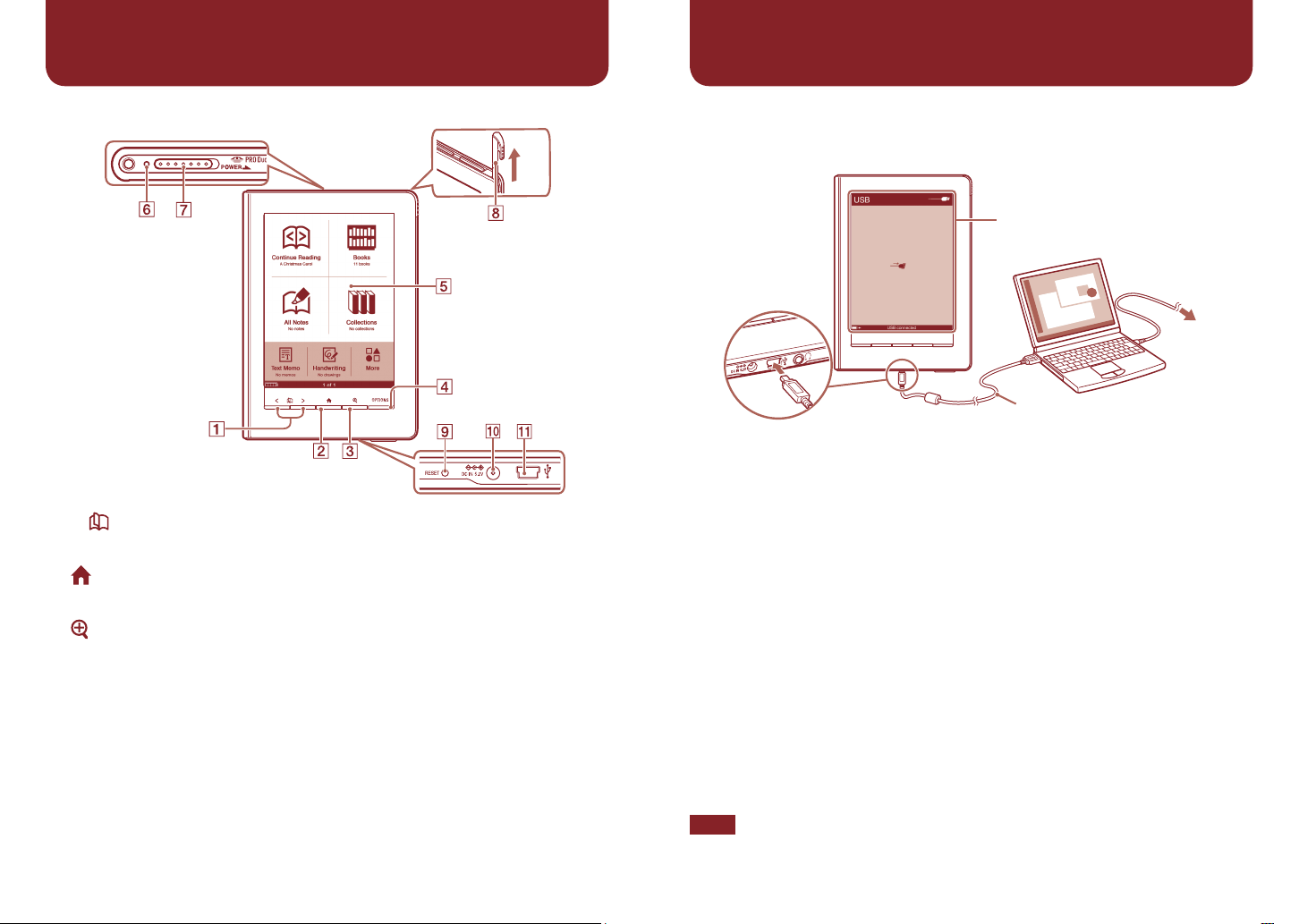
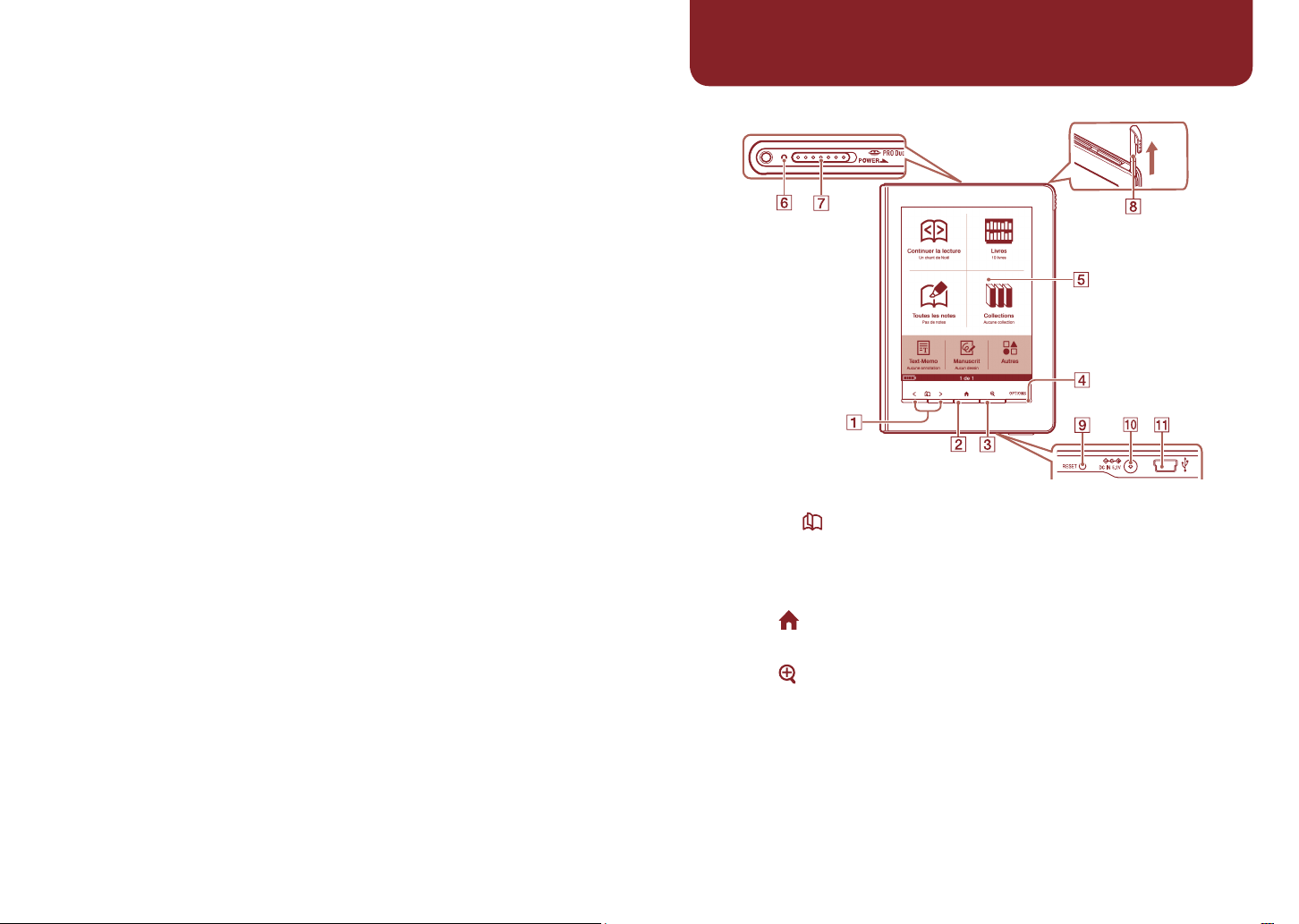
Navigation Controls
Home menu is
displayed.
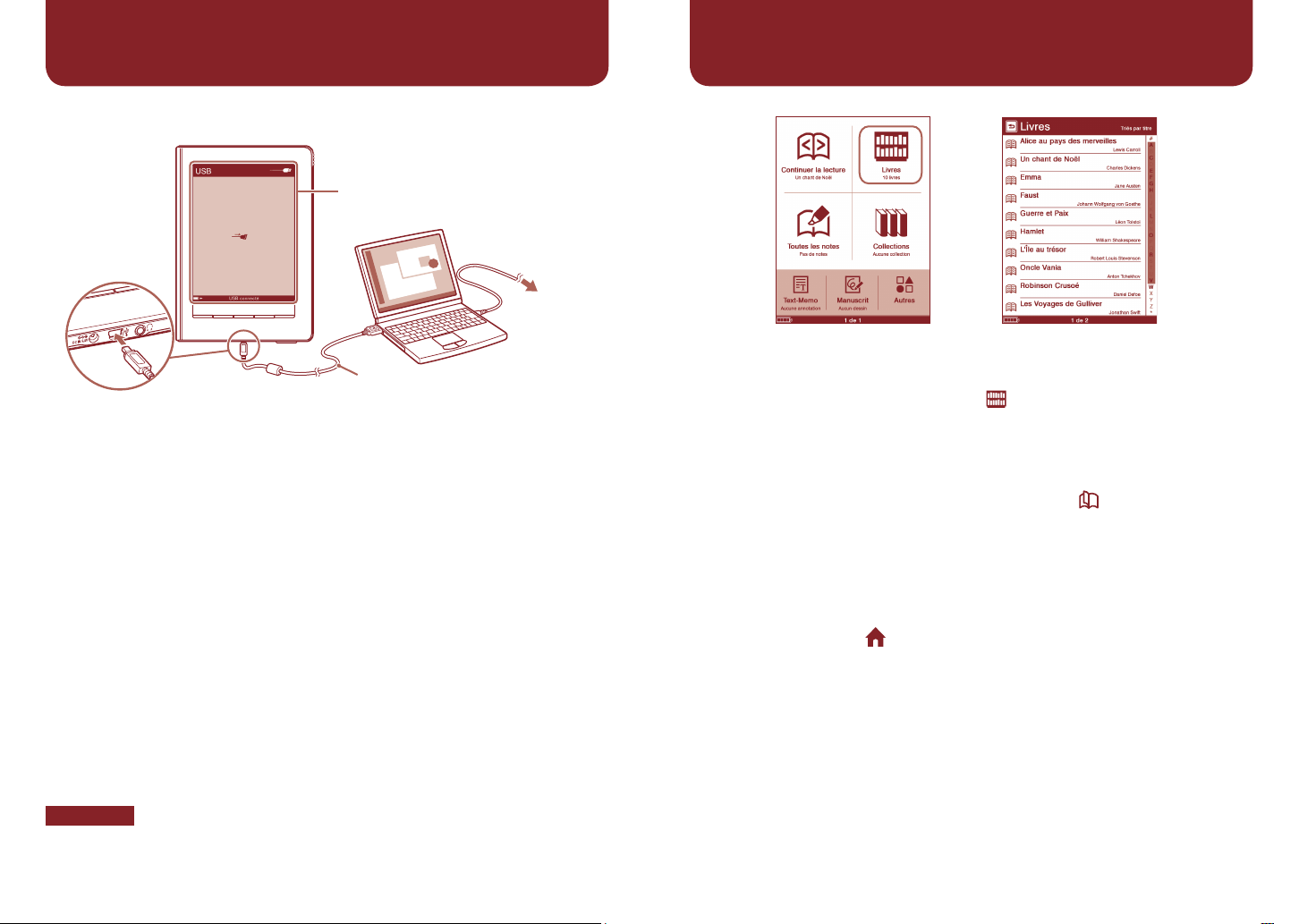
Getting Started
“USB connected” screen
To AC outlet
USB cable (supplied)
Connect to
USB connector
< > (Page Turn) buttons
Turns the page.
(Home) button
Displays the Home menu.
(Size) button
OPTIONS button
Displays the Option menu.
Touch screen
Provides simple commands by
touching the screen.
Charge indicator
Lights up when the Reader is
charging.
POWER switch
Stylus
Used for precise touch screen
operations.
RESET button
DC IN jack
Used to connect the AC
Adapter for Reader (ACS5220E) (optional).
USB connector
1 Charge the Reader via USB (as shown above) at least 5 minutes
until “USB connected” appears on the Reader.
Keep your computer in an active mode while charging the Reader.
To fully charge the Reader, wait about 4 hours or less until the charge
indicator (lights up in red while charging) goes off.
2 Disconnect the Reader from your computer, and then follow the
on-screen instructions of the Reader to complete the initial
settings.
To select an item on the touch screen, tap the item. To apply the
setting, tap “OK.”
Note
You cannot operate the Reader while it is connected to your computer.
Page 3
4
EN
5 EN
Reading eBooks
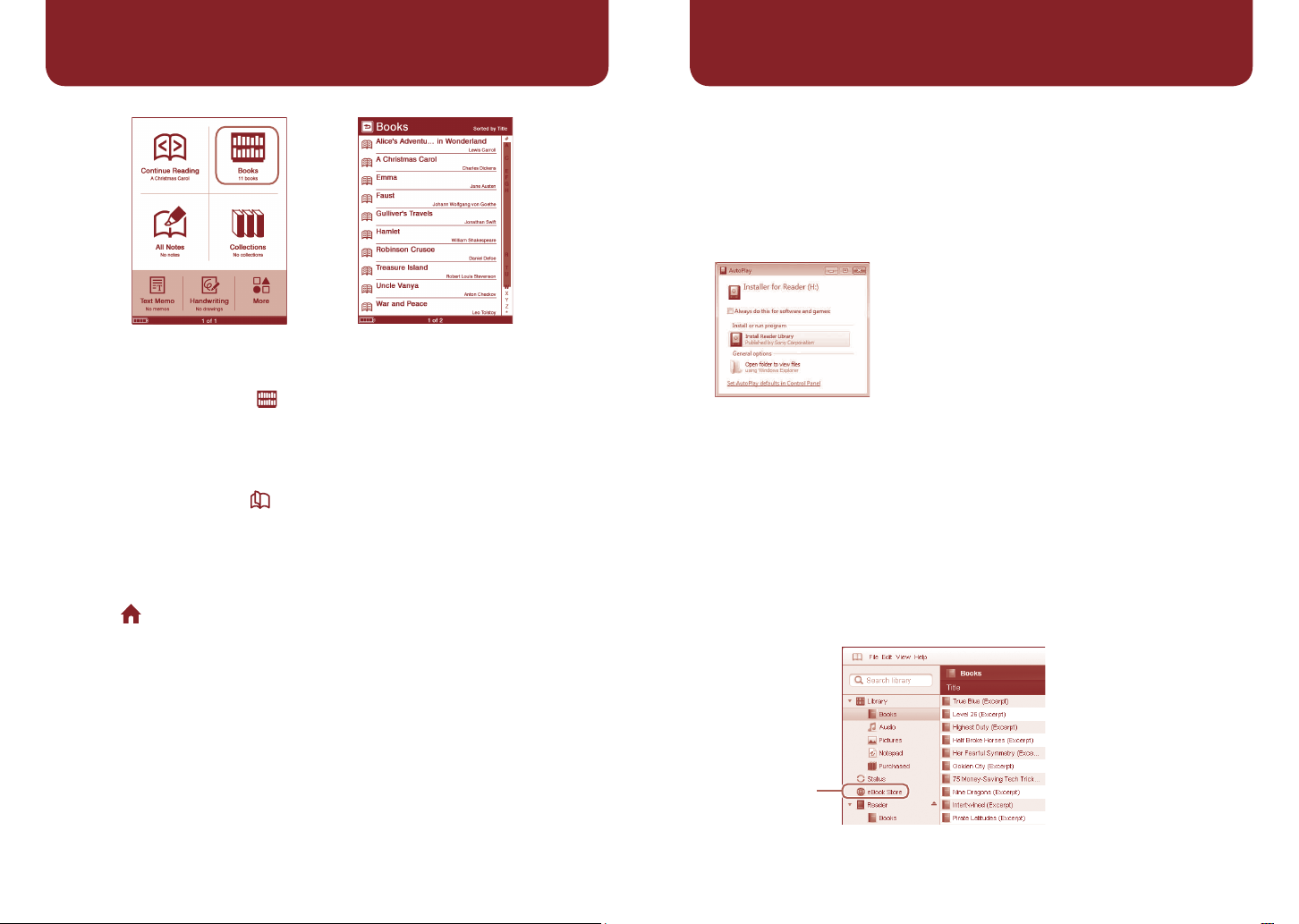
Home menu “Books” list
Getting eBooks
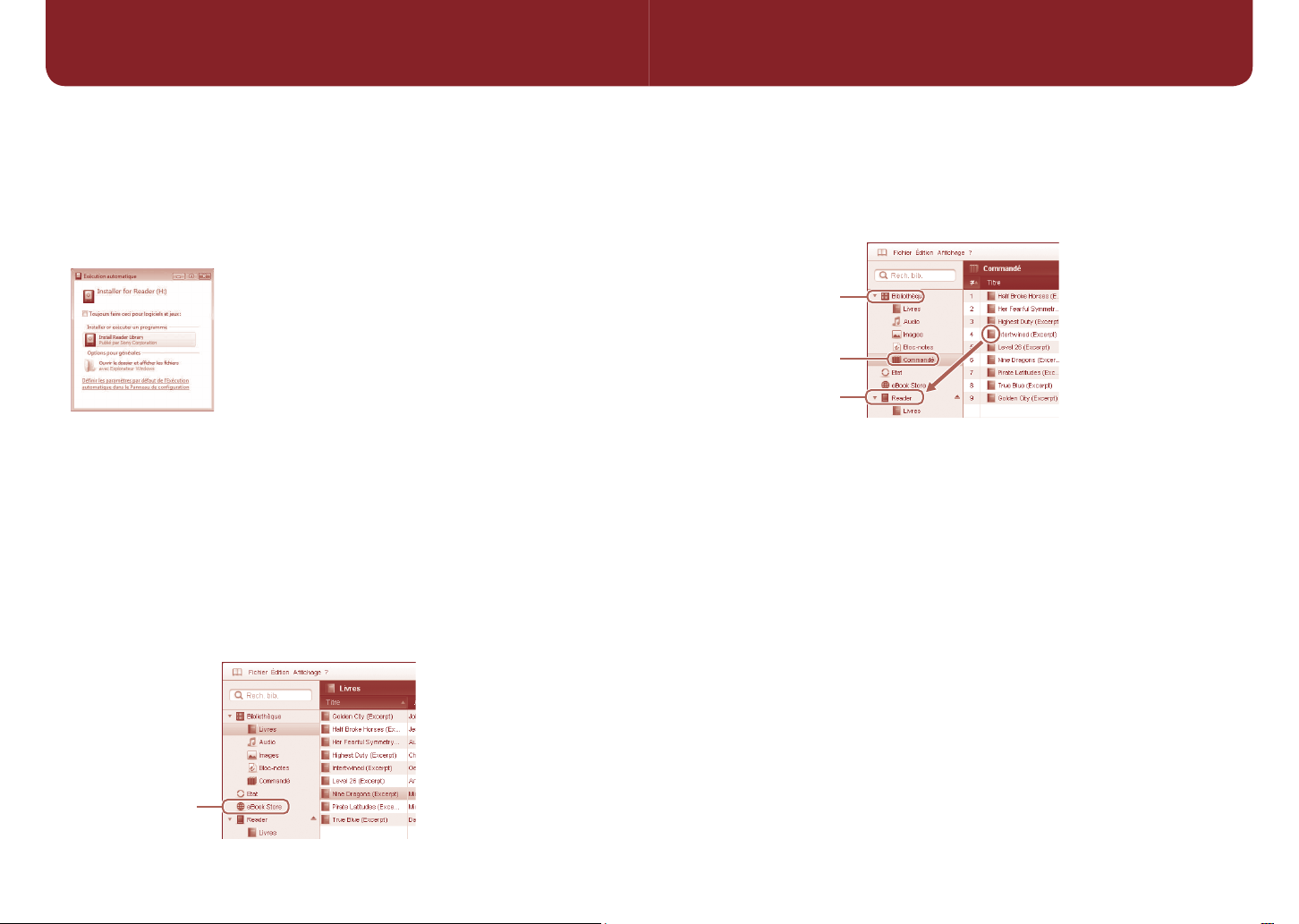
To purchase or download eBooks, install Reader Library software on your
computer and register to the eBook store.
When the Reader is connected to your PC, the AutoPlay window appears
on the screen.
1 Click “Install Reader Library” in the “Installer for Reader” window,
and then follow the on-screen instructions.
AutoPlay window
(in case of Windows Vista)
1 In the Home menu, tap (“Books”).
2 Tap the desired book in the “Books” list.
To turn pages, press the < > (Page Turn) buttons.
To return to the “Books” list
Press the OPTIONS button, then tap “Return to List.”
To return to the Home menu
Press the (Home) button.
If the installation launcher does not start, access the Installation launcher
stored on the Reader manually.
“My Computer”(“Computer” in the case of Vista) – “Installer for
Reader” – “Windows” – “Setup Reader Library”
To install Reader Library on a Macintosh
When the Reader is connected to your Mac, “LAUNCHER” and
“READER” appear on the desktop. Click the following, and then follow
the on-screen instructions: “LAUNCHER” – “Mac” – “Setup Reader
Library”
From the Start menu, click the following:
2 Start Reader Library, and then click “eBook Store.”
“eBook Store”
Page 4
Getting eBooks (continued)
Support
If you encounter an issue, resolve the issue in the following order.
3 Create your account by following the store instructions.
Purchased eBooks will be downloaded to Reader Library.
Transferring eBooks to the Reader
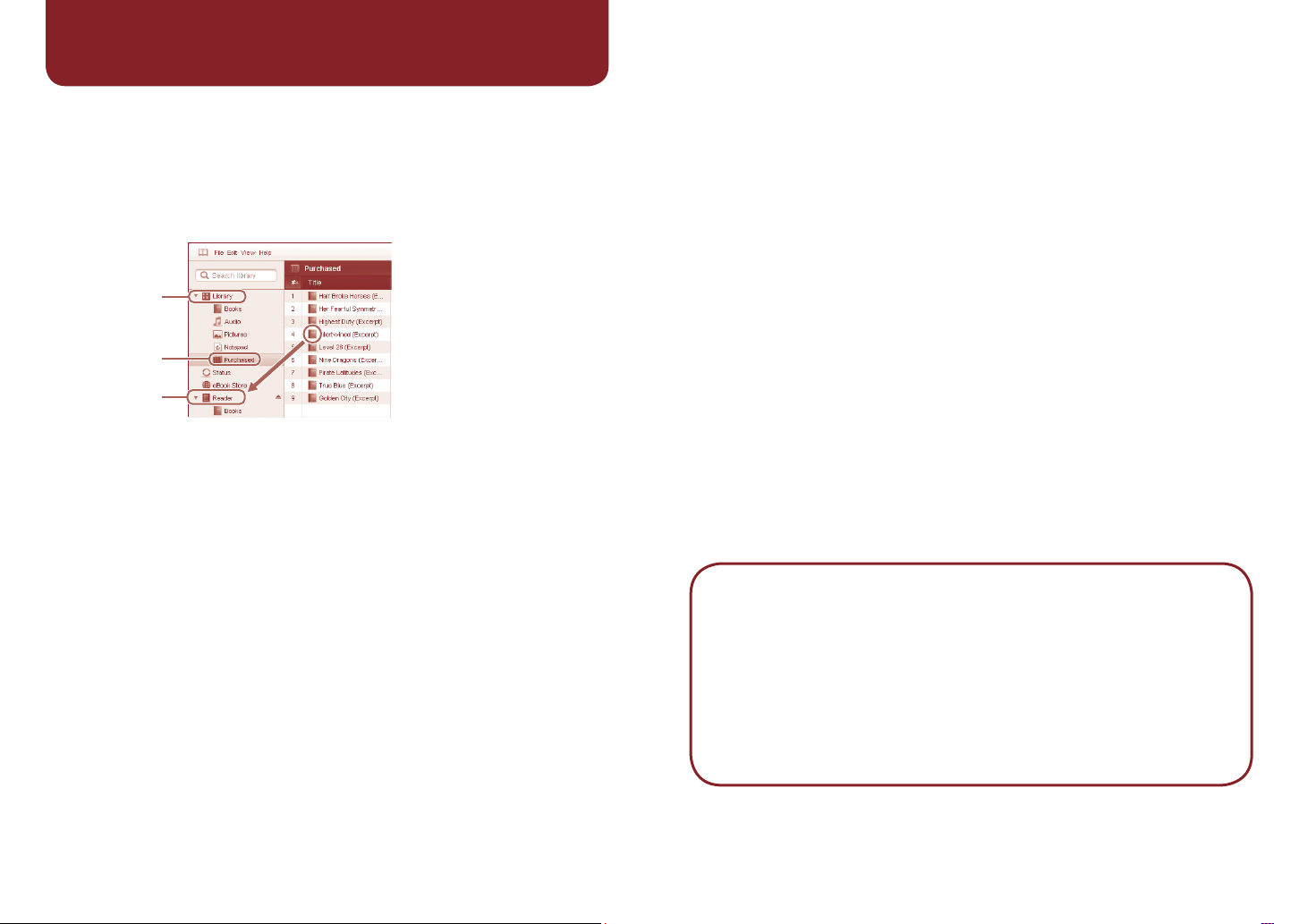
“Library”
“Purchased”
“Reader”
1 Click “Purchased” under “Library” to locate purchased eBooks.
2 Click an eBook to select, and then drag and drop it to “Reader.”
The transferred eBook can be read on the Reader after disconnecting it
from your computer.
Please refer to the Reader Library Help for further information.
1 Refer to the User’s Guide or the Reader Library Help.
You can obtain the User’s Guide in one of the following ways:
Connect the Reader via USB, then access the zipped file (PRS600_
UG) stored on the Reader.
Windows; from the Start menu, click the following: “My Computer”
(“Computer” in the case of Vista) – “READER” – “Documents” –
“PRS600_UG”
Drag and drop to your computer and unzip it.
Macintosh; click the following: “READER” – “Documents” –
“PRS600_UG”
Download the User’s Guide from the support web site to your
computer.
2 Visit the support site.
For customers in the USA: http://www.sony.com/readersupport
For customers in Canada: http://www.sony.ca/ElectronicsSupport/
For customers in Europe: http://support.sony-europe.com/eBook/PRS
3 Contact (call) Sony Support. (USA/Canada only)
For customers in the USA: 1-866-962-7669
For customers in Canada: 1-877-899-7669
About the serial number
The serial number provided for this unit is required for customer registration. The
number is on a label on the back of the unit. Do not remove the label.
Owner’s Record
The model and serial numbers are located on the back of the unit. Record them in the
space provided below. Refer to these numbers in the spaces whenever you call upon
your Sony dealer regarding this product.
Model No. ___________________________
Serial No. ___________________________
6
EN
7 EN
Page 5
Precautions
Notice for customers: the
following information is only
applicable to equipment
sold in countries applying
EU directives
The manufacturer of this product is Sony
Corporation, 1-7-1 Konan, Minato-ku, Tokyo,
Japan. The Authorized Representative for
EMC and product safety is Sony
Deutschland GmbH, Hedelfinger Strasse 61,
70327 Stuttgart, Germany.
For any service or guarantee matters please
refer to the addresses given in separate
service or guarantee documents.
Note on use
Please use the Reader and the supplied
stylus with only the originally intended
purpose and care.
On Copyrights
The contents of each book pre-installed on
this product are copyrighted works, edited
with the cooperation of the publisher and
editor hereto mentioned.
Copyright laws prohibit copying the data of
this product or the contents of this manual
(illustrations, related documents, etc.) in
whole or in part without the permission of the
copyright holder. Additionally, use of the
data of this product or the contents of this
manual is not allowed without Sony’s
permission except for personal use.
• Sony, the Sony logo, “BBeB”, “BBeB
Book”, “Reader”, “Reader Touch Edition”
and their logos are either trademarks or
registered trademarks of Sony Corporation.
• “Memory Stick,” “Memory Stick PRO Duo,”
“Memory Stick Duo,” “Memory Stick
Micro,” “M2” and their logos are
trademarks of Sony Corporation.
• Bitstream is a registered trademark, and
EN
8
Dutch, Font Fusion, and Swiss are
trademarks, of Bitstream Inc.
• Microsoft, Windows, Windows Vista and
Windows Media are trademarks or
registered trademarks of Microsoft
Corporation in the United States and / or
other countries.
• Macintosh and Mac OS are trademarks of
Apple Inc., registered in the U.S. and other
countries.
• Adobe, the Adobe logo, Reader and PDF
are either registered trademarks or
trademarks of Adobe Systems
Incorporated in the United States and/or
other countries.
• MPEG Layer-3 audio coding technology
and patents licensed from Fraunhofer IIS
and Thomson.
All other system names and product names
appearing in this document are generally the
registered trademarks or trademarks of their
respective manufacturers. Further, the
trademark ™ and registered trademark ®
symbols are not indicated throughout this
document.
Notice for users
Before use, please read through the End
User License Agreement (EULA) that is
stored on the Reader.
To access the EULA, connect the Reader to
your computer via USB, then follow the
instructions below.
Windows; from the Start menu, click the
following: “My Computer”(“Computer” in the
case of Vista) - “READER” - “Documents””LICENSE”
Macintosh; click the following: “READER” on
the desktop - “Documents” - “LICENSE”
Program ©2009 Sony Corporation
Documentation ©2009 Sony Corporation
Commandes de navigation
Le menu d’accueil
s’affiche.
Touches < > (Changement
de page)
Permettent de tourner les
pages.
Touche (Accueil)
Affiche le menu Accueil.
Touche (Taille)
Touche OPTIONS
Permet d’afficher le menu
d’options.
Ecran tactile
Permet d’effectuer des
opérations simples en touchant
l’écran.
Témoin de charge
S’allume lorsque le Reader est
en cours de charge.
Commutateur POWER
Stylet
Utilisé pour effectuer des
opérations précises sur l’écran
tactile.
Touche RESET
Prise DC IN
Sert au raccordement de
l’adaptateur secteur pour le
Reader (AC-S5220E) (en option).
Connecteur USB
2
FR
Page 6
3
FR
4
FR
Mise en service
Ecran « USB connecté »
Vers la prise
secteur
Câble USB (fourni)
Raccordement au
connecteur USB
1 Chargez le Reader au moyen d’un raccordement USB (comme
illustré ci-dessus) pendant au moins 5 minutes, jusqu’à ce que
l’indication « USB connecté » s’affiche sur le Reader.
Laissez votre ordinateur allumé pendant la charge du Reader.
Lecture d’eBooks
Liste « Livres »Menu accuell
1 Dans le menu d’accueil, effleurez (« Livres »).
2 Effleurez le livre de votre choix dans la liste « Livres ».
Pour tourner les pages, appuyez sur les touches < > (Changement de
page).
Pour revenir à la liste « Livres »
Appuyez sur la touche OPTIONS, puis effleurez « Revenir à la Liste ».
Pour charger complètement le Reader, attendez environ 4 heures
maximum, jusqu’à ce que le témoin de charge (allumé en rouge
pendant la charge) s’éteigne.
2 Débranchez le Reader de l’ordinateur, puis suivez les instructions
affichées sur l’écran du Reader pour terminer les réglages
initiaux.
Pour sélectionner un élément sur l’écran tactile, effleurez cet élément.
Pour appliquer le réglage, effleurez « OK ».
Remarque
Vous ne pouvez pas utiliser le Reader lorsqu’il est raccordé à votre
ordinateur.
Pour revenir au menu d’accueil
Appuyez sur la touche (Accueil).
Page 7
5
FR
6
FR
Obtenir des eBooks
Pour acheter ou télécharger des eBooks, installez le logiciel Reader
Library sur votre ordinateur, puis enregistrez-vous sur le eBook store.
Lorsque le Reader est raccordé à votre PC, la fenêtre Exécution
automatique s’affiche sur l’écran.
1 Cliquez sur « Install Reader Library » dans la fenêtre « Installer for
Reader », puis suivez les instructions à l’écran.
Fenêtre Exécution automatique
(sous Windows Vista)
Si l’installation ne démarre pas, lancez-la manuellement sur le Reader.
A partir du menu Démarrer, cliquez sur : « Poste de travail »
(« Ordinateur » sous Windows Vista) – « Installer for Reader » –
« Windows » – « Setup Reader Library »
Pour installer Reader Library sur un Macintosh
Lorsque le Reader est raccordé à votre Mac, « LAUNCHER » et
« READER » apparaissent sur le bureau. Cliquez sur les éléments
suivants, puis suivez les instructions indiquées à l’écran :
« LAUNCHER » – « Mac » – « Setup Reader Library »
2 Démarrez Reader Library, puis cliquez sur « eBook Store ».
3 Créez votre compte en suivant les instructions.
Les eBooks achetés seront téléchargés dans Reader Library.
Transfert de eBooks sur le Reader
«
Bibliothèque
« Commandé »
« Reader »
»
1 Cliquez sur « Commandé » dans « Bibliothèque » pour rechercher
les eBooks achetés.
2 Cliquez sur le eBook que vous souhaitez sélectionner, puis faites-
le glisser jusqu’au « Reader ».
Le eBook transféré peut être lu sur le Reader après l’avoir déconnecté de
l’ordinateur.
Veuillez vous reporter à l’Aide Reader Library pour plus d’informations.
« eBook Store »
Page 8
7
FR
8
FR
Assistance
Si vous rencontrez un problème, solutionnez-le en procédant dans l’ordre
suivant.
1 Reportez-vous au Guide de l’utilisateur ou à l’Aide Reader Library.
Vous pouvez obtenir le Guide de l’utilisateur de l’une des manières
suivantes :
Raccordez le Reader au moyen d’un raccordement USB, puis
ouvrez le fichier zippé (PRS600_UG) enregistré sur le Reader.
Windows : à partir du menu Démarrer, cliquez sur : « Poste de travail »
(« Ordinateur » sous Windows Vista) – « READER » – « Documents » –
« PRS600_UG »
Faites-le glisser vers votre ordinateur et dézippez-le.
Macintosh : cliquez sur : « READER » – « Documents » –
« PRS600_UG »
Téléchargez le Guide de l’utilisateur sur votre ordinateur à partir du
site Web d’assistance.
2 Consultez le site d’assistance.
Pour les clients aux Etats-Unis : http://www.sony.com/readersupport
Pour les clients au Canada : http://www.sony.ca/ElectronicsSupport/
Pour les clients en Europe : http://support.sony-europe.com/eBook/PRS
3 Contactez (par téléphone) l’assistance Sony. (Etats-Unis/Canada
uniquement)
Pour les clients aux Etats-Unis : 1-866-962-7669
Pour les clients au Canada : 1-877-899-7669
À propos du numéro de série
Le numéro de série fourni avec cet appareil est requis lors de l’enregistrement du client.
Ce numéro est inscrit sur l’étiquette collée au dos de l’appareil. Ne retirez jamais cette
étiquette.
Remarque à l’attention des utilisateurs
Avant toute utilisation, veuillez lire le End User License Agreement (EULA) qui est stocké sur
le Reader. Pour accéder au document EULA, raccordez le Reader à votre ordinateur au
moyen d’un raccordement USB, puis suivez les instructions ci-après.
Windows : à partir du menu Démarrer, cliquez sur : « Poste de travail » (« Ordinateur » sous
Windows Vista) - « READER » - « Documents » - « LICENSE »
Macintosh : cliquez sur : « READER » sur le bureau - « Documents » - « LICENSE »
Précautions
Avis à l’intention des clients :
les informations suivantes
s’appliquent uniquement
aux appareils vendus dans
des pays qui appliquent les
directives de l’Union
Européenne.
Le fabriquant de ce produit est Sony
Corporation, 1-7-1 Konan, Minato-ku, Tokyo,
Japon. Le représentant agréé en matière de
normes CEM et de sécurité des produits est
Sony Deutschland GmbH, Hedelfinger
Strasse 61, 70327 Stuttgart, Allemagne.
Pour toute demande d’entretien ou de
garantie, veuillez écrire aux adresses
spécifiées dans les documents d’entretien
ou de garantie séparés.
Remarque sur l’utilisation
Utilisez le Reader et le stylet fourni avec soin
et ne les utilisez pas pour un usage autre
que celui pour lequel ils ont été conçus.
Droits d’auteur
Le contenu de chaque livre pré-installé sur
ce produit est protégé par des droits
d’auteur et est édité avec la coopération de
l’éditeur et du rédacteur mentionnés.
La législation sur les droits d’auteur interdit
la reproduction, partielle ou totale, des
données concernant ce produit ou du
contenu de ce manuel (illustrations,
documents liés, etc.) sans la permission du
détenteur des droits d’auteur. En outre,
l’utilisation des données concernant ce
produit ou du contenu du présent manuel
est interdite sans la permission de Sony,
excepté pour un usage personnel.
• Sony, le logo Sony, « BBeB », « BBeB
Book », « Reader », « Reader Touch
Edition » et leurs logos sont des marques
commerciales ou déposées de Sony
Corporation.
• « Memory Stick », « Memory Stick PRO
Duo », « Memory Stick Duo »,
« Memory Stick Micro », « M2 » et leurs
logos sont des marques commerciales de
Sony Corporation.
• Bitstream est une marque déposée et
Dutch, Font Fusion et Swiss sont des
marques commerciales de Bitstream Inc.
• Microsoft, Windows, Windows Vista et
Windows Media sont des marques
commerciales ou des marques déposées
de Microsoft Corporation aux Etats-Unis et/
ou dans d’autres pays.
• Macintosh et Mac OS sont des marques
d’Apple Inc., déposées aux Etats-Unis et
dans d’autres pays.
• Adobe, le logo Adobe, Reader et Adobe
PDF sont des marques commerciales ou
des marques déposées de Adobe
Systems Incorporated aux Etats-Unis et/ou
dans d’autres pays.
• Licence de la technologie de codage
audio MPEG Layer-3 et des brevets
obtenue de Fraunhofer IIS et Thomson.
Tous les autres noms de système et de
produit cités dans ce document sont en
général des marques commerciales ou des
marques déposées de leur détenteur
respectif. Les symboles ™ et ®
n’apparaissent pas dans ce manuel.
Pour les utilisateurs en
France
MDR-E10LP
En cas de remplacement du casque/
écouteurs, référez-vous au modèle de
casques/écouteurs adaptés à votre appareil
et indiqué ci-dessus.
A pleine puissance, l’écoute
prolongée du baladeur peut
endommager l’oreille de
l’utilisateur.
Programme ©2009 Sony Corporation
Documentation ©2009 Sony Corporation
 Loading...