

Page 1
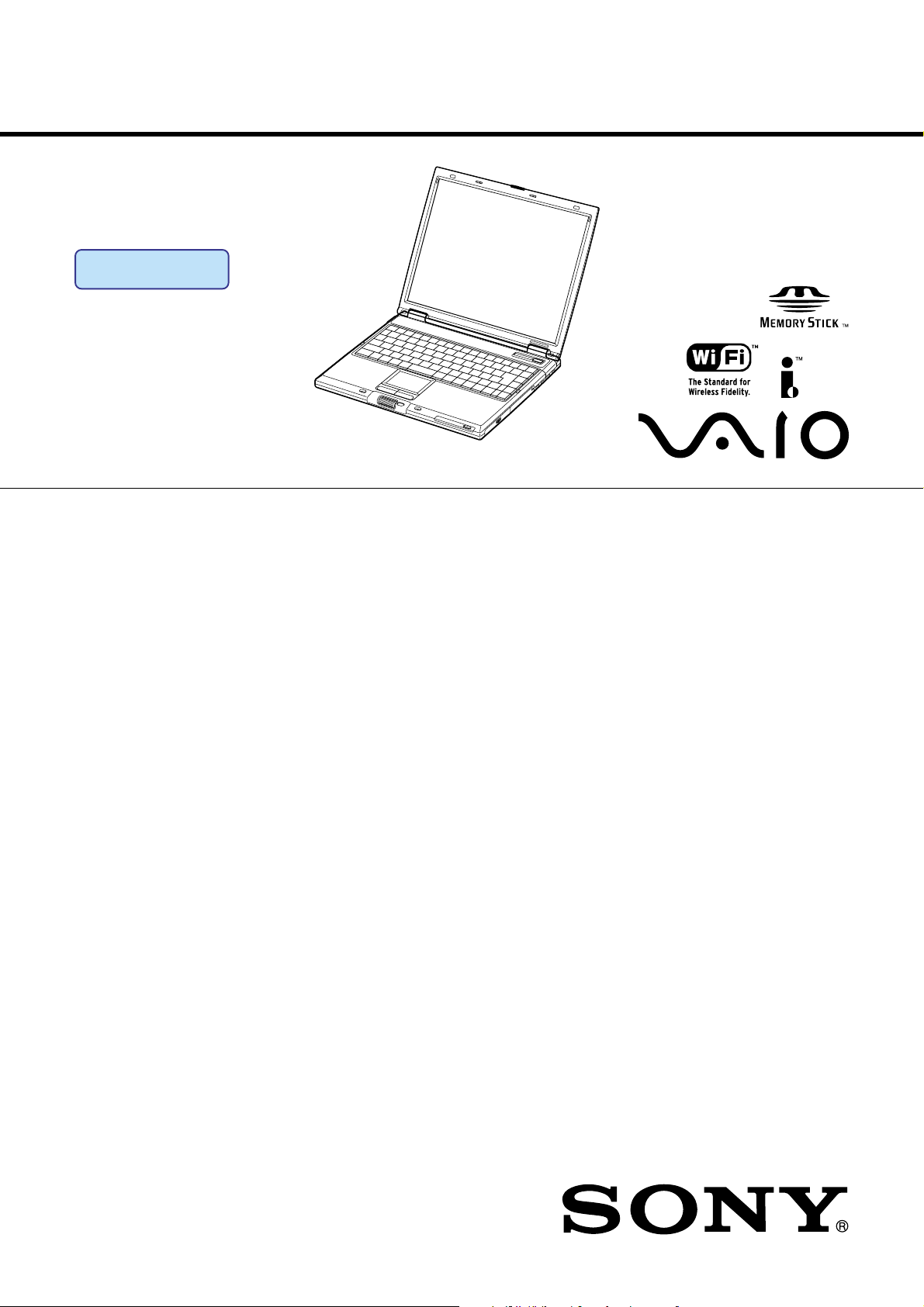
PCG-GRS150/GRS170
SERVICE MANUAL
Ver 1-2002J
Revision History
Lineup : PCG-GRS170
PCG-GRS150
Illust : PCG-GRS170
For American Area
US Model
CanadianModel
S400
Confidential
• Design and specifications are subject to
change without notice.
9-876-018-01
NOTEBOOK COMPUTER
Page 2

Information in this document is subject to change without notice.
Sony, VAIO and CLIE are trademarks or registered trademarks of
Sony. Microsoft, Windows, Windows Media, Outlook, Bookshelf
and other Microsoft products are trademarks or registered trademarks
of Microsoft Corporation in the United States and other countries.
The word Bluetooth and the Bluetooth logo are trademarks of
Bluetooth SIG, Inc. AMD, AMD logo, AMD Duron and
combinations thereof, 3DNow!, are trademarks of Advanced Micro
Devices, Inc. Intel Inside logo, Pentium and Celeron are trademarks
or registered trademarks of Intel Corporation. Transmeta, the
Transmeta logo, Crusoe Processor, the Crusoe logo and
combinations thereof are trademarks of Transmeta Corporation in
the USA and other countries. Graffiti, HotSync, PalmModem, and
Palm OS are resistered trademarks, and the Hotsync logo and Palm
are trademarks of Palm, Inc. or its subsidiaries. (M) and Motrola
are trademarks of Motrora, Inc. Other Motrola products and services
with (R) mark like Dragomball are the trademarks of Motrola, Inc.
All other names of systems, products and services in this manual
are trademarks or registered trademarks of their respective owners.
In this manual, the (TM) or (R) mark are not specified.
Caution Markings for Lithium/Ion Battery - The following or similar
texts shall be provided on battery pack of equipment or in both the
operating and the service instructions.
CAUTION: Danger of explosion if battery is incorrectly replaced.
Replace only with the same or equivalent type recommended by
the manufacturer. Discard used batteries according to the
manufacturer’s instructions.
CAUTION: The battery pack used in this device may present a fire
or chemical burn hazard if mistreated. Do not disassemble, heat
above 100°C (212°F) or incinerate.
Dispose of used battery promptly.
Keep away from children.
CAUTION: Changing the back up battery.
• Overcharging, short circuiting, reverse charging, multilation or
incineration of the cells must be avoided to prevent one or more of
the following occurrences; release of toxic materials, release of
hydrogen and/or oxygen gas, rise in surface temperature.
• If a cell has leaked or vented, it should be replaced immediately
while avoiding to touch it without any protection.
Service and Inspection Precautions
1. Obey precautionary markings and instructions
Labels and stamps on the cabinet, chassis, and components identify areas
requiring special precautions. Be sure to observe these precautions, as well
as all precautions listed in the operating manual and other associated
documents.
2. Use designated parts only
The set’s components possess important safety characteristics, such as
noncombustibility and the ability to tolerate large voltages. Be sure that
replacement parts possess the same safety characteristics as the originals.
Also remember that the 0 mark, which appears in circuit diagrams and
parts lists, denotes components that have particularly important safety
functions; be extra sure to use only the designated components.
3. Always follow the original design when mounting
parts and routing wires
The original layout includes various safety features, such as inclusion of
insulating materials (tubes and tape) and the mounting of parts above the
printer board. In addition, internal wiring has been routed and clamped so
as to keep it away from hot or high-voltage parts. When mounting parts or
routing wires, therefore, be sure to duplicate the original layout.
4. Inspect after completing service
After servicing, inspect to make sure that all screws, components, and wiring
have been returned to their original condition. Also check the area around
the repair location to ensure that repair work has caused no damage, and
confirm safety.
5. When replacing chip components...
Never reuse components. Also remember that the negative side of tantalum
capacitors is easily damaged by heat.
6. When handling flexible print boards...
• The temperature of the soldering-iron tip should be about 270C.
• Do not apply the tip more than three times to the same pattern.
• Handle patterns with care; never apply force.
Caution: Remember that hard disk drives are easily damaged by
vibration. Always handle with care.
ATTENTION AU COMPOSANT AYANT RAPPORT
À LA SÉCURITÉ!
LES COMPOSANTS IDENTIFÉS PAR UNE MARQUE 0 SUR LES
DIAGRAMMES SCHÉMATIQUES ET LA LISTE DES PIÈCES SONT
CRITIQUES POUR LA SÉCURITÉ DE FONCTIONNEMENT. NE
REMPLACER CES COMPOSANTS QUE PAR DES PIÈSES SONY
DONT LES NUMÉROS SONT DONNÉS DANS CE MANUEL OU
DANS LES SUPPÉMENTS PUBLIÉS PAR SONY.
— 2 —
Confidential
PCG-GRS150/GRS170 (AM)
Page 3

TABLE OF CONTENTS
Section Title Page
CHAPTER 1. BLOCK DIAGRAM ............................... 1-1
(to 1-2)
CHAPTER 2. FRAME HARNESS DIAGRAM ........ 2-1
(to 2-2)
CHAPTER 3. EXPLODED VIEWS AND
PARTS LIST............................................ 3-1
3-1. Main Section .................................................................... 3-2
3-2. LCD Section – Made by HI – .......................................... 3-5
3-3. Connector Section (CH Type Only)................................. 3-7
(to 3-8)
History of the changes is shown as the
“Revision History” at the end of this data.
— 3 —
Confidential
PCG-GRS150/GRS170 (AM)
Page 4
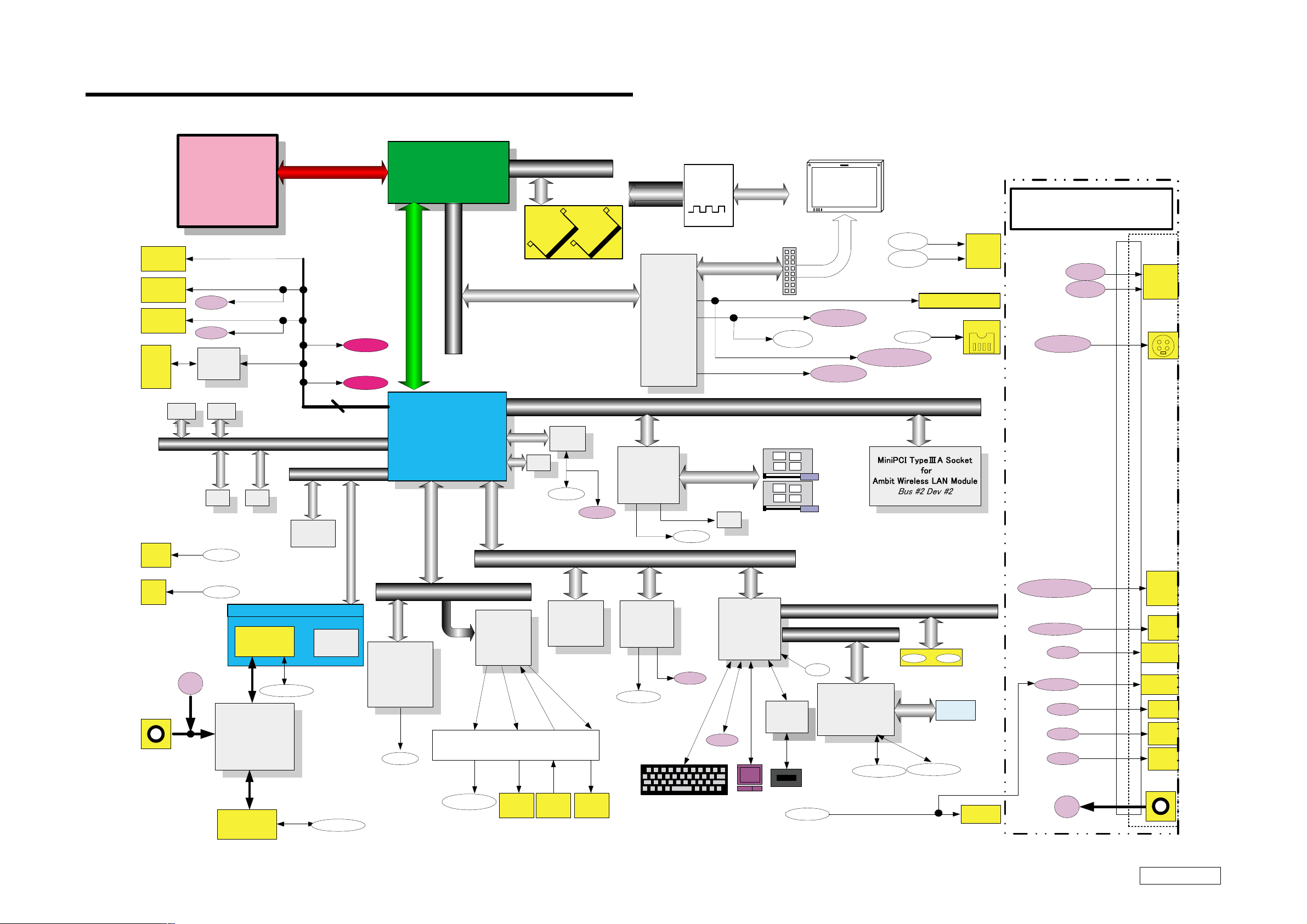
CHAPTER 1.
BLOCK DIAGRAM
USB Ri gh t
CONN
USB Left
CONN
USB Rear
CONN
MS
CONN
EEPRO M
On DIMM1
RJ 45
For SPD
Pentium 4
Processor
512KB L2
478pins
uFCPGA
USB3
USB2
Memory
Stick
Module
For SPD
EEPROM
On DIMM 2
EEPROM
For Passw ord
RJ-45
Port-0
Port-3
Port-3
Port-2
Port-2
Port-4
SMBUS2
EEPROM
For ClockG
CPU Local Bus
Port-1
Port-5
IDE(ATA100)
EN
Internal
HDD
Port0-5
Primary
Reserved
Reserved
Secondary
Chipset : Intel 845MZ
Memory
CONTROLLER
HUB (MCH)
593 FCBGA
AGP x 4
IO Control Hub
ICH3 -m
FW82801CAM
200MHz Memory Bus
(DDR1600)
DDR(SO-DIMM)
Total max memory size
512MB
Ether
PHY
EEPROM
For LAN
RJ-45
RJ-45
LPC
SMBUS 2
Re fer to Clock Gene rator
Graphics
M7CSP16
Vide o Memory
16MB
CARDBUS
& i.LINK
RICOH
R5C5 52
Bus #2 Dev #5
CLKGEN
9870GTD
Block Diagram
AT I
i.LINK 0
IM I
PCI BUS(3.3V)
For i.LINK
EEPR OM
SMBUS2
LCD CONN
TV- Out
CardBus/16b itCard
15inch XGA
SONY
Cable
TV-Out
S-Video-Ou t
PC Card
Connector
2 Slot
TV-Out
LineOut
i.LINK0
Dock -VGA DB-15
VGA DSUB-15
i.LINK
AV
Out
Port Repricator
TV-Out
LineOut
S-Video-Out
Out
AV
RJ11
DC Jack
DC in
RJ-11
Multi Purpose Bay
2nd
Battery
BATTERY2
Power
Circuit
1st
Battery
Optical
Drive
BATTERY1
MDC
(Mod em
Daughter
Card)
Module
RJ-11
AC LINK
t
u
O
e
n
i
L
LINE-OUT
Audio
YMF753
(Yamaha)
H
e
a
AMP, etc.
PHONE
OUT
Dock-VGA DB-15
J OG
Controller
J OG
Parallele
SMBUS1
LID
& SM BUS MUX
SMBUS0
I/O Expander
BATTERY1
FAN0 ATF0
Other
Control
BATTERY2
Parallele
RJ-45
Serial
Parallele
PS/2
USB3
USB2
DCin
FWH
8Mb
(Flash BIOS
ROM)
S
M
I
C
MIC
IN
p
e
a
k
e
r
Speak er
L&R
d
p
h
o
n
e
Super I/O
SMsC
LPC47N227
Parallele
Internal Key Board
H8S/2149
KBC/EC
SPIC
Serial
PS/2
TouchPad
Membrane
VGA
DB-15
RJ45
Serial
Parallele
PS/2
USB
CONN
USB
CONN
DC Jack
1/1
Confidential
1-21-1
(END)
PCG-GRS150/GRS170 (AM)
Page 5

CHAPTER 2.
FRAME HARNESS DIAGRAM
LCD Block
ANTENNAANTENNA
LCD
Rear Panel
IEEE 1394 i.LINK
MEMORY
STICK
Side
SPEAKER
CN6002
CN6001
SWX-118 Board
(Side-A)
NICKEL HYDROGEN
(GRS150 Model)
CARD, WIRELESS LAN
HARNESS (2P)
MODEM CARD
29
J1
1
CN4601
IFX-203 Board
(Side-A)
41
111
212
BATTERY
EXTERNAL MICROPHONE
HEADPHONE
PHONE PRINTER
NETWORK
PCGA-PRGR2
Port Replicator
30
2
CN4611
CN5001
CN1113
CN1703
CN1701
CN1301
CN1112
FFC
112
1
7
28
CN4602
PC CARD
CONNECTOR
21
CN1111
CN3101
1
7
2
8
29
1
CN1114
30
78
CN1601
2
CN1202
154
CN1501
1
CN601
20
29
77 1
30
CN3001
1
2
FFC
50
49
2
1
KEY BOARD
Optical DRIVE
CN7501
99
100
MBX-75 Board
(Side-A)
CN3103
20
1
1
2
1
2
59
60
CN7502
CN2901
2
1
CN2301
60
59
CN101
CN502
CN501
CN3102
29
30
CNX-182 Board
(Side-A)
HARNESS (10P)
RAM
PC133 SO-DIMM
256MB
101
CN1
LEX-40 Board
(Side-A)
1
2
1
2
CN2007
CN1801
11
12
12
CN1901
24
143
144
143
144
1
1
2
12 1
J1
TOUCH PAD
(GRS70P Model)
CPU
44
43
CN2201
20
CN2008
1
2
1
FLEXIBLE PWB
10 1
CN3501
CN7001
JOG DIAL
INVERTER
LCD HARNESS
DC FAN
FFC
HARD DISK
2nd BATTERY PACK
(OPTION)
SWX-119 Board
(Side-B)
From board to connector (direct connection)
Harness (connector at both end)
Harness (soldered at one end)
Connectors soldered on board and appearing on the panel
AV OUT
CN9001
20
CN8002
1
J9331
40
2
MONITORDC-INUSB USB USB
CN9301
391
CN8521
201
VIF-22 Board
(Side-A)
29
30
CN8001
PWS-22 Board
(Side-B)
CN8802
CN8402
1
2
BATTERY PACK
2-22-1
(END)
Confidential
PCG-GRS150/GRS170 (AM)
Page 6

EXPLODED VIEWS AND PARTS LIST
NOTE:
• Items marked “ * ” are not stocked since they are seldom
required for routine service. Some delay should be
anticipated when ordering these items.
• The mechanical parts with no reference number in the
exploded views are not supplied.
• When two or more parts are shown in parallel, use the
part described first as the main part.
• The parts marked “ $ ” are the High Value Modules.
• The parts marked “ # ” are the parts on which
barcode label is attached.
• The indication [CH] is used for identification of part type.
• Regarding the boards of this model, the discrete parts
on the boards cannot be replaced. However, Some
connectors can be replaced.
The components identified by mark 0 or
dotted line with mark 0 are critical for safety.
Replace only with part number specified.
Les composants identifiés par une marque
0 sont critiques pour la sécurité.
Ne les remplacer que par une pièce portant
le numéro spécifié.
CHAPTER 3.
3-1
Confidential
PCG-GRS150/GRS170 (AM)
Page 7

3-1. Main Section
Ref.No. Part No. Description Ref.No. Part No. Description
1 4-667-050-01 ESCUSHION (TP)
2 1-796-166-21 PAD, TOUCH
3 X-4625-237-1 HOUSING (PALM REST) ASSY
4 4-667-053-01 ESCUSHION (JOG)
* 5 4-667-062-01 PLATE (GND)
63 4-653-801-11 [CH]...SHEET HDD
64 4-653-799-11 [CH]...BRACKET HDD
65 X-4625-233-1 ASSY DOOR HDD
66 1-761-564-21 # (GRS150)...WIRELESS LAN CARD
67 X-4625-236-1 HOUSING BOTTOM ASSY
6 9-885-028-59 GT T/P FPC
7 4-653-795-01 [CH]...BUTTON HOLDER
* 8 4-667-061-01 BRACKET (JOG)
9 4-667-037-01 HOLDER (SPEAKER L)
10 A-8067-680-A $ GT1 SWX-119 BD ASSY (S)
11 4-666-522-01 (GRS150)...SLIDE SWITCH
12 1-796-455-11 # COMBO DRIVE (UJDA730)
13 A-8067-678-A $ GT1 CNX-182 BD ASSY (S)
14 4-667-033-01 CASE (BAY)
15 A-8067-683-A $# GT1 MBX-75 BD ASSY
16 4-668-304-01 SHEET DRIVE
17 1-815-594-41 CONNECTOR, PC CARD (EJECT RIGHT)
18 4-655-960-11 [CH]...SHEET PC CARD
* 19 4-667-068-01 BRACKET (PALMREST R)
20 1-761-606-11 # CARD, MODEM
* 21 4-667-067-01 BRACKET (PALMREST L)
22 6-600-116-01 IC M470-L3224DT0-CB0
23 X-4625-305-1 BRACKET KEYBOARD ASSY
24 X-4625-501-1 BLACKET IO ASSY
25 6-703-104-01 (GRS150)...IC RH80532NC029256
25 6-703-331-01 (GRS170)...IC RH80532GC033512-2
26 4-654-119-11 [CH]...PLATE DC
27 A-8067-682-A $ GT1 VIF-22 BD ASSY (S)
28 X-4625-238-1 ASSY SHIELDING PALMREST
29 A-8023-934-A HEATSINK ASSY
30 4-670-461-01 SHEET BLIND (PLATE HEATSINK)
31 4-670-396-01 SHEET COPPER (PLATE HEATSINK)
32 4-653-761-01 [CH]...CAP ETHERNET
33 4-667-060-01 BRACKET (I LINK)
34 1-824-997-11 FFC (20P)
68 4-654-379-12 [CH]...COVER (PORT)
70 4-668-288-01 CUSHION PALM
71 1-756-038-11 BATTERY, NICKEL HYDROGEN
72 4-642-711-11 [CH]...SHEET (BATTERY), ADHESIVE
73 FILAMENT TAPE (W19X20) (*1)
74 4-669-395-01 SHEET (THERMAL)
75 4-668-310-01 GASKET (LAN)
76 4-666-520-01 (GRS150)...LENS COVER (A)
76 4-666-521-01 (GRS170)...LENS COVER (B)
77 4-668-305-01 GT1 SHEET HOOD
78 4-668-313-01 ICON SHEET
79 4-654-837-01 SHEET BAY BOARD
81 4-654-380-31 [CH]...CAP BAY
83 X-4625-306-1 PLATE HEATSINK ASSY
84 4-668-300-01 SHEET ATI
86 FILAMENT TAPE (W19X20) (*1)
87 X-4625-162-1 BEZEL CMB (PA)
89 4-668-306-01 SHEET PORT
90 4-668-307-01 SHEET DIMM
91 4-668-308-01 SHEET MINI PCI
92 4-668-312-01 SHEET DIMM SIDE
93 4-668-297-01 INSULATOR MB SHIELDING
94 4-668-295-01 FAN INLUT SPONGE 1
95 4-668-296-01 FAN INLUT SPONGE 2
96 4-669-868-01 FAN INLUT SPONGE 3
97 1-400-255-21 (GRS150)...FERRITE CORE
98 4-670-462-01 THERMAL SHEET (PLATE HEAT SINK)
100 4-670-463-01 THERMAL SHEET (HEATINK1)
101 4-670-464-01 THERMAL SHEET (HEATSINK1)
102 4-669-565-01 COMBO GND
36 A-8067-681-A $ GT1 PWS-22 BD ASSY (S)
37 X-4625-234-1 ASSY DOOR (MDC)
38 4-667-066-01 BRACKET (PHONE)
39 X-4625-239-1 ASSY LATCH DETECTOR
40 9-885-028-60 HARNESS, 2PIN
41 A-8067-679-A $ GT1 LEX-40 BD ASSY (S)
42 4-668-294-01 FOOT FRONT
45 4-667-052-01 DOOR (BATTERY)
46 4-668-299-01 DOOR BATTERY SPRING
47 X-4625-307-1 DOOR IO ASSY
49 X-4625-235-1 ASSY DOOR DIMM
50 X-4625-232-1 ASSY HOOD KEYBOARD
51 4-654-606-01 SHEET (MS)
52 A-8067-442-A $ COMPLETE PWB IFX-203 (2240)
53 1-529-878-31 SPEAKER (2.8CM)
54 4-667-038-01 HOLDER (SPEAKER R)
55 1-823-099-11 CABLE, FLEXIBLE FLAT
56 A-8067-684-A $ GT1 SWX-118 BD ASSY (S)
57 1-823-100-11 CABLE, FLEXIBLE FLAT
58 4-668-301-01 SHEET PWS1
59 4-668-302-01 SHEET PWS2
60 1-477-580-21 KEY BOARD UNIT (US)
61 4-667-074-01 BASE (DISPLAY)
62 A-8059-226-A $# (GRS150)...
HDD (30GB,IC25N030ATCS04-0) (S)
62 A-8059-344-A $# (GRS170)...
ASSY HDD 30GB (T,20,F) (S)
103 4-670-047-01 TAPE COPPER (PA1)
104 4-670-048-01 TAPE COPPER (PA2)
B1 4-654-387-01 SCREW (MBX)
B2 4-641-726-41 SCREW (M2), SPECIAL HEAD
B3 4-669-867-01 SCREW (M2X4), SPECIAL HEAD
B4 4-639-112-01 SCREW M2X4
B5 4-645-177-01 SCREW (M1.7X3.5)
B6 4-635-301-01 SCREW M3X4
B7 4-635-966-01 SCREW (HEX)
B8 4-656-703-01 SCREW M2
B10 4-654-386-01 SPACER (PWS)
B11 4-654-385-01 SPACER (VIF)
B12 4-661-107-01 STAND OFF M2X5
B13 4-644-899-01 SCREW (M2), 0 NUMBER P3 KIND
B14 4-654-811-01 SCREW M3
B15 7-622-205-05 NUT (M2 TYPE2), HEXAGON
B17 4-641-726-81 SCREW (M2), SPECIAL HEAD
B20 4-653-989-01 SCREW (M2), SPECIAL HEAD
∗1 Use the FILAMENT TAPE.
3-2
Confidential
PCG-GRS150/GRS170 (AM)
Page 8

B17
21
B20
60
30
B3
27
71
O
D
R
C
B3
B11
B2
W
F
V
B11
I
33
1
E
F
70
72
3
Supplied
with 3
4
10
B5
A
7
87
8
28
B5
B17
76
11
103
A
B20
2
39
B3
23
GRS150
Model
B17
B
6
41
J
5
804
(Refer to
Page 3-6)
D
B13
B20
70
B2
19
B2
B2
B3
R
B1
B2
B
91
16
B17
G
H
B3
B17
18
B13
102
59
N
22
34
L
P
B12
J
K
B6
95
58
17
Q
92
20
B3
B6
K
36
B10
Q
B10
B15
B15
GRS150
Model
37
72
U
L
S
B15
66
N
T
32
M
98
89
31
83
P
77
B3
90
B17
38
24
40
15
84
B2
100
25
75
B13
O
B7
47
B17
74
86
68
H
29
26
B7
B3
101
96
52
I
51
55
U
B14
B4
B3
E
B2
T
94
S
V
61
9
57
C
B4
W
53
73
54
B4
97
50
62
B3
M
B2
G
GRS150
Model
78
53
B4
56
B6
104
12
B8
13
79
14
B8
B3
B3
67
81
42
42
42
46
93
45
B3
49
63
B6
64
65
B14
Confidential
PCG-GRS150/GRS170 (AM)3-3 3-4
Page 9

3-2. LCD Section – Made by HI –
203
201
B19
223
B17
B18
210
211
B18
205
C
202
222
225
B18
205
B18
Ref.No. Part No. Description
201 4-666-090-01 COVER SCREW LOWER
202 X-4625-183-1 HOUSING (BEZEL 15) ASSY
203 4-667-073-01 COVER (HINGE)
204 1-754-261-11 (GRS150)...
FILM ANTENNA (FOR LEFT)
205 4-666-091-01 COVER SCREW UPPER
206 4-666-340-01 LATCH HONTAI
208 4-639-623-11 SPRING (LATCH), COIL
209 4-666-253-01 SHIELD DISPLAY
* 210 4-666-430-02 BRACKET LCD 15 (L)
211 A-8067-507-A $# ASSY LCD 15HI AP2 (S)
* 212 4-666-429-02 BRACKET LCD 15 (R)
213 1-961-757-13 LCD HARNESS
214 4-666-339-01 LATCH BUTTON
* 215 X-4625-151-1 HINGE LEFT
216 1-476-316-31 INVERTER UNIT
* 217 X-4625-152-1 HINGE RIGHT
218 X-4625-182-1 HOUSING (DISPLAY 15) ASSY
219 1-754-261-21 (GRS150)...
FILM ANTENNA (FOR RIGHT)
221 FILAMENT TAPE (W19X20) (*1)
222 4-666-088-01 CUSHION LATCH
223 4-666-955-01 CUSHION BEZEL
224 FILAMENT TAPE (W19X50) (*1)
225 4-668-044-11 (GRS170)...LABEL ID (U)
225 4-668-044-31 (GRS150)...LABEL ID (U)
226 4-670-044-01 (GRS150)...SHEET WL CABLE
227 4-670-045-01 (GRS150)...TUBE WL CABLE
Ref.No. Part No. Description
ACCESSORIES
************
0 800 1-477-205-42 $ ADAPTOR, AC
801 A-8110-809-A $# BP2NX SNT (U) ASSY (S)
0 802 1-757-562-21 CORD, POWER
803 4-653-768-02 WEIGHT SAVER
(Refer to page 3-3.)
4-668-096-01 QUICK START
800
AC Adaptor (1)
801
Battery Pack (1)
802
Power Cord (1)
803
Weight Saver (1)
B
213
B18
GRS150
Model
B
215
216
209
221
224(∗1)
B18
A
A
227
206
214
217
B18
208
C
224(∗1)
D
D
GRS150
Model
212
204
B17
226
219
218
GRS150
Model
B17 4-641-726-81 SCREW (M2), SPECIAL HEAD
B18 4-641-726-61 SCREW (M2), SPECIAL HEAD
B19 4-664-453-21 SCREW (M2X4), SPECIAL HEAD
∗1 Use the FILAMENT TAPE.
NOTE :
Set the DIP switch on the MBX-75 board (Main board)
to match with the LCD that is used in this computer.
ON
1 2 3 4 5 6 7 8
The upper position where ON indication is shown is the
ON position . The lower position is the OFF position.
No.
ON/OFF
12345678
01111111
0 : ON 1: OFF
The components identified by
mark 0 or dotted line with mark
0 are critical for safety.
Replace only with part number
specified.
Les composants identifiés par
une marque 0 sont critiques
pour la sécurité.
Ne les remplacer que par une
pièce portant le numéro spécifié.
3-5 3-6
Confidential
PCG-GRS150/GRS170 (AM)
Page 10

3-3. Connector Section (CH Type only)
901
Ref.No. Fig. Part No. Description
901 1-817-023-11 [CH]...CONNECTOR, USB
USB connector
902 1-779-745-21 [CH]...JACK, DC
DC IN connector
903 X-4625-501-1 [CH]...BRACKET IO ASSY
I/O Bracket
∗ Among the parts that are used on the boards of this model, only the connectors
that are show in the list can be replaced.
(The parts other that the specified connectors cannot be replaced.)
903
902
902
901
902 901
Confidential
PCG-GRS150/GRS170 (AM)3-7 3-8
(END)
Page 11

PCG-GRS150/GRS170 (AM)
List of PCG-GRS Series (As of October, 2002)
Model Name
PCG-GRS150
PCG-GRS170
Service Manual
Part No.
9-876-018-01
9-876-018-01
Sony Corporation
— 24 —
This manual and the constituent data may not be
replicated, copied nor reprinted in whole or in part
without prior written authorization of Sony Corporation.
English
2002J1600-1
© 2002 Sony Corporation
Published by Sony EMCS VAIO-GSC [SNT]
Page 12

Revision History
(AM)
Suffix
-01 Ver. 1 2002.10.15
Ver. Date
Contents QM No.
First
Edition
< Remarks >
PCG-GRS150/GRS170
[Confidential]
 Loading...