

Page 1

Television
Reference Guide
4-697-130-11(1)
KD-49X7500E / 43X7500E
Page 2

Table of Contents
Note
Safety Information . . . . . . . . . . . . . . . . . . . . . 2
Precautions . . . . . . . . . . . . . . . . . . . . . . . . . . . 5
Parts and Controls . . . . . . . . . . . . . . . . . . . 6
Controls and Indicators . . . . . . . . . . . . . . . . .6
Using Remote Control . . . . . . . . . . . . . . . . 7
Remote Control Parts Description. . . . . . . . . 7
Connection Diagram . . . . . . . . . . . . . . . . . 9
Installing the TV to the Wall . . . . . . . . . . .11
Troubleshooting . . . . . . . . . . . . . . . . . . . . 15
Troubles and Solutions. . . . . . . . . . . . . . . . . 15
Specifications . . . . . . . . . . . . . . . . . . . . . . 16
Introduction
Thank you for choosi ng this Sony product.
Before operating the TV, please read this manual thoroughly and
retain it for f uture re ferenc e.
• Before operating the TV, please read the “Safety Information”
(page 2).
• Instructio ns about “Installing th e TV to the Wall” are included
within this TV’s instruction manual.
• Imag es and illus trations used in the Setup Gu ide and this
manual are for reference only and may differ from the actual
product.
Location of the Setup Guide
Setup Guide is placed on top of the cushion inside the TV carton.
Help/Help Guide
Help feature offers a lot of informat ion about your TV. To use the
Help feature, press HELP on the remote co ntrol. You can f ind how
to and troubleshooting from the list or keyword sea rch. Select
[Help Guide] on Help menu to view the manual. If you connect
your TV to the internet, the He lp feature and information will be
updated.
Location of the identification label
Labels for the TV Model No. and Power Supply rating are located
on the rear of the TV.
Labels for the AC ada pter Mode l No. and Serial No. are located on
the bottom of the AC adapter.
Safety Information
WARN ING
Batteries must not be expose d to excessive heat such as
sunshine, fire or the like.
Never place a television set in an unstable locati on. A television
set may fall, ca using seriou s personal in jury or death. Many
injuries, particularly to children, can be avoided by taking simple
precautions such as:
Using cabinets or stands recommended by the manufacturer o f
the television set.
Onl y using furniture that can safe ly support the televis ion set.
Ensuring the television set is no t overhanging the edg e of the
supporting furniture.
Not p lacing the television se t on tall furniture (for example,
cupboards or bookcases) w ithout anchoring b oth the furniture
and the television s et to a suitable support.
Not p lacing the television se t on cloth or other materials that
may be located between the television set and supporting
furniture.
Educati ng children about the dang ers of climbing on furni ture
to reach the television set or its controls.
If your existing television set is b eing retained and relocated, the
same considerations as above should be applied.
Installation/Set-up
Install and use the TV s et in accordance with the instructi ons
below in order to avoid any risk of fire, electric shock or damage
and/or in juries.
Installation
• The TV se t should be insta lled near an easi ly accessible AC
power outlet (mains socket).
• Place the TV o n a stable, level surface to preven t it from falling
over and causing personal injury or property damage.
• Install the TV where it cannot be pulled, pushed, or knocked
over.
GB
2
Page 3

• Install the TV s o that the TV's Table-Top Stand doe s not
Screw (M6)
Wall-Mount Bracket
8 mm - 12 mm
TV’s rear cover
Screw
(not supplied)
Cord
(not supplied)
M6 screw (not supplied)
8 mm - 12 mm
1.5 N·m/1,5 N·m
{15 kgf·cm}
30 cm
10 cm
10 cm
10 cm
Leave at least this space around the set.
30 cm
10 cm 10 cm
Leave at least this space a round the set.
6 cm
Air circulation is blocked.
Wall Wall
protrudes out from the TV stand (not supplied). If the Table-Top
Stand protrudes out from the TV stand, it may cause T V set to
topple over, fall down, and caus e personal injury or da mage to
the TV.
• Only qualified service personnel should carry out wall-mount
installations.
• For safety reasons, it is strongly recommended t hat you use
Sony accessories, includ ing:
Wall-Mou nt Bracket SU-WL450
• Be sure to use the screws supplied with the Wall-Mount Bracket
when attaching the Wall-Moun t Bracket to the TV set. The
supplied screws are designed as indicated by illustration when
measured from the attaching surface of the Wall-Mount Bracket.
The diameter and length of the screws differ depending on the
Wall-Mount Bracket model.
Use of screws other than t hose supplied may result in internal
damage to the TV se t or cause it to fall, etc.
Topple prevention
Ventilation
• Never cover the ventilation holes or insert anything in the
cabin et.
• Leave space around the TV set as shown below.
• It is strongly recomme nded that you use a Sony Wall-Mo unt
Bracket in order to provide adequate air circulation.
Installed on the wall
Tran spo rti ng
• Before transporting the TV set, disconnect all cables.
• Two or three people are needed to transport a large TV set.
• When transpo rting the TV set by han d, hold it as shown bel ow.
Do not put stress on the LCD pane l and the frame around th e
screen.
• When lifting or moving the TV set, hol d it firmly from the
bottom.
• When transpo rting the TV set, do not su bject it to jolts or
excessive vibration.
• When transpo rting the TV set for repairs or when moving, pack
it using the original carton and packing material.
Installed with stand
• To ensure proper ventilation and prevent the collection of dirt or
dust:
Do not lay the TV set flat, instal l upside down, bac kwards, or
sideways.
Do not p lace the TV set on a shelf, rug, bed o r in a closet.
Do not cover the TV set with a c loth, such as curtains, or i tems
such as newspapers, etc.
Do n ot install the TV set as show n below.
3
GB
Page 4
AC power cord (mains lead)
Note
Handle the AC power cord (mai ns lead) and outlet (ma ins socket)
as follows in order to avoi d any risk of fire, electric sh ock or
damage and/or injuries:
The shape of AC power plug (mains plug), which is supplied
with the TV set, varies depending on the region. Be sure to
connect the appropriate suppli ed AC power cord (mains lead)
with the plug that fits into th e AC power outlet (mains socket).
Use only Sony supplied AC power cords (mains lead), not those
of other brands.
Insert the plug fully into the AC power outlet (mains socket).
Operate the TV set on a 100 V - 240 V AC supp ly only.
When wiring cables, be sure to unplug the AC power cord
(mains lead) for yo ur safety and take care not to catch your feet
on the cables.
Disconnect the AC power cord (mains lead) from the AC power
outlet (mains socket) before working on or moving the TV set.
Keep the AC p ower cord (mains lead) a way from heat sources.
Unplug the AC power plug (mains plug) and clean it regularly. If
the plug is covered with dust and it picks up moisture, its
insulation may deterio rate, which could result in a fire.
• Do not use the s upplied AC power cord (mai ns lead) on any
other equipment.
• Do not pinch, bend, or twist the AC powe r cord (mains lead)
excessively. The core conductors may be exposed or broken.
• Do not modify the AC power cord (mains lead) .
• Do not put anythi ng heavy on the AC powe r cord (mains lead).
• Do not pull on th e AC power cord (mains lead) i tself when
disconnecting the AC power cord (mains lead).
• Do not connect to o many appliances to the same AC power
outlet (m ains so cket).
• Do not use a po or fitting AC power outlet (m ains socket).
NOTE ON AC ADAPTER
Warni ng
To reduce the risk of fire or electric shock, do not expose this
apparat us to rain or m oist ure.
To prevent fire or shock hazard, do not place objects filled with
liquids, such as vase s, on the apparatus. Do no t install this
equipment in a confined space, such as a bookshelf or similar
unit.
• Please ensu re that the AC power outlet (mai ns socket) is
installed near the equipment and shall be easily accessible.
• Be sure to use the supplied AC adapter and AC power cord
(mains lead). Other wise it may cause a m alfunction.
• Connect the AC ad apter to an easily accessible AC pow er outlet
(mains socket).
• Do not coil the AC power cord (mains lead)
around the AC adapter. The core wire may
be cut and/or it ma y cause a malfunction
of the TV.
• Do not touch the AC adapter with wet hands.
• If you notice an ab normality in the AC adap ter, disconnect it
from the AC power outlet (m ains socket) immediately.
• The set is not dis connected from the AC source as lon g as it is
connected to the AC power outl et (mains socket), even if the set
itself has been turned off.
• As the AC adapter w ill become warm when it is use d for a long
time, you may feel hot when touching it by hand.
Prohibited Usage
Do not install/use the TV s et in locations, environme nts or
situations such as t hose listed below, or the TV set may
malfunction and cau se a fire, electric shock, da mage and/or
injuries.
Locations:
• Outdoors (in d irect sunlight), at the seash ore, on a ship or other
vessel, inside a vehicle, in medical institutions, unstable
locations, near water, rain, moisture or s moke.
Environments:
• Places that are hot, humid, or excessively dusty; where insects
may enter; where it migh t be exposed to mechanical vi bration,
near flammable objects (candles, etc.) . The TV set shall not be
exposed to dripping or splashing and no objects filled with
liquids, such as vases, shall be placed on the TV.
Situations:
• Use when yo ur hands are wet, with th e cabinet removed, or
with attachments no t recommended by the manufac turer.
Disconnect the TV set from AC power outlet (mains socket) and
antenna (aerial) during lightning storms.
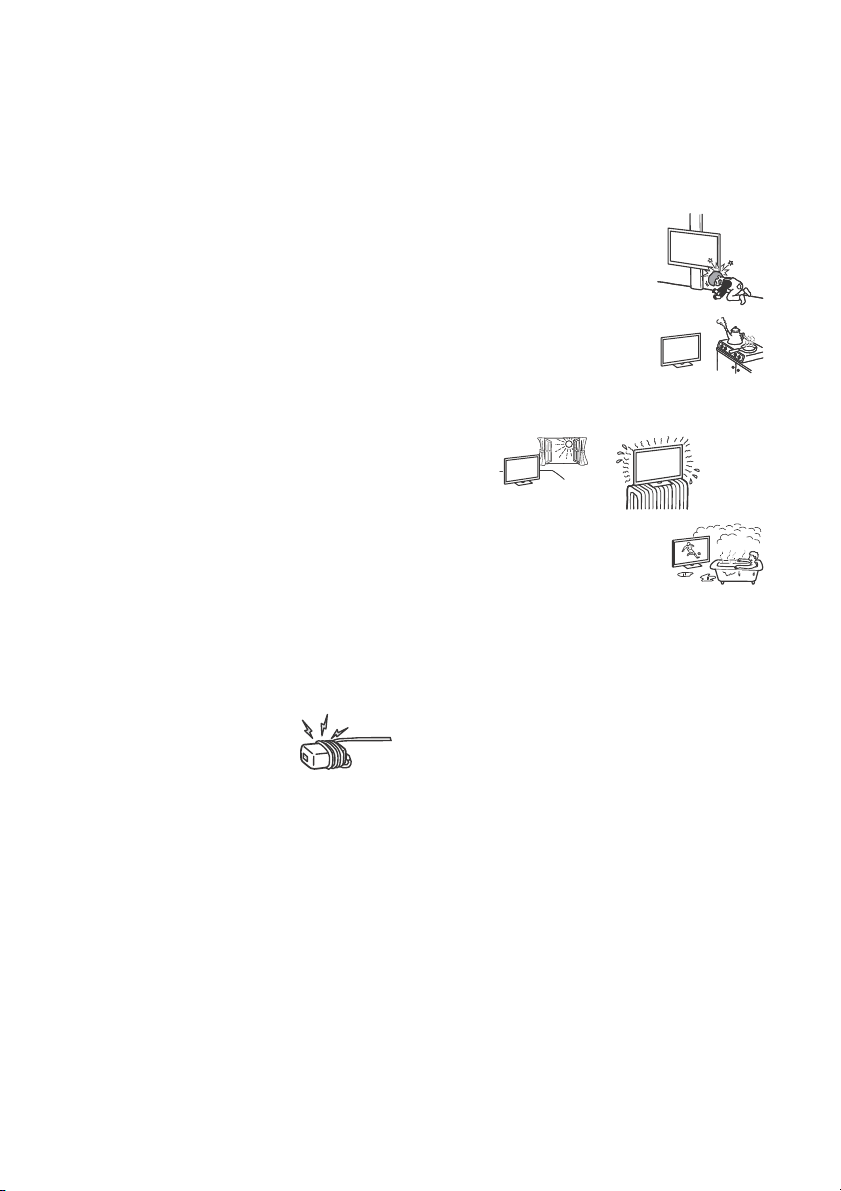
• Install the TV s o that it sticks out into an
open space. Injury or damage from a
person or object bumping into the TV
may result.
• Place the TV in a humid or dusty space, or
in a room with oily smoke or steam (near
cooking tables or humidifiers). Fire,
electric shock, or warping may result.
• Install the TV in places subject to extreme
temperature, such as in direct sunl ight, near a radiator or a
heating vent. The TV may overheat in such conditions which can
cause deformation of the enclosure and/or TV malfunction.
• If th e TV is placed in the changing room of a
public bath or hot spring , the TV may be
damaged by airborne sulfur, etc.
• For best picture quality, do not expose the screen to direct
illumination or sunlight.
• Avoid moving the TV from a cold area to a warm area. Sudden
room temperature changes ma y cause moisture condensati on.
This may cause the TV to show poor picture and/or poor colour.
Should this occur, allow mo isture to evaporate completely
before powering the TV on.
Broken pieces:
• Do n ot throw anything at the TV set. T he screen glass may break
by the impact and cause serious injury.
• If the surface of th e TV set cracks, do not touch it until yo u have
unplugged the AC powe r cord (mains lead). Othe rwise this may
cause an electric shock.
When not in use
• If you will not be using the TV set for se veral days, the TV set
should be disconnected from the AC power (mains) for
environmental and safety reasons.
• As the TV s et is not disconnected from the AC pow er (mains)
when the TV set is just turned off, pull the plug from the AC
power outlet (mains socket) to disconnect the TV set
completely.
• Some TV se ts may have features that require the TV set to be
left in standby to work correctly.
For children
• Do not allow children to climb on the TV set.
• Keep small accessorie s out of the reach of children, so that the y
are not mistakenly swallowe d.
GB
4
Page 5

If the following problems occur...
Turn off the T V set and unplug the AC p ower cord (mains lead)
immediately if any of th e following p roblems occu r.
Ask your dealer or Sony service centre to have it checked by
qualified service personnel.
When:
AC power cord (mains lead) is damaged.
Poor fitting of AC power outlet (mai ns socket).
TV set is damaged by being dropped, hit or having something
thrown at it.
Any liquid or solid object falls through openings in the cabinet.
About LCD TV Temperature
When the LCD TV is used for an extended period, the panel
surrounds become warm. You may feel hot wh en touching there
by the hand.
Precautions
Viewing the TV
• Vi ew the TV i n moderate li ght, as view ing the TV i n poor ligh t or
during long period of time, strains your eyes.
• When using he adphones, adjust th e volume so as to avoid
excessive levels , as h earing dam age may resu lt.
LCD Screen
• Although th e LCD screen is made with high-precision
technology and 99.99 % o r more of the pixels are effect ive,
black dots may appear or bright points of light (red, blue, or
green) may appear cons tantly on the LCD screen. This is a
structural property of th e LCD screen and is not a malfunctio n.
• Do not push or sc ratch the front filter, or place objects on top of
this TV set. The image may be uneven or the LCD screen may be
damaged.
• If this TV set is u sed in a cold place, a smear m ay occur in the
picture or the picture may become dark. This does not indicate a
failure. These phenomena d isappear as the temp erature rises.
• Ghos ting may o ccur when s till pictures are dis played
continuously. It may disappe ar after a few moments.
• The screen an d cabinet ge t warm whe n this TV set is in use. This
is not a malfunction.
• The LCD screen con tains a small amount of liquid cry stal. Follow
your local ordi nances and reg ulations for d isposal.
Handling and cleaning the screen surface/
cabinet of the TV set
Be sure to unplug the AC pow er cord (mains lead) connected to
the TV set from AC power outlet (mains socket) before cleaning.
To avoid material degradation or screen coating deg radation,
observe the following precautions.
• To remove dust from the screen surface/cabinet, wipe gently
with a soft cloth. If dust is persistent, wipe with a soft cloth
slightly moistened w ith a diluted mild detergent so lution.
• Never spray water or d etergent directly on
the TV set. It may drip to the bottom of the
screen or exterior parts and enter the TV
set, and may cause da mage to the TV set.
• Never use any type of abrasive pad,
alkaline/acid cleaner, scouring powder, or volatile solvent, such
as alcohol, benzene, thinner or insecticide. Using such materials
or maintaining p rolonged contact with rubber or vinyl materials
may result in damage to the screen surface and cabinet
material.
• Do not touch the TV if your hand is covered in any chemical
substance such as ha nd cream or sunblock .
• Periodic vacuuming of the ventilation openings is
recommended to ensure proper ventilation.
• When adju sting the angle of the TV set, move it slowly so as to
prevent the TV set from m oving or slipping off from its table
stand.
Optional Equipment
Keep optional components or any equipment emitting
electromagnetic radiation away from the TV set. Otherwise
picture distortion and/or noisy sound may occur.
Wireless Function of the unit
• Do not operate this u nit near medical equip ment (pacemaker,
etc.), as thi s may result i n the malfunction o f the medica l
equipme nt.
• Altho ugh this un it transmits/receives scram bled signals, be
careful of unauthorised i nterception. We cannot be responsib le
for any trouble as a result.
Caution about handling the remote control
• Obser ve the correct polarity when inserting batteries.
• Do not use di fferent types of batter ies together or mix old and
new batteries.
• Disp ose of batteri es in an envi ronmentally friendly way. Certa in
regions may regulate the disp osal of batteries. Plea se consult
your local au thority.
• Handle the rem ote control with care. Do not drop or step on it,
or spill liquid of any kind onto it.
• Do not pla ce the remote control in a location nea r a heat source,
a place subject to direct sunligh t, or a damp room.
Disposal of the TV set
Disposal of Old Electrical &
Electronic Equipment (Applicable in
the European Union and other
European countries with separate
collection systems)
Disposal of Old Electrical &
Electronic Equipment (Applicable
in Republic of India)
This symbol and its var iations indicate that this
product and its componen ts, consumables,
parts or spares thereof sha ll not be treated as
household waste and may not be dropped in
garbage bins. Product owners are advised to
point for the recycling of electrical and electronic equipment.
Your co-operation shall facilitate prop er disposal and help p revent
potential negative conseque nces/hazards to the environme nt
and human health, which could otherwise be caused by
inappropriate waste disposa l including improper handl ing,
accidental breakage, damage and/or improper recycling of
e-waste. The recycling of materials will help to conserve natural
resources. For more detailed information about recycling of this
product, please contact y our local civic office, your h ousehold
waste disposal service provider or the store where you made the
purchase. You may contact our company’s toll free number in
India for assistance.
Toll Free: 1800-103-7799
Visit: www.sony.co.in for product recyc ling
Reduction in the Use of Hazardous Substances
in Electrical & Electronic Equipment (Applicable
in Republic of India)
This product and its components, consumables, parts or
spares comply with the hazardous substances res triction of
India’s E-Waste (Management) Rules. The maximum allowable
concentrations of the restricted substances are 0.1% by weight
in homogenous materials for Lead, Mercury, Hexavalent
Chromium, Polybrominated Biphenyls (PBB) and
Polybrominated Diphenyl Ethers (PBDE), and 0.01% by weight
in homogenous materials for Cadmium, except for the
exemptions specified in Schedule II of the aforesaid Rules.
deposit their product at the nearest collection
GB
5
Page 6

Parts and Controls
2
Controls and Indicators
(Power) / + / –
When the TV is off,
Press to power on.
When the TV is on,
Press and hold to power off.
Press repeatedly to change the function,
then press + or – button to:
• Adjust the volume.
• Select the channel.
• Select the input source of TV.
Remote Control sensor* /
Light sensor* / Illumination LED
The illumination LED lights up or blinks
according to the status of the TV.
For more information, refer to the Help
Guide.
* Do not place anything near the sensor.
GB
6
Page 7
Using Remote Control
Ȫ
ȩ
ȫ
Ȭ
ȭ
Ȯ
MIC
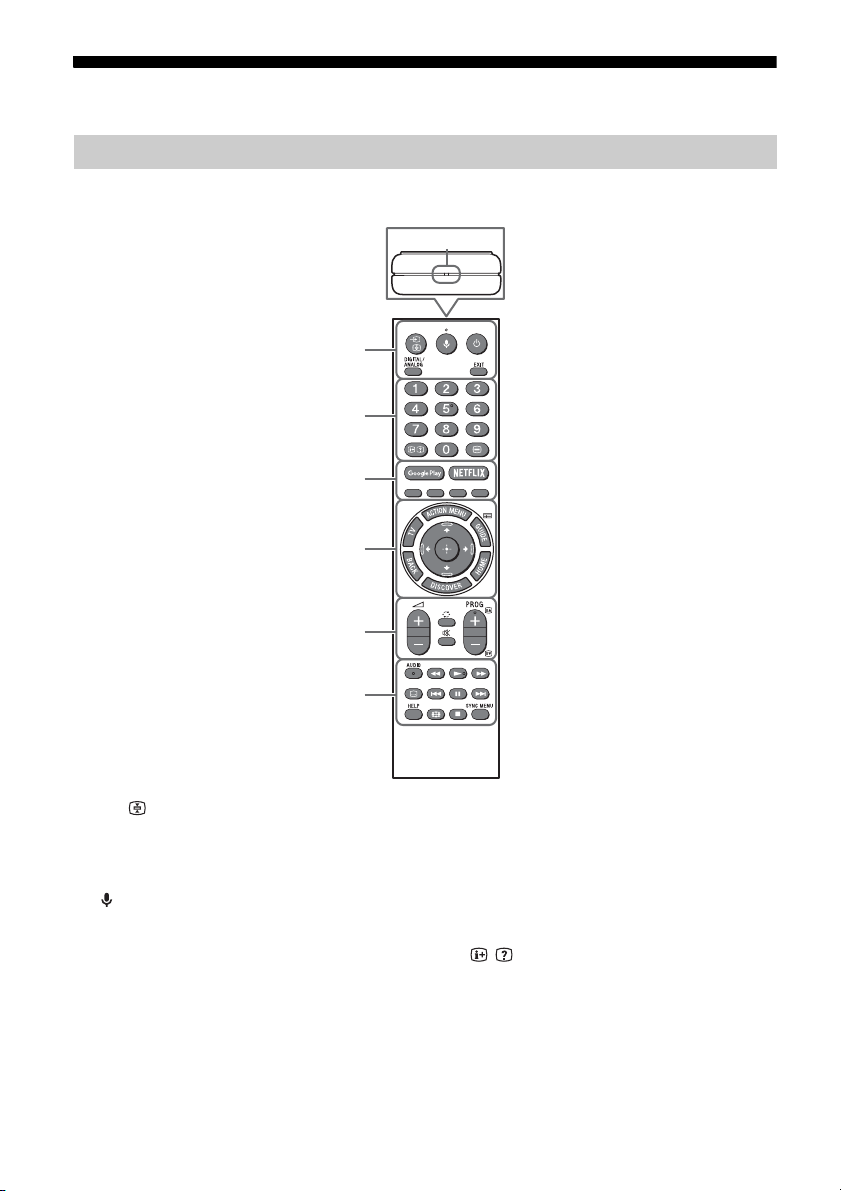
Remote Control Parts Description
The remote control shape, location, availability and function of remote control button may vary
depending on your region/country/TV model.
/ (Input select/Text hold)
In TV mode: Display and select the input
source.
In Text mode: Hold the current page.
(Microphone)
Use Voice Function. (e.g., Search various
content by voice.)
(TV standby)
Turn on or turn off the TV (standby mode).
DIGITAL/ANALOG
Switch between digital and analogue mode.
EXIT
Return to the previous screen or exit from
the menu. When an Interactive Application
service is available, press to exit from the
service.
Number buttons
/ (Info/Text reveal)
Display information.
(Text)
Display text information.
GB
7
Page 8

Google Play
Access the “Google Play” online service.
NETFLIX (Only on limited region/
country/TV model)
Access the “NETFLIX” online service.
Colour buttons
Execute corresponding function at that time.
ACTION MENU
Display a list of contextual functions.
TV
• Switch to a TV channel or input from other
applications.
• Turn on the TV to display TV channel or
input.
GUIDE/
Display the digital programme guide.
BACK
Return to previous screen.
HOME
Display the TV Home Menu.
DISCOVER
Bring up the Content Bar to search for
content.
//// (Item select/Enter)
AUDIO
Change the language for the programme
currently being viewed.
//////
Operate media contents on TV and
connected BRAVIA Sync-compatible device.
(Subtitle setting)
Turn subtitles on or off (when the feature is
available).
HELP
Display Help menu. Help Guide can be
accessed from here.
(Wide mode)
Change the screen format.
SYNC MENU
Display the BRAVIA Sync Menu.
+/– (Volume)
Adjust the volume.
(Jump)
Jump back and forth between two channels
or inputs. The TV alternates between the
current channel or input and the last
channel or input that was selected.
(Muting)
Mute the sound. Press again to restore the
sound.
PROG +/–//
In TV mode: Select the channel.
In Text mode: Select the next () or
previous () page.
GB
8
Page 9
Connection Diagram
*1
< 14 mm
VCR/Video game equipment/
DVD player/Camcorder
Home Audio
System with ARC/
HDMI Device
HDMI
Device
Cable/Antenna
Headphone/
Home Audio
System/
Subwoofer
Digital still
camera/
Camcorder/USB
storage media
HDMI
Device
Home Audio
System with
Optical
Audio Input
Router IR BlasterDVD player with component output
VCR/Video game equipment/
DVD player/Camcorder
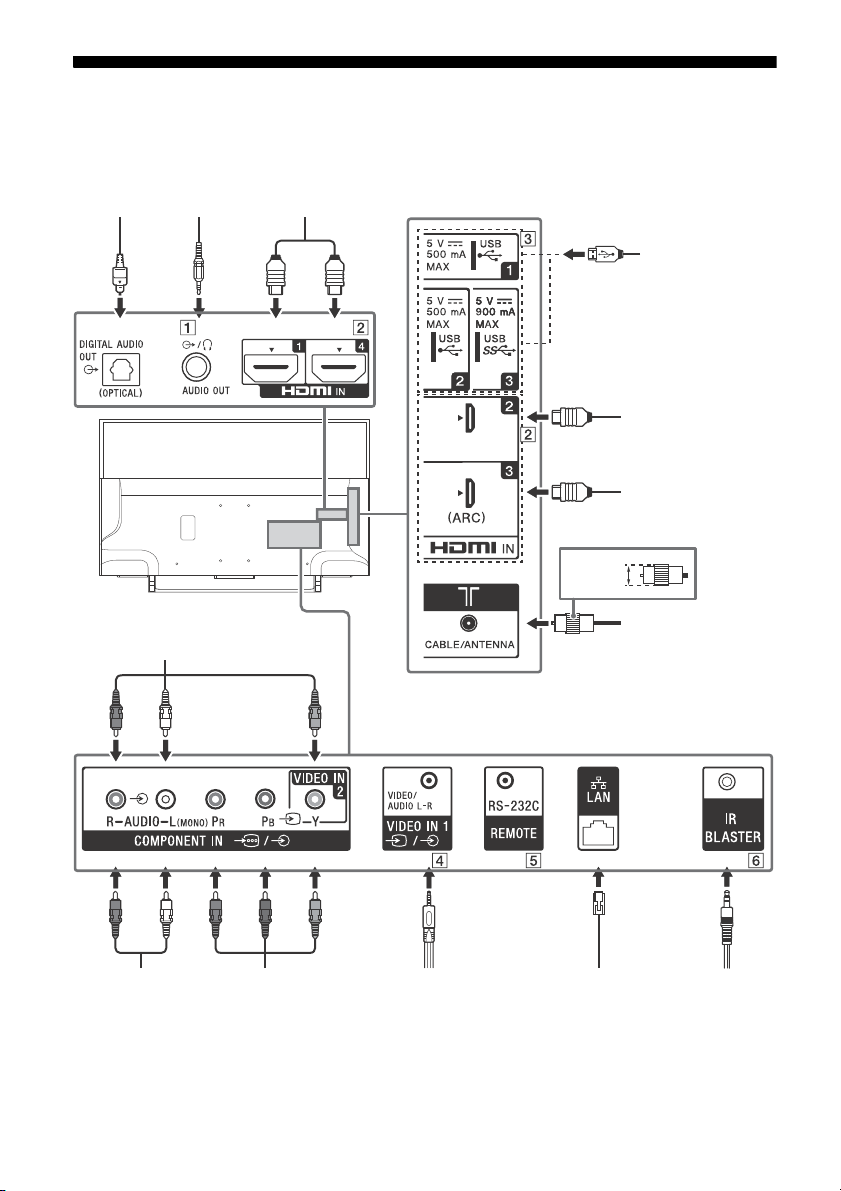
For more information on connections, refer to the Help Guide by pressing HELP on the remote control.
GB
9
Page 10
AUDIO OUT /
< 21 mm
< 12 mm
3.5 mm
1234
1: L
2: Video
3: Ground
4: R
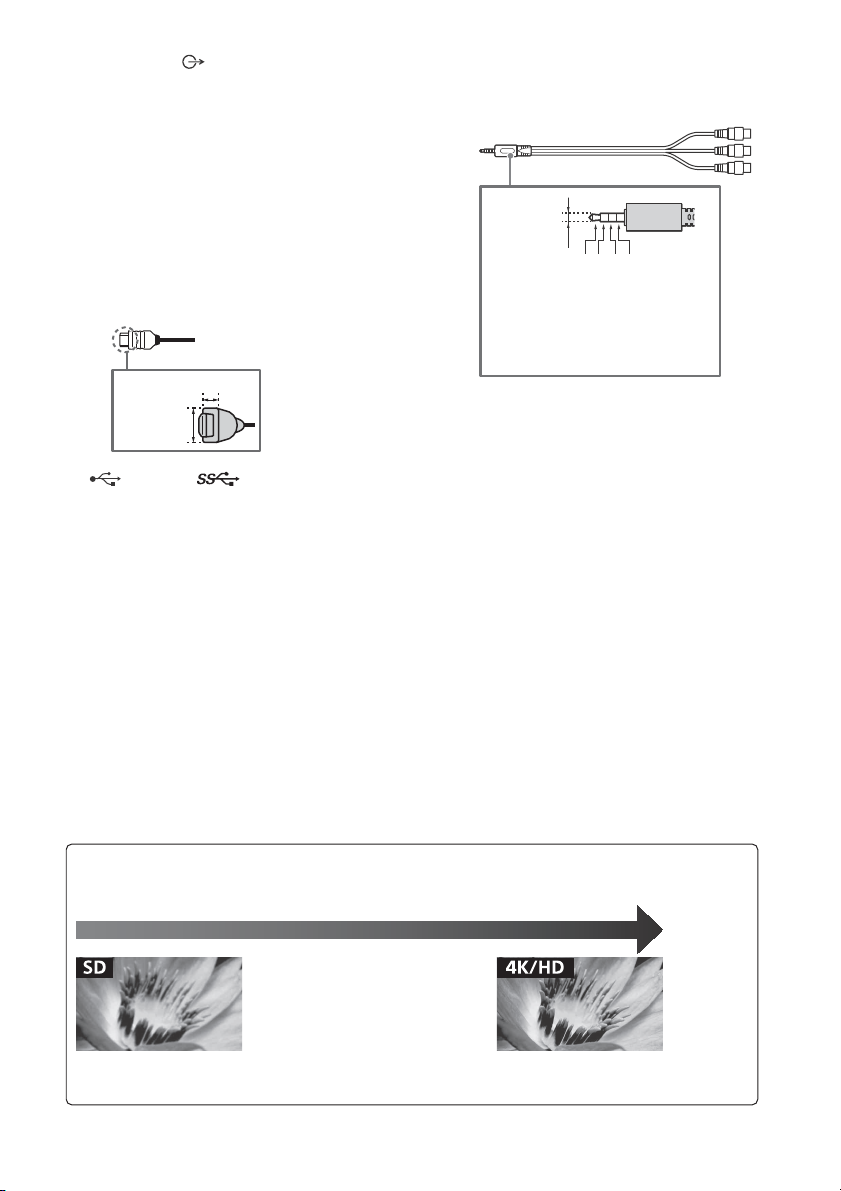
Standard definition (SD) videos have picture signals with a
vertical resolution of 480 (NTSC) or 576 (PAL/SECAM) lines.
High definition (HD) videos have picture signals
with a vertical resolu tion of 720 or 1,080 lines .
(For 4K vertical resolution : 2,160 lines)
Picture Quality
• AV composite cable
• Antenna (aerial) cable
•HDMI cable• Component cable
• Supports 3-pole stereo mini jack only.
• To listen to the TV's sound through the
connected equipment, press HOME.
Select [Settings] [Sound]
[Headphone/Audio out] and then select
the desired item.
HDMI IN 1/2/3/4
• If connecting a digital audio system that is
compatible with Audio Return Channel
(ARC) technology, use HDMI IN 3. If not, an
additional connection with DIGITAL AUDIO
OUT (OPTICAL) is necessary.
•
/ VIDEO IN 1
• For a composite connection, use an
Analogue Extension Cable (not supplied).
•
USB 1/2, USB 3
• Connecting a large USB device may
interfere with other connected devices
beside it.
• When connecting a large USB device,
connect to the USB 1 port.
REMOTE RS-232C*
2
This terminal is for service use only.
IR BLASTER*
*1 When connecting mono equipment, connect to the
L (MONO) audio jack (socket).
*2 Only on limited region/country/TV model.
2
GB
10
Page 11
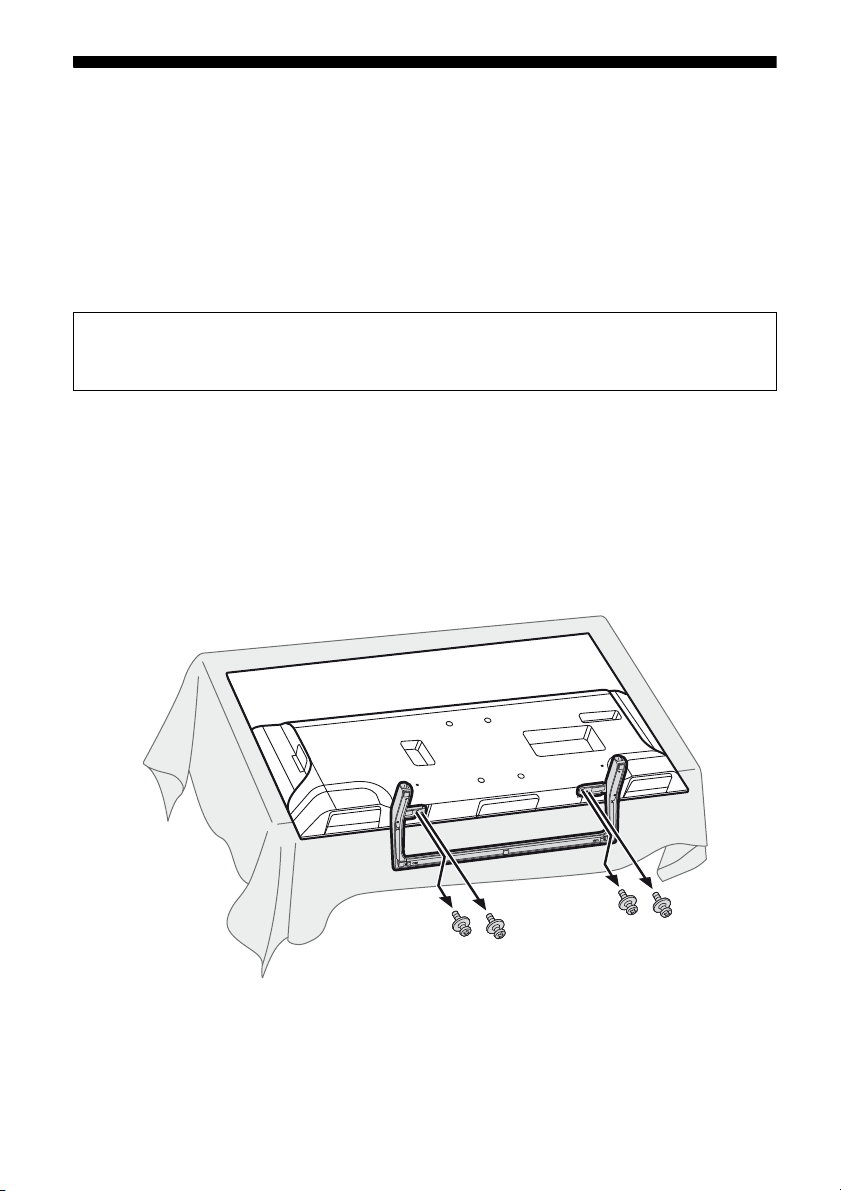
Installing the TV to the Wall
Note
This TV’s instruction manual only shows the steps on preparing the installation of the TV before
installing to the wall.
To C u s tomers:
For product protection and safety reasons, Sony strongly recommends that installation of your
TV be performed by Sony dealers or licensed contractors. Do not attempt to install it yourself.
To Sony Dealers and Contractors:
Provide full attention to safety during the installation, periodic maintenance and examination of
this product.
Sufficient expertise is required for installing this product, especially to determine the strength of the wall for
withstanding the TV’s weight. Be sure to entrust the attachment of this product to the wall to Sony dealers or
licensed contractors and pay adequate attention to safety during the installation. Sony is not liable for any
damage or injury caused by mishandling or improper installation.
Use the Wall-Mount Bracket SU-WL450 (not supplied) to install the TV to the wall.
When installing the Wall-Mount Bracket, also refer to the Operating Instructions and Installation Guide
supplied with the Wall-Mount Bracket.
• Be sure to store the removed screws in a safe place, keeping them away from children.
• If the Table-Top Stand is attached to the TV, detach the Table-Top Stand beforehand. See the Setup Guide and follow
in reverse order the steps to detach the Table-Top Stand.
• Place the TV with its screen facing down on a level and stable surface covered with a thick and soft cloth, when
removing the Table-Top Stand from the TV to prevent damaging the surface of the LCD display.
To detach the Table-Top Stand from the TV
GB
11
Page 12
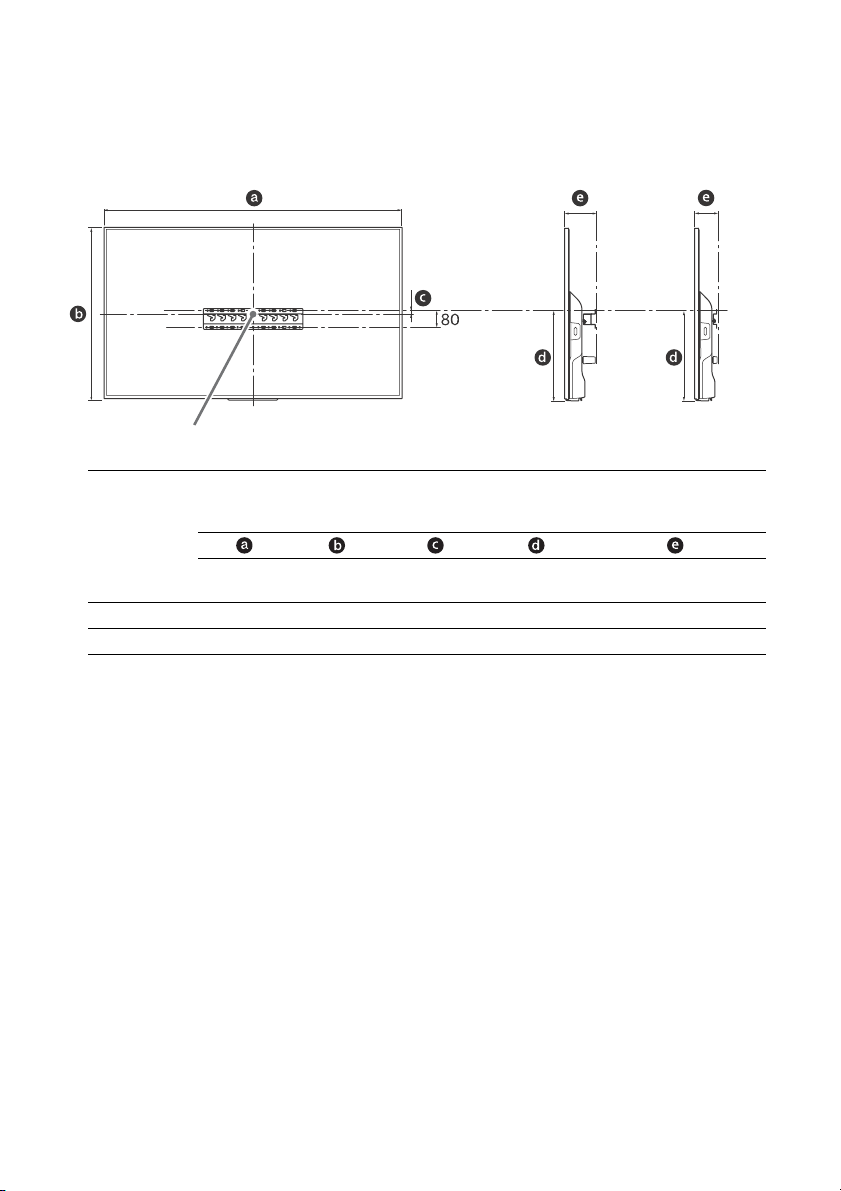
1 Make sure that the wall has enough space for the TV and is capable of supporting a
Note
Screen centre point
Standard
mounting
Slim
mounting
weight of at least four times that of the TV.
Refer to the following table on installing the TV to the wall. See page 16-17 (Specifications)
for the TV’s weight.
Display dimensions
Model Name
KD-
49X7500E 1,102 646 15 314 120 78
43X7500E 971 571 23 315 120 78
Screen
centre
dimension
Length for mounting
Standard
mounting
mounting
Unit: mm
Slim
• Figures in the table may differ slightly depending on the installation.
• When your TV is installed on the wall, the upper side of the TV slightly leans forward.
GB
12
Page 13
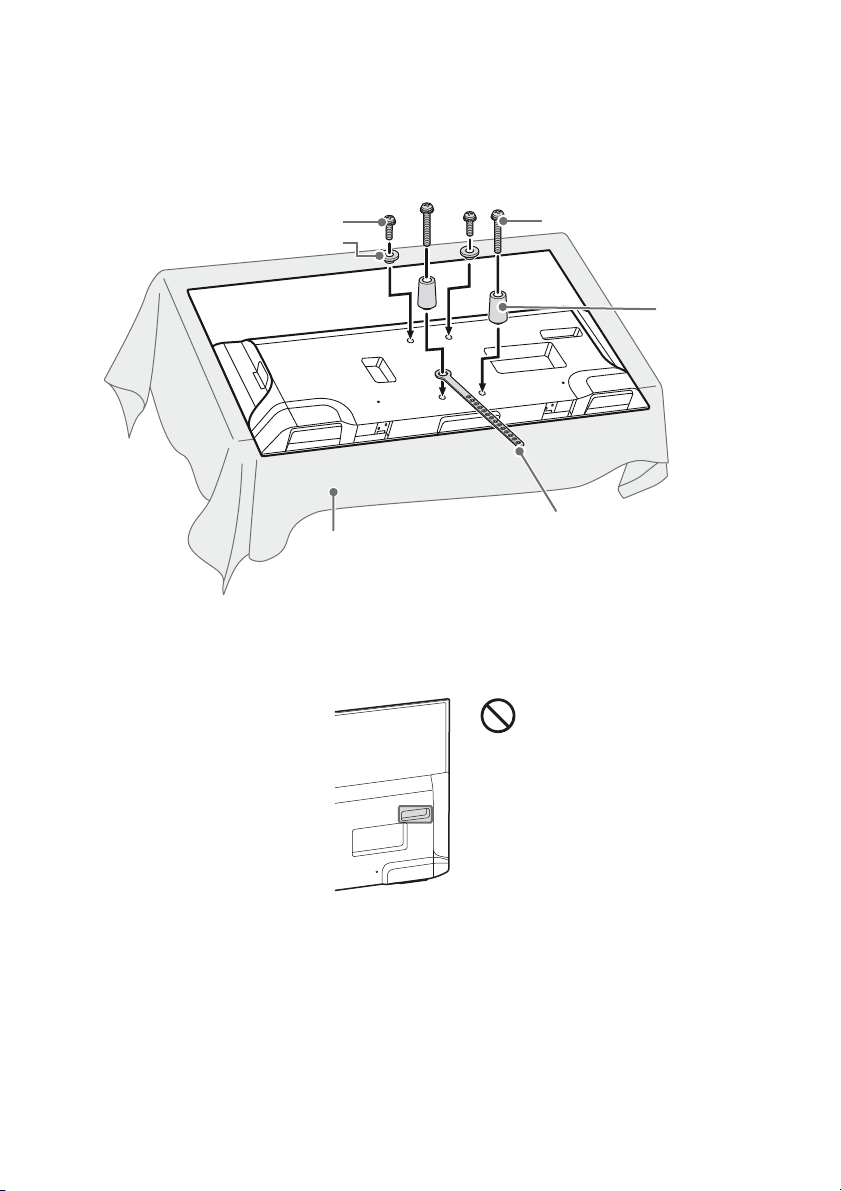
2 Attach the Attachment parts for Wall-Mount Bracket. Check the Attachment parts by
Note
Note
Screw (+PSW 6 x 20)
Pulley
Spacer
(60 mm)
Screw (+PSW 6 x 50)
Belt
Soft cloth
referring to “1” of the Wall-Mount Bracket Installation Guide.
• If using an electric screwdriver, set the torque at approximately 1.5 N·m {15 kgf·cm}.
• Be sure to store the unused parts in a safe place for future use. Retain this manual for future reference.
Standard mounting
Slim mounting
• You cannot use some of the terminals on the rear of the TV when using this mounting style.
GB
13
Page 14
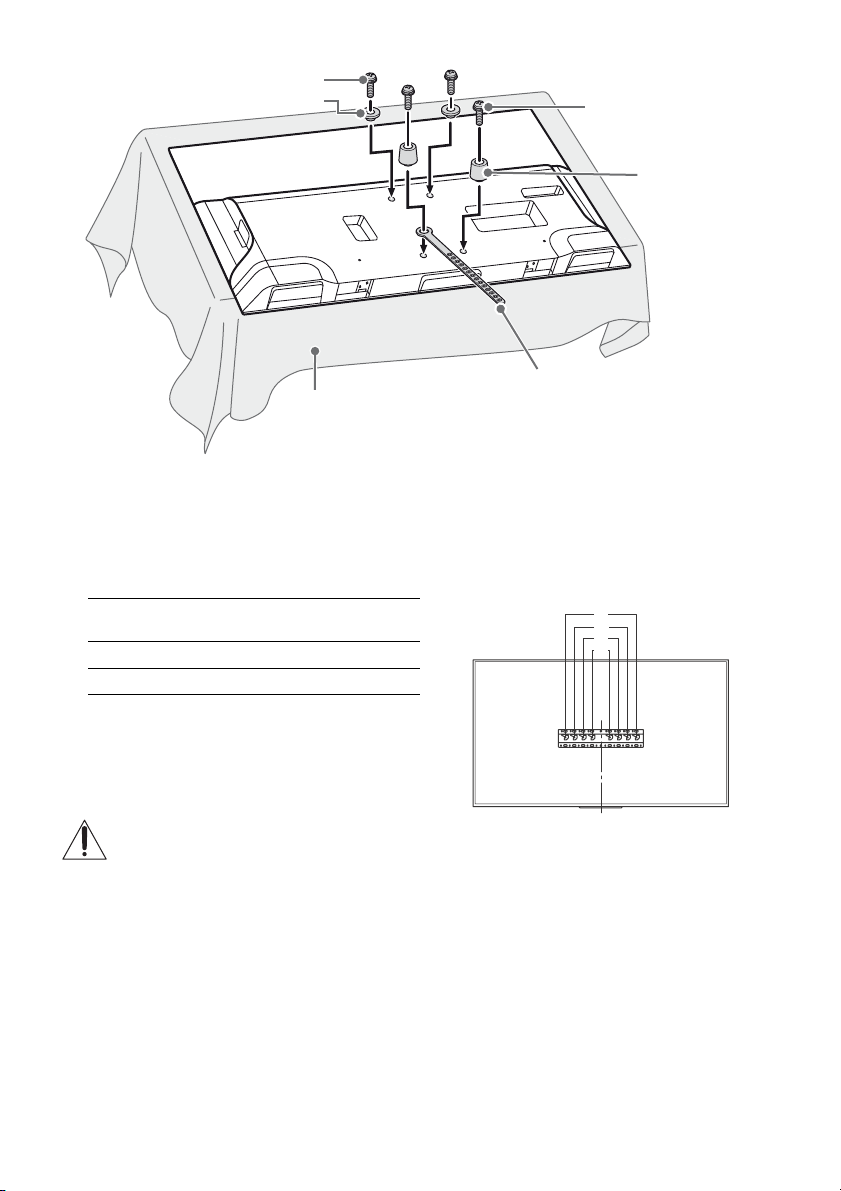
3 Connect necessary cables to the TV.
Note
Pulley
Spacer (20 mm)
Screw (+PSW 6 x 20)
Belt
Soft cloth
Screw (+PSW 6 x 20)
c
d
a
b
• You cannot access to any terminal after installing the TV to the wall.
4 Install the TV to the Base. Refer to “5” of Installation Guide and “Installing the TV to the
Wall” of Operating Instructions supplied with the Wall-Mount Bracket.
Model Name
KD-
49X7500E c
43X7500E d
Refer to the instructions supplied with the Wall-Mount Bracket for your model to install the TV on the wall.
Hook location
GB
14
Page 15
Troubleshooting
Updating...
General troubleshooting for issues like: black
screen, no sound, frozen picture, TV does not
respond, or network is lost, do the following
steps.
1 Restart your TV by pressing the power button
on the remote control until a message
appears. The TV will restart. If the TV does not
recover, try unplugging the TV from the AC
power cord (mains lead) for two minutes and
then plug it in again.
2 Refer to the Help menu by pressing HELP on
the remote control.
3 Connect your TV to the Internet and perform
a software update.
4 Visit Sony support website (information
provided on the back cover).
When [A new TV system software update is
available…] message is displayed.
Sony strongly recommends you to update the
TV software by selecting [Update Now]. These
software updates improve your TV performance
or add new features.
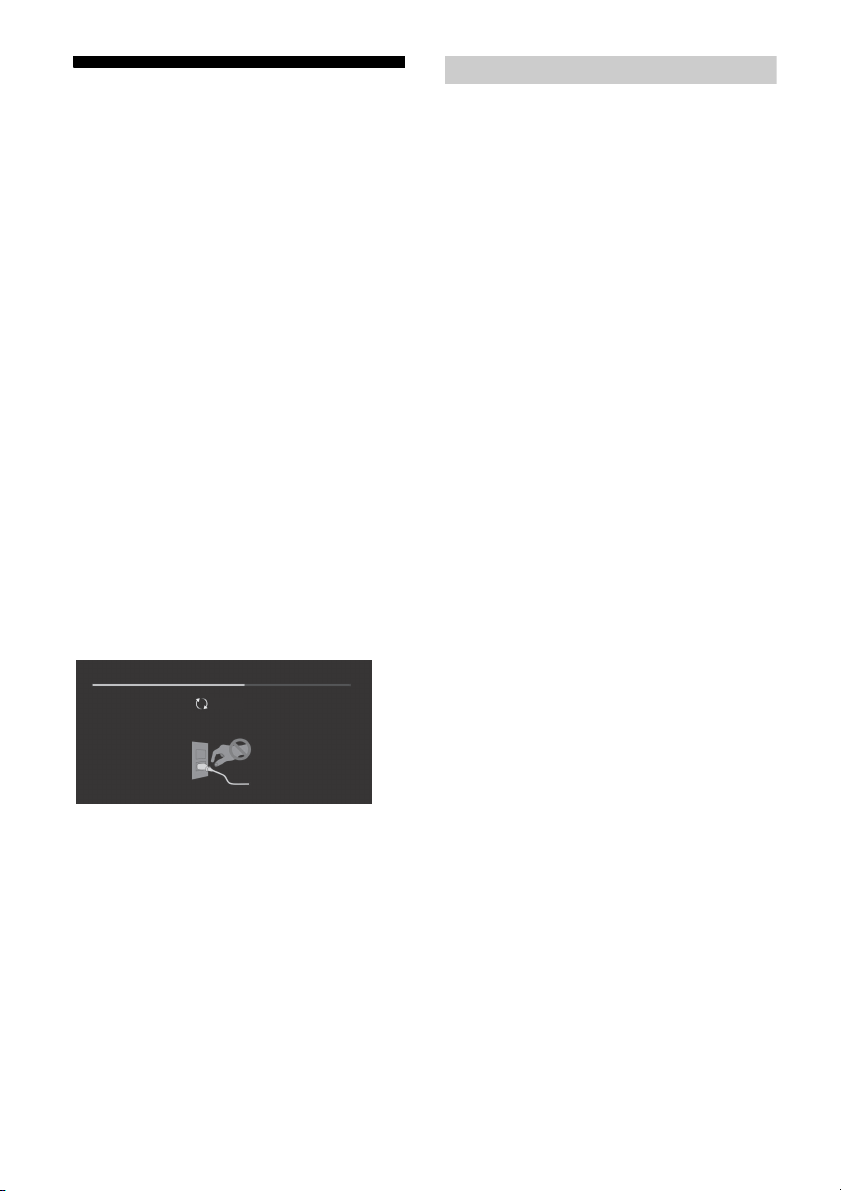
The following screen with [Updating…] will
appear and the illumination LED flashes white
while software is updating.
Troubles and Solutions
When the illumination LED is flashing in red.
Count how many times it flashes (interval time is
three seconds).
Reboot the TV by disconnecting the AC power
cord (mains lead) for two minutes, then turn on
the TV.
If the problem persists, disconnect the AC power
cord (mains lead), and contact your dealer or Sony
service centre with the number of times the
illumination LED flashes.
There is no picture (screen is dark) and no
sound.
Check the antenna (aerial)/cable connection.
Connect the TV to the AC power (mains), and
press on the TV or remote control.
Some programmes cannot be tuned.
Check the antenna (aerial)/cable connection.
The remote control does not function.
Replace the batteries.
The parental lock for broadcast password has
been forgotten.
Enter 9999 for the PIN code and select [Change
PIN Code].
The TV surrounds become warm.
When the TV is used for an extended period, the
TV surrounds become warm.
You may feel hot when touching there by the
hand.
Do not unplug the AC power cord (mains lead)
during the software update. If you do, the
software update may not finish completely, and
it may cause a software malfunction. Software
updates can take up to 15 minutes.
When you plug in TV, the TV may not be able
to turn on for a while even if you press the
power button on the remote control or the TV.
It takes time to initialize the system. Wait for
about one minute, then operate it again.
GB
15
Page 16
Specifications
System
Panel system
LCD (Liquid Crystal Display) Panel, LED Backlight
TV system
Depend on your country/area selection
Analogue: B/G, I, D/K, M
Digital: DVB-T/DVB-T2
Colour system
PAL, SECAM, NTSC3.58, NTSC4.43
Channel coverage
Depend on your country/area selection
Analogue: UHF/VHF/Cable
Digital: UHF/VHF
Sound output
10 W + 10 W
Wireless technology
Protocol IEEE802.11ac/a/b/g/n
(IEEE802.11ac may not be available depending on
countries/regions.)
Bluetooth Version 4.1
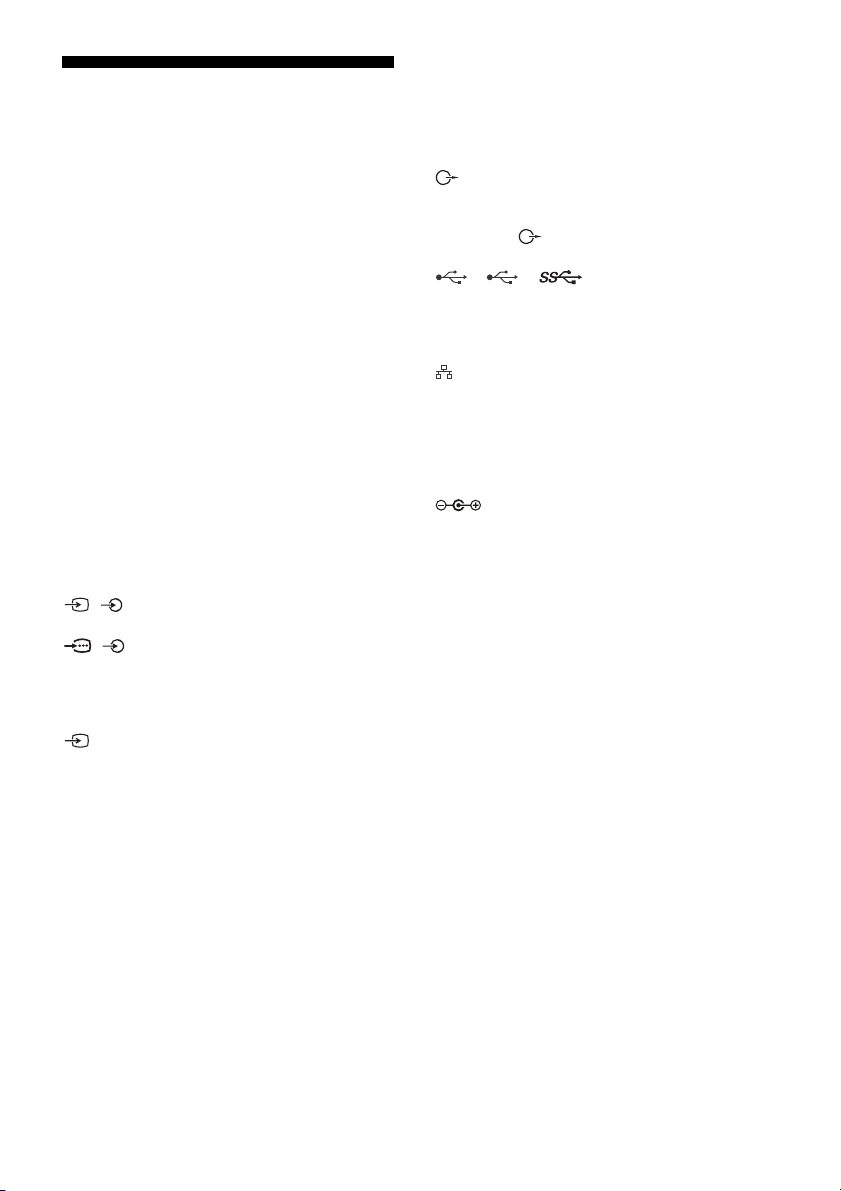
Input/Output jacks
Antenna (aerial)/cable
75 ohm external terminal for VHF/UHF
/ VIDEO IN
Video/Audio input (mini jack)
/ COMPONENT IN
YPBPR (Component Video): 1080p (50, 60 Hz),
1080i (50, 60 Hz), 720p (50, 60 Hz), 576p, 576i,
480p, 480i
Audio input (phono pin jack)
VIDEO IN 2
Video input (common phono pin with Y input)
HDMI IN 1, 2, 3, 4 (support 4K resolution, HDCP
2.2-compatible)
Video:
4096 × 2160p (50, 60 Hz)*
1
(24 Hz)*
, 3840 × 2160p (50, 60 Hz)*2,
3840 × 2160p (24, 25, 30 Hz), 1080p (30, 50,
60 Hz), 1080/24p, 1080i (50, 60 Hz), 720p (30,
50, 60 Hz), 720/24p, 576p, 576i, 480p, 480i, PC
3
Formats*
*1 When 4096 × 2160p is input and [Wide
mode] is set to [Normal], the resolution is
displayed as 3840 × 2160p. To display 4096 ×
2160p, set [Wide mode] setting to [Full 1] or
[Full 2].
*2 HDMI IN 2 / 3 only.
*3 Please refer to the Help Guide for details.
1*2
, 4096 × 2160p
Audio: 5.1 channel linear PCM: 32, 44.1, 48, 88.2,
96, 176.4 and 192 kHz, 16, 20 and 24 bits, Dolby
Digital, Dolby Digital Plus and DTS
ARC (Audio Return Channel) (HDMI IN 3 only)
(Two channel linear PCM: 48 kHz, 16 bits, Dolby
Digital, Dolby Digital Plus, DTS)
DIGITAL AUDIO OUT (OPTICAL)
Digital optical jack (Two channel linear PCM:
48 kHz, 16 bits, Dolby Digital, DTS)
AUDIO OUT / (Stereo mini jack)
Headphone, Audio output, Subwoofer
1, 2, 3
USB device port.
USB port 1 and 2 support High Speed USB
(USB2.0).
USB port 3 supports Super Speed USB (USB3.0).
LAN
10BASE-T/100BASE-TX connector (Depending on
the operating environment of the network,
connection speed may differ. 10BASE-T/
100BASE-TX communication rate and
communication quality are not guaranteed for
this TV.)
DC IN 19.5 V
AC adapter input
REMOTE
RS-232C, mini jack
(This terminal is for service use only.)
IR BLASTER*
IR Blaster Cable input (mini jack)
1
Others
Optional accessories
Wall -Mount Bracket: SU -WL 450
Operating temperature
0 ºC – 40 ºC
Power and others
Power requirements
19.5 V DC with AC adapter
Rating: Input 100 V - 240 V AC, 50/60 Hz
Screen size (measured diagonally) (Approx.)
KD-49X7500E: 49 inches / 123.2 cm
KD-43X7500E: 43 inches / 108.0 cm
Power consumption
Indicated at the rear of the TV
Standby power consumption*2*
0.50 W
Display resolution
3,840 pixels (horizontal) × 2,160 lines (vertical)
3
GB
16
Page 17
Output Rating
Note
USB 1/2: 5 V , 500 mA MAX
USB 3: 5 V , 900 mA MAX
Dimensions (Approx.) (w × h × d)
wi t h Table -To p Sta n d
KD-49X7500E: 1,102 × 694 × 252 mm
KD-43X7500E: 971 × 620 × 242 mm
without Table-Top Stand
KD-49X7500E: 1,102 × 646 × 70 mm
KD-43X7500E: 971 × 571 × 70 mm
Mass (Approx.)
wi t h Table -To p Sta n d
KD-49X7500E: 12.3 kg
KD-43X7500E: 10.1 kg
without Table-Top Stand
KD-49X7500E: 11.6 kg
KD-43X7500E: 9.4 kg
1
*
Only on limited region/country/TV model.
2
*
Specified standby power is reached after the TV
finishes necessary internal processes.
3
*
Standby power consumption will increase when
your TV is connected to the network.
• Optional accessories availability depends on
countries/regions/TV model/stock.
• Design and specifications are subject to change
without notice.
Notes on Digital TV function
• Any functions related to Digital TV ( )
will only work in countries or areas where
DVB-T/DVB-T2 (MPEG-2 and H.264/
MPEG-4 AVC) digital terrestrial signals are
broadcast. Please confirm with your local
dealer if you can receive a DVB-T/DVB-T2
signal where you live.
• This TV set complies with DVB-T/DVB-T2
specifications, but compatibility with future
DVB-T/DVB-T2 digital terrestrial broadcasts
are not guaranteed.
• Some Digital TV functions may not be
available in some countries/areas.
Trademark Information
• The terms HDMI and HDMI High-Definition
Multimedia Interface, and the HDMI Logo
are trademarks or registered trademarks of
HDMI Licensing LLC in the United States
and other countries.
• Manufactured under license from Dolby
Laboratories.
Dolby, Dolby Audio, and the double-D
symbol are trademarks of Dolby
Laboratories.
• “BRAVIA” and are trademarks of
Sony Corporation.
• Gracenote, Gracenote eyeQ, Gracenote
VideoID, Gracenote Video Explore, the
Gracenote logo and logotype, and the
“Powered by Gracenote” logo are either
registered trademarks or trademarks of
Gracenote in the United States and/or
other countries.
• Opera® Devices SDK. Copyright 1995-2016
Opera TV AS. All rights reserved.
• Wi-Fi, Wi-Fi Direct, Miracast, Wi-Fi
Protected Setup and Wi-Fi CERTIFIED Logo
are trademarks or registered trademarks of
Wi-Fi Alliance.
• For DTS patents, see
http://patents.dts.com. Manufactured
under license from DTS, Inc.
DTS, the Symbol, & DTS and the Symbol
together are registered trademarks, and
DTS Digital Surround is a trademark of DTS,
Inc. © DTS, Inc. All Rights Reserved.
• The Bluetooth® word mark and logos are
registered trademarks owned by the
Bluetooth SIG, Inc. and any use of such
marks by Sony Corporation is under
license. Other trademarks and trade names
are those of their respective owners.
• TUXERA is a registered trademark of Tuxera
Inc. in the US and other countries.
• USB-IF SuperSpeed USB Trident logo is a
registered trademark of USB Implementers
Forum, Inc.
GB
17
Page 18
GB
18
Page 19

Page 20
Customer Support and Contact:
Help Guide
http://rd1.sony.net/help/tv/ega3/h_ga/
© 2017 Sony Corporation
 Loading...