

Page 1
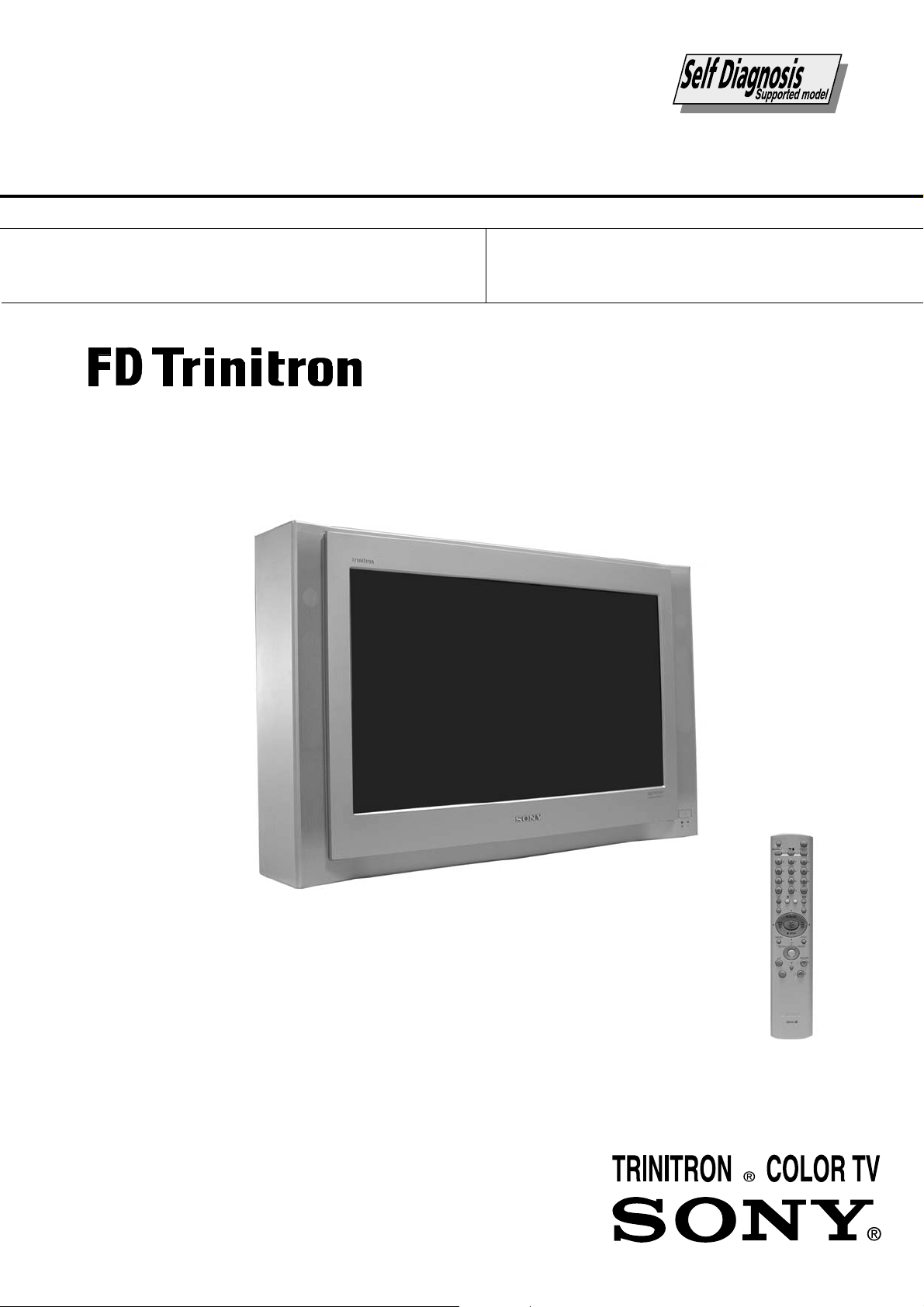
SERVICE MANUAL
FE-2
CHASSIS
MODEL COMMANDER DEST CHASSIS NO.
KD-28DX40U RM-933 UK SCC-Q52K-A
MODEL COMMANDER DEST CHASSIS NO.
KD-32DX40U RM-933 UK SCC-Q52L-A
KD-28/32DX40
- 1 -
RM-933
Page 2

TABLE OF CONTENTS
Section Title Pag e Section Title Pag e
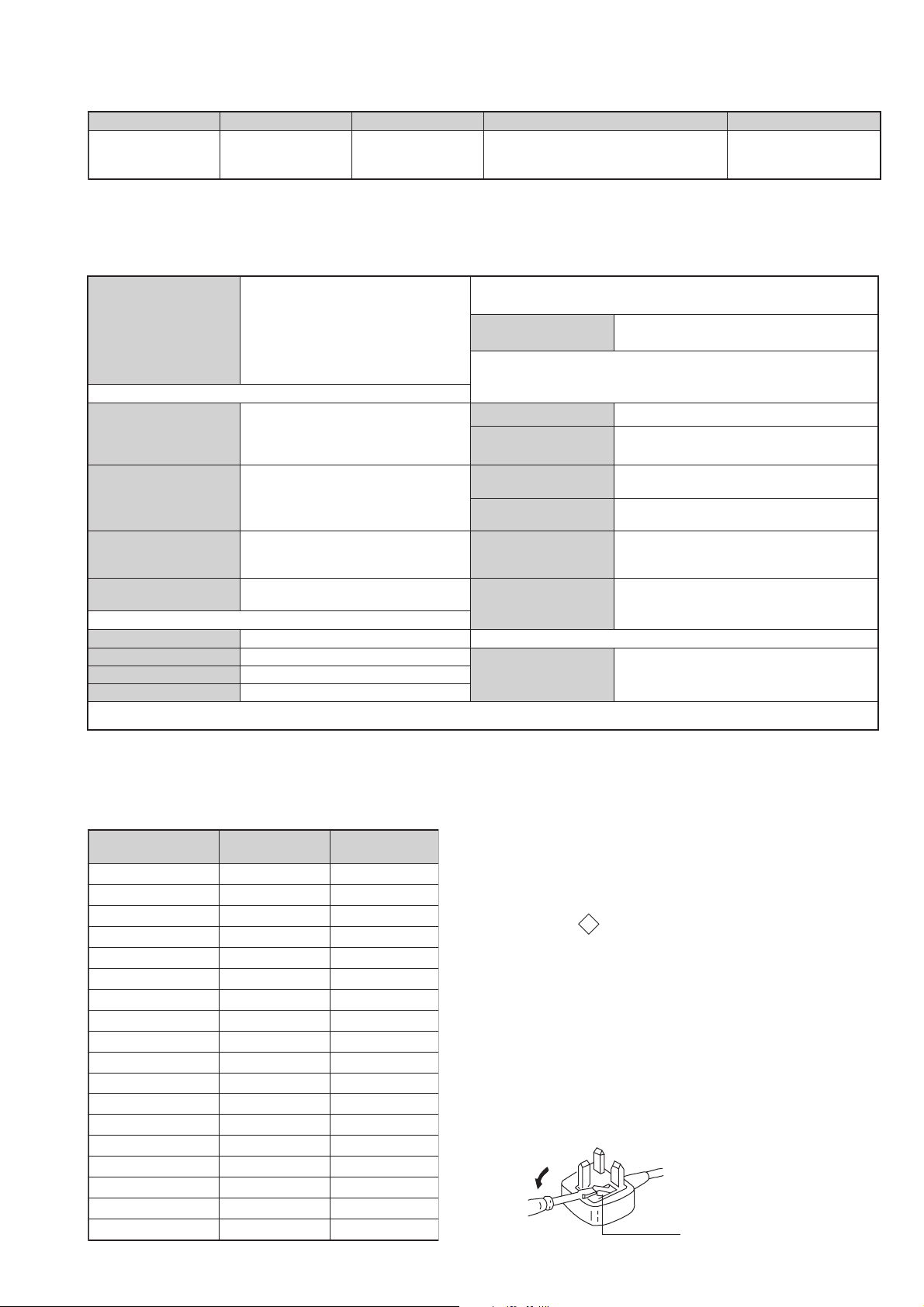
Specifications .................... 3
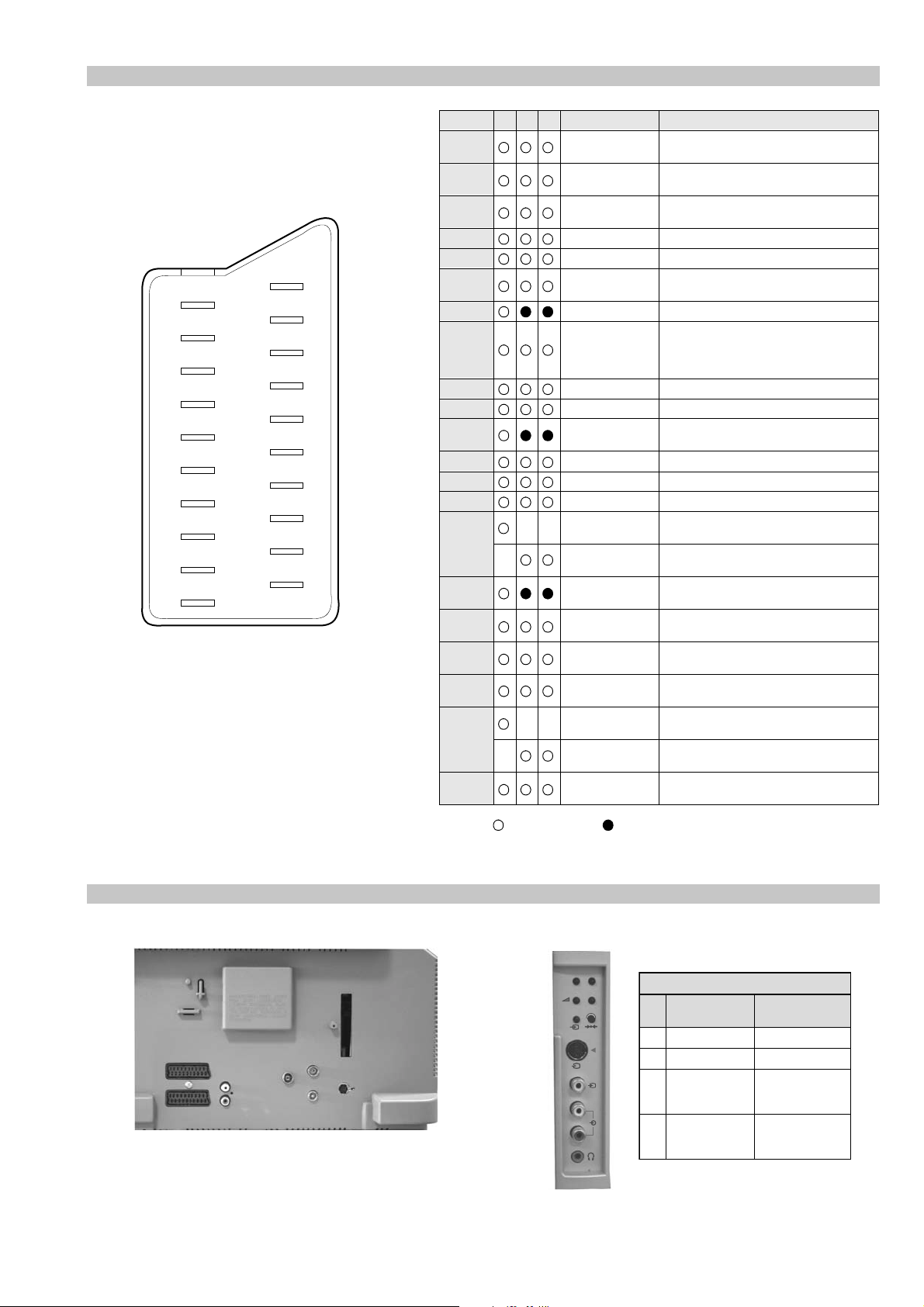
Connectors .................... 4
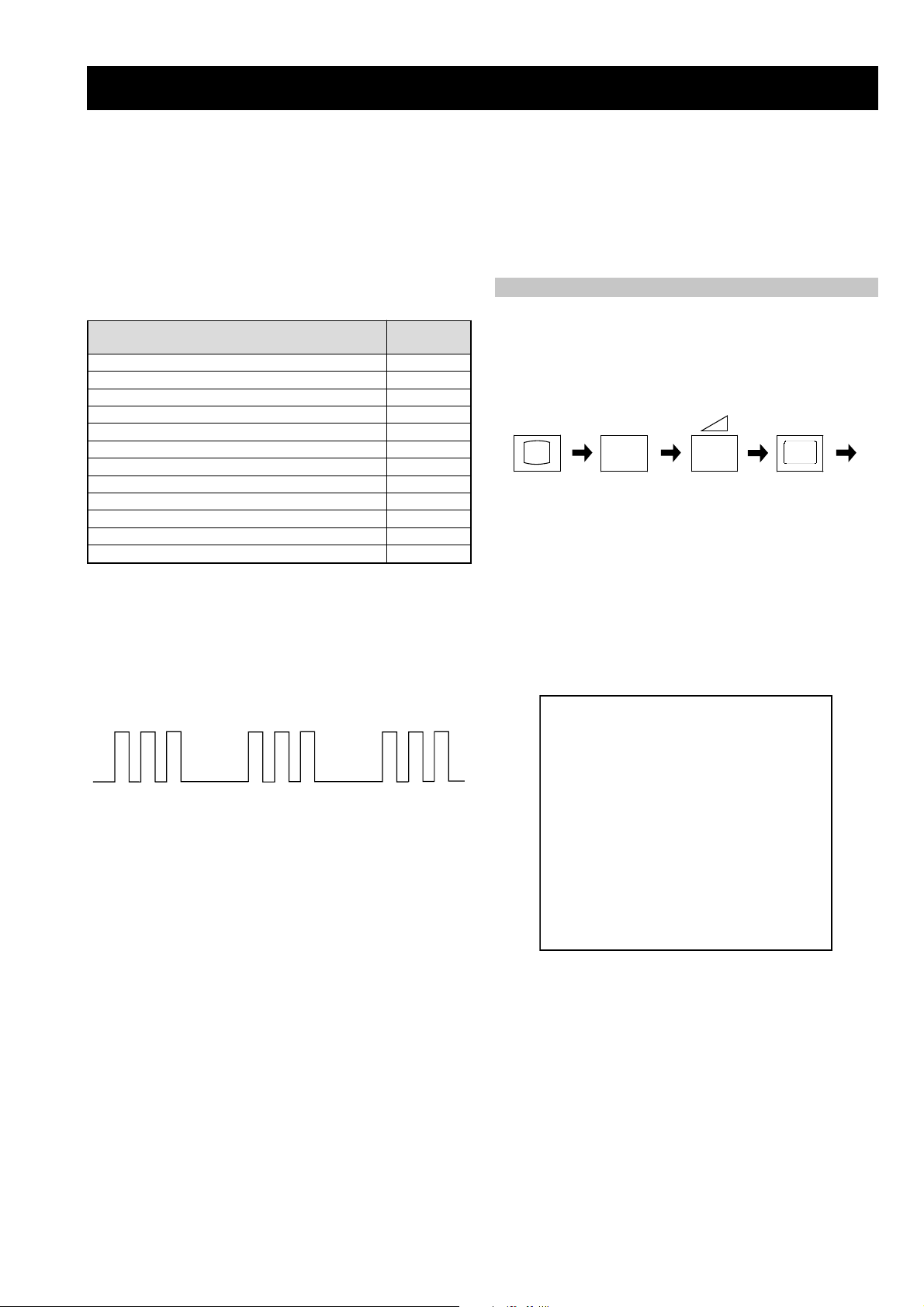
Self Diagnostic Software .................... 5
1. GENERAL
Automatically Tuning the TV .................... 6
Finding the V ideo Channel .................... 6
Selecting Digital or Analogue
Mode .................... 6
The Programme Index T able .................... 6
The Channel Index Menu .................... 6
Vi ewing Digital T elete xt .................... 7
T eletext(Analogue) .................... 8
The Digital EPG Menu .................... 8
The Digital INFO Display .................... 9
The TV Menu System .................... 10
The Set Up Menu .................... 11
Remote Control of Equipment .................... 12
Troubleshooting .................... 12
2. DISASSEMBLY
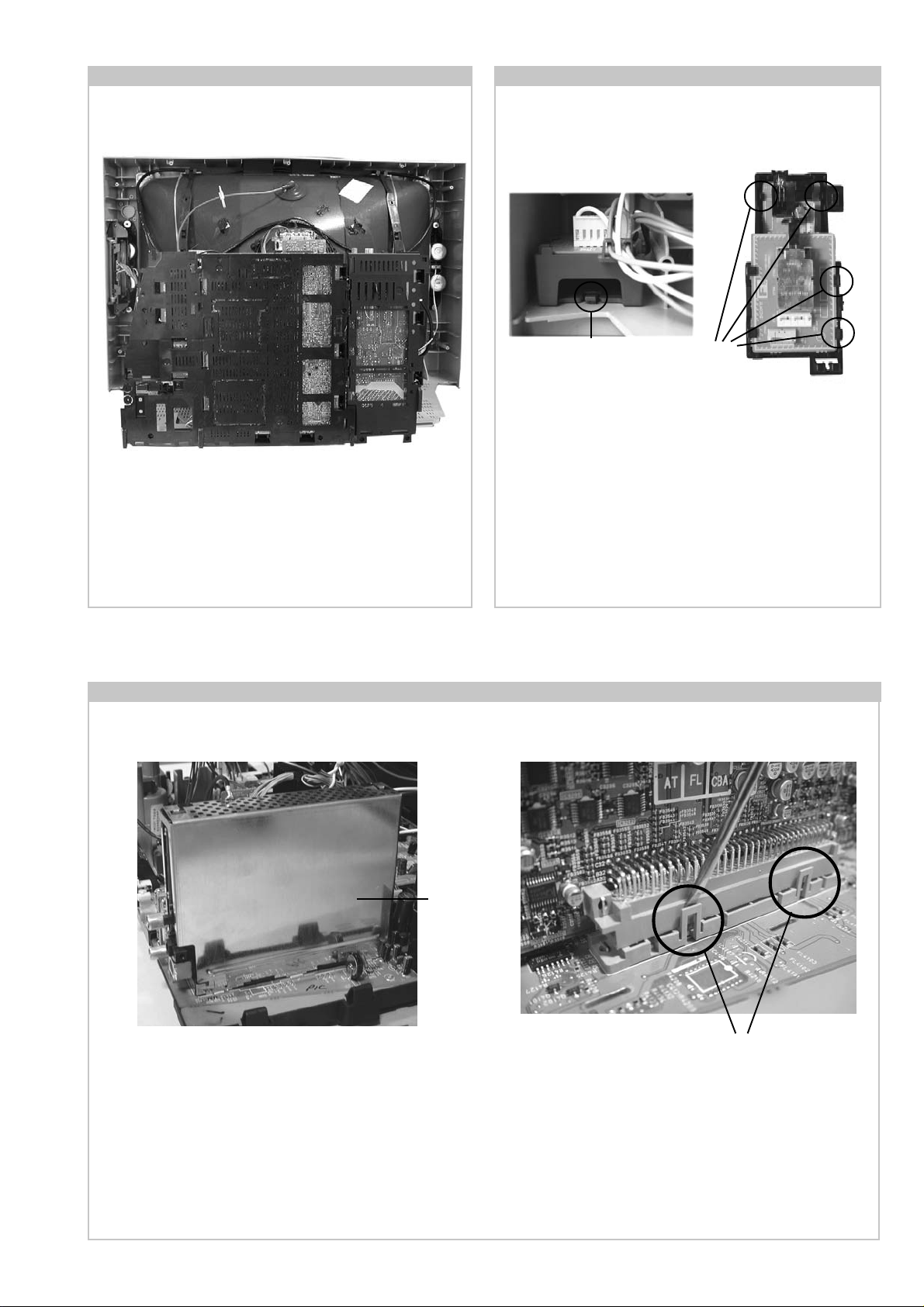
2-1. Rear Cover Removal .................... 13
2-2. Side Control Module Removal .................... 13
2-3. Chassis Removal .................... 13
2-4. Service Position .................... 14
2-5. F6 and H8 Board Removal .................... 14
2-6. N Board Removal .................... 14
2-7. Picture Tube Remov al .................... 15
Bottom Plates .................... 16
3. SET-UP ADJUSTMENTS
4. CIRCUIT ADJUSTMENTS
4-1. Electrical Adjustments .................... 21
4-2. T est Mode 1 .................... 23
4-3. T est Mode 2 .................... 23
5. DIAGRAMS
5-1. Block Diagrams (1) .................... 24
Block Diagrams (2) .................... 25
Block Diagrams (3) .................... 26
5-2. Circuit Board Location .................... 27
5-3. Schematic Diagrams and
Printed Wiring Boards .................... 27
* A Board .................... 29
* C Board .................... 32
* VM Board .................... 33
* A1 Board .................... 34
* B Board .................... 36
* H2 Board .................... 36
* D3 Board .................... 37
* H8 Board .................... 37
* F3 Board .................... 37
* D2 Board .................... 37
* F6 Board .................... 37
5-4. Semiconductors .................... 38
5-5. IC Blocks .................... 40
6. EXPLODED VIEWS
6-1. Chassis .................... 41
6-2. Picture Tube .................... 42
3-1. Beam Landing .................... 17
3-2. Convergence .................... 18
3-3. Focus Adjustment .................... 20
3-4. Screen (G2), White Balance .................... 20
CAUTION
SHORT CIRCUIT THE ANODE OF THE PICTURE TUBE AND THE
ANODE CAP TO THE METAL CHASSIS, CRT SHIELD, OR THE
CARBON PAINTED ON THE CRT, AFTER REMOVAL OF THE
ANODE CAP.
WARNING !!
AN ISOLATION TRANSFORMER SHOULD BE USED DURING
ANY SERVICE WORK TO AVOID POSSIBLE SHOCK HAZARD
DUE TO LIVE CHASSIS, THE CHASSIS OF THIS RECEIVER IS
DIRECTLY CONNECTED TO THE POWER LINE.
SAFETY-RELATED COMPONENT WARNING !!
COMPONENTS IDENTIFIED BY SHADING AND MARKED ON
THE SCHEMATIC DIAGRAMS, EXPLODED VIEWS AND IN THE
PARTS LIST ARE CRITICAL FOR SAFE OPERATION. REPLACE
THESE COMPONENTS WITH SONY PARTS WHOSE PART
NUMBERS APPEAR AS SHOWN IN THIS MANUAL OR IN
SUPPLEMENTS PUBLISHED BY SONY.
7. ELECTRICAL PARTS LIST .................... 43
ATTENTION
APRES AVOIR DECONNECTE LE CAP DE’LANODE,
COURT-CIRCUITER L’ANODE DU TUBE CATHODIQUE ET
CELUI DE L’ANODE DU CAP AU CHASSIS METALLIQUE DE
L’APPAREIL, OU AU COUCHE DE CARBONE PEINTE SUR LE
TUBE CATHODIQUE OU AU BLINDAGE DU TUBE
CATHODIQUE.
ATTENTION !!
AFIN D’EVITER TOUT RISQUE D’ELECTROCUTION
PROVENANT D’UN CHÁSSIS SOUS TENTION, UN
TRANSFORMATEUR D’ISOLEMENT DOIT ETRE UTILISÈ LORS
DE TOUT DÈPANNAGE LE CHÁSSIS DE CE RÈCEPTEUR EST
DIRECTMENT RACCORDÈ Á L’ALIMENTATION SECTEUR.
ATTENTION AUX COMPOSANTS RELATIFS Á
LA SECURITÈ!!
LES COMPOSANTS IDENTIFIÈS PAR UNE TRAME ET PAR UNE
MARQUE SUR LES SCHÈMAS DE PRINCIPE, LES VUES
EXPLOSÈES ET LES LISTES DE PIECES SONT D’UNE IMPOR-
TANCE CRITIQUE POUR LA SÈCURITÈ DU FONCTIONNEMENT,
NE LES REMPLACER QUE PAR DES COMPSANTS SONY DONT
LE NUMÈRO DE PIÈCE EST INDIQUÈ DANS LE PRÈSENT
MANUEL OU DANS DES SUPPLÈMENTS PUBLIÈS PAR SONY.
- 2 -
Page 3
LEDOMMETI metsySnoisiveleT metsySoeretS egarevoClennahC metsySroloC
UI oeretSMACIN96E-12E:FHUI
MACES,LAP
85.3CSTN,34.4CSTN
)NIOEDIV(
ebuTerutciP
skcaJonohPoiduArofelbairavsrotcennoCtuptuO
latigiD
kcajenohpdaeHkcajinimoerets
stupnioiduAskcajonohp
stupnioediVskcajonohp
tupnioediVSNIDnip4
nortinirTDFyalpsiDtalF
)sehcni82(mc17xorppA
derusaemerutcipmc66xorppA(
U04XD82-DK)yllanogaid
)sehcni23(mc28xorppA
derusaemerutcipmc67xorppA(
U04XD23-DK)yllanogaid
]RAER[slanimreTtuptuO/tupnI
rotcennocoruEnip-12:1
)dradnatsCELENEC(
rotcennocoruEnip-12:2
slangiS
]EDIS[slanimreTtuptuO/tupnI
.BGRrofstupnI
.slangis
.oediVSrofstupnI
)elbatceles(
kcaJmedoM
AICMCP
.slangisoediVdnaoiduArofstupnI
oiduAdnaoediVVTfostuptuO
.slangisoediVdnaoiduArofstupnI
.slangisoiduAdnaoediVVTfostuptuO
tuptuodnuoS
rekaepstfeLdnathgiR)SMR(W7x2)rewoPcisuM(W41x2
snoitacificepSlareneG
stnemeriuqeRrewoPV042-022
noitpmusnoCrewoP
snoisnemiD
thgieW
seirosseccAdeilppuS
serutaeFrehtO
cdV3
stnemeriuqerrewoP
.ecitontuohtiwegnahcottcejbuserasnoitacificepsdnangiseD
)04XD82-DK(W09
)04XD23-DK(W88
)04XD82-DK(mm045x794x608xorppA
)04XD23-DK(mm485x465x198xorppA
)04XD82-DK(gk34xorppA
)04XD23-DK(gk5.06xorppA
)1(rednammoCetomeR339-MR
)2(yrettab6RdetangisedCEI
txeteleT,noitcetedotuAmetsysVT
ybloDlautriV
lortnoCderarfnI:metsySlortnoCetomeR
noitangisedCEIseirettab2
)AAezis(6R
metI
emaNledoM
bmoClaPFFOFFO
PIPFFOFFO
ytiroirPBGRNONO
xoBrefooWFFOFFO
1tracSNONO
2tracSNONO
)3(nitnorFNONO
4tracSFFOFFO
rotcejorPFFOFFO
G/BmroNFFOFFO
ImroNNONO
K/DmroNFFOFFO
SUAmroNFFOFFO
LmroNFFOFFO
TASmroNFFOFFO
MmroNFFOFFO
txeteleTNONO
oeretSmaciNNONO
U04XD82-DK U04XD23-DK
WARNING (UK Models only)
The flexible mains lead is supplied connected to a B.S. 1363 fused
plug having a fuse of 5 AMP rating. Should the fuse need to be
replaced, use a 5 AMP FUSE approved by ASTA to BS 1362, ie one
that carries the
IF THE PLUG SUPPLIED WITH THIS APPLIANCE IS NOT SUITABLE FOR THE OUTLET SOCKETS IN YOUR HOME, IT SHOULD
BE CUT OFF AND AN APPROPRIATE PLUG FITTED. THE PLUG
SEVERED FROM THE MAINS LEAD MUST BE DESTROYED AS A
PLUG WITH BARED WIRES IS DANGEROUS IF ENGAGED IN A
LIVE SOCKET.
When an alternative type of plug is used, it should be fitted with a
5 AMP FUSE, otherwise the circuit should be protected by a 5 AMP
FUSE at the distribution board.
- 3 -
ASA
T
mark.
How to replace the fuse.
Open the fuse compartment with
a screwdriver blade and replace
the fuse.
FUSE
Page 4
21 pin connector
21
19
17
15
13
11
9
7
5
3
1
20
18
16
14
12
10
8
6
4
2
Pin No 1 2 4 Signal Signal level
1 Audio output B
2
3
4 Ground (audio)
5 Ground (blue)
6 Audio input A
7 Blue input 0.7 +/- 3dB, 75 ohms positive
8 Function select
9 Ground (green)
10 Open
11 Green Green signal : 0.7 +/- 3dB, 75 ohms,
12 Open
13 Ground (red)
14 Ground (blanking)
15
_ (S signal Chroma
16 Blanking input
17 Ground (video
18 Ground (video
19 Video output 1V +/- 3dB, 75ohms, positive sync 0.3V
20
_ Video input
21 Common ground
(right)
Audio output B
(right)
Audio output A
(left)
(left)
(AV control)
_ _ Red input 0.7 +/- 3dB, 75 ohms, positive
input)
(Ys signal)
output)
input)
_ _ Video input 1V +/- 3dB, 75ohms, positive sync 0.3V
Y (S signal)
(plug, shield)
Standard level : 0.5V rms
Output impedence : Less than 1kohm*
Standard level : 0.5V rms
Output impedence : More than 10kohm*
Standard level : 0.5V rms
Output impedence : Less than 1kohm*
Standard level : 0.5V rms
Output impedence : More than 10kohm*
High state (9.5-12V) : Part mode
Low state (0-2V) : TV mode
Input impedence : More than 10K ohms
Input capacitance : Less than 2nF
positive
0.3 +/- 3dB, 75 ohms, positive
High state (1-3V) Low state (0-0.4V)
Input impedence : 75 ohms
(-3+10dB)
(-3+10dB)
1V +/- 3dB, 75ohms, positive sync 0.3V
(-3+10dB)
Connected Not Connected (open) * at 20Hz - 20kHz
Rear Connection Panel Front Connection Panel
p
- +
niP
oN
S-Video
socket
s
4
4
MONO
L/G/S/I
4
R/D/D/D
1dnuorG2dnuorG3tupni)langisS(Y,mho57Bd3-/+V1
4tupni)langisS(CBd3-/+V3.0
langiS leveLlangiS
noitarugifnocniptekcosoediVS
V3.0.cnySevitisop
Bd01+3-
evitisop,mho57
.cnyS
- 4 -
Page 5
FE-2 SELF DIAGNOSTIC SOFTWARE
The identification of errors within the FE-2 chassis is triggered in one of two ways :- 1: Busy or 2: Device failure to respond to IIC. In the event
of one of these situations arising the software will first try to release the bus if busy (Failure to do so will report with a continuous flashing
LED) and then communicate with each device in turn to establish if a device is faulty. If a device is found to be faulty the rele vant device number
will be displayed through the LED (Series of flashes which must be counted) See table 1., non fatal errors are reported using this method.
Each time the software detects an error it is stored within the NVM. See T able 2.
Table 1
egasseMrorrE
rorreoN00
devreseR10
)noitcetorPtnerruCrevO(PCO20
desUtoN30
cnySlacitreVoN40
norewoptarorrERKI50
norewoptawolsenilatadro/dnakcolcsubCII60
norewoptaegdelwonkcasubCIIonMVN70
desUtoN80
norewoptaegdelwonkcaonrenuT90
rorrErossecorPdnuoS01
rorrestlov8rellortnocelgnuJ11
Flash Timing Example : e.g. error number 3
StBy LED
ON
ON ON
How to enter into T able 2
DEL
edoC
1. Turn on the main power switch of the TV set and enter into
the ‘Stanby Mode’.
2. Press the following sequence of buttons on the Remote
Commander.
i+
(ON SCREEN (DIGIT 5) (VOLUME -) (TV)
DISPLAY)
5
-
3. The following table will be displayed indicating the error
count.
Table 2
UNEMRORRE
OFF
OFF
20E
30E
40E
50E
60E
70E
80E
90E
01E
11E
SRUOH
SETUNIM
PCO
A/NPVO
CNYSV
RKI
CII
MVN
ELGNUJ
RENUT
PDNUOS
V8
EMITGNIKROW
)552,0(
0
)552,0(
0
)552,0(
0
)552,0(
0
)552,0(
0
)552,0(
0
)552,0(
0
)552,0(
0
)552,0(
0
)552,0(
0
2
11
Note: T o clear the error count data press ‘80’ on the Remote
commander.
- 5 -
Page 6
- 6 -
OK
O
K
O
K
Getting Started
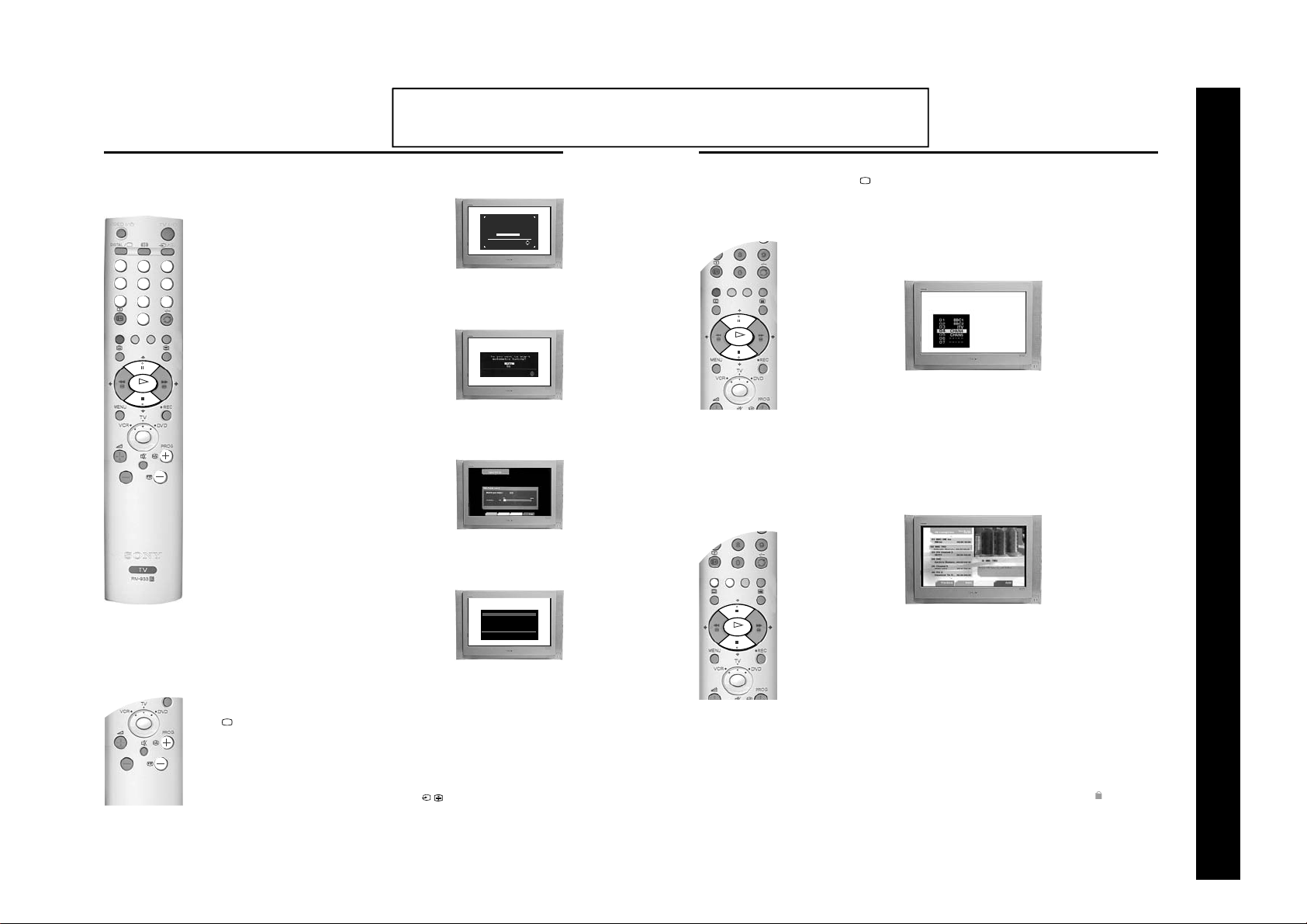
5. Automatically tuning the TV
1. When you switch on the TV for the first time a menu appears on the
screen asking you to check if the picture is slanted. (Sometimes the
Earth’s natural magnetism can cause the screen to look tilted.)
VIDEO
DIGITAL
TV
/
/
a) If no correction is required, press the V or v buttons on the
remote control to highlight ‘Not necessary’ and press the OK
button.
1
2
3
b) If some correction is required, press the V or v buttons on the
4
5
6
7
8
9
0
O
K
remote control to highlight ‘Adjust now’, then press the OK
button. Correct the slant by pressing the V or v buttons then
press the OK button to store.
2. The autotune prompt screen appears. Press the OK button to select
‘Yes’. The autotune procedure begins.
The Digital autotune display appears on screen and the search and
store procedure begins. All the a v ai lab le Digital chann els wil l no w be
captured and stored. As this may take some time, a message is
included in the display to inform you of the tuning progress.
When Digital tuning is complete, the analogue display appears
automatically and the search and store procedure for the analogue
channels begins.
If no Digital and no analogue channels are found, a menu appears
asking you to confirm your aerial is connected. After checking the
aerial has been connected press OK to begin the autotune
procedure again.
Once all Digital and analogue channels have been captured and
stored, the TV returns to normal operation and displays the Digital
channel captured on channel number 1.
The operating instructions mentioned here are partial abstracts from the ‘Operating
Instruction Manual’. The page numbers of the ‘Operating Instruction Manual’ remain
as in the manual.
Selecting Digital or analogue mode
Press the DIGITAL/ button on the remote control to switch between Digital and analogue mode. To
Checking the picture tilt.
If picture slants, please
adjust picture rotation.
Not necessary
Adjust now
The Programme Index table
OK
check if you are watching a Digital or analogue mode press the PROG +/- button. If you are watching a
digital programme a banner will appear momentarily at the top of the screen.
The ‘Program me Index t able’ is a quick and easy way to search for a channel you wish to view. The
‘Programme Index table’ is only available in analogue mode.
1. Press the OK button to display the ‘Programme Index table’ on screen.
The autotune prompt screen.
2. Press the v or V button to scroll through the list until the channel you wish to view is highlighted.
3. Press the OK button to display your chosen channel on the TV screen.
The Channel Index menu
Tuning the Digital channels.
The ‘Channel Index menu’ provides you with a quick and easy way to:-
a) View a complete list of the programmes available for selection,
b) Obtain a preview of the programmes contained in the list,
c) Search for a programme quickly by selecting from different categories of programmes,
d) Store programmes into a list of favourites.
Basic Operation
SECTION 1 GENERAL
Note: If no Digital channels are captured, the analogue channel that is stored
on channel number 1 is displayed.
3. To view programmes, press the PROG+/- buttons or the numbered
buttons.
6. Finding the video channel
If you connected a VCR to your TV when following the ‘Connecting an
aerial and a VCR’ instructions, you will now need to find your video
channel. Ensure the TV is in analogue mode. If it is not, press the
DIGITAL/ button on the remote control.
1. Press the PROG +/- buttons on the remote control until the picture
from the pre-recorded tape appears on the TV screen.
Notes: If you wish to move your video channel to a different programme number,
refer to ‘The Set Up menu’ section of this manual.
If you have connected your VCR using a scart lead, press the /
button on the remote control until the picture from the pre-recorded tape
appears on the TV screen. (Refer to ‘Connecting additional equipment’).
6
Getting Started
Tuning the analogue channels.
Auto Tuning
Programme: 02
C29
Channel :
Completed 16%
The ‘Channel Index menu’ is only available in Digital mode.
1. Press the OK button on the remote control to display the ‘Channel Index menu’ on the TV screen.
The menu contains a list of all the available channels. The name of the programme currently being
shown along with its start and finish times is shown for each of the available channels. The current
channel is previewed in the top right corner of the screen with its channel name and number
displayed below it.
2. Press the V or v buttons to move the coloured cursor up or down the list to select the desired
programme. If you do not want to select a programme from the 6 channels listed, press the GREEN
button to display the next 6 programmes or the RED button to display the preceding 6 channels.
3. Press the OK button to display the highlighted programme in the preview window*.
4. Press the OK button to exit the ‘Channel Index menu’. The programme that was being previewed will
be displayed.
*Note: If an age limit for viewing has been set and the programme selected exceeds that age limit, you will need to
enter your PIN code before the preview is displayed. Ref er to ‘Th e Mai n Men u’ for more inf ormation on the ‘PIN
Code’ feature. Programmes that exceed the age limit you have set will be identified by a symbol.
Basic Operation
9
Page 7
VIDEO
/
TV
/
DIGITAL
O
K
1
2
3
6
5
4
7
8
9
0
O
K
- 7 -
Basic Operation
K
O
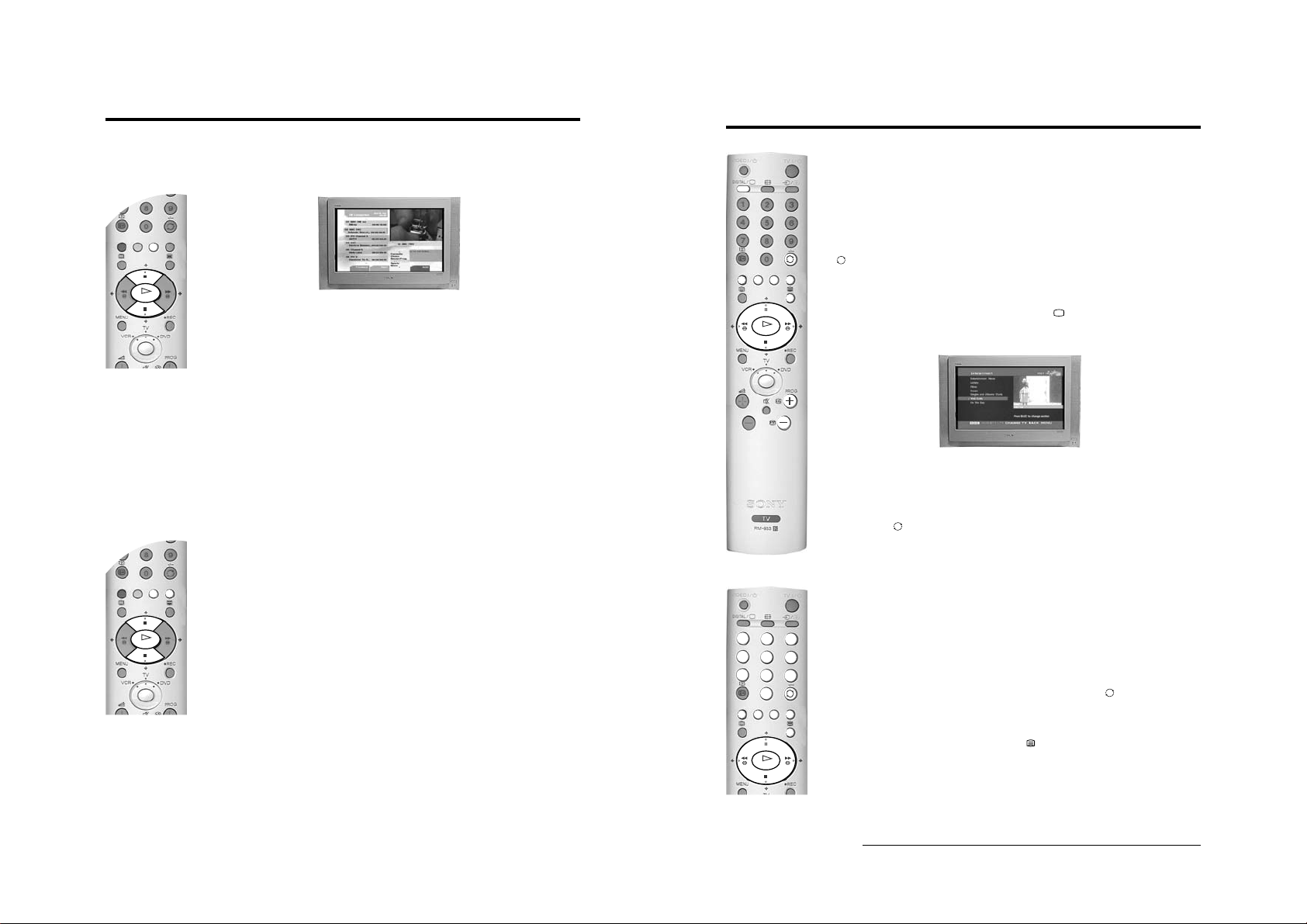
The Category pop-up list
The ‘Category’ pop-up list allows you to quickly search for a programme by choosing from different
categories of programmes.
1. With the ‘Channel Index menu’ on screen, press the YELLOW button to display the ‘Category’ popup list.
2. Press the V or v buttons to highlight the required category. The category you choose will be
displayed in a title bar at the top of the programme list along with the date and time.
3. Press the OK button. The ‘Channel Index menu’ will now contain o nly programmes of the type
selected.
Basic Operation
Viewing Digital Teletext
VIDEO
DIGITAL
/
K
O
Many broadcasters now provide a Digital Teletext service in the form of a dedicated Teletext channel.
TV
/
This Digital service includes high quality text and graphics along with advanced navigation options.
The appearance, content and navigation methods of all Digital Text services are decided by the
broadcaster. For example, Digital Text from the BBC may look different to Digital Text from ITV which
may use different navigation methods. Most of the Digital Text services currently available use simple
navigation method s based on the followi ng buttons:
The V, v, B and b buttons (to move around the screen),
The OK button (to select items on screen),
The button (to cancel),
The four coloured buttons (to access shortcuts).
Dedicated Digital Teletext channels
1. If the TV is not already in Digital mode, press the DIGITAL/ button on the remote control. Press
the numbered buttons on the remote control to select a dedicated Teletext channel number. To find
out the channel number of a dedicated Digital Teletext channel, use the ‘Channel Index menu’.
(Please refer to the ‘Changing channels’ section of this instruction manual.)
The following categories are available:
Favourite Contains all the programmes you have stored as a favourite (see below).
Choice The TV will create this list based on the type of programmes you watch the most.
Recent Prog. Contains the last 5 programmes watched.
All Categories Contains all available channels.
Sports Contains all sport channels.
News Contains all news channels.
Film Contains all film channels.
Entertainment Contains all entertainment channels.
Lifestyle Contains all lifestyle channels.
Education Contains all education channels.
Kids Contains all kids channels.
Favourite programmes
This feature allows you to create a list of your favourite programmes.
To add a programme to the Favourite list
1. With the ‘Channel Index menu’ on screen, press the V or v buttons to highlight the programme you
want as a favourite.
2. Press the BLUE button to store the programme in the favourite list.
To remove a programme from the Favourite list
K
O
1. With the ‘Channel Index menu’ on screen, press the YELLOW button to access the ‘Category’ popup list.
2. Highlight the ‘Favourite’ category. Press the OK button to display the ‘Favourite list’.
3. Highlight the programme you wish to remove from the ‘Favourite list’.
4. Press the BLUE button to remove the programme.
2. Once the Teletext channel is displayed, press the V, v, B or b buttons as instructed on the screen t o
select your requirement, then press the OK button to display the chosen information.
Note: On some pages the TV programme is also displayed. Instructions on screen will tell you how to change the
displayed programme.
3. If when viewing the Teletext pages, you a re req ues te d to select ‘OK’ or ‘Cancel’, press the OK button
for ‘OK’ and the button for ‘Cancel’.
4. When you have finished viewing Teletext, press the PROG +/- buttons to exit.
Selecting Teletext from other Digital channels
Normal Teletext services may also be av ailab le on other Dig ital c hanne ls. Som etim es thi s is i ndi cated by
a small symbol or text display on your TV screen, superimposed on the channel you are watching.
1. Press the V, v, B or b buttons to select the symbol then press the OK button to display the chosen
information.
2. Alternatively, you may be requested to use the numbered and coloured buttons on your remote
control to display the various pages of text information. If when viewing the teletext pages, you are
requested to select ‘OK’ or ‘Cancel’, press the OK button for ‘OK’ and the button for ‘Cancel’.
3. Once the text information is displayed on screen, use the V, v, B or b buttons, the coloured buttons
and/or the numbered buttons to access the chosen information.
4. When you have finished viewing Teletext, press the button and then select an alternative Digital
channel.
10 Basic Operation
12 Basic Operation
Page 8
- 8 -
VIDEO
/
TV
/
DIGITAL
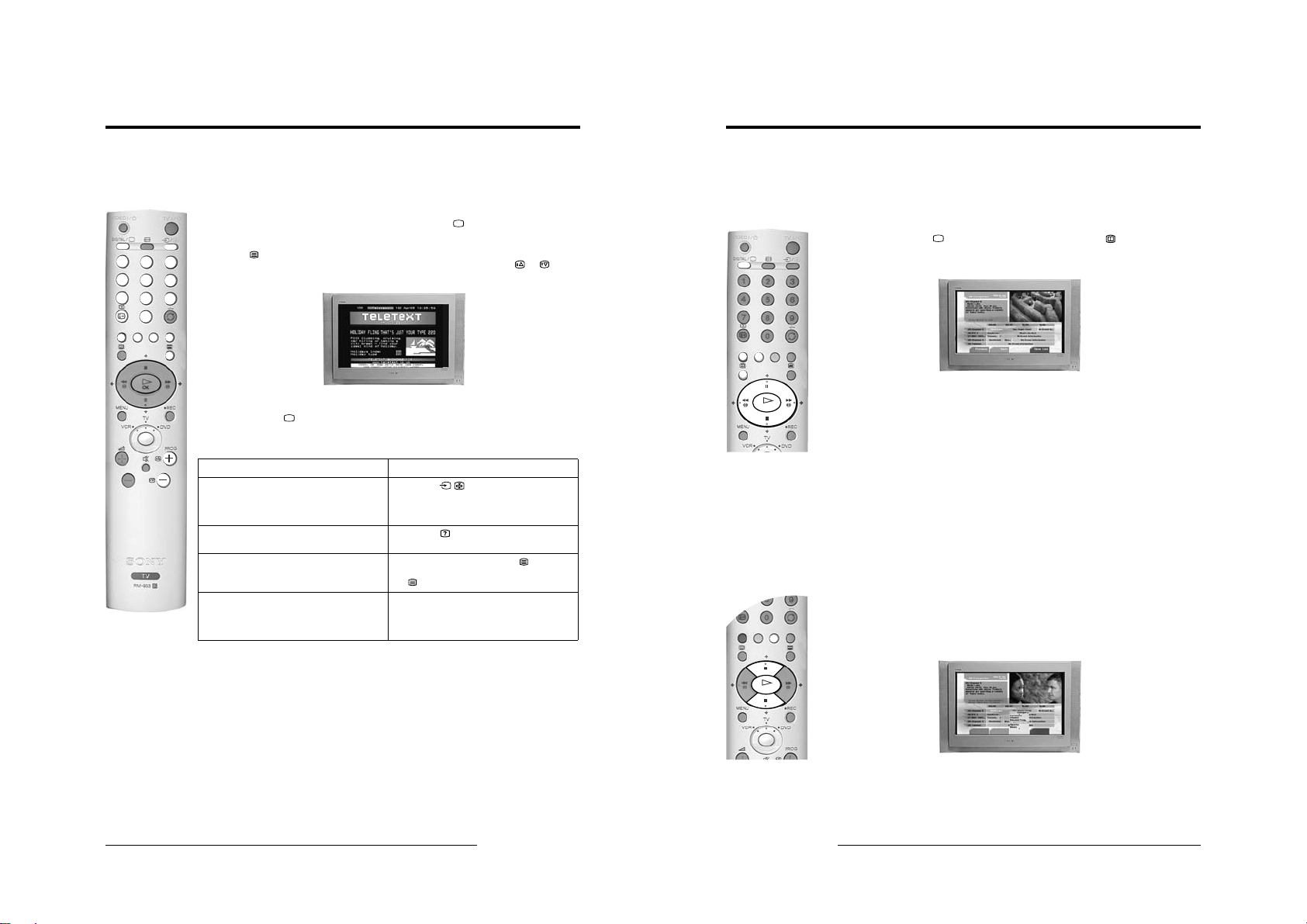
Teletext (Analogue)
Most analogue TV channels broadcast a Teletext service. The index page (usually page 100) provides
information on how to use the service. Please ensure you are receiving a good signal, or some Teletext
errors may occur.
Switching Teletext on and off
VIDEO
DIGITAL
TV
/
/
1. If the TV is not already in analogue mode, press the DIGITAL/ bu tton on the remo te control.
Select the analogue TV channel which carries the Teletext service you want to view.
1
2
4
5
7
8
0
2. Press the button to enter Teletext mode, then using the numbered buttons on the remote control,
3
enter the three digits of the page number y ou wish to vie w. Alternatively, press the or buttons
to view the previous or next page. After a short time it will appear on screen.
6
9
3. Enter more 3 digit page numbers as required.
4. Press the DIGITAL/ button to exit Teletext.
How to use Teletext features
Hold Some pages co ntain sub-p ages whic h
Reveal Some Teletext pages contain hidden
Mix This feature allows you to
Fastext Fastext allows you to access pages
Feature How to use
follow on automatically. This feature
allows you hold the current page until
you are ready to proceed.
information (e.g. for a quiz).
superimpose Teletext on to the TV
screen.
quickly and easily. Wh en Fastext is
available, four coloured items appear
at the bottom of the screen.
Press the / button to hold the page
currently being displayed. Press again to cancel.
Press the button to reveal the hidden
information. Press again to cancel.
In Teletext mode, press the button to
superimpose Teletext on to the TV screen. Press
the button again to exit Teletext.
Press the corresponding coloured button on the
remote control to access the required page.
Basic Operation
Basic Operation
The Digital EPG menu
The EPG menu (Electronic Programme Guide) provides you with a quick and easy way to:-
a) View a complete list of the programmes available.
b) Obtain a preview of the programmes currently being broadcast.
c) Reduce the size of the list by selecting a category of programme, e.g. Sports or Movies.
d) Record programmes.
1. The EPG menu is only available when watching Digital channels. If the TV is not already in Digital
mode, press the DIGITAL/ button on the remote control. Press the button on the remote
control to display the EPG menu screen. This screen consists of an information window, a preview
window, a 2 hour timer bar ( divided into 30 minute inter vals) and a 5 channel programme li st
covering the 2 hour period.
2. Press the V or v buttons to mov e the c oloured c ursor b ar up or d ow n the p rogr amm e list a nd the b or
B buttons to move left and right. If you press the b button once more after highlighting the last
K
O
programme on the right, the programmes scheduled for the next 2 hour period are displayed.
As each programme is highlighted, a brief description of the programme appears in the event
information box at the top left of the screen.
If you do not wish to select a programme from the 5 channels listed, press the GREEN button to
display the next 5 channels or RED button to display the previous 5 channels.
3. If a programme you highlight is currentl y be ing broad ca st, press the OK button to obtain a preview in
the preview window. If you have previously set a viewing age limit in the ‘Digital Setting’ menu, and
the programme excee ds that age limit, y ou wi ll be ask ed to en ter y our PIN code before the preview is
allowed.
4. When the programme in the preview screen is the one y ou wish to w atch, pres s the OK b utton to e xit
the EPG menu and view the programme at full size.
The Category pop-up list
The ‘Category’ pop-up list allows you to quickly search for a programme by choosing from different
categories of programmes. For example, select the ‘News’ option from the ‘Category’ pop-up list to
display programme information only for News channels.
1. With the EPG menu on screen, press the YELLOW button to display the ‘Category’ pop-up list.
2. Press the V or v buttons to highlight the category you want, then press the OK button. The EPG
programme list will now only contain programmes of the type selected.
K
O
For information on the types of Ca tegories along wi th instructions on how to add and remove programm es
from the Favourite list, please refer to ‘The Channel Index menu’ section of this instruction manual.
Basic Operation
13
14 Basic Operation
Page 9
VIDEO
/
TV
/
DIGITAL
1
2
3
6
5
4
7
8
9
0
- 9 -
Basic Operation
VIDEO
DIGITAL
/
K
O
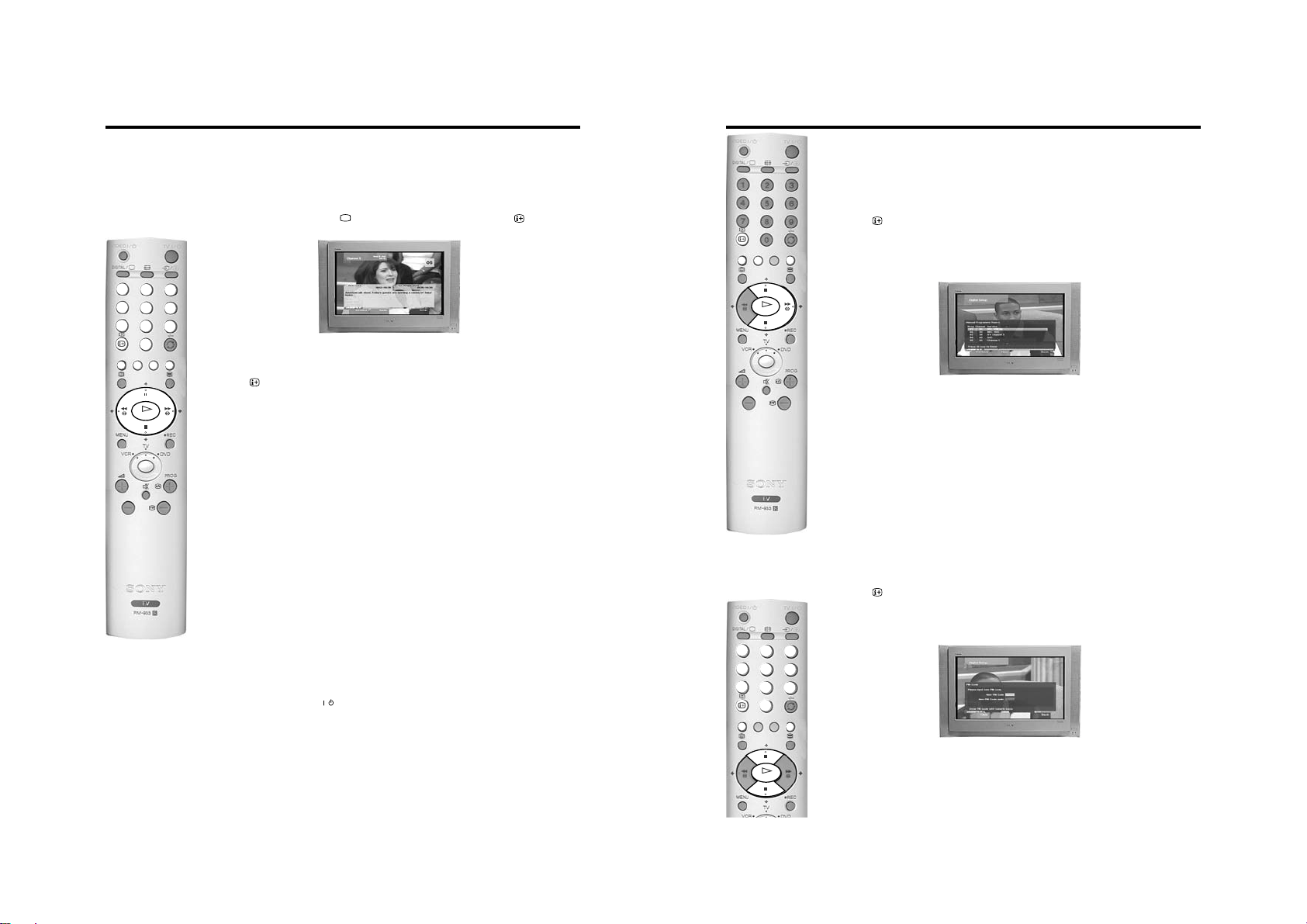
The Digital INFO display
This menu gives you information on the programmes currently being shown aswell as the those
programmes which are on next. When first s electe d, the ‘Digita l IN FO displ ay’ gives a brief description of
the current programme being transmitt ed, i ts c ha nne l nu mber and the start and end time. The title of the
next programme and its start and end time is also shown.
1. The ‘Digital INFO display’ is only available when watching Digital ch an nel s . If the TV is not already in
Digital mode, press the DIGITAL/ button on the remote control. Press the button on the
remote control to display the ‘Digital INFO display’ screen.
VIDEO
DIGITAL
TV
/
/
1
2
3
4
5
6
7
8
9
0
2. Press the b button to obtain a brief d escription of the next programme in the sc hedule. If the
programme box is blank, there is no information currently available. To return to the starting point,
press the B button repeatedly until the description for the current programme reappears.
3. Press the button on the remote control at any time to exit the ‘Digital INFO display’.
Note: To change channels while the ‘Digital INFO display’ is on screen, press the relevant numbered buttons on the
K
O
remote control.
Using other INFO menu features
Subtitles
This feature will place Digital subtitles on the screen (similar to selecting p.888 in analogue Teletext
mode).
With the ‘Digital INFO display’ on the TV screen, press the RED button to access the ‘Subtitles’ pop-up
menu. Press the V or v button to highlight the language required then press OK to select.
To remove subtitles from the TV screen, access the ‘Subtitles’ pop-up menu and select ‘Off’.
Audio
This feature allows you to listen to the broadcast in different languages*.
With the ‘Digital INFO display’ on the TV screen, press the GREEN button to access the ‘Audio’ pop-up
menu. Press the V or v button to highlight the language required then press OK to select.
REC
This feature allows you to automatically set your VCR to record the selected programme**, or have the
TV switch to the correct channel automatically when the selected programme starts.
With the ‘Digital INFO display’ on the TV screen, press the YELLOW button to access the ‘REC’ pop-up
menu. If your VCR does not have Smartlink a message is displayed reminding you to manually set your
VCR. Press the RED button to continue or press the BLUE button to return to the INFO display.
Notes: Do not switch off theTV once a programme has been set to record. If you do not wish to view the programme
being recorded, press the TV button on the remote control to switch the TV into standby mode.
When a programme has been set to record and the TV is in standby mode the standby indicator on t he front
of the TV will flash green periodically to inform you that a programme has been set to record.
Do not change channels or switch the TV to analogue mode once a programme has started rec ording or the
recording will be cancelled.
Set-up
With the ‘Digital INFO display’ on the TV screen, press the BLUE butto n to ac ce ss the ‘Ma in M enu’. The
‘Main Menu’ is explained on the following pages.
Notes: *Only when the programme is broadcast in multiple languages.
**Only for Smartlink VCRs
/
K
O
Detail Set-up
TV
/
The ‘Detail Set-up’ menu allows you to further customise your TV with the following features:
Manual Tuning
This feature allows you to select a chann el numb er from the dis played l ist and change t he digita l servic es
of that channel.
1. Press the button on the remote control to display the ‘Digital INFO display’. Press the BLUE
button to display the ‘Main Menu’.
2. Press the V or v button to highlight ‘Detail Set-up’ then press the OK button to display the ‘Detail
Set-up’ menu.
3. Press the V or v button to highlight ‘Manual Tuning’ then press the OK button to display the ‘Manual
Tuning’ menu.
4. Press the V or v button to highlight the chosen channel number for your new channel. If you do not
wish to select any of the programme numbers listed, press the RED or GREEN button to display the
previous or next 5 programme numbers on the list.
5. With your channel number highlighted, press the OK button to display the ‘Manual Programme
Search’ screen.
6. Press the V or v button if you wish to change the channel number, then press the b button to make
the select search box active.
7. Press the V or v button to begin the search process. The words ‘Searching Down’ or ‘Searching Up’
appear in the select search box to indicate that the TV is searching. If no Digital services are found
on the channel you have chosen, the channel number changes up or down automatically and the
search continues. When all services allocated to the selected channel have been found, the service
selection screen is displayed.
8. Press the V or v button to find and highlight the service you wish to allocate to the channel number
selected in Step 4, then press the OK button to display the channel selection screen.
9. Repeat Steps 4 to 8 if you wish to manually add more channels to your TV.
10. Press the BLUE button on the remote control three times to remove the ‘Digital INFO display’ from
the TV screen.
PIN Code
This feature allows you to set a 4-digit PIN code.
1. Press the button on the remote control to display the ‘Digital INFO display’. Press the BLUE
button to display the ‘Main Menu’.
2. Press the V or v button to highlight ‘Detail Set-up’ then press the OK button to display the ‘Detail
Set-up’ menu.
3. Press the V or v button to highlight ‘PIN Code’ then press the OK button to display the ‘PIN Code’
menu.
4. Enter your PIN code using the num bered b u ttons o n the r emo te con trol. If y ou ent er a wr ong n umber,
press the RED button to clear and start again.
5. Once you have entered a 4-digit code a cursor will appear in the second PIN Code box. Enter your
new PIN code once again as confirmation. Press the OK button to confirm.
6. When both PIN codes match, a message appears to inform you that your new PIN code has been
accepted. This is the PIN code you must use in future.
7. Press the BLUE button on the remote control to remove the ‘Digital INFO display’ from the TV
screen.
Note: If you have forgotten your PIN code, please use 9999. This PIN code will always be accepted.
16 Basic Operation
Advanced Operation
Advanced Operation
19
Page 10
- 10 -
O
K
O
K
Advanced Operation
K
O
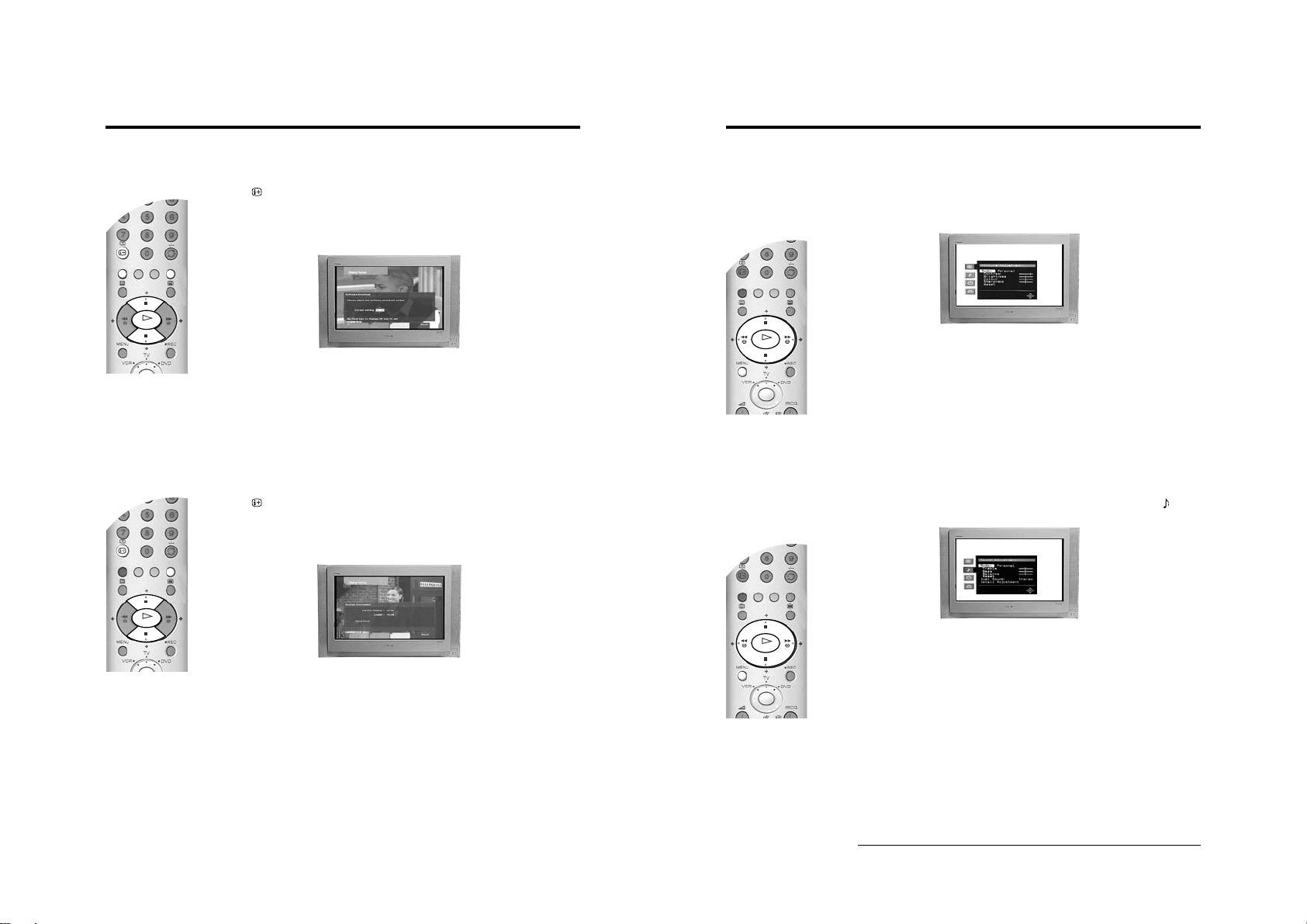
Software Download
Periodically Sony issues updates for the software that controls your TV. This feature allows you to
automatically receive updates free through your existing aerial.
1. Press the button on the remote control to display the ‘Digital INFO display’. Press the BLUE
button to display the ‘Main Menu’.
2. Press the V or v button to highlight ‘Detail Set-up’ then press the OK button to display the ‘Detail
Set-up’ menu.
3. Press the V or v button to highlight ‘Software Download’ then press the OK button to display the
‘Software Download’ menu.
4. Press the V or v button to change the ‘Current Setting’. If you wish to receive downloads, the
‘Current Setting’ should be set to ‘On’. If you do not wi sh to r e ce ive downl o ad s, th e ‘Current Setting’
should be set to ‘Off’.
5. Press the OK button to confirm.
6. Press the BLUE button to return to the Main menu.
7. Press the BLUE button on the remote control to remove the ‘Digital INFO display’ from the TV
screen.
System Information
This is an information screen only. It tells you th e curren t versi on of the software in you r TV togeth er with
the signal strength, as indicated by the red bar in the display.
1. Press the button on the remote control to display the ‘Digital INFO display’. Press the BLUE
button to display the ‘Main Menu’.
2. Press the V or v button to highlight ‘Detail Set-up’ then press the OK button to display the ‘Detail
Set-up’ menu.
3. Press the V or v button to highlight ‘System Information’ then press the OK button to display the
‘System Information’ menu.
Advanced Operation
The TV menu system
This TV contains a menu system which is based on a series of user friendly on-screen displays. These
displays will help you to get the most from your TV, helping you to change the picture settings, sound
settings and change the order of the TV channels.
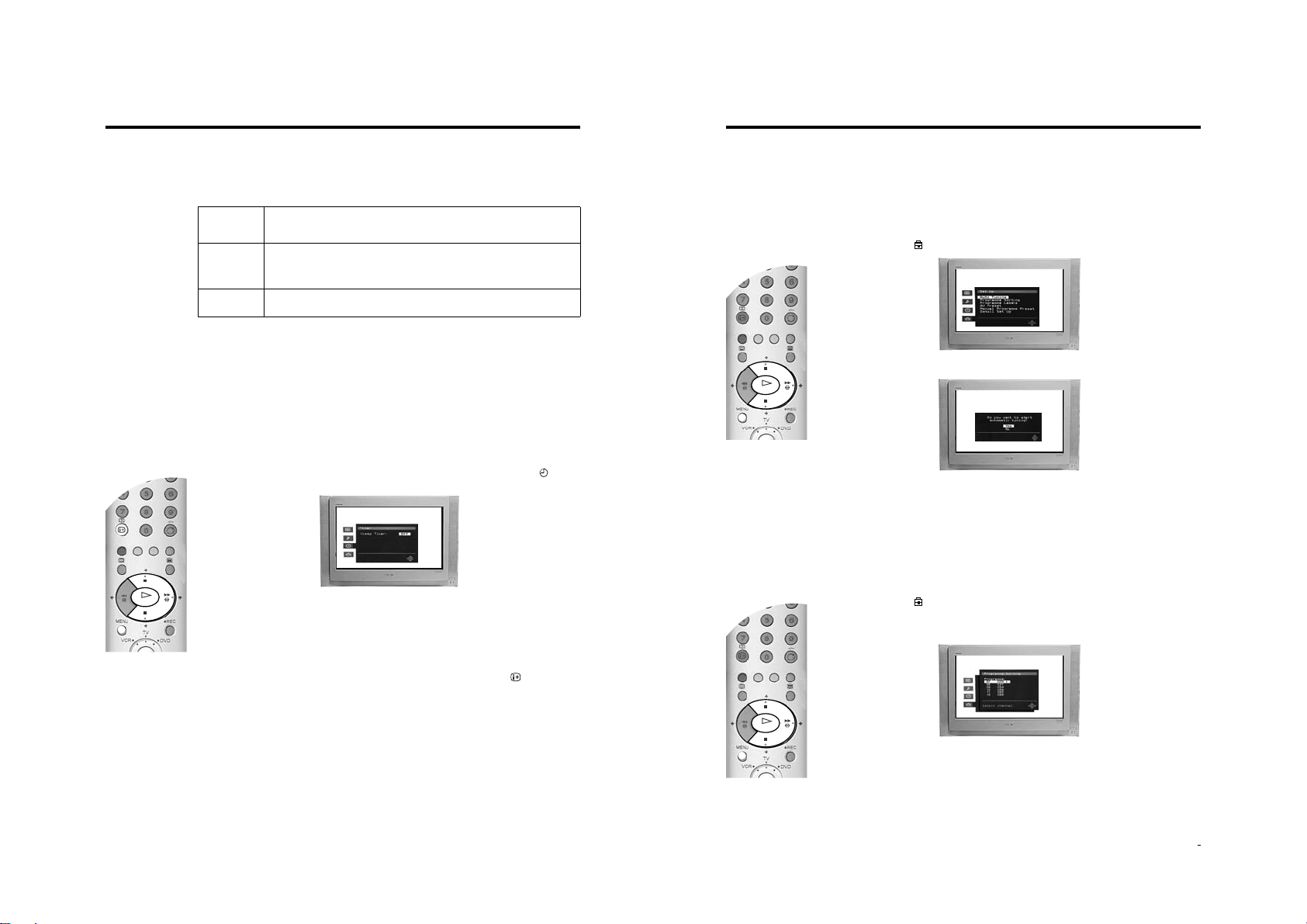
The Picture Adjustment menu
1. Press the MENU button to display the main menu, then press the b button to enter the ‘Picture
Adjustment’ menu.
2. ‘Mode:’ is highlighted. Press the v or V button to highlight one of the options, then after pressing the
b button to activate the option press b and B or v and V buttons to adjust the setting.
3. Press the OK button to store the new setting and repeat step 2 to adjust the other options.
The Mode option has three settings for you to choose from:-
Personal: This setting allows you to adjust the Brightness, Colour, Contrast and Sharpness
Live: This is a fixed setting and is recommended for live broadcasts.
Movie: This is a fixed setting and is recommended for watching films.
4. Press the MENU button to return to normal TV operation.
Note: Highlight Reset and press OK only if you wish to return the picture to the factory preset levels.
levels to suit your personal preference.
The Sound Adjustment menu
1. Press the MENU button to display the main menu, then press the v b ut ton to high light the symbol.
Now press the b button to enter the ‘Sound Adjustment’ menu.
K
O
4. Press the BLUE button to return to the Main menu.
5. Press the BLUE button on the remote control to remove the ‘Digital INFO display’ from the TV
screen.
20 Advanced Operation
22 Advanced Operation
2. ‘Mode:’ is highlighted. Press the v or V button to highlight one of the options, then after pressing the
b button to activate the option press b and B or v and V buttons to adjust the setting.
3. Press the OK button to store the new setting and repeat step 2 to adjust the other options.
The Mode option has four settings for you to choose from:-
Personal: This setting allows you to adjust all the available options in the ‘Sound adjustment’
Rock: This is a fixed setting and is recommended for rock soundtracks.
Pop: This is a fixed setting and is recommended for pop soundtracks.
Jazz: This is a fixed setting and is recommended for jazz soundtracks.
Note: ‘Tre ble’ and ‘Bass’ settings can only be altered when the ‘Mode’ option is set to Personal.
4. When ‘Detail Ad justment’ is highlighted, press the b button to display the ‘Detail Adjustment’ sub
menu. This menu gives you a further three options to choose from.
menu to suit your personal preference.
continued...
Page 11
- 11 -
O
K
O
K
O
K
Advanced Operation
5. Highlight and activate one of the options using the v and b buttons, then press the v or V buttons to
set the option to On or Off. See the table below for an explanation of each option and their effects.
6. Press the OK button to store the new setting, then repeat step 5 to alter the other options.
7. Press MENU button to return to normal TV operation.
Dolby* Virtual When set to ‘On’, the TV simulates the effects of Dolby Pro Logic Surround sound.
Auto Volume When set to ‘On’, the volume level will remain constant even if the broadcast level
TV Speakers Set to ‘Off’ if you wish to conne ct an ex ternal am plifier to the audi o output sockets on
• Notes on the Sound Adjustment menu
• Highlight ‘Reset’ and press OK only if you wish to return the sound settings to their factory preset levels.
• When receiving a bilingual broadcast set the ‘Dual Sound’ option to ‘A’ for channel 1 sound, ‘B’ for channel 2 sound or ‘Mono’ if the mono
channel is available for selection. When receiving a stereo broadcast the ‘Dual Sound’ option can be set to Stereo or Mono.
* This TV has been designed to create a Virtual Dolby Surround sound effect from a ‘Dolby Pro Logic Surround’ broadcast without the need for
additional speakers. However, you can connect an external amplifier to this TV if desired (see ‘Connecting additional equipment’ section of
this manual).
* Manufactured under licence from Dolby Laboratories. ‘Dolby’, ‘Pro Logic’ and the double-D symbol are trademarks of Dolby Laboratories.
Note: If you connect headphones to this TV or if you set the ‘Auto Volum e’ option to ‘On’,
‘Dolby Virtual’ will automatically be set to Off.
should change, i.e. during commercial breaks.
Note: This option automatically sets itself to ‘Off’ when ‘Dolby Virtual’ is set to ‘On’.
the rear of the TV.
The Timer menu
The ‘Sleep Timer’ allows you to select a period of time after which the TV automatically switches itself
into standby mode.
1. Press the MENU button to display the main menu. Use the v or V button to highlight the symbol.
Press the b button twice to highlight ‘Off’ in the ‘SleepTimer’ menu.
Advanced Operation
The Set Up menu
The ‘Set Up’ menu contains many features that enable you to customise your TV. The following pages
explain all of the features contained in the ‘Set Up’ menu.
Auto Tuning
The TV automatically tuned in all the available channels when you first installed the TV. Follow these
instructions if you wish to re-install y our TV at an alternative l ocation or s earch for ne w channels that have
been subsequently launched by broadcasters.
1. With the TV in analogue mode, press the MENU button to display the main menu. Press the v or V
button to highlight the symbol, then press the b button to enter the ‘Set Up’ menu.
2. Press the v or V buttons to highlight ‘Auto Tuning’ then press the b button to confirm. The autotune
prompt display appears on screen.
3. Press the OK button to select ‘Yes’ and begin the autotune procedure.
Whilst tuning is taking place, the search and store display appears on screen.
When all availab le s ignals ha v e be en cap tured an d stored , the di spla y is rem oved and the TV returns
to normal operation.
Notes: You can cancel the tuning at any time by pressing the MENU button.
Programme Sorting
2. Press the v or V buttons to set the amount of time before the TV switches itself into standby. This
can be in 15 minute intervals up to a maximum of 4 hours.
3. Press the OK button to store.
4. Press the MENU button to return to normal TV operation. One minute before the TV switches into
standby, the time remaining is counted down on screen.
Note: In analogue mode you can check the time remaining until standby by pressing the button. The time
remaining is displayed in the bottom left corner of the TV screen.
Advanced Operation
23
24 Advanced Operation
You can use this feature to change the order in which the analogue channels are stored on your TV.
1. With the TV in analogue mode, press the MENU button to display the main menu. Press the v or V
button to highlight the symbol, then press the b button to enter the ‘Set Up’ menu.
2. Press the v or V buttons to highlight ‘Progra mme Sorti ng’ then press the b button to display the
Programme Sorting menu on screen.
3. Press the v or V button to highlight the channel you wish to move to a new position, then press the
OK button.
4. Press the v or V button to highlight the new channel number for your channel, then press the OK
button.
5. Repeat steps 3 and 4 to move other channels if required, then press the MENU button to return to
normal TV operation.
Page 12
- 12 -
Additional Information
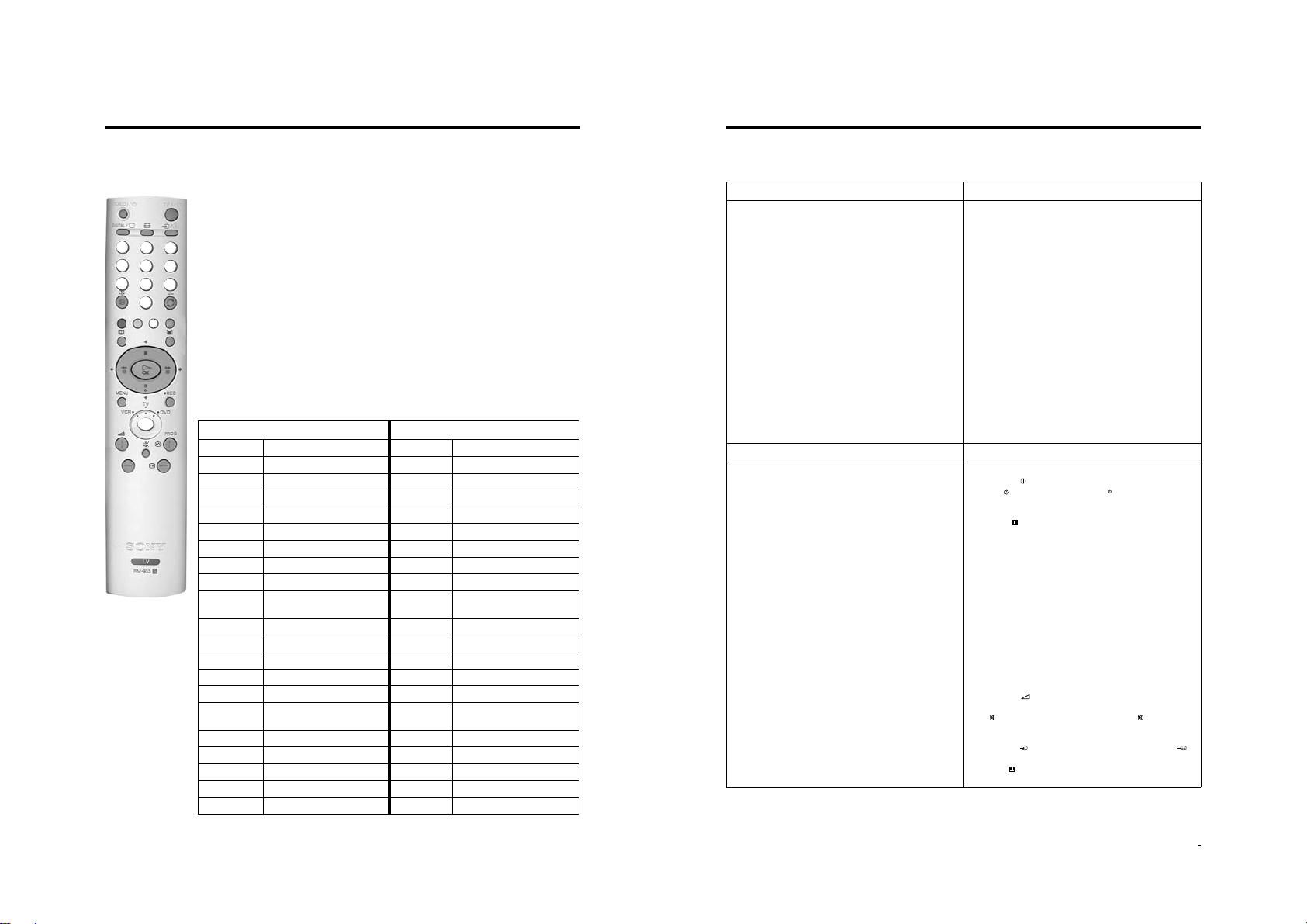
Remote control of connected equipment
This remote control can operate not only Sony DVDs and VCRs, but also those made by other
manufacturers. The following instructions will guide you through the set up procedure.
VIDEO
DIGITAL
/
1
2
4
5
7
8
0
1. Find the 3 digit code for your brand from the list below.
TV
/
2. Press the Media Select button on the remote control until either the green VCR light is illuminated
OR the green DVD light is illuminated.
3. Whilst the required green light is illuminated, press and hold down the YELLOW button for
3
approximately 6 seconds, until the light starts to flash.
6
4. Use the numbered buttons to enter t he 3 di git cod e for your DVD or VCR. Once a corre ct n umber has
been entered, all three green lights will illuminate momentarily.
9
5. Turn on your DVD or VCR and check that the remote control operates the main functions. If not,
repeat steps 2 - 4 and enter the next 3 digit code allocated to your brand of VCR or DVD.
6. When you wish to use the remote control to operate the TV again, press the Media Select button
until the TV green light illuminates. Don’t forget to select VCR or DVD using the Media Select button
every time you wish to operate that equipment with this remote control.
Note: The brand codes you set may be lost if weak batteries are not replaced immediately. Should this happen, use
the above procedure to re-enter the code. A small label has been attached to the inside of the battery cover
for you to make a note of your brand codes. Not all brands and models of DVDs or VCRs are covered in this
list, however, Sony will endeavour to update the software periodically. Please refer to the code table provided
with your remote control.
VCR Brand List DVD Brand List
Brand Code Brand Code
SONY (VHS) 301, 302, 303, 309 SONY 001
SONY (BETA) 303, 307, 310 AIWA 021
SONY (DVD) 304, 305, 306 DENON 018, 027, 020, 002
AIWA 325, 331, 351 GRUNDIG 009, 028, 023, 024, 016, 003
AKAI 326, 329, 330 HITACHI 025, 026, 015, 004
DAEWOO 342, 343 JVC 006, 017
GRUNDIG 358, 355, 360, 361, 320, 351 KENWOOD 008
HITACHI 327, 333, 334 LG 015, 014
JVC 314, 315, 322, 344, 352, 353,
354, 348, 349
LG 332, 338 MATSUI 013, 016
LOEWE 358, 355, 360, 361, 320, 351 ONKYO 022
MATSUI 356, 357 PANASONIC 018, 027, 020, 002
ORION 328 PHILIPS 009, 028, 023, 024, 016, 003
PANASONIC 321, 323 PIONEER 004
PHILIPS 311, 312, 313, 316, 317, 318,
SAMSUNG 339, 340, 341, 345 SANYO 007
SANYO 335, 336 SHARP 019, 027
SHARP 324 THOMSON 012
THOMSON 319, 350 TOSHIBA 003
TOSHIBA 337 YAMAHA 018, 027, 020, 002
358, 359
LOEWE 009, 028, 023, 024, 016, 003
SAMSUNG 11, 14
Additional Information
Troubleshooting
Here are some simple soloutions to problems which may affect the picture and sound.
Problem Cause
No picture, no sound.
Poor or no picture (screen is dark), but good sound.
No Digital channels after tuning.
Some channels are blank.
Standby indicator flashing.
Good Picture, no sound.
Poor picture quality.
No colour on colour programmes.
Remote control does not function.
Distorted picture when changing programmes or selecting
Teletext.
Cause Solution
TV in standby.
Aerial disconnected.
Picture level adjustment.
No Digital transmissions in your area.
No Digital transmissions from th e trans mitter you are curren tly
using.
Unsuitable aerial.
Weak signal.
Scrambled/subscription-only channel.
Programme information without picture or sound.
Fault.
Volume control.
TV speakers turned off
Wrong external mode selected.
Colour level setting.
• If you continue to have these problems, have your TV serviced by qualified
personnel or you can contact the Sony UK Digital HelpLine on 0870 600 1717.
• NEVER open the casing yourself.
• Power off.
• TV in standby.
• Aerial disconnected.
• Picture preset level adjustment.
• No digital transmissions in your area.
• No digital transmissions from the transmitter you are
currently using.
• Weak signal.
• Unsuitab le aerial.
• Scrambled/subscription-only channel.
• Programme used only for data (no picture or sound).
• Programme not being transmitted.
• Digital mode Timer Record active (regular flash).
• Fault (irregular flash).
• Volume control.
• TV speakers turned off.
• Headphones are connected.
• Wrong external mode selected on an RGB video source.
• Colour level setting.
• Batteries low. Media Selector set to wrong mode for the
equipment in use.
• Inputs from external equipment not switched off.
• Plug in the TV.
• Press the button on the front of the TV.
• If the indicator is o n p re ss th e button or a numbered
button on the remote control.
• Check the aerial connection.
• Select on the TV menu system then adjust the
brightness, picture and colour balance levels.
• Contact a local installer to find out when digital
transmissions begin in your area.
• Contact a local installer to find out at which transmitter
you should be pointing your aerial.
• Change your aerial to cover the channels used by digital
programmes. (Contact a local installer)
• Ensure aerial is correctly align ed to tra ns mi tter.
• Ensure aerial is plugged directly into the TV (not through
other equipment).
• Upgrade to a higher gain aerial.
• Subscribe to pay-per-view broadcaster.
• See ‘Skipping a programme’ section of this manual.
• See ‘Programm e Sorting’ section of this manual.
• Do not open the cabinet, refer to qualified personnel.
• Contact your nearest Sony Service Centre.
• Press the + button on the remote control.
• Refer to ‘The Sound menu’ section in this manual
• If is displayed on the screen, press the button on the
remote control.
• Disconnect headphones.
• Press the button repeatedly until the RGB symbol is
displayed on screen.
• Select on the TV menu system then adjust the colour
setting.
/
32 Additional Information
34 Additional Information
Page 13
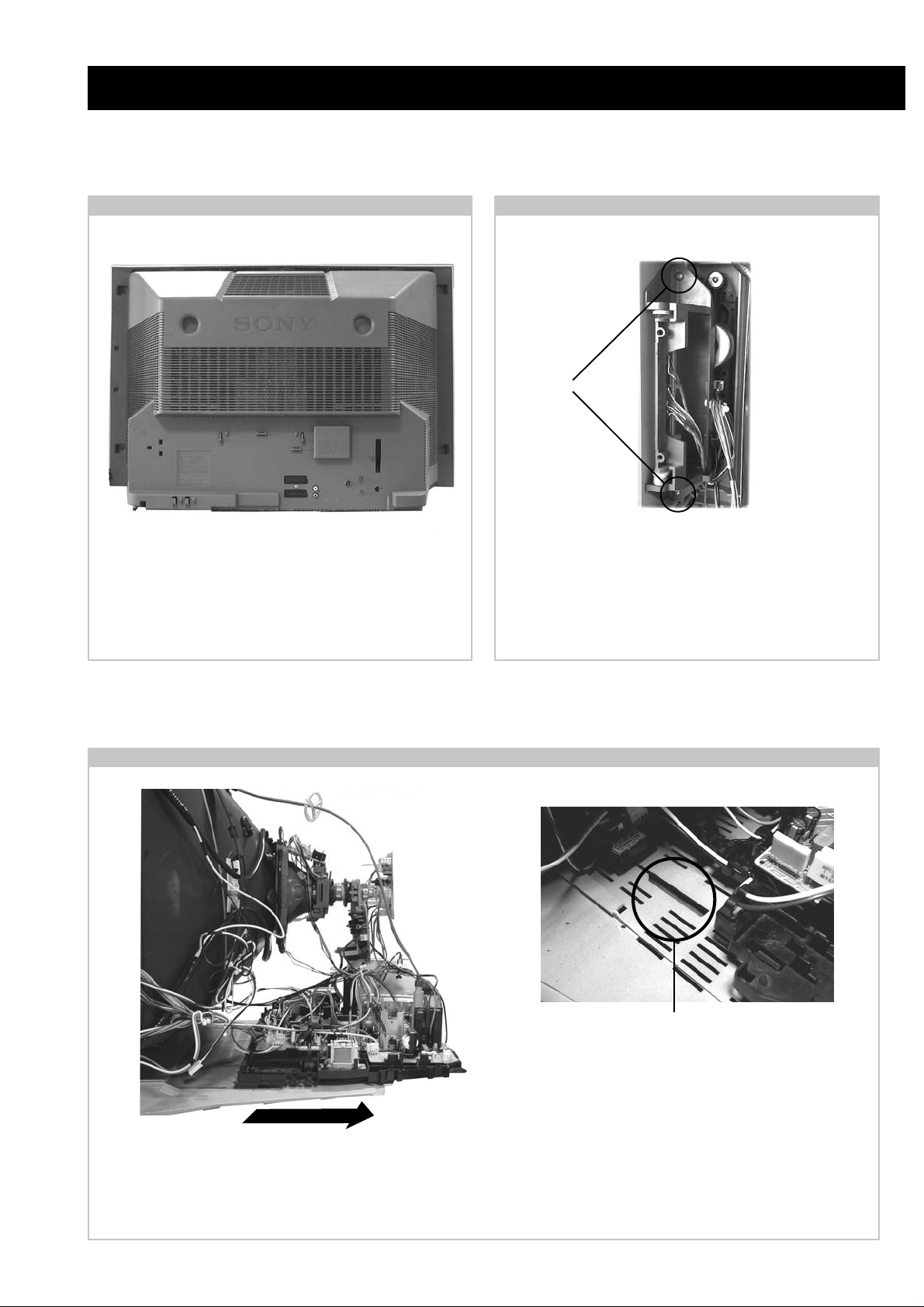
SECTION 2 DISASSEMBLY
2-1. Rear Cover Removal 2-2. Side Control Module Removal
<=
<=
=>
=>
=>
Remove the rear cover fixing screws indicated and withdraw
the rear cover from the beznet.
<=
<=
<=
<=
Screws
<=
Remove the two screws fixing the user control module to the
side of the set. The control module can then be removed by
sliding it towards the rear of the set allowing access to the H2
Board.
2-3. Chassis Removal and Refitting
T o remove lift the main bracket rear slightly and slide the
chassis away from the beznet. Ensure that the interconnecting
leads are released from their purse locks to prevent damage
being caused.
When refitting the chassis ensure that the main
bracket is located in the beznet guide slots before
sliding the chassis forwards. Refit the
interconnecting leads in their respective purse locks.
- 13 -
Page 14
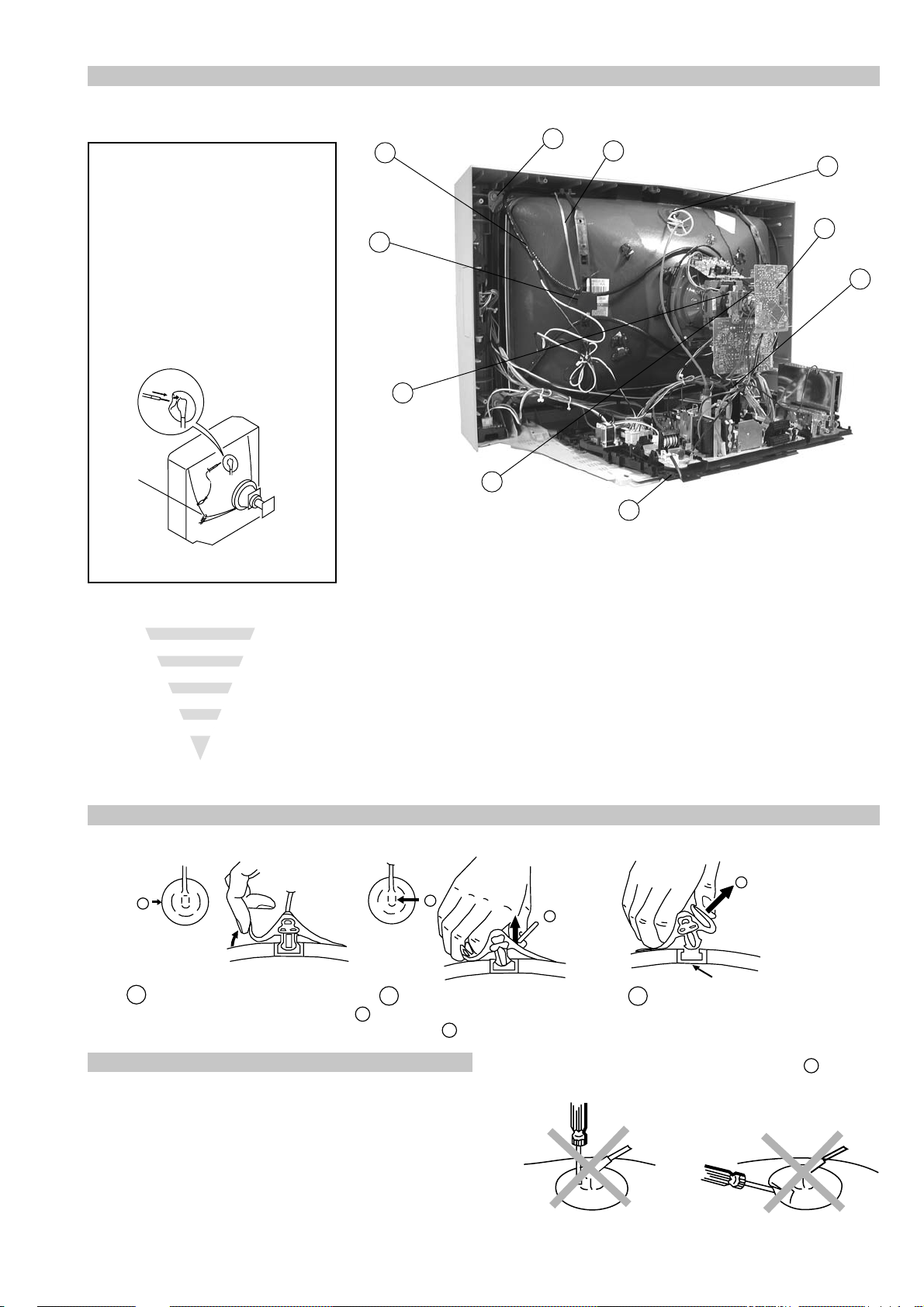
2-4. Service Position
2-5. F6 and H8 Board Removal
Position the chassis as indicated to access the solder side
of the PWB’s. T o gain access to the A Board follo w the
instructions on page 16. [Removal and Replacement of the
main bracket bottom plates ].
2-6. N Board Removal
Clip
Clips
Release the clip circled and pull the F6 bracket towards the
rear of the set. The bracket can then be removed to allow
access to the boards.
T o remove the F6 and H8 Boards release the clips circled and
ease the boards gently away from the support bracket.
Shield
case
Clips
Remove the shield case by pulling vertically until it is clear of the N Board. Release the N board socket retaining clips, circled, by
gently prising them with a screwdriver and carefully lift the N Board v ertically .
- 14 -
Page 15
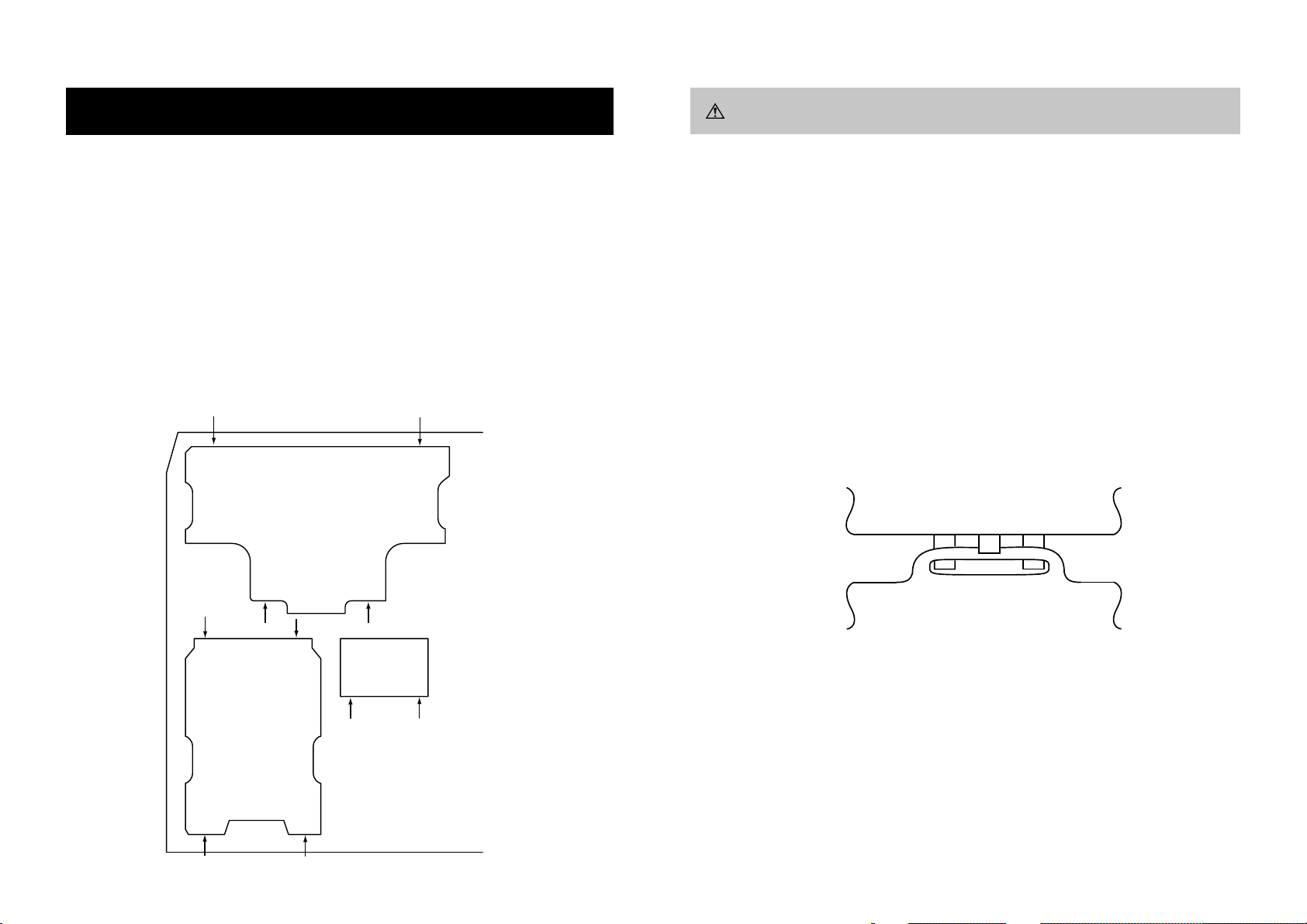
2-7. Picture Tube Removal
WARNING:
BEFORE REMOVING
THE ANODE CAP
High voltage remains in the CRT even
after the power is disconnected. To
avoid electric shock, discharge CRT
before attempting to remove the anode
cap. Short between anode and CRT
coated earth ground strap.
Coated Earth
Ground Strap
8
10
9
1
3
7
2
6
5
4
1. Discharge the anode of the CRT and remove the anode cap.
2. Unplug all interconnecting leads from the Deflection yoke, neck
assy, de gaussing coils and CRT grounding strap.
3. Remov e the C Board from the CR T.
4. Remov e the chassis assembly .
5. Loosen the Neck assembly fixing screw and remove.
6. Loosen the Deflection yoke fixing screw and remove.
7. Place the set with the CRT face down on a cushion and remove
the Degaussing Coil holders.
8. Remove the Degaussing Coils.
9. Remov e the CR T grounding strap and spring tentioners.
10. Unscrew the four CRT fixing scre ws [ located on each CRT
corner ] and remove the CR T .
[T ake care not to handle the CR T by the neck.]
Removal of the Anode-Cap
* REMOVING PROCEDURES.
a
1
Turn up one side of the rubber cap in
the direction indicated by the arrow a
b
2 Using a thumb pull up the rubber cap
firmly in the direction indicated by the
arrow b
How to handle the Anode-Cap
1. To prevent damaging the surface of the anode-cap do not use
sharp materials.
2. Do not apply too great a pressure on the rubber, as this may cause
damage to the anode connector.
3. A metal fitting called a shatter hook terminal is fitted inside the
rubber cap.
4. Do not turn the rubber foot over excessively, this may cause
damage if the shatter hook sticks out.
c
b
Anode button
3 When one side of the rubber cap is
separated from the anode button, the
anode-cap can be removed by turning
up the rubber cap and pulling it up in
the direction of the arrow c
- 15 -
Page 16
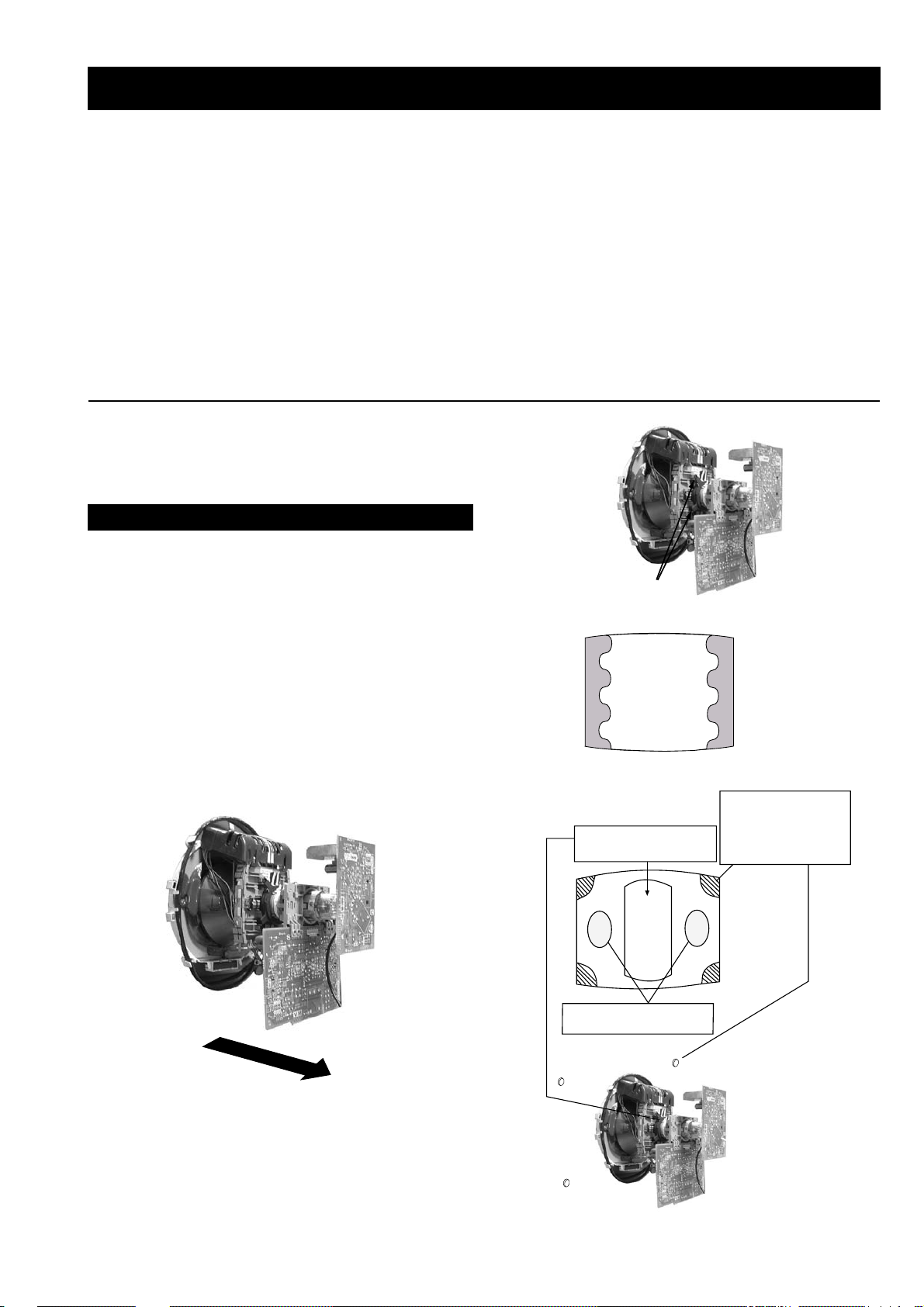
REMOV AL AND REPLA CEMENT OF THE MAIN-BRA CKET
BOTT OM PLA TES.
For safety reasons, on no account should the plates be removed and not refitted after servicing.
(1) REMOVING THE PLATES
In the event of servicing being required to the solder side of the D Board printed wiring board, the
bottom plates fitted to the main chassis bracket require to be removed.
This is performed by cutting the gates with a sharp wire cutter at the locations indicated by the
arrows.
Note : There are 3 plates fitted to the main bracket and secured by3 gates.
Only remove the necessary plate to gain access to the printed wiring board.
- 16 -
(2) REFITTING THE PLATES
Because the plates differ in size it is important that the correct plates are refitted in their original
location.
Please note that the plates need to be rotated 180 degrees from their cut position to allow the tabs to
be fitted into their catch positions.
Catch
Tab
Page 17
SECTION 3 SET -UP ADJUSTMENTS
• When complete readjustment is necessary or a new picture
tube is installed, carry out the following adjustments.
• Unless there are specific instructions to the contrary , carry
out these adjustments with the rated power supply .
• Unless there are specific instructions to the contrary, set the
controls and switches to the following settings :
Contrast .................... 80% [or remote control normal]
Brightness................... 50%
Preparation:
1. In order to reduce the influence of geomagnetism on the
set’s picture tube, face it in an easterly or westerly direction.
2. Switch on the set’s power and degauss with the degausser.
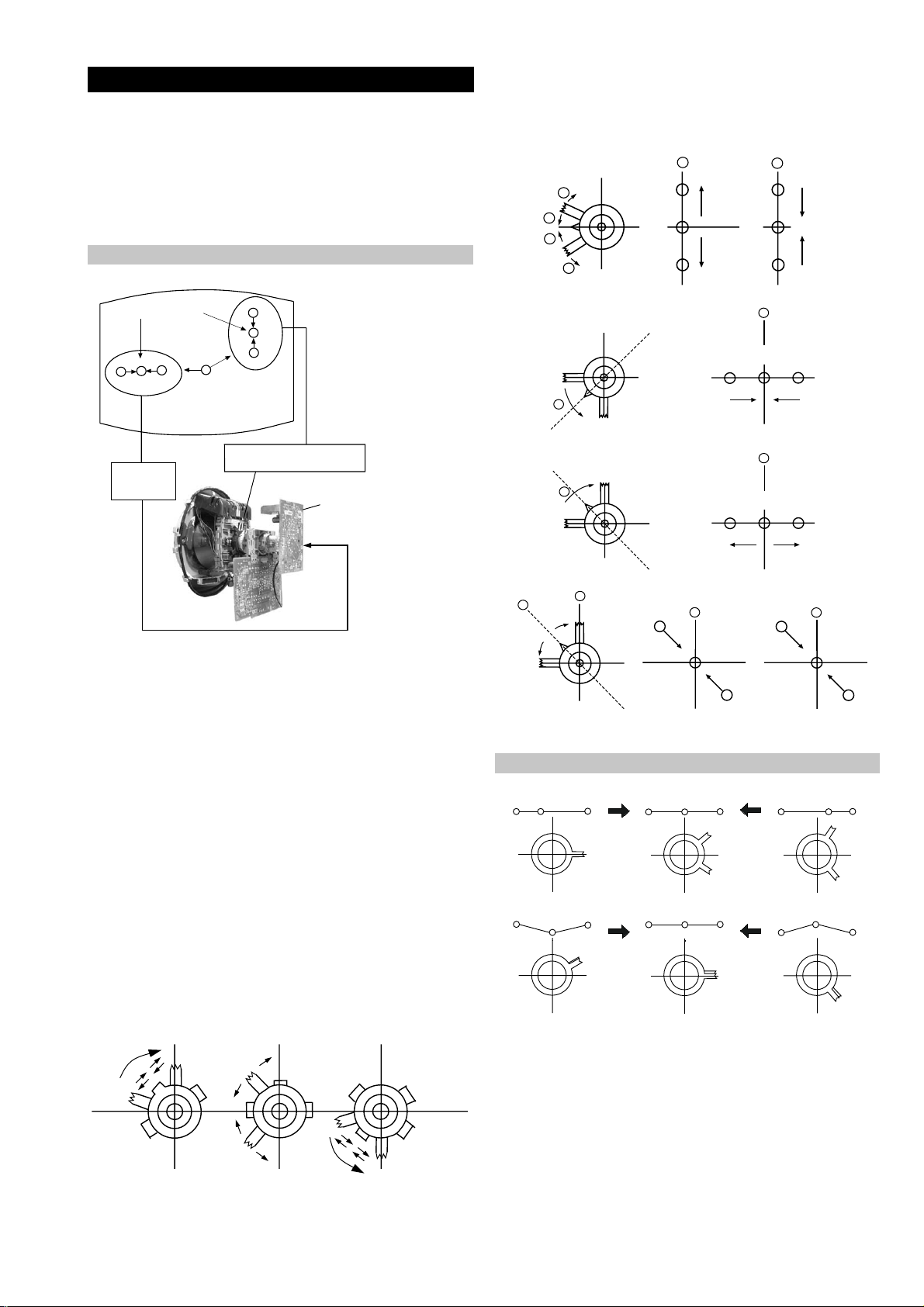
3-1. Beam Landing
1. Input an all white signal from the pattern generator. Set the
Contrast and Brightness to normal.
2. Set the pattern generator raster signal to Red.
3. Move the deflection yoke forward and adjust with the
purity control so that the Red is at the centre and the Blue
and Green take up equally sized areas on each side of the
screen. [See Fig.3-1 - 3-3].
4. Move the deflection yoke backwards and adjust so that the
entire screen becomes Red. [See Fig.3-1]
5. Switch the raster signal to Blue, then to Green and verify
the condition.
6. When the position of the deflection yoke has been
determined, fasten the deflection yoke with the screws.
7. If the beam does not land correctly in all the corners, use a
magnet to correct it. [See Fig.3-4]
Carry out the adjustments in the following order :
3-1. Beam Landing.
3-2. Convergence.
3-3. Focus.
3-4. White Balance.
Note : T est equipment required.
1. Color bar/pattern generator.
2. Degausser.
3. Oscilloscope.
4. Digital multimeter.
Fig. 3-2.
Purity
Fig. 3-3.
GREEN
RED
BLUE
Disk magnets or
rotatable disk
Purity control corrects
this area
magnets correct
these areas (a-d)
Fig. 3-1.
Caution :
High voltages are present on the Deflection yoke terminals
- take care when handling the Deflection yoke whilst carrying
out adjustments.
- 17 -
Disk Magnets
Fig.3-4
a
cd
Deflection yoke positioning
corrects these areas
b
Page 18
GBR
GBR
GBR
G
B
R
GBR
G
B
R
3-2. Con vergence
B
G
R
a
b
R
G
B
b
a
Preparation:
4. If the V.STAT magnet is moved in the direction of the (a)
and (b) arrows, the Red, Green and Blue points move as
indicated below .
• Before starting this adjustment, adjust the focus, horizontal
size and vertical size.
• Minimize the Brightness setting.
• Input a dot pattern from the pattern generator.
Horizontal and Vertical Static Convergence
Center dot
R
G
B
H STAT
convergence
control
R
G
B
V.STAT Vertical Static Magnet
C Board
RV702 (H STAT)
H STAT Convergence
(on mount side)
a
b
a
a
b
a
b
B
G
R
R
R
b
B
G
R
a
B
G
b
B
G
Fig.3-5
1. [Moving horizontally], adjust the H.STAT control so that
the Red, Green and Blue points are on top of each other at
the centre of the screen.
Operation of the BMC (Hexapole) magnet.
2. [Moving v ertically], adjust the V .STAT magnet so that the
Red, Green and Blue points are on top of each other at the
centre of the screen.
3. If the H.STAT variable resistor is unable to bring the Red,
Green and Blue points together at the centre of the screen,
adjust the horizontal convergence with the H.STAT variable
resistor and the V.STAT magnet in the manner indicated
below.
[In this case, the H.ST AT variable resistor and the V.STA T
magnet influence each other].
• Tilt the V.ST AT magnet and adjust the static convergence by
opening or closing the V.STA T magnet.
The movement of the magnets interact with each other and so
the respective dot position should be monitored while carrying
out this adjustment.
Use the H.STA T VR to adjust the Red, Green and Blue dots so
that they coincide at the centre of the screen
(by moving the dots in the horizontal direction).
- 18 -
Page 19
+
YCH VR
Deflection Yoke
+
+
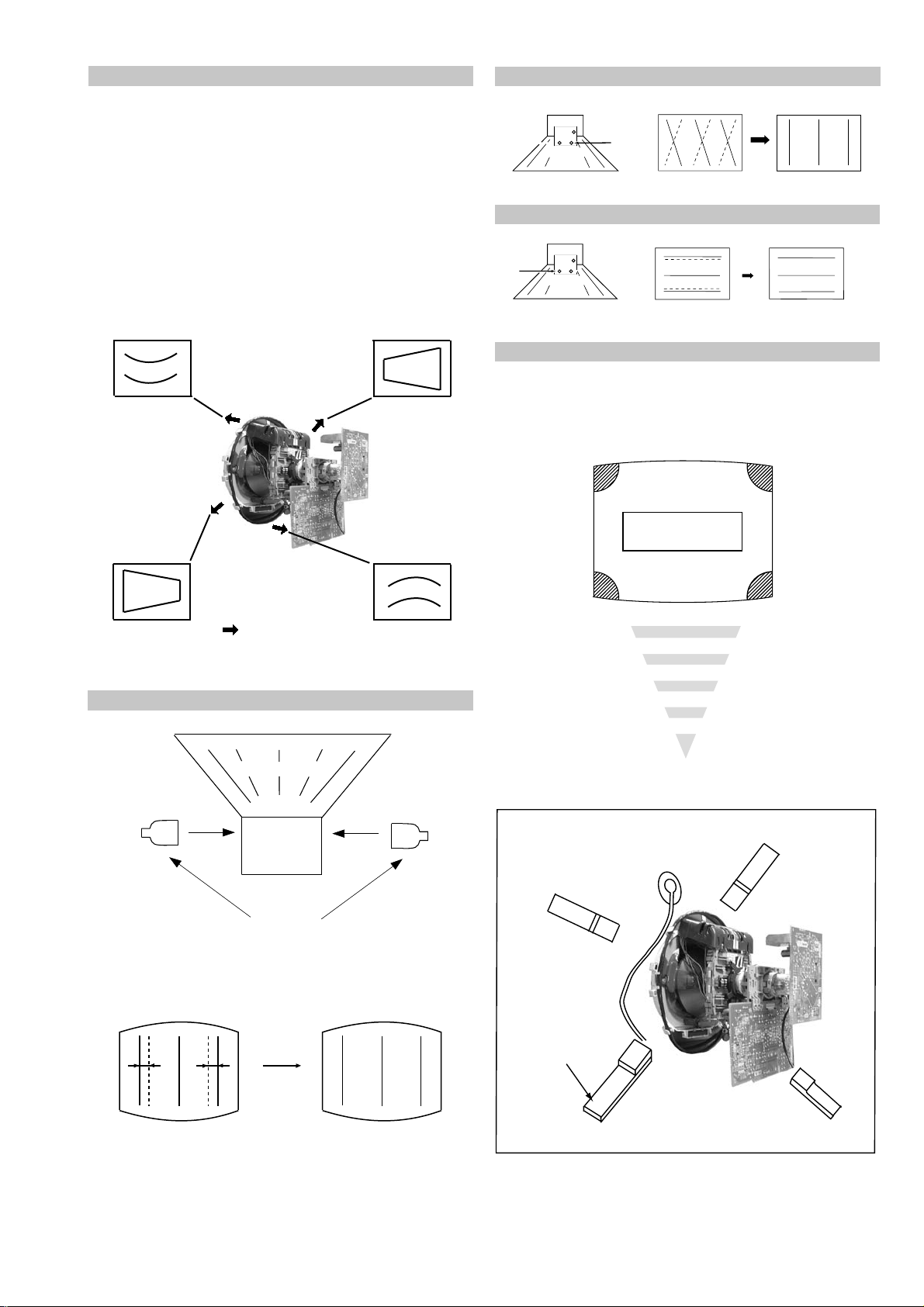
Geometry Adjustment.
Preparation:
Before starting this adjustment, adjust the horizontal and
vertical static convergence.
1. Remove the deflection yoke spacer.
2. Tilt the deflection yoke as indicated in the figure below and
optimise the geometry.
Tilting the D Y Up and Down will balance the upper and
lower pin adjustment.
Tilting the D Y Left and Right will balance the H-Trap
adjustment.
3. Re-install the deflection yoke spacer.
YCH Adjustment
TL V Adjustment
+
+
TLV VR
+
Deflection Yoke
Screen Corner Convergence
If you are unable to adjust the corner conver gence properly ,
this can be corrected with the use of permalloy magnets.
HTIL Adjustment
Tilt Direction
Deflection Yoke
TLH pieces
a
a-d: screen-corner
convergence defect
c
Install the permalloy assembly
for the area that needs correcting.
b
b
d
a
HTIL correction can be performed by adding a TLH correction
assembly to the Deflection yoke.
Permalloy Assy
X-4387-214-1
- 19 -
d
Convergence adjustment with permalloy
c
Page 20

Layout of each control
V.STAT
Purity
BMC (Hexapole)
3-3. Focus Adjustment
1. Receive a television broadcast signal.
2. Normalize the picture setting.
3. Adjust the focus control located on the flyback transformer
to obtain the best focus at the centre of the screen.
Bring only the centre area of the screen into focus, the
magenta-ring appears on the screen. In this case, adjust the
focus to optimize the screen uniformly.
3-4. Screen (G2), White Balance
[Adjustment in the service mode using the remote
commander]
G2 adjustment
1. Input a dot signal from the pattern generator .
2. Enter the ‘Service Mode’ by pressing ‘TEST’, ‘TEST’ and
‘38’ (TT -38) on the remote commander , to set up the G2
service adjustment mode.
3. Whilst watching the picture, adjust the G2 control [SCREEN]
located on the Flyback Transformer to the point where the
OSD menu indication shows “OK”.
White balance adjustment for TV mode
1. Input an all-white signal from the pattern generator .
2. Enter into the ‘Service Mode’ by pressing ‘TEST’, ‘TEST’
and ‘MENU’ on the Service Commander.
3. Select ‘Service’ from the on screen menu display and press
the right arrow button on the remote commander .
4. The ‘Service’ menu will appear on the screen.
[See Page 21]
5. Set the ‘Contrast’ to MAX.
6. Set the ‘R-Drive’ to 25.
7. Adjust the ‘G-Drive’ and the ‘B-Drive’ so that the white
balance becomes optimum.
8. Press the ‘OK’ button to write the data for each item.
9. Set the ‘Contrast’ to MIN.
10. Adjust the ‘G-Cutoff’, and the ‘R-Cutoff’ with the left and
right buttons on the remote commander so that the white
balance becomes optimum.
11. Press the ‘OK’ button to write the data for each item.
Focus
Screen
- 20 -
Page 21

SECTION 4 CIRCUIT ADJUSTMENTS
4-1. Electrical Adjustments
Service adjustments to this model can be performed using the
supplied remote Commander RM-932.
How to enter into the Service Mode
1. T urn on the main po wer switch and enter into the stand-by mode.
2. Press the following sequence of buttons on the Remote
Commander.
i+
(ON SCREEN (DIGIT 5) (VOLUME +) (TV)
DISPLAY)
5
‘TT—’ will appear in the upper right corner of the screen.
Other status information will also be displayed.
3. Press ‘MENU’ on the remote commander to obtain the following
menu on the screen.
ecivreS
ngiseD
sutatS
dnuoS
4. Move to the corresponding adjustment item using the
up or down arrow b uttons on the Remote Commander.
5. Press the right arrow button to enter into the required menu item.
6. Press the ‘Menu’ button on the Remote Commander to quit the
Service Mode when all adjustments have been completed.
Note :
• Before performing any adjustments ensure that the correct model
has been selected in the ‘Model Setting’ menu.
• After carrying out the service adjustments, to prevent the
customer
accessing the ‘Service Menu’ switch the TV set OFF and then
ON.
UNEMRORRE
20E
30E
40E
50E
60E
70E
80E
90E
01E
11E
+
yrtemoeG
tsujdaFI
uneMrorrE
30.0vlatigiD2-EF
PCO
CNYSV
RKI
CII
MVN
RENUT
V8
hFFhFFatadyrotcaF
G1143PSM:eciveDPSM
)552,0(
A/NPVO
ELGNUJ
PDNUOS
0
)552,0(
0
)552,0(
0
)552,0(
0
)552,0(
0
)552,0(
0
)552,0(
0
)552,0(
0
)552,0(
0
)552,0(
0
ECIVRES
R-tesffO
G-tesffO
evirD-R
evirD-G
evirD-B
qerF-kaeP
yaleD-amuL
0CS
kaeP-etihW
tnocbuS
thgirbuS
locbuS
prahsbuS
.rBffotuC
DSOrB
TXTrB
YRTEMOEG
ytiraeniL-V
llorcS-V
klBH-tfeL
klBH-thgiR
elgnA-V
woB-V
ertneC-H
eziS-H
pmA-niP
niP-renroC-U
niP-renroC-L
esahPniP
epolS-V
eziS-V
noitcerroC-S
ertneC-V
mooZ-V
atnegaM
TSUJDAFI
tsujdACGA
etumotuA
niaGoiduA
gnitaGL
)36,0(
)36,0(
)36,0(
)36,0(
)36,0(
)3,0(
)51,0(
)3,0(
)51,0(
)51,0(
)36,0(
)36,0(
)36,0(
)36,0(
)51,0(
)51,0(
)36,0(
)36,0(
)51,0(
)51,0(
)36,0(
)36,0(
)36,0(
)36,0(
)36,0(
)36,0(
)36,0(
)36,0(
)36,0(
)36,0(
)36,0(
)36,0(
)36,0(
)36,0(
jdA
jdA
13
jdA
jdA
0
8
3
51
8
03
jdA
52
13
01
7
jdA
23
01
7
jdA
jdA
jdA
jdA
jdA
jdA
jdA
jdA
04
jdA
jdA
jdA
72
13
)51+,61-(0+
1
0
0
Sub Brightness Adjustment
1. Input a Monoscope pattern.
2. Press ‘TEST’ ‘TEST’ 13 on the Remote Commander.
3. Adjust the ‘Sub-Brightness’ data so that there is barely a
difference between the 0 IRE and 10 IRE signal levels.
Sub Contrast Adjustment
1. Input a video signal that contains a small 100% white area on a
black background.
2. Connect an digital voltmeter to Pin 10 of J701 [C Board].
3. Adjust the Sub-Contrast [‘TT11’] to obtain a voltage of
105 +/- 5V.
SRUOH
EMITGNIKROW
SETUNIM
2
11
- 21 -
Page 22

Sub Colour Adjustment
Deflection System Adjustment
1. Recei ve a PAL colour bar signal.
2. Connect an oscilloscope to Pin 5 of CN003 [A Board].
3. Enter into the ‘Service’ service menu.
4. Adjust the ‘Sub Colour’ data so that the Cyan, Magenta and
Blue colour bars are of equal levels as indicated belo w .
Same Level
B-Out Wav eform
T uner A GC Adjustment
Note:
There should be no need to adjust the A GC as this is preadjusted during manufacture of the FRONTEND. If the AGC
does need adjustment then follow steps 1. to 4. below.
1. Receive a signal of 62dBuV / 75 ohm terminated via the tuner
antenna socket.
2. Connect a v oltmeter to pin1 of TU101 [print side of A1 Board]
or to the AGC pin of CN301 [mount side of A Board].
3. Conf irm that the AGC voltage is 3.5volts +/- 0.3v olts.
4. If adjustment is required, then re-adjust the A GC variable
resistor (located at the top rear of the FRONTEND) to obtain
a voltage of 3.5V +/- 0.3V.
1. Enter into the ‘Geometry’ service menu.
2. Select and adjust each item in order to obtain the optimum image.
YRTEMOEG
ytiraeniL-V
llorcS-V
klBH-tfeL
klBH-thgiR
elgnA-V
woB-V
ertneC-H
eziS-H
pmA-niP
niP-renroC-U
niP-renroC-L
esahPniP
epolS-V
eziS-V
noitcerroC-S
ertneC-V
mooZ-V
atnegaM
)36,0(
)36,0(
)51,0(
)51,0(
)36,0(
)36,0(
)36,0(
)36,0(
)36,0(
)36,0(
)36,0(
)36,0(
)36,0(
)36,0(
)36,0(
)36,0(
)36,0(
)36,0(
jdA
23
01
7
jdA
jdA
jdA
jdA
jdA
jdA
jdA
jdA
04
jdA
jdA
jdA
72
13
V SIZE
V LIN
S CORRECTION
[ Print side of A1 board ]
TU101
Pin 1
V CENTRE
H CENTRE
H SIZE
PIN AMP
PIN PHASE
CORNER PIN
V ANGLE
- 22 -
Page 23

4-2. TEST MODE 1:
Test Mode 1 is a v ailable by pressing the ‘TEST’ b utton once, OSD
‘T’ appears. The functions described below are available by selecting
the indicated keys. The ‘T’ is released automatically after each
command is executed.
YEK NOITCNUFEDOM-T
+emulovmumixamemulov
-emulovmuminimerutciP
+erutcipmumixamerutciP
-erutcipmuminimerutciP
puruolocmumixamruoloc
nwodruolocmuminimruoloc
thgirb-ssenthgirbmumixamssenthgirb
krad-ssenthgirbmuminimssenthgirb
hsilprup-euhhsilprup-euh
hsineerg-euhhsineerg-euh
prahs-ssenprahsmumixamssenprahs
tfos-ssenprahsmuminimssenprahs
tfelecnalabtfelllufecnalab
thgirecnalabthgirllufecnalab
puelbertmumixamelbert
nwodelbertmuminimelbert
pussabmumixamssab
nwodssabmuminimssab
4-3. TEST MODE 2:
Test Mode 2 is a v ailable by pressing the ‘TEST’ button twice, OSD
‘TT’ appears. The functions described below are available by
selecting the two numbers. T o release the ‘Test mode 2’, press 00, 10,
20 ... twice or switch the TV set into Stand-by mode. In ‘TT Menu’
mode, it is possible to remove the Menu from the screen by pressing
the Speaker Off button once. Pressing the Speaker OFF button a
second time will cause the Menu to reappear. The function is k ept
even when the menu is not displayed on screen !!.
00
10
20
30
40
50
60
70
80
11
21
31
41
51
61
91
12
22
32
42
52
62
ffoedom'TT'
mumixamerutciP
muminimerutciP
%53otemuloVenohpdaeh/rekaepsteS
%05otemuloVenohpdaeh/rekaepsteS
%56otemuloVenohpdaeh/rekaepsteS
%08otemuloVenohpdaeh/rekaepsteS
edomgniegA
noitidnoCgnippihS
tnemtsujdaerutcipbuS
tnemtsujdaruolocbuS
tnemtsujdassenthgirBbuS
tnemtsujdanoitisoPHtxeT
tseTlioCnoitatoR
%05levelerutciP
elbasiD/elbanEedoMyrotcaF
RKEDAnoitanitseD
LBnoitanitseD
RKEDAnoitanitseD
UnoitanitseD
RKEDAnoitanitseD
LBnoitanitseD
72
82
13
33
53
63
83
14
34
44
54
64
84
94
15
25
45
55
65
75
16
26
36
46
56
66
76
86
96
17
27
37
47
87
97
78
98
19
29
39
49
59
99
RKEDAnoitanitseD
RKEDAnoitanitseD
elbasiD/elbanEffotuhSotuA
FFO/NOnoitatoR
sutatsVTyalpsiD;9:61><3:4TRC
tsetNO/FFO)MV(noitaludoMyticoleV
tnemtsujda2G
MVNesilaitini-eR
dnuosAlauDtceleS
dnuosBlauDtceleS
dnuosonoMtceleS
dnuosoeretStceleS
nigrivnonsaMVNteS
nigrivsaMVNteS
ffo/noybloDlautriV
elbanE)tnemecnahnessaB(BPM/refoowbuS
RKEDAnoitani)partamorhc(M/CerutcurtstoD
)SPLA/YNOS(noitcelesrenuT
elbasid/elbaneEBB
elbasid/elbaneenilunemEBB
tnemtsujdACGAotuA
elbasid/elbanednabesabmorfMA
rotcennoc3CYelbasiD/elbanE
ytiroirpBGRelbasiD/elbanE
elbasid/elbanetceted-otuaBGR
elbasid/elbaneremitnO
tnemtsujdACGAlaunaM
)melborpN(erusaemretnuoc62XelbasiD/elbanE
erutaefICAelbasiD/elbanE
oedivLAPecroF
)noitidnocoedivlamronerotser(LAPecrof-nU
)47.6/5.6(metsys2K/DnotiewZelbanE
)47.5/5.6(metsys3K/DnotiewZelbanE
tfelllufecnalaB
thgirllufecnalaB
tsetsyeklacoL
godhctawelbasiD/elbanE
edommooz9:41teS
edommoozTRAMSteS
edommooz9:61teS
edomMOOZteS
edommooz3:4teS
unememiTgnikroWdnarorrEyalpsiD
- 23 -
Page 24

5-1. BLOCK DIAGRAMS (1)
CN1701
9
TO
A BOARD
CN510
TO
A BOARD
CN503
6
8
CN1702
3
V-PULSE
LOW B
VM OUT
15V PULSE
+9V
IC1902
DF/DQP/TIMING
IC1701
I
VM AMP
Q1701
IC1901
COMPARATOR
-
3
+
2
5
+
-
6
72
QP OUT
Q1841
CN1718
1
Q.P.-
2
3
Q.P.+
VM AMP
BUFFER
Q1704, 1705
VM OUT
Q1708, 1711
4
VM
GND
Q.P.
VM
NECK ASSY
1
7
VELOCITY MODULATION,
VM ( )
DYNAMIC FOCUS AND DQP
CN1809
DF
1
TO
A BOARD
CN509
TO F6 BOARD
CN7601
CN3601
2
AC IN
1 AC IN
F3 ( )
WOOFER MUTE
TO A BOARD
CN1200
TO A BOARD
CN406
T3603
1 2
4 3
AC INPUT, FUSE
CN908
1
2
R IN
3
R OUT
5
L OUT
6L IN
CN906
KEY 1
AUDIO L
6
AUDIO R
9
Y/CVBS
4
C
2
AC OUT
AC OUT
CN3603
2
1
TO A BOARD
CN606
S7601
POWER
1
AC IN
2
AC IN
F6 ( )
POWER SWITCH
CN900
L
R
VIDEO
1
Y/C
3
4
2
AC OUT
AC OUT
J900
CN7601CN7602
1
2
TO F3 BOARD
CN3601
J900
HEADPHONES
S900
S901
S902
H2( )
- 24 -
AUDIO IN, Y/C IN,
HEADPHONE IN
Page 25

5-1. BLOCK DIAGRAMS (2)
LOWB
5
6
4
CN001
J401
(1/2)
77
63
5
7
4
3
2
1
5
4
RELAY
SWITCH
Q601
T603
SRT
16
15
17
18
18
16
1
2
15
8
11
12
IC602
ERROR AMP
1
2
PH601
ISOLATOR
+B
D638
RECT
AUDIO
VCC
+B
LOWB
3.3V REG
H-OUT
Q533
STBY
+3.3V
IC608
7
5
IC501
V OUTPUT
3
1
VD+
BOOST
REF
OUT
PIN OUT
Q532
6
5
4
3
2
1
D571,
Q571,574
T511
FBT
FV
ABL
12
3
4
1
5
6
13
8
9
11
10
7
V- DY+
V- DY-
H- DY+
H- DY+
TO C BOARD
CN707
H1
200V
TO PICTURE
TUBE
2
3
65+
-
+
-
1
7
IC531
PIN CORRECTION
EWD
HP
PROTECT
IN
VP
VD-
41
2
3
T531
HDT
IC609
STANDBY
POWER
HD
D
C
T602
D632
RECT
IC001
MICRO, VIDEO PROCESSOR,
ROM, AUDIO, VIDEO SWITCH
CN606
VD
VG(H)
VS
HP
+B
HV
CN508
XTAL OUT
RED
NVM WP
L AUDIO
TO SPEAKERS
A ( )
POWER SUPPLY, DEFLECTION,
SMALL SIGNAL BOARD,
AUDIO AMPLIFIER
IC601
D514
-15V RECT
VIDEO
L
1
2
1
3
DGC
DGC
DGC
DGC
CHECK
DGC CHECK
CN603
CN602
2
1
H- DY-
H- DY-
TO C BOARD
CN706
G2
IC604
DUAL DC REGULATOR
2
1
+8V
D608
LINE FILTER
T601
RELAY
RY601
MAIN RECT
D601
1
3
4
6
7
9
CT
VSENSE
RT
TIMER
SS
OCP
12
VG(L)
Q606
Q607
6
5
4
7
3
LOWB
D624
D622
D618
D619
VM VCC
QCP DETECT
Q612, 602
1
4
CN1201
J1200
R AUDIO
64
XTAL IN
40
AUDIO MUTE
5
AUD OUT
78
+3.3V
STBY
6
5
23+
-
+
-
7
1
+5V STBY
IC201
AUDIO AMP
MUTE
1
IN/INL
10
3
/OUT W
H-DRIVE
Q535
68
IC401
AV LINK
+5V STBY
69
R0
56
A10
B10
1
2
3
6
G0 57
B0
58
IK
55
GREEN
BLUE
IK
EWD 17
VD-
18
VD+
19
ABL
54
74
TO C BOARD
CN703
7
CN003
J401
(2/2)
NSC CORRECT
ROT COIL
AGC
SCL
SDA
VIDEO
IC004
SDA
6
SCL
5
7
WP
71
SCL
72
SDA
28
CVBS2/
CVBSY2
3
AGC
53
B2/UIN
1
MODE1
80
MODE2
52
G2/YIN
51
R2/VIN
38
-/C4
50
INSSW2
32
CVBS1
37
-/CVBS4Y4
65
RESET
45
AUDIO 1
49
AUDIO 3
34
CVBS3
A8
A11
A7
B8
A15
A16
B20
B15
A20
A2
BLUE IN
MODE1
MODE2
GREEN IN
RED IN
C2 IN
BLK
V IN 1
Y/V IN 2
IC003
RESET
TU101
MUTE SW
Q212
AUDIO
AUDIO
VIDEO
STBY
70
2
FB
D513
+15V RECT
5
1
D625
14
OUT/L
12
/OUT R
9
STBY/
MW
6
/IN W
L OUT
L IN
R IN
R OUT
TO H2 BOARD
CN908
CN1200
1
CN1202
CN1203
WOOFER
WFR R IN
WFR L IN
1
2
4
MUTE
7
SDA
CS
SCL
AGC
3
IC201
MSP3410D-PP-B4
SC1 OUT R
37
SC1 OUT L
36
63
XTAL OUT
62
XTAL IN
47
SC3 IN R
46
SC3 IN L
31
DACM SUB
/C3 35
KEY 2
LED
6
SIRCS
67
CN405
7
6
4
KEY
LED
SIRCS
TO H8 BOARD
CN7150
A1
B1
A3
B3
SC1 OUT L
SC1 OUT R
SC2 OUT L
SC2 OUT R
SC2 OUT R
34
SC2 OUT L
33
R
AUDIO
J402
L
CVBS/Y
KEY
R
A19
VIDEO
CN406
TO H2 BOARD
CN906
1
4
6
8
9
6
5
3
2
C
CS
4
6
7
TO F3 BOARD
CN3603
TO D2 BOARD
CN8801
SW
SMART
CN512
2
6
DEF SW 75
TO D3 BOARD
CN2803
VOUT
AC IN
4
8
TO B BOARD
CN8302
AC IN
TO VM BOARD
CN1701
VMOUT
CN510
CN501
- 25 -
Page 26

5-1. BLOCK DIAGRAMS (3)
R DIGITAL
B1
A1 ( )
DIGITAL FRONT
END PROCESSING
CN4101
TO A BOARD
CN301
3.3V
RIGHT
LEFT
A1
A3 FBLK
A4 CVBS
A5 B
A6 G/C
A7 R/Y
A22 SCL (TV)
B22 SDA (TV)
A24 PTEN
A25 FE RESET
B25 FE LOCK
A26 SCL (N)
B26 SDA (N)
A28 PT CLK
B28 PT SYNC
A29 TS 6
B29 TS 7
A30 TS 4
B30 TS 5
A31 TS 2
B31 TS 3
A32 TS 0
B32 TS 1
LEVEL SHIFTER
Q4104
LEVEL SHIFTER
Q4105
13
12
11
10
9
8
CONT A
CONT D
I/PD
O/PD
O/PD
I/PD
2
3
5
6
O/PA
O/PA
CONT B
CONT C
Q4101 Q4102
IC4101
PLL 12C 5W
2
3
- (1)
+ (1)
7
6
5
OUT (2)
- (2)
+ (2)
RY4601
AC IN
AC IN
3
2
T4601
9
10
11
4
7
8
1
12
13
14
15
3
8
6
IC4102
RTC
IC4608
COMPARATOR
1
IC4603
ERROR AMPLIFIER
G
IC4606
+9V REGULATOR
I
IC4605
+5V REGULATOR
I
IC4604
+5V REGULATOR
I
IC4607
+3.3V REGULATOR
I
LED DRIVER
Q4103
RESET
VDD
SCL
LEVEL SHIFTER
Q4107
TU4101
5
SDA
LEVEL SHIFTER
Q4106
5V
1
2
9
8
3
IC4601
POWER SUPPLY
RED/Y
3
1
CN4103
TO N BOARD
TO A BOARD
CN601
2
1
2
4
GREEN/U
BLUE/V
FBLK
L DIGITAL
CN4104
5
Y DIGITAL/CVBS A
6
C DIGITAL
7
QSS
8
AM
13
AGC
15
CVBS A/D
1
2
3
4
5
Y 1
Y 0
Z 1
Z
Z 0
15
14
12
11
Y
X
X 0
A (X)
IC4104
A/D VIDEO SWITCH
10
9
B (Y)
C (Z)
1
14
15
16
TU4102
AGC
AGC
AGC
INVERTER
Q4118
INVERTER
Q4120
INVERTER
Q4119
3
4
5
X
Y
Z
IC4105 PORT EXPANDER
CN4601
IC4602
PHOTO COUPLER
+5V
+5V
+9V
+3.3V
TO B BOARD
CN8301
VIDEO
J701
TO A BOARD
CN003
IC701
R.G.B. DRIVE
6
5
1
3
G IN
CN703
C ( )
R.G.B. OUT
7
2
1
B IN
R IN
IK
NS CORRECT
1
2
3
5
9
8
7
IC1801
ROTATION AMP
1
2
3
7
6
10
8
9
3
6
CN1801
ROT (+)
ROT (-)
CN706
CN707
1
1H2
G2
PICTURE TUBE
TO ROTATION COIL
CN8302
TO A1 BOARD
CN4103
IC8301
YUV SWITCH
12Y IN
CN8301
B ( )
3
4
U IN
V IN
FBLK IN
1
2
3
4
11
10
9
6
5
3
2
1
U IN
TO A BOARD
CN002
7V IN
Y IN
Y OUT
U OUT
V OUT
14
13
12
15
5
Y
X
X 1
X 0
A
B
C
Y 1
Y 0
Z 1
Z
Z 0
BUFFER
Q8303,8306
BUFFER
Q8302,8305
BUFFER
Q8304,8307
INVERTER
Q8301
Y, U, V, SWITCHING
1
3
H- DY+
CN2802
D3 ( )
4:3 SWITCHING
4
5
H- DY-
H- DY-
V- DY-
Q2801,2802
2H- DY+
6 V- DY+
TO A BOARD
CN501
1
3
H- DY+
CN2803
4
5
H- DY-
H- DY-
V- DY-
2H- DY+
6
V- DY+
CN2801
TO D2 BOARD
CN8802
T2801
+8V
6
8
10
5
4
2
1
RY2801
DY ASSY
V DY
V- DY+
V- DY-
H DY
H- DY+
H- DY-
SW
6
7
2
IC7150
RECEIVER
2
1
LED
TO A BOARD
CN405
H8 ( )
IR
RECEIVER
CN7150
SIRCS
+5V STBY
STBY 5V
TO A BOARD
CN512
TO D3 BOARD
CN2801
CN8801
SMART
SWITCH
HDY-
CN8802
9
2
8
1
+15V
SWITCH
Q8802, 8803
D2 ( )
IC8801
SMART MODE
DEFLECTION
Q8801
SMART MODE DEFLECTION
- 26 -
Page 27

5-2. CIRCUIT BOARD LOCATION
Reference Information
C
C Board
C
N
VM Board
VM
CVM Board
H
H2 Board
A
H8 Board
F6 Board
D1
A Board
5-3. SCHEMATIC DIAGRAMS AND
PRINTED WIRING BOARDS
Note :
• All capacitors are in µF unless otherwise noted.
• pF : µµF 50WV or less are not indicated except for
electrolytic types.
• Indication of resistance, which does not have one for
rating electrical power, is as follows.
Pitch : 5mm
Electrical power rating : 1/4W
• Chip resistors are 1/10W
• All resistors are in ohms.
k = 1000 ohms, M = 1000,000 ohms
• : nonflammable resistor.
• : fusible resistor.
• : internal component.
• : panel designation or adjustment for repair.
• All variable and adjustable resistors have
characteristic curve B, unless otherwise noted.
• All voltages are in Volts.
• Readings are taken with a 10Mohm digital mutimeter.
• Readings are taken with a color bar input signal.
• Voltage variations may be noted due to normal production
tolerences.
•: B + bus.
D3 Board
B Board
F3 Board
D2
D2 Board
D
N Board
S1 Board
A Board
A
J
A2
A1 Board
A1
RESISTOR RN
RC
FPRD
FUSE
RS
RB
RW
COIL LF-8L
CAPACITOR TA
PS
PP
PT
MPS
MPP
ALB
ALT
ALR
Note :
The components identified by shading
and marked are critical for safety.
Replace only with the part numbers
specified in the parts list.
Note :
Les composants identifiés par une trame et
par une marque sont d'une importance
critique pour la sécurité. Ne les remplacer
que par des pièces de numéro spécifié.
specified.
: METAL FILM
: SOLID
: NON FLAMMABLE CARBON
: NON FLAMMABLE FUSIBLE
: NON FLAMMABLE METAL OXIDE
: NON FLAMMABLE CEMENT
: NON FLAMMABLE WIREWOUND
: ADJUSTMENT RESISTOR
: MICRO INDUCTOR
: TANTALUM
: STYROL
: POLYPROPYLENE
: MYLAR
: METALIZED POLYESTER
: METALIZED POLYPROPYLENE
: BIPOLAR
: HIGH TEMPERATURE
: HIGH RIPPLE
• : B - bus.
• : RF signal path.
• : earth - ground.
• : earth - chassis.
- 27 -
Page 28

1.83 Vp-p (V)
20us/div
TP7
20us/div
1.88 Vp-p (H)
TP1
5ms/div
TP8
488 mVp-p (V)
20us/div
1.86 Vp-p (H)
TP3
20us/div
1.84 Vp-p (H)
TP2
20us/div
6.0 Vp-p (H)
TP4
20us/div
5.4 Vp-p (H)
TP5
20us/div
TP6
16.8 Vp-p (H)
5ms/div
50.8 Vp-p (V)
TP11
5ms/div
49.8 Vp-p (V)
TP9
20us/div
TP10
1.06 kVp-p (H)
~ A Board IC Voltage Table~
oNfeR
oNniP )V(egatloV
10
22.3864.0
39.2960
50 070
60.2170
83.2270
90.8371.7
010.5470.5
210 571.8
310 675.3-
410.4770
614.1872.3
715.1972.3
810 080
910
028.336.21-
128.352.0
220.569.31
620 73.0
825.3
926.323.2
039.138.1
133.054.2
236.366.1
439.174.6
100CI
534.1
639.325.08-
838.132.08-
043.342.08-
243.355.18-
344.166.18540 7 8.77640 9 8.18-
746.30167-
848.2119.18-
943.2214.97-
052.0415.61
155.25111
255.2614.41
355.2814.68
451.2
552.539.4
650.350
751.360
851.373.11
952.393.0
260 010
360 210
460 4153.11
560
100CI
105CI
135CI
106CI
oNfeR
1021CI
oNniP )V(egatloV
768.4
13.0
14.1
14.08-
111
~ A Boar d Semiconductor Voltage T able ~
feR )e( )b( )c( feR )e( )b( )c(
310Q07.00 406Q005.2
610Q003.3806Q006.5
212Q07.00 906Q6.56.50
104Q8.42.48.1
114Q1.17.12.4
106Q6.58.43.5606Q9.015.417.68
206Q2.411.58 706Q4.28-9.97-9.01
306Q880 535Q05.22.59
feR )s( )g( )d(
~ A Board Wavef orms ~
~ A Board Difference T able~
feR U04XD82 U04XD23
225CFU72.0635CFU28.0FU1
935CFU1FU2.2
245CFP033FU100.0
745CFU28.0FU86.0
555CFP00022FP00091
101RJ- 0
220RK74K93
350RK51K28
554R0 HU7.4
315RK022615RK65K74
715RK81K22
815RK7.2K8.6
125RK022435RK001K093
535RK021K022
045R3374
645R028K1
865R086028
385RK01K51
006R093021
106R074086
335T
REMROFSNART21-089-334-1REMROFSNART11-603-924-1
- 28 -
Page 29

KD-28/32DX40U
9-927-411-01
- 29 -
~ A Schematic [ P o wer Supply, Deflection, Small Signal, Audio Amp ] pa ge 1/2 ~
Page 30

KD-28/32DX40U
9-927-411-01
- 30 -
~ A Schematic [ P o wer Supply, Deflection, Small Signal, Audio Amp ] pa ge 2/2 ~
Page 31

ABCDE F
G
HIJKLMN
1
2
3
4
5
6
7
8
9
10
11
NOTE:
Portions of the circuit marked as shown are high
voltage areas. Use care to prevent electric shock
during inspection or repair.
EDOID
124D2-C136D7-L
100D2-I224D2-C236D5-K
200D3-I324D2-C336D5-L
300D2-K424D2-M836D6-I
400D4-M724D4-A046D5-L
600D8-M824D3-C
ROTSISNART
700D1-K924D3-D310Q3-I
800D3-L534D2-A410Q1-L
010D2-G634D2-A940Q3-J
110D2-F105D9-D202Q3-E
310D1-M205D9-D302Q2-F
610D2-J305D2-I212Q5-I
810D3-I405D2-I104Q1-C
020D8-M505D2-M904Q1-G
120D2-L605D4-D114Q2-D
220D2-J705D2-M235Q4-D
530D3-K215D8-D335Q6-A
630D3-K315D9-D535Q4-B
150D3-L415D9-C106Q5-K
101D1-B435D5-E206Q5-G
301D1-E535D6-E306Q5-G
401D2-E635D6-B406Q5-H
501D1-A735D4-C606Q01-G
601D1-B835D6-E706Q9-G
701D2-B935D5-B806Q6-J
702D3-F145D5-F906Q6-J
012D5-I375D5-F0121Q3-H
112D5-I106D9-I1121Q3-H
212D5-I206D5-J0321Q3-B
822D4-E406D9-F1321Q3-B
632D3-D806D8-F2321Q3-B
932D3-D016D5-J3321Q2-C
204D3-E116D5-G
S'CI
304D2-B216D5-G100CI2-K
404D3-I316D6-J200CI8-M
504D2-B416D8-K400CI2-H
604D2-B516D5-H104CI3-I
704D2-B816D6-H105CI01-E
804D2-B916D6-H135CI4-F
014D2-C026D5-M106CI01-F
114D3-C126D5-J206CI7-F
214D3-D226D7-H406CI5-H
314D3-C326D5-J806CI5-L
414D2-B526D6-H906CI6-L
814D3-B726D7-K1021CI4-H
914D2-E826D7-L
024D2-B926D7-L
~ A Board Semiconductor
Location T a ble ~
~ A Printed Wiring Board Conductor side ~
- 31 -
Page 32

ABCDE F
G
HIJKLMN
1
2
3
4
5
6
7
8
9
10
11
feR )e( )b( )c( feR )e( )b( )c( feR )e( )b( )c(
107Q2.4218.421202607Q5.71.80.521217Q8.5214.6219.102
207Q3.20.35.7707Q6.4218.5215.5317Q0.3314.2319.102
307Q5.71.86.131807Q5.31.25.7517Q3.2315.1311.8
407Q1314.2312.5907Q5.71.83.321617Q8.5210.5211.8
507Q5.21.35.7017Q0.3213.4215.5717Q2.4214.3211.8
oNfeR
oNniP )V(egatloV
oNfeR
oNniP )V(egatloV
1071CI
11.3
1081CI
13.1
21.223.1
30.334.1
55.551.4
713161.4
832170.7
96.42180.8
10us/div
10us/div
10us/div
10us/div
10us/div
10us/div
10us/div
2.16 Vp-p (H) 2.0 Vp-p (H)
1.9 Vp-p (H)
116 Vp-p (H) 100 Vp-p (H)
TP1
TP2
TP3
TP4
100 Vp-p (H)
6.8 Vp-p (H)
TP4
TP5
TP6
TP7
~ C Board Schematic [ R-G-B Out ] ~
~ VM Printed Wiring Board ~
~ C Board Semiconductor Voltages ~
~ C Board IC V oltages ~
~ C Board W aveforms ~
~ C Printed Wiring Boar d ~
- 32 -
Page 33

5ms/div
5ms/div
5ms/div
1.54 Vp-p (V) 1.4 Vp-p (V)
TP1 TP2
20 Vp-p (H)
TP3
~ VM Board Wavef orms ~
feR )e( )b( )c(
1071Q9.65.70.9
4071Q0.66.67.8
5071Q9.50.60.9
6071Q4.545.4486
7071Q6.444.541.531
8071Q1.5316.43186
9071Q2.18.14.1
0171Q5.02.18.0
1171Q8.04.186
~ VM Board Semiconductor V oltages ~
~ VM Schematic [ V elocity Modulation ] ~
[Dynamic Focus and DQP ]
- 33 -
Page 34

- 34 -
~ A1 Schematic [ Digital Front End Processing ] ~
Page 35

ABCDE F
G
HIJKLMN
1
2
3
4
5
6
7
8
9
10
11
EDOID
1164D01-J
1014D9-B
CI
2014D9-D7014CI7-C
1064D01-M1064CI8-L
2064D8-K2064CI01-J
3064D01-K3064CI01-I
4064D01-K4064CI7-K
5064D01-K5064CI7-H
6064D01-I6064CI7-I
7064D8-J
ROTSISNART
8064D9-I1064Q01-J
9064D8-I
EDOID
5064CI1-G
1014D3-M6064CI1-E
2014D4-J7064CI2-F
3014D2-I8064CI5-F
1064D4-B
ROTSISNART
2064D2-C1014Q2-M
3064D4-C2014Q2-M
4064D4-C3014Q3-J
5064D4-C4014Q2-M
6064D4-F5014Q2-M
7064D2-E6014Q2-H
8064D4-F7014Q2-H
9064D3-F2114Q2-H
0164D5-F3114Q2-H
1164D5-D4114Q4-H
2164D2-G5114Q3-H
3164D4-F6114Q3-H
CI
7114Q4-G
1014CI3-M8114Q4-G
2014CI2-H9114Q4-H
4014CI4-H0214D5-H
5014CI5-H3214D4-G
6014CI5-L4214D4-G
1064CI3-B1064D5-F
2064CI4-D2064D1-F
3064CI4-E3064D2-F
4064CI1-D
~ A1 Printed Wiring Board Conductor side A ~
~ A1 Board Semiconductor
Location T ab le (side A) ~
~ A1 Printed Wiring Board Conductor side B ~
~ A1 Board Semiconductor
Location T ab le (side B) ~
- 35 -
Page 36

~ B Schematic [ Y.U.V. Switching ] ~ ~ B Printed Wiring Board ~
~ H2 Schematic [ Y/C In, A udio In, Headphone In ] ~
~ H2 Printed Wiring Board ~
- 36 -
Page 37

~ D3 Schematic [ 4:3 Switching ] ~
~ H8 Schematic [ LED and SIRCS Response ] ~ ~ F3 Schematic [ AC Input, Fuse ] ~
~ D3 Printed Wiring Board ~
~ D2 Schematic [ Smart Mode Deflection ] ~
~ H8 Printed Wiring Board ~
~ D2 Printed Wiring Board ~
~ F3 Printed Wiring Board ~
~ F6 Schematic [ P ower Switc h ] ~
- 37 -
~ F6 Printed Wiring Board ~
Page 38

5-4. SEMICONDUCTORS
115
19
1
( TOP VIEW )
7
14 8
TCET1103G
TDA7495S
TDA6108JF/N1B
74LVC00-PW
74LVC08APW
74LVC273PW
74LVC32A-PW
74LVC541APW
B
C
E
IRF614-037
2SC5511
CATHODE
ANODE
BAS316-115
SARS01V0
DTZ-TT11-6.8B
UDZS-TE17-33B
DAN202K
2
1
3
1
3
2
G
D
S
BC327-25
DTA144EKA-T146
DTA144EKA
DTC114EK
DTC143TKA-T146
DTC144EKA
DTC144ESA
KRA104M-AT
KRC104M-AT
2SA1175-HFE
2SA933AS-QT
2SC2785-HFE
D1NL20U
D1NL20U-TA
D1NL40-TA2
EGP20G
EL1Z
FUF4005
C
B
E
CATHODE
ANODE
IN
GND
OUT
GP08D
P6KE200ASY
RB721Q
RU-3AM
1SS133T-77
1SS83
2SA1037AK-T1462SA1162-G
2SC1623-L5L6
2SC3840(3)
TLP721(D4-G)
BU2515DX-127
2SD601A-Q-TX
UDZSTE-175.6B
UDZSTE-176.8B
UDZSTE-179.1B
1SS355TE-17
SSK2518-01MR
2SK2640-01MR
BA09T
LM2940T-9.0
SE-012N-LF4
UPC2405AHF
IN
GND
OUT
CXA1875AM-T4
MC14053BDR2
16 9
L78L33ABZ-AP
IN
GND
MCZ3001D
TC74HC4066AF
OUT
PQ3RF33
PQ05RF11
1
2
3
1 : V IN
2 : V OUT
3 : GND
4 : ON/OFF CONTROL
4
PST573IMT-T1
123
+
1
Vcc
Out
3
2
Gnd
1
( TOP VIEW )
LM358N
LM393DT
LM393N
M5216P
M24C08-WMN6T
TOP209P
7
6
8
1
5
2
3
4
8
MSP3411G-PP-B8 SE135N-LF4
9
10
18
26
68
1
( TOP VIEW )
61
60
52
44
433527
PC123F2
2
1
STR-L474-LF428
3
1V
2 COLLECTOR
3 GND
OUT
SENSE
LM393PS-E20
NJM3404AM-T1
85
1
4
( TOP VIEW )
PCF8593/T118
STV9379
1
7
- 38 -
Page 39

1
2
3
D2SB60A-F04
D4SBL20UF1
D4SB60LF
GBU4JL-6088
L59SRSGC-CC
MA3047M-TX
3
23
TLG124A
UGB8BT
1
2
NC
1
ERA38-06
HZS9-1NB2
MTZJ-4.7C
MTZJ-7.5B
MTZ-33A
MTZJ-T-77-9.1A
RD10ESB2
CATHODE
ANODE
RD15ES-B2
RD3.6ES-B2
RD5.1ESB2
RD5.6ESB2
RD6.8ES-B2
UZ4.7BSC
1SS119-25
MM3Z12VT1
MM3Z4V7T1
MM3Z6V8T1
RK14V1
2SA2005
2SB734-34
B
C
E
ERC06-15S
RK46LF-T2
RU4AM-T3
2SK2036(TE85L)
CATHODE
ANODE
- 39 -
E
Page 40

5-5 IC BLOCK DIAGRAMS
A BOARD IC604 BA41W12ST-V5 A BOARD IC401/IC531 LM393DT
SW
2
Vref
-
+
1
5
3
GND
-
+
4
A BOARD IC601 MCZ3001D
18
8
1
-
+
2
-
3
+
7
6
5
Remote
1
Vsense
5
SS
DVLD
15v/8v
7
Osc
4 3 2
Internal
ref 5v
F/B
Latch
Centre
OFF
Sel=34v
Timer
Driver
Reg. 10v
TSD
Level
Shift
Control
Logic
OCP
6
14
16
15
10
12
11
9
A BOARD IC1201 TDA7495S
2
VOLUME
1
30K
OP AMP
14
MUTE/STBY
PROTECTIONS
VOLUME
5
30K
43
OP AMP
60K
9
10
12
- 40 -
Page 41

NOTE :
SECTION 6
EXPLODED VIEWS
Items with no part number and no description are not
stocked because they are seldom required for routine
service.
The construction parts of an assembled part are indicated
with a collation number in the remarks column.
6-1. Chassis
22
21
20
Items marked “*” are not stocked
since they are seldom required for
routine service. Some delay should
be anticipated when ordering these
items.
17
18
19
16
15
14
26
25
13
12
11
23
22
8
21
1
5
4
3
2
6
10
9
7
REF.NO. PART.NO DESCRIPTION REMARK REF.NO. PART.NO DESCRIPTION REMARK
1
2
3
4 £
5
6
7 £
8
9
10
11
12 £
13
14
*A-1646-242-A
*4-205-697-01
*A-1646-245-A
1-571-433-21
*A-1624-106-A
*4-202-531-01
*1-776-204-12
1-424-733-11
*A-1640-431-A
*4-206-048-11
*A-1624-109-A
1-453-308-41
*A-1642-281-A
*A-1632-947-A
*A-1632-948-A
H2 BOARD, COMPLETE
H/F BRACKET
H8 BOARD, COMPLETE
SWITCH, PUSH (AC POWER)
F6 BOARD, COMPLETE
AC CORD LOCK (SC)
CORD, POWER (FILTER)
COIL, PFC CHOKE 65MMH
D3 BOARD, COMPLETE
BRACKET, MAIN
F3 BOARD, COMPLETE
TRANSFORMER ASSY, FLYBACK (NX-4521//Z2B4)
D2 BOARD, COMPLETE
A BOARD, COMPLETE (KD-28DX40)
A BOARD, COMPLETE (KD-32DX40)
15 1-693-557-13 FRONTEND (TUNER + IF)
16 8-598-585-00 FRONT END BTD-DU604
17 *4-206-219-01 SHIELD
18 *A-1654-053-A N BOARD, COMPLETE
19 *A-1631-157-A A1 BOARD, COMPLETE
20 *4-206-401-01 BRACKET, A1
21 1-529-408-11 SPEAKER (4.2x24CM)
22 4-384-096-01 SCREW (4x16), TAPPING, +P
23 *A-1620-146-A B BOARD, COMPLETE
24 4-205-700-21 REAR COVER (KD-28DX40)
4-205-736-01 REAR COVER (KD-32DX40)
25 4-206-295-01 PCMCIA PLATE
26 4-039-358-01 SCREW (4x16), (+) BV TAPPING
24
- 41 -
Page 42

6-2. Picture Tube
74
75
76
77
78
73
71
69
68
70
68
51
52
53
54
58
57
59
55
72
56
60
61
62
63
64
65
67
66
REF.NO. PART.NO DESCRIPTION REMARK REF.NO. PART.NO DESCRIPTION REMARK
51
52
53
54
55
56
57
58
59
60 £
£
61
62
63
64
X-4200-630-5
4-205-699-02
4-202-964-11
4-205-698-01
4-205-696-21
4-047-464-01
4-205-743-01
*4-205-695-01
4-203-128-41
4-203-128-31
8-737-786-05
8-735-079-05
8-451-521-11
8-451-520-11
1-452-896-11
8-453-011-11
*A-1645-050-A
*A-1645-049-A
BEZNET ASSY
POWER BUTTON
SPRING
GUIDE, LIGHT
DOOR
CATCHER, PUSH
SPRING, TORSION
DOOR BRACKET
SHEET, BLOTTING (KD-28DX40)
SHEET, BLOTTING (KD-32DX40)
PICTURE TUBE (W66LLX060X) (KD-28DX40)
PICTURE TUBE (W76LLZ060X) (KD-32DX40)
DEFLECTION YOKE (Y28RVC3-B) (KD-28DX40)
DEFLECTION YOKE (Y32RVC3) (KD-32DX40)
COIL, NA ROTATION (RT200)
NECK ASSY, (NA299-M)
VM BOARD, COMPLETE (KD-28DX40)
VM BOARD, COMPLETE (KD-32DX40)
52-54
65
66
67 £
£
68
69
70
71 £
72
73
74
75
76
77
78
- 42 -
*A-1638-156-A
4-200-433-01
1-416-466-21
1-416-769-11
*4-203-390-71
*4-057-303-01
*4-059-569-01
4-202-693-01
1-251-946-11
4-203-658-01
4-036-188-01
4-204-225-01
4-308-870-00
1-452-094-00
1-452-032-00
X-4387-214-1
3-701-007-00
C BOARD, COMPLETE
SPRING, EXTENSION
COIL, DEMAGNETIC (KD-28DX40)
COIL, DEMAGNETIC (KD-32DX40)
CUSHION, DGC
HOLDER, DGC (KD-28DX40)
HOLDER, DGC (KD-32DX40)
HOLDER, HV CABLE
CAP ASSY, HIGH-VOLTAGE
SPACER, DY
SCREW, SELF TAPPING (KD-28DX40)
PT SCREW (KD-32DX40)
CLIP, LEAD WIRE
MAGNET, ROTATABLE DISK; 15MM Ø
MAGNET, DISK; 10MM Ø
PERMALLOY ASSY, CORRECTION
BAND, BINDING
Page 43

SECTION 7
ELECTRICAL PARTS LIST
PARTS LISTING TABLE OF CONTENTS
Page
A1 BOARD COMPLETE Parts List : ............................................................................................. 47
A BOARD COMMON Parts List : Parts common to all models listed in this manual ..................... 50
A BOARD VARIANT Parts List : Parts that belong only to the model specied
Model
KD-28DX40 ............................................................................................. 57
KD-32DX40 ............................................................................................. 57
B BOARD COMPLETE Parts List : ............................................................................................. 58
F3 BOARD COMPLETE Parts List : ............................................................................................. 58
F6 BOARD COMPLETE Parts List : ............................................................................................. 59
C BOARD COMPLETE Parts List : ............................................................................................. 59
D3 BOARD COMPLETE Parts List : ............................................................................................. 59
D2 BOARD COMPLETE Parts List : ............................................................................................. 60
VM BOARD COMMON Parts List : Parts common to all models listed in this manual ..................... 60
VM BOARD VARIANT Parts List : Parts that belong only to the model specied
Model
KD-28DX40 ............................................................................................. 62
KD-32DX40 ............................................................................................. 62
H2 BOARD COMPLETE Parts List : ............................................................................................. 62
H8 BOARD COMPLETE Parts List : ............................................................................................. 63
MISCELLANEOUS : ............................................................................................. 64
ACCESSORIES AND PACKAGING MATERIALS : ........................................................................................ 64
Note: The N Board Schematic Diagram, Printed Wiring Board and Parts List are not indicated
in this manual as the PWB is regarded as a non service item for exchange only.
Note : Refer to the designated variant parts list when seeking a part indicated by an asterisk (*)
Parts indicated (XX) on the Schematic Diagram are not used in this model and
therefore do not appear in the Parts List.
- 43 -
Page 44

H7
REF.NO. PART.NO DESCRIPTION REMARK REF.NO. PART.NO DESCRIPTION REMARK
*A-1631-157-A A1 Board, Complete
1-682-341-11 PWB, A1
1-720-213-11 PWB, A1 COMBI
4-202-373-01 SPRING, IC
4-206-218-01 SHIELD BASE
4-206-394-01 HEAT SINK REG
4-382-854-01 SCREW (M3X8), P, SW (+)
< CAPACITOR >
C4158 1-162-974-11 CERAMIC CHIP 0.01UF 50V
C4159 1-162-974-11 CERAMIC CHIP 0.01UF 50V
C4160 1-162-974-11 CERAMIC CHIP 0.01UF 50V
C4161 1-162-974-11 CERAMIC CHIP 0.01UF 50V
C4162 1-162-974-11 CERAMIC CHIP 0.01UF 50V
C4163 1-162-974-11 CERAMIC CHIP 0.01UF 50V
C4164 1-162-974-11 CERAMIC CHIP 0.01UF 50V
C4165 1-162-974-11 CERAMIC CHIP 0.01UF 50V
C4166 1-162-925-11 CERAMIC CHIP 68PF 5.00% 50V
C4167 1-162-925-11 CERAMIC CHIP 68PF 5.00% 50V
A1
C4101 1-164-156-11 CERAMIC CHIP 0.1UF 25V
C4102 1-164-156-11 CERAMIC CHIP 0.1UF 25V
C4103 1-164-156-11 CERAMIC CHIP 0.1UF 25V
C4104 1-162-974-11 CERAMIC CHIP 0.01UF 50V
C4105 1-164-156-11 CERAMIC CHIP 0.1UF 25V
C4107 1-164-156-11 CERAMIC CHIP 0.1UF 25V
C4108 1-164-156-11 CERAMIC CHIP 0.1UF 25V
C4109 1-162-974-11 CERAMIC CHIP 0.01UF 50V
C4110 1-126-933-11 ELECT 100UF 20.00% 16V
C4111 1-126-933-11 ELECT 100UF 20.00% 16V
C4113 1-126-933-11 ELECT 100UF 20.00% 16V
C4114 1-126-933-11 ELECT 100UF 20.00% 16V
C4115 1-126-933-11 ELECT 100UF 20.00% 16V
C4116 1-126-966-11 ELECT 33UF 20.00% 50V
C4117 1-164-156-11 CERAMIC CHIP 0.1UF 25V
C4118 1-127-715-91 CERAMIC CHIP 0.22UF 10% 16V
C4119 1-164-160-11 CERAMIC CHIP 20PF 5.00% 50V
C4120 1-110-489-11 CAPACITOR 1F 5.5V
C4121 1-127-715-91 CERAMIC CHIP 0.22UF 10% 16V
C4126 1-164-346-11 CERAMIC CHIP 1UF 16V
C4127 1-164-346-11 CERAMIC CHIP 1UF 16V
C4128 1-164-346-11 CERAMIC CHIP 1UF 16V
C4130 1-126-964-11 ELECT 10UF 20.00% 50V
C4131 1-164-346-11 CERAMIC CHIP 1UF 16V
C4133 1-126-947-11 ELECT 47UF 20.00% 16V
C4601 1-161-964-91 CERAMIC 0.0047UF 250V
C4602 1-161-964-91 CERAMIC 0.0047UF 250V
C4603 1-137-635-41 ELECT(BLOCK) 68UF 20% 450V
C4604 1-127-568-51 CERAMIC 4700PF 10% 2KV
C4605 1-126-964-11 ELECT 10UF 20.00% 50V
C4606 1-102-228-00 CERAMIC 470PF 10.00% 500V
C4607 1-162-318-11 CERAMIC 0.001UF 10.00% 500V
C4608 1-165-602-91 CERAMIC 220PF 10 2KV
C4609 1-126-967-11 ELECT 47UF 20.00% 50V
C4610 1-137-399-11 MYLAR 0.1UF 5.00% 100V
C4611 1-137-399-11 MYLAR 0.1UF 5.00% 100V
C4612 1-115-766-51 ELECT 0.0022F 20.00% 16V
C4613 1-136-165-00 FILM 0.1UF 5.00% 50V
C4614 1-104-665-11 ELECT 100UF 20.00% 25V
C4615 1-115-766-51 ELECT 0.0022F 20.00% 16V
C4616 1-136-165-00 FILM 0.1UF 5.00% 50V
C4617 1-104-665-11 ELECT 100UF 20.00% 25V
C4618 1-115-792-11 ELECT 0.0022F 20.00% 25V
C4619 1-136-165-00 FILM 0.1UF 5.00% 50V
C4620 1-104-665-11 ELECT 100UF 20.00% 25V
C4621 1-136-165-00 FILM 0.1UF 5.00% 50V
C4622 1-104-665-11 ELECT 100UF 20.00% 25V
C4623 1-136-165-00 FILM 0.1UF 5.00% 50V
C4624 1-104-665-11 ELECT 100UF 20.00% 25V
C4625 1-136-165-00 FILM 0.1UF 5.00% 50V
C4134 1-126-947-11 ELECT 47UF 20.00% 16V
C4135 1-126-947-11 ELECT 47UF 20.00% 16V
C4136 1-126-947-11 ELECT 47UF 20.00% 16V
C4137 1-126-964-11 ELECT 10UF 20.00% 50V
C4138 1-164-156-11 CERAMIC CHIP 0.1UF 25V
C4139 1-164-156-11 CERAMIC CHIP 0.1UF 25V
C4142 1-126-964-11 ELECT 10UF 20.00% 50V
C4146 1-126-947-11 ELECT 47UF 20.00% 16V
C4147 1-164-156-11 CERAMIC CHIP 0.1UF 25V
C4148 1-162-974-11 CERAMIC CHIP 0.01UF 50V
C4149 1-164-156-11 CERAMIC CHIP 0.1UF 25V
C4150 1-126-966-11 ELECT 33UF 20.00% 50V
C4151 1-126-969-11 ELECT 220UF 20.00% 50V
C4152 1-164-156-11 CERAMIC CHIP 0.1UF 25V
C4157 1-162-974-11 CERAMIC CHIP 0.01UF 50V
C4626 1-104-665-11 ELECT 100UF 20.00% 25V
C4627 1-136-165-00 FILM 0.1UF 5.00% 50V
C4628 1-104-665-11 ELECT 100UF 20.00% 25V
C4629 1-136-165-00 FILM 0.1UF 5.00% 50V
C4630 1-164-346-11 CERAMIC CHIP 1UF 16V
C4631 1-164-156-11 CERAMIC CHIP 0.1UF 25V
C4632 1-126-964-11 ELECT 10UF 20.00% 50V
C4633 1-164-156-11 CERAMIC CHIP 0.1UF 25V
< CONNECTOR >
CN4101 *1-794-730-11 SOCKET, PC CONNECTOR (PC BOARD
CN4103 *1-564-509-11 PLUG, CONNECTOR 6P
CN4104 *1-564-596-11 PLUG, CONNECTOR 15P
CN4601 1-580-843-11 PIN, CONNECTOR (POWER)
CN4602 *1-564-506-11 PLUG, CONNECTOR 3P
- 44 -
Page 45

REF.NO. PART.NO DESCRIPTION REMARK REF.NO. PART.NO DESCRIPTION REMARK
< DIODE >
D4101 8-719-982-24 DIODE MTZJ-33A
D4102 8-719-812-43 DIODE TLG124A
D4103 8-719-914-43 DIODE DAN202K
D4601 8-719-025-88 DIODE GBU4JL-6088
D4602 8-719-080-26 DIODE SARS01V0
D4603 8-719-075-11 DIODE AG01ZV0
D4604 8-719-075-11 DIODE AG01ZV0
D4605 8-719-075-11 DIODE AG01ZV0
D4606 8-719-075-11 DIODE AG01ZV0
D4607 6-500-081-01 DIODE RK34-LF-C4
D4608 8-719-059-21 DIODE RK46LF-T2
D4609 6-500-082-01 DIODE RJ43-LF-T2
D4610 8-719-076-73 DIODE UGB8BT
D4611 8-719-991-33 DIODE 1SS133T-77
D4612 8-719-076-73 DIODE UGB8BT
IC4602 £ 8-749-013-21 IC TLP721(D4-G)
IC4603 6-700-293-01 IC SE-012N-LF4
IC4604 8-759-390-57 IC UPC2405AHF
IC4605 8-759-069-28 IC PQ05RF11
IC4606 8-759-267-25 IC LM2940T-9.0
IC4607 8-759-473-67 IC PQ3RF33
IC4608 8-759-988-13 IC LM393PS
< COIL >
L4101 1-410-667-31 INDUCTOR 22UH
L4102 1-412-002-31 INDUCTOR 4.7UH
L4103 1-412-002-31 INDUCTOR 4.7UH
L4600 1-410-397-21 FERRITE 1.1UH
L4602 1-412-519-11 INDUCTOR 3.3UH
L4603 1-412-519-11 INDUCTOR 3.3UH
L4604 1-412-519-11 INDUCTOR 3.3UH
A1
D4613 8-719-401-32 DIODE MA3047M-TX
< FERRITE BEAD >
FB4103 1-469-869-21 FERRITE 0UH
FB4104 1-469-869-21 FERRITE 0UH
FB4105 1-469-869-21 FERRITE 0UH
FB4106 1-469-869-21 FERRITE 0UH
FB4107 1-469-869-21 FERRITE 0UH
FB4108 1-469-869-21 FERRITE 0UH
FB4109 1-469-869-21 FERRITE 0UH
FB4110 1-469-869-21 FERRITE 0UH
FB4111 1-469-869-21 FERRITE 0UH
FB4601 1-535-465-11 LEAD, JUMPER (5.0MM)
FB4602 1-535-465-11 LEAD, JUMPER (5.0MM)
FB4603 1-410-396-41 FERRITE 0.45UH
FB4604 1-535-465-11 LEAD, JUMPER (5.0MM)
FB4605 1-410-396-41 FERRITE 0.45UH
FB4606 1-410-396-41 FERRITE 0.45UH
< FILTER >
FL4101 1-239-899-21 FILTER, CHIP EMI
FL4102 1-239-899-21 FILTER, CHIP EMI
FL4103 1-239-899-21 FILTER, CHIP EMI
FL4104 1-239-899-21 FILTER, CHIP EMI
FL4105 1-239-899-21 FILTER, CHIP EMI
FL4108 1-239-899-21 FILTER, CHIP EMI
< IC >
IC4101 8-759-239-25 IC TC74HC4066AF
IC4102 8-759-478-44 IC PCF8593/T118
IC4104 8-759-385-77 IC MC14053 BDR2
IC4105 8-752-072-94 IC CXA1875AM-T4
IC4601 6-700-292-01 IC STR-L474-LF428
< IC LINK >
PS4601 1-535-465-11 LEAD, JUMPER (5.0MM)
PS4603 £ 1-801-550-21 PROTECTOR, MODULE
PS4604 1-535-465-11 LEAD, JUMPER (5.0MM)
PS4605 £ 1-801-549-21 PROTECTOR, MODULE
< TRANSISTOR >
Q4101 1-801-806-11 TRANSISTOR DTC144EKA
Q4102 1-801-806-11 TRANSISTOR DTC144EKA
Q4103 1-801-806-11 TRANSISTOR DTC144EKA
Q4104 8-729-028-28 TRANSISTOR 2SK2036(TE85L)
Q4105 8-729-028-28 TRANSISTOR 2SK2036(TE85L)
Q4106 8-729-028-28 TRANSISTOR 2SK2036(TE85L)
Q4107 8-729-028-28 TRANSISTOR 2SK2036(TE85L)
Q4112 8-729-216-22 TRANSISTOR 2SA1162-G
Q4113 8-729-216-22 TRANSISTOR 2SA1162-G
Q4114 8-729-216-22 TRANSISTOR 2SA1162-G
Q4115 8-729-216-22 TRANSISTOR 2SA1162-G
Q4116 8-729-216-22 TRANSISTOR 2SA1162-G
Q4117 8-729-216-22 TRANSISTOR 2SA1162-G
Q4118 1-801-806-11 TRANSISTOR DTC144EKA
Q4119 1-801-806-11 TRANSISTOR DTC144EKA
Q4120 1-801-806-11 TRANSISTOR DTC144EKA
Q4123 8-729-216-22 TRANSISTOR 2SA1162-G
Q4124 8-729-216-22 TRANSISTOR 2SA1162-G
Q4601 8-729-119-78 TRANSISTOR 2SC2785-HFE
Q4602 1-801-806-11 TRANSISTOR DTC144EKA
Q4603 1-801-806-11 TRANSISTOR DTC144EKA
< RESISTOR >
R4101 1-216-864-11 SHORT 0
R4103 1-216-821-11 RES-CHIP 1K 5% 1/16W
- 45 -
Page 46

B1
REF.NO. PART.NO DESCRIPTION REMARK REF.NO. PART.NO DESCRIPTION REMARK
R4104 1-216-864-11 SHORT 0
R4105 1-216-864-11 SHORT 0
R4106 1-216-864-11 SHORT 0
R4107 1-216-864-11 SHORT 0
R4108 1-216-864-11 SHORT 0
R4167 1-216-833-11 RES-CHIP 10K 5% 1/16W
R4168 1-216-829-11 RES-CHIP 4.7K 5% 1/16W
R4169 1-216-821-11 RES-CHIP 1K 5% 1/16W
R4170 1-216-833-11 RES-CHIP 10K 5% 1/16W
R4171 1-216-821-11 RES-CHIP 1K 5% 1/16W
A1
R4109 1-216-864-11 SHORT 0
R4110 1-216-864-11 SHORT 0
R4111 1-216-864-11 SHORT 0
R4112 1-216-864-11 SHORT 0
R4113 1-216-864-11 SHORT 0
R4114 1-216-864-11 SHORT 0
R4115 1-216-864-11 SHORT 0
R4116 1-216-821-11 RES-CHIP 1K 5% 1/16W
R4118 1-216-864-11 SHORT 0
R4119 1-216-864-11 SHORT 0
R4120 1-216-864-11 SHORT 0
R4121 1-216-864-11 SHORT 0
R4123 1-216-817-11 RES-CHIP 470 5% 1/16W
R4124 1-216-841-11 RES-CHIP 47K 5% 1/16W
R4125 1-216-821-11 RES-CHIP 1K 5% 1/16W
R4128 1-216-821-11 RES-CHIP 1K 5% 1/16W
R4129 1-216-821-11 RES-CHIP 1K 5% 1/16W
R4130 1-216-829-11 RES-CHIP 4.7K 5% 1/16W
R4131 1-216-829-11 RES-CHIP 4.7K 5% 1/16W
R4132 1-216-833-11 RES-CHIP 10K 5% 1/16W
R4133 1-216-833-11 RES-CHIP 10K 5% 1/16W
R4136 1-216-841-11 RES-CHIP 47K 5% 1/16W
R4137 1-216-809-11 RES-CHIP 100 5% 1/16W
R4138 1-216-809-11 RES-CHIP 100 5% 1/16W
R4139 1-216-809-11 RES-CHIP 100 5% 1/16W
R4172 1-216-833-11 RES-CHIP 10K 5% 1/16W
R4173 1-216-833-11 RES-CHIP 10K 5% 1/16W
R4176 1-216-829-11 RES-CHIP 4.7K 5% 1/16W
R4177 1-216-821-11 RES-CHIP 1K 5% 1/16W
R4178 1-216-829-11 RES-CHIP 4.7K 5% 1/16W
R4183 1-216-809-11 RES-CHIP 100 5% 1/16W
R4184 1-216-809-11 RES-CHIP 100 5% 1/16W
R4185 1-216-821-11 RES-CHIP 1K 5% 1/16W
R4186 1-216-841-11 RES-CHIP 47K 5% 1/16W
R4187 1-216-833-11 RES-CHIP 10K 5% 1/16W
R4188 1-216-841-11 RES-CHIP 47K 5% 1/16W
R4189 1-216-833-11 RES-CHIP 10K 5% 1/16W
R4190 1-216-864-11 SHORT 0
R4195 1-216-809-11 RES-CHIP 100 5% 1/16W
R4196 1-216-809-11 RES-CHIP 100 5% 1/16W
R4199 1-216-825-11 RES-CHIP 2.2K 5% 1/16W
R4201 1-216-833-11 RES-CHIP 10K 5% 1/16W
R4202 1-216-864-11 SHORT 0
R4204 1-216-864-11 SHORT 0
R4206 1-216-821-11 RES-CHIP 1K 5% 1/16W
R4601 1-217-155-00 METAL 1 10% 2W
R4602 1-260-128-91 CARBON 270K 5% 1/2W
R4603 1-217-418-00 FUSIBLE 0.47 10% 1/2W
R4604 1-260-133-11 CARBON 680K 5% 1/2W
R4605 1-215-884-11 METAL OXIDE 47 5% 2W
R4140 1-216-833-11 RES-CHIP 10K 5% 1/16W
R4141 1-216-833-11 RES-CHIP 10K 5% 1/16W
R4142 1-216-833-11 RES-CHIP 10K 5% 1/16W
R4143 1-216-833-11 RES-CHIP 10K 5% 1/16W
R4144 1-216-864-11 SHORT 0
R4145 1-216-864-11 SHORT 0
R4151 1-216-821-11 RES-CHIP 1K 5% 1/16W
R4152 1-216-835-11 RES-CHIP 15K 5% 1/16W
R4153 1-216-833-11 RES-CHIP 10K 5% 1/16W
R4155 1-216-821-11 RES-CHIP 1K 5% 1/16W
R4156 1-216-835-11 RES-CHIP 15K 5% 1/16W
R4157 1-216-833-11 RES-CHIP 10K 5% 1/16W
R4158 1-216-864-11 SHORT 0
R4160 1-216-841-11 RES-CHIP 47K 5% 1/16W
R4161 1-216-829-11 RES-CHIP 4.7K 5% 1/16W
R4162 1-216-841-11 RES-CHIP 47K 5% 1/16W
R4163 1-216-829-11 RES-CHIP 4.7K 5% 1/16W
R4164 1-216-841-11 RES-CHIP 47K 5% 1/16W
R4165 1-216-833-11 RES-CHIP 10K 5% 1/16W
R4166 1-216-841-11 RES-CHIP 47K 5% 1/16W
R4606 1-249-401-11 CARBON 47 5% 1/4W
R4607 1-249-421-11 CARBON 2.2K 5% 1/4W
R4608 1-249-415-11 CARBON 680 5% 1/4W
R4609 1-216-366-00 METAL OXIDE 0.56 5% 2W
R4610 1-247-835-91 CARBON 1.5K 5% 1/4W
R4611 1-249-403-11 CARBON 68 5% 1/4W
R4612 1-249-418-11 CARBON 1.2K 5% 1/4W
R4613 1-249-419-11 CARBON 1.5K 5% 1/4W
R4614 1-247-807-31 CARBON 100 5% 1/4W
R4616 1-249-437-11 CARBON 47K 5% 1/4W
R4617 1-249-437-11 CARBON 47K 5% 1/4W
R4618 1-216-825-11 RES-CHIP 2.2K 5% 1/16W
R4619 1-216-825-11 RES-CHIP 2.2K 5% 1/16W
R4620 1-216-825-11 RES-CHIP 2.2K 5% 1/16W
R4621 1-216-823-11 RES-CHIP 1.5K 5% 1/16W
R4622 1-216-825-11 RES-CHIP 2.2K 5% 1/16W
R4623 1-216-821-11 RES-CHIP 1K 5% 1/16W
R4624 1-216-809-11 RES-CHIP 100 5% 1/16W
R4625 1-260-127-11 CARBON 220K 5% 1/2W
R4626 1-247-837-91 CARBON 1.8K 5% 1/4W
- 46 -
Page 47

A
REF.NO. PART.NO DESCRIPTION REMARK REF.NO. PART.NO DESCRIPTION REMARK
< RELAY >
RY4601 £ 1-755-388-11 RELAY (AC POWER)
< TRANSFORMER >
C038 1-163-038-91 CERAMIC CHIP 0.1UF 25V
C039 1-164-505-11 CERAMIC CHIP 2.2UF 16V
C040 1-163-017-00 CERAMIC CHIP 0.0047UF 10.00% 50V
C042 1-162-625-11 CERAMIC CHIP 0.0047UF 5.00% 50V
C043 1-163-037-11 CERAMIC CHIP 0.022UF 10.00% 50V
A1
A
T4601 £ 1-437-445-11 TRANSFORMER, CONVERTER (SRT)
T4602 1-424-993-11 PFC CHOKE COIL 20MH
< TUNER >
TU4101 8-598-585-00 FRONT END BTD-DU604
TU4102 1-693-557-13 FRONTEND (TUNER+IF)
< CRYSTAL >
X4101 1-760-105-11 VIBRATOR, CRYSTAL
*A-1632-947-A A Board, Complete (KD-28DX40)
*A-1632-948-A A Board, Complete (KD-32DX40)
A Board Common Parts
4-382-854-01 SCREW (M3X8), P, SW (+)
4-382-854-01 SCREW (M3X8), P, SW (+)
< CAPACITOR >
C002 1-163-233-91 CERAMIC CHIP 18PF 5.00% 50V
C004 1-163-037-11 CERAMIC CHIP 0.022UF 10.00% 50V
C005 1-126-916-11 ELECT 1000UF 20.00% 6.3V
C006 1-163-233-91 CERAMIC CHIP 18PF 5.00% 50V
C009 1-164-004-11 CERAMIC CHIP 0.1UF 10.00% 25V
C010 1-164-005-11 CERAMIC CHIP 0.47UF 16V
C011 1-163-005-91 CERAMIC CHIP 470PF 10.00% 50V
C012 1-126-963-11 ELECT 4.7UF 20.00% 50V
C013 1-162-970-91 CERAMIC CHIP 0.01UF 10.00% 25V
C014 1-162-970-91 CERAMIC CHIP 0.01UF 10.00% 25V
C015 1-162-970-91 CERAMIC CHIP 0.01UF 10.00% 25V
C016 1-216-295-91 SHORT 0
C018 1-162-970-91 CERAMIC CHIP 0.01UF 10.00% 25V
C019 1-162-919-11 CERAMIC CHIP 22PF 5.00% 50V
C020 1-164-004-11 CERAMIC CHIP 0.1UF 10.00% 25V
C021 1-163-037-11 CERAMIC CHIP 0.022UF 10.00% 50V
C022 1-126-935-11 ELECT 470UF 20.00% 10V
C025 1-126-935-11 ELECT 470UF 20.00% 16V
C026 1-162-970-91 CERAMIC CHIP 0.01UF 10.00% 25V
C027 1-164-004-11 CERAMIC CHIP 0.1UF 10.00% 25V
C028 1-163-009-91 CERAMIC CHIP 0.001UF 10.00% 50V
C030 1-163-009-91 CERAMIC CHIP 0.001UF 10.00% 50V
C033 1-163-009-91 CERAMIC CHIP 0.001UF 10.00% 50V
C035 1-163-009-91 CERAMIC CHIP 0.001UF 10.00% 50V
C036 1-163-009-91 CERAMIC CHIP 0.001UF 10.00% 50V
C037 1-136-244-11 FILM 0.1UF 2.00% 50V
C044 1-164-346-11 CERAMIC CHIP 1UF 16V
C045 1-164-489-11 CERAMIC CHIP 0.22UF 10.00% 16V
C046 1-163-037-11 CERAMIC CHIP 0.022UF 10.00% 50V
C047 1-126-935-11 ELECT 470UF 20.00% 16V
C053 1-164-004-11 CERAMIC CHIP 0.1UF 10.00% 25V
C055 1-126-960-11 ELECT 1UF 20.00% 50V
C100 1-126-933-11 ELECT 100UF 20.00% 16V
C103 1-126-965-91 ELECT 22UF 20.00% 50V
C105 1-162-970-91 CERAMIC CHIP 0.01UF 10.00% 25V
C106 1-126-933-11 ELECT 100UF 20.00% 16V
C112 1-162-970-91 CERAMIC CHIP 0.01UF 10.00% 25V
C204 1-115-340-11 CERAMIC CHIP 0.22UF 10.00% 25V
C211 1-162-970-91 CERAMIC CHIP 0.01UF 10.00% 25V
C213 1-163-249-11 CERAMIC CHIP 82PF 5.00% 50V
C214 1-163-139-00 CERAMIC CHIP 820PF 5.00% 50V
C215 1-163-084-00 CERAMIC CHIP 1.5PF 0.25PF 50V
C216 1-163-117-00 CERAMIC CHIP 100PF 5.00% 50V
C217 1-163-084-00 CERAMIC CHIP 1.5PF 0.25PF 50V
C218 1-163-249-11 CERAMIC CHIP 82PF 5.00% 50V
C221 1-163-109-00 CERAMIC CHIP 47PF 5.00% 50V
C222 1-163-117-00 CERAMIC CHIP 100PF 5.00% 50V
C223 1-126-965-91 ELECT 22UF 20.00% 50V
C224 1-163-117-00 CERAMIC CHIP 100PF 5.00% 50V
C225 1-126-157-11 ELECT 10UF 20.00% 16V
C226 1-164-004-11 CERAMIC CHIP 0.1UF 10.00% 25V
C227 1-163-117-00 CERAMIC CHIP 100PF 5.00% 50V
C228 1-126-965-91 ELECT 22UF 20.00% 50V
C229 1-163-017-00 CERAMIC CHIP 0.0047UF 10.00% 50V
C230 1-164-336-11 CERAMIC CHIP 0.33UF 25V
C232 1-126-157-11 ELECT 10UF 20.00% 16V
C233 1-164-004-11 CERAMIC CHIP 0.1UF 10.00% 25V
C234 1-107-823-11 CERAMIC CHIP 0.47UF 10.00% 16V
C235 1-164-005-11 CERAMIC CHIP 0.47UF 25V
C236 1-126-157-11 ELECT 10UF 20.00% 16V
C237 1-126-965-91 ELECT 22UF 20.00% 50V
C238 1-163-117-00 CERAMIC CHIP 100PF 5.00% 50V
C239 1-126-157-11 ELECT 10UF 20.00% 16V
C242 1-163-009-91 CERAMIC CHIP 0.001UF 10.00% 50V
C245 1-163-009-91 CERAMIC CHIP 0.001UF 10.00% 50V
C401 1-126-964-11 ELECT 10UF 20.00% 50V
C404 1-162-970-91 CERAMIC CHIP 0.01UF 10.00% 25V
C405 1-163-009-91 CERAMIC CHIP 0.001UF 10.00% 50V
C407 1-164-346-11 CERAMIC CHIP 1UF 16V
C408 1-127-715-91 CERAMIC CHIP 0.22UF 10% 16V
C409 1-126-964-11 ELECT 10UF 20.00% 50V
- 47 -
Page 48

REF.NO. PART.NO DESCRIPTION REMARK REF.NO. PART.NO DESCRIPTION REMARK
C410 1-162-970-91 CERAMIC CHIP 0.01UF 10.00% 25V
C411 1-163-009-91 CERAMIC CHIP 0.001UF 10.00% 50V
C412 1-164-346-11 CERAMIC CHIP 1UF 16V
C414 1-164-346-11 CERAMIC CHIP 1UF 16V
C415 1-164-346-11 CERAMIC CHIP 1UF 16V
C550 1-107-638-11 ELECT 33UF 20.00% 160V
C552 1-102-212-00 CERAMIC 820PF 10.00% 500V
C553 1-137-417-11 MYLAR 0.0047UF 10.00% 200V
C580 1-162-970-91 CERAMIC CHIP 0.01UF 10.00% 25V
C582 1-163-259-91 CERAMIC CHIP 220PF 5.00% 50V
A
C416 1-126-964-11 ELECT 10UF 20.00% 50V
C417 1-162-970-91 CERAMIC CHIP 0.01UF 10.00% 25V
C418 1-164-346-11 CERAMIC CHIP 1UF 16V
C419 1-162-964-11 CERAMIC CHIP 0.001UF 10.00% 50V
C423 1-127-715-91 CERAMIC CHIP 0.22UF 10% 16V
C424 1-163-009-91 CERAMIC CHIP 0.001UF 10.00% 50V
C426 1-163-009-91 CERAMIC CHIP 0.001UF 10.00% 50V
C427 1-163-009-91 CERAMIC CHIP 0.001UF 10.00% 50V
C428 1-163-009-91 CERAMIC CHIP 0.001UF 10.00% 50V
C429 1-163-009-91 CERAMIC CHIP 0.001UF 10.00% 50V
C430 1-102-114-00 CERAMIC 470PF 10.00% 50V
C435 1-163-017-00 CERAMIC CHIP 0.0047UF 10.00% 50V
C436 1-163-017-00 CERAMIC CHIP 0.0047UF 10.00% 50V
C437 1-164-346-11 CERAMIC CHIP 1UF 16V
C438 1-164-346-11 CERAMIC CHIP 1UF 16V
C445 1-126-964-11 ELECT 10UF 20.00% 50V
C446 1-126-964-11 ELECT 10UF 20.00% 50V
C447 1-162-970-91 CERAMIC CHIP 0.01UF 10.00% 25V
C449 1-216-025-11 RES-CHIP 100 5% 1/10W
C501 1-126-968-11 ELECT 100UF 20.00% 50V
C502 1-163-038-91 CERAMIC CHIP 0.1UF 25V
C503 1-115-832-11 ELECT 100UF 20.00% 50V
C504 1-106-220-00 MYLAR 0.1UF 10.00% 100V
C505 1-137-194-81 FILM 0.47UF 5.00% 50V
C506 1-162-970-91 CERAMIC CHIP 0.01UF 10.00% 25V
C583 1-163-009-91 CERAMIC CHIP 0.001UF 10.00% 50V
C600 1-119-888-51 CERAMIC 2200PF 20.00% 250V
C601 £ 1-136-516-12 FILM 0.1UF 20.00% 300V
C602 £ 1-136-516-12 FILM 0.1UF 20.00% 300V
C603 £ 1-119-889-51 CERAMIC 1000PF 10.00% 250V
C604 £ 1-119-889-51 CERAMIC 1000PF 10.00% 250V
C605 1-115-785-11 ELECT 470UF 20.00% 16V
C606 1-117-751-11 ELECT(BLOCK) 220UF 20.00% 450V
C607 1-126-964-11 ELECT 10UF 20.00% 50V
C608 1-126-963-11 ELECT 4.7UF 20.00% 50V
C610 1-126-941-11 ELECT 470UF 20.00% 25V
C611 1-163-009-91 CERAMIC CHIP 0.001UF 10.00% 50V
C612 1-104-571-91 CERAMIC 0.0015UF 10.00% 2KV
C613 1-104-571-91 CERAMIC 0.0015UF 10.00% 2KV
C614 1-161-964-51 CERAMIC 0.0047UF 250V
C615 1-115-339-11 CERAMIC CHIP 0.1UF 10.00% 50V
C616 1-165-127-11 CERAMIC 470PF 10.00% 500V
C617 1-165-127-11 CERAMIC 470PF 10.00% 500V
C618 1-126-949-11 ELECT 220UF 20.00% 35V
C619 1-165-127-51 CERAMIC 470PF 10.00% 500V
C620 1-137-990-21 FILM 33000PF 3% 800V
C621 1-165-127-51 CERAMIC 470PF 10.00% 500V
C622 1-104-571-91 CERAMIC 0.0015UF 10.00% 2KV
C623 1-104-571-91 CERAMIC 0.0015UF 10.00% 2KV
C624 1-126-935-11 ELECT 470UF 20.00% 16V
C509 1-107-364-11 MYLAR 0.01UF 10.00% 400V
C510 1-163-005-91 CERAMIC CHIP 470PF 10.00% 50V
C513 1-107-662-11 ELECT 22UF 20.00% 250V
C515 1-104-666-11 ELECT 220UF 20.00% 25V
C517 1-115-781-11 ELECT 220UF 20.00% 25V
C518 1-106-375-12 MYLAR 0.022UF 10.00% 250V
C519 1-163-275-11 CERAMIC CHIP 0.001UF 5.00% 50V
C520 1-163-038-91 CERAMIC CHIP 0.1UF 25V
C524 1-163-037-11 CERAMIC CHIP 0.022UF 10.00% 50V
C525 1-123-024-21 ELECT 33UF 160V
C531 1-126-964-11 ELECT 10UF 20.00% 50V
C532 1-163-037-11 CERAMIC CHIP 0.022UF 10.00% 50V
C537 1-102-002-00 CERAMIC 680PF 10.00% 500V
C538 1-165-319-11 CERAMIC CHIP 0.1UF 50V
C540 1-136-206-11 MYLAR 0.033UF 10.00% 400V
C541 1-106-383-00 MYLAR 0.047UF 10.00% 200V
C543 1-162-134-11 CERAMIC 470PF 10.00% 2KV
C545 1-164-004-11 CERAMIC CHIP 0.1UF 10.00% 25V
C546 1-130-895-51 FILM 0.056UF 5.00% 400V
C548 1-162-134-11 CERAMIC 470PF 10.00% 2KV
C626 1-126-967-11 ELECT 47UF 20.00% 50V
C627 1-126-964-11 ELECT 10UF 20.00% 50V
C628 1-126-963-11 ELECT 4.7UF 20.00% 50V
C629 1-165-127-11 CERAMIC 470PF 10.00% 500V
C630 1-107-641-11 ELECT 220UF 20.00% 160V
C631 1-126-942-61 ELECT 1000UF 20.00% 25V
C632 1-126-964-11 ELECT 10UF 20.00% 50V
C633 1-163-009-91 CERAMIC CHIP 0.001UF 10.00% 50V
C634 1-128-562-11 ELECT 47UF 20.00% 100V
C635 1-136-165-00 FILM 0.1UF 5.00% 50V
C636 1-136-479-11 FILM 0.001UF 2.00% 50V
C637 1-126-967-11 ELECT 47UF 20.00% 50V
C638 1-107-679-91 ELECT 10UF 20.00% 450V
C639 1-104-665-11 ELECT 100UF 20.00% 25V
C640 1-126-947-11 ELECT 47UF 20.00% 25V
C641 1-115-785-11 ELECT 470UF 20.00% 16V
C642 1-104-665-11 ELECT 100UF 20.00% 25V
C643 1-165-127-11 CERAMIC 470PF 10.00% 500V
C645 1-164-004-11 CERAMIC CHIP 0.1UF 10.00% 25V
C648 1-125-782-91 CERAMIC 4700PF 10.00% 1KV
- 48 -
Page 49

REF.NO. PART.NO DESCRIPTION REMARK REF.NO. PART.NO DESCRIPTION REMARK
C649 1-163-038-91 CERAMIC CHIP 0.1UF 25V
C657 1-126-952-11 ELECT 1000UF 20.00% 35V
C1201 1-216-952-91 ELECT 1000UF 20.00% 35V
C1202 1-126-959-11 ELECT 0.47UF 20.00% 50V
C1203 1-535-143-61 LEAD,JUMPER (5.00MM)
D003 8-719-109-69 DIODE RD3.6ES-B2
D005 8-719-929-15 DIODE HZS9.1NB2
D006 8-719-109-89 DIODE RD5.6ESB2
D007 8-719-069-55 DIODE UDZSTE-175.6B
D008 8-719-074-43 DIODE BAS316-115
A
C1207 1-126-960-11 ELECT 1UF 20.00% 50V
C1208 1-126-953-11 ELECT 2200UF 20.00% 35V
C1209 1-163-033-91 CERAMIC CHIP 0.022UF 50V
C1210 1-126-960-11 ELECT 1UF 20.00% 50V
C1211 1-163-033-91 CERAMIC CHIP 0.022UF 50V
C1213 1-164-346-11 CERAMIC CHIP 1UF 16V
C1215 1-126-952-11 ELECT 1000UF 20.00% 35V
C1218 1-109-982-11 CERAMIC CHIP 1UF 10.00% 10V
C1219 1-104-666-11 ELECT 220UF 20.00% 25V
C1221 1-115-339-11 CERAMIC CHIP 0.1UF 10.00% 50V
C1228 1-126-952-11 ELECT 1000UF 20.00% 35V
C1229 1-163-001-11 CERAMIC CHIP 220PF 10.00% 50V
C1230 1-163-001-11 CERAMIC CHIP 220PF 10.00% 50V
C1231 1-163-001-11 CERAMIC CHIP 220PF 10.00% 50V
C1232 1-115-339-11 CERAMIC CHIP 0.1UF 10.00% 50V
C1235 1-126-960-11 ELECT 1UF 20.00% 50V
C1236 1-126-960-11 ELECT 1UF 20.00% 50V
< CONNECTOR >
CN001 *1-564-508-11 PLUG, CONNECTOR 5P
CN002 *1-770-723-11 CONNECTOR, BOARD TO BOARD 8P
CN003 *1-564-510-11 PLUG, CONNECTOR 7P
CN101 1-695-915-21 TAB (CONTACT)
CN405 *1-564-510-11 PLUG, CONNECTOR 7P
CN406 *1-564-512-11 PLUG, CONNECTOR 9P
CN501 1-580-798-11 CONNECTOR PIN (DY)
CN503 *1-564-506-11 PLUG, CONNECTOR 3P
CN506 1-695-915-21 TAB (CONTACT)
CN508 *1-564-508-11 PLUG, CONNECTOR 5P
CN509 1-695-915-11 TAB (CONTACT)
CN510 1-691-771-11 PLUG (MICRO CONNECTOR) 9P
CN512 *1-770-723-11 CONNECTOR, BOARD TO BOARD 8P
CN601 1-580-843-11 PIN, CONNECTOR (POWER)
CN602 1-508-765-00 PIN, CONNECTOR (5MM PITCH) 3P
CN603 *1-508-786-00 PIN, CONNECTOR (5MM PITCH) 2P
CN605 *1-691-960-11 PIN, CONNECTOR (PC BOARD) 3P
CN606 *1-695-292-11 PIN, CONNECTOR (POWER)
CN1200 *1-564-509-11 PLUG, CONNECTOR 6P
CN1201 *1-564-507-11 PLUG, CONNECTOR 4P
CN1202 *1-564-506-11 PLUG, CONNECTOR 3P
< DIODE >
D001 8-719-069-55 DIODE UDZSTE-175.6B
D002 8-719-069-55 DIODE UDZSTE-175.6B
D010 8-719-074-43 DIODE BAS316-115
D011 8-719-074-43 DIODE BAS316-115
D012 8-719-929-15 DIODE HZS9.1NB2
D013 8-719-109-69 DIODE RD3.6ES-B2
D014 1-216-295-91 SHORT 0
D016 8-719-109-89 DIODE RD5.6ESB2
D018 8-719-109-69 DIODE RD3.6ES-B2
D019 8-719-978-33 DIODE DTZ-TT11-6.8B
D021 8-719-978-33 DIODE DTZ-TT11-6.8B
D022 8-719-069-55 DIODE UDZSTE-175.6B
D035 8-719-069-55 DIODE UDZSTE-175.6B
D036 8-719-069-55 DIODE UDZSTE-175.6B
D051 8-719-081-98 DIODE MM3Z6V8T1
D101 8-719-083-87 DIODE UDZS-TE17-33B
D103 8-719-081-98 DIODE MM3Z6V8T1
D104 8-719-069-55 DIODE UDZSTE-175.6B
D105 8-719-069-55 DIODE UDZSTE-175.6B
D106 8-719-069-55 DIODE UDZSTE-175.6B
D107 8-719-069-55 DIODE UDZSTE-175.6B
D203 8-719-069-55 DIODE UDZSTE-175.6B
D207 8-719-069-60 DIODE UDZSTE-179.1B
D210 8-719-069-55 DIODE UDZSTE-175.6B
D211 8-719-069-60 DIODE UDZSTE-179.1B
D212 8-719-914-43 DIODE DAN202K
D228 8-719-069-55 DIODE UDZSTE-175.6B
D235 8-719-069-55 DIODE UDZSTE-175.6B
D236 8-719-069-60 DIODE UDZSTE-179.1B
D401 8-719-978-33 DIODE DTZ-TT11-6.8B
D402 8-719-081-98 DIODE MM3Z6V8T1
D403 8-719-978-33 DIODE DTZ-TT11-6.8B
D404 8-719-109-89 DIODE RD5.6ESB2
D405 8-719-081-98 DIODE MM3Z6V8T1
D406 8-719-081-98 DIODE MM3Z6V8T1
D407 8-719-081-98 DIODE MM3Z6V8T1
D408 8-719-978-33 DIODE DTZ-TT11-6.8B
D410 8-719-978-33 DIODE DTZ-TT11-6.8B
D411 8-719-978-33 DIODE DTZ-TT11-6.8B
D412 8-719-081-98 DIODE MM3Z6V8T1
D413 8-719-978-33 DIODE DTZ-TT11-6.8B
D414 8-719-081-98 DIODE MM3Z6V8T1
D418 8-719-069-60 DIODE UDZSTE-179.1B
D419 8-719-084-66 DIODE BAT85 SB00018/D8
D420 8-719-081-98 DIODE MM3Z6V8T1
D421 8-719-084-66 DIODE BAT85 SB00018/D8
D422 8-719-978-33 DIODE DTZ-TT11-6.8B
- 49 -
Page 50

REF.NO. PART.NO DESCRIPTION REMARK REF.NO. PART.NO DESCRIPTION REMARK
D423 8-719-081-98 DIODE MM3Z6V8T1
D424 8-719-069-60 DIODE UDZSTE-179.1B
D427 8-719-082-01 DIODE MM3Z12VT1
D428 8-719-978-33 DIODE DTZ-TT11-6.8B
D429 8-719-978-33 DIODE DTZ-TT11-6.8B
D435 8-719-069-60 DIODE UDZSTE-179.1B
D436 8-719-069-60 DIODE UDZSTE-179.1B
D501 8-719-979-85 DIODE EGP20G
D502 8-719-081-90 DIODE PDZ22B-115
D503 8-719-069-55 DIODE UDZSTE-175.6B
D504 8-719-074-43 DIODE BAS316-115
D512 8-719-302-43 DIODE EL1Z
D513 8-719-979-85 DIODE EGP20G
D514 8-719-979-85 DIODE EGP20G
D534 8-719-302-43 DIODE EL1Z
D535 8-719-908-03 DIODE GP08D
D536 8-719-945-80 DIODE ERC06-15S
D537 8-719-070-62 DIODE PDZ9.1B-115
D538 8-719-908-03 DIODE GP08D
D539 8-719-312-10 DIODE RU4AM-T3
D541 1-216-295-91 SHORT 0
D573 8-719-082-00 DIODE MM3Z4V7T1
D601 8-719-510-53 DIODE D4SB60L
D602 8-719-911-19 DIODE 1SS119-25
D604 8-719-083-94 DIODE FUF4005
D608 8-719-063-70 DIODE D1NL20U
D610 8-719-110-41 DIODE RD15ES-B2
D611 8-719-991-33 DIODE 1SS133T-77
D612 8-719-991-33 DIODE 1SS133T-77
D613 8-719-911-19 DIODE 1SS119-25
D614 8-719-077-76 DIODE D2SB60A-F04
D615 8-719-929-15 DIODE HZS9.1NB2
D618 8-719-022-97 DIODE D2S4MF
D619 8-719-022-97 DIODE D2S4MF
D620 8-719-109-85 DIODE RD5.1ESB2
D621 8-719-109-89 DIODE RD5.6ESB2
D623 8-719-911-19 DIODE 1SS119-25
D624 8-719-052-90 DIODE D1NL40-TA2
D625 8-719-062-39 DIODE D4SBL20UF1
D627 8-719-063-71 DIODE D1NL20U-TA
D628 8-719-083-49 DIODE P6KE200ASY
D629 8-719-083-94 DIODE FUF4005
D631 8-719-921-63 DIODE MTZJ-7.5B
D632 8-719-063-70 DIODE D1NL20U
D633 8-719-109-69 DIODE RD3.6ES-B2
D638 8-719-083-92 DIODE YG802C09RF122
D640 8-719-921-63 DIODE MTZJ-7.5B
D1203 8-719-914-43 DIODE DAN202K
D1204 8-719-069-55 DIODE UDZSTE-175.6B
D1230 8-719-074-43 DIODE BAS316-115
< FERRITE BEAD >
FB601 1-410-397-21 FERRITE 1.1UH
FB602 1-410-397-21 FERRITE 1.1UH
FB603 1-412-911-11 FERRITE 0UH
FB604 1-410-397-21 FERRITE 1.1UH
FB605 1-410-397-21 FERRITE 1.1UH
FB606 1-412-911-11 FERRITE 0UH
FB607 1-412-911-11 FERRITE 0UH
< FILTER >
FL201 1-239-803-11 FILTER, EMI
< IC >
IC001 6-800-687-01 IC TDA9394H/N1/5/0423
IC004 8-759-575-72 IC M24C08-WMN6T
IC201 6-700-411-01 IC MSP3411G-PP-B8
IC401 8-759-665-11 IC LM393DT
IC501 8-759-192-71 IC STV9379
IC531 8-759-665-11 IC LM393DT
IC601 8-759-670-30 IC MCZ3001D
IC602 8-749-016-19 IC SE135N-LF4
IC604 8-759-668-87 IC BA41W12ST-V5
IC608 8-759-591-02 IC L78L33ABZ-AP
IC609 8-759-468-89 IC TOP209P
IC1201 8-759-831-57 IC TDA7495S
< JACK >
J401 1-766-296-21 CONNECTOR, DUAL SCART
J404 1-784-632-11 JACK, PIN 2P
< COIL >
L001 1-408-611-31 INDUCTOR 47UH
L002 1-414-187-11 INDUCTOR 47UH
L004 1-408-611-31 INDUCTOR 47UH
L006 1-408-611-31 INDUCTOR 47UH
L027 1-216-295-91 SHORT 0
L101 1-412-534-31 INDUCTOR 56UH
L102 1-408-611-31 INDUCTOR 47UH
L103 1-412-002-31 INDUCTOR 4.7UH
L104 1-412-002-31 INDUCTOR 4.7UH
L201 1-408-602-31 INDUCTOR 8.2UH
L202 1-408-591-11 INDUCTOR 1UH
L203 1-408-602-31 INDUCTOR 8.2UH
L205 1-408-591-11 INDUCTOR 1UH
L206 1-535-143-61 LEAD, JUMPER (5.0MM)
L207 1-408-591-11 INDUCTOR 1UH
L401 1-410-993-42 INDUCTOR 1UH
L403 1-410-993-42 INDUCTOR 1UH
A
- 50 -
Page 51

C
REF.NO. PART.NO DESCRIPTION REMARK REF.NO. PART.NO DESCRIPTION REMARK
L404 1-410-993-42 INDUCTOR 1UH
L405 1-535-143-61 LEAD, JUMPER (5.0MM)
L406 1-414-177-11 INDUCTOR 1UH
L410 1-216-025-11 RES-CHIP 100 5% 1/10W
L430 1-412-002-31 INDUCTOR 4.7UH
Q607 8-729-053-36 TRANSISTOR 2SK2640-01MR
Q608 8-729-120-28 TRANSISTOR 2SC1623-L5L6
Q609 8-729-026-49 TRANSISTOR 2SA1037AK-T146
Q1230 8-729-027-56 TRANSISTOR DTC143TKA-T146
Q1231 8-729-027-56 TRANSISTOR DTC143TKA-T146
A
L446 1-216-295-91 SHORT 0
L448 1-216-295-91 SHORT 0
L501 1-414-187-11 INDUCTOR 47UH
L502 1-412-529-11 INDUCTOR 22UH
L503 1-412-521-31 INDUCTOR 4.7UH
L504 1-535-143-61 LEAD, JUMPER (5.0MM)
L505 1-412-542-41 INDUCTOR 270UH
L507 1-412-533-21 INDUCTOR 47UH
L532 1-412-553-41 INDUCTOR 3.3MMH
L533 1-406-989-21 INDUCTOR 10MH
L534 1-216-025-11 RES-CHIP 100 5% 1/10W
L535 1-459-111-00 INDUCTOR 10MH
L601 1-408-603-31 INDUCTOR 10UH
L602 1-408-611-31 INDUCTOR 47UH
L603 1-412-523-41 INDUCTOR 6.8UH
L1201 1-535-143-61 LEAD, JUMPER (5.0MM)
L1203 1-535-143-61 LEAD, JUMPER (5.0MM)
< PHOTO COUPLER >
PH601 £ 8-749-016-21 IC TCET1103G
< IC LINK >
PS1201 1-533-597-31 LINK, IC 5A
Q1232 8-729-026-49 TRANSISTOR 2SA1037AK-T146
Q1233 8-729-026-49 TRANSISTOR 2SA1037AK-T146
< RESISTOR >
JR3 1-216-296-11 SHORT 0
JR4 1-216-295-91 SHORT 0
JR5 1-216-295-91 SHORT 0
JR5 1-216-295-91 SHORT 0
JR7 1-216-295-91 SHORT 0
JR9 1-216-295-91 SHORT 0
JR10 1-216-295-91 SHORT 0
JR16 1-216-296-11 SHORT 0
JR17 1-216-295-91 SHORT 0
JR21 1-216-818-11 RES-CHIP 560 5% 1/16W
JR24 1-216-295-91 SHORT 0
JR25 1-216-295-91 SHORT 0
JR26 1-216-295-91 SHORT 0
JR105 1-216-295-91 SHORT 0
JR204 1-216-296-11 SHORT 0
JR206 1-216-295-91 SHORT 0
JR208 1-216-295-91 SHORT 0
JR209 1-216-295-91 SHORT 0
JR210 1-216-295-91 SHORT 0
JR211 1-216-296-11 SHORT 0
< TRANSISTOR >
Q002 8-729-900-53 TRANSISTOR DTC114EK
Q013 8-729-120-28 TRANSISTOR 2SC1623-L5L6
Q014 8-729-120-28 TRANSISTOR 2SC1623-L5L6
Q049 8-729-120-28 TRANSISTOR 2SC1623-L5L6
Q202 8-729-120-28 TRANSISTOR 2SC1623-L5L6
Q203 8-729-120-28 TRANSISTOR 2SC1623-L5L6
Q212 8-729-422-33 TRANSISTOR 2SD601A-Q-TX
Q401 8-729-026-49 TRANSISTOR 2SA1037AK-T146
Q409 8-729-120-28 TRANSISTOR 2SC1623-L5L6
Q411 8-729-120-28 TRANSISTOR 2SC1623-L5L6
Q532 8-729-053-33 TRANSISTOR IRF614-037
Q533 8-729-049-08 TRANSISTOR BU2515DX-127
Q535 8-729-053-33 TRANSISTOR IRF614-037
Q576 8-729-422-33 TRANSISTOR 2SD601A-Q-TX
Q601 8-729-026-49 TRANSISTOR 2SA1037AK-T146
Q602 8-729-119-78 TRANSISTOR 2SC2785-HFE
Q603 8-729-037-17 TRANSISTOR KRA104M-AT
Q604 8-729-036-60 TRANSISTOR KRC104M-AT
Q606 8-729-053-36 TRANSISTOR 2SK2640-01MR
JR213 1-216-295-91 SHORT 0
JR401 1-216-295-91 SHORT 0
JR418 1-216-296-11 SHORT 0
JR423 1-216-296-11 SHORT 0
JR505 1-216-295-91 SHORT 0
JR506 1-216-296-11 SHORT 0
JR601 1-216-295-91 SHORT 0
JR609 1-216-295-91 SHORT 0
JR610 1-216-295-91 SHORT 0
JR1209 1-216-295-91 SHORT 0
R001 1-216-295-91 SHORT 0
R003 1-216-065-91 RES-CHIP 4.7K 5% 1/10W
R004 1-216-033-00 RES-CHIP 220 5% 1/10W
R005 1-216-041-00 RES-CHIP 470 5% 1/10W
R006 1-216-025-11 RES-CHIP 100 5% 1/10W
R007 1-216-025-11 RES-CHIP 100 5% 1/10W
R008 1-216-025-11 RES-CHIP 100 5% 1/10W
R009 1-216-049-11 RES-CHIP 1K 5% 1/10W
R010 1-216-049-11 RES-CHIP 1K 5% 1/10W
R011 1-216-295-91 SHORT 0
- 51 -
Page 52

REF.NO. PART.NO DESCRIPTION REMARK REF.NO. PART.NO DESCRIPTION REMARK
R012 1-216-121-91 RES-CHIP 1M 5% 1/10W
R014 1-216-069-00 RES-CHIP 6.8K 5% 1/10W
R015 1-216-198-91 RES-CHIP 1K 5% 1/8W
R017 1-216-025-11 RES-CHIP 100 5% 1/10W
R018 1-208-820-11 METAL CHIP 39K 0.5% 1/10W
R103 1-216-061-91 RES-CHIP 3.3K 5% 1/10W
R104 1-216-295-91 SHORT 0
R105 1-414-813-11 FERRITE 0UH
R106 1-215-900-11 METAL OXIDE 22K 5% 2W
R107 1-216-025-11 RES-CHIP 100 5% 1/10W
A C
R020 1-216-077-91 RES-CHIP 15K 5% 1/10W
R023 1-216-035-00 RES-CHIP 270 5% 1/10W
R024 1-216-025-11 RES-CHIP 100 5% 1/10W
R025 1-216-025-11 RES-CHIP 100 5% 1/10W
R026 1-216-025-11 RES-CHIP 100 5% 1/10W
R027 1-216-025-11 RES-CHIP 100 5% 1/10W
R028 1-216-025-11 RES-CHIP 100 5% 1/10W
R029 1-216-061-91 RES-CHIP 3.3K 5% 1/10W
R030 1-216-821-11 RES-CHIP 1K 5% 1/16W
R031 1-216-061-91 RES-CHIP 3.3K 5% 1/10W
R032 1-216-061-91 RES-CHIP 3.3K 5% 1/10W
R033 1-216-073-91 RES-CHIP 10K 5% 1/10W
R034 1-216-129-00 RES-CHIP 2.2M 5% 1/10W
R035 1-216-101-00 RES-CHIP 150K 5% 1/10W
R036 1-216-083-00 RES-CHIP 27K 5% 1/10W
R039 1-216-065-91 RES-CHIP 4.7K 5% 1/10W
R040 1-216-033-00 RES-CHIP 220 5% 1/10W
R041 1-216-025-11 RES-CHIP 100 5% 1/10W
R042 1-216-025-11 RES-CHIP 100 5% 1/10W
R044 1-216-073-91 RES-CHIP 10K 5% 1/10W
R045 1-216-129-00 RES-CHIP 2.2M 5% 1/10W
R046 1-216-025-11 RES-CHIP 100 5% 1/10W
R047 1-216-025-11 RES-CHIP 100 5% 1/10W
R048 1-216-073-91 RES-CHIP 10K 5% 1/10W
R049 1-216-049-11 RES-CHIP 1K 5% 1/10W
R108 1-216-025-11 RES-CHIP 100 5% 1/10W
R201 1-216-025-11 RES-CHIP 100 5% 1/10W
R202 1-216-073-91 RES-CHIP 10K 5% 1/10W
R203 1-216-025-11 RES-CHIP 100 5% 1/10W
R211 1-216-081-00 RES-CHIP 22K 5% 1/10W
R212 1-216-069-00 RES-CHIP 6.8K 5% 1/10W
R213 1-216-081-00 RES-CHIP 22K 5% 1/10W
R214 1-216-041-00 RES-CHIP 470 5% 1/10W
R215 1-216-037-00 RES-CHIP 330 5% 1/10W
R216 1-216-097-11 RES-CHIP 100K 5% 1/10W
R217 1-216-222-00 RES-CHIP 10K 5% 1/8W
R220 1-216-031-00 RES-CHIP 180 5% 1/10W
R221 1-216-190-00 RES-CHIP 470 5% 1/8W
R232 1-216-025-11 RES-CHIP 100 5% 1/10W
R233 1-216-069-00 RES-CHIP 6.8K 5% 1/10W
R234 1-216-069-00 RES-CHIP 6.8K 5% 1/10W
R235 1-216-057-00 RES-CHIP 2.2K 5% 1/10W
R236 1-216-057-00 RES-CHIP 2.2K 5% 1/10W
R238 1-216-025-11 RES-CHIP 100 5% 1/10W
R246 1-260-107-11 CARBON 4.7K 5% 1/2W
R248 1-249-429-11 CARBON 10K 5% 1/4W
R249 1-216-097-11 RES-CHIP 100K 5% 1/10W
R250 1-216-230-00 RES-CHIP 22K 5% 1/8W
R251 1-216-069-00 RES-CHIP 6.8K 5% 1/10W
R252 1-216-069-00 RES-CHIP 6.8K 5% 1/10W
R050 1-216-025-11 RES-CHIP 100 5% 1/10W
R051 1-216-295-91 SHORT 0
R052 1-216-295-91 SHORT 0
R055 1-216-025-11 RES-CHIP 100 5% 1/10W
R056 1-216-081-00 RES-CHIP 22K 5% 1/10W
R060 1-216-025-11 RES-CHIP 100 5% 1/10W
R061 1-216-025-11 RES-CHIP 100 5% 1/10W
R070 1-216-025-11 RES-CHIP 100 5% 1/10W
R071 1-216-049-11 RES-CHIP 1K 5% 1/10W
R072 1-127-715-91 CERAMIC CHIP 0.22 10% 16V
R073 1-216-057-00 RES-CHIP 2.2K 5% 1/10W
R074 1-216-073-91 RES-CHIP 10K 5% 1/10W
R090 1-216-057-00 RES-CHIP 2.2K 5% 1/10W
R091 1-216-081-00 RES-CHIP 22K 5% 1/10W
R092 1-216-073-91 RES-CHIP 10K 5% 1/10W
R094 1-216-025-11 RES-CHIP 100 5% 1/10W
R095 1-216-065-91 RES-CHIP 4.7K 5% 1/10W
R096 1-216-073-91 RES-CHIP 10K 5% 1/10W
R101 1-216-093-91 RES-CHIP 68K 5% 1/10W
R102 1-216-097-11 RES-CHIP 100K 5% 1/10W
R253 1-216-025-11 RES-CHIP 100 5% 1/10W
R254 1-216-025-11 RES-CHIP 100 5% 1/10W
R401 1-410-993-42 INDUCTOR 1UH
R402 1-216-041-00 RES-CHIP 470 5% 1/10W
R403 1-216-113-00 RES-CHIP 470K 5% 1/10W
R404 1-216-113-00 RES-CHIP 470K 5% 1/10W
R405 1-216-829-11 RES-CHIP 4.7K 5% 1/16W
R406 1-216-296-11 SHORT 0
R407 1-216-022-00 RES-CHIP 75 5% 1/10W
R408 1-216-022-00 RES-CHIP 75 5% 1/10W
R409 1-216-025-11 RES-CHIP 100 5% 1/10W
R410 1-216-025-11 RES-CHIP 100 5% 1/10W
R411 1-216-022-00 RES-CHIP 75 5% 1/10W
R412 1-216-025-11 RES-CHIP 100 5% 1/10W
R413 1-216-113-00 RES-CHIP 470K 5% 1/10W
R414 1-216-022-00 RES-CHIP 75 5% 1/10W
R415 1-216-022-00 RES-CHIP 75 5% 1/10W
R416 1-216-027-00 RES-CHIP 120 5% 1/10W
R417 1-216-113-00 RES-CHIP 470K 5% 1/10W
R418 1-216-113-00 RES-CHIP 470K 5% 1/10W
- 52 -
Page 53

VM
REF.NO. PART.NO DESCRIPTION REMARK REF.NO. PART.NO DESCRIPTION REMARK
R419 1-216-022-00 RES-CHIP 75 5% 1/10W
R420 1-216-073-91 RES-CHIP 10K 5% 1/10W
R421 1-216-049-11 RES-CHIP 1K 5% 1/10W
R422 1-216-829-11 RES-CHIP 4.7K 5% 1/16W
R423 1-216-113-00 RES-CHIP 470K 5% 1/10W
R523 1-216-121-11 RES-CHIP 1M 5% 1/10W
R524 1-216-075-00 RES-CHIP 12K 5% 1/10W
R525 1-216-057-00 RES-CHIP 2.2K 5% 1/10W
R526 1-216-089-91 RES-CHIP 47K 5% 1/10W
R527 1-216-077-91 RES-CHIP 15K 5% 1/10W
F5
A
R424 1-216-113-00 RES-CHIP 470K 5% 1/10W
R425 1-216-085-91 RES-CHIP 33K 5% 1/10W
R426 1-216-073-91 RES-CHIP 10K 5% 1/10W
R427 1-216-113-00 RES-CHIP 470K 5% 1/10W
R428 1-216-073-91 RES-CHIP 10K 5% 1/10W
R429 1-216-089-91 RES-CHIP 47K 5% 1/10W
R430 1-216-073-91 RES-CHIP 10K 5% 1/10W
R431 1-216-073-91 RES-CHIP 10K 5% 1/10W
R433 1-216-073-91 RES-CHIP 10K 5% 1/10W
R434 1-216-073-91 RES-CHIP 10K 5% 1/10W
R435 1-216-295-91 SHORT 0
R438 1-216-022-00 RES-CHIP 75 5% 1/10W
R440 1-216-049-11 RES-CHIP 1K 5% 1/10W
R441 1-216-051-00 RES-CHIP 1.2K 5% 1/10W
R442 1-216-085-91 RES-CHIP 33K 5% 1/10W
R443 1-216-073-91 RES-CHIP 10K 5% 1/10W
R444 1-216-061-91 RES-CHIP 3.3K 5% 1/10W
R445 1-216-022-00 RES-CHIP 75 5% 1/10W
R446 1-216-113-00 RES-CHIP 470K 5% 1/10W
R447 1-216-295-91 SHORT 0
R448 1-216-113-00 RES-CHIP 470K 5% 1/10W
R449 1-216-295-91 SHORT 0
R450 1-216-041-00 RES-CHIP 470 5% 1/10W
R451 1-216-041-00 RES-CHIP 470 5% 1/10W
R453 1-216-171-00 RES-CHIP 75 5% 1/8W
R528 1-216-097-11 RES-CHIP 100K 5% 1/10W
R529 1-216-073-91 RES-CHIP 10K 5% 1/10W
R530 1-216-085-91 RES-CHIP 33K 5% 1/10W
R531 1-216-057-00 RES-CHIP 2.2K 5% 1/10W
R532 1-216-065-91 RES-CHIP 4.7K 5% 1/10W
R533 1-216-077-91 RES-CHIP 15K 5% 1/10W
R538 1-535-143-71 LEAD, JUMPER (7.5MM)
R539 1-535-143-41 LEAD, JUMPER (17.5MM)
R543 1-216-065-91 RES-CHIP 4.7K 5% 1/10W
R544 1-216-065-91 RES-CHIP 4.7K 5% 1/10W
R547 1-535-143-71 LEAD, JUMPER (7.5MM)
R548 1-249-387-11 CARBON 3.3 5% 1/4W
R549 1-535-143-71 LEAD, JUMPER (7.5MM)
R551 1-215-873-00 METAL OXIDE 4.7K 5% 1W
R552 1-216-848-91 RES-CHIP 180K 5% 1/16W
R553 1-249-381-11 CARBON 1 5% 1/4W
R555 1-216-059-00 RES-CHIP 2.7K 5% 1/10W
R556 1-215-916-00 METAL OXIDE 680 5% 3W
R557 1-216-067-00 RES-CHIP 5.6K 5% 1/10W
R558 1-216-057-00 RES-CHIP 2.2K 5% 1/10W
R589 1-216-097-11 RES-CHIP 100K 5% 1/10W
R590 1-216-081-91 RES-CHIP 22K 5% 1/10W
R591 1-215-892-11 METAL OXIDE 1K 5% 2W
R595 1-249-377-91 CARBON 0.47 5% 1/4W
R602 1-202-968-11 CEMENTED 1.2 5% 10W
R454 1-216-001-00 RES-CHIP 10 5% 1/10W
R460 1-216-049-11 RES-CHIP 1K 5% 1/10W
R461 1-216-022-00 RES-CHIP 75 5% 1/10W
R462 1-216-178-00 RES-CHIP 150 5% 1/8W
R500 1-216-061-91 RES-CHIP 3.3K 5% 1/10W
R501 1-216-091-00 RES-CHIP 56K 5% 1/10W
R502 1-216-073-91 RES-CHIP 10K 5% 1/10W
R503 1-215-888-00 METAL OXIDE 220 5% 2W
R504 1-249-385-11 CARBON 2.2 5% 1/4W
R505 1-216-671-11 METAL CHIP 6.8K 0.5% 1/10W
R506 1-208-796-11 METAL CHIP 3.9K 0.5% 1/10W
R507 1-216-349-00 METAL OXIDE 1 5% 1W
R508 1-216-673-11 METAL CHIP 8.2K 0.5% 1/10W
R509 1-208-796-11 METAL CHIP 3.9K 0.5% 1/10W
R510 1-216-113-00 RES-CHIP 470K 5% 1/10W
R512 1-249-382-11 CARBON 1.2 5% 1/4W
R514 1-249-377-11 CARBON 0.47 5% 1/4W
R515 1-249-377-11 CARBON 0.47 5% 1/4W
R520 1-215-884-11 METAL OXIDE 47 5% 2W
R522 1-216-097-11 RES-CHIP 100K 5% 1/10W
R603 1-202-933-61 FUSIBLE 0.1 10% 1/2W
R605 1-216-049-11 RES-CHIP 1K 5% 1/10W
R608 1-216-073-91 RES-CHIP 10K 5% 1/10W
R609 1-216-677-11 METAL CHIP 12K 0.5% 1/10W
R610 1-215-481-00 METAL 330K 1% 1/4W
R611 1-216-059-00 RES-CHIP 2.7K 5% 1/10W
R612 1-249-429-11 CARBON 10K 5% 1/4W
R613 £ 1-219-720-91 METAL 10M 5% 1W
R615 1-215-385-00 METAL 33 1% 1/4W
R618 1-247-889-00 CARBON 270K 5% 1/4W
R619 1-216-065-91 RES-CHIP 4.7K 5% 1/10W
R621 1-216-113-00 RES-CHIP 470K 5% 1/10W
R622 1-216-073-91 RES-CHIP 10K 5% 1/10W
R623 1-216-065-91 RES-CHIP 4.7K 5% 1/10W
R624 1-216-001-00 RES-CHIP 10 5% 1/10W
R625 1-216-073-91 RES-CHIP 10K 5% 1/10W
R627 1-249-389-11 CARBON 4.7 5% 1/4W
R628 1-247-791-91 CARBON 22 5% 1/4W
R629 1-216-073-91 RES-CHIP 10K 5% 1/10W
R631 1-216-101-00 RES-CHIP 150K 5% 1/10W
- 53 -
Page 54

H5 D2
REF.NO. PART.NO DESCRIPTION REMARK REF.NO. PART.NO DESCRIPTION REMARK
R632 1-249-417-11 CARBON 1K 5% 1/4W
R633 1-215-481-00 METAL 330K 1% 1/4W
R634 1-217-625-00 METAL 0.05 10% 2W
R635 1-260-300-11 CARBON 4.7 5% 1/2W
R636 1-249-413-11 CARBON 470 5% 1/4W
R637 1-216-041-00 RES-CHIP 470 5% 1/10W
R639 1-208-814-91 METAL CHIP 22K 0.5% 1/10W
R640 1-208-830-11 METAL CHIP 100K 0.5% 1/10W
R641 1-216-097-11 RES-CHIP 100K 5% 1/10W
R642 1-249-405-11 CARBON 100 5% 1/4W
R643 1-216-089-91 RES-CHIP 47K 5% 1/10W
R645 1-216-073-91 RES-CHIP 10K 5% 1/10W
R647 1-216-049-11 RES-CHIP 1K 5% 1/10W
R648 1-215-481-00 METAL 330K 1% 1/4W
R649 1-208-805-11 METAL CHIP 9.1K 0.5% 1/10W
R650 1-208-758-11 METAL CHIP 100 0.5% 1/10W
R651 1-220-926-11 FUSIBLE 0.47 10% 1/2W
R652 1-216-081-00 RES-CHIP 22K 5% 1/10W
R653 1-216-073-91 RES-CHIP 10K 5% 1/10W
R654 1-216-001-00 RES-CHIP 10 5% 1/10W
R656 1-216-365-00 METAL OXIDE 0.47 5% 2W
R658 1-202-968-11 CEMENTED 1.2 5% 10W
R660 1-247-807-31 CARBON 100 5% 1/4W
R1202 1-216-073-91 RES-CHIP 10K 5% 1/10W
R1203 1-216-049-11 RES-CHIP 1K 5% 1/10W
R1207 1-216-077-91 RES-CHIP 15K 5% 1/10W
R1210 1-216-077-91 RES-CHIP 15K 5% 1/10W
R1213 1-216-049-11 RES-CHIP 1K 5% 1/10W
R1214 1-216-049-11 RES-CHIP 1K 5% 1/10W
R1215 1-216-049-11 RES-CHIP 1K 5% 1/10W
R1216 1-216-025-11 RES-CHIP 100 5% 1/10W
R1217 1-216-341-11 METAL OXIDE 0.22 5% 1W
R1230 1-216-041-00 RES-CHIP 470 5% 1/10W
R1231 1-216-113-00 RES-CHIP 470K 5% 1/10W
R1232 1-216-041-00 RES-CHIP 470 5% 1/10W
R1233 1-216-113-00 RES-CHIP 470K 5% 1/10W
R1235 1-216-073-91 RES-CHIP 10K 5% 1/10W
R1236 1-216-073-91 RES-CHIP 10K 5% 1/10W
< RELAY >
RY601 £ 1-755-388-11 RELAY (AC POWER)
< SWITCH >
SW532 1-572-707-11 SWITCH, LEVER
< TRANSFORMER >
T511 £ 1-453-308-41 TRANSFORMER ASSY, FLYBACK (NX4521//Z2B4)
T531 1-437-210-11 TRANSFORMER, HORIZONTAL DRIVE
T532 1-426-981-91 TRANSFORMER, FERRITE (PMT)
T602 £ 1-431-732-31 TRANSFORMER, CONVERTER (SRT)
T603 £ 1-435-976-11 TRANSFORMER, CONVERTER (PIT)
< THERMISTOR >
TH601 1-803-586-41 THERMISTOR
THP601 £ 1-803-951-11 THERMISTOR, PTC
< CRYSTAL >
X001 1-578-774-71 VIBRATOR, CRYSTAL
X201 1-760-628-11 VIBRATOR, CRYSTAL
A Board Variant Parts KD-28DX40
< CAPACITOR >
C522 1-137-447-11 MYLAR 0.27UF 5.00% 50V
C536 1-115-521-11 FILM 0.82UF 5.00% 250V
C539 1-111-230-11 ELECT 1UF 20.00% 160V
C542 1-162-115-00 CERAMIC 330PF 10.00% 2KV
C547 1-115-521-11 FILM 0.82UF 5.00% 250V
C555 1-117-652-11 FILM 22000PF 3.00% 1.2KV
< RESISTOR >
R022 1-216-089-91 RES-CHIP 47K 5% 1/10W
R053 1-216-077-91 RES-CHIP 15K 5% 1/10W
R455 1-216-295-91 SHORT 0
R513 1-216-105-91 RES-CHIP 220K 5% 1/10W
R516 1-214-907-00 METAL 56K 1% 1/2W
R517 1-215-451-00 METAL 18K 1% 1/4W
R518 1-216-059-00 RES-CHIP 2.7K 5% 1/10W
R521 1-216-105-91 RES-CHIP 220K 5% 1/10W
R534 1-216-097-11 RES-CHIP 100K 5% 1/10W
R535 1-216-099-00 RES-CHIP 120K 5% 1/10W
R540 1-212-970-00 FUSIBLE 33 5% 1/2W
R546 1-216-480-11 METAL OXIDE 820 5% 3W
R568 1-215-916-00 METAL OXIDE 680 5% 3W
R583 1-216-073-91 RES-CHIP 10K 5% 1/10W
R600 1-216-641-11 METAL CHIP 390 0.5% 1/10W
R601 1-216-643-11 METAL CHIP 470 0.5% 1/10W
< TRANSFORMER >
T533 1-433-980-12 TRANSFORMER, HORIZONTAL LINEAR
A Board Variant Parts KD-32DX40
< CAPACITOR >
C536 1-115-522-11 FILM 1UF 5.00% 250V
C539 1-107-667-11 ELECT 2.2UF 20.00% 160V
C542 1-161-754-00 CERAMIC 0.001UF 10.00% 2KV
C547 1-109-844-11 FILM 0.68UF 5.00% 250V
A
- 54 -
Page 55

BA
REF.NO. PART.NO DESCRIPTION REMARK REF.NO. PART.NO DESCRIPTION REMARK
C555 1-127-717-11 FILM 19000PF 3.00% 1.2KV
Q8307 8-729-120-28 TRANSISTOR 2SC1623-L5L6
F3
< RESISTOR >
JR101 1-216-295-91 SHORT 0
R022 1-216-689-11 RES-CHIP 39K 5% 1/10W
R053 1-216-095-00 RES-CHIP 82K 5% 1/10W
R455 1-412-002-31 INDUCTOR 4.7UH
R516 1-214-905-11 METAL 47K 1% 1/2W
R517 1-215-453-00 METAL 22K 1% 1/4W
R518 1-216-069-00 RES-CHIP 6.8K 5% 1/10W
R534 1-216-111-00 RES-CHIP 390K 5% 1/10W
R535 1-216-105-91 RES-CHIP 220K 5% 1/10W
R540 1-212-974-00 FUSIBLE 47 5% 1/2W
R546 1-215-917-11 METAL OXIDE 1K 5% 3W
R568 1-216-480-11 METAL OXIDE 820 5% 3W
R583 1-216-077-91 RES-CHIP 15K 5% 1/10W
R600 1-216-629-11 METAL CHIP 120 0.5% 1/10W
R601 1-216-647-11 METAL CHIP 680 0.5% 1/10W
< TRANSFORMER >
T533 1-429-306-11 TRANSFORMER, HORIZONTAL LINEAR
< RESISTOR >
R8301 1-216-809-11 RES-CHIP 100 5% 1/16W
R8302 1-216-809-11 RES-CHIP 100 5% 1/16W
R8303 1-216-809-11 RES-CHIP 100 5% 1/16W
R8304 1-216-817-11 RES-CHIP 470 5% 1/16W
R8305 1-216-817-11 RES-CHIP 470 5% 1/16W
R8306 1-216-817-11 RES-CHIP 470 5% 1/16W
R8307 1-216-817-11 RES-CHIP 470 5% 1/16W
R8308 1-216-817-11 RES-CHIP 470 5% 1/16W
R8309 1-216-817-11 RES-CHIP 470 5% 1/16W
R8310 1-216-829-11 RES-CHIP 4.7K 5% 1/16W
R8311 1-216-835-11 RES-CHIP 15K 5% 1/16W
R8312 1-216-833-11 RES-CHIP 10K 5% 1/16W
R8313 1-216-835-11 RES-CHIP 15K 5% 1/16W
R8314 1-216-833-11 RES-CHIP 10K 5% 1/16W
R8315 1-216-835-11 RES-CHIP 15K 5% 1/16W
R8316 1-216-833-11 RES-CHIP 10K 5% 1/16W
R8317 1-216-821-11 RES-CHIP 1K 5% 1/16W
R8318 1-216-821-11 RES-CHIP 1K 5% 1/16W
R8319 1-216-821-11 RES-CHIP 1K 5% 1/16W
*A-1620-146-A B Board, Complete
< CAPACITOR >
C8301 1-126-947-11 ELECT 47UF 20.00% 25V
C8302 1-126-964-11 ELECT 10UF 20.00% 50V
C8303 1-126-964-11 ELECT 10UF 20.00% 50V
C8304 1-126-964-11 ELECT 10UF 20.00% 50V
C8305 1-107-826-11 CERAMIC CHIP 0.1UF 10.00% 16V
C8306 1-107-826-11 CERAMIC CHIP 0.1UF 10.00% 16V
C8307 1-107-826-11 CERAMIC CHIP 0.1UF 10.00% 16V
C8308 1-107-826-11 CERAMIC CHIP 0.1UF 10.00% 16V
< CONNECTOR >
CN8301 1-564-521-11 PLUG, CONNECTOR 6P
CN8302 *1-778-770-11 CONNECTOR,BOARD TO BOARD(PLUG)
< IC >
IC8301 8-759-385-77 IC MC14053 BDR2
< TRANSISTOR >
*A-1624-109-A F3 Board, Complete
*4-374-846-01 COVER, CAPACITOR, CAP TYPE
< CAPACITOR >
C3601 1-113-924-51 CERAMIC 0.0047UF 20.00% 250V
C3602 1-136-516-12 METAL 0.1UF 20.00% 300V
C3603 1-136-516-12 METAL 0.1UF 20.00% 300V
< CONNECTOR >
CN3601 1-580-843-11 PIN, CONNECTOR (POWER)
CN3602 1-695-915-21 TAB (CONTACT)
CN3603 1-580-843-11 PIN, CONNECTOR (POWER)
< FUSE >
F3601 £ 1-576-232-21 FUSE (H.B.C.) 5A/250V
*1-533-725-11 HOLDER, FUSE (F3601)
< RESISTOR >
R3601 1-202-719-91 SOLID 1M 10% 1/2W
Q8301 8-729-900-53 TRANSISTOR DTC114EK
Q8302 8-729-120-28 TRANSISTOR 2SC1623-L5L6
Q8303 8-729-120-28 TRANSISTOR 2SC1623-L5L6
Q8304 8-729-120-28 TRANSISTOR 2SC1623-L5L6
Q8305 8-729-120-28 TRANSISTOR 2SC1623-L5L6
Q8306 8-729-120-28 TRANSISTOR 2SC1623-L5L6
< TRANSFORMER >
T3601 1-433-488-11 TRANSFORMER, LINE FILTER
T3602 1-433-488-11 TRANSFORMER, LINE FILTER
- 55 -
Page 56

CF6F3 D3
REF.NO. PART.NO DESCRIPTION REMARK REF.NO. PART.NO DESCRIPTION REMARK
< VARISTOR >
VD3601 1-803-830-11 VARISTOR (ERZ14D621)
*A-1624-106-A F6 Board, Complete
1-682-339-15 PWB, F6
D1802 8-719-110-17 DIODE RD10ESB2
D1803 8-719-110-17 DIODE RD10ESB2
< IC >
IC701 8-759-562-43 IC TDA6108JF/N1B
IC1801 8-759-603-37 IC M5216P
< CONNECTOR >
CN7601 *1-691-291-11 PIN, CONNECTOR (PC BOARD) 5P
CN7602 1-580-843-11 PIN, CONNECTOR (POWER)
< SWITCH >
S7601 £ 1-571-433-21 SWITCH, PUSH (AC POWER)
*A-1638-156-A C Board, Complete
*1-681-784-15 PWB, C
4-382-854-01 SCREW (M3X8), P, SW (+)
< CAPACITOR >
C701 1-136-189-00 MYLAR 0.1UF 10.00% 250V
C702 1-126-964-11 ELECT 10UF 20.00% 50V
C703 1-101-004-00 CERAMIC 0.01UF 50V
C704 1-107-649-11 ELECT 2.2UF 20.00% 250V
C705 1-162-318-11 CERAMIC 0.001UF 10.00% 500V
C706 1-162-318-11 CERAMIC 0.001UF 10.00% 500V
C708 1-115-350-61 CERAMIC 0.0047UF 2KV
C710 1-107-652-11 ELECT 10UF 20.00% 250V
C1803 1-101-005-00 CERAMIC 0.022UF 50V
C1804 1-126-964-11 ELECT 10UF 20.00% 50V
< SOCKET >
J701 £ 1-251-732-11 SOCKET, CRT
< COIL >
L704 1-414-183-41 INDUCTOR 10UH
< RESISTOR >
R701 1-247-903-00 CARBON 1M 5% 1/4W
R702 1-249-429-11 CARBON 10K 5% 1/4W
R703 1-247-903-00 CARBON 1M 5% 1/4W
R704 1-535-143-21 LEAD, JUMPER (12.5MM)
R705 1-215-869-11 METAL OXIDE 1K 5% 1W
R706 1-249-411-11 CARBON 330 5% 1/4W
R712 1-215-869-11 METAL OXIDE 1K 5% 1W
R716 1-249-411-11 CARBON 330 5% 1/4W
R718 1-202-814-11 SOLID 33K 10% 1/2W
R726 1-215-869-11 METAL OXIDE 1K 5% 1W
R727 1-249-411-11 CARBON 330 5% 1/4W
R728 1-249-390-11 CARBON 5.6 5% 1/4W
R741 1-202-549-00 SOLID 100 20% 1/2W
R1801 1-249-441-11 CARBON 100K 5% 1/4W
R1805 1-249-429-11 CARBON 10K 5% 1/4W
C1805 1-101-880-00 CERAMIC 47PF 5.00% 50V
< CONNECTOR >
CN702 1-695-915-11 TAB (CONTACT)
CN703 *1-564-510-11 PLUG, CONNECTOR 7P
CN706 1-695-915-11 TAB (CONTACT)
CN707 *1-564-508-11 PLUG, CONNECTOR 5P
CN1801 *1-564-506-11 PLUG, CONNECTOR 3P
< DIODE >
D701 8-719-991-33 DIODE 1SS133T-77
D702 8-719-901-83 DIODE 1SS83
D703 8-719-901-83 DIODE 1SS83
D705 8-719-302-43 DIODE EL1Z
D706 8-719-901-83 DIODE 1SS83
D707 8-719-901-83 DIODE 1SS83
D708 8-719-109-97 DIODE RD6.8ES-B2
D709 8-719-109-97 DIODE RD6.8ES-B2
D710 8-719-109-97 DIODE RD6.8ES-B2
D1801 8-719-110-17 DIODE RD10ESB2
R1806 1-247-899-11 CARBON 680K 5% 1/4W
R1807 1-249-429-11 CARBON 10K 5% 1/4W
R1808 1-249-429-11 CARBON 10K 5% 1/4W
R1809 1-249-429-11 CARBON 10K 5% 1/4W
R1810 1-249-429-11 CARBON 10K 5% 1/4W
< VARIABLE RESISTOR >
RV702 1-241-656-21 RES, ADJ, METAL FILM 110M
*A-1640-431-A D3 Board, Complete
< CAPACITOR >
C2802 1-126-965-91 ELECT 22UF 20.00% 50V
< CONNECTOR >
CN2801 *1-564-506-11 PLUG, CONNECTOR 3P
CN2802 *1-785-270-12 PIN, DY CONNECTOR (PC BOARD)
CN2803 *1-580-798-11 CONNECTOR PIN (DY) 6P
- 56 -
Page 57

REF.NO. PART.NO DESCRIPTION REMARK REF.NO. PART.NO DESCRIPTION REMARK
< DIODE >
< RESISTOR >
VMD2D3
D2801 8-719-991-33 DIODE 1SS133T-77
< TRANSISTOR >
Q2801 8-729-119-78 TRANSISTOR 2SC2785-HFE
Q2802 8-729-119-78 TRANSISTOR 2SC2785-HFE
< RESISTOR >
R2801 1-249-421-11 CARBON 2.2K 5% 1/4W
R2802 1-249-421-11 CARBON 2.2K 5% 1/4W
< RELAY >
RY2801 1-755-172-11 RELAY
< TRANSFORMER >
T2801 1-419-090-11 COIL, CHOKE (100UH)
*A-1642-281-A D2 Board, Complete
< CAPACITOR >
C8802 1-136-104-00 FILM 0.16UF 5.00% 200V
C8803 1-117-670-11 FILM 0.82UF 5.00% 250V
C8804 1-136-207-11 MYLAR 0.047UF 10.00% 250V
< CONNECTOR >
CN8801 *1-778-770-11 CONNECTOR, BOARD TO BOARD(PLUG)
CN8802 *1-564-506-11 PLUG, CONNECTOR 3P
< DIODE >
JR8801 1-216-864-11 SHORT 0
R8803 1-249-441-11 CARBON 100K 5% 1/4W
R8804 1-216-825-11 RES-CHIP 2.2K 5% 1/16W
R8805 1-216-833-11 RES-CHIP 10K 5% 1/16W
R8806 1-216-809-11 RES-CHIP 100 5% 1/16W
R8812 1-218-879-11 METAL CHIP 22K 0.5% 1/16W
*A-1645-050-A VM Board, Complete (KD-28DX40)
*A-1645-049-A VM Board, Complete (KD-32DX40)
VM Board Common Parts
4-352-844-01 PIN, LEAD, COATING
< CAPACITOR >
C1701 1-104-665-11 ELECT 100UF 20.00% 25V
C1702 1-162-970-11 CERAMIC CHIP 0.01UF 10.00% 25V
C1703 1-162-955-91 CERAMIC CHIP 150PF 5.00% 50V
C1704 1-104-665-11 ELECT 100UF 20.00% 25V
C1705 1-162-919-11 CERAMIC CHIP 22PF 5.00% 50V
C1710 1-106-375-12 MYLAR 0.022UF 10.00% 250V
C1711 1-106-375-12 MYLAR 0.022UF 10.00% 250V
C1713 1-106-375-12 MYLAR 0.022UF 10.00% 250V
C1721 1-107-655-11 ELECT 47UF 20.00% 250V
C1722 1-136-153-00 FILM 0.01UF 5.00% 50V
C1723 1-126-935-11 ELECT 470UF 20.00% 10V
C1728 1-126-935-11 ELECT 470UF 20.00% 10V
C1732 1-162-970-11 CERAMIC CHIP 0.01UF 10.00% 25V
C1733 1-126-947-11 ELECT 47UF 20.00% 25V
C1734 1-126-947-11 ELECT 47UF 20.00% 25V
D8801 8-719-923-60 DIODE MTZJ-T-77-9.1A
D8802 8-719-302-43 DIODE EL1Z
D8803 8-719-010-34 DIODE MTZJ-4.7B
< IC >
IC8801 8-749-010-64 PHOTO COUPLER PC123F2
< COIL >
L8802 1-406-978-11 INDUCTOR 150UH
< TRANSISTOR >
Q8801 8-729-034-09 TRANSISTOR 2SK2518-01MR
Q8802 1-801-806-11 TRANSISTOR DTC144EKA
Q8803 1-801-806-11 TRANSISTOR DTC144EKA
C1737 1-104-999-11 MYLAR 0.1UF 5.00% 200V
C1844 1-129-716-00 FILM 0.015UF 5.00% 630V
C1845 1-129-725-00 FILM 0.082UF 5.00% 400V
C1901 1-162-927-11 CERAMIC CHIP 100PF 5.00% 50V
C1902 1-137-374-11 MYLAR 0.047UF 5.00% 50V
C1903 1-126-964-11 ELECT 10UF 20.00% 50V
C1904 1-137-366-11 MYLAR 0.0022UF 5.00% 50V
C1905 1-137-374-11 MYLAR 0.047UF 5.00% 50V
C1906 1-162-970-11 CERAMIC CHIP 0.01UF 10.00% 25V
C1908 1-109-954-11 ELECT 0.47UF 20.00% 160V
C1913 1-129-898-00 FILM 0.0022UF 5.00% 630V
C1915 1-136-205-11 MYLAR 0.022UF 10.00% 250V
C1917 1-102-228-00 CERAMIC 470PF 10.00% 500V
C1951 1-126-964-11 ELECT 10UF 20.00% 50V
C1952 1-126-964-11 ELECT 10UF 20.00% 50V
C1953 1-137-367-11 MYLAR 0.0033UF 5.00% 50V
C1954 1-162-970-11 CERAMIC CHIP 0.01UF 10.00% 25V
C1957 1-126-964-11 ELECT 10UF 20.00% 50V
C1958 1-136-169-00 FILM 0.22UF 5.00% 50V
- 57 -
Page 58

A
REF.NO. PART.NO DESCRIPTION REMARK REF.NO. PART.NO DESCRIPTION REMARK
C1959 1-136-169-00 FILM 0.22UF 5.00% 50V
< CONNECTOR >
CN1701 1-691-771-11 PLUG (MICRO CONNECTOR) 9P
CN1702 *1-564-506-11 PLUG, CONNECTOR 3P
CN1718 *1-770-723-11 CONNECTOR, BOARD TO BOARD 8P
CN1809 1-695-915-11 TAB (CONTACT)
< DIODE >
D1711 8-719-988-61 DIODE 1SS355TE-17
D1719 8-719-991-33 DIODE 1SS133T-77
D1722 8-719-991-33 DIODE 1SS133T-77
D1733 8-719-921-40 DIODE MTZJ-T-4.7C
D1734 8-719-921-40 DIODE MTZJ-T-4.7C
Q1707 8-729-049-09 TRANSISTOR BC327-25
Q1708 8-729-045-05 TRANSISTOR 2SA2005
Q1709 8-729-119-78 TRANSISTOR 2SC2785-HFE
Q1710 8-729-049-10 TRANSISTOR BC337-25
Q1711 8-729-045-04 TRANSISTOR 2SC5511
Q1840 8-729-119-76 TRANSISTOR 2SA1175-HFE
Q1841 8-729-039-68 TRANSISTOR IRF620
Q1901 8-729-120-28 TRANSISTOR 2SC1623-L5L6
Q1902 8-729-120-28 TRANSISTOR 2SC2412K-T-146-R
Q1903 8-729-043-95 TRANSISTOR 2SC3840(3)
Q1906 8-729-120-28 TRANSISTOR 2SC1623-L5L6
Q1907 8-729-140-97 TRANSISTOR 2SB734-34
< RESISTOR >
B
VM
D1840 8-719-302-43 DIODE EL1Z
D1901 8-719-991-33 DIODE 1SS133T-77
D1902 8-719-991-33 DIODE 1SS133T-77
D1903 8-719-991-33 DIODE 1SS133T-77
D1904 8-719-991-33 DIODE 1SS133T-77
D1905 8-719-110-41 DIODE RD15ESB2
D1906 8-719-970-87 DIODE ERA38-06
D1907 8-719-970-87 DIODE ERA38-06
D1908 8-719-300-33 DIODE RU-3AM
D1909 8-719-991-33 DIODE 1SS133T-77
< FERRITE BEAD >
FB1701 1-535-143-61 LEAD, JUMPER (5.0MM)
< IC >
IC1701 8-759-394-36 IC BA09T
IC1901 8-759-450-95 IC LM393N
IC1902 8-759-008-70 IC LM358N
< COIL >
L1701 1-414-183-41 INDUCTOR 10UH
L1702 1-412-525-31 INDUCTOR 10UH
L1703 1-414-184-41 INDUCTOR 15UH
L1843 1-406-989-21 INDUCTOR 10MH
L1901 1-406-677-11 INDUCTOR 10MH
L1902 1-414-177-11 INDUCTOR 1UH
JR1702 1-216-814-11 RES-CHIP 270 5% 1/16W
R1701 1-216-814-11 RES-CHIP 270 5% 1/16W
R1702 1-216-814-11 RES-CHIP 270 5% 1/16W
R1709 1-216-825-11 RES-CHIP 2.2K 5% 1/16W
R1710 1-216-839-11 RES-CHIP 33K 5% 1/16W
R1711 1-216-823-11 RES-CHIP 1.5K 5% 1/16W
R1712 1-216-824-11 RES-CHIP 1.8K 5% 1/16W
R1713 1-216-809-11 RES-CHIP 100 5% 1/16W
R1714 1-260-089-11 CARBON 150 5% 1/2W
R1719 1-216-822-11 RES-CHIP 1.2K 5% 1/16W
R1720 1-249-433-11 CARBON 22K 5% 1/4W
R1721 1-249-433-11 CARBON 22K 5% 1/4W
R1722 1-216-822-11 RES-CHIP 1.2K 5% 1/16W
R1723 1-249-399-11 CARBON 33 5% 1/4W
R1724 1-216-830-11 RES-CHIP 5.6K 5% 1/16W
R1725 1-247-889-00 CARBON 270K 5% 1/4W
R1726 1-247-889-00 CARBON 270K 5% 1/4W
R1727 1-216-830-11 RES-CHIP 5.6K 5% 1/16W
R1728 1-249-399-11 CARBON 33 5% 1/4W
R1729 1-249-407-11 CARBON 150 5% 1/4W
R1732 1-249-407-11 CARBON 150 5% 1/4W
R1733 1-214-809-81 METAL 5.1 1% 1/2W
R1734 1-214-809-81 METAL 5.1 1% 1/2W
R1735 1-215-922-11 METAL OXIDE 6.8K 5% 3W
R1736 1-215-892-11 METAL OXIDE 1K 5% 2W
R1737 1-215-867-00 METAL OXIDE 470 5% 1W
< COIL >
L8802 1-406-978-11 INDUCTOR 150UH
< TRANSISTOR >
Q1701 8-729-120-28 TRANSISTOR 2SC1623-L5L6
Q1704 8-729-120-28 TRANSISTOR 2SC1623-L5L6
Q1705 8-729-119-78 TRANSISTOR 2SC2785-HFE
Q1706 8-729-026-39 TRANSISTOR 2SA933AS-QT
R1739 1-535-143-61 LEAD, JUMPER (5.0MM)
R1842 1-216-809-11 RES-CHIP 100 5% 1/16W
R1846 1-216-825-11 RES-CHIP 2.2K 5% 1/16W
R1901 1-216-841-11 RES-CHIP 47K 5% 1/16W
R1903 1-216-833-11 RES-CHIP 10K 5% 1/16W
R1904 1-216-833-11 RES-CHIP 10K 5% 1/16W
R1905 1-216-845-11 RES-CHIP 100K 5% 1/16W
R1906 1-216-833-11 RES-CHIP 10K 5% 1/16W
R1907 1-216-845-11 RES-CHIP 100K 5% 1/16W
- 58 -
Page 59

VM
REF.NO. PART.NO DESCRIPTION REMARK REF.NO. PART.NO DESCRIPTION REMARK
R1908 1-216-813-11 RES-CHIP 220 5% 1/16W
R1909 1-215-489-00 METAL 680K 1% 1/4W
R1910 1-216-864-11 SHORT 0
R1911 1-216-833-11 RES-CHIP 10K 5% 1/16W
R1912 1-216-857-11 RES-CHIP 1M 5% 1/16W
R1913 1-216-821-11 RES-CHIP 1K 5% 1/16W
R1914 1-216-825-11 RES-CHIP 2.2K 5% 1/16W
R1915 1-216-829-11 RES-CHIP 4.7K 5% 1/16W
R1917 1-216-842-11 RES-CHIP 56K 5% 1/16W
R1918 1-215-921-11 METAL OXIDE 4.7K 5% 3W
R1919 1-218-871-11 METAL CHIP 10K 0.5% 1/16W
R1920 1-216-864-11 SHORT 0
R1923 1-216-845-11 RES-CHIP 100K 5% 1/16W
R1924 1-216-845-11 RES-CHIP 100K 5% 1/16W
R1925 1-216-845-11 RES-CHIP 100K 5% 1/16W
R1953 1-216-850-11 RES-CHIP 270K 5% 1/16W
R1954 1-216-851-11 RES-CHIP 330K 5% 1/16W
R1955 1-216-849-11 RES-CHIP 220K 5% 1/16W
R1956 1-218-463-11 RES-CHIP 8.2M 5% 1/10W
R1957 1-216-833-11 RES-CHIP 10K 5% 1/16W
R1958 1-216-809-11 RES-CHIP 100 5% 1/16W
R1959 1-216-828-11 RES-CHIP 3.9K 5% 1/16W
R1962 1-216-839-11 RES-CHIP 33K 5% 1/16W
R1964 1-216-809-11 RES-CHIP 100 5% 1/16W
R1965 1-216-817-11 RES-CHIP 470 5% 1/16W
R1960 1-216-833-11 RES-CHIP 10K 5% 1/16W
R1961 1-216-839-11 RES-CHIP 33K 5% 1/16W
VM Board Variant Parts KD-32DX40
< CAPACITOR >
C1848 1-136-601-11 FILM 0.01UF 5.00% 630V
C1914 1-102-244-00 CERAMIC 220PF 10.00% 500V
C1916 1-162-962-11 CERAMIC CHIP 470PF 10.00% 50V
< COIL >
L1959 1-406-677-11 INDUCTOR 10MH
< RESISTOR >
R1847 1-216-474-11 METAL OXIDE 82 5% 3W
R1848 1-216-474-11 METAL OXIDE 82 5% 3W
R1916 1-216-665-11 METAL CHIP 3.9K 0.5% 1/10W
R1921 1-215-921-11 METAL OXIDE 4.7K 5% 3W
R1922 1-215-918-00 METAL OXIDE 1.5K 5% 3W
R1931 1-216-689-11 RES-CHIP 39K 5% 1/10W
R1960 1-216-831-11 RES-CHIP 6.8K 5% 1/16W
R1961 1-216-838-11 RES-CHIP 27K 5% 1/16W
R1966 1-215-886-11 METAL OXIDE 100 5% 2W
*A-1646-242-A H2 Board, Complete
H2
R1967 1-216-483-11 METAL OXIDE 2.7K 5% 3W
R1968 1-215-886-11 METAL OXIDE 100 5% 2W
R1969 1-216-483-11 METAL OXIDE 2.7K 5% 3W
< TRANSFORMER >
T1901 1-424-584-11 TRANSFORMER, DYNAMIC FOCUS
VM Board Variant Parts KD-28DX40
< CAPACITOR >
C1848 1-136-347-11 FILM 0.0047UF 5.00% 630V
C1912 1-162-117-00 CERAMIC 100PF 10.00% 500V
C1914 1-102-030-00 CERAMIC 330PF 10.00% 500V
C1916 1-127-573-11 CERAMIC CHIP 1UF 10.00% 16V
< COIL >
L1959 1-406-679-11 INDUCTOR 22MH
< RESISTOR >
R1848 1-215-911-11 METAL OXIDE 100 5% 3W
R1916 1-216-669-11 METAL CHIP 5.6K 0.5% 1/10W
R1921 1-215-922-11 METAL OXIDE 6.8K 5% 3W
R1922 1-215-919-11 METAL OXIDE 2.2K 5% 3W
R1931 1-216-841-11 RES-CHIP 47K 5% 1/16W
< CAPACITOR >
C906 1-126-960-11 ELECT 1UF 20.00% 50V
C907 1-126-960-11 ELECT 1UF 20.00% 50V
C908 1-102-106-00 CERAMIC 100PF 10.00% 50V
C909 1-102-106-00 CERAMIC 100PF 10.00% 50V
< CONNECTOR >
CN906 *1-564-524-11 PLUG, CONNECTOR 9P
CN908 1-564-521-11 PLUG, CONNECTOR 6P
< DIODE >
D902 8-719-929-15 DIODE HZS9.1NB2
D903 8-719-929-15 DIODE HZS9.1NB2
D904 8-719-109-97 DIODE RD6.8ES-B2
D905 8-719-109-97 DIODE RD6.8ES-B2
D908 8-719-923-60 DIODE MTZJ-T-77-9.1A
< JACK >
J900 1-750-264-11 JACK
< COIL >
L900 1-535-143-61 LEAD, JUMPER (5.0MM)
L901 1-535-143-61 LEAD, JUMPER (5.0MM)
L902 1-408-603-31 INDUCTOR 10UH
- 59 -
Page 60

H2 H8
REF.NO. PART.NO DESCRIPTION REMARK REF.NO. PART.NO DESCRIPTION REMARK
L903 1-408-603-31 INDUCTOR 10UH
L904 1-410-119-11 INDUCTOR 1MH
< RESISTOR >
R901 1-249-427-11 CARBON 6.8K 5% 1/4W
R902 1-249-429-11 CARBON 10K 5% 1/4W
R903 1-249-406-11 CARBON 120 5% 1/4W
R904 1-249-406-11 CARBON 120 5% 1/4W
R909 1-247-895-91 CARBON 470K 5% 1/4W
R910 1-247-895-91 CARBON 470K 5% 1/4W
R911 1-249-419-11 CARBON 1.5K 5% 1/4W
R912 1-535-143-61 LEAD, JUMPER (5.0MM)
R913 1-247-843-11 CARBON 3.3K 5% 1/4W
R914 1-249-431-11 CARBON 15K 5% 1/4W
R915 1-249-406-11 CARBON 120 5% 1/4W
R916 1-249-406-11 CARBON 120 5% 1/4W
R917 1-247-807-31 CARBON 100 5% 1/4W
R918 1-247-807-31 CARBON 100 5% 1/4W
R7152 1-216-829-11 RES-CHIP 4.7K 5% 1/16W
R7153 1-216-829-11 RES-CHIP 4.7K 5% 1/16W
R7154 1-216-825-11 RES-CHIP 2.2K 5% 1/16W
R7155 1-216-809-11 RES-CHIP 100 5% 1/16W
R7156 1-216-815-11 RES-CHIP 330 5% 1/16W
< SWITCH >
S900 1-692-979-11 SWITCH, TACTILE
S901 1-692-979-11 SWITCH, TACTILE
S902 1-692-979-11 SWITCH, TACTILE
*A-1646-245-A H8 Board, Complete
1-682-340-15 PWB, H8
4-205-711-01 HOLDER, LED
< CAPACITOR >
C7150 1-126-969-11 ELECT 220UF 20.00% 50V
< CONNECTOR >
CN7150 *1-564-510-11 PLUG, CONNECTOR 7P
< DIODE >
D7150 8-719-081-56 DIODE L-59SRSGC-CC
D7152 8-719-109-89 DIODE RD5.6ESB2
< IC >
IC7150 8-749-014-59 IC TSOP1740KS1
< TRANSISTOR >
Q7150 8-729-027-38 TRANSISTOR DTA144EKA-T146
Q7151 8-729-900-53 TRANSISTOR DTC114EK
< RESISTOR >
R7150 1-216-813-11 RES-CHIP 220 5% 1/16W
R7151 1-216-813-11 RES-CHIP 220 5% 1/16W
- 60 -
Page 61

REF.NO. PART.NO DESCRIPTION REMARK REF.NO. PART.NO DESCRIPTION REMARK
MISCELLANEOUS
£ 1-571-433-21 SWITCH, PUSH (AC POWER)
£ 1-776-204-12 CORD, POWER (FILTER)
1-424-733-11 COIL, PFC CHOKE 65MMH
£ 1-453-308-41 TRANSFORMER ASSY, FLYBACK (NX-4521//Z2B4)
1-693-557-13 FRONT END (TUNER + IF)
8-598-585-00 FRONT END BTD-DU604
1-529-408-11 SPEAKER (4.2X24CM)
£ 8-737-786-05 PICTURE TUBE (W66LLX060X)(KD-28DX40)
£ 8-735-079-05 PICTURE TUBE (W76LLZ060X)(KD-32DX40)
8-451-521-11 DEFLECTION YOKE (Y28RVC3-B)(KD-28DX40)
8-451-520-11 DEFLECTION YOKE (Y32RVC3)(KD-32DX40)
1-452-896-11 COIL, NA ROTATION (RT-200)
8-453-011-11 NECK ASSY, (NA299-M)
£ 1-416-466-21 COIL, DEMAGNETIC (KD-28DX40)
£ 1-416-769-11 COIL, DEMAGNETIC (KD-32DX40)
£ 1-251-946-11 CAP ASSY, HIGH-VOLTAGE
1-452-094-00 MAGNET, ROTATABLE DISK; 15MM Ø
1-452-032-00 MAGNET, DISK; 10MM Ø
ACCESSORIES AND PACKAGING MATERIALS
*4-395-957-01 BAG, PROTECTION (KD-28DX40)
*4-209-168-01 BAG, PROTECTION (KD-32DX40)
*4-205-504-02 CUSHION, UPPER (KD-28DX40)
*4-205-531-02 CUSHION, UPPER (KD-32DX40)
*4-205-505-03 CUSHION, LOWER (KD-28DX40)
*4-205-532-02 CUSHION, LOWER (KD-32DX40)
*4-205-503-01 INDIVIDUAL CARTON (KD-28DX40)
*4-205-530-01 INDIVIDUAL CARTON (KD-32DX40)
4-206-297-11 INSTRUCTION MANUAL (ENGLISH)
REMOTE COMMANDER
1-476-697-11 COMMANDER, STANDARD (RM-933)
- 61 -
Page 62

A newTV Repair Assistance Tool that combines ease of use and powerful PC software tools to
allow you to save valuable time during many TV repairs.
The TRACE interface connects to the PC's serial port. It provides
connection to the TV's I2C bus and can be provided with an InfraRed
transmitter (optional).
The interface is powered by a standard 9V PP3 battery for portable
use, and can also be powered by an external 9V/25mA DC power
supply.
The TRACE software that is supplied with the interface allows you to:
•
Read, restore and compare NVM contents via the I2C bus
Acknowledge check of all I2C devices in the TV set
•
Read Error Codes (emulation of the Error Reader tool)
•
With the optional IRAdd-on kit, the following features can be added:
Remote Commander emulation
•
User programmable Functional Check through Infrared
•
Fast and documented Test Mode setting of all Sony TV chassis
•
Additional features such as Adjustments and Troubleshooting are
available in chassis-dependent software modules. Please contact your
local Sony Service organisation for the latest information.
Note: For workshops already using the existing I2C Link parallel port interface (9-948-320-30), this software can be used as well, replacing the
TV Data Handling software (9-948-340-50), but Error Reader and IR functions can only be accessed with the TRACE interface.
Partnumbers: TRACE Starter Kit (TRACE interface + software): 9-948-320-70
TRACE Software (for users of the I2C Link interface): 9-948-340-80
TRACE IRAdd-on (IR interface + Remote Commander software): 9-948-320-80
PC requirements: IBM-compatible PC with operating system Windows95, Windows98, or WindowsNT*.
* WindowsNT only supported with TRACE interface
Sony Corporation
Sony UK
9-927-411-01
Service Promotions Dept.
English
01HP7100-1
Printed in U.K.
© 2001.8
 Loading...