

Page 1
HVR-Z7E
HVR-S270E
Digital HD Video Camera Recorder
HVR-M35E
Digital HD Videocassette Recorder
www.sonybiz.net/hdv
Preliminary
Page 2
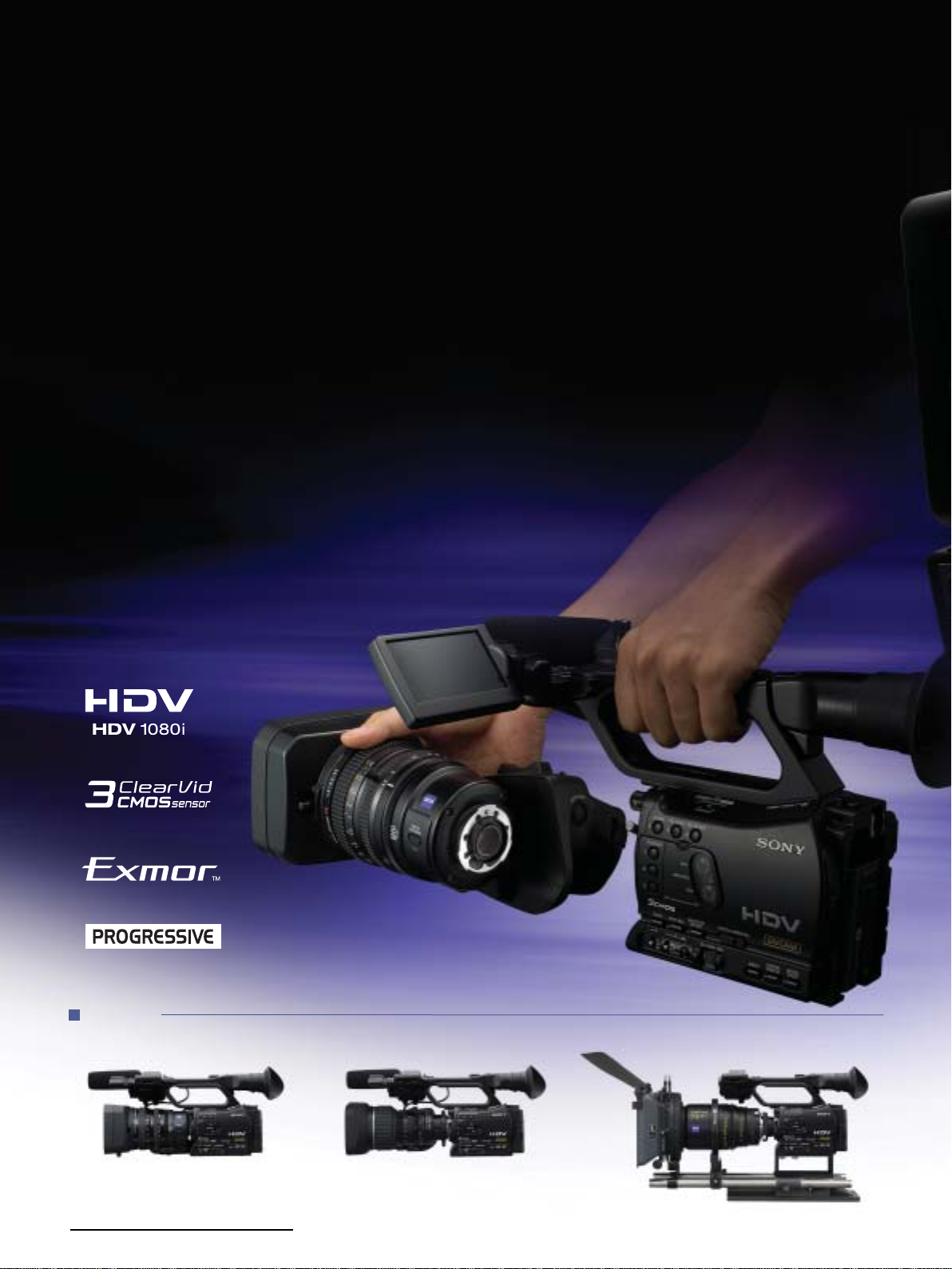
Interchangeable lens system, native
progressive recording and solid-state
memory recording – Sony’s commitment to
the HDV world brings a remarkable evolution
in next-generation products.
Sony is proud to introduce two new HDV™ camcorders that deliver the enhanced functionality professionals have been
waiting for: an interchangeable lens system, native progressive recording and solid-state memory recording.
Introducing the HVR-Z7E, the world’s first HDV handheld camcorder that uses 1/3-inch bayonet joint interchangeable
lenses and the HVR-S270E shoulder-mount camcorder which supports standard-size cassettes for extended recording times.
A streamlined nonlinear editing workflow can be achieved using the supplied Memory Recording Unit, which
provides HDV/DVCAM/DV file recording on a widely available CompactFlash
These groundbreaking new camcorders feature the 1080/25p HDV native progressive recording mode
and they also have HDMI or HD/SD-SDI output.
This next-generation system features the HVR-M35E Video Cassette Recorder which has HD/SD-SDI output.
These new solutions enhance the operational versatility of Sony's professional HDV line-up and open up a world of
possibilities for high-definition digital video production. Whether it’s for general TV production, low-budget movies,
music videos, Internet, education, or a wide range of live events and corporate videos, Sony’s new HDV camcorders are ideal.
®
solid-state memory card.
HVR-Z7E
2
(with supplied lens) (with ENG lens*) (with cinema lens*)
Page 3
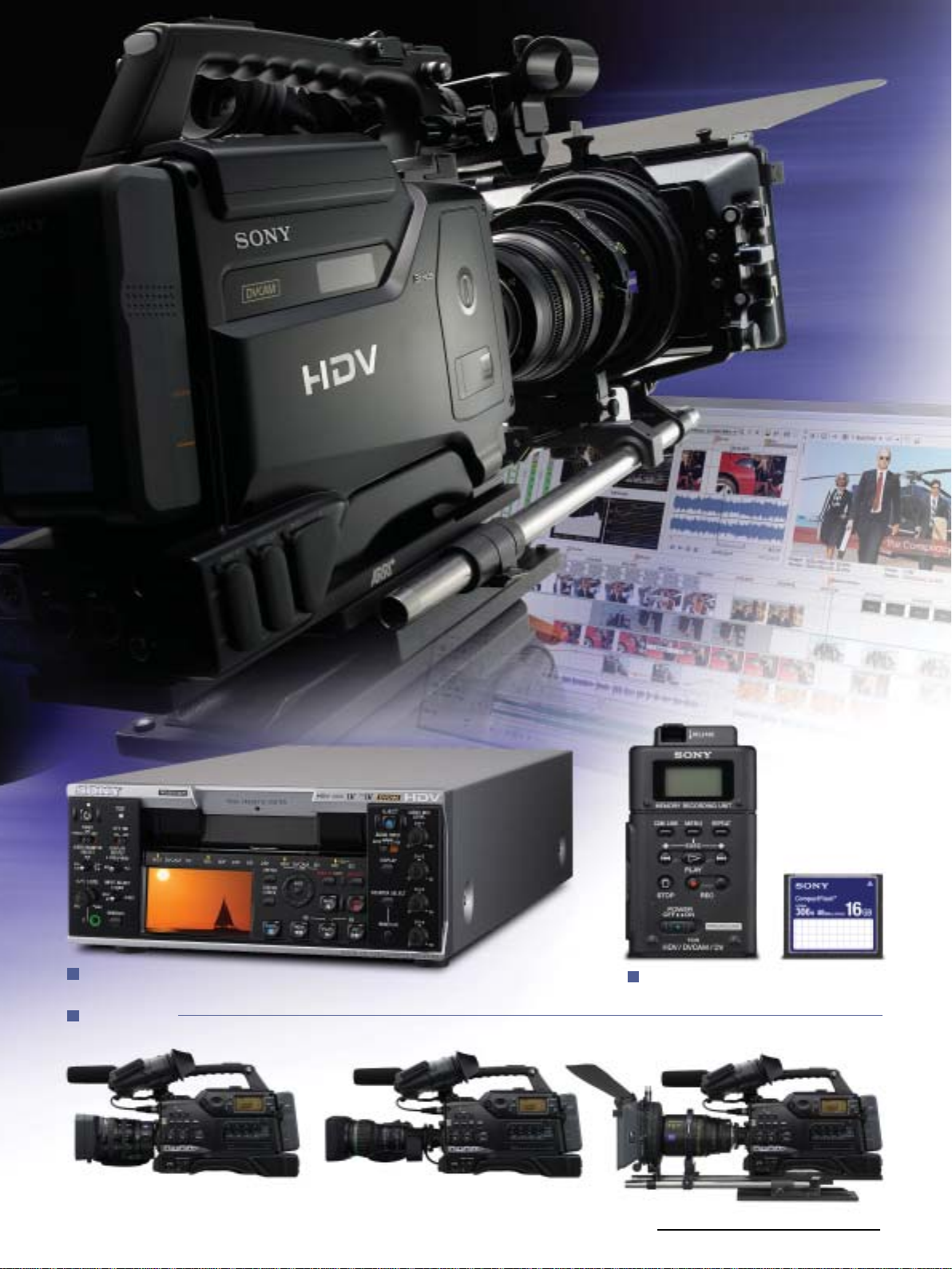
HVR-M35E
HVR-S270E
Memory Recording Unit
(supplied with the HVR-Z7E/S270E)
(with ENG lens*) (with cinema lens*)(with supplied lens)
*These lenses, adaptors and matte box sets are not supplied.
3
Page 4
HVR-Z7E and HVR-S270E Common Features
New Line-up Expanding the HDV format World
Sony’s commitment to HDV has resulted in the remarkable
evolution of cutting-edge technology equipment, such as the
HVR-Z7E and HVR-S270E which use the popular HDV1080i
recording specification.
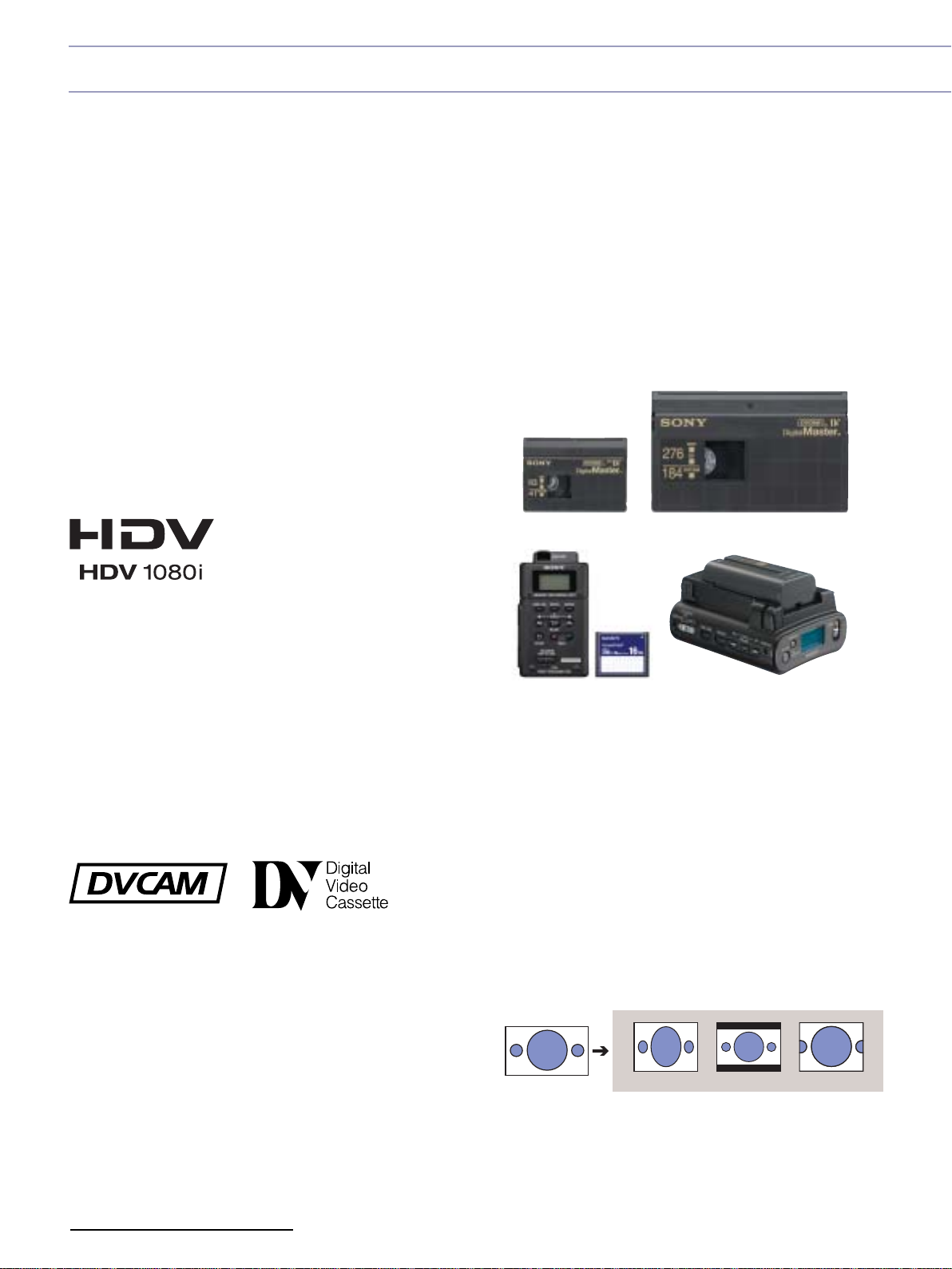
The HDV1080i specification uses one of the “MPEG2 Long GOP”
compression profiles. This highly efficient and robust "MPEG2
Long GOP" codec - which is also used in the Sony XDCAM HD
and XDCAM EX series – enables users to record stunning-quality
HD video.
The HVR-Z7E provides over 60 minutes*2of recording time using
the widely available miniDV videotape. While the HVR-S270E
has the additional option of using standard-size cassettes that
provide over 4.5 hours*3of continuous recording.
*2 When Sony's recommended Professional HDV tape DigitalMaster™ model
PHDVM-63DM is used,approx. 63 min. recording time.
*3 When Sony's recommended Professional HDV tape DigitalMaster™ model
PHDV-276DM is used, approx. 276 min.(4 hrs. 36 min.) recording time.
Native editing in the HDV format is supported by most of the
popular NLE (Nonlinear editing) software manufacturers.
Additionally, the HDV signals can be recorded as a file on
non-tape media. For example, when using the supplied
CompactFlash (CF) Memory Recording Unit, images can
be stored on a standard CF card for quick nonlinear editing.
The optional HVR-DR60 Hard Disk Recording Unit can be
used in the same manner, with images being recorded on to
its large-capacity 60GB hard drive, which provides 4.5 hours
of recording time.
PHDVM-63DM
PHDV-276DM
Switchable Recording and
Playback – HDV1080i/DVCAM/DV
The HVR-Z7E and HVR-S270E can switch between HDV 1080i,
DVCAM and DV recording, providing full flexibility to record
in either standard definition or high definition depending on
your production needs.
Memory Recording Unit (supplied)*
*CF card is not included.
HVR-DR60 (option)
Built-in Down-converter for
SD Production
The HVR-Z7E and S270E can convert material from 1080i
down to 576i and output the video signals through its i.LINK
interface and other SD output connectors.
This allows users to edit recorded material with a compatible
nonlinear editing system using current DV editing software,
as well as record SD signals to an external VTR.
)
)
HD (16:9
Squeeze Letterbox Edge crop
*Letterbox mode is not available from the i.LINK connector. i.Link is a
trademark of Sony used only to designate that a product contains an IEEE
1394 connector.Not all products with an i.LINK connector will necessarily
communicate with each other.For information on compatibility, operating
conditions and proper connection, please refer to the documentation
supplied with any device with an i.LINK connector. For information on
devices that include an i.LINK connection, please contact your nearest
Sony office.
SD (4:3
4
Page 5
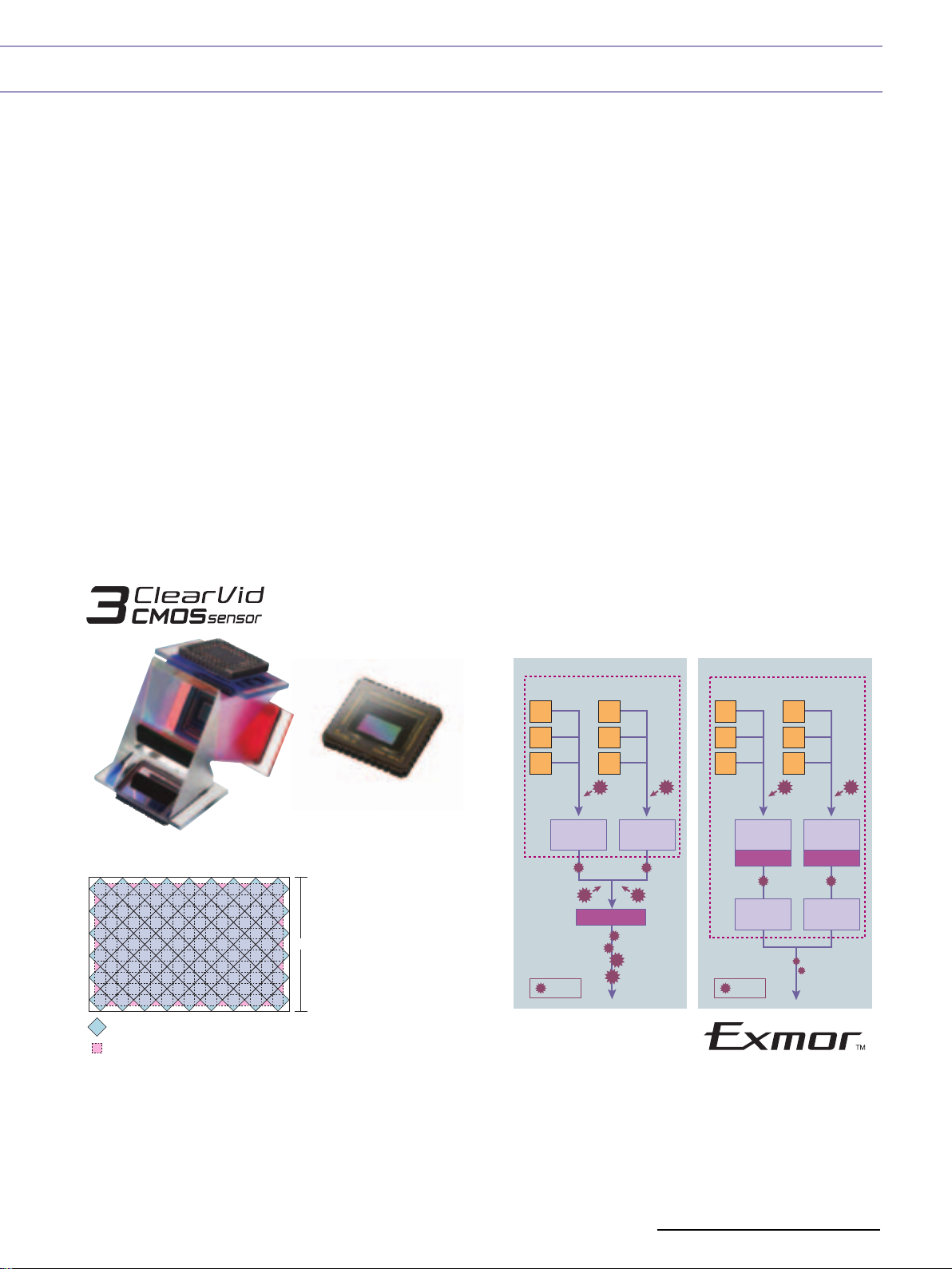
Cutting-edge imaging System for New Camcorders
✜ 1/3 inch-type 3 ClearVid CMOS Sensor
system
The newly developed 1/3-inch type 3 ClearVid CMOS
Sensor™ system has 45-degree rotated pixels on each
chip in order to increase the signal density, while each
pixel maintains sufficient surface area.
In combination with Enhanced Imaging Processor™ (EIP),
the 3 ClearVid CMOS Sensor system achieves high
resolution, high sensitivity, wide dynamic range and
excellent colour reproduction.
The pixel shift interpolation technique has been
traditionally used in small 3CCD camcorders. However,
it normally requires the combination of all three colour
element (RGB) signals to maximise resolution. If an object
lacks one or more colour elements, the
resolution of the object may be degraded.
The 3 ClearVid CMOS Sensor system is different. It can
always produce maximum resolution, regardless of the
balance between colour elements, thanks to its unique
and sophisticated interpolation technology.
✜ Enhanced Functionality due
to “Exmor” Technology
Both the HVR-Z7E and HVR-S270E offer cutting-edge
features, such as the “Exmor™”technology developed
by Sony, which utilises the full potential of the 3 ClearVid
CMOS Sensor system.
The “Exmor” technology, which features the
column-parallel A/D conversion technique and the dual
noise cancelling method are also used in other new
camera products from Sony, such as the PMW-EX1.
Multiple A/D (analogue to digital) converters on each pixel
row convert analogue signals to digital as soon as they are
generated, unlike traditional technology that only has
one A/D converter on each chip. The“Exmor” technology
can eliminate the influence of external noise that
enters the signal chain during transfer to the A/D
converter, resulting in high-quality digital signals with
extremely low noise. This significantly enhances shooting
in low-light environments.
By adopting this groundbreaking technology, the new
1/3-inch 3 ClearVid CMOS Sensor system enables the
HVR-Z7E and HVR-S270E to achieve a low light sensitivity
of just 1.5 lux*.
* at 1/25 shutter,auto iris and auto gain.
Current Technology “Exmor” technology
Sensor
Photo Diodes
Sensor
Photo Diodes
Pixel Layout
Pixels (Photo Diodes)
Signals after interpolation
1080 Pixels
Noise
Cancelling
:Noise
Cancelling
A/D Converter
Noise
Noise
Cancelling
A/D Converter
Noise
Cancelling
:Noise
Noise
Noise
Cancelling
Cancelling
A/D Converter
Noise
Cancelling
5
Page 6
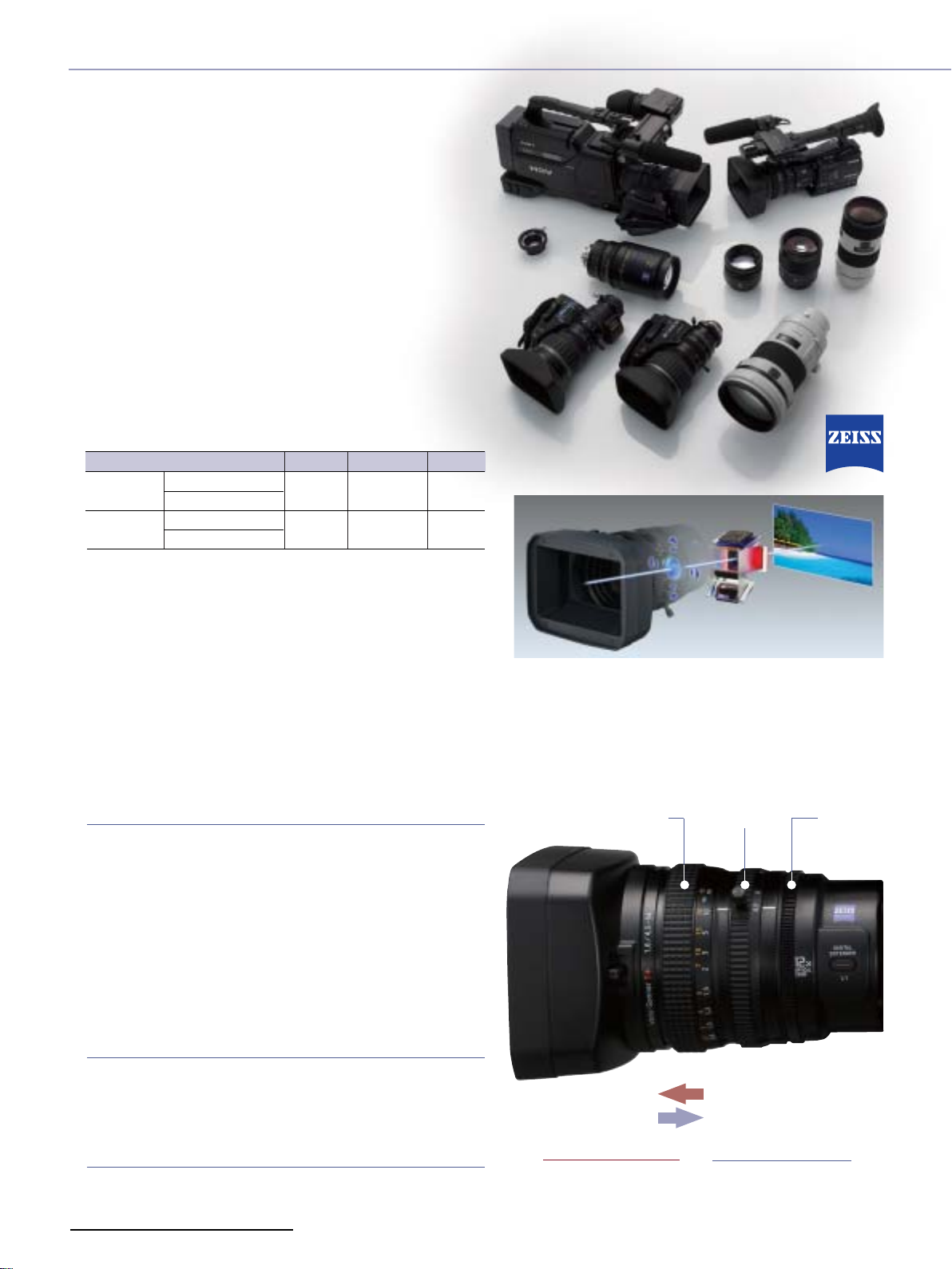
Interchangeable Lens System
Offers Unlimited Possibilities
Var ious video lenses can be attached to the
HVR-S270E and HVR-Z7E
with a universal standard 1/3-inch bayonet mount
mechanism for quick changing of lenses.
✜ Carl Zeiss Lens for HD Video as Standard
A high-quality, multi-purpose Carl Zeiss lens for HD video comes as
standard with the HVR-S270E and HVR-Z7E. Stunning resolution and
contrast is achieved thanks to the Carl Zeiss Vario-Sonnar™ T*
coating, which suppresses unwanted reflections. A specially
designed wide-angle lens is also available as an option to suit a
diverse range of shooting requirements.
Lens
Standard lens
(supplied)
Wide lens
(option)
*4 These values are calculated to be equivalent to 35 mm film.
VCL-412BWH (for HVR-Z7E)
VCL-412BWS (for HVR-S270
VCL-308BWH (for HVR-Z7E)
VCL-308BWS (for HVR-S270E)
which are both equipped
(16:9)
(16:9)
4
F number
1.6 - 2.0
1.6 - 2.4
Optical Zoom
E)
12x
8x
Focal Length*
32mm-384mm
24mm-192mm
✜ Easy-to-use Interchangeable Lens for Fixed-lens
Camcorder Users
These lenses give Sony’s two new HDV camcorders the same
functionality as popular fixed-lens camcorders like the HVR-Z1E and
HVR-V1E, thanks to built-in features such as auto-focus, optical
stabiliser,and automatic back-focus adjustment.
Current users of the above camcorders will easily become adept
at using the HVR-Z7E and HVR-S270E, even if they have never used
interchangeable lenses.
✜ Natural-touch Lens Operation
Focus
The newly designed focus ring offers two types of manual focus,
plus an auto focus mode that can be easily switched by sliding
the focus ring forward or backward.
When the focus ring is in the front position, the lens works in the
same way as the HVR-Z1E, HVR-V1E and DSR-PD170P. In this
case, either manual or auto focus mode can be selected by
the assignable button on the lens. On the other hand, when
the focus ring is set to the rear position, the focus ring has a
physical stop at infinity and works in the same way as a
professional interchangeable lens, with fixed-focus-position and
distance indicators.
Zoom
Fast, intuitive manual-zoom response is provided by an internal
gearwheel mechanism that provides accurate zoom positioning.
A high-quality servo-motor provides the smooth zooming
performance that industry professionals have come to rely on.
Iris
The iris ring encircles the lens barrel.
Manual iris adjustment is possible with an ENG-type ring system
that allows fine exposure control for challenging lighting situations.
6
Slide Focus Ring Zoom Ring Iris Ring
Front : AF/MF
Back : Full MF
AF/MF Mode
• Full AF
• MF with One-push AF
Full MF Mode
• Full MF
(absolute focus position)
Page 7
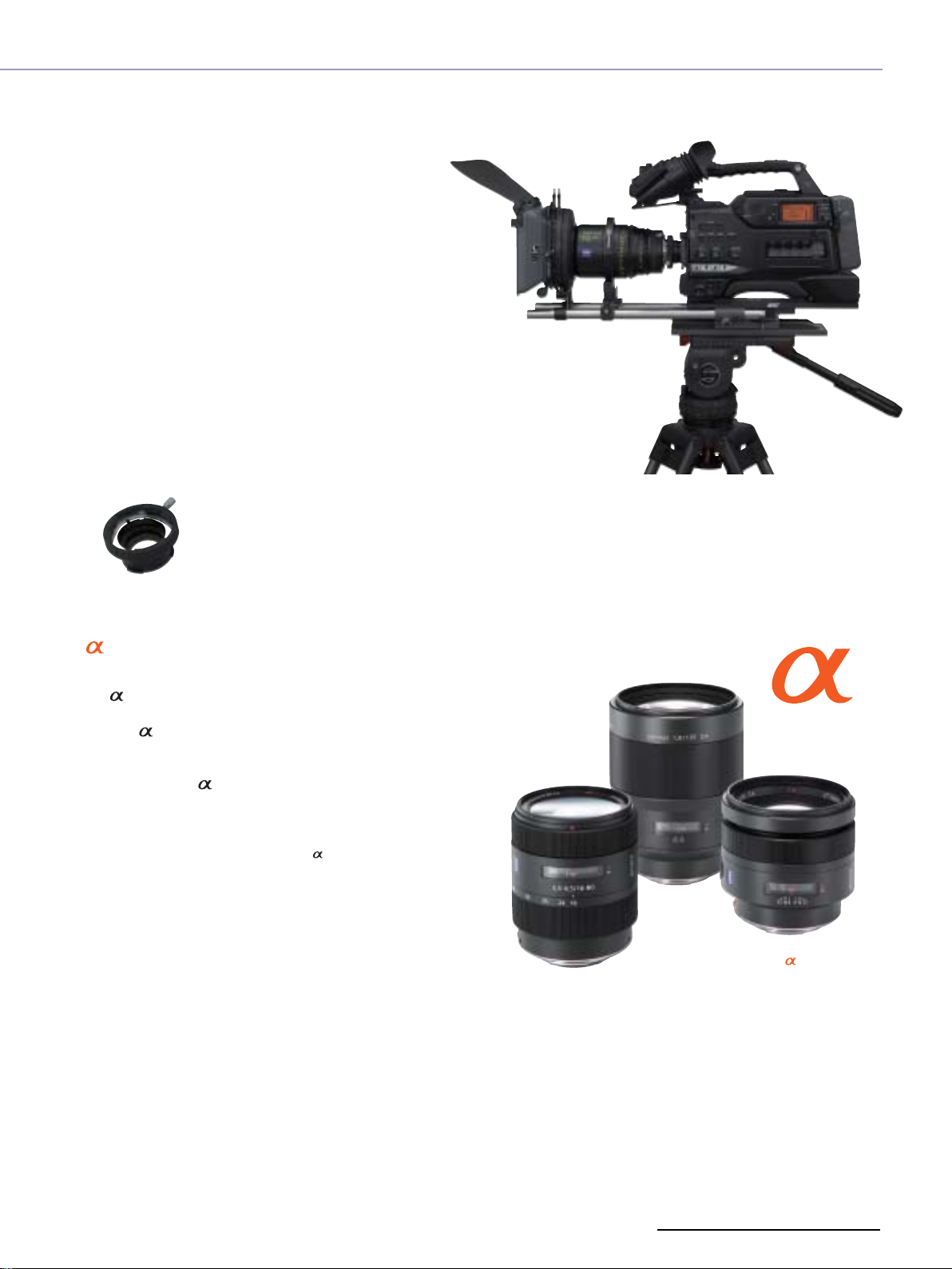
✜ Wide Range of Lenses
The flexible bayonet lens attachment system allows you
to use a wide range of lenses.
Standard 1/3-inch HD video lenses, from manufacturers
such as Fujinon and Canon, can be attached directly to
the HVR-Z7E and HVR-S270E.
If you’d like to attach a 2/3-inch or 1/2-inch HD video lens
on the HVR-Z7E or HVR-S270E, it is possible to do so by
adding a standard lens adaptor from the lens
manufacturer.
The HVR-S270E and HVR-Z7E camcorders have 12-pin lens
connectors allowing compatibility with professional ENG
lenses.
This feature is very useful, not only for those who already
have these professional HD video lenses, but also for
those who prefer to use HD digital cinema lenses for their
unique contrast, colour and atmosphere.
HVR-Z7E and HVR-S270E Common Features
Cinema lens on HVR-S270E with an adaptor
Lens adaptor
✜ Lens Compatibility
With a special adaptor from Sony, it is also possible to use
the lens series designed for Sony Digital SLR stills
cameras.
By using lenses in various configurations, creative
effects can be achieved.
This approach is ideal for filmmakers on a budget or those
who already own lenses.
Note:
The focal length is doubled with a 2/3-inch lens adaptor
The focal length is increased 1.3 times with a 1/2-inch lens adaptor
The focal length is increased 7 times with an lens adaptor
Some lenses may not be compatible and not all lens functions may be
available
lenses
7
Page 8
Operational Versatility
S
d
1
2
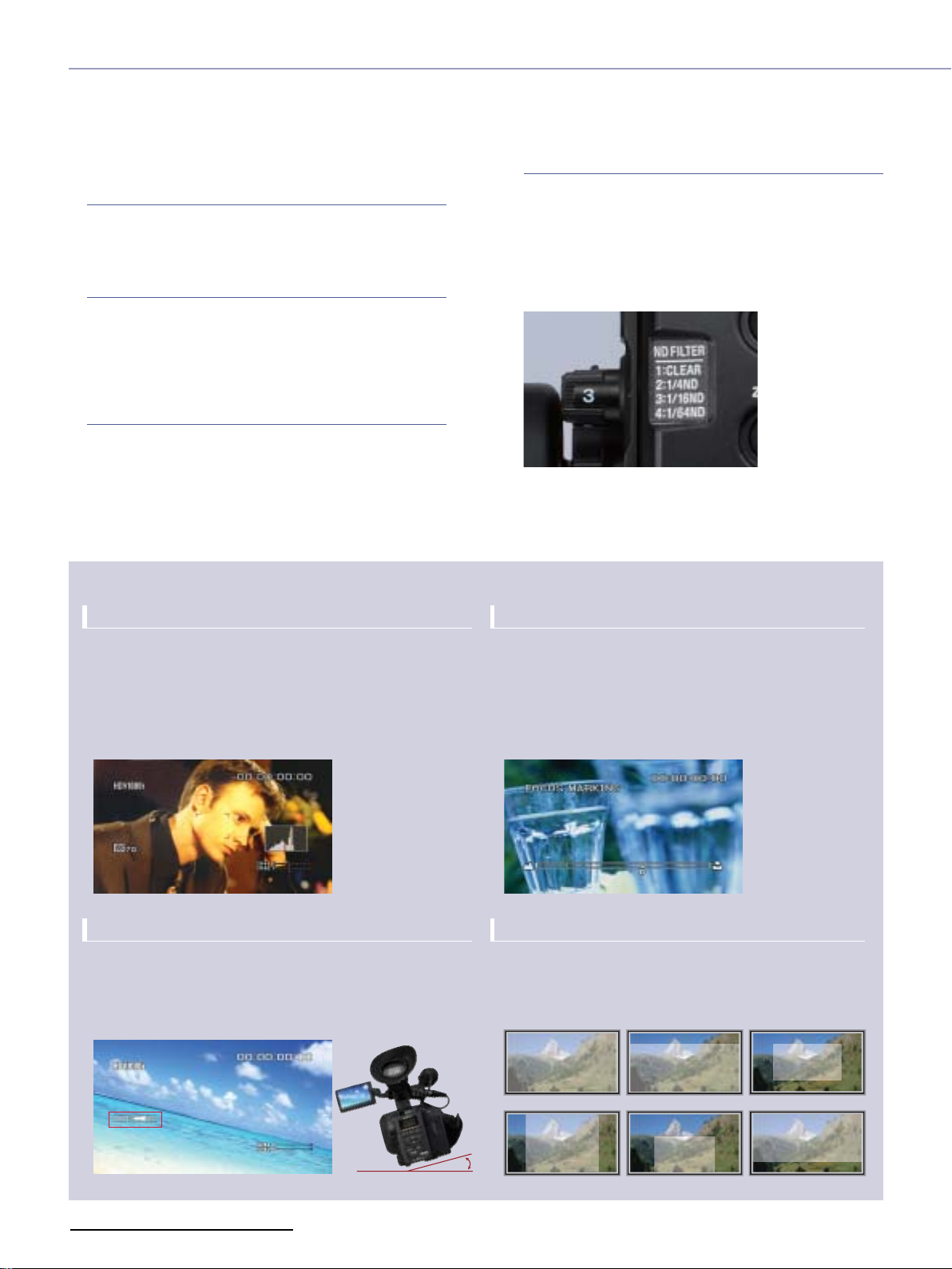
✜ New Manual Camera settings
Three ND filters
The HVR-Z7E and HVR-S270E have three built-in ND
(Neutral Density) filters, which help users to reduce light
intensity under bright shooting conditions.
Negative Gain
Negative gain settings of -6 and -3 dB have also been
added to help reduce sensitivity under bright lighting
conditions. When the iris needs to be opened to create
a short depth of field, a suitable brightness can be
achieved with this function.
Smooth Gain
The Smooth Gain function is a smooth transition gain
system that avoids sudden brightness changes caused by
manual gain-level adjustment. With this function, the
brightness changes gradually when the gain-level
position is switched and avoids any sudden, unwanted iris
adjustment.
Shooting Support Functions
Advanced Histogram
The Histogram Indicator for brightness can be displayed on
the LCD monitor and viewfinder, allowing operators to easily
evaluate the brightness of captured images.
A target window appears in the centre of the screen and the
brightness level is indicated by a vertical red line in the
histogram. The zebra indicator level appears as a yellow
vertical line in the histogram as reference for proper exposure.
Smooth WB (White Balance)
The Smooth WB feature is a smooth transition white
balance system that avoids unnatural sudden colour
temperature changes between preset white balance
settings. For example, this function is useful when you
move from an artificial,low-light environment inside a
building, to bright natural sunlight outside.
Three ND filters
Focus Marking
When the focus position needs to be manually moved to
pre-decided positions, you can put up to two markers
(A and B) on a focus position indicator in the LCD/EVF as
reference points. When the focus position becomes
aligned with one of these markers, it will begin to flash. This
allows you to keep your eye on the subject of your shot,
without having to check the focus indicator on the lens.
Camera Leveling
The HVR-Z7E and HVR-S270E both have a built-in threedimensional gravity (3G) sensor, which detects the horizontal
level of the camcorder and displays it via an indicator in the
AE Window
Six types of AE (Auto Exposure) can be selected to
automatically adjust the exposure to the most suitable
level.
LCD/EVF. This digital leveler function makes it possible to obtain
a horizontal level reading even when shooting without a tripod.
tandar
Type 3 Type 4 Type 5
Type
Type
8
Page 9

HVR-Z7E and HVR-S270E Common Features
Picture Profile
Up to six different picture-quality settings, including
gamma and colour settings, can be registered in the
memory as picture profiles. This labour-saving function
allows operators to easily recall customised picturequality settings for various shooting conditions. It is also
useful for matching footage shot at different times or for
multi-camera setups.
The picture-profile functions of the HVR-Z7E and
HVR-S270E include enhanced versions from the HVR-Z1E
or HVR-V1E, plus a selection of new functions.
Colour Depth
Generally, the brightness of a video image increases as
the colour level becomes more vivid. In these new
camcorders, the brightness and colour level are processed
independently so that more flexible tone – for instance, a
dark image with a vivid colour – is realised by 3D-LUT colour
processing.
Note: 3D-LUT = three-dimensional look-up table
Colour Correction
The Colour Correction function of the HVR-Z1E has been
improved in the HVR-Z7E and HVR-S270E camcorders.
Colour Correction provides two functions for creative
shooting. The Colour Extraction function can retain up to
two desired colours of monitored pictures in the screen,
while making all other colours black and white. The
advanced function allows users to select the colour simply
by pressing a button to memorise the centre colour of the
captured image.
The Colour Revision function can change the hue of only
the colour designated by the Colour Extraction function.
This function is good not only for creating impressive
images, but also for blue- or green-screen shooting in
order to normalise uneven colour.
The colour data is stored in each Picture Profile so that
users can select the most suitable colour setting for each
shooting situation.
Normal Colour Extraction Colour Revision
Colour Correction Images Simulated
WB Shift
The WB (White Balance) Shift function allows users to
create an impressive colour or to adjust the colour
temperature of the camcorder.
There are two WB Shift options to choose from:
•LB-CC type: adjusting the LB axis (colour temperature)
and CC filter effect
•R-B level type: adjusting the red and blue levels
Skintone Detail
This function allows users to change the sharpness of an
object with a specific colour and is particularly good for
making skin tones look more natural. The target colour can
be specified by controlling the Phase/Range/Saturation/Y
Level/Y Range parameters or by pressing a button to
specify the colour of an object with a colour picker.
If the sharpness of the background object is decreased,
the blur looks more natural.
Improved Microphone Sound Quality
✜ New Supplied Monaural Microphone
ECM-XM1
The supplied ECM-XM1 microphone's S/N ratio is 78 dB, a
sensitivity increase of 14 dB over its predecessor, the
ECM-NV1*
*6 The ECM-NV1 is a supplied microphone with DSR-PD170P, DSR-250P,
HVR-A1E and HVR-V1E.
Microphone
Sensitivity (at 1KHz)
Signal-to-noise ratio
Frequency Response
Maximum input sound pressure level
Dynamic Range
*7 0 dB=1 V/Pa. at 1 kHz
*8 0 dB SPL=20 µ Pa.
6
.
ECM-XM1
-30 dB±3.5 dB*
78 dB, typical
50~20,000 Hz
8
127 dB SPL, typical
*
111 dB, typical
ECM-NV1
7
-44 dB±4.0 dB
70 dB
100~15,000 Hz
121 dB SPL
97 dB
9
Page 10
1080p
1080i
Even Field
Odd Field
1080p
1080i
Progressive-look Motion
1080p 1080i 1080p or 1080i 1080p or 1080i
DeliverEditRecordCapture
Selectable Progressive Modes
1080p 1080p1080p1080p
Capture Record Edit Deliver
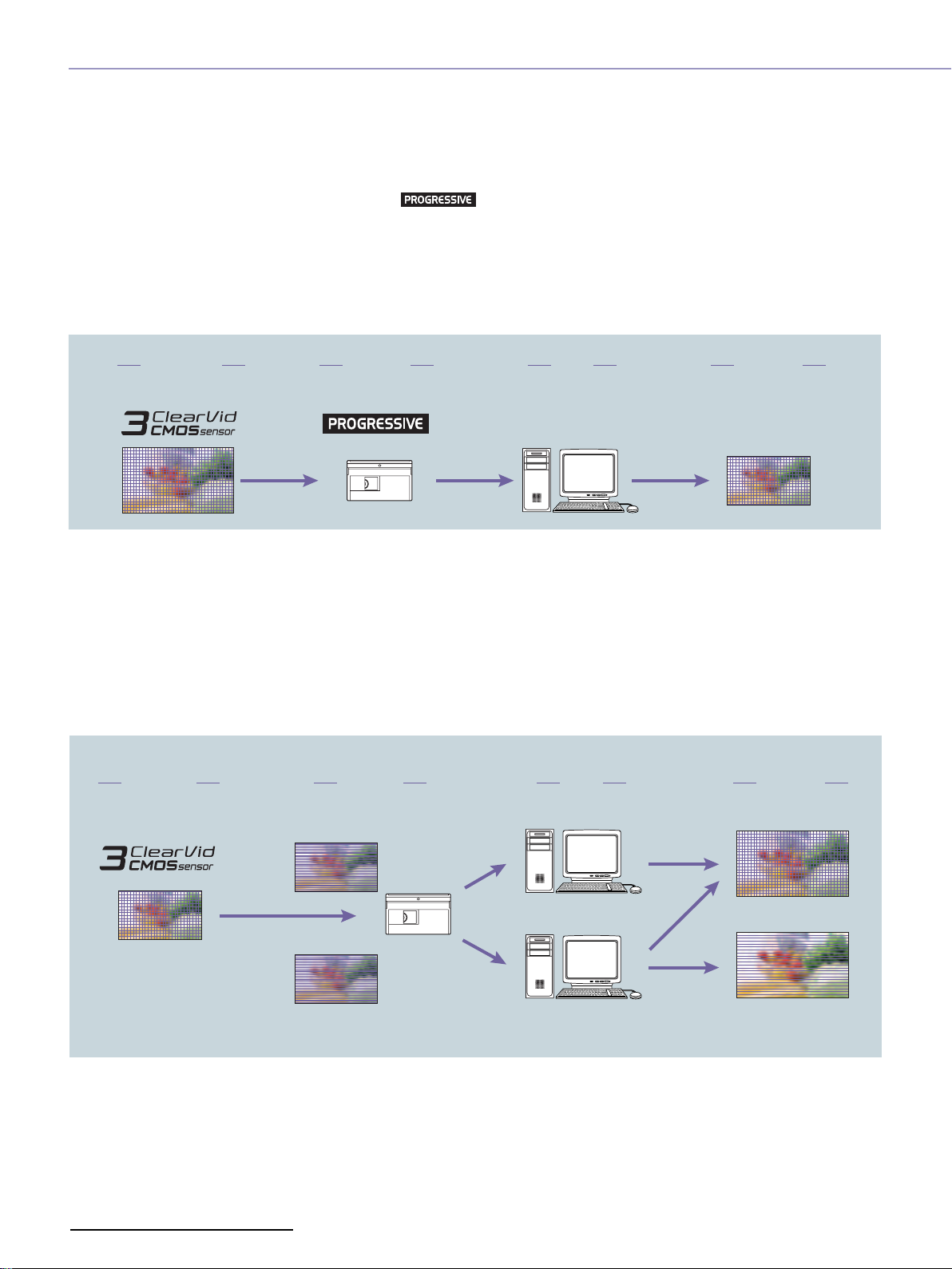
The HVR-Z7E and HVR-S270E have two types of progressive shooting modes.
✜
25p HDV Native Progressive Recording Modes
The HVR-Z7E and HVR-S270E camcorders newly feature
a 25p HDV native progressive recording mode.
The 3 ClearVid CMOS Sensor system and EIP create true
1080p images, which can then be recorded as a
progressive signal by the HVR-Z7E and HVR-S270E
camcorders in HDV format.
✜ 25p Progressive Scan Mode
In this mode, the 1080p image captured by the 3
ClearVid CMOS Sensor system is also recorded as an
interlaced signal by dividing each frame into two fields.
This enables compatibility with current editing and
monitoring equipment that only accept interlace signals,
while maintaining the quality of the 1080p image.
The progressive scan mode is suitable for feature films,
The progressive HDV stream can be output from an i.LINK
connector and used for progressive editing with
compatible NLE software.
The native progressive recording mode is suitable for
output to film, CG composition, viewing on a progressive
monitor,or as an Internet movie.
Note: interlaced video is output from connectors other than i.LINK
documentaries and music videos, which have to be
recorded as interlaced video for viewing on interlaced
monitors, but want to offer a “progressive look” to their
motion.
It is also possible to edit footage recorded in the “25p
scan” mode as progressive material.
Most NLE software can output the edited timeline in
progressive format by merging odd and even fields.
10
Page 11
Memory Recording Unit
✜ HDV in IT Workflow by CompactFlash
Memory Recording Unit
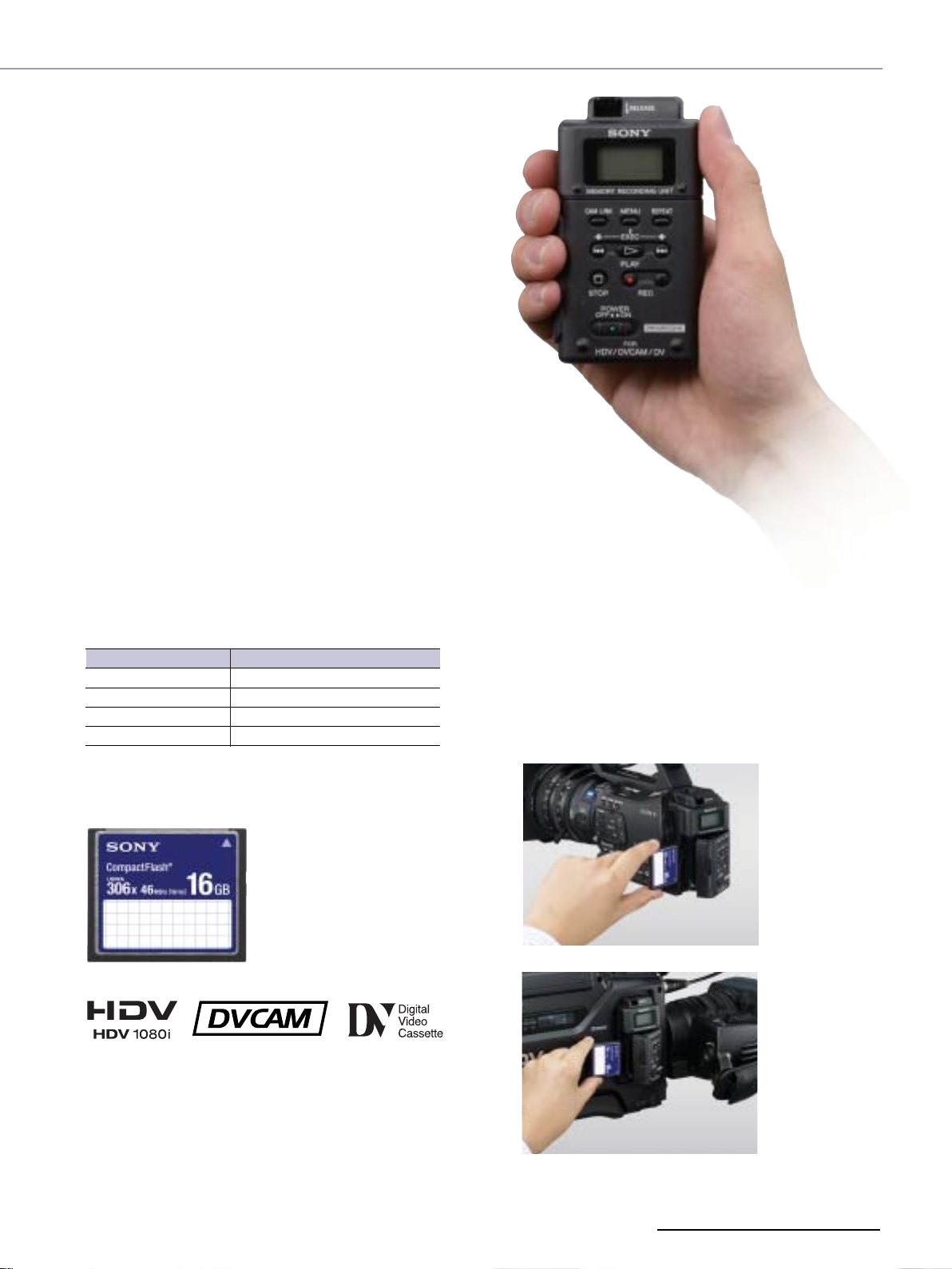
The Memory Recording Unit is supplied with each
camcorder to support HDV tape recording.
It captures the HDV1080i, DVCAM, or DV stream output
from the camcorder and records it as movie file while you
are simultaneously recording to tape.
You can use a standard CompactFlash (CF) card*, which
offers secure recording, high-speed access, large data
capacity, removable media convenience and high
durability against external vibration.
*Not supplied.
The CF card was selected for these HDV camcorders because
the media is easily obtainable. So, in the same way as miniDV tape
is easily obtainable for HDV recordings, CF will be easily available
for file recording. This general versatility is very important for
those who frequently need to obtain media quickly, such
as someone shooting a documentary or news reports
while moving from city to city.
✜ HDV/DVCAM/DV File Recording on Easily
Obtained CompactFlash Card
The recording time on a 16-GB CF card*9in HDV, DVCAM
and DV format*10is approximately 72 minutes.
CF card capacity
16GB
8GB
4GB
2GB
*9 At least 133x speed and 2-GB capacity is required. The NCFD8GP
and NCFD16GP Sony CF cards are recommended.
*10 The recording time may change according to the CF card type
and recording format.
Recording time(approximately)
72 minutes
36 minutes
18 minutes
9 minutes
HVR-Z7E and HVR-S270E Common Features
✜ Integration Without Cabling
The Memory Recording Unit can be integrated to the
HVR-Z7E or HVR-S270E without the need for cabling,
simply by attaching it onto the special shoe connector*
This smart combination never interferes with shooting
operations. The Memory Recording Unit automatically
synchronises with the recording action of the
camcorder – i.e., when the camcorder starts or stops
recording, so does the unit.
*11 The intelligent shoe connector inputs and outputs an HDV/DV stream
and supplies power to the Memory Recording Unit. The i.LINK connector
is not available when the unit is attached on the camcorder.
11
.
72 min.
16 GB
attached on the HVR-Z7E
attached on the HVR-S270E
11
Page 12
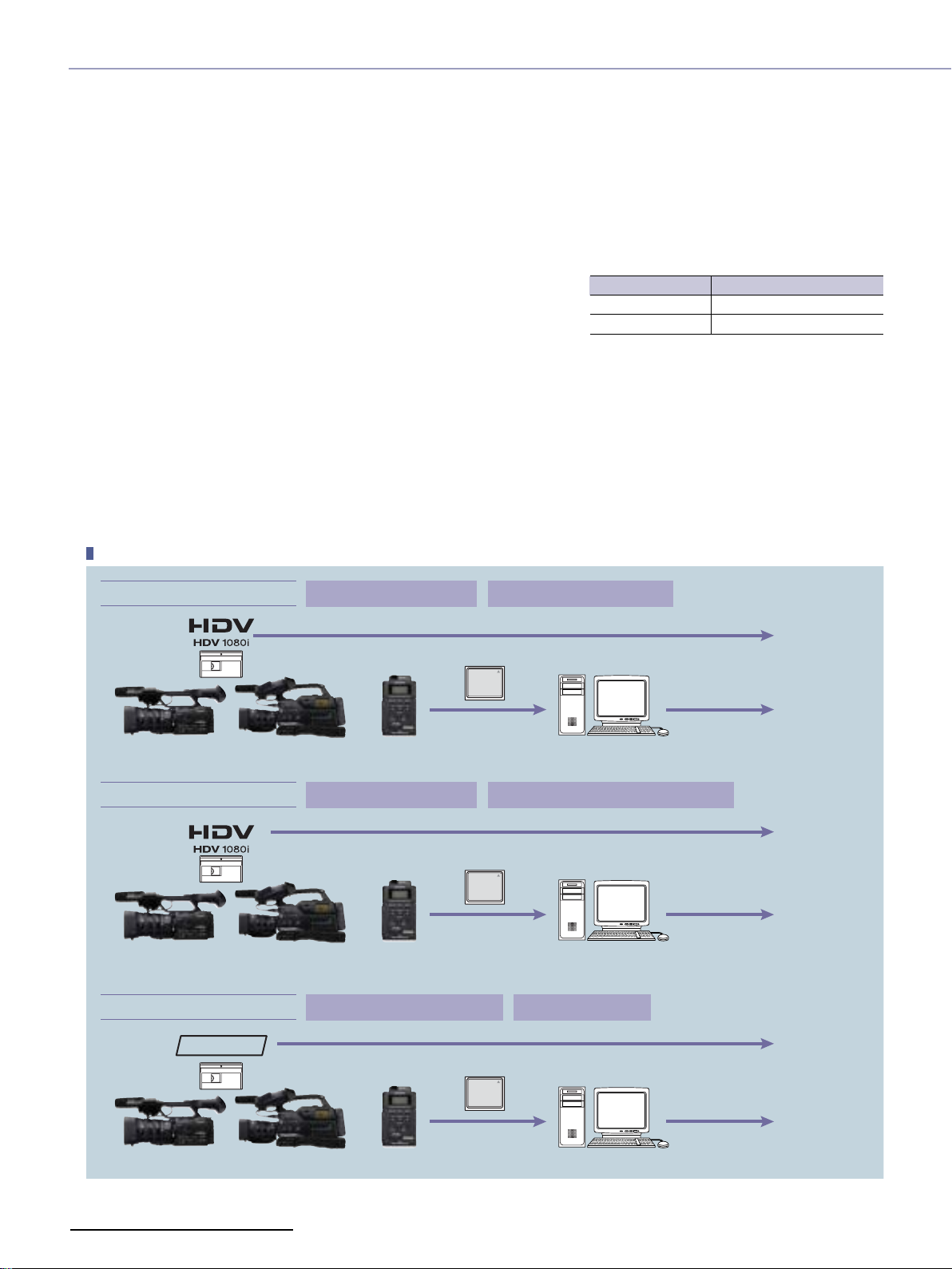
✜ Hybrid Operation Realises Archiving, IT Workflow and HD/SD Parallel Recording
The Memory Recording Unit provides a hybrid operation, where images are recorded to tape and a CF card simultaneously,
in a similar fashion to the HVR-DR60 Hard Disk Recording Unit*
*12 HVR-DR60 does not accept a native progressive HDV stream.
This means you can immediately access a movie file for streamlined NLE work,while keeping the master source tape in a safe place.
12
.
The file format is M2T for HDV mode and AVI or RawDV for DVCAM/DV modes.
In the same fashion as HVR-DR60 operation, these files can be edited using
popular NLE software.*
*13 The Memory Recording Unit and HVR-DR60 adopt the FAT32 file system. Continuous recording is divided into 4-GB files (approximately 20 minutes of
recording time). A utility software, available from the Sony website, can merge these divided files for seamless editing on NLEs. Some NLEs include this
function. For details of NLE operation, please consult your nearest NLE software dealer.
In addition, when the built-in down-converter of the connected HDV camcorder is active, SD images can be recorded on a CF
card while HD images are recorded to tape.
HD master tape is recorded and SD movie files are created at the same time.
HDV or DVCAM tape-based users can gradually move to IT workflow with this hybrid-operation.
Ta pe-less recording is also available if desired.
13
Mode
HDV
DVCAM/DV
File Format
M2T
DV-AVI(type 1) or Raw-DV
Hybrid-Recording
“HD + HD” Hybrid-Recording
HD HD
Tape : HDV1080i signal CF card : HDV1080i signal
CF
+
M2T file
HDV Editing
Archiving
Repurposing
HD Delivery
“HD + SD” Hybrid-Recording
HD SD
“SD + SD” Hybrid-Recording
DVCAM
SD
12
Tape : HDV1080i signal CF card : Down-converted DV signal
CF
+
DV file
DV Editing
Tape : DVCAM or DV signal CF card : DV signal
CF
+
SD
DV file
DV Editing
Archiving
Repurposing
SD Delivery
Archiving
Repurposing
SD Delivery
Page 13
PC with CF card slot
CF card
USB connection
i.LINK connection
PC with USB interface
PC with i.LINK(IEEE1394) connector
Memory Recording Unit
on the supplied cradle
Memory
Recording
Unit
CF
CF card
CF
CF card reader(USB)*
*Not supplied.
CF card
CF
DisplayHVR-Z7E
+ or
HDV VTR / Camcorder
Component
Composite/S-Video
HDMI (HVR-Z7E)
HD/SD-SDI (HVR-S270E)
HVR-S270E
Display
Component
Composite/S-Video
HDMI (HVR-M25E, HVR-V1E)
HD/SD-SDI (HVR-M35E/HVR-1500)
i.LINK
connection
Video output
Video output
Memory Recording Unit
Memory Recording Unit
on the supplied cradle
Cradle
Battery (L series) Slot
Memory Recording Unit
DC Power Input
i.LINK Connector
(6pin)
File Transfer
HVR-Z7E and HVR-S270E Common Features
Playback from the Memory Recording Unit
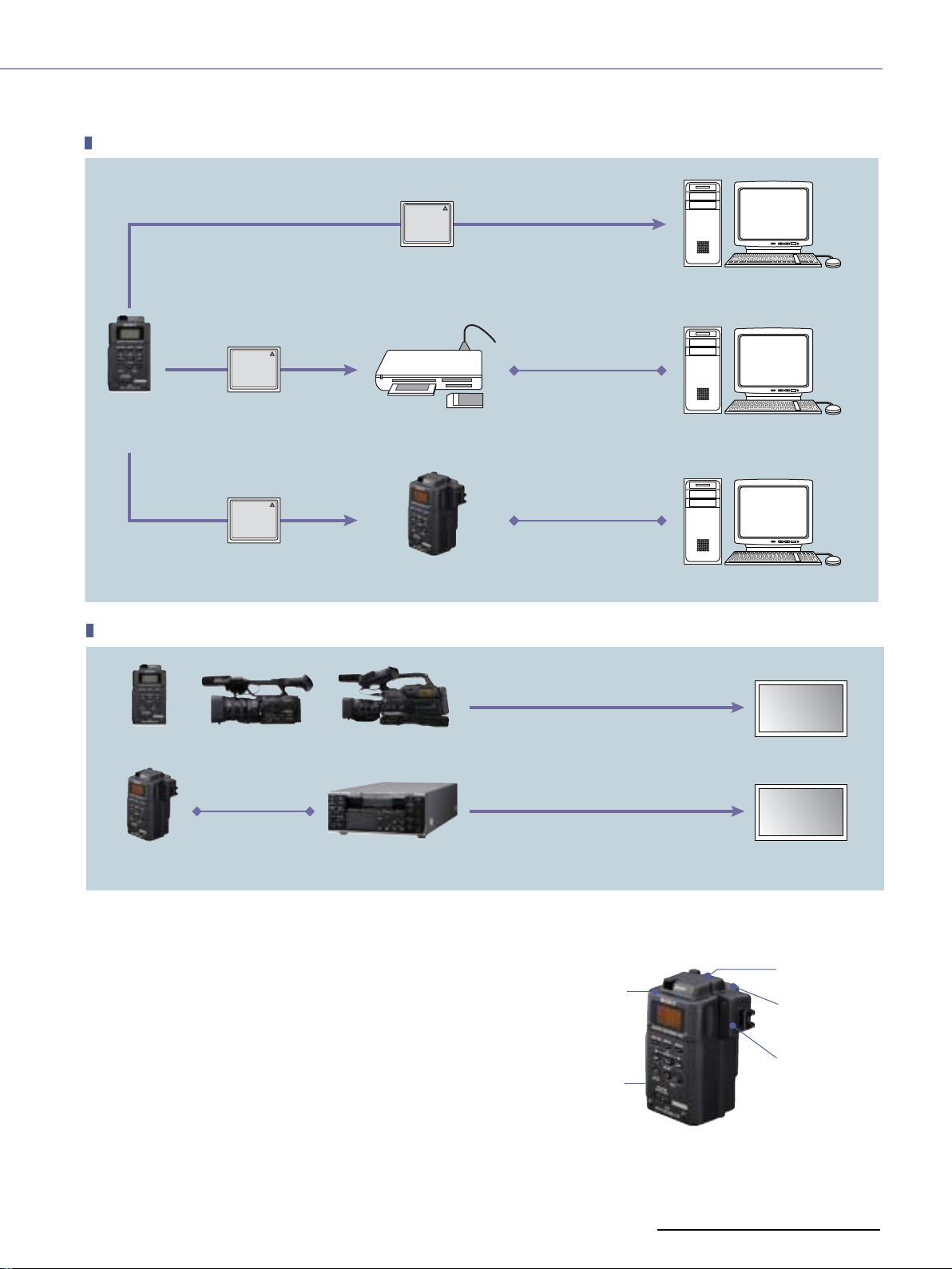
✜ Independent Use With the Supplied Cradle
The Memory Recording Unit can be used as an external recording
unit, just like the HVR-DR60, by attaching the supplied cradle that
has an i.LINK connector,battery attachment and DC power
input. When the Memory Recording Unit is connected to a PC
via i.LINK, it is recognised as an external drive and can be used to
access files. When connected to a video device (such as a VTR or
NLE system) via i.LINK, it can be used to input/output a
HDV/DVCAM/DV stream.
13
Page 14
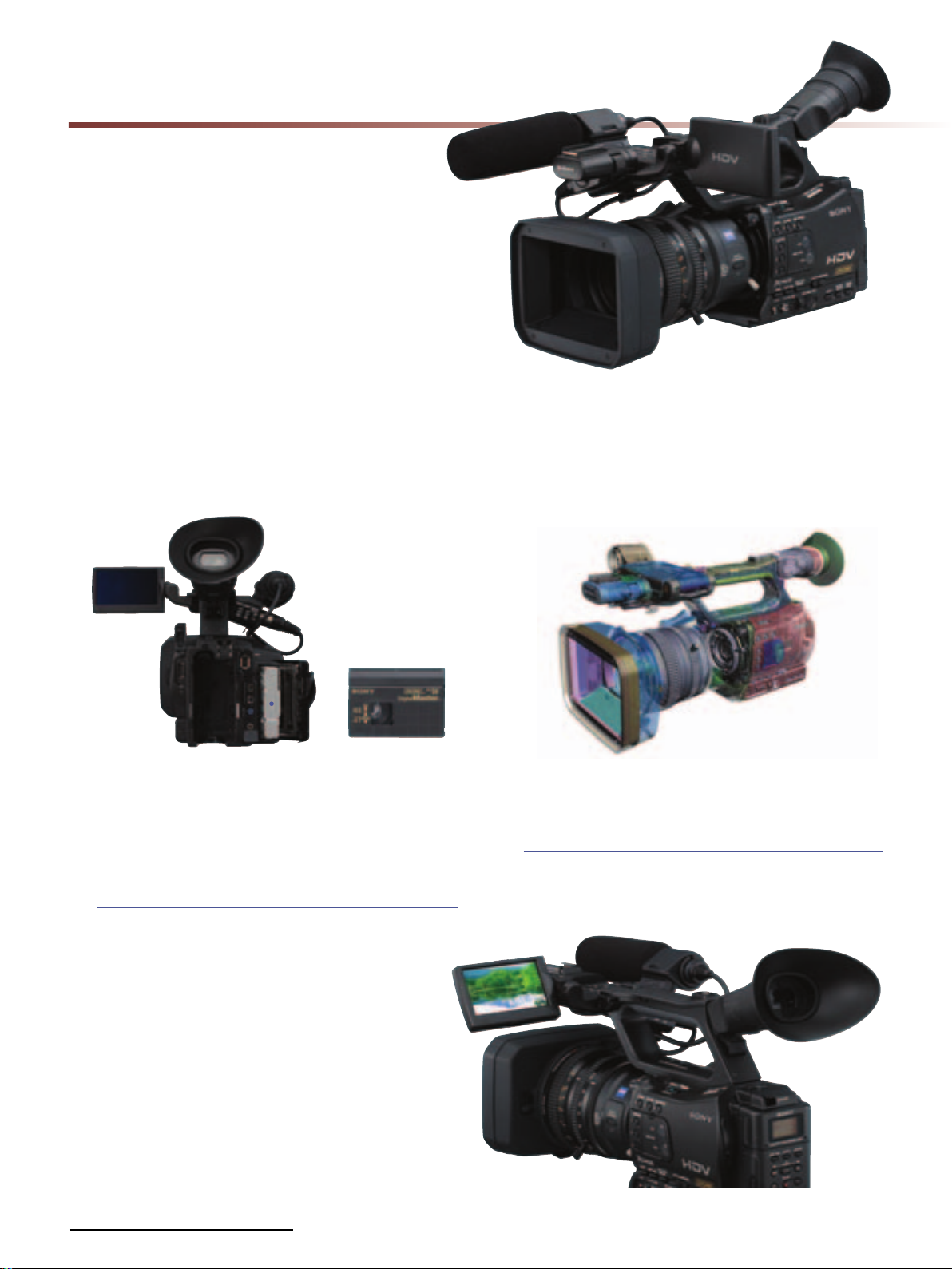
HVR-Z7E
Sony's new HVR-Z7E is the world's first
professional handheld HDV camcorder with
an interchangeable lens system.
The compact design makes it easy to use
and flexible when shooting applications
requiring mobility and in space-constrained
locations.
✜ HDV, DVCAM and DV Recording on a
miniDV Cassette tape
The HVR-Z7E accepts miniDV cassette tapes, which
provide over 60 minutes recording time for HDV and DV
formats, over 40 minutes for DVCAM format.
Cassette compartment
Operational Versatility of HVR-Z7E
✜ New XtraFine LCD and EVF Offer
High-resolution, High-contrast Images
XtraFine™ LCD
A 3.2-inch type XtraFine LCD is located on the HVR-Z7E in
the same position as on the HVR-Z1E.
The high pixel number of approximately 921,000 dots is
around four times greater than the LCD of the HVR-Z1E,
and this higher resolution allows for easier focus
adjustments.
✜ An Ideal Handheld Camcorder Design
Sony has responded to professional user feedback to
create the ideal handheld camcorder with
ergonomically designed body-weight balance and a
well-planned layout of buttons and connectors to reduce
camera operator fatigue.
Common Features of the XtraFine LCD and EVF
•100% full-scan display – helps you to check the entire
recorded area.
•6500k colour temperature – the standard for professional
monitors.
XtraFine EVF
The 0.45 inch type XtraFine EVF (Electronic View Finder) has
approximately 1,227,000 dots (852x480x3(RGB)).
This device has three independent LEDs for R,G, and B
colours. This technology allows users to check objects with
remarkable colour reproduction and resolution*. The EVF has a
selectable display mode between colour or black and white.
*When the camcorder is panned quickly or when an object in the
screen moves quickly, the primary colours of R/G/B may be seen on the
object in the EVF momentarily.
14
XtraFine LCD and EVF
Page 15
✜ infoLITHIUM L Series Battery Compatible
The HVR-Z7E uses the same batteries as the HVR-Z1E,
HVR-V1E and DSR-PD170P, so you can fully utilise your
existing battery and charger assets.
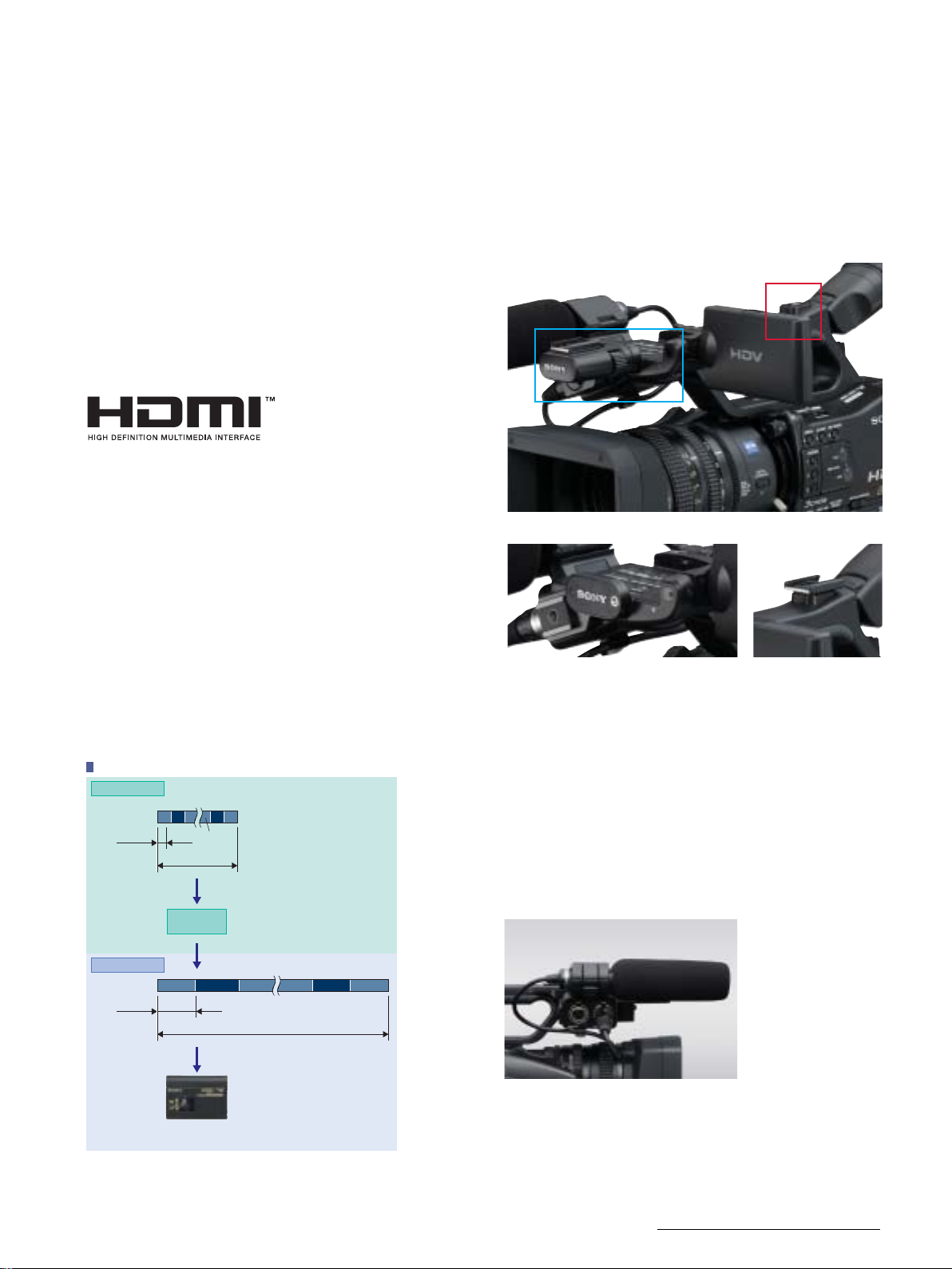
✜ HDMI output connector
Uncompressed digital HD video and audio signals are
output from the HDMI connector. You can see stunning
HD images on the HDMI-compatible monitor display.
During shooting, the pre-compressed 1920x1080i/4:2:2
signal is output from the HDMI connector.
✜ Two Accessory Shoes
The HVR-Z7E features two accessory shoes. There is a cold
shoe on the front that can be removed to make room for
a mattebox. While at the rear, there is a screw-hole type
shoe located on the handle, which can be changed to a
cold shoe, if required, using supplied parts.
B
A
✜ Smooth Slow Rec
The Smooth Slow Rec function of the HVR-Z7E camcorder
enables slow-motion playback by capturing images four
times faster than the normal field rate (200 fields/s). In this
mode, quad-speed images are captured for three
seconds, stored in the built-in buffer memory,and then
recorded to tape (in either HDV, DVCAM, or DV format) as
slow-motion pictures lasting 12 seconds*
recorded images to be checked immediately in the field.
Although the resolution of the picture quality is
decreased, this function is effective for some applications
that don’t need full HD quality, such as Internet movies or
the analysis of moving objects like a golf swing, for
example.
Smooth Slow Rec
200i Capturing
1 2 3
1/200 s
50i Recording
1/50 s
599 600
598
3s
Buffer
Memory
1
2 3 599598 600
12 s
15
. This allows
A:Removable Front Shoe B:Screw Hole
Removable Front Shoe
Rear cold shoe parts
✜ Two Screw Holes for Secure Connection
To provide a more secure connection between the
camcorder and tripod plate or other accessories, two
screw holes have been incorporated.
✜ One-touch Clip-type Microphone Holder
A one-touch clip-type microphone holder makes it easy
to remove the microphone for quick storage.
Tape
(HDV/DVCAM/DV)
*15 Audio cannot be recorded while shooting in this mode.
Clip-type microphone holder
15
Page 16
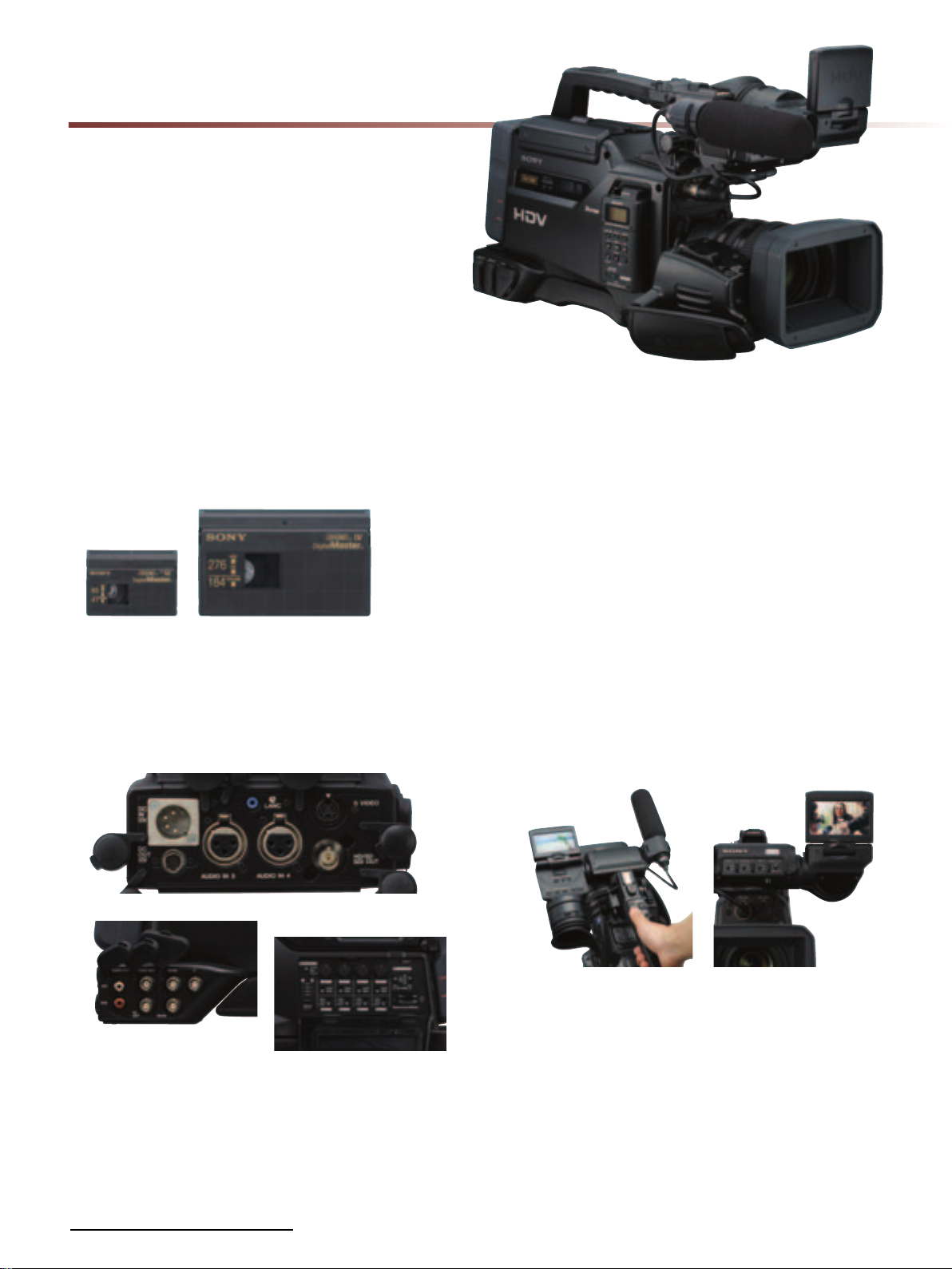
HVR-S270E
The HVR-S270E offers videographers a
traditional “on-the-shoulder” feel with the
benefits of increased camera stability and
longer recording time of up to 4.5 hours with
standard size cassettes.
✜ Standard-size Cassette Compatibility
A standard-size cassette tape provides approximately 4.5
hours of HDV/DV recording or approximately 3 hours of
DVCAM recording. Of course, recording on a miniDV
tape is still an option.
✜ HD/SD-SDI & Other Output Connectors
An HD/SD-SDI output connector provides embedded
audio and TC data and can, for example, be linked up to
an XDCAM HD deck.
BNC connectors provide secure cabling connections.
✜ "Dual Finder" New LCD Position on EVF Unit
The new LCD position on the EVF (Electric View Finder)
unit is currently only available on Sony’s professional HDV
shoulder-mount camcorders.
The HVR-S270E camcorder features a new configuration
of a 3.2-inch type XtraFine LCD monitor (approximately
921,000 dots) and an XtraFine EVF (approximately
1,227,000 dots, 852x480x3 (RGB))*. The LCD is located on
the EVF unit. This unique layout enables the camera
operator to perform both traditional EVF monitoring and
LCD monitoring, while the camcorder is held on the
shoulder. The 180-degree tilt mechanism allows for LCD
monitoring when the camcorder is held in a high or
low-angle position. The 270-degree swivel mechanism
will allow LCD monitoring from the front, right,
or even left of the camcorder so that a reporter or
a director can monitor what is being captured by the
camcorder.
*When the camcorder is panned quickly or when an object in the
screen moves quickly, the primary colours of R/G/B may be seen on the
object in the EVF momentarily.
Rear panel
Connectors
Side panel
✜ Four-channel Audio Input
Four-channel audio recording is realised in HDV and
DVCAM thanks to four XLR audio input connectors – two
at the front, and two at the back.
16
✜ BP Series Battery Compatible
V-lock professional BP batteries are another great feature
in common with broadcast camcorders.
✜ Smooth Slow Rec
As with the HVR-Z7E, the HVR-S270E camcorder enables
slow-motion playback by capturing images four times
faster than the normal field rate (200 fields/s).
Page 17
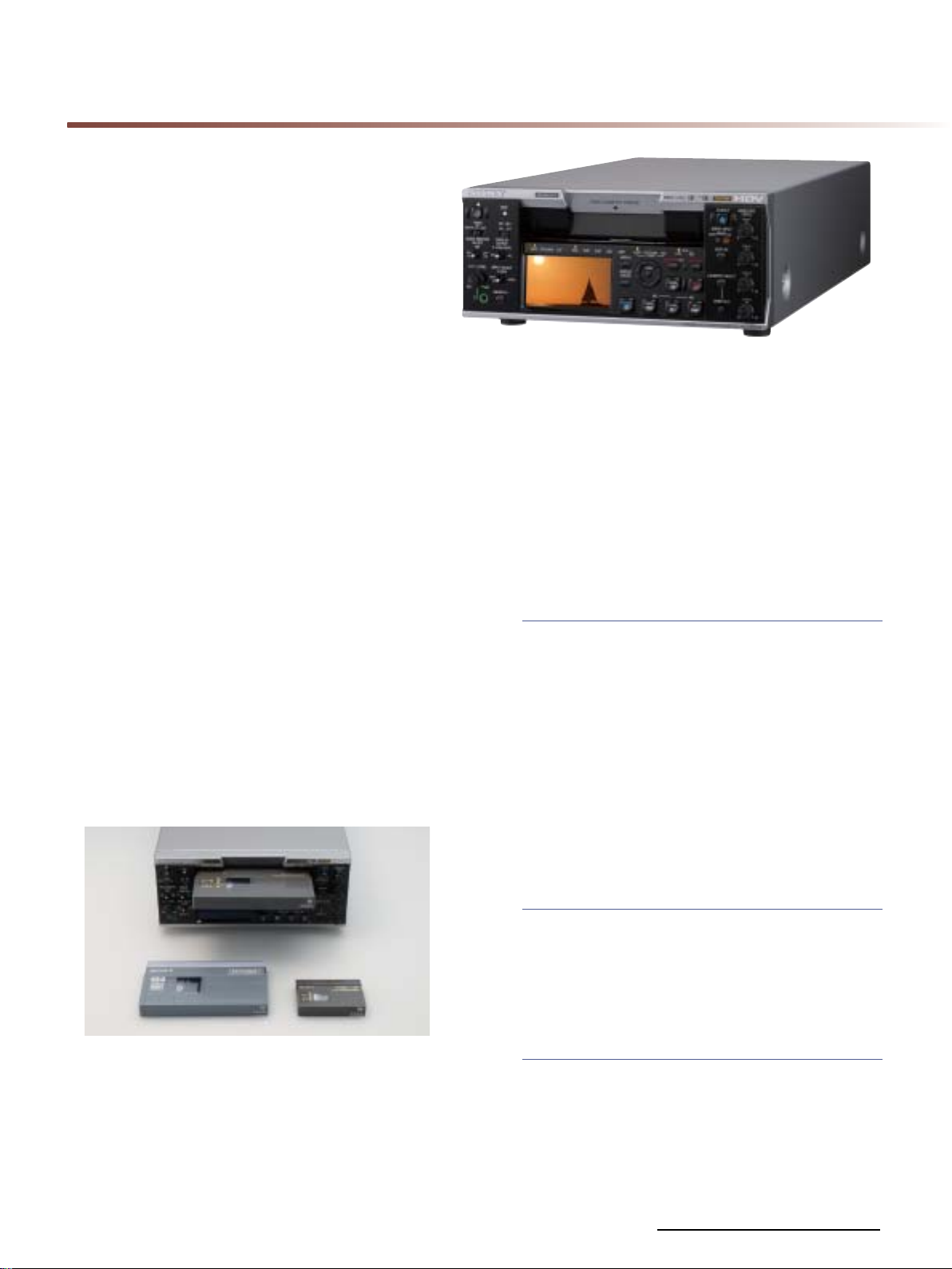
HVR-M35E
The HVR-M35E is compatible with HDV native
progressive recording modes and supports
HD/SD-SDI output with embedded audio
and TC data.
✜ HD/SD-SDI Output
The HD/SD-SDI output of HVR-M35E allows straight
duplication to a deck with HD/SD-SDI input.
✜ Multi-format Playback/Recording
Capability
The HVR-M35E supports HDV native progressive recording
modes and has a 60i/50i switchable function, so it can
playback/record:
•HDV1080i: 60i/50i/24p/30p/25p
•DVCAM/DV:60i/50i
•The HDV720p(24/25/30p) tape playback is available for
a simple viewing.*
*No i.LINK output for HDV720p
✜ Standard and Mini Size Cassette Tape
Compatibility
Both standard and mini size cassette tapes are
supported. It accepts standard cassettes shot on the
HVR-S270E or other shoulder-mount DVCAM camcorders.
✜ 2.7-inch Wide Clear Photo LCD plus Screen
and Monaural Speaker
A built-in 2.7-inch type wide Clear Photo LCD plus™
screen and built-in monaural speaker allow quick and
convenient checking of video and audio.
✜ Other Functions of the HVR-M35E
The HVR-M35E covers most functions of its lower-end
model, the HVR-M25E.
Down-conversion Playback Capabilities
The HVR-M35E can convert material from HD down to SD,
and output the SD video signal through its i.LINK, SD-SDI,
analogue component, S-video, and composite connectors.
This allows users to edit recorded material with a
compatible nonlinear editing system using current DV
editing software, as well as record SD signals to an
external VTR.
When down-converting these signals, the aspect ratio
displayed can be converted from 16:9 to 4:3. Display
modes can be selected from Squeeze, Letterbox, and
Edge Crop*
*16 Letterbox output is not available from the i.LINK connector. For the
HDV recording with four channels audio data,the audio data in the
down-converted DV signal is selectable from either 1/2ch or 3/4ch.
16
.
✜ Four Channel Audio Data Playback
The HVR-M35E can play back the four-channel audio
data in HDV1080i format recorded by the HVR-S270E.
It can also play back the four-channel audio data in
DVCAM format. The four-channel audio data is
embedded in the i.LINK and HD/SD-SDI output, or is
output through the AES/EBU audio connectors.
Edge Crop Adjust
When down-converting signals in Edge Crop mode, you
can use the Edge Crop Adjust function to adjust the
edge crop position. By displaying the edge crop marker
on the LCD monitor,operators can conveniently check
the edge crop position before outputting downconverted signals.
DUPLICATE PLUS
The DUPLICATE PLUS function makes it easy to copy video
and audio from a VTR or camcorder onto the HVR-M35E –
along with the original time code. Operators simply
connect the two i.LINK devices together via their i.LINK
interfaces and press the DUPLICATE PLUS and PLAY
buttons on the front panel of the HVR-M35E. Copying
will then begin.
17
Page 18
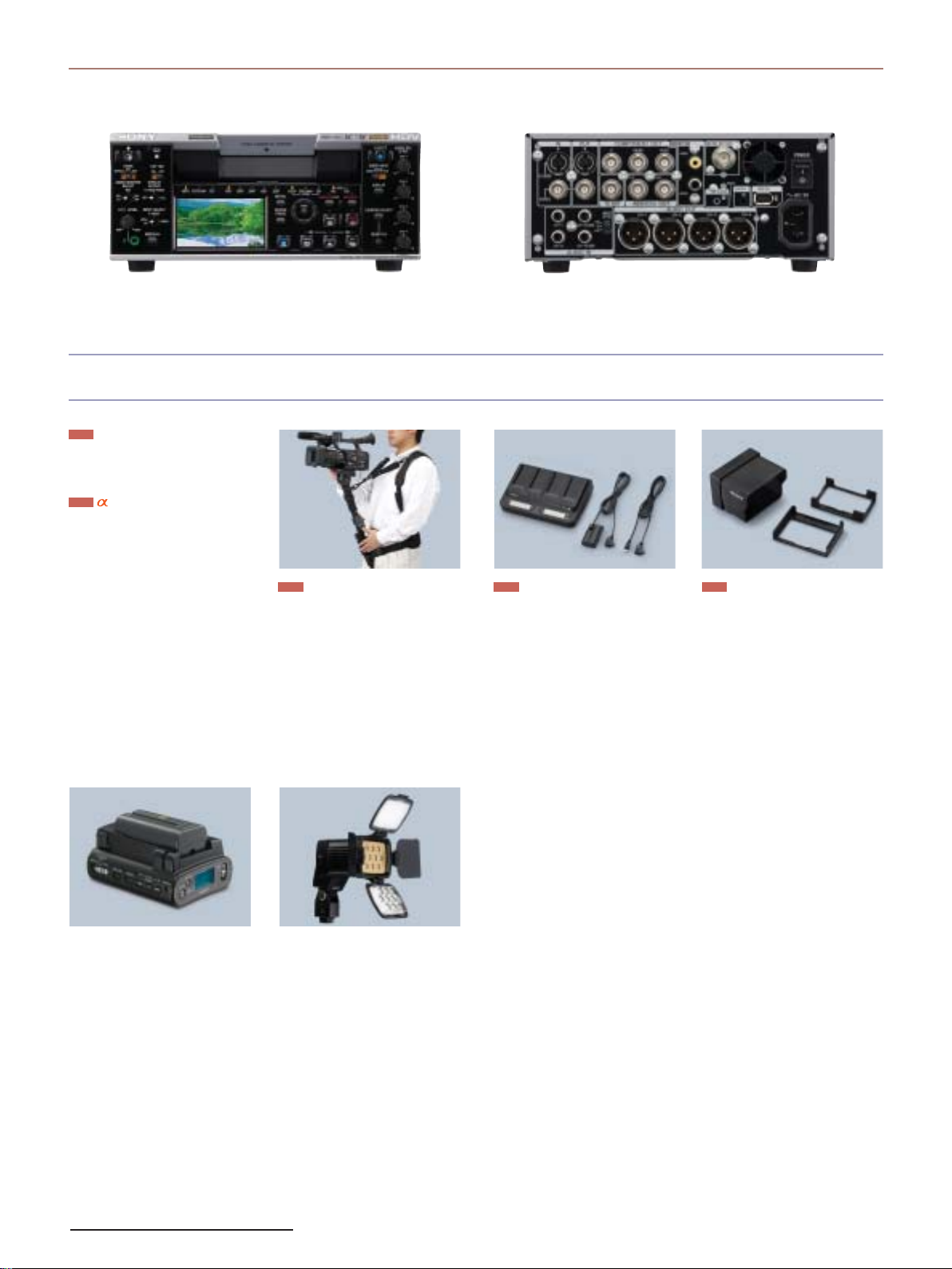
HVR-M35E
Front Rear
Accessories
New
Optional Wide Lens
VCL-308WBH (for HVR-Z7E)*
VCL-308BWS (for HVR-S207E)*
New
lens adaptor
LA-100W*
* For the detail on the release date,
please ask your nearest Sony office or
authorised dealer.
New New
VCT-SP1BP
CompactFlash Card
NCFD16GP 16GB 300x
CompactFlash Card
(available from April 2008)
NCFD8GP 8GB 300x
CompactFlash Card
Camcorder Support (HVR-Z7E)
•Weight support for stable/
comfortable shooting
•Support for several shooting styles
(e.g., high-angle shooting)
•Quick-release function from harness
for excellent mobility
•Perfect design for a camcorder
Monopod
•Carbon shaft for light weight and
rigid design
•RM-1BP Remote Controller supplied
as standard
AC-VQL1BP
AC Adaptor Charger (HVR-Z7E)
•4 slots battery charger (A pair of
parallel charge)
•2 charge mode selectable
(Normal/Full)
•Charging information
Remaining time to charge complete
Current available time for shooting
•Battery Log information
Total charge time
Total charge cycle
Last operation date
New
SH-L32WBP
LCD Hood (HVR-Z7E/S270E)
•LCD Hood for 3.2” LCD monitor
•Adjustable shade (360° shade)
Folding structure - no need to remove
•
from camcorder
HVR-DR60
Hard Disk Recording Unit
An external Hard Disk Recording Unit
with a 60GB capacity and 4.5 hours
of recording time for HDV, DVCAM
and DV. (battery is not supplied)
18
HVL-LBP
LED Battery Video Light
(HVR-Z7E/S270E)
•
LED reliability and low power
consumption of 16W
•Battery power from NP-F770/F970
•Wide compatibility for flexible
installation (Cold shoe/Screw
bolt/Screw hole)
•Ideal for Wide-angle shooting and
interviews
Spot (600lx@1m) or flood-lighting
(300lx@1m) with attached
condensing lens ON or Off
•Light diffuser attached to soften
shadows and reduce contrast
•Long Operating time: approximately
3 hours with the NP-F970
(at maximum brightness)
2NP-F970/B
InfoLITHIUM Rechargeable
Battery Pack (2 pack) (HVR-Z7E)
NP-F970/F770/F570
InfoLITHIUM Rechargeable
Battery Pack (HVR-Z7E)
VCT-PG11RMB
Tripod with RM-1BP Remote
Controller (HVR-Z7E)
RM-1BP
LANC remote controller
(HVR-Z7E/S270E)
BP-GL95/GL65/L60S/L80S
Lithium-ion Battery Pack
(HVR-S270E)
BC-L70/M150/L500
Battery Charger (HVR-S270E)
AC-DN10
AC Adaptor (HVR-S270E)
Page 19
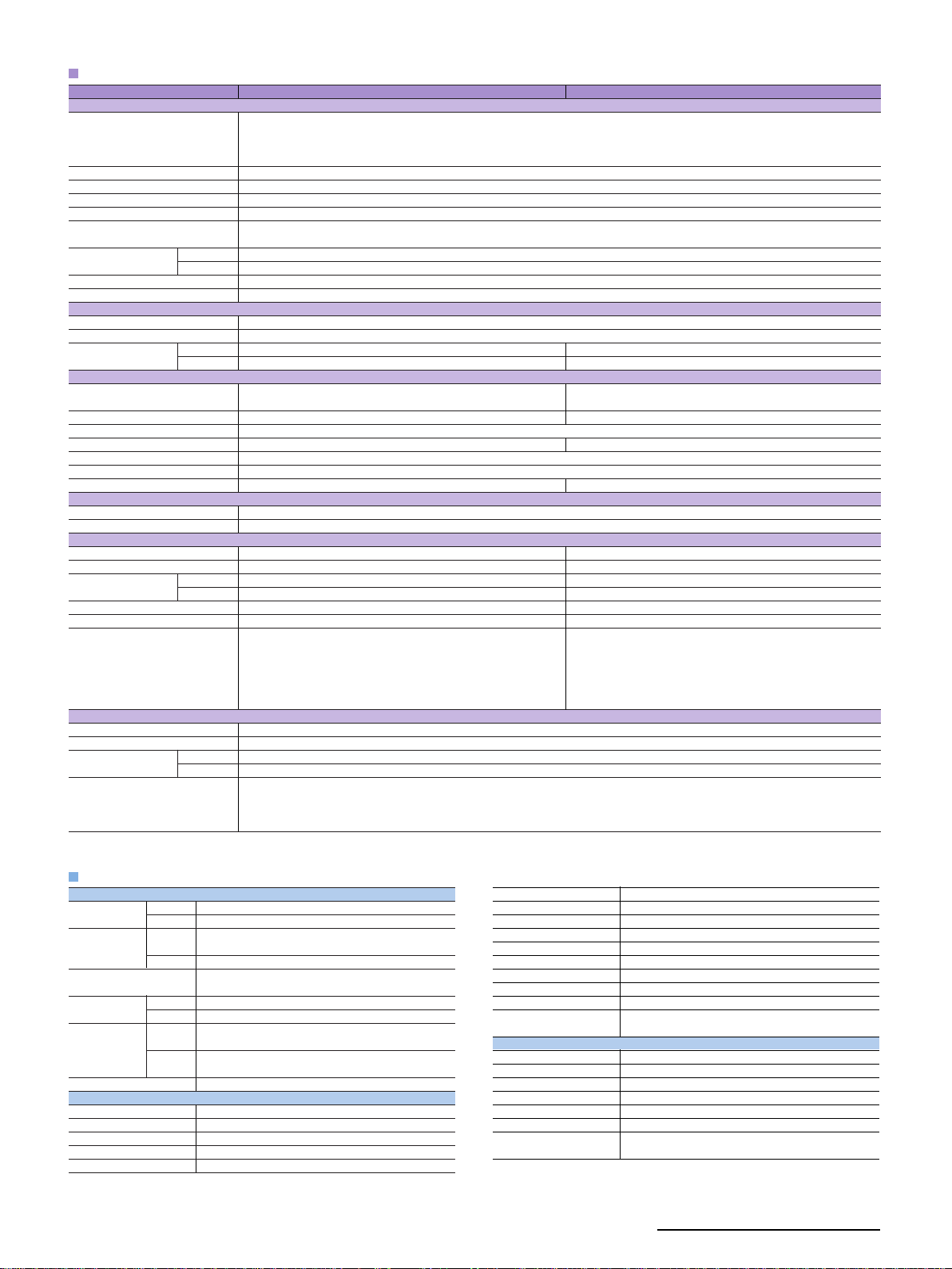
Specifications (HVR-Z7E,HVR-S270E)
Camera section
Supplied Lens
Built-in filter
Imaging system
Picture elements
Focus
White balance
Manual shutter speed Auto
Manual
Gain
Minimum illumination
VTR section
Recording format
Play out/Down conversion format
Playback/Recording time HDV/DV SP
DVCAM
Input/Output conectors
Audio/Video output
Component video output
HDV/DV input/output
XLR audio input
Headphone
LANC
Digital video output
Built-in output devices
LCD view finder
LCD monitor
General
Mass
Power requirements
Power consumption HDV
DVCAM /DV
Operating temperature
Storage temperature
Supplied accessories
Supplied memory recording unit
Recording media
File system
File format HDV
DVCAM /DV
Connectors
HVR-Z7E
Carl Zeiss Vario-Sonnar T* zoom lens, 12x (optical),
f = 39.5 to 474 mm* at 4:3 mode, filter diameter: 72 mm
1/3-inch, progressive 3 ClearVid CMOS Sensor system with Exmor technology
Approx. 1,037,000 pixels (effective),approx. 1,120,000 pixels (total)
Auto, one-push auto (A/B positions),indoor (3200 K), outdoor (selectable level -7 to +7, approx. 500K/step),
Max. 63 min with PHDVM-63DM cassette
Max. 41 min with PHDVM-63DM cassette
(composite, unbalanced audio x2ch with the supplied cable)
Approx. 2.4 kg (5 lb 4 oz) (w/ the supplied lens, w/o tape,batter y)
AC-VQ1050 AC adaptor/charger,NP-F570 infoLITHIUM rechargeable battery
pack, A/V connecting cable, component video cable,lens hood with lens
cover,lithium battery (CR2025), shoe adaptor, large size eye-cup,additional
normal shoe kit, RMT-831 wireless Remote Commander, ECM-XM1 monaural
electret condenser microphone Operating instructions (CD-ROM) Printed
operating instructions, memory recording unit kit
10-pin connector A/V OUT jack
Component out jack (special connector)
XLR 3-pin female x 2ch
HDMI connector
0.45-inch type (Viewable area measured diagonally), approx. 1,226,880 dots (852x480x3[RGB]),16:9 aspect ratio
3.2-inch type (Viewable area measured diagonally), XtraFine LCD, approx.921,600 dots, hybrid type, 16:9 aspect ratio
DC 7.2 V (battery pack), DC 8.4 V (AC adaptor)
Approx. 7.0 W (with ECM-XM1 / LCD EVF ON)
Approx. 6.8 W (with ECM-XM1 / LCD EVF ON)
0 to 40 °C (32 to 104 °F)
-20 to +60 °C (-4 to 140 °F)
Auto, manual (focus ring/one push auto/infinity/AF assist/ focus macro)
manual WB Temp (selectable 2300K to 15000K, 100K/step)
CompactFlash card (2GB or bigger,133x or faster) (not supplied)
infoLITHIUM L series battery slot (on the supplied cradle)
f = 4.4 to 52.8 mm,
f = 32.0 to 384 mm* at 16:9 mode
Clear,1/4, 1/16, 1/64
1/50 - 1/1750
50i/25p: 1/3 - 1/10000
-6, -3,0 , 3, 6, 9,12, 15, 18,21 dB
1.5 lux (auto gain, auto iris,1/25 shutter)
HDV1080/50i, DVCAM,DV SP 576/50i (PAL)
HDV1080/50i, DVCAM,DV SP 576/50i (PAL)
i.LINK interface (IEEE 1394, 6-pin)
Stereo mini jack (ø3.5 mm)
Stereo mini-mini jack (ø2.5 mm)
.AVI (DV-AVI, type 1) or .DV (Raw-DV)
special hot shoe
i.LINK-6pin (on the supplied cradle)
DC power input (on the supplied cradle)
HVR-S270E
Max. 276min with PHDV-276DM Max. 63 min with PHDVM-63DM cassette
Max. 184min with PHDV-276DM Max. 41 min with PHDVM-63DM cassette
Composite video (BNCx1)
Unbalanced auido (pin x2ch)
BNC x3
XLR 3pin female x 4ch
HD/SD-SDI BNC x1
Approx. 6.3kg (13 lb 15 oz) (w/ the supplied lens, w/o tape, BP-GL95battery)
DC 12 V (battery pack), DC 14.4 V (AC adaptor)
Approx. 12.2 W (with ECM-XM1 / EVF ON)
Approx. 11.7 W (with ECM-XM1 / EVF ON)
0 to 40 °C (32 to 104 °F)
-20 to +60 °C (-4 to 140 °F)
lens hood with lens cover,lithium battery (CR2025), large size eye-cup,
additional normal shoe kit, ECM-XM1 monaural electret condenser
microphone, Shoulder Belt,Operating instructions (CD-ROM), Printed
operating instructions, memory recording unit kit
FAT3 2
.M2T
Specifications (HVR-M35E)
Recording/playback performance
Recording format HDV
Playout format HDV
Playout video signal
Tape speed HDV/DV SP
Playback/recording time
Fast forward/rewind time
Input/output connectors/devices
Video input/output
Monitor video out
S-video input/output
Component video output
i.LINK interface (HDV /DV)
DVCAM / DV S P
DVCAM / DV S P
DVCAM
HDV/DV SP
DVCAM
HDV1080/60i, 1080/50i,1080/24p, 1080/25p, 1080/30p
DVCAM, DV SP 480/60i (NTSC),576/50i (PAL)
HDV1080/60i, 1080/50i,1080/24p, 1080/25p, 1080/30p.
HDV720/24p, 720/25p,720/30p
DVCAM, DV SP 480/60i (NTSC),576/50i (PAL)
1080/60i, 1080/50i,480/60i (NTSC), 576/50i (PAL),480/60P, 576/50P
720/60P, 720/50P
Max. 18.812 mm/s
Max. 28.218 mm/s
Max. 276 min with PHDV-276DM cassette
Max. 63 min with PHDVM-63DM cassette
Max. 184 min with PHDV-276DM cassette
Max. 41 min with PHDVM-63DM cassette
Approx. 2 min with PHDV-276DM cassette
BNCx1 / BNCx1
RCA pin x1
Mini-DIN 4-pin x1 / Mini-DIN 4-pin x1
BNC x 3
6-pin (no power)
HD/SD-SDI output
Audio input
Audio output
Monitor audio out
AES/EBU output
TC out
Phones
LANC
Control S input
LCD monitor
General
Weight
Dimention (WxHxD)
Power requirements
Power consumption
Operating temperature
Storage temperature
Supplied accessories
BNC x1
RCA pin x 4ch
XLR 3pin x 4ch
RCA pin x 1
BNC x2
BNC x1
Stereo minijack (ø3.5 mm)
Stereo mini-minijack (ø2.5 mm)
Stereo minijack (ø3.5 mm)
2.7-inch type (Viewable area measured diagonally), approx.
211,200 dots (960 x 220), Clear Photo™ LCD Plus
Approx. 9 lb 12 oz (4.4 kg)
Approx. 212 x 88 x 390.3mm (8 3/8 x 3 1/2 x 15 3/8 inch)
AC 120 V, 60 Hz
16 W (playback mode with LCD monitor on)
41 to 104 °F (5 to 40 °C)
-4 to 140 °F (-20 to +60 °C)
Remote Commander Unit (1), power cord (1), size AA batteries (2),
cleaning cassette (1), operating instructions (1)
19
Page 20

Services from Sony: working with you, working for you.
Recognising that every company and every challenge is unique, we offer a complete and comprehensive range of services all the way through consulting, planning, financing, implementation,
training, servicing, maintenance and support. Choose exactly what’s right for you, when and where
you need it.
Sony Professional Services
Tailor-made design, installation and project management of audio-visual and IT (AV/IT) systems using
skills developed over 25 years of systems integration.
Sony Financial Services
Innovative and flexible finance solutions designed to meet budgetary and financial requirements
and constraints, enabling businesses to always have the most current technology.
Sony Training Services
A range of off-the-shelf or customised training services from basic operation through to high-level
technical maintenance.
Sony Support Services
Fully integrated and customised support for products and systems throughout their operational life,
combining proactive and reactive technical services.
Not all services are available in all countries. If you’d like to find out more about what we do, who we do it for and how we do it, visit
www.sonybiz.net or contact your local Sony office.
Sony Specialist Dealers receive extensive
training on all our products and services.
They combine this with an in-depth knowledge
of the market, ensuring you get advice that
meets your needs before and after purchase.
To find your nearest Sony Specialist Dealer
visit our “dealer locator” at:
www.sonybiz.net/dealer
© 2007 Sony Corporation. All rights reserved. Reproduction in whole or in part without permission is prohibited.
Features and specifications are subject to change without notice.
All non-metric weights and measurements are approximate. Images on monitors are simulated.
Sony, TRIMASTER, and Memory Stick are trademarks of Sony Corporation.
VESA is a trademark of the Video Electronics Standards Association.
All other trademarks are the property of their respective owners.
 Loading...