

Page 1

GC86
EDGE PC Card
User Guide
Page 2

Page 3

Contents
About this guide. . . . . . . . . . . . . . . . . . . . . . . . . . . . . . . . . . . . . . . iii
How this guide is organised . . . . . . . . . . . . . . . . . . . . . . . . . . . . . . . . . . . . iii
Additional resources. . . . . . . . . . . . . . . . . . . . . . . . . . . . . . . . . . . . . . . . . . iii
Overview . . . . . . . . . . . . . . . . . . . . . . . . . . . . . . . . . . . . . . . . . . . . . 1
Checklist. . . . . . . . . . . . . . . . . . . . . . . . . . . . . . . . . . . . . . . . . . . . . . . . . . . 2
Hardware overview. . . . . . . . . . . . . . . . . . . . . . . . . . . . . . . . . . . . . . . . . . . 2
Software overview . . . . . . . . . . . . . . . . . . . . . . . . . . . . . . . . . . . . . . . . . . . 2
System requirements . . . . . . . . . . . . . . . . . . . . . . . . . . . . . . . . . . . . . . . . . 3
Technical specifications . . . . . . . . . . . . . . . . . . . . . . . . . . . . . . . . 4
Additional information. . . . . . . . . . . . . . . . . . . . . . . . . . . . . . . . . . 9
Guidelines for safe and efficient use. . . . . . . . . . . . . . . . . . . . . . . . . . . . . . 9
Limited warranty . . . . . . . . . . . . . . . . . . . . . . . . . . . . . . . . . . . . . . . . . . . . . 11
Disputes and Governing Law . . . . . . . . . . . . . . . . . . . . . . . . . . . . . . . . . . . 12
Regulatory information . . . . . . . . . . . . . . . . . . . . . . . . . . . . . . . . .13
Declaration of conformity . . . . . . . . . . . . . . . . . . . . . . . . . . . . . . . . . . . . . . 13
FCC statement . . . . . . . . . . . . . . . . . . . . . . . . . . . . . . . . . . . . . . . . . . . . . . 14
Index . . . . . . . . . . . . . . . . . . . . . . . . . . . . . . . . . . . . . . . . . . . . . . . .15
Contents i
Page 4

GC86 EDGE PC Card
First edition (August 2006)
This manual is published by Sony Ericsson Mobile Communications AB, without an y warranty.
Improvements and changes to this manual necessitated by typographical errors, inaccuracies of
current information, or improvements to programs and/or equipment, may be made by Sony Ericsson
at any time and without notice. Such changes will, however, be incorporated into new editions of this
manual.
This manual is copyrighted work of Sony Ericsson Mobile Communications AB, Sweden.
The programs referred to herein are copyrighted and trademarked works of Sony Ericsson Mobile
Communications AB, Sweden. Reproduction in whole or in part, including utilisation in machines
capable of reproduction or retrieval, without the express written permission of the copyright holders
is prohibited. Reverse engineering is also prohibited.
All other product or service names mentioned in this manual are trademarks of their respective
companies.
All rights reserved.
© Sony Ericsson Mobile Communications AB, 2006
Publication number: EN/LZT 123 8447/33 R1A
ii Contents
Page 5

About this guide
Congratulations and thank you for purchasing a Sony Ericsson GC86 PC Card.
This book includes an overview of the supported features, detailed technical specifications,
system requirements, and safety guidelines for your Sony Ericsson GC86 PC Card.
Note:
Be sure to read all safety guidelines in this book before using your PC Card.
How this guide is organised
Chapter 1: Overview on page 1, contains an overview of your Sony Ericsson GC86 PC Card and
the features that it supports. It also provides a list of the requirements and tools needed to use yo ur
new PC Card.
Chapter 2: Technical specifications on page 4, provides detailed technical specifications for your
PC Card.
Chapter 3: Additional information on page 9, provides safety guidelines, warranty information ,
and regulations that are relevant to your Sony Ericsson GC86 PC Card.
Additional resources
Additional resources can be found on the CD that came with your GC86 or on the Internet at the Sony
Ericsson support Website.
Sony Ericsson support Website
You can use the Sony Ericsson Website to find the most up-to-date product information and support
wherever you are. It gives you access to online customer services, user manuals, the latest software
downloads, and other useful information. For more information, go to:
http://www.SonyEricsson.com
Publications
The following documents are located on the Wireless Manager CD-ROM which is provided with
your GC86:
• A printed Quick Start Guide aimed at getting you operational as quickly as possible.
• An online Wireless Manager User Guide that provides a comprehensive description of how
to use Wireless Manager to manage the wireless connections for your GC86. The Wireless
Manager User Guide is saved as an Adobe Acrobat PDF file. It is located on the CD-ROM that
came with your PC Card.
• An online GC86 PC Card User Guide (this document) that contains a detailed description of
your GC86 and the features that it supports. The GC86 PC Card Use r Gu ide i s s aved as an Adobe
Acrobat PDF file on the CD-ROM that came with your PC Card.
The CD-ROM also contains Adobe Acrobat Reader
®
which you can install if necessary.
About this guide iii
Page 6

Overview
The GC86 is a quad band GSM PC Card. The GC86 is designed for use in the home and at work; it
is very simple to install and use; the software provided allows you to select the best data service
available so that the GC86 is always available for data transfer.
The GC86 enables your laptop PC to:
• Connect to your corporate network
• Browse the Internet
• Send and receive e-mails
• Receive information services in real time
• Access files, databases and discussion groups
• Send and receive SMS text messages
• Edit SIM card entries
Note:
The Wireless Manager software, which is provided with your PC Card, is the software you use
to control your PC Card. Before using your PC Card, read the Wireless Manager User Guide.
Wireless Manager must be installed before you insert your PC Card into your PC.
The GC86 supports the following services and bands:
EDGE
GPRS
CSD
SMS
The GSM, GPRS and EDGE facilities provide almost worldwide portable modem access to the
Internet or to corporate networks.
• Enhanced Data Rates for Global Evolution (EDGE)
EDGE enhances GPRS by increasing data throughput over GPRS by as much as three times,
depending upon the network radio signal strength and quality. GPRS networks that are
enhanced with EDGE are often referred to as Enhanced GPRS (E-GPRS) networks.
EDGE provides the “always on” capability of GPRS but at faster speeds. EDGE technology
is transparent — simply make a GPRS connection as usual and benefit from the increase in
speed where EDGE is available in a network. When EDGE is available you can expect
increased speeds of up to 200 kbps, dependent on network coverage.
• General Packet Radio Service (GPRS)
GPRS is a type of network connection that provides “always on” mobility. The connection
set up is fast. After you are connected, applications can send and receive data whenever
required. In today’s GPRS networks, the GC86 receives data at speeds up to 53.6 kbps
and transmits at speeds up to 26.8 kbps.
✓
✓
✓
✓
GSM 850
GSM 900
GSM 1800
GSM 1900
✓
✓
✓
✓
1Overview
Page 7

• Circuit Switched Data (CSD)
CSD is the original GSM network data transfer method, used in the past for WAP.
Almost all GSM networks have this capability at 9.6 kbps.
• Short Message Service (SMS)
The PC can send and receive SMS text messages using the SMS Messages window in
Wireless Manager, see Wireless Manager – SMS Messages view, for more information.
Checklist
Make sure the following items are in the box when you unpack it:
• Protective case for storing your PC Card
• Sony Ericsson GC86 PC Card
• Quick Start Guide
•CD-ROM
The CD contains the necessary drivers, software, and documentation that you need to get started.
Hardware overview
Your Sony Ericsson GC86 PC Card is a standard 32-bit cardbus PC Card wit h a 15mm extension
which contains the GSM antenna. An access door is provided which allows you to connect an external
antenna for improved GSM GPRS/EDGE radio performance in low signal locations.
The amount of power that your PC Card draws from the laptop battery depends on several factors,
including status, frequency band, and distance to the base station that is used.
Before using the GC86, you must install the Wireless Manager software and applicable drivers on
your computer.
SIM card
When you subscribe to a mobile network, you are issued a Subscriber Identity Module (SIM) card.
Your SIM card contains your personal subscriber data. To connect to a mobile network you must
first insert your SIM card that includes the appropriate network subscription into your GC86.
Software overview
Wireless Manager
Your GC86 comes with Wireless Manager, an application that provides the tools
to configure and manage your wireless connecti ons on your PC. For more informat ion about software
requirements, refer to the Wireless Manager User Guide.
You can use Wireless Manager to:
• Manage your GC86 settings
• Display GSM GPRS/EDGE status information
• Create or modify connection settings
Overview 2
Page 8

• Connect to the Internet
• Manage phone books saved to your SIM card and hard drive
• Send and receive SMS messages
You can use your GC86 like a modem to provide Intranet/Internet connectivity
for other applications.
Third-party applications
Your network operator or your network administrator may provide an application that works with
your GC86. Please refer to the instructions supplied with that application. Functions and features
available may be different compared with the Sony Ericsson Wireless Manager application.
Apple Macintosh
To use your PC Card with your Mac OS X system, you will need Mobile High Speed –
Sony Ericsson Edition. This application enables you to set up and use EDGE, GPRS, and
GSM connections (subject to network coverage and availability). The software is available for
download without charge from this Website:
http://www.novamedia.de/sonyericsson
Please follow the instructions on the Website to install, configure, and use your PC Card with your
Apple PowerBook. Do not use the Quick Start Guide that is included with the PC Card. For more
information, refer to documentation that comes with the Mobile High Speed – Sony Ericsson Editi on
application.
System requirements
This section lists the network subscriptions and hardware requirements for using your Sony Ericsson
GC86 PC Card.
Hardware requirements
You will need the following hardware:
• Laptop PC that meets the minimum specifications recommended by Microsoft to run the version
of Windows
• 32 bit CardBus type II PC Card slot
• Sony Ericsson GC86 PC Card
• SIM card
Network and subscription requirements
The network subscription you use in conjunction with your GC86 depends on the functions and
features that are available from your network operator. Contact your network operator or service
provider to make sure the options that you require are available (GSM GPRS/EDGE, CSD and SMS).
Note:
Network operators often provide a number of connectivity options via GPRS/EDGE such
as WAP and Internet. Verify the services that you require, such as Internet, e-mail
or corporate VPN (Virtual Private Network) service is available through your Service operator
and enabled on your subscription.
®
installed on it
3Overview
Page 9
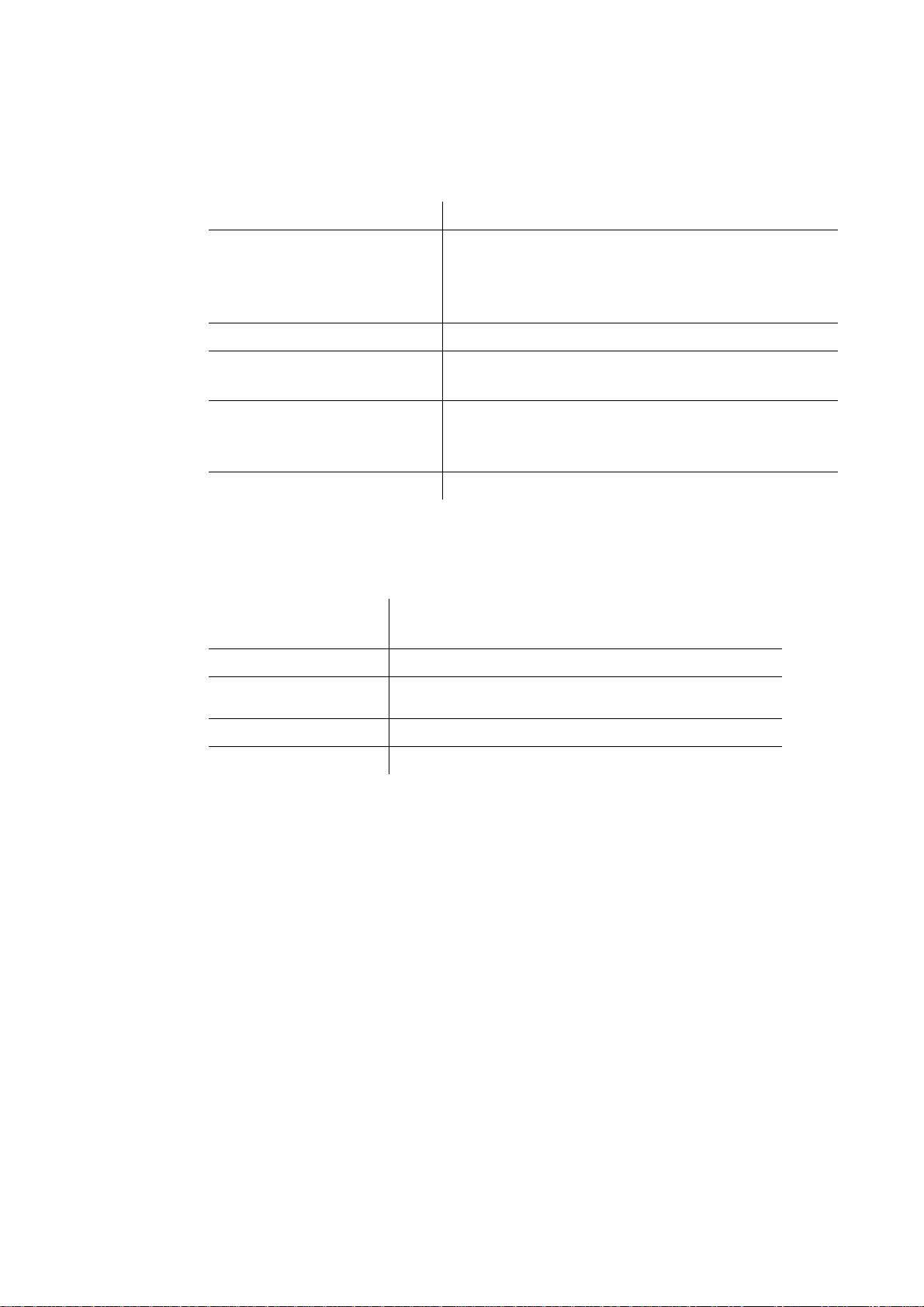
Technical specifications
Product name GC86
System GSM 850
PC Card Type Type II, 32-bit Cardbus
Services supported CSD, GPRS/EDGE, SMS
SIM Card SIM Lock supported
Type Number FAF-1051012-BV
Exterior description
E-GSM 900
GSM 1800
GSM 1900
Speech services are not supported
Regular (non-GPRS-aware) and GPRS-aware SIMs supported
Standard, GPRS-aware and USIM (2G functionality) 1.8v & 3v
Size Card part: 84.6 mm x 54.0 mm x 5.0 mm
Extension part: 15.5 mm x 54.0 mm x 10.6 mm
Weight 42g, excluding SIM card
Battery Powered via the PC Card slot. The GC86 uses
Antenna 50 ohm interface; Antenna supplied.
Antenna connector MMCX connector (for optional external GSM antenna)
the laptop battery.
Technical specifications 4
Page 10
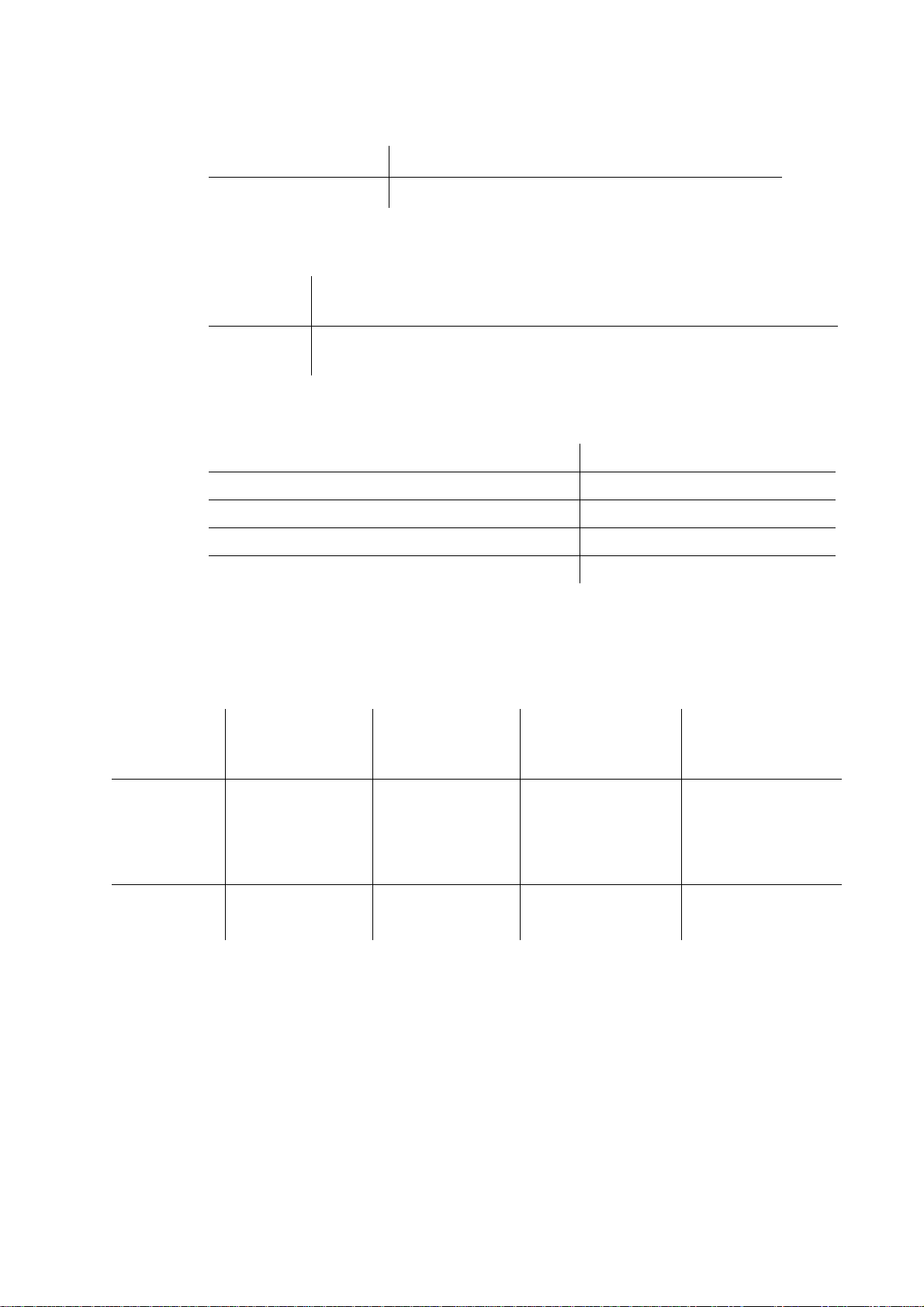
Ambient temperatures
Operating
Storage
Application support
Windows Wireless Manager
Apple Macintosh Mobile High Speed (via download)
Electrical characteristics
Supported voltages 3.3V
Nominal operating voltage 3.3V
Average Standby Current/Power (Inserted, not active) < 30mW
Average Idle Current/Power (GPRS attached) < 150mW
Data Transfer Current/Power (Worst case
-10 to 55 degrees C
-20 to 65 degrees C
Third-party software that might be provided by your mobile operator
Third-party software that might be provided by your mobile operator
± 10%
GPRS transfer) < 2.2W
Note:
All power consumptions are at nominal voltage.
GSM performance and technical characteristics
Dimension GSM 850 GSM 900
Modulation GMSK/8-PSK GMSK/8-PSK GMSK/8-PSK GMSK/8-PSK
Power classes Class 4 (2W) for GSM/
Transmitter
output
impedance
GPRS and EGPRS/MCS
1-4 (GMSK);
Class E2 (0.5W) for
EGPRS/MCS 5-9 (8PSK)
50
Ω 50Ω 50Ω 50Ω
E-GSM 900
Class 4 (2W) for GSM/
GPRS and EGPRS/MCS
1-4 (GMSK);
Class E2 (0.5W) for
EGPRS/MCS 5-9 (8PSK)
GSM 1800 GSM 1900
Class 1 (1W) for GSM/
GPRS and EGPRS/MCS
1-4 (GMSK);
Class E2 (0.4W) for
EGPRS/MCS 5-9 (8-PSK)
Class 1 (1W) for GSM/
GPRS and EGPRS/MCS
1-4 (GMSK);
Class E2 (0.4W) for
EGPRS/MCS 5-9 (8-PSK)
5 Technical specifications
Page 11

GSM features supported
ME SIM Lock Network, Network Subset, Network operator and Corporate
Online services (SIM-AT) Class 2 with call control
USSD Phase 2+
CSD technical data
Standards AT commands industry standard ETSI 07.05, 07.07 and 07.10, V.25ter
CSD data rates GSM 9.6 kbps or 14.4 kbps, depending on the GSM network
Compression MNP5 (Increases data rate up to 2x depending on data type)
Error correction End to End MNP2 and LAPM (V.42)
GSM/ISDN According to V.110 and V.120
GPRS technical data
GPRS Specification SMG SMG31bis
Data Rates Multislot class 10 supported (see table below).
Support is provided via AT commands; No MMI is provided
command set supported
V.42bis (Increases data rate up to 4x depending on data type)
GSM network support required for compression
RLP
Requires GSM Network support
Coding schemes: CS-1, CS-2, CS-3 and CS-4
Mode of Operation Class B (attaches to both GSM and GPRS at the same time; data connection
Attach Modes GPRS Attach
Network modes Network Mode 1
R Reference Point Physical layer: RS232 virtual COM port
IP Connectivity PDP type IP is supported
SMS over GPRS Mobile Originated and Mobile Terminated
is established using CS (CSD or GPRS) The user may select CSD or GPRS
modes via settings in Wireless Manager or alternative management software.
GPRS Detach
Combined Attach (CS+GPRS) (CCCH)
Combined Detach (CCCH)
Combined Attach (CS+GPRS) (PCCCH)
Combined Detach (PCCCH)
Network Mode 2
Network Mode 3
Authentication mechanisms PAP and CHAP supported
IPv4
Technical specifications 6
Page 12
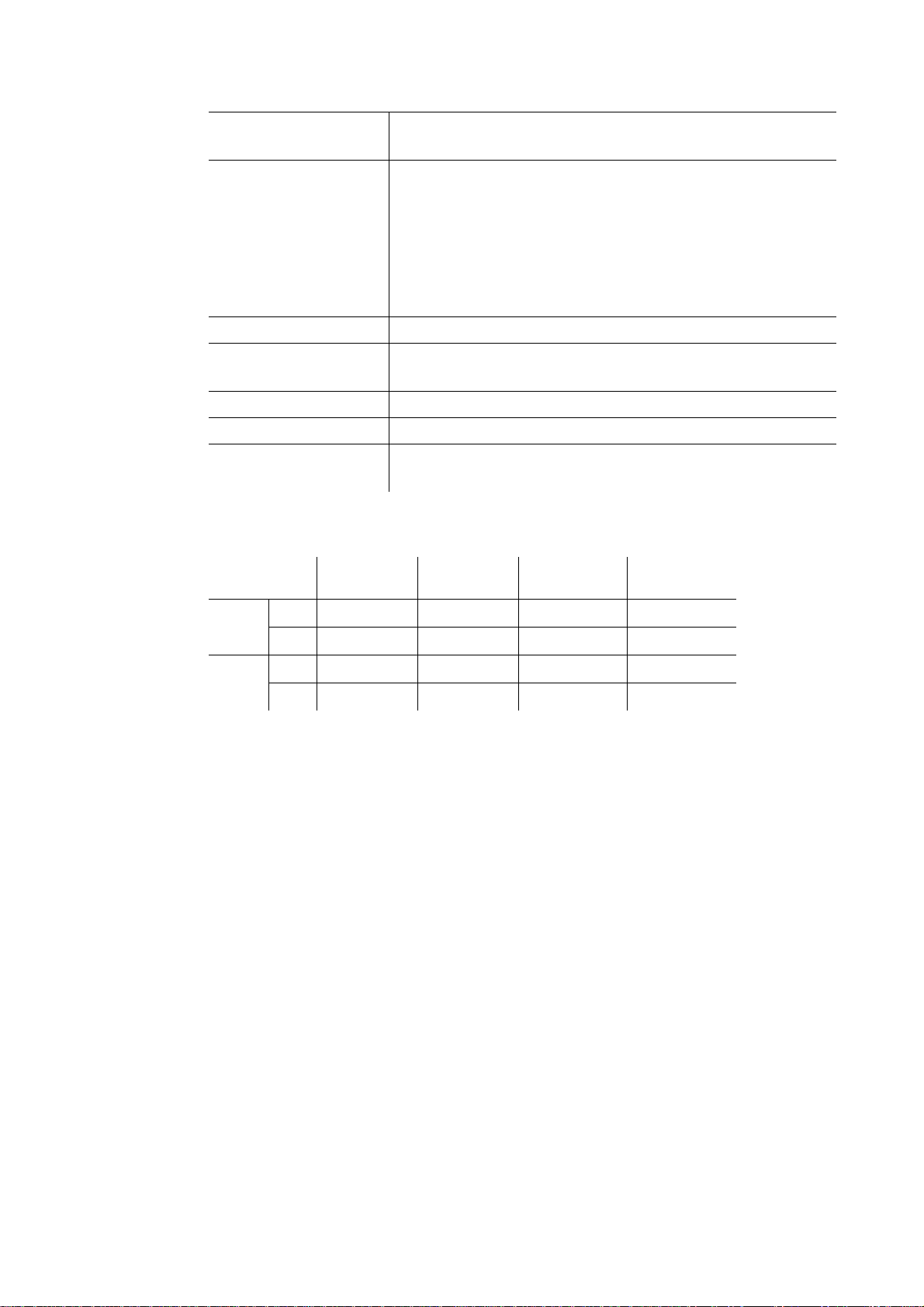
QoS Support for all 4 classes.
PDP Context Up to 10 PDP context details are stored in GC86 memory.
SIM Support for GPRS aware as well as non-GPRS-aware SIMs
Compression TCP/IP Header Compression
GPRS Encryption GEA1 and GEA2
GPRS Frequency Hopping Supported
GPRS IP allocation Dynamic
GPRS maximum data rates
QoS Negotiation
Number of parallel PDP Context activated (both MO and MT):1
Number of PDP Context with traffic in parallel:1
PDP Context modification (e.g. QoS renegotiation).
Network initiated PDP Context modification.
Network initiated PDP Context deactivation.
Collision of MS and Network initiated PDP Context activation.
V42bis
Static
CS-1
9.05 kbps
4 + 1 RX 36.2 53.6 62.4 85.6
TX 9.05 13.4 15.6 21.4
3 + 2 RX 27.15 40.2 46.8 64.2
TX 18.1 26.8 31.2 42.8
CS-2
13.4 kbps
CS-3
15.6 kbps
CS-4
21.4 kbps
Speed achieved depends on the Coding Scheme supported by the GSM network. The speeds given
are maximums. Sony Ericsson cannot guarantee the speed at which your network will operate.
Data rate is the payload per slot: header plus data.
7 Technical specifications
Page 13
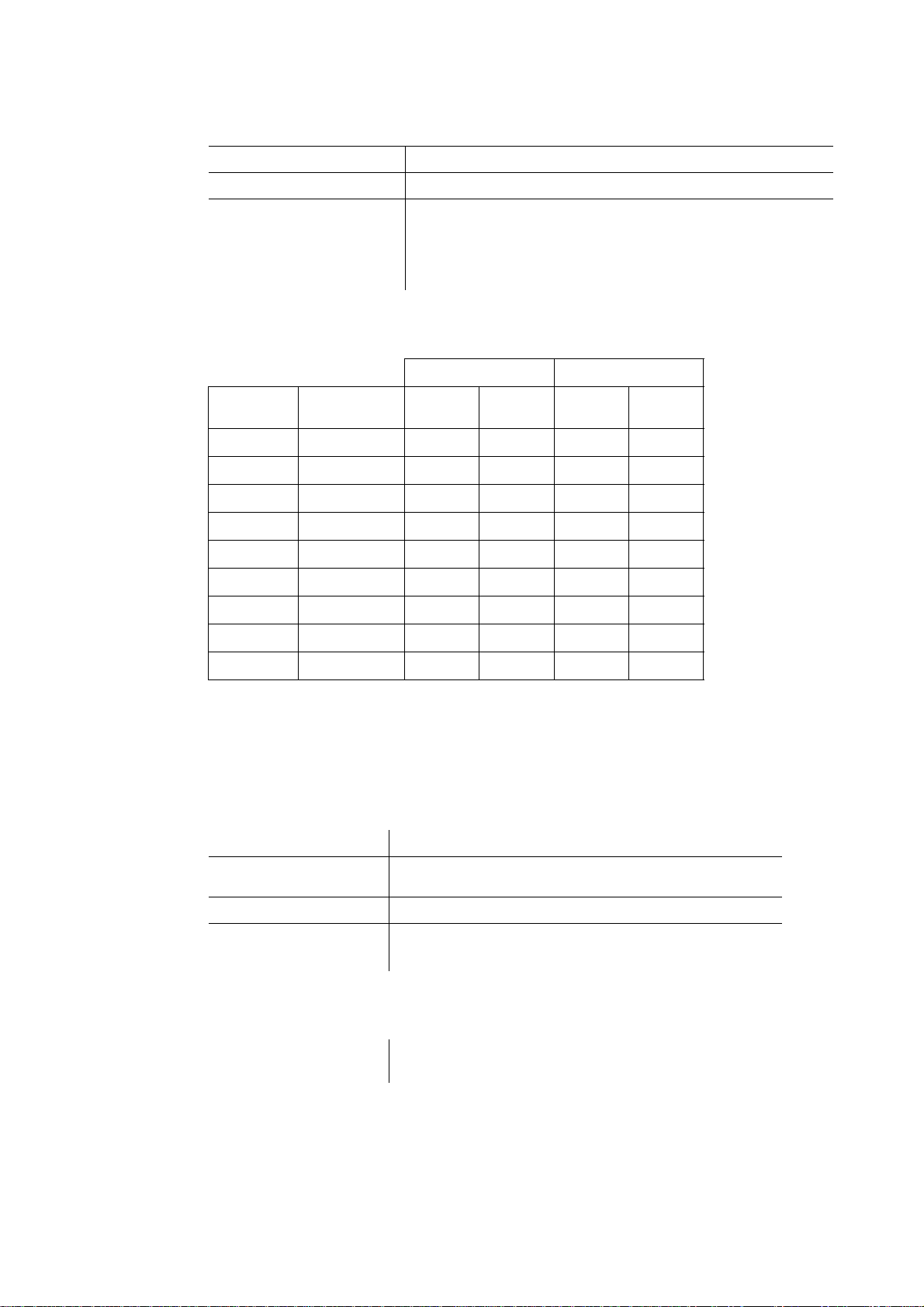
EDGE technical data
Device class EDGE Class 10
Modulation Coding Schemes MCS-1 to MCS-9
EDGE features Link Adaptation
EDGE maximum data rates
Incremental Redundancy
Extended Uplink Temporary Block Flow (TBF)
Single Phase Access on RACH
4 + 1 3 + 2
Coding
scheme
MCS-1 10.60 42.40 10.60 31.80 21.20
MCS-2 13.00 52.00 13.00 39.00 26.00
MCS-3 16.60 66.40 16.60 49.80 33.20
MCS-4 19.40 77.60 19.40 58.20 38.80
MCS-5 24.05 96.20 24.05 72.15 48.10
MCS-6 31.25 125.00 31.25 93.75 62.50
MCS-7 47.45 189.80 47.45 142.35 94.90
MCS-8 57.05 228.20 57.05 171.15 114.10
MCS-9 61.85 247.40 61.85 185.55 123.70
Speed achieved depends on the Coding scheme supported by the GSM Network. The speeds given
are maximums, Sony Ericsson cannot guarantee the speed at which your network will operate.
Data rate is the payload per slot: header plus data.
SMS Technical Data
Concatenated SMS Yes.
SMS Cell Broadcast Supported in Wireless Manager and by AT Commands (excluding
SMS Immediate Display Supported in Wireless Manager and by AT Commands.
Data rate per
slot
Rx Tx Rx Tx
Cell ID).
SMS interface Wireless Manager.
Firmware upgrade
PC Card firmware upgrade
AT Command.
Via secure Internet download using the Sony Ericsson Update
Service, www.SonyEricsson.com or at Sony Ericsson Service Points
Technical specifications 8
Page 14

Additional information
Guidelines for safe and efficient use
Please read this information before using your GC86 EDGE PC Card.
Recommendations
• Always treat your product with care and keep it in a clean and dust-free place.
• Do not expose your product to liquid or moisture or humidity .
• Do not expose your product to extreme high or low temperatures.
• Do not expose your product to open flames or lit tobacco products.
• Do not drop, throw or try to bend your product.
• Do not paint your product.
• Do not use your product near medical equipment without requesting permission from your
treating physician or authorised medical staff.
• Do not use your product when in, or around aircraft, or areas showing the sign “turn off twoway radio”.
• Do not use your product in an area where a potentially explosive atmosphere exists.
• Do not place your product or install wireless equipment in the area above your car’s air bag.
• Do not attempt to disassemble your product. Only Sony Ericsson authorised personnel should
perform service.
Antenna
Only use an antenna that has been specifically designed by Sony Ericsson for your PC card. Use of
antenna devices not marketed by Sony Ericsson specifically for this model could damage yo ur PC
card, reduce performance, and produce SAR levels above the establish limits (see below).
Efficient use
Do not cover the antenna when in use, as this affects call quality and may cause th e GC8 6 to operate
at a h i g h e r p o w e r l e v e l t h a n n e e d e d , t h u s s h o r t e n i n g t a l k a n d standby times.
Radio Frequency (RF) exposure and SAR
Your PC Card is a low-power radio transmitter and receiver (transceiver). When it is turned on,
it emits low levels of radio frequency energy (also known as radio waves or radio frequency fields).
Governments around the world have adopted comprehensive internat ional safety guidelines, developed
by scientific organisations, e.g. ICNIRP (International Commission on Non-Ionising Radiation Protection)
and IEEE (The Institute of Electrical and Electronics Engineers Inc.), through periodic and thorough
evaluation of scientific studies. These guidelines establish permitted levels of radio wave exposure
for the general population. The levels include a safety margin designed to assure the safety of all
persons, regardless of age and health, and to account for any variations in measurements.
9 Additional information
Page 15

Specific Absorption Rate (SAR) is the unit of measurement for the amount of radio frequency energy
absorbed by the body when using a transceiver. The SAR value is determined at the highest certified
power level in laboratory conditions, but the actual SAR level of the transceiver while operating can
be well below this value. This is because the transceiver is designed to use the minimum power required
to reach the network.
Variations in SAR below the radio frequency exposure guidelines do not mean that there are variatio ns
in safety. While there may be differences in SAR levels among mobile phones, all Sony Ericsson
PC cards are designed to meet radio frequency exposure guidelines.
More information on radio frequency exposure and SAR can be found on:
www.sonyericsson.com.
Caution!
The PC Card has been tested for compliance with FCC / IC RF exposure limits in the laptop
computer(s) configurations with side PCMCIA representative of laptop computers with
substantially similar physical dimensions, construction, and electrical and RF characteristics.
Always place the external antenna in the upright position (oriented vertically) when using the PC
Card in a notebook computer.
Note:
If this PC Card is intended for use in any other portable device, you are responsible for
separate approval to satisfy the SAR requirements of Part 2.1093 of FCC rules.
Personal medical devices
PC Cards may affect the operation of cardiac pacemakers and other implanted equipment. If a minimum
distance of 15 cm (6 inches) is kept between the GC86 and the pacemaker, the risk of interference
is limited. If you have any reason to suspect that interference is taking place, immediately turn off
your GC86. Contact your cardiologist for more information.
For other medical devices, please consult your physician and the manufacturer of the device.
CHILDREN
DO NOT ALLOW CHILDREN TO PLAY WITH YOUR PC CARD OR ITS ANTENNA.
THEY COULD HURT THEMSELVES OR OTHERS, OR COULD ACCIDENTALLY DAMAGE
THE PC CARD OR ANTENNA. YOUR PC CARD OR ITS ANTENNA MAY CONTAIN SMALL
PARTS THAT COULD BE DETACHED AND CREATE A CHOKING HAZARD.
Disposing of the product
This symbol indicates that all electrical and electronic equipment included shall not be treated as
household waste. Instead it shall be left at the appropriate collection point for the recycling of
electri cal a nd ele ctron ic eq uipmen t. By ensuring this product is disposed of correctly, you will help
prevent potential negative consequences for the environment and human health, which could
otherwise be caused by inappropriate waste handling of this product. The recycling of materials will
help to conserve natural resources. For more detailed information about recycling of this product,
please contact your local city office, your household waste disposal service or the shop where you
purchased your GC86.
Emergency calls
PC Cards manufactured by Sony Ericsson do not support voice calls and should not be relied upon
for essential communications.
Additional information 10
Page 16

Inserting and removing the SIM card – precautions against electrostatic discharge (ESD)
Do not touch the SIM card connectors. As a precaution, always make sure that the GC86 is already
in your hand before you insert or remove the SIM card.
Limited warranty
Sony Ericsson Mobile Communications AB, Nya Vattentornet, SE-221 88 Lund, Sweden,
(Sony Ericsson), provides this Limited Warranty for your PC Card and original accessory delivered
with your PC Card (hereinafter referred to as “Product”).
Should your Product need warranty service, please return it to the dealer from whom it was
purchased, or contact your local Sony Ericsson Call Centre (national rates may apply) or visit
www.SonyEricsson.com for further information.
Our warranty
Subject to the conditions of this Limited Warranty, Sony Ericsson warrants this Product to be free
from defects in design, material and workmanship at the time of its original purchase by a consumer,
and for a subsequent period of one (1) year.
What we will do
If, during the warranty period, this Product fails to operate under normal use and service, due
to defects in design, materials or workmanship, Sony Ericsson authorised distributors or service
partners, in the country/region* where you purchased the Product, will, at their option, either repair
or replace the Product in accordance with the terms and conditions stipulated herein.
Sony Ericsson and its service partners reserve the right to charge a handling fee if a returned Product
is found not to be under warranty according to the conditions below.
Please note that some of your personal settings, downloads and other information may be lost when
your Sony Ericsson Product is repaired or replaced. At present Sony Ericsson may be prevented
by applicable law, other regulation or technical restrictions from making a backup copy of certain
downloads. Sony Ericsson does not take any responsibility for any lost information of any kind and
will not reimburse you for any such loss. You should alway s make backup copies of all the informat ion
stored on your Sony Ericsson Product such as downloads, calendar and contacts before handing
in your Sony Ericsson Product for repair or replacement.
Conditions
1. This limited warranty is valid only if the original p roof of purchase issued to the original purchaser
by an, for this Product, Sony Ericsson authorised dealer, specifying the date of purchase and
serial number** for this product is presented with the Product to be repaired or replaced.
Sony Ericsson reserves the right to refuse warranty service if this information has been removed
or changed after the original purchase of the Product from the dealer.
2. If Sony Ericsson repairs or replaces the Product, the repair for the defect concerned or the replaced
Product shall be warranted for the remaining time of the original warranty period or for ninety
(90) days from the date of repair, whichever is longer. Repair or replacement may involve the
use of functionally equivalent reconditioned units. Replaced parts or components will become
the property of Sony Ericsson.
3. This warranty does not cover any failure of the Product due to normal wear and tear, or due
to misuse, including but not limited to use in other than the normal and customary manner, in
accordance with the Sony Ericsson instructions for use and maintenance of the Product.
Nor does this warranty cover any failure of the Product due to accident, software or hardware
modification or adjustment, acts of God or damage resulting from liquid.
11 Additional information
Page 17

4. Since the cellular network on which the Product is to operate is provided by a carrier independent
from Sony Ericsson, Sony Ericsson will not be responsible for the operation, availability, coverage
services or range of that system.
5. This warranty does not cover Product failures caused by installations, modifications, or repair
or opening of the Product performed by a non-Sony Ericsson authorised person.
6. The warranty does not cover Product failures which have been caused by use of accessories
or other peripheral devices which are not Ericsson or Sony Ericsson branded original accessories
intended for use with the Product.
Sony Ericsson disclaims any and all warranties, whether express or implied, for failures caused
to the Product or peripheral devices as a result of viruses, Trojan horses, spy ware, or other
malicious software. Sony Ericsson strongly recommends that you install appropriate virus protection
software on your Product and any periph eral devices connected to it, as available, and update it
regularly, to better protect your device. It is understood, however, that such software will never
fully protect your Product or its peripheral devices and Sony Ericsson disclaims all warranties,
whether express or implied, in case of failure by such antivirus software to fulfil its intended purpose.
7. Tampering with any of the seals on the Product will void the warranty.
8. THERE ARE NO EXPRESS WARRANTIES, WHETHER WRITTEN OR ORAL, OTHER
THAN THIS PRINTED LIMITED WARRANTY. ALL IMPLIED W ARRANTIES, INCLUDING
WITHOUT LIMITATION THE IMPLIED WARRANTIES OF MERCHANTABILITY OR
FITNESS FOR A PARTICULAR PURPOSE, ARE LIMITED TO THE DURATION OF THIS
LIMITED WARRANTY. IN NO EVENT SHALL SONY ERICSSON OR ITS LICENSORS
BE LIABLE FOR INCIDENTAL OR CONSEQUENTIAL DAMAGES OF ANY NATURE
WHATSOEVER, INCLUDING BUT NOT LIMITED TO LOST PROFITS OR COMMERCIAL
LOSS, TO THE FULL EXTENT THOSE DAMAGES CAN BE DISCLAIMED BY LAW.
Some countries/states do not allow the exclusion or limitat ion of incidental or consequenti al damages,
or limitation of the duration of implied warranties, so the preceding limitations or exclusions may
not apply to you.
The warranty provided does not affect the consumer's statutory rights under applicable legislation
in force, nor the consumer's rights against the dealer arising from their sales/ purchase contract.
* European Union (EU)
If you have purchased your Product in an EU country you can have your Product serviced, under the
conditions set out above, within the warranty period in any EU country where an identical Product
is sold by an authorised Sony Ericsson distributor. To find out if your Product is sold in the EU country
you are in, please call the local Sony Ericsson Call Centre. Please observe that certain services may
not be possible elsewhere than in the country of original purchase, for example due to the fact that
your Product may have an interior or exterior which is different from equivalent models sold in other
EU countries. It may not be possible to repair SIM-locked Products.
** In some countries/regions additional information (such as a valid warranty card) may be requested.
Disputes and Governing Law
The validity, construction and performance of this Agreement shall be governed by the laws of Sweden.
All disputes, differences or questions between the parties with respect to any matter arising out of or
relating to this Agreement shall be finally settled under the Rules of Conciliation and Arbitr ation of the
International Chamber of Commerce, in Stockholm, by three (3) arbitrators appointed in accordance
with the said Rules. The proceeding shall be conducted in the English language.
Additional information 12
Page 18
Regulatory information
Declaration of conformity
We, Sony Ericsson Mobile Communications AB of
Nya Vattentornet
S-221 88 Lund, Sweden
declare under our sole responsibility that our product
Sony Ericsson type FAF-1051012-BV
and in combination with our accessories, to which this declaration relates is in conformity with the
appropriate standards 3GPP TS 51.010-1, EN 301489-7 and EN 60950, following the provisions of
Radio Equipment and Telecommunication Terminal Equipment directive 99/5/EC with requirements
covering EMC directive 89/336/EEC, and Low Voltage directive 73/23/EEC.
Research Triangle Park, North Carolina. August 2006
Place and date of issue
Najmi Jarwala
President - US & Canada
Sony Ericsson Mobile Communications (USA) Inc.
We fulfil the requirements of the R&TTE Directive (99/5/EC).
13 Regulatory information
Page 19

FCC statement
This device complies with Part 15 of the FCC Rules and with RSS-210
of Industry Canada. Operation is subject to the following two conditions:
(1) This device may not cause harmful interference, and
(2) The device must accept any interference received, including interference that may cause
undesired operation.
FCC ID: PY7FF051012
IC: 4170B-FF051012
This equipment has been tested and found to comply with the limits for a Class B digital device,
pursuant to Part 15 of the FCC Rules. These limits are designed to provide reasonable protection
against harmful interference in a residential installation. This equipment generates, uses and can
radiate radio frequency energy and, if not installed and used in accordance with the instructions, may
cause harmful interference to radio communications. However, there is no guarantee that
interference will not occur in a particular installation. If this equipment does cause harmful
interference to radio or television reception, which can be determined by turning the equipment off
and on, the user is encouraged to try to correct the interference by one or more of the following
measures:
• Reorient or relocate the receiving antenna.
• Increase the separation between the equipment and receiver.
• Connect the equipment into an outlet on a circuit different from that to which the receiver is
• Consult the dealer or an experienced radio/TV technician for help.
connected.
F
c
C
Canadian ICES-003
This Class B digital apparatus complies with Canadian ICES-003.
Warning!
Changes or modifications made to this equipment not expressly approved by Sony Ericsson
may void the FCC authorization to operate this equipment.
Regulatory information 14
Page 20

Index
A
antenna
guidelines 9
Apple
Mac OS X 3
application support 5
C
Circuit Switched Data. See CSD
conformity, declaration of 13
CSD
definition 2
technical data 6
D
declaration of conformity 13
E
EDGE
definition 1
technical data 8
Enhanced Data Rates for Global Evolution. See EDGE
F
guidelines
antenna 9
children 10
disposal of 10
emergency calls 10
overview 9
personal medical devices 10
recommendations 9
RF exposure and SAR 9
H
hardware
overview 2
requirements 3
SIM card 2
Hardware Overview
SIM Card 2
M
Mobile High Speed – Sony Ericsson Edition 3
N
network
requirements 3
network and subscription 3
FCC 14
firmware 8
G
General Packet Radio Service. See GPRS
GPRS
definition 1
maximum data rates 7, 8
technical data 6
GSM
features supported 6
performance 5
15 Index
P
packaging, checklist 2
PC Card
disposal of 10
personal medical devices, guidelines 10
R
requirements
hardware 3
network and subscription 3
SIM card 2
RF
exposure 9
S
SAR 9
Short Message Service. See SMS
Page 21

SIM card
definition 2
SMS
definition 2
software
Apple Macintoch 3
Mobile High Speed – Sony Ericsson Edition 3
overview 2
third-party applications 3
Wireless Manager 2
support
publications iii
Sony Ericsson Website iii
System requirements
Wireless LAN connection 3
T
third-party applications 3
U
UMTS
technical data 8
W
warranty
conditions 11
EU 12
limited 11
what we will do 11
wireless LAN
connection 3
Wireless Manager
description 2
Index 16
 Loading...