

Page 1
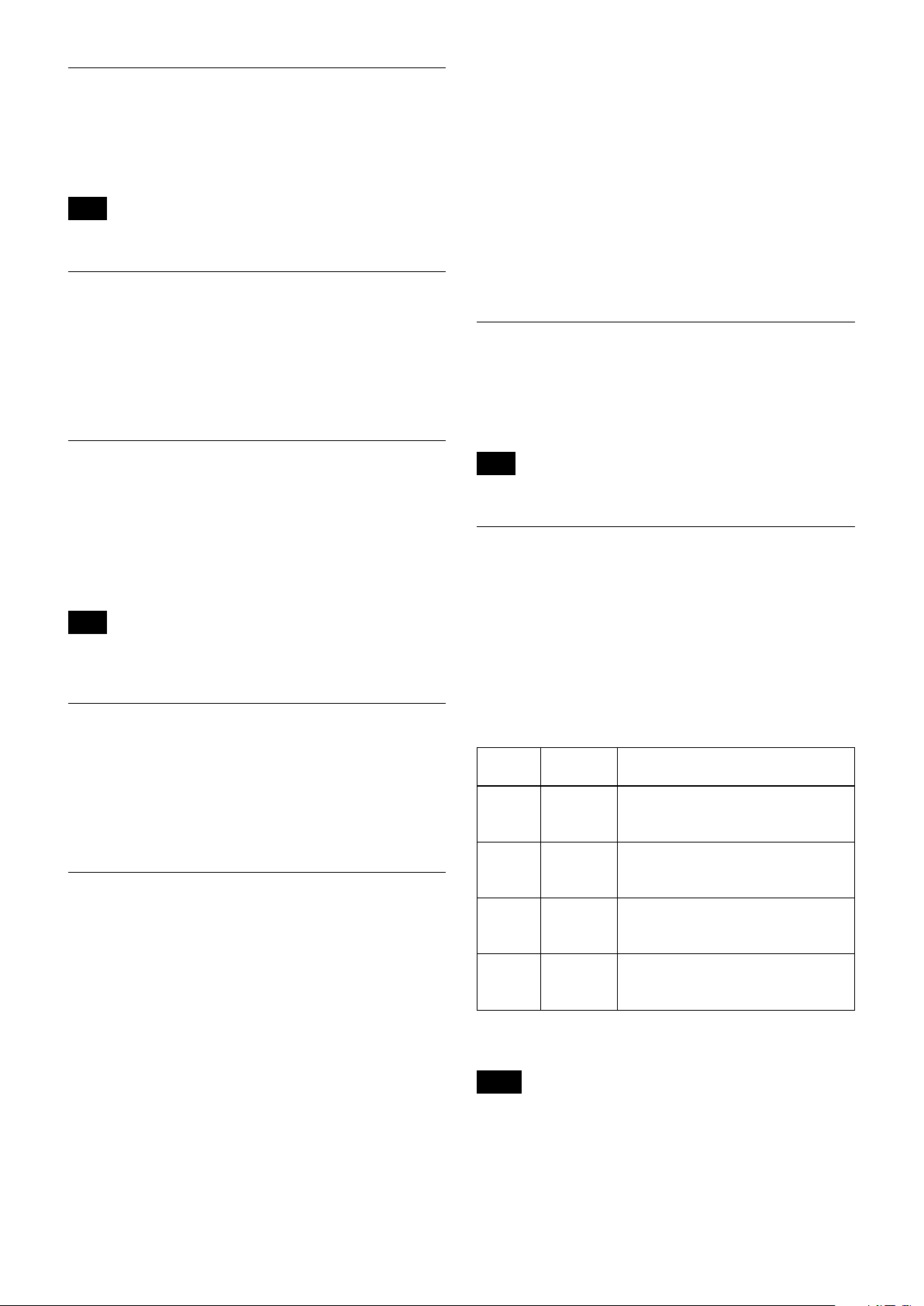
D-023-100-11(1)
Color Camera Module
Technical Manual
FCB-EV7520A
FCB-CV7520A
2018 Sony Corporation
Page 2

Table of Contents
Features ............................................................................. 3
Precautions ....................................................................... 4
Locations of Controls .......................................................5
Basic Functions ................................................................. 6
Overview of Functions ..................................................................... 6
User’s Updating ............................................................................... 20
Eclipse ................................................................................................. 23
Spectral Sensitivity Characteristics .......................................... 23
Initial settings and backup of camera ..................................... 24
Mode Condition .............................................................................. 26
Command List .................................................................29
VISCA/RS-232C Commands ........................................................ 29
FCB Camera Commands .............................................................. 35
Specifications ................................................................. 56
2
Page 3

• Imager
This camera uses a 1/2.8" “Exmor R” CMOS
(complementary metal-oxide semiconductor) image
sensor (approx. 2.13 million effective pixels) that
supports FULL HD (high definition) to produce highquality images.
Overview
Features
• ISP
Using the image signal processor (ISP), the following
images can be obtained.
- Full HD 60fps output image
- Low focal plane distortion image using the
high-speed readout of imager
The following functions are provided.
- Noise Reduction (NR), and Image Stabilizer
functions
- Wide Dynamic Range Mode (Wide-D), Tone
correction (Visibility Enhancer), and Defog
functions
• Lens
The camera is equipped with a bright lens with 30×
optical zoom and F1.6 aperture.
With consideration given environmental protection,
this module is designed to operate with low power
consumption and also incorporates lead-free and
halogen-free circuit boards.
3
Page 4

Overview
Precautions
Software
Use of the demonstration software developed by Sony
Corporation or use of the software with customer
developed application software may damage hardware,
the application program or the camera. Sony
Corporation is not liable for any damages under these
conditions.
Operation
Start the camera control software on your computer
after you turn on the camera and the image is displayed.
Operation and storage locations
Do not shoot images that are extremely bright (e.g.,
light sources, the sun, etc.) for long periods of time. Do
not use or store the camera in the following extreme
conditions:
• Extremely hot or cold places (operating temperature
–5 ˚C to +60 ˚C (23 ˚F to 140 ˚F))
• Close to generators of powerful electromagnetic
radiation such as radio or TV transmitters
• Where it is subject to fluorescent light reflections
• Where it is subject to unstable (flickering, etc.)
lighting conditions
• Where it is subject to strong vibration
• Where it is subject to radiation from laser beams
Care of the unit
Remove dust or dirt on the surface of the lens with a
blower (commercially available).
Other
• Design and specifications are subject to change
without notice.
• Do not apply excessive voltage. (Use only the specified
voltage.) Otherwise, you may get an electric shock or
a fire may occur.
• The CMOS image sensor and IC included in this
camera may break if exposed to static electricity.
When directly handling this camera, wear an
antistatic strap, spread a conductive sheet or similar
item under your workbench, and take measures to
eliminate static electricity.
• In case of abnormal operation, contact your
authorized Sony dealer or the store where you
purchased the product.
Phenomena specific to CMOS image sensors
The following phenomena that may appear in images
are specific to CMOS image sensors. They do not
indicate malfunctions.
Rolling shutter
As CMOS image sensors use shutters that capture
images line-by-line, there is a slight time difference
between the top and bottom of an image. As a result,
images may appear skewed if the camera is moved.
White flecks
Although the CMOS image sensors are produced with
high-precision technologies, fine white flecks may be
generated on the screen in rare cases, caused by cosmic
rays, etc.
This is related to the principle of CMOS image sensors
and is not a malfunction.
The white flecks especially tend to be seen in the
following cases:
• when operating at a high environmental temperature
• when you have raised the master gain (sensitivity)
• when operating in Slow-Shutter mode
Aliasing
When fine patterns, stripes, or lines are shot, they may
appear jagged or flicker.
Phenomena Specific to Lenses
Ghosting
If a strong light source (e.g., the sun) exists near the
incidence angle of the lens, bright spots may appear in
the image due to diffuse reflection within the lens.
About the trademark
“Exmor R” and “StableZoom” are trademarks of Sony
Corporation.
4
Page 5
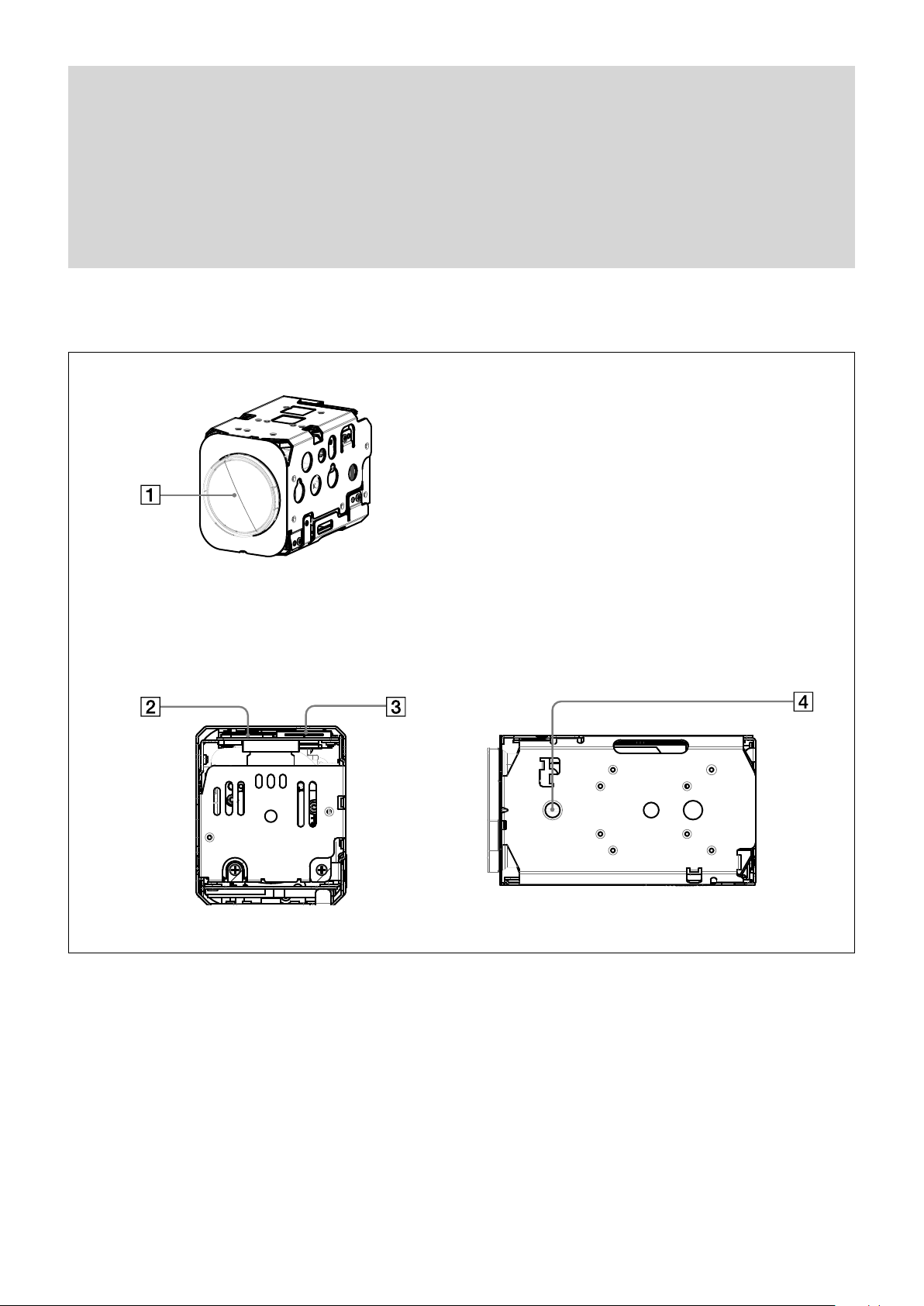
Front
Locations of Controls
Locations of Controls
Back
Lens
Digital output connector
Maintenance connector
* Do not connect here, this is for maintenance purpose.
Tripod screw hole
When a tripod is used, please use 7 mm (
Also, please be sure to attach the tripod securely.
9
/32 in.) or less screw to attach it to the camera.
Bottom
5
Page 6
Basic Functions
Basic Functions
Overview of Functions
The camera control is performed by VISCA
Commands.
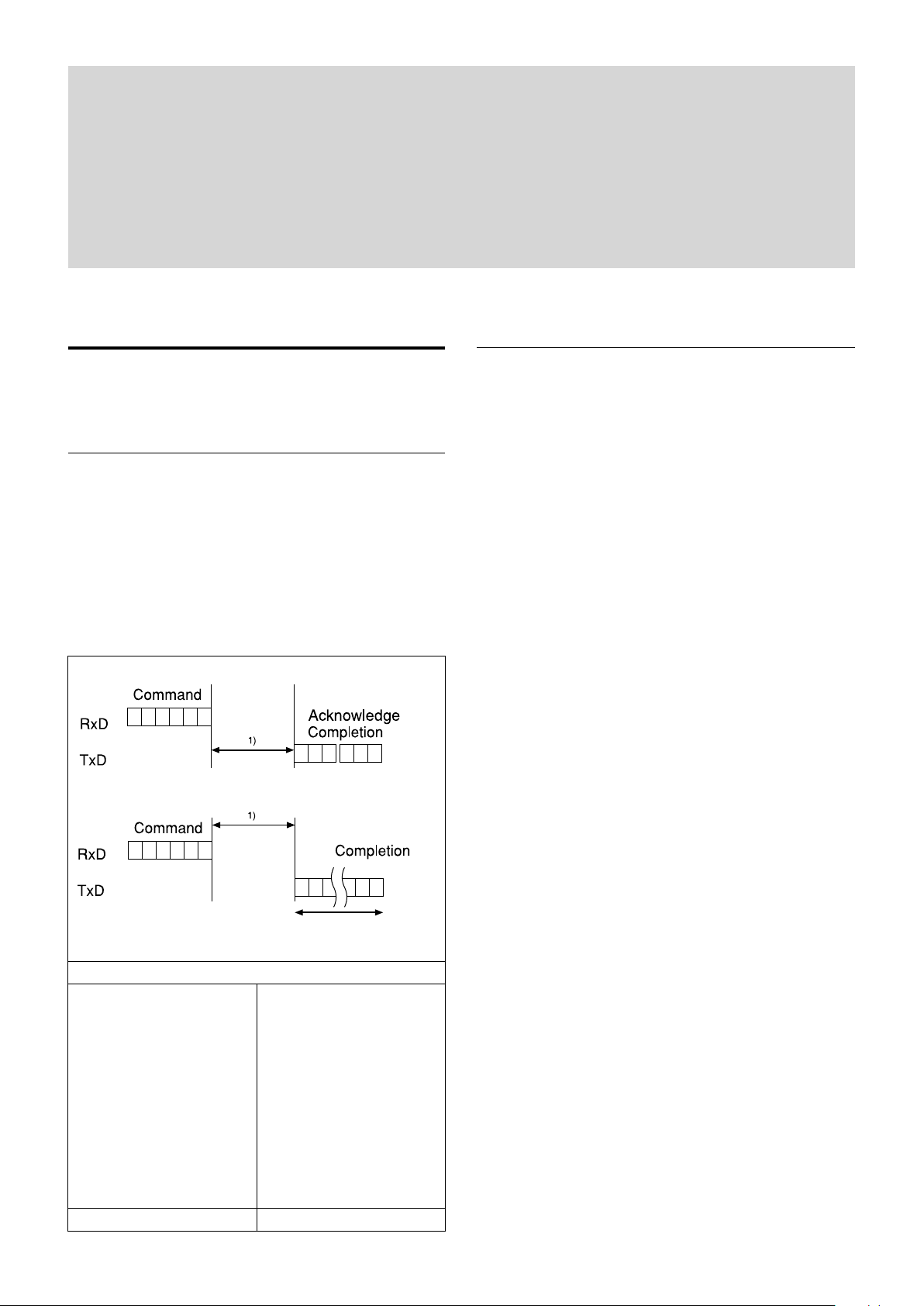
Timing Chart
As VISCA Command processing can only be carried
out one time in a Vertical cycle, it takes the maximum
1V cycle time for an Acknowledge/Completion to be
returned.
If the Command/Acknowledge/Completion
communication time can be less than the 1V cycle
time, then every 1V cycle can receive a Command.
General Commands
Query Commands
In general
• Power On/Off (Standby)
Powers the camera on and off.
When the power is off (on Standby), the camera is
able to accept the VISCA Commands although the
screen is set non-displayed.
• I/F Clear
Clears the Command buffer of the FCB camera.
• Address Set
VISCA is a protocol, which normally supports a daisy
chain of up to seven connected cameras via RS-232C
interface. In such cases, the address set command can
be used to assign addresses from 1 to 7 to each of the
seven cameras, allowing you to control the seven
cameras with the same personal computer.
Although the FCB camera does not support direct
connection of cameras in a daisy chain, be sure to use
the address set command to set the address whenever
a camera is connected for the first time.
• ID Write
Sets the camera ID.
16 Byte
1) 1V cycle times on each Monitoring Mode and Shutter Speed.
Monitoring Mode
1080p/60 1080p/50
1080p/59.94 1080p/25
1080p/30 1080i/50
1080p/29.97 720p/50
1080i/60 720p/25
1080i/59.94
720p/60
720p/59.94
720p/30
720p/29.97
1/60 sec 1/50 sec
• Mute
Blanks the screen and sends out a synchronizing
signal.
• Lens Initialize
Initializes the zoom and focus of the lens. Even when
power is turned on, it initializes the zoom and the
focus.
6
Page 7

Basic Functions
Zoom
The zoom function contains 2 functions, optical zoom
and digital zoom.
• Optical zoom
The function to zoom optically by moving the zoom
lens to change focus distance.
This can zoom up to 30×.
• Digital zoom
The function to zoom images digitally by cropping the
center part of captured images to zoom with the CMOS
image sensor.
When the zoom diameter goes up, the resolution will
go down. This can zoom up to 12×.
By combining the optical zoom and digital zoom, the
unit can zoom up to 360×.
Zoom has the following modes.
Using Standard Mode
Using Variable Mode
There are eight levels of zoom speed.
Notes
• The zoom will be stopped when a Stop Command is sent
after the zoom operation is started in Standard Mode or
Variable mode. If you do not send a Stop Command, the
zoom will be stopped after reaching the Wide end or the
Tele end.
• Direct Mode cannot be operated while zooming in
Standard Mode or Variable Mode.
Operate Direct Mode after Stop Command.
Direct Mode
Setting the zoom position enables quick
movement to the designated position.
Digital Zoom
The Zoom Mode supports, a OFF, a Combined
Mode and a Separate Mode.
Combined Mode
This is the previously existing zoom method.
After the optical zoom has reached its
maximum level, the camera switches to Digital
Zoom Mode.
Separate Mode
In this mode, Optical Zoom and Digital Zoom
can be operated separately.
You can use digital zoom magnification at any
time from within any level of optical
magnification.
Note
When you operate Direct Mode Digital Zoom
When the Digital Zoom is operated in the Direct
Mode, the Direct Zoom Position of the Inquiry
Command is not immediately reflected.
Place a wait time before reading the position.
When using the Slow Shutter, place a wait time more
than twice the shutter speed.
When not using Slow Shutter, place a wait time of 0.1
seconds or more.
About Continuous Zoom Position Reply
With ZoomDirect mode, or when zooming according
to a preset, the camera outputs zoom position data
when Continues Zoom Position Reply is set to On via a
command.
Continues Zoom Position Reply: y0 07 04 69 0p 0p 0q
0q 0q 0q FF
pp: D-Zoom Position
qqqq: Zoom Position
Focus
Focus has the following modes.
• Auto Focus Mode
The minimum focus distance is 10 mm at the optical
Wide end and 1200 mm at the optical Tele end, and is
independent of the digital zoom. The Auto Focus
(AF) function automatically adjusts the focus position
to maximise the high frequency content of the picture
in a center measurement area, taking into
consideration the high luminance and strong contrast
components.
- Normal AF Mode
This is the normal mode for AF operations.
- Interval AF Mode
The mode used for AF movements carried out at
particular intervals. The time intervals for AF
movements and for the timing of the stops can be
set in one-second increments using the Set Time
Command. The initial setting for both is set to
5 seconds.
- Zoom Trigger Mode
When zoom position is changed, it becomes AF
mode during the pre-set value (initial setting is set
to 5 seconds). Then it stops.
• AF Sensitivity
The switching of AF sensitivity can be set.
- Normal
Reaches the highest focus speed quickly. Use this
when shooting a subject that moves frequently.
Usually, this is the most appropriate mode.
- Low
Improves the stability of the focus. When the
lighting level is low, the AF function does not take
effect, even though the brightness varies,
contributing to a stable image.
7
Page 8

Basic Functions
• Manual Focus Mode
Manual Focus has both a Standard Mode and a
Variable Mode. Standard Mode focuses at a fixed rate
of speed. Variable Mode has eight speed levels.
Note
In these standard and variable modes, it is necessary to send Stop
Command to stop the zoom operation.
• One push AF
When sending a One Push Trigger command in
Manual Focus Mode, the lens moves to focus on the
subject. After that, it will convert to the normal
Manual Focus Mode.
There are two kinds of One Push Trigger commands.
- One Push Trigger
As with the Auto Focus, move the focus smoothly
and focus on the subject.
- Full Scan One Push Trigger
Perform a Full Scan (move the focus to the whole
area from the Near end to the Far end), and focus
on the subject after confirming the distance with
the subject.
Unlike the One Push Trigger, the time to focus is
longer because of full scan operation, but you can
focus more accurately.
One Push White Balance data is lost when the power
is turned off. If the power is turned off, reset One
Push White Balance.
• Manual WB
This is a mode that enables you to manually set the
control of R and B gain up to 256 steps.
• Outdoor Auto
This is an auto white balance mode specifically for
outdoors. It allows you to capture images with natural
white balance in the morning and evening.
• Sodium Vapor Lamp Auto
This is an auto white balance mode that is compatible
with sodium vapor lamps.
• Sodium Vapor Lamp
This is a fixed white balance mode specifically for
sodium vapor lamps.
• Sodium Vapor Lamp Outdoor Auto
This is an auto white balance mode specifically for
outdoors, which is compatible with sodium vapor
lamps.
Note
High-pressure sodium lamps are supported. Proper white balance
may not be captured for some subjects when using low-pressure
sodium lamps.
• Near Limit
Can be set in a range from 1000 (∞) to F000 (10 mm).
Initial setting: D000h (30 cm)
White Balance (WB)
White Balance has the following modes.
• Auto
This mode computes the white balance value output
using color information from the entire screen. It
outputs the proper value using the color temperature
radiating from a black subject based on a range of
values from 2500K to 7500K.
This mode is the initial setting.
• ATW
Auto Tracing White balance (2000K to 10000K)
• Indoor
3200K Base Mode
• Outdoor
5800K Base Mode
• One Push WB
The One Push White Balance mode is a fixed white
balance mode that may be automatically readjusted
only at the request of the user (One Push Trigger),
assuming that a white subject, in correct lighting
conditions, and occupying more than 1/2 of the
image, is submitted to the camera.
Auto Exposure Mode (AE)
A variety of AE functions are available for optimal
output of subjects in lighting conditions that range
from low to high.
• Full Auto
Iris, Gain and Shutter Speed can be set automatically.
• Gain Limit Setting
The gain limit can be set at the Full Auto, Shutter
Priority, Iris Priority, Spot Exposure and Manual in
the AE mode. Use this setting when you want to
obtain image in which signal-to-noise ratio is
particularly important.
• Shutter Priority
Adjust with Variable Shutter Speed (1/1 to 1/10,000
sec., 16 high-speed shutter speeds plus 6 low-speed
shutter speeds), Auto Iris and Gain.
• Iris Priority
Adjust with Variable Iris (F1.6 to Close, 14 steps),
Auto Gain and Shutter speed.
• Manual
Adjust with Variable Shutter, Iris and Gain.
8
Page 9
Basic Functions
(8,7)
Horizontal 17
Vertical 15
0
0
1
2
3
4
5
6
7
8
9
A
B
C
D
E
1 2 3 4 5 6 7 8 9 A B C D E F 10
AE – Shutter Priority
The shutter speed can be set freely by the user to a total
of 22 steps – 16 high speeds and 6 low speeds. When
the slow shutter is set, the speed can be adjusted
according to subject brightness. The picture output is
read at a normal rate from the memory. The memory is
updated at a low rate from the CMOS. AF following
capability is lowered and also the number of frame to
be displayed is decreased. In high speed mode, the
shutter speed can be set up to 1/10,000s. The iris and
gain are set automatically, according to the brightness
of the subject.
Data 59.94/29.97
mode
15 1/10000 1/10000
14 1/6000 1/6000
13 1/4000 1/3500
12 1/3000 1/2500
11 1/2000 1/1750
10 1/1500 1/1250
0F 1/1000 1/1000
0E 1/725 1/600
0D 1/500 1/425
0C 1/350 1/300
0B 1/250 1/215
0A 1/180 1/150
09 1/125 1/120
08 1/100 1/100
07 1/90 1/75
06 1/60 1/50
05 1/30 1/25
04 1/15 1/12
03 1/8 1/6
02 1/4 1/3
01 1/2 1/2
00 1/1 1/1
50/25 mode
AE – Manual
The shutter speed (22 steps), iris (14 steps) and gain
(15 steps) can be set freely by the user.
Spot Exposure Mode
In Full Auto AE, the level for the entire screen is
computed and the optimum Auto Iris and Gain levels
are determined. In Spot AE, a particular section of the
subject can be designated, and then that portion of the
image can be weighted and a value computed so that
Iris and Gain can be optimized to obtain an image.
For example, in an image with a lot of movement and
with varying levels of brightness, portions without
much change can be designated as such a “spot,” and
changes to the screen can be minimized in that area.
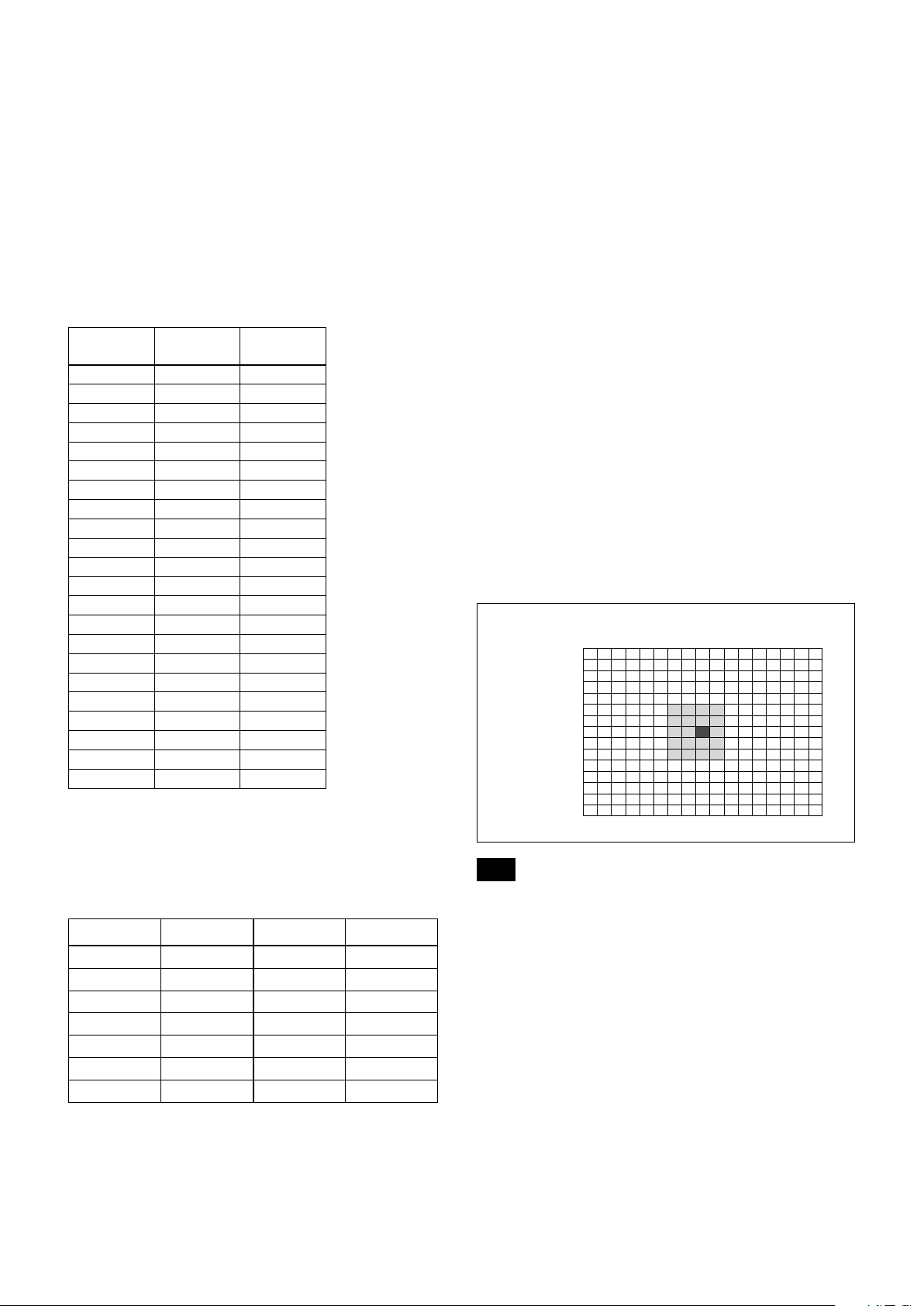
As shown in the diagram below, a range of 15 blocks
vertically and 17 blocks horizontally can be designated.
In the case where the center is designated (shown in
black), the level is computed along with a weighted
value for the surrounding block (shaded), including the
specified portions; and then the Gain and Iris are set.
The value of the designated portions and the
surrounding areas should be calculated as 100%, the
rest should be set to 20%. The range of the Spot AE
frame is fixed to 5 blocks vertically and 4 blocks
horizontally.
AE – Iris Priority
The iris can be set freely by the user to 14 steps
between F1.6 and Close.
The gain and shutter speed are set automatically,
according to the brightness of the subject.
Data
11 F1.6 0A F5.6
10 F2 09 F6.8
0F F2.4 08 F8
0E F2.8 07 F9.6
0D F3.4 06 F11
0C F4 05 F14
0B F4.8 00 CLOSE
Setting value
Data
Setting value
Note
Wide-D/HLC/Backlight Compensation/Spot Exposure Mode do
not work at the same time.
9
Page 10

Basic Functions
Exposure Compensation
Exposure compensation is a function which offsets the
internal reference brightness level used in the AE
mode, by steps of 1.5 dB.
Data Step
0E +7 +10.5 dB
0D +6 +9 dB
0C +5 +7.5 dB
0B +4 +6 dB
0A +3 +4.5 dB
09 +2 +3 dB
08 +1 +1.5 dB
07 0 0 dB
06 −1 −1.5 dB
05 −2 −3 dB
04 −3 −4.5 dB
03 −4 −6 dB
02 −5 −7.5 dB
01 −6 −9 dB
00 −7 −10.5 dB
Setting value
Slow AE (Auto Exposure)
The slow AE Response function allows you to reduce
the exposure response speed. Usually the camera is set
up so that the optimum exposure can be obtained
automatically within about 1 second. However, using
the slow AE response function allows you to lengthen
the auto exposure response speed from the initial setup
speed (01h) to approx. 10 minutes (30h) (at normal
shutter speed).
For example, with the normal setting (about 1 second),
if the headlights of a car are caught by the camera, the
camera automatically adjusts the exposure so that it can
shoot a high-intensity subject (in this case, the
headlights). As a result, images around the headlights,
that is, the rest of the subject, except the headlights,
becomes relatively dark, and poorly distinguished.
However, using the slow AE function means the AE
response speed will be slower, and response time will
be longer. As a result, even if the camera catches a highintensity subject (e.g., the headlights) for a moment,
you can still easily distinguish the portions of the image
surrounding the headlights.
Aperture Control
Aperture control is a function which adjusts the edge
enhancement of objects in the picture. There are 16
levels of adjustment, starting from “no enhancement.”
When shooting text, this control may help by making
them sharper.
Backlight Compensation
When the background of the subject is too bright, or
when the subject is too dark due to shooting in the AE
mode, back light compensation will make the subject
appear clearer.
Note
Wide-D/HLC/Backlight Compensation/Spot Exposure Mode do
not work at the same time.
Wide Dynamic Range Mode (Wide-D)
The Wide Dynamic Range mode is a function for
dividing an image into several blocks and correcting
blocked-up shadows and blown-out highlights in
accordance with the intensity difference. It enables you
to obtain images in which portions ranging from dark
to light can be recognized, even when capturing a
subject with a large intensity difference that is backlit
or includes extremely light portions.
Images with wide dynamic range are produced by
combining long-exposure signals (normal shutter) with
the signals of the high-intensity portions obtained with
a short exposure (high-speed shutter).
• About Wide-D Set Parameter
(Command: 8x 01 04 2D 00 0q 0r 0s 00 00 00 00 FF)
q: Display brightness
(0: Dark to 6: Bright)
The brightness and the darkness can be
adjusted to seven levels. The normal brightness
is set to 3.
Initial setting: 3
r: Brightness compensation selection
(0: Darker, 1: Dark, 2: Standard, 3: Bright)
Set the area which you want to adjust the
brightness of the image with Wide-D effect.
Initial setting: 2
s: Compensation level
(0: Low, 1: Mid, 2: High)
The compensation of the brightness, which you
select from the parameter, can be set to three
levels.
Initial setting: 1
Notes
• When the Wide-D is On, false colors may appear in some parts of
the image. This phenomenon is unique to Wide-D, and is not an
indication of a camera malfunction.
• When Wide-D is switched, images may be disported.
• Wide-D/HLC/Backlight Compensation/Spot AE do not work at
the same time.
• After the Wide-D ON/OFF switchover, the Visca command will
not be accepted for up to 2 seconds and an error message may be
returned from the camera.
10
Page 11
Basic Functions
Visibility Enhancer (VE)
Depending on the imaging scene, the Visibility
Enhancer function makes the darker part of a camera
image brighter, and automatically correct brightness
and contrast to show bright parts clearly.
Note
This function is also used in the Wide-D operation.
Defog mode
When the surrounding area of the subject is foggy and
low contrast, the defog mode will make the subject
appear clearer.
You can select this function from the four levels: OFF,
Low, Middle and High.
HLC
HLC (highlight correction) is a function to adjust AE
and AF, and to perform the masking of light area as
required when a high intensity spot light is detected.
It allows you to easily read the number of vehicles and
number plate in the indoor parking area or in the
outdoor during the night.
Note
Wide-D/HLC/Backlight Compensation/Spot Exposure Mode do
not work at the same time.
MinimumShutter
• In the normal setting, you can select the noise
reduction level from 6 levels: levels 1 to 5, plus off.
In this setting, the users cannot adjust the ratio of
2D/3D effect level.
• In the independent setting, you can individually select
the 2D NR and 3D NR from 6 levels respectively:
levels 1 to 5, plus off.
The NR effect is applied in levels based on the gain,
and this setting value determines the limit of the effect.
In bright conditions, changing the NR level will not
have an effect.
High sensitivity mode
This function increases the max gain to allow bright
output in darker environments.
However, with a strong gain (up to 10×), the captured
image will contain a lot of noise.
Note
When Wide-D is ON, the High sensitivity mode does not work.
Flicker Reduction
This function automatically reduces flicker such as that
caused by fluorescent light.
When the camera detects flicker, it automatically
changes the shutter speed and reduces flicker.
The shutter speed is automatically selected according to
conditions such as subject brightness and the Auto
Slow Shutter setting.
See the table below for the shutter speed to be selected.
When the subject becomes dark, the shutter speed
becomes slow, and then the gain is increased. This is a
function to put a limit on the shutter speed.
It prevents the camera shake when you shoot a moving
subject in a dark place.
Noise Reduction (NR)
The NR function removes noise (both random and
non-random) to provide clearer images.
The functions of both 2D NR (removal of 2dimentional noise) and 3D NR (removal of 3dimentional noise) are provided. When the 2D NR
level is increased, the details of image may be lost
because the smoothing of image with the peripheral
area is performed. Also, when the 3D NR level is
increased, adverse effects such as image blur and
blending in the successive images occur in the moving
portion. In this function, the mode to set the level of
effect by combining 2D/3D (normal setting) and the
mode to individually set the level of effect respectively
(independent setting) are available.
Video
mode
60 FPS 50 Hz Auto Slow Shutter OFF: 1/100
30 FPS 50 Hz Auto Slow Shutter OFF: 1/100, 1/50
50 FPS 60 Hz Auto Slow Shutter OFF: 1/120, 1/60
25 FPS 60 Hz Auto Slow Shutter OFF: 1/120, 1/60, 1/30
Flicker
Frequency
Shutter speed
Auto Slow Shutter ON: 1/100, 1/50, 1/25,
1/12.5
Auto Slow Shutter ON: 1/100, 1/50, 1/25,
1/12.5
Auto Slow Shutter ON: 1/120, 1/60, 1/30,
1/15
Auto Slow Shutter ON: 1/120, 1/60, 1/30,
1/15
If the camera does not detect flicker, it will run normal
AE operation.
Notes
• This function operates only during AE-Full Auto.
• Flicker Reduction does not work in AE-Shutter Priority/Iris
Priority/Manual/Spot Exposure Mode or Wide Dynamic Range
Mode.
• After the camera detects flicker and the shutter speed is changed,
Extended Normal Shutter and Minimum Shutter are inoperative.
11
Page 12
Basic Functions
• The Flicker Reduction may not work if the subject is bright under
an environment where flicker occurs. If the shutter speed is 1/100
(flicker frequency 50 Hz) or 1/120 (flicker frequency 60Hz) and
the brightness exceeds the Iris variable area (F14), stop the Flicker
Reduction and run a normal AE operation.
Variable Gamma Mode
There are standard (00h) mode and straight gamma
(01h) mode.
Gamma Offset
You can set the brightness from –64 to +64 in each
mode of variable gamma mode.
Contrast Adjustment Function
You can adjust the contrast level in the range from
0 (00h) to 255 (FFh). The initial setting is 128 (80h).
The smaller the value is, the lower the contrast
becomes, and the larger the value is, the higher the
contrast becomes.
Note
This function is available when the variable gamma mode is set to
standard (00h) mode and when VE/Wide-D/HLC are set to OFF.
Temperature Reading Function
The conversion value (hex) of the temperature sensor
built into to the camera can be read by using a query
command. The conversion value has an error of ±3 °C,
and because the temperature sensor is inside the
camera, this value is not the ambient temperature. Use
it as a reference value.
Image Stabilizer
zoom and digital zoom. As no digital zoom by the
Image Stabilizer is available on the wide side, you can
obtain a wider image with no resolution degradation.
Only the electronic zoom operates between Wide end
and 1.2×, and only the optical zoom operates between
1.2× and Tele end. The Image Stabilizer does not work
between Wide end and 1.2×, and only works after 1.2×.
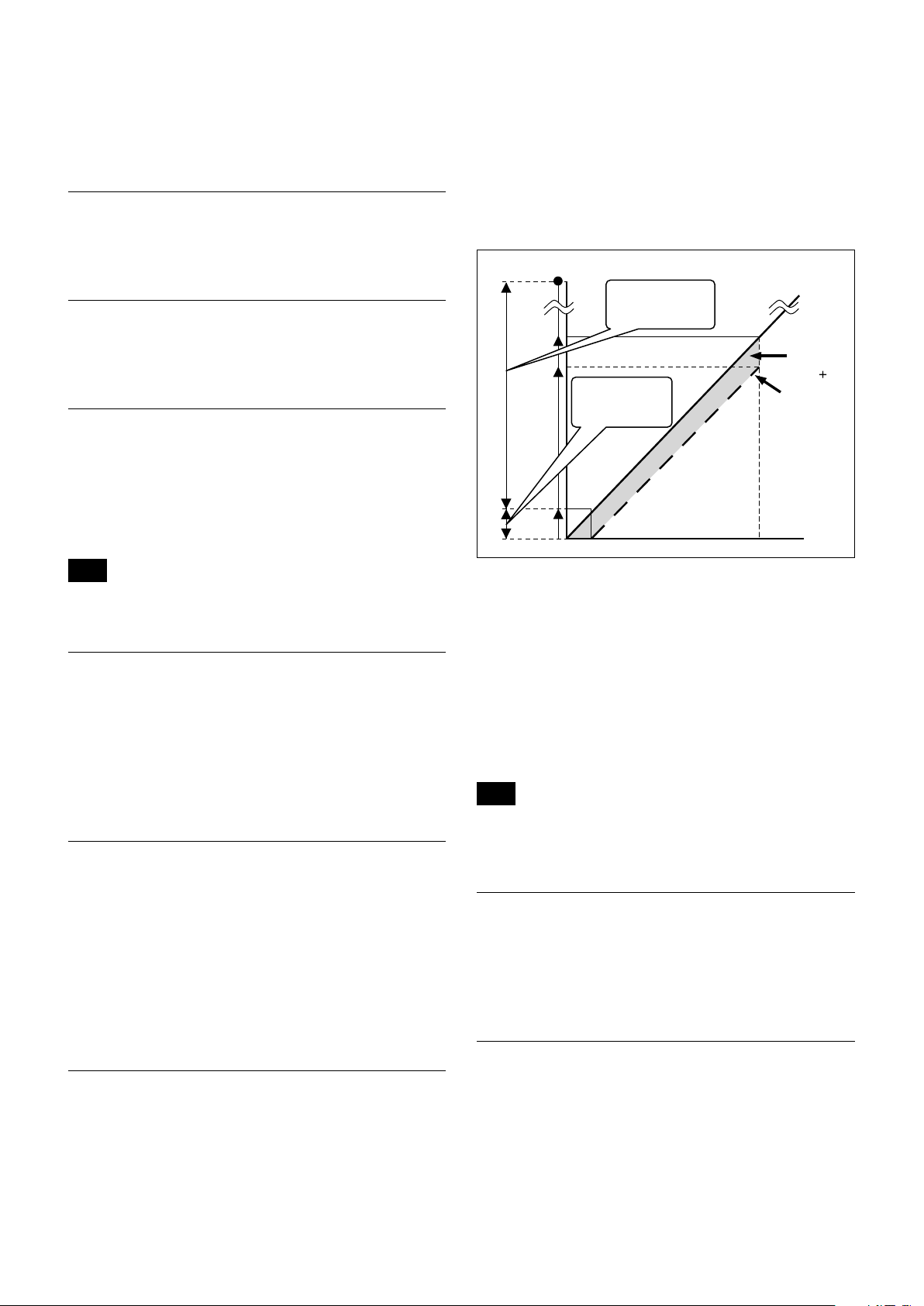
The “StableZoom” function can be switched On/Off in
the register settings.
Up to
360x
Image Stabilizer
approx.
36x
30x
1.2x
Wide Optical zoom position Tele
ON
Image Stabilizer
OFF
“StableZoom”
Digital
zoom
+
Optical
zoom
Hold Function of Image Stabilizer
With the Image Stabilizer function, suddenly stopping
high-speed movement (pan, tilt, etc.) of the camera
produces a blur sensor counteraction that may cause
image movement. In such a case, you can use a
command setting (hold) to maintain the correction of
the Image Stabilizer function. In this case the image
stabilizer is off, but there is no change in the angle of
view.
Note
The hand shake correction function may not work correctly under
the condition that high-frequency vibra tion component exits. In
such a case, set the image stabilizer function to Off.
Switching On the Image Stabilizer function reduces
image blurring caused by, for example, vibration, which
allows you to obtain images without much blurring. A
correction effect is possible for a vibration frequency of
around 10 Hz. The Image Stabilizer function employs
the digital zoom system, so the angle of view and
resolution are changed, but the sensitivity is
maintained.
“StableZoom”
“StableZoom” is a function for performing correction
using the Image Stabilizer function in accordance with
the zoom ratio, and smoothly zooming up to
approximately 36× using a combination of the optical
Auto Slow Shutter On/Off
When set to “On,” the slow shutter functions
automatically when the light darkens. This setting is
available only when the AE mode is set to “Full Auto.”
The initial setting is “Auto Slow Shutter Off.”
Low-Illumination Chroma Suppress Mode
You can configure a chroma suppress mode for lowillumination conditions. This can be useful when color
noise is particularly noticeable in such conditions.
Four levels (disabled and three levels) are available for
the low-illumination chroma suppress mode.
12
Page 13
Basic Functions
ICR
Shutter
Dark Bright
AGC
MAX
Iris
OPEN
Shutter 1/60 sec
ICR Off On
GAIN
ICR On
Iris
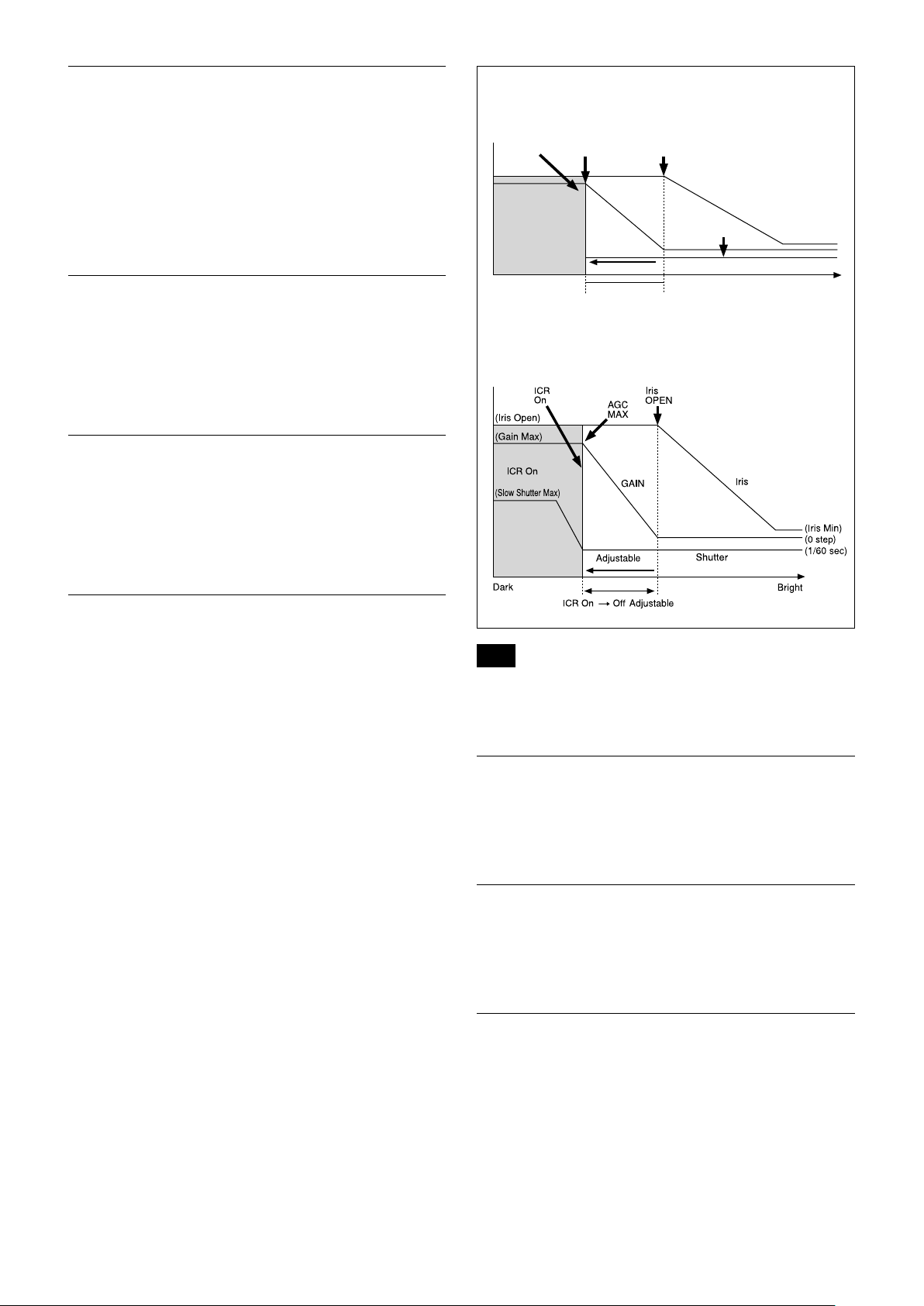
ICR (IR Cut-Removable) Mode
An infrared (IR) Cut-Filter can be disengaged from the
image path for increased sensitivity in low light
environments. The ICR will automatically engage
depending on the ambient light, allowing the camera to
be effective in day/night environments.
When the auto ICR mode is set to On, the image
becomes black and white.
Custom Color Gain
You can configure the color gain.
The initial setting is 4h and the setting can be set to 15
levels from 0h to Eh.
The higher the setting value, the higher the color
saturation. The lower the setting value, the lower the
color saturation.
Custom Color Phase
You can configure the color phase.
The initial setting is 7h and the setting can be set to 15
levels from 0h to Eh.
The higher the setting value, the color phase shifts to
the + side. The lower the setting value, the color phase
shifts to the − side.
When Auto Slow Shutter is Off (initial setting)
When Auto Slow Shutter is On
Auto ICR Mode
Auto ICR Mode automatically switches the settings
needed for attaching or removing the IR Cut Filter.
With a set level of darkness, the IR Cut Filter is
automatically disabled (ICR On), and the infrared
sensitivity is increased. With a set level of brightness,
the IR Cut Filter is automatically enabled (ICR Off).
Also, on systems equipped with an IR light, the internal
data of the camera is used to make the proper decisions
to avoid malfunctions.
Auto ICR Mode operates with the AE Full Auto setting.
Note
Depending on the information such as brightness, etc., in the On/
Off settings condition, a malfunction may occur when the subjects
largely consisting of blue and green colors are taken.
Camera ID
The ID can be set up to 65,536 (0000h to FFFFh). As
this will be memorized in the nonvolatile memory
inside, data will be saved.
Picture Effect
It consists of the following functions.
• Black & White: Monochrome Image
Others
E-FLIP
This function reverses the video output from the
camera vertically and horizontally.
13
Page 14

Basic Functions
LR Reverse
This function reverses the video output from the
camera horizontally.
Freeze
This function captures an image in the field memory of
the camera so that this image can be output
continuously.
Note
Because communication inside the camera is based on V cycle, the
captured image is always the one 3V to 4Vs after the sending of a
Command. Thus, you can not specify a time period after sending
EVEN, ODD or a Command.
Memory (Position preset)
Using the position preset function, 16 sets of camera
shooting conditions can be stored and recalled.
This function allows you to achieve the desired status
instantly, even without adjusting the following items
each time.
• Zoom Position
• Digital Zoom On/Off
• Focus Auto/Manual
• Focus Position
• AE Mode
• Shutter control parameters
• Iris control parameters
• Gain control parameters
• Exposure Compensation On/Off
• Exposure Level
• Backlight Compensation On/Off
• Auto Slow Shutter On/Off
• White Balance
• R/B Gain
• Aperture Control
• ICR On/Off
• Defog
• Wide-D On/Off
• Wide-D Parameter
• VE On /Off
• VE Parameter
• Minimum Shutter Mode
• Minimum Shutter Limit
Custom Preset
As with the position preset function, the camera
shooting conditions can be stored and recalled. The
settings are recalled when the power is turned on.
For setting items, see the “Initial Settings, Custom Preset
and Backup” section on page 24.
User Memory Area
This is the memory area with 16-byte capacity which
users can overwrite freely.
This can be used as a Serial No. for individual
recognition.
Note
Rewriting of memory is not unlimited. Be careful to avoid using the
memory area for such as unnecessary tasks as rewriting the
contents of the memory for every operation.
Register Setting
The camera’s initial settings can be changed by the
register setting command.
Register Setting Command:
8x 01 04 24 mm 0p 0q FF
mm: Register No. (=00 to 7F)
pq: Register Value (=00 to FF)
Register Inquiry Command:
8x 09 04 24 mm FF
mm: Register No.
y0 50 0p 0p FF
pp: Register Value
(returned from the camera.)
The register setting items and No. are as follows.
For details, see “Register Setting” on page 54.
Baud Rate: 00
Communication speed can be changed.
Monitoring Mode: 72
The output mode can be set.
LVDS Mode: 74
LVDS output mode can be set.
Zoom Limit: 50 (Wide end), 51 (Tele end)
The Wide and Tele zoom limits can be set.
D-Zoom Max: 52
The maximum digital zoom limit can be set (initial
settinig is 12×).
“StableZoom”: 53
ON/OFF can be set. (initial setting is OFF.)
For details, see “StableZoom” on page 12.
FocusTrace: 54
When you want to prioritize zoom speed, set
FocusTrace to Off to minimize the transition time
between Wide and Tele zoom (although the image
may be blurred because focus is not tracked).
FocusOffset: 55
Placing a dome cover in front of the camera may
cause the focal distance of the camera to change.
Especially at the Tele end, this effect exceeds the AF
range, so focus cannot track, although it responds
to changes in this value.
For details, see “Register Setting” on page 54.
AE parameter change during VE On, Defog On: 58
ON/OFF can be set. (initial setting is ON.)
14
Page 15
Basic Functions
Auto slow shutter limit: 59
The auto slow shutter limit can be set. (initial
setting is 04.)
For details, refer to “Register Setting” (page 54).
Extended normal shutter: 5A
The lower limit of slow shutter when the Auto Slow
Shutter mode is set to OFF can be set. (initial
setting is OFF.)
Defog Limit: 5B, 5C, 5D
The maximum value of Defog mode in the low,
mid and high levels can be set respectively.
Extended mode: 5F
ON/OFF can be set. (initial setting is OFF.)
For details, see “Extended mode” on page 54.
Note
After changing the register setting, turn off the camera, then turn it
on again.
Privacy Zone Masking Settings
For details, see “Privacy zone masking function” on
page 16
.
Title Display
• You can set a title of up to 11 lines. One line can
contain up to 20 characters.
• You can set display on/off, the horizontal position of
the first character, blinking state and color for each
line.
• The camera gives priority to a title display when the
camera status is displayed on the relevant line. On the
lines where a title is not set, the camera status is
displayed.
Line Number 00h to 0Ah
H-position 00h to 1Fh
00h WHITE
01h YELLOW
02h VIOLET
Color
Blink
03h RED
04h CYAN
05h GREEN
06h BLUE
00h Off
01h On
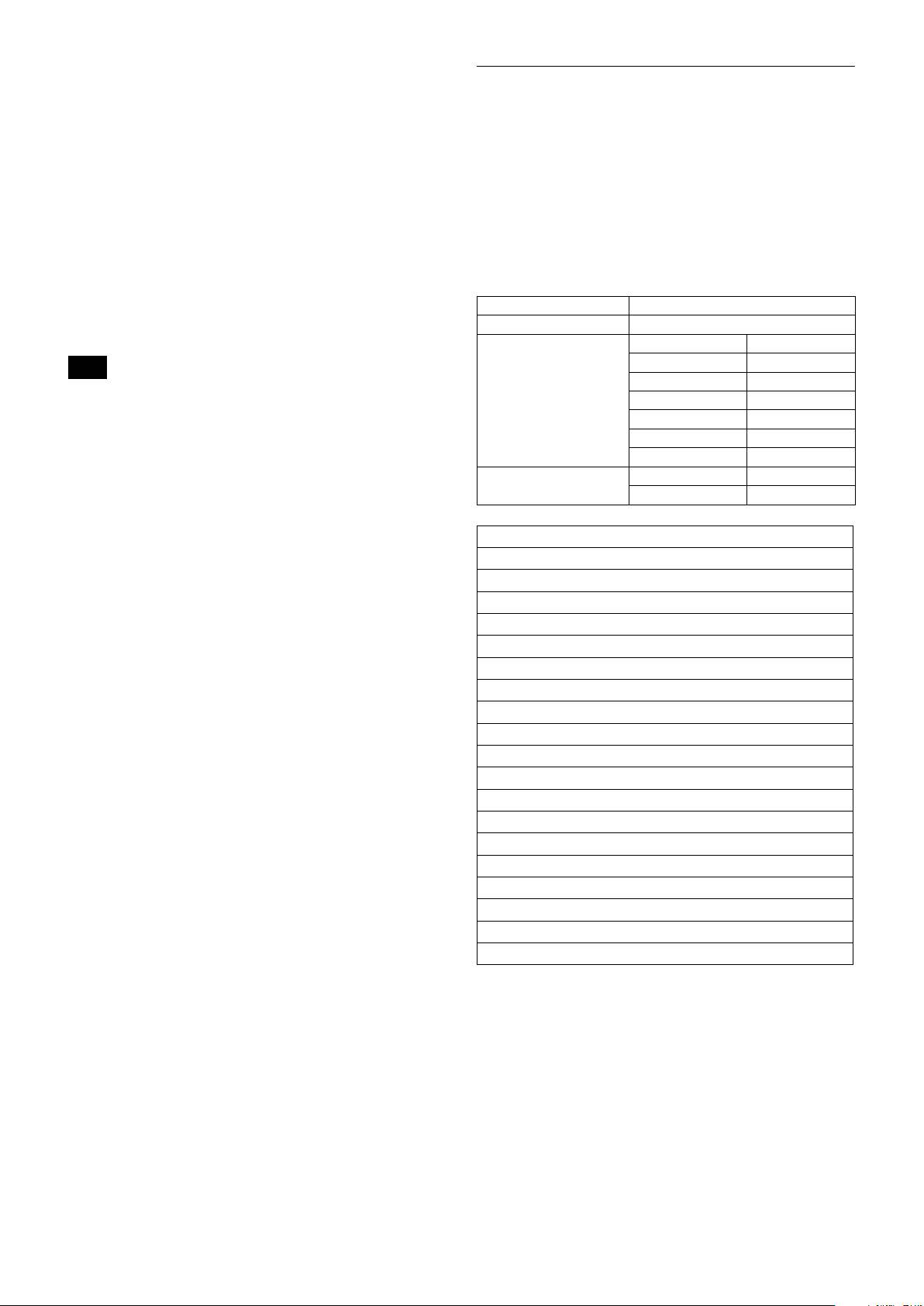
Motion detection
For details, see “Motion detection (MD) function” on
page 18
.
00 01 02 03 04 05 06 07
A B C D E F G H
08 09 0A 0B 0C 0D 0E 0F
I J K L M N O P
10 11 12 13 14 15 16 17
Q R S T U V W X
18 19 1A 1B 1C 1D 1E 1F
Y Z & ? ! 1 2
20 21 22 23 24 25 26 27
3 4 5 6 7 8 9 0
28 29 2A 2B 2C 2D 2E 2F
À È Ì Ò Ù Á É Í
30 31 32 33 34 35 36 37
Ó Ú Â Ê Ô Æ Ã
38 39 3A 3B 3C 3D 3E 3F
Õ Ñ Ç ß Ä Ï Ö Ü
40 41 42 43 44 45 46 47
Å $ ¥ £ ¿ ¡
48 49 4A 4B 4C 4D 4E 4F
ø ” : ’ . , / -
15
Page 16
Basic Functions
Privacy Zone Masking Function
Privacy Zone masking protects private objects and
areas such as house windows, entrances, and exits
which are within the camera’s range of vision but not
subject to surveillance.
Privacy zone masking can be masked on the monitor to
protect privacy.
Features
• Mask can be set on up to 24 places according to Pan/
Tilt positions.
• Mask can be displayed on 8 places per screen
simultaneously.
• Individual on/off zone masking settings.
• Two colors can be individually set for each of
24 privacy zones.
• Interlocking control with zooming.
• Interlocking control with Pan/Tilt.
• Non-interlocking control with Pan/Tilt.
Set Display
Command: 8x 01 04 77 pp pp pp pp FF
Parameter:
pp pp pp pp Each 24 Privacy Zones corresponds to the BIT.
See “pp pp pp pp: Mask bit” in “Parameters” on
page 17.
Comments: Each of 24 Privacy zones can be switched
on and off individually by a single VISCA
Command. If you want to display a Privacy zone,
you must set its bit to 1. If you do not want to
display a Privacy zone, you must set its bit to 0.
Set Mask Color
Command: 8x 01 04 78 pp pp pp pp qq rr FF
Parameter:
pp pp pp pp Each 24 Privacy Zones correspond to the BIT.
See “pp pp pp pp: Mask bit” in “Parameters” on
page 17.
qq Set the color code
rr Set the color code. See “qq, rr: Color code” in
“Parameters” on page 17.
Details of Setting Commands
Set Mask
Command: 8x 01 04 76 mm nn 0r 0r 0s 0s FF
Parameters:
mm Setting Mask
See “mm: Mask setting list” in “Parameters” on page 17.
nn Selects new setting or resetting for the zone. See “nn:
Setting” in “Parameters” on page 17.
rr Sets the half value “w” of the Mask Width.
ss Sets the half value “h” of the Mask Height.
See “pp: x, qq: y, rr: w, ss: h” in “Parameters” on page 17.
Comments: To set the mask, first display the object at
the center of the screen. When “nn” is set to 1, the
current Pan/Tilt/Zoom Position is recorded in
internal memory.
When “nn” is set to 0, the Pan/Tilt/Zoom Position
in memory is not changed.
Notes
• The tilt angle at which you can set the mask is between –70 to
+70 degrees.
• It is recommended that you set the size to at least twice the size
of the object (height and width).
Comments: Two different color masks can be chosen.
Two colors can be individually set for each of
24 privacy zones.
If the bit of parameter (pp pp pp pp) is set to “0”,
mask color will be “qq” color (Color code). If the
bit of parameter (pp pp pp pp) is set to “1”, the
mask color will be “rr” color (Color code).
Example: 8x 01 04 78 00 00 00 03 00 07 FF
The mask color of Mask_A and Mask_B is White
(color code 07h), and the mask color of the other
Mask (C to X) is Black (color code 00h).
Set Pan Tilt Angle
Command: 8x 01 04 79 0p 0p 0p 0q 0q 0q FF
Parameter:
ppp Pan Angle
qqq Tilt Angle
See “Setting pan/tilt angle” in “Parameters” on
page 18.
Comments: Pan/Tilt angle settings are hexadecimal
data.
The resolution of Pan/Tilt angle is 0.088 degrees.
Notes
• When you set the pan/tilt angle, locate the pan/tilt position at
the center point of the FCB camera’s position.
• If you set the pan/tilt angle or zoom the camera, a bigger mask
will be displayed for about one second.
16
Page 17
Basic Functions
160
90
0h(x,y)
w
B0h
D3h
2Dh
50h
Set PTZ Mask
Command: 8x 01 04 7B mm 0p 0p 0p 0q 0q 0q 0r 0r
0r 0r FF
Parameter:
mm Setting Mask
See “mm: Mask setting list” in “Parameters” on page 17.
ppp Pan Angle (000 to FFF)
See “Setting pan/tilt angle” in “Parameters” on page 17.
qqq Tilt Angle (000 to FFF)
See “Setting pan/tilt angle” in “Parameters” on page 17.
rrrr Zoom Position (000 to 4000)
See “Zoom Ratio and Zoom Position (for reference)” on
page 52.
Comments: Mask can be set at the desired position
by setting the pan tilt angle and zoom position
using this command.
The set value can be input by hexadecimal
number.
Note
Privacy mask zone follows the change of angle of view according
to zoom. However, the follow might be delayed for a moment if
there is any big change, such as when using D-Zoom or E-FLIP.
Parameters
mm: Mask setting list
Mask Name mm (Hex) Mask Name mm (Hex)
Mask_A 00h Mask_M 0Ch
Mask_B 01h Mask_N 0Dh
Mask_C 02h Mask_O 0Eh
Mask_D 03h Mask_P 0Fh
Mask_E 04h Mask_Q 10h
Mask_F 05h Mask_R 11h
Mask_G 06h Mask_S 12h
Mask_H 07h Mask_T 13h
Mask_I 08h Mask_U 14h
Mask_J 09h Mask_V 15h
Mask_K 0Ah Mask_W 16h
Mask_L 0Bh Mask_X 17h
nn:Setting
nn Setting
00h Resetting the zone size (the value of w, h)
for the existing mask.
01h Setting newly the zone size (the value of w, h).
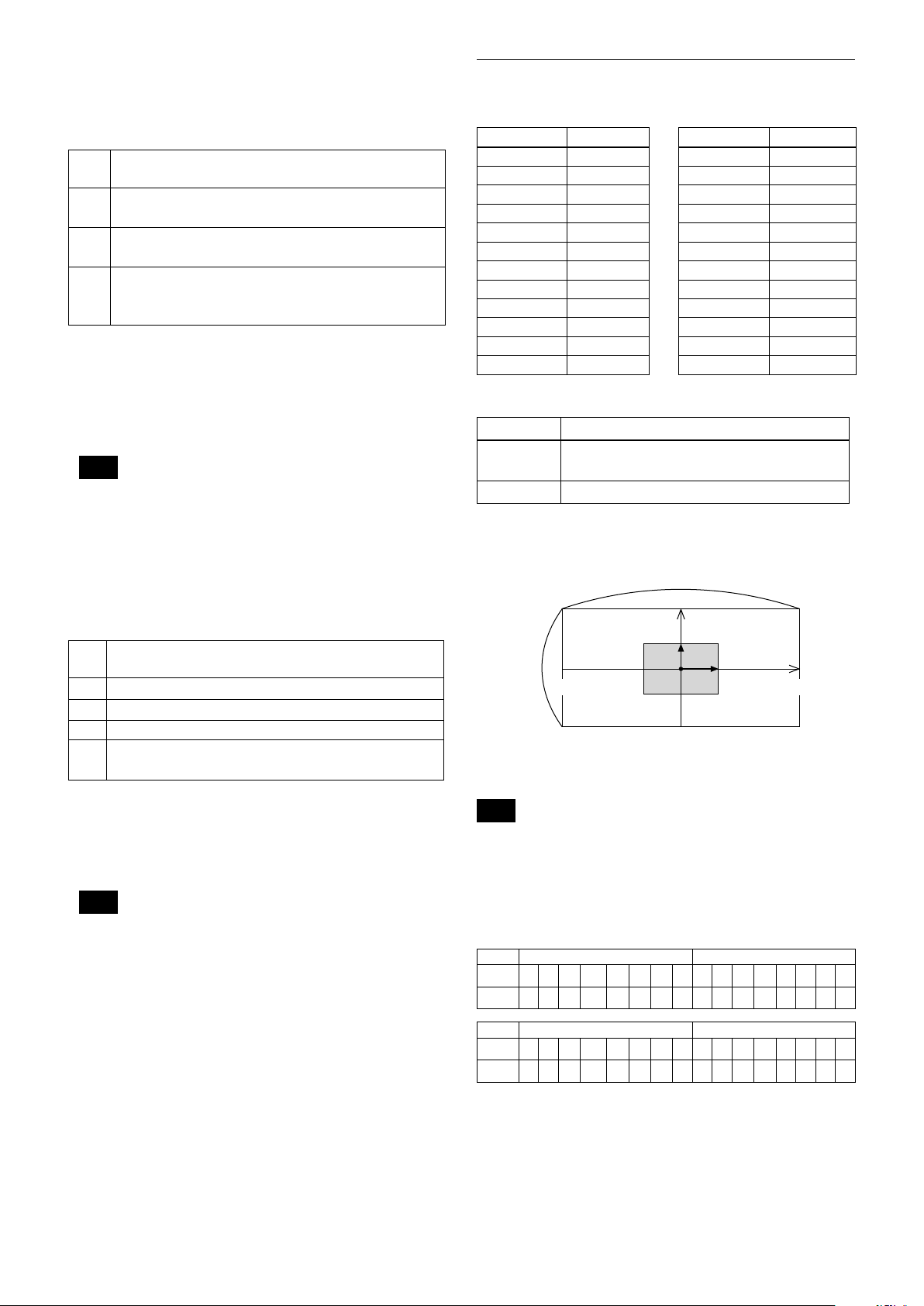
pp: x, qq: y, rr: w, ss: h
Non Interlock Mask
Command: 8x 01 04 6F mm 0p 0p 0q 0q 0r 0r 0s 0s
FF
Parameters:
mm Setting Mask
See “mm: Mask setting list” in “Parameters” on page 17.
pp Sets the center position “x” of the Mask on screen.
qq Sets the center position “y” of the Mask on screen.
rr Sets the half value “w” of the Mask Width.
ss Sets the half value “h” of the Mask Height.
See “pp: x, qq: y, rr: w, ss: h” in “Parameters” on page 17.
Commands: Mask does not interlock with pan/tilt.
The limitations of parameters are as follows.
(hexadecimal representation)
x: ±50h w: ±50h
y: ±2Dh h: ±2Dh
Note
When the Set Mask command and the Non Interlock Mask
command are set to the same mask, the command set later
becomes effective.
mask
Effective display area
Note
The priority order of the mask display is in the sequence from
A (highest) to X (lowest). When you set the parameters of masks
non-sequentially, it is recommended that you set the mask whose
priority order is higher, first.
pp pp pp pp: Mask bit
pp pp
bit 7 6 5 4 3 2 1 0 7 6 5 4 3 2 1 0
Mask - - X W V U T S - - R Q P O N M
pp pp
bit 7 6 5 4 3 2 1 0 7 6 5 4 3 2 1 0
Mask - - L K J I H G - - F E D C B A
The “-” must be “0”.
17
Page 18
Basic Functions
0 90-180 -90 180
400h800h C00h 800h
17
15
qq, rr: Color code
Mask (color) Code (qq, rr)
Black 00 h
Gray1 01 h
Gray2 02 h
Gray3 03 h
Gray4 04 h
Gray5 05 h
Gray6 06 h
White 07 h
Red 08 h
Green 09 h
Blue 0A h
Cyan 0B h
Yellow 0C h
Magenta 0D h
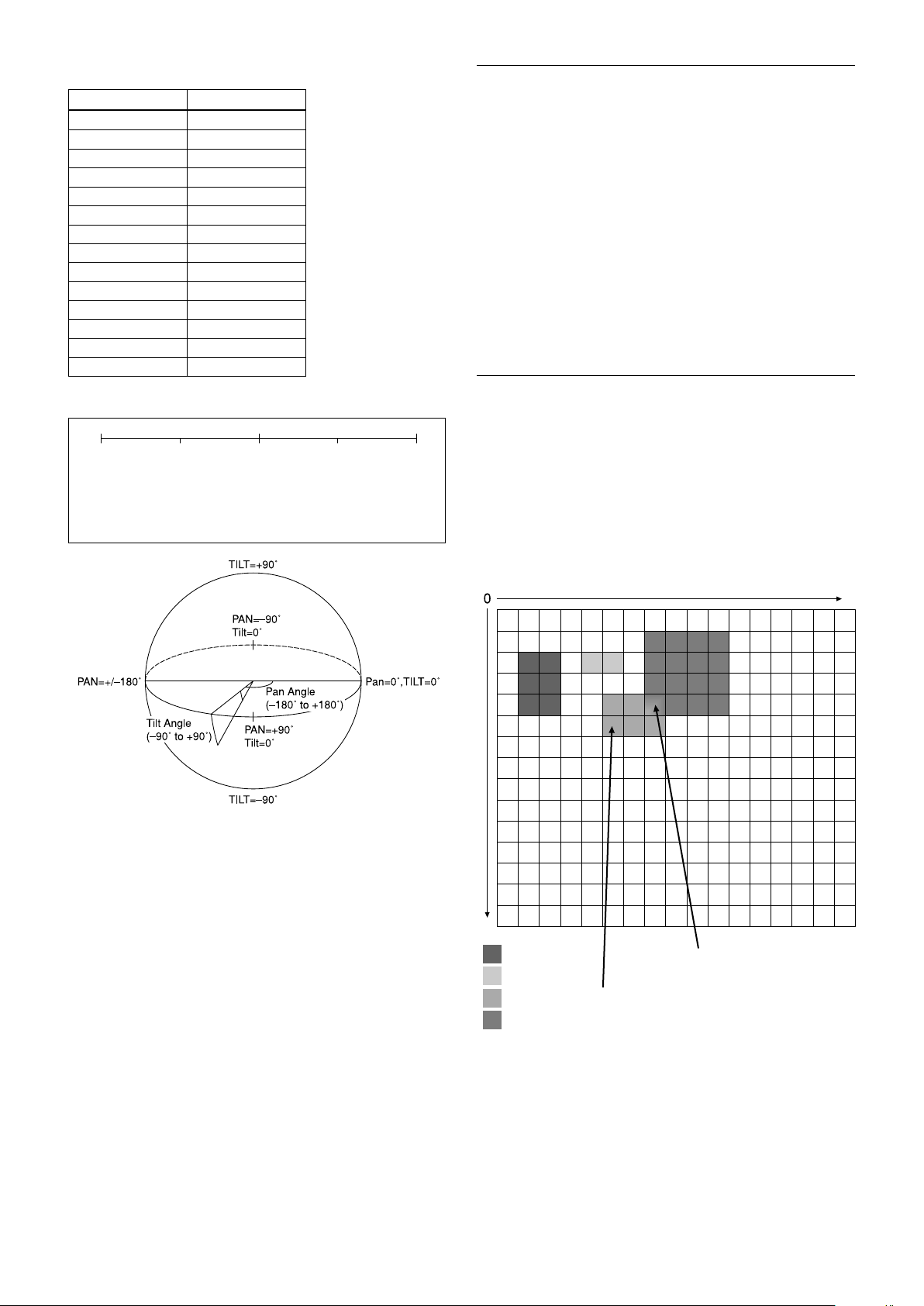
Setting pan/tilt angle
Angle/Parameter of Angle (ppp, qqq)
Set the angle resolution to 360 (degree)/4096 (1000h).
Features
• You can set a frame for the detection range of
17 (horizontally) × 15 (vertically) blocks.
• You can set up to four frames.
• When the motion is detected in the set frame, the
Alarm Replay VISCA Command is sent.
• The threshold level for detection can be set (common
to four frames).
• The interval of alarm detection can be set up to
255 seconds in units of one second.
• You can set ON/OFF for each frame.
• The frame number is also sent with Alarm Replay to
report in which frame the motion has been detected.
Frames
Setting frames
You can set the frame by assigning the starting point
and terminating point vertically and horizontally.
You can set up to four frames.
When motion is detected within the range where
frames overlap
The alarms are sent for both frames.
Motion Detection (MD) Function
This function instructs the camera to detect movement
within the monitoring area and then send an alarm
signal automatically.
The Detect signal goes out through the VISCA
Command.
18
Frame 1
Frame 2
Frame 3
Frame 4
Within this overlapped
range, alarms are sent for
both frame 3 and frame 4.
At this position, the
alarm for frame 3 is
sent.
Page 19
Sending Alarms
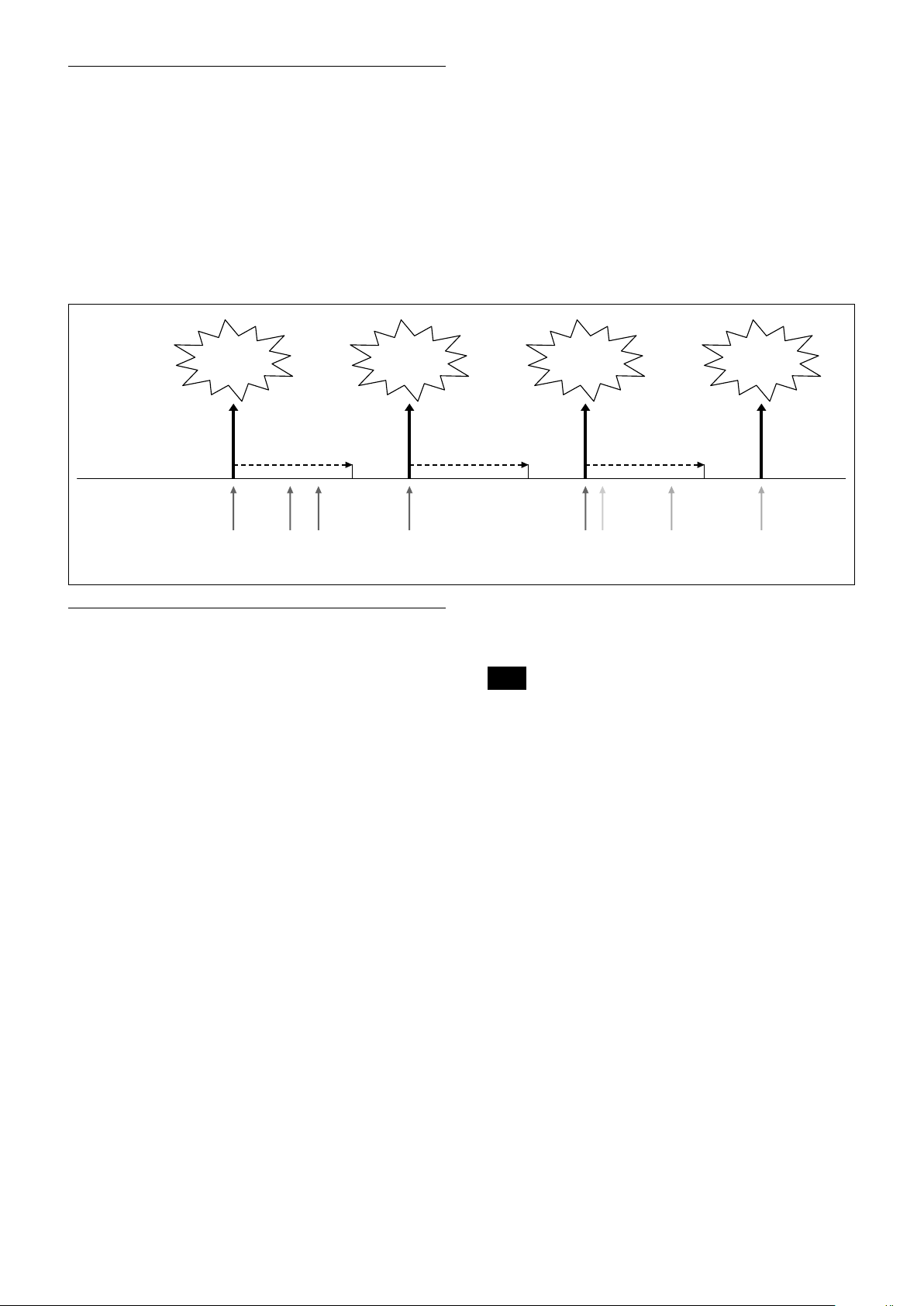
• When motion is detected, the Alarm Replay
command is issued via the serial command (VISCA)
communication line.
• When multiple motions are detected or motion is
detected in another frame within the set interval
following the original time the alarm was issued,
another alarm command is not issued.
• When motion is detected after the interval time
elapsed, the alarm is issued again.
Alarm issue Alarm issue Alarm issue Alarm issue
Basic Functions
Alarm interval
Motion is
detected in
frame 1.
Interval
Motion is
detected in
frame 1.
Motion is
detected in
frame 1.
Motion is
detected in
frame 1.
Setting Commands
• MD On/Off
The Display mode is selected by the Function Set
command and frames are set by the Frame Set
command. By sending an MD On command, the
frame is displayed when motion is detected in the set
frame. The Alarm Reply command is sent via the
serial command (VISCA) communication line.
8x 01 04 1B 02 FF --- On
8x 01 04 1B 03 FF --- Off
• Function Set
Select the detected frame, and set the Threshold Level
and the Interval Time.
8x 01 04 1C 0m 0n 0p 0q 0r 0s FF
m: Display Mode on/off (bit0)
n: Detection Frame set on/off (bit0:Frame0, bit1:
Frame1, bit2:Frame2, bit3:Frame3)
- (0 to F)
pq: Threshold - (00 to FF)
rs: Interval time set - (00 to FF)
(When pq and rs are 0, the command is received, but
the setting is disabled.)
Interval Interval
Motion is
detected in
frame 1.
Motion is
detected in
frame 2.
Motion is
detected in
frame 3.
Motion is
detected in
frame 3.
• Frame Set
You can set up to four frames by assigning the starting
and terminating points.
Note
Set a terminating point higher vertically and
horizontally than the starting point. If you set the
wrong value, an error occurs.
8x 01 04 1D 0m 0p 0q rr 0s FF
m: Select Detection Frame (0: Frame0, 1: Frame1,
2: Frame2, 3: Frame3) - (0, 1, 2, 3)
p: Frame set Start Horizontal Position - (00 to 10)
q: Frame set Start Vertical Position - (00 to 0E)
r: Frame set End Horizontal Position - (01 to 11)
s: Frame set End Vertical Position - (01 to 0F)
• Alarm Reply
When motion is detected in the set frame, the camera
issues this command. This command includes the
information on the number of the detected frame.
y0 07 04 1B 0p FF
p: Frame Number (bit0: Frame0, bit1: Frame1,
bit2: Frame2, bit3: Frame3)
19
Page 20

Basic Functions
Extended Commands
Extended commands support the following functions
(described previously).
Turn on this mode (for details, see “Extended Mode” in
“Register Setting” on page 54) to enable the following
functions.
• Exposure Compensation
The setting can be set in steps of approximately 0.2dB
(–128 (00h) to approximately +127 (FFh)).
For details, see page 10.
• Aperture Control
The setting can be set to 256 levels (00h to FFh).
For details, see page 10.
• Custom Color Gain
You can configure the color gain.
The initial setting is 80h and the setting can be set to
256 levels from 00h to FFh.
The higher the setting value, the higher the color
saturation. The lower the setting value, the lower the
color saturation.
You can set the color saturation more widely and
finely than the normal color gain variable.
For details, see page 13.
• Custom Color Phase
You can configure the color phase.
The initial setting is 80h and the setting can be set to
256 levels from 00h to FFh.
The higher the setting value, the color phase shifts to
the + side. The lower the setting value, the color phase
shifts to the − side.
You can set the color phase more finely than the
normal color phase variable.
For details, see page 13.
• Auto ICR Mode
The setting of ICR ON→OFF threshold can be set
when Auto ICR is on.
The setting range is 0 step (00h) to 255 step (FFh).
The setting of ICR OFF→ON threshold (On Level)
can be set when Auto ICR is on.
The setting range is 0 step (00h) to 28 step (1Ch).
For details, see page 13.
Note
When the extended mode is Off, CMD_NOT_EXEC
will be returned if you send the extended commands
to the camera.
When the extended mode is On, CMD_NOT_EXEC
will be returned if you send the normal commands to
the camera.
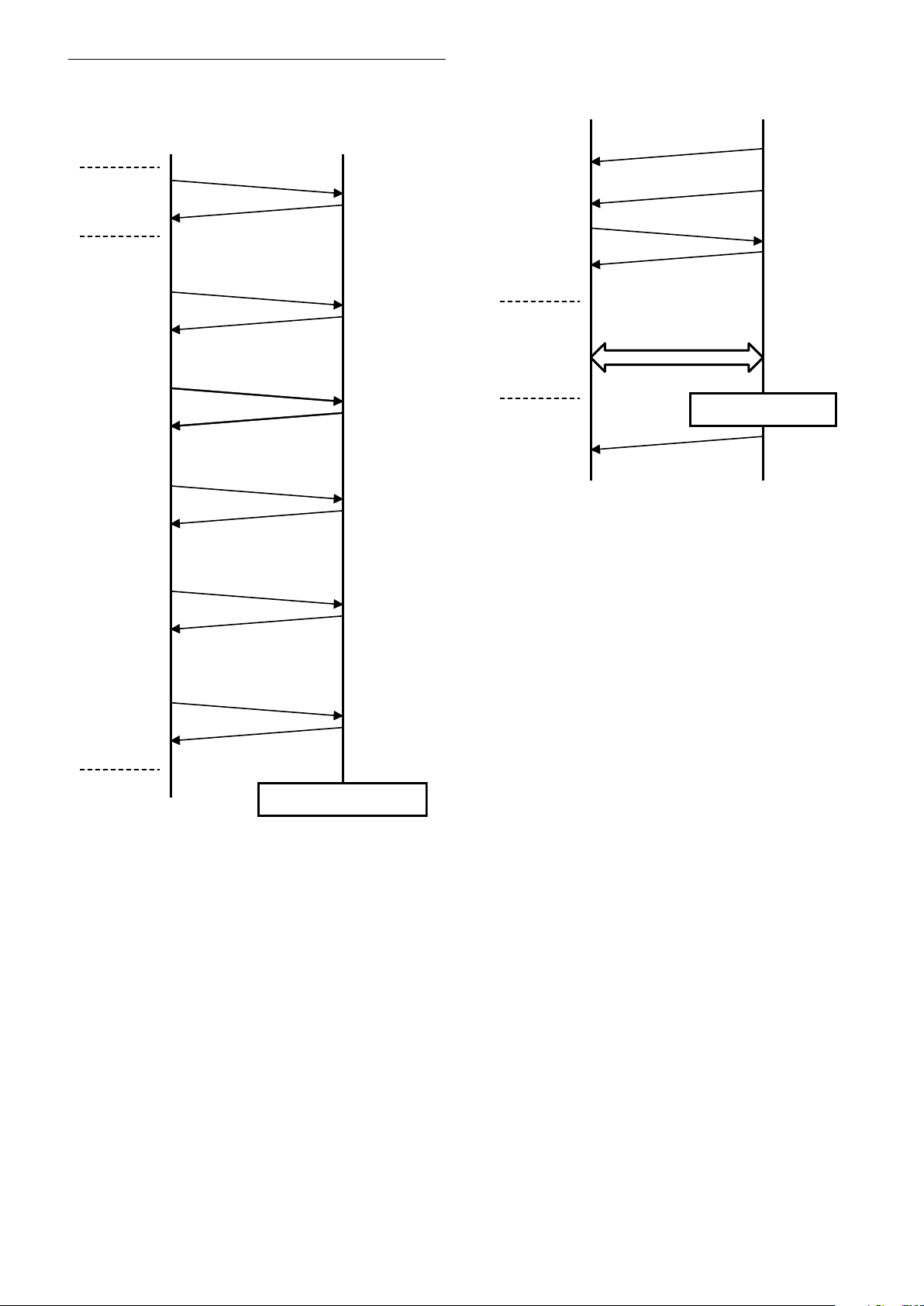
User’s Updating
Overview
The details on the firmware version upgrade are
described.
To perform the firmware version upgrade, the
following three steps are required.
1) Shifting to the maintenance mode using the Visca
command
2) Binary transmission (X model protocol) of the
firmware in the maintenance mode
3) Finalizing setting using the Visca command
Each step is described as follows.
1) Shifting to the maintenance mode using the Visca
command
After entering the standby mode using the Visca
command, the unit shifts to the maintenance mode.
Note that if the power is turned off during the
writing, the program will be broken and cannot be
restored.
2) Binary transmission (X model protocol) of the
firmware in the maintenance mode
Serial Port Setting during maintenance mode
Communication Speed 115200 bps
Data bit 8 bit
Parity None
Stop bit 1 bit
Flow control None
In the maintenance mode, the terminal software
capable of sending the character command is used.
The terminal software that is provided with the
XMODEM binary transfer protocol is used.
When you transfer the camera firmware (uug.bin
file) using this function, the transferred file is
written in FlashROM. The writing takes
approximately 6 minutes.
Note that if the power is turned OFF during
writing, the program may be broken and may not
be restorable.
After the writing is completed, the unit restarts
automatically, and then the camera firmware is
started.
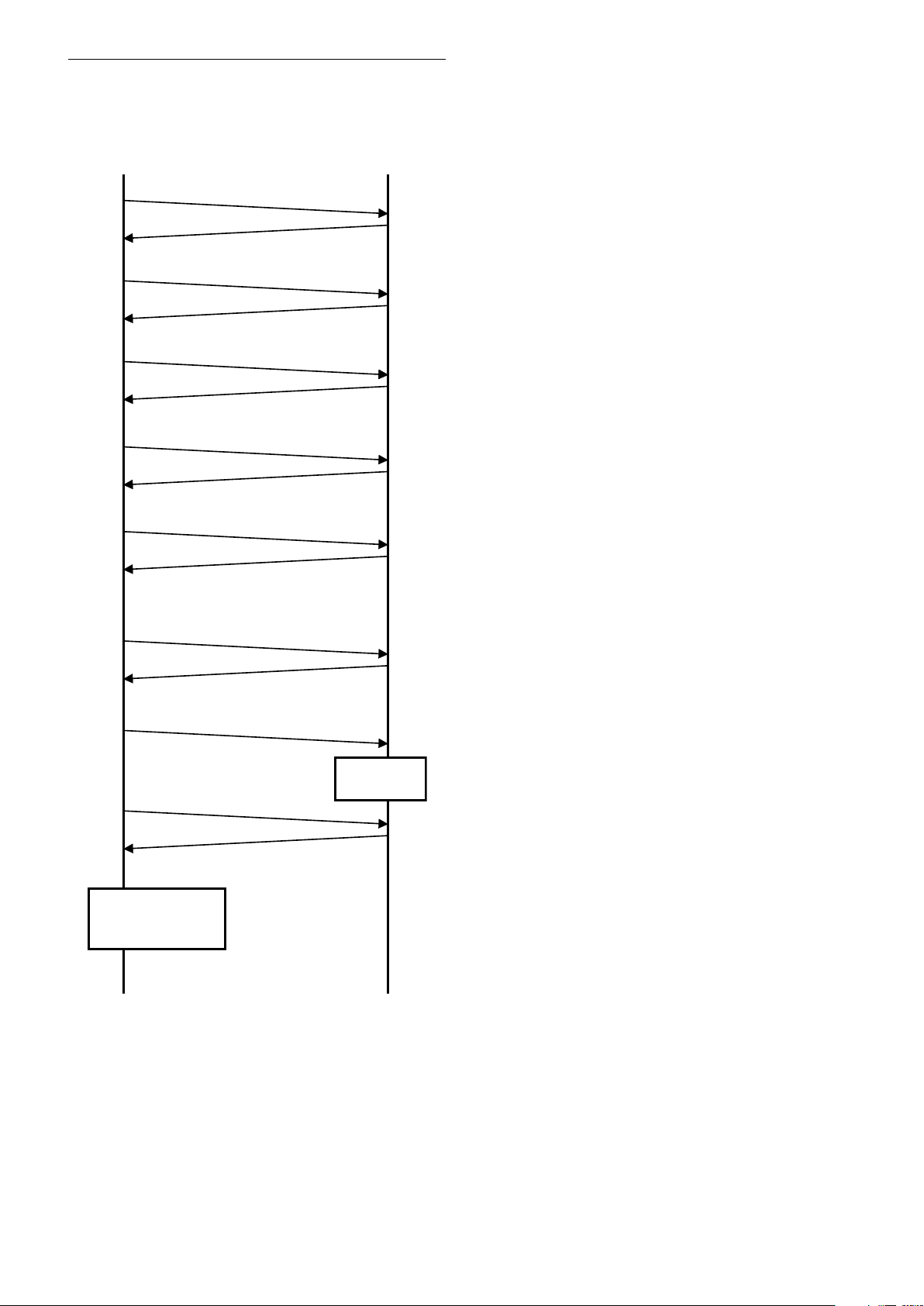
3) Finalizing setting using the Visca command
The finalizing setting is performed using the Visca
command.
You cannot read the correct camera firmware
version without performing this setting. Be sure to
perform this setting.
20
Page 21
Basic Functions
HOST FCB
CAM_Power off
8x 01 04 00 03 FF
ACK, COMP
8x 01 04 00 0C FF
ACK, COMP
8x 01 04 00 0D FF
ACK, COMP
8x 01 04 00 13 FF
ACK, COMP
8x 01 04 00 04 FF
ACK, COMP
8x 01 04 00 20 FF
ACK, COMP
Enter
Standby
Mode
Enter
Maintenance
Mode
* Do not turn OFF the power while updating because
there is a possibility that the camera will break.
REBOOT AUTOMATICALLY
Sending firmware
Sending Firmware Binary
with X modem protocol
Firmware Update
Ready Message
HOST FCB
CODE NAME+
VERSION + CR
“ready” + CR
“reprogram ( )” + CR
“receive”+ CR
‘reboot’+ CR
* Writing in FlashROM
* Do not turn OFF the power while updating because
there is a possibility that the camera will break.
Update Procedure
Enter Maintenance Mode
Maintenance Mode
21
Page 22
Finalizing procedure
HOST FCB
Reboots
automatically.
8x 01 7F 01 7F FF
ACK, COMP
8x 01 7F 7F 02 00 00 01 00 01 FF
ACK, COMP
8x 01 7F 7F 02 03 08 00 00 08 FF: EV7520A
ACK, COMP
8x 01 7F 7F 02 03 00 00 06 01 FF
ACK, COMP
8x 01 7F 7F 02 03 00 01 06 01 FF
ACK, COMP
8x 09 7F 7F 01 03 00 02 FF
8x 09 00 02 FF
9x 50 00 00 00 01 FF is received.*
1
8x 01 04 19 03 FF
9x 50 00 20 HH HH JJ JJ 02 FF is received.
Check that JJJJ is the
same as the updated
FW version. *
2
*1 When 9x 50 00 00 00 00 FF is received,
retransmit 8x 09 7F 7F 01 03 00 02 FF
until 9x 50 00 00 00 01 FF is received.
*2 If it is not the same, perform the
update procedure from the beginning.
After the maintenance mode, perform the following
finalizing procedure.
Basic Functions
22
Page 23
Eclipse
0.0
0.2
0.4
0.6
0.8
1.0
400 500 600 700 800 900 1000
Relative response [a.u.]
Wavelength [nm]
Red Green Blue
When designing the housing, refer to the dimensional
allowance as shown in the figure below.
unit: mm (inches)
Basic Functions
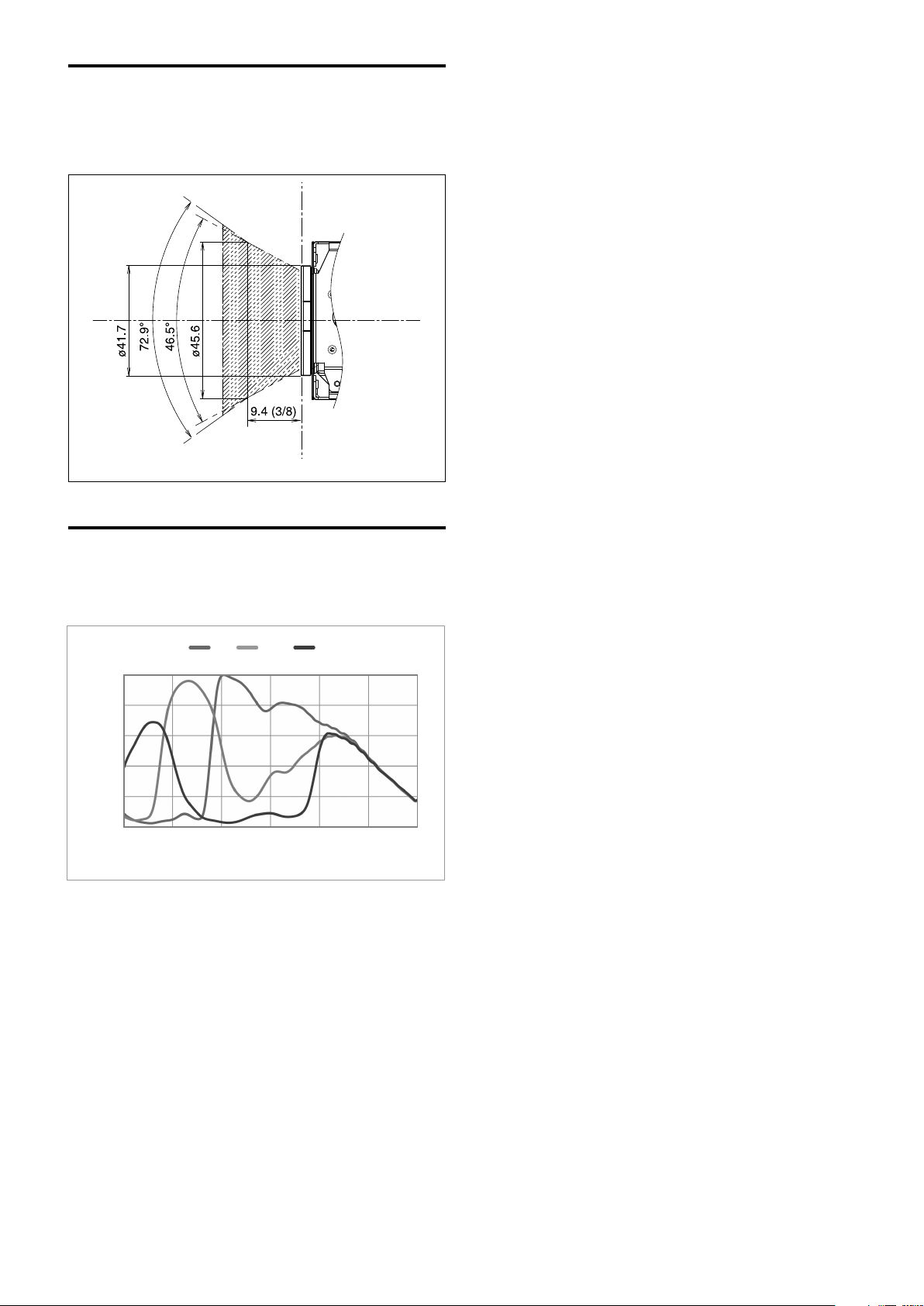
Spectral Sensitivity Characteristics
Use the graph as a reference value. (We can not
guarantee these values.)
This data is measured when the IR cut filter is removed
and the characteristics of the lens and optical source
characteristics are ignored.
23
Page 24

Initial settings and backup of camera
“Initial settings” is the factory preset value.
“Custom Preset”, indicates data that can be stored with
preset function.
“Back up on standby” indicates that
is retained while on Standby and × is not retained.
and data that cannot be stored with × using the custom
Basic Functions
Mode/Position setting Initial Settings
Zoom Position Wide end
D-Zoom On/Off
D-Zoom Separate/Combine
D-Zoom Position
Focus Position
Focus Auto/Manual
Near Limit Setting
AF Sensitivity
AF Mode
AF Run Time 5 sec
AF Interval 5 sec
WB Mode
WB Data (Rgain, Bgain)
One Push WB Data
AE Mode Full Auto
AE Response
Auto Slow Shutter Mode
Shutter Position
Iris Position
Gain Position
Exposure Compensation On/Off
Exposure Compensation
Amount
BackLight On/Off
Spot AE On/Off
Spot AE Position Setting X=8 Y=7
Aperture Level
LR Reverse On/Off
Freeze On/Off
Picture Effect
ICR On/Off
Auto ICR On/Off
Auto ICR Threshold Level
Camera Memory Same as the initial value setting
Display On/Off
Mute On/Off
Auto ICR Alarm On/Off
Image Stabilizer On/Off/Hold
High Sensitivity mode On/Off
Gamma 0: standard
Defog On/Off
On
Combine
00h
—
Auto
D000h
Normal
Normal
Auto
—
—
01h
Off
—
—
—
Off
±0
Off
Off
Ah
Off
Off
Off
Off
Off
0Eh
Off
Off
Off
Off
Off
Off
Custom
Preset
Back up
at standby
24
Page 25

Basic Functions
Mode/Position setting Initial Settings
NR level (normal setting)
NR level (independent setting)
Gain Limit
Low-Illumination Chroma
Suppress
Color Gain
Color Hue
Title Display On/Off
Title Setting
Mask Setting
Mask Display On/Off
Mask Color Setting
Center Line Display On/Off
E-Flip On/Off
Privacy Zone On/Off
Privacy Zone Setting
Camera ID
MD On/Off
MD Display Setting
MD Threshold Level
MD Interval
MD Window Setting
ZoomPos Continuous Output
On/Off
ZoomPos Continuous Output
Interval
Minimum Shutter Mode
Minimum Shutter Limit
HLC Level
HLC Mask Level
VE On/Off
VE Parameter Display brightness level: 3
Brightness compensation
selection: 2 (Standard)
Compensation level: 1 (Mid)
Wide-D On/Off
Wide-D Parameter Display brightness level: 3
Brightness compensation
selection: 2 (Standard)
Compensation level: 1 (Mid)
Contrast Adjustment
Flicker Reduction
3
Disabled
—
2h (Mid)
04h (100%)
7h (0 degrees)
Off
—
—
Off
—
Off
Off
Off
—
0000h
Off
Off
10h
1 sec
—
Off
3Ch
Off
1/125
Off
Off
Off
Off
80h
Off
Custom
Preset
Back up
at standby
Notes
• Acceptable number to write custom presets is limited.
• Privacy Zone Setting while digital zooming is not preserved by Custom Preset.
25
Page 26

Mode Condition
Condition
Mode
Power Off
Initializing
Power On
Basic Functions
Freeze On
MemRecall
Address Set
IF_Clear
Command Cancel
Power On/Off
Lens
Mode
Zoom Tele/Wide/Stop
Zoom Direct
Zoom Focus Direct
D-Zoom On/Off
D-Zoom Separate/Combine
D-Zoom Tele/Wide/Stop
D-Zoom Direct
Focus Far/Near/Stop
Focus Direct
Focus Auto/Manual
One Push AF
Focus Near Limit
AF Sensitivity Normal/Low
AF Mode Norm/Interval/Zoom
AF Activation Time/Interval Setting
Camera Memory Set/Reset
Camera Memory Recall
Lens Initialize
Power Off
Initializing
Power On
Freeze On
MemRecall
Zoom Direct
Focus Direct
ZmFo Direct
Focus Auto
26
Page 27

White Balance
Mode
Power Off
Initializing
Power On
Basic Functions
Freeze On
MemRecall
WB Auto
Indoor
Outdoor
Outdoor
Auto
Sodium Lamp
Sodium Lamp
Auto
Sodium Lamp
Outdoor Auto
One Push
ATW
Manual
WB Mode Switchover
One Push WB
RGain Setting
BGain Setting
Exposure
Mode
AE Full Auto
AE Manual
Shutter Priority
Iris Priority
Shutter Setting
Iris Setting
Gain Setting
Auto Slow Shutter On/Off
Exposure Compensation On/Off
Exposure Compensation Setting
BackLight On/Off
SpotAE On/Off
SpotAE Setting
Defog On/Off
Minimum Shutter On/Off
VE On/Off
HLC Setting (On/Off/Mask Level)
Wide-D On/Off
Flicker Reduction
Power Off
Initializing
Power On
Freeze On
MemRecall
AE Full Auto
AE Manual
Shutter
Priority
Iris Priority
×
Wide-D
VE/Defog
HLC
27
Page 28

Others
Mode
Basic Functions
Power Off
Initializing
Power On
Freeze On
MemRecall
Aperture Setting
LR_Reverse On/Off
Freeze On/Off
Picture Effect Setting
ICR On/Off
Auto ICR On/Off
Auto ICR Threshold Level Setting
Auto ICR Alarm On/Off
Display On/Off
Mute On/Off
Title Setting
Mask On/Off
Mask Setting
MD On/Off
MD Window Setting
MD Function Setting
ID Write
Memory Save
Register Value Setting
NR Level Setting
Chroma Suppress
Color Gain
Color Hue
Contrast Adjustment
Flicker Reduction
28
Page 29

VISCA/RS-232C Commands
This Manual outlines an RS-232C control protocol and
command list for certain Sony cameras from which
control software can be developed.
THIS CONTROL PROTOCOL AND COMMAND
LIST IS PROVIDED BY SONY ON AN “AS-IS BASIS”
WITHOUT WARRANTY OF ANY KIND. SONY
DOES NOT WARRANT ANY PARTICULAR RESULT
FROM THE USE OF THIS CONTROL PROTOCOL
AND COMMAND LIST AND DISCLAIMS AND
EXCLUDES ALL WARRANTIES. EXPRESS OR
IMPLIED, WITH RESPECT TO THAT CONTROL
PROTOCOL AND COMMAND LIST, INCLUDING,
BUT NOT LIMITED TO, ANY OR ALL IMPLIED
WARRANTIES OF MERCHANTABILITY OR
FITNESS FOR A PARTICULAR PURPOSE. IN FACT,
SONY SPECIFICALLY ACKNOWLEDGES THAT
SOFTWARE DEVELOPED BASED ON THIS
CONTROL PROTOCOL AND COMMAND LIST
MAY CAUSE MALFUNCTION OR DAMAGE TO
HARDWARE AND SOFTWARE USED WITH IT
(INCLUDING SONY HARDWARE AND
SOFTWARE) AND SPECIFICALLY DISCLAIMS
ANY LIABILITY FOR ANY SUCH MALFUNCTION
OR DAMAGE. THIS CONTROL PROTOCOL AND
COMMAND LIST SHOULD BE USED WITH
CAUTION.
Command List
Command List
Overview of VISCA
In VISCA, the device outputting commands, for
example, a computer, is called the controller. The
device receiving the commands, an FCB camera is
called the peripheral device. In VISCA, up to seven
peripheral devices like the FCB camera can be
connected to one controller using communication
conforming to the RS-232C standard. The parameters
of RS-232C are as follows.
Communication speed: 9.6 kbps/19.2 kbps/
38.4 kbps/115.2 kbps
Data bits : 8
Start bit : 1
Stop bit : 1
Non parity
Flow control using XON/XOFF and RTS/CTS, etc., is
not supported.
29
Page 30
VISCA Communication
Bit 7
(MSB)
Bit 6 Bit 5 Bit 4 Bit 3 Bit 2 Bit 1 Bit 0
(LSB)
1 0
FF
Bit 7
(MSB)
Bit 6 Bit 5 Bit 4 Bit 3 Bit 2 Bit 1 Bit 0
(LSB)
1 1 1 1 1 1 1 1
Specifications
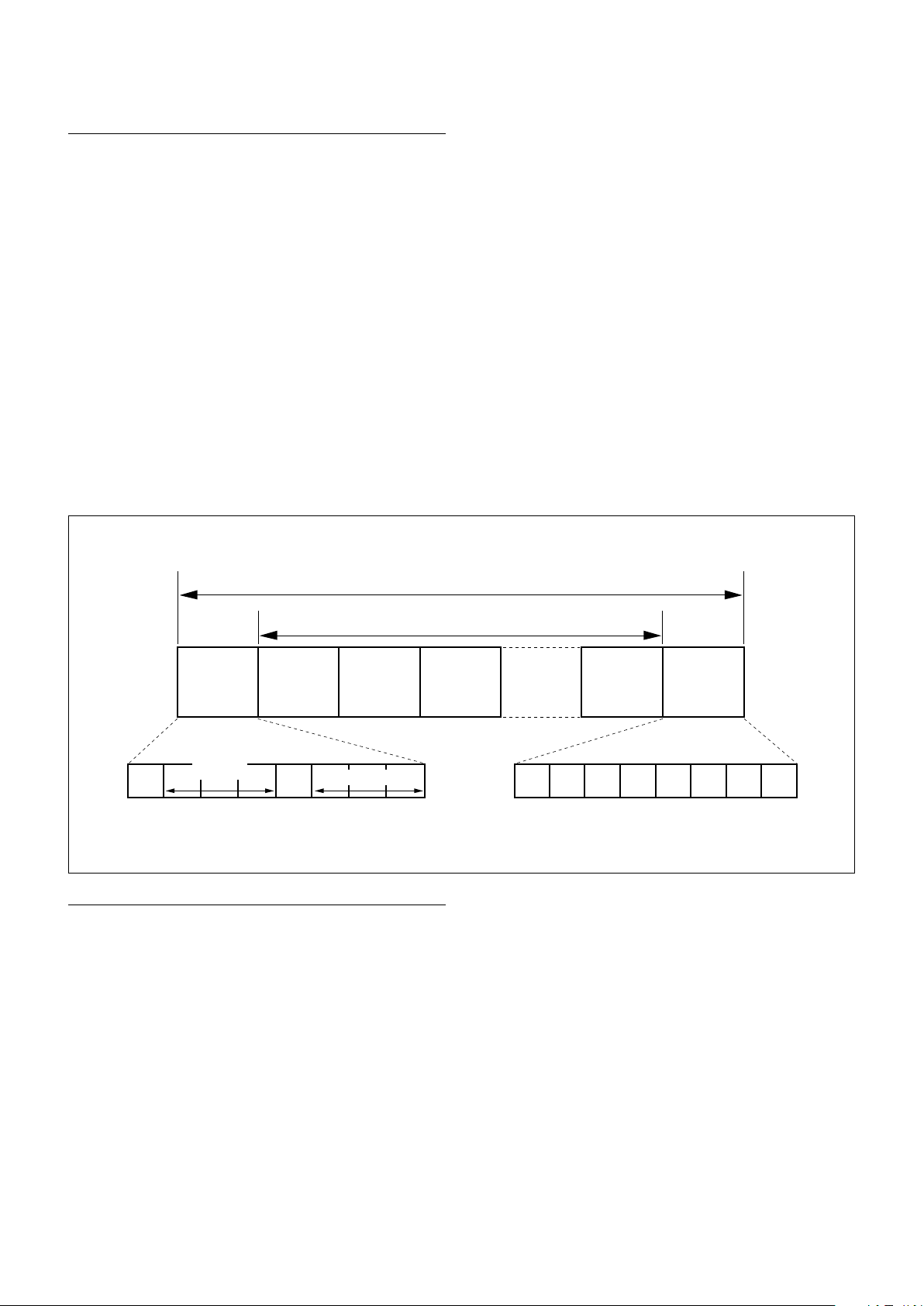
VISCA packet structure
The basic unit of VISCA communication is called a
packet. The first byte of the packet is called the header
and comprises the sender’s and receiver’s addresses. For
example, the header of the packet sent to the FCB
camera assigned address 1 from the controller (address
0) is hexadecimal 81h. The packet sent to the camera
assigned address 2 is 82h. In the command list, as the
header is 8X, input the address of the camera at X. The
header of the reply packet from the camera assigned
address 1 is 90h. The packet from the camera assigned
address 2 is A0h.
Some of the commands for setting cameras can be sent
to all devices at one time (broadcast). In the case of
broadcast, the header should be hexadecimal 88h.
When the terminator is FFh, it signifies the end of the
packet.
Command List
Header
Sender’s
address
Byte 1 Byte 2 Byte 3
Receiver’s address
Message (1 to 14 bytes)
Command and inquiry
Command
Sends operational commands to the FCB camera.
Inquiry
Used for inquiring about the current state of the FCB
camera.
Packet (3 to 16 bytes)
Terminator
Command Packet Note
Inquiry 8X QQ RR ... FF QQ
RR
1)
QQ = 01 (Command), 09 (Inquiry)
2)
RR = 00 (Interface), 04 (camera 1), 06 (Pan/Tilt), 07 (camera 2)
X = 1 to 7: FCB camera address
1)
= Command/Inquiry,
2)
= category code
30
Page 31

Command List
Responses for commands and inquiries
Acknowledge message
Returned by the FCB camera when it receives a
command. No Acknowledge message is returned for
inquiries.
Completion message
Returned by the FCB camera when execution of
commands or inquiries is completed. In the case of
inquiry commands, it will contain reply data for the
inquiry after the 3rd byte of the packet. If the
Acknowledge message is omitted, the socket number
will contain 0.
Reply Packet Note
Acknowledge X0 4Y FF Y = socket number
Completion (Commands) X0 5Y FF Y = socket number
Completion (Inquiries) X0 5Y ... FF Y = socket number
X = 9 to F: FCB camera address + 8
Error message
When a command could not be executed or failed,
an error message is returned instead of the
Acknowledge message. After an Acknowledge
message, an error message may be returned if the
process of some command (zoom, etc.) has not been
completed.
When a inquiry command could not be executed or
failed, an error message is returned instead of the
completion message.
The Acknowledge message is not returned for these
commands and inquiries, and only the completion
message of socket number 0 is returned.
Command execution cancel
To cancel a command which has already been sent,
send the Cancel command as the next command. To
cancel one of any two commands which have been
sent, use the cancel message.
Cancel Packet Note
Cancel 8X 2Y FF Y = socket number
X = 1 to 7: FCB camera address, Y = socket number
An error message will be returned for this command,
but this is not a fault. It indicates that the command has
been canceled.
Error Packet Description
X0 6Y 01 FF Message length error (>14 bytes)
X0 6Y 02 FF Syntax Error
X0 6Y 03 FF Command buffer full
X0 6Y 04 FF Command cancelled
X0 6Y 05 FF No socket (to be cancelled)
X0 6Y 41 FF Command not executable
X = 9 to F: FCB camera address + 8, Y = socket number
Socket number
When command messages are sent to the FCB camera,
send the next command message after waiting for the
completion message or error message to return.
However to deal with advanced uses, the FCB camera
has two buffers (memories) for commands, so that up
to two commands including the commands currently
being executed can be received. When the FCB camera
receives commands, it notifies the sender which
command buffer was used using the socket number of
the Acknowledge message. As the completion message
or error message also has a socket number, it indicates
which command has ended. Even when two command
buffers are being used at any one time, an FCB camera
management command and some inquiry messages
can be executed.
31
Page 32

VISCA Device Setting Command
Before starting control of the FCB camera, be sure to
send the Address command and the IF_Clear
command using the broadcast function.
For VISCA network administration
Address
Sets an address of a peripheral device. Use when
initializing the network, and receiving the following
network change message.
Network Change
Sent from the peripheral device to the controller
when a device is removed from or added to the
network. The address must be re-set when this
message is received.
Packet Note
Address 88 30 01 FF Always broadcasted.
Network Change X0 38 FF
X = 9 to F: FCB camera address + 8
Command List
Note
Please start the camera and start sending the VISCA command
after receiving the Network Change.
VISCA interface command
IF_Clear
Clears the command buffers in the FCB camera and
cancels the command currently being executed.
Command Packet Reply Packet Note
IF_Clear 8X 01 00 01 FF X0 50 FF
IF_Clear (broadcast) 88 01 00 01 FF 88 01 00 01 FF
X = 1 to 7: FCB camera board address (For inquiry packet)
X = 9 to F: FCB camera board address +8 (For reply packet)
VISCA interface and inquiry
CAM_VersionInq
Returns information on the VISCA interface.
Inquiry Inquiry Packet Reply Packet Description
CAM_VersionInq 8X 09 00 02 FF Y0 50 GG GG HH HH JJ JJ KK FF GGGG = Vender ID
(0020: Sony)
HHHH = Model ID
0640: FCB-EV7520A
0641: FCB-CV7520A
JJJJ = ROM revision
KK = Maximum socket #(02)
X = 1 to 7: FCB camera address (For inquiry packet)
X = 9 to F: FCB camera address +8 (For reply packet)
32
Page 33
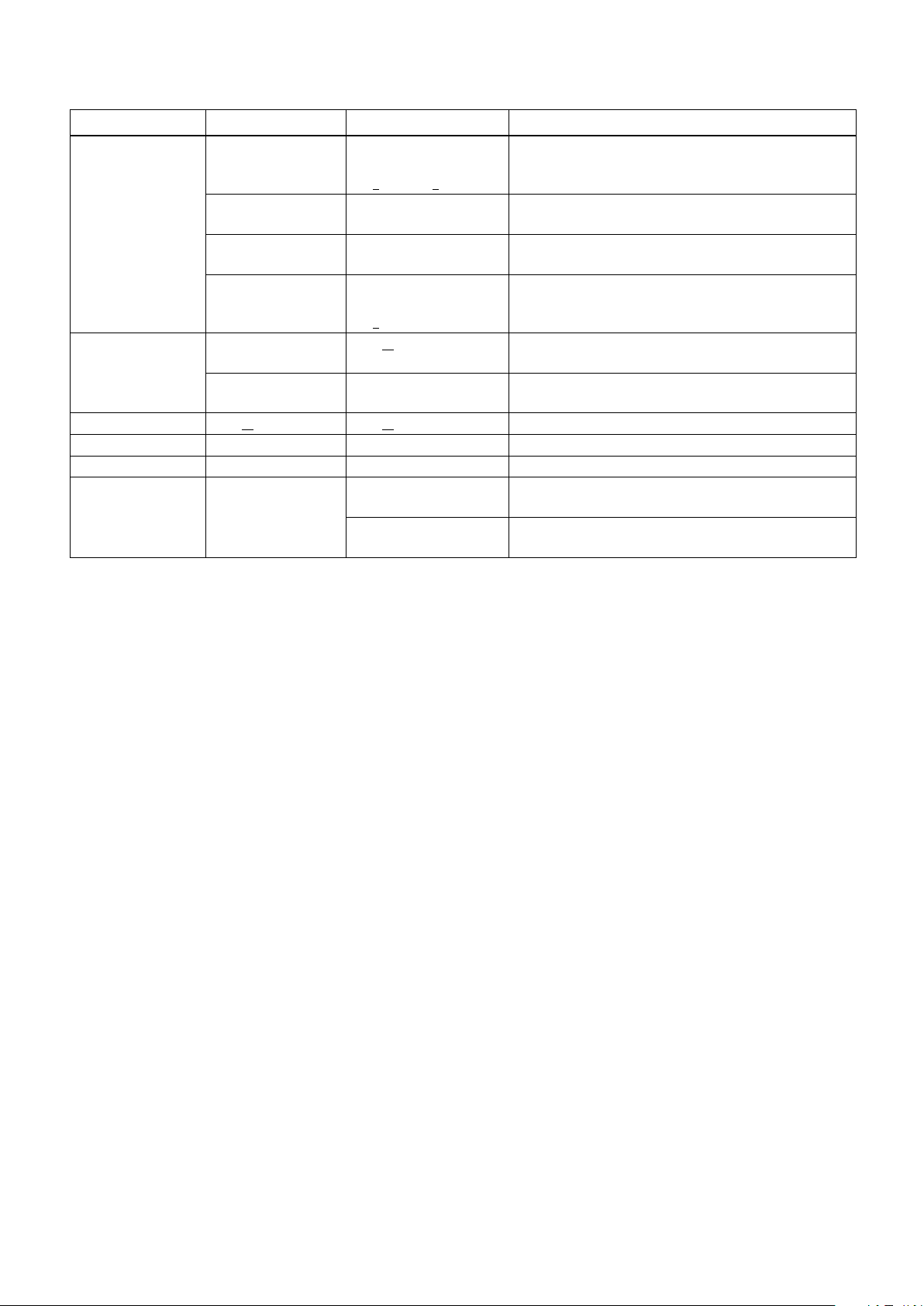
VISCA Command/Acknowledge Protocol
Command Command Message Reply Message Comments
General Command 81 01 04 38 02 FF
(Example)
81 01 04 38 FF
(Example)
81 01 04 38 02 FF
(Example)
81 01 04 08 02 FF
(Example)
Inquiry Command 81 09 04 38 FF
(Example)
81 09 05 38 FF
(Example)
Address Set 88 30 01 FF 88 30 02 FF Returned the device address to +1.
IF_Clear(Broadcast) 88 01 00 01 FF 88 01 00 01 FF Returned the same command.
IF_Clear (For x) 8x 01 00 01 FF z0 50 FF (Completion) Acknowledge is not returned for this command.
Command Cancel 8x 2y FF z0 6y 04 FF
90 41 FF (Acknowledge)
+90 51 FF (Completion)
90 42 FF 90 52 FF
90 60 02 FF (Syntax Error) Accepted a command which is not supported or a command
90 60 03 FF
(Command Buffer Full)
90 61 41 FF
(Command Not Executable)
90 62 41 FF
90 50 02 FF (Completion) Acknowledge is not returned for the inquiry command.
90 60 02 FF (Syntax Error) Accepted an incompatible command.
(Command Canceled)
z0 6y 05 FF (No Socket)
Returns Acknowledge when a command has been accepted, and
Completion when a command has been executed.
lacking parameters.
There are two commands currently being executed, and the
command could not be accepted.
Could not execute the command in the current mode.
Returned when the command of the socket specified is canceled.
Completion for the command canceled is not returned.
Returned when the command of the specified socket has already
been completed or when the socket number specified is wrong.
Command List
33
Page 34

Command List
VISCA Camera-Issued Messages
Acknowledge/Completion Messages
Command Messages Comments
Acknowledge z0 4y FF
(y:Socket No.)
Completion z0 5y FF
(y:Socket No.)
z = Device address + 8
Error Messages
Command Messages Comments
Syntax Error z0 60 02 FF Returned when the command format is different or when a command with illegal
Command Buffer Full z0 60 03 FF Indicates that two sockets are already being used (executing two commands) and the
Command Canceled z0 6y 04 FF
(y:Socket No.)
No Socket z0 6y 05 FF
(y:Socket No.)
Command Not Executable z0 6y 41 FF
(y:Socket No.)
Returned when the command is accepted.
Returned when the command has been executed.
command parameters is accepted.
command could not be accepted when received.
Returned when a command which is being executed in a socket specified by the cancel
command is canceled. The completion message for the command is not returned.
Returned when no command is executed in a socket specified by the cancel command,
or when an invalid socket number is specified.
Returned when a command cannot be executed due to current conditions. For example,
when commands controlling the focus manually are received during auto focus.
Network Change Message
Command Message Comments
Network Change z0 38 FF Issued when power is being routed.
34
Page 35

FCB Camera Commands
Command List (1/6)
Command Set Command Command Packet Comments
AddressSet Broadcast 88 30 01 FF Address Setting
IF_Clear — 8x 01 00 01 FF I/F Clear
Broadcast 88 01 00 01 FF
CommandCancel — 8x 2p FF p: Socket No. (=1 or 2)
CAM_Power On 8x 01 04 00 02 FF Power On/Off
Off (Standby) 8x 01 04 00 03 FF
CAM_Zoom Stop 8x 01 04 07 00 FF —
Tele (Standard) 8x 01 04 07 02 FF
Wide (Standard) 8x 01 04 07 03 FF
Tele (Variable) 8x 01 04 07 2p FF p=0 (Low) to 7 (High)
Wide (Variable) 8x 01 04 07 3p FF
Direct 8x 01 04 47 0p 0q 0r 0s FF pqrs: Zoom Position
CAM_DZoom On 8x 01 04 06 02 FF Digital Zoom On/Off
Off 8x 01 04 06 03 FF
Combine Mode 8x 01 04 36 00 FF Optical/Digital Zoom Combined
Separate Mode 8x 01 04 36 01 FF Optical/Digital Zoom Separate
Stop 8x 01 04 06 00 FF —
Tele (Variable) 8x 01 04 06 2p FF p=0 (Low) to 7 (High)
Wide (Variable) 8x 01 04 06 3p FF
Direct 8x 01 04 46 00 00 0p 0q FF pq: D-Zoom Position
CAM_Focus Stop 8x 01 04 08 00 FF —
Far (Standard) 8x 01 04 08 02 FF
Near (Standard) 8x 01 04 08 03 FF
Far (Variable) 8x 01 04 08 2p FF p=0 (Low) to 7 (High)
Near (Variable) 8x 01 04 08 3p FF
Direct 8x 01 04 48 0p 0q 0r 0s FF pqrs: Focus Position
Auto Focus 8x 01 04 38 02 FF AF On/Off
Manual Focus 8x 01 04 38 03 FF
Auto/Manual 8x 01 04 38 10 FF
One Push Trigger 8x 01 04 18 01 FF One Push AF Trigger
Full Scan One Push
Trigger
Near Limit 8x 01 04 28 0p 0q 0r 0s FF pqrs: Focus Near Limit Position
CAM_AFSensitivity Normal 8x 01 04 58 02 FF AF Sensitivity High/Low
Low 8x 01 04 58 03 FF
CAM_AFMode Normal AF 8x 01 04 57 00 FF AF Movement Mode
Interval AF 8x 01 04 57 01 FF
Zoom Trigger AF 8x 01 04 57 02 FF
Active/Interval Time 8x 01 04 27 0p 0q 0r 0s FF pq: Movement Time, rs: Interval
CAM_IRCorrection Standard 8x 01 04 11 00 FF Focus IR compensation data switching
IR Light 8x 01 04 11 01 FF
CAM_ZoomFocus Direct 8x 01 04 47 0p 0q 0r 0s
CAM_Initialize Lens 8x 01 04 19 01 FF Lens Initialization Start
Camera 8x 01 04 19 03 FF Camera reset
8x 01 04 18 03 FF Full Scan One Push AF Trigger
0t 0u 0v 0w FF
* Enabled during Separate Mode
* Enabled during Separate Mode
pqrs: Zoom Position
tuvw: Focus Position
Command List
35
Page 36

Command List (2/6)
Command Set Command Command Packet Comments
CAM_WB Auto 8x 01 04 35 00 FF Normal Auto
Indoor 8x 01 04 35 01 FF Indoor mode
Outdoor 8x 01 04 35 02 FF Outdoor mode
One Push WB 8x 01 04 35 03 FF One Push WB mode
ATW 8x 01 04 35 04 FF Auto Tracing White Balance
Manual 8x 01 04 35 05 FF Manual Control mode
One Push Trigger 8x 01 04 10 05 FF One Push WB Trigger
Outdoor Auto 8x 01 04 35 06 FF Outdoor auto
Sodium Lamp Auto 8x 01 04 35 07 FF Auto including sodium lamp source
Sodium Lamp 8x 01 04 35 08 FF Sodium lamp source fixed mode
Sodium Lamp Outdoor
Auto
CAM_RGain Reset 8x 01 04 03 00 FF Manual Control of R Gain
Up 8x 01 04 03 02 FF
Down 8x 01 04 03 03 FF
Direct 8x 01 04 43 00 00 0p 0q FF pq: R Gain
CAM_BGain Reset 8x 01 04 04 00 FF Manual Control of B Gain
Up 8x 01 04 04 02 FF
Down 8x 01 04 04 03 FF
Direct 8x 01 04 44 00 00 0p 0q FF pq: B Gain
CAM_AE Full Auto 8x 01 04 39 00 FF Auto Exposure mode
Manual 8x 01 04 39 03 FF Manual Control mode
Shutter Priority 8x 01 04 39 0A FF Shutter Priority Auto Exposure mode
Iris Priority 8x 01 04 39 0B FF Iris Priority Auto Exposure mode
CAM_AutoSlowShutter On 8x 01 04 5A 02 FF Auto Slow Shutter On/Off
Off 8x 01 04 5A 03 FF
CAM_Shutter Reset 8x 01 04 0A 00 FF Shutter Setting
Up 8x 01 04 0A 02 FF
Down 8x 01 04 0A 03 FF
Direct 8x 01 04 4A 00 00 0p 0q FF pq: Shutter Position
CAM_Iris Reset 8x 01 04 0B 00 FF Iris Setting
Up 8x 01 04 0B 02 FF
Down 8x 01 04 0B 03 FF
Direct 8x 01 04 4B 00 00 0p 0q FF pq: Iris Position
CAM_Gain Reset 8x 01 04 0C 00 FF Gain Setting
Up 8x 01 04 0C 02 FF
Down 8x 01 04 0C 03 FF
Direct 8x 01 04 4C 00 00 0p 0q FF pq: Gain Position
Gain Limit 8x 01 04 2C 0p FF p: Gain Position
8x 01 04 35 09 FF Outdoor auto including sodium lamp source
Command List
36
Page 37

Command List
Command List (3/6)
Command Set Command Command Packet Comments
CAM_ExpComp On 8x 01 04 3E 02 FF Exposure Compensation On/Off
Off 8x 01 04 3E 03 FF
Reset 8x 01 04 0E 00 FF Exposure Compensation Amount Setting
Up 8x 01 04 0E 02 FF
Down 8x 01 04 0E 03 FF
Direct 8x 01 04 4E 00 00 0p 0q FF pq: ExpComp Position
CAM_BackLight On 8x 01 04 33 02 FF Back Light Compensation On/Off
Off 8x 01 04 33 03 FF
CAM_SpotAE On 8x 01 04 59 02 FF Spot Auto Exposure Setting
Off 8x 01 04 59 03 FF
Position 8x 01 04 29 0p 0q 0r 0s FF pq: X (0h to 10h), rs: Y (0h to Eh)
CAM_AE_Response Direct 8x 01 04 5D pp FF pp: Auto Exposure Response Setting (01h to 30h),
initial setting: 01h
CAM_VE Off 8x 01 04 3D 03 FF Off
VE On 8x 01 04 3D 06 FF VE On
Set Parameter 8x 01 04 2D 00 0q 0r 0s 00 00 00
00 FF
CAM_WD On 8x 01 04 3D 02 FF Wide-D On
Off 8x 01 04 3D 03 FF Wide-D and VE Off
VE On 8x 01 04 3D 06 FF VE On
Set Parameter 8x 01 04 2D 00 0q 0r 0s 00 00 00
00 FF
CAM_Defog On 8x 01 04 37 02 0p FF Defog On/Off
Off 8x 01 04 37 03 00 FF
CAM_Aperture Reset 8x 01 04 02 00 FF Aperture Control
Up 8x 01 04 02 02 FF
Down 8x 01 04 02 03 FF
Direct 8x 01 04 42 00 00 0p 0q FF pq: Aperture Gain
CAM_NR Noise Reduction 8x 01 04 53 pq FF pq: NR setting
2D/3D NR independent
setting
CAM_Gamma — 8x 01 04 5B 0p FF p: Gamma Setting (0: Standard, 1: Straight)
CAM_HighSensitivity On 8x 01 04 5E 02 FF High Sensitivity mode On/Off
Off 8x 01 04 5E 03 FF
CAM_LR_Reverse On 8x 01 04 61 02 FF LR Reverse On/Off
Off 8x 01 04 61 03 FF
CAM_Freeze On 8x 01 04 62 02 FF Freeze On/Off
Off 8x 01 04 62 03 FF
CAM_PictureEffect Off 8x 01 04 63 00 FF Picture Effect Setting
Black & White 8x 01 04 63 04 FF
8x 01 05 53 0p 0q FF p: 2DNR level (0: OFF, 1 to 5: level 1 to 5)
q: Display brightness level (0: Dark to 6: Bright)
Brightness compensation selection (0: Very dark, 1: Dark,
r:
2: Standard, 3: Bright)
s: Compensation level (0: Low, 1: Mid, 2: High)
q: Display brightness level (0: Dark to 6: Bright)
r: Brightness compensation selection (0: Very dark, 1: Dark,
2: Standard, 3: Bright)
s: Compensation level (0: Low, 1: Mid, 2: High)
p: Defog level (1: low, 2: mid, 3: high)
(00: Off, 01 to 05: level 1 to 5, 7F: 2D/3D NR independent
setting available)
q: 3DNR level (0: OFF, 1 to 5: level 1 to 5)
37
Page 38

Command List
Command List (4/6)
Command Set Command Command Packet Comments
CAM_MinShutter On 8x 01 04 12 02 FF pq: Minimum Shutter Position (05h to 14h)
Off 8x 01 04 12 03 FF
Limit 8x 01 04 13 00 00 0p 0q FF
CAM_PictureFlip On 8x 01 04 66 02 FF E-Flip On/Off
Off 8x 01 04 66 03 FF
CAM_ICR On 8x 01 04 01 02 FF ICR Mode On/Off
Off 8x 01 04 01 03 FF
CAM_AutoICR On 8x 01 04 51 02 FF Auto ICR Mode On/Off
Off 8x 01 04 51 03 FF
Threshold 8x 01 04 21 00 00 0p 0q FF
CAM
_AutoICRAlarmReply
CAM_Stabilizer On 8x 01 04 34 02 FF Stabilizer On/Off/HOLD
CAM_Memory Reset 8x 01 04 3F 00 0p FF p: Memory Number (=0h to Fh)
CAM_Custom Reset 8x 01 04 3F 00 7F FF Starts up in this mode when the power is turned on.
CAM_MemSave Write 8x 01 04 23 0X 0p 0q 0r 0s FF X: 00h to 07h (Address), total 16 byte
CAM_Display On 8x 01 04 15 02 FF
CAM_MultiLineTitle Title Set1 8x 01 04 73 1L 00 nn pp
CAM_Mute On 8x 01 04 75 02 FF Muting On/Off
CAM_PrivacyZone SetMask 8x 01 04 76 mm nn
On 8x 01 04 31 02 FF Auto ICR switching Alarm On/Off
Off 8x 01 04 31 03 FF
(Reply) y0 07 04 31 02 FF
y0 07 04 31 03 FF
Off 8x 01 04 34 03 FF
Hold 8x 01 04 34 00 FF
Set 8x 01 04 3F 01 0p FF
Recall 8x 01 04 3F 02 0p FF
Set 8x 01 04 3F 01 7F FF
Recall 8x 01 04 3F 02 7F FF
(8x 01 06 06 02 FF)
Off 8x 01 04 15 03 FF
(8x 01 06 06 03 FF)
On/Off 8x 01 04 15 10 FF
(8x 01 06 06 10 FF)
qq 00 00 00 00 00 00 FF
Title Set2 8x 01 04 73 2L mm nn pp
qq rr ss tt uu vv ww FF
Title Set3 8x 01 04 73 3L mm nn pp
qq rr ss tt uu vv ww FF
Title Clear 8x 01 04 74 1p FF Title Setting clear (p: 0h to Ah, F= all lines)
On 8x 01 04 74 2p FF Title display On/Off (p: 0h to Ah, F= all lines)
Off 8x 01 04 74 3p FF
Off 8x 01 04 75 03 FF
On/Off 8x 01 04 75 10 FF
0r 0r 0s 0s FF
Display 8x 01 04 77 pp pp pp pp FF Mask Display On/Off
SetMaskColor 8x 01 04 78 pp pp pp pp
qq rr FF
SetPanTiltAngle 8x 01 04 79 0p 0p 0p
0q 0q 0q FF
SetPTZMask 8x 01 04 7B mm 0p 0p 0p
0q 0q 0q 0r 0r 0r 0r FF
pq: ICR On Off Threshold Level
ICR Off On
Off
ICR On
pqrs: 0000h to FFFFh (Data)
Display On/Off
L: Line Number, nn: H-position
pp: Color, qq: Blink
L: Line Number,
mnpqrstuvw: Setting of characters (1 to 10)
L: Line Number,
mnpqrstuvw: Setting of characters (11 to 20)
mm: Mask Settings
nn 00: Modify, 01: New
rr: W, ss: H
pp pp pp pp: Mask Settings (0: Off, 1: On)
pp pp pp pp: Mask Color Settings
qq: Color Setting when 0 is selected
rr: Color Setting when 1 is selected
Pan/Tilt Angle Settings
ppp: Pan, qqq: Tilt
Pan/Tilt/Zoom Settings for Mask
ppp: Pan, qqq: Tilt, rrrr: Zoom, mm: Mask Settings
38
Page 39

Command List (5/6)
Command Set Command Command Packet Comments
CAM_PrivacyZone Non_InterlockMask 8x 01 04 6F mm
0p 0p 0q 0q 0r 0r 0s 0s FF
CenterLineOff 8x 01 04 7C 03 FF Center Line Display Off
CenterLineOn 8x 01 04 7C 04 FF Center Line Display On
CAM_IDWrite — 8x 01 04 22 0p 0q 0r 0s FF pqrs: Camera ID (=0000h to FFFFh)
CAM_MD On 8x 01 04 1B 02 FF Motion Detection On/Off
Off 8x 01 04 1B 03 FF
Function Set 8x 01 04 1C 0m 0n 0p 0q 0r 0s FF m: Display mode
Window Set 8x 01 04 1D 0m pp 0q rr 0s FF m: Select Detection Frame (0, 1, 2, 3)
Alarm (Reply) y0 07 04 1B 0p FF p: Detection Frame Number
CAM_Continuous
ZoomPosReply
CAM_ZoomPos
ReplyIntervalTimeSet
CAM_Continuous
FocusPosReply
CAM_FocusPosReply
IntervalTimeSet
CAM_RegisterValue — 8x 01 04 24 mm 0p 0p FF mm: Register No. (=00h to 7Fh)
CAM_ChromaSuppress — 8x 01 04 5F pp FF pp: Chroma Suppress setting level
CAM_ColorGain Direct 8x 01 04 49 00 00 00 0p FF p: Color Gain Setting 0h to Eh
CAM_ColorHue Direct 8x 01 04 4F 00 00 00 0p FF p: Color Hue Setting 0h to Eh
CAM_GammaOffset Direct 8x 01 04 1E 00 00 00 0s 0t 0u FF s: Polarity offset (0 is plus, 1 is minus)
On 8x 01 04 69 02 FF Zoom Position data Continuous Output On/Off
Off 8x 01 04 69 03 FF
(Reply) y0 07 04 69 0p 0p 0q 0q 0q 0q FF pp: D-Zoom Position
— 8x 01 04 6A 00 00 0p 0p FF pp: Interval Time [V cycle]
On 8x 01 04 16 02 FF Focus Position data Continuous Output On/Off
Off 8x 01 04 16 03 FF
(Reply) y0 07 04 16 00 00 0p 0p 0p 0p FF pppp: Focus Position
— 8x 01 04 1A 00 00 0p 0p FF pp: Interval Time [V cycle]
mm: Non_Interlock Mask Settings
pp: X, qq: Y, rr: W, ss: H
n: Detection Frame Set (00h to 0Fh)
pq: Threshold Level (00h to FFh)
rs: Interval Time set (00h to FFh)
pp: Start Horizontal Position (00h to 10h)
q: Start Vertical Position (00h to 0Eh)
rr: Stop Horizontal Position (01h to 11h)
s: Stop Vertical Position (01h to 0Fh)
* 00: When Zoom Mode is Combine
qqqq: Zoom Position
pp: Register Value (=00h to FFh)
00: Off
01h to 03h: On (3 levels). Effect increases as the level number
increases.
tu: Offset s=0 (00h to 40h)
Offset s=1 (00h to 40h)
Command List
39
Page 40

Command List
Command List (6/6)
Command Set Command Command Packet Comments
CAM_ContrastAdjLevel Direct 8x 01 05 5D 01 0p 0q FF pq: 00h to FFh
00h to 7Fh: The smaller the value is, the lower the contrast
becomes.
80h (Initial setting): No contrast adjustment
81h to FFh: The larger the value is, the higher the contrast
becomes.
CAM_ExExpComp Reset 8x 01 04 1F 0E 00 00 FF Exposure compensation reset
Up 8x 01 04 1F 0E 02 pp FF Exposure compensation up
pp: Step number
pp=00h to 7Fh (However, 00h is the same operation as 01h.)
Down 8x 01 04 1F 0E 03 pp FF Exposure compensation down
pp: Step number
pp=00h to 7Fh (However, 00h is the same operation as 01h.)
Direct 8x 01 04 1F 4E 00 00 0p 0q FF Set the exposure compensation to the specified level
pq: Level
pq=00h to FFh
CAM_ExAperture Reset 8x 01 04 1F 02 00 00 FF Aperture control reset
Up 8x 01 04 1F 02 02 pp FF Aperture control up
pp: Step number
pp=00h to 7Fh (However, 00h is the same operation as 01h.)
Down 8x 01 04 1F 02 03 pp FF Aperture control down
pp: Step number
pp=00h to 7Fh (However, 00h is the same operation as 01h.)
Direct 8x 01 04 1F 42 00 00 0p 0q FF Set the aperture control to the specified level
pq: Level
pq=00h to FFh
CAM_ExAutoICR Threshold
(On→Off)
On Level 8x 01 04 1F 21 01 00 0r 0s FF pq: ICR Off→On threshold level when Auto ICR
CAM_ExColorGain Direct 8x 01 04 1F 49 00 00 0p 0q FF Color Gain Setting
CAM_ExColorHue Direct 8x 01 04 1F 4F 00 00 0p 0q FF Color Hue Setting
CAM_HLC Parameter Set 8x 01 04 14 0p 0q FF p: HLC level (0: Off, 1: Low, 2: Mid, 3: High)
CAM_FlickerReduction ON 8x 01 04 32 02 FF Flicker reduction ON/OFF
OFF 8x 01 04 32 03 FF
8x 01 04 1F 21 00 00 0p 0q FF pq: ICR On→Off threshold level when Auto ICR
pq=00h to FFh
pq=00h to 1Ch
pq: Gain setting level
pq=00h to FFh
pq: Phase setting level
pq=00h to FFh
q: HLC mask level (0: Off, 1: Low, 2: Mid, 3: High)
40
Page 41

Inquiry Command List (1/4)
Inquiry Command Command Packet Inquiry Packet Comments
CAM_PowerInq 8x 09 04 00 FF y0 50 02 FF On
y0 50 03 FF Off (Standby)
CAM_ZoomPosInq 8x 09 04 47 FF y0 50 0p 0q 0r 0s FF pqrs: Zoom Position
CAM_DZoomModeInq 8x 09 04 06 FF y0 50 02 FF D-Zoom On
y0 50 03 FF D-Zoom Off
CAM_DZoomC/SModeInq 8x 09 04 36 FF y0 50 00 FF Combine Mode
y0 50 01 FF Separate Mode
CAM_DZoomPosInq 8x 09 04 46 FF y0 50 00 00 0p 0q FF pq: D-Zoom Position
CAM_FocusModeInq 8x 09 04 38 FF y0 50 02 FF Auto Focus
y0 50 03 FF Manual Focus
CAM_FocusPosInq 8x 09 04 48 FF y0 50 0p 0q 0r 0s FF pqrs: Focus Position
CAM_FocusNearLimitInq 8x 09 04 28 FF y0 50 0p 0q 0r 0s FF pqrs: Focus Near Limit Position
CAM_AFSensitivityInq 8x 09 04 58 FF y0 50 02 FF AF Sensitivity Normal
y0 50 03 FF AF Sensitivity Low
CAM_AFModeInq 8x 09 04 57 FF y0 50 00 FF Normal AF
y0 50 01 FF Interval AF
y0 50 02 FF Zoom Trigger AF
CAM_AFTimeSettingInq 8x 09 04 27 FF y0 50 0p 0q 0r 0s FF pq: Movement Time, rs: Interval
CAM_IRCorrectionInq 8x 09 04 11 FF y0 50 00 FF Standard
y0 50 01 FF IR Light
CAM_WBModeInq 8x 09 04 35 FF y0 50 00 FF Auto
y0 50 01 FF
y0 50 02 FF
y0 50 03 FF One Push WB
y0 50 04 FF
y0 50 05 FF
y0 50 06 FF Outdoor Auto
y0 50 07 FF Sodium Lamp Auto
y0 50 08 FF Sodium Lamp
y0 50 09 FF Sodium Lamp Outdoor Auto
CAM_RGainInq
CAM_BGainInq 8x 09 04 44 FF y0 50 00 00 0p 0q FF pq: B Gain
CAM_AEModeInq 8x 09 04 39 FF y0 50 00 FF Full Auto
CAM_AutoSlowShutterInq 8x 09 04 5A FF y0 50 02 FF On
CAM_ShutterPosInq 8x 09 04 4A FF y0 50 00 00 0p 0q FF pq: Shutter Position
CAM_IrisPosInq 8x 09 04 4B FF y0 50 00 00 0p 0q FF pq: Iris Position
CAM_GainPosInq 8x 09 04 4C FF y0 50 00 00 0p 0q FF pq: Gain Position
CAM_GainLimitInq 8x 09 04 2C FF y0 50 0q FF p: Gain Limit
CAM_ExpCompModeInq 8x 09 04 3E FF y0 50 02 FF On
CAM_ExpCompPosInq 8x 09 04 4E FF y0 50 00 00 0p 0q FF pq: ExpComp Position
CAM_BackLightModeInq 8x 09 04 33 FF y0 50 02 FF On
8x 09 04 43 FF y0 50 00 00 0p 0q FF pq: R Gain
y0 50 03 FF
y0 50 0A FF Shutter Priority
y0 50 0B FF Iris Priority
y0 50 03 FF
y0 50 03 FF
y0 50 03 FF
Indoor
Outdoor
ATW
Manual
Manual
Off
Off
Off
Command List
41
Page 42

Command List
Inquiry Command List (2/4)
Inquiry Command Command Packet Inquiry Packet Comments
CAM_SpotAEModeInq 8x 09 04 59 FF y0 50 02 FF On
y0 50 03 FF
CAM_SpotAEPosInq 8x 09 04 29 FF y0 50 0p 0q 0r 0s FF pq: X Position, rs: Y Position
CAM_VEModeInq 8x 09 04 3D FF y0 50 03 FF Off
y0 50 06 FF VE On
CAM_VEParameterInq 8x 09 04 2D FF y0 50 00 0q 0r 0s 0t 0u 00 00 FF q: Display brightness level (0: Dark to 6: Bright)
CAM_WDModeInq 8x 09 04 3D FF y0 50 02 FF Wide-D On
y0 50 03 FF Wide-D and VE Off
y0 50 06 FF VE On
CAM_WDParameterInq 8x 09 04 2D FF y0 50 00 0q 0r 0s 0t 0u 00 00 FF q: Display brightness level (0: Dark to 6: Bright)
CAM_AEResponseInq 8x 09 04 5D FF y0 50 pp FF pp: 01h to 30h
CAM_DefogInq 8x 09 04 37 FF y0 50 02 0p FF p: Defog level (1: low, 2: mid, 3: high)
y0 50 03 00 FF Defog Off
CAM_ApertureInq 8x 09 04 42 FF y0 50 00 00 0p 0q FF pq: Aperture Gain
CAM_NRInq 8x 09 04 53 FF y0 50 pq FF pq: NR level (00: Off, 01 to 05: level 1 to 5, 7F: 2D/3D
CAM_NR2D3Dinq 8x 09 05 53 FF y0 50 0p 0q FF p: 2D NR level (0: Off, 01 to 05: level 1 to 5)
CAM_GammaInq 8x 09 04 5B FF y0 50 0p FF Gamma p: 00h, 01h
CAM_HighSensitivityInq 8x 09 04 5E FF y0 50 02 FF On
y0 50 03 FF
CAM_LR_ReverseModeInq 8x 09 04 61 FF y0 50 02 FF On
y0 50 03 FF
CAM_FreezeModeInq 8x 09 04 62 FF y0 50 02 FF On
y0 50 03 FF
CAM_PictureEffectModeInq 8x 09 04 63 FF y0 50 00 FF Off
y0 50 04 FF Black & White
CAM_PictureFlipModeInq 8x 09 04 66 FF y0 50 02 FF On
y0 50 03 FF
CAM_ICRModeInq 8x 09 04 01 FF y0 50 02 FF On
y0 50 03 FF
CAM_AutoICRModeInq 8x 09 04 51 FF y0 50 02 FF On
y0 50 03 FF
CAM_AutoICRThresholdInq 8x 09 04 21 FF y0 50 00 00 0p 0q FF
CAM_AutoICRAlarmReplyInq 8x 09 04 31 FF y0 50 02 FF On
y0 50 03 FF
CAM_MemoryInq 8x 09 04 3F FF y0 50 pp FF pp: Memory number recalled last
CAM_MemSaveInq 8x 09 04 23 0X FF y0 50 0p 0q 0r 0s FF X: 00h to 07h (Address)
Off
r: Brightness compensation selection (0: Very dark,
1: Dark, 2: Standard, 3: Bright)
s: Compensation level (00h: Low, 01h: Mid, 02h: High)
tu: Always 0
r: Brightness compensation selection (0: Very dark,
1: Dark, 2: Standard, 3: Bright)
s: Compensation level (00h: Low, 01h: Mid, 02h: High)
tu: Always 0
NR independent setting available)
q: 3D NR level (0: Off, 01 to 05: level 1 to 5)
Off
Off
Off
Off
Off
Off
pq: ICR On Off Threshold Level
Off
pqrs: 0000h to FFFFh (Data)
42
Page 43

Command List
Inquiry Command List (3/4)
Inquiry Command Command Packet Inquiry Packet Comments
CAM_DisplayModeInq 8x 09 04 15 FF
(8x 09 06 06 FF)
CAM_StabilizerModeInq 8x 09 04 34 FF y0 05 02 FF On
CAM_MuteModeInq 8x 09 04 75 FF y0 50 02 FF On
CAM_PrivacyDisplayInq 8x 09 04 77 FF y0 50 pp pp pp pp FF pp pp pp pp: Mask Display (0: Off, 1: On)
CAM_PrivacyPanTiltInq 8x 09 04 79 FF y0 50 0p 0p 0p 0q 0q 0q FF ppp: Pan
CAM_PrivacyPTZInq 8x 09 04 7B mm FF y0 50 0p 0p 0p 0q 0q 0q 0r 0r 0r 0r FFmm: Mask Settings
CAM_PrivacyMonitorInq 8x 09 04 6F FF y0 50 pp pp pp pp FF pp pp pp pp: Mask is displayed now.
CAM_IDInq 8x 09 04 22 FF y0 50 0p 0q 0r 0s FF pqrs: Camera ID
CAM_VersionInq 8x 09 00 02 FF y0 50 00 20
CAM_MDModeInq 8x 09 04 1B FF y0 50 02 FF On
CAM_MDFunctionInq 8x 09 04 1C FF y0 50 0m 0n 0p 0q 0r 0s FF m: Display mode
CAM_MDWindowInq 8x 09 04 1D 0m FF y0 50 pp 0q rr 0s FF m: Select Detection Frame (0, 1, 2, 3)
CAM_ContinuousZoomPos
ReplyModeInq
CAM_ZoomPosReply
IntervalTimeInq
CAM_Continuous
FocusPosReplyModeInq
CAM_FocusReply
IntervalTimeInq
CAM_RegisterValueInq 8x 09 04 24 mm FF y0 50 0p 0p FF mm: Register No. (=00h to 7Fh)
CAM_ChromaSuppressInq 8x 09 04 5F FF y0 50 pp FF pp: Chroma Suppress setting level
CAM_ColorGainInq 8x 09 04 49 FF y0 50 00 00 00 0p FF p: Color Gain Setting 0h to Eh
CAM_ColorHueInq 8x 09 04 4F FF y0 50 00 00 00 0p FF
CAM_TempInq 8x 09 04 68 FF Y0 50 00 00 0p 0q FF pq: Lens Temperature
CAM_GammaOffsetInq 8x 09 04 1E FF y0 50 00 00 00 0s 0t 0u FF s: Polarity offset (0 is plus, 1 is minus)
CAM_ContrastAdjLevelInq 8x 09 05 5D FF y0 50 0p 0q FF pq: Contrast adjustment value
CAM_ExExpCompPosInq 8x 09 04 1F 4E FF y0 50 00 00 0p 0q FF pq: Exposure compensation level pq = 00h to FFh
8x 09 04 69 FF y0 50 02 FF On
8x 09 04 6A FF y0 50 00 00 0p 0p FF pp: Interval Time
8x 09 04 16 FF y0 50 02 FF On
8x 09 04 1A FF y0 50 00 00 0p 0p FF pp: Interval Time
y0 50 02 FF On
y0 50 03 FF
y0 05 03 FF
y0 05 00 FF
y0 50 03 FF
mn pq rs tu vw FF
y0 50 03 FF
y0 50 03 FF
y0 50 03 FF
Off
Off
Hold
Off
qqq: Tilt
ppp: Pan
qqq: Tilt
rrrr: Zoom
mnpq: Model Code (06xx)
rstu: ROM version
vw: Socket Number (=02)
Off
n: Detection Frame Set (00h to 0Fh)
pq: Threshold Level (00h to FFh)
rs: Interval Time set (00h to FFh)
pp: Start Horizontal Position (00h to 10h)
q: Start Vertical Position (00h to 0Eh)
rr: Stop Horizontal Position (01h to 11h)
s: Stop Vertical Position (01h to 0Fh)
Off
Off
pp: Register Value (=00h to FFh)
p: Color Hue Setting 0h to Eh
tu: Offset s=0 (00h to 40h)
Offset s=1 (00h to 40h)
(low) 00h to 80h (no adjustment) to FFh (high)
43
Page 44

Command List
Inquiry Command List (4/4)
Inquiry Command Command Packet Inquiry Packet Comments
CAM_ExApertureInq 8x 09 04 1F 42 FF y0 50 00 00 0p 0q FF pq: Aperture control level
pq=00h to FFh
CAM_ExColorGainInq 8x 09 04 1F 49 00 FF y0 50 0p 0q FF pq: Gain setting level
pq=00h to FFh
CAM_ExColorHueInq 8x 09 04 1F 4F 00 FF y0 50 0p 0q FF pq: Phase setting level
pq=00h to FFh
CAM_ExAutoICRThresholdInq 8x 09 04 1F 21 00 FF y0 50 00 00 0p 0q FF pq: ICR On→Off threshold level when Auto ICR
pq=00h to FFh
CAM_ExAutoICROnLevelInq 8x 09 04 1F 21 01 FF y0 50 00 00 0p 0q FF pq: ICR Off→On threshold level when Auto ICR
pq=00h to 1Ch
CAM_MinShutterInq 8x 09 04 12 FF y0 50 02 FF On
y0 50 03 FF
CAM_MinShutterLimitInq 8x 09 04 13 FF y0 50 00 00 0p 0q FF pq: MinShutter Position
CAM_HLCInq 8x 09 04 14 FF y0 50 0p 0q FF p: HLC level (0: OFF, 1: Low, 2: Mid, 3: High)
CAM_FlickerReductionInq 8x 09 04 32 FF y0 50 02 FF ON
y0 50 03 FF
Off
q: HLC mask level (0: OFF, 1: Low, 2: Mid, 3: High)
OFF
44
Page 45
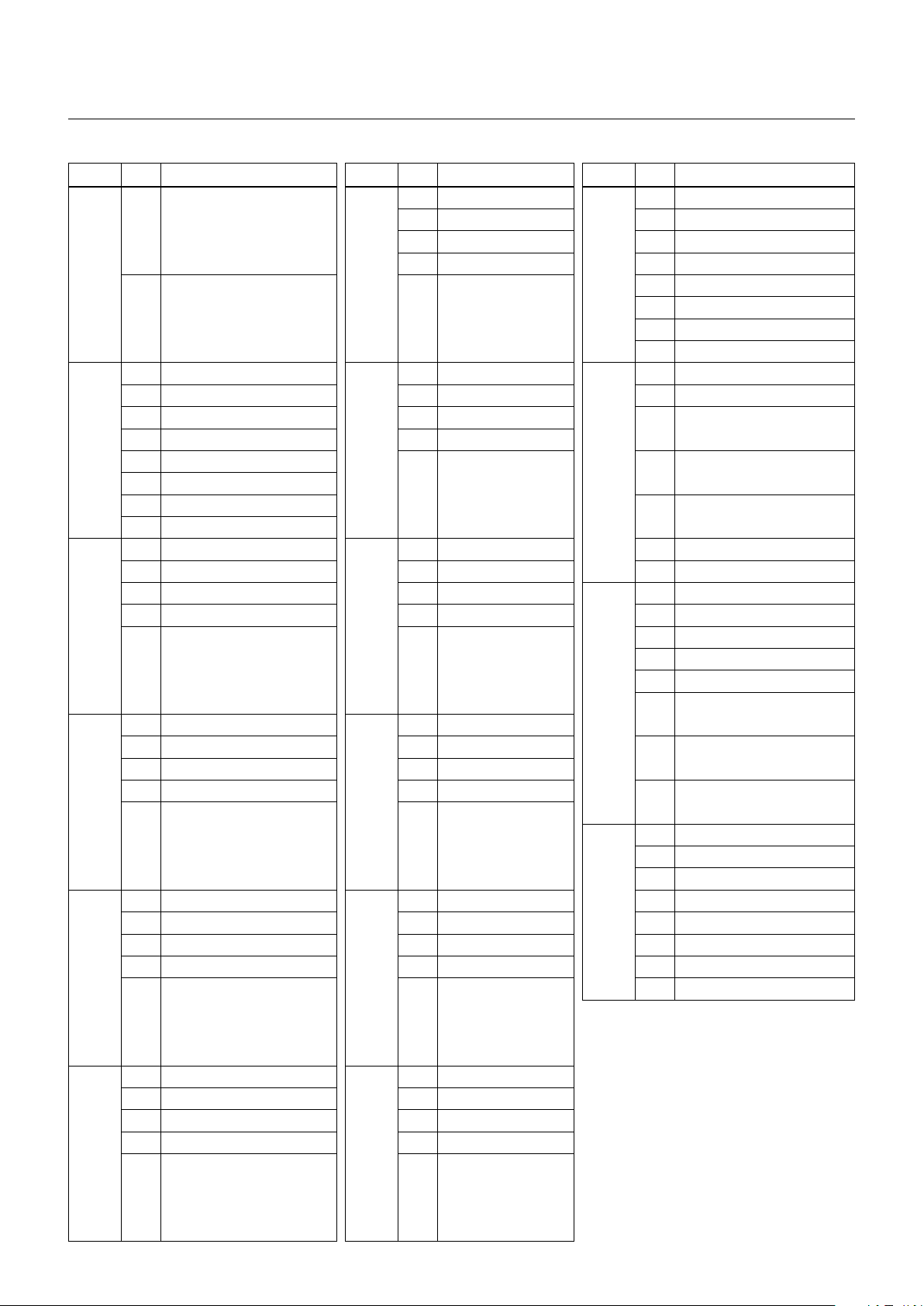
Command List
Block Inquiry Command List
Lens Control System Inquiry Commands .....................Command Packet 8x 09 7E 7E 00 FF
Byte Bit Comments Byte Bit Comments Byte Bit Comments
7
6 6 0 6 0
5 5 0 5 0
4 4 0 4 0
0
3
2 2 2 0
1 1 1 0
0 0 0 0
7 0 Completion Message (50h)
6 1 6 0 6 0
5 0 5 0
4 1 4 0
1
3 0 3
2 0 2
1 0 1
0 0 0
7 0
6 0 6 0
5 0 5 0
4 0 4 0 6 0
2
3
2 2 4 0
1 1
0 0
7 0
6 0 6 0
5 0 5 0
4 0 4 0
3
3
2 2
1 1 6 1
0 0 5 1
7 0
6 0 6 0 3 1
5 0 5 0 2 1
4 0 4 0 1 1
4
3
2 2
1 1
0 0
7 0
6 0 6 0
5 0 5 0
4 0 4 0
5
3
2 2
1 1
0 0
Destination Address
Source Address
Zoom Position (HH)
Zoom Position (HL)
10
Zoom Position (LH)
11
Zoom Position (LL)
7 0
6
3
Focus Near Limit (H)
7 0
7
Focus Near Limit (L)
7 0 1 Digital Zoom 1: On 0: Off
8
3
Focus Position (HH)
7 0
9
3
Focus Position (HL)
7 0 4 1
3
Focus Position (LH)
7 0
3
Focus Position (LL)
12
13
14
15
7 0
3 0
7 0
5
DZoomMode
0: Combine 1: Separate
4
0: Normal 1: Interval
2: Zoom Trigger
3
2
AF Sensitivity
0: Low 1: Normal
Focus Mode 1: Auto 0: Manual
0
7 0
5 0
3
2
Camera Memory Recall
1: Executing 0: Stopped
1
Focus Command
1: Executing 0: Stopped
0
Zoom Command
1: Executing 0: Stopped
7 1 Terminator (FFh)
0 1
0
45
Page 46
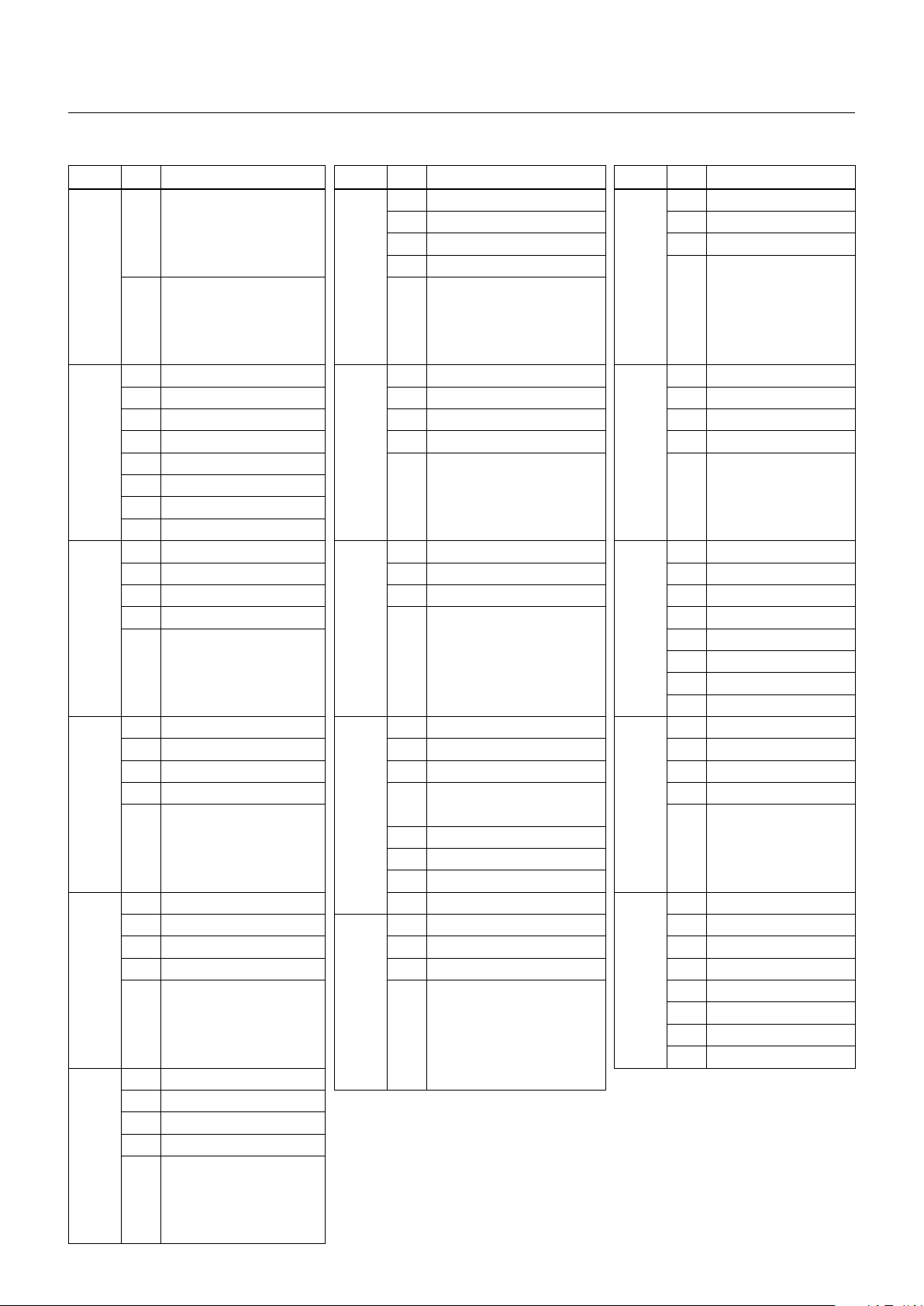
Command List
Camera Control System Inquiry Commands ................Command Packet 8x 09 7E 7E 01 FF
Byte Bit Comments Byte Bit Comments Byte Bit Comments
7
6 6 0 6 0
5 5 0 5 0
4 4 0 4
0
3
2 2 2
1 1 1
0 0 0
7 0 Completion Message (50h)
6 1 6 0 6 0
5 0 5 0 5 0
4 1 4 0 4 0
1
3 0
2 0 2 2
1 0 1 1
0 0 0 0
7 0
6 0 6 0 6 0
5 0 5 0 5 0
4 0 4
2
3
2 2 2 0
1 1 1 0
0 0 0 0
7 0
6 0 6 0 6 0
5 0
4 0
3
3
2 3 Spot AE 1: On 0: Off 2
1 2 Back Light 1: On 0: Off 1
0 1 Exposure Comp. 1: On 0: Off 0
7 0
6 0
5 0 6 0 5 1
4 0 5 0 4 1
4
3
2 3 2 1
1 2 1 1
0 1 0 1
7 0 0
6 0
5 0
4 0
5
3
2
1
0
Destination Address
Source Address
R Gain (H)
R Gain (L)
10
B Gain (H)
B Gain (L)
7 0
6
3
WB Mode
7 0
7
3
Aperture Gain
7 0
8
3 3 0
Exposure Mode
7 0
5
4
VE 1: On 0: Off
9
Wide-D (1:
Slow Shutter 1: On 0: Off
0
7 0 6 1
4
46
0 5 0
Other than
Shutter Position
Off, 0: Off)
11
12
13
14
15
7 0
3
Iris Position
7 0
3
Gain Position
7 0
4 0
7 0
4 0
3
Exposure Comp. Position
7 1 Terminator (FFh)
3 1
Page 47
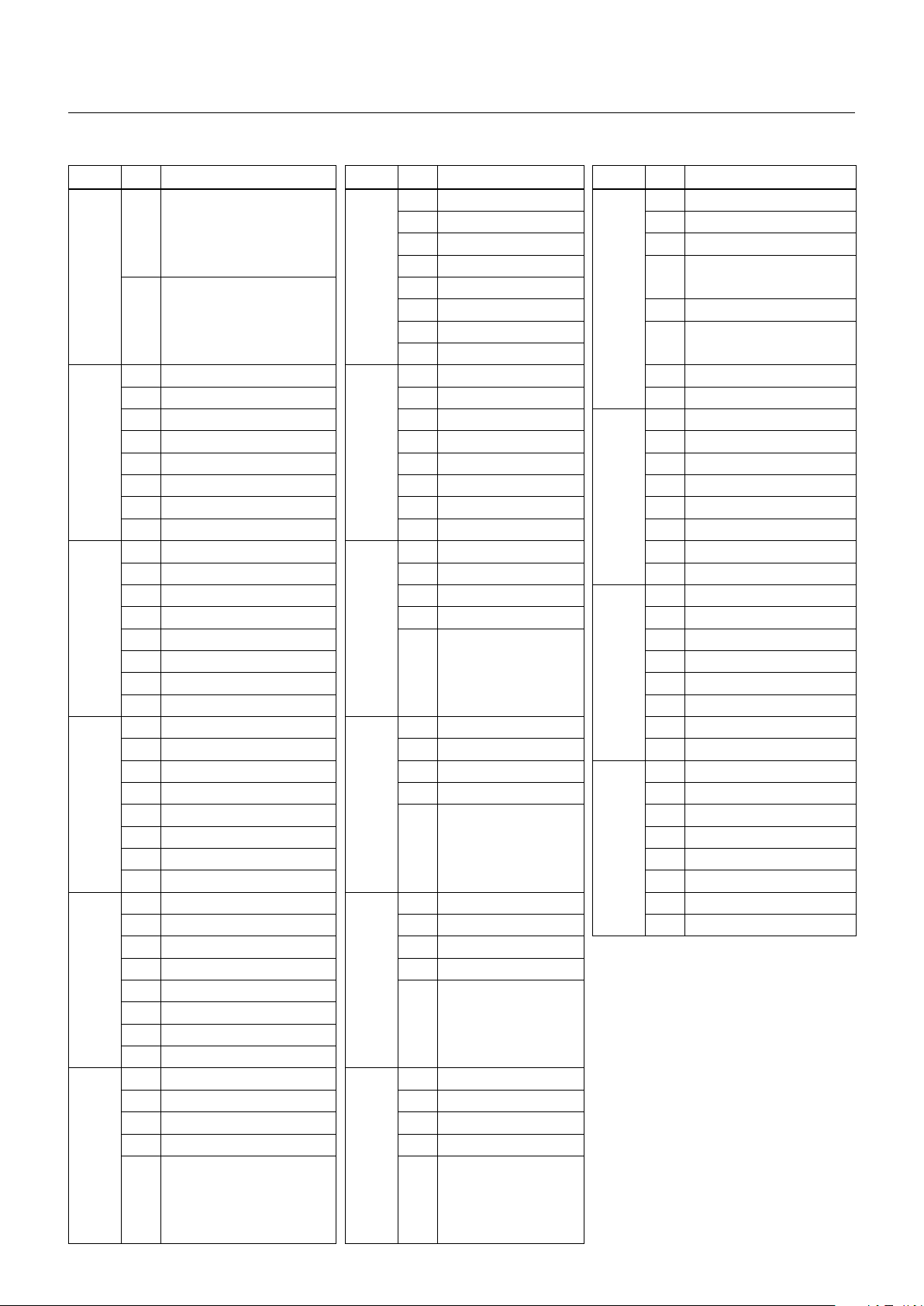
Command List
Other Inquiry Commands ............................................. Command Packet 8x 09 7E 7E 02 FF
Byte Bit Comments Byte Bit Comments Byte Bit Comments
7
6 6 0 6 0
5 5 0 5 0
4 4 0 4
0
3
2 2 0 3 0
1 1 0 2
0 0 0
7 0 Completion Message (50h)
6 1 6 0 0 System 1: 1/50, 1/25 0: 1/60, 1/30
5 0 5 0
4 1 4 0 6 0
1
3 0 3 0 5 0
2 0 2 0 4 0
1 0 1 0 3 0
0 0 0 0 2 0
7 0
6 0 6 0 0 0
5 0 5 0
4 0 4 0 6 0
2
3
2 Auto ICR 1: On 0: Off 2 4 0
1 0 1 3 0
0 Power 1: On 0: Off 0 2 0
7 0
6 Stabilizer 1: On 0: Off 6 0 0 0
5 Stabilizer Hold 1: Hold 0: Off 5 0
4 ICR 1: On 0: Off 4 0 6 1
3
3 Freeze 1: On 0: Off
2 LR Reverse 1: On 0: Off 2 4 1
1 0 1 3 1
0 0 0 2 1
7 0
6 0 6 0 0 1
5 Privacy Zone 1: On 0: Off 5 0
4 Mute 1: On 0: Off 4 0
4
3 Title Display 1: On 0: Off 3
2 Display 1: On 0: Off 2
1 0 1
0 0 0
7 0
6 0 6 0
5 0 5 0
4 0 4 0
5
3
2 2
1 1
0 0
Destination Address
Source Address
Auto ICR Alarm (1: On, 0: Off)
10
11
Picture Effect Mode
7 0
6
3 0
7 0 1
7
7 0 1 0
8
3
Camera ID (HH)
7 0 1 0
9
3
Camera ID (HL)
7 0 1 1
Camera ID (LH)
7 0
3
Camera ID (LL)
47
12
13
14
15
7 0
7 0
7 0
5 0
7 1 Terminator (FFh)
5 1
Memory 1: Provided 0: Not
provided
ICR 1: Provided 0: Not
provided
Stabilizer 1:
Provided 0: Not
provided
Page 48

Command List
Extended Function1 Query Command .........................Command Packet 8x 09 7E 7E 03 FF
Byte Bit Comments Byte Bit Comments Byte Bit Comments
7
6 6 0 6
5 5 0 5
4 4 0 4
0
3
2 2
1 1
0 0
7 0 Completion Message (50h)
6 1 6 0
5 0 5 0 6 0
1
4 1 4 0 5 0
3 0 3
2 0 2 3
1 0 1 2
0 0 0 1
7 0
6 0 6 0
5 0 5 0 6
4 0 4
2
3
2 2 3 0
1 1 2
0 0 1
7 0
6 0 6 0
5 0 5 0 6
4 0 4 0 5
3
3
2 2 3
1 1 2
0 0 1
7 0
6 0 6 0
5 0 5 0 6 1
4 0 4 0 5 1
4
3
2 2 MD (1: On, 0: Off ) 3 1
1 1 0 2 1
0 0 E-Flip (1: On, 0: Off ) 1 1
7 0 0 1
6 0
5 0
4 0
5
3
2
1
0
Destination Address
Source Address
Digital Zoom Position (H)
Digital Zoom Position (L)
10
AF Activation Time (H)
AF Activation Time (L)
7 0
6
3
AF Interval Time (H)
7 0
7
AF Interval Time (L)
7 0 0
8
3 4
SpotAE Position (X)
7 0 0
9
3
SpotAE Position (Y)
7 0 0
3 0 4 1
48
11
12
13
14
15
7 0
Color Gain (0h to Eh)
3
2
Advanced Privacy
(1: Provided, 0: Not provided)
1
0
E-Flip
(1: Provided, 0: Not provided)
7 0
4
7 0
5
NR Level
(The lower 3 bits of the CAM_
NRInq return value pq are stored.)
7 0
4
7 1 Terminator (FFh)
Reserved
AE Response
Gamma
Chroma Suppress
Gain Limit
Page 49
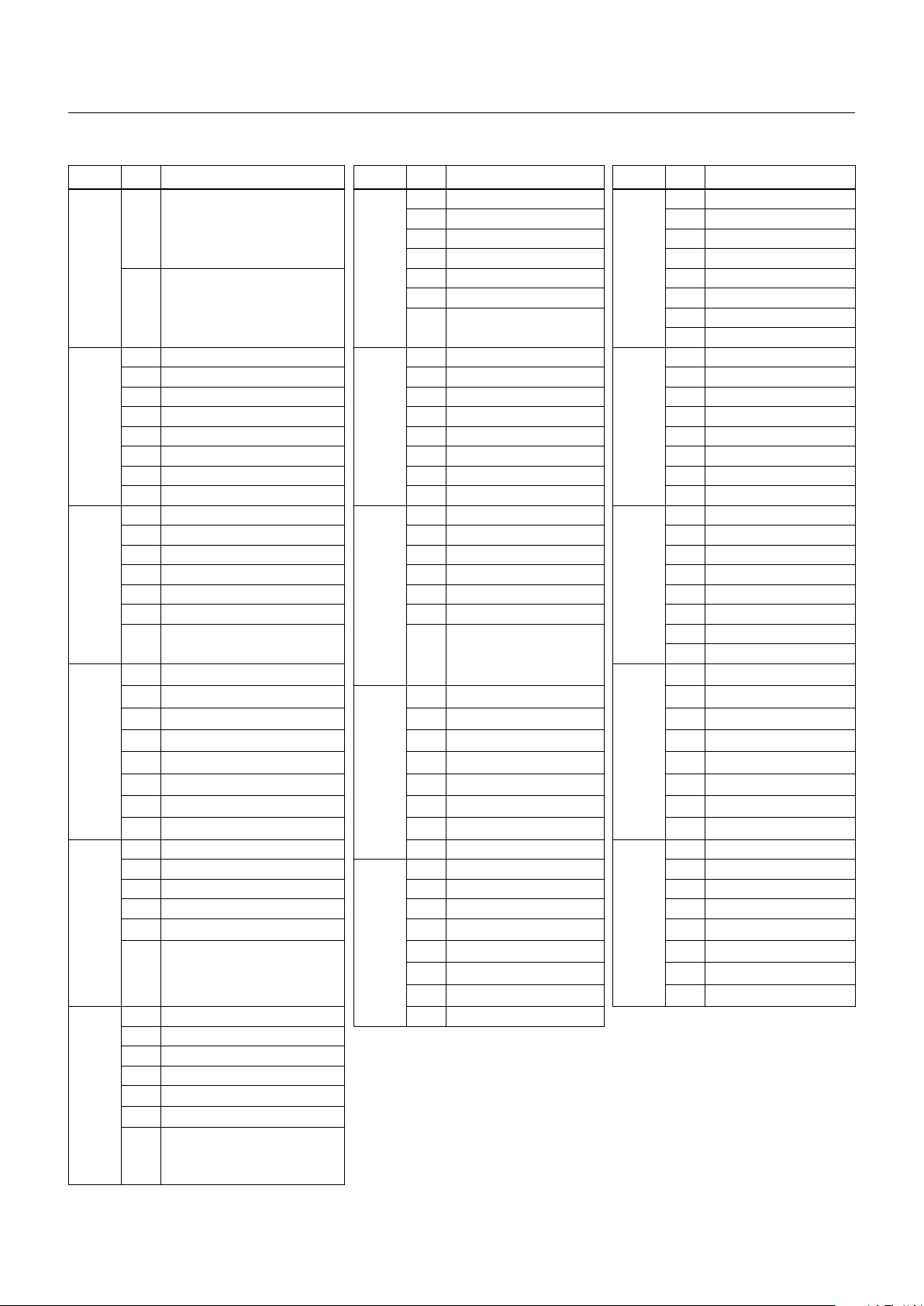
Command List
Extended Function2 Query Command .........................Command Packet 8x 09 7E 7E 04 FF
Byte Bit Comments Byte Bit Comments Byte Bit Comments
7
6 6 0 6 0
5 5 0 5 0
4 4 0 4 0
0
3
2 2 0 2 0
1 1 Compensation level 1 0
0 0 0: Low 1: Mid 2: High 0 0
7 0 Completion Message (50h)
6 1 6 0 6 0
5 0 5 0 5 0
4 1 4 0 4 0
1
3 0 3 0 3 0
2 0 2 0 2 0
1 0 1 0 1 0
0 0 0 Defog 0: Off 1: On 0 0
7 0
6 0 6 0 6 0
5 0 5 0 5 0
4 0 4 0 4 0
2
3 0 3 0 3 0
2 0 2 0 2 0
1
0 0 0 0
7 0
6 0
5 0 6 0 5 0
4 0 5 0 4 0
3
3 0 4 0 3 0
2 0 3 0 2 0
1 0 2 0 1 0
0 0 1 0 0 0
7 0 0 0
6 0
5 0 6 0 5 1
4 0 5 0 4 1
4
3
2
1 2 0 1 1
0 1 0 0 1
7 0 0 0
6 0
5 0
4 0
5
3 0
2 0
1 Brightness compensation selection
0
Destination Address
Source Address
Wide-D
0: Off 1: On 2: VE On
0
Display brightness level setting
0: Dark to 6: Bright
0: Very dark 1: Dark 2: Standard
3:
Bright
10
7 0
6
3 0 3 0
7 0
7
7 0
8
1
Defog Level
1: low 2: mid 3: high
7 0 6 0
9
7 0 6 1
4 0 3 1
3 0 2 1
11
12
13
14
15
7 0
7 0
7 0
1 0
7 0
7 1 Terminator (FFh)
49
Page 50
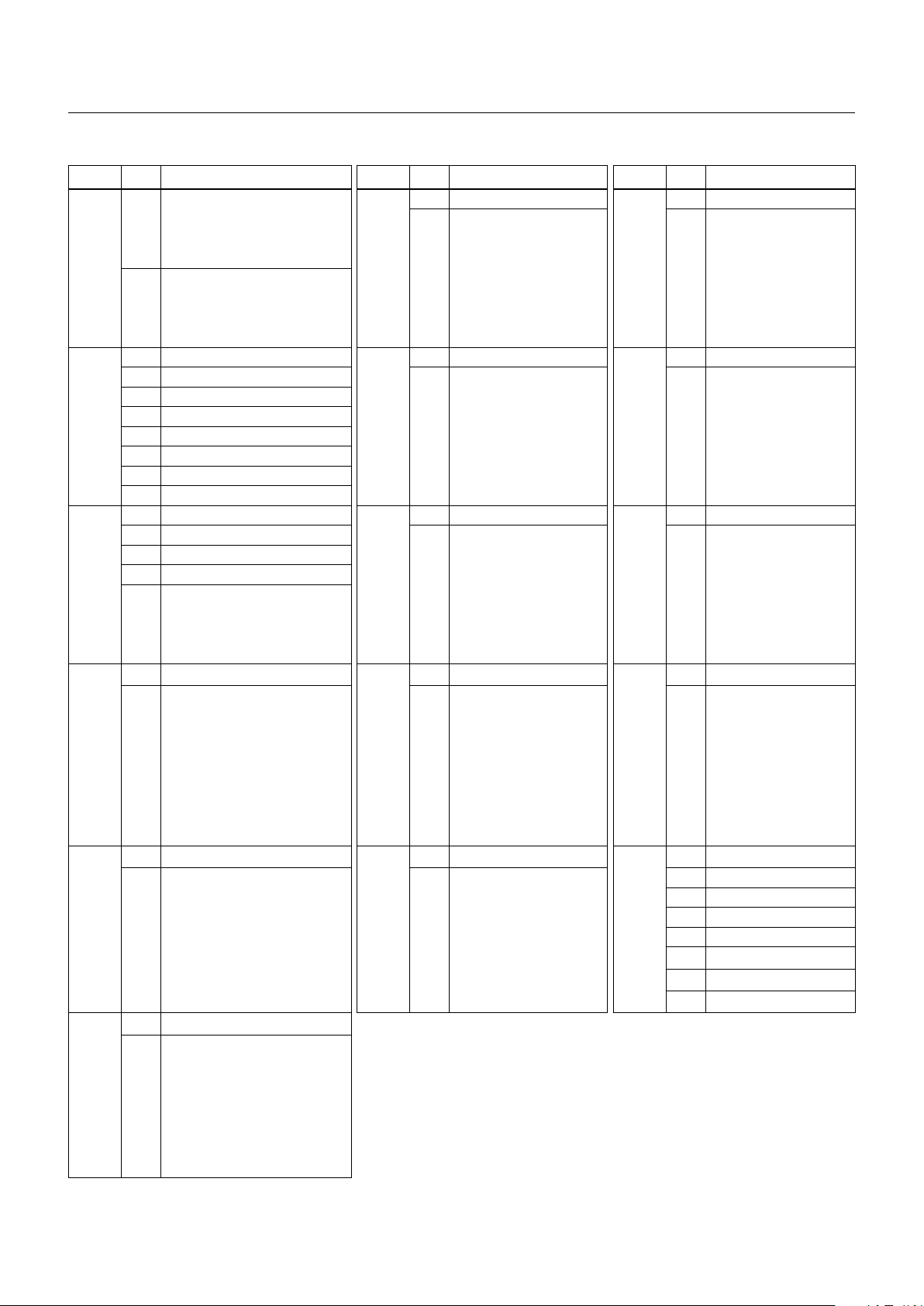
Command List
Extended Function3 Query Command .........................Command Packet 8x 09 7E 7E 05 FF
Byte Bit Comments Byte Bit Comments Byte Bit Comments
7
6 6
5 5 5
4 4 4
0
3
2 2 2
1 1 1
0 0 0
7 0 Completion Message (50h)
6 1 6
5 0 5 5
4 1 4 4
1
3 0 3 3
2 0 2 2
1 0 1 1
0 0 0 0
7 0
6 0 6
5 0 5 5
4 0 4 4
2
3
2 2 2
1 1 1
0 0 0
7 0
6
5 5 5
4 4 4
3
3 3 3
2 2 2
1 1 1
0 0 0
7 0
6
5 5 5 1
4 4 4 1
4
3 3 3 1
2 2 2 1
1 1 1 1
0 0 0 1
7 0
6
5
4
5
3
2
1
0
Destination Address
Source Address
Color Hue
(0h to Eh)
Reserved
Reserved
Reserved
10
7 0
6
3 3
7 0
7
7 0
8
3 3
7 0
6
9
7 0
6
Reserved
Reserved
Reserved
Reserved
Reserved
7 0
6
11
7 0
6
12
7 0
6
13
7 0
6
14
7 1 Terminator (FFh)
6 1
15
Reserved
Reserved
Reserved
Reserved
50
Page 51

VISCA Command Setting Values
Command List
Exposure control (1/2)
Shutter Speed
15 1/10000 1/10000
14 1/6000 1/6000
13 1/4000 1/3500
12 1/3000 1/2500
11 1/2000 1/1750
10 1/1500 1/1250
0F 1/1000 1/1000
0E 1/725 1/600
0D 1/500 1/425
0C 1/350 1/300
0B 1/250 1/215
0A 1/180 1/150
09 1/125 1/120
08 1/100 1/100
07 1/90 1/75
06 1/60 1/50
05 1/30 1/25
04 1/15 1/12
03 1/8 1/6
02 1/4 1/3
01 1/2 1/2
00 1/1 1/1
59.94/29.97
mode
50/25 mode
Gain
Gain Limit
0F 50.0 dB (28 step)
0E 46.4 dB (26 step)
0D 42.8 dB (24 step)
0C 39.3 dB (22 step)
0B 35.7 dB (20 step)
0A 32.1 dB (18 step)
09 28.6 dB (16 step)
08 25.0 dB (14 step)
07 21.4 dB (12 step)
06 17.8 dB (10 step)
05 14.3 dB (8 step)
04 10.7 dB (6 step)
03 7.1 dB (4 step)
02 3.6 dB (2 step)
01 0 dB (0 step)
0F 50.0 dB (28 step)
0E 46.4 dB (26 step)
0D 42.8 dB (24 step)
0C 39.3 dB (22 step)
0B 35.7 dB (20 step)
0A 32.1 dB (18 step)
09 28.6 dB (16 step)
08 25.0 dB (14 step)
07 21.4 dB (12 step)
Iris
11 F1.6
10 F2
0F F2.4
0E F2.8
0D F3.4
0C F4
0B F4.8
0A F5.6
09 F6.8
08 F8
07 F9.6
06 F11
05 F14
00 CLOSE
06 17.8 dB (10 step)
05 14.3 dB (8 step)
04 10.7 dB (6 step)
51
Page 52
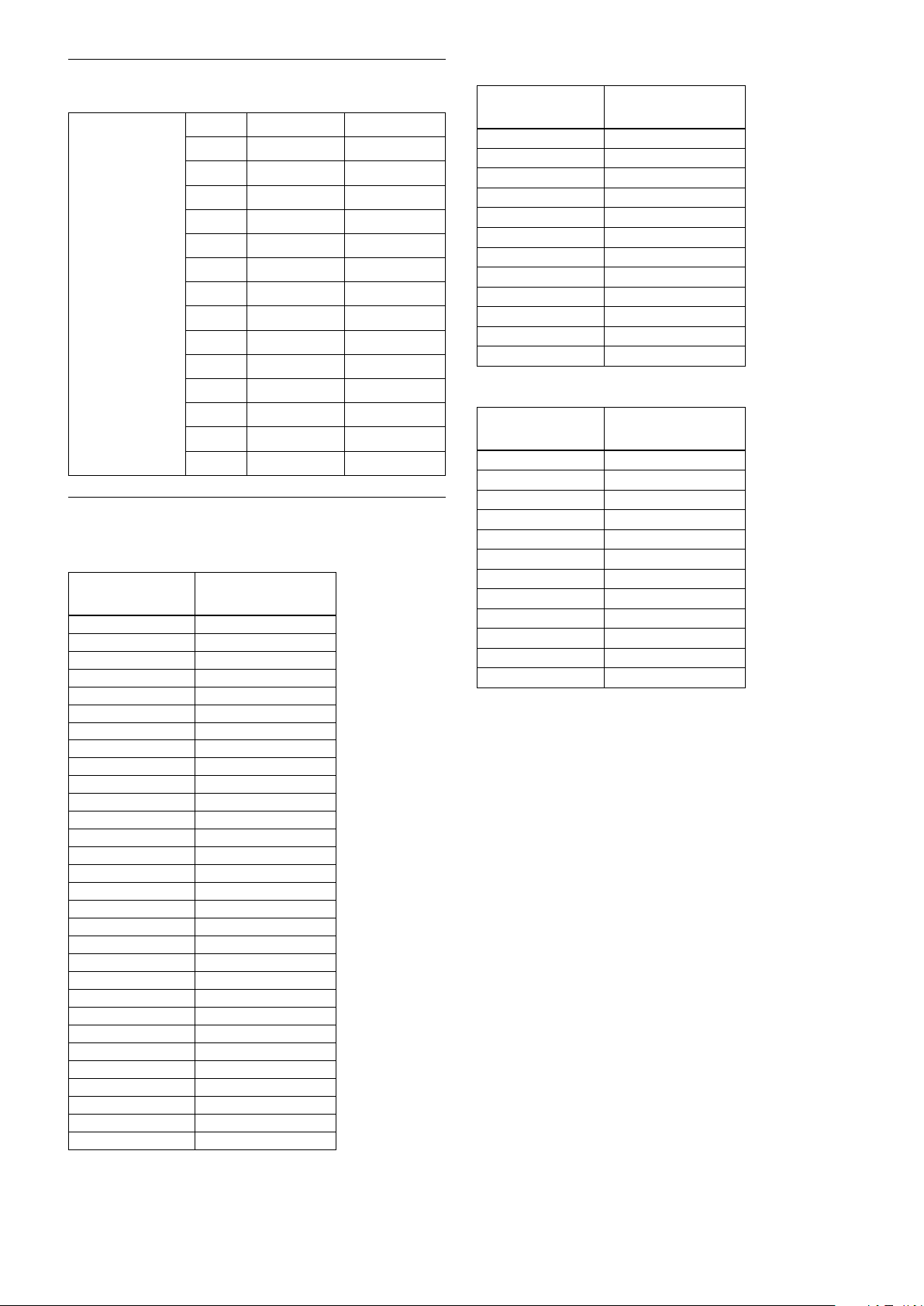
Command List
Exposure control (2/2)
Exposure Comp.
0E +7 +10.5 dB
0D +6 +9 dB
0C +5 +7.5 dB
0B +4 +6 dB
0A +3 +4.5 dB
09 +2 +3 dB
08 +1 +1.5 dB
07 0 0 dB
06 −1 −1.5 dB
05 −2 −3 dB
04 −3 −4.5 dB
03 −4 −6 dB
02 −5 −7.5 dB
01 −6 −9 dB
00 −7 −10.5 dB
Zoom Ratio and Zoom Position
(for reference)
Optical Zoom
Ratio
1× 0000
2× 16A1
3× 2063
4× 2628
5× 2A1D
6× 2D13
7× 2F6D
8× 3161
9× 330D
10× 3486
11× 35D7
12× 3709
13× 3820
14× 3920
15× 3AOA
16× 3ADD
17× 3B9C
18× 3C46
19× 3CDC
20× 3D60
21× 3DD4
22× 3E39
23× 3E90
24× 3EDC
25× 3F1E
26× 3F57
27× 3F8A
28× 3FB6
29× 3FDC
30× 4000
Optical Zoom
Position Data
Digital Zoom Combine mode
Digital Zoom
Ratio
1× 4000
2× 6000
3× 6A80
4× 7000
5× 7300
6× 7540
7× 76C0
8× 7800
9× 78C0
10× 7980
11× 7A00
12× 7AC0
Digital Zoom
Position Data
Zoom Separate mode
Digital Zoom
Ratio
1× 00
2× 80
3× AA
4× C0
5× CC
6× D5
7× DB
8× E0
9× E3
10× E6
11× E8
12× EB
Digital Zoom
Position Data
52
Page 53
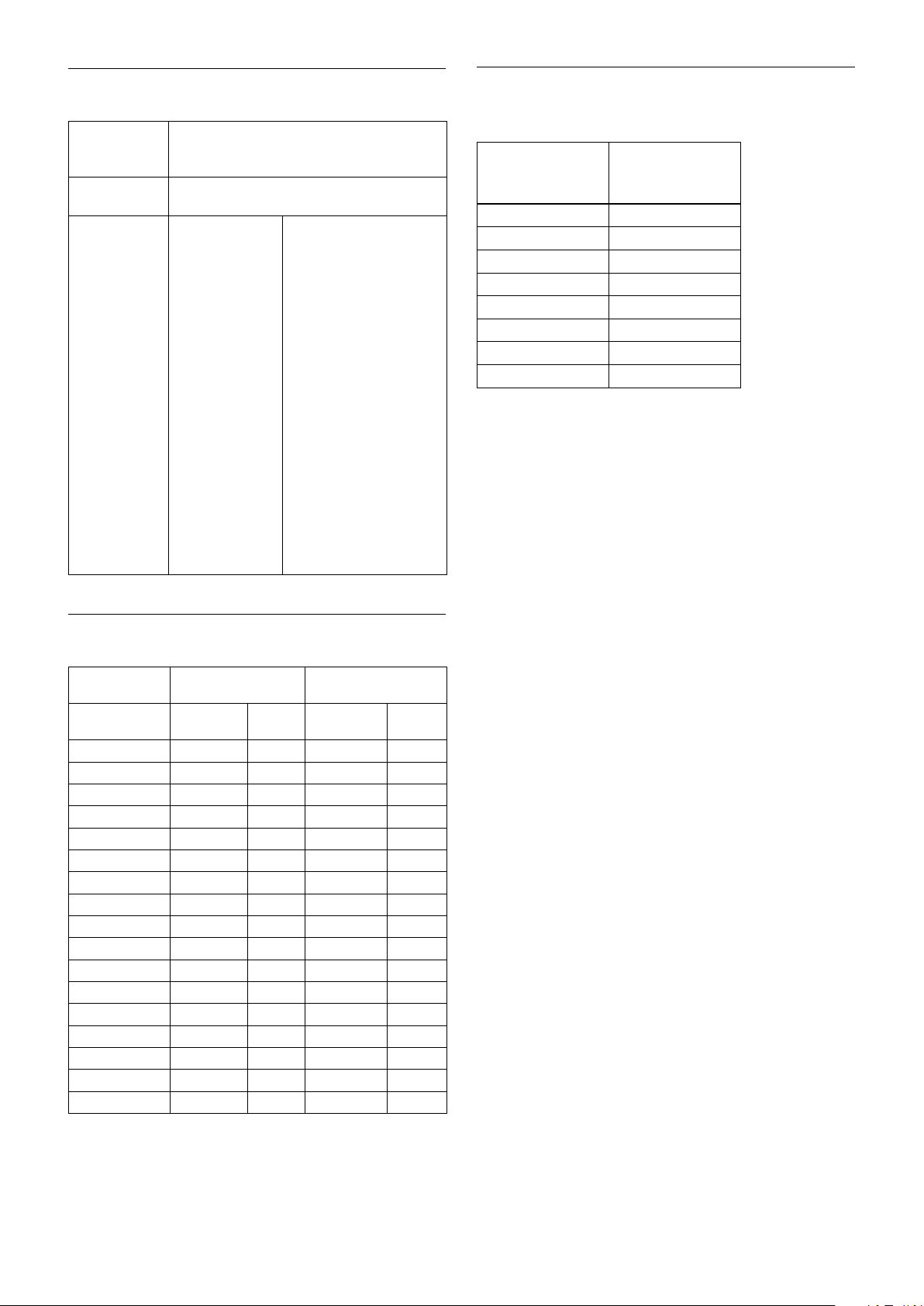
Command List
Lens control
Zoom Position
Focus Position
Focus Near
Limit
0000 to 4000 to 7AC0
Wide end Optical Digital
Tele end Tele end
1000 to F000
Far end Near end
1000: Over Inf
2000: 20 m
3000: 10 m
4000: 6 m
5000: 4.2 m
6000: 3.1 m
7000: 2.5 m
8000: 2.0 m
9000: 1.65 m
A000: 1.4 m
B000: 1.2 m
C000: 0.8 m
D000: 30 cm
(initial setting)
E000: 11 cm
F000: 1 cm
As the distance on the left
will differ due to temperature
characteristics, etc., use as
approximate values.
* The lower 1 byte is fixed at
00.
Temperature Reading Conversion Value
(Reference Value)
Reading Value
pq (hex)
FB −8 to −2
00 −3 to +3
0A 7 to 13
14 17 to 23
1E 27 to 33
28 37 to 43
32 47 to 53
3C 57 to 63
Temperature
Conversion
Value (ºC)
Wide/Tele Limit Setting
Wide/Tele Limit
Setting Value
Limit Setting
Value
00 0000 1 4000 30
10 00C4 1.02 3F3B 25.5
20 0188 1.04 3E77 22.7
30 024C 1.06 3DB3 20.7
40 0310 1.08 3CEF 19.1
50 03D4 1.11 3C2B 17.8
60 0498 1.13 3B67 16.7
70 055C 1.15 3AA3 15.7
80 0620 1.18 39DF 14.8
90 06E4 1.2 391B 14
A0 07A8 1.23 3857 13.2
B0 086C 1.26 3793 12.5
C0 0930 1.28 36CF 11.8
D0 09F4 1.31 360B 11.2
E0 0AB8 1.34 3547 10.6
F0 0B7C 1.38 3483 10
FF 0C33 1.41 33CC 9.5
Wide Limit Tele Limit
Zoom
Position
Zoom
Ratio
Position
Zoom
Zoom
Ratio
53
Page 54
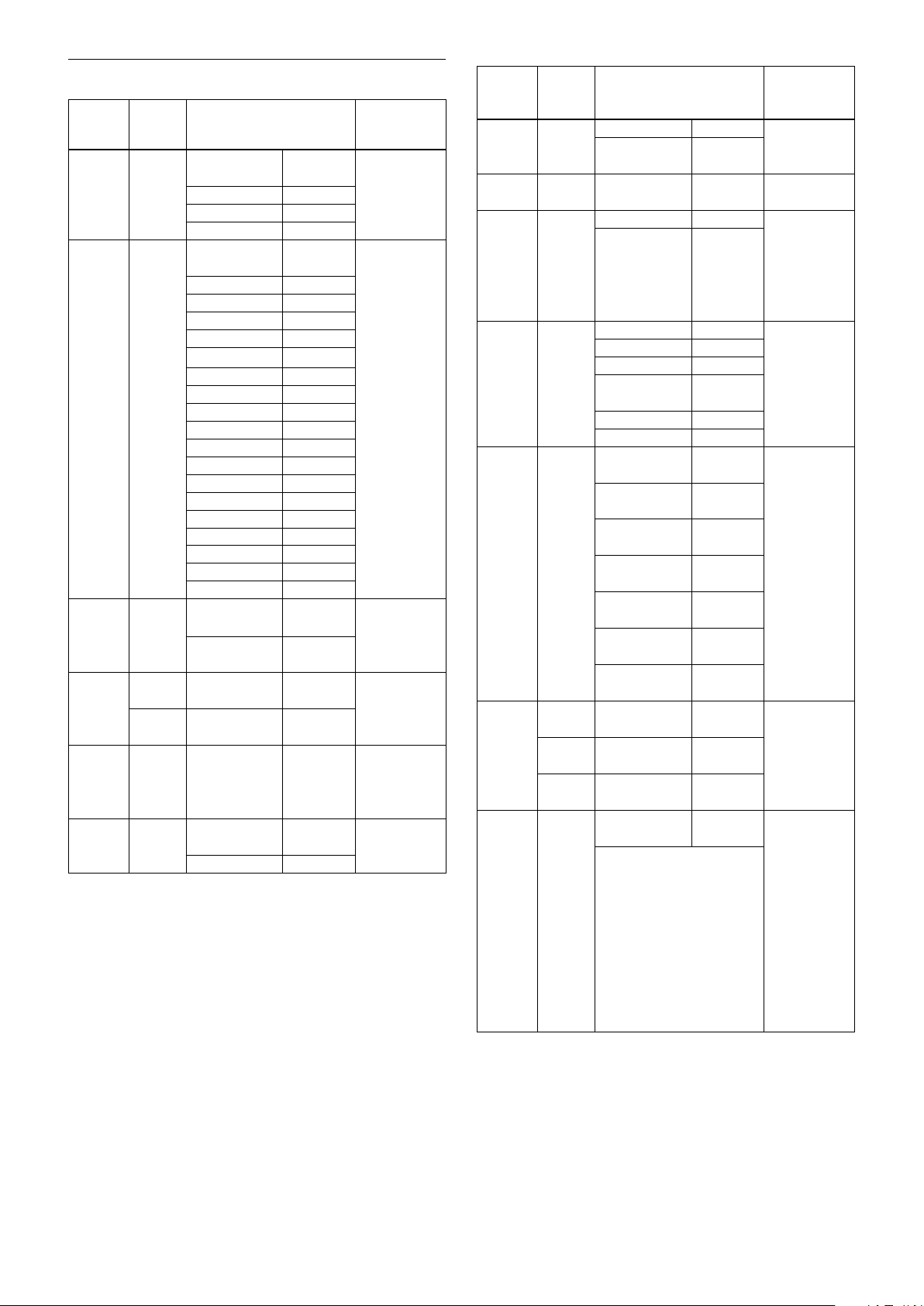
Command List
Register Setting
Register
name
VISCA
Baud Rate
Monitoring
Mode
LVDS
Mode
Zoom
Limit
D-Zoom
Max
“StableZoom”
* Timing to reflect register setting value changes
• Reflect after camera reset: After the setting value is changed, changes are
• Reflect immediately: Changes are reflected immediately after the setting
Register
No.
Setting value Setting value
reflection
timing*
00 00
(Iinitial Setting)
01 19200 bps
02 38400 bps
03 115200 bps
72 01
(Iinitial Setting)
02
04 1080i/50
06 1080p/29.97
07
08 1080p/25
09 720p/59.94
0A
0B
0C 720p/50
0D
0E 720p/29.97
0F
10
11 720p/25
12
13 1080p/59.94
14 1080p/50
15
74 00
(Iinitial Setting)
01 Double
50 00-FF
(Iinitial Setting: 00)
51 00-FF
(Iinitial Setting: 00)
52 00-EB
(Iinitial Setting: EB)
53 00
(Iinitial Setting: 00)
01 On
reflected following camera reset by “Camera reset command” or
“Camera power supply turned OFF and then ON again”.
value is changed.
9600 bps Reflected after
camera reset
1080i/59.94 Reflected after
camera reset
1080i/60
1080p/30
720p/60
Reserved
Reserved
720p/30
Reserved
Reserved
1080p/60
Single output Reflected after
camera reset
output
Wide Limit
(0: Disabled)
Tele Limit
(0: Disabled)
Max. digital
zoom ratio =
256 ÷
(256-Value)
Off Immediate
Reflected after
camera reset
Reflected after
camera reset
reflection
Register
name
FocusTrace
@ZoomDirect
FocusOffset
@DomeCover
AE
Parameter
Change
During VE
On, Defog
On
Auto Slow
Shutter
Limit
Extended
Normal
Shutter
Defog
Limit
Extended
Mode
Register
No.
Setting value Setting value
reflection
timing*
54 00 Off Reflected after
01
(Iinitial Setting: 01)
55 00-FF
(Iinitial Setting: 00)
58 00 OFF Immediate
01
(Iinitial Setting)
59 01 1/30 Immediate
02 1/15
03 1/8
04
(Iinitial Setting)
05 1/2
06 1/1
5A 00
(Iinitial Setting)
01 Allowed up
02 Allowed up
03 Allowed up
04 Allowed up
05 Allowed up
06 Allowed up
5B 00-FF
(Iinitial Setting: FF)
5C 00-FF
(Iinitial Setting: FF)
5D 00-FF
(Iinitial Setting: FF)
5F 00
(Iinitial Setting)
bit: 0 Exposure compensation
Extended 256 levels On/Off
bit: 1 Aperture Extended 256
levels On/Off
bit: 2 Color Gain/Hue
Extended 256 levels On/Off
bit: 3 Auto ICR Off
setting enable On/Off
* For all of bit, 1 is to activate, 0
is Off
On
00: None to
FF: Max.
ON
1/4
OFF Immediate
to 1/30
to 1/15
to 1/8
to 1/4
to 1/2
to 1/1
Defog level
Low Limit
Defog level
Mid Limit
Defog level
High Limit
OFF Immediate
On
camera reset
Reflected after
camera reset
reflection
reflection
reflection
Immediate
reflection
reflection
54
Page 55

Others
Command List
AF Active Time
AF Interval Time
1)
1)
Spot AE X position
Spot AE Y position
R Gain
B Gain
Aperture Control Level
AE Response
AutoICR On
Off Threshold Level
MD Threshold Level
MD Interval Time
1)
MD Set Horizontal Position
MD Set Vertical Position
Chroma Suppress setting level
Color Gain setting level
Color Hue setting level
1)
Unit: One second
00 to FF
00 to FF
00 to 10
00 to 0E
00 to FF
00 to FF
00 to 0F
01 to 30
00 to 1C
00 to FF
00 to FF
00 to 11
00 to 0F
00 to 03
00 to 0E
00 to 0E
55
Page 56

Specifications
Specifications
Imager 1/2.8 Type “Exmor R” CMOS Sensor
Picture elements 2130K pixels
Lens 30× Zoom
(Typical value) f= 4.3 mm (WIDE) to 129 mm
(TELE), F1.6 to F4.7
Zoom movement speed
Optical WIDE – Optical TELE
5.0 sec (Focus Tracking On)
2.5 sec (Focus Tracking Off)
Optical WIDE – Digital TELE
(Digital 12×)
7.0 sec (29.97p/59.94p mode)
7.4 sec (25p/50p mode)
Digital WIDE – Digital TELE
(Digital 12×)
2.1 sec (29.97p/59.94p mode)
2.5 sec (25p/50p mode)
Focus Movement time
∞ to Near 1.1 sec
Digital Zoom 12× (360× with optical zoom)
Angle of view (H) Approx. 63.7 degrees (Wide end),
approx. 2.3 degrees (Tele end)
Min. working distance
10 mm (Wide end), 1200 mm
(Tele end)
Sync system Internal
Min. illumination In the case of ICR-Off
(Typical value) 0.01 lx (1/30 sec, 50%,
High Sensitivity mode On)
0.1 lx (1/30 sec, 50%, High
Sensitivity mode Off)
0.013 lx (1/4 sec, 1/3 sec, 50%,
In the case of ICR-On
0.0015 lx (1/30 sec, 50%, High
0.006 lx (1/30 sec, 50%, High
0.0008 lx (1/4 sec, 1/3 sec, 30%,
Recommended illumination
100 lx to 100,000 lx
0.0013 lx (1/4 sec, 1/3 sec, 50%,
High Sensitivity mode On)
High Sensitivity mode Off)
Sensitivity mode On)
Sensitivity mode Off)
High Sensitivity mode On)
Back light compensation
On/Off
Electronic shutter speed
1/1 sec to 1/10000 sec (22 steps)
White Balance Auto, ATW, Indoor, Outdoor, One
Push WB, Manual WB, Outdoor
Auto, Sodium Vapor Lamp (Fix/
Auto/Outdoor Auto)
Gain Auto/Manual
(0 to 50.0 dB (0 to 28 step))
Max. Gain Limit
(10.7 to 50.0 dB (6 to 28 step))
Wide Dynamic Range Mode
On/Off
Noise Reduction
On/Off (level 5 to 1 / Off, 6 steps)
Defog mode On/Off
Aperture control 16 steps
Preset 16-POSITIONS
Camera control VISCA protocol (CMOS 5V)
9.6 kbps, 19.2 kbps, 38.4 kbps,
115.2 kbps, Stop bit, 1 bit
Video Output HD: Digital (LVDS)
Storage temperature/Humidity
–20 °C to +60 °C (–4 °F to +140 °F)/
20% to 95%
Absolute humidity: 36 g/m
Operating temperature/Humidity
–5 °C to +60 °C (23 °F to +140 °F)/
20% to 80%
Absolute humidity: 36 g/m
Power requirements
6 V to 12 V DC
Power consumption
3.2 W
(during motor operation: 4.0 W)
Mass Approx. 250 g (8.8 oz.)
Dimensions 50 × 60 × 89.7 mm
(2 × 2
3
3
3
/8 × 3 5/8 in.) (w/h/d)
56
Page 57
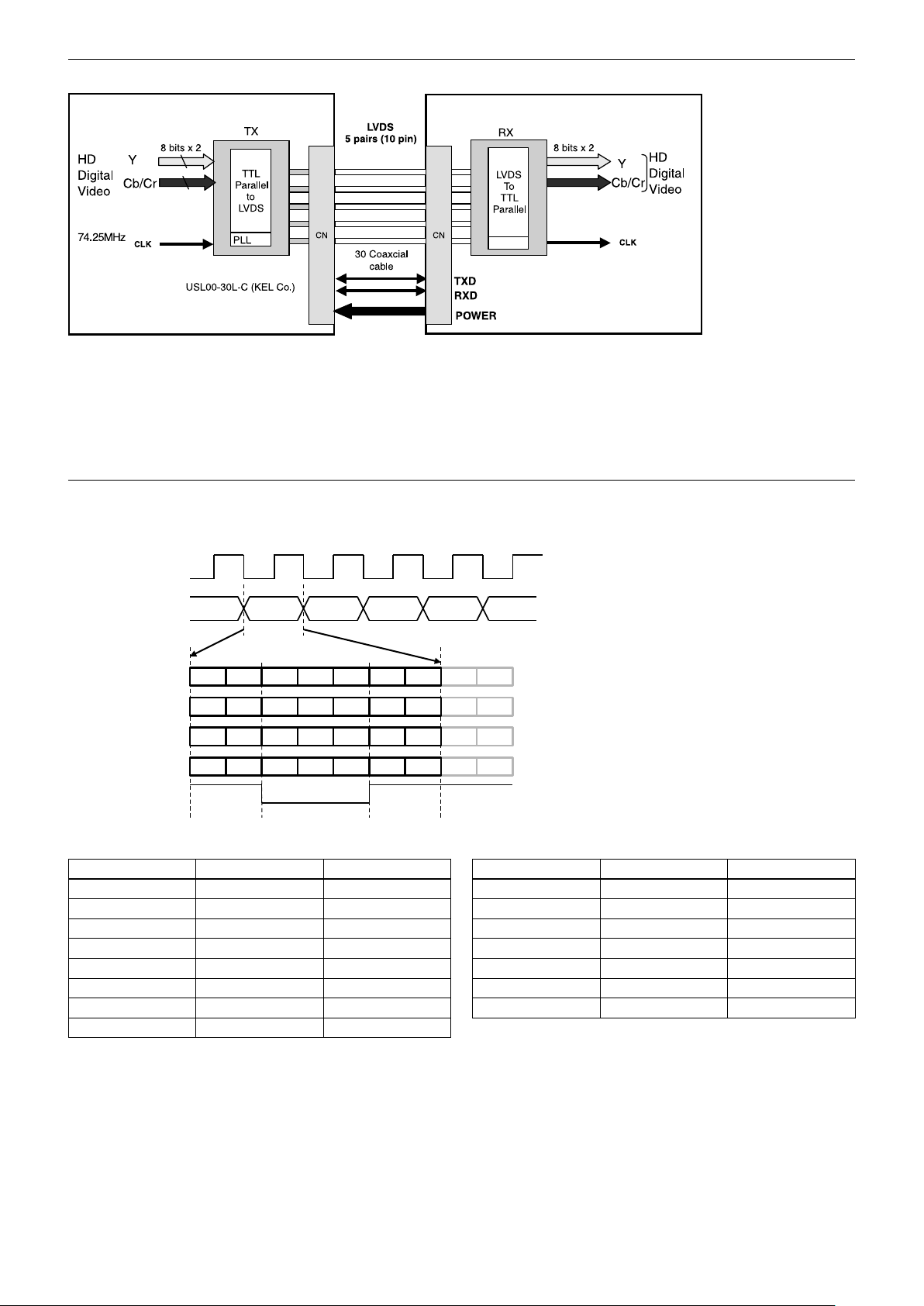
Specifications
PLL
FCB-EV7520A/
FCB-CV7520A
Y6 Y5
0 0
C5C6
0 0
Pixel CLK
Pixel Data
Y6 Y5 Y4 Y3 Y2 Y1 Y0
0 0 0 Y7
C6 C5 C4 C3 C2 C1 C0
0 0 0 0 0 C6 C7
TA1 +/
TB1 +/
TC1 +/
TD1 +/
TCLK +
FCB OUT
Single Mode
Please ignore the value which can be “0” or “1”.
Interface
• In FCB-EV7520A/FCB-CV7520A, the video signal is transmitted by using LVDS. The LVDS receiver
IC chip (e.g., THC63LVD1024, THC63LVD104C, BU90R102) is recommended.
• Recommended connectors and cables
Cable: #42 Micro coaxial cable
Connector: USL20-30S (KEL)
LVDS Pixel Data Format
Output Format Pixel CLK[Hz] TCLK+[Hz] Output Format Pixel CLK[Hz] TCLK+[Hz]
1080p/60 148.5M 148.5M 720p/59.94 74.25M/1.001 74.25M/1.001
1080p/59.94 148.5M/1.001 148.5M/1.001 720p/30 74.25M 74.25M
1080p/30 74.25M 74.25M 720p/29.97 74.25M/1.001 74.25M/1.001
1080p/29.97 74.25M/1.001 74.25M/1.001 1080p/50 148.5M 148.5M
1080i/60 74.25M 74.25M 1080p/25 74.25M 74.25M
1080i/59.94 74.25M/1.001 74.25M/1.001 720p/50 74.25M 74.25M
1080i/50 74.25M 74.25M 720p/25 74.25M 74.25M
720p/60 74.25M 74.25M
57
Page 58
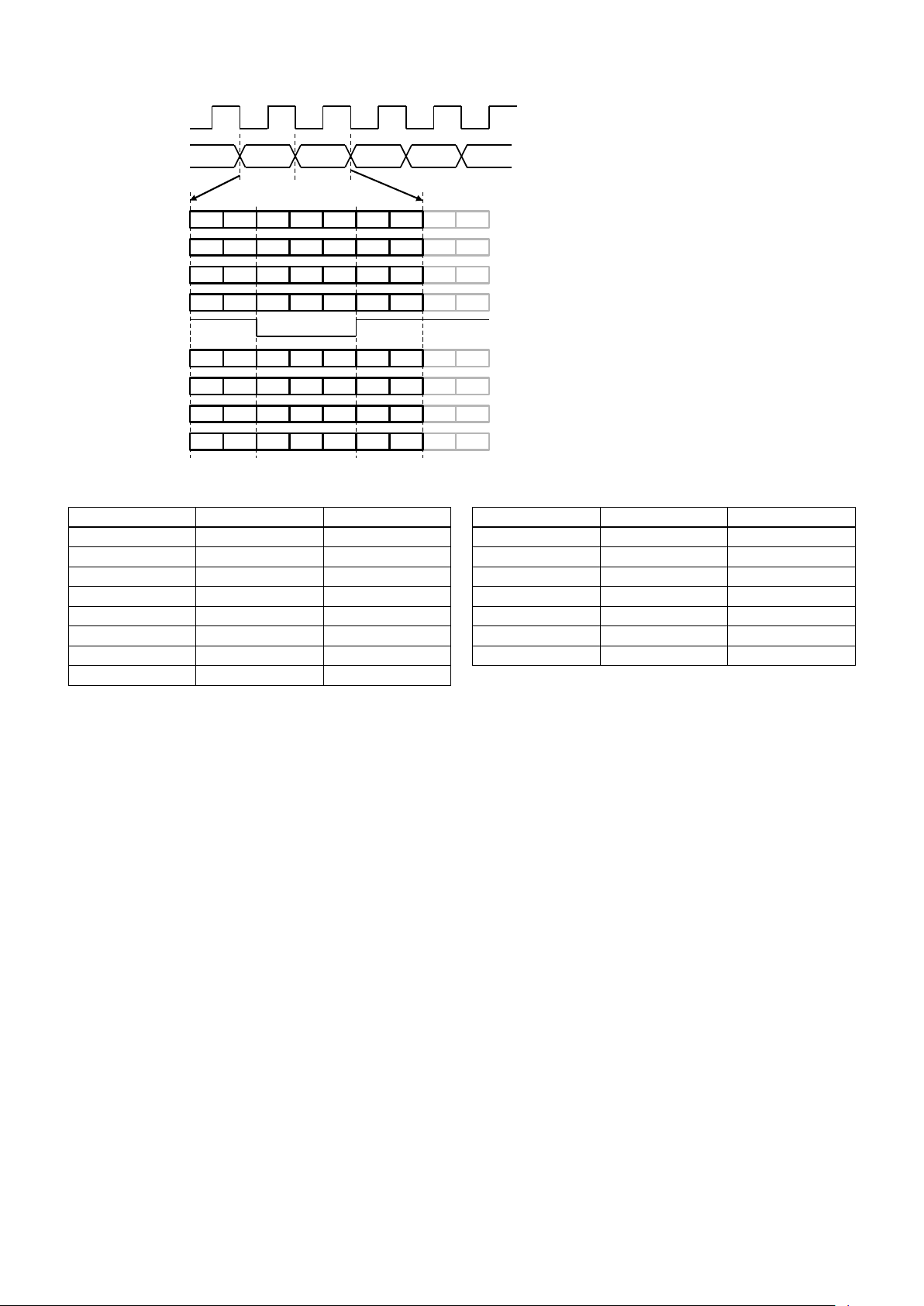
Specifications
Y6 Y5
0 0
C5
0 0
Y6 Y5
0 0
C5
0 0
Y6 Y5 Y4 Y3 Y2 Y1 Y0
0 0 0 Y7
C5 C4 C3 C2 C1 C0
0 0 0 0 0 C6 C7
Y6 Y5 Y4 Y3 Y2 Y1 Y0
0 0 0 Y7
C5 C4 C3 C2 C1 C0
0 0 0 0 0 C6 C7
TA1 +/
TB1 +/
TC1 +/
TD1 +/
TA2 +/
TB2 +/
TC2 +/
TD2 +/
TCLK +
FCB OUT
ODD
DATA
EVEN DATA
Pixel CLK
Pixel Data
ODD EVEN ODD EVEN ODD
Double Mode
* Please ignore the value which can be “0” or “1”.
Output Format Pixel CLK[Hz] TCLK+[Hz] Output Format Pixel CLK[Hz] TCLK+[Hz]
1080p/60 148.5M 74.25M 720p/59.94 74.25M/1.001 37.125M/1.001
1080p/59.94 148.5M/1.001 74.25M/1.001 720p/30 74.25M 37.125M
1080p/30 74.25M 37.125M 720p/29.97 74.25M/1.001 37.125M/1.001
1080p/29.97 74.25M/1.001 37.125M/1.001 1080p/50 148.5M 74.25M
1080i/60 74.25M 37.125M 1080p/25 74.25M 37.125M
1080i/59.94 74.25M/1.001 37.125M/1.001 720p/50 74.25M 37.125M
1080i/50 74.25M 37.125M 720p/25 74.25M 37.125M
720p/60 74.25M 37.125M
58
Page 59
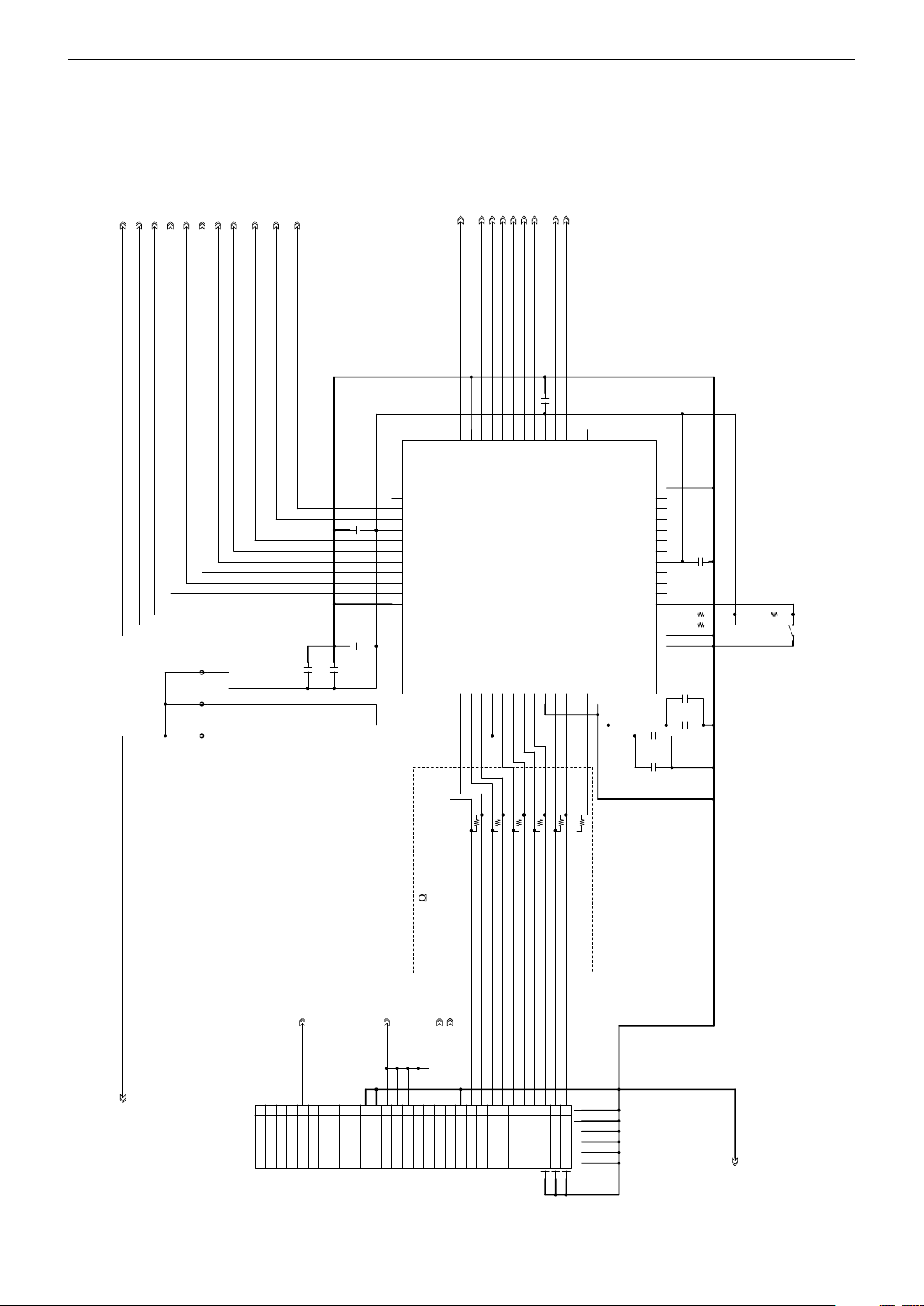
Specifications
DE
Y1
Y4
C0 01
10 u
25 V
HS YNC
Y5
C0 08
0. 1u
25 V
C6
C3
C0 09
0. 1u
25 V
C0 03
0. 1u
25 V
CL K
R0 28
10 k
FB 003
R0 29
10 k
R0 02 10 0
RX D
C0 10
0. 1u
25 V
C0 04
0. 1u
25 V
RE SET
C4
D3 .3V _
TX D
Y7
C0
UN REG
R0 06 10 0
C5
R0 03 10 0
R0 05 10 0
Y0
CN 001
30 P
1TX OUT 4-
2TX OUT 4+
3TX OUT 5-
4TX OUT 5+
5RE SET
6NC
7TX OUT 6-
8TX OUT 6+
9TX OUT 7-
10TX OUT 7+
11GN D
12GN D
13UN REG
14UN REG
15UN REG
16UN REG
17UN REG
18RX D
19TX D
20GN D
21TX OUT 0-
22TX OUT 0+
23TX OUT 1-
24TX OUT 1+
25TX OUT 2-
26TX OUT 2+
27TX CLK OU T-
28TX CLK OU T+
29TX OUT 3-
30TX OUT 3+
C1
FB 002
C0 05
1u
25 V
C0 07
0. 1u
25 V
R0 01 10 0
Y2
Y3
R0 27
10 k
Y6
C7
IC 001
TH C63 LV D10 4C
1
GN D_1
2
TE ST
3
PD
4
OE
5
R/ F
6
RE 6
7
RE 5
8
RE 4
9
VC C_9
10
RE 3
11
RE 2
12
RE 1
13
RE 0
14
RD 6
15
RD 5
16
GN D_1 6
RD 417RD 318RD 219RD 120RD 021RC 6
22
VC C_2 3
23
RC 524RC 425RC 326RC 227RC 128RC 0
29
GN D_3 030CL KOU T
31
RB 6
32
33
RB 5
34
RB 4
35
RB 3
36
RB 2
37
VC C_3 7
38
RB 1
39
RB 0
40
RA 6
41
RA 5
42
RA 4
43
RA 3
44
GN D_4 4
45
RA 2
46
RA 1
47
RA 0
48
VC C_4 8
RA -49RA +50RB -51RB +52LV CC53RC -54RC +55RC LK-56RC LK+57LG ND58RD -59RD +60RE -61RE +62PG ND63PV CC
64
VS YNC
C2
GN D
FB 001
R0 04 10 0
C0 06
1u
25 V
C0 02
0. 1u
25 V
S0 01
100 I m ped a n c e
4 l a ne
3 0 p in C oa x ia l
LVDS receiver circuit example (Single output)
Sony Corporation is not liable for any damages to user’s hardware incurred by the use of the circuit example shown
below.
LVDS receiver circuit example (Single output) * Not compatible with 1080p/60, 59.94, 50
• The switch (S001) selects whether to input the rising edge or falling edge of the signal.
59
Page 60

Specifications
LVDS receiver IC (e.g., THC63LVD104C)
Pin assigment Single mode LVDS input - CMOS output * Not compatible with 1080p/60, 59.94, 50
Pin No. Description Signal
1 GND_1
2 TEST
3 PD
4 OE
5 R/F
6 RE6
7 RE5
8 RE4
9 VCC_9
10 RE3
11 RE2
12 RE1
13 RE0
14 RD6
15 RD5
16 GND_16
17 RD4
18 RD3
19 RD2
20 RD1
21 RD0 C7
22 RC6 C6
23 VCC_23
24 RC5 C5
25 RC4 C4
26 RC3 C3
27 RC2 C2
28 RC1 C1
29 RC0 C0
30 GND_30
31 CLKOUT CLK
32 RB6
Pin No. Description Signal
33 RB5
34 RB4
35 RB3 DE
36 RB2 VSYNC
37 VCC_37
38 RB1 HSYNC
39 RB0 Y7
40 RA6 Y6
41 RA5 Y5
42 RA4 Y4
43 RA3 Y3
44 GND_44
45 RA2 Y2
46 RA1 Y1
47 RA0 Y0
48 VCC_48
49 RA− TXOUT0−
50 RA+ TXOUT0+
51 RB+ TXOUT1−
52 RB− TXOUT1+
53 LVCC
54 RC− TXOUT2−
55 RC+ TXOUT2+
56 RCLK− TXCLKOUT−
57 RCLK+ TXCLKOUT+
58 LGND
59 RD− TXOUT3−
60 RD+ TXOUT3+
61 RE−
62 RE+
63 PGND
64 PVCC
60
Page 61
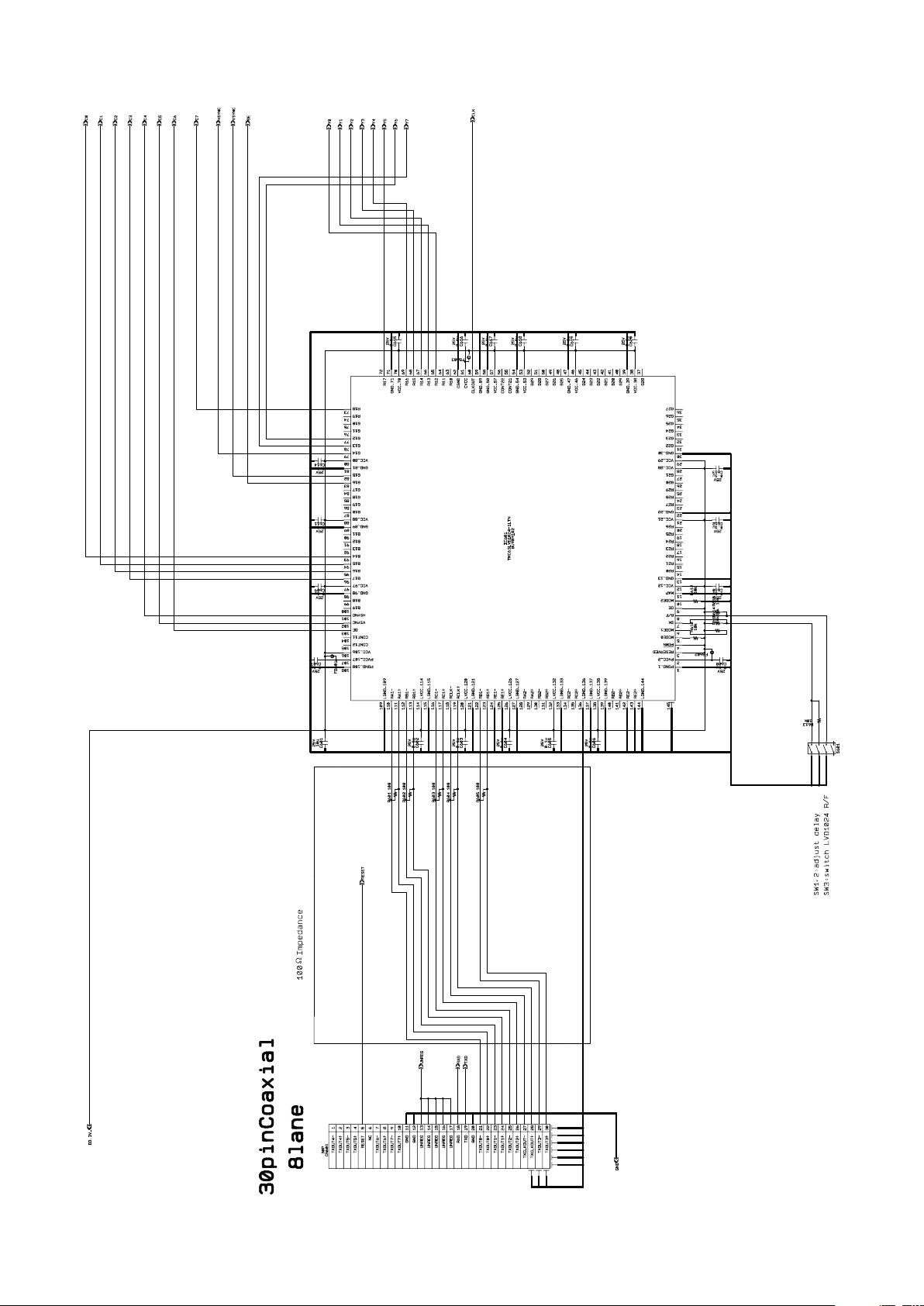
LVDS receiver circuit example (Single output)
Specifications
• No.1 and 2 of S601 adjust the signal delay. No.3 selects whether to input the rising edge or falling edge of the
signal.
61
Page 62

LVDS receiver IC (e.g., THC63LVD1024, BU90R102)
Pin assigment Single mode LVDS input - CMOS output
Specifications
Pin No. Description Signal
1 PGND_1
2 PVCC_2
3 RESERVED
4 PDWN
5 MODE0
6 MODE1
7 DK
8 R/F
9 OE
10 MODE2
11 MAP
12 VCC_12
13 GND_13
14 R20
15 R21
16 R22
17 R23
18 R24
19 R25
20 R26
21 VCC_21
22 GND_22
23 R27
24 R28
25 R29
26 G20
27 G21
28 VCC_28
29 VCC_29
30 GND_30
31 G22
32 G23
33 G24
34 G25
35 G26
36 G27
37 G28
38 VCC_38
39 GND_39
40 G29
41 B20
42 B21
43 B22
44 B23
45 B24
46 VCC_46
47 GND_47
48 B25
49 B26
50 B27
Pin No. Description Signal
51 B28
52 B29
53 VCC_53
54 GND_54
55 CONT21
56 CONT22
57 VCC_57
58 GND_58
59 GND_59
60 CLKOUT CLK
61 CVCC
62 CGND
63 R10
64 R11
65 R12 Y0
66 R13 Y1
67 R14 Y2
68 R15 Y3
69 R16 Y4
70 VCC_70
71 GND_71
72 R17 Y5
73 R18 C7
74 R19 C6
75 G10
76 G11
77 G12 Y6
78 G13 Y7
79 G14 HSYNC
80 VCC_80
81 GND_81
82 G15 VSYNC
83 G16 DE
84 G17
85 G18
86 G19
87 B10
88 VCC_88
89 GND_89
90 B11
91 B12
92 B13
93 B14 C0
94 B15 C1
95 B16 C2
96 B17 C3
97 VCC_97
98 GND_98
99 B18
100 B19
Pin No. Description Signal
101 HSYNC C4
102 VSYNC C5
103 DE C6
104 CONT11
105 CONT12
106 VCC_106
107 PVCC_107
108 PGND_108
109 LGND_109
110 RA1− TXOUT0−
111 RA1+ TXOUT0+
112 RB1− TXOUT1−
113 RB1+ TXOUT1+
114 LVCC_114
115 LGND_115
116 RC1− TXOUT2−
117 RC1+ TXOUT2+
118 RCLK− TXCLKOUT−
119 RCLK+ TXCLKOUT+
120 LVCC_120
121 LGND_121
122 RD1− TXOUT3−
123 RD1+ TXOUT3+
124 RE1−
125 RE1+
126 LVCC_126
127 LGND_127
128 RA2−
129 RA2+
130 RB2−
131 RB2+
132 LVCC_132
133 LGND_133
134 RC2−
135 RC2+
136 LGND_136
137 LGND_137
138 LVCC_138
139 LVCC_139
140 RD2−
141 RD2+
142 RE2−
143 RE2+
144 LGND_144
62
Page 63
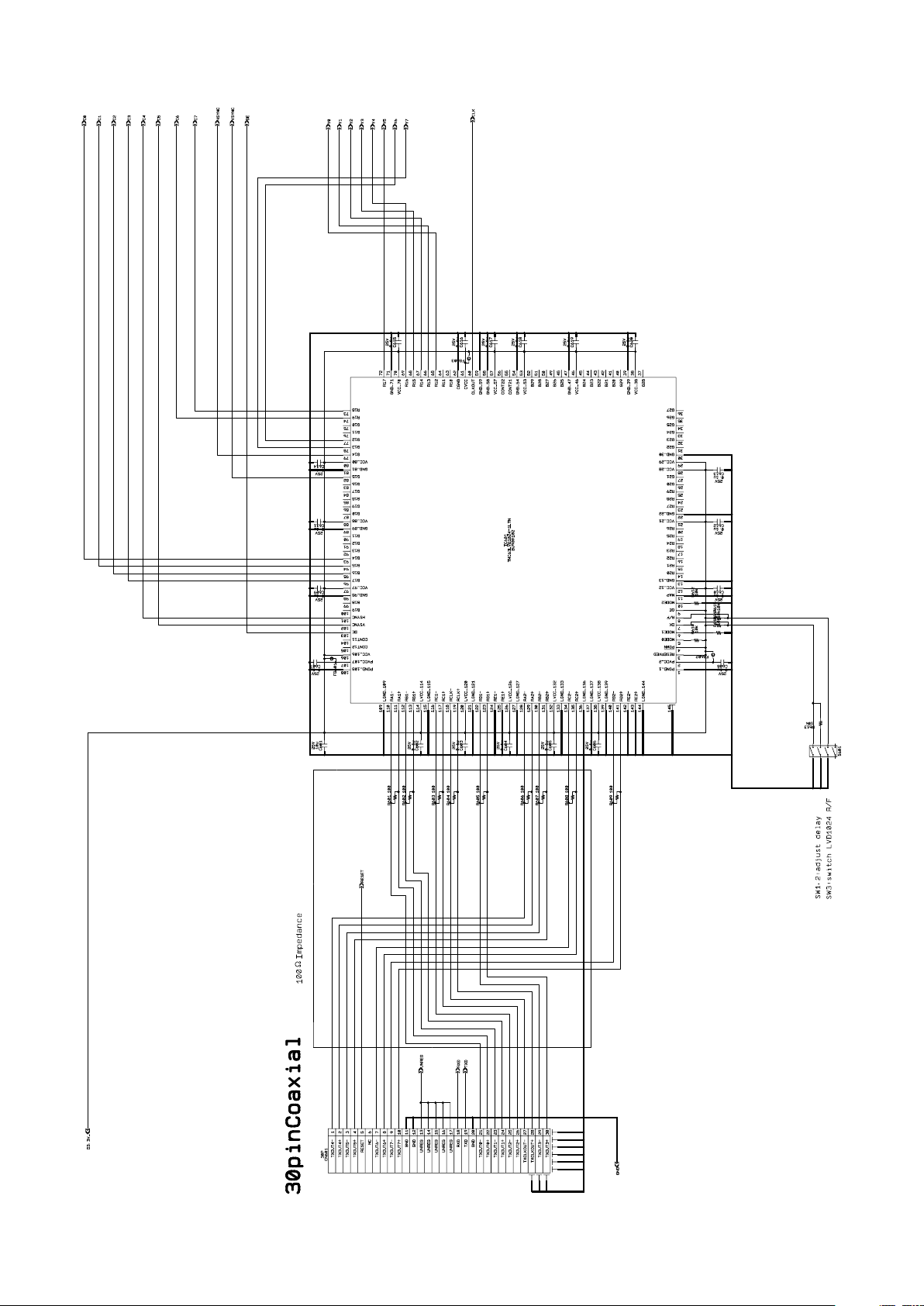
LVDS receiver circuit example (Double output)
Specifications
• No.1 and 2 of S601 adjust the signal delay. No.3 selects whether to input the rising edge or falling edge of the
signal.
63
Page 64

LVDS receiver IC (e.g., THC63LVD1024, BU90R102)
Pin assigment Double mode LVDS input - CMOS output
Specifications
Pin No. Description Signal
1 PGND_1
2 PVCC_2
3 RESERVED
4 PDWN
5 MODE0
6 MODE1
7 DK
8 R/F
9 OE
10 MODE2
11 MAP
12 VCC_12
13 GND_13
14 R20
15 R21
16 R22
17 R23
18 R24
19 R25
20 R26
21 VCC_21
22 GND_22
23 R27
24 R28
25 R29
26 G20
27 G21
28 VCC_28
29 VCC_29
30 GND_30
31 G22
32 G23
33 G24
34 G25
35 G26
36 G27
37 G28
38 VCC_38
39 GND_39
40 G29
41 B20
42 B21
43 B22
44 B23
45 B24
46 VCC_46
47 GND_47
48 B25
49 B26
50 B27
Pin No. Description Signal
51 B28
52 B29
53 VCC_53
54 GND_54
55 CONT21
56 CONT22
57 VCC_57
58 GND_58
59 GND_59
60 CLKOUT CLK
61 CVCC
62 CGND
63 R10
64 R11
65 R12 Y0
66 R13 Y1
67 R14 Y2
68 R15 Y3
69 R16 Y4
70 VCC_70
71 GND_71
72 R17 Y5
73 R18 C7
74 R19 C6
75 G10
76 G11
77 G12 Y6
78 G13 Y7
79 G14 HSYNC
80 VCC_80
81 GND_81
82 G15 VSYNC
83 G16
84 G17
85 G18
86 G19
87 B10
88 VCC_88
89 GND_89
90 B11
91 B12
92 B13
93 B14 C0
94 B15 C1
95 B16 C2
96 B17 C3
97 VCC_97
98 GND_98
99 B18
100 B19
Pin No. Description Signal
101 HSYNC C4
102 VSYNC C5
103 DE DE
104 CONT11
105 CONT12
106 VCC_106
107 PVCC_107
108 PGND_108
109 LGND_109
110 RA1− TXOUT0−
111 RA1+ TXOUT0+
112 RB1− TXOUT1−
113 RB1+ TXOUT1+
114 LVCC_114
115 LGND_115
116 RC1− TXOUT2−
117 RC1+ TXOUT2+
118 RCLK− TXCLKOUT−
119 RCLK+ TXCLKOUT+
120 LVCC_120
121 LGND_121
122 RD1− TXOUT3−
123 RD1+ TXOUT3+
124 RE1−
125 RE1+
126 LVCC_126
127 LGND_127
128 RA2− TXOUT4−
129 RA2+ TXOUT4+
130 RB2− TXOUT5−
131 RB2+ TXOUT5+
132 LVCC_132
133 LGND_133
134 RC2− TXOUT6−
135 RC2+ TXOUT6+
136 LGND_136
137 LGND_137
138 LVCC_138
139 LVCC_139
140 RD2− TXOUT7−
141 RD2+ TXOUT7+
142 RE2−
143 RE2+
144 LGND_144
64
Page 65
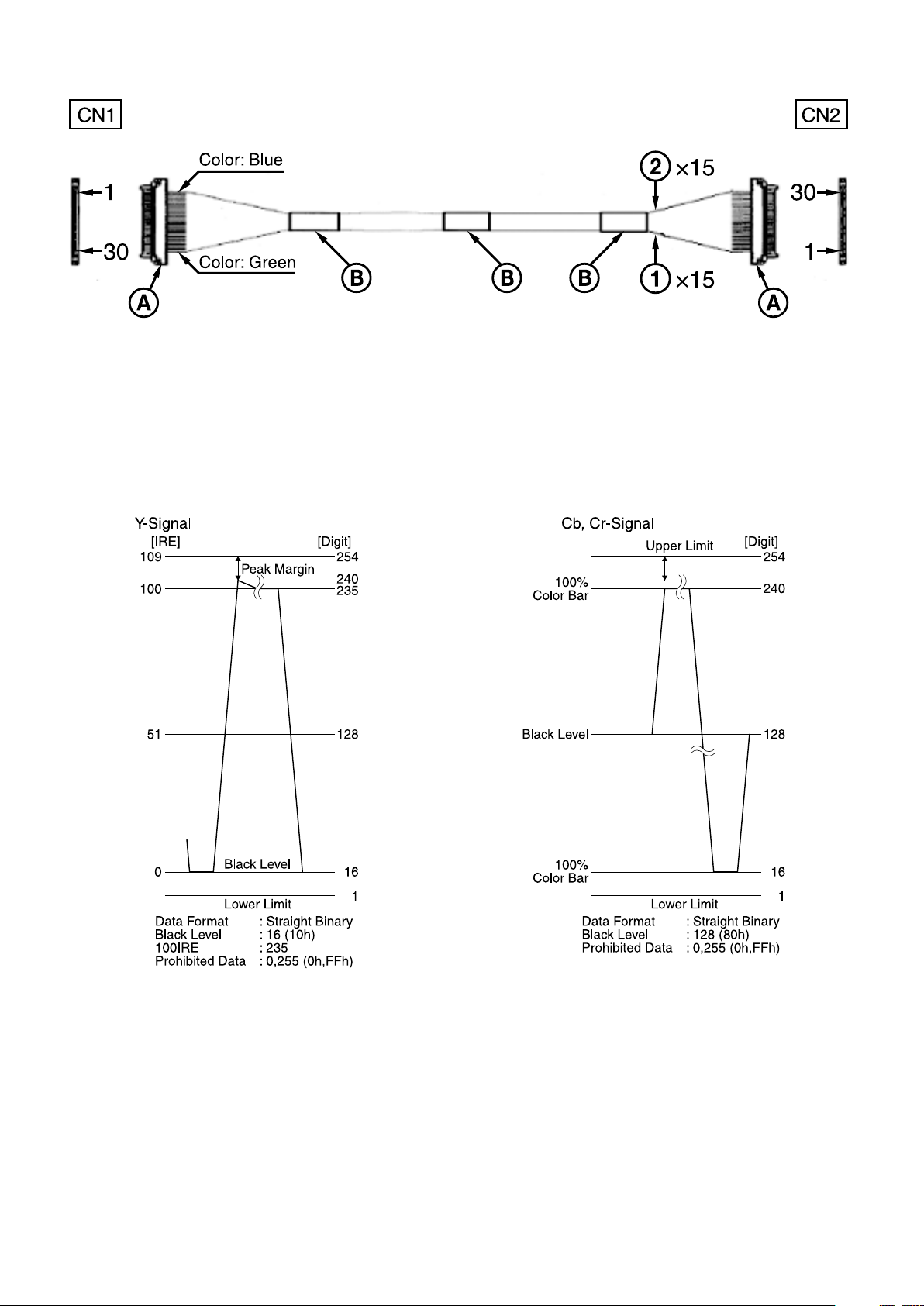
Cable reference specifications (crossover)
• Recommended connectors and cables
Cable
Cable
Connector
Binding tape
green: #42 Micro coaxial cable
blue: #42 Micro coaxial cable
: USL20-30S (KEL)
Specifications
DIGITAL Image Output Y, Cb, Cr 4:2:2 FORMAT Color coding complies with BT709.
65
Page 66
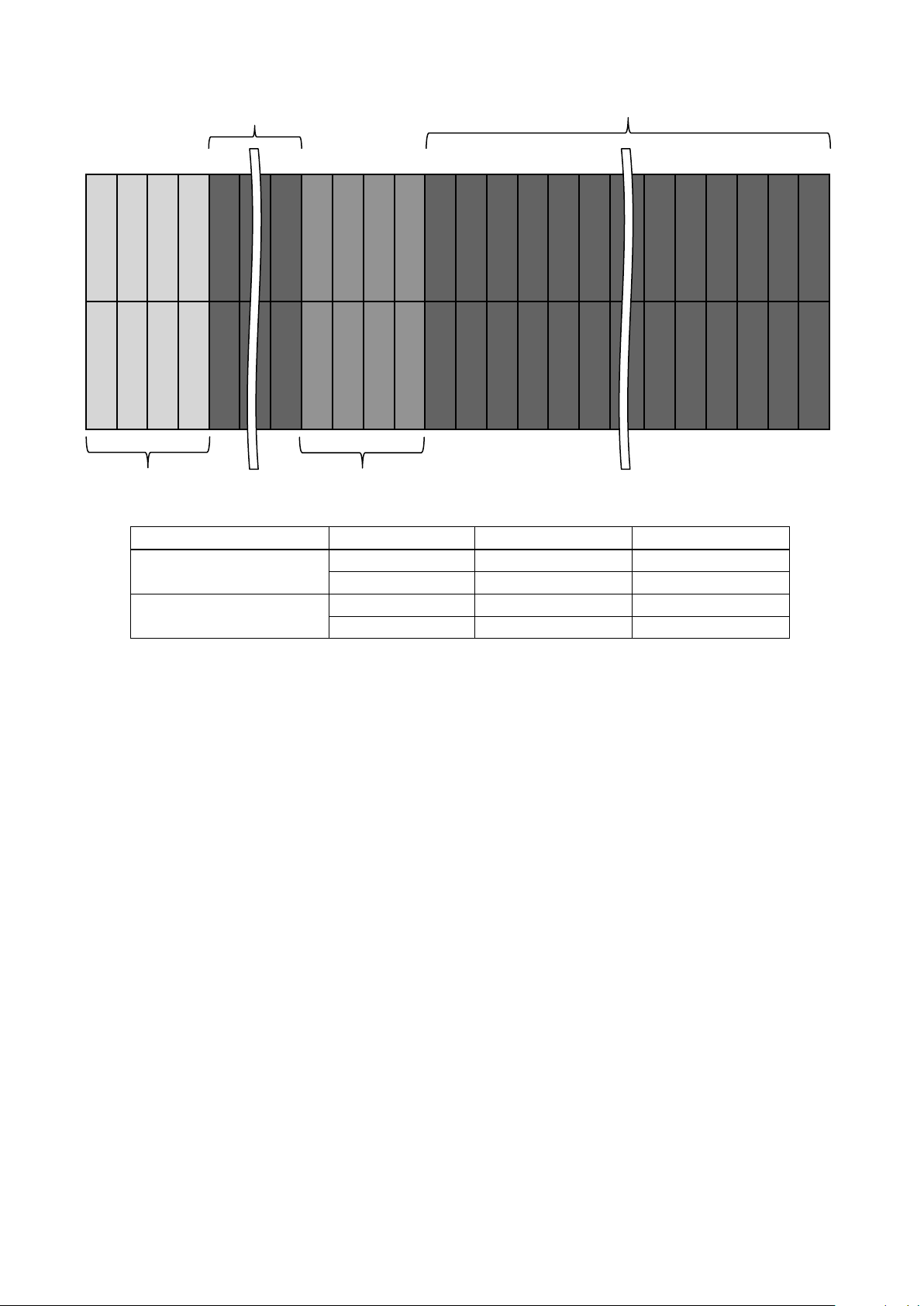
Synchronized codes
0
0
F
F
00X
X
FF0000X
X
Y
Y Y
0
0
F
F
00X
X
0000X
X
YY YY
YYYYY
P
r
P
b
P
r
P
b
P
r
P
b
P
r
P
b
P
r
P
b
P
r
P
b
F
F
Specifications
Blanking
EAV SAV
First Field
Second Field
Active Video Area
Non-active Video Area
Active Video Area
Non-active Video Area
Active Video Area or Non-active Video Area
XX for SAV XX for EAV
80h 9Dh
ABh B6h
C7h DAh
ECh F1h
66
Page 67

Synchronized codes
SAV for First Field Active Video Area
SAV for First Field Non-active Video Area
SAV for Second Field Active Video Area
SAV for Second Field Non-active Video Area
EAV for Second Field Active Video Area
EAV for Second Field Non-active Video Area
Non-active Video Area
Active Video Area
Non-active Video Area
Non-active Video Area
Active Video Area
Non-active Video Area
Blanking
Blanking
Blanking
Blanking
Blanking
First Field
Second Field
Blanking
EAV for First Field Active Video Area
EAV for First Field Non-active Video Area
SAV
EAV
Interlace system (Comparable to SMPTE 274 M)
Specifications
67
Page 68

Synchronized codes
Non-active Video Area
Active Video Area
Non-active Video Area
Blanking
Blanking
Blanking
SAV
EAV
SAV for Active Video Area
SAV for Non-active Video Area
EAV for Active Video Area
EAV for Non-active Video Area
Progressive system (Comparable to SMPTE 274 M, 296 M)
Specifications
68
Page 69
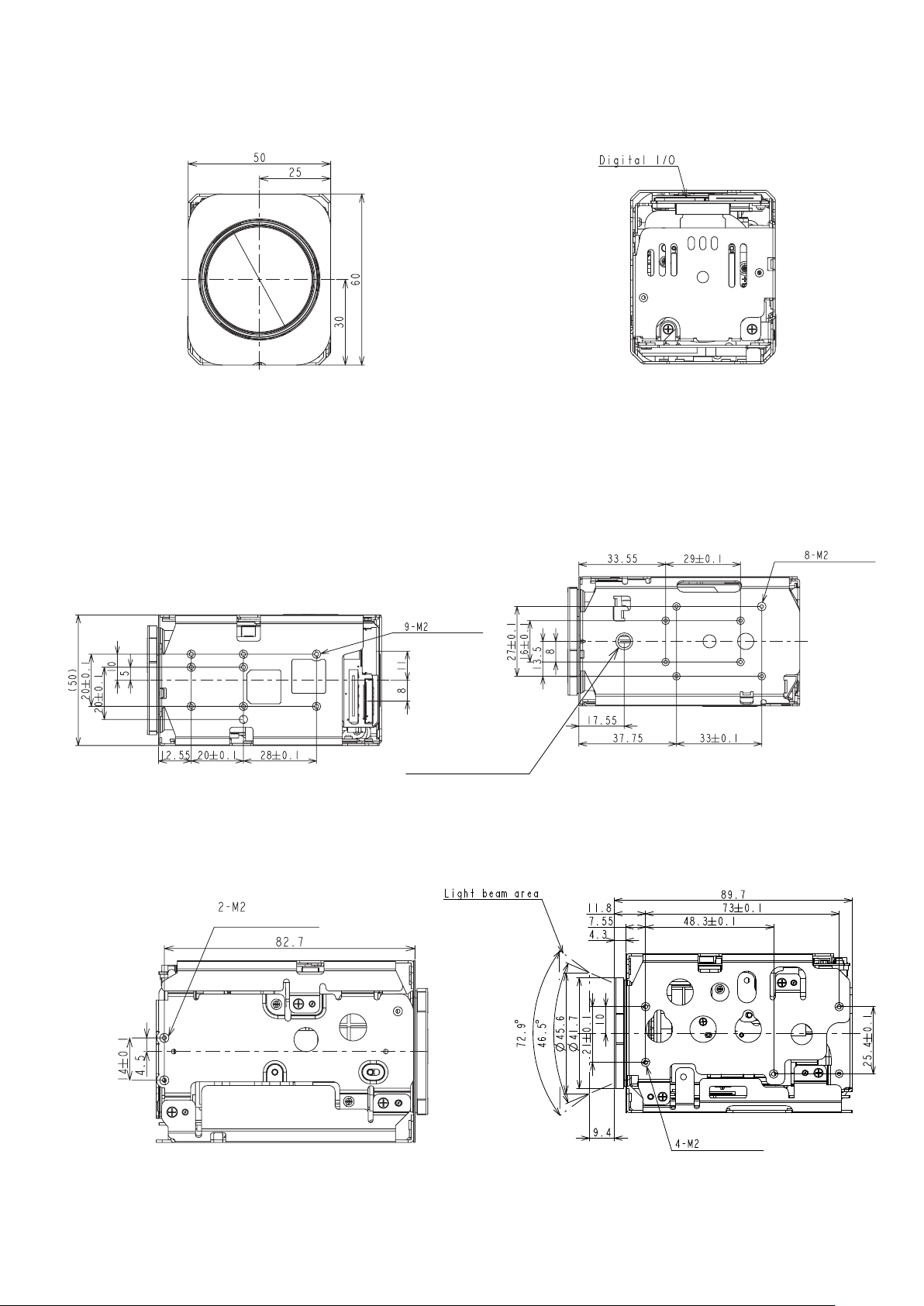
Dimensions
Front Back
Specifications
Top Bottom
Within a depth of
3 mm (1/8 in.) or
less from the top
surface
Screw for camera tripod
within a depth of
7 mm (9/32 in) or less
(1/4-20UNC)
Left side Right side
Within a depth of 3 mm (1/8 in.) or
less from the side
Within a depth of
1
/8 in.) or less
3 mm (
from the bottom
surface
69
Within a depth of 3 mm (1/8 in.) or
less from the side
Unit: mm (inches)
Page 70
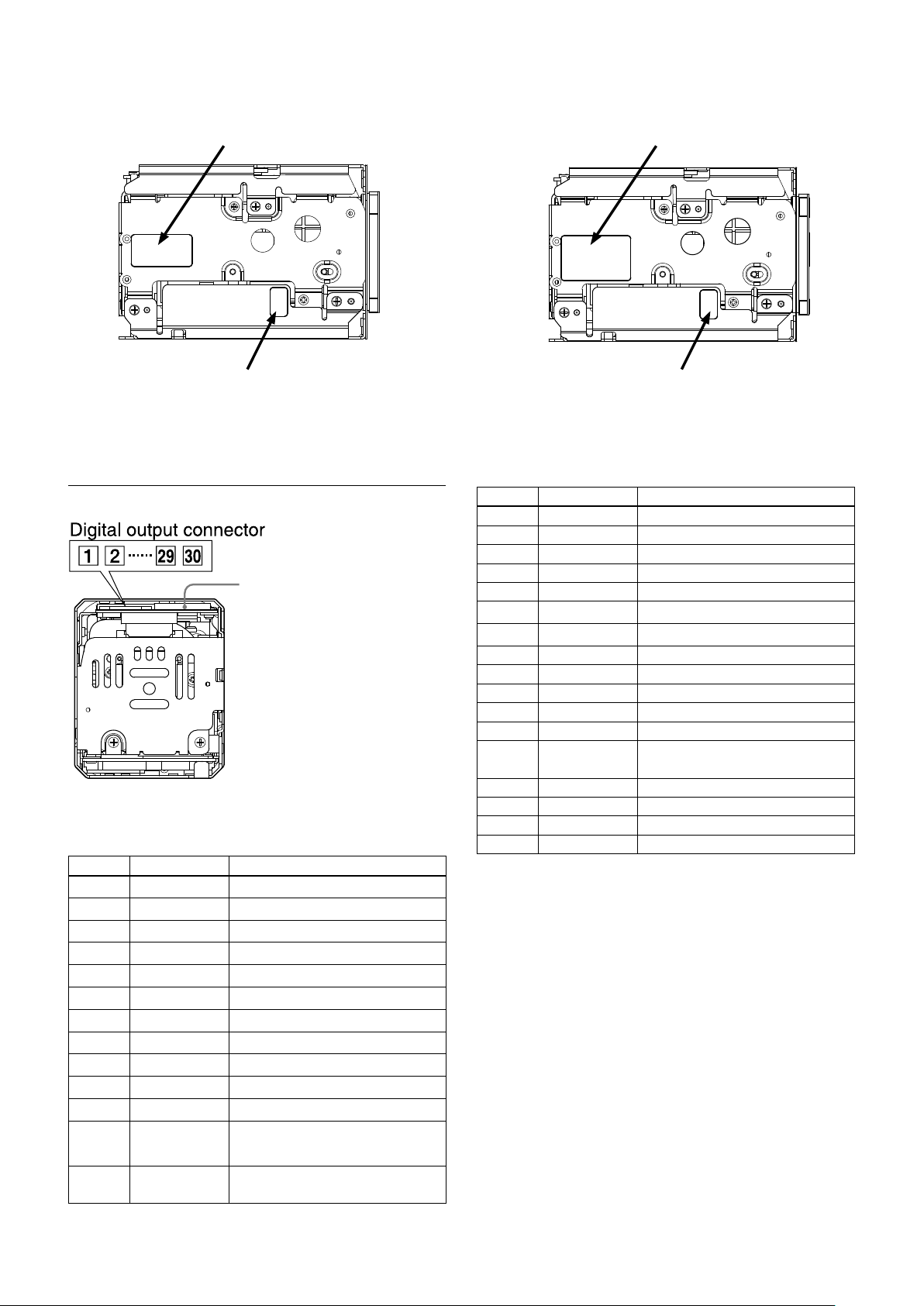
Label drawings
Specifications
Name plate
Manufacturing control label
FCB-EV7520A FCB-CV7520A
Pin assignment
Maintenance connector
* Do not connect here, this is for
maintenance purpose.
Digital output connector
KEL Co. USL00-30L-C
Pin No. Name Level
1 TXOUT3+
2 TXOUT3−
3 TXCLKOUT+
4 TXCLKOUT−
5 TXOUT2+
6 TXOUT2−
7 TXOUT1+
8 TXOUT1−
9 TXOUT0+
10 TXOUT0−
11 GND
12 TxD
13 RxD CMOS 5 V (Low: Max 1.0 V,
CMOS 5 V (Low: Max 0.1 V,
High: Min 4.4 V)
High: Min 2.3 V)
Name plate
Manufacturing control label
Pin No. Name Level
14 DC IN 6 to 12 V DC
15 DC IN 6 to 12 V DC
16 DC IN 6 to 12 V DC
17 DC IN 6 to 12 V DC
18 DC IN 6 to 12 V DC
19 GND
20 GND
21 TXOUT7+ Single out mode: open
22 TXOUT7– Single out mode: open
23 TXOUT6+ Single out mode: open
24 TXOUT6– Single out mode: open
25 NC
26 RESET
27 TXOUT5+ Single out mode: open
28 TXOUT5– Single out mode: open
29 TXOUT4+ Single out mode: open
30 TXOUT4– Single out mode: open
Reset: Low (GND),
Normal: Open (1.8V)
70
Page 71

Specifications
About license of open source software
Please read the contents of licenses below.
GNU GPL/LGPL
The following software are used in this product and are subject to the
GNU General Public License (“GPL”) or GNU Lesser General Public
License (“LGPL”) as attached. Sony Corporation notifies you
hereunder that you have the rights to obtain, modify and/or
redistribute the source code of such software in accordance with the
terms and conditions of GPL/LGPL attached. Therefore, if you obtain
such source code, please read carefully the terms and conditions of
GPL/LGPL.
Linux kernel ,
jffs2,
uboot,
Busybox,
uClibc
GNU GENERAL PUBLIC LICENSE
Version 2, June 1991
Copyright (C) 1989, 1991 Free Software Foundation, Inc., 51
Franklin Street, Fifth Floor, Boston, MA 02110-1301 USA Everyone is
permitted to copy and distribute verbatim copies of this license
document, but changing it is not allowed.
Preamble
The licenses for most software are designed to take away your
freedom to share and change it. By contrast, the GNU General
Public License is intended to guarantee your freedom to share and
change free software-- to make sure the software is free for all its
users. This General Public License applies to most of the Free
Software Foundation's software and to any other program whose
authors commit to using it. (Some other Free Software Foundation
software is covered by the GNU Lesser General Public License
instead.) You can apply it to your programs, too.
When we speak of free software, we are referring to freedom, not
price. Our General Public Licenses are designed to make sure that
you have the freedom to distribute copies of free software (and
charge for this service if you wish), that you receive source code or
can get it if you want it, that you can change the software or use
pieces of it in new free programs; and that you know you can do
these things.
To protect your rights, we need to make restrictions that forbid
anyone to deny you these rights or to ask you to surrender the rights.
These restrictions translate to certain responsibilities for you if you
distribute copies of the software, or if you modify it.
For example, if you distribute copies of such a program, whether
gratis or for a fee, you must give the recipients all the rights that you
have. You must make sure that they, too, receive or can get the
source code. And you must show them these terms so they know
their rights.
We protect your rights with two steps: (1) copyright the software, and
(2) offer you this license which gives you legal permission to copy,
distribute and/or modify the software.
Also, for each author's protection and ours, we want to make certain
that everyone understands that there is no warranty for this free
software. If the software is modified by someone else and passed
on, we want its recipients to know that what they have is not the
original, so that any problems introduced by others will not reflect on
the original authors' reputations.
Finally, any free program is threatened constantly by software
patents. We wish to avoid the danger that redistributors of a free
program will individually obtain patent licenses, in effect making the
program proprietary. To prevent this, we have made it clear that any
patent must be licensed for everyone's free use or not licensed at all.
The precise terms and conditions for copying, distribution and
modification follow.
TERMS AND CONDITIONS FOR COPYING, DISTRIBUTION AND
MODIFICATION
0. This License applies to any program or other work which
contains a notice placed by the copyright holder saying it may be
distributed under the terms of this General Public License. The
"Program", below, refers to any such program or work, and a
"work based on the Program" means either the Program or any
derivative work under copyright law: that is to say, a work
containing the Program or a portion of it, either verbatim or with
modifications and/or translated into another language.
(Hereinafter, translation is included without limitation in the term
"modification".) Each licensee is addressed as "you".
Activities other than copying, distribution and modification are
not covered by this License; they are outside its scope. The act
of running the Program is not restricted, and the output from the
Program is covered only if its contents constitute a work based
on the Program (independent of having been made by running
the Program). Whether that is true depends on what the Program
does.
1. You may copy and distribute verbatim copies of the Program's
source code as you receive it, in any medium, provided that you
conspicuously and appropriately publish on each copy an
appropriate copyright notice and disclaimer of warranty; keep
intact all the notices that refer to this License and to the absence
of any warranty; and give any other recipients of the Program a
copy of this License along with the Program. You may charge a
fee for the physical act of transferring a copy, and you may at
your option offer warranty protection in exchange for a fee.
2. You may modify your copy or copies of the Program or any
portion of it, thus forming a work based on the Program, and
copy and distribute such modifications or work under the terms
of Section 1 above, provided that you also meet all of these
conditions:
a) You must cause the modified files to carry prominent notices
stating that you changed the files and the date of any change.
b) You must cause any work that you distribute or publish, that
in whole or in part contains or is derived from the Program or any
part thereof, to be licensed as a whole at no charge to all third
parties under the terms of this License.
c) If the modified program normally reads commands
interactively when run, you must cause it, when started running
for such interactive use in the most ordinary way, to print or
display an announcement including an appropriate copyright
notice and a notice that there is no warranty (or else, saying that
you provide a warranty) and that users may redistribute the
program under these conditions, and telling the user how to view
a copy of this License. (Exception: if the Program itself is
interactive but does not normally print such an announcement,
your work based on the Program is not required to print an
announcement.)
These requirements apply to the modified work as a whole. If
identifiable sections of that work are not derived from the Program,
and can be reasonably considered independent and separate works
in themselves, then this License, and its terms, do not apply to those
sections when you distribute them as separate works. But when you
distribute the same sections as part of a whole which is a work
based on the Program, the distribution of the whole must be on the
terms of this License, whose permissions for other licensees extend
to the entire whole, and thus to each and every part regardless of
who wrote it.
Thus, it is not the intent of this section to claim rights or contest your
rights to work written entirely by you; rather, the intent is to exercise
the right to control the distribution of derivative or collective works
based on the Program.
71
Page 72

Specifications
In addition, mere aggregation of another work not based on the
Program with the Program (or with a work based on the Program) on
a volume of a storage or distribution medium does not bring the other
work under the scope of this License.
3. You may copy and distribute the Program (or a work based on it,
under Section 2) in object code or executable form under the
terms of Sections 1 and 2 above provided that you also do one
of the following:
a) Accompany it with the complete corresponding machine-
readable source code, which must be distributed under the terms
of Sections 1 and 2 above on a medium customarily used for
software interchange; or,
b) Accompany it with a written offer, valid for at least three years,
to give any third party, for a charge no more than your cost of
physically performing source distribution, a complete machinereadable copy of the corresponding source code, to be
distributed under the terms of Sections 1 and 2 above on a
medium customarily used for software interchange; or,
c) Accompany it with the information you received as to the offer
to distribute corresponding source code. (This alternative is
allowed only for noncommercial distribution and only if you
received the program in object code or executable form with
such an offer, in accord with Subsection b above.)
The source code for a work means the preferred form of the work for
making modifications to it. For an executable work, complete source
code means all the source code for all modules it contains, plus any
associated interface definition files, plus the scripts used to control
compilation and installation of the executable. However, as a special
exception, the source code distributed need not include anything that
is normally distributed (in either source or binary form) with the major
components (compiler, kernel, and so on) of the operating system on
which the executable runs, unless that component itself accompanies
the executable.
If distribution of executable or object code is made by offering access
to copy from a designated place, then offering equivalent access to
copy the source code from the same place counts as distribution of
the source code, even though third parties are not compelled to copy
the source along with the object code.
4. You may not copy, modify, sublicense, or distribute the Program
except as expressly provided under this License. Any attempt
otherwise to copy, modify, sublicense or distribute the Program is
void, and will automatically terminate your rights under this
License. However, parties who have received copies, or rights,
from you under this License will not have their licenses
terminated so long as such parties remain in full compliance.
5. You are not required to accept this License, since you have not
signed it. However, nothing else grants you permission to modify
or distribute the Program or its derivative works. These actions
are prohibited by law if you do not accept this License. Therefore,
by modifying or distributing the Program (or any work based on
the Program), you indicate your acceptance of this License to do
so, and all its terms and conditions for copying, distributing or
modifying the Program or works based on it.
6. Each time you redistribute the Program (or any work based on
the Program), the recipient automatically receives a license from
the original licensor to copy, distribute or modify the Program
subject to these terms and conditions. You may not impose any
further restrictions on the recipients' exercise of the rights
granted herein. You are not responsible for enforcing compliance
by third parties to this License.
7. If, as a consequence of a court judgment or allegation of patent
infringement or for any other reason (not limited to patent
issues), conditions are imposed on you (whether by court order,
agreement or otherwise) that contradict the conditions of this
License, they do not excuse you from the conditions of this
License. If you cannot distribute so as to satisfy simultaneously
your obligations under this License and any other pertinent
obligations, then as a consequence you may not distribute the
Program at all. For example, if a patent license would not permit
royalty-free redistribution of the Program by all those who receive
copies directly or indirectly through you, then the only way you
could satisfy both it and this License would be to refrain entirely
from distribution of the Program.
If any portion of this section is held invalid or unenforceable
under any particular circumstance, the balance of the section is
intended to apply and the section as a whole is intended to apply
in other circumstances.
It is not the purpose of this section to induce you to infringe any
patents or other property right claims or to contest validity of any
such claims; this section has the sole purpose of protecting the
integrity of the free software distribution system, which is
implemented by public license practices. Many people have
made generous contributions to the wide range of software
distributed through that system in reliance on consistent
application of that system; it is up to the author/donor to decide if
he or she is willing to distribute software through any other
system and a licensee cannot impose that choice.
This section is intended to make thoroughly clear what is
believed to be a consequence of the rest of this License.
8. If the distribution and/or use of the Program is restricted in
certain countries either by patents or by copyrighted interfaces,
the original copyright holder who places the Program under this
License may add an explicit geographical distribution limitation
excluding those countries, so that distribution is permitted only in
or among countries not thus excluded. In such case, this License
incorporates the limitation as if written in the body of this License.
9. The Free Software Foundation may publish revised and/or new
versions of the General Public License from time to time. Such
new versions will be similar in spirit to the present version, but
may differ in detail to address new problems or concerns. Each
version is given a distinguishing version number. If the Program
specifies a version number of this License which applies to it and
"any later version", you have the option of following the terms
and conditions either of that version or of any later version
published by the Free Software Foundation. If the Program does
not specify a version number of this License, you may choose
any version ever published by the Free Software Foundation.
10. If you wish to incorporate parts of the Program into other free
programs whose distribution conditions are different, write to the
author to ask for permission. For software which is copyrighted
by the Free Software Foundation, write to the Free Software
Foundation; we sometimes make exceptions for this. Our
decision will be guided by the two goals of preserving the free
status of all derivatives of our free software and of promoting the
sharing and reuse of software generally.
NO WARRANTY
11. BECAUSE THE PROGRAM IS LICENSED FREE OF CHARGE,
THERE IS NO WARRANTY FOR THE PROGRAM, TO THE
EXTENT PERMITTED BY APPLICABLE LAW. EXCEPT WHEN
OTHERWISE STATED IN WRITING THE COPYRIGHT
HOLDERS AND/OR OTHER PARTIES PROVIDE THE
PROGRAM "AS IS" WITHOUT WARRANTY OF ANY KIND,
EITHER EXPRESSED OR IMPLIED, INCLUDING, BUT NOT
LIMITED TO, THE IMPLIED WARRANTIES OF
MERCHANTABILITY AND FITNESS FOR A PARTICULAR
PURPOSE. THE ENTIRE RISK AS TO THE QUALITY AND
PERFORMANCE OF THE PROGRAM IS WITH YOU. SHOULD
THE PROGRAM PROVE DEFECTIVE, YOU ASSUME THE
COST OF ALL NECESSARY SERVICING, REPAIR OR
CORRECTION.
12. IN NO EVENT UNLESS REQUIRED BY APPLICABLE LAW OR
AGREED TO IN WRITING WILL ANY COPYRIGHT HOLDER,
OR ANY OTHER PARTY WHO MAY MODIFY AND/OR
REDISTRIBUTE THE PROGRAM AS PERMITTED ABOVE, BE
LIABLE TO YOU FOR DAMAGES, INCLUDING ANY GENERAL,
SPECIAL, INCIDENTAL OR CONSEQUENTIAL DAMAGES
72
Page 73

Specifications
ARISING OUT OF THE USE OR INABILITY TO USE THE
PROGRAM (INCLUDING BUT NOT LIMITED TO LOSS OF
DATA OR DATA BEING RENDERED INACCURATE OR
LOSSES SUSTAINED BY YOU OR THIRD PARTIES OR A
FAILURE OF THE PROGRAM TO OPERATE WITH ANY
OTHER PROGRAMS), EVEN IF SUCH HOLDER OR OTHER
PARTY HAS BEEN ADVISED OF THE POSSIBILITY OF SUCH
DAMAGES. END OF TERMS AND CONDITIONS How to
Apply These Terms to Your New Programs
If you develop a new program, and you want it to be of the greatest
possible use to the public, the best way to achieve this is to make it
free software which everyone can redistribute and change under
these terms.
To do so, attach the following notices to the program. It is safest to
attach them to the start of each source file to most effectively convey
the exclusion of warranty; and each file should have at least the
"copyright" line and a pointer to where the full notice is found.
<one line to give the program's name and a brief idea of what it
does.> Copyright (C) <year> <name of author>
This program is free software; you can redistribute it and/or modify it
under the terms of the GNU General Public License as published by
the Free Software Foundation; either version 2 of the License, or (at
your option) any later version.
This program is distributed in the hope that it will be useful, but
WITHOUT ANY WARRANTY; without even the implied warranty of
MERCHANTABILITY or FITNESS FOR A PARTICULAR PURPOSE.
See the GNU General Public License for more details.
You should have received a copy of the GNU General Public License
along with this program; if not, write to the Free Software Foundation,
Inc., 51 Franklin Street, Fifth Floor, Boston, MA 02110-1301 USA.
Also add information on how to contact you by electronic and paper
mail.
If the program is interactive, make it output a short notice like this
when it starts in an interactive mode:
Gnomovision version 69, Copyright (C) year name of author
Gnomovision comes with ABSOLUTELY NO WARRANTY; for details
type `show w'. This is free software, and you are welcome to
redistribute it under certain conditions; type `show c' for details.
The hypothetical commands `show w' and `show c' should show the
appropriate parts of the General Public License. Of course, the
commands you use may be called something other than `show w'
and `show c'; they could even be mouse-clicks or menu items-whatever suits your program.
You should also get your employer (if you work as a programmer) or
your school, if any, to sign a "copyright disclaimer" for the program, if
necessary. Here is a sample; alter the names:
Yoyodyne, Inc., hereby disclaims all copyright interest in the program
`Gnomovision' (which makes passes at compilers) written by James
Hacker.
<signature of Ty Coon>, 1 April 1989 Ty Coon, President of Vice
This General Public License does not permit incorporating your
program into proprietary programs. If your program is a subroutine
library, you may consider it more useful to permit linking proprietary
applications with the library. If this is what you want to do, use the
GNU Lesser General Public License instead of this License.
GNU LESSER GENERAL PUBLIC LICENSE
Version 2.1, February 1999
Copyright (C) 1991, 1999 Free Software Foundation, Inc. 51 Franklin
Street, Fifth Floor, Boston, MA 02110-1301 USA Everyone is
permitted to copy and distribute verbatim copies of this license
document, but changing it is not allowed.
[This is the first released version of the Lesser GPL. It also counts as
the successor of the GNU Library Public License, version 2, hence
the version number 2.1.]
Preamble
The licenses for most software are designed to take away your
freedom to share and change it. By contrast, the GNU General
Public Licenses are intended to guarantee your freedom to share
and change free software--to make sure the software is free for all its
users.
This license, the Lesser General Public License, applies to some
specially designated software packages--typically libraries--of the
Free Software Foundation and other authors who decide to use it.
You can use it too, but we suggest you first think carefully about
whether this license or the ordinary General Public License is the
better strategy to use in any particular case, based on the
explanations below.
When we speak of free software, we are referring to freedom of use,
not price. Our General Public Licenses are designed to make sure
that you have the freedom to distribute copies of free software (and
charge for this service if you wish); that you receive source code or
can get it if you want it; that you can change the software and use
pieces of it in new free programs; and that you are informed that you
can do these things.
To protect your rights, we need to make restrictions that forbid
distributors to deny you these rights or to ask you to surrender these
rights. These restrictions translate to certain responsibilities for you if
you distribute copies of the library or if you modify it.
For example, if you distribute copies of the library, whether gratis or
for a fee, you must give the recipients all the rights that we gave you.
You must make sure that they, too, receive or can get the source
code. If you link other code with the library, you must provide
complete object files to the recipients, so that they can relink them
with the library after making changes to the library and recompiling it.
And you must show them these terms so they know their rights.
We protect your rights with a two-step method: (1) we copyright the
library, and (2) we offer you this license, which gives you legal
permission to copy, distribute and/or modify the library.
To protect each distributor, we want to make it very clear that there is
no warranty for the free library. Also, if the library is modified by
someone else and passed on, the recipients should know that what
they have is not the original version, so that the original author's
reputation will not be affected by problems that might be introduced
by others.
Finally, software patents pose a constant threat to the existence of
any free program. We wish to make sure that a company cannot
effectively restrict the users of a free program by obtaining a
restrictive license from a patent holder. Therefore, we insist that any
patent license obtained for a version of the library must be consistent
with the full freedom of use specified in this license.
Most GNU software, including some libraries, is covered by the
ordinary GNU General Public License. This license, the GNU Lesser
General Public License, applies to certain designated libraries, and
is quite different from the ordinary General Public License. We use
this license for certain libraries in order to permit linking those
libraries into non-free programs.
When a program is linked with a library, whether statically or using a
shared library, the combination of the two is legally speaking a
combined work, a derivative of the original library. The ordinary
General Public License therefore permits such linking only if the
entire combination fits its criteria of freedom. The Lesser General
Public License permits more lax criteria for linking other code with
the library.
We call this license the "Lesser" General Public License because it
does Less to protect the user's freedom than the ordinary General
Public License. It also provides other free software developers Less
of an advantage over competing non-free programs. These
disadvantages are the reason we use the ordinary General Public
License for many libraries. However, the Lesser license provides
73
Page 74

Specifications
advantages in certain special circumstances.
For example, on rare occasions, there may be a special need to
encourage the widest possible use of a certain library, so that it
becomes a de-facto standard. To achieve this, non-free programs
must be allowed to use the library. A more frequent case is that a
free library does the same job as widely used non-free libraries. In
this case, there is little to gain by limiting the free library to free
software only, so we use the Lesser General Public License.
In other cases, permission to use a particular library in non-free
programs enables a greater number of people to use a large body of
free software. For example, permission to use the GNU C Library in
non-free programs enables many more people to use the whole
GNU operating system, as well as its variant, the GNU/Linux
operating system.
Although the Lesser General Public License is Less protective of the
users' freedom, it does ensure that the user of a program that is
linked with the Library has the freedom and the wherewithal to run
that program using a modified version of the Library.
The precise terms and conditions for copying, distribution and
modification follow. Pay close attention to the difference between a
"work based on the library" and a "work that uses the library". The
former contains code derived from the library, whereas the latter
must be combined with the library in order to run.
TERMS AND CONDITIONS FOR COPYING, DISTRIBUTION AND
MODIFICATION
0. This License Agreement applies to any software library or other
program which contains a notice placed by the copyright holder
or other authorized party saying it may be distributed under the
terms of this Lesser General Public License (also called "this
License"). Each licensee is addressed as "you".
A "library" means a collection of software functions and/or data
prepared so as to be conveniently linked with application
programs (which use some of those functions and data) to form
executables.
The "Library", below, refers to any such software library or work
which has been distributed under these terms. A "work based on
the Library" means either the Library or any derivative work
under copyright law: that is to say, a work containing the Library
or a portion of it, either verbatim or with modifications and/or
translated straightforwardly into another language. (Hereinafter,
translation is included without limitation in the term
"modification".)
"Source code" for a work means the preferred form of the work
for making modifications to it. For a library, complete source
code means all the source code for all modules it contains, plus
any associated interface definition files, plus the scripts used to
control compilation and installation of the library.
Activities other than copying, distribution and modification are
not covered by this License; they are outside its scope. The act
of running a program using the Library is not restricted, and
output from such a program is covered only if its contents
constitute a work based on the Library (independent of the use
of the Library in a tool for writing it). Whether that is true depends
on what the Library does and what the program that uses the
Library does.
1. You may copy and distribute verbatim copies of the Library's
complete source code as you receive it, in any medium, provided
that you conspicuously and appropriately publish on each copy
an appropriate copyright notice and disclaimer of warranty; keep
intact all the notices that refer to this License and to the absence
of any warranty; and distribute a copy of this License along with
the Library.
You may charge a fee for the physical act of transferring a copy,
and you may at your option offer warranty protection in exchange
for a fee.
2. You may modify your copy or copies of the Library or any portion
of it, thus forming a work based on the Library, and copy and
distribute such modifications or work under the terms of Section
1 above, provided that you also meet all of these conditions:
a) The modified work must itself be a software library.
b) You must cause the files modified to carry prominent notices
stating that you changed the files and the date of any change.
c) You must cause the whole of the work to be licensed at no
charge to all third parties under the terms of this License.
d) If a facility in the modified Library refers to a function or a
table of data to be supplied by an application program that uses
the facility, other than as an argument passed when the facility is
invoked, then you must make a good faith effort to ensure that,
in the event an application does not supply such function or
table, the facility still operates, and performs whatever part of its
purpose remains meaningful. (For example, a function in a
library to compute square roots has a purpose that is entirely
well-defined independent of the application. Therefore,
Subsection 2d requires that any application-supplied function or
table used by this function must be optional: if the application
does not supply it, the square root function must still compute
square roots.)
These requirements apply to the modified work as a whole. If
identifiable sections of that work are not derived from the Library,
and can be reasonably considered independent and separate
works in themselves, then this License, and its terms, do not
apply to those sections when you distribute them as separate
works. But when you distribute the same sections as part of a
whole which is a work based on the Library, the distribution of
the whole must be on the terms of this License, whose
permissions for other licensees extend to the entire whole, and
thus to each and every part regardless of who wrote it.
Thus, it is not the intent of this section to claim rights or contest
your rights to work written entirely by you; rather, the intent is to
exercise the right to control the distribution of derivative or
collective works based on the Library.
In addition, mere aggregation of another work not based on the
Library with the Library (or with a work based on the Library) on
a volume of a storage or distribution medium does not bring the
other work under the scope of this License.
3. You may opt to apply the terms of the ordinary GNU General
Public License instead of this License to a given copy of the
Library. To do this, you must alter all the notices that refer to this
License, so that they refer to the ordinary GNU General Public
License, version 2, instead of to this License. (If a newer version
than version 2 of the ordinary GNU General Public License has
appeared, then you can specify that version instead if you wish.)
Do not make any other change in these notices.
Once this change is made in a given copy, it is irreversible for
that copy, so the ordinary GNU General Public License applies
to all subsequent copies and derivative works made from that
copy.
This option is useful when you wish to copy part of the code of
the Library into a program that is not a library.
4. You may copy and distribute the Library (or a portion or
derivative of it, under Section 2) in object code or executable
form under the terms of Sections 1 and 2 above provided that
you accompany it with the complete corresponding machinereadable source code, which must be distributed under the terms
of Sections 1 and 2 above on a medium customarily used for
software interchange. If distribution of object code is made by
offering access to copy from a designated place, then offering
equivalent access to copy the source code from the same place
satisfies the requirement to distribute the source code, even
though third parties are not compelled to copy the source along
with the object code.
74
Page 75

Specifications
5. A program that contains no derivative of any portion of the
Library, but is designed to work with the Library by being
compiled or linked with it, is called a "work that uses the Library".
Such a work, in isolation, is not a derivative work of the Library,
and therefore falls outside the scope of this License. However,
linking a "work that uses the Library" with the Library creates an
executable that is a derivative of the Library (because it contains
portions of the Library), rather than a "work that uses the library".
The executable is therefore covered by this License. Section 6
states terms for distribution of such executables. When a "work
that uses the Library" uses material from a header file that is part
of the Library, the object code for the work may be a derivative
work of the Library even though the source code is not. Whether
this is true is especially significant if the work can be linked
without the Library, or if the work is itself a library. The threshold
for this to be true is not precisely defined by law. If such an
object file uses only numerical parameters, data structure layouts
and accessors, and small macros and small inline functions (ten
lines or less in length), then the use of the object file is
unrestricted, regardless of whether it is legally a derivative work.
(Executables containing this object code plus portions of the
Library will still fall under Section 6.)
Otherwise, if the work is a derivative of the Library, you may
distribute the object code for the work under the terms of Section
6. Any executables containing that work also fall under Section 6,
whether or not they are linked directly with the Library itself.
6. As an exception to the Sections above, you may also combine or
link a "work that uses the Library" with the Library to produce a
work containing portions of the Library, and distribute that work
under terms of your choice, provided that the terms permit
modification of the work for the customer's own use and reverse
engineering for debugging such modifications.
You must give prominent notice with each copy of the work that
the Library is used in it and that the Library and its use are
covered by this License. You must supply a copy of this License.
If the work during execution displays copyright notices, you must
include the copyright notice for the Library among them, as well
as a reference directing the user to the copy of this License.
Also, you must do one of these things:
a) Accompany the work with the complete corresponding
machine- readable source code for the Library including
whatever changes were used in the work (which must be
distributed under Sections 1 and 2 above); and, if the work is an
executable linked with the Library, with the complete machinereadable "work that uses the Library", as object code and/or
source code, so that the user can modify the Library and then
relink to produce a modified executable containing the modified
Library. (It is understood that the user who changes the contents
of definitions files in the Library will not necessarily be able to
recompile the application to use the modified definitions.)
b) Use a suitable shared library mechanism for linking with the
Library. A suitable mechanism is one that (1) uses at run time a
copy of the library already present on the user's computer
system, rather than copying library functions into the executable,
and (2) will operate properly with a modified version of the library,
if the user installs one, as long as the modified version is
interface- compatible with the version that the work was made
with.
c) Accompany the work with a written offer, valid for at least
three years, to give the same user the materials specified in
Subsection 6a, above, for a charge no more than the cost of
performing this distribution.
d) If distribution of the work is made by offering access to copy
from a designated place, offer equivalent access to copy the
above specified materials from the same place.
e) Verify that the user has already received a copy of these
materials or that you have already sent this user a copy.
For an executable, the required form of the "work that uses the
Library" must include any data and utility programs needed for
reproducing the executable from it. However, as a special
exception, the materials to be distributed need not include
anything that is normally distributed (in either source or binary
form) with the major components (compiler, kernel, and so on) of
the operating system on which the executable runs, unless that
component itself accompanies the executable.
It may happen that this requirement contradicts the license
restrictions of other proprietary libraries that do not normally
accompany the operating system. Such a contradiction means
you cannot use both them and the Library together in an
executable that you distribute.
7. You may place library facilities that are a work based on the
Library side-by-side in a single library together with other library
facilities not covered by this License, and distribute such a
combined library, provided that the separate distribution of the
work based on the Library and of the other library facilities is
otherwise permitted, and provided that you do these two things:
a) Accompany the combined library with a copy of the same
work based on the Library, uncombined with any other library
facilities. This must be distributed under the terms of the Sections
above.
b) Give prominent notice with the combined library of the fact
that part of it is a work based on the Library, and explaining
where to find the accompanying uncombined form of the same
work.
8. You may not copy, modify, sublicense, link with, or distribute the
Library except as expressly provided under this License. Any
attempt otherwise to copy, modify, sublicense, link with, or
distribute the Library is void, and will automatically terminate
your rights under this License. However, parties who have
received copies, or rights, from you under this License will not
have their licenses terminated so long as such parties remain in
full compliance.
9. You are not required to accept this License, since you have not
signed it. However, nothing else grants you permission to modify
or distribute the Library or its derivative works. These actions are
prohibited by law if you do not accept this License. Therefore, by
modifying or distributing the Library (or any work based on the
Library), you indicate your acceptance of this License to do so,
and all its terms and conditions for copying, distributing or
modifying the Library or works based on it.
10. Each time you redistribute the Library (or any work based on the
Library), the recipient automatically receives a license from the
original licensor to copy, distribute, link with or modify the Library
subject to these terms and conditions. You may not impose any
further restrictions on the recipients' exercise of the rights
granted herein. You are not responsible for enforcing compliance
by third parties with this License.
11. If, as a consequence of a court judgment or allegation of patent
infringement or for any other reason (not limited to patent
issues), conditions are imposed on you (whether by court order,
agreement or otherwise) that contradict the conditions of this
License, they do not excuse you from the conditions of this
License. If you cannot distribute so as to satisfy simultaneously
your obligations under this License and any other pertinent
obligations, then as a consequence you may not distribute the
Library at all. For example, if a patent license would not permit
royalty-free redistribution of the Library by all those who receive
copies directly or indirectly through you, then the only way you
could satisfy both it and this License would be to refrain entirely
from distribution of the Library.
If any portion of this section is held invalid or unenforceable
under any particular circumstance, the balance of the section is
intended to apply, and the section as a whole is intended to
apply in other circumstances.
It is not the purpose of this section to induce you to infringe any
patents or other property right claims or to contest validity of any
75
Page 76

Specifications
such claims; this section has the sole purpose of protecting the
integrity of the free software distribution system which is
implemented by public license practices. Many people have
made generous contributions to the wide range of software
distributed through that system in reliance on consistent
application of that system; it is up to the author/donor to decide if
he or she is willing to distribute software through any other
system and a licensee cannot impose that choice.
This section is intended to make thoroughly clear what is
believed to be a consequence of the rest of this License.
12. If the distribution and/or use of the Library is restricted in certain
countries either by patents or by copyrighted interfaces, the
original copyright holder who places the Library under this
License may add an explicit geographical distribution limitation
excluding those countries, so that distribution is permitted only in
or among countries not thus excluded. In such case, this License
incorporates the limitation as if written in the body of this License.
13. The Free Software Foundation may publish revised and/or new
versions of the Lesser General Public License from time to time.
Such new versions will be similar in spirit to the present version,
but may differ in detail to address new problems or concerns.
Each version is given a distinguishing version number. If the
Library specifies a version number of this License which applies
to it and "any later version", you have the option of following the
terms and conditions either of that version or of any later version
published by the Free Software Foundation. If the Library does
not specify a license version number, you may choose any
version ever published by the Free Software Foundation.
14. If you wish to incorporate parts of the Library into other free
programs whose distribution conditions are incompatible with
these, write to the author to ask for permission. For software
which is copyrighted by the Free Software Foundation, write to
the Free Software Foundation; we sometimes make exceptions
for this. Our decision will be guided by the two goals of
preserving the free status of all derivatives of our free software
and of promoting the sharing and reuse of software generally.
NO WARRANTY
15. BECAUSE THE LIBRARY IS LICENSED FREE OF CHARGE,
THERE IS NO WARRANTY FOR THE LIBRARY, TO THE
EXTENT PERMITTED BY APPLICABLE LAW. EXCEPT WHEN
OTHERWISE STATED IN WRITING THE COPYRIGHT
HOLDERS AND/OR OTHER PARTIES PROVIDE THE LIBRARY
"AS IS" WITHOUT WARRANTY OF ANY KIND, EITHER
EXPRESSED OR IMPLIED, INCLUDING, BUT NOT LIMITED
TO, THE IMPLIED WARRANTIES OF MERCHANTABILITY AND
FITNESS FOR A PARTICULAR PURPOSE. THE ENTIRE RISK
AS TO THE QUALITY AND PERFORMANCE OF THE LIBRARY
IS WITH YOU. SHOULD THE LIBRARY PROVE DEFECTIVE,
YOU ASSUME THE COST OF ALL NECESSARY SERVICING,
REPAIR OR CORRECTION.
16. IN NO EVENT UNLESS REQUIRED BY APPLICABLE LAW OR
AGREED TO IN WRITING WILL ANY COPYRIGHT HOLDER,
OR ANY OTHER PARTY WHO MAY MODIFY AND/OR
REDISTRIBUTE THE LIBRARY AS PERMITTED ABOVE, BE
LIABLE TO YOU FOR DAMAGES, INCLUDING ANY GENERAL,
SPECIAL, INCIDENTAL OR CONSEQUENTIAL DAMAGES
ARISING OUT OF THE USE OR INABILITY TO USE THE
LIBRARY (INCLUDING BUT NOT LIMITED TO LOSS OF DATA
OR DATA BEING RENDERED INACCURATE OR LOSSES
SUSTAINED BY YOU OR THIRD PARTIES OR A FAILURE OF
THE LIBRARY TO OPERATE WITH ANY OTHER SOFTWARE),
EVEN IF SUCH HOLDER OR OTHER PARTY HAS BEEN
ADVISED OF THE POSSIBILITY OF SUCH DAMAGES.
END OF TERMS AND CONDITIONS How to Apply These Terms
to Your New Libraries
If you develop a new library, and you want it to be of the greatest
possible use to the public, we recommend making it free software
that everyone can redistribute and change. You can do so by
permitting redistribution under these terms (or, alternatively, under
the terms of the ordinary General Public License).
To apply these terms, attach the following notices to the library. It is
safest to attach them to the start of each source file to most
effectively convey the exclusion of warranty; and each file should
have at least the "copyright" line and a pointer to where the full
notice is found.
<one line to give the library's name and a brief idea of what it does.>
Copyright (C) <year> <name of author>
This library is free software; you can redistribute it and/or modify it
under the terms of the GNU Lesser General Public License as
published by the Free Software Foundation; either version 2.1 of the
License, or (at your option) any later version.
This library is distributed in the hope that it will be useful, but
WITHOUT ANY WARRANTY; without even the implied warranty of
MERCHANTABILITY or FITNESS FOR A PARTICULAR PURPOSE.
See the GNU Lesser General Public License for more details.
You should have received a copy of the GNU Lesser General Public
License along with this library; if not, write to the Free Software
Foundation, Inc., 51 Franklin Street, Fifth Floor, Boston, MA 021101301 USA
Also add information on how to contact you by electronic and paper
mail.
You should also get your employer (if you work as a programmer) or
your school, if any, to sign a "copyright disclaimer" for the library, if
necessary. Here is a sample; alter the names:
Yoyodyne, Inc., hereby disclaims all copyright interest in the library
`Frob' (a library for tweaking knobs) written by James Random
Hacker.
<signature of Ty Coon>, 1 April 1990 Ty Coon, President of Vice
That's all there is to it!
Openssl
LICENSE ISSUES
==============
The OpenSSL toolkit stays under a double license, i.e. both the
conditions of the OpenSSL License and the original SSLeay license
apply to the toolkit.
See below for the actual license texts.
OpenSSL License
---------------
/* ==================================================
*
Copyright (c) 1998-2017 The OpenSSL Project. All rights reserved.
*
* Redistribution and use in source and binary forms, with or without
* modification, are permitted provided that the following conditions
* are met:
*
* 1. Redistributions of source code must retain the above copyright
* notice, this list of conditions and the following disclaimer.
*
* 2. Redistributions in binary form must reproduce the above
* copyright notice, this list of conditions and the following
* disclaimer in the documentation and/or other materials provided
* with the distribution.
*
76
Page 77

Specifications
* 3. All advertising materials mentioning features or use of this
* software must display the following acknowledgment:
*
"This product includes software developed by the OpenSSL
*
Project
for use in the OpenSSL Toolkit.
* (http://www.openssl.org/)"
*
* 4. The names "OpenSSL Toolkit" and "OpenSSL Project" must not
* be used to endorse or promote products derived from this
* software without prior written permission. For written permission,
* please contact [email protected].
*
*
5. Products derived from this software may not be called "OpenSSL"
* nor may "OpenSSL" appear in their names without prior written
* permission of the OpenSSL Project.
*
* 6. Redistributions of any form whatsoever must retain the following
* acknowledgment:
* "This product includes software developed by the OpenSSL
* Project for use in the OpenSSL Toolkit (http://www.openssl.org/)"
*
* THIS SOFTWARE IS PROVIDED BY THE OpenSSL PROJECT
* ``AS IS'' AND ANYEXPRESSED OR IMPLIED WARRANTIES,
* INCLUDING, BUT NOT LIMITED TO, THE IMPLIED
* WARRANTIES OF MERCHANTABILITY AND FITNESS FOR A
* PARTICULAR PURPOSE ARE DISCLAIMED. IN NO EVENT
* SHALL THE OpenSSL PROJECT OR ITS CONTRIBUTORS BE
* LIABLE FOR ANY DIRECT, INDIRECT, INCIDENTAL, SPECIAL,
* EXEMPLARY, OR CONSEQUENTIAL DAMAGES (INCLUDING,
* BUT NOT LIMITED TO, PROCUREMENT OF SUBSTITUTE
* GOODS OR SERVICES;
* LOSS OF USE, DATA, OR PROFITS; OR BUSINESS
* INTERRUPTION) HOWEVER CAUSED AND ON ANY THEORY
* OF LIABILITY, WHETHER IN CONTRACT, STRICT LIABILITY,
* OR TORT (INCLUDING NEGLIGENCE OR OTHERWISE)
* ARISING IN ANY WAY OUT OF THE USE OF THIS SOFTWARE,
* EVEN IF ADVISED OF THE POSSIBILITY OF SUCH DAMAGE.
* ==================================================
*
* This product includes cryptographic software written by Eric Young
* ([email protected]). This product includes software written by
* Tim Hudson ([email protected]).
*
*/
* modification, are permitted provided that the following conditions
* are met:
* 1. Redistributions of source code must retain the copyright
* notice, this list of conditions and the following disclaimer.
* 2. Redistributions in binary form must reproduce the above
* copyright notice, this list of conditions and the following
* disclaimer in the documentation and/or other materials provided
* with the distribution.
* 3. All advertising materials mentioning features or use of this
* software must display the following acknowledgement:
* "This product includes cryptographic software written by Eric
* Young ([email protected])"
* The word 'cryptographic' can be left out if the rouines from the
* library being used are not cryptographic related :-).
* 4. If you include any Windows specific code (or a derivative
* thereof) from the apps directory (application code) you must
* include an acknowledgement:
* "This product includes software written by Tim Hudson (tjh@
* cryptsoft.com)"
*
* THIS SOFTWARE IS PROVIDED BY ERIC YOUNG ``AS IS'' AND
* ANY EXPRESS OR IMPLIED WARRANTIES, INCLUDING, BUT
* NOT LIMITED TO, THE IMPLIED WARRANTIES OF
* MERCHANTABILITY AND FITNESS FOR A PARTICULAR
* PURPOSE ARE DISCLAIMED. IN NO EVENT SHALL THE
* AUTHOR OR CONTRIBUTORS BE LIABLE FOR ANY DIRECT,
* INDIRECT, INCIDENTAL, SPECIAL, EXEMPLARY, OR
* CONSEQUENTIAL DAMAGES (INCLUDING, BUT NOT LIMITED
* TO, PROCUREMENT OF SUBSTITUTE GOODS OR SERVICES;
* LOSS OF USE, DATA, OR PROFITS; OR BUSINESS
* INTERRUPTION) HOWEVER CAUSED AND ON ANY THEORY
* OF LIABILITY, WHETHER IN CONTRACT, STRICT LIABILITY,
* OR TORT (INCLUDING NEGLIGENCE OR OTHERWISE)
* ARISING IN ANY WAY OUT OF THE USE OF THIS SOFTWARE,
* EVEN IF ADVISED OF THE POSSIBILITY OF SUCH DAMAGE.
*
* The licence and distribution terms for any publically available
* version or derivative of this code cannot be changed. i.e. this code
* cannot simply be copied and put under another distribution licence
* [including the GNU Public Licence.]
*/
Original SSLeay License
----------------------/* Copyright (C) 1995-1998 Eric Young ([email protected])
* All rights reserved.
*
* This package is an SSL implementation written
* by Eric Young ([email protected]).
* The implementation was written so as to conform with Netscapes
* SSL.
*
* This library is free for commercial and non-commercial use as long
* as the following conditions are aheared to. The following
* conditions apply to all code found in this distribution, be it the RC4,
* RSA, lhash, DES, etc., code; not just the SSL code. The SSL
* documentation included with this distribution is covered by the
* same copyright terms except that the holder is Tim Hudson (tjh@
* cryptsoft.com).
*
* Copyright remains Eric Young's, and as such any Copyright
* notices in the code are not to be removed.
* If this package is used in a product, Eric Young should be given
* attribution as the author of the parts of the library used.
* This can be in the form of a textual message at program startup or
* in documentation (online or textual) provided with the package.
*
* Redistribution and use in source and binary forms, with or without
77
 Loading...