

Page 1
Communication Color Video Camera
EVI-D100/D100P
1/4
Non-TV Format
CCD
***
CCD
Iris
Horizontal
Flip
B/W Model
*
For RS-232C control
TV Format
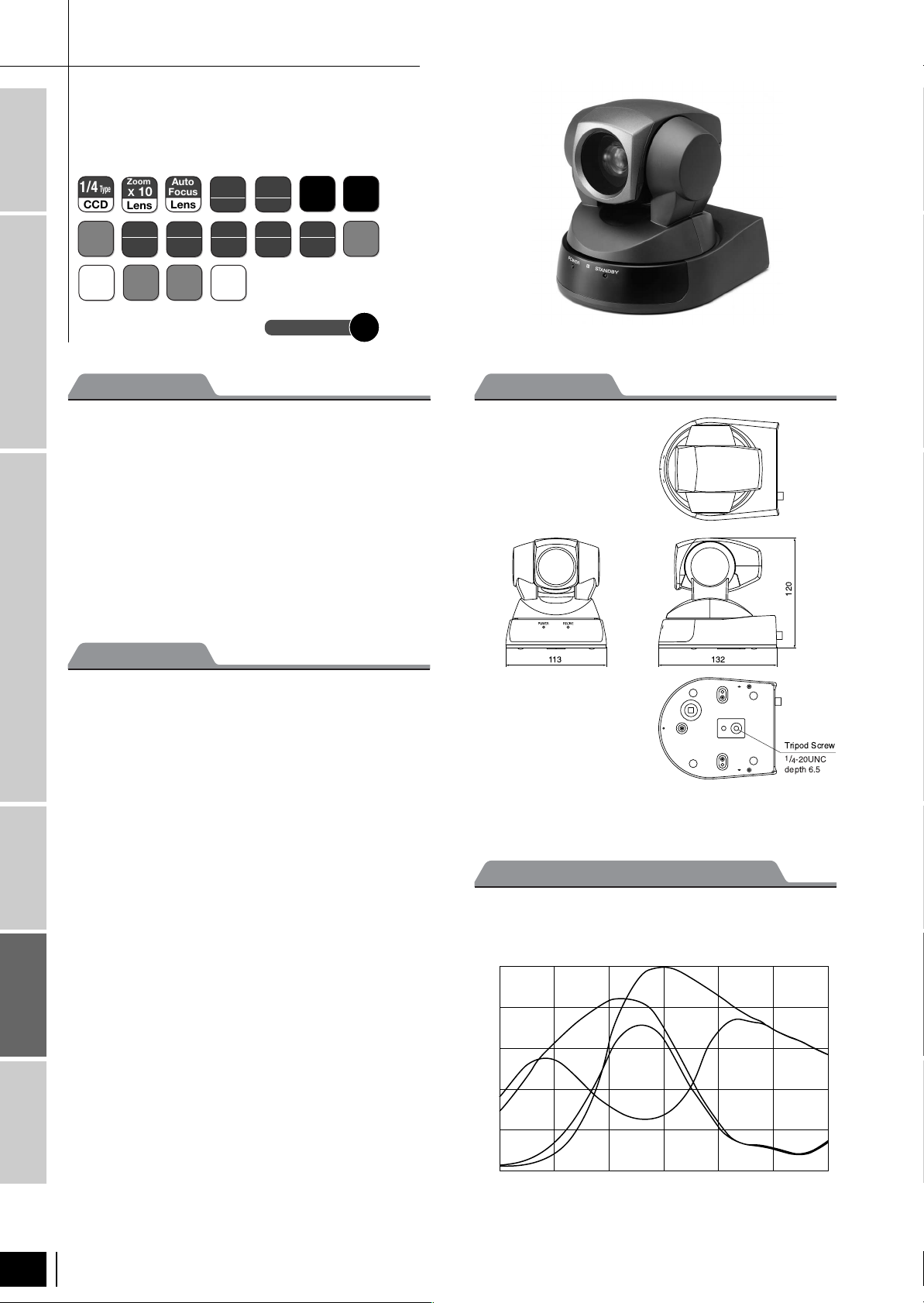
The EVI-D100/D100P is a CCD camera module that
Color Model
combines a newly developed high-speed pan/tilt function
with a wide angle zoom lens, to offer pan/tilt/zoom in one
package. From the 65-degree wide angle (horizontal), 40x
zoom (optical 10x) is possible. In addition, the camera
features a direct drive mechanism that achieves high-speed
operation that is three times faster than other Sony models
Intelligent
and is significantly quieter. Furthermore, it is equipped with
a wide variety of functions such as digital effects, electronic
slow shutter, precise remote setting and control, etc. More
than ever, this camera is ideal for remote monitoring.
Zoom
Type
X
Lens
ATW
Balance
E-Zoom
Outline
10
White
X
4
Auto
Focus
Lens
***
AUTO
White
Balance
RS232C
Control
VBS
Output
One-Push
White
Balance
Power
Save
*
Long
Y/C
Exposure
Output
Fixed
Manual
White
Balance
Balance
Connection Diagram
White
Normal
Shutter
PTZ
Pan/Tilt/
Zoom
P113
Dimensions
IEEE1394
Features
Digital Interface
■
High-speed silent direct drive mechanism
■
40x zoom (10x (optical), 4x (digital))
■
Equipped with a wide-range zoom lens: Maximum field
angle 65-degree
■
Minimum illumination of the object: 3.5 lx at
(1/60 sec, F1.8, 50 IRE)
Camera Link compatible
■
Electronic automatic slow shutter correspondence
■
Various white balance correspondences
■
Various digital effect functions such as horizontal flip and
still image
■
Auto-sleep function
■
Preset position, battery backup function
■
Precise control through VISCA Protocol
Accessories
■
Supporting EVI-D30 emulation mode
■
Infrared remote commander and AC power adaptor
supplied
* “VISCA” is a registered trademark of Sony Corporation
Color PTZ Model
Unit: mm
Spectral Sensitivity Characteristics
●EDV-D100/D100P
(Typical Values)
Relative sensitivity
1.0
0.8
Cy
0.6
0.4
0.2
Ye
G
Mg
Color Camara Block
108
EVI-D100/D100P
0
400 450 500 550
Wavelength (nm)
600 650 700
Page 2
Location and Function of Parts and Controls
⑦
21
ON
⑥⑤
Front
③
③
④
④
①
①
②
②
Non-TV Format B/W Model
TV Format
Rear
⑤
① ④
⑥
②
⑦
③
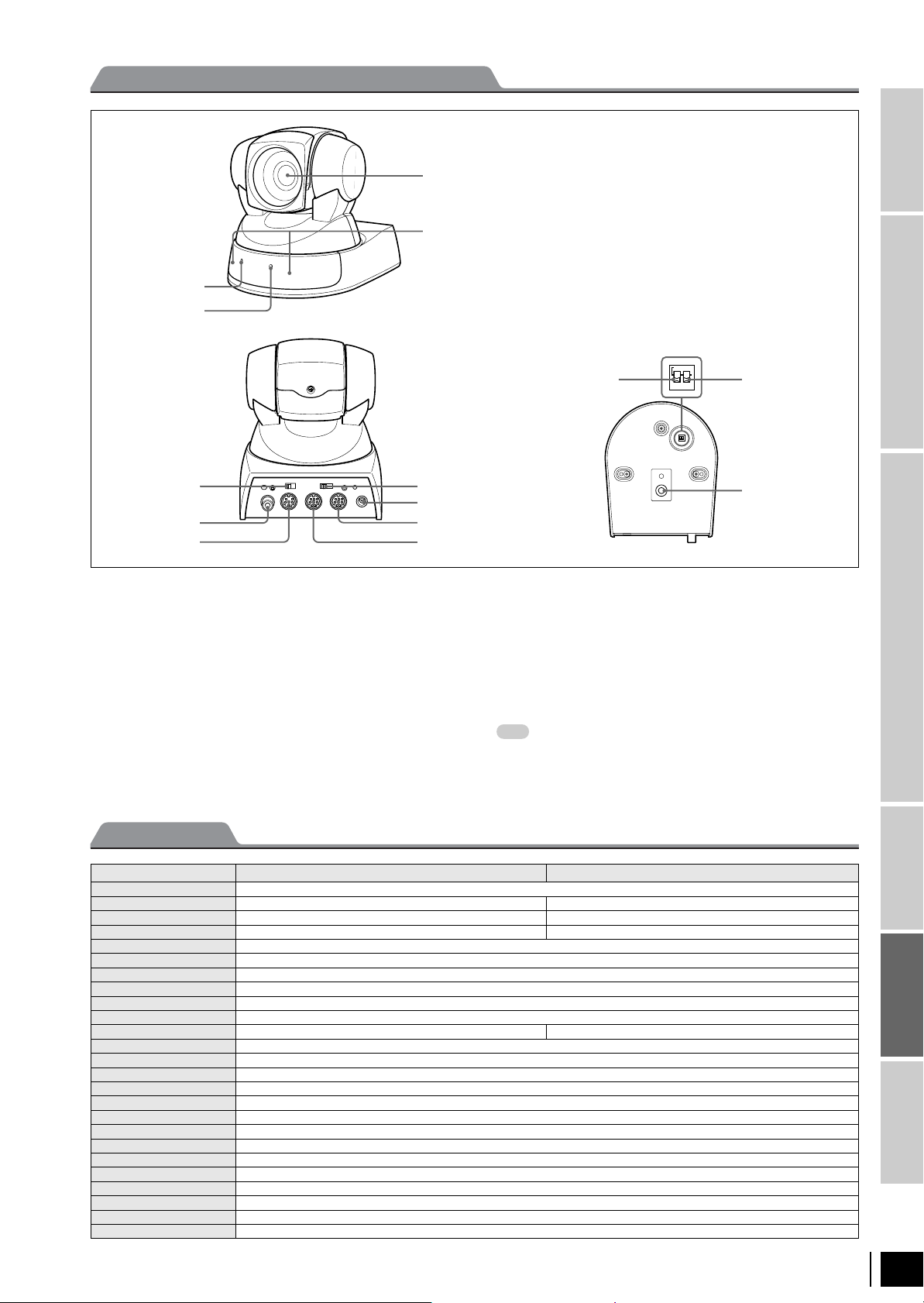
① POWER lamp
② STANDBY lamp
③ Lens
④ Reference holes (at the bottom)
⑤ BACKUP switch
⑥ VIDEO jack
⑦ S VIDEO jack
⑧ IR SELECT switch
⑨ DC IN 12 V jack
⑩ VISCA OUT jack
⑪ VISCA IN jack
⑧
⑤
⑨
⑥
⑩
⑦
⑪
Bottom
⑫⑬
⑭
⑫ IR SELECT switch
Set this switch to ON to allow the camera output signals
transmitted from the Remote Commander to the Color Video
Camera via the VISCA OUT jack to be output.
When you don’t intend to do so, set it to OFF.
⑬ D30/D31 mode switch
Set this switch to ON to enable you to operate the Color Video
Camera using the VISCA commands for the EVI-D30/D31.
When you don’t intend to do so, set it to OFF.
Note
You cannot use some of the commands of the EVI-D30/D31
even if you set this switch to ON.
⑭ Tripod hole
Color Model
Intelligent
Digital Interface
IEEE1394
Camera Link compatible
Specifications
Image device 1/4 type IT CCD
Signal system NTSC PAL
Effective picture elements 768 (H) x 494 (V) 752 (H) x 582 (V)
Effective lines 470 TV lines (wide end) 460 TV lines (wide end)
Lens 10x zoom, f=3.1 to 31, F1.8 to F2.9
Digital zoom 4x (40x with optical zoom)
Horizontal angle of view 6.6 to 65 degrees
Minimum object distance 100 mm (Wide end), 600 mm (Tele end)
Minimum illumination 3.5 lx (F1.8) (50 IRE)
Auto exposure Auto/Manual/Priority AE, Exposure compensation, Back light Compensation
Shutter speed 1/4 to 1/10,000 s 1/4 to 1/10,000 s
White balance Auto/ATW/Manual/One Push/3200K/5800K
Digital effects Pastel/Neg.Art/Sepia/Black & White/Solarize/Mosaic/Slim/Stretch/Still/Flash/Lumi/Trail
S/N Ratio More than 50 dB
Pan/tilt Horizontal ± 100 degrees (Max speed 300 degrees/s), Vertical ± 25 degrees (Max speed 125 degrees/s)
Position preset 6 positions
Control terminal RS-232C (8-pin mini DIN) control (VISCA)/RS-422 (9-pin) control (VISCA), baud rate: 9.6 Kb/s, 38.4 Kb/s
Video output VBS, Y/C
Power requirement DC 10.8 to 13.0 V
Power consumption Max. 13.2 W (at 12 Vdc)
Operating temperature 0 to 40 ºC
Storage temperature -20 to +60 ºC
Dimensions (W x H x D) 113 x 120 x 132 mm
Mass 860 g
Supplied accessories AC adaptor (1), IR Remote Commander unit (1), Velcro tape (1), Operating instruction (1)
EVI-D100 EVI-D100P
EVI-D100/D100P
Accessories
Color PTZ Model
Color Camara Block
109
Page 3
Connector Pin Assignments
Non-TV Format
B/W Model
● EVI-D100/P Windows D-Sub 9 pin
1. DTR
2. DSR
3. TXD
4. GND
5. RXD
6. GND
7. IR OUT
8. N.C.
1. CD
2. RXD
3. TXD
4. DTR
5. GND
6. DSR
7. RTS
8. CTS
9. RI
TV Format
Color Model
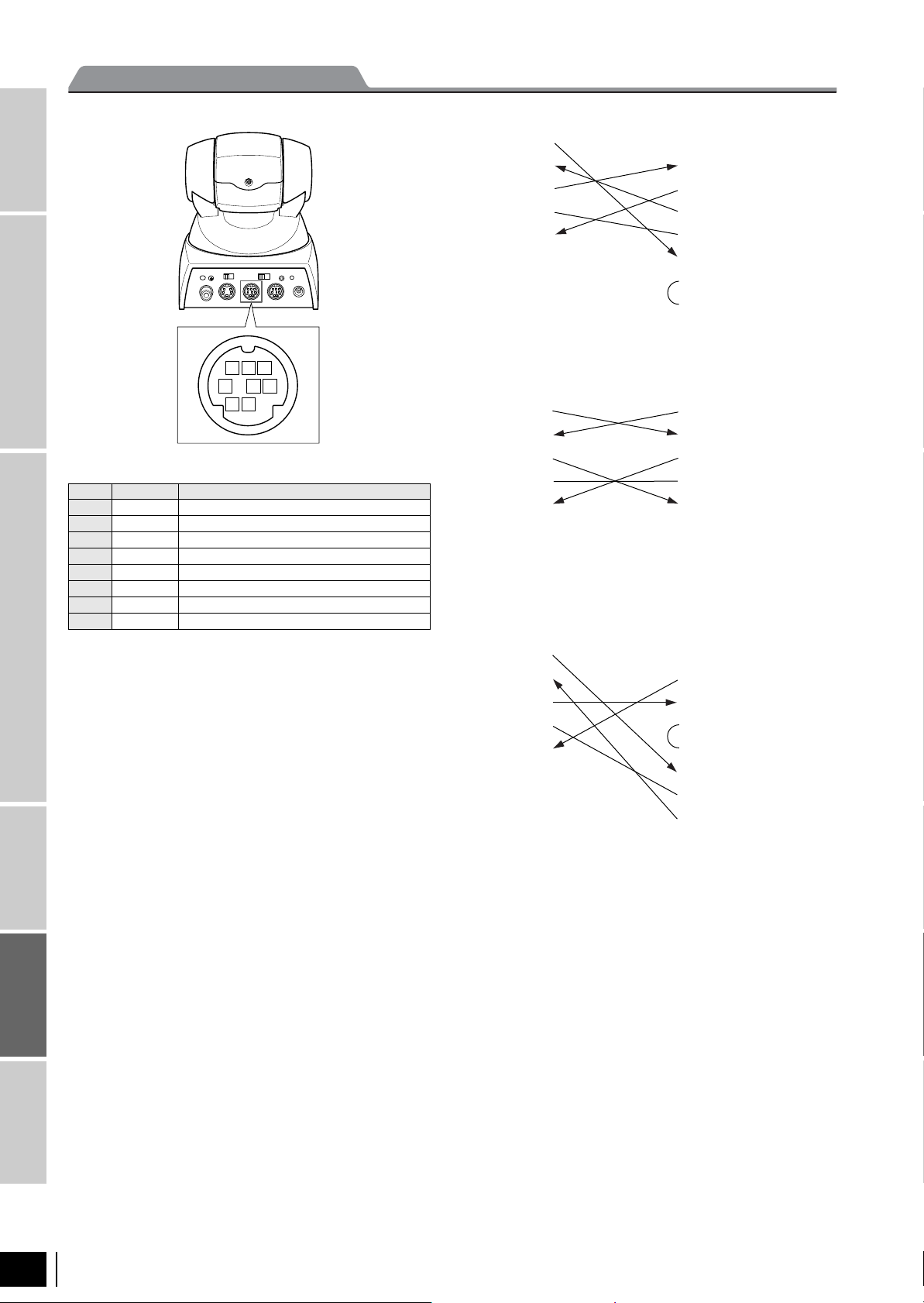
No Pins Signals
1 DTR DataTransmission Ready (OUTPUT)
2 DSR Data Set Ready (INPUT)
Intelligent
IEEE1394
Digital Interface
Camera Link compatible
3 TXD Transmit Data (OUTPUT)
4 GND Ground
5 RXD Receive Data (INPUT)
6 GND Ground
7 IR OUT IR Commander Signal (OUTPUT)
8 N.C. No Connection
IR OUT outputs the signals of the Remote Commander at 0 to 5 V when
the IR OUT switch is set to ON. When the switch is set to OFF, signals
input to the VISCA IN jack are output through the VISCA OUT jack.
8 7 6
5 4 3
2 1
VISCA IN
● EVI-D100/P EVI or Macintosh
1. DTR
2. DSR
3. TXD
4. GND
5. RXD
6. GND
7. IR OUT
8. N.C.
● EVI-D100/P Windows D-Sub 25 pin
1. DTR
2. DSR
3. TXD
4. GND
5. RXD
6. GND
7. IR OUT
8. N.C.
1. DTR
2. DSR
3. TXD
4. GND
5. RXD
6. GND
7. OPEN
8. OPEN
1. FG
2. TXD
3. RXD
4. RTS
5. CTS
6. DSR
7. GND
20. DTR
Accessories
Color PTZ Model
Color Camara Block
110
EVI-D100/D100P
Page 4
Initial Values and Backup
POWER
CAMERA SELECT
1
23
AUTO
POSITION
HOME
RM-EV100
RESET
PRESET
STD REV
BACK LIGHT
MANUAL
FAR
FOCUS
NEAR
W
T
W
T
123
456
PAN-TILT
SLOW FAST
ZOOM
L/R
DIRECTION SET
PAN-TILT
RESET
DATA SCREEN
⑧
⑨
⑩
②
⑦
⑥
①
⑤
③
④
The “Initial mode” column shows the setting values at the time of
factory shipment.
A circle ( ) in the Backed up/Not backed up column indicates that
the setting is stored in the camera if the power is turned OFF while
the BACKUP switch located on the back side of the camera is ON.
An “X” indicates that the setting data is not stored in the camera.
Backed up/Not backed
Category Mode/Position Initial values
Pan/Tilt Pan/Tilt Position Home position
Pan/Tilt Limit Position
movable-range maximum
Zoom Zoom Position Wide end
Digital Zoom On/Off On
Focus Focus Mode Auto/Manual Auto
AF Sens High/Low High
Focus Position —
Near Limit Near end
WB WB Mode Auto
R/B Gain —
AE AE Mode Full Auto
Slow Shutter Auto/Manual
Manual
Shutter Position —
Iris Position —
Gain Position —
Bright Position —
ExpComp On/Off Off
ExpComp Position ±0
Back Light On/Off Off
Aperture Aperture Gain 5
Effect Wide Mode Off
LR Reverse On/Off Off
Freeze On/Off Off
Picture Effect Mode Off
Digital Effect Mode Off
Digital Effect Level 0
OSD Datascreen On/Off Off
IR IR_Receive On/Off On
IR_ReceiveReturn On/Off Off
AutoPowerOff Auto Power Off Timer 0
Memory Position Preset Data —
VISCA VISCA Address 1 ✕
up ( : Backed up,
✕
: Not backed up)
✕
✕
✕
✕
✕
✕
✕
1)
1)
1)
1),2)
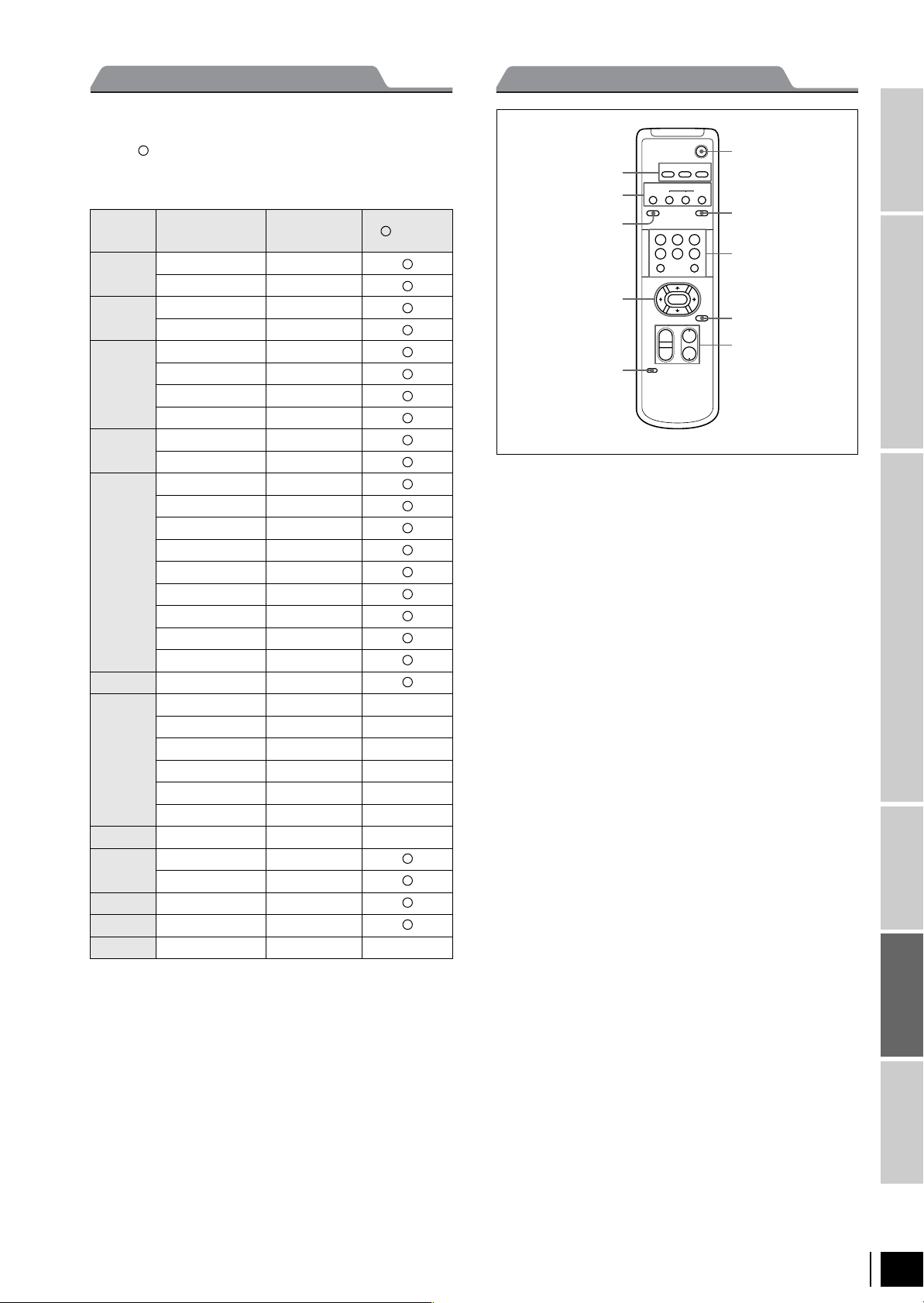
Remote Commander
① CAMERA SELECT buttons
② FOCUS buttons
AUTO button
FAR button
NEAR button
MANUAL button
③ DATA SCREEN button
④ PAN-TILT button
Arrow buttons
HOME button
⑤ L/R DIRECTION SET button
⑥ POWER switch
⑦ BACK LIGHT button
⑧ POSITION buttons
Numeric buttons (Button 1 also works as the STD button. Button
2 also works as the REV button.)
PRESET button
RESET button
⑨ PAN-TILT RESET button
⑩ ZOOM buttons
SLOW T button
SLOW W button
FAST T button
FAST W button
Non-TV Format B/W Model
TV Format
Color Model
Intelligent
Digital Interface
IEEE1394
Camera Link compatible
Accessories
Color PTZ Model
1) The data items are backed up when the power is turned OFF (standby
mode) using a VISCA command or remote control, regardless of
whether the BACKUP switch is ON or OFF.
2) When the camera is in D30/D31 mode, the VISCA address is backed up.
EVI-D100/D100P
Color Camara Block
111
 Loading...