

Page 1
S OIVY
3-759-138-22 (1)
Compact Disc Compact Player
D-826K
Operating Instructions
Beforeoperatingthe unit, pleasereadthis manualthoroughlyand
retain it for future reference.
Owner's Record
The model number and the serial number are located at the bottom.
Record the serial number in the space provided below. Refer to
thesenumberswheneveryoucall uponyourSonydealerregarding
this product.
Model No. D-826K Serial No.
DIGITAL AUDIO
Discman
0 1994 by Sony Corporation
Page 2

WARNING
To prevent fire or shock hazard, do not expose the unit
to rain or moisture.
To avoid electrical shock, do not open the cabinet.
Refer servicing to qualified personnel only.
CAUTION
The use of optical instruments with this product will increase eye hazard.
INFORMATION (For the Customers in U.S.A.)
This equipment has been tested and found to comply with the limits for a Class B digital
device, pursuant to Part 15 of the FCC Rules. These limits are designed to provide
reasonable protection against harmful interference in a residential installation. This
equipment generates, uses, and can radiate radio frequency energy and, if not installed
and use in accordance with the instructions, may cause harmful interference to radio
communications. However, there is no guarantee that interference will not occur in a
particular installation. If this equipment does cause harmful interference to radio or
television reception, which can be determined by turning the equipment off and on, the
user is encouraged to try to correct the interference by one or more of the following
measure:
— Reorient or relocate the receiving antenna.
— Increase the separation between the equipment and receiver.
— Connect the equipment into an outlet on a circuit different from that to which the
receiver is connected.
— Consult the dealer or an experienced radi0/TV technician for help.
You are cautioned that any changes or modifications not expressly approved in this
manual could void your authority to operate this equipment.
For the Customers in Australia
The supply cord of the AC power adaptor cannot be replaced; if the cord is damaged.
the AC power adaptor should be discarded.
2
Page 3

For the Customers in the United Kingdom
This Compact Disc player is classified as a
CLASS 1 LASER PRODUCT
LUOKAN 1 LASERLAITE
KLASS 1 LASERAPPARAT
CLASS 1 LASER product.
The CLASS 1 LASER PRODUCT label is
located on the bottom exterior.
For the Customers in Canada
THIS APPARATUS COMPLIES WITH THE CLASS B LIMITS FOR RADIO NOISE
EMISSIONS SET OUT IN RADIO INTERFERENCE REGULATIONS.
Table of Contents
Precautions
Location and function of controls ..................................................................................
Power sources .. 8
Using in a car.
. 12
Disc playing .
Various playing modes
Connecting with other equipment .............
Maintenance ............ ..
. 32
. 33
Specifications • •„ • • • ..
Troubleshooting guide .
. 36
4
6
18
25
34
Page 4

Precautions
On safety
• As the laser beam used in this compact
disc player is harmful to the eyes, do
not attempt to disassemble the casing.
Refer servicing to qualified personnel
only.
• Do not put any foreign objects in the
safety slot inside the disc compartment.
If you do so, the laser beam may come
out when the lid is opened.
• Do not put any foreign objects in the
DC IN 4.5 V (external power input) jack.
• Should any solid objects or liquid fatl
into the unit, disconnect the power
supply and have the unit checked by
qualified personnel before operating it
any further.
On power sources
• Use the rechargeable battery pack (not
supplied), batteries (not supplied),
house current or car battery.
• For AC operation: Use the AC power
adaptor supplied with this unit or the
AC-E45HG AC power adaptor (not
supplied). Do not use any other AC
power adaptor as it may cause
malfunction.
• For car battery operation: Use the
supplied car battery cord and car
connecting pack or the car mount arm
CPM-300PK (not supplied) or mount
plate CPM-300P (not supplied) and car
connecting pack.
• If the unit is not going to be used for a
long period of time, be sure to
disconnect the power supply (AC power
adaptor, rechargeable battery pack,
batteries, or car battery cord) from the
unit. To remove the AC power adaptor
from the wall outlet, grasp the adaptor
itself; never pull it by the cord.
• The nameplate indicating operating
voltage, power consumption, etc. is
located on the bottom exterior. (AC
power adaptor for Middle East only.)
On operation
• Since the CD system offers a wide
dynamic range, the peaks of the high
level inputs are recorded with high
fidelity, and the noise level is very low.
Do not turn up the volume while
listening to a part of disc with no
audio signals or very low level
inputs. If you do so, the speakers may
be damaged when the peak level of the
sound is played.
• The lens on the disc table should be
kept clean. Do not touch the lens or
poke at it. If you do so, the lens may be
damaged and the unit will not operate
properly.
Page 5

On installation
• Never install the unit where it would be
subject to:
— heat sources such as radiators or
airducts.
direct sunlight.
— excessive dust.
moisture or rain.
— mechanical vibration or shock.
— unleveled surface.
• Do not put the unit on a dashboard nor
leave it in a car parked in sunlight since
the temperature may rise excessively.
• When the unit is used with the AC
power adaptor, do not wrap the unit in a
cloth, blanket, etc. If you do so, the
temperature inside and outside the unit
may rise considerably, resulting in
malfunctioning of the unit or serious
accidents.
• Do not put any heavy object on top of
the unit. The unit and disc may be
damaged.
• If the unit is brought directly from a cold
to a warm location, or is placed in a
very damp room, moisture may
condense on the lens inside the unit.
Should this occur, the unit will not
operate. In this case, remove the disc
and leave the unit in a warm place for
several hours until the moisture
evaporates.
• For the unit to operate at its best, it
should not be subjected to
temperatures below 50 C (410 F) or
above 350 C (950 F).
Notes on headphones
• Road safety
Do not use headphones while driving,
cycling, or operating any motorized
vehicle. It may create a traffic hazard
and is illegal in some areas. It can also
be potentially dangerous to play your
headsets at high volume while walking,
especially at pedestrian crossing. You
should exercise extreme caution or
discontinue use in potentially
hazardous situations.
• Preventing hearing damage
Avoid using headphones at high
volume. Hearing experts advise
against continuous, loud and extended
play. If you experience a ringing in your
ears, reduce the volume or discontinue
use.
• Caring for others
Keep the volume at a moderate level.
This will allow you to hear outside
sounds and to be considerate to the
people around you.
If you have any questions or problems
concerning your unit, please consult your
nearest Sony dealer.
Page 6

Location and Function of Controls
Disc window
RESUME switch
PLAY MODE button
OPEN button
DSP* button
HOLD switch
SURROUND button
REPEAT/ENTER button
Display window
Normally the track number and the
elapsed playing time are shown.
When using the unit on the power
supplied through the DC IN 4.5 V
jack, the window witl be illuminated.
Lens
The laser beam is emitted
from this point to pick-up
signal on the disc.
STOP/DISPLAY
OFF button
VOLUME control
For listening through
headphones.
Q (headphones)/
REMOTE jack
selector
"I (play/pause) button
buttons
Disc guide light
When using the unit on the power
supplied through the DC IN 4.5 V
jack, the light will be tumed on.
Page 7

Digital Signal Processing
Automatic Votume Limiter System
Automatic Music Sensor
Electronic Shock Protection
Battery compartment
LINE OUT (output) jack
(stereo minijack)
DC IN 4.5 V (external
power input) jack
switch
ILLUMINATION switch
To change the illumination colors
Slide the ILLUMINATION switch to
GREEN or AMBER. When the unit is in
the DSP or SURROUND mode, the DSP
or SURROUND button is illuminated with
oooosite color to the other buttons.
DSP or
SURROUND button
amber
green
Other buttons
green
amber
Page 8
Power Sources
Using with Rechargeable Battery
Use the BP-DMIO rechargeable battery
(not supplied).
Attaching the rechargeable battery
Bottom
Charging the battery
to DC IN 4.5 V
Connect the supplied AC power adaptor
when the unit is in the stop mode.
When charging starts, CHG indication
appears in the display window and the
segments of the '0001mark lights up one
by one. They disappear when charging
is completed. After charging, disconnect
the AC power adaptor.
When the unit is not to be used with the
rechargeable battery for a long period of
time, remove it from the unit.
8
When using the rechargeable battery for
the first time, make sure to charge it.
Open the lid and insert the rechargeable battery
as illustrated beside the battery compartment.
to a wall outlet
AC power adaptor (supplied)
Play time on rechargeable battery
Charging
time*
Max. 2 Approx. 2.5 Approx. 2
hours hours hours
(When the unit is used on a flat and
stable place.)
• The charging time varies depending on how
the rechargeable battery is used.
The remaining power of the rechargeable
battery is indicated in the display window
as shown on page 24.
ESP: OFF
Playing time
' ESP: ON
Page 9
Rechargeable battery life
If the operating time reduces
approximately by half even if you charge
it fully, replace it with a new BP-DMIO
(not supplied). You cannot use BP-
DMI battery pack (not supplied).
Notes on the rechargeable battery
(Ni-Cd battery)
• Be sure to use the supplied AC power
adaptor.
• Remember to recharge the battery pack
after every use. Leaving the
rechargeable battery discharged may
shorten its life.
• When charging the battery for the first
time or after being unused for a long
time, playing time may reduce. In this
case, charge and discharge it several
times.
• Store the battery in a temperature
between 50 C (410 F) and 350 C (950 F)
to make it work at its best.
• Never throw the battery into fire.
• If any metat object touches the metal
portion of the battery pack, excessive
heat may be generated and is
dangerous. When carrying the battery
pack, do not put it in a pocket together
with a metal object such as a key
holder.
• Do not disassemble the battery. If the
electrolyte inside the battery should
come into contact with cloth or skin,
wash the contaminated objects with
water immediately.
The unit may become warm
The bottom of the unit may be warm
during operation, which is normal. If it is
unusually warm, disconnect the AC
power adaptor and consult your Sony
dealer.
Page 10

Power Sources
Using with Batteries
Insert two size AA (LR6) alkaline
batteries (not supplied) according to the
O and @ indications in the battery
compartment.
Bottom
Playing time on alkaline batteries
When the unit is used on a flat and stable
place, approx. 6.5 hours (when the ESP
system is not active), and approx. 5
hours (when the ESP system is active) of
playback is possible.
The remaining power of the battery is
indicated in the display window as shown
on page 24.
10
Notes on batteries
• Insert batteries with correct polarity.
• Do not use old battery together with a
new one or different types of batteries
together.
• If the electrolyte inside the battery
should leak, wipe the contaminated
parts in the battery compartment with a
cloth and replace the old batteries with
new ones.
• Do not charge the batteries.
• When the unit is not to be used for a
long period of time, remove the
batteries.
Page 11

Using on House Current
Connect the supplied AC power adaptor
in the same way as for charging the
rechargeable battery.
When the unit is not to be used, be sure
to disconnect the AC power adaptor.
For the customers whose unit is
supplied with an AC plug adaptor
Use the AC plug adaptor if the AC power
adaptor does not fit the outlet.
Note on the AC power adaptor
Use only the supplied AC power adapor
(for DC 4.5 V, unified polarity type) or the
AC-E45HG AC power adaptor (not
supplied). If you use any other AC power
adaptors, the unit may be damaged. Do
not use the AC power adaptor supplied
with other "Discman" CD compact
players equipped with DC IN 6 V or 9 V
jack, nor an optional AC power adaptor
for DC 6 V or 9 V.
Polarity of the plug
(Unified polarity type)
Page 12
Using in a Car
You can use this unit with a car cassette
deck by connecting it with the supplied
car battery cord and car connecting pack.
Installation
Precautions
Do not install the unit in a location which:
— interferes with your driving.
— may be dangerous for passengers.
— interferes with the glove box lid or
ashtray when opening it.
— is near a heat source.
— is subject to direct sunlight,
excessive dust, or moisture
(especially on a dashboard).
Car Battery Cord
DC plug (4.5 Ve•G0)
Please understand that we will not incur
any obligations for troubles caused by
incorrect installation.
Spiral tube
12
Car battery cord
Velcro tapes (2)
Page 13

The unit can be installed directly on a flat
surface, such as a console box, with the
supplied Velcro tapes.
Car Connecting Pack
Stereo miniplug
Cross talk adjust switch
Notes
• Select the position of the cross talk
adjust switch to obtain the optimum
sound quality.
Bottom of the unit
Console box
Dummy tape
Head protective film
• Do not remove the head protective film
(metal path).
• Do not pull out or contaminate the
dummy tape.
Page 14

Using in a Car
When you have a car cassette deck with
a tape head on the right side, you can
In other cases, you need to change the
side where the cord exits.
use the car connecting pack as it is.
I Remove thecordcover.
2 Change thecordtotheappropriatesideaccordingtoyourcarcassettedeck,
and replace the cover again.
At first, fit this side.
Car cassette deck
Cord cover
Coin
with a tape head at
the left side
Cord
Car cassette deck
with a tape head
inner
You can run
the cord through
this side.
Cord
Notes
• You cannot use the car connecting
pack with some car cassette deck.
• When you replace the cord cover
removed, be sure to fit it firmly.
Page 15

Connection
To listen to the CD compact player
through the car cassette deck, make
connections as shown.
Car connecting pack
To O/
REMOTE
To route the cords, use the supplied
spiral tube.
Car cassette deck
Discma•u
to a cassette
insertion door
to a cigarette
lighter socket
to DC IN 4.5 V
Car battery cord
Notes
• Route the cords so that they do not
interfere with your driving.
• Never insert the cord end of the car
connecting pack into the cassette
insertion door. Otherwise, the cord
may break or the car cassette deck
may be damaged.
• To disconnect the cord from the CD
player, pull it out by grasping the plug.
Never pull the plug out by the cord.
• Set the AVLS selector to OFF when
you use the CD player in a car.
Page 16

Using in a Car
Operation
1 Insertthecarconnectingpackinto
the cassette deck.
2 Setatapeselectorto the normal
(TYPE l) position and DOLBY NR,
REPEAT, and BLANK SKIP
switches to OFF if they are
equipped.
3 Startplayback.
If your car cassette deck has a
reversible playback head, make sure
that it is set in the normal (forward)
di rection.
4 Press ontheunitto startCD
playback.
Adjust the volume.
If no sound is heard or the car connecting
pack is ejected, change the direction of
playback on the car cassette deck.
To remove the car connecting pack,
press the (eject) button of the car
cassette deck.
Notes
• Unplug the unit from the cigarette
lighter socket when it is not in use.
Otherwise, it may drain the car battery.
• With some car cassette decks, you may
hear some rattling noise from the car
connecting pack. However, this is not a
sign Of malfunction.
• You can also connect the car
connecting pack to LINE OUT,
however, the SURROUND and beep
functions do not work.
When you turn off the engine
Even when the alkaline batteries are
installed in the unit, the unit will stop
operating when you turn off the engine of
the car (Switched ignition function). This
function is not available with every model
of car. In such a case, press to stop
operation.
Recommended accessories for
use in a car (not supplied)
Plate arm CPM-300A
Mount plate CPM-300P
Mount arm CPM-300PK (CPM-300A +
CPM-300P)
When you use the mount plate (CPM-
300P)
First, attach the car mount adaptor which
is supplied with CPM-300P to the mount
plate, then install the CD player.
16
Page 17

Installation with an optional unit
Car connecting pack (supplied)
to DC IN V
CPM-300A Plate arm (not supplied)
Fuse Replacement
Fuse
Plug end
If the unit does not operate, check the
fuse, if it is blown, replace it as follows:
1 Turn off the unit and remove the
cigarette tighter plug from the cigarette
lighter socket.
2 Remove the plug end by turning it
counterclockwise.
3 Remove the detective fuse from the
plug.
4 Insert the supplied spare fuse into the
plug.
5 Replace the plug end by turning it
clockwise.
Cigarette lighter Plug
to O/REMOTE
CPM-300P
Mount plate
(not supplied)
Notes on fuse replacement
• Be sure to use the supplied spare fuse.
Never use a piece of wire as a
substitute for the fuse.
• If the fuse is blown again after replacing
it, contact your nearest Sony dealer. In
such a case. bring the supplied spare
fuse to the dealer with you.
to a car
cassette
deck
to a cigarette
lighter socket
Page 18
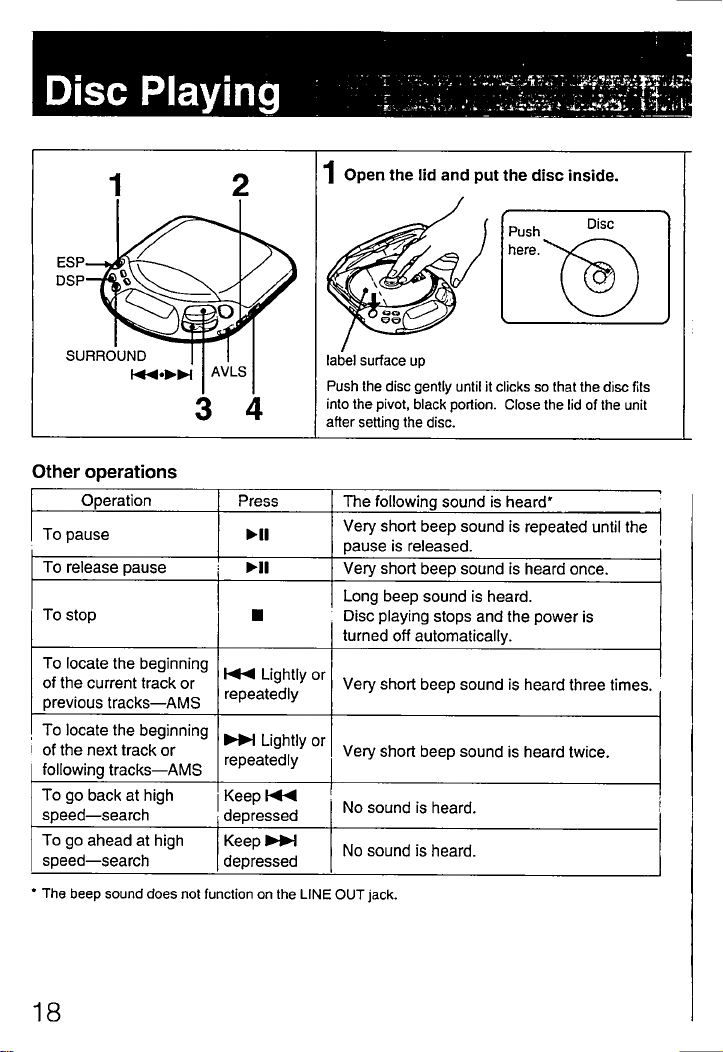
Disc Playing
Open the lid and put the disc inside.
label surface up
Push the disc gently until it clicks so that the disc fits
into the pivot. black portion. Close the lid of the unit
after setting the disc.
ESP
DSP
SURROUND
1
2
o
AVLS
Other operations
O eration
To pause
TO release pause
To stop
Press
The following sound is heard'
Very short beep sound is repeated until the
pause is released.
Very short beep sound is heard once.
Long beep sound is heard.
Disc playing stops and the power is
turned off automatically.
To locate the beginning
Of the current track or
previous tracks—AMS
To locate the beginning
Of the next track or
following tracks—AMS
To go back at high
speed—search
To go ahead at high
speed—search
• The beep sound does not function on the LINE OUT jack.
Lightly or
repeatedly
Lightly or
repeatedly
Keep
depressed
Keep
depressed
Very short beep sound is heard three times.
Very short beep sound is heard twice.
NO sound is heard.
No sound is heard.
Push
here.
Disc
18
Page 19

2 Connect headphones.
to
REMOTE
Stereo
headphones
(not supplied)
3 Press"I.
A short beep sound is heard
and play starts.
4 Adjustthevolume.
VOLUME
• The unit pauses at the beginning of the
located track when you press lightly
or in the pause mode.
• During the program play, the AMS
operates in the programed order.
• Each time you press the unit
locates the current and the previous
tracks. Each time you press the
unit locates the next tracks and stops at
the last track.
When you press u, disc playing will stop
and after one minute the power will be
turned off automatically.
When using the unit with the power
supply through the DC IN 4.5 V jack, the
number of the tracks of the disc and total
playing time will be indicated, the back
light, disc guide light and around the
OPEN button will be lit for about one
minute. When using the unit with the
rechargeable battery or batteries, the
number of the tracks of the disc and total
playing time will be indicated. If you want
to turn off the indication and light just
after you press press it again.
To eliminate the beep sound
Do not connect any power sources.
While keeping pressed, connect the
power source (rechargeable battery,
alkaline batteries, or external power
sources). Now the beep sound is
eliminated and this condition remains as
long as the power source is connected.
About the headphones
You can use this unit with the stereo
headphones with stereo miniplug (not
supplied) or stereo headphones with
remote controller (not supplied).
19
Page 20

Disc Playing
To remove the disc
Pick up the disc, holding the edge, while
pressing the pivot gently as illustrated.
To play an 8 cm (3-inch) disc
You can play it without an adaptor.
20
Page 21
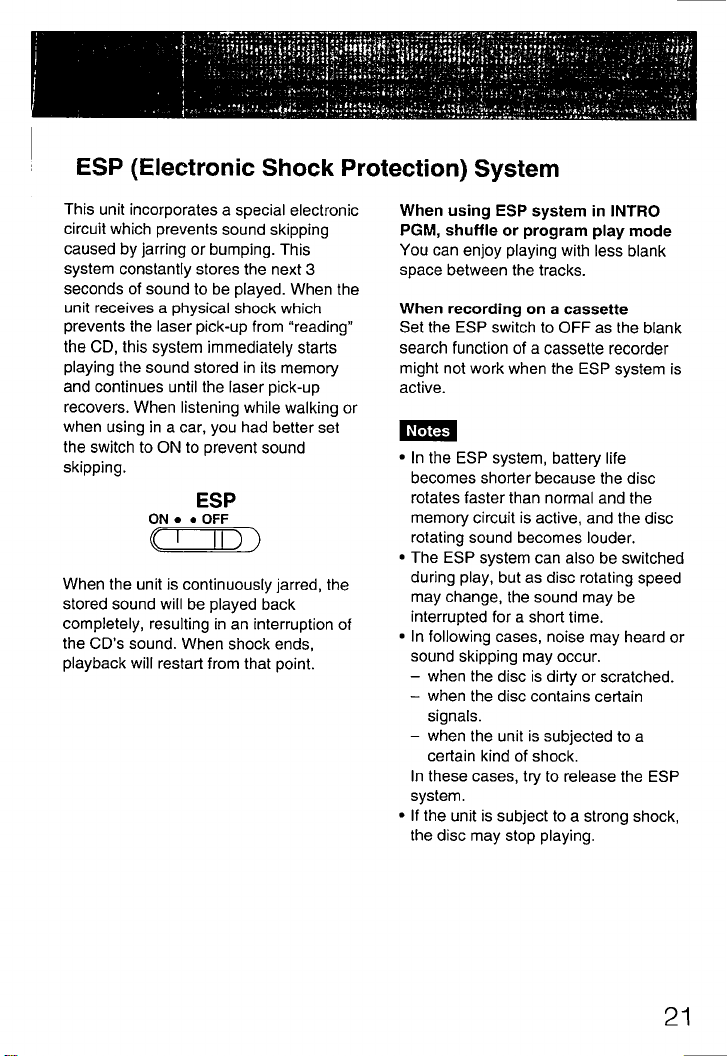
ESP (Electronic Shock Protection) System
This unit incorporates a special electronic
circuit which prevents sound skipping
caused by jarring or bumping. This
system constantly stores the next 3
seconds of sound to be played. When the
unit receives a physical shock which
prevents the laser pick-up from "reading"
the CD,this systemimmediatelystarts
playing the sound stored in its memory
and continues until the laser pick-up
recovers. When listening while walking or
when using in a car, you had better set
the switch to ON to prevent sound
skipping.
ESP
ON • • OFF
When the unit is continuously jarred, the
stored sound will be played back
completely, resulting in an interruption of
the CD's sound. When shock ends,
playback will restart from that point.
When using ESP system in INTRO
PGM, shuffle or program play mode
You can enjoy playing with less blank
space between the tracks.
When recording on a cassette
Set the ESP switch to OFF as the blank
search function of a cassette recorder
might not work when the ESP system is
active.
Notes
• In the ESP system, battery life
becomes shorter because the disc
rotates faster than normal and the
memory circuit is active, and the disc
rotating sound becomes louder.
• The ESP system can also be switched
during play, but as disc rotating speed
may change, the sound may be
interrupted for a short time.
• In following cases, noise may heard or
sound skipping may occur.
—when the disc is dirty or scratched.
when the disc contains certain
signals.
—when the unit is subjected to a
certain kind of shock.
In these cases, try to release the ESP
system.
• If the unit is subject to a strong shock,
the disc may stop playing.
21
Page 22

Disc Playing
How to Use DSP*
Select the function of the DSP button
according to the contents of your disc or
where to use the unit.
Each time you press the DSP button, the
DSP function changes as follows:
BASS *BASS < —VOCAL
Normal play CAR
(no indication)
BASS BASS —a: The bass sound
will be boosted more powerfully. BASS
is more effective than BASS g. If
you set the volume too high, the sound
may be cracked or distorted. If this
happens, turn down the volume.
VOCAL: Sound of the middle frequency
range is emphasized and human voice
becomes more audible.
CAR: Inaudible sound will be boosted for
better audibility. This is useful when
listening at noisy places.
• DSP: Digital Signal Processing
Notes
• The bass boost, or CAR effect may be
decreased according to the output level
of the recorded sound.
• While playing back the track with fast
tempo or the track with narrow dynamic
range, the CAR position may not give
efficient effect.
• DSP also works on the LINE OUT jack.
When listening through the external
speakers or when recording on the
cassette recorder, adjustment of DSP is
also possible.
• DSP is retained as long as the power is
connected.
22
Page 23

Enjoying Surround Effect
Press SURROUND.
sun
" " appears in the display
window. A rich and spacious effect will
be added to the original sound.
is more effective than
SUR
O)) " or
SUR
Notes
• The surround effect does not work on
SUR
the LINE OUT jack.
• When the SURROUND button is
pressed, the volume will be turned up.
Adjust the volume if necessary.
To Limit the Volume at a Moderate Level
The AVLS (Automatic Volume Limiter
System) selector allows you to limit the
maximum volume of your unit when
listening through headphones.
OFF.
• When the AVLS selector is set to either
position 1 or 2, the volume will be kept
at a moderate level, even if you attempt
to turn up the volume.
• When the AVLS selector is set to either
position I or 2, the playback sound may
be distorted or unstable according to
the music (especially bass boosted
part). If this happens, turn down the
volume.
• When the AVLS selector is turned off,
you will be abte to enjoy the full volume
capability of your unit.
Page 24
Disc Playing
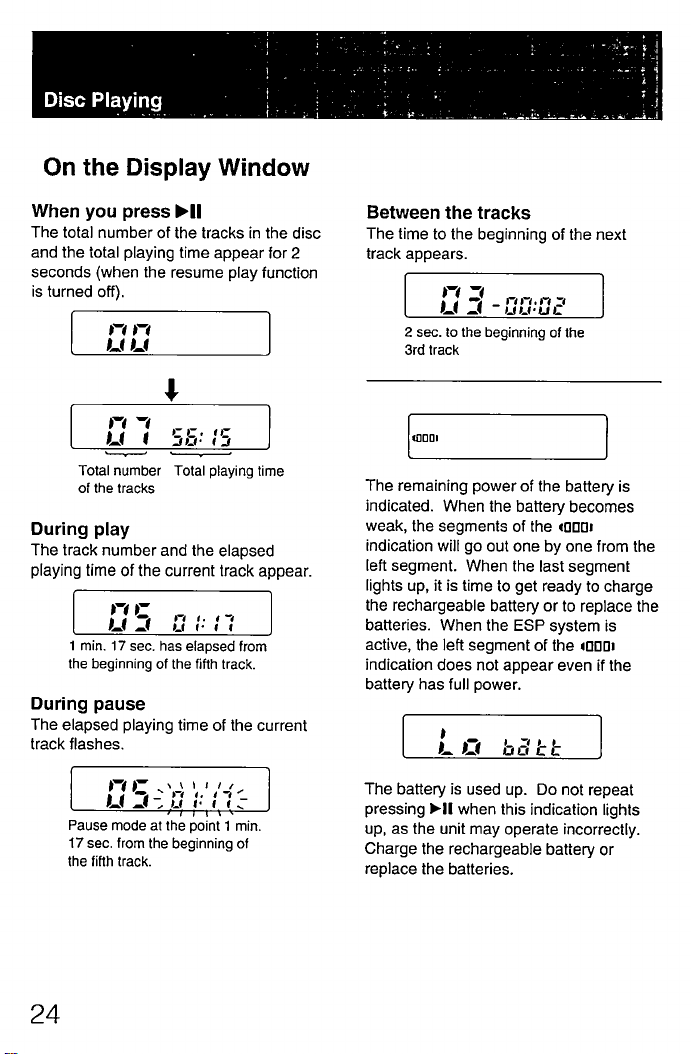
On the Display Window
When you press
The total number of the tracks in the disc
and the total playing time appear for 2
seconds (when the resume play function
is turned off).
Total number Total playing time
of the tracks
During play
The track number and the elapsed
playing time of the current track appear.
I min. 17 sec. has elapsed from
the beginning of the fifth track.
During pause
The elapsed playing time of the current
track flashes.
Pause mode at the point I min.
17 sec. from the beginning of
the fifth track.
Between the tracks
The time to the beginning of the next
track appears.
2 sec. to the beginning of the
3rd track
The remaining power of the battery is
indicated. When the battery becomes
weak, the segments of the (0001
indication will go out one by one from the
left segment. When the last segment
lights up, it is time to get ready to charge
the rechargeable battery or to replace the
batteries. When the ESP system is
active, the left segment of the 40001
indication does not appear even if the
battery has full power.
bdEE
The battery is used up. Do not repeat
pressing "I when this indication lights
up, as the unit may operate incorrectly.
Charge the rechargeable battery or
replace the batteries.
24
Page 25
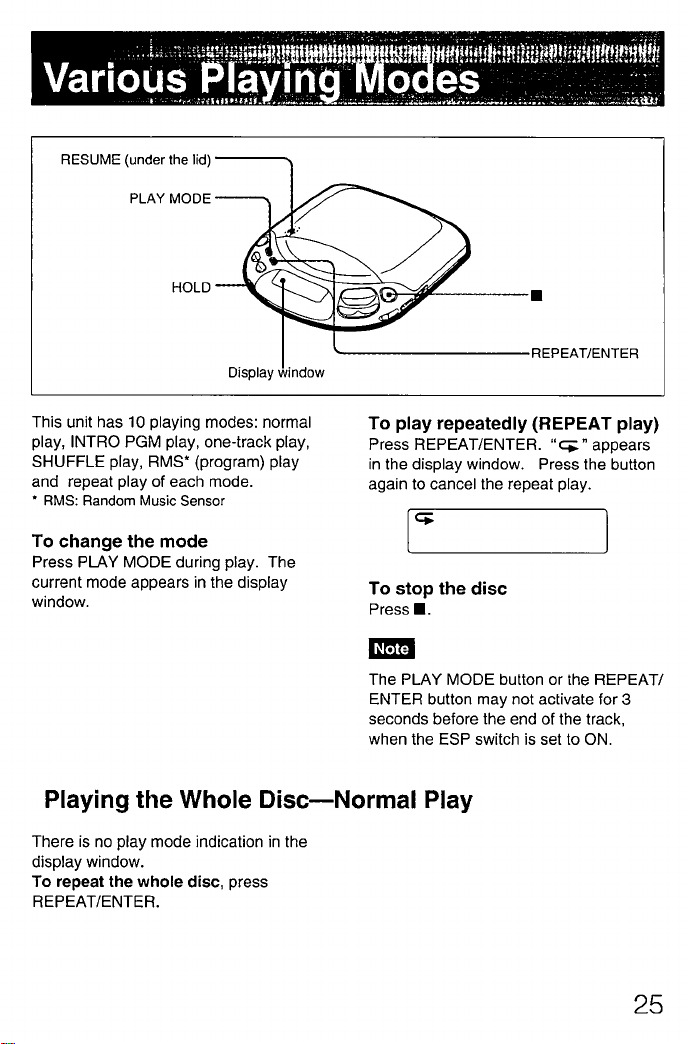
Various
RESUME (under the lid)
PLAY MODE
HOLD
Display window
This unit has 10 playing modes: normal
play, INTRO PGM play, one-track play,
SHUFFLE play, RMS* (program) play
and repeat play of each mode.
• RMS: Random Music Sensor
To play repeatedly (REPEAT play)
Press REPEAT/ENTER. "c; n appears
in the display window. Press the button
again to cancel the repeat play.
To change the mode
Press PLAY MODE during play. The
current mode appears in the display
window.
To stop the disc
Press
Note
The PLAY MODE button or the REPEAT/
ENTER button may not activate for 3
seconds before the end of the track,
when the ESP switch is set to ON.
Playing the Whole Disc—Normal Play
There is no play mode indication in the
display window.
To repeat the whole disc, press
REPEAT/ENTER.
REPEAT/ENTER
25
Page 26

Various Playing Modes
Playing the Desired Tracks after Listening to the
Beginning of All the Tracks—INTRO PGM Play
1 PressPLAYMODEduringplay
until "INTRO PGM" flashes slowly
in the display window.
2 Press"1.
"INTRO PGM" starts flashing fast and
the unit starts to play the first 15
(approximately) seconds of each
track from the first track.
3 During15secondsof play,press
REPEAT/ENTER if it is your
desired track to enter the track in
the program.
When it is not your desired track, do
not press any button during 15
seconds of play, or press to skip
the track.Select your desired tracks
in this way.
After the beginning of the last track is
played, "INTRO PGM stops flashing
and the selected tracks will be played
automatically in the order of the track
number of the disc.
To try the programing again
Press to go back during
programing. As the programing of the
tracks returned is canceled, select the
desired tracks from that point.
To repeat the programed tracks, press
REPEAT/ENTER while they are played.
To repeat the beginning of all the
tracks, press REPEAT/ENTER first and
then press PLAY MODE until "INTRO
PGM" flashes. Then press HI. If you
did not enter any tracks in the program,
the beginning of all the tracks will be
repeated.
To finish programing before hearing
through the disc, press HI. The
selected tracks are played.
26
Page 27
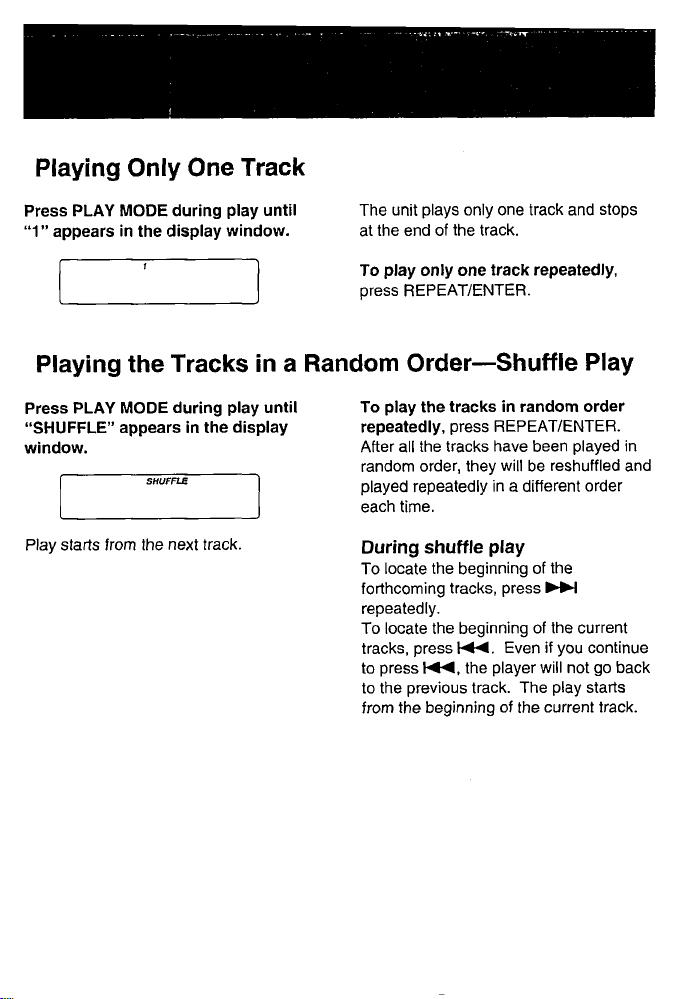
Playing Only One Track
Press PLAY MODE during play until
I appears in the display window.
The unit plays only one track and stops
at the end of the track.
To play only one track repeatedly,
press REPEAT/ENTER.
Playing the Tracks in a Random Order—Shuffle Play
Press PLAY MODE during play until
"SHUFFLE" appears in the display
window.
SHUFFLE
Play starts from the next track.
To play the tracks in random order
repeatedly, press REPEAT/ENTER.
After all the tracks have been played in
random order, they will be reshuffled and
played repeatedly in a different order
each time.
During shuffle play
To locate the beginning of the
forthcoming tracks, press
repeatedly.
To locate the beginning of the current
tracks, press Even if you continue
to press the player will not go back
to the previous track. The play starts
from the beginning of the current track.
Page 28

Various Playing Modes
Playing the Track in the Desired Order
—RMS* (program) Play
I PressPLAYMODEduringplay
until "RMS" flashes in the display
window.
2 Press or toselectthe
desired track.
-pRMS
Desired track The first track
number
You can program the tracks in the
desired order regardless Of their
track numbers.
3 PressREPEAT/ENTER".
The 2nd (next) track
4 Repeat steps2and3(upto 22
tracks).
If another track is memorized after 22
tracks have been memorized, the
first track will be cleared and the new
one will be memorized in its place.
5 Press>11.
"RMS" stops flashing and play starts.
To resume normal play, press PLAY
MODE again.
To repeat program play, press
REPEAT/ENTER.
• RMS: Random Music Sensor
When REPEAT/ENTER is pressed for more i
than one second, the total number and the
total playing timeof the progtamedtracks will
appear in the displaywindow while REPEAT/
ENTER is pressed.
If a disc contains 32 tracks or more and you
wish to programthe 32nd track or a track
after that or if the total playing time exceeds
100minutes,thetotal playingtime or the
programwill not bedisplayed
indication will appear instead.) However, it is
possibleto programsuch tracks,
28
Page 29
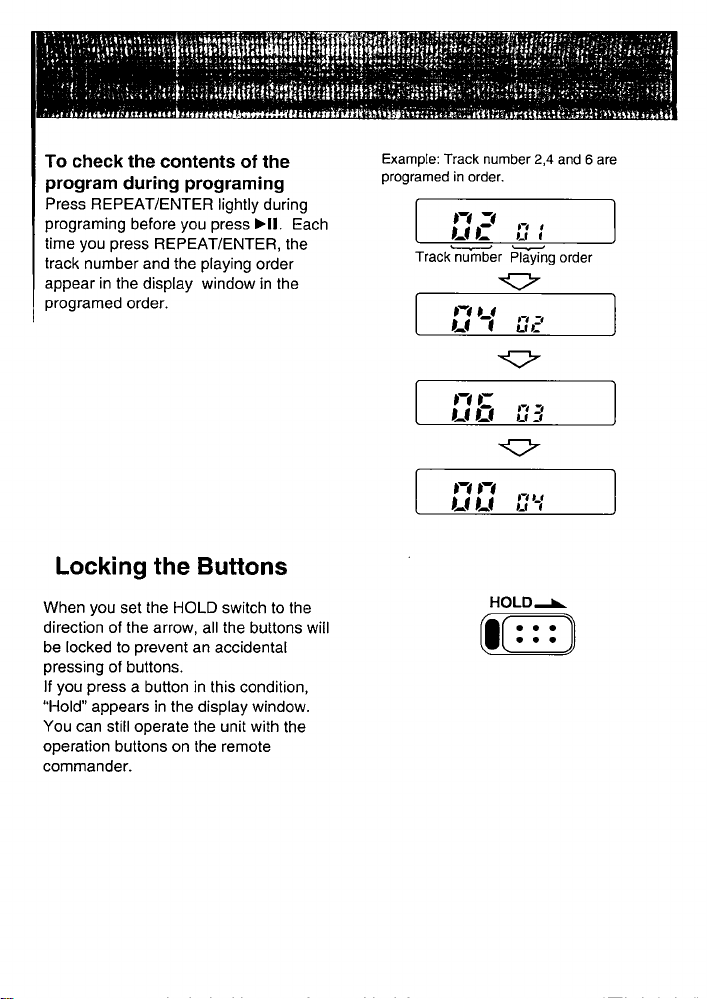
To check the contents of the
program during programing
Press REPEAT/ENTER lightly during
programing before you press HI. Each
time you press REPEAT/ENTER, the
track number and the playing order
appear in the display window in the
programed order.
Locking the Buttons
When you set the HOLD switch to the
direction of the arrow, all the buttons will
be locked to prevent an accidental
pressing of buttons.
If you press a button in this condition,
"Hold" appears in the display window.
You can still operate the unit with the
operation buttons on the remote
commander.
Example: Track number 2,4 and 6 are
programed in order.
Track number Playing order
HOLD—K
Page 30

Various Playing Modes
To Playfrom WhereYouHaveStopped—ResumePlayFunction
Set the RESUME switch to the ON
position. When you press "I, the play
starts from where you have pressed r.
RESUME
ON
OFF
Indications at the beginning of the play are as follows:
(Ex. The play is stopped when 6 min. 18 sec. of 5th track has elapsed.)
is pressed.
When the RESUME switch is ON.
Press >II.
18
Play starts.
When the RESUME switch is OFF.
Total number of
the tracks
Press "I.
Total playing
time
nm. mm
Play starts.
30
Page 31
Notes
• If you open the lid after pressing I, the
memory of the position where you
pressed is canceled. The play starts
from the first track.
• The DSP and surround functions are
always memorized regardless of the
position of the RESUME switch unless
the power supp5y is disconnected.
• The resume play may start
approxmately 30 seconds behind or
ahead the position where you pressed
if the AC power adaptor or the car
battery cord is disconnected, or the
rechargeable battery or batteries are
removed. However, memories of DSP
mode, playing mode and repeat mode
will be erased.
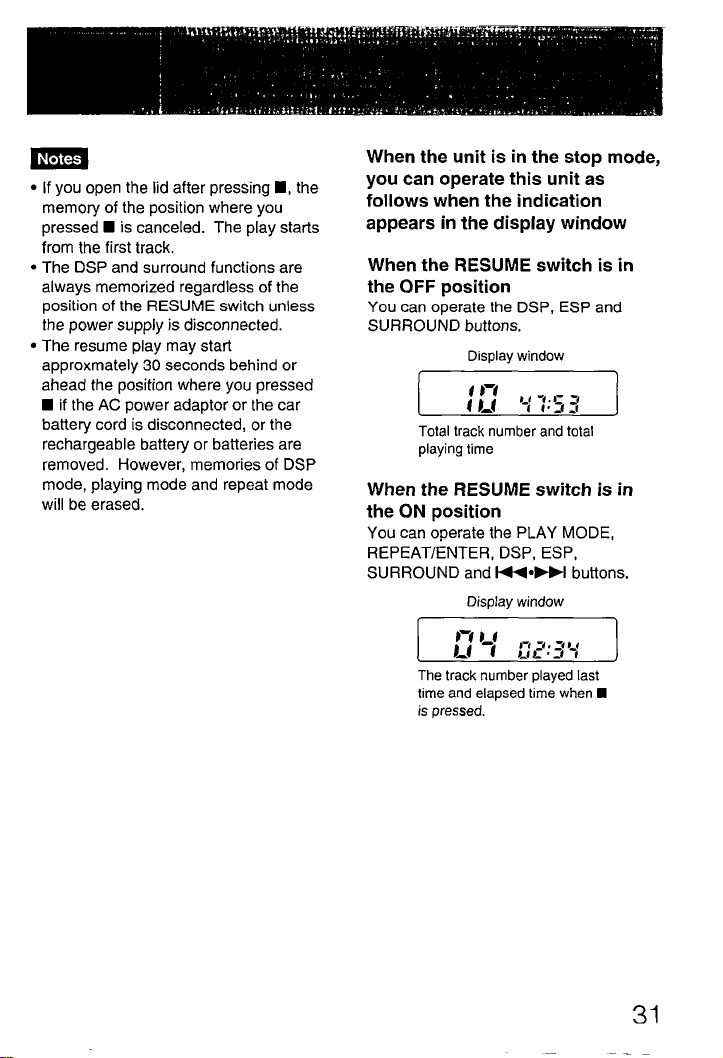
When the unit is in the stop mode,
you can operate this unit as
follows when the indication
appears in the display window
When the RESUME switch is in
the OFF position
You can operate the DSP, ESP and
SURROUND buttons.
Display window
Total track number and total
playing time
When the RESUME switch is in
the ON position
You can operate the PLAY MODE,
REPEAT/ENTER, DSP, ESP,
SURROUND and buttons.
Display window
The track number played last
time and elapsed time when
is pressed.
31
Page 32
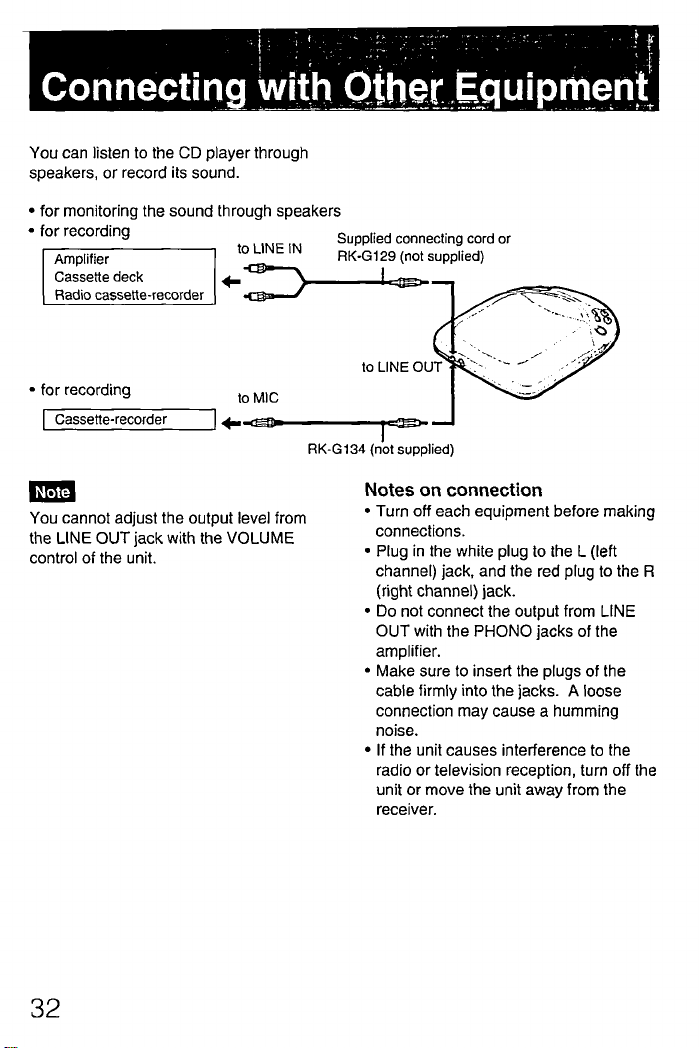
Connecting with Other Equipment
You can listen to the CD player through
speakers, or record its sound.
• for monitoring the sound through speakers
• for recording
Amplifier
Cassette deck
Radio cassette-recorder
• for recording
to LINE IN
to MIC
Supplied connecting cord or
RK•GI 29 (not supplied)
to LINE OUT
RK-G134 (not supplied)
Note
You cannot adjust the output level from
the LINE OUT jack with the VOLUME
control of the unit.
32
Notes on connection
• Turn off each equipment before making
connections.
• Plug in the white plug to the L (left
channel) jack, and the red plug to the R
(right channel) jack.
• Do not connect the output from LINE
OUT with the PHONO jacks of the
amplifier.
• Make sure to insert the plugs of the
cabie firmly into the jacks. A loose
connection may cause a humming
noise.
• If the unit causes interference to the
radio or television reception, tum off the
unit or move the unit away from the
receiver.
Page 33
Maintenance
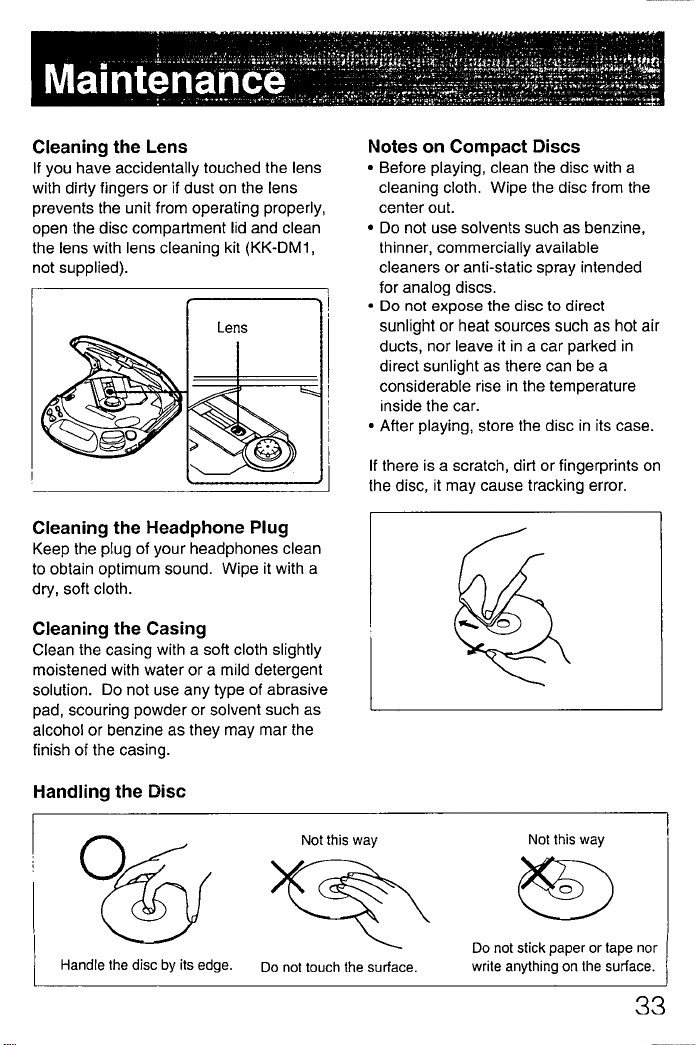
Cleaning the Lens
If you have accidentally touched the lens
with dirty fingers or if dust on the lens
prevents the unit from operating properly,
open the disc compartment lid and clean
the tens with lens cleaning kit (KK-DMI ,
not supplied).
Lens
Cleaning the Headphone Plug
Keep the plug of your headphones clean
to obtain optimum sound. Wipe it with a
dry, soft cloth.
Cleaning the Casing
Clean the casing with a soft cloth slightly
moistened with water or a mild detergent
solution. Do not use any type of abrasive
pad, scouring powder or solvent such as
alcohol or benzine as they may mar the
finish of the casing.
Notes on Compact Discs
• Before playing, clean the disc with a
cleaning cloth. Wipe the disc from the
center out.
• Do not use solvents such as benzine,
thinner, commercially available
cleaners or anti-static spray intended
for analog discs.
• Do not expose the disc to direct
sunlight or heat sources such as hot air
ducts, nor leave it in a car parked in
direct sunlight as there can be a
considerable rise in the temperature
inside the car.
• After playing, store the disc in its case.
If there is a scratch, dirt or fingerprints on
the disc, it may cause tracking error.
Handling the Disc
06
Handle the disc by its edge.
Not this way
Do not touch the surface.
Not this way
Do not stick paper or tape nor
write anything on the surface.
Page 34

Specifications
System
Laser diode properties
Compact disc digital audio system
Material: GaAlAs
Wavelength: A=780 nm
Emission duration: Continuous
Laser output: Less than 44.6 PW
(This output is the value measured at a distance of 200 mm
from the objective lens surface on the Optical Pick-up
Error correction
D-A conversion
Frequency response
Block.)
Sony Super Strategy Cross Interleave Reed Solomon Code
I-bit quartz time-axis control
20 - 20,000 Hz dB
(measured by EIAJ CP-307)
Output (at 4.5 V input level) Line output (stereo minijack)
Output level 0.65 V rms at 50 kilohms
Load impedance over 10 kilohms
Headphones (stereo minijack)
4 16 Q
General
Power requirements
Supplied:
• DC IN 4.5 V jack accepts the Sony AC power adaptor for
use on:
Where purchased
European and Asian
countries
U.S.A., Canada, Central
and South America
Middle East
United Kingdom, Australia
Other countries
Operating voltage
220-230 V AC, 50 Hz
120 V AC, 60 Hz
110-240 V AC, 50/60 Hz
240 V AC, 50 Hz
100-240 V AC, 50/60 Hz
Dimensions
Mass
34
• DC IN 4.5 V jack accepts the car battery cord for use on
car battery.
Not supplied:
• DC 2.4 V rechargeable battery pack
• DC 3 V two size AA (LR6) alkaline batteries
Approx. 138x 31.5 x 159.0 mm (51/2x 11/4x 63/8in.) (wm/d)
incl. projecting parts and controls
Approx. 310 g (I I oz.) not incl. rechargeable battery
Page 35

Supplied accessories
AC power adaptor (1)
Velcro tapes (2)
Connecting cord (phono plug x 2 stereo miniplug) (1)
Car battery cord (1)
Spare fuse (1)
Spiral tube (I)
Car connecting pack (1)
Design and specifications subject to change without notice.
Accessories not supplied
Plate arm CPM-300A
Mount plate CPM-300P
Mount arm CPM-300PK
Mount kit CPM-300PC
Mount kit CPM-300CK
Car connecting pack CPA-8, CPA-4
Active speaker system SRS-58
Rechargeable battery BP-DMIO
Stereo headphones MDR-A22L, MDR-E747
AC power adaptor AC-E45HG
Your dealer may not handle some of the above listed accessories. Please ask the
dealer for detailed information about the accessories in your country.
Note
This appliance conforms with EEC Directive 87/307/EEC regarding interference
suooression.
Page 36

Troubleshooting Guide
Should any problem persist after you have made the following checks, consult your
nearest Sony service facility.
Symptom
Disc play does not start.
• The disc is inserted upside down or incorrectly.
-+ Insert the disc correctly with the label surface
up.
• Dusty or defective disc
• Dirty or dusty lens
• The disc compartment lid is not closed.
• Moisture condensation -+ Leave the unit in a
warm place until the moisture evaporates.
• The AC power adaptor is not plugged into the
wall outlet.
• The car battery cord is not firmly connected to a
cigarette lighter socket.
• The unit is not placed on a level surface.
• The HOLD switch is set to the direction of the
arrow.
• When the 12 cm CD with contains many tracks is
replaced with a disc with a few tracks (such as
CDsingleorCDV,etc.),it maytakemorethan10 i
seconds before play starts.
• Weak rechargeable battery or alkaline batteries
Cause and/or solution
No sound from the
headphones
No sound from the
connected speakers
I Skipping of sound
36
• The headphones plug is not firmly connected to
the O/REMOTE jack.
• Adjust the volume
• Dirty plug
• Check the connections.
• The amplifier is not tumed on.
• Dirty or defective disc
• Dirty lens
• Strong vibration
Page 37
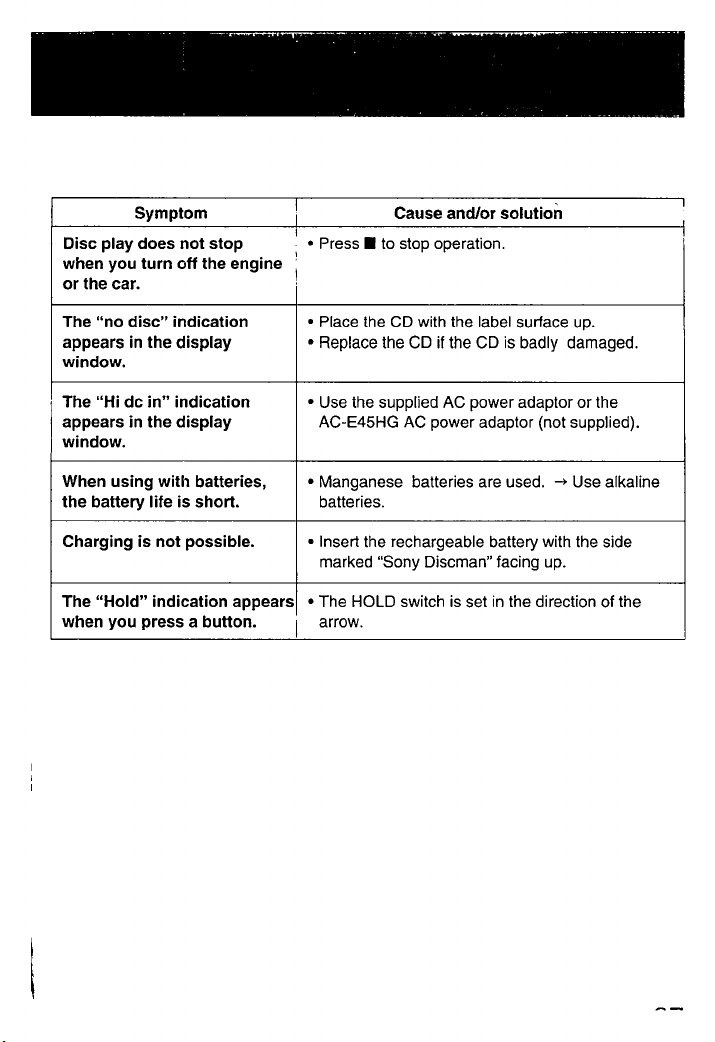
Symptom
Disc play does not stop
when you turn off the engine
or the car.
Cause and/or solution
• Press to stop operation.
The "no disc" indication
appears in the display
window.
The "Hi dc in" indication
appears in the display
window.
When using with batteries,
the battery life is short.
Charging is not possible.
• Place the CD with the label surface up.
• Replace the CD if the CD is badly damaged.
• Use the supplied AC power adaptor or the
AC-E45HG AC power adaptor (not supplied).
• Manganese batteries are used. -+ Use alkaline
batteries.
• Insert the rechargeable battery with the side
marked "Sony Discman" facing up.
The "Hold" indication appears • The HOLD switch is set in the direction of the
when you press a button.
arrow.
 Loading...