

Page 1
Television
Reference Guide
4-735-501-E1(1)
KD-75ZF9 / 65ZF9
Page 2
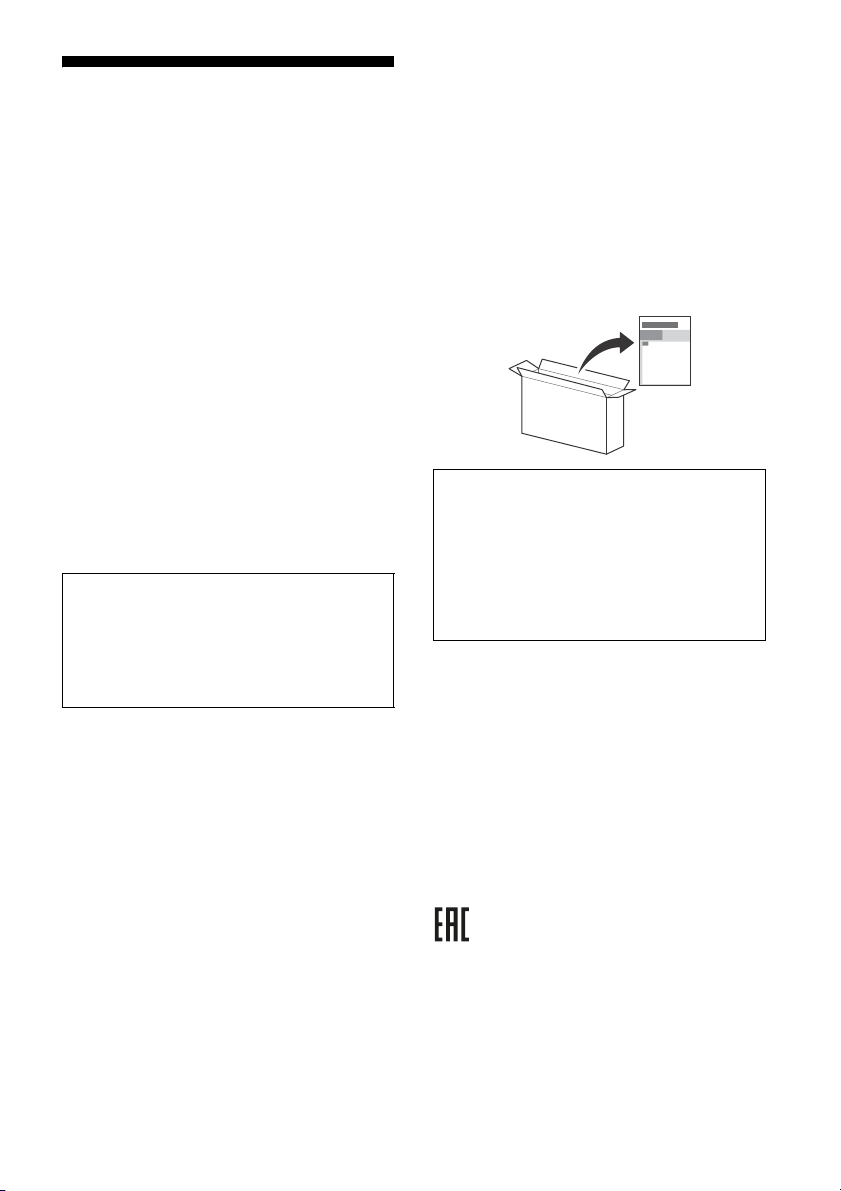
Table of Contents
Note
ВАЖНОЕ ПРИМЕЧАНИЕ . . . . . . . . . . . . . . . . 3
ВАЖЛИВА ПРИМІТКА . . . . . . . . . . . . . . . . . . 3
ЕСКЕРТУ . . . . . . . . . . . . . . . . . . . . . . . . . . . . . 3
Safety Information . . . . . . . . . . . . . . . . . . . . .3
Precautions . . . . . . . . . . . . . . . . . . . . . . . . . . .6
Parts and Controls . . . . . . . . . . . . . . . . . . . 8
Controls and Indicators . . . . . . . . . . . . . . . . . 8
Using Remote Control . . . . . . . . . . . . . . . . 9
Remote Control Parts Description. . . . . . . . .9
Connection Diagram . . . . . . . . . . . . . . . . .11
Installing the TV to the Wall . . . . . . . . . . 13
Using the optional Wall-Mount Bracket . . . 13
KD-75ZF9 only. . . . . . . . . . . . . . . . . . . . . . . . 15
Troubleshooting. . . . . . . . . . . . . . . . . . . . 18
Troubles and Solutions. . . . . . . . . . . . . . . . . 18
Specifications . . . . . . . . . . . . . . . . . . . . . . 19
Internet Connection and Data Privacy
This product connects to the interne
as a network is connected in order to confirm internet
connection, and later to configure the Home screen. Your IP
address is used in these and all other internet connections. If
you do not want your IP address be used at all, do not set-up the
wireless internet function and do not connect an internet cable.
Please refer to the privacy information presented in the set-up
screens for further details of internet connections.
t during initial setup as soon
Introduction
Thank you for choosing this Sony product.
Before operating the TV, please read this manual thoroughly and
tain i t for future reference.
re
• Before operating the TV, please read the “Safety Information”
3).
(page
• Images and illustrations used in the Setup Guide and this
nual are for reference only and may differ from the actual
ma
product.
• Sales should be performed in accordance with current
able local regulation. Product which cannot be used
applic
anymore should be utilized in accordance with current
applicable local regulation.
Attaching the Table-Top Stand to the TV
Refer to the Setup Guide on top of the cushion.
Help
Find more troubleshooting and other useful information
directly from your TV. Press HELP on the remote con trol to
display a list of topics, or to search by keyword.
Help Guide (Manual)
For more detailed information, select [Help Guide] from the
Help menu on your TV. You can also check the Help Guide from
your PC or smartphone (information provided on the back
cover).
Location of the identification label
Labels for the TV Model No., Production Date (year/month) and
Power Supply rating are located on the rear of the TV or package.
hey can be found by removing the bottom cover.
T
Дата изготовления указана на изделии
со штрих-кодом в следующем формате: YYYY/MM, где
YYYY - год, MM - месяц изготовления.
Дата виготовлення зазначена на виробі та упаковці на
і зі штрих-кодом у наступному форматі: YYYY/MM,
етикетц
де YYYY - рік, MM - місяць виготовлення.
Өндіруші: Со
Өндіруші мекен
141-8610 Жа
Словакияда жаса
Өндіруші ел өні
ни Вижуал Продактс Инк.
жайы: 2-10-1 Осаки Шинагава-ку Токио,
пония
лған
мде жəне қорапта көрсетілген.
и упаковке на этикетке
Кеден одағы жеріндегі шетелден əкелуші: «Сони Электроникс»
АҚ Ресей, 123103, Мəскеу, Карамышевский өтпе көшесі, 6
Қазақстан жері
қабылдауға уəкілетті ұйым «Сони Электроникс» АҚ
Қазақстандағы Өкілдігі, 050010, Қазақстан Республикасы,
Алматы қ., Достық даңғылы, 117/7 үй
GB
2
ндегі тұтынушылардың шағым-талаптарын
Page 3
WARNING
TO PREVENT THE
SPREAD OF FIRE, KEEP
CANDLES OR O
THER OPEN
FLAMES AWAY FROM THIS
PRODUCT AT ALL TIMES.
Для покупателей в России
Устройство предназначено только для использования в
помещениях.
ВАЖНОЕ ПРИМЕЧАНИЕ
Название продукта: Телевизор
Производитель: Сони Вижуал Продактс Инк., 2-10-1 Осаки
Шинагава-ку Токио, 141-8610 Япония
Сделано в Словакии.
Страна производства указана на изделии и упаковке.
Импортер на территории стран Таможенного союза: АО
они Электроникс», Россия, 123103, Москва, Карамышевский
«С
проезд, 6
ВАЖЛИВА ПРИМІТКА
Назва виробу: Телевізор
Справжнім Соні Віжуал Продактс Інк. заявляє, що телевізори
SONY моделей KD-75ZF9, KD-65ZF9 відповідають Технічному
регламенту радіообладнання; повний текст декларації про
відповідність доступний на веб-сайті за такою адресою:
http://www.compliance.sony.ua/.
Радіообладнання може використовуватися на території
України без
спектру.
Виробник: Соні Віжуал Продактс Інк., 2-10-1 Осакі Шінагава-ку
То
Вироблено у Словаччині.
Країна виробництва зазначається на виробі та пакуванні.
порушення чинних вимог щодо радіочастотного
кіо, 141-8610 Японія
Safety Information
WARN ING
Caution
Risk of explosion if the battery is replaced by an incorrect type.
Batteries must not be exposed to excessive heat such as
sunshine, fire or the like or extremely low air pressure that can
result in an explosion or leakage of flammable liquid or gas.
Stability Hazard
The television set may fall, causing serious personal injury or
death.
Never place a television set in an unstable location. A television
et may fall, causing serious personal injury or death. Many
s
injuries, particularly to children, can be avoided by taking simple
precautions such as:
• Using cabinets or stands recommended by the manufacturer of
he television set.
t
• Only using furniture that can safely support the television set.
• Ensuring the television set is not overhanging the edge of the
ting furniture.
suppor
• Not placing the television set on tall furniture (for example,
ds or bookcases) without anchoring both the furniture
cupboar
and the television set to a suitable support.
• Not placing the television set on cloth or other materials that
ay be located between the television set and supporting
m
furniture.
• Educating children about the dan
to reach the television set or its controls.
If your existing television set is being r
same considerations as above should be applied.
gers of climbing on furniture
etained and relocated, the
Installation/Set-up
Install and use the TV set in accordance with the instructions
below in order to avoid any risk of fire, electric shock or damage
and/or injuries.
Apparatus connected to the protective earthing of the building
stallation through the mains connection or through other
in
apparatus with a connection to protective earthing – and to a
television distribution system using coaxial cable, may in some
circumstances create a fire hazard. Connection to a television
distribution system therefore has to be provided through a device
providing electrical isolation below a certain frequency range
(galvanic isolator, see EN 60728-11).
Installation
• The TV set should be installed near an easily accessible mains
socket.
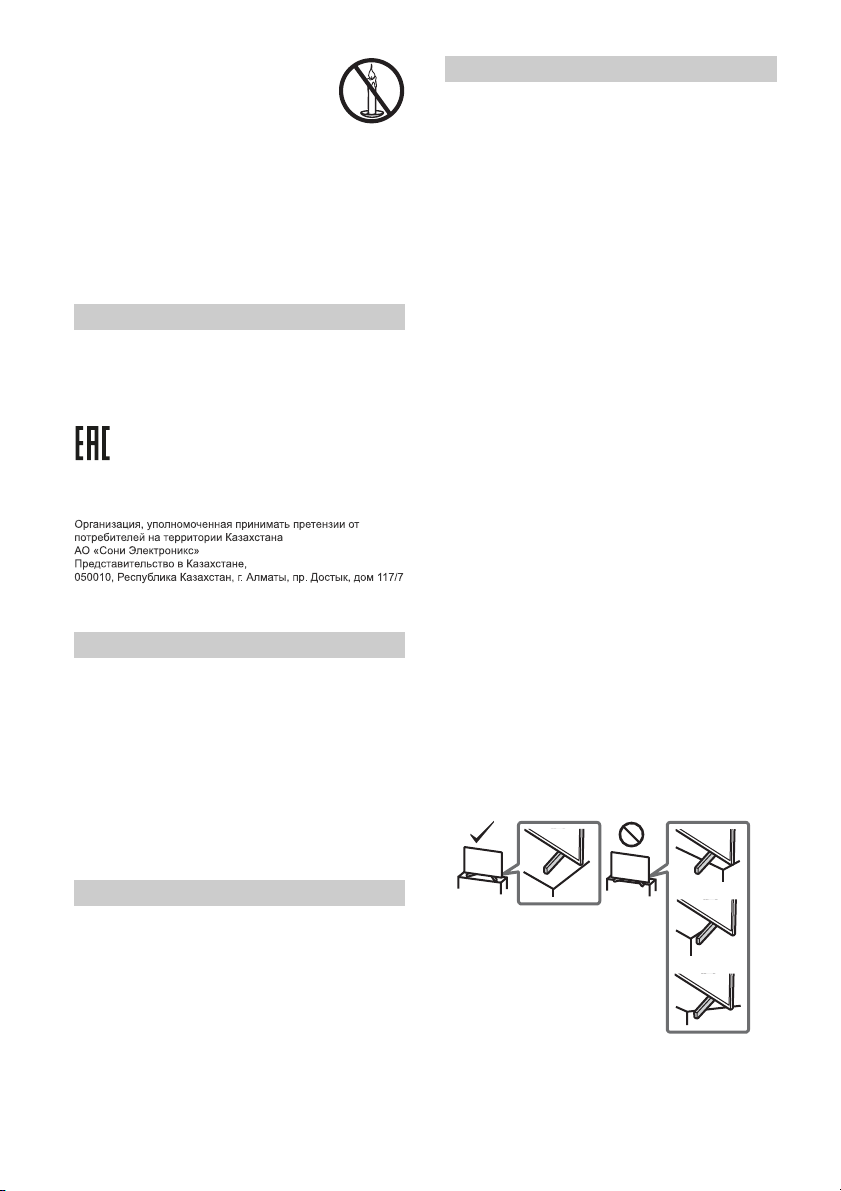
• Place the TV set on a stable, level surface to prevent it from
alling over and causing personal injury or property damage.
f
• Install the TV where it cannot be pulled, pushed, or knocked
er.
ov
• Install the TV so that the TV's Table-Top Stand does not protrude
ut from the TV stand (not supplied). If the Table-Top Stand
o
protrudes out from the TV stand, it may cause TV set to topple
over, fall down, and cause personal injury or damage to the TV.
ЕСКЕРТУ
Θнім атауы: Телевизор
• Only qualified service personnel
installations.
• For safety reasons, it is strongly recommended that you use
ony access ories, incl uding:
S
all-Mount Bracket SU-WL450 (KD-65ZF9 only)
W
should carry out wall-mount
GB
3
Page 4
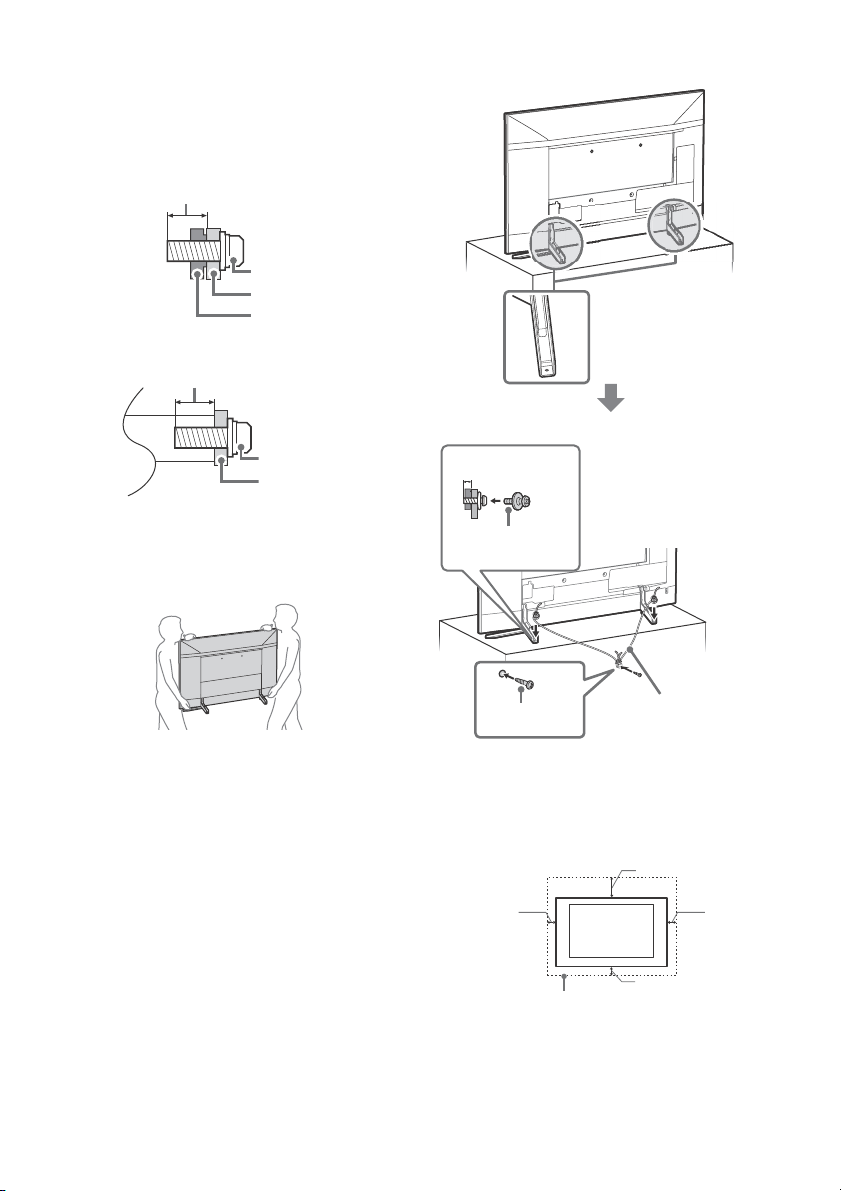
• Be sure to use the screws supplied with the Wall-Mount Bracket
Screw (M6)
Wall-Mount Bracket
8 mm - 12 mm
TV’s rear cover
Screw (M6)
Wall-Mount Bracket
8 mm - 12 mm
M4 screw (not
supplied)
Cord (not
supplied)
Screw (not
supplied)
4 mm - 7 mm
30 cm
10 cm
10 cm
10 cm
Leave at least this space around the set.
when attaching the Wall-Mount Bracket to the TV set. The
supplied screws are designed as indicated by illustration when
measured from the attaching surface of the Wall-Mount Bracket.
The diameter and length of the screws differ depending on the
all-Mount Bracket model.
W
Use of screws other than those supplied may result in internal
age to the TV set or cause it to fall, etc.
dam
Upper side
Lower side
Tran spor ting
• Before transporting the TV set, disconnect all cables.
• Two or three people are needed to transport a large TV set.
• When transporting the TV set by hand, hold it as shown below.
t put stress on the LCD panel and the frame around the
Do no
screen.
Topple prevention
• When transporting the TV set, do not subject it to jolts or
cessive v ibration.
ex
• When transporting the TV set for repairs or when moving, pack
using the original carton and packing material.
it
GB
4
Vent ilation
• Never cover the ventilation holes or insert anything in the
cabinet.
• Leave space around the TV set as shown below.
• It is strongly recommended that you use a Sony Wall-Mount
racket in order to provide adequate air circulation.
B
Installed on the wall
Page 5
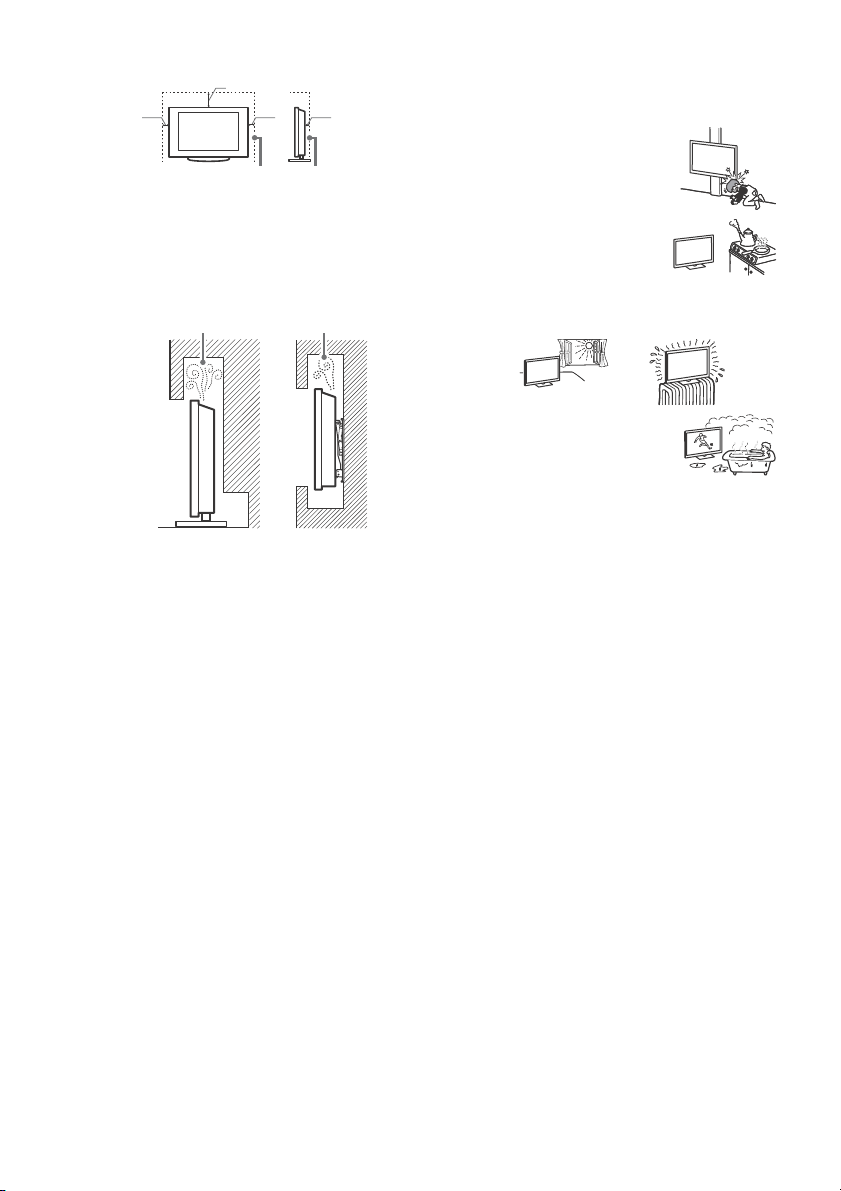
Installed with stand
Note
30 cm
10 cm
10 cm
Leave at least this space around the set.
6 cm
Wall
Air circulation is blocked.
Wall
• To ensure proper ventilation and prevent the collection of dirt or
dust:
t lay the TV set flat, install upside down, backwards, or
Do no
sideways.
t place the TV set on a shelf, rug, bed or in a closet.
Do no
t cover the TV set with a cloth, such as curtains, or items
Do no
such as newspapers, etc.
t install the TV set as shown below.
Do no
Situations:
• Use when your hands are wet, with the cabinet removed, or
with attachments not recommended by the manufacturer.
Disconnect the TV set from mains socket and aerial during
lightning storms.
• Install the TV so that it sticks out into an
en space. Injury or damage from a
op
person or object bumping into the TV may
result.
• Place the TV in a humid or dusty space,
r in a room with oily smoke or steam
o
(near cooking tables or humidifiers). Fire,
electric shock, or warping may result.
• Install the TV in places subject to
xtreme temperature such as in direct sunlight, near a radiator
e
or a heating vent. The TV may overheat in such condition which
can cause deformation of the enclosure and/or TV malfunction.
Mains lead
Handle the mains lead and socket as follows in order to avoid any
risk of fire, electric shock or damage and/or injuries:
• Use only mains leads supplied by S
• Insert the plug fu lly into the mains socket.
• Operate the TV set on a 220 V - 240 V AC supply only.
• When wiring cables, be sure to unplug the mains lead for your
fety and take care not to catch your feet on the cables.
sa
• Disconnect the mains lead from the mains socket before
king on or moving the TV set.
wor
• Keep the mains lead away from heat sources.
• Unplug the mains plug and clean it regularly. If the plug is
overed with dust and it picks up moisture, its insulation may
c
deteriorate, which could result in a fire.
• Do not use the supplied mains lead on any other equipment.
• Do not pinch, bend, or twist the mains lead excessively. The core
conductors may be exposed or broken.
• Do not modify the mains lead.
• Do not put anything heavy on the mains lead.
• Do not pull on the mains lead itself when disconnecting the
ad.
mains le
• Do not connect too many appliances
• Do not use a poor fitting mains socket.
ony, not other suppliers.
to the same mains socket.
Prohibited Usage
Do not install/use the TV set in locations, environments or
situations such as those listed below, or the TV set may
malfunction and cause a fire, electric shock, damage and/or
injuries.
Locations:
• Outdoors (in direct sunlight), at the seashore, on a ship or other
vessel, inside a vehicle, in medical institutions, unstable
locations, near water, rain, moisture or smoke.
Environments:
• Places that are hot, humid, or excessively dusty; where insects
may enter; where it might be exposed to mechanical vibration,
near flammable objects (candles, etc.). The TV set shall not be
exposed to dripping or splashing and no objects filled with
liquids, such as vases, shall be placed on the TV.
• If the TV is placed in the changing room of
• For best picture quality, do not expose the
• Avoid moving the TV from a cold area to a
Broken pieces:
• Do not throw anything at the TV set. The screen glass may break
• If the surface of the TV set cracks, do not touch it until you have
th or hot spring, the TV may be
a public ba
damaged by airborne sulfur, etc.
een to direct illumination or sunlight.
scr
rm area. Sudden room temperature changes may cause
wa
moisture condensation. This may cause the TV to show poor
picture and/or poor colour. Should this occur, allow moisture to
evaporate completely before powering the TV on.
by the impact and cause serious injury.
d the mains lead. Otherwise this may cause an electric
unplugge
shock.
When not in use
• If you will not be using the TV set for several days, the TV set
should be disconnected from the mains for environmental and
safety reasons.
• As the TV set is not disconnected from the mains when the TV
t is just turned off, pull the plug from the mains socket to
se
disconnect the TV set completely.
• Some TV sets may have features that require the TV set to be
ndby to work correctly.
left in sta
For children
• Do not allow children to climb on the TV set.
• Keep small accessories out of the reach of children, so that they
e not mistakenly swallowed.
ar
If the following problems occur...
Turn off the TV set and unplug the mains lead immediately if any
of the following problems occur.
Ask your dealer or Sony service centre to have it checked by
alified service personnel.
qu
When:
• Mains lead is damaged.
• Poor fitting of mains socket.
• TV set is damaged by being dropped, hit or having something
own at it.
thr
• Any liquid or solid object falls through openings in the cabinet.
About LCD TV Temperature
When the LCD TV is used for an extended period, the panel
surrounds become warm. You may feel hot when touching there
by the hand.
5
GB
Page 6
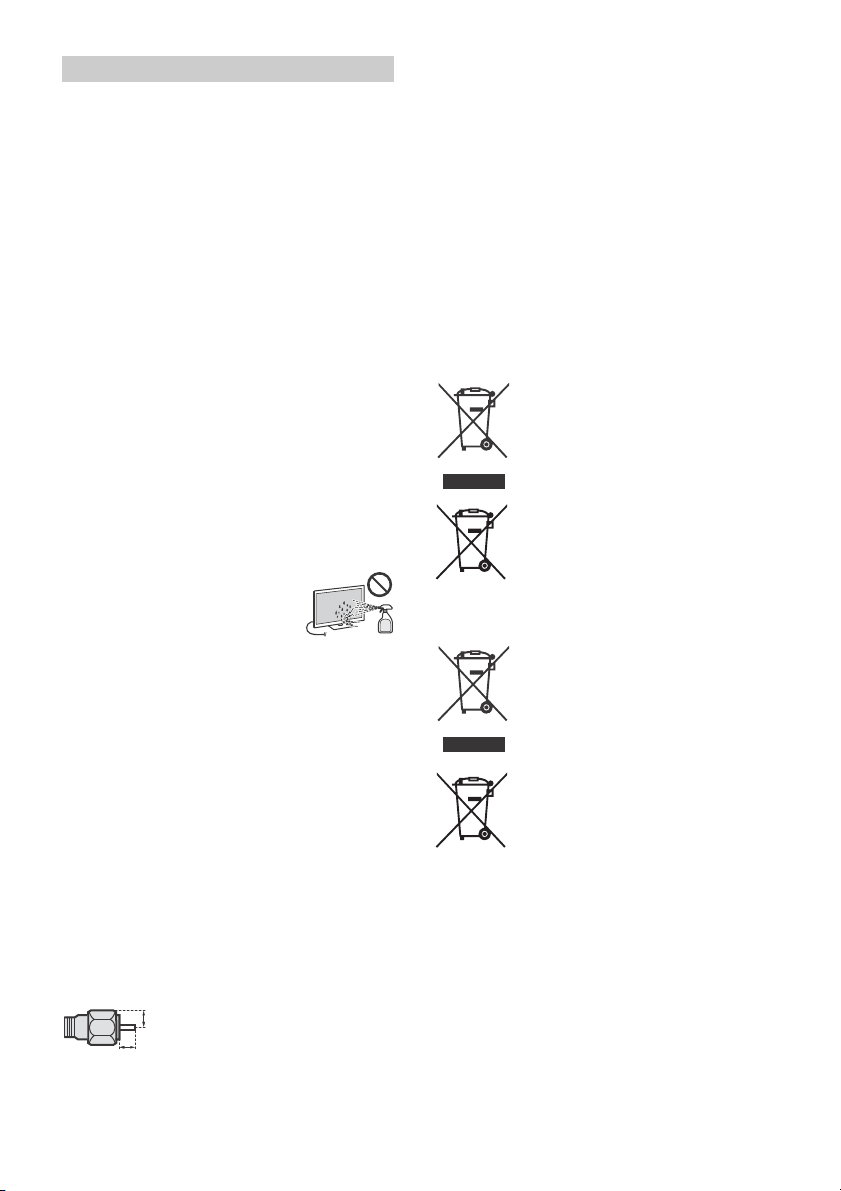
Precautions
1.5 mm max.
(Reference drawing of the F type plug)
7 mm max.
Viewing the TV
• View the TV in moderate light, as viewing the TV in poor light or
during long period of time, strains your eyes.
• When using headphones, adjust the volume so as to avoid
xcessive levels, as hearing damage may result.
e
LCD Screen
• Although the LCD screen is made with high-precision
technology and 99.99 % or more of the pixels are effective,
black dots may appear or bright points of light (red, blue, or
green) may appear constantly on the LCD screen. This is a
structural property of the LCD screen and is not a malfunction.
• Do not push or scratch the front filter
this TV set. The image may be uneven or the LCD screen may be
damaged.
• If this TV set is used in a cold place, a smear may occur in the
ure or the picture may become dark. This does not indicate a
pict
failure. These phenomena disappear as the temperature rises.
• Ghosting may occur when still pictures are displayed
ontinuously. It may disappear after a few moments.
c
• The screen and cabinet get warm when this TV set is in use. This
t a malfunction.
is no
• The LCD screen contains a small amount of liquid crystal. Follow
local ordinances and regulations for disposal.
your
, or place objects on top of
Handling and cleaning the screen surface/
cabinet of the TV set
Be sure to unplug the mains lead connected to the TV set from
mains socket before cleaning.
To avoid material degradation or screen coating degradation,
bserve the following precautions.
o
• To remove dust from the screen surface/cabinet, wipe gently
ith a soft cloth. If dust is persistent, wipe with a soft cloth
w
slightly moistened with a diluted mild detergent solution.
• Never spray water or detergent directly on
he TV set. It may drip to the bottom of the
t
screen or exterior parts and enter the TV
set, and may cause damage to the TV set.
• Never use any type of abrasive pad,
line/acid cleaner, scouring powder, or
alka
volatile solvent, such as alcohol, benzene,
thinner or insecticide. Using such materials or maintaining
prolonged contact with rubber or vinyl materials may result in
damage to the screen surface and cabinet material.
• Do not touch the TV if your hand is covered in any chemical
ance such as hand cream or sunblock.
subst
• Periodic vacuuming of the ventilation openings is
ecommended to ensure proper ventilation.
r
• When adjusting the angle of the TV set, move it slowly so as to
event the TV set from moving or slipping off from its table
pr
stand.
Optional Equipment
• Keep optional components or any equipment emitting
electromagnetic radiation away from the TV set. Otherwise
picture distortion and/or noisy sound may occur.
• This equipment has been tested and found to comply with the
its set out in the EMC Directive using a connection signal
lim
cable shorter than 3 meters.
• This equipment has been tested and found to comply with the
s set out in the EMC Directive using a RF cable shorter than
limit
30 meters for terrestrial/satellite/CATV terminal.
Recommendation of F type plug
Projection of the inner wire from the connection part must be less
than 1.5 mm.
Wireless Function of the unit
• Do not operate this unit near medical equipment (pacemaker,
etc.), as this may result in the malfunction of the medical
equipment.
• Although this unit transmits/receives scrambled signals, be
areful of unauthorised interception. We cannot be responsible
c
for any trouble as a result.
• This equipment should be installed and operated keeping a
ation distance of 20 cm or more between the antenna of
separ
this device and a person's body.
Caution about handling the remote control
• Observe the correct polarity when inserting batteries.
• Do not use different types of batteries together or mix old and
batteries.
new
• Dispose of batteries in an environmentally friendly way. Certain
egions may regulate the disposal of batteries. Please consult
r
your local authority.
• Handle the remote control with care. Do not drop or step on it,
or spill liquid of
• Do not place the remote control in a location near a heat source,
place subject to direct sunlight, or a damp room.
a
any kind onto it.
Утилизация телевизора
Утилизация отслужившего
электрического и электронного
оборудования (директива
применима в странах Евросоюза
и других странах, где действуют
системы раздельного сбора
отходов)
Утилизация использованных
элементов питания (Директива
применима в странах Евросоюза
и других странах, где действуют
системы раздельного сбора
отходов)
Утилізація телевізора
Утилізація старого електричного
та електронного обладнання
(застосовується в Європейському
союзі та інших країнах із
системами роздільного збирання
сміття)
Утилізація використаних батарей
(застосовно в Європейському
союзі та інших країнах, у яких
діють системи роздільного
збирання сміття)
GB
6
Page 7

Теледидар құрылғысын лақтыру
Қызмет мерзімі біткен электрлік
жəне электрондық жабдықты
залалсыз жою (бағыттама
қалдықтарды бөлек жинау
жүйелері жұмыс істейтін Еуропа
Одағы мен басқа елдерде
қолданылады)
Пайдаланылған
аккумуляторларды залалсыз жою
(қалдықтарды бөлек жинау
жүйелері жұмыс істейтін Еуропа
Одағы мен басқа елдерде
қолданылады)
GB
7
Page 8
Parts and Controls
ȩ
ȫȬȪ
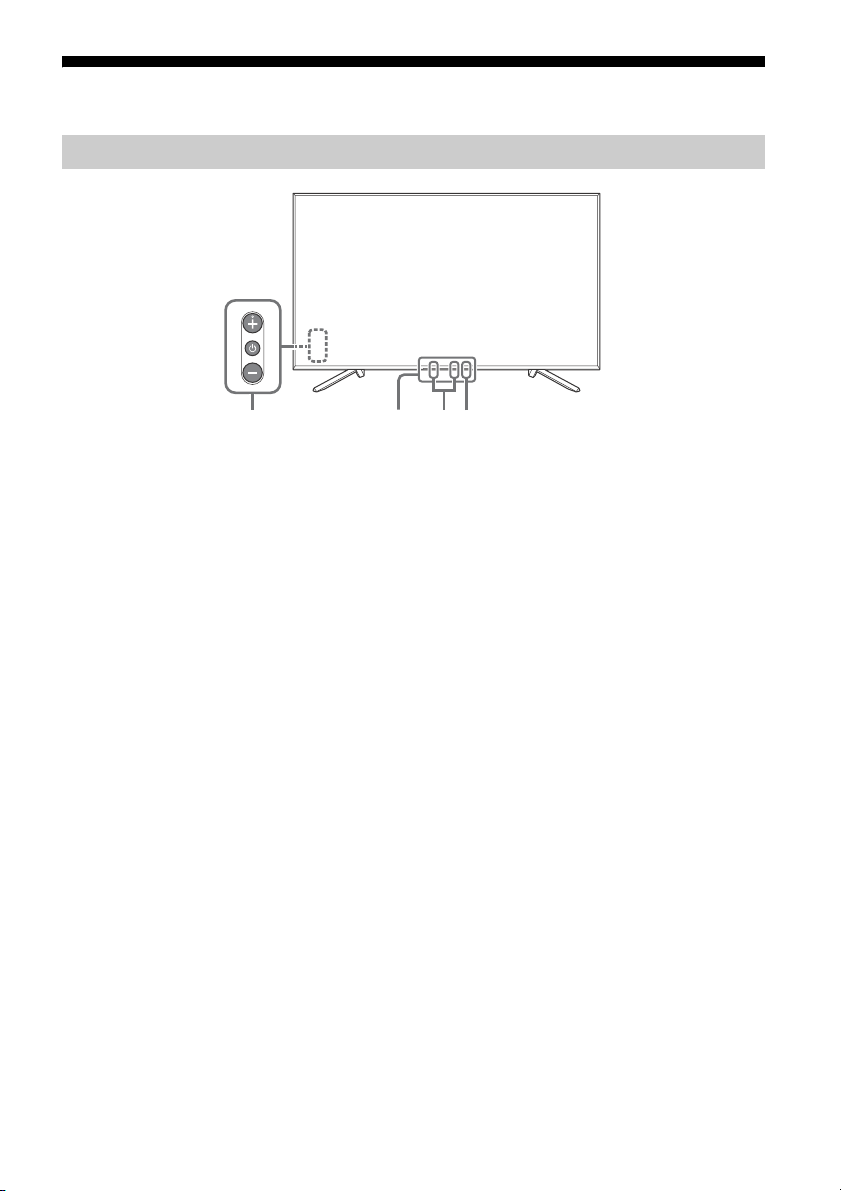
Controls and Indicators
(Power) / + / –
When the TV is off,
Press to power on.
When the TV is on,
Press and hold to power off.
Press repeatedly to change the function,
then press + or – button to:
•Adjust the volume.
• Select the channel.
• Select the input source of TV.
Remote Control sensor*1 /
Light sensor*
1
/ Illumination LED
The illumination LED lights up or blinks
according to the status of the TV.
For more information, refer to the Help
Guide.
Built-in MIC*2*
3
Use the hands-free built-in microphone for
Voice Search. To enable the built-in MIC,
press HOME, then select [Settings]
[Google].
Built-in MIC LED
The built-in MIC LED lights up in amber
when the built-in MIC is enabled. The builtin MIC LED can be disabled.*
*1 Do not place anything near the sensor.
*2 The built-in MIC will be available when software is
updated. For the latest information, visit Sony
support website (information provided on the back
cover).
The Voice Search requires an Internet connection.
The Voice Search with the built-in MIC is available
only on limited region/country/language.
Standby power consumption will increase because
the built-in MIC is always listening when the Voice
Search with the built-in MIC is enabled.
*3 For more information, see the Online Help Guide
(page 2).
3
GB
8
Page 9
Using Remote Control
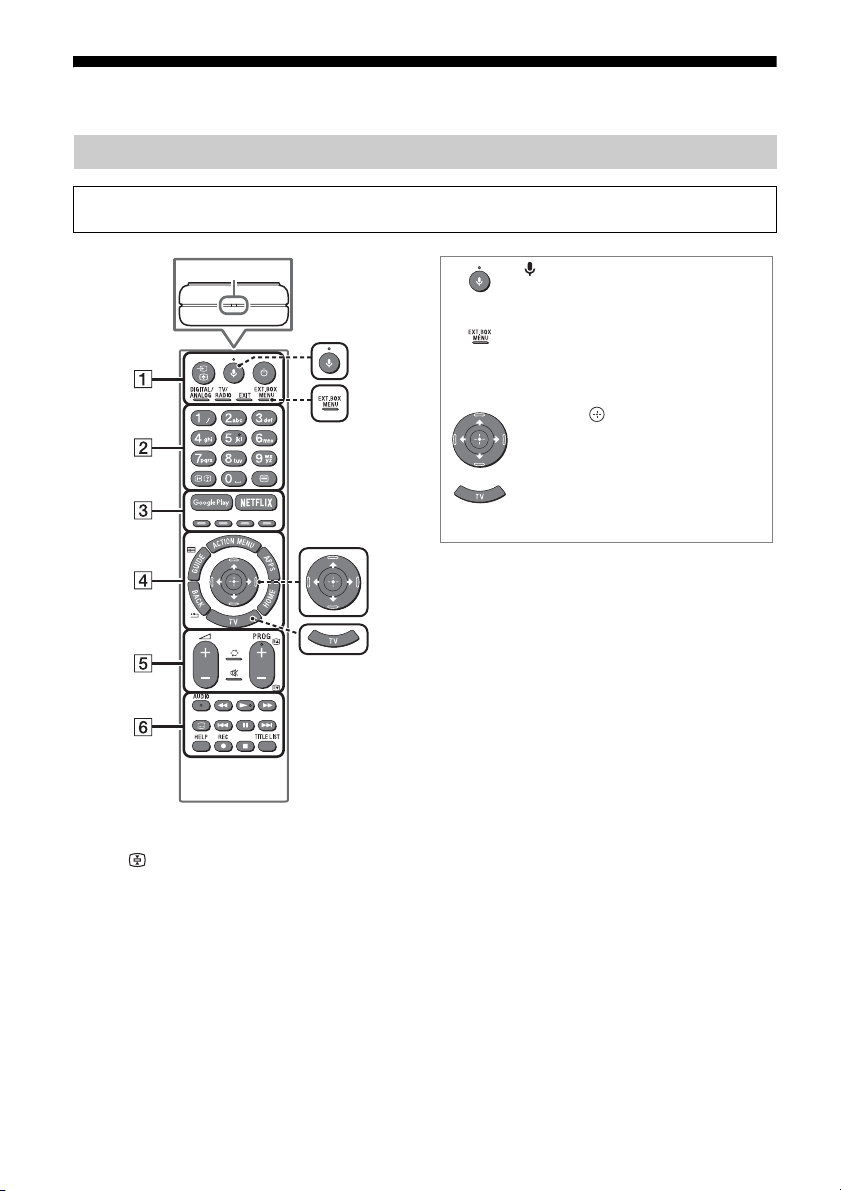
MIC
(Microphone)
Use Voice Search*. (e.g., Search
various content by voice.)
EXT.BOX MENU
Display the External Box (cable/
satellite box) menu only if HDMI CEC
compatible device is connected.
//// (Navigation D-Pad)
On screen menu navigation and
selection.
TV
Switch to a TV channel or input and
display the TV Menu Bar.
* The Voice Search requires an Internet connection.
Remote Control Parts Description
The remote control shape, location, availability and function of remote control buttons may vary
depending on your region/country/TV model.
/ (Input select/Text hold)
In TV mode: Display and select the input
source.
In Text mode: Hold the current page.
(TV standby)
Turn on or turn off the TV (standby mode).
DIGITAL/ANALOG
Switch between digital and analogue mode.
TV/RADIO
Switch between TV or RADIO broadcasts.
EXIT
Return to the previous screen or exit from
the menu. When an Interactive Application
service is available, press to exit from the
service.
GB
9
Page 10

Number buttons
Hint
/ (Info/Text reveal)
Display information.
(Text)
Display text information.
Google Play
Access the “Google Play” online service.
NETFLIX (Only on limited region/
country/TV model)
Access the “NETFLIX” online service.
Colour buttons
Execute corresponding function at that time.
ACTION MENU
Display a list of contextual functions.
GUIDE/
Display the digital programme guide.
APPS
Access various services and applications.
BACK/
Return to the previous screen.
HOME
Display the TV Home Menu.
+/– (Volume)
Adjust the volume.
(Jump)
Jump back and forth between two channels
or inputs. The TV alternates between the
current channel or input and the last
channel or input that was selected.
(Muting)
Mute the sound. Press again to restore the
sound.
AUDIO
Change the language for the programme
currently being viewed.
//////
Operate media contents on the TV and
connected BRAVIA Sync-compatible device.
(Subtitle setting)
Turn subtitles on or off (when the feature is
available).
HELP
Display the Help menu. Help Guide can be
accessed from here.
REC
Record the current programme with the USB
HDD recording function.
TITLE LIST
Display the Title list.
• You can switch the accessibility on and off by
pressing and holding .
PROG +/–//
In TV mode: Select the channel.
In Text mode: Select the next () or
previous () page.
GB
10
Page 11
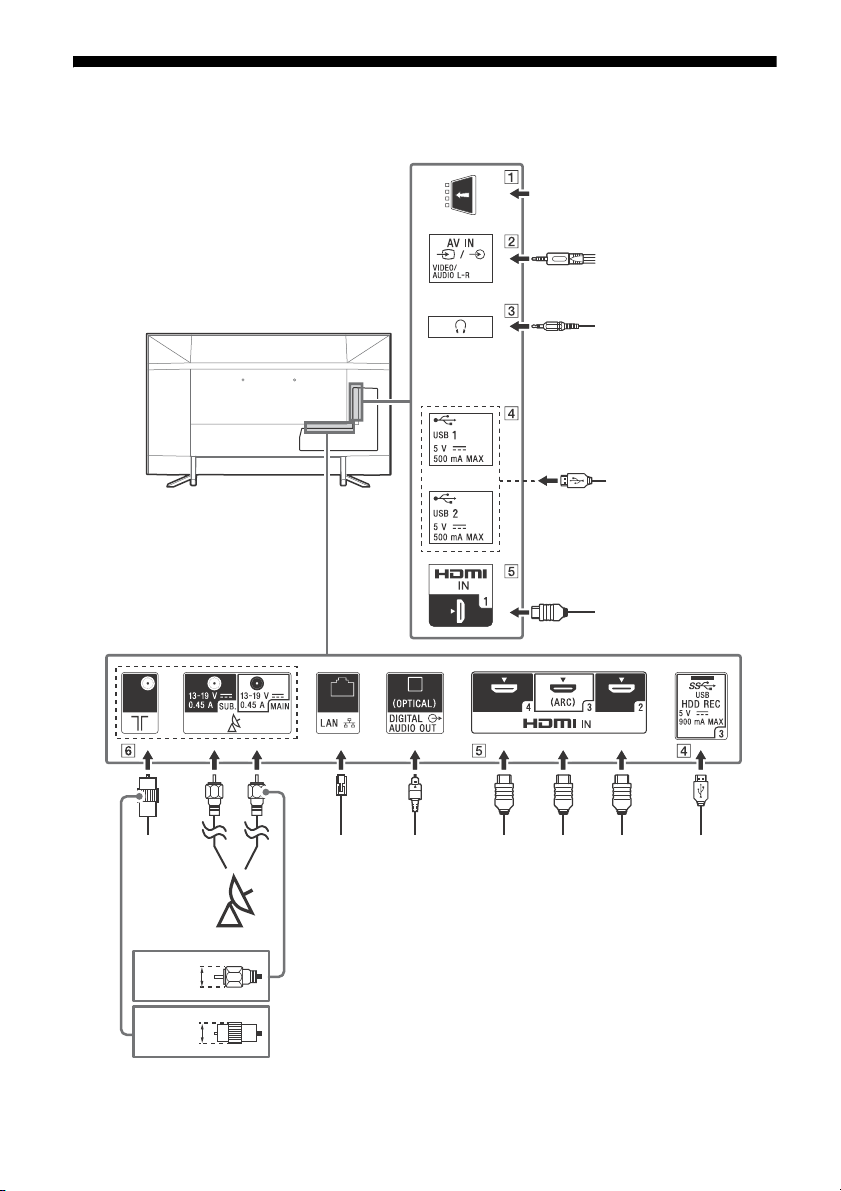
Connection Diagram
Cable/
Antenna/
External Box
Router
Satellite
Audio
System
with
ARC/
HDMI
Device
Digital still camera/
Camcorder/USB
storage media
Headphone
< 14 mm
HDMI
Device
HDMI Device
VCR/Video game
equipment/DVD player/
Camcorder/External Box*
1
< 14 mm
Conditional
Access Module
Digital still
camera/
Camcorder/USB
storage media/
USB HDD device
HDMI
Device
Audio System
with Optical
Audio Input
For more information on connections, refer to the Help Guide by pressing HELP on the remote control.
GB
11
Page 12
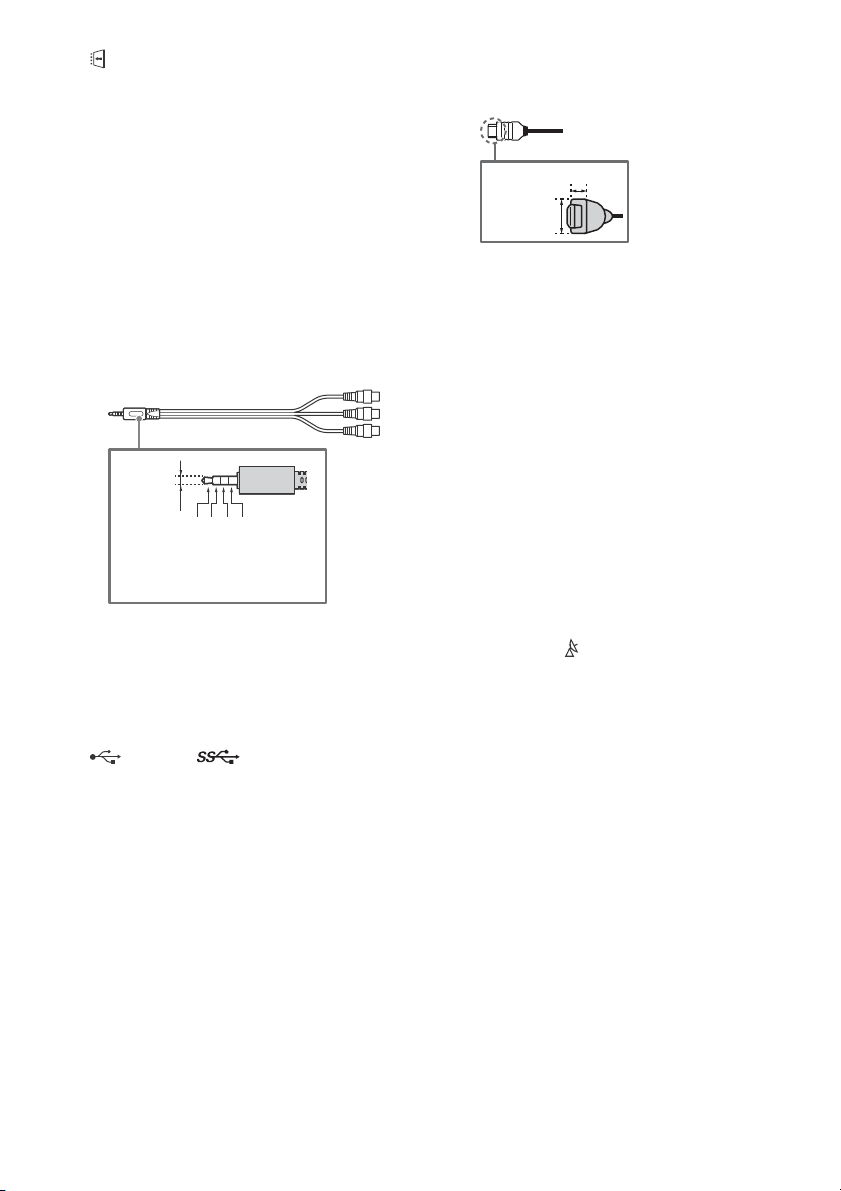
CAM (Conditional Access Module)
3.5 mm
1234
1: L
2: Video
3: Ground
4: R
< 12 mm
< 21 mm
• Provides access to pay TV services. For
details, refer to the instruction manual
supplied with your CAM.
• Do not insert the smart card directly into
the TV CAM slot. It must be fitted into the
Conditional Access Module provided by
your authorised dealer.
• CAM is not supported in some countries/
areas. Check with your authorised dealer.
• A CAM message may appear when you
switch to a digital programme after using
the Internet video.
/ AV IN
• For a composite connection, use an
Analogue Extension Cable (not supplied).
•
(Headphone)
• Supports 3-pole stereo mini jack only.
• You cannot output sound from both the
headphone and the TV speakers at the
same time.
USB 1/2, USB 3 (HDD REC)*
• Connecting a large USB device may
interfere with other connected devices
beside it.
• When connecting a large USB device,
connect to the USB 1 port.
• Connect a USB HDD device to the USB 3
port (blue).
HDMI IN 1/2/3/4
• HDMI interface can transfer the digital
video and audio on a single cable.
•
• To enjoy high quality 4K 50p/60p
contents, connect a Premium High Speed
HDMI cable and set the [HDMI signal
format] to [Enhanced format].
Do this setting individually for each
connected HDMI IN terminal. For details of
supported formats, refer to the
“Specifications“ in this manual (page 19-
21).
• HDMI IN 3 ARC (Audio Return Channel)
Connect your audio system to the
HDMI IN 3 to route TV audio to your audio
system. An audio system that supports
HDMI ARC can send video to the TV, and
receive audio from the TV via the same
HDMI cable. If your audio system does not
support HDMI ARC, an additional
connection with DIGITAL AUDIO OUT
(OPTICAL) is necessary.
(RF input), (Satellite input)
• Connections for terrestrial/cable and
satellite. Connection steps: SUB. MAIN
Antenna
• For SUB. jack, connect only when you are
2
using twin tuner mode except for Single
Cable Distribution EN50494.
*1 For an external device which has only SCART AV
OUT, use a SCART-RCA adaptor and Analogue
Extension Cable.
*2 Only on limited region/country/TV model.
GB
12
Page 13
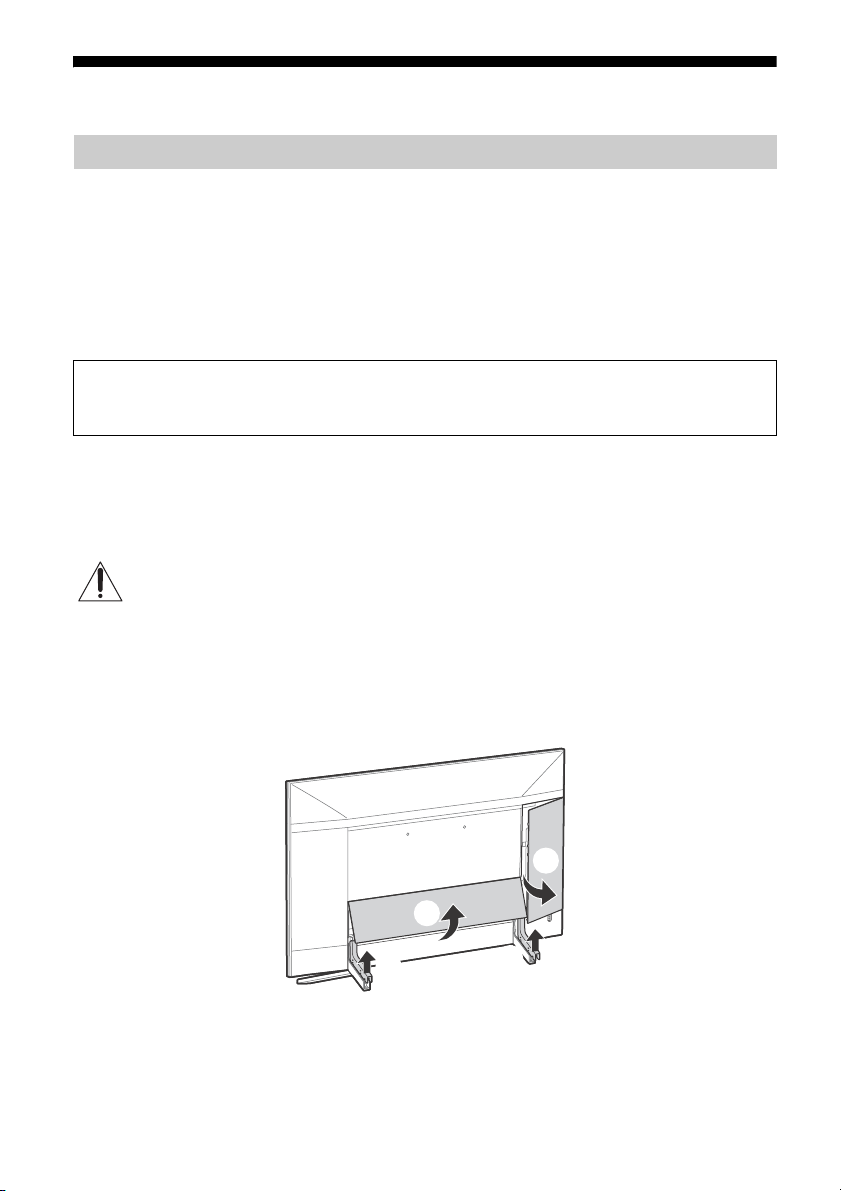
Installing the TV to the Wall
Note
ʓ
ʔ
ʕ
ʕ
Using the optional Wall-Mount Bracket
This TV’s instruction manual only provides the steps to prepare the TV for Wall-Mount installation
before it is installed on the wall.
To Customers:
For product protection and safety reasons, Sony strongly recommends that installation of your TV be
performed by Sony dealers or licensed contractors. Do not attempt to install it yourself.
To Sony Dealers and Contractors:
Provide full attention to safety during the installation, periodic maintenance and examination of this
product.
Sufficient expertise is required for installing this product, especially to determine the strength of the wall for
withstanding the TV’s weight. Be sure to entrust the attachment of this product to the wall to Sony dealers or
licensed contractors and pay adequate attention to safety during the installation. Sony is not liable for any
damage or injury caused by mishandling or improper installation.
Use the Wall-Mount Bracket SU-WL450 (not supplied) (KD-65ZF9 only) to install the TV to the wall.
When installing the Wall-Mount Bracket, also refer to the Operating Instructions and Installation Guide
supplied with the Wall-Mount Bracket.
• Be sure to store the removed screws in a safe place, keeping them away from children.
For instructions on Wall-Mount Bracket installation, see the Installation Information (Wall-Mount Bracket) on the
product page for your TV model.
www.sony.eu/support/
KD-65ZF9 only
1 Remove the stand cover and terminal covers.
GB
13
Page 14
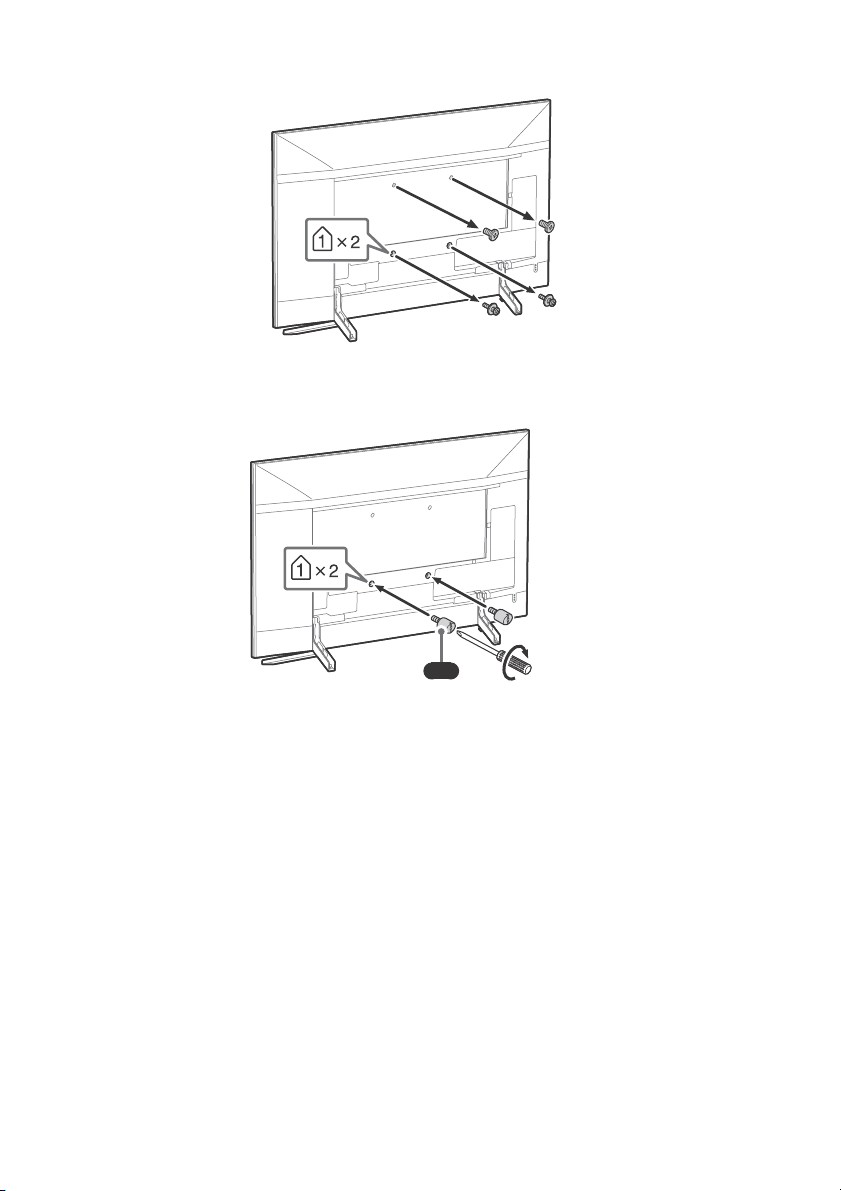
2 Remove the screws from the rear of the TV.
Note
VS
1.5 N∙m {15 kgf∙cm}
3 Attach the Wall-Mount Attachment (supplied with the TV) to the rear of the TV (to make it
parallel with the wall).
• If using an electric screwdriver, set the torque at approximately 1.5 N·m {15 kgf·cm}.
• Be su re to fasten the Wall-Mount Attac hment whe n attaching them to the TV. Use onl y a flat head screwdriv er to
install the Wall-Mount Attachment. Use of another tool might result in over torqueing the Wall-Mount
Attachment and damaging the TV.
GB
14
Page 15
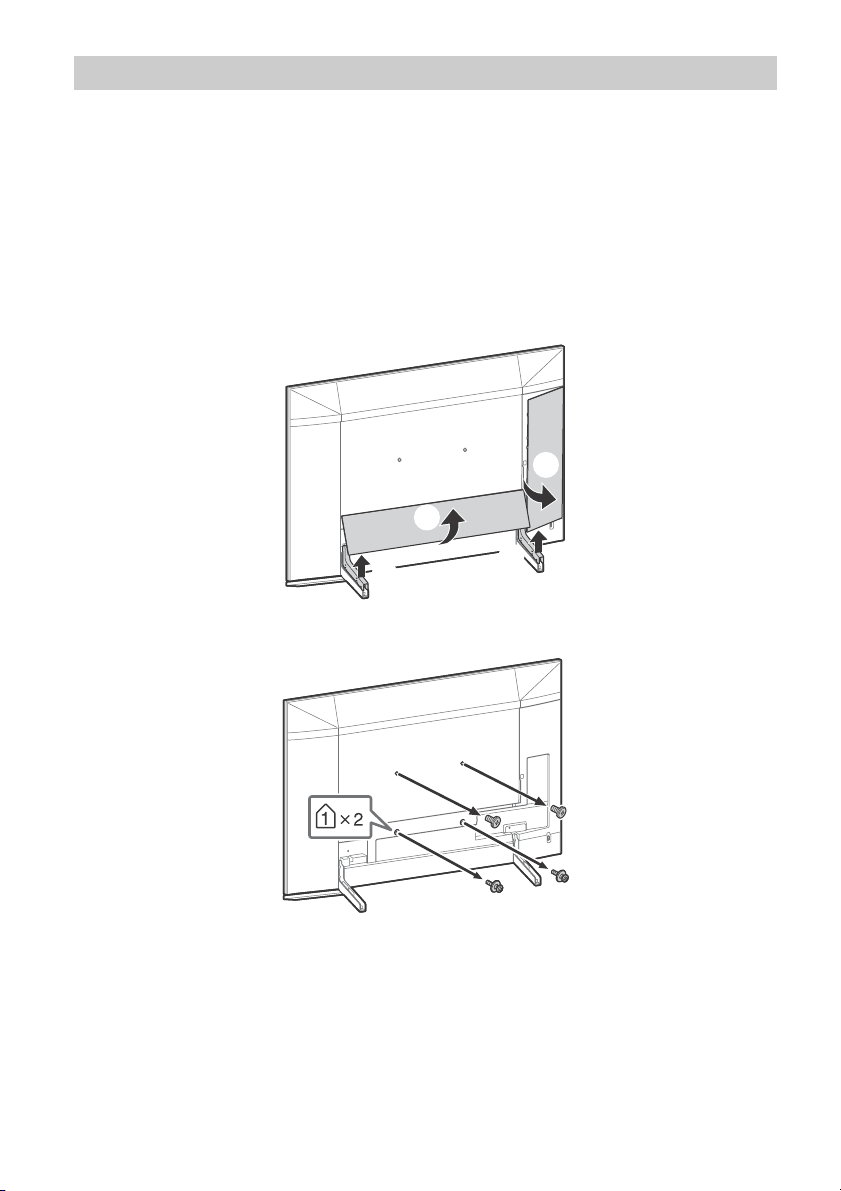
KD-75ZF9 only
ʓ
ʔ
ʕ
ʕ
Your TV can be mounted on a wall using a Wall-Mount Bracket (not supplied) out of the box as
packaged.
Prepare the TV for the Wall-Mount Bracket before making cable connections.
For product protection and safety reasons, Sony strongly recommends that installation of your TV
on the wall be performed by qualified professionals. Do not attempt to install it yourself.
• Follow the instruction guide provided with the Wall-Mount Bracket for your model. Sufficient
expertise is required in installing this TV, especially to determine the strength of the wall for
withstanding the TV’s weight.
• Be sure to store the unused screws and Table-Top Stand in a safe place until you are ready to attach
the Table-Top Stand. Keep the screws away from small children.
1 Remove the stand cover and terminal covers.
2 Remove the screws from the rear of the TV.
GB
15
Page 16
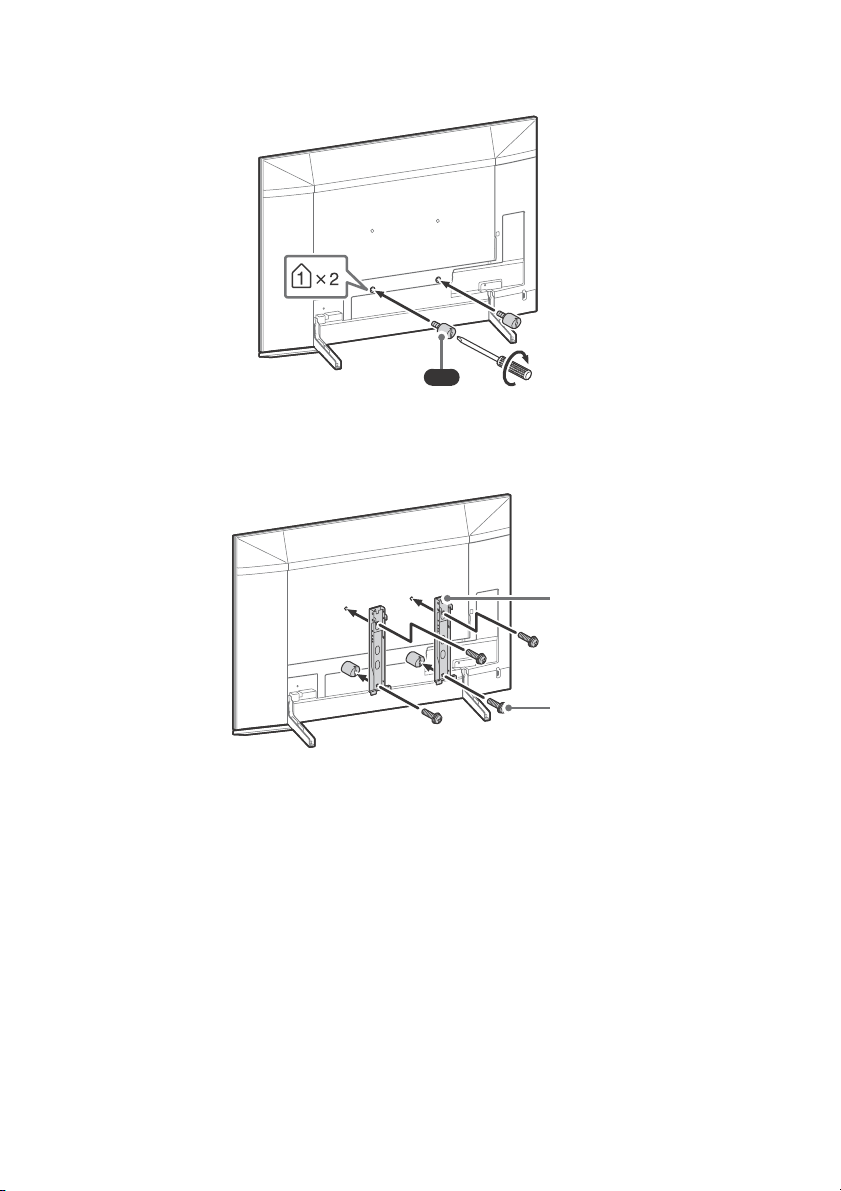
3 Attach the Wall-Mount Attachment (supplied with the TV) to the rear of the TV (to make it
Note
VS
1.5 N∙m {15 kgf∙cm}
Wall-Mount Bracket
(not supplied)
Screw (not supplied)
parallel with the wall).
4 Attach the Wall-Mount Bracket (not supplied) using the screws (not supplied).
• If using an electric screwdriver, set the torque at approximately 1.5 N·m {15 kgf·cm}.
• Be su re to fasten the Wall-Mount Attac hment whe n attaching them to the TV. Use onl y a flat head screwdriv er to
install the Wall-Mount Attachment. Use of another tool might result in over torqueing the Wall-Mount
Attachment and damaging the TV.
GB
16
Page 17
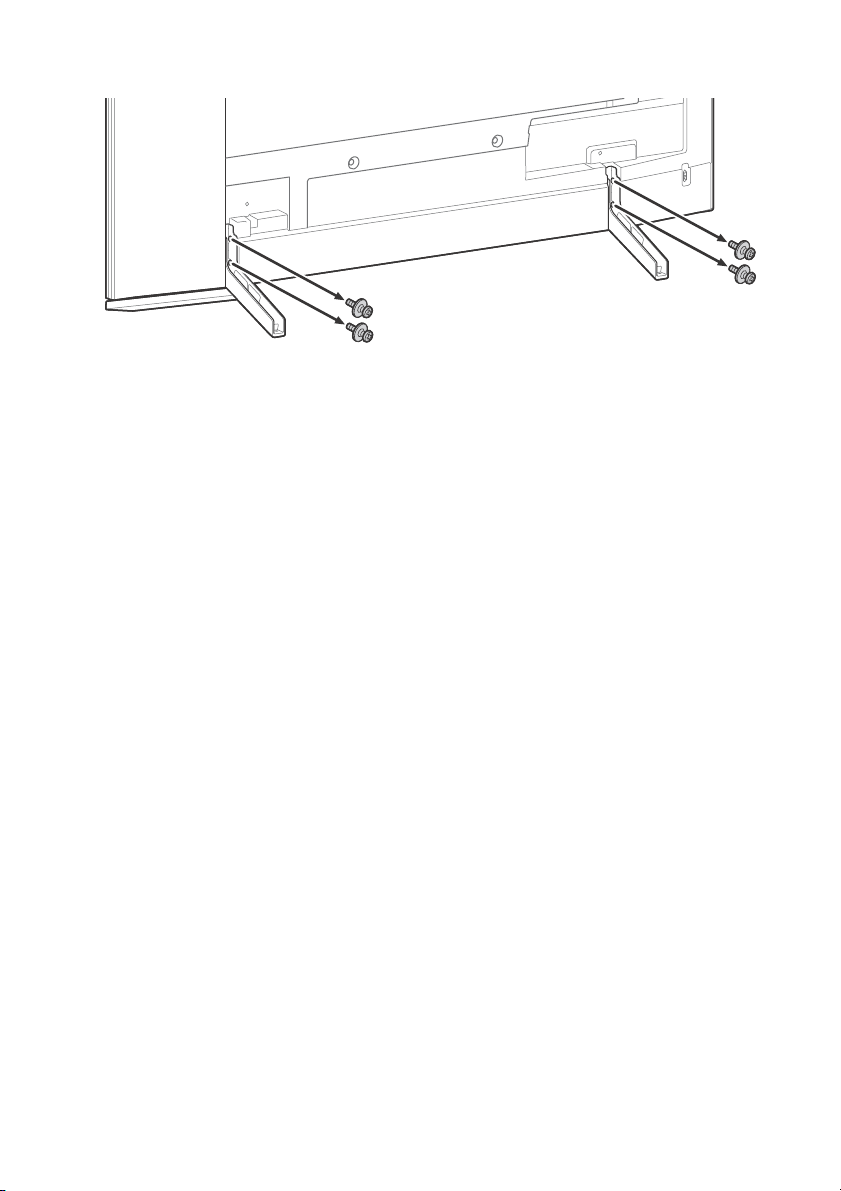
5 Detach the Table-Top Stand from the TV.
GB
17
Page 18

Troubleshooting
General troubleshooting for issues like: black
screen, no sound, frozen picture, TV does not
respond, or network is lost, do the following
steps.
1 Restart your TV by pressing the power button
on the remote control until a message
appears. The TV will restart. If the TV does not
recover, try unplugging the TV from the
mains lead for two minutes and then plug it
in again.
2 Refer to the Help menu by pressing HELP on
the remote control.
3 Connect your TV to the Internet and perform
a software update. Sony recommends you to
keep your TV software updated. Software
updates provide new features and
performance improvements.
4 Visit Sony support website (information
provided on the back cover).
When you plug in the TV, the TV may not be
able to turn on for a while even if you press
the power button on the remote control or
the TV.
It takes time to initialize the system. Wait for
about one minute, then operate it again.
Satellite service cannot be received.
Check the satellite cable connection.
When [No signal. LNB overload detected…]
message is displayed, unplug the mains lead.
Then, ensure the satellite cable is not damaged
and the satellite signal line is not short-circuited
in the satellite connector.
The remote control does not function.
Replace the batteries.
The EXT.BOX MENU button on the remote
control does not work.
Connect HDMI CEC compatible device and change
to that input.
The parental lock for broadcast password has
been forgotten.
Enter 9999 for the PIN code and select [Change
PIN code].
The TV surrounds become warm.
When the TV is used for an extended period, the
TV surrounds become warm. You may feel hot
when touching there by the hand.
Troubles and Solutions
When the illumination LED is flashing in red.
Count how many times it flashes (interval time is
three seconds).
Reboot the TV by disconnecting the mains lead
f
or two minutes, then turn on the TV.
If the problem persists, disconnect the mains
l
ead, and contact your dealer or Sony service
centre with the number of times the illumination
LED flashes.
Terrestrial/cable service cannot be received.
Check the antenna (aerial)/cable connection and
booster settings.
Select terrestrial/cable service by pressing
DIGITAL/ANALOG on the remote control. If the
broadcasting service is not displayed, press TV
and then press DIGITAL/ANALOG.
Terrestrial signal might be suppressed if there is a
strong signal supplied nearby. Set [LNA (CH ---)]
to [Off] in digital tuning settings.
After moving to a new house or trying to receive
new services, attempt a service search by
selecting [Digital Tuning].
GB
18
Page 19
Specifications
System
Panel syste m
LCD (Liquid Crystal Display) Panel, LED Backlight
TV system
Depending on your country/area selection/TV
model
Analogue: B/G, D/K, I
Digital: DVB-T/DVB-C
DVB-T2*
Satellite*: DVB-S/DVB-S2
Colour system
PAL/SECAM/NTSC3.58 (Video only)/NTSC4.43
(Video only)
Channel coverage
Depending on your country/area selection/TV
model
Analogue: UHF/VHF/Cable
Digital: UHF/VHF/Cable
Satellite*: IF Frequency 950-2,150 MHz
Sound output
10 W + 10 W
Wireless technology
Protocol IEEE802.11ac/a/b/g/n
(IEEE802.11ac may not be available depending on
c
ountries/regions.)
Bluetooth Version 4.2
Частотні діапазони
Бездротова LAN (IEEE802.11ac/a/b/g/n)
Діапазон частот Вихідна потужність
2400 - 2483,5 МГц < 20,0 dBm
5150 - 5350 МГц < 20,0 dBm
5470 - 5850 МГц < 20,0 dBm
Bluetooth
Діапазон частот Вихідна потужність
2400 - 2483,5 МГц < 10,0 dBm
RMF-TX220E
Bluetooth
апазон частот Вихідна потужність
Ді
2400 - 2483,5 МГц < 10,0 dBm
Версія програмного забезпечення
Телевізор: PKG_.____.____EUA
Натисніть HELP н
керування, щоб дізнатися версію програмного
забезпечення.
Пристрій дистанційного керування:
Натисніть HOME, п
[Налаштування] [Голосове дистанційне
керування] [Версія ПЗ].
Будь-які оновлення програмного
забезпечення/
обладнання/пристроїв/компонентів в
жодному разі не будуть порушувати
відповідність Технічному регламенту
радіообладнання.
* Not all the TV sets have DVB-T2 or DVB-S/S2
tec
hnology or satellite antenna terminal.
а пристрої дистанційного
_._.__.___
отім перейдіть до
мікропрограми для цього
Input/Output jacks
Antenna (aerial)/cable
75 ohm external terminal for VHF/UHF
Satellite antenna
Female F Type Connector, 75 ohm.
DiSEqC 1.0, LNB 13 V/18 V & 22 kHz tone, Single
C
able Distribution EN50494.
/ AV IN
Video/Audio input (mini jack)
HDMI IN 1/2/3/4 (support 4K resolution, HDCP
2.3-compatible)
Video:
4096 × 2160p (50, 60 Hz)*
1
(24 Hz)*
, 3840 × 2160p (50, 60 Hz)*2,
3840 × 2160p (24, 25, 30 Hz), 1080p (30, 50,
60, 100, 120 Hz), 1080/24p, 1080i (50, 60 Hz),
720p
(30, 50, 60 Hz), 720/24p, 576p, 480p,
PC Formats*
*1When 4096 × 2160p is input and [Wide
2
*
3
*
3
mode] is set to [Normal], the resolution is
displayed as 3840 × 2160p. To display 4096 ×
2160p, set [Wide mode] setting to [Full 1] or
[Full 2].
To support 18 Gbps, set [HDMI signal format]
to [Enhanced format].
Refer to the Help Guide for details.
1*2
, 4096 × 2160p
GB
19
Page 20
Audio:
In eARC (Enhanced Audio Return Channel)
mo
de*
Refer to the Help Guide for details.
Except eARC mode
5.1 channel linear PCM: 32/44.1/48/88.2/96/
17
6.4/192 kHz 16/20/24 bits, Dolby Digital,
Dolby Digital Plus, DTS
* eARC will be available when software is
up
dated. Visit Sony support website
(information provided on the back cover) for
the latest information.
eARC mode is active when [eARC mode] is set
to [Auto], [Speakers] is set to [Audio system]
and eARC compatible audio system is
connected.
ARC (Audio Return Channel) (HDMI IN 3 only)
In eARC mode*
Refer to the Help Guide for details.
In ARC mode
Two channel linear PCM: 48 kHz 16 bits, Dolby
Di
gital, Dolby Digital Plus, DTS
* eARC will be available when software is
u
pdated. Visit Sony support website
(information provided on the back cover) for
the latest information.
eARC mode is active when [eARC mode] is set
to [Auto], [Speakers] is set to [Audio system]
and eARC compatible audio system is
connected.
DIGITAL AUDIO OUT (OPTICAL)
Digital optical jack (Two channel linear PCM:
48 kHz 16 bits, Dolby Digital, DTS)
(Stereo mini jack)
Headphone
1, 2, 3 (HDD REC)*
USB device port ( 3 USB HDD device for REC
feature)
USB port 1 and 2 support High Speed USB
(USB 2.0)
USB port 3 supports Super Speed USB (USB 3.1
Ge
n 1)
CAM (Conditional Access Module) slot
1
LAN
10BASE-T/100BASE-TX connector (Depending on
the operating environment of the network,
connection speed may differ. 10BASE-T/
100BASE-TX communication rate and
c
ommunication quality are not guaranteed for
this TV.)
Others
Optional accessories
Wall-Mount Bracket: SU-WL450 (KD-65ZF9 only)
Условия хранения:
Товары сохраняют в упакованном виде в
темных, сухих, чистых, хорошо вентилируемых
помещениях, изолированных от мест
хранения кислот и щелочей.
Температура хранения*: от -20 °C до +60 °C.
О
тносительная влажность хранения*: < 80 %
(без конденсации).
* Примечание: максимальные значения для
обоих параметров не могут быть достигнуты
одновременно.
Рабочая температура: от 0 °C до 40 °C. Рабочая
отн
осительная влажность: 10 % – 80 % (без
конденсации).
Умови зберігання:
Продукцію зберігають в упакованому виді в
темних, сухих, чистих, добре вентильованих
приміщеннях, ізольованих від місць зберігання
кислот і лугів. Температура зберігання*: від
-20 °C до +60 °C. Відносна вологість
збер
ігання*: < 80 % (без конденсації).
* Примітка: неможливо отримати максимальні
значення
Робоча температура: від 0 °C до 40 °C. Робоча
в
ідносна вологість: 10 % - 80 % (без
конденсації).
для обох параметрів одночасно.
Сақтау шарты:
Өнімдерді қараңғы, құрғақ, таза, жақсы
желдетілетін қышқылдар мен сілтілік металдар
сақталған орыннан оқшауланған бумада сақтау
қажет. Сақтау температурасы*: -20 °C мен +60 °C
аралығы. Сақтау ылғалдылығы*: < 80 % салыст.
ылғалдылық (конденсациясыз).
* Ескерту: Екі параметрдің ең үлкен мəндеріне бір
уақытта жету мүмкін емес.
Жұмыс температурасы: 0 °C мен 40 °C аралығы.
Жұмыс ыл
ылғалдылық (конденсациясыз).
ғалдылығы: 10 % – 80 % салыст.
Power, Product Fiche and others
Power requirements
220 V - 240 V AC, 50 Hz
Energy Efficiency Class
KD-75ZF9: B
KD-65ZF9: A
Screen size (measured diagonally) (Approx.)
KD-75ZF9: 189.3 cm / 75 inches
KD-65ZF9: 163.9 cm / 65 inches
Удельная потребляемая мощность в режиме
[Стандартный]:
KD-75ZF9: 15,4 мВт/см
KD-65ZF9: 14,2 мВт/см
2
2
20
GB
Page 21
Power consumption
Note
In [Standard] mode
KD-75ZF9: 235 W
KD-65ZF9: 162 W
In [Vivid] mode
KD-75ZF9: 416 W
KD-65ZF9: 301 W
Average annual energy consumption*
KD-75ZF9: 326 kWh
KD-65ZF9: 225 kWh
Standby power consumption*3*
0.50 W (27 W in software/EPG update mode)
Display resolution
3,840 dots (horizontal) × 2,160 lines (vertical)
Output Rating
USB 1/2
5 V , 500 mA MAX
USB 3
5 V , 900 mA MAX
2
4
Dimensions (Approx.) (w × h × d)
with Table-Top Stand
KD-75ZF9: 167.6 × 103.9 × 39.9 cm
KD-65ZF9: 145.3 × 90.6 × 31.4 cm
without Table-Top Stand
KD-75ZF9: 167.6 × 96.3 × 6.7 cm
KD-65ZF9: 145.3 × 83.7 × 6.7 cm
Mass (Approx.)
with Table-Top Stand
KD-75ZF9: 40.1 kg
KD-65ZF9: 29.5 kg
without Table-Top Stand
KD-75ZF9: 38.5 kg
KD-65ZF9: 28.2 kg
*1 Only on limited region/country/TV model.
*2 Energy consumption per year, based on the
power consumption of the television operating
4 hours per day for 365 days. The actual energy
consumption will depend on how the television
is used.
*3 Specified standby power is reached after the TV
finishes necessary internal processes.
*4 Standby power consumption will increase when
your TV is connected to the network.
• Optional accessories availability depends on
countries/region/TV model/stock.
• Design and specifications are subject to change
without notice.
Notes on Digital TV function
• Digital TV (DVB terrestrial, satellite and
cable), interactive services and network
functions may not be available in all
countries or areas. Some functions might
not be enabled or might not operate
correctly with some providers and network
environments. Some TV service providers
may charge a fee for their services.
• This TV supports digital broadcasting using
G-2, H.264/MPEG-4 AVC and H.265/
MPE
HEVC codecs, but compatibility with all
operator/service signals, which may
change over time, cannot be guaranteed.
Trademark Information
• The terms HDMI and HDMI High-Definition
Multimedia Interface, and the HDMI Logo
are trademarks or registered trademarks of
HDMI Licensing Administrator, Inc. in the
United States and other countries.
• Manufactured under license from Dolby
ratories. Dolby, Dolby Audio, Dolby
Labo
Vision, and the double-D symbol are
trademarks of Dolby Laboratories.
•“BRAVIA”, and BRAVIA Sync are
trademarks or registered marks of Sony
rporation.
Co
• Gracenote, the Gracenote logo and
otype, “Powered by Gracenote” logo are
log
either registered trademarks or trademarks
of Gracenote, Inc. in the United States and/
or other countries.
• Vewd® Core. Copyright 1995-2017 Vewd
are AS. All rights reserved.
Softw
• Google, Android TV, Google Play,
romecast built-in, YouTube and other
Ch
related marks and logos are trademarks of
Google LLC.
• Wi-Fi®, Wi-Fi Alliance® and Wi-Fi Direct® are
egistered trademarks of Wi-Fi Alliance.
r
• Wi-Fi Protected Setup™ is a trademark of
i Alliance.
Wi-F
• The Wi-Fi CERTIFIED™ Logo is a
ertification mark of Wi-Fi Alliance.
c
GB
21
Page 22
• For DTS patents, see
http://patents.dts.com. Manufactured
nder license from DTS, Inc.
u
DTS, the Symbol, & DTS and the Symbol
ogether are registered trademarks, and
t
DTS Digital Surround is a trademark of DTS,
Inc. © DTS, Inc. All Rights Reserved.
• The Bluetooth® word mark and logos are
egistered trademarks owned by the
r
Bluetooth SIG, Inc. and any use of such
marks by Sony Corporation is under
license. Other trademarks and trade names
are those of their respective owners.
• Netflix is a registered trademark of Netflix,
.
Inc
• DiSEqC™ is a trademark of EUTELSAT.
This TV supports DiSEqC 1.0. This TV is not
tended for controlling motorized
in
antennas.
• TUXERA is a registered trademark of Tuxera
c. in the US and other countries.
In
• USB-IF SuperSpeed USB Trident logo is a
egistered trademark of USB Implementers
r
Forum, Inc.
• All other trademarks are the property of
espective owners.
their r
22
GB
Page 23

Page 24
Для получения полезной информации о продукции Сони
Для отримання корисної інформації щодо виробів компанії Sony
Sony ԧɧɿɦɞɟɪɿɧɿԙɩɚɣɞɚɥɵɚԕɩɚɪɚɬɬɚɪɵ
Справочное руководство
Ⱦɨɜɿɞɤɚ
Ʉԧɦɟɤɲɿɧԝɫԕɚɭɥɵԕ
http://rd1.sony.net/help/tv/faep2/h_aep/
Actual resolution: 3840 x 2160 pixels
© 2018 Sony Visual Products Inc.
 Loading...