

Page 1
2018/12/0415:17:04(GMT+09:00)
“SHINKA” Evolve, Intensify, and True Value
F Y16 Models LCDTV Main MCB
Easy Repair Guide (ERG)
BBGG
“Harmonization”
SYSSET
1
Page 2
2018/12/0415:17:04(GMT+09:00)
Chassis : GN2S (ITC5)
Board : BB3
Segment : SE3/SE3N
Easy Repair Tips
Sony EMCS (Malaysia) Sdn. Bhd.
“Toge t he r , Innovation, Our Future ” -- Open & Transparent
SYSSET
2
Page 3
2018/12/0415:17:04(GMT+09:00)
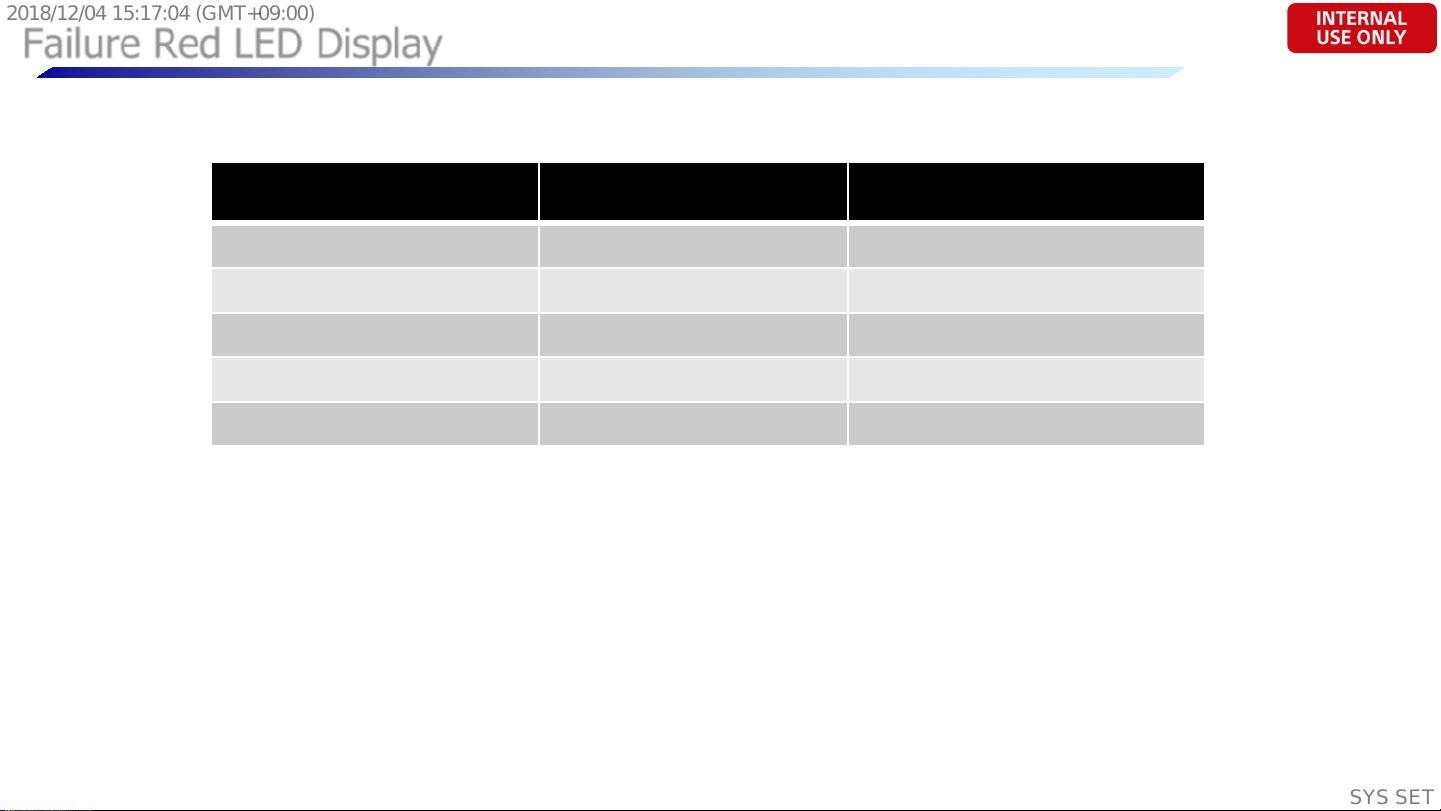
Failure Red LED Display
The Number of Standby LED
(Red LED blinking)
2 Main Power Error AC Adaptor Error
3 Audio Error Board Error
4 Pan el P ower Err or Board Error
5 Panel I2C COMM Error Panel / LVDS Error
6 Backlight Error Board Error
**Same as last FY14 ITC3 m o del
Detection Items Board Error Item
Sony EMCS (Malaysia) Sdn. Bhd.
“Toge t he r , Innovation, Our Future ” -- Open & Transparent
SYSSET
3
Page 4
2018/12/0415:17:04(GMT+09:00)
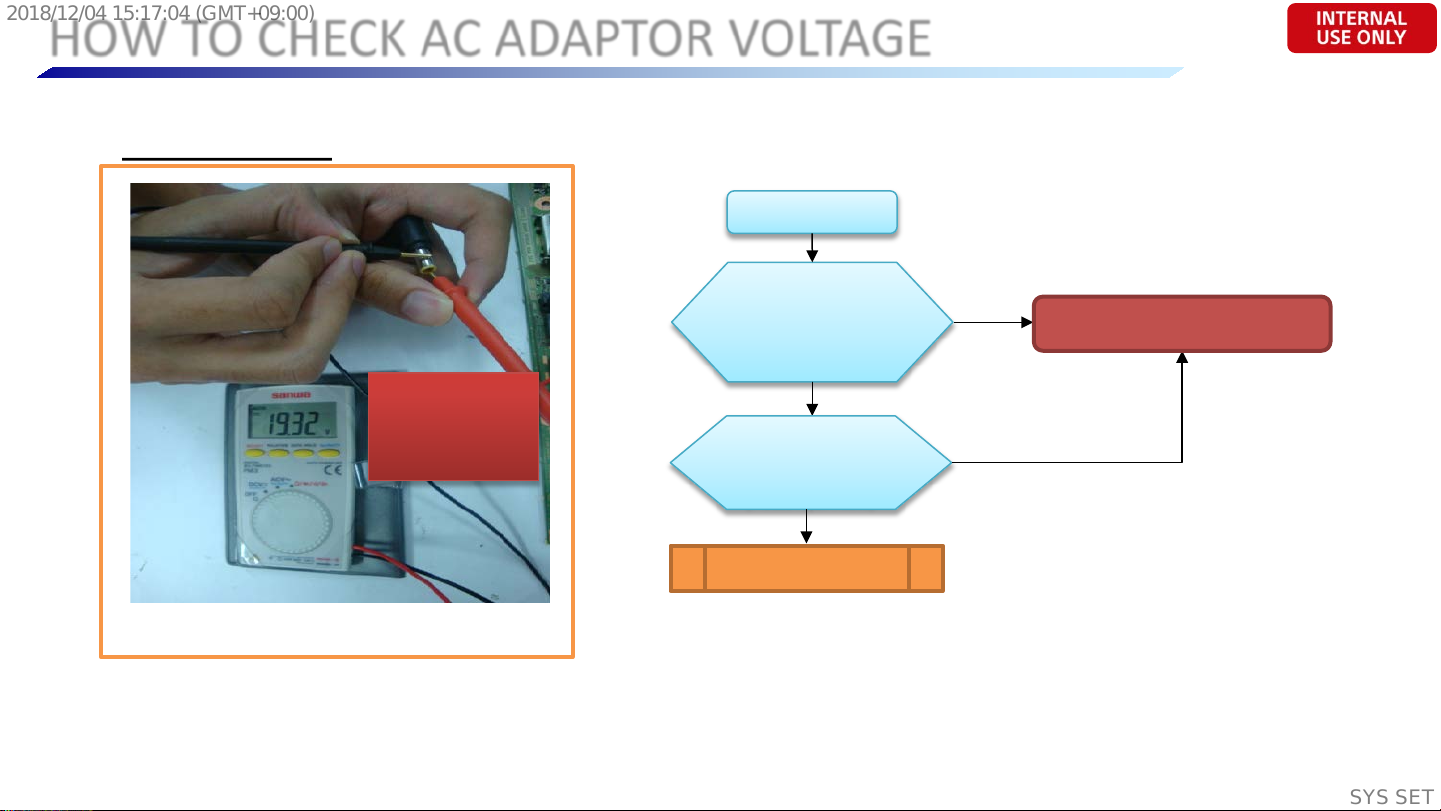
HOW TO CHECK AC ADAPTOR VOLTAGE
AC ADAPTOR
-ve
+ve
Ensure that +ve
probe is touching
the +ve terminal.
Photo: How to check AC Adaptor’s output voltage.
**apply to all AC Adaptor models for all chassis
TV No Power
Check DC voltage at
JL6001
Is it 19.5V?
No
Take out adaptor
and test at adaptor
output is it 19V – 19.5V?
(Please refer Photo)
No
AC Adaptor NG
Yes
Yes
Please refer to DDCon Checking
(next page)
Sony EMCS (Malaysia) Sdn. Bhd.
“Toge t he r , Innovation, Our Future ” -- Open & Transparent
SYSSET
4
Page 5

2018/12/0415:17:04(GMT+09:00)
BB3 DDCon Checking
**IC location & probing point is on next page.
Sony EMCS (Malaysia) Sdn. Bhd.
Check IC6019 (JL6034)
Check IC6014 (JL6019)
Check IC6017 (JL6040)
Check IC6012 (JL6037)
Check IC6010 (JL6036)
Check IC6009 (JL6038)
Check IC6016 (JL6035)
(SE 3 N; PN 6-722-730-01)
12V?
OK
5V?
OK
1.2V?
OK
1.5V?
OK
3.3V?
OK
3.3V?
OK
1.1V?
OK
Replace IC5000
(SE3; PN 6-722-741-01)
OK
“Toge t he r , Innovation, Our Future ” -- Open & Transparent
NG
NG
NG
NG
Replace IC6019
(PN 6-718-479-11)
Replace IC6014
PN 6-721-997-01
Replace IC6017
(PN 6-722-479-01)
Replace IC6012
(PN 6-722-699-01)
After changed DDCon
still NG, IC5000 MTK internal
short to GND. Replace IC5000.
**IC5000 is a BGA IC.
Only BRC can change
IC5000 using the BGA
NG
NG
NG
Replace IC6010
(PN 6-722-697-01)
Replace IC6009
(PN 6-722-697-01)
Replace IC6016
(PN 6-719-635-01)
Machine
SYSSET
5
Page 6

2018/12/0415:17:04(GMT+09:00)
BB3 Board Photo & DDCon Location.
IC6019
Sony EMCS (Malaysia) Sdn. Bhd.
“Toge t he r , Innovation, Our Future ” -- Open & Transparent
SYSSET
6
Page 7

2018/12/0415:17:04(GMT+09:00)
ERG CONTENTS (BB3 BOARD)
**Contents are as per findings in F60 Project
# Parts Ref Symptom Part Number
1 CN3600 HDMI2 Not Working
2 IC5000 No Power
# ## ## ## ##
# ## ## ## ##
1-822-637-31
(HDMI2 Connector)
SE3; 6-722-741-01
SE3N; 6-722-730-01
(MTK IC)
-
Remarks
Unable to issue ERG due to investigation & a na lysis
is still on-going. Will update in future.
Future ERG Expand ite m . (bas e d on F6 0 findings )
Future ERG Expand ite m . (bas e d on F6 0 findings )
Sony EMCS (Malaysia) Sdn. Bhd.
“Toge t he r , Innovation, Our Future ” -- Open & Transparent
SYSSET
7
Page 8

2018/12/0415:17:04(GMT+09:00)
1. CN3600
HDMI2 Connector
(HDMI2 Not Working)
Sony EMCS (Malaysia) Sdn. Bhd.
“Toge t he r , Innovation, Our Future ” -- Open & Transparent
SYSSET
8
Page 9

2018/12/0415:17:04(GMT+09:00)
1. HDMI2 Not Working/No Picture
# Parts Ref Symptom Part Number
1 CN3600 HDMI2 Not Working
HDMI2 No Picture
Verify with other
HDMI source /cable
[NG] No picture
Factory reset
HDMI source & re-verify
[NG] No picture
Verify by using laptop
[NG] No picture
Physical appearance
check on HDMI2 connector
[NG] Connector/PWB abnormal
& PWB
[OK] Picture recovered
[OK] Picture recovered
[OK] Picture recovered
[OK] No Abnormalities
1-822-637-31
(HDMI2 Connector)
HDMI source/
cable problem
HDMI source
setting problem
Not CN3600 NG.
Refer SM for full Checking
Not CN3600 NG.
Refer SM for full Checking
Connector NG – Replace CN3600
PWB NG – Replace Main Board
Sony EMCS (Malaysia) Sdn. Bhd.
(PN 1-822-637-31)
(PN; please refer SM)
“Toge t he r , Innovation, Our Future ” -- Open & Transparent
SYSSET
9
Page 10

2018/12/0415:17:04(GMT+09:00)
BB3 Board Photo & CN3600 Location
HDMI2
(CN3600)
Sony EMCS (Malaysia) Sdn. Bhd.
“Toge t he r , Innovation, Our Future ” -- Open & Transparent
10
SYSSET
Page 11

2018/12/0415:17:04(GMT+09:00)
EOF
Sony EMCS (Malaysia) Sdn. Bhd.
“Toge t he r , Innovation, Our Future ” -- Open & Transparent
11
SYSSET
 Loading...