

Page 1
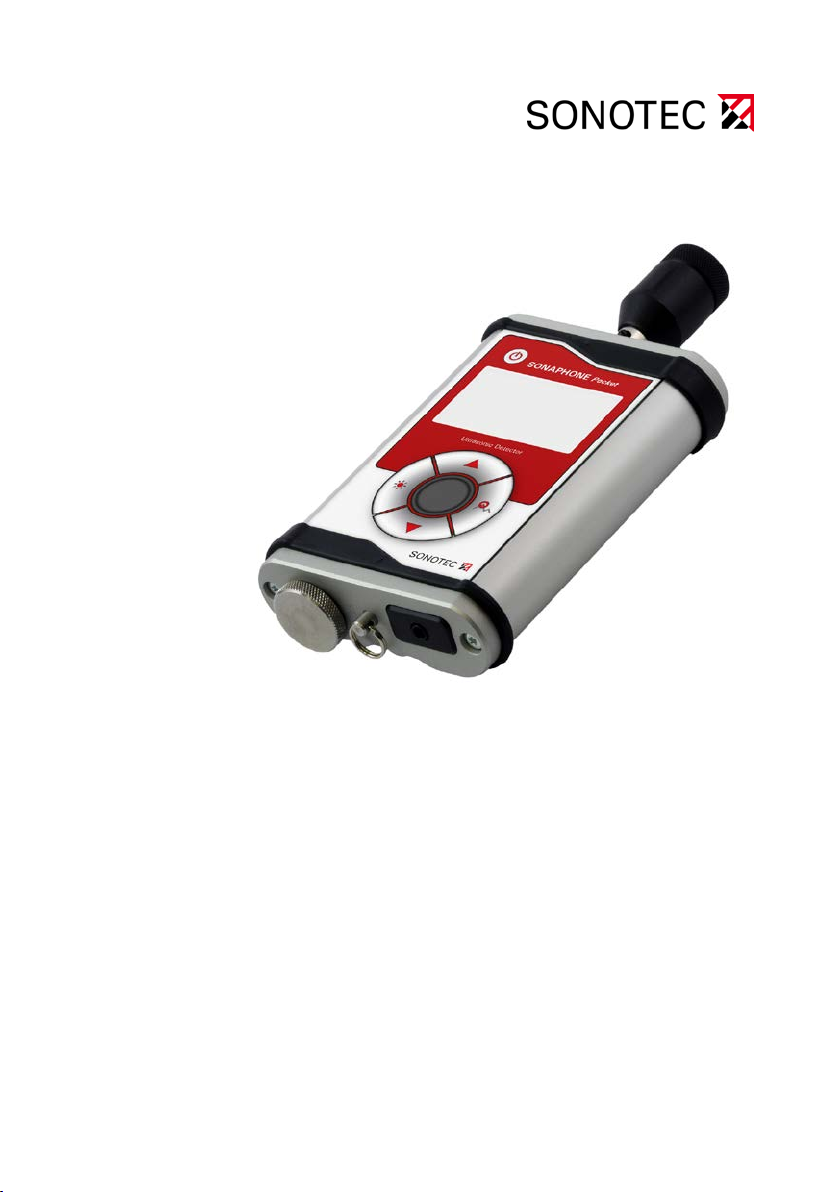
Ultrasonic Testing Device
SONAPHONE
Operating manual
Pocket
Page 2

Distribution: SONOTEC Ultraschallsensorik Halle GmbH
Model: Ultrasonic testing device
Type: SONAPHONE Pocket
Multifunction device for leak detection, tightness control and
other maintenance tasks
SONOTEC Ultraschallsensorik Halle GmbH
Nauendorfer Str. 2
06112 Halle (Saale), Germany
Phone: +49 (0)345 133 17-0
Fax: +49 (0)345 133 17-99
E-mail: [email protected]
Web: www.sonotec.eu
© 2016
All rights reserved
The contents of this manual are copyrighted property. Duplication and distribution in any
form, particularly reprinting, photographic, mechanical or electronic reproduction, or in the
form of storage in data processing systems or data networks, is prohibited without the
consent of the copyright holder.
Revision: 1, Date: 2016-08-02
Subject to technical modifications!
SONAPHONE Pocket 2
Page 3

Contents
1 Notes on the operating manual .................................................. 5
1.1 General .......................................................................................... 5
1.2 Symbols used ................................................................................ 5
2 Safety ............................................................................................ 6
2.1 Safety information.......................................................................... 6
2.2 User qualifications ......................................................................... 7
3 Device description and probes .................................................. 8
3.1 Designated use .............................................................................. 8
3.2 Measuring method and functioning ............................................... 8
3.3 Device construction ....................................................................... 9
3.4 Display and operating butto ns ..................................................... 10
3.5 Accessories ................................................................................. 12
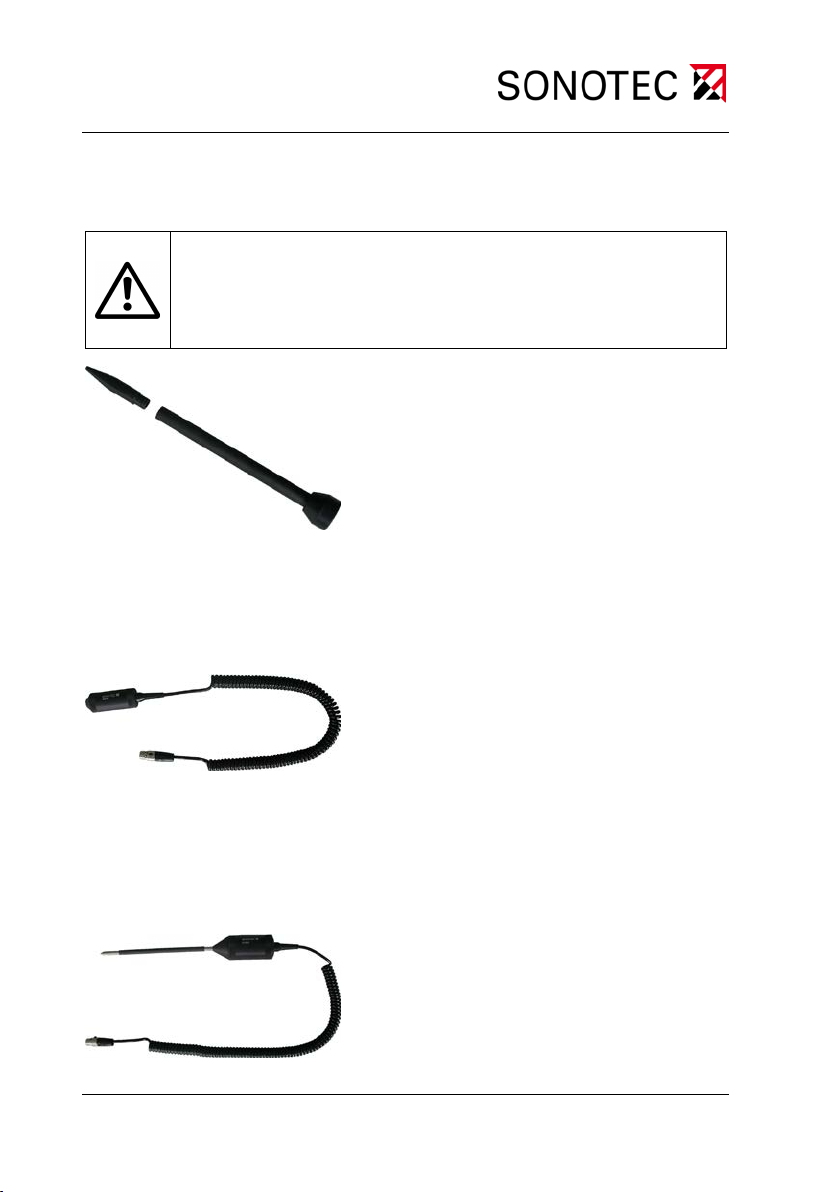
3.6 Airborne sound probe L50 ........................................................... 13
3.7 Acoustic horn (attachment for airborne sound probe L50) .............. 13
3.8 Directional tube with tip (for probe L50) ...................................... 14
3.9 Structure-borne sound probe L51 for valve te sting .......................... 14
3.10 Structure-borne sound probe L52 ................................................... 14
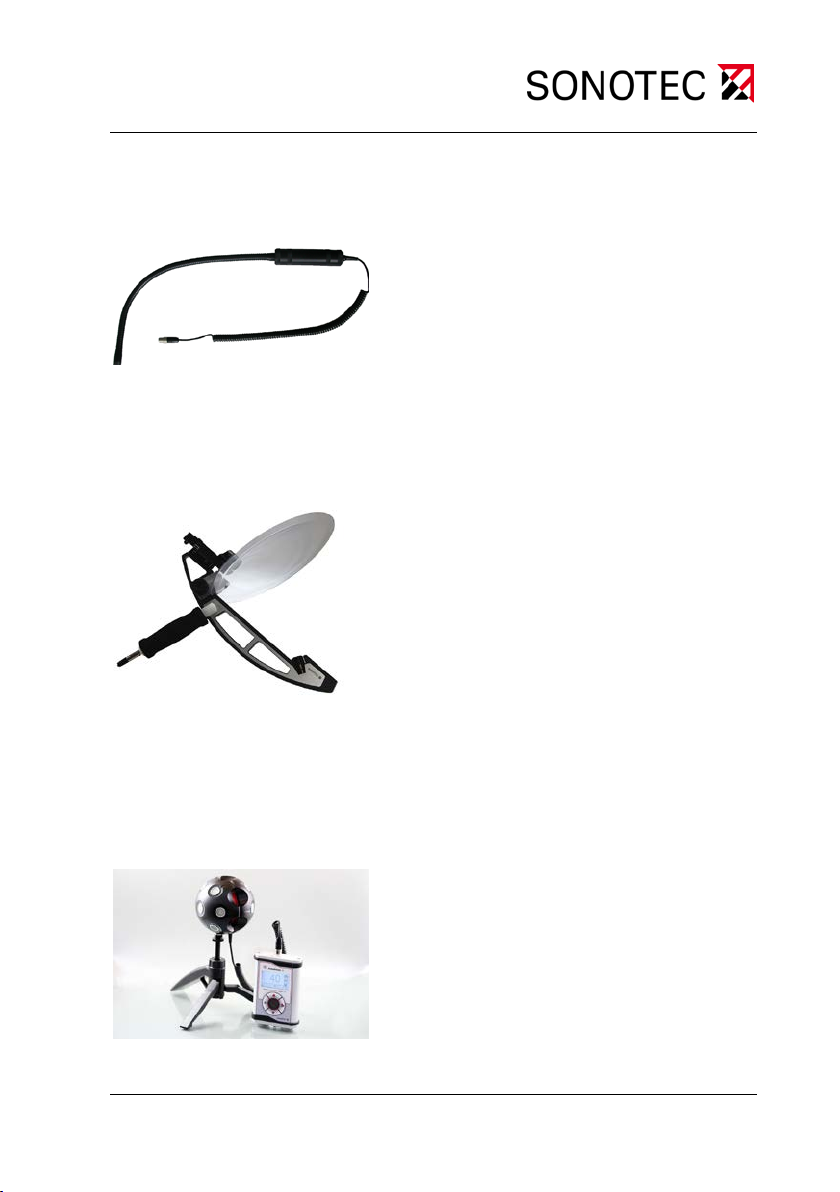
3.11 Airborne ultrasonic probe L53 (f lex ible pr obe) ............................ 15
3.12 Parabolic probe L55 – SONOSPOT ............................................ 15
3.13 Ultrasonic transmitter SONAPHONE T and spherical transmitter
L56 – SONOSPHERE ................................................................. 15
SONAPHONE Pocket 3
Page 4

4 Commissioning and installing ................................................ 16
4.1 Inserting the batteries ................................................................. 16
4.2 Plug in headphones .................................................................... 16
4.3 Installing probes ......................................................................... 17
4.4 Uninstalling probes ..................................................................... 17
5 Operating the SONAPHONE Pocket ....................................... 18
5.1 Switching the SONAPHONE Pocket on and off ......................... 18
5.2 Setting the volume ...................................................................... 18
5.3 Switch on maximum value detection .......................................... 18
5.4 Switch on the display lighting ..................................................... 19
5.5 Adjust display contrast settings .................................................. 19
6 Cleaning and care ..................................................................... 20
7 Maintenance and troubleshooting .......................................... 20
8 Technical data ........................................................................... 21
SONAPHONE Pocket 4
Page 5
1 Notes on the operating manual
1 Notes on the operating manual
1.1 General
Thank you for choosing the SONAPHONE Pocket.
This manual f orms par t of the SONAPHONE
Pocket and should therefore
be stored in the im mediate vicinity of any operator and s hou ld be ac c essible at any time. It c ontai ns all the inf orm ation need ed to ensur e proper
and efficient use, along with all the ins tructions to ensure s afe operation
of the SONAPHONE
Pocket.
1.2 Symbols used
Hazards or special information are indicated as follows:
Warning!
This information warns of possible personal injury and
damage to property.
Caution!
This information warns of possible damage to property.
Note
This symbol provides information or draws attention to
special features.
SONAPHONE Pocket 5
Page 6
the manufacturer.
2 Safety
2 Safety
2.1 Safety information
The SONAPHONE Pocket corresponds to state-of-the-art technolog y and
complies with safety regulations. The manufacturer has taken every
possible action to guara ntee safe operation. The us er must ensure that
safe use is not impaired. T he devic e is factor y tested and was deliver ed
in a safe operating condition.
Warning!
Incorrect operation and use of the SONAPHONE
its accessories may present a hazard for the user.
• The SONAPHONE
power sources in the operating voltage range specified
Pocket may only be operated with
in the technical data.
• Operation and storage of the SONAPHONE
outside the temperature ranges specified in the technical data is not permitted.
• The SONAPHONE
Pocket may not be immersed in
liquids.
• The SONAPHONE
Pocket may only be exposed to
limited risks due to mechanical factors. If there is visible damage, the SONAPHONE
Pocket must be taken
out of operation immediately.
• Check the headphone cable regularly for damage and
avoid bending, crushing or tugging the cable.
• Opening the SONAPHONE Pocket and its accessories
or performing repair work on them without authorization is not permitted. This may only be carried out by
Pocket and
Pocket
SONAPHONE Pocket 6
Page 7
2 Safety
• You should always be able to see the device and the
probes clearly while at work. Never work with the
probes near exposed live parts or without visual contact in unfamiliar areas.
• When locating ultrasonic signals on electrical systems,
a sufficient safety distance must be observed in order
to avoid electrical flashovers.
2.2 User qualifications
Warning!
The SONAPHONE
Pocket may only be installed and op erated
by users who have read and understood the entire operating
manual.
SONAPHONE Pocket 7
Page 8

3 Device description and probes
3 Device description and probes
3.1 Designated use
The SONAPHONE Pocket is used to detect ultrasound.
Any use other than the designated use is prohibit ed and can result in
personal injury or dam age to property. The SONOTEC Ultraschallsensorik Halle GmbH ac cepts no liability for damage, inc luding damage to
third parties, caused by improper handling of the device.
3.2 Measuring method and functioning
Using the SONAPHONE Pocket, faulty components can be localized in
different systems and their potential risk for the process can be assessed. It is based on ultr asonic signals which c an be c aused b y friction
on defective parts, for example.
Ultrasound can be created during a wide range of processes, including:
• at leaks in compressed air, steam and vacuum systems,
• during the operation of steam traps,
• at leaking valves, gates, barriers or taps in pipe systems,
• during the normal function of rolling bearings
• during cavitation caused by pumps and compressors, as well as
• in the event of flashovers or corona discharges in electrical s ys-
tems
SONAPHONE Pocket 8
Page 9
1
2
4
3
3 Device description and probes
The ultrasonic signals created during the specified processes are detected with the SONAPHONE
Pocket, converted into audible s ound and
output in their intensit y through the headphones. At the same time, the
ultrasound level is reported on the display.
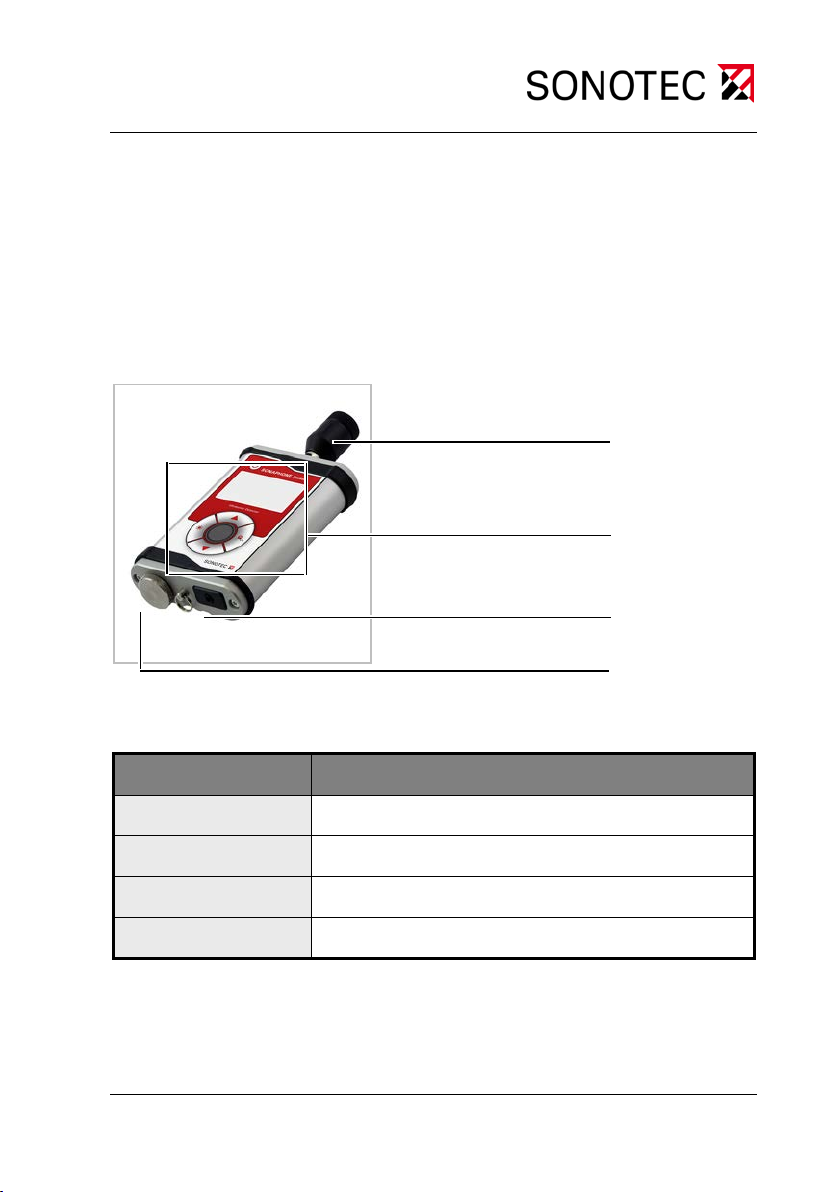
3.3 Device construction
Figure 1: Ultrasonic testing device SONAPHONE
Pocket
Item number Function
1
2
3
4
Table 1: SONAPHONE Pocket device elements
Slot for ultrasonic probes
Display and operating buttons
Headphones port
Battery compartment
SONAPHONE Pocket 9
Page 10
1
4
6
3 5 2
3 Device description and probes
3.4 Display and operating buttons
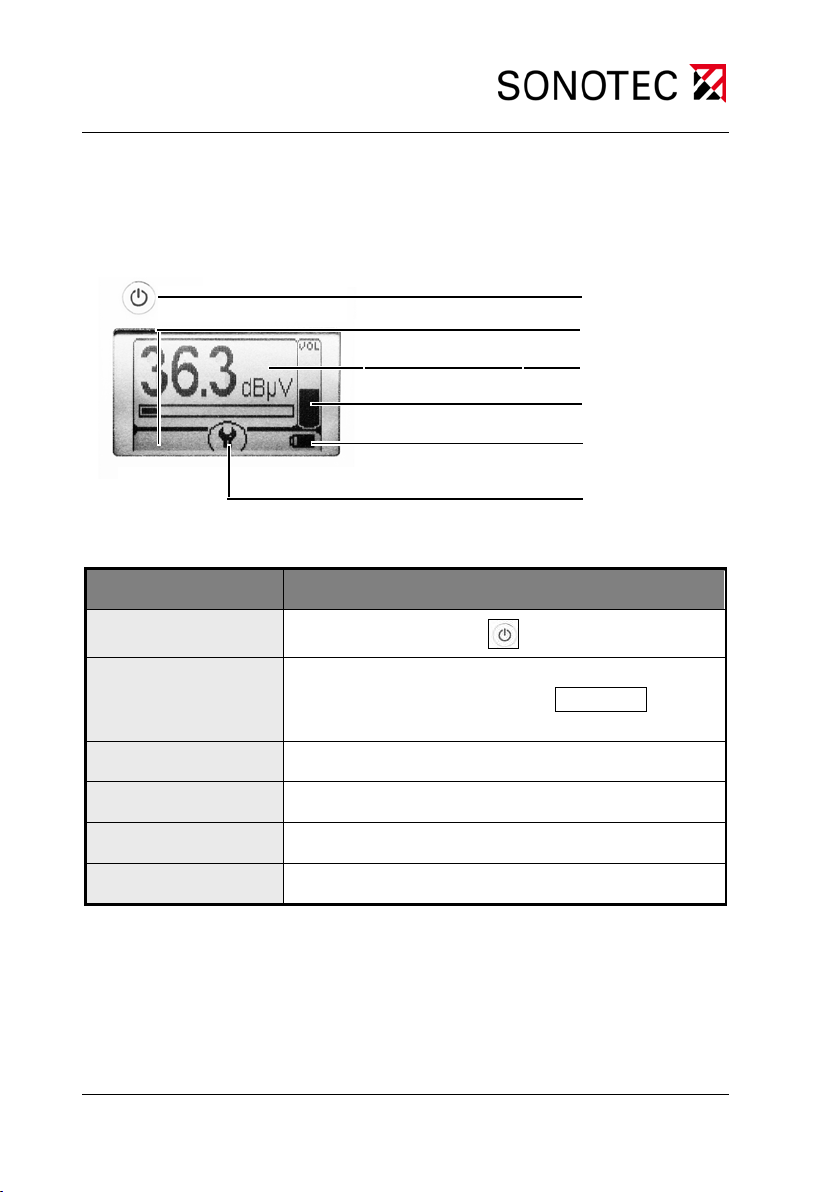
Description of the display elements:
Figure 2: Display
Item number Function/view on the display
1
2
Device: On/Off switch
Maximum sound level display:
Maximum value detection On Max xx.x /
Off (no display)
3
4
5
6
Table 2: Description of the display elements
SONAPHONE Pocket 10
Sound level display xx.x dBµV
Volume display
Battery status view
Function of the enter key in the menu
Page 11
1
2 34
3 Device description and probes
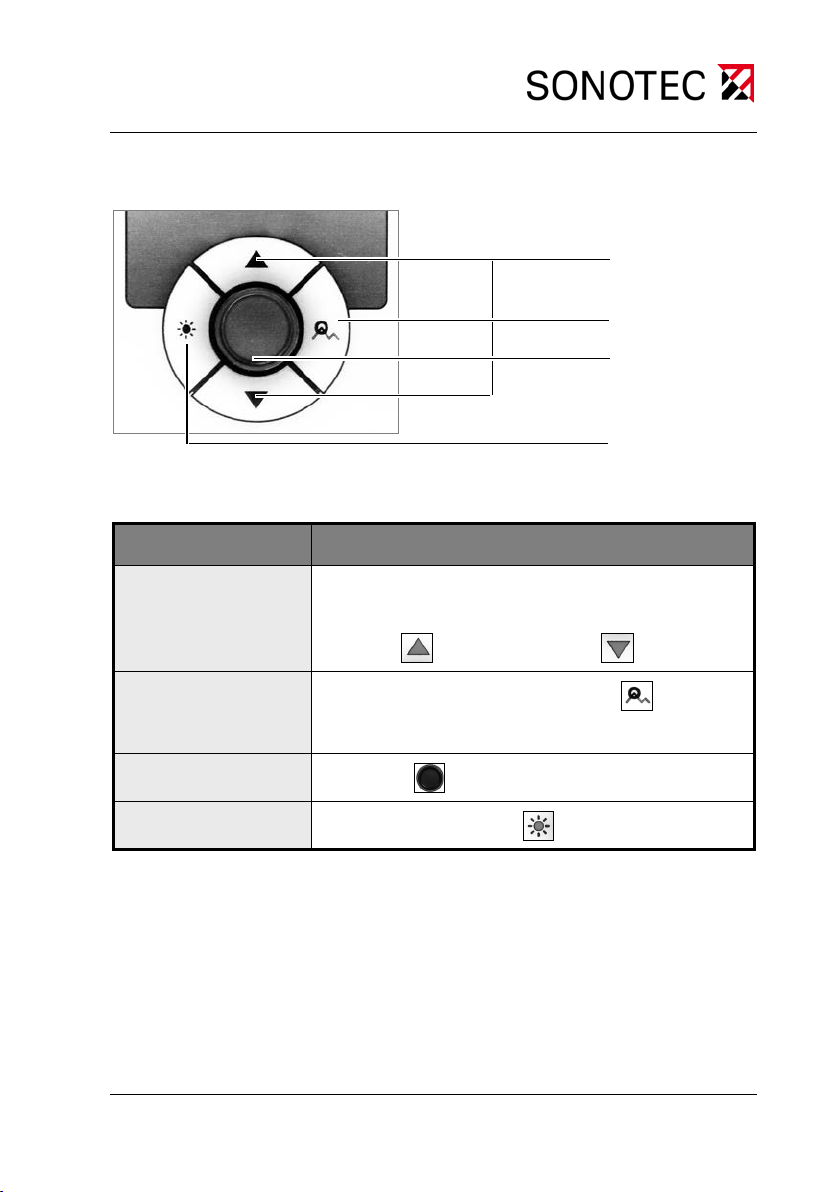
Description of the operating buttons:
Figure 3: Operating buttons
Item number Function
1
1. Changing the volume
2. Settings in the menu:
or decrease value
2
Increase
Maximum value detection: On/Off
In the menu: Cancel
3
4
Table 3: Description of the operating buttons
Enter key: Switch to menu or confirm value
Display lighting On/Off
SONAPHONE Pocket 11
Page 12

3 Device description and probes
3.5 Accessories
Batteries
Operating manual
Probes*
• Airborne sound probe L50
• Directional tube with tip (for airborne sound probe L50)
• Acoustic horn (attachment for airborne sound probe L50)
• Structure-borne sound probe L52
• Airborne ultrasonic probe L53 (f lex ible pr obe)
• Parabolic probe L55 – SONOSPOT
• Extension cable for ultrasonic probes
Other accessories*
Carrying case
Headphones
Carrying strap
For leak testing*
• Ultrasonic transmitter S ONAPHONE T with airborne sound probe L5 0
• Spherical tran smitter L56 – SONOSPHERE with magnetic and
suction cup attachment, tripod, carrying case with carry ing strap and
user manual
*according to the order
SONAPHONE Pocket 12
Page 13
1
2
3
3 Device description and probes
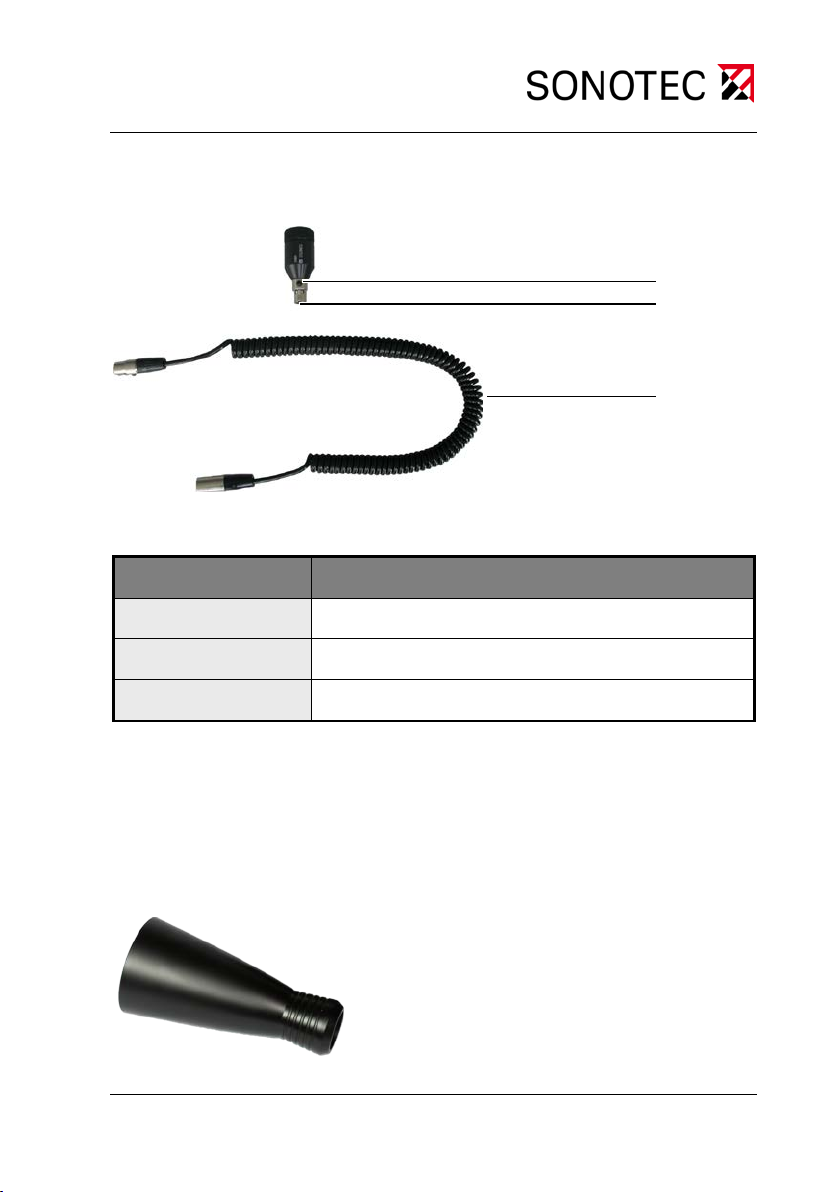
3.6 Airborne sound probe L50
Item number Function
1
2
3
Table 4: Elements of the airborne sound probe
Button for unlocking
Connector
Extension cord (optional)
3.7 Acoustic horn (attachment for airborne sound probe L50)
SONAPHONE Pocket 13
Page 14
3 Device description and probes
3.8 Directional tube with tip (for probe L50)
Caution!
Slip the rubber grommet carefully over the L50. Avoid exerting pressure on the probe; this may damage the probe grid!
3.9 Structure-borne sound probe L51 for valve testing
3.10 Structure-borne sound probe L52
SONAPHONE Pocket 14
Page 15
3 Device description and probes
3.11 Airborne ultrasonic probe L53 (flexible probe)
3.12 Parabolic probe L55 – SONOSPOT
3.13 Ultrasonic transmitter SONAPHONE T and spherical transmit t er L56 – SONOSPHERE
SONAPHONE Pocket 15
Page 16
4 Commissioning and installing
4 Commissioning and installing
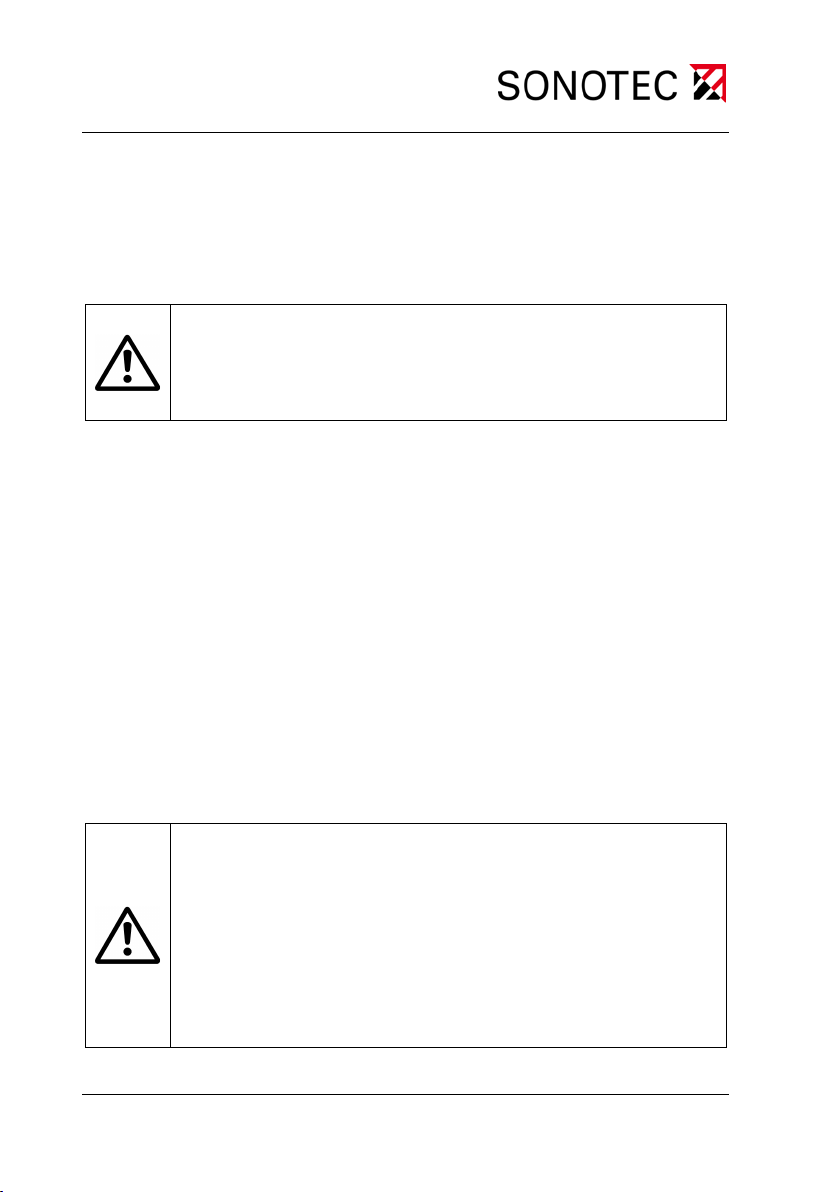
4.1 Inserting the batteries
Caution!
Make sure you install the batteries in the correct position.
The device may be damaged by incorrect insertion.
The correct position for installing the batteries is shown on the device.
Unscrew the battery compartment cover.
Insert the batteries (2 AA 1.5 V) into th e bat tery c om partm ent acc ord-
ing to the illustration on the bottom of the device.
When the device is operational, the battery status (1.5 V) is shown on
the display.
Appropriate accum ulators can also be used to operate the device . The
charge status for the accumulators (1.2 V) is then shown approximately.
4.2 Plug in headphones
Caution!
Malfunctions in device may occur:
• Only connect headphones with a stereo plug.
• When connecting the headphones, make sure
both plugs (on the device and the headset) are fully
inserted into the socket.
SONAPHONE Pocket 16
Page 17
4 Commissioning and installing
4.3 Installing pr obes
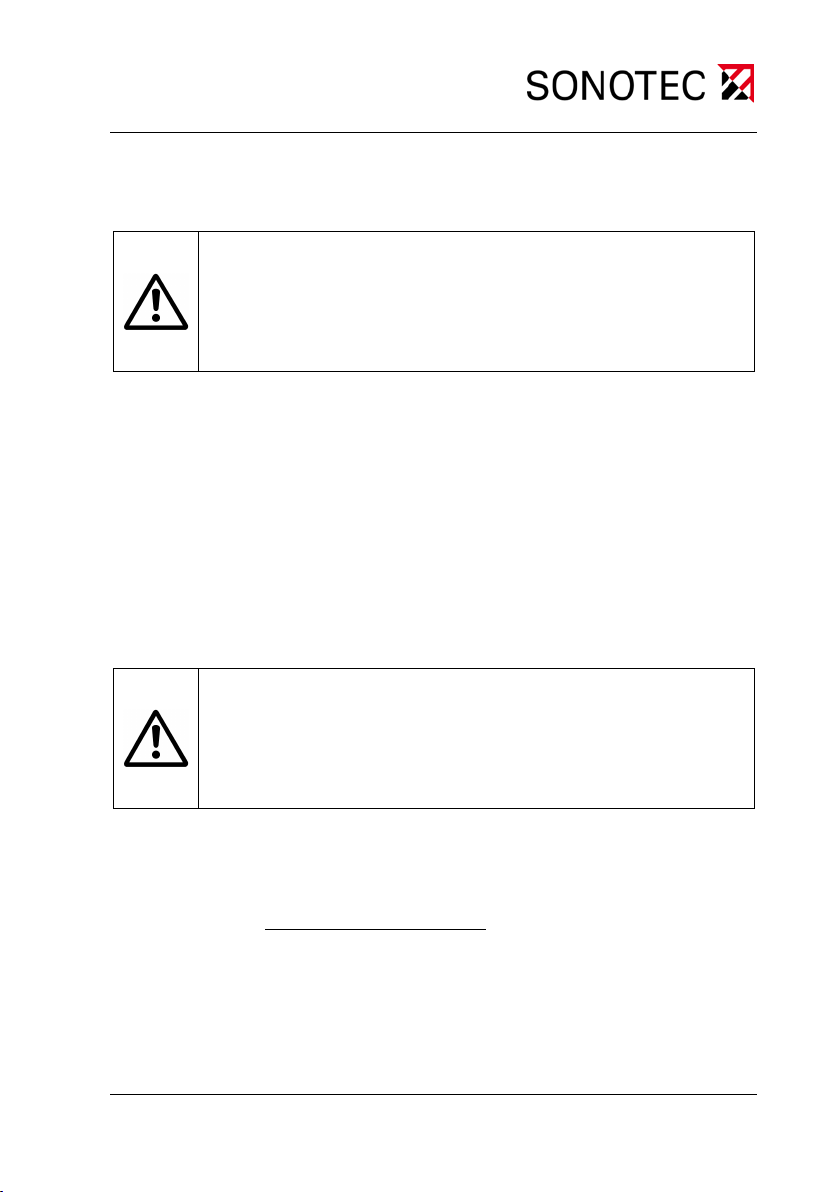
Caution!
Make sure the probe connector is in the correct position.
The device and the probe may be damaged during installation.
The slot for probes is provided with a n otch which indic ates the correct
position for insertion.
Install the required pr obe in the specified position. You must feel the
connector click into place.
The probe is installed and ready to use.
4.4 Uninstalling pr obes
Caution!
Do not turn the probe to remove it!
The device and the probe may be damaged during installation.
Press the button to unlock the connector.
Pull the probe carefully in a straight line to remove it from its slot.
SONAPHONE Pocket 17
Page 18

5 Operating the SONAPHONE Pocket
5 Operating the SONAPHONE Pocket
5.1 Switching the SONAPHONE Pocket on and off
Switch the device on or off by pressing the On/Off button.
The device is read y to use and displa ys the current sound level dur-
ing operation.
5.2 Setting the volume
The volume can be varied in regular steps of 2 between -42 dB and
0 dB. The factory setting is -22 dB.
Press the arrow buttons to increase
The current volume is shown on the display.
or decrease the volume .
5.3 Switch on maximum value detection
Press the button for m aximum value detec tion to switch the func-
tion on and off.
The value is displayed on the bottom left of the display.
Max xx.x Maximum value detection on
SONAPHONE Pocket 18
Page 19
5 Operating the SONAPHONE Pocket
5.4 Switch on the displa y lighting
Press the Light button to switch the display lighting on and off.
The lighting automatically switches off after approx. 20 seconds.
5.5 Adjust displa y contrast s ettings
To adapt the view to individua l ambient conditions, the displa y contrast
can be altered.
The factory setting is 50 %.
Press the Enter key
Select a contrast value using the arrow keys
1x to select the contrast.
.
Confirm the value with the Enter key to return to the main menu.
SONAPHONE Pocket 19
Page 20
6 Cleaning and care | 7 Maintenance and troubleshooting
6 Cleaning and care
Caution!
Incorrect cleaning of the SONAPHONE
Pocket and its parts
may damage the device.
It must not be cleaned
• with abrasive and aggressive cleaning agents
• by immersion in liquids.
7 Maintenance and troubleshooting
Caution!
In the event of errors or problems, it is not permitted to open
the SONAPHONE
pair work on them without authorisation. This may only be
carried out by the manufacturer.
The SONAPHONE Pocket is practically maintenance free.
If errors or problems do occur, please contact the manufacturer.
Pocket or accessories or to undertake re-
SONAPHONE Pocket 20
Page 21
8 Technical data
8 Technical data
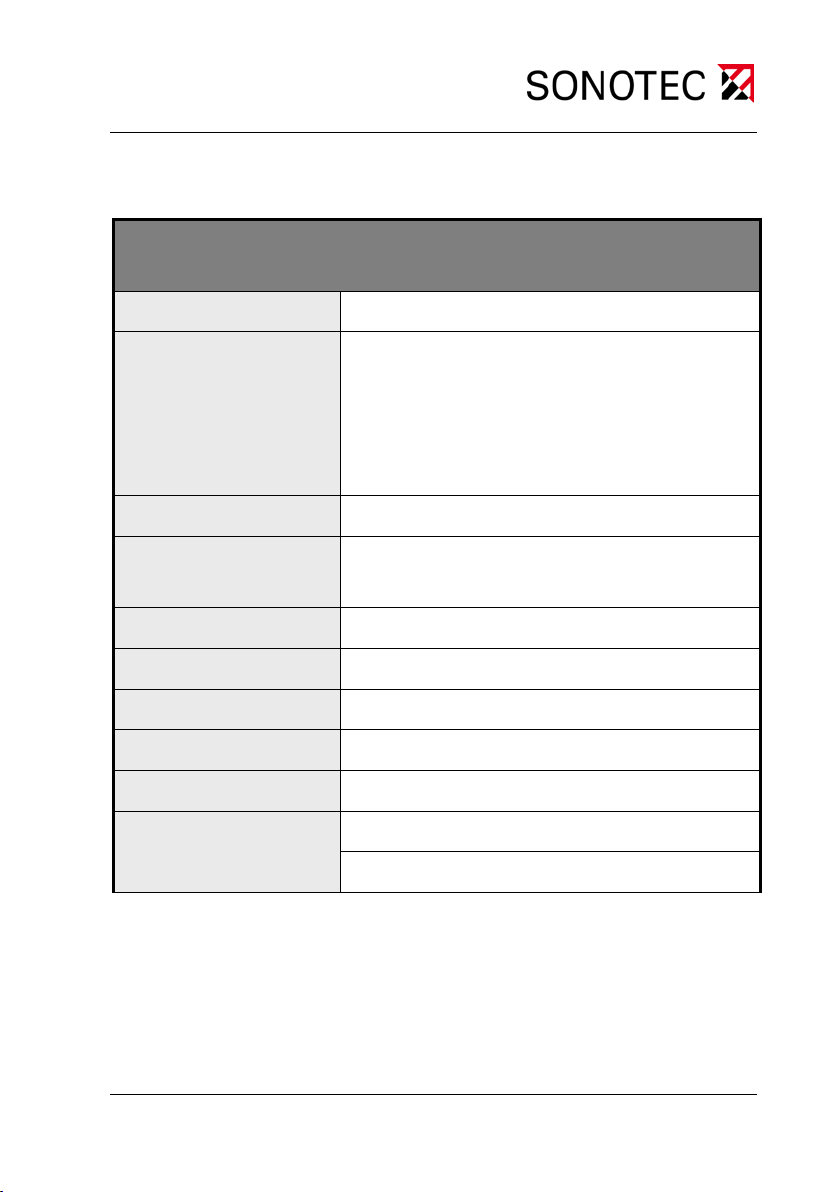
SONAPHONE Pocket, Version 1.0
Ultrasonic testing device
Operating frequency
Functionality
Display
Connections
Power supply
Operating voltage
Running time
Operating temperature
Storage temperature
Protection type
About 40 kHz
Detection and conversion of ultrasonic
signals:
Making ultrasound audible
Report of sound level on the display
Auto Power Off function
Illuminated LC display
For different ultrasonic probes;
Stereo jack plug
2 AA batteries or accumulators
2x 1.5 V battery or 2x min. 1.2 V accumulator
Approx. 24 hours with batter y operation
-10 °C ... +60 °C
-20 °C ... +60 °C
Device: IP54
Probe: IP20
SONAPHONE Pocket 21
Page 22
8 Technical data
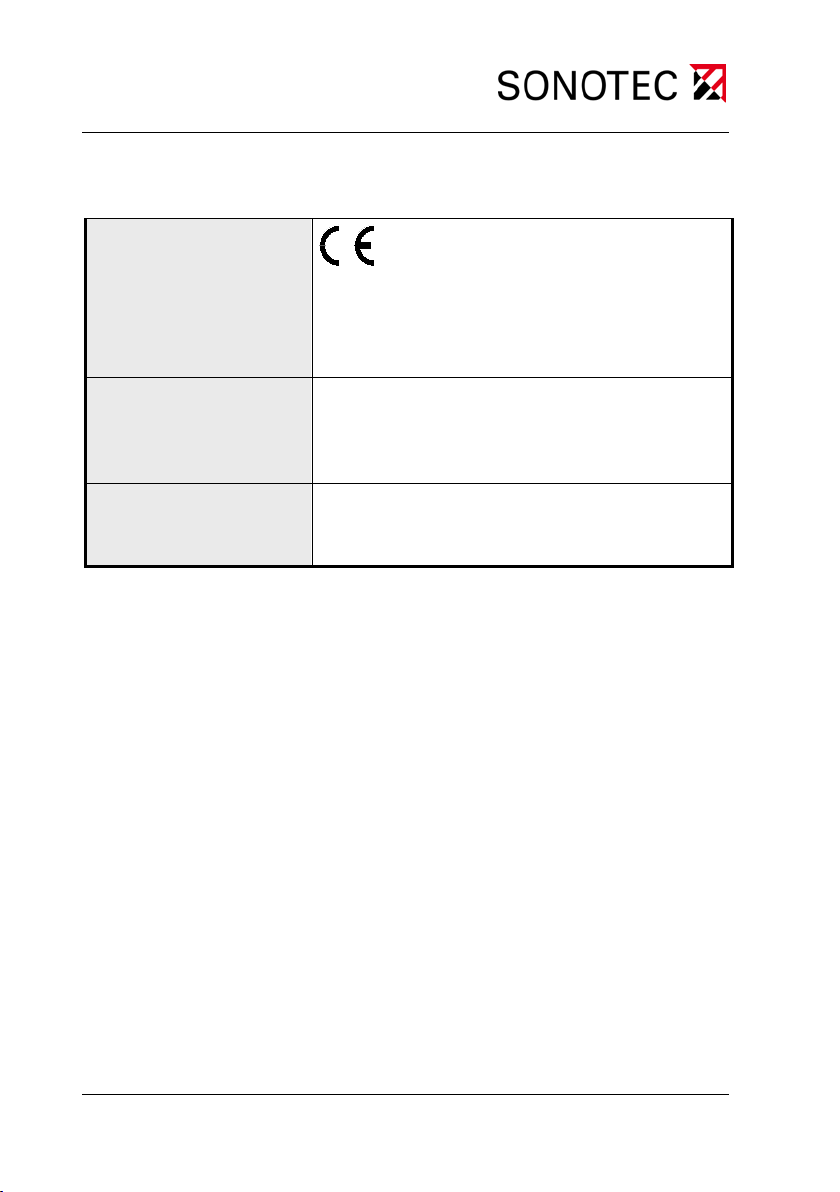
Directives
2014/30/EU, electromagnetic compatibility;
2011/65/EU, on the restriction of the use of
certain hazardous substances in electrical
and electronic equipment (RoHS)
Dimensions
Without probe: LWH 130 x 85 x 30 mm
With L50 probe: Length ~170 mm
Probe: Length ~ 5 2 mm, Ø ~ 22 mm
Items supplied
Ultrasonic tes t ing de vice, probes as specified
in the order, stereo headphones, carrying
case, user manual
Table 5: Technical data for the SONAPHONE Pocket
SONAPHONE Pocket 22
 Loading...