

Page 1
1551 E 11th Street, Loveland, CO 80537 • 970-667-1000 • Fax: 970-667-1032 • www.coloradotime.com
Page 2

INSTRUCTIONS
Introduction
Congratulations on the purchase of your new electronic scoreboard. Your scoreboard is state of the art and designed
along with detailed information regarding your particular model. If further information is required please contact
your CDS sales representative at 970-667-1000.
Service and Customer Information
In the event service is required for your scoreboard or if you wish to order replacement parts please contact your
CDS sales representative at 970-667-1000.
To aid in your discussions, we suggest that you record the following information for reference:
MODEL NUMBER: ___________________________________________________________
INSTALLATION DATE: _______________________________________________________
CDS SALES
REPRESENTATIVE: ___________________________________________________________
CONTACT
INFORMATION: _______________________________________________________________
CONTACT
PRODUCT
SERIAL NUMBERS: ____________________________________________________________
____________________________________________________________
____________________________________________________________
____________________________________________________________
____________________________________________________________
____________________________________________________________
1551 E 11th Street, Loveland, CO 80537 • 970-667-1000 • Fax: 970-667-1032 • www.coloradotime.com
Page 3

INSTRUCTIONS
Indoor Scoreboards
Your scoreboard will require a 120 VAC, 60 Hz, grounded receptacle located within 5 feet of the top-centre of the scoreboard. Optional 230VAC, 60Hz, is also available. Typically the outlet will be a dedicated
15 Amp circuit. Refer to the model specific information provided in this package for the exact current load
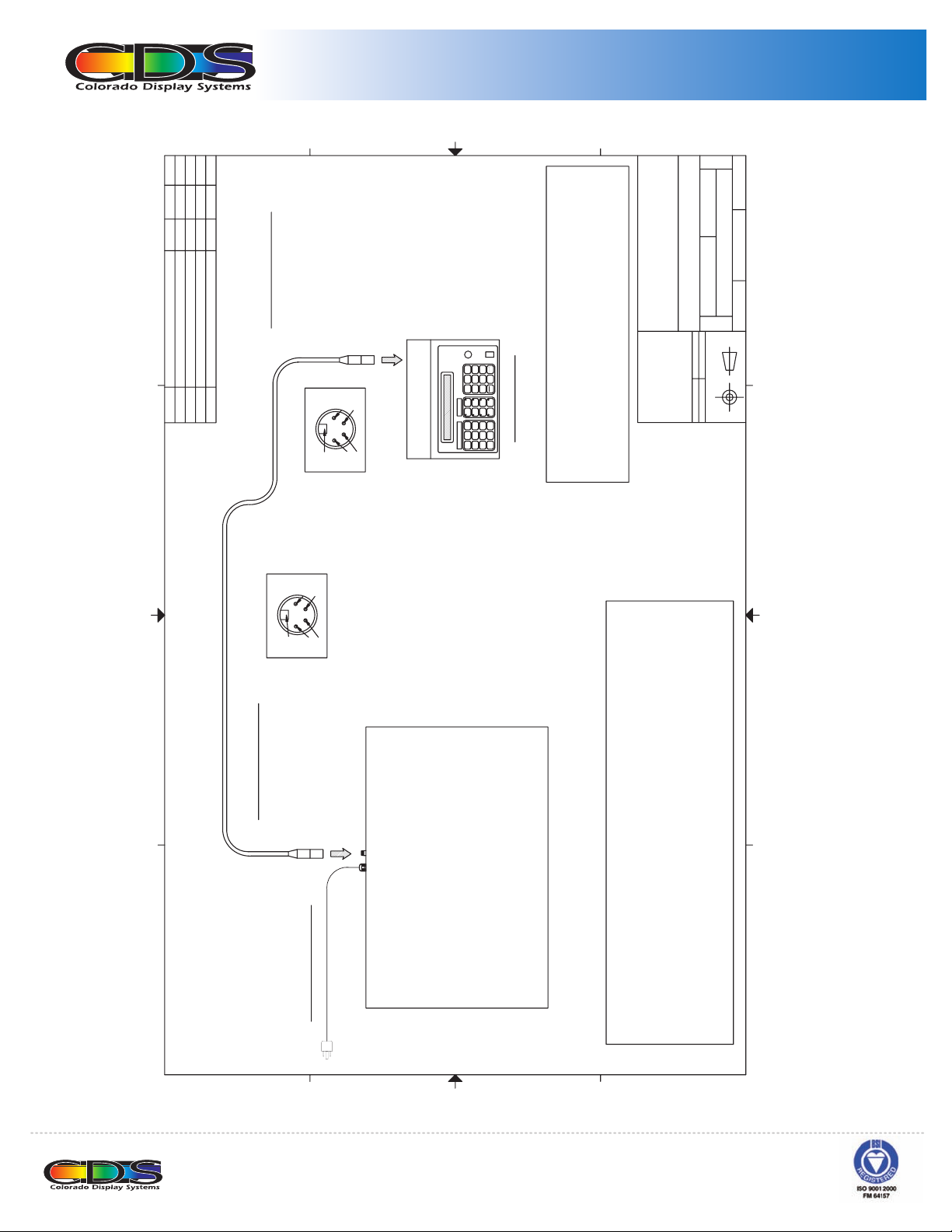
for your scoreboard. FIGURE 1 illustrates a generic installation including a controller. Seek the service of
a qualified electrician to ensure the electrical installation meets all local electrical codes. CDS assumes no
responsibilities for installations done by others.
NOTE: On scoreboards with the cULus mark, the scoreboard does not come equipped with a power
cord as these units must be permanently wired in.
Data cabling for the scoreboard is available in standard lengths (connectors factory installed), or as a kit
for custom lengths (connectors installed on site). See the DATA CABLING section for more information.
Wall mounting is the preferred method of installation. When determining the installation location, ensure
-
shipping. Remove and re-install the brackets so that the mounting holes are exposed past the edge of the
scoreboard. Lifting eyebolts are provided on the top of the scoreboard to facilitate lifting of the unit to its
type of fasteners selected should be suitable for the type of wall construction and have sufficient capacity
to support the scoreboard. CDS recommends using 3/8” fasteners. Detailed information regarding mounting locations and fasteners recommendations for your scoreboard model is provided in the documentation
attached.
1551 E 11th Street, Loveland, CO 80537 • 970-667-1000 • Fax: 970-667-1032 • www.coloradotime.com
Page 4
INSTRUCTIONS
1
2
APVD
DATE
.
AUTH
N
INITIAL DESIGN 05/20/03
DESCRIPTIO
N
REVISIO
A
D
)
LY
CN137C
NTROLLER ON
OES BIN#
. FEMALE CONNECTOR
NEUTRIK PART# NC4FX
4 POS
PIN 2 - COM (DC CONTROLLER ONLY)
PIN 1 - V+ (DC CO
PIN G
C
NNECTION
K (RS -)
CO
AC
PIN 3 - WHITE (RS +)
PIN 4 - BL
PIN G - NO
4
3
PIN
PIN
PIN 2
PIN 1
SOLDER CUP VIEW
6
9
8
5
4
7
B
TION.
CA
R
3
ENTE
2
0
R
1
CLEA
CONTROLLER
ISC85X
CONTROLLER DATA WIRE AS PER
PIN OUTS DETAILED ABOVE.
CONTROLLER WIRING:
CONNECT
NTROLLER RECEIVES POWER FROM SCOREBOARD
DC CO
AC AND RF CONTROLLERS WILL REQUIRE AN 120VAC
CONTROLLER LO
LE NEAR
RECEPTAC
A
V
RE
TE
ING DA
ARDS
INIT DRAW
ALLATION
ON N6L 1P7
,
m
ndon
, Lo
OES ELECTRONIC SCOREBO
GENERIC OUTDOOR INST
4056 Blakie Road
OES, Inc.
NOTICE TO PERSON RECEIVING THIS DRAWING AND
TECHNICAL INFORMATION:
OES, INC. CLAIMS PROPERTY RIGHTS TO THE MATERIAL
FILENAME
(519) 652-5833
l.
DESCRIPTION
Fax. (519) 652-3795
Email oes@oes-inc.co
Te
SIZE
DISCLOSED HEREIN. THIS DRAWING INCLUDES
UNPUBLISHED PROPRIETARY MATERIAL DEVELOPED BY
OES, INC. AND AS SUCH IS NOT TO BE COPIED,
REPRODUCED OR USED IN ANY WAY WITHOUT PRIOR
WRITTEN AUTHORIZATION FROM OES, INC.
APPROVED BY:
CHECKED BY:
A
05/20/2003
GE
800-INSTALL-002
USA
B
THIRD ANGLE PROJECTIONS
1 OF 1
PAGE
JPG
N BY
AW
DR
TION ONLY
A
N/
INFORMA
E
SCAL
1
2
PIN 1PIN 2
3
4
GENERIC INDOOR INSTALLATION
4
PIN G
PIN
PIN 3
SOLDER CUP VIEW
)
Y)
NC4MX
CN137D
TOR
#
NNEC
CO
4 POS. MALE
RT
PA
OES BIN#
NEUTRIK
NTROLLER ONL
CO
OM (DC CONTROLLER ONLY
PIN 2 - C
PIN 3 - WHITE (RS +)
PIN 1 - V+ (DC
CK (RS -)
PIN 4 - BLA
PIN G - SHIELD
ARD
OREBO
SC
:
LENGTH - 5 FEET
OX.
APPR
GROUNDED ELECTRICAL CORD
D
C
B
ARD WIRING
OREBO
SC
AD
LO
WIRE
TA
E DA
.
GROUNDED RECEPTACLE
ARD'S TOP EDGE.
, 60Hz,
OREBO
AC
C/230V
VA
15A, 120
CATED WITHIN 5 FEET OF SC
LO
->ELECTRICAL:
REFER TO MODEL SPECIFIC DOCUMENTION FOR EXACT CURRENT
OREBOARD
2 TWISTED PAIR, 24 GUAG
TOP CENTRE OF SC
SHIELDED,
:
TA
CATED ON
OM LENGTHS
NTROLLER DA
CO
->
ALL WIRING LO
AVAILABLE PRE-ASSEMBLED IN STANDARD LENGTHS OR IN KIT FORM
FOR CUST
A
L
ENSURE AL
TO
ALIFIED ELECTRICIAN
ICE OF A QU
RV
SEEK THE SE
3
CODES.
4
WIRING MEETS APPLICABLE ELECTRICAL
1551 E 11th Street, Loveland, CO 80537 • 970-667-1000 • Fax: 970-667-1032 • www.coloradotime.com
Page 5

INSTRUCTIONS
Installation
Outdoor Scoreboards
Your scoreboard will require a 120 VAC, 60 Hz, grounded electrical feed. Typically the feed will be a dedicated 20
Amp circuit. Optional 230VAC, 60Hz, is also available. Refer to the model specifi c information provided in this
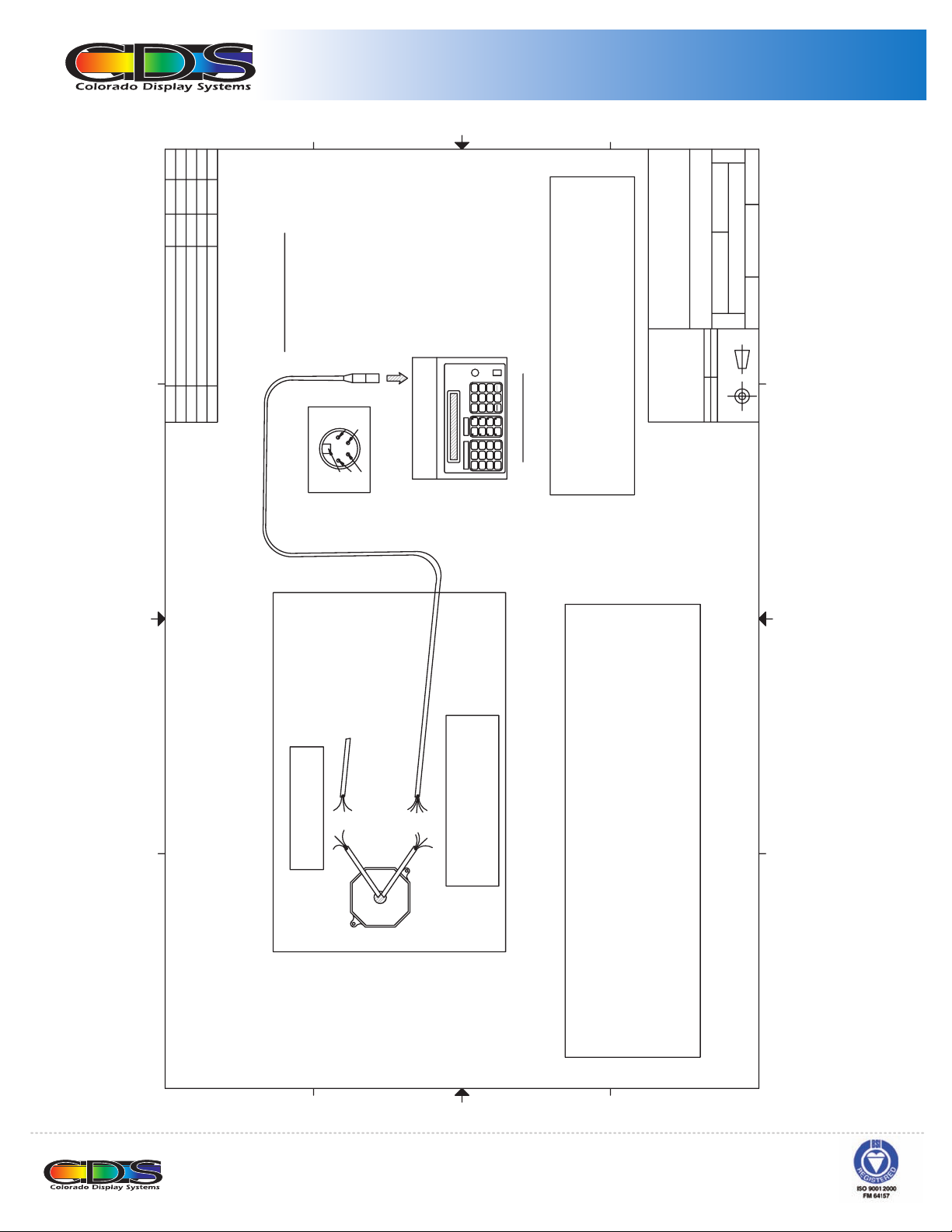
package for the exact current load for your scoreboard. FIGURE 2 illustrates a generic installation including a controller. CDS recommends using ONLY grounded metal conduit. Seek the service of a qualifi ed electrician to ensure
the electrical installation meets all local electrical codes. CDS assumes no responsibilities for installations done by
others. Data cabling for the scoreboard is available as a kit for installation with the grounded conduit (connectors
installed on site). See the DATA CABLING for more information.
Pole mounting is the preferred method of installation. Seek the service of a qualifi ed contractor to ensure the struc-
CD
scoreboard is shipped with mounting brackets which will require installation prior to mounting the scoreboard. All
necessary hardware required to mount the brackets to the scoreboard is provided with your new scoreboard. Lifting eyebolts are provided on the top of the scoreboard to facilitate lifting of the unit to its fi nal installation location.
suitable for the type of construction and have suffi cient capacity to support the scoreboard. CDS recommends using
½”, grade 8 fasteners. Detailed information regarding mounting locations and fastener recommendations for your
scoreboard model is provided in the documentation attached.
1551 E 11th Street, Loveland, CO 80537 • 970-667-1000 • Fax: 970-667-1032 • www.coloradotime.com
Page 6
INSTRUCTIONS
1
2
APVDAUTH.
DATE
DESCRIPTION
REVISION
INITIAL DESIGN 05/20/03
A
D
Y)
LY)
C4FX
CN137C
NTROLLER ON
# N
CONNECTOR
OES BIN#
FEMALE
NEUTRIK PART
4 POS.
PIN 2 - COM (DC CONTROLLER ONL
PIN 1 - V+ (DC CO
PIN G
C
ACK (RS -)
PIN 3 - WHITE (RS +)
PIN 4 - BL
PIN G - NO CONNECTION
4
PIN
PIN 3
PIN 2
PIN 1
SOLDER CUP VIEW
B
RD
OA
TION.
LOCA
6
3
98
ENTER
2
0
5
R
1
4
7
CLEA
CONTROLLER
ISC85X
ILED ABOVE.
TA
CONNECT CONTROLLER DATA WIRE AS PER
PINOUTS DE
CONTROLLER WIRING:
OLLER RECIEVES POWER FROM SCOREB
ONT
DC C
NTROLLER
LE NEAR CO
AND RF CONTROLLERS WILL REQUIRE A 120VAC
AC
RECEPTAC
A
V
RE
TION
RDS
OA
INIT DRAWING DATE
ALLA
7
ON N6L 1P
London,
,
OES ELECTRONIC SCOREB
GENERIC OUTDOOR INST
Inc.
,
4056 Blakie Road
OES
NOTICE TO PERSON RECEIVING THIS DRAWING AND
TECHNICAL INFORMATION:
OES, INC. CLAIMS PROPERTY RIGHTS TO THE MATERIAL
FILENAME
(519) 652-3795
l. (519) 652-5833
Email oes@oes-inc.com
Fax.
Te
DESCRIPTION
SIZE
:
:
DISCLOSED HEREIN. THIS DRAWING INCLUDES
UNPUBLISHED PROPRIETARY MATERIAL DEVELOPED BY
OES, INC. AND AS SUCH IS NOT TO BE COPIED,
REPRODUCED OR USED IN ANY WAY WITHOUT PRIOR
WRITTEN AUTHORIZATION FROM OES, INC.
APPROVED BY
CHECKED BY
A
1
1 OF
GE
05/20/2003
JPG PA
LY
DRAWN BY
TION ON
GE
N/A
800-INSTALL-001
INFORMA
USA
B
SCALE
THIRD ANGLE PROJECTIONS
1
2
3
4
TION
GENERIC OUTDOOR INSTALLA
D
RD
OA
)
OREB
AC
E
C)
CABL
AC
K - LINE (120VA
REAR OF SC
AC
OREBOARD
BL
WHITE - NEUTRAL (120V
SC
D
X
WIRE
TA
E DA
AG
UMINUM JUNCTION BO
, 24 GU
TION FOR
A
ISTED PAIR
TW
2
D,
AD
LO
TA: SHIELDE
MODEL SPECIFIC DOCUMENT
TO
CT CURRENT
NTROLLER DA
REFER
EXA
->CO
TO ENSURE ALL
CODES.
.
HERPROOF AL
RD
AT
ALIFIED ELECTRICIAN
OREBOA
TED WITHIN WE
CATED ON REAR OF SC
ALL WIRING LOCA
SEEK THE SERVICE OF A QU
LO
WIRING MEETS APPLICABLE ELECTRICAL
A
NDUIT
CO
L
TA
ME
THROUGH GROUNDE
CABLING ROUTED
CABLE
TA
-
GREEN - EARTH
RD DA
OREBOA
SC
K - RS
AC
BL
WHITE - RS +
C
)
)
NTROLLER ONLY
NTROLLER ONLY
M (DC CO
CO
K AC
RED - V+ (DC CO
BL
XES DEPENDING ON MODEL
AL JUNCTION BO
TO INDIVIDU
ED IN
AT
SHIELD - EARTH
Y BE SEPAR
CABLING MA
TA
AND DA
AC
L CONDUIT FOR ALL WIRING.
TA
COMMEND GROUNDED ME
RE
SCOREBOARD WIRING:
B
T
TED CIRCUI
DEDICA
60Hz,
,
AC/230VAC
120V
->ELECTRICAL:
3
4
1551 E 11th Street, Loveland, CO 80537 • 970-667-1000 • Fax: 970-667-1032 • www.coloradotime.com
Page 7

INSTRUCTIONS
1
2
TE APVD
04/02/03
DA
.
TH
AU
INITIAL DESIGN
DESCRIPTIONREVISION
A
D
C
K
PIN 2 - BLAC
PIN 1 - RED
2
8001005-XXX
4
PIN 3 - WHITE
K
AC
PIN 4 - BL
4
PIN
B
CN137D
LB005A
CN137C
WR060B
MC4MX
NC4FX
9502
N/A
NEUTRIKNEUTRIK
BELDON
BRADY
R
R
TO
NNEC
CONNECTO
IR 24GA
CO
PA
L
FEMALE
4 POS. MALE
4 POS.
2 TWISTED
WIRE LABE
D
111
AS REQ'
1
2
4
3
C
PIN 3
2
1
PIN
PIN
A
#PART #
BIN
MFG.
ON N6L 1P7
,
London
,
ENGINEERING SPECIFICATION
(519) 652-3795
(519) 652-5833
l.
ax.
Te
4056 Blakie Road
Email oes@oes-inc.com
F
DESCRIPTION
OES, Inc.
N
DESCRIPTIO
QTY
NOTICE TO PERSON RECEIVING THIS DRAWING AND
TECHNICAL INFORMATION:
OES, INC. CLAIMS PROPERTY RIGHTS TO THE MATERIAL
DISCLOSED HEREIN. THIS DRAWING INCLUDES
UNPUBLISHED PROPRIETARY MATERIAL DEVELOPED BY
OES, INC. AND AS SUCH IS NOT TO BE COPIED,
REPRODUCED OR USED IN ANY WAY WITHOUT PRIOR
WRITTEN AUTHORIZATION FROM OES, INC.
ITEM
V
RE
TE
AWING DA
INIT DR
CONSTRUCTION
8001005-XXX
FILENAME
E
SIZ
:
THIRD ANGLE PROJECTIONS
APPROVED BY
CHECKED BY:
A
04/02/2003
NSTRUCTION
CO
USE FOR
USAGE
8001005-XXX SPEC
B
1
1 OF
GE
PA
G
JP
N BY
AW
DR
1
1:
E
SCAL
1
2
3
PIN 1
PIN 2
3
8001005-XXX
3
3
G PIN G
PIN 4
PIN
PIN
1
3
1
G PIN G - N/
4
RED - PIN
WHITE - PIN
BLACK - PIN
BLACK - PIN 2
SHIELD - PIN
4
D
C
B
A
INDICATES WIRE LENGTH IN FEET
4
TE:
NO
8001005-XXX
1551 E 11th Street, Loveland, CO 80537 • 970-667-1000 • Fax: 970-667-1032 • www.coloradotime.com
Page 8

INSTRUCTIONS
Installation
Data Cabling
Data cabling can be purchased as a pre-assembled cable in set lengths or as a kit to be assembled on site.
Pre-assembled cables are available in multiple lengths of 25 feet (25ft, 50ft, 75ft, etc). Cable kits can be purchased
in any desired length. If cabling is to be routed through conduit, CDS recommends purchasing the cable kit.
FIGURE 3 outlines connection details for both. Your CDS sales representative can help you select the appropriate
cabling choice for your particular installation.
Installation Accessories
A wide range of accessories are available to you and your facility to ease installation and protect your scoreboard
investment. Products such as junction boxes and connector boxes are available to provide a professional appearance
to any installation. RF radios are available for both indoor and outdoor scoreboards to eliminate costly controller
cabling. Safety screens are available to protect the scoreboard from accidental impact. Protective bags are available
for controller storage and transport while not in use. Please contact your CDS sales representative for more information on available accessories for your scoreboard.
Model Specifi c Documentation
ment parts, and specifi c mounting details. If any further information is required please contact your CDS sales
representative at 970-667-1000.
1551 E 11th Street, Loveland, CO 80537 • 970-667-1000 • Fax: 970-667-1032 • www.coloradotime.com
Page 9

1551 E 11th Street, Loveland, CO 80537 • 970-667-1000 • Fax: 970-667-1032 • www.coloradotime.com
Page 10

1551 E 11th Street, Loveland, CO 80537 • 970-667-1000 • Fax: 970-667-1032 • www.coloradotime.com
Page 11

1551 E 11th Street, Loveland, CO 80537 • 970-667-1000 • Fax: 970-667-1032 • www.coloradotime.com
Page 12

1551 E 11th Street, Loveland, CO 80537 • 970-667-1000 • Fax: 970-667-1032 • www.coloradotime.com
Page 13

1551 E 11th Street, Loveland, CO 80537 • 970-667-1000 • Fax: 970-667-1032 • www.coloradotime.com
Page 14

1551 E 11th Street, Loveland, CO 80537 • 970-667-1000 • Fax: 970-667-1032 • www.coloradotime.com
Page 15

ISC85X Intelligent Controller
OPERATION:
To enter into confi gure mode on the controller:
• Turn on controller.
• Turn RUN/STOP switch to STOP position.
• Press and hold the bottom button in the fi fth column on
the keypad until the confi gure menu appears (Button to
the left of CLEAR). This button may be blank or may
be labeled “CONFIG” or “SETUP”.
INTRODUCTION:
• Select desired option using the numeric keypad.
INSTRUCTIONS
The ISC85x controller comes ready to use; no setup
required. All settings are pre-set at the factory
to the customer requirements. The settings can
be accessed by the operator if necessary. There
are a number of confi gure / set-up features within
the controller. These features include: Turning the
scoreboard off/on, setting up the sport and features
of the scoreboard, setting the time of day (TOD),
setting the contrast on the controller LCD display,
and running the scoreboard through a system of
tests.
NOTE: These confi gure features, including this
instruction sheet, should be kept from the standard
user and only made available to the person in
charge of the scoreboard system.
OPTIONS:
1. Board Off/On:
• This blanks the entire scoreboard. This is only required
on a few baseball scoreboard models, since the
majority will blank on their own 15 seconds after the
last communications for the controller.
2. Select Sport/Features:
• The fi rst screen selects the sport, follow on screen
instructions.
MODEL 52xx SYSTEM NOTE:
basketball, volley ball, and
wrestling are valid selections.
MODEL 62xx SYSTEM NOTE:
Hockey is only valid selection.
1551 E 11th Street, Loveland, CO 80537 • 970-667-1000 • Fax: 970-667-1032 • www.coloradotime.com
Page 16

ISC85X Intelligent Controller
The next screen selects the features.
• ‘0’ indicates disabled
• ‘1’ indicates enabled
• ‘X’ means ‘0’ or ‘1’ will depend on the system
(Contact factory if clarifi cation is required.)
Basketball 5200 5210 5240
Time Out Left 0 0 0
Team Fouls 0 1 0
Player Fouls 0 0 0
Last Foul 0 1 0
Shoot Clocks X X X
Hockey 6200 / 6220 6210 / 6225 6240
Shots On Goal 0 0 0
Penaltys 1 1 1
Time 1 1 0
Player 1 0 0
Shot Clocks X X X
Shift Timer X X X
Motherboard Filler X X X
INSTRUCTIONS
Follow on screen instructions to properly set-up features
NOTE: Improper settings will result in the scoreboard
operating and displaying undesirably.
3. TOD
• This sets up the time of day on the clocks in the
scoreboard system.
• Ensure all clocks that need to receive this setting are on
and attached to the controller through the communication
network.
• Follow on screen instructions to properly set-up TOD.
4. Contrast
• This controls the brightness / contrast of the LCD on the
controller.
• Follow on screen instructions to properly set-up
the contrast.
5. Board Test:
• This will test the scoreboard digits.
The fi rst test, All On, turns on everything
The other test, Rotate, has all digits counting
from 0-9, then blank
• These tests continue until you exit from the
screen and then will return to the game
displays.
• Follow on screen instructions to control the
tests.
6. Exit
• This exits the confi gure screens without any
changes.
1551 E 11th Street, Loveland, CO 80537 • 970-667-1000 • Fax: 970-667-1032 • www.coloradotime.com
Page 17

INSTRUCTIONS
ISC85X Intelligent Controller
5240 Instructions
Game
Time
New
Game
Poss
Shot
ISC85X
Int.
Mode
Period
Shot
Clock Set
/ Shift
BASKETBALL
Home
Score
+ 1
Guest
Score
+ 2
Bonus
0-1-2
Time
Out
+ 3
1. START/STOP the clock:
• Flip switch ON/OFF (Rocker switch on the right
side of the unit.)
2. Manual HORN:
• Activate by pressing the push button switch on
the right side of the unit.
3. Automatic HORN:
• Horn sounds automatically when time hits 0:00.
• Horn will sound for 1.5 seconds.
4. To set TIME:
• Press GAME TIME.
• Enter “minutes” on the numeric keypad.
Press Enter.
• Enter “seconds” on the numeric keypad.
Press Enter.
INT. • Enter “tenths of seconds” on the numeric keypad.
Press Enter.
• When pressed at the end of the period, the last
entered time will appear and the period will
automatically increment.
5. To set TIME OUT/INTERMISSION timer:
• Press INT. MODE.
• Enter “minutes” on the numeric keypad.
Press Enter.
• Enter “seconds” on the numeric keypad.
Press Enter.
INT. • To exit this mode, press INT. MODE again.
Bonus
0-1-2
Time
Out
Clock Reset
6. To set PERIOD/QUARTER:
• Press PERIOD.
• Enter period on the numeric keypad.
Press Enter.
7. To set SCORES:
• Press HOME SCORE or GUEST SCORE.
• Enter score on numeric keypad. Press Enter.
8. To INCREMENT SCORES:
• Press HOME SCORE or GUEST SCORE.
• Then press: +1,+2, or +3.
9. To toggle POSSESSION between HOME/GUEST:
• Press POSS.
10. To toggle between “BONUS”: No Bonus (0); Single
Bonus (1); and Double Bonus (2).
• Press HOME BONUS or GUEST BONUS.
11. To set TIME OUT
• Press HOME TIME OUT or GUEST TIME OUT.
• Toggles On or Off.
12. (Optional) To set Shot Clock:
• Press SHOT CLOCK SET.
• Enter “shot clock” length on the
numeric keypad.
Press Enter.
• NOTE: if not using the shot clock, set the shot
clock time to zero.
13. (Optional) To Reset Shot Clock:
• Press SHOT CLOCK RESET.
14. To set SHIFT TIMER (IF ENABLED):
NOTE: The SHIFT TIMER counts down from the set amount.
When the SHIFT TIMER is expired a one second horn will
sound, then the SHIFT TIMER will reset and start counting
down again.
•Press SHIFT.
•Enter the shift time settings in minutes using the
numeric keypad. Press ENTER.
•To edit the current running shift time Press SHIFT.
Then SHIFT again. Enter the minutes using the
numeric keypad.Press ENTER.Enter the seconds
using the numeric keypad.Press ENTER.
NOTE: On power up, the shift time will be 0:00, which leaves
it in an inactive mode which means no horns will sound.
1551 E 11th Street, Loveland, CO 80537 • 970-667-1000 • Fax: 970-667-1032 • www.coloradotime.com
 Loading...