

Page 1
IONIZATION SOLUTIONS
Ionizing Air Blower
Aerostat® XC
User’s Manual
Page 2

About Simco-Ion
Simco-Ion develops, manufactures, and markets system solutions
to manage electrostatic charge. As the world's largest provider of
electrostatics management products and services, Simco-Ion
improves its customers' business results by providing a total
solution to their electrostatic discharge and electromagnetic
interference challenges. Simco-Ion Technology Group is a division
of Illinois Tool Works (ITW), located in Alameda, California. For
more information about Simco-Ion visit www.simco-ion.com
(Technology Group) or call +1 800-367-2452. Simco-Ion is
ISO 9001-2008 Certified.
Ion Systems’ logo is a registered trademark of
Simco-Ion, An ITW Company.
© 2019 Ion Systems. Printed in the USA.
© 2019 Simco-Ion
Aerostat XC Heater 5100550-M Rev 7
Page 3

Important Safety Information
Carefully read the following safety information before
installing or operating the equipment. Failure to follow
these safety warnings could result in damage to your
ionization system and/or voiding the product warranty.
This unit is supplied with a 3-prong grounding plug, which must
be inserted in an appropriate, properly wired, and grounded
receptacle. Do not defeat the electrical ground. Grounding and
proper wiring are required for safe and efficient operation.
Keep the unit dry. Do not operate the ionizer in flammable, or
explosive atmospheres.
Do not insert objects through the unit's intake or outlet grilles.
Damage to the ionizer and/or personal injury may result.
Do not ground or make electrical connections of any kind to the
unit's metal fan guards located on the intake and output.
A factory-qualified service technician must perform component
service and repairs. Please contact Simco-Ion Customer
Service for information.
Aerostat XC Heater 5100550-M Rev 7
Page 4

Informations de Sécurité Importantes
Lisez attentivement les consignes de sécurité
suivantes avant d'installer ou d'utiliser l'équipement. Le
non-respect de ces avertissements peut entraîner des
dommages à votre système d'ionisation et/ou d'annuler
la garantie du produit.
Cette unité est fournie avec un 3-broches fiche de mise à la
terre, qui doit être insérée dans un approprié, correctement
câblé et boîtier raccordé à la terre. Ne pas défaire la mise à la
terre électrique. La mise à la terre et le câblage correct sont
requises pour un fonctionnement sûr et efficace.
Garder l'unité sec. Ne pas faire fonctionner le ioniseur, inflam-
mables ou atmosphères explosives.
N'insérez pas d'objets dans l'unité de grilles d'entrée ou de
sortie. Dommage pour l'ioniseur et/ou peut entraîner des blessures graves.
Ne porter pas à la masse ou des connexions électriques de
toute nature à l'unité en métal de protections du ventilateur situé
sur l'admission et la sortie.
Usine d'un technicien qualifié doit effectuer composant service
et réparations. Veuillez contacter Simco-Ion Service client pour
plus d'informations.
Aerostat XC Heater 5100550-M Rev 7
Page 5

Contents
1 Description .......................................................................... 1
1.1 Aerostat® XC Ionizing Air Blower ............................................................2
1.2 Aerostat XC Identification ........................................................................4
2 Installation ........................................................................... 5
2.1 Unpacking................................................................................................ 6
2.2 Location ...................................................................................................7
2.3 Electrical ................................................................................................. 8
3 Operation ............................................................................. 9
3.1 Controls & Indicators.............................................................................. 10
4 Maintenance ...................................................................... 12
4.1 Cleaning & Adjustments......................................................................... 13
4.2 Emitter Cleaning ....................................................................................14
4.3 Air Inlet & Outlet Cleaning...................................................................... 15
4.4 Optional Air Filter Cleaning.................................................................... 16
4.5 Ion Output Check................................................................................... 17
4.6 Ion Balance Check................................................................................. 18
4.7 Calibration.............................................................................................. 19
5 Specifications.................................................................... 20
6 Warranty & Service .......................................................... 25
Aerostat XC Heater 5100550-M Rev 7
Page 6

Description
1.1 Aerostat® XC Ionizing Air Blower
1.2 Aerostat XC Identification
1
Aerostat XC Heater 5100550-M Rev 7 1
Page 7
1.1 Aerostat® XC Ionizing Air Blower
Simco-Ion's Aerostat XC was designed for use with sensitive
electronic components where electrostatic discharge (ESD) is a
problem. It can be applied in inspection, testing, and assembly
environments. The Aerostat XC can also be used where static
electricity causes problems such as attraction of dirt to product,
misalignment of small parts due to electrostatic "jumping", and
undesirable adhesion of plastic films due to electrostatic charge.
The Aerostat XC ionized air blower produces an air flow that is rich
in positive and negative ions. Directing the air flow on an object that
has a static charge will neutralize the charge. If the object has a
positive static charge, it will draw negative ions from the air flow. If
the object has a negative static charge, it will draw positive ions from
the air flow. The ions are attracted to the oppositely charged object
and neutralize the electrostatic charge on the object.
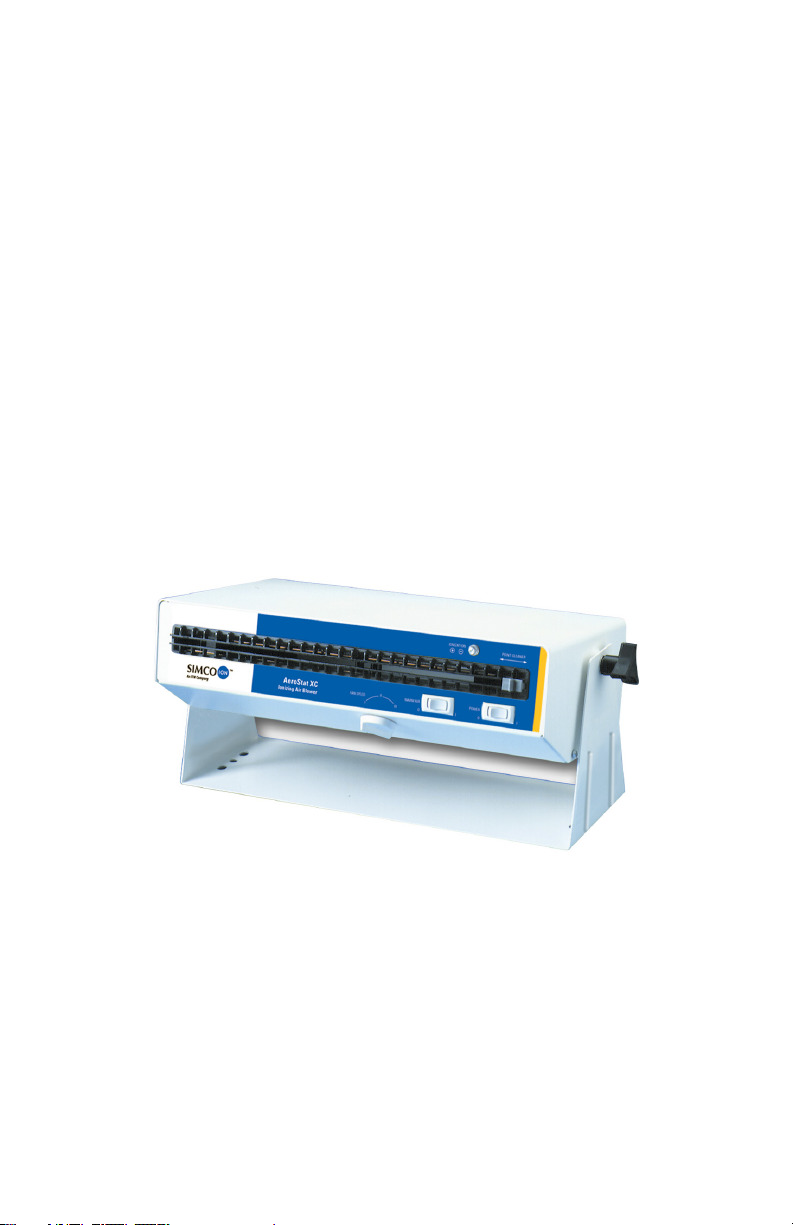
Figure 1. Aerostat XC Ionizing Air Blower
The Aerostat XC uses a three-speed tangential blower to produce a
uniform air flow. This air flow is directed into a duct, which shapes
the airflow. The duct also contains a heater and ionizer. The lowwattage heater can be turned on at any time for user comfort. The
ionizer uses a transformer which produces high voltage AC. The
transformer output contains a current limiting resistor which
provides redundant safety and enhances the ionization stability.
Aerostat XC Heater 5100550-M Rev 7 2
Page 8

The high voltage AC is applied to a row of stainless steel emitter
pins, which results in an intense alternating electric field at the tip of
the emitters. It is this intense electric field that introduces alternating
polarity ions into the air flow. The shaped air flow exiting the
Aerostat XC carries these ions over a broad area for control of
electrostatic charge. To ensure that the unit is working properly, the
output is monitored by an ionization indicator lamp.
The ionizer of the Aerostat XC features an exclusive balancing
circuit. This results in the equal production of positive and negative
ions. The Aerostat XC also features a built-in emitter cleaner.
Taking a few seconds to clean the emitters on a weekly basis
prevents the build-up of debris on the emitter pins, keeping your
AeroStat, keeping your Aerostat XC working in top form for the life
of the unit.
Features
• Rapidly neutralizes static charges
• Covers an extended area with ionized air
• Three-speed fan with wide range of air flow
• Low-wattage heater for operator comfort
• Tilt Bench stand, or optional pedestal mount.
• Inherently balanced ion output
• Built-in ion emitter cleaner
• Ionization indicator lamp
• Durable, electrically grounded steel enclosure
Aerostat XC Heater 5100550-M Rev 7 3
Page 9
1.2 Aerostat XC Identification
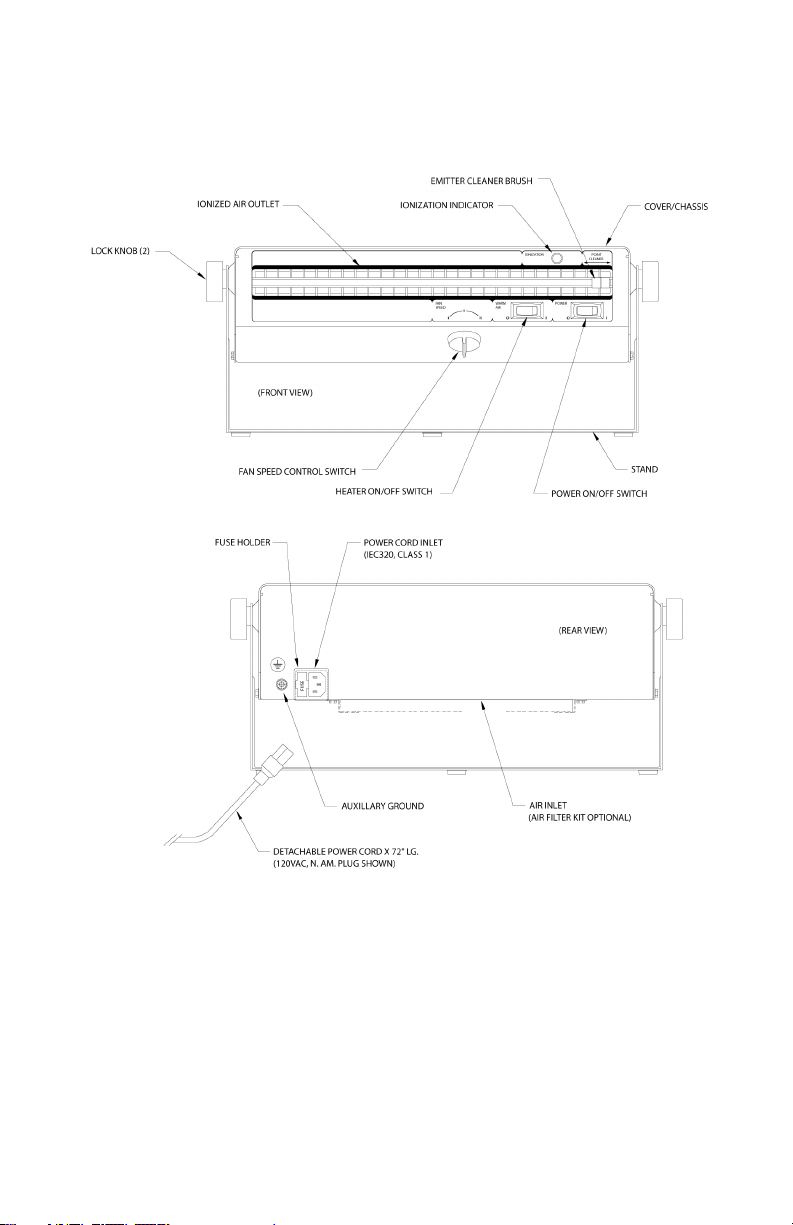
Figure 2. Aerostat XC Identification
Aerostat XC Heater 5100550-M Rev 7 4
Page 10

2.1 Unpacking
2.2 Location
2.3 Electrical
2
Installation
Aerostat XC Heater 5100550-M Rev 7 5
Page 11

2.1 Unpacking
Carefully remove the equipment from the carton and inspect all
contents. Empty the carton to insure that small parts are not
discarded. If any damage has occurred during the shipment, notify
the local carrier immediately. A report should also be forwarded to
Simco-Ion Technology Group email address at
[email protected]. See Warranty section for Return
Shipment information.
Aerostat XC Heater 5100550-M Rev 7 6
Page 12

2.2 Location
The Aerostat XC is designed for free or fixed position operation on
a table top or work bench surface. Each unit includes an adjustable,
skid resistant stand intended for placement onto the selected
surface. Holes in the base of the stand are provided for securing the
unit in a fixed location using 5/16 diameter screw hardware (not
provided).
An optional pedestal kit is available for elevated mounting.
For extremely dusty environments, an optional air filter kit is
available. The air filter kit includes support brackets, screw
hardware, and a polymer foam air filter. The air filter is cleanable
and reusable. See section 5 for air filter ordering part numbers
The Aerostat XC should be placed approximately 1 to 3 feet (0.3 to
1.0 meters) from the objects to be neutralized or the critical work
area. It should be positioned to cover as much of the area with the
ionized air stream as possible. The air stream can be directed
upward or downward by tilting the unit within the stand. Tightening
the lock knobs on each side of the unit secures it in position.
Aerostat XC Heater 5100550-M Rev 7 7
Page 13

2.3 Electrical
Depending on the ordering part number, the Aerostat XC requires
the following electrical power for proper operation.
Part Number Voltage Power Cord
4002612 120 VAC/60 Hz North America
4002667 230 VAC/50 Hz EUR (Schuko)
4009044 230 VAC/50 Hz UK
4015593 230 VAC/50Hz China
The unit must be grounded for safe and efficient operation. Plug the
supplied power cord into a standard 3-terminal grounded
receptacle. If an extension cord is necessary, use only a three wire
extension cord that provides grounding.
Aerostat XC Heater 5100550-M Rev 7 8
Page 14

3.1 Controls & Indicators
3
Operation
Aerostat XC Heater 5100550-M Rev 7 9
Page 15
3.1 Controls & Indicators
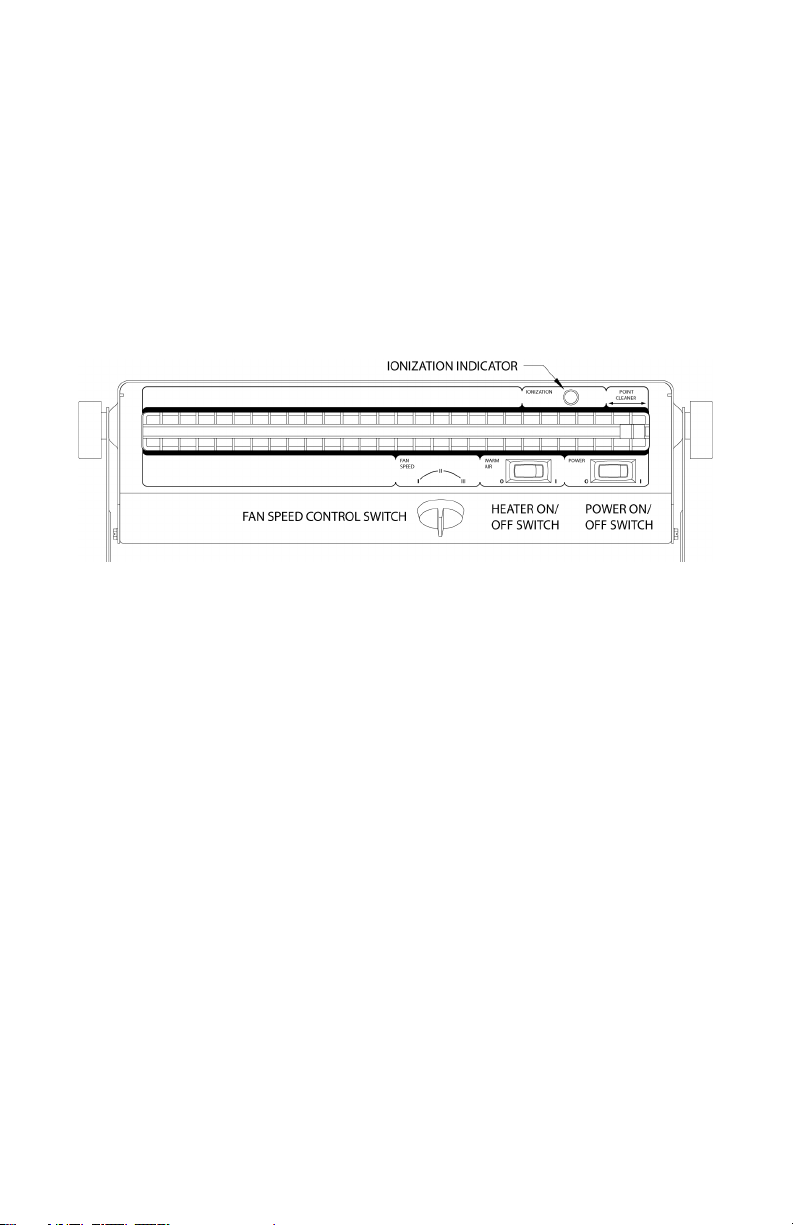
Activate the XC by setting the POWER switch to the ON position.
The ionization indicator will illuminate to indicate the presence of
ionized air. Set the air flow as desired by adjusting the FAN SPEED
to low ( I ), medium ( I I ), or high ( I I I ). If warm air is desired for
operator comfort, set the HEATER switch to the ON (I) position. The
direction of the air stream can be adjusted upward or downward by
loosening the lock knobs, tilting the unit and retightening the knobs.
Figure 3. Aerostat XC Controls and Indicators
The Aerostat XC produces an ionized air stream that covers a large
area uniformly. The time required to neutralize a static charge on an
item in this area depends on many factors.
Two important factors are:
• Distance to the ionizer
• Air velocity
Air ions constantly "neutralize" each other. Positive and negative
ions are attracted to each other. When they contact, the charge
transfers and the ions recombine. With high air velocity, the ions
travel further before they recombine. Setting the fan speed to high
results in coverage for the greatest possible area. Decreasing the
distance to the ionizer results in more rapid neutralization. For fast
neutralizing, the item should be placed approximately 1 to 3 feet
(0.3 to 1.0 meters) from the objects. For virtually instantaneous
neutralizing, the item may be held as close as 6 inches.
Aerostat XC Heater 5100550-M Rev 7 10
Page 16

When using the Aerostat XC in an electronics assembly area, the
ionized air stream should cover as much of the work area as
possible. The constant flow of ionized air will prevent items such as
work surfaces, tools, materials and components from developing a
static charge. Charged items introduced into the work area will be
neutralized and will remain neutral while they are in the air stream.
Aerostat XC Heater 5100550-M Rev 7 11
Page 17

Maintenance
4.1 Cleaning & Adjustments
4.2 Emitter Cleaning
4.3 Air Inlet & Outlet Cleaning
4.4 Optional Air Filter Cleaning
4.5 Ion Output Check
4.6 Ion Balance Check
4.7 Calibration
4
Aerostat XC Heater 5100550-M Rev 7 12
Page 18
4.1 Cleaning & Adjustments
The Aerostat XC has been designed with low maintenance in mind.
The only regular maintenance suggested is emitter point cleaning,
ion balance checking and ion output checking. Emitter point
cleaning takes only seconds with Simco-Ion's built-in point cleaner.
The Aerostat XC contains a balancing circuit that is inherently self
balancing. This circuit compensates for dirt build-up on emitters,
emitter point wear, line voltage fluctuations and variations in air
velocity. Scheduled checking of the ion output and balance should
be considered to assure quality audit requirements.
ELECTRICAL SHOCK HAZARD!
Do not insert objects through intake or outlet grille.
RISQUE DE CHOC ÉLECTRIQUE !
N'insérez pas d'objets à l'admission ou grille de sortie.
Aerostat XC Heater 5100550-M Rev 7 13
Page 19

4.2 Emitter Cleaning
To clean the ion emitters, simply sweep the emitter cleaner back
and forth once across the ionized air outlet. Recommended
frequency of cleaning is once a week.
Aerostat XC Heater 5100550-M Rev 7 14
Page 20

4.3 Air Inlet & Outlet Cleaning
The air inlet grille on the rear of the unit and the ionized air outlet
should remain clean to prevent restriction of air flow. They can be
cleaned with a soft brush or vacuum.
Aerostat XC Heater 5100550-M Rev 7 15
Page 21

4.4 Optional Air Filter Cleaning
Remove the air filter from the rear of the unit by sliding the aluminum
frame of the filter towards the rear of the unit. Rinse the filter in plain
water while gently squeezing. If the dirt is stubborn, wash the filter
in mild soap and water then rinse. Blot the filter dry with paper
towels and allow to dry. Reinstall filter on air inlet by sliding it under
brackets from rear of the unit.
If an air filter is used, clean the air filter regularly.
Si un filtre à air est utilisé, nettoyez régulièrement le filtre à air.
Aerostat XC Heater 5100550-M Rev 7 16
Page 22

4.5 Ion Output Check
To test the unit for ion output, the use of a charge plate monitor is
recommended. Discharge times can be measured and checked
against the Discharge Specification in Section 5.
If a charge plate monitor is not available, but a static meter such as
a Simco-Ion handheld electrostatic fieldmeter is available, ion
output may be checked with the following procedure. Take a piece
of plastic and rub it with cloth until a static charge can be read with
the static meter. Turn on the Aerostat XC. Hold the plastic one foot
away from the ionized air outlet for five seconds. Remove the plastic
from the ionized air stream and measure the static charge. The
plastic should be neutralized.
Do not try to verify operation of the unit by drawing a spark from an
ion emitter point. The design of the balancing circuit makes the
"spark test" inconclusive. Sustained grounding of the ion emitters
may damage the balancing circuit.
Aerostat XC Heater 5100550-M Rev 7 17
Page 23

4.6 Ion Balance Check
To test the unit for ion balance, the use of a charge plate monitor is
recommended. Offset voltage should be measured and checked
against the Balance Specification in Section 5.
If a charge plate monitor is not available you may use a Simco-Ion
brand electrostatic fieldmeter equipped with a removable test plate.
Follow the instructions in the fieldmeter instruction booklet for the
ion balance test procedure.
Aerostat XC Heater 5100550-M Rev 7 18
Page 24

4.7 Calibration
The Aerostat XC's ion output is inherently balanced by design, so
there are no calibration adjustments. If after checking the ion
balance as outlined above, an unbalance or offset voltage exists in
excess of 0±5 volts, contact Simco-Ion Technical Support at 510217-0470 or email [email protected].
Never open the case of the unit. This exposes hazardous voltages.
If repairs are necessary, call Simco-Ion for a Return Authorization
Number and return the unit to the factory.
Aerostat XC Heater 5100550-M Rev 7 19
Page 25

Specifications
5.1 Specifications
5.2 Parts & Accessories
5.3 Dimensional Drawing
5
Aerostat XC Heater 5100550-M Rev 7 20
Page 26
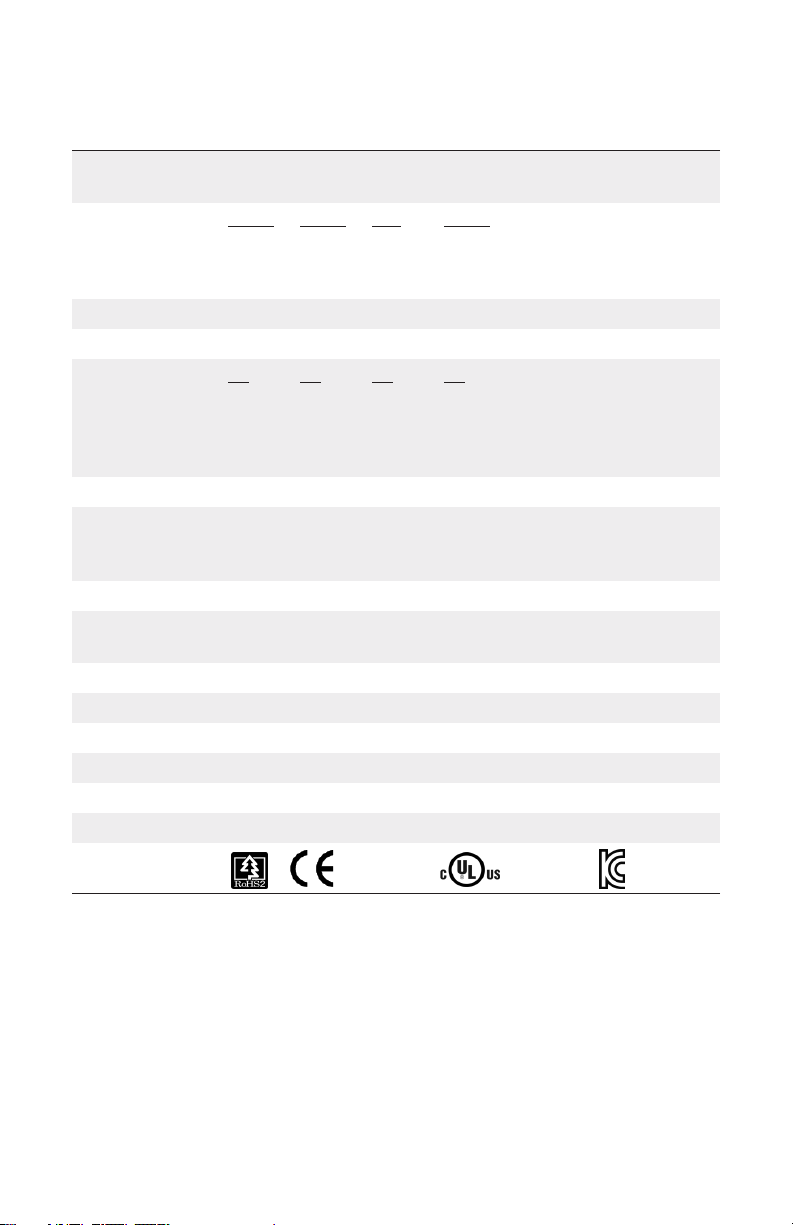
5.1 Specifications
Input Voltage
Discharge*
Fan High
Fan Medium
Fan Low
Balance 0 ±10V
Air Volume Fan low 70 cfm; fan medium 95 cfm; fan high 102 cfm
Air Velocity (fpm)
Fan Low
Fan Medium
Fan High
Coverage 3' x 6'
Heated Air Temp
Operating Env. Temperature 50-95°F (10-35°C); humidity 30-70% RH, non-condensing
Ozone
Audible Noise
Optional Air Filter 30 ppi open cell polyurethane foam
Enclosure Formed steel, white polyester paint
Weight 17.5 lbs (7.9 kg)
Dimensions 15-3/8W x 4-1/2H x 8-1/8D in. (39.1 x 11.4 x 20.6 cm)
Warranty Two year limited warranty
120 VAC, 60 Hz, 0.6-3.6A (heater on)
230 VAC, 50 Hz, 0.3-1.8A (heater off)
1 ft 2 ft 3 ft 4 ft
5/1.5 5.5/2.5 6.5/4 8.5/5.5 12”/Center
6/1.7 7/3.5 9/5 11/7 12”/Center
8/2 9/5 10/7 12/9 12”/Center
1 ft 2 ft 3 ft 4 ft
600 300 180 150
800 400 220 180
1000 500 250 200
(measured @ center line of air stream)
Fan High: 4-5°F (2-3°C) above ambient; Fan Medium: 4-5°F (2-3°C) above
ambient; Fan Low: 5-7°F (3-4°C) above ambient, measured at 12" in front
of blower (Heater optional)
0.005 ppm measured @ 6" in front of unit; test conducted in accordance
with EPA EQOA-0577-019 using Dasibi ozone monitor model 1003AH
Fan low 52 dB; fan medium 58 dB; fan high 64 dB (measured @ 2’ from unit)
Certifications 230V, 50 Hz 120V, 60 Hz
* Tested in accordance with ANSI/ESD STM3.1-20015.
Note: Discharge times at high speed are approx. 10% longer for 230 V, 50 Hz.
Aerostat XC Heater 5100550-M Rev 7 21
Page 27
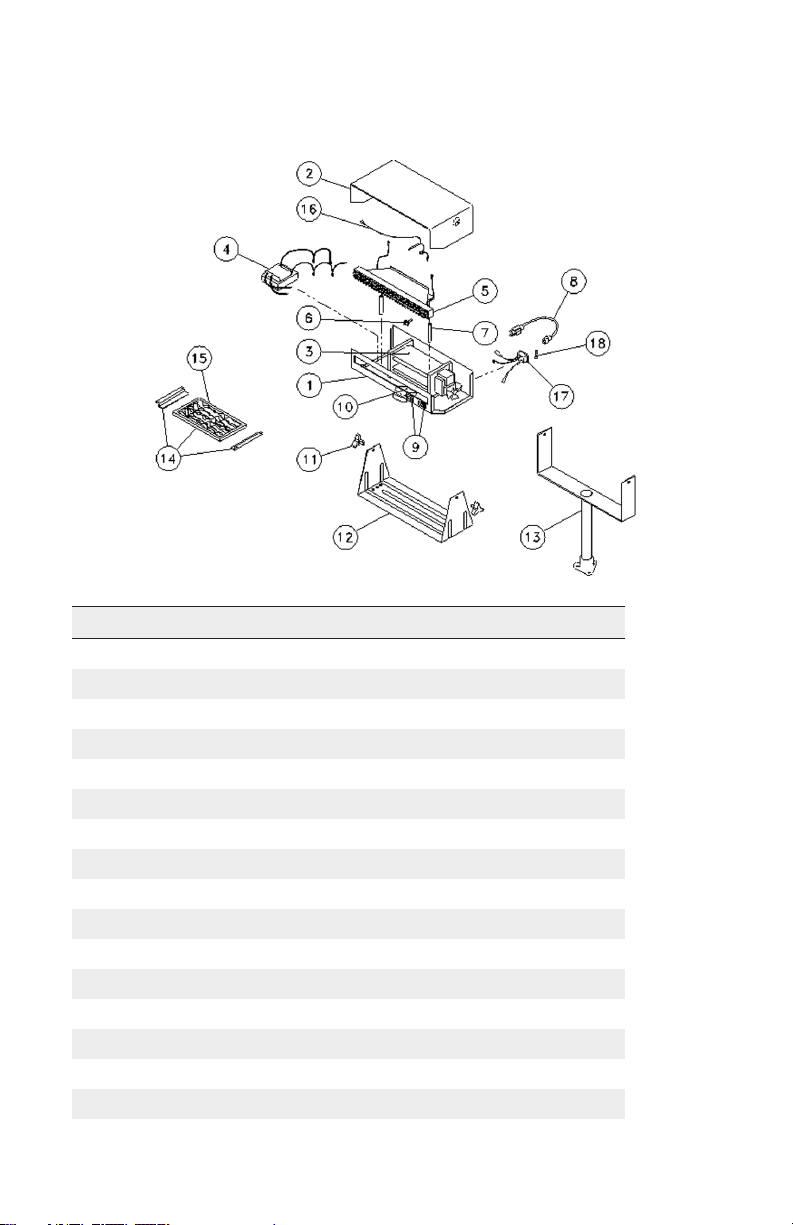
5.2 Parts & Accessories
Part No. Description
4343230 Chassis
4108398 Lid Assembly
4710066 3-Speed Blower, 120 VAC
4710077 3-Speed Blower, 230 VAC
4108537 HV Transformer with Leads, 100 VAC
4108538 HV Transformer with Leads, 120 VAC
4108540 HV Transformer with Leads, 230 VAC
4103939 Ionizer Duct Assembly, 120 VAC (with Heater)
4104036 Ionizer Duct Assembly, 230 (with Heater)
4104100 Ionizer Duct Assembly, 120/230 VAC (without Heater)
4670700 Brush
4401510 Ionizer Duct Standoff (2 required)
5050767 Line Cord, 120 VAC (N. Am.)
5050768 Line Cord, 230 VAC (Continental European)
5051191 Line Cord, 230 VAC (UK / Ireland)
5051726 Line Cord, 230 VAC (China)
Aerostat XC Heater 5100550-M Rev 7 22
Page 28

4610699 Illuminated Rocker Switch, 120 VAC
4610729 Illuminated Rocker Switch, 230 VAC
4610700 3-Position Rotary Switch and Knob
4670063 Lock Knob (2 required per unit)
4103942 Stand Assembly
5050282 Pedestal Mount (includes hardware)
5051321 Air Filter Kit (includes filter, mounting brackets, hardware)
4470059 Air Filter
4104354 Ionizer indicator assembly
4108400 Inlet Assembly
28-21459 Fuse, 5x20 mm, 5.0A, Slo-Blo, (Units with Heater)
10648-002 Fuse, 5x20 mm, 2.5A, Slo-Blo, (Units without Heater)
33-6010-01 Locking stand kit (optional)
Aerostat XC Heater 5100550-M Rev 7 23
Page 29
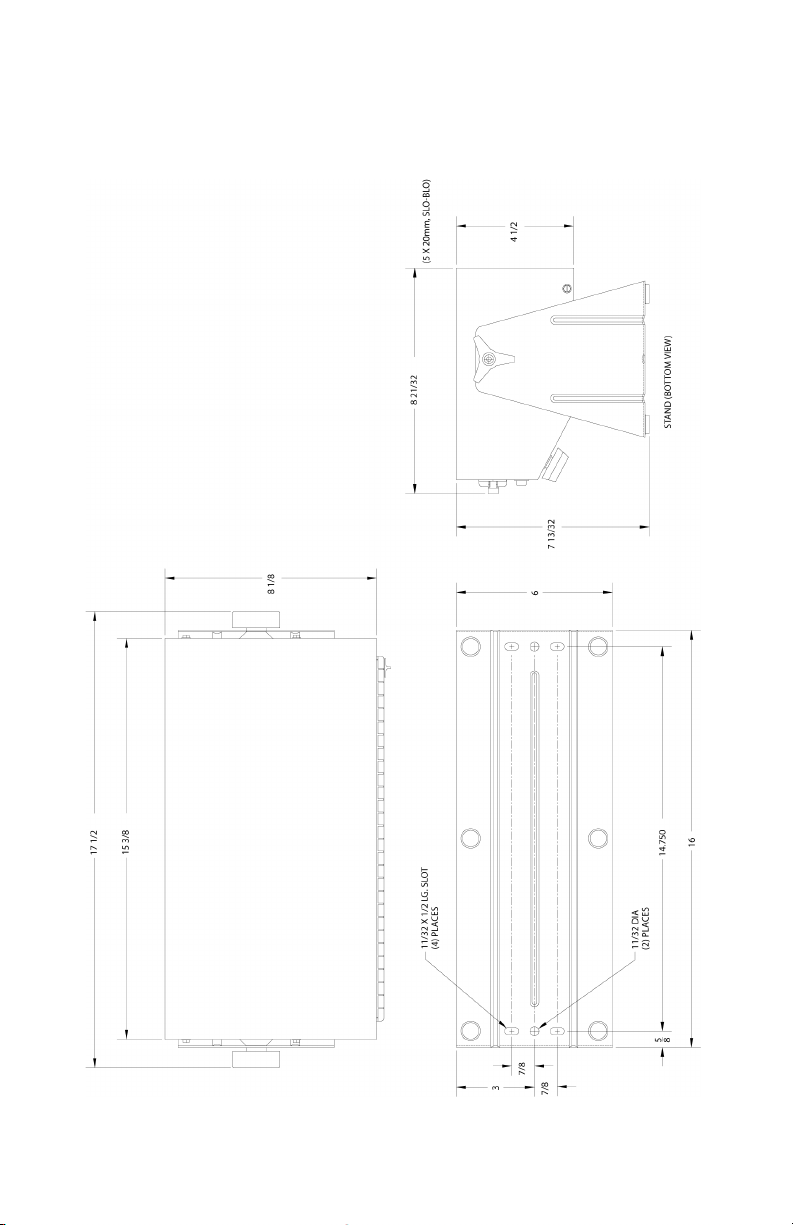
5.3 Dimensional Drawing
Aerostat XC Heater 5100550-M Rev 7 24
Page 30

6
Warranty & Service
Simco-Ion provides a limited warranty for the Aerostat XC Ionizing
Blower. New products manufactured or sold by Simco-Ion are
guaranteed to be free from defects in material or manufacture for a
period of two (2) years from date of initial shipment. Simco-Ion
liability under its new product warranty is limited to servicing
(evaluating, repairing, or replacing) any unit returned to Simco-Ion
that has not been subjected to misuse, neglect, lack of routine
maintenance, repair, alteration or accident. In no event shall SimcoIon be liable for collateral or consequential damages. Consumable
items such as, but not exclusive to, emitter points, emitter wires,
batteries, filters, fuses or light bulbs are only covered under this
warranty if found defective as received with the new product.
To obtain service under this warranty, please contact Simco-Ion
Technical Support at [email protected] or
+1 (510) 217-0470.
Aerostat XC Heater 5100550-M Rev 7 25
Page 31

Aerostat XC Heater 5100550-M Rev 7
Technology Group
1141 Harbor Bay Pkwy, Ste 201
Alameda, CA USA 94502
Toll free: +1 800-367-2452
Sales services: +1 510-217-0460
Tech support: +1 510-217-0470
Fax: +1 510-217-0484
www.simco-ion.com
 Loading...