

Page 1
™
GoDVD!
Digital Video Enhancer
and Duplicator
Model CT-100
User Manual
Sima Products Corporation
140 Pennsylvania Ave Bldg #5 Oakmont, PA 15139
800-345-7462 www.simacorp.com
e-mail us at [email protected]
© 2005 Sima Products Corporation PN21718
www.simacorp.com
Page 2

Notice: Use of this product for unauthorized duplication of
copyrighted material from DVD, VHS or other media is
strictly prohibited under the federal Copyright laws unless
the copy qualifies as a fair use under the Copyright laws.
FCC Information
This equipment generates and uses radio frequency energy and if not
installed and used properly, that is, in strict acceptance with the
manufacturer’s instructions, may cause interference to radio and television
reception. It has been type tested and found to comply with the limits for a
Class B computing device in accordance with the specifications in Subpart J
of Part 15 of FCC Rules, which are designed to provide reasonable
protection against such interference in a residential installation. However,
there is no guarantee that interference will not occur in a particular
installation. If this equipment does cause interference to radio and television
reception, which can be determined by turning the equipment off and on,
the user is encouraged to try to correct the interference by one or more of
the following measures:
* Re-orient the receiving antenna
* Relocate this equipment with respect to the receiver
* Move this equipment away from the receiver.
* Plug this equipment into a different outlet so that this equipment and
receiver are on different branch circuits.
If necessary, the user should consult the dealer or an experienced
radio/television technician for additional suggestions. The user may find
“How to Identify and resolve Radio/Television Interference Problems”
prepared by the FCC helpful. The booklet is available from the U.S.
Government Printing Office, Washington, DC 20402, Stock No. 004-00000345-4
90-day Limited Warranty
Sima Products Corporation warrants this product against
defects in materials and workmanship for a period of 90
days from the date of purchase. During the warranty
period, the product will be repaired or replaced at Sima’s
option. Mail the enclosed product registration card within
ten days of the original purchase or register your product
online at our website – www.simacorp.com
Conditions
Ship your unit, freight pre-paid, including a copy of your
sales receipt and a description of problem to:
Sima Products Corporation
Attn: Customer Service
140 Pennsylvania Ave.
Bldg. #5
Oakmont, PA 15139
This warranty is void if any defects are caused by abuse,
misuse, negligence or unaut horized repairs. All liability for
incidental or consequential damages is specifically excluded.
Some states do not allow for the exclusion or limitation of
incidental or consequential damages, so the above limitation
or exclusion may not apply to you. This warranty gives you
specific legal rights and you may have other rights, which vary
from state to state.
Page 3
Troubleshooting
Device does not
operate
No picture
Picture rolling
Specifications
Video Format - NTSC (FSC= 3,58 MHz)
INPUT CONNECTORS
Composi te Video (RC A jack) x 1
Power: DC 7.5V 500mA
OUTPUT CONNECTORS
Composi te Video (RC A jack) x 1
Dimensions: 4.5”(W) x 2.5”(L) x .75”(H)
Possible Solutions
Has correct mode (AV, Line, Tuner, etc.) been set on the
•
VCR or DVD
Correct connecting cable?
•
Have the RCA cables been mixed up at the input and
•
output of the VCR/DVD?
Is the Power light on? If not, there is no power.
•
Is the connecting cable of the plug-in adapter damaged?
•
Make sure VCR/TV is not set to channel 3 or 4 and that
•
AV, Line or appropriate mode is selected.
TV does not support 50/60 Hz scan rates.
•
Congratulations on your purchase of Sima’s GoDVD! (Model CT-100) This
package includes: (1) Go-DVD! - Model CT-100, (1) RCA style Video Cable
(1) 7.5V, 500 mA AC adapter and This Instruction Manual
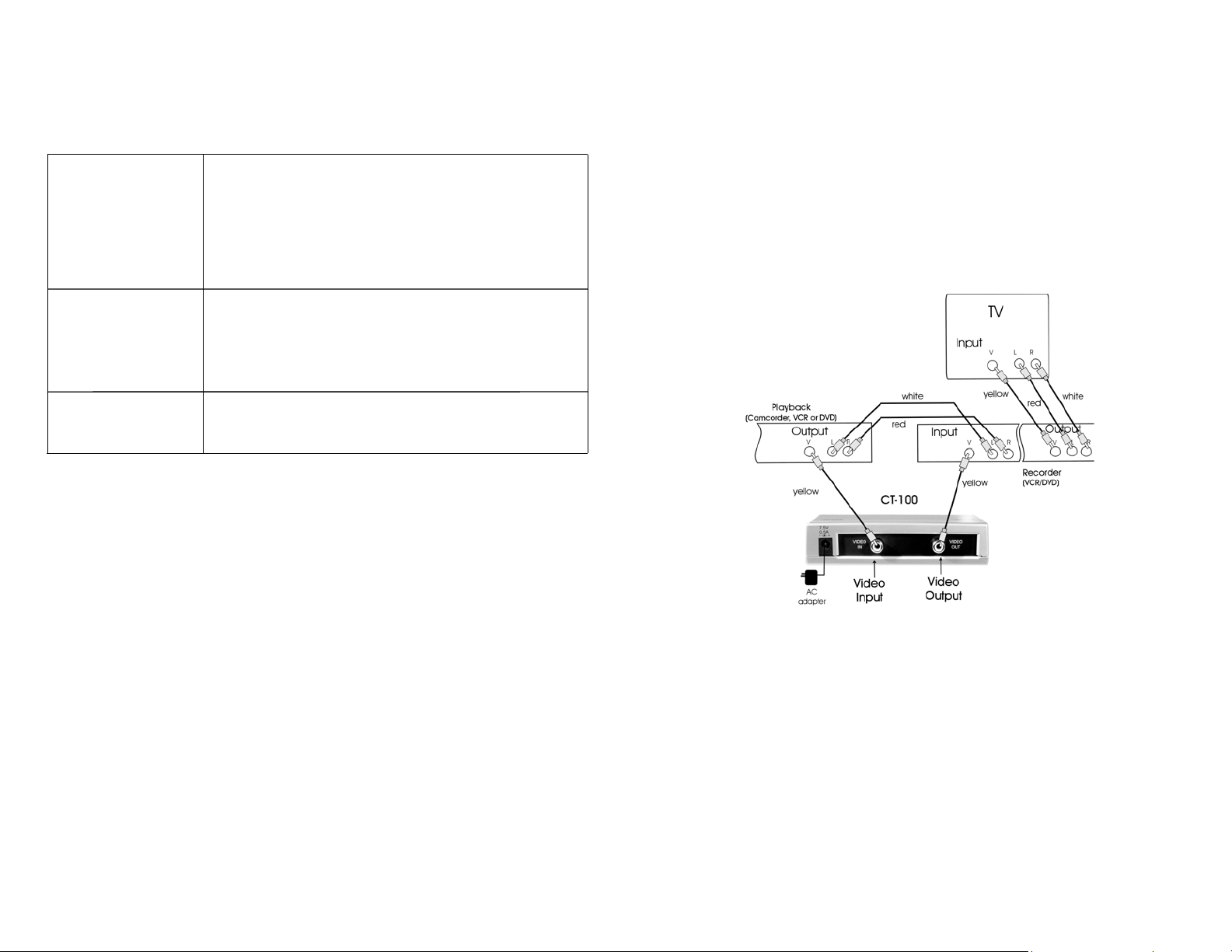
Connection Notes: First, connect your player (VCR/DVD) to your recorder
(VCR/DVD) to your TV. Verify that your hook-up cables are working. Then
disconnect the yellow video cable and connect the CT-100 as shown below.
After connecting the CT-100 the red light will turn on showing that the CT-100 is
powered up and in standby mode. Press the POWER button to turn the unit on.
Page 4
Operation
1. Verify that player/recorder connections work without CT-100.
2. Connect the CT-100 unit as shown on page 3.
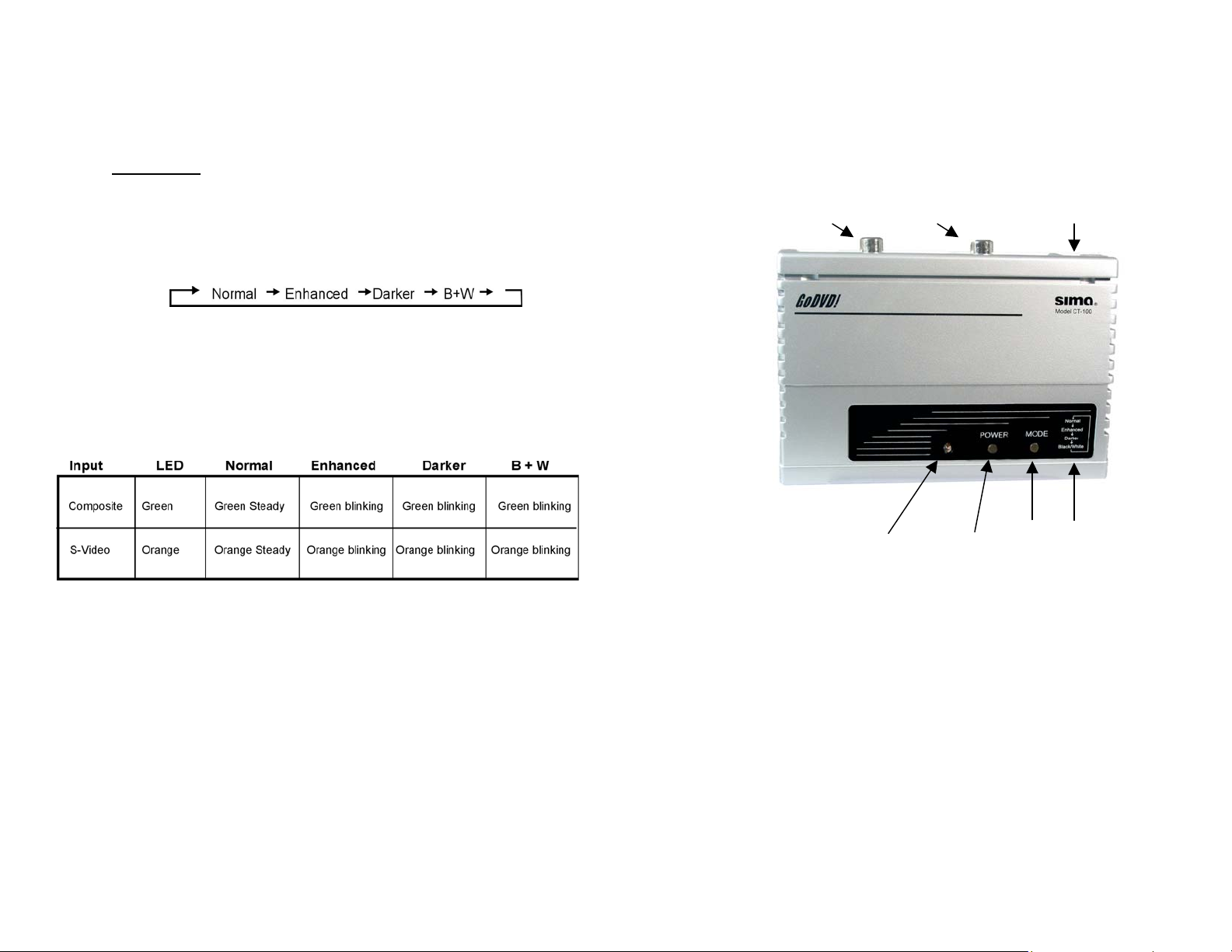
3. The red/green indicator light signifies CT-100 has power. Select the
desired video enhancement mode by pressing the Mode button. The Mode
button cycles between four enhancement modes as follows:
Pressing the button four times begins the cycle again.
4. The LED indicator light shows which Enhancement mode is selected. For
example, a steady green light means the CT-100 will output in the Normal
video mode. Use the steady indicator light as a fixed point to determine the
desired enhancement mode. Review the chart below to determine the
correct setting. If unsure which video enhancement mode is selected, look
at your video monitor while toggling through the options.
Red light = standby
5. Select A/V input on your recording VCR or DVD and press RECORD.
6. Then press PLAY on your playback device.
CT-100 Controls and Functions
Video Output Video Input Power jack
Red/Green Power Video Mode
Indicator Button Mode Sequence
 Loading...