

Page 1
SDS Series
Digital Oscilloscope
Programming Guide
EN11F
Page 2

SDS Series Programming Guide
Int.siglent.com 1
contents
VERSION DECLARATION ..................................................................................................... 14
What’s New in Version E11E ........................................................................................... 14
What’s New in Version E11D ........................................................................................... 14
What’s New in Version E11C ........................................................................................... 15
What’s New in Version E11B ........................................................................................... 15
Version E11A at Introduction ........................................................................................... 16
SUPPORTED MODELS ......................................................................................................... 17
PROGRAMMING OVERVIEW ............................................................................................... 18
Establishing Communications ......................................................................................... 18
Install NI-VISA .......................................................................................................... 18
Connect the Instrument ............................................................................................ 21
Remote Control ................................................................................................................ 22
User-defined Programming ...................................................................................... 22
Send SCPI Commands via NI-MAX ......................................................................... 22
Using SCPI with Telnet ............................................................................................. 22
Using SCPI with Sockets .......................................................................................... 23
Introduction to the SCPI Language ................................................................................. 24
Command and Query Structure ............................................................................... 24
Long and Short Form................................................................................................ 24
Syntax Notation ........................................................................................................ 24
Parameter Types ...................................................................................................... 25
COMMANDS & QUERIES ..................................................................................................... 27
Common (*) Commands .................................................................................................. 28
*IDN .......................................................................................................................... 29
*OPC ......................................................................................................................... 29
*RST ......................................................................................................................... 30
Root(:) Commands .......................................................................................................... 31
:AUToset ................................................................................................................... 32
:PRINt ....................................................................................................................... 32
:FORMat:DATA ......................................................................................................... 33
ACQUire Commands ....................................................................................................... 34
:ACQuire:AMODe ..................................................................................................... 35
:ACQuire:CSWeep ................................................................................................... 35
:ACQuire:INTerpolation ............................................................................................ 36
Page 3

SDS Series Programming Guide
2 Int.siglent.com
:ACQuire:MMANagement ......................................................................................... 37
:ACQuire:MODE ....................................................................................................... 38
:ACQuire:MDEPth .................................................................................................... 39
:ACQuire:NUMAcq ................................................................................................... 41
:ACQuire:POINts ...................................................................................................... 41
:ACQuire:RESolution ................................................................................................ 42
:ACQuire:SEQuence ................................................................................................ 43
:ACQuire:SEQuence:COUNt .................................................................................... 44
:ACQuire:SRATe ....................................................................................................... 45
:ACQuire:TYPE ........................................................................................................ 46
CHANnel Commands ...................................................................................................... 47
:CHANnel:REFerence .............................................................................................. 48
:CHANnel<n>:BWLimit ............................................................................................. 49
:CHANnel<n>:COUPling .......................................................................................... 50
:CHANnel<n>:IMPedance ........................................................................................ 51
:CHANnel<n>:INVert ................................................................................................ 52
:CHANnel<n>:LABel ................................................................................................. 53
:CHANnel<n>:LABel:TEXT ...................................................................................... 54
:CHANnel<n>:OFFSet .............................................................................................. 55
:CHANnel<n>:PROBe .............................................................................................. 56
:CHANnel<n>:SCALe ............................................................................................... 57
:CHANnel<n>:SKEW ................................................................................................ 58
:CHANnel<n>:SWITch .............................................................................................. 59
:CHANnel<n>:UNIT .................................................................................................. 60
:CHANnel<n>:VISible ............................................................................................... 61
COUNter Commands....................................................................................................... 62
:COUNter .................................................................................................................. 63
:COUNter:LEVel ....................................................................................................... 64
:COUNter:MODE ...................................................................................................... 65
:COUNter:SOURce ................................................................................................... 66
:COUNter:STATistics ................................................................................................ 67
:COUNter:STATistics:RESet ..................................................................................... 68
:COUNter:TOTalizer:GATE ....................................................................................... 69
:COUNter:TOTalizer:GATE:LEVel ............................................................................ 70
:COUNter:TOTalizer:GATE:SLOPe .......................................................................... 71
:COUNter:TOTalizer:GATE:TYPE ............................................................................ 72
:COUNter:TOTalizer:RESet ...................................................................................... 73
:COUNter:TOTalizer:SLOPe ..................................................................................... 73
Page 4

SDS Series Programming Guide
Int.siglent.com 3
CURSor Commands ........................................................................................................ 74
:CURSor ................................................................................................................... 75
:CURSor:TAGStyle ................................................................................................... 76
:CURSor:IXDelta ...................................................................................................... 77
:CURSor:MITem ....................................................................................................... 78
:CURSor:MODE ....................................................................................................... 79
:CURSor:SOURce1 .................................................................................................. 80
:CURSor:SOURce2 .................................................................................................. 81
:CURSor:X1 .............................................................................................................. 82
:CURSor:X2 .............................................................................................................. 83
:CURSor:XDELta ...................................................................................................... 84
:CURSor:XREFerence.............................................................................................. 85
:CURSor:Y1 .............................................................................................................. 86
:CURSor:Y2 .............................................................................................................. 87
:CURSor:YDELta ...................................................................................................... 88
:CURSor:YREFerence.............................................................................................. 89
DECode Commands ........................................................................................................ 90
:DECode ................................................................................................................... 91
:DECode:LIST .......................................................................................................... 92
:DECode:LIST:LINE .................................................................................................. 93
:DECode:LIST:SCRoll............................................................................................... 94
:DECode:BUS<n> .................................................................................................... 95
:DECode:BUS<n>:COPY ......................................................................................... 96
:DECode:BUS<n>:FORMat ...................................................................................... 97
:DECode:BUS<n>:PROTocol ................................................................................... 98
:DECode:BUS<n>:RESult ........................................................................................ 99
:DECode:BUS<n>:IIC Commands ......................................................................... 100
:DECode:BUS<n>:SPI Commandds ...................................................................... 106
:DECode:BUS<n>:UART Commands .................................................................... 121
:DECode:BUS<n>:CAN Commands ...................................................................... 132
:DECode:BUS<n>:LIN Commands ........................................................................ 136
:DECode:BUS<n>:FLEXray Commands [Option] .................................................. 140
:DECode:BUS<n>:CANFd Commands [Option] .................................................... 144
:DECode:BUS<n>:IIS Commands [Option] ........................................................... 149
:DECode:BUS<n>:M1553 Commands [Option] ..................................................... 163
:DECode:BUS<n>:SENT Commands [Option] ...................................................... 167
:DECode:BUS<n>:MANChester Commands [Option] ........................................... 177
DIGital Commands [Option] ........................................................................................... 192
Page 5

SDS Series Programming Guide
4 Int.siglent.com
:DIGital .................................................................................................................... 193
:DIGital:ACTive ....................................................................................................... 194
:DIGital:BUS<n>:DISPlay ....................................................................................... 195
:DIGital:BUS<n>:DEFault ....................................................................................... 196
:DIGital:BUS<n>:FORMat ...................................................................................... 197
:DIGital:BUS<n>:MAP ............................................................................................ 198
:DIGital:D<d> .......................................................................................................... 199
:DIGital:HEIGht ....................................................................................................... 200
:DIGital:LABel<d> ................................................................................................... 201
:DIGital:POINts ....................................................................................................... 202
:DIGital:POSition .................................................................................................... 203
:DIGital:SKEW ........................................................................................................ 204
:DIGital:SRATe ........................................................................................................ 205
:DIGital:THReshold<n> .......................................................................................... 206
DISPlay Commands ...................................................................................................... 208
:DISPlay:AXIS ........................................................................................................ 209
:DISPlay:AXIS:MODE............................................................................................. 210
:DISPlay:BACKlight ................................................................................................ 211
:DISPlay:CLEar ...................................................................................................... 212
:DISPlay:COLor ...................................................................................................... 212
:DISPlay:GRATicule ................................................................................................ 213
:DISPlay:GRIDstyle ................................................................................................ 214
:DISPlay:INTensity .................................................................................................. 215
:DISPlay:MENU ...................................................................................................... 216
:DISPlay:MENU:HIDE ............................................................................................ 217
:DISPlay:PERSistence ........................................................................................... 218
:DISPlay:TRANsparence ........................................................................................ 219
:DISPlay:TYPE ....................................................................................................... 220
DVM Commands ........................................................................................................... 221
:DVM ....................................................................................................................... 222
:DVM:ALARm ......................................................................................................... 223
:DVM:ARANge ........................................................................................................ 224
:DVM:CURRent ...................................................................................................... 225
:DVM:HOLD ............................................................................................................ 226
:DVM:MODE ........................................................................................................... 227
:DVM:SOURce ....................................................................................................... 228
FUNCtion Commands ................................................................................................... 229
:FUNCtion:FFTDisplay ........................................................................................... 231
Page 6

SDS Series Programming Guide
Int.siglent.com 5
:FUNCtion:GVALue ................................................................................................ 232
:FUNCtion<x> ......................................................................................................... 233
:FUNCtion<x>:AVERage:NUM ............................................................................... 234
:FUNCtion<x>:DIFF:DX .......................................................................................... 235
:FUNCtion<x>:ERES:BITS ..................................................................................... 236
:FUNCtion<x>:FFT:AUToset ................................................................................... 237
:FUNCtion<x>:FFT:HCENter .................................................................................. 238
:FUNCtion<x>:FFT:HSCale .................................................................................... 239
:FUNCtion<x>:FFT:SPAN ....................................................................................... 240
:FUNCtion<x>:FFT:LOAD ....................................................................................... 241
:FUNCtion<x>:FFT:MODE ...................................................................................... 242
:FUNCtion<x>:FFT:POINts ..................................................................................... 243
:FUNCtion<x>:FFT:RESET .................................................................................... 244
:FUNCtion<x>:FFT:RLEVel .................................................................................... 245
:FUNCtion<x>:FFT:SCALe ..................................................................................... 247
:FUNCtion<x>:FFT:SEARch ................................................................................... 248
:FUNCtion<x>:FFT:SEARch:EXCursion ................................................................ 249
:FUNCtion<x>:FFT:SEARch:RESult ...................................................................... 250
:FUNCtion<x>:FFT:SEARch:THReshold ................................................................ 252
:FUNCtion<x>:FFT:UNIT ........................................................................................ 253
:FUNCtion<x>:FFT:WINDow .................................................................................. 254
:FUNCtion<x>:FILTer:TYPe .................................................................................... 255
:FUNCtion<x>:FILTer:HFRequency........................................................................ 256
:FUNCtion<x>:FILTer:LFRequency ........................................................................ 257
:FUNCtion<x>:INTegrate:GATE ............................................................................. 258
:FUNCtion<x>:INTegrate:OFFSet .......................................................................... 259
:FUNCtion<x>:INTErpolate:COEF ......................................................................... 260
:FUNCtion<x>:INVert .............................................................................................. 261
:FUNCtion<x>:LABel .............................................................................................. 262
:FUNCtion<x>:LABel:TEXT .................................................................................... 263
:FUNCtion<x>:MAXHold:SWeeps .......................................................................... 264
:FUNCtion<x>:MINHold:SWeeps ........................................................................... 265
:FUNCtion<x>:OPERation ...................................................................................... 266
:FUNCtion<x>:POSition ......................................................................................... 267
:FUNCtion<x>:SCALe ............................................................................................ 268
:FUNCtion<x>:SOURce1 ....................................................................................... 269
:FUNCtion<x>:SOURce2 ....................................................................................... 270
HISTORy Commands .................................................................................................... 271
Page 7

SDS Series Programming Guide
6 Int.siglent.com
:HISTORy ............................................................................................................... 272
:HISTORy:FRAMe .................................................................................................. 273
:HISTORy:INTERval ............................................................................................... 274
:HISTORy:LIST ....................................................................................................... 275
:HISTORy:PLAY ..................................................................................................... 276
:HISTORy:TIME ...................................................................................................... 277
MEASure Commands .................................................................................................... 278
:MEASure ............................................................................................................... 279
:MEASure:ADVanced:CLEar .................................................................................. 279
:MEASure:ADVanced:LINenumber ........................................................................ 280
:MEASure:ADVanced:P<n> ................................................................................... 281
:MEASure:ADVanced:P<n>:SOURce1 .................................................................. 282
:MEASure:ADVanced:P<n>:SOURce2 .................................................................. 283
:MEASure:ADVanced:P<n>:STATistics .................................................................. 284
:MEASure:ADVanced:P<n>:TYPE ......................................................................... 285
:MEASure:ADVanced:P<n>:VALue ........................................................................ 288
:MEASure:ADVanced:STATistics ........................................................................... 289
:MEASure:ADVanced:STATistics:AIMLimit ............................................................ 290
:MEASure:ADVanced:STATistics:HISTOGram ...................................................... 291
:MEASure:ADVanced:STATistics:MAXCount ......................................................... 292
:MEASure:ADVanced:STATistics:RESet ................................................................ 293
:MEASure:ADVanced:STYLe ................................................................................. 293
:MEASure:ASTRategy ............................................................................................ 294
:MEASure:ASTRategy:BASE ................................................................................. 295
:MEASure:ASTRategy:TOP ................................................................................... 296
:MEASure:GATE ..................................................................................................... 297
:MEASure:GATE:GA .............................................................................................. 298
:MEASure:GATE:GB .............................................................................................. 299
:MEASure:MODE ................................................................................................... 300
:MEASure:SIMPle:CLEar ....................................................................................... 301
:MEASure:SIMPle:ITEM ......................................................................................... 301
:MEASure:SIMPle:SOURce ................................................................................... 302
:MEASure:SIMPle:VALue ....................................................................................... 303
:MEASure:THReshold:SOURce ............................................................................. 304
:MEASure:THReshold:TYPE .................................................................................. 305
:MEASure:THReshold:ABSolute ............................................................................ 306
:MEASure:THReshold:PERCent ............................................................................ 307
MEMory Commands ...................................................................................................... 308
Page 8

SDS Series Programming Guide
Int.siglent.com 7
:MEMory<m>:HORizontal:POSition ....................................................................... 309
:MEMory<m>:HORizontal:SCALe .......................................................................... 310
:MEMory<m>:HORizontal:SYNC ........................................................................... 311
:MEMory<m>:IMPort .............................................................................................. 312
:MEMory<m>:LABel ............................................................................................... 313
:MEMory<m>:LABel:TEXT ..................................................................................... 314
:MEMory<m>:SWITch............................................................................................. 315
:MEMory<m>:VERTical:POSition ........................................................................... 316
:MEMory<m>:VERTical:SCALe.............................................................................. 317
MTEst Commands ......................................................................................................... 318
:MTESt .................................................................................................................... 319
:MTESt:COUNt ....................................................................................................... 319
:MTESt:FUNCtion:BUZZer ..................................................................................... 320
:MTESt:FUNCtion:COF .......................................................................................... 321
:MTESt:FUNCtion:FTH ........................................................................................... 322
:MTESt:FUNCtion:SOF .......................................................................................... 323
:MTESt:IDISplay ..................................................................................................... 324
:MTESt:MASK:CREate ........................................................................................... 324
:MTESt:MASK:LOAD.............................................................................................. 325
:MTESt:OPERate ................................................................................................... 326
:MTESt:RESet ........................................................................................................ 326
:MTESt:SOURce .................................................................................................... 327
:MTESt:TYPE ......................................................................................................... 328
RECall Commands ........................................................................................................ 329
:RECall:FDEFault ................................................................................................... 330
:RECall:REFerence ................................................................................................ 331
:RECall:SERase ..................................................................................................... 332
:RECall:SETup ........................................................................................................ 333
REF Commands ............................................................................................................ 334
:REF<r>:LABel ....................................................................................................... 335
:REF<r>:LABel:TEXT ............................................................................................. 336
:REF<r>:DATA ........................................................................................................ 337
:REF<r>:DATA:SOURce ......................................................................................... 338
:REF<r>:DATA:SCALe ........................................................................................... 339
:REF<r>:DATA:POSition ......................................................................................... 340
SAVE Commands .......................................................................................................... 341
:SAVE:BINary ......................................................................................................... 342
:SAVE:CSV ............................................................................................................. 343
Page 9

SDS Series Programming Guide
8 Int.siglent.com
:SAVE:DEFault ....................................................................................................... 344
:SAVE:IMAGe ......................................................................................................... 345
:SAVE:MATLab ....................................................................................................... 346
:SAVE:REFerence .................................................................................................. 347
:SAVE:SETup ......................................................................................................... 348
SEARch Commands ...................................................................................................... 349
:SEARch ................................................................................................................. 350
:SEARch:MODE ..................................................................................................... 351
:SEARch:COUNt .................................................................................................... 351
:SEARch:EVENt ..................................................................................................... 352
:SEARch:COPY ...................................................................................................... 352
:SEARch:EDGE Commands .................................................................................. 353
:SEARch:SLOPe Commands ................................................................................. 357
:SEARch:PULSe Commands ................................................................................. 365
:SEARch:INTerval Commands ............................................................................... 372
:SEARch:RUNT Commands .................................................................................. 379
SYSTem Commands ..................................................................................................... 387
:SYSTem:BUZZer ................................................................................................... 388
:SYSTem:CLOCk .................................................................................................... 389
:SYSTem:COMMunicate:LAN:GATeway ................................................................ 390
:SYSTem:COMMunicate:LAN:IPADdress .............................................................. 391
:SYSTem:COMMunicate:LAN:MAC ....................................................................... 391
:SYSTem:COMMunicate:LAN:SMASk ................................................................... 392
:SYSTem:COMMunicate:LAN:TYPE ...................................................................... 393
:SYSTem:COMMunicate:VNCPort ......................................................................... 394
:SYSTem:DATE ...................................................................................................... 395
:SYSTem:EDUMode ............................................................................................... 396
:SYSTem:LANGuage .............................................................................................. 397
:SYSTem:MENU ..................................................................................................... 398
:SYSTem:NSTorage ................................................................................................ 399
:SYSTem:NSTorage:CONNect ............................................................................... 400
:SYSTem:NSTorage:DISConnect ........................................................................... 400
:SYSTem:NSTorage:STATus .................................................................................. 400
:SYSTem:PON ........................................................................................................ 401
:SYSTem:REBoot ................................................................................................... 401
:SYSTem:REMote ................................................................................................... 402
:SYSTem:SELFCal ................................................................................................. 403
:SYSTem:SHUTdown ............................................................................................. 403
Page 10

SDS Series Programming Guide
Int.siglent.com 9
:SYSTem:SSAVer ................................................................................................... 404
:SYSTem:TIME ....................................................................................................... 405
:SYSTem:TOUCh ................................................................................................... 406
TIMebase Commands ................................................................................................... 407
:TIMebase:DELay ................................................................................................... 408
:TIMebase:REFerence ........................................................................................... 409
:TIMebase:REFerence:POSition ............................................................................ 410
:TIMebase:SCALe .................................................................................................. 411
:TIMebase:WINDow ............................................................................................... 412
:TIMebase:WINDow:DELay ................................................................................... 413
:TIMebase:WINDow:SCALe ................................................................................... 414
TRIGger Commands...................................................................................................... 415
:TRIGger:FREQuency ............................................................................................ 416
:TRIGger:MODE ..................................................................................................... 417
:TRIGger:RUN ........................................................................................................ 418
:TRIGger:STATus ................................................................................................... 418
:TRIGger:STOP ...................................................................................................... 419
:TRIGger:TYPE ...................................................................................................... 419
:TRIGger:EDGE Commands .................................................................................. 420
:TRIGger:SLOPe Commands ................................................................................. 431
:TRIGger:PULSe Commands ................................................................................. 445
:TRIGger:VIDeo Commands .................................................................................. 458
:TRIGger:WINDow Commands .............................................................................. 469
:TRIGger:INTerval Commands ............................................................................... 482
:TRIGger:DROPout Commands ............................................................................. 495
:TRIGger:RUNT Commands .................................................................................. 507
:TRIGger:PATTern Commands ............................................................................... 521
:TRIGger:QUALified Commands ............................................................................ 532
:TRIGger:DELay Commands ................................................................................. 542
:TRIGger:NEDGe Commands ................................................................................ 553
:TRIGger:SHOLd Commands ................................................................................ 564
:TRIGger:IIC Commands ........................................................................................ 575
:TRIGger:SPI Commands ...................................................................................... 588
:TRIGger:UART Commands ................................................................................... 605
:TRIGger:CAN Commands ..................................................................................... 620
:TRIGger:LIN Commands ....................................................................................... 629
:TRIGger:FLEXray Commands [Option] ................................................................ 643
:TRIGger:CANFd Commands [Option] ................................................................... 652
Page 11

SDS Series Programming Guide
10 Int.siglent.com
:TRIGger:IIS Commands [Option] .......................................................................... 663
:TRIGger:SENT Commands [Option] ..................................................................... 679
WAVeform Commands .................................................................................................. 682
:WAVeform:SOURce ............................................................................................... 683
:WAVeform:STARt .................................................................................................. 684
:WAVeform:INTerval ................................................................................................ 685
:WAVeform:POINt ................................................................................................... 686
:WAVeform:MAXPoint ............................................................................................. 687
:WAVeform:WIDTh .................................................................................................. 688
:WAVeform:PREamble............................................................................................ 689
:WAVeform:DATA .................................................................................................... 692
:WAVeform:SEQuence ........................................................................................... 698
WGEN Commands ........................................................................................................ 699
ARbWaVe ............................................................................................................... 700
BaSic_WaVe ........................................................................................................... 702
OUTPut ................................................................................................................... 704
SToreList ................................................................................................................. 705
SYNC ...................................................................................................................... 708
VOLTPRT................................................................................................................ 708
METEr Commands ........................................................................................................ 709
MMETer .................................................................................................................. 710
READ ...................................................................................................................... 710
CONFigure Commands .......................................................................................... 711
MEASure Commands ............................................................................................. 719
SENSe Commands ................................................................................................ 728
PROGRAMMING EXAMPLES ............................................................................................. 736
VISA Examples .............................................................................................................. 737
VC++ Example ....................................................................................................... 737
VB Example ............................................................................................................ 743
MATLAB Example .................................................................................................. 748
LabVIEW Example ................................................................................................. 750
C# Example ............................................................................................................ 753
Examples of Using Sockets ........................................................................................... 767
Python Example ..................................................................................................... 767
C Example .............................................................................................................. 770
Common Command Examples...................................................................................... 772
Read Waveform Data Example .............................................................................. 772
Read Waveform Data of Digital Example ............................................................... 776
Page 12

SDS Series Programming Guide
Int.siglent.com 11
Read Waveform Data of FFT Example .................................................................. 779
Read Sequence Waveform Data Example ............................................................ 782
Screen Dump (PRINt) Example ............................................................................. 789
Page 13

SDS Series Programming Guide
12 Int.siglent.com
Copyright and Declaration
Copyright
SIGLENT TECHNOLOGIES CO., LTD.
All Rights Reserved.
Trademark Information
SIGLENT
is the registered trademark of
SIGLENT TECHNOLOGIES CO., LTD.
Declaration
⚫
SIGLENT
products are protected by patent law in and outside of P.R.C.
⚫
SIGLENT
reserves the right to modify or change parts of or all the specifications or pricing
policies at the companys.
⚫ Information in this publication replaces all previously corresponding material.
⚫ Any way of copying, extracting or translating the contents of this manual is not allowed without
the permission of
SIGLENT
.
Product Certification
SIGLENT
guarantees this product conforms to the national and industrial standards in China and
other international standard conformance certifications are in progress.
Contact Us
If you have any problem or requirement when using our products, please contact
SIGLENT
TECHNOLOGIES CO., LTD
Headquarters
SIGLENT Technologies Co., Ltd.
Add: Blog No.4 & No.5, Antongda Industrial Zone, 3rd Liuxian Road,
Bao’an District, Shenzhen, 518101, China.
Tel: + 86 755 3688 7876
Fax: + 86 755 3359 1582
Emall: [email protected]
Website: www.siglent.com/ens
Page 14

SDS Series Programming Guide
Int.siglent.com 13
Europe
SIGLENT Technologies Germany GmbH
Add: Staetzlinger Str. 70, 86165 Augsburg, Germany
Tel: +49(0)-821-666 0 111 0
Fax: +49(0)-821-666 0 111 22
Emall: [email protected]
Website www.siglenteu.com
America
SIGLENT Technologies NA, Inc
6557 Cochran Rd Solon, Ohio 44139
Tel: 440-398-5800
Toll Free:877-515-5551
Fax: 440-399-1211
Emall: [email protected]
Website: www.siglentna.com
Page 15

SDS Series Programming Guide
14 Int.siglent.com
Version Declaration
This chapter declares the modifications of command in the most recent release of the programming
guide version.
What’s New in Version E11F
New features in version E11F of the software are:
⚫ Support for SDS800X HD, SDS3000X HD.
⚫ Modify the value range of parameter for some commads:
”:CURSor:X1”,”:CURSor:X2”, ”:CURSor:Y1”,”:CURSor:Y2”,” :FUNCtion:GVALue”
⚫ Modify the incorrect parameter enumeration of the commad “:DIGital:BUS<n>:FORMat”.
⚫ Add parameters SENT, MANchester, ARINC429, USB20 for the
command :DECode:BUS<n>:PROTOCol.
⚫ Add parameters ARINC429 for the command :TRIGger:TYPE.
⚫ Modify the parameter string length of :DIGital: LABel<d> from 7 to 8.
What’s New in Version E11E
New features in version E11E of the software are:
⚫ Support for SDS7000A, SDS1000X HD.
⚫ New support sources for some modules: CURSor, FUNCtion, MEASure, MEMory, SAVE.
⚫ The commad “PRINt” supports for obtaining inverted images.
⚫ New commad in dispay group: ":DISPlay:MENU:HIDE”.
⚫ New commad in measure group: “:MEASure:ADVanced:CLEar”, “:MEASure:SIMPle:CLEar”.
⚫ Add counter commands.
⚫ Add a read waveform data example in C#.
What’s New in Version E11D
New features in version E11D of the software are:
⚫ Support for SDS6000L.
⚫ Add Qualified, Delay, Nth Edge, Setup/Hold trigger commands.
⚫ New option “FTRIG” for “:TRIGger:MODE” command.
⚫ New commads ”TRIGger:FREQuency”, “TRIGger:EDGE:IMPedance”,”FORMat:DATA”.
⚫ Add 1553B, SENT, Manchester decode commands.
Page 16

SDS Series Programming Guide
Int.siglent.com 15
⚫ Add bus decoding result query.
⚫ Add FFT Search result query.
⚫ New commands for parameter settings of filter, maxhold, interpolation, average and eres
function operators
⚫ Add search commands.
⚫ New commands for axis label settings.
⚫ New commands for horizontal and vertical reference strategy settings.
⚫ New command to get the number of acquired frames.
⚫ Update the save command “:SAVE:BINary <path>” to “SAVE:BINary <path>,<src>”.
⚫ Supplementary path description of save commands, the path type can be local, network
storage, and udisk.
⚫ Support memory source(Mx), function source(Fx), digital bus(DIGital) for save commands.
⚫ Modify the description of “SAVE:MATLab”, which can only be saved in mat format at present.
⚫ The return header of “WAVeform:DATA” shows the number of digits according to the actual data
length, instead of the fixed 9 digits.
What’s New in Version E11C
New features in version E11C of the software are:
⚫ Support for SDS2000X HD.
⚫ New vertical resolution command for SDS2000X Plus.
⚫ DVM commands.
⚫ Memory commands.
⚫ Measure cursors commands.
⚫ New measurement item: PSLOPE, NSLOPE, TSR, TSF, THR, THF.
⚫ Update C# example.
⚫ New Read Waveform Data of FFT Example.
⚫ Update Read Waveform Data Example.
⚫ Update Read Sequence Waveform Data Example.
What’s New in Version E11B
New features in version E11B of the software are:
⚫ Measure threshold
⚫ Network storage
Page 17

SDS Series Programming Guide
16 Int.siglent.com
⚫ Memory management:Auto,Fixed Memory Depth and Fixed Sampling Rate
⚫ Display menu style: EMBedded|FLOating
⚫ Option for specifying FFT autoset as SPAN|PEAK|NORMal
⚫ Set FFT span: FUNCtion<x>:FFT:SPAN
⚫ :FUNCtion:INTGate revised to :FUNCtion<x>:INTegrate:GATE
⚫ :FUNCtion:INTGate:GA|GB revised to :FUNCtion:GVALue
⚫ PRINt revised to PRINt?
⚫ Read sequence waveform
⚫ Support reading waveform by piece
⚫ WAV:PRE? and WAV:DATA? return in standard binary block format
⚫ Support for SHS800X/SHS1000X/SDS6000A
Version E11A at Introduction
Compared with previous versions, this new document redefines the instruction format of each group
according to the SCPI specifications and adopts tree-style management. However, not all series
models support these instructions, see the next chapter “Supported Models” for details.
Page 18

SDS Series Programming Guide
Int.siglent.com 17
Supported Models
The commands and queries listed in this document can be used for SIGLENTs Digital Oscilloscope
Series as shown below. Models are arranged according to their initial release dates.
Model
Version for New Commands
SDS5000X
0.9.0 and later
SDS2000X Plus
1.3.5R3 and later
SDS6000 Pro/
SDS6000A
1.1.7.0 and later
SHS800X/
SHS1000X
1.1.9 and later
SDS2000X HD
1.2.0.2 and later
SDS6000L
1.0.1.0
SDS1000X HD
1.1.0.2
SDS7000A
1.0.7.0
SDS800X HD
1.1.3.1
SDS3000X HD
1.0.3.0
Page 19

SDS Series Programming Guide
18 Int.siglent.com
Programming Overview
This chapter introduces how to build communication between the instrument and the PC. It also
introduces how to configure a system for remote instrument control.
Users can remotely control the instrument through USB and LAN interfaces, in combination with
National Instruments NI-VISA and programming languages. Through the LAN interface, users can
communicate using VXI-11, Sockets and Telnet protocols, depending on the capabilities of the
specific instrument.
Establishing Communications
Install NI-VISA
USB control requires the National Instruments NI-VISA Library for communications. We also
recommend using it for LAN communications for its ease of use, but sockets, telnet, and VXI-11 can
also be implemented via LAN connections.
Currently, NI-VISA is packaged in two versions: A full version and a Run-Time Engine version. The
full version includes the NI device drivers and a tool named NI MAX which is a user interface to
control and test remotely connected devices. The Run-Time Engine is recommended, as it is a
much smaller download than the full version and includes the necessary tools for basic
communication to instruments.
For example, you can get the NI-VISA 5.4 full version from http://www.ni.com/download/ni-visa-
5.4/4230/en/.
You also can download NI-VISA Run-Time Engine 5.4 to your PC and install it as the default
selection. Its installation process is similar to the full version.
After you downloaded the file, follow these steps to install NI-VISA (The full version of NI-VISA 5.4 is
used in this example. Newer versions are likely and should be compatible with SIGLENT
instrumentation. Download the latest version available for the operating system being used by the
controlling computer):
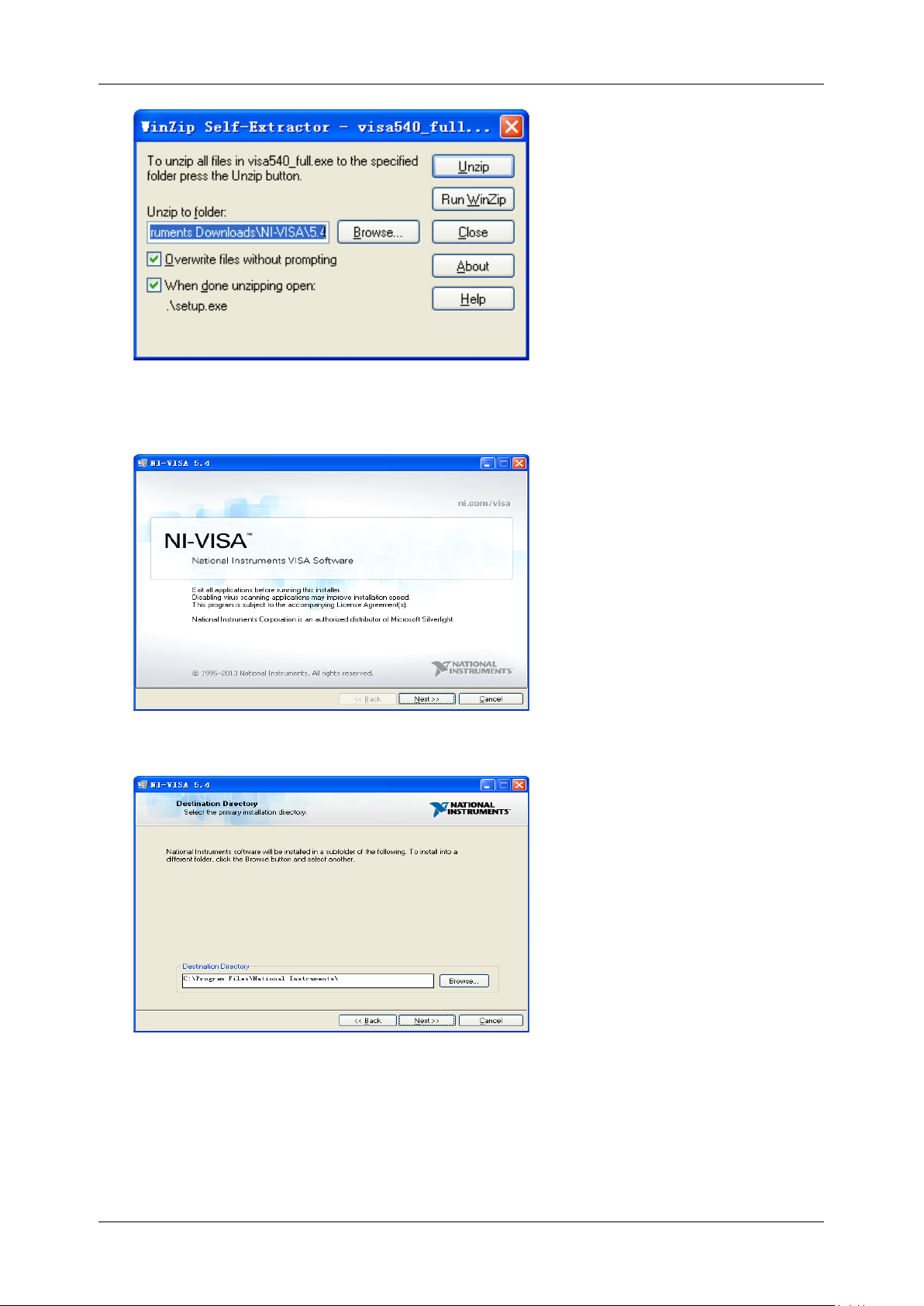
a. Double click the visa540_full.exe, the dialog will be similar to that shown below:
Page 20
SDS Series Programming Guide
Int.siglent.com 19
b. Click Unzip, the installation process will automatically launch after unzipping files. If your
computer needs to install .NET Framework 4, it may auto start.
c. The NI-VISA installing dialog is shown above. Click Next to start the installation process.
d. Set the install path. The default path is “C:\Program Files\National Instruments\”, you can
change it. Click Next, dialog shown as above.
Page 21
SDS Series Programming Guide
20 Int.siglent.com
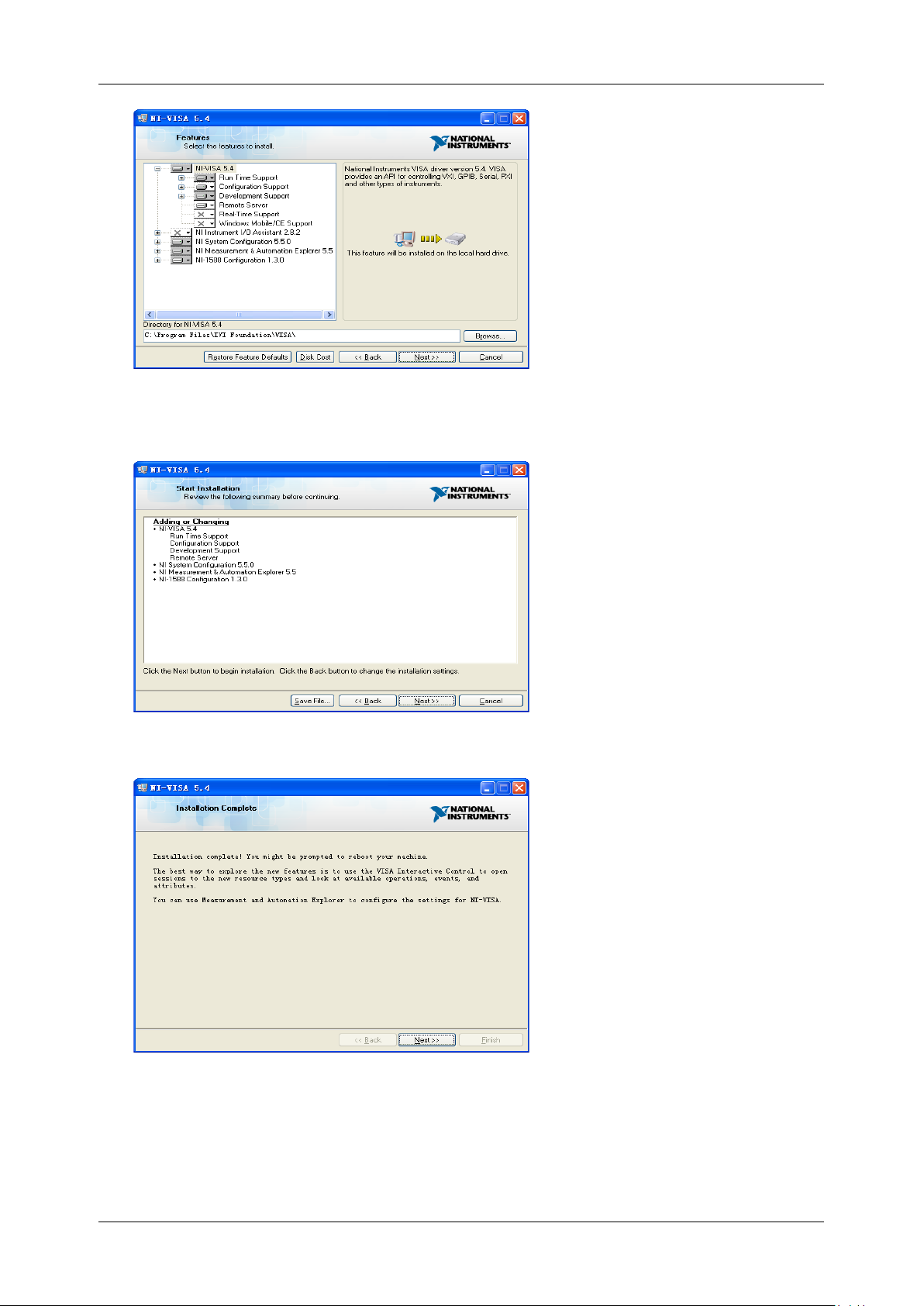
e. Click Next twice, in the License Agreement dialog, select the “I accept the above 2 License
Agreement(s).”, and click Next, dialog shown as below:
f. Click Next to begin the installation.
g. Now the installation is complete. Reboot your PC.
Page 22
SDS Series Programming Guide
Int.siglent.com 21
Connect the Instrument
Depending on the specific model, your oscilloscope may be able to communicate with a PC through
the USB or LAN interface.
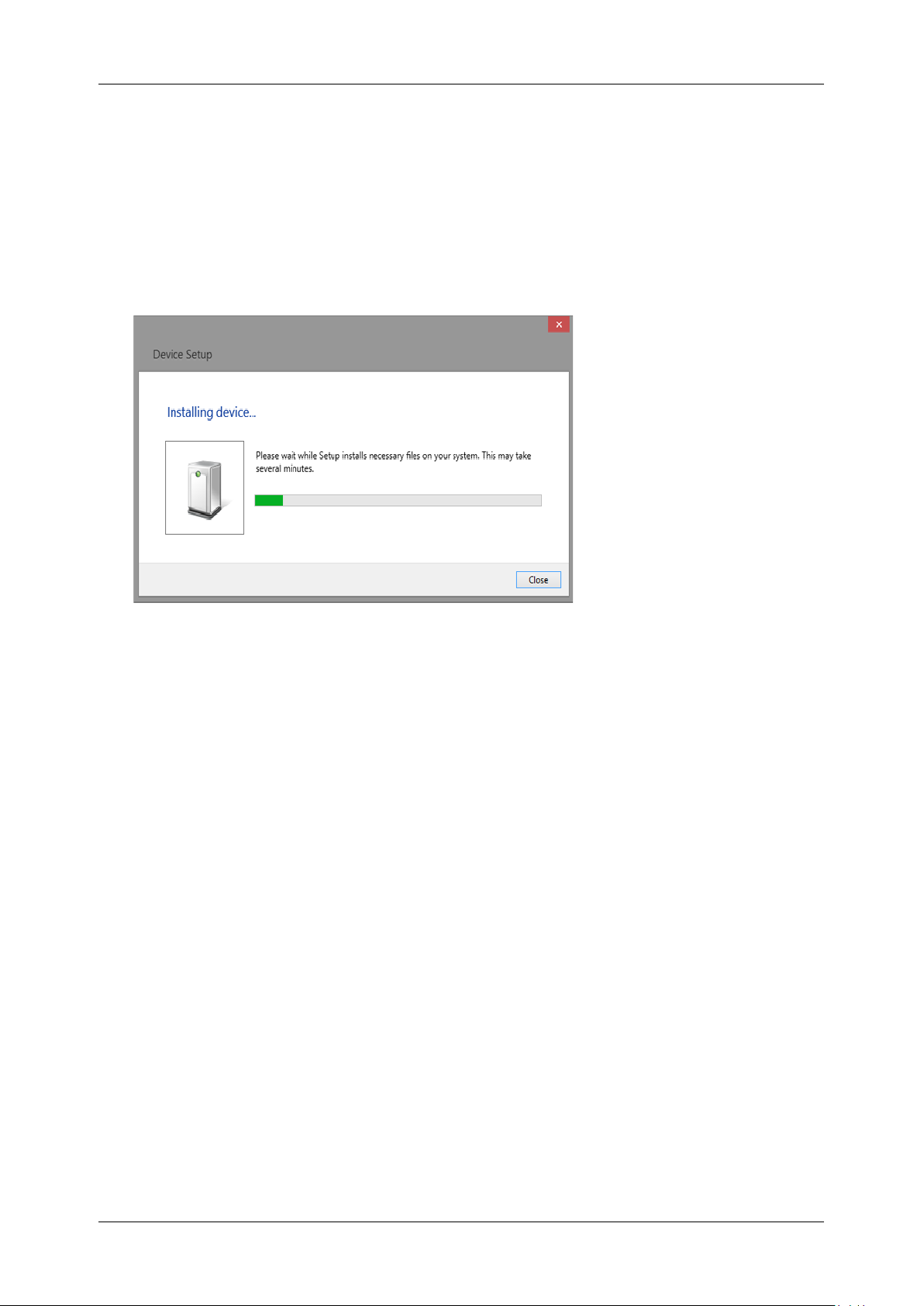
Connect the instrument and the USB Host interface of the PC using a USB cable. Assuming your
PC is already turned on, turn on your oscilloscope, and then the PC will display the “Device Setup”
screen as it automatically installs the device driver as shown below.
Wait for the installation to complete and then proceed to the next step.
Page 23
SDS Series Programming Guide
22 Int.siglent.com
Remote Control
User-defined Programming
Users can use SCPI commands via a computer to program and control the digital oscilloscope. For
details, refer to the introductions in "Programming Examples".
Send SCPI Commands via NI-MAX
NI-Measurement and Automation eXplorer (NI-MAX) is a program created and maintained by
National Instruments. It provides a basic remote control interface for VXI, LAN, USB, GPIB, and
Serial communications. It is a utility that enables you to send commands one-at-a-time and also
retrieve data from connected devices. It is a great tool for troubleshooting and testing command
sequences. The oscilloscopes can be controlled remotely by sending SCPI commands via NI-MAX.
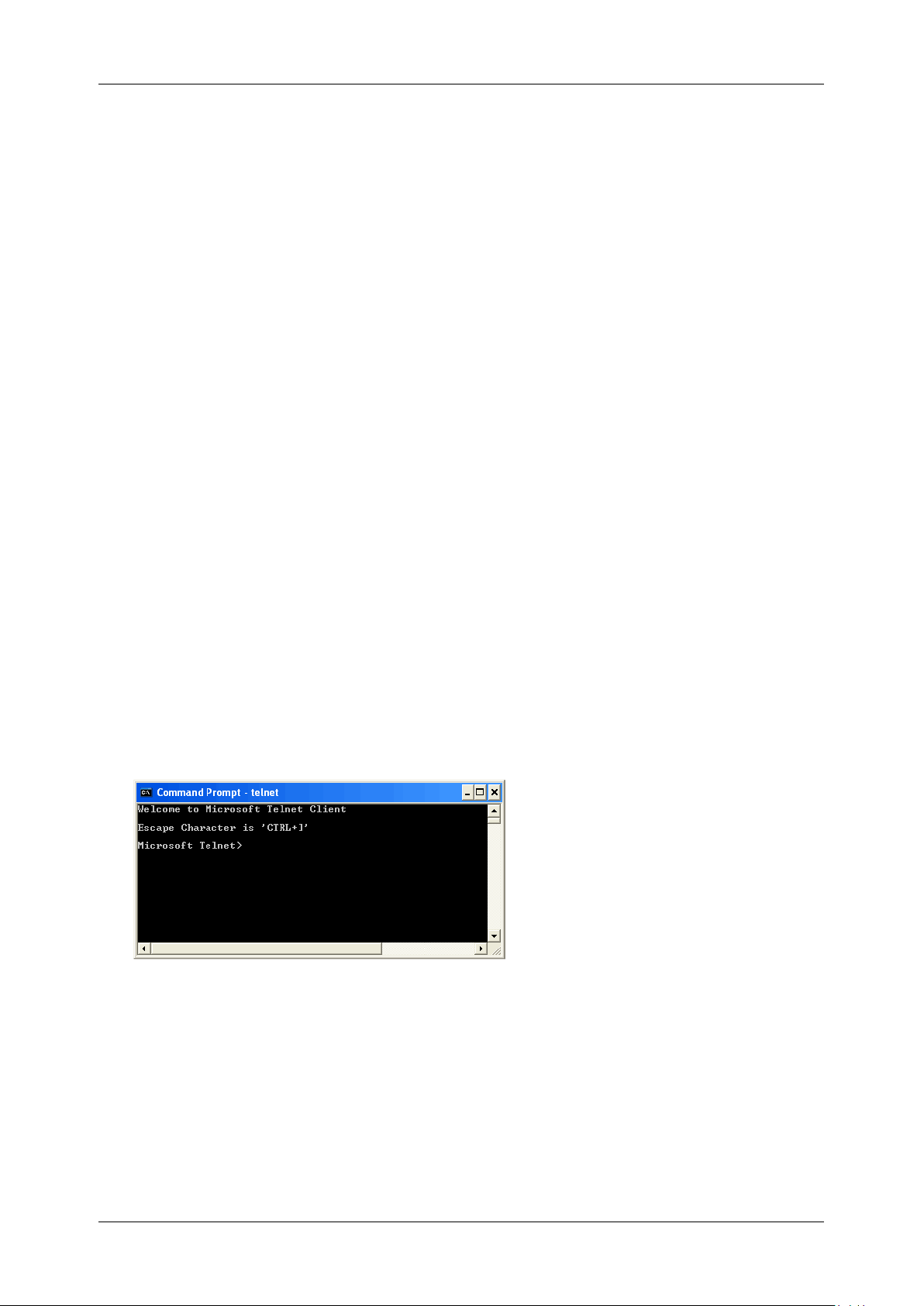
Using SCPI with Telnet
Telnet provides a means of communicating with the oscilloscopes over a LAN connection. The
Telnet protocol sends SCPI commands to the oscilloscopes from a PC and is similar to
communicating with the oscilloscopes over USB. It sends and receives information interactively: one
command at a time. Windows operating systems use a command prompt style interface for the
Telnet client. The steps are as follows:
1. On your PC, click Start > All Programs > Accessories > Command Prompt.
2. At the command prompt, type in telnet.
3. Press the Enter key. The Telnet display screen will be displayed.
4. At the Telnet command line, type:
open XXX.XXX.XXX.XXX 5024
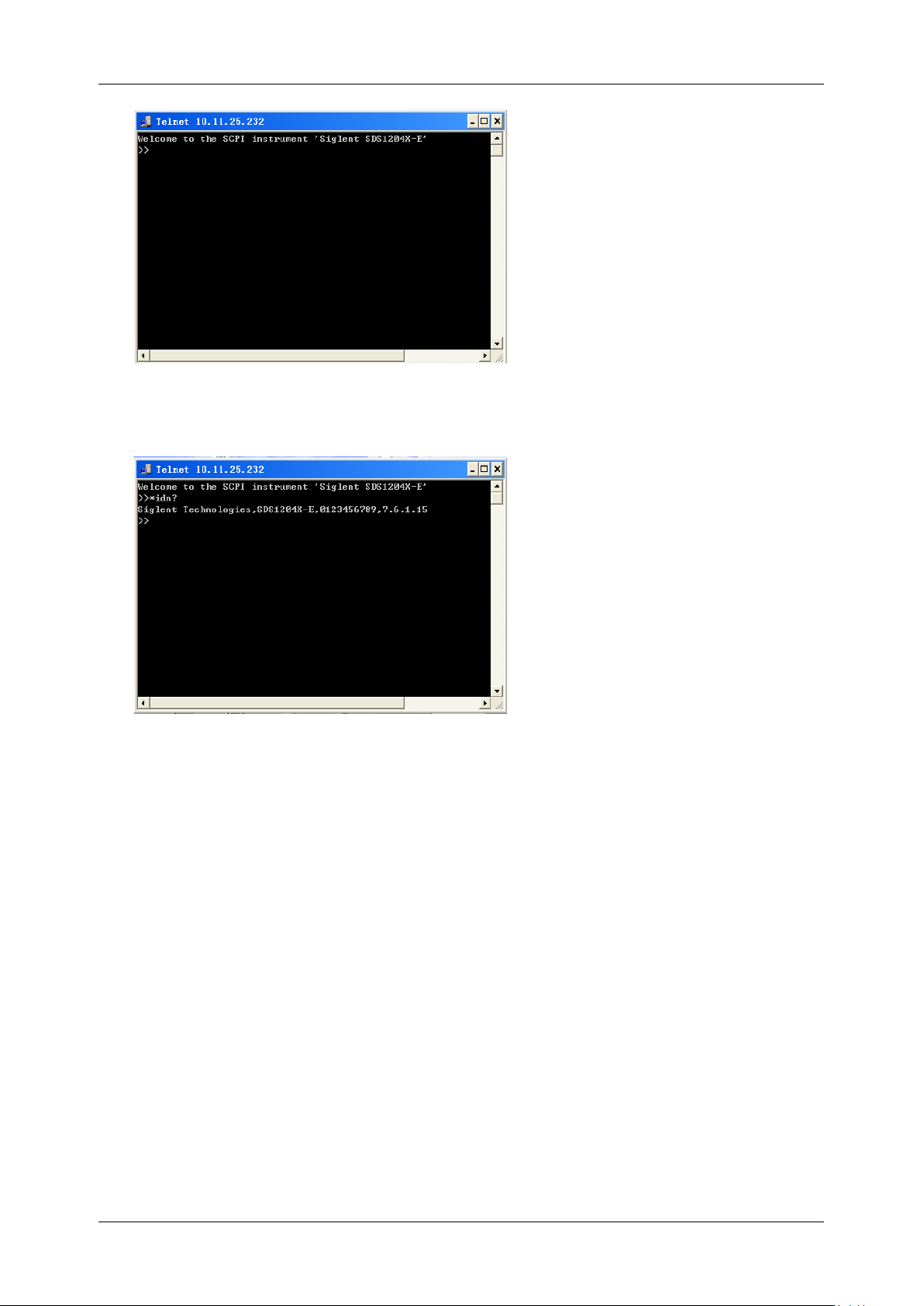
Where XXX.XXX.XXX.XXX is the instrument’s IP address and 5024 is the port. You should see
a response similar to the following:
Page 24
SDS Series Programming Guide
Int.siglent.com 23
5. At the SCPI> prompt, input the SCPI commands such as *IDN? to return the company name,
model number, serial number, and firmware version number.
6. To exit the SCPI> session, press the Ctrl+] keys simultaneously.
7. Type quit at the prompt or close the Telnet window to close the connection to the instrument
and exit Telnet.
Using SCPI with Sockets
Socket API can be used to control the SDS2000X Plus series via LAN without installing any other
libraries. This can reduce the complexity of programming.
SOCKET ADDRESS
IP address+port number
IP ADDRESS
SDS IP address
PORT NUMBER
5025
Please see the section "Examples of Using Sockets" for the details.
Page 25

SDS Series Programming Guide
24 Int.siglent.com
Introduction to the SCPI Language
Command and Query Structure
Commands consist of set commands and query commands (usually called commands and queries).
Commands modify oscilloscope settings or tell the oscilloscope to perform a specific action. Queries
cause the oscilloscope to return data and status information. Not all commands have both a set and
a query form. Some commands have set only and some have query only.
Commands usually start with a colon [:]. A keyword is separated by a colon (:) followed by optional
parameter settings. A question mark (?) is added after the command line to indicate that this
function is queried. The command keyword is separated from the first parameter by spaces.
Example:
:CHANnel:SCALe <value>
:CHANnel:SCALe?
Long and Short Form
Each command has both a long and a short form. Note that elsewhere in this document a special
notation is employed to differentiate the short form keyword from the long form of the same keyword.
The long form of the keyword is shown, with the short form portion shown in uppercase characters,
and the rest of the keyword is shown in lowercase characters. If you want to abbreviate, you have to
type all the capital letters in the command format.
Example:
:CHANnel1:SCALe?
:CHAN1:SCAL?
Syntax Notation
The following notations are used in the commands:
< > (Angle Brackets)
Angle brackets enclose words that are used as placeholders, of which there are two types: the
header path and the data parameter of a command. Parameters are distinguished by enclosing the
type name in angle brackets.
:= (Defined As)
A colon followed by an equals sign separates a placeholder from the description of the type and
range of values that may be used in a command instead of the placeholder.
Page 26

SDS Series Programming Guide
Int.siglent.com 25
{ } (Braces)
Braces or curly brackets are used to enclose one or more parameters that may be included zero or
more times. The vertical bar (|) can be read as “or” and is used to separate alternative parameter
options.
[ ] (Square Brackets)
Square brackets are used to enclose a keyword that is optional when programming the command;
that is, the instrument shall process the command to have the same effect whether the option node
is omitted by the programmer or not.
… (Ellipsis)
An ellipsis (trailing dots) indicates that the preceding element may be repeated one or more times.
Parameter Types
Enumeration
Enter these arguments as unquoted text words. Like keywords, enumeration arguments follow the
same convention where the portion indicated in uppercase is required and that in lowercase is
optional.
Numeric
Many oscilloscope commands require numeric arguments. The syntax shows the format that the
oscilloscope returns in response to a query. This is also the preferred format when sending the
command to the oscilloscope, though any of the formats will be accepted. This documentation
represents these arguments as described below.
Type
Meaning
<NR1>
Signed integer value
<NR2>
Floating point value without an exponent
<NR3>
Floating point value with an exponent
<bin>
Signed or unsigned integer in binary format
Quoted String
A quoted string is simply a group of ASCII characters enclosed by double quote ("). The following is
an example of a quoted string: "This is a quoted string". This documentation represents these
arguments as follows: Some commands accept or return data in the form of a quoted string
Type
Meaning
<qstring>
Quoted string of ASCII text
Page 27

SDS Series Programming Guide
26 Int.siglent.com
A quoted string can include any character defined in the 7-bit ASCII character set. Follow these
rules when you use quoted strings:
1. Use a double quote character to open and close the string.
Example: "this is a valid string".
2. You can mix quotation marks within a string as long as you follow the previous rule. But cannot
include a double quote character within a string by repeating the quote.
Example: "this is an 'acceptable' string".
3. You cannot include double quotes character within a string by repeating the double quote.
Example: "here is a "" mark". It will be recognized as "here is a ".
4. Strings can have upper or lower case characters. But the oscilloscope will automatically convert
it to uppercase.
5. A carriage return or line feed embedded in a quoted string will be recognized as the string.
Here are some invalid strings:
⚫ "Invalid string argument’ (quotes are not of the same type)
⚫ "here is a " " mark" (Duplicate double quotes inside double quotes)
Page 28

SDS Series Programming Guide
Int.siglent.com 27
Commands & Queries
This chapter introduces each command subsystem of the
SIGLENT
Digital Oscilloscope Series
command set. The contents of this chapter are shown as below:
Common (*) Commands
Root(:) Commands
ACQUire Commands
CHANnel Commands
CURSor Commands
DECode Commands
DIGital Commands [Option]
DISPlay Commands
DVM Commands
FUNCtion Commands
HISTORy Commands
MEASure Commands
MEMory Commands
MTEst Commands
RECall Commands
REF Commands
SAVE Commands
SYSTem Commands
TIMebase Commands
TRIGger Commands
WAVeform Commands
WGEN Commands
Page 29

SDS Series Programming Guide
28 Int.siglent.com
Common (*) Commands
The IEEE 488.2 standard defines some general commands for querying the basic information of an
instrument or performing common basic operations. These commands usually start with *, and the
command key length is 3 characters.
*IDN
*OPC
*RST
Page 30

SDS Series Programming Guide
Int.siglent.com 29
*IDN
Query
DESCRIPTION
The command query identifies the instrument type and
software version. The response consists of four different fields
providing information on the manufacturer, the scope model,
the serial number and the firmware revision.
QUERY SYNTAX
*IDN?
RESPONSE FORMAT
Siglent Technologies,<model>,<serial_number>,<firmware>
<model>:= The model number of the instrument.
<serial number>:= A 14-character code.
<firmware>:= The software revision of the instrument
EXAMPLE
The following command queries the instrument type and
software version.
Query message:
*IDN?
Response message:
Siglent
Technologies,SDS5104X,SDS5XDAD2R0160,4.6.0.8.7R1
*OPC
Query
DESCRIPTION
The command query places an ASCII "1" in the output queue
when all pending device operations have completed. The
interface hangs until this query returns.
QUERY SYNTAX
*OPC?
RESPONSE FORMAT
1
EXAMPLE
Query message:
*OPC?
Response message:
1
Page 31

SDS Series Programming Guide
30 Int.siglent.com
*RST
Command
DESCRIPTION
Resets the oscilloscope to the default configuration, equivalent
to the Default button on the front panel.
COMMAND SYNTAX
*RST
EXAMPLE
The following command resets the oscilloscope.
Command message:
*RST
RELATED COMMANDS
:RECall:FDEFault
:RECall:SETup
:SAVE:DEFault
:SAVE:SETup
Page 32

SDS Series Programming Guide
Int.siglent.com 31
Root(:) Commands
The Root commands for querying the basic information of an instrument or performing common
basic operations. These commands are only located at the root of the command tree, with no next
level and no parameters.
:AUToset
:PRINt
:FORMat:DATA
Page 33

SDS Series Programming Guide
32 Int.siglent.com
:AUToset
Command
DESCRIPTION
This command attempts to automatically adjust the trigger,
vertical, and horizontal controls of the oscilloscope to deliver a
usable display of the input signal. Autoset is not recommended
for use on low frequency events (< 100 Hz).
COMMAND SYNTAX
:AUToset
EXAMPLE
Command message:
:AUToset
AUT
Query
DESCRIPTION
The query captures the screen and returns the data in
specified image format.
QUERY SYNTAX
:PRINt? <type>[,<format>]
<type>:= {BMP|PNG}
BMP selects bitmap format
PNG selects Portable Networks Graphics format
<format>:= {NORMal|INVerted}
RESPONSE FORMAT
<bin>
Image data in specified image format
EXAMPLE
See the code in Screen Dump (PRINt) Example
Page 34

SDS Series Programming Guide
Int.siglent.com 33
:FORMat:DATA
Command/Query
DESCRIPTION
The command sets the returned precision of the command
with data in NR1/NR3 format. The current default precision is
3-digits.
The query returns the current precision of the returned data.
COMMAND SYNTAX
:FORMat:DATA <option>[,<digit>]
<option>:= {SINGle|DOUBle|CUSTom}
SINGle indicates that the single precision type and
significant digit is 7.
DOUBle indicates that the double precision type and
significant digit is 14.
CUSTom is user-defined precision, and <digit> need to
be set.
<digit>:= Value in NR1 format, including an integer and no
decimal point, like 1. The range of the value is [1,64].
QUERY SYNTAX
:FORMat:DATA?
RESPONSE FORMAT
CUSTom,<digit>
<digit>:= Value in NR1 format, including an integer and no
decimal point, like 1.
EXAMPLE
The following command sets the returned data precision of the
command to 5-digits.
Command message:
:FORMat:DATA CUSTom,5
FORM:DATA CUST,5
Query message:
FORM:DATA?
Response message:
CUSTom,5
Page 35

SDS Series Programming Guide
34 Int.siglent.com
ACQUire Commands
The :ACQUIRE subsystem commands control the way in which waveforms are acquired. These
commands set the parameters for acquiring and storing data.
:ACQuire:AMODe
:ACQuire:CSWeep
:ACQuire:INTerpolation
:ACQuire:MMANagement
:ACQuire:MODE
:ACQuire:MDEPth
:ACQuire:NUMAcq
:ACQuire:POINts
:ACQuire:RESolution
:ACQuire:SEQuence
:ACQuire:SEQuence:COUNt
:ACQuire:SRATe
:ACQuire:TYPE
Page 36

SDS Series Programming Guide
Int.siglent.com 35
:ACQuire:AMODe
Command/Query
DESCRIPTION
The command sets the rate of waveform capture. This
command can provide a high-speed waveform capture rate to
help capture signal anomalies.
The query returns the current acquisition rate mode.
COMMAND SYNTAX
:ACQuire:AMODe <rate>
<rate>:= {FAST|SLOW}
FAST selects fast waveform capture
SLOW selects slow waveform capture
QUERY SYNTAX
:ACQuire:AMODe?
RESPONSE FORMAT
<rate>
<rate>:= {FAST|SLOW}
EXAMPLE
The following command sets the FAST acquisition rate mode.
Command message:
:ACQuire:AMODe FAST
ACQ:AMOD FAST
Query message:
ACQ:AMOD?
Response message:
FAST
:ACQuire:CSWeep
Command
DESCRIPTION
The command clears the sweep and restarts the acquisition. It
is equivalent to the Clear Sweeps button on the front panel.
COMMAND SYNTAX
:ACQuire:CSWeep
EXAMPLE
The following command clears acquisition sweep.
Command message:
:ACQuire:CSWeep
ACQ:CSW
Page 37

SDS Series Programming Guide
36 Int.siglent.com
:ACQuire:INTerpolation
Command/Query
DESCRIPTION
The command sets the method of interpolation.
The query returns the current method of interpolation.
COMMAND SYNTAX
:ACQuire:INTerpolation <state>
<state>:= {ON|OFF}
ON selects sinx/x (sinc) interpolation
OFF selects linear interpolation
QUERY SYNTAX
:ACQuire:INTerpolation?
RESPONSE FORMAT
<state>
<state>:= {ON|OFF}
EXAMPLE
The following command enables sinusoidal interpretation.
Command message:
:ACQuire:INTerpolation ON
ACQ:INT ON
Query message:
ACQ:INT?
Response message:
ON
Page 38

SDS Series Programming Guide
Int.siglent.com 37
:ACQuire:MMANagement
Command/Query
DESCRIPTION
The command sets the memory mode of the oscilloscope.
The query returns the current memory mode of the
oscilloscope.
COMMAND SYNTAX
:ACQuire:MMANagement <mem_mode>
<mem_mode>:= {AUTO|FSRate|FMDepth}
AUTO mode maintain the maximum sampling rate, and
automatically set the memory depth and sampling rate
according to the time base.
FSRate mode is Fixed Samling Rate, maintain the
specified sampling rate and automatically set the memory
depth according to the time base.
FMDepth mode is Fixed Memory Depth, the oscilloscope
automatically sets the sampling rate according to the
storage depth and time base.
QUERY SYNTAX
:ACQuire:MMANagement?
RESPONSE FORMAT
<mem_mode>
< mem_mode>:= {AUTO|FSRate|FMDepth}
EXAMPLE
The following command sets the memory mode of the
oscilloscope as FMDepth.
Command message:
:ACQuire:MMANagement FMDepth
ACQ:MMAN FMD
Query message:
ACQ:MMAN?
Response message:
FMDepth
Page 39

SDS Series Programming Guide
38 Int.siglent.com
:ACQuire:MODE
Command/Query
DESCRIPTION
The command sets the acquisition mode of the oscilloscope.
The query returns the current acquisition mode of the
oscilloscope.
COMMAND SYNTAX
:ACQuire:MODE <mode_type>
<mode_type>:= {YT|XY|ROLL}
YT mode plots amplitude (Y) vs. time (T)
XY mode plots channel X vs. channel Y, commonly
referred to as a Lissajous curve
Roll mode plots amplitude (Y) vs. time (T) as in YT mode,
but begins to write the waveforms from the right-hand side
of the display. This is similar to a “strip chart” recording
and is ideal for slow events that happen a few
times/second.
QUERY SYNTAX
:ACQuire:MODE?
RESPONSE FORMAT
<mode_type>
<mode_type>:= {YT|XY|ROLL}
EXAMPLE
The following command sets the mode of the oscilloscope as
YT.
Command message:
:ACQuire:MODE YT
ACQ:MODE YT
Query message:
ACQ:MODE?
Response message:
YT
Page 40

SDS Series Programming Guide
Int.siglent.com 39
:ACQuire:MDEPth
Command/Query
DESCRIPTION
The command sets the maximum memory depth.
The query returns the maximum memory depth.
COMMAND SYNTAX
:ACQuire:MDEPth <memory_size>
<memory_size>:= Varies by model. See the table below for
details:
Model
<memory_size>
SDS5000X
Single Channel
{250k|1.25M|2.5M|12.5M|25M|125M|
250M}
Dual-Channel
{125k|625k|1.25M|6.25M|12.5M|
62.5M|125M}
SDS2000X Plus
Single Channel
{20k|200k|2M|20M|200M}
Dual-Channel
{10k|100k|1M|10M|100M}
SDS6000 Pro
SDS6000A
1G Model Single Channel
{1.25k|5k|25k|50k|250k|500k|
2.5M|5M|12.5M|125M|250M}
1G Model Dual-Channel
{1.25k|2.5k|12.5k|25k|125k|250k|
1.25M|2.5M|12.5M|62.5M|125M}
2G Model
{2.5k|5k|25k|50k|250k|500k|
2.5M|5M|12.5M|25M|50M|125M|250
M|250M|500M}
SDS6000L
{2.5k|5k|25k|50k|250k|500k|
2.5M|5M|12.5M|25M|50M|125M|250
M|250M|500M}
SHS800X
SHS1000X
Single Channel
{12k|120k|1.2M|12M}
Dual-Channel
{6k|60k|600k|6M}
SDS2000X HD
Single Channel
{20k|200k|2M|20M|200M}
Dual-Channel
{10k|100k|1M|10M|100M}
SDS800X HD
SDS1000X HD
Single Channel
{10k|100k|1M|10M|100M}
Dual-Channel
{10k|100k|1M|10M|50M}
Four-Channel
{10k|100k|1M|10M|25M}
Page 41

SDS Series Programming Guide
40 Int.siglent.com
SDS7000A
{1k|5k|10k|50k|100k|500k|1M|5M|
10M|50M|100M|500M|1G}
SDS3000X HD
Single Channel
{2k|10k|20k|100k|200k|1M|10M|20M|
100M|200M|400M}
Dual-Channel
{2k|10k|20k|100k|200k|1M|10M|20M|
100M|200M}
Quad-Channel
{2k|10k|20k|100k|200k|1M|10M|20M|
100M}
Note:
• For the definition of single and dual channel mode, please
refer to the user manual.
• Turn on digital channels or set the acquisition type to
AVERage/ERES or set the acquisition mode to roll, will
limit the memory depth.
QUERY SYNTAX
:ACQuire:MDEPth?
RESPONSE FORMAT
<memory_size>
EXAMPLE
The following command sets the memory depth to 125 Mpts
for the SDS5000X series.
Command message:
:ACQuire:MDEPth 125M
ACQ:MDEP 125M
Query message:
:ACQ:MDEP?
Response message:
125M
RELATED COMMANDS
:ACQuire:MODE
:ACQuire:TYPE
:DIGital
Page 42

SDS Series Programming Guide
Int.siglent.com 41
:ACQuire:NUMAcq
Query
DESCRIPTION
The query returns the number of waveform acquisitions that
have occurred since starting acquisition. This value is reset to
zero when any acquisition,horizontal, or vertical arguments
that affect the waveform are changed.
QUERY SYNTAX
:ACQuire:NUMAcq?
RESPONSE FORMAT
<value>
<value>:= Value in NR1 format, including an integer and no
decimal point, like 1.
EXAMPLE
The following query returns that 350 acquisitions have
occurred since starting acquisition.
Query message:
:ACQuire:NUMAcq?
ACQ:NUMA?
Response message:
350
:ACQuire:POINts
Query
DESCRIPTION
The query returns the number of sampled points of the current
waveform on the screen.
QUERY SYNTAX
:ACQuire:POINts?
RESPONSE FORMAT
<point>
<point>:= Value in NR3 format, including a decimal point and
exponent, like 1.23E+2.
EXAMPLE
The following command queries the points of current
acquisition.
Query message:
ACQ:POIN?
Response message:
1.25E+08
Page 43

SDS Series Programming Guide
42 Int.siglent.com
:ACQuire:RESolution
Command/Query
DESCRIPTION
The command sets the ADC resolution for SDS2000X Plus
oscilloscope.
The query returns the ADC resolution for SDS2000X Plus
oscilloscope.
COMMAND SYNTAX
:ACQuire:RESolution <bit>
<bit>:= {8Bits|10Bits}
QUERY SYNTAX
:ACQuire:RESolution?
RESPONSE FORMAT
<bit>
<bit>:= {8Bits|10Bits}
EXAMPLE
The following command sets the ADC resolution to 10Bits.
Command message:
:ACQuire:RESolution 10Bits
ACQ:RES 10B
Query message:
ACQ:RES?
Response message:
10Bits
Page 44

SDS Series Programming Guide
Int.siglent.com 43
:ACQuire:SEQuence
Command/Query
DESCRIPTION
The command enables or disables sequence acquisition
mode.
The query returns whether the current sequence acquisition
switch is on or not.
COMMAND SYNTAX
:ACQuire:SEQuence <state>
<state>:= {ON|OFF}
QUERY SYNTAX
:ACQuire:SEQuence?
RESPONSE FORMAT
<state>
<state>:= {ON|OFF}
EXAMPLE
The following command turns on sequence acquisition mode.
Command message:
:ACQuire:SEQuence ON
ACQ:SEQ ON
Query message:
ACQ:SEQ?
Response message:
ON
RELATED COMMANDS
:ACQuire:SEQuence:COUNt
Page 45

SDS Series Programming Guide
44 Int.siglent.com
:ACQuire:SEQuence:COUNt
Command/Query
DESCRIPTION
The command sets the number of memory segments to
acquire. The maximum number of segments may be limited by
the memory depth of your oscilloscope.
The query returns the current count setting.
COMMAND SYNTAX
:ACQuire:SEQuence:COUNt <count>
<count>:= Value in NR1 format, including an integer and no
decimal point, like 1. The range of the value varies from the
models and the current timebase, see the user manual for
details.
QUERY SYNTAX
: ACQuire:SEQuence:COUNt?
RESPONSE FORMAT
<count_value>
<count_value>:= Value in NR1 format, including an integer and
no decimal point, like 1.
EXAMPLE
The following command sets the count of sequence segment
as 5.
Command message:
:ACQuire:SEQuence:COUNt 5
ACQ:SEQ:COUN 5
Query message:
ACQ:SEQ:COUN?
Response message:
5
RELATED COMMANDS
:ACQuire:SEQuence
Page 46

SDS Series Programming Guide
Int.siglent.com 45
:ACQuire:SRATe
Command/Query
DESCRIPTION
The command set the sampling rate when in the fixed
sampling rare mode.
The query returns the current sampling rate.
COMMAND SYNTAX
:ACQuire:SRATe <rate>
<type>:= Value in NR3 format, including a decimal point and
exponent, like 1.23E+2. If the set value is greater than the
settable value, it will automatically match to the settable value.
QUERY SYNTAX
:ACQuire:SRATe?
RESPONSE FORMAT
<sample_rate>
<sample_rate>:= Value in NR3 format, including a decimal
point and exponent, like 1.23E+2.
EXAMPLE
The following command sets the current sampling rate.
Command message:
:ACQuire:SRATe 5.00E9
ACQ:SRAT 5.00E9
Query message:
ACQ:SRAT?
Response message:
5.00E+09
Page 47

SDS Series Programming Guide
46 Int.siglent.com
:ACQuire:TYPE
Command/Query
DESCRIPTION
The command selects the type of data acquisition that is to
take place.
The query returns the current acquisition type.
COMMAND SYNTAX
:ACQuire:TYPE <type>
<type>:= {NORMal|PEAK|AVERage[,<times>]|ERES[,<bits>]}
<times>:= {4|16|32|64|128|256|512|1024|2048|4096|8192}
<bits>:= {0.5|1.0|1.5|2.0|2.5|3.0|3.5|4.0}
NORMal sets the oscilloscope to normal mode.
PEAK sets the oscilloscope to peak detect mode.
AVERage sets the oscilloscope acquisition to averaging
mode. You can set the number of averages by sending
the command followed by a numeric integer value
<times>.
ERES sets the oscilloscope to the enhanced resolution
mode. This is essentially a digital boxcar filter and is used
to reduce noise at slower sweep speeds. You can set the
enhanced bits by sending the command followed by the
<bits>.
Note:
The AVERage|ERES type is not available when in sequence
mode (:ACQuire:SEQuence ON).
QUERY SYNTAX
:ACQuire:TYPE?
RESPONSE FORMAT
<type>
<type>:= {NORMal|PEAK|AVERage[,<times>]|ERES[,<bits>]}
<times>:= {4|16|32|64|128|256|512|1024|2048|4096|8192},
when <type> is AVERage.
<bits>:= {0.5|1.0|1.5|2.0|2.5|3.0|3.5|4.0} when <type> is ERES.
EXAMPLE
The following command sets the acquisition type as AVERage,
and the average number as 16.
Command message:
:ACQuire:TYPE AVERage,16
ACQ:TYPE AVER,16
Query message:
ACQ:TYPE?
Response message:
AVERage,16
Page 48

SDS Series Programming Guide
Int.siglent.com 47
CHANnel Commands
The :CHANnel<n> subsystem commands control the analog channels. Channels are independently
programmable for offset, probe, coupling, bandwidth limit, inversion, and more functions. The
channel index (1, 2, 3, or 4) specified in the command selects the analog channel that is affected by
the command.
:CHANnel:REFerence
:CHANnel<n>:BWLimit
:CHANnel<n>:COUPling
:CHANnel<n>:IMPedance
:CHANnel<n>:INVert
:CHANnel<n>:LABel
:CHANnel<n>:LABel:TEXT
:CHANnel<n>:OFFSet
:CHANnel<n>:PROBe
:CHANnel<n>:SCALe
:CHANnel<n>:SKEW
:CHANnel<n>:SWITch
:CHANnel<n>:UNIT
:CHANnel<n>:VISible
Page 49

SDS Series Programming Guide
48 Int.siglent.com
:CHANnel:REFerence
Command/Query
DESCRIPTION
This command sets the strategy for the offset value change in
the vertical direction when the vertical scale is changed.
The query returns the current vertical reference strategy.
COMMAND SYNTAX
:CHANnel:REFerence <type>
<type>:= {OFFSet|POSition}
OFFset means when the vertical scale is changed, the
vertical offset remains fixed. As the vertical scale is
changed, the waveform expands/contracts around the
main X-axis of the display.
POSition means when the vertical scale is changed, the
vertical offset remains fixed to the grid position on the
display. As the vertical scale is changed, the waveform
expands/contracts around the position of the vertical
ground position on the display.
QUERY SYNTAX
:CHANnel:REFerence?
RESPONSE FORMAT
<type>
<type>:= {OFFSet|POSition}
EXAMPLE
The following command sets the strategy of the vertical
reference to offset.
Command message:
:CHANnel:REFerence OFFSet
CHAN:REF OFFS
Query message:
CHAN:REF?
Response message:
OFFSet
Page 50

SDS Series Programming Guide
Int.siglent.com 49
:CHANnel<n>:BWLimit
Command/Query
DESCRIPTION
The command enables or disables the bandwidth-limiting lowpass filter. If the bandwidth filter is on, it will filter the signal to
reduce noise and other unwanted high frequency components.
When the filter is on, the bandwidth of the specified channel is
limited to approximately 20 MHz or 200 MHz.
The query returns the current setting of the low-pass filter.
COMMAND SYNTAX
:CHANnel<n>:BWLimit <bwlimit>
<n>:= 1 to (# analog channels) in NR1 format, including an
integer and no decimal point, like 1.
<bwlimit>:= {FULL|20M|200M}
FULL sets the oscilloscope bandwidth to full.
20M enables the 20 MHz bandwidth filter.
200M enables the 200 MHz bandwidth filter.
QUERY SYNTAX
:CHANnel<n>:BWLimit?
RESPONSE FORMAT
<bwlimit>
<bwlimit>:= {FULL|20M|200M}
EXAMPLE
The following command sets the bandwidth filter of Channel 1
to 20 MHz.
Command message:
:CHANnel1:BWLimit 20M
CHAN1:BWL 20M
Query message:
CHAN1:BWL?
Response message:
20M
Page 51

SDS Series Programming Guide
50 Int.siglent.com
:CHANnel<n>:COUPling
Command/Query
DESCRIPTION
The command selects the coupling mode of the specified input
channel.
The query returns the coupling mode of the specified channel.
COMMAND SYNTAX
:CHANnel<n>:COUPling <coupling_mode>
<n>:= 1 to (# analog channels) in NR1 format, including an
integer and no decimal point, like 1.
<coupling_mode>:= {DC|AC|GND}
DC sets the channel coupling to DC.
AC sets the channel coupling to AC.
GND sets the channel coupling to Ground.
QUERY SYNTAX
:CHANnel<n>: COUPling?
RESPONSE FORMAT
<coupling_mode>
<coupling_mode>:= {DC|AC|GND}
EXAMPLE
The following command sets the coupling mode of Channel 1
to AC.
Command message:
:CHANnel1:COUPling AC
CHAN1:COUP AC
Query message:
CHAN1:COUP?
Response message:
AC
Page 52

SDS Series Programming Guide
Int.siglent.com 51
:CHANnel<n>:IMPedance
Command/Query
DESCRIPTION
The command sets the input impedance of the selected
channel. There are two impedance values available,
depending on model. They are 1 MOhm and 50.
The query returns the current impedance setting of the
selected channel.
COMMAND SYNTAX
:CHANnel<n>:IMPedance <impedance>
<n>:= 1 to (# analog channels) in NR1 format, including an
integer and no decimal point, like 1.
<impedance>:= {ONEMeg|FIFTy}
ONEMeg means 1 Mohm.
FIFTy means 50 ohm.
Note:
When set to FIFTy, the range of legal values set by
the :CHAN<n>:SCAL commands is limited to less than 1 V.
QUERY SYNTAX
:CHANnel<n>:IMPedance?
RESPONSE FORMAT
<impedance>
<impedance>:= {ONEMeg|FIFTy}
EXAMPLE
The following command sets the impedance of Channel 2 to 1
MOhm.
Command message:
:CHANnel2:IMPedance ONEMeg
CHAN2:IMP ONEM
Query message:
CHAN2:IMP?
Response message:
ONEMeg
RELATED COMMANDS
:CHANnel<n>:SCALe
Page 53

SDS Series Programming Guide
52 Int.siglent.com
:CHANnel<n>:INVert
Command/Query
DESCRIPTION
The command selects whether or not to mathematically invert
the input signal for the specified channel. This is a
mathematical operation and does not change the polarity of
the input signal with reference to ground.
The query returns the current state of the channel inversion.
COMMAND SYNTAX
:CHANnel<n>:INVert <state>
<n>:= 1 to (# analog channels) in NR1 format, including an
integer and no decimal point, like 1.
<state>:= {ON|OFF}
ON enables channel inversion.
Off disables channel inversion.
QUERY SYNTAX
:CHANnel<n>:INVert?
RESPONSE FORMAT
<state>
<state>:= {ON|OFF}
EXAMPLE
The following command inverts the display of Channel 2.
Command message:
:CHANnel2:INVert ON
CHAN2:INV ON
Query message:
CHAN2:INV?
Response message:
ON
Page 54

SDS Series Programming Guide
Int.siglent.com 53
:CHANnel<n>:LABel
Command/Query
DESCRIPTION
The command is to turn the specified channel label on or off.
The query returns the label associated with a particular
channel.
COMMAND SYNTAX
:CHANnel<n>:LABel <state>
<n>:= 1 to (# analog channels) in NR1 format, including an
integer and no decimal point, like 1.
<state>:= {ON|OFF}
ON enables the channel label.
OFF disables the channel label.
QUERY SYNTAX
:CHANnel<n>:LABel?
RESPONSE FORMAT
<state>
<state>:= {ON|OFF}
EXAMPLE
The following command turns on the label of Channel 1.
Command message:
:CHANnel1:LABel ON
CHAN1:LAB ON
Query message:
CHAN1:LAB?
Response message:
ON
Page 55

SDS Series Programming Guide
54 Int.siglent.com
:CHANnel<n>:LABel:TEXT
Command/Query
DESCRIPTION
The command sets the selected channel label to the string that
follows. Setting a label for a channel also adds the name to the
label list in non-volatile memory (replacing the oldest label in
the list)
The query returns the current label text of the selected
channel.
COMMAND SYNTAX
:CHANnel<n>:LABel:TEXT <qstring>
<n>:= 1 to (# analog channels) in NR1 format, including an
integer and no decimal point, like 1.
<qstring>:= Quoted string of ASCII text. The length of the
string is limited to 20.
Note:
All characters will be automatically converted to uppercase.
QUERY SYNTAX
:CHANnel<n>:LABel:TEXT?
RESPONSE FORMAT
<string>
EXAMPLE
The following command sets the label text of Channel 2 to
“VOUT”.
Command message:
:CHANnel2:LABel:TEXT ”VOUT”
CHAN2:LAB:TEXT “VOUT”
Query message:
CHAN2:LAB:TEXT?
Response message:
“VOUT”
RELATED COMMANDS
:CHANnel<n>:LABel
Page 56

SDS Series Programming Guide
Int.siglent.com 55
:CHANnel<n>:OFFSet
Command/Query
DESCRIPTION
The command allows adjustment of the vertical offset of the
specified input channel. The maximum ranges depend on the
fixed sensitivity setting.
The query returns the offset value of the specified channel.
COMMAND SYNTAX
:CHANnel<n>:OFFSet <offset_value>
<n>:= 1 to (# analog channels) in NR1 format, including an
integer and no decimal point, like 1.
<offset_value>:= Value in NR3 format, including a decimal point
and exponent, like 1.23E+2.
Note:
The range of legal values varies with the value set by
the :CHANnel<n>:SCALe commands.
QUERY SYNTAX
:CHANnel<n>:OFFSet?
RESPONSE FORMAT
<offset_value>
<offset_value>:= Value in NR3 format, including a decimal point
and exponent, like 1.23E+2.
EXAMPLE
The following command sets the offset of Channel 2 to -3.8 V.
Command message:
:CHANnel2:OFFSet -3.8E+00
CHAN1:OFFS -3.8E+00
Query message:
CHAN1:OFFS?
Response message:
-3.8E+00
RELATED COMMANDS
:CHANnel<n>:SCALe
Page 57

SDS Series Programming Guide
56 Int.siglent.com
:CHANnel<n>:PROBe
Command/Query
DESCRIPTION
The command specifies the probe attenuation factor for the
selected channel. This command does not change the actual
input sensitivity of the oscilloscope. It changes the reference
constants for scaling the display factors, for making automatic
measurements, and for setting trigger levels.
The query returns the current probe attenuation factor for the
selected channel.
COMMAND SYNTAX
:CHANnel<n>:PROBe <attenuation>[,<value>]
<n>:= 1 to (# analog channels) in NR1 format, including an
integer and no decimal point, like 1.
<attenuation>:= {DEFault|VALue}
DEFault means set to the default value 1X.
VALue means set to the <value>.
<value>:= Probe attenuation ratio in NR3 format when
<attenuation> is VALue, and the range is [1E-6, 1E6].
QUERY SYNTAX
:CHANnel<n>:PROBe?
RESPONSE FORMAT
<value>
<value>:= Value in NR3 format, including a decimal point and
exponent, like 1.23E+2.
EXAMPLE
The following command sets the attenuation factor of Channel
1 to 100:1. To ensure the data matches the true signal voltage
values, the physical probe attenuation must match the scope
attenuation values for that input channel.
Command message:
:CHANnel1:PROBe VALue,1.00E+02
CHAN1:PROB VAL,1.00E+02
Query message:
CHAN1:PROB?
Response message:
1.00E+02
RELATED COMMANDS
:CHANnel<n>:SCALe
:CHANnel<n>:OFFSet
Page 58

SDS Series Programming Guide
Int.siglent.com 57
:CHANnel<n>:SCALe
Command/Query
DESCRIPTION
The command sets the vertical sensitivity in Volts/div. If the
probe attenuation is changed, the scale value is multiplied by
the probe's attenuation factor.
The query returns the current vertical sensitivity of the
specified channel.
COMMAND SYNTAX
:CHANnel<n>:SCALe <scale>
<n>:= 1 to (# analog channels) in NR1 format, including an
integer and no decimal point, like 1.
<scale>:= Value in NR3 format, including a decimal point and
exponent, like 1.23E+2.
Note:
The range of value varies from the models and the bandwidth
of the model. See the data sheet for details.
QUERY SYNTAX
:CHANnel<n>:SCALe?
RESPONSE FORMAT
<scale>
<scale>:= Value in NR3 format, including a decimal point and
exponent, like 1.23E+2. The return value is affected by probe.
EXAMPLE
The following command sets the vertical sensitivity of
Channel 1 to 50 mV/div
Command message:
:CHANnel1:SCALe 5.00E-02
CHAN1:SCAL 5.00E-02
Query message:
CHAN1:SCAL?
Response message:
5.00E-02
5.00E-01 (when the probe attenuation ratio is 10:1)
RELATED COMMANDS
:CHANnel<n>:PROBe
Page 59

SDS Series Programming Guide
58 Int.siglent.com
:CHANnel<n>:SKEW
Command/Query
DESCRIPTION
The command sets the channel-to-channel skew factor for the
specified channel.
The query returns the current probe skew setting for the
selected channel.
COMMAND SYNTAX
:CHANnel<n>:SKEW <skew_value>
<n>:= 1 to (# analog channels) in NR1 format, including an
integer and no decimal point, like 1.
<skew_value>:= Value in NR3 format, including a decimal point
and exponent, like 1.23E+2. The range of the value is [-1.00E07, 1.00E-07].
QUERY SYNTAX
:CHANnel<n>:SKEW?
RESPONSE FORMAT
<value>
<value>:= Value in NR3 format, including a decimal point and
exponent, like 1.23E+2.
EXAMPLE
The following command sets the skew of Channel 1 to 1.52 ns.
Command message:
:CHANnel1:SKEW 1.52E-09
CHAN1:SKEW 1.52E-09
Query message:
CHAN1:SKEW?
Response message:
1.52E-09
Page 60

SDS Series Programming Guide
Int.siglent.com 59
:CHANnel<n>:SWITch
Command/Query
DESCRIPTION
The command turns the display of the specified channel on or
off.
The query returns current status of the selected channel.
COMMAND SYNTAX
:CHANnel<n>:SWITch <state>
<n>:= 1 to (# analog channels) in NR1 format, including an
integer and no decimal point, like 1.
<state>:= {OFF|ON}
QUERY SYNTAX
:CHANnel<n>:SWITch?
RESPONSE FORMAT
<state>
<state>:= {OFF|ON}
EXAMPLE
The following command displays Channel 1.
Command message:
:CHANnel1:SWITch ON
CHAN1:SWIT ON
Query message:
CHAN1:SWIT?
Response message:
ON
Page 61

SDS Series Programming Guide
60 Int.siglent.com
:CHANnel<n>:UNIT
Command/Query
DESCRIPTION
The command change the unit of input signal of specified
channel. There is voltage (V) and current (A) two choice to
choose for each channel.
The query returns the current unit of the concerned channel.
COMMAND SYNTAX
:CHANnel<n>:UNIT <unit>
<n>:= 1 to (# analog channels) in NR1 format, including an
integer and no decimal point, like 1.
<unit>:= {V|A}
Note:
The related parameter units are changed to the selected unit
after processing this command. This also effects measurement
results, cursors value, channel sensitivity, and trigger level.
QUERY SYNTAX
:CHANnel<n>:UNIT?
RESPONSE FORMAT
<unit>
<unit>:= {V|A}
EXAMPLE
The following command sets the unit of Channel 1 to A.
Command message:
:CHANnel1:UNIT A
CHAN1:UNIT A
Query message:
CHAN1:UNIT?
Response message:
A
Page 62

SDS Series Programming Guide
Int.siglent.com 61
:CHANnel<n>:VISible
Command/Query
DESCRIPTION
The command is used to whether display the waveform of the
specified channel or not. Different from the
command :CHANnel<n>:SWITch, it sets the state on the
display, and the latter sets the physical switch.
The query returns whether the waveform display function of
the selected channel is on or off.
COMMAND SYNTAX
:CHANnel<n>:VISible <display_state>
<n>:= 1 to (# analog channels) in NR1 format, including an
integer and no decimal point, like 1.
<display_state>:= {ON|OFF}
QUERY SYNTAX
:CHANnel<n>:VISible?
RESPONSE FORMAT
<display_state>
<display_state>:= {ON|OFF}
EXAMPLE
The following command sets the display of Channel 2 to ON.
Command message:
:CHANnel2:VISible ON
CHAN2:VIS ON
Query message:
CHAN2:VIS?
Response message:
ON
Page 63

SDS Series Programming Guide
62 Int.siglent.com
COUNter Commands
The :COUNter subsystem commands control the counter function.
:COUNter
:COUNter:LEVel
:COUNter:MODE
:COUNter:SOURce
:COUNter:STATistics
:COUNter:STATistics:RESet
:COUNter:TOTalizer:GATE
:COUNter:TOTalizer:GATE:LEVel
:COUNter:TOTalizer:GATE:SLOPe
:COUNter:TOTalizer:GATE:TYPE
:COUNter:TOTalizer:RESet
:COUNter:TOTalizer:SLOPe
Page 64

SDS Series Programming Guide
Int.siglent.com 63
:COUNter
Command/Query
DESCRIPTION
This command sets the switch of the counter function.
The query returns the current state of the counter.
COMMAND SYNTAX
:COUNter <state>
<state>:= {ON|OFF}
QUERY SYNTAX
:COUNter?
RESPONSE FORMAT
<state>
<state>:= {ON|OFF}
EXAMPLE
The following command enables counter function.
Command message:
:COUNter ON
COUN ON
Query message:
COUN?
Response message:
ON
Page 65

SDS Series Programming Guide
64 Int.siglent.com
:COUNter:LEVel
Command/Query
DESCRIPTION
This command specifies the level of the counter.
The query returns the current level of the counter.
COMMAND SYNTAX
:COUNter:LEVel <value>
<value>:= Value in NR3 format, including a decimal point and
exponent, like 1.23E+2.
The range of the value varies by model, see the table below
for details.
Model
Value Range
SDS7000A
[-4.26*vertical_scale-vertical_offset,
4.26*vertical_scale-vertical_offset]
SDS6000 Pro
SDS6000A
SDS6000L
[-4.5*vertical_scale-vertical_offset,
4.5*vertical_scale-vertical_offset]
SDS5000X
SDS2000X Plus
SDS2000X HD
SDS1000X HD
SDS800X HD
SDS3000X HD
[-4.1*vertical_scale-vertical_offset,
4.1*vertical_scale-vertical_offset]
QUERY SYNTAX
:COUNter:LEVel?
RESPONSE FORMAT
<value>:
<value>:= Value in NR3 format, including a decimal point and
exponent, like 1.23E+2.
EXAMPLE
The following command sets the level of the counter to 0.5V.
Command message:
:COUNter:LEVel 5.00E-01
COUN:LEV 5.00E-01
Query message:
COUN:LEV?
Response message:
5.00E-01
Page 66

SDS Series Programming Guide
Int.siglent.com 65
:COUNter:MODE
Command/Query
DESCRIPTION
This command selects the mode of the counter.
The query returns the current mode of the counter.
COMMAND SYNTAX
:COUNter:MODE <type>
<type>:= {FREQuency|PERiod|TOTalizer}
FREQuency means the average frequency over a set
period
PERiod means the reciprocal of the average frequency
over a set period
TOTalizer means the value of cumulative count
QUERY SYNTAX
:COUNter:MODE?
RESPONSE FORMAT
<type>:= {FREQuency|PERiod|TOTalizer}
EXAMPLE
The following command sets the mode of the counter as
Frequency.
Command message:
:COUNter:MODE FREQuency
COUN:MODE FREQ
Query message:
COUN:MODE?
Response message:
FREQ
Page 67

SDS Series Programming Guide
66 Int.siglent.com
:COUNter:SOURce
Command/Query
DESCRIPTION
This command specifies the source of the counter source.
The query returns the current source of the counter.
COMMAND SYNTAX
:COUNter:SOURce <source>
<source>:= {C<n>}
<n>:= 1 to (# analog channels) in NR1 format, including an
integer and no decimal point, like 1.
QUERY SYNTAX
:COUNter:SOURce?
RESPONSE FORMAT
<source>
<source>:= {C<n>}
EXAMPLE
The following command sets the source of the counter as
Channel 1.
Command message:
:COUNter:SOURce C1
COUN:SOUR C1
Query message:
COUN:SOUR?
Response message:
C1
Page 68

SDS Series Programming Guide
Int.siglent.com 67
:COUNter:STATistics
Command/Query
DESCRIPTION
This command sets the switch of the counter statistics
function.
The query returns the current state of the counter statistics.
COMMAND SYNTAX
:COUNter:STATistics <state>
<state>:= {ON|OFF}
Note:
This command can only be used when the counter mode is
FREQuency or PERriod.
QUERY SYNTAX
:COUNter:STATistics?
RESPONSE FORMAT
<state>:
<state>:= {ON|OFF}
EXAMPLE
The following command sets the switch of the counter statistic
to ON.
Command message:
:COUNter:STATistics ON
COUN:STAT ON
Query message:
COUN:STAT?
Response message:
ON
Page 69

SDS Series Programming Guide
68 Int.siglent.com
:COUNter:STATistics:RESet
Command
DESCRIPTION
This command resets the statistics results of the counter
statistics function.
COMMAND SYNTAX
:COUNter:STATistics:RESet
Note:
This command can only be used when the counter mode is
FREQuency or PERiod.
EXAMPLE
The following command resets the statistics results of the
counter statistics function.
Command message:
:COUNter:STATistics:RESet
:COUN:STAT:RES
RELATED COMMANDS
:COUNter:STATistics
Page 70

SDS Series Programming Guide
Int.siglent.com 69
:COUNter:TOTalizer:GATE
Command/Query
DESCRIPTION
The command sets the state of the counter gate when the
mode is TOTalizer.
This query returns the current state of the counter gate.
COMMAND SYNTAX
:COUNter:TOTalizer:GATE <state>
<state>:= {ON|OFF}
QUERY SYNTAX
:COUNter:TOTalizer:GATE?
RESPONSE FORMAT
<state>
<state>:= {ON|OFF}
EXAMPLE
The following command sets the gate setting switch to on.
Command message:
:COUNter:TOTalizer:GATE ON
COUN:TOT:GATE ON
Query message:
COUN:TOT:GATE?
Response message:
ON
Page 71

SDS Series Programming Guide
70 Int.siglent.com
:COUNter:TOTalizer:GATE:LEVel
Command/Query
DESCRIPTION
The command sets the value of the gate level.
This query returns the value of the gate level.
COMMAND SYNTAX
:COUNter:TOTalizer:GATE:LEVel <value>
<value>:= Value in NR3 format, including a decimal point and
exponent, like 1.23E+2.
QUERY SYNTAX
:COUNter:TOTalizer:GATE:LEVel?
RESPONSE FORMAT
<value>
<value>:= Value in NR3 format, including a decimal point and
exponent, like 1.23E+2.
EXAMPLE
The following command sets the style of counter gate to
level.
Command message:
:COUNter:TOTalizer:GATE:LEVel 5.00E-1
COUN:TOT:GATE:LEV 5.00E-1
Query message:
COUN:TOT:GATE:LEV?
Response message:
5.00E-1
Page 72

SDS Series Programming Guide
Int.siglent.com 71
:COUNter:TOTalizer:GATE:SLOPe
Command/Query
DESCRIPTION
The command sets the slope of the gate source when the
gate type is AEDGe, and sets the polarity of the gate source
when the gate type is LEVel.
This query returns the slope or polarity of the gate source.
COMMAND SYNTAX
:COUNter:TOTalizer:GATE:SLOPe <slope>
<slope>:= {RISing|FALLing}
QUERY SYNTAX
:COUNter:TOTalizer:GATE:SLOPe?
RESPONSE FORMAT
<slope>
<slope>:= {RISing|FALLing}
EXAMPLE
The following command sets the slope of the counter gate to
RISing when the gate type is AEDGe.
Command message:
:COUNter:TOTalizer:GATE:SLOPe RISing
COUN:TOT:GATE:SLOP RIS
Query message:
COUN:TOT:GATE:SLOP?
Response message:
RISing
Page 73

SDS Series Programming Guide
72 Int.siglent.com
:COUNter:TOTalizer:GATE:TYPE
Command/Query
DESCRIPTION
The command selects the type of the counter gate.
This query returns the current style of the counter gate.
COMMAND SYNTAX
:COUNter:TOTalizer:GATE:TYPE <style>
<style>:= {LEVel|AEDGe}
QUERY SYNTAX
:COUNter:TOTalizer:GATE:TYPE?
RESPONSE FORMAT
<style>
<style>:= {LEVel|AEDGe}
EXAMPLE
The following command sets the style of counter gate to
level.
Command message:
:COUNter:TOTalizer:GATE:TYPE LEVel
COUN:TOT:GATE:TYPE LEV
Query message:
COUN:TOT:GATE:TYPE?
Response message:
LEVel
Page 74

SDS Series Programming Guide
Int.siglent.com 73
:COUNter:TOTalizer:RESet
Command
DESCRIPTION
This command resets the results of the counter totalizer
function.
COMMAND SYNTAX
:COUNter:TOTalizer:RESet
EXAMPLE
The following command resets the results of the counter
totalizer function.
Command message:
:COUNter:TOTalizer:RESet
:COUN:TOT:RES
:COUNter:TOTalizer:SLOPe
Command/Query
DESCRIPTION
The command sets the slope of the counter totalizer source.
This query returns the slope of the counter totalizer source.
COMMAND SYNTAX
:COUNter:TOTalizer:SLOPe <slope>
<slope>:= {RISing|FALLing}
QUERY SYNTAX
:COUNter:TOTalizer:SLOPe?
RESPONSE FORMAT
<slope>
<slope>:= {RISing|FALLing}
EXAMPLE
The following command sets the slope of counter totalizer
source to RISing.
Command message:
:COUNter:TOTalizer:SLOPe RISing
COUN:TOT:SLOP RIS
Query message:
COUN:TOT:SLOP?
Response message:
RISing
Page 75

SDS Series Programming Guide
74 Int.siglent.com
CURSor Commands
The :CURSor subsystem commands control the cursor measurement function.
:CURSor
:CURSor:TAGStyle
:CURSor:IXDelta
:CURSor:MITem
:CURSor:MODE
:CURSor:SOURce1
:CURSor:SOURce2
:CURSor:X1
:CURSor:X2
:CURSor:XDELta
:CURSor:XREFerence
:CURSor:Y1
:CURSor:Y2
:CURSor:YDELta
:CURSor:YREFerence
Page 76

SDS Series Programming Guide
Int.siglent.com 75
:CURSor
Command/Query
DESCRIPTION
The command chooses whether to open the cursor.
This query returns the current state of the cursor.
COMMAND SYNTAX
:CURSor <state>
<state>:= {ON|OFF}
QUERY SYNTAX
:CURSor?
RESPONSE FORMAT
<state>
<state>:= {ON|OFF}
EXAMPLE
The following command enables cursor function.
Command message:
:CURSor ON
CURS ON
Query message:
CURS?
Response message:
ON
Page 77

SDS Series Programming Guide
76 Int.siglent.com
:CURSor:TAGStyle
Command/Query
DESCRIPTION
The command selects the tag type of the cursor value.
The query returns the current tag type of cursor value.
COMMAND SYNTAX
:CURSor:TAGStyle <type>
<type>:= {FIXed|FOLLowing}
QUERY SYNTAX
:CURSor:TAGStyle?
RESPONSE FORMAT
<type>
<type>:= {FIXed|FOLLowing}
EXAMPLE
The following command sets the tag type of cursor value to
FIXed.
Command message:
:CURSor:TAGStyle FIXed
CURS:TAGS FIXed
Query message:
:CURS:TAGS?
Response message:
FIXed
Page 78

SDS Series Programming Guide
Int.siglent.com 77
:CURSor:IXDelta
Query
DESCRIPTION
The query returns the current value of cursor 1/(X1-X2).
QUERY SYNTAX
:CURSor:IXDelta?
RESPONSE FORMAT
<value>
<value>:= Value in NR3 format, including a decimal point and
exponent, like 1.23E+2.
EXAMPLE
Query message:
CURS:IXD?
Response message:
5.7143E+00
RELATED COMMANDS
:CURSor:X1
:CURSor:X2
:CURSor:XDELta
Page 79

SDS Series Programming Guide
78 Int.siglent.com
:CURSor:MITem
Command/Query
DESCRIPTION
The command specifies the measure item of the cursors, when
the cursor mode is measure.
The query returns the current measure item of cursor.
COMMAND SYNTAX
:CURSor:MITem <type>,<source1>[,<source2>]
<type>:= the type of the selected measurement item in
advanced measurement,see the table for details.
<source1>:= the source of the selected measurement item in
advanced measurement. The optional parameters are the same
as the measurement source.
<source2>:= when the type is CH Delay type, source2 needs to
be specified. The optional parameters are the same as the
measurement source
QUERY SYNTAX
:CURSor:MITem?
RESPONSE FORMAT
<type>,<source1>[,<source2>]
EXAMPLE
The following command sets the mesure item of the cursor to
PKPK(C2), when the advanced measurement is turned on.
Command message:
:CURSor:MITem PKPK,C2
CURS:MIT PKPK,C2
Query message:
CURS:MIT?
Response message:
PKPK,C2
Page 80

SDS Series Programming Guide
Int.siglent.com 79
:CURSor:MODE
Command/Query
DESCRIPTION
The command specifies the mode of cursor, and the type of
cursor to be displayed when the cursor mode is manual.
The query returns the current mode of cursor.
COMMAND SYNTAX
:CURSor:MODE <type>
<type>:= {TRACk|MANual[,<mode>]|MEASure}
<mode>:= {X|Y|XY}
MANul means the manual cursors
TRACk means the track cursors
MEASure means the measure cursors
QUERY SYNTAX
:CURSor:MODE?
RESPONSE FORMAT
<type>
<type>:= {TRACk|MANual[,<mode>]}
<mode>:= {X|Y|XY}
EXAMPLE
The following command sets the cursor type to manual X, when
the cursor mode is manual.
Command message:
:CURSor:MODE MANual,X
CURS:MODE MAN,X
Query message:
CURS:MODE?
Response message:
MANual,X
Page 81

SDS Series Programming Guide
80 Int.siglent.com
:CURSor:SOURce1
Command/Query
DESCRIPTION
This command specifies the source of the cursor source 1.
The query returns the current source of the cursor source 1.
COMMAND SYNTAX
:CURSor:SOURce1 <source>
<source>:=
{C<n>|Z<n>|F<x>|M<m>|REF<r>|DIGital|HISTOGram}
<n>:= 1 to (# analog channels) in NR1 format, including an
integer and no decimal point, like 1.
<x>:= 1 to (# math functions) in NR1 format, including an
integer and no decimal point, like 1.
<m>:= 1 to (# memory waveforms) in NR1 format, including an
integer and no decimal point, like 1.
<r>:= {A|B|C|D}
Note:
When the cursor mode is a TRACk, the source cannot be set
to HISTOGram or DIGital.
QUERY SYNTAX
:CURSor:SOURce1?
RESPONSE FORMAT
<source>
<source>:=
{C<n>|Z<n>|F<x>|M<m>|REF<r>|DIGital|HISTOGram}
EXAMPLE
The following command sets the source of the cursor source 1
as Channel 1.
Command message:
:CURSor:SOURce1 C1
CURS:SOUR1 C1
Query message:
CURS:SOUR1?
Response message:
C1
RELATED COMMANDS
:CURSor:SOURce2
Page 82

SDS Series Programming Guide
Int.siglent.com 81
:CURSor:SOURce2
Command/Query
DESCRIPTION
This command specifies the source of the cursor source 2.
The query returns the current source of the cursor source 2.
COMMAND SYNTAX
:CURSor:SOURce2 <source>
<source>:=
{C<n>|Z<n>|F<x>|M<m>|REF<r>|DIGital|HISTOGram}
<n>:= 1 to (# analog channels) in NR1 format, including an
integer and no decimal point, like 1.
<x>:= 1 to (# math functions) in NR1 format, including an integer
and no decimal point, like 1.
<m>:= 1 to (# memory waveforms) in NR1 format, including an
integer and no decimal point, like 1.
<r>:= {A|B|C|D}
Note:
When the cursor mode is a TRACk, the source cannot be set to
HISTOGram or DIGital.
QUERY SYNTAX
:CURSor:SOURce2?
RESPONSE FORMAT
<source>
<source>:=
{C<n>|Z<n>|F<x>|M<m>|REF<r>|DIGital|HISTOGram}
EXAMPLE
The following command sets the source of the cursor source 2
as Channel 1.
Command message:
:CURSor:SOURce2 C1
CURS:SOUR2 C1
Query message:
CURS:SOUR2?
Response message:
C1
RELATED COMMANDS
:CURSor:SOURce1
Page 83

SDS Series Programming Guide
82 Int.siglent.com
:CURSor:X1
Command/Query
DESCRIPTION
This command specifies the position of the cursor X1.
The query returns the current position of the cursor X1.
COMMAND SYNTAX
:CURSor:X1 <value>
<value>:= Value in NR3 format, including a decimal point and
exponent, like 1.23E+2. The range of the value is
[-horizontal_grid/2*timebase+horizontal_delay,
horizontal_grid/2*timebase+horizontal_delay].
QUERY SYNTAX
:CURSor:X1?
RESPONSE FORMAT
<value>
<value>:= Value in NR3 format, including a decimal point and
exponent, like 1.23E+2.
EXAMPLE
The following command sets the value of the cursor X1 to 1
us.
Command message:
:CURSor:X1 1.00E-06
CURS:X1 1.00E-06
Query message:
CURS:X1?
Response message:
1.00E-06
RELATED COMMANDS
:CURSor:X2
:CURSor:XDELta
:CURSor:IXDelta
Page 84

SDS Series Programming Guide
Int.siglent.com 83
:CURSor:X2
Command/Query
DESCRIPTION
This command specifies the position of the cursor X2.
The query returns the current position of the cursor X2.
COMMAND SYNTAX
:CURSor:X2 <value>
<value>:= Value in NR3 format, including a decimal point and
exponent, like 1.23E+2. The range of the value is
[-horizontal_grid/2*timebase+horizontal_delay,
horizontal_grid/2*timebase+horizontal_delay].
QUERY SYNTAX
:CURSor:X2?
RESPONSE FORMAT
<value>
<value>:= Value in NR3 format, including a decimal point and
exponent, like 1.23E+2.
EXAMPLE
The following command sets the value of the cursor X2 to 1
us.
Command message:
:CURSor:X2 1.00E-06
CURS:X2 1.00E-06
Query message:
CURS:X2?
Response message:
1.00E-06
RELATED COMMANDS
:CURSor:X1
:CURSor:XDELta
:CURSor:IXDelta
Page 85

SDS Series Programming Guide
84 Int.siglent.com
:CURSor:XDELta
Query
DESCRIPTION
The query returns the horizontal difference between cursor X1
and cursor X2.
QUERY SYNTAX
:CURSor:XDELta?
RESPONSE FORMAT
<value>
<value>:= Value in NR3 format, including a decimal point and
exponent, like 1.23E+2.
EXAMPLE
The following command returns the current value of the cursor
X1-X2.
Query message:
CURS:XDEL?
Response message:
1.750E-01
RELATED COMMANDS
:CURSor:X1
:CURSor:X2
:CURSor:IXDelta
Page 86

SDS Series Programming Guide
Int.siglent.com 85
:CURSor:XREFerence
Command/Query
DESCRIPTION
This command specifies the expansion strategy around the
cursor X.
The query returns the expansion strategy of the cursor X.
COMMAND SYNTAX
:CURSor:XREFerence <type>
<type>:= {DELay|POSition}
DELay means that the cursor value is fixed, and the on-
screen cursor position changes for different timebase
values.
POSition means that the cursor position is fixed, and does
not change at any time. Timebase changes cause an
expansion or contraction of the waveforms around the
cursor position.
QUERY SYNTAX
:CURSor:XREFerence?
RESPONSE FORMAT
<type>
< type >:= {DELay|POSition}
EXAMPLE
The following command sets the type of the X cursor reference
to delay.
Command message:
:CURSor:XREFerence DELay
CURS:XREF DEL
Query message:
CURS:XREF?
Response message:
DELay
Page 87

SDS Series Programming Guide
86 Int.siglent.com
:CURSor:Y1
Command/Query
DESCRIPTION
This command specifies the position of the cursor Y1.
The query returns the current position of the cursor Y1.
COMMAND SYNTAX
:CURSor:Y1 <value>
<value>:= Value in NR3 format, including a decimal point and
exponent, like 1.23E+2. The range of the value is
[-vertical_grid/2*vertical_scale-vertical_offset,
vertical_grid/2*vertical_scale-vertical_offset].
QUERY SYNTAX
:CURSor:Y1?
RESPONSE FORMAT
<value>
<value>:= Value in NR3 format, including a decimal point and
exponent, like 1.23E+2.
EXAMPLE
The following command sets the value of the cursor Y1 to 12
V.
Command message:
:CURSor:Y1 1.20E+01
CURS:Y1 1.20E+01
Query message:
CURS:Y1?
Response message:
1.20E+01
RELATED COMMANDS
:CURSor:Y2
:CURSor:YDELta
Page 88

SDS Series Programming Guide
Int.siglent.com 87
:CURSor:Y2
Command/Query
DESCRIPTION
This command specifies the position of the cursor Y2.
The query returns the current position of the cursor Y2.
COMMAND SYNTAX
:CURSor:Y2 <value>
<value>:= Value in NR3 format, including a decimal point and
exponent, like 1.23E+2. The range of the value is
[-vertical_grid/2*vertical_scale-vertical_offset,
vertical_grid/2*vertical_scale-vertical_offset]
QUERY SYNTAX
:CURSor:Y2?
RESPONSE FORMAT
<value>
<value>:= Value in NR3 format, including a decimal point and
exponent, like 1.23E+2.
EXAMPLE
The following command sets the value of the cursor Y2 to 10
V.
Command message:
:CURSor:Y2 1.00E+01
CURS:Y2 1.00E+01
Query message:
CURS:Y2?
Response message:
1.00E+01
RELATED COMMANDS
:CURSor:Y1
:CURSor:YDELta
Page 89

SDS Series Programming Guide
88 Int.siglent.com
:CURSor:YDELta
Query
DESCRIPTION
The query returns the vertical difference between the cursor
Y1 and cursor Y2.
QUERY SYNTAX
:CURSor:YDELta?
RESPONSE FORMAT
<value>
<value>:= Value in NR3 format, including a decimal point and
exponent, like 1.23E+2.
EXAMPLE
The following command returns the current value of the cursor
Y1-Y2.
Query message:
CURS:YDEL?
Response message:
1.80E+01
RELATED COMMANDS
:CURSor:Y1
:CURSor:Y2
Page 90

SDS Series Programming Guide
Int.siglent.com 89
:CURSor:YREFerence
Command/Query
DESCRIPTION
This command specifies the expansion strategy of the Y
cursor.
The query returns the expansion strategy of the Y cursor.
COMMAND SYNTAX
:CURSor:YREFerence <type>
<type>:= {OFFSet|POSition}
OFFSet means that the cursor value is fixed, and the
cursor position moves with vertical scale changes. The
cursors expand or contract if the vertical scale changes.
POSition means that the cursor position is fixed, and does
not change at any time.
QUERY SYNTAX
:CURSor:YREFerence?
RESPONSE FORMAT
<type>
<type>:= {OFFSet|POSition}
EXAMPLE
The following command sets the type of the Y cursor reference
to offset.
Command message:
:CURSor:YREFerence OFFSet
CURS:YREF OFFS
Query message:
CURS:YREF?
Response message:
OFFSet
Page 91

SDS Series Programming Guide
90 Int.siglent.com
DECode Commands
The :DECode subsystem commands control the basic decode functions of the oscilloscope.
:DECode
:DECode:LIST
:DECode:LIST:LINE
:DECode:LIST:SCRoll
:DECode:BUS<n>
:DECode:BUS<n>:COPY
:DECode:BUS<n>:FORMat
:DECode:BUS<n>:PROTocol
:DECode:BUS<n>:RESult
:DECode:BUS<n>:IIC Commands
:DECode:BUS<n>:SPI Commandds
:DECode:BUS<n>:UART Commands
:DECode:BUS<n>:CAN Commands
:DECode:BUS<n>:LIN Commands
:DECode:BUS<n>:CANFd Commands [Option]
:DECode:BUS<n>:IIS Commands [Option]
:DECode:BUS<n>:M1553 Commands [Option]
:DECode:BUS<n>:SENT Commands [Option]
:DECode:BUS<n>:MANChester Commands [Option]
Page 92

SDS Series Programming Guide
Int.siglent.com 91
:DECode
Command/Query
DESCRIPTION
The command sets the state of the decode function.
This query returns the current status of the decode function.
COMMAND SYNTAX
:DECode <state>
<state>:= {ON|OFF}
QUERY SYNTAX
:DECode?
RESPONSE FORMAT
<state>
<state>:= {ON|OFF}
EXAMPLE
The following command enables the decode function.
Command message:
:DECode ON
DEC ON
Query message:
DEC?
Response message:
ON
Page 93

SDS Series Programming Guide
92 Int.siglent.com
:DECode:LIST
Command/Query
DESCRIPTION
The command enables or disables the list of decode result.
This query returns the current switch state of the decode list.
COMMAND SYNTAX
:DECode:LIST <state>
<state>:= {OFF|D1|D2}
D1 means bus 1
D2 means bus 2
QUERY SYNTAX
:DECode:LIST?
RESPONSE FORMAT
<state>
<state>:= {OFF|D1|D2}
EXAMPLE
The following command enables the D1 list.
Command message:
:DECode:LIST D1
DEC:LIST D1
Query message:
DEC:LIST?
Response message:
D1
Page 94

SDS Series Programming Guide
Int.siglent.com 93
:DECode:LIST:LINE
Command/Query
DESCRIPTION
The command sets the number of lines displayed in the
decoding list on the screen.
This query returns the number of lines displayed in the
decoding list.
COMMAND SYNTAX
:DECode:LIST:LINE <value>
<value>:= Value in NR1 format, including an integer and no
decimal point, like 1. The range of value is [1, 7].
QUERY SYNTAX
:DECode:LIST:LINE?
RESPONSE FORMAT
<value>
<value>:= Value in NR1 format, including an integer and no
decimal point, like 1.
EXAMPLE
The following command sets the number of lines displayed by
decoding to 6.
Command message:
:DECode:LIST:LINE 6
DEC:LIST:LINE 6
Query message:
DEC:LIST:LINE?
Response message:
6
Page 95

SDS Series Programming Guide
94 Int.siglent.com
:DECode:LIST:SCRoll
Command/Query
DESCRIPTION
The command sets the selected line when the decode list is
turned on.
This query returns the selected line of the decode list.
COMMAND SYNTAX
:DECode:LIST:SCRoll <value>
<value>:= Value in NR1 format, including an integer and no
decimal point, like 1.
QUERY SYNTAX
:DECode:LIST:SCRoll?
RESPONSE FORMAT
<value>
<value>:= Value in NR1 format, including an integer and no
decimal point, like 1.
EXAMPLE
The following command sets the third line 3 selected when
decoding the display.
Command message:
:DECode:LIST:SCRoll 3
DEC:LIST:SCR 3
Query message:
DEC:LIST:SCR?
Response message:
3
RELATED COMMANDS
:DECode:LIST
:DECode:LIST:LINE
Page 96

SDS Series Programming Guide
Int.siglent.com 95
:DECode:BUS<n>
Command/Query
DESCRIPTION
The command sets the status of the decode bus.
This query returns the current status of the decode bus.
COMMAND SYNTAX
:DECode:BUS<n> <state>
<n>:= {1|2}, is attached as a suffix to BUS and defines the bus
that is affected by the command.
<state>:= {ON|OFF}.
QUERY SYNTAX
:DECode:BUS<n>?
RESPONSE FORMAT
<state>
<state>:= {ON|OFF}
EXAMPLE
The following command sets decode bus 1 on.
Command message:
:DECode:BUS1 ON
DEC:BUS1 ON
Query message:
DEC:BUS1?
Response message:
ON
RELATED COMMANDS
:DECode
Page 97

SDS Series Programming Guide
96 Int.siglent.com
:DECode:BUS<n>:COPY
Command
DESCRIPTION
The command synchronizes the decoding settings with the
trigger settings.
COMMAND SYNTAX
:DECode:BUS<n>:COPY <operation>
<n>:= {1|2}, is attached as a suffix to BUS and defines the bus
that is affected by the command.
<operation>:= {FROMtrigger|TOTRigger}.
FROMtrigger means copy trigger settings to the decoding
bus.
TOTRigger means copy decoding settings to trigger.
EXAMPLE
The following command copies the decode settings on bus 1
to the trigger settings.
Command message:
:DECode:BUS1:COPY FROMtrigger
DEC:BUS1:COPY FROM
Page 98

SDS Series Programming Guide
Int.siglent.com 97
:DECode:BUS<n>:FORMat
Command/Query
DESCRIPTION
The command selects the display format of the specified
decode bus.
This query returns the display format of the specified decode
bus.
COMMAND SYNTAX
:DECode:BUS<n>:FORMat <format>
<n>:= {1|2}, is attached as a suffix to BUS and defines the bus
that is affected by the command.
<format>:= {BINary|DECimal|HEX|ASCii}
QUERY SYNTAX
:DECode:BUS<n>:FORMat?
RESPONSE FORMAT
<format>
<format>:= {BINary|DECimal|HEX|ASCii}
EXAMPLE
The following command selects the display format of the bus 1
as HEX.
Command message:
:DECode:BUS1:FORMat HEX
DEC:BUS1:FORM HEX
Query message:
DEC:BUS1:FORM?
Response message:
HEX
Page 99

SDS Series Programming Guide
98 Int.siglent.com
:DECode:BUS<n>:PROTocol
Command/Query
DESCRIPTION
The command selects the protocol of the specified bus.
This query returns the protocol of the specified bus.
COMMAND SYNTAX
:DECode:BUS<n>:PROTocol <protocol>
<n>:= {1|2}, is attached as a suffix to BUS and defines the bus
that is affected by the command.
<protocol>:=
{IIC|SPI|UART|CAN|LIN|FLEXray|CANFd|IIS|M1553|SENT|MA
Nchester|ARINC429|USB20}
QUERY SYNTAX
:DECode:BUS<n>:PROTocol?
RESPONSE FORMAT
<protocol>
<protocol>:=
{IIC|SPI|UART|CAN|LIN|FLEXray|CANFd|IIS|M1553}
EXAMPLE
The following command sets the decoding protocol of bus 1 to
IIC.
Command message:
:DECode:BUS1:PROTocol IIC
DEC:BUS1:PROT IIC
Query message:
DEC:BUS1:PROT?
Response message:
IIC
Page 100

SDS Series Programming Guide
Int.siglent.com 99
:DECode:BUS<n>:RESult
Query
DESCRIPTION
The command selects the protocol of the specified bus.
This query returns the protocol of the specified bus.
QUERY SYNTAX
:DECode:BUS<n>:RESult?
<n>:= {1|2}, is attached as a suffix to BUS and defines the bus
that is affected by the command.
RESPONSE FORMAT
<ascii_text>
The data is separated by commas, and each frame is separated
by semicolons and automatically wrapped. The data value is
related to the format set by “:DECode:BUS<n>:FORMat”. The
first row of data is header description information.
EXAMPLE
The following command sets the decoding protocol of bus 1 to
IIC.
Query message:
DEC:BUS1:RES?
Response message:
lin,sync,id,parity,data,checksum;
0x55,0x06,0,0x54\s0x5F,0x46;
 Loading...