

Page 1
Synco-Gamma
Application Guide
Hotel buildings
www.siemens.com/bt/integrated-applications
Page 2

Page 3

Enhanced comfort and energy efficiency in
hotels – with Synco and Gamma building
systems
Requirements
Single source
Types of integration
Purpose of the
document
Hotel buildings require special technical solutions. What is needed are low construction costs, a high level of flexibility to be able to easily rearrange spaces, economical
operation and, naturally, excellent comfort for the guests. The buildings must ensure
optimum working conditions, low energy consumption, safe operation, protection from
damage, and securit y in emergency situations. Building systems based on conventional technology cannot satisfy most of these requirements.
As a supplier of products and systems for all sectors of bui lding automation and control, Siemens offers integrated, energy-efficient and tested solutions – from the production of heat and cooling energy to individual room control and from energy distribution to the power outlet in the hotel room, thus meeting all requirements.
There are different types of integrated applications:
· "Integrated room applications" comprise HVAC, lighting and shading control with the
option of manual intervention from the room
· "Integrated room primary applications" com pri se HVAC, lighting and shading control
with the option of manual intervention from the room, but also including a connection to primary plant, which ensures optimum communication between the room and
the heating/refrigeration plant – guarant eeing maximum energy efficiency
The present Application Manual describes 7 variants of a guest room in a hotel and
one variant each of lobby, restaurant, fitness room, and primary plant. With all applications, the focus is placed on energy efficiency and comfort. The different variants offer
room automation wi th fan coil units, radiators and floor heating systems as well as
ventilation and VAV plant with a host of products from Siemens’ KNX range: From
simple solutions with fan coil units including switching of electric circuits to VAV systems for larger rooms with automatic lighting and blind control. Manual control is always possible. There is no need to worry about energy savings since these are automatically ensured by the system. Moreover, the best climatic and lighting conditions
are guaranteed f or all secti ons of the hotel.
Structure of the
document
Synco with special
group addresses
Engineering notes
Each application variant is subdivided into the following sections:
· Features/benefits
· Room setup
· De vice list
· Function description
· Secondary docum ents
Synco devices use standard group addresses to distribute system time and information about plant malfunctions. When an application program is downloaded to the
Synco devices via ETS, the group addresses are deleted. For this reason, the special
group addresses must be downloaded via ETS. Otherwise, t he Synco devices will not
be able to communicate. The group addresses can be downloaded from the Internet
at www.siemens.com/knx-td
This document describes examples of room applications and makes proposals for
their implementation. For configuration and parameterization of the individual devices,
please refer to the respective application and function sheets which can be downloaded from the Internet at www.siemens.com/hit
or www.siemens.com/knx-td
3
Page 4

Summary
No. Functions Benefits Page
1 Fan coil unit, radiator, lighting,
sun protec tion
(hotel room)
Heating and cooling, 1 control l oop:
· Automatic or manual fan control, 1- or 3-
speed
· Automatic or manual changeover of heat-
ing/cooling mode
· Window contact – central detection of open
windows
· Detection of presence via hotel card switch
· Presence- and time-dependent control of
HVAC, lig hting, su n protection and power
supply to the room
· Dimming and switching of lighting
· Operation and display of HVAC
· Simple and flexible installation thanks to
wireless technology
· Pushbuttons for "SOS", "Make up room" and
"Do not dis turb"
· Demand-compensated production of heat
and cooli ng energy t hanks to automatic data
exchange with primary plant
2 Fan coil unit, radiator, lighting,
sun protec tion
Efficiency class B
Individ ual room temperat ur e control and automatic data exchange with primary plant together save up to 30% heat-
ing/c ooli ng en er g y.
Time- and presence-dependent temperature control s aves up
to 20% heati ng /cooling en er gy.
Presence-dependent control of lighting and power supply
saves electrical energy.
Time- and daylight-depend ent shading control saves heating/c ooling ener gy when th e room is not oc cupied.
Display of energy efficiency s aves energy: F ac ility man ager and
personn el are inf ormed about energy wast e and error messages
(e.g. op en w in dows duri ng nonoccupancy times ).
Installation: Straightforw ard and flexible thanks to wireless technology – saves time and material.
Efficiency class B
11
16
(hotel room)
Heating and cooling, 2 control l oops:
· Automatic or manual fan control, 1- or 3-
speed
· Automatic or manual changeover of heating/cooling mode
· Window contact – central detection of open
windows
· Detection of presence via hotel card switch
· Presence- and time-dependent control of
HVAC, lig hting, sun protecti on, and power
supply to the room
· Dimming and switching of lighting
· Operation of HVAC
· Simple and flexible installation thanks to
wireless technology
· Pushbuttons for "SOS", "Make up room" and
"Do not dis turb"
· Demand-compensated production of heat
and cooli ng energy t hanks to automatic data
exchange with primary plant
Individ ual room temperat ur e control and automatic data exchange with primary plant together save up to 30% heating/
coolin g en erg y.
Time- and presence-dependent temperature control s aves up
to 20% heati ng /cooling en er gy.
eu.bac-certifi ed room t emperature controller gu arantees hi gh
control accurac y and reliability and, in addit ion, saves heating/
coolin g en erg y.
Separate temperature control in the bat hroom ensur es enhanc ed
comf ort an d longer life of faciliti es .
Presence-dependent control of lighting and power supply
saves electrical energy.
Time- and daylight-depend ent shading control saves heating/c ooling ener gy when th e room is not oc cupied.
Display of energy efficiency s aves energy: F ac ility man ager and
personn el are inf ormed about energy wast e and error messages
(e.g. op en w in dows duri ng nonoccupancy times ).
Installation: Straightforw ard and flexible thanks to wireless technology – saves time and material.
4
Page 5

3 Fan coil unit, radiator, lighting,
sun protec tion
(hotel room)
Heating and cooling, 2 control l oops:
· Individual room temperature control, heating
and cooling
· 2 control loops for room and bathroom
· Automatic or manual fan control, 1- or 3-s peed
· Automatic or manual changeover of heat-
ing/cooling mode
· Window contact – central detection of open
windows
· Detection of presence via presence detector
and door contact
· Presence- and time-dependent control of
HVAC, lig hting, sun protect ion, and pow er s upply to the room
· Dimming and switching of lighting
· Central operation and display of HVAC, lighting,
and sun protection
· Pushbuttons for "SOS", "Make up room" and
"Do not dis turb"
· Demand-compensated production of heat and
coolin g energy thanks to aut om atic data e xchange wit h primary plan t
Efficiency class B
Individ ual room temperat ur e control and automatic data exchange
with primary plant together save up to 30% heating/cool ing ener gy.
Time- and presence-dependent temperature control saves up to
20% heati ng /cooling en er g y.
eu.bac-certifi ed room t emperature controller guarantees high control accuracy and reliabil ity and, in addition, saves heating/c ooling
energy.
Separate temperature control in the bat hroom ensur es enhanc ed
comf ort an d longer life of faciliti es .
Presence-dependent control of lighting and power supply saves
electrical energ y.
Automatic detection of occupancy ensures enhanced c omfort.
Time- and daylight-depend ent shading control saves heat-
ing/c ooling ener gy when th e room is not oc cupied.
Display of energy efficiency s aves energy: F ac ility man ager and
personn el are inf or med about energy wast e and error m essages ( e.g.
open windows duri ng nonoccup ancy times).
21
4 Fan coil unit, radiator, lighting,
sun protec tion
(hotel room)
Heating and cooling, 1 control l oop:
· Automatic or manual fan control, 1- or 3-s peed
· Automatic or manual changeover of heat-
ing/cooling mode
· Window contact – central detection of open
windows
· Detection of presence via hotel card switch
· Presence- and time-dependent control of
HVAC, lig hting, sun protect ion, and pow er s upply to the room
· Dimming and switching of lighting
· Operation and display of HVAC
· Pushbuttons for "SOS", "Make up room" and
"Do not dis turb"
· Demand-compensated production of heat and
coolin g energy thanks to aut om atic data e xchange wit h primary plan t
Efficiency class B
Individ ual room temperat ur e control and automatic data exchange
with primary plant together save up to 30% heating/cool ing ener gy.
Time- and presence-dependent temperature control saves up to
20% heati ng /cooling en er g y.
Presence-dependent control of lighting and power supply saves
electrical energ y.
Time- and daylight-depend ent shading control saves heating/c ooling ener gy when th e room is not oc cupied.
Display of energy efficiency s aves energy: F ac ility man ager and
personn el are inf or med about energy wast e and error m essages ( e.g.
open windows duri ng nonoccup ancy times).
26
5
Page 6

5 Fan coil unit, radiator, lighting
(hotel room)
Heating and cooling, 1 control l oop:
· Individual room temperature control, heating
and cooling
· One control loop for room and bathroom
· Automatic or manual fan control, 1- or 3-s peed
· Automatic or manual changeover of heat-
ing/cooling mode
· Window contact – central detection of open
windows
· Detection of presence via hotel card switch
· Presence- and time-dependent control of
HVAC, lighting, sun prot ection and p ow er supply to the room
· Operation and display of HVAC
· Pushbuttons for "SOS", "Make up room" and
"Do not dis turb"
· Demand-compensated production of heat and
coolin g energy thanks to aut om atic data e xchange wit h primary plan t
Efficiency class C
Individ ual room temperat ur e control and automatic data exchange
with primary plant together save up to 30% heating/cool ing ener gy.
Time- and presence-dependent temperature control saves up to
20% heati ng /cooling en er g y.
Presence-dependent control of lighting and power supply saves
electrical energ y.
Display of energy efficiency s aves energy: F ac ility man ager and
personn el are inf or med about energy wast e and error m essages ( e.g.
open windows duri ng nonoccup ancy times).
31
6 Radiator, lighting, sun protection
(hotel room)
Heating, 2 control loops:
· Individual room temperature control, heating
· Two control loops for room and bathroom
· Window contact – central detection of open
windows
· Detection of presence via hotel card switch
· Presence- and time-dependent control of
HVAC, lig hting, sun protect ion, and pow er s upply to the room
· Central operation and display of HVAC, lighting,
and sun protection
· Pushbuttons for "SOS", "Make up room" and
"Do not dis turb"
7 Floor heating, lighting, sun protec-
tion
(hotel room)
Heating, 2 control loops:
· Individual room temperature control, heating
· Two control loops for room and bathroom
· Window contact – central detection of open
windows
· Detection of presence via hotel card switch
· Presence- and time-dependent control of
HVAC, lig hting, sun protect ion, and pow er s upply to the room
· Central operation and display of HVAC, lighting,
and sun protection
· Pushbuttons for "SOS", "Make up room" and
"Do not dis turb"
Efficiency class B
Time- and presence-dependent individual room temperature control saves up to 20% heating energy.
Separate temperature control in the bat hroom ensur es enhanc ed
comf ort an d longer life of faciliti es .
Presence-dependent control of lighting and power supply saves
electrical energ y.
Time- and daylight-depend ent shading control saves h eating energy when th e r oom is not occupied.
Efficiency class B
Time- and presence-dependent individual room temperature control saves up to 20% heating energy.
Separate temperature control in the bat hroom ensur es enhanc ed
comf ort an d longer life of faciliti es .
Presence-dependent control of lighting and power supply saves
electrical energ y.
Time- and daylight-depend ent shading control saves h eating energy when th e r oom is not occupied.
35
39
6
Page 7

8 Air conditioning plant, indoor air quality con-
trol, lighting
(reception area)
Heating and cooling, indoor air quality control
· Room-supply air temperature control/CO2 control
· Automatic data exchange between room HVAC and primary
plant
· VAV controllers for optimization of ventilation system
· Remote control of individual rooms or room groups
· Demand-compensated production of heat and cooling energy
thanks to automatic data exc hange with heating and refrig eration controller
· Constant light control
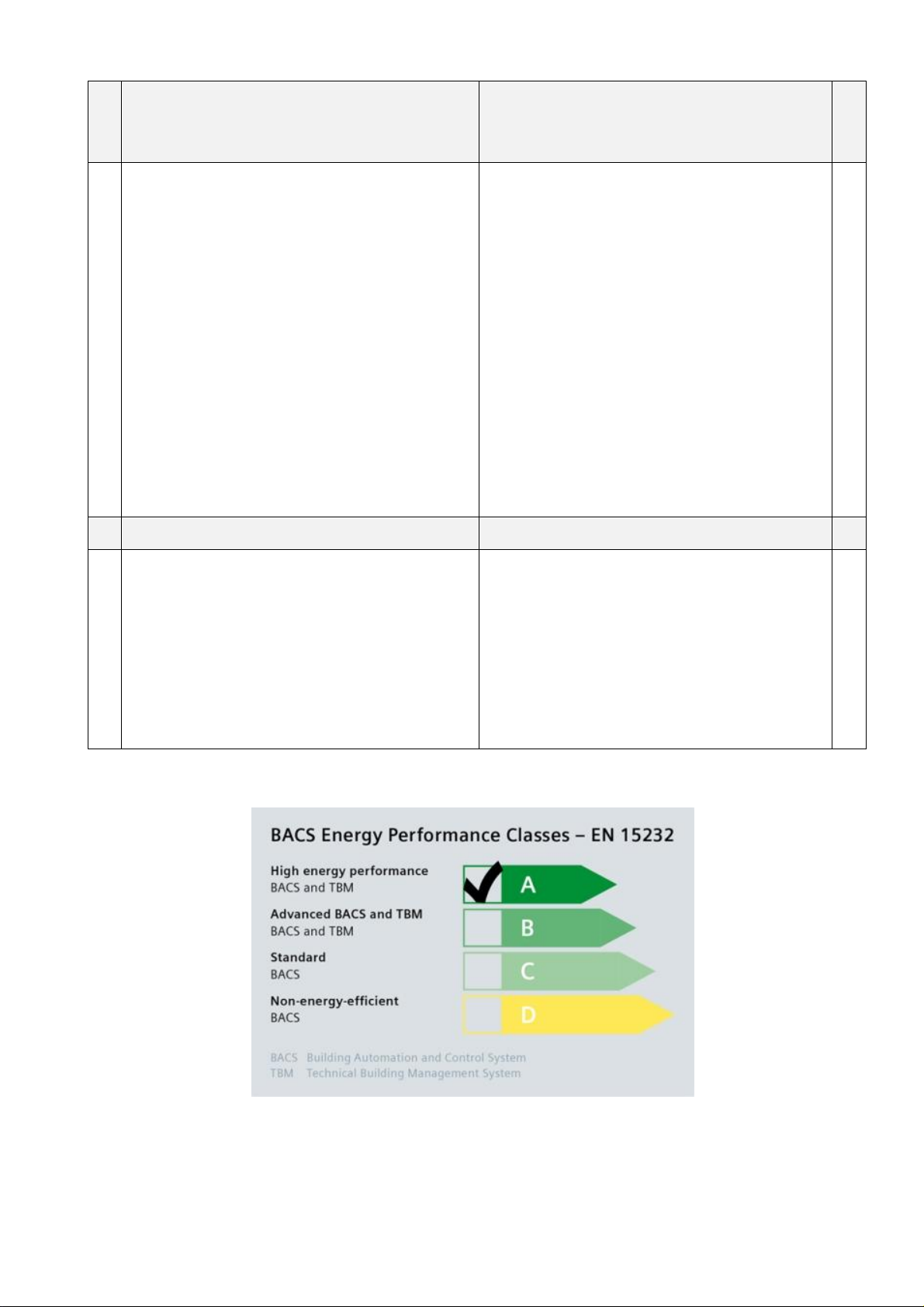
· Efficiency class A conforming to EN 15232
Efficiency class A
Temper atu re contr ol and auto matic data exchange
with primary plant together save up t o 30% heat -
ing/c ooli ng en er g y.
Time- and presence-dependent temperature control
saves up to 20% heating/cooling energy.
Demand-compensated ventilation saves 20% to 70%
ventil ati on en ergy.
Time-, prese nce- and brightn ess-dependent control
of lighting saves up to 45% lig ht energy.
Monitoring of operating times and error me ssages
from the lighting system ensure reli abi lity.
Display of energy efficiency s aves energy: Fault
status messages are sent to the facility manager and to
personnel.
43
9 VAV plant, indoor air quality control,
lighting, and sun protection
(restaurant area)
Heating and cooling, indoor air quality control
· Fully integrated VAV application with temperature, CO2 and
volumetric air flow control
· Automatic data exchange between room HVAC and primary
plant
· VAV controllers for optimization of ventilation system
· Remote control of individual rooms or room groups
· Demand-compensated production of heat and cooling energy
thanks t o automatic data exch ange with primary plant
· Constant light control
· Efficiency class A conforming to EN 15232
Efficiency class A
Temper atu re contr ol and auto matic data exchange
with primary plant together save up t o 30% heat -
ing/c ooli ng en er g y.
Time- and presence-dependent temperature control
saves up to 20% heating/cooling energy.
Demand-compensated ventilation saves 20% to 70%
ventil ati on en ergy.
Time-, prese nce- and brightn ess-dependent control
of lighting saves up to 45% lig ht energy.
Monitoring of operating times and error me ssages
from the lighting system ensure reli abi lity.
Time- and daylight-depend ent shading control saves
up to 30% heat in g/coolin g en ergy.
Display of energy efficiency s aves energy: Fault
status messages are sent to the facility manager and to
personnel.
47
7
Page 8
10 VAV plant, indoor air quality control,
lighting, sun protection
(fitness room)
Heating and cooling, indoor air quality control
· Fully integrated VAV application with temperature, CO
and volu metric air flow control
· Automatic data exchange between room HVAC and
primary pl an t
· VAV controllers for optimization of ventilation system
· Remote control of individual rooms or room groups
· Demand-compensated production of heat and cooling
energy t hanks to automatic data exchange with primar y
plant
· Constant light control
· Efficiency class A conforming to EN 15232
Efficiency class A
Temper atu re control and auto matic data ex change wit h
2
primary plant together save up to 30% heating/cooling
energy.
Time- and presence-dependent temperature control
saves up to 20% heating/cooling energy.
Demand-compensated ventilation saves 20% to 70%
ventil ati on en ergy.
Time-, prese nce- and brightness-dependent control o f
lighting saves up to 45% light energy.
Monitoring of operating times and error messages fro m
the lighting system ensure reli ability.
Time- and daylight-depend ent shading control saves up
to 30% heati ng /cooling en er gy.
Display of energy efficiency s aves ener gy: Fault status
messages are sent to the facility manager and to personnel.
53
11 Primary plant
Preparation of heat, refr igeration and air
· Demand-compensated production of heat, cooling energy and sup ply air
· Setpoint compensation based on demand and outside
temperature
· Together with room automation: Prerequisite to attain
efficiency class A conforming to EN 15232
Efficiency class A
Temper atu re control and auto matic data ex change wit h
all rooms together save up t o 30% heating /cooling en ergy.
Time- and demand-d ependent temperature control saves
up to 20% heat in g/coolin g en ergy.
Demand-compensated ventilation saves 20% to 70%
ventil ati on en ergy.
Display of energy efficiency s aves ener gy: Fault status
messages are sent to the facility manager and to personnel.
58
8
Page 9

Scenarios for hotel rooms
For hotel rooms, the following usage scenarios are considered realistic:
HVAC A typical HVAC scenario could look as follows:
When a room is not occupied, it operates continuously in Economy mode. The moment the
guest checks in, the hotel reservation system switches the room’s operating mode from
Economy to Precomfort. As long as the room is not occupied, its temperature is maintained
at the Precomfort setpoint (20 °C for heating/26 °C for cooling). When the guest enters the
room, its temperature is raised to the Comfort level of 21 °C in the case of heating/lowered to
24 °C in the case of cooling, and then lowered/raised again when the guest leaves the room.
When checking out, the room’s operating mode is reset to Economy.
The guest can adjust t he Comfort setpoint to meet his/her individual needs. But when auto-
matically swit ching to another operati ng mode, the setpoints are reset to those of the room
group.
Lighting A typical lighting scenario could look as follows:
When the hotel card is inserted, the basic lighting is switched on. Then, other lights can be
switched on manually via the pushbuttons. When leaving the room, all lights are automatically turned off after a certain period of time.
Shading A typical blinds scenario could look as follows:
When the room is not occupied, the bl inds are controlled automatically. In the winter after
sunrise, the blinds are automatically raised, allowing solar heat to enter the room. On the
other hand, when, in the summer, the sun shines on the façade, the blinds are lowered t o
protect t he room from solar heat. For saf ety reasons, the blinds are automatically lowered
after sunset.
When the room is occupied, it is up to the guest t o control the blinds. Then, autom atic operation is deactivated and the blinds can be controlled via the pushbuttons or the room operator
unit.
9
Page 10

Hotel-specific functions
The functions described below are used primarily in hotels:
SOS Alarm function
The alarm function can be triggered via pushbutton. When pressed, a signal is sent to the
management station. The alarm can be visualized on a suitable display unit (touch panel or
webbrowser) or on a panel with signal lamp. The operating elements provided are rockers
with "Bell" sym bol and pull cords.
MUR Make up room
The MUR function is activated via pushbutton. When pressed, a signal is sent to the management station. The signal can be displayed on a suitable display unit (touch panel or
webbrowser) or can be indicated by a signal lamp on a panel.
DND Do not disturb
The DND function is triggered via pushbutton. Indication is by signal lamp, inside and outside
the room.
Minibar Monitoring of minibar
Monitoring of the minibar can be implemented by a window contact fitted to the door of the
minibar and a pushbutton interface. When the minibar door is opened, a signal is sent to the
management station and logged on the UP 588 touch panel as a trend. When using Synco
700 devices (RMB795B , RMS705B), opening the door can either be counted or logged as an
event. In each case, 4 channels available.
Hotel book ing
system
Fire protection and
smoke
extraction
Integration in hotel booking system
Integration of an OPC server with suitable, commercially available software facilitates the
connection from the KNX bus to the Micros® Fidelio/Opera hotel management system.
This makes it possible to automatically switch the hotel room’s operating mode when guests
check in or out, or based on the booking plan.
Shutdown, ventilation or smoke extraction in the event of fire
Use of the central control unit RMB795B in connection with the fan coil unit applications allows ventilation to be automatically shut down in the case of f ire or to switch on smoke extraction, if required. The sensors are connected directly to the RMB795B. The respective
signal is f orwarded to the ventilation controller (RMU7x0B) via the KNX bus.
On VAV applications, the signal is also fed to the room thermostat or the VAV controllers,
which ensure that the VAV dampers will be correctl y closed or opened.
10
Page 11
Application Manual
Nr. 01
Synco™
Fan coil unit with radiator in the bathroom
,
sun protection
, pr
esence
-
Hotel rooms – room automation
dependent switching off of lighting and power supply
Features
· Individual room temperature control, heating and cooling
· One control loop for the room and the bathroom
· Automati c or manual fan cont rol, 1- or 3-speed
· Automatic or manual changeover of heating/cooling mode
· Window contact – central detection of open windows
· Detection of presence via hotel card switch
· Pr esence- and time-dependent control of HVAC, lighting, sun protect ion, and power
supply to the room
· Dimming and switching of lighting
· Operation and display of HVAC
· Simple and fl exibl e installation thanks to wireless technol ogy
· Pushbutt ons f or "SOS", "Make up room ", and "Do not disturb"
· Dem and-compensated production of heat and cooli ng energy thanks to automatic data
exchange with prim ary plant
& Gamma
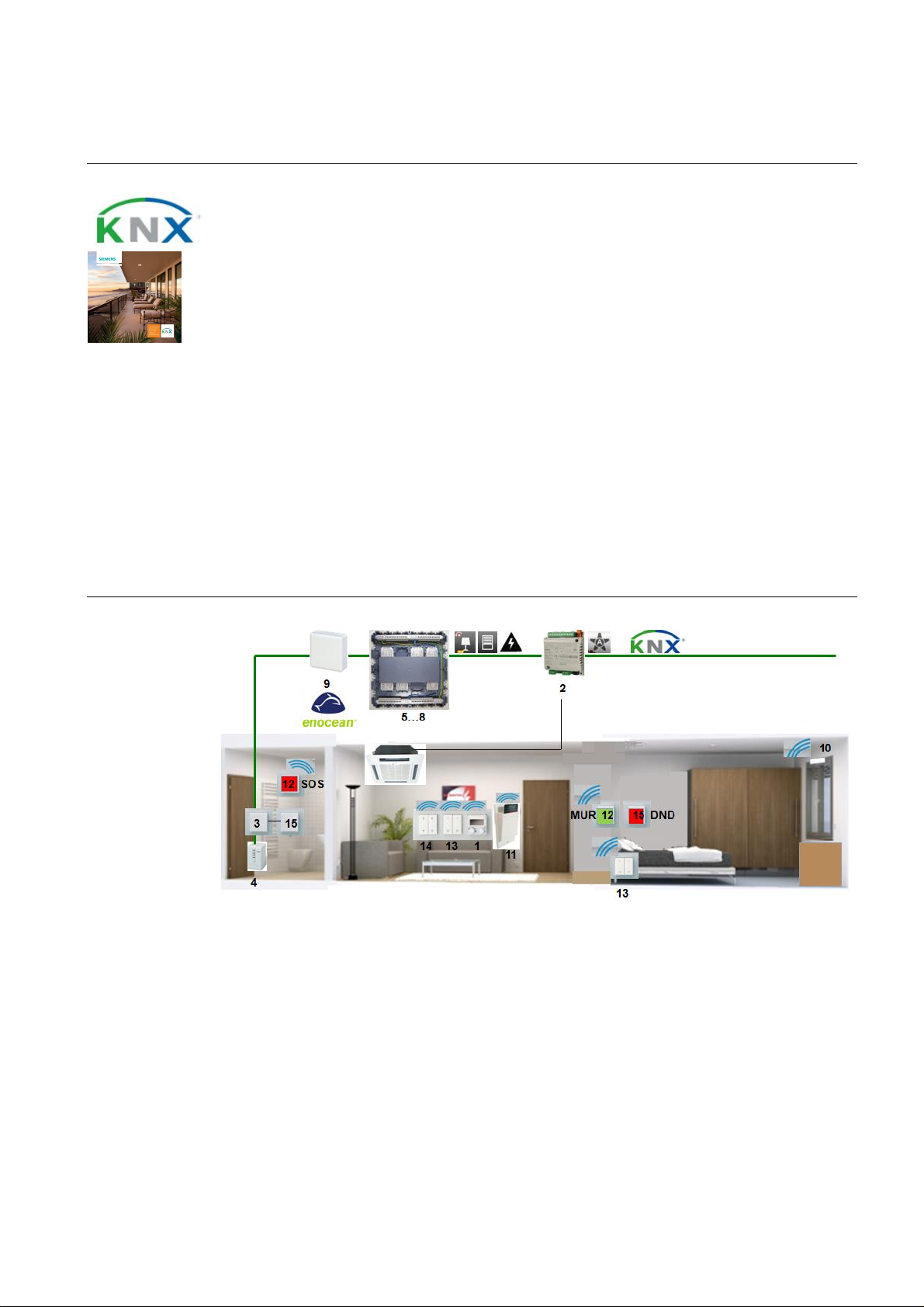
Room setup
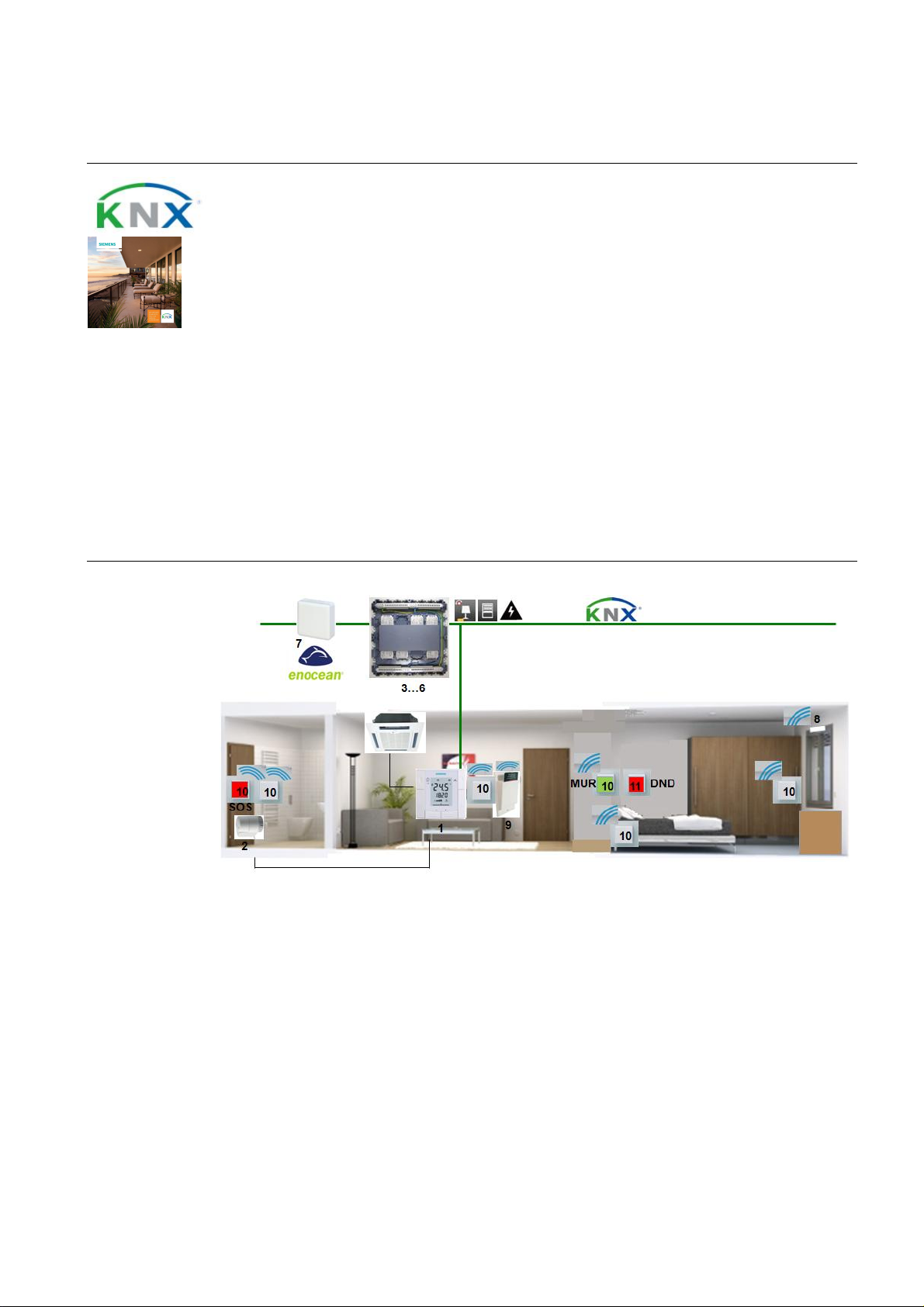
1. Room thermostat RDF600KN: T he RDF600KN acquir es the room temperatur e and controls the fan coil
unit and the radiator in th e bathroom accordi ngly. Th e room operating mode can be selected and the
temper ature setpoints can be adjusted on the room thermost at.
2. STA23 electrothermal actuator: The ST A23 adjus ts t he valve accordin g to the positioning signal it
receives from the controller.
3. AP 641 room control box: The AP 641 features 8 sockets for room automation modules type RS or RL.
4. RS 525/23 universal dimmer: Th e RS 525/23 features a relay contact to dim a lighting group up t o 250
VA.
5. RL 521/23 blind actuator: The RL 521/23 features 2 relay contacts to control blinds .
6. RS 510/23 binary output, 2-fold: The RS 510/23 features 2 relay contacts to switch electric circuits.
7. RXZ97.1 gateway EnOcean/KNX: The R XZ97.1 converts EnOcean wireless signals from the wall transmitter to KNX telegrams.
11
Page 12

Application Manual
Nr. 01
Synco™
ct c auses the room operating mode to
,
Hotel rooms – room automation
8. EnOcean window contact (3rd party product): The window conta
switch to Economy when the window is open.
9. EnOcean hotel car d switch ( 3r d party pr oduct): When the card is inserted, the hotel card switch
causes t he room operating mode to change from Precomfort to Comfort. When the card is removed, the
room operating mod e returns to Precomfort. Electric circuits and lighti ng groups ar e switched of f.
10. AP 221 wall transmitter EnOcean, 1-fold, neutral: The AP 221 is used to control the lighting, t he blinds
the MUR (Make up room) and the alarm function (SOS).
11. DELTA pushb utto n, 1-fol d: The DELT A pushbutton activates signal lamp DND (Do not dis turb) outside
and inside the room.
Device list Key Product no. and description Stock number
1 RDF600KN room thermostat S55770-T293
2 ST A23 el ec trotherm al act u at or S55174-A101
3 AP641 room control box 5WG1 641-3AB01
4 RS 525/23 universal dimmer, 1 x 250 W 5WG1 525-2AB23
5 RL 521/23 blind actuator, 1 x 6 A 5WG1 521-4AB23
6 RS 5 10/23 bin ary output, 2 x 10 A 5WG1 510-2AB23
7 RXZ97.1 gateway EnOcean/KNX S55842-Z101
8 EnOcean win dow cont act 3rd party product
9 EnOcean hotel card switch 3rd party product
10 AP 221 wall transmitt er EnOcean, 1-fold, neutral 5WG4 221-3AB10
11 Rocker, n eutr al 5TG6 201
Insert, universal switch 5TA2 156
& Gamma
Optional Key Product no. and description Stock number
12 RMB795B central control unit S55370-C162…C167
13 OZW 772. x web server OZW 772. x
14 N125/12 power supply 5WG1 125-1AB12
15 AP257/32 weather stati on 5WG1 257-3AB32
16 N151 IP viewer 5 WG1 151-1AB01
17 UP588 color touc h panel 5WG1 588-2AB13
Variants Key Product no. and description Stock number
1a RDF301.50 room thermostat S55770-T105
1b RDG160KN room thermostat (DC fan outp ut) S55770-T297
1c RDG100 KN S55770-T163
3a AP 118 automati on modul e b ox 5WG1 118-4AB01
4a UP 525/13 universal dimmer, 1 x 250 W 5WG1 525-2AB13
5a UP 520/13 bli nd actuator, 1 x 6 A 5WG1 520-2AB13
6a UP 510/13 bin ary output, 2 x 10 A 5WG1 510-2AB13
12
Page 13
Application Manual
Nr. 01
Synco™
3191S03
king system. O pen windows are alwa ys automatically detected
t booked (or, if desired, wh en the gues t is absent), a weath er s tation ou tside the b uilding pr otects
Hotel rooms – room automation
HVAC control
B2
T
Y1
M1
T
(B1)
YR
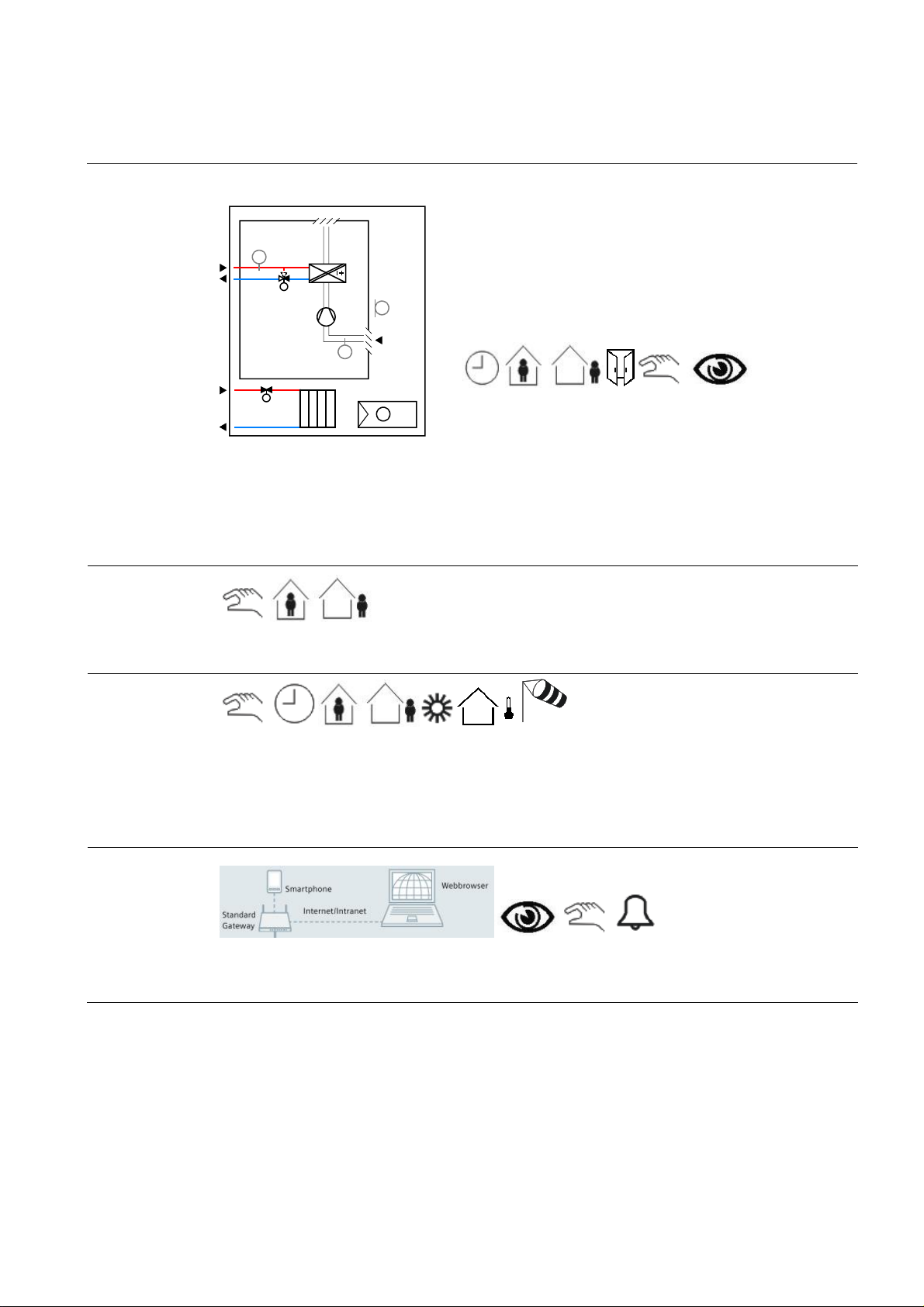
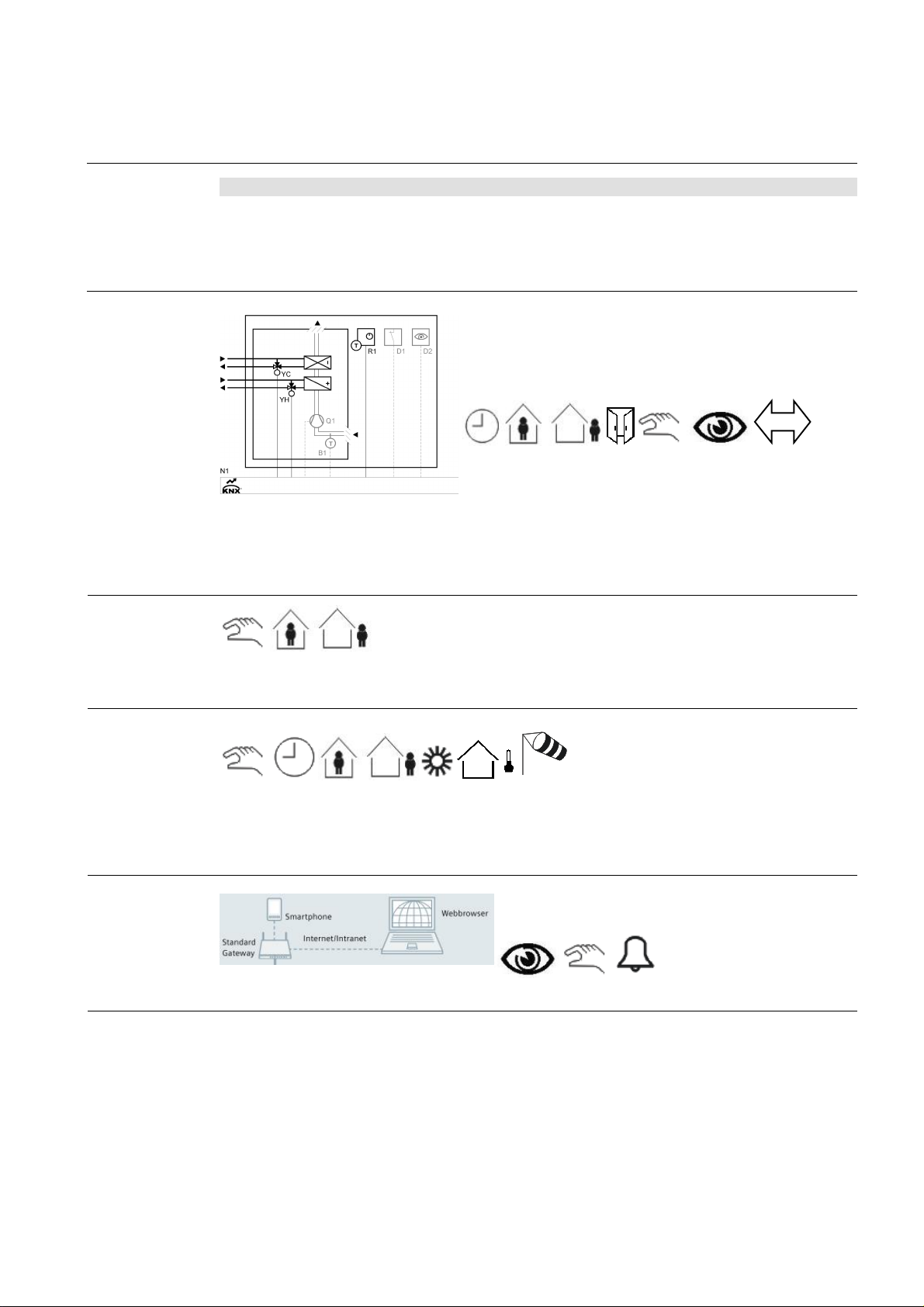
The temperature in every room is acquired and controlled. E very room sends its h eat/cooli ng energy request t o the
heating /refrigeration plant. These plants are contr olled depending on t he outside temperature and the heat/cooling
energy requests received from the rooms. Duri ng nonoccupancy times (rooms not book ed), the room temperatures
are aut omaticall y lowered via the int egrated h otel boo
and the temperatures of such rooms are lowered/raised to save heating/coolin g energy. The room temperatures are
also slightly lowered/raised during the day, if the guest is n ot present.
Lighting control
(B1)
& Gamma
2-pipe fan coil unit with radiat or
· Heating or cool ing
· On/off , PW M or 3-position c ontr ol of heati ng/cooling and rad iat or
actuators
· Autom at ic or manual fan contr ol, 1- or 3-speed
T
N1
T
· Automat ic or manual changeov er of heating/c ool ing mod e
· Multifunc tion al inputs f or keycard c ontact, ext ernal sens or, etc.
TAAC01 DG1 HQ
Blinds control
Remote control
Presence detectors (hot el card switc hes) help save energ y by automatically s wi tching lighting off wh en the room is
not occupied.
When a room is no
up to 4 façades from extreme sunli ght in the summer. This func tion helps to keep the rooms cool. The weather
station also protec ts the blinds from dam age caused b y s trong win ds or other natural influences. On sunny wi nter
days, the weather station raises the blinds to let solar radiation make a natural heat contribution.
When the guest is present, t he blinds can be controlled via the pushbuttons and automatic operation is off.
Integration of a w ebserver facilitates remote control an d monitoring on a PC or smartphone via webbr owser.
13
Page 14

Application Manual
Nr. 01
Synco™
Hotel rooms – room automation
Function
description
Description of functions
Individual room temperature control
The room thermostat (RDF) acquires the t emperature,
controls it via the fan coil unit and calculates the
demand for heat or cooling energy. The resulting
signal is forwarded to the primary controller via the
KNX bus.
Time program and hotel booking syst em
Time pr ograms f or up to 10 room s or room groups
can be defined in the central c ontrol unit (RMB). A
time program sets the periods of time the r oom is not
used. During these time p eriods, the operating mode
is set to Protection, resulting in a lower temperature
setpoint. After that, the setpoint is raised to the Economy level.
Room aut omation can also communicate with th e
hotel’s booking system. When the guest checks in,
the room temperature is prematuraly raised to the
Comfort l evel. During the periods of time the hotel is
closed or in non-booked rooms, valu able heating
energy is automatically saved by chan ging the operating mode to Economy.
Window contact
If one or several windows of a room are op ened, the
operating mode changes automatically to Economy.
This means that heating or cooling en er gy is saved
since the system does not try to compensate for
energy losses.
Presence-dependent heating control
When the presence detector (hotel c ard switch) signals room occupancy, the room t emperature is raised
to the Comfort level. Then, it is lowered again to the
Econom y l evel .
Presence-dependent lighting control
When the room is no longer occu pied, lighting is
automatically switched off.
& Gamma
Blinds control
The weather stat ion (AP257/32) with its built-in GPS
receiver measur es solar radiation and controls shading to protect the façade against sunlight. Up to 4
façad es can be selected f or automatic and individual
control.
In cold winter nights, the blinds are l ow ered to improve
the buil ding’s thermal ins ulation. On sunny winter
days, the blinds ar e raised, allowing s unlight to enter
the room so that en ergy is gai ned.
When the r oom is occupied, automatic operation is
deacti vated. The blinds can then be operat ed via the
pushbuttons.
Protecti on of bli nds
The weather station acquires continuousl y the wind
speed. If strong winds occur, the blinds are rais ed t o a
secure p osi ti on.
Remote control a nd monitoring
Using a webbrowser, all rooms can be controlled and
monitored via webserver (OZW). The following parameters can be monitored:
· Current state of windows and doors
· Current room temperatures
· Current room temperature setpoints
· Current operating modes
If required, the following parameters can be changed:
· The room operating modes, individually or
in groups
· The room temperature setpoints, individually or in groups
· The time program for every room or for
groups of rooms
Display of energy efficiency
The OZW772 webserver is able to display the HVAC
system’s energy efficiency, which reminds the user if –
from th e point of view of energy eff iciency – s ettings
beyond the permitted limits were made. If nonefficient
operating states oc cur, the user is notified via e-mail
or smartphone app. The limit values can be set by the
user.
14
Page 15

Application Manual
Nr. 01
Synco™
with webbr ow ser
Hotel rooms – room automation
Secondary
documents
The Appl ication S heets listed below describ e individual controller app lications and contain detailed infor mation.
They can be downloaded from the Internet at www.siemens.com/hit
Applic ati on no. Name of appl ication Prod uct no.
Synco Application Sheet,
Individual Rooms
TAAC01 DG1 HQ
Synco Application Sheet,
Central ly Managed Rooms
QCA001 MB7 HQ
Synco Application Sheet,
Central O perating and Monitoring
OWAL03 772 HQ
Gamm Application Sheet, Lighting
L00001 N 5 HQ
Gamma Application Sheet,
Shading
B00002 AP2 HQ
& Gamma
2-pipe fan coil unit with radiator RDG100KN
Central control of room temperature control
equipment
Local pl ant operati on and monitoring via local netw ork
Central and manual switching of lighti ng N 512/11
Shading of façad es AP 257/32
RMB795B
OZW 772
15
Page 16
Application Manual
Nr. 02
Synco™
Fan coil unit with radiator in the bathroom
,
sun protection
, pr
esence
-
RS or
Hotel rooms – room automation
dependent switching off of lighting and power supply
Features
· Individual room temperature control, heating and cooling
· 2 control loops for room and bathroom
· Automati c or manual fan cont rol, 1- or 3-speed
· Automatic or manual changeover of heating/cooling mode
· Window contact – central detection of open windows
· Detection of presence via hotel card switch
· Pr esence- and time-dependent control of HVAC, lighting, sun protect ion, and power
supply to the room
· Dimming and switching of lighting
· Operation of HVAC
· Simple and fl exible installation thanks to wireless technology
· Pushbutt ons f or "SOS", "Make up room ", and "Do not disturb"
· Dem and-compensated production of heat and cooli ng energy thanks to automatic data
exchange with prim ary plant
& Gamma
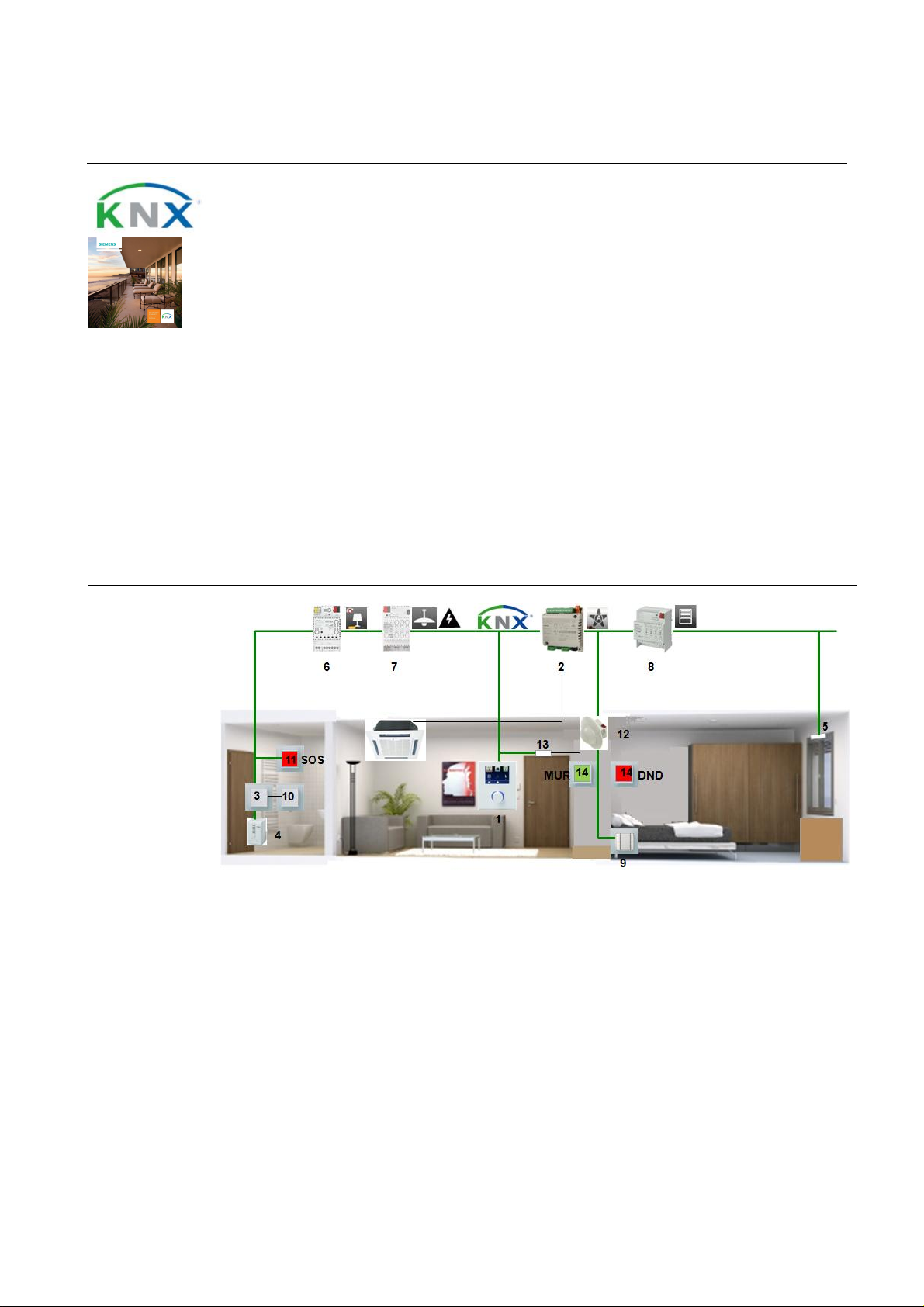
Room setup
1. QAX98.4 solar roo m unit: The QAX98.4 acquires the room temperature. The 2 knobs ar e used to
adjust the room temp erature setpoint an d to select the operating mode (present/ absent).
2. RXB21.1 room controller: The RXB21.1 controls th e room temperature via the fan coil unit. It
receives the setpoint information from the room unit.
3. AQR2532 room sensor with AQ R 2570 basic module: The AQR acquires and controls the room
temperature in the bathroom via the radiator.
4. AP 562/02 valve actuator: The AP 5 62/02 dri ves the radiator valve in the bathroom. It receives the
positioning signal from the AQR controller.
5. AP 641 room control box: T he AP 641 features 8 sockets for room automation modules type
RL.
6. RS 525/23 universal dimmer: The RS 525/23 features a relay contact to dim a lighting group up to
16
Page 17

Application Manual
Nr. 02
Synco™
used to control
Hotel rooms – room automation
250 VA.
7. RL 521/23 blind actuator: The RL 521/23 features 2 relay contacts to control blinds.
8. RS 510/23 binary output, 2-fold: The RS 510/23 features 2relay co ntacts to switch electric circuits.
9. RXZ97.1 gateway EnOcean/KNX: The RXZ97.1 con verts EnOcean wireless sign als from the wall
transmitter to KNX telegrams.
10. EnOcean window contact (3rd party product): The window contact causes the room operating
mode to switch t o Econom y when the window is open.
11. EnOcean hotel c ar d switch (3rd party product): When the card is inserted, the hotel card switch
causes t he room operating mode to change from Precomfort to Comfort. When the card is removed,
the room operating mode returns to Precomfort. Electric circuits and lighting groups are switched off.
12. AP 221 wall transmitter EnOcean, 1-fold, neutral: The AP 221 is used to c ontrol the lig hting, the
blinds, the MUR (Make up room ) and the al arm function (SOS).
13. AP 222 wall transmitter EnOcean, 2-fold, with "I/0" symbol: The AP 222 is used to control the
lighting.
14. AP 222 wall transmitter EnOcean, 2-fold, with "Up/Down" symbol: TheAP 222 is
the bl inds.
15. DELTA pushb utto n: The DELTA pushbutton activates signal lamp D N D (Do not disturb) outside
and insid e the room. In the bathroom, it switches the lighting.
& Gamma
Device list Key Product no. and description Stock number
1 QAX98.4 s olar room unit S55623-H107
2 RXB21.1 room controller BPZ:RXB211-FC-10
3 AQR2570 room sensor, basic module S55720-S203…206
AQR2532 room sensor, t emperature S55720-S136
4 AP 562/02 valv e ac tuator 5WG1 562-7AB02
5 AP 6 41 room control box 5WG1 641-3AB01
6 RS 525/23 universal dimmer, 1 x 250 W 5WG1 525-2AB23
7 RL 521/23 blind actuator, 1 x 6 A 5WG1 521-4AB23
8 RS 5 10/23 bin ary output, 2 x 10 A 5WG1 510-2AB23
9 RXZ97.1 gateway EnOcean/KNX S55842-Z101
10 EnOc ean window contact 3rd party product
11 EnOcean hotel card switch 3rd party product
12 AP 221 wall transmitt er EnOcean, 1-fold, neutral 5WG4 221-3AB10
13 AP 222 wall transm itter EnOcean, 2-fold, with "I/0" symbol 5WG4 222-3AB11
Optional
14 AP 222 wall transm itter EnOcean, 2-fold, with "U p/Down"
symbol
15 Rocker, n eutr al 5TG6 201
Insert, universal switch 5TA2 156
Key Product no. and description Stock number
16 RMB795B central control unit S55370-C162…C167
17 OZW 772. x web server OZW772. x
18 N 125/12 power supply 5WG1 125-1AB12
19 AP 257/32 weather stati on 5WG1 257-3AB32
20 N 151 IP viewer 5WG1 151-1AB01
21 UP 588 color touch panel 5WG1 588-2AB13
5WG4 222-3AB12
17
Page 18
Application Manual
Nr. 02
Synco™
are aut om atically lowered vi a t he integr ated hotel b ook ing system. Op en wi ndows ar e al w ays autom atically detected
and the temperatures of such rooms are lowered/raised to save heating/coolin g energy. The room temperatures are
outside the building protects
Hotel rooms – room automation
Variants
Room HVAC control 4-pipe fan coil unit
Key Product no. and description Stock number
5a AP 118 automati on modul e b ox 5WG1 118-4AB01
6a UP 525/13 universal dimmer, 1 x 250 W 5WG1 525-2AB13
7a UP 520/13 bli nd actuator, 1 x 6 A 5WG1 520-2AB13
8a UP 510/13 bin ary output , 2 x 10 A 5WG1 510-2AB13
· Heating and cooling with hot or chilled water
· Modulating control of heating and cooling valve
· Automatic or manual fan control
XFNC04 B21 HQ
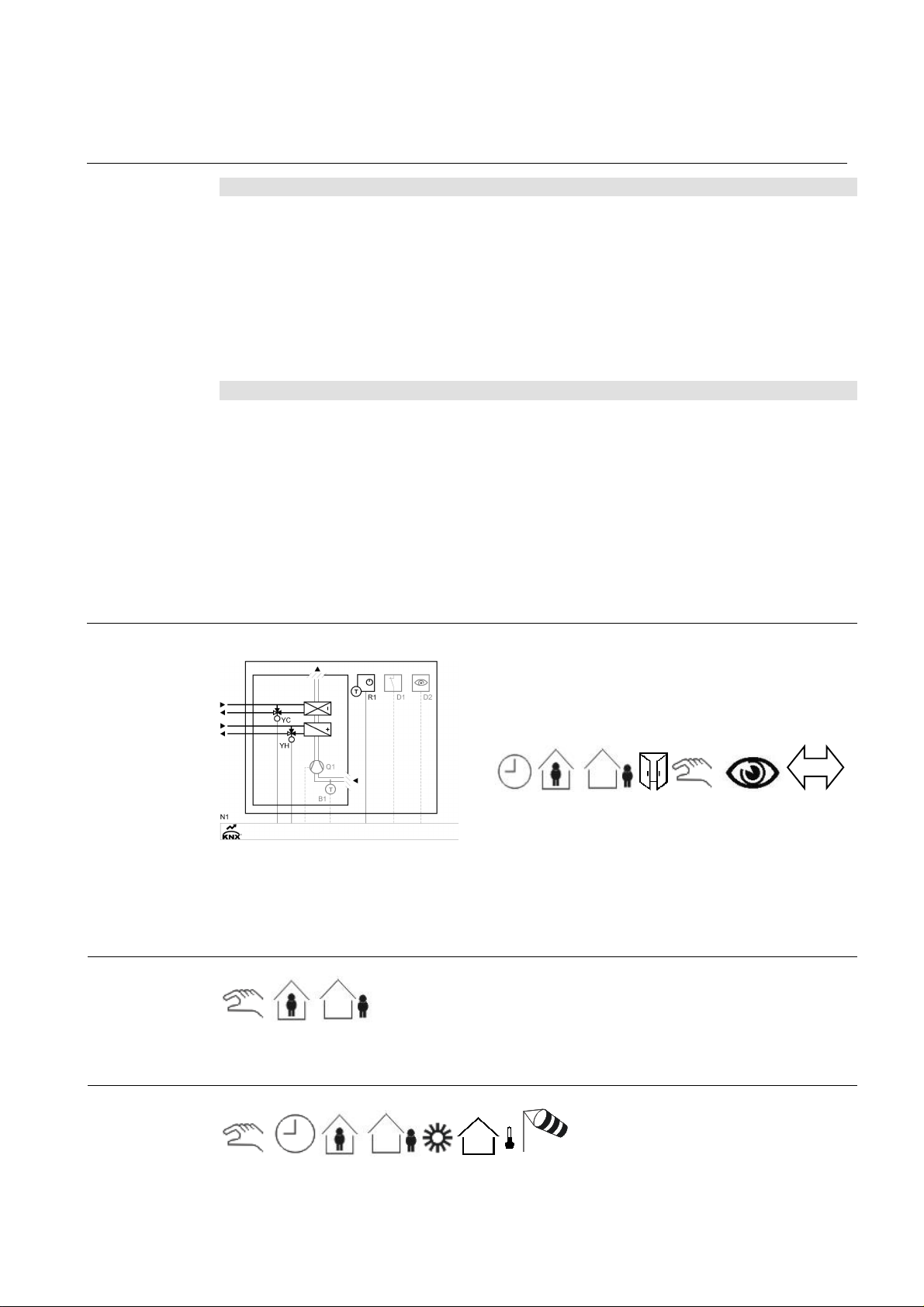
The temperature in every room is acquired and controlled. E very room sends its h eat/cooli ng energy request t o the
heating /refrigeration plant. These plants are contr olled depending on t he outside temperature and the heat/cooling
energy requests received from the rooms. Duri ng nonoccupancy times (rooms not book ed), the room temperatures
also lowered/rais ed during the day, if the gu est is not present.
& Gamma
Lighting control
Blinds control
Remote control
Presence detectors (hot el card switches) help save energy by aut omaticall y switching the lighting and individu al
electric circuits off when guests are not present.
When a room is not booked (or, if desired , wh en the guest is absent), a weather station
up to 4 façades from extreme sunli ght in the summer. This func tion helps to keep the rooms cool. The weather
station also protec ts the blinds from dam age caused b y s trong win ds or other natural influences. On sunny wi nter
days, the weather station raises the blinds to let solar radiation make a natural heat contribution.
When the guest is present, t he blinds can be controlled via the pushbuttons and automatic operation is off.
Integration of a w ebserver facilitates remote control an d monitoring on a PC or smartphone via webbr owser.
18
Page 19

Application Manual
Nr. 02
Synco™
Hotel rooms – room automation
Function
description
Description of functions
Individual room temperature control
The room unit (QAX) acquires the temperature and
makes it available t o the room controller (RXB) which
controls the fan coil unit and calculates the demand
for heat/refrigeration. The result of the calculation is
sent to the p rimary controller vi a th e KNX bus.
In the bathroom, the AQR acquires and controls the
temperature and feeds the positioning signal to the
radiator’s valve actuator.
Time program and hotel booking syst em
Time pr ograms f or up to 10 room s or room groups
can be defined in the central c ontrol unit (RMB). A
time program sets the periods of time the r oom is not
used. During these time p eriods, the operating mode
is set to Protection, resulting in a lower temperature
setpoint. After that, the setpoint is raised to the Economy level.
Room aut omation can also communicate with th e
hotel’s booking system. When the guest checks in,
the room temperature is prematuraly raised to the
Comfort l evel. During the periods of time the hotel is
closed or in non-booked rooms, valu able heating
energy is automatically saved by chan ging the operating mode to Economy.
Window contact
If one or several windows of a room are op ened, the
operating mode changes automatically to Protection.
This means that heating or cooling en er gy is saved
since the system does not try to compensate for
energy losses.
Presence-dependent heating control
When the hotel card switc h signals room occupancy,
the room temperature is raised to the Comfort level.
Then, it is lowered again to the Pr ecomfort level.
Presence-dependent lighting control
When the room is no l onger occupied, the lightin g and
individual electr ic circuits are aut omatically switched
off.
& Gamma
Blinds control
The weather stat ion (AP257/32) with its built-in GPS
receiver measur es solar radiation and controls shading to protect the façade against sunlight. Up to 4
façad es can be selected f or automatic and individual
control.
In cold winter nights, the blinds are l ow ered to improve
the buil ding’s thermal ins ulation. On sunny winter
days, the blinds ar e raised, allowing s unlight to enter
the room so that en ergy is gai ned.
When the r oom is occupied, automatic operation is
deactivated. The blinds can then be controlled via the
pushbuttons.
Protecti on of bli nds
The weather station acquires continuousl y the wind
speed. If strong winds occur, the blinds are rais ed t o a
secure p osi ti on.
Remote control a nd monitoring
Using a webbrowser, all rooms can be controlled and
monitored via webserver (OZW). The following parameters can be monitored:
· Current state of windows and doors
· Current room temperatures
· Current room temperature setpoints
· Current operating modes
If required, the following parameters can be changed:
· The room operating modes, individually or
in groups
· The room temperature setpoints, individually or in groups
· The time program for every room or for
groups of rooms
Display of energy efficiency
The OZW772 webserver is able to display the HVAC
system’s energy efficiency, which reminds the user if –
from th e point of view of energy eff iciency – s ettings
beyond the permitted limits were made. If nonefficient
operating states oc cur, the user is notified via e-mail
or smartphone app. The limit values can be set by the
user.
19
Page 20

Application Manual
Nr. 02
Synco™
with webbr ow ser
Hotel rooms – room automation
Secondary
documents
The Appl ication S heets listed below describ e individual controller app lications and contain detailed infor mation.
They can be downloaded from the Internet at www.siemens.com/hit
Applic ati on no. Name of appl ication Prod uct no.
Synco Application Sheet,
Individual Rooms
XFNC04 B21 HQ
Synco Application Sheet,
Central ly Managed Rooms
QCA001 MB7 HQ
Synco Application Sheet,
Central O perating and Monitoring
OWAL03 772 HQ
Gamma Application Sheet,
Lighting
L00001 N 5 HQ
Gamma Application Sheet,
Shading
B00002 AP2 HQ
& Gamma
4-pipe fan coil unit RXB21.1
Central control of room temperature control
equipment
Local pl ant operati on and monitoring via local netw ork
Central and manual switching of lighti ng N 512/11
Shading of façad es AP 257/32
RMB795B
OZW 772
20
Page 21
Application Manual
Nr. 03
Synco™
via
Hotel rooms – room automation
Fan coil unit with radiator in the bathroom, sun protection, presencedependent switching off of lighting and power supply
Features
· Individual room temperature control, heating and cooling
· Two control loops for the room and the bathroom
· Automati c or manual fan cont rol, 1- or 3-speed
· Automatic or manual changeover of heating/cooling mode
· Window contact – central detection of open windows
· Detect ion of presence v ia presence detector and door cont act
· Pr esence- and time-dependent control of HVAC, lighting, sun protect ion, and power
supply to the room
· Dimming and switching of lighting
· Central operation and display of HVAC, li ghting, and sun protection
· Pushbutt ons f or "SOS", "Make up room ", and "Do not disturb"
· Dem and-compensated production of heat and cooli ng energy thanks to automatic data
exchange with prim ary plant
& Gamma
Room setup
1. UP 204 Contouch room controller: The UP 20 4 acquir es the room temperature and sends
temperature, setpoint shift, operating mode and fan speed commands to the RXB room controller
the KNX bus. The Contouch room controller can also be used to control th e lighting and the blin ds.
2. RXB21.1 room controller: The RXB21.1 controls the room temperature via the fan coil unit. If
required, the room thermostat sends a heat/coolin g energy request to the primar y controller.
3. AQR2532 room sensor with AQ R 2570 basic module: Der AQR acquires an d controls the room
temperature in the bathroom via the radiator.
4. AP 562/02 valve actuator: The AP 562/02 drives the radiator valve in the bathroom. It receives the
positioning signal from the AQR controller.
5. S 290 door/win dow contact: The window contact causes the room operating mode to change to
Protection when th e wind ow is op en.
6. N 528/31 universal dimmer, main module: The N528/31 featur es a channel to control a lighting
group up to 300 VA.
21
Page 22

Application Manual
Nr. 03
Synco™
e relay contacts to
is sent to the KNX bus via pushbutton
Hotel rooms – room automation
7. N 512/11 switching actuator, main modu le: The N 512/ 11 features 3 potentialfr e
control lighting groups and el ectric circuits.
8. N 523/02 blind ac tuator: The N 523/02 features 4 channels to control up to 4 blind motors.
9. UP 222/2 pushbutton, 2-fold, neutral: The UP 222/2 is used to control the lighting and /or the shad-
ing.
10. DELTA pushb utto n: T he pushbutton is connected to the KNX i nterface of the AQR and is used to
control the lighting .
11. DELTA pushbutton with "Bell" symbol (SOS): The pushbutton is used to trigg er the alarm func-
tion.
12. UP 258D11 presence detector with bright ness sensor: The UP 258D11 in connection with the
S 290 door contact detects wh ether a gues t is presen t or absent. When present, the presence
detector causes the room operating mode to change from Precomfort to Comfort and electric circuits
are switched on. When absent , the room operating mode returns to Precomfort. Electric circuits and
lighting groups are switch ed off.
13. S 290 door/ window contact: The door contact in connection with the UP 258D11 causes the room
operatin g mode to change to C omfort/Pr ecomfort when the gues t is present/absent.
14. DELTA pushbutton, 2-fold, with labeling field (MUR, DND): One of the pushbuttons can be used
to activat e s ignal lam p DN D (Do not disturb) outside and ins ide the room. The other pushbut ton is
used to activate the MUR function (Make up room). This signal
interface UP 220.
& Gamma
Device list Key Product no. and description Stock number
1 UP 204 Contouch room controller 5WG1 204-2AB11
2 RXB21.1 room controller BPZ:RXB211-FC-10
3 AQR2570 room sensor, basic module S55720-S203…206
AQR2532 room sensor, t emperature S55720-S136
4 AP 562/02 valv e ac tuator 5WG1 562-7AB02
5 S 290 door/window contact 5WG1 290-7AB11
UP 220/21 I/O pushbutton interface, 2 inputs/out puts 5WG1 220-2AB21
6 N 528/31 uni versal dimmer, main module, 1 x 300 W 5WG1 528-1AB31
7 N 512/11 switc hing actuator, m ain module, 3 x 1 6 A 5WG1 512-1AB11
8 N 523/02 blind actuator, 4 x 6 A 5WG1 523-1AB02
9 UP 222/2 pushbutton, 2-fold, neutral 5WG1 222-2DB12
UP 117/12 bus coupling unit (BTM) 5WG1 117-2AB12
10 Rocker, n eutr al 5TG6 201
Insert, universal switch 5TA2 156
11 Rocker, with "Bell" symbol (SOS) 5TG6 207
UP 116/21 DELTA bus coupling unit, 1-fold 5WG1 116-2AB01
12 UP 258D11 presence detector with brightness sensor 5WG1 258-2DB11
13 S 290 door/window contact 5WG1 290-7AB11
14 Rocker, double, with lab eling field (MUR, DND ) 5TG6 212
Insert, pushbutton, 2-fold, 2 NO contacts 5TD2 111
UP 220/21 I/O pushbutton interface, 2 inputs/out puts 5WG1 220-2AB21
22
Page 23
Application Manual
Nr. 03
Synco™
2
are aut om atically lowered vi a t he integr ated hotel b ook ing system. Op en wi ndows ar e al w ays autom atically detected
of such rooms are lowered/raised to save heating/cooling energy. The room temperatures are
lighting off when the room
Hotel rooms – room automation
Optional
Variants Key Product no. and description Stock number
Key Product no. and description Stock number
15 RMB795B central control unit S55370-C162…C167
16 OZW 772. x web server OZW 772. x
17 N 125/12 power supply 5WG1 125-1AB12
18 AP 257/32 weather stati on 5WG1 257-3AB32
19 N 151 IP viewer 5WG1 151-1AB01
20 UP 588 color touch panel 5WG1 588-2AB13
21 N 528/41 universal dimm er, extension, 1 x 300 W 5WG1 528-1AB41
22 N 512/21 switching actuator, extens ion, 3 x 16 A 5WG1 512-1AB21
1a QMX3.P37 room operator u nit, display and operation,
temperature
3a QMX3.P70 room operator unit, temperature, humidity, CO
6a UP 525/13 universal dimmer, 1 x 250 W 5WG1 525-2AB13
UP 221/2 pushbutton, 1-fold, neutral 5WG1 221-2DB12
7a UP 510/13 bin ary output, 2 x 10 A 5WG1 510-2AB13
UP 222/2 pushbutton, 2-fold, neutral 5WG1 222-2DB12
8a UP 520/13 bli nd actuator, 1 x 6 A 5WG1 520-2AB13
UP 221/2 pushbutton, 1-fold, neutral 5WG1 221-2DB12
12a/13a DELTA hotel card switch with insert 5TG4 820
UP 220/21 I/O pushbutton interface, 2 inputs/out puts 5WG1 220-2AB21
& Gamma
S55624-H108
S55624-H104
Room HVAC control
Lighting control
Blinds control
4-pipe fan coil unit
· Heating and cooling with hot and chilled water
· Modulating control of heating and cooling valve
· Automatic or manual fan control
XFNC04 B21 HQ
The temperature in every room is acquired and controlled. E very room sends its h eat/cooli ng energy request t o the
heating /refrigeration plant. These plants are contr olled depending on t he outside temperature and the heat/cooling
energy requests received from the rooms. Duri ng nonoccupancy times (rooms not book ed), the room temperatures
and the temperat ures
also lowered/rais ed during the day, if the gu est is not present.
Presence detectors (hot el card switc hes) help save energ y by automatically s wi tching the
is not occupied.
23
Page 24
Application Manual
Nr. 03
Synco™
When a room is not b ooked (or, if desired , when the guest is absent), a weather st ation outs ide the bui lding prot ects
winter days, the b linds are
Hotel rooms – room automation
up to 4 façades from extreme sunli ght in the summer. This func tion helps to keep the rooms cool. The weather
station also protec ts the blinds from dam age caused b y s trong win ds or other natural influences. On sunny wi nter
days, the weather station raises the blinds to let solar radiation make a natural heat contribution.
When the guest is present, t he blinds can be controlled via the pushbuttons and automatic operation is off.
Remote control
Integration of a w ebserver facilitates remote control an d monitoring on a PC or smartphone via webbr owser.
Function
description
Description of functions
Individual room temperature control
The room operator unit (UP 204) ac quires the temperature and makes it available to the room controller
(RXB) which controls the fan coil unit and calculates
the demand for heat/refri geration. The result of the
calculati on is sent t o the primary controller via the
KNX bus.
Time program and hotel booking syst em
Time pr ograms f or up to 10 room s or room groups
can be defined in the central c ontrol unit (RMB). A
time program sets the periods of time the r oom is not
used. During these time p eriods, the operating mode
is set to Protection, resulting in a lower temperature
setpoint. After that, the setpoint is raised to the Economy level.
Room aut omation can also communicate with th e
hotel’s booking system. When the guest checks in,
the room temperature is prematuraly raised to the
Comfort l evel. During the periods of time the hotel is
closed or in non-booked rooms, valu able heating
energy is automatically saved by chan ging the operating mode to Economy.
Presence-dependent heating control
When th e p resenc e detector signals room occupancy,
the room temperature is raised or lowered to the
Comfort level. When the guest leaves the room by
openin g t he door, the door contact as the last device
sends a signal, causing t he room temperature to be
lowered or raised to the Precomfort level.
Presence-dependent lighting control
When the room is no longer occupied, the lighting is
automatically switched off.
& Gamma
Blinds control
The weather stat ion (AP257/32) with its built-in GPS
receiver measur es solar radiation and controls shading to protect the façade against sunlight. Up to 4
façad es can be selected f or automatic and individual
control.
In cold winter nights, the blinds are l ow ered to improve the building’s thermal insulat ion. On sunny
raised, allowing sunlight to
enter the room s o that ener gy is gain ed.
When the r oom is occupied, automatic operation is
deactivated. The blinds can then be controlled via the
pushbuttons.
Protecti on of bli nds
The weather station acquires continuousl y the wind
speed. If strong winds occur, the blinds are rais ed t o a
secure p osi ti on.
Remote control a nd monitoring
Using a webbrowser, all rooms can be controlled and
monitored via webserver (OZW). The following parameters can be monitored:
· Current state of windows and doors
· Current room temperatures
· Current room temperature setpoints
· Current operating modes
If required, the following parameters can be changed:
· The room operating modes, individually or
in groups
· The room temperature setpoints, individually or in groups
· The time program for every room or for
groups of rooms
Display of energy efficiency
The OZW772 webserver is able to display the HVAC
system’s energy efficiency, which reminds the user if
– from the point of view of energy efficiency – settings
beyond the permitted limits were made. If nonefficient
operating states oc cur, the user is notified via e-mail
or smartphone app. The limit values can be set by the
user.
24
Page 25

Application Manual
Nr. 03
Synco™
with webbr ow ser
Hotel rooms – room automation
Secondary
documents
The Appl ication S heets listed below describ e individual controller app lications and contain detailed infor mation.
They can be downloaded from the Internet at www.siemens.com/hit
Applic ati on no. Name of appl ication Prod uct no.
Synco Application Sheet,
Individual Rooms
XFNC04 B21 HQ
Synco Application Sheet,
Central ly Managed Rooms
QCA001 MB7 HQ
Synco Application Sheet,
Central O perating and Monitoring
OWAL03 772 HQ
Gamma Application Sheet,
Lighting
L00002 N 5 HQ
Gamma Application Sheet,
Shading
B00002 AP2 HQ
& Gamma
4-pipe fan coil unit RXB21.1
Central control of room temperature control
equipment
Local pl ant operati on and monitoring via local netw ork
Daylight - and presenc e-depen dent switch ing of light ing UP258D 11
Shading of façad es AP 257/32
RMB795B
OZW 772
25
Page 26
Application Manual
Nr. 04
Synco™
Hotel rooms – room automation
Fan coil unit with radiator in the bathroom, sun protection, presencedependent switching off of lighting and power supply
Features
· Individual room temperature control, heating and cooling
· One control loop for the room and the bathroom
· Automati c or manual fan cont rol, 1- or 3-speed
· Automatic or manual changeover of heating/cooling mode
· Window contact – central detection of open windows
· Detection of presence via hotel card switch
· Pr esence- and time-dependent control of HVAC, lighting, sun protect ion, and power
supply to the room
· Dimming and switching of lighting
· Operation and display of HVAC
· Pushbutt ons f or "SOS", "Make up room ", and "Do not disturb"
· Dem and-compensated production of heat and cooli ng energy thanks to automatic data
exchange with prim ary plant
& Gamma
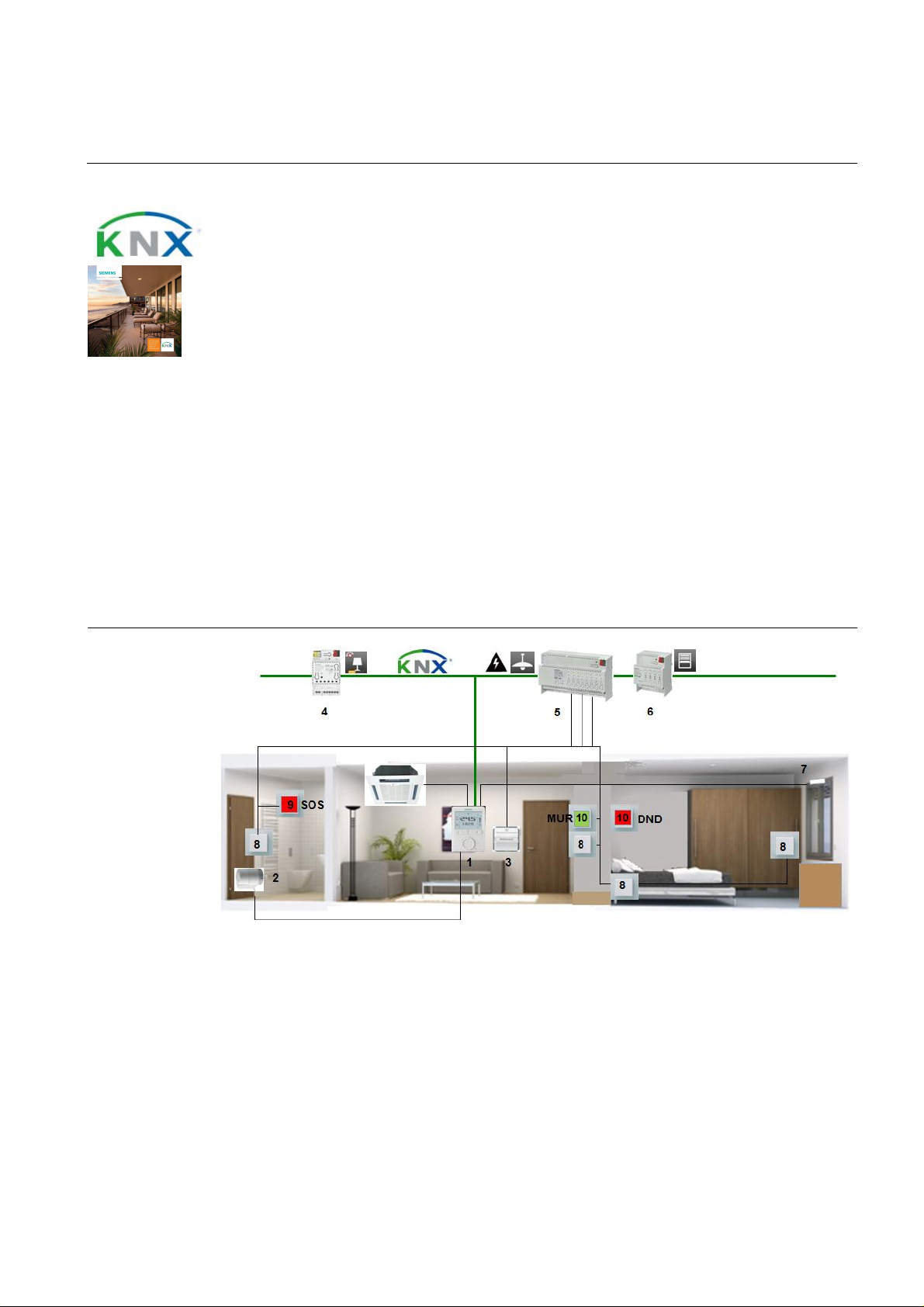
Room setup
1. RDG100KN room thermostat: The RDG100KN acquires the room temperature and controls the fan coil
unit and the radiator in th e bathroom accordi ngly. Th e room operating mode can be selected and the
temper ature setpoints can be adjusted on the room thermost at.
2. STA23 electrotherma l actuator: The STA23 adjusts the valve acc ording to the positioning signal it
receives from the controller.
3. DELTA hotel card switc h: When the card is ins erted, the h otel card switch causes th e room operating
mode to change fr om Economy to Comfort and electric circuits are switched on. When the card is
removed, the room operating mode retur ns to Economy. Elect ric circuits and lig hting groups are switched
off.
4. N 528/31 univ er sal dimmer, main module: The N528 /31 features a chann el to control a lightin g group
up to 300 VA.
26
Page 27

Application Manual
Nr. 04
Synco™
Hotel rooms – room automation
5. N 502/02 combi switc hing actuator: The N 502/02 features 8 inputs and 8 relay contacts. It is used to
switch electric circuits and lighting groups and s erves the pushbutton s as a KNX int erface.
6. N 523/02 blind actuator: The N 523/02 features 4 ch annels to control up to 4 blind motors.
7. S 290 door/window contact: The window contact causes the room operating mode to change to
Econom y w h en t h e wi ndow is op en.
8. DELTA pushbutton: The pushbutton is connected t o the N 502/02 and used to control the lighting, the
blinds, etc.
9. DELTA pushbutton with "Bell" symbol (SOS): The pushb utton is used to trigger the alarm function.
10. DELTA pushbutton, 2-fold, with labeling field (MUR, DND): One of the pushbuttons can be used to ac-
tivate si gnal lamp DND ( Do not disturb) outside and inside the r oom. The oth er pushbutton is used t o activate the MUR funct ion (Make up room).
Device list Key Product no. and description Stock number
1 RDG 100KN room therm ostat S55770-T163
2 ST A23 el ec trotherm al act u at or S55174-A101
3 DELTA hotel card switch with insert 5TG4 820
4 N 528/31 uni versal dimmer, main module, 1 x 300 W 5WG1 528-1AB31
5 N 502/02 combi switching actuator, 8 x 16 A, 8 inputs 5WG1 502-1AB02
6 N 523/02 blind actuator, 4 x 6 A 5WG1 523-1AB02
7 S 290 door/window contact 5WG1 290-7AB11
8 R ocker, neutral 5TG6 201
Insert, universal switch 5TA2 156
9 Rocker, with "Bell" symbol (SOS) 5TG6 207
Insert, universal switch 5TA2 156
10 Rocker, double, with lab eling field (MUR, DND ) 5TG6 212
Insert, pushbutton, 2-fold, 2 NO contacts 5TD2 111
& Gamma
Optional Key Product no. and description Stock number
11 RMB795B central control unit S55370-C162…C167
12 OZW 772. x web server OZW 772. x
13 N 125/12 power supply 5WG1 125-1AB12
14 AP 257/32 weather stati on 5WG1 257-3AB32
15 N 151 IP viewer 5WG1 151-1AB01
16 UP 588 color touch panel 5WG1 588-2AB13
17 N 528/41 universal dimm er, extension, 1 x 300 W 5WG1 528-1AB41
27
Page 28
Application Manual
Nr. 04
Synco™
3191S03
call y d et ect ed
The room temperatures are
hen the room
When a room is not b ooked (or, if desired , when the guest is absent), a weather st ation outs ide the bui lding prot ects
Hotel rooms – room automation
Variants
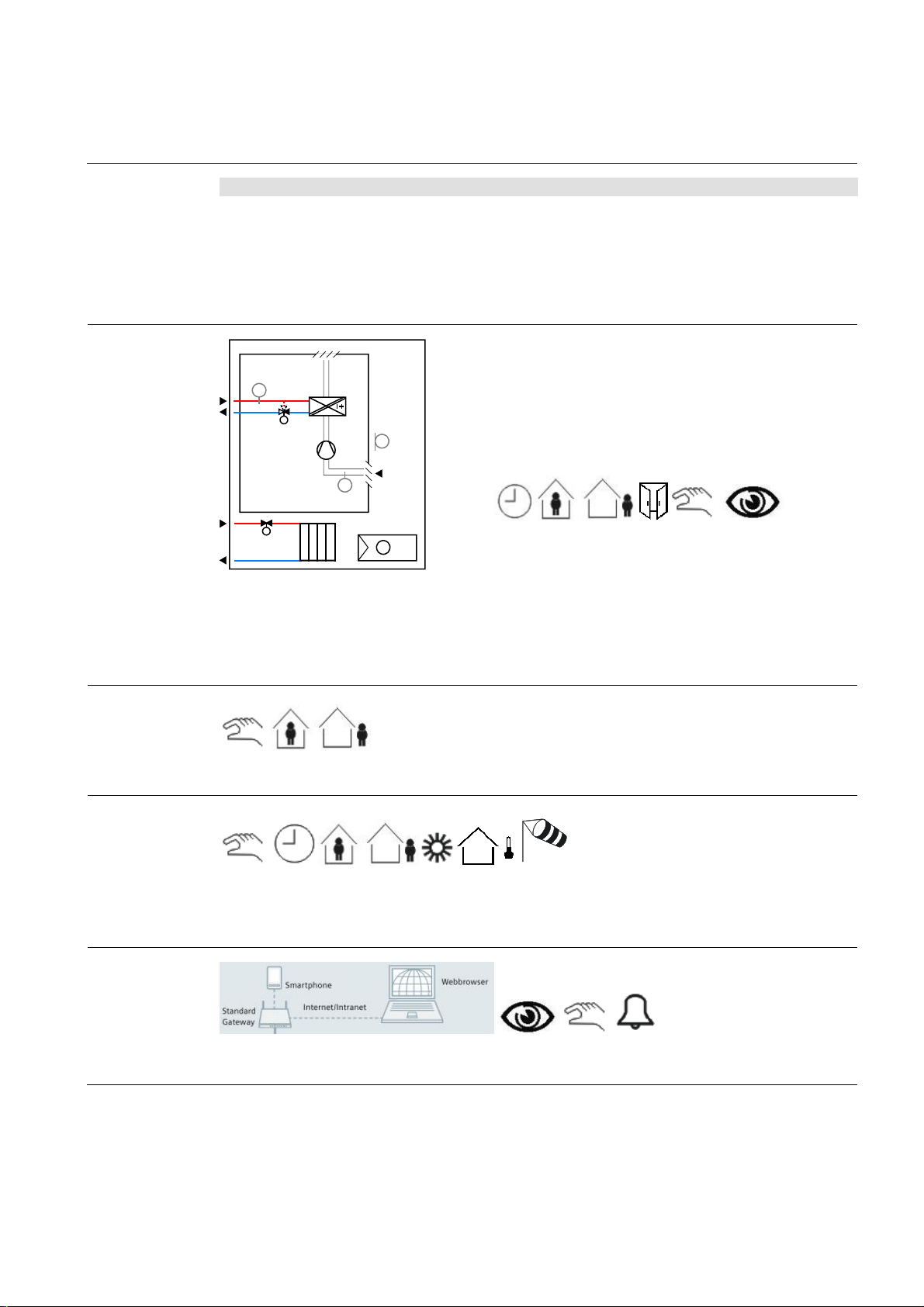
HVAC control
Key Product no. and description Stock number
1a
RDF600KN room thermostat S55770-T293
3a + UP 220/21 I/O pushbutton interface, 2 inp uts/outputs 5WG1 220-2AB21
4a UP 525/13 universal dimmer, 1 x 250 W 5WG1 525-2AB13
5a UP 510/13 bin ary output, 2 x 10 A 5WG1 510-2AB13
6a UP 520/13 bli nd actuator, 1 x 6 A 5WG1 520-2AB13
8a…10a + UP 220/ 31 I /O pushb utton int erface, 4 inputs/outputs 5WG1 220-2AB31
B2
T
Y1
M1
T
(B1)
YR
The temperature in every room is acquired and controlled. E very room sends its h eat/cooli ng energy request t o the
heating /refrigeration plant. These plants are contr olled depending on t he outside temperature and the heat/cooling
energy requests received from the rooms. Duri ng nonoccupancy times (rooms not book ed), the room temperatures
are aut om atically lowered vi a t he integr ated hotel b ooking system. Open windows are always autom ati
and the temperatures of such rooms are lowered/raised to save heating/cooling energy.
also slightly lowered/raised during the day, if the guest is n ot present.
(B1)
& Gamma
2-pipe fan coil unit with radiat or
· Heating or cool ing
· On/off , PWM or 3-position c ontr ol of heating /c ooling and rad ia-
tor actuators
· Automatic or manu al fan contr ol, 1- or 3-speed
T
N1
T
· Automat ic or manual changeov er of heating/c ool ing mod e
· Multifunc tion al inputs f or keycard c ontact, ext ernal sens or, etc.
TAAC01 DG1 HQ
Lighting control
Blinds control
Remote control
Presence detectors (hot el card switches) help save energy by aut omaticall y switching the lighting off w
is not occupied.
up to 4 façades from extreme sunli ght in the summer. This func tion helps to keep the rooms cool. The weather
station also protec ts the blinds from dam age caused b y s trong win ds or other natural influences. On sunny wi nter
days, the weather station raises the blinds to let solar radiation make a natural heat contribution.
When the guest is present, t he blinds can be controlled via the pushbuttons and automatic operation is off.
Integration of a w ebserver facilitates remote control an d monitoring on a PC or smartphone via webbr owser.
28
Page 29

Application Manual
Nr. 04
Synco™
winter days, the b linds are
Hotel rooms – room automation
Function
description
Description of functions
Individual room temperature control
The room thermostat (RDG) acquires the temperature, controls it vi a the fan coil unit and calculates th e
demand for heat or cooling energy. The resulting
signal is forwarded to the primary controller via the
KNX bus.
Time program and hotel booking syst em
Time pr ograms f or up to 10 room s or room groups
can be defined in the central c ontrol unit (RMB). A
time program sets the periods of time the r oom is not
used. During these time p eriods, the operating mode
is set to Protection, resulting in a lower temperature
setpoint. After that, the setpoint is raised to the Economy level.
Room aut omation can also communicate with th e
hotel’s booking system. When the guest checks in,
the room temperature is prematuraly raised to the
Comfort l evel. During the periods of time the hotel is
closed or in non-booked rooms, valu able heating
energy is automatically saved by chan ging the operating mode to Economy.
Presence-dependent heating control
When the presence detector (hotel c ard switch) signals room occupancy, the room t emperature is raised
to the Comfort level. Then, it is lowered again to the
Econom y l evel .
Window contact
If one or several windows of a room are op ened, the
operating mode changes automatically to Economy.
This means that heating or cooling en er gy is saved
since the system does not try to compensate for
energy losses.
Presence-dependent lighting control
When the room is no longer occupied, the lighting is
automatically switched off after a delay time.
& Gamma
Blinds control
The weather stat ion (AP257/32) with its built-in GPS
receiver measur es solar radiation and controls shading to protect the façade against sunlight. Up to 4
façad es can be selected f or automatic and individual
control.
In cold winter nights, the blinds are l ow ered to improve the building’s thermal insulat ion. On sunny
raised, allowing sunlight to
enter the room s o that ener gy is gain ed.
When the r oom is occupied, automatic operation is
deactivated. The blinds can then be controlled via the
pushbuttons.
Protecti on of bli nds
The weather station acquires continuousl y the wind
speed. If strong winds occur, the blinds are rais ed t o a
secure p osi ti on.
Remote control a nd monitoring
Using a webbrowser, all rooms can be controlled and
monitored via webserver (OZW). The following parameters can be monitored:
· Current state of windows and doors
· Current room temperatures
· Current room temperature setpoints
· Current operating modes
If required, the following parameters can be changed:
· The room operating modes, individually or
in groups
· The room temperature setpoints, individually or in groups
· The time program for every room or for
groups of rooms
Display of energy efficiency
The OZW772 webserver is able to display the HVAC
system’s energy efficiency, which reminds the user if
– from the point of view of energy efficiency – settings
beyond the permitted limits were made. If nonefficient
operating states oc cur, the user is notified via e-mail
or smartphone app. The limit values can be set by the
user.
29
Page 30

Application Manual
Nr. 04
Synco™
with webbr ow ser
Hotel rooms – room automation
Secondary
documents
The Appl ication S heets listed below describ e individual controller app lications and contain detailed infor mation.
They can be downloaded from the Internet at www.siemens.com/hit
Applic ati on no. Name of appl ication Prod uct no.
Synco Application Sheet,
Individual Rooms
TAAC01 DG1 HQ
Synco Application Sheet,
Central ly Managed Rooms
QCA001 MB7 HQ
Synco Application Sheet,
Central O perating and Monitoring
OWAL03 772 HQ
Gamma Application Sheet,
Lighting
L00001 N 5 HQ
Gamma Application Sheet,
Shading
B00002 AP2 HQ
& Gamma
2-pipe fan coil unit with radiator RDG100KN
Central control of room temperature control
equipment
Local pl ant operati on and monitoring via local netw ork
Central and manual switching of lighti ng N 512/11
Shading of façad es AP 257/32
RMB795B
OZW 772
30
Page 31
Application Manual
Nr. 05
Synco™
Fan coil unit with radiator in the bathroom, sun protection, presence
-
sel ec t ed and
Hotel rooms – room automation
dependent switching off of lighting and power supply
Features
· Individual room temperature control, heating and cooling
· One control loop for the room and the bathroom
· Automati c or manual fan cont rol, 1- or 3-speed
· Automatic or manual changeover of heating/cooling mode
· Window contact – central detection of open windows
· Detection of presence via hotel card switch
· Pr esence- and time-dependent control of HVAC, lighting, sun protect ion, and power
supply to the room
· Operation and display of HVAC
· Pushbutt ons f or "SOS", "Make up room ", and "Do not disturb"
· Dem and-compensated production of heat and cooli ng energy thanks to automatic data
exchange with prim ary plant
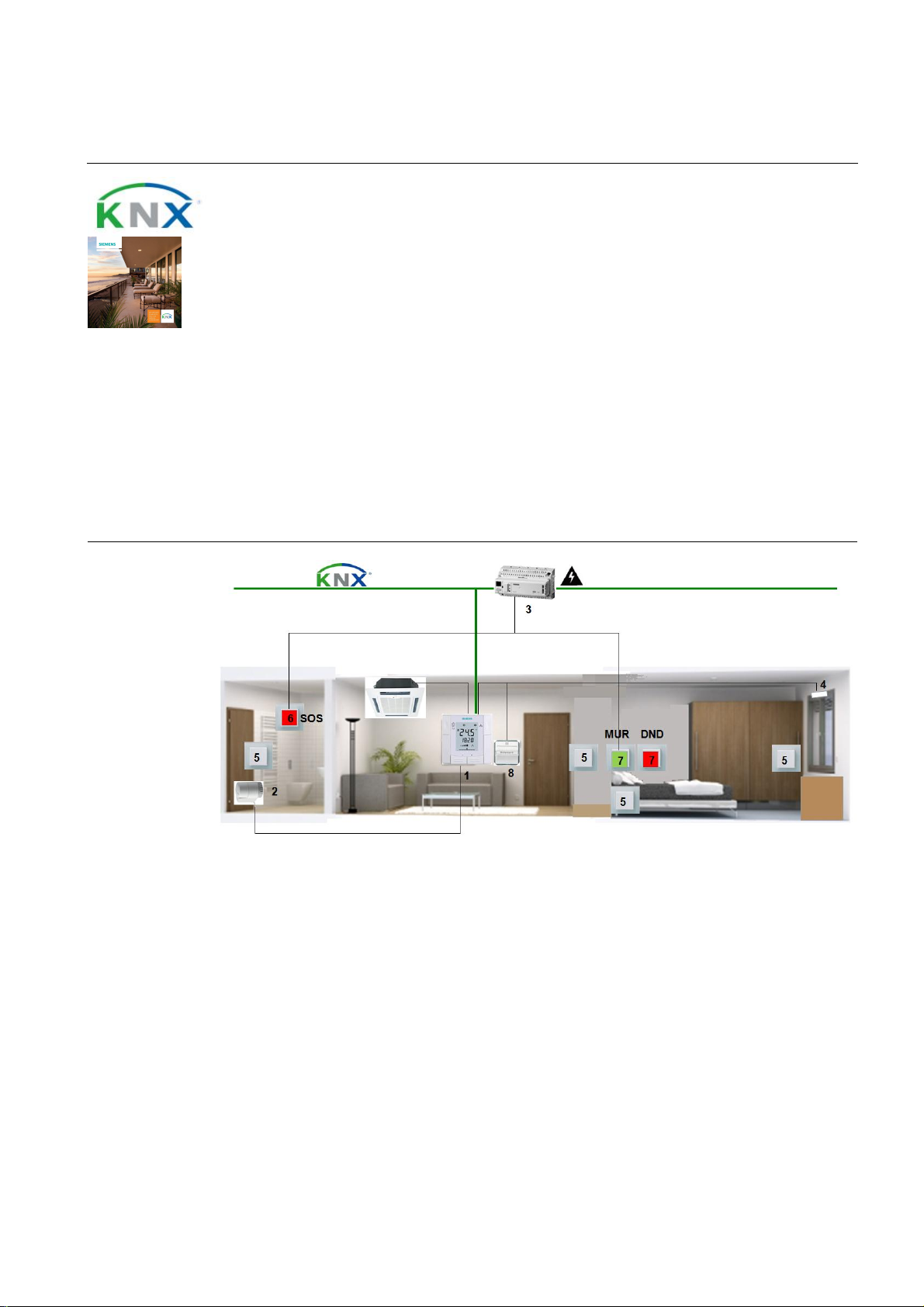
Room setup
& Gamma
1. RDF600KN room thermostat: The RDF600 KN acquires the room temperature and controls the fan
coil unit and the radiator in the bathroom accordi ngly. The room operating mod e can be
the tem peratur e setpoints can be adjusted on the room thermostat.
2. STA23 electrothermal actuator: The ST A23 adjus ts t he valve accordin g to the positioning signal it
receives from the controller.
3. RMS705B switching and mo nitoring device: The RMS705B switches electric citcuits. All signals
avail able at the inputs can b e passed to the KNX bus.
4. S 290 door/win dow contact: The window contact causes the room operating mode to change to
Economy when the wi ndow is open. It is conn ected directly to th e RDF600KN.
5. DELTA pushbutton: The p ushbutton is included in the elec tric circuit and switching directly the lig hting, the blinds, etc.
6. DELTA pushbutton with "Bell" symbol (SOS): The pushbutton is used to trigger the alarm func-
tion. It is c onnected t o th e RMS705B.
31
Page 32

Application Manual
Nr. 05
Synco™
Hotel rooms – room automation
7. DELTA pushbutton, 2-fold, with labeling field (MUR, DND): One of the pushbuttons can b e used
to activat e s ignal lam p DN D (Do not disturb) outside and ins ide the room. The other pushbut ton is
used to activate th e MUR function (Mak e up room). The MUR pushbutton is connected to the
RMS705B.
8. DELTA hotel card switch: When the card is inserted, the hotel card switch causes the room
operatin g mode to change from Economy to Comfort and electric circuits ar e switched on. When the
card is removed, the room op erating m ode returns to Ec onomy. Electric circ uits and lighting groups
are switched off.
Device list Key Product no. and description Stock number
1 RDF600KN room thermostat S55770-T293
2 ST A23 el ec trotherm al act u at or S55174-A101
3 RMS705B switching and monitor ing devic e, 6 x 4 A,
8 inputs
4 S 290 door/window contact 5WG1 290-7AB11
5 R ocker, neutral 5TG6 201
Insert, universal switch 5TA2 156
6 Rocker, with "Bell" symbol (SOS) 5TG6 207
Insert, universal switch 5TA2 156
7 Rocker, double, with labeling field (MUR, DND) 5TG6 212
Insert, pushbutton, 2-fold, 2 NO contacts 5TD2 111
8 DELTA hotel card switch with insert 5TG4 820
& Gamma
S55370-C100…105
Optional
Variants Key Product no. and description Stock number
Key Product no. and description Stock number
9 RMB795B central control unit S55370-C162…C167
10 OZW 772. x web server OZW 772. x
11 UP 588 color touch panel 5WG1 588-2AB13
12 RMZ787 extensi on module, 4 x 4 A, 4 inputs RMZ787
13 N 125/12 power supply 5WG1 125-1AB12
14 N 151 IP viewer 5WG1 151-1AB01
1a RDG100KN room thermostat S55770-T163
1b RDG160KN room thermost at S55770-T297
32
Page 33
Application Manual
Nr. 05
Synco™
3191S03
matic ally lower ed via the integrated hotel booking syst em. Open wi ndows ar e al w ays autom atically detected
and the temperatures of such rooms are lowered/raised to save heating/coolin g energy. The room temperatures are
lighting off when the room
Hotel rooms – room automation
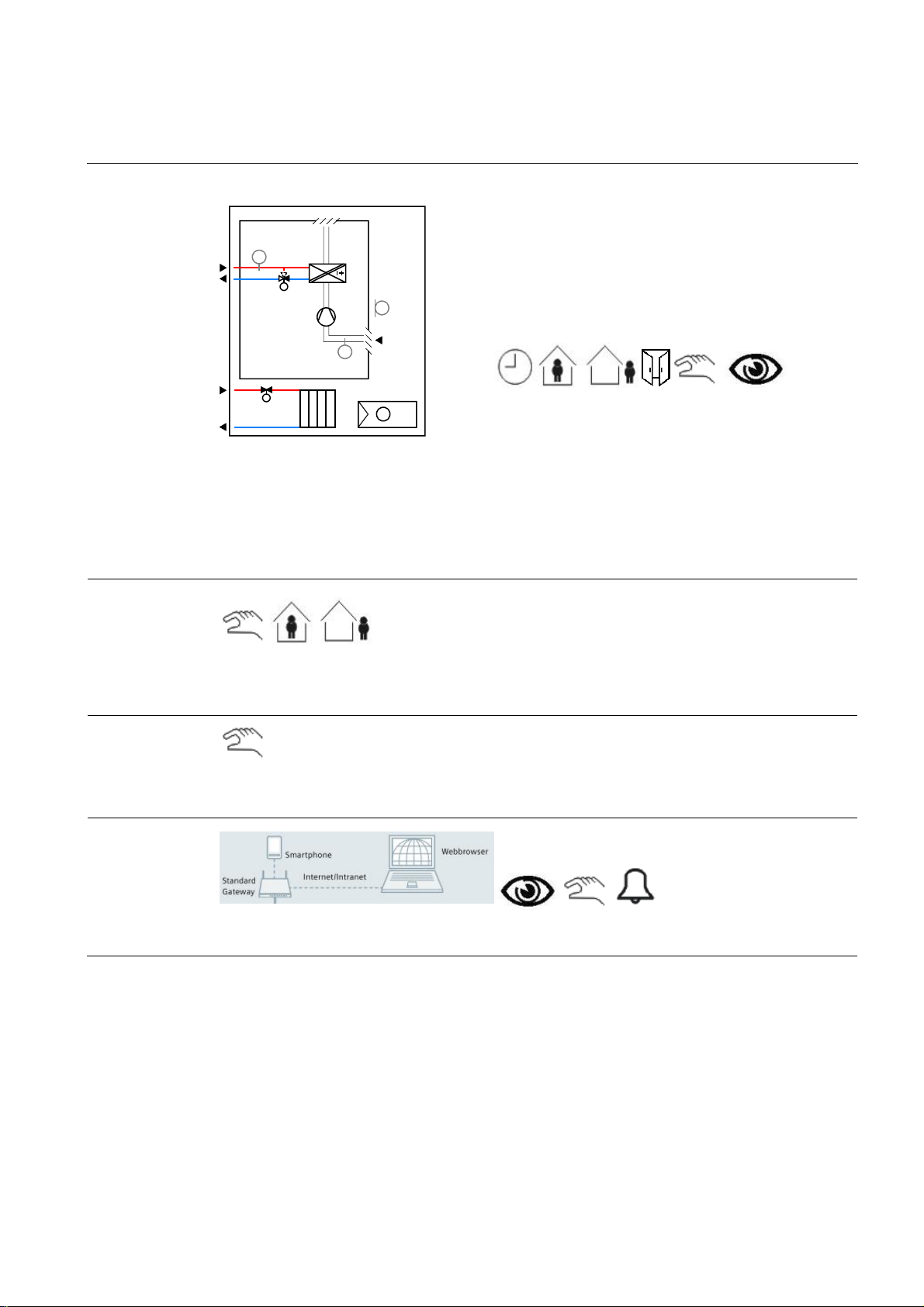
HVAC control
B2
T
Y1
M1
T
(B1)
YR
TAAC01 DG1 HQ
The temperature in every room is acquired and controlled. E very room sends its h eat/cooli ng energy request t o the
heating /refrigeration plant. These plants are contr olled depending on t he outside temperature and the heat/cooling
energy requests received from the rooms. Duri ng nonoccupancy times (rooms not book ed), the room temperatures
are auto
also slightly lowered/raised during the day, if the guest is n ot present.
(B1)
& Gamma
2-pipe fan coil unit with radiat or
· Heating or cool ing
· On/off , PWM or 3-position c ontr ol of heating /c ooling and rad ia-
tor actuators
· Automatic or manu al fan contr ol, 1- or 3-speed
T
N1
T
· Automat ic or manual changeov er of heating/c ool ing mod e
· Multifunc tion al inputs f or keycard c ontact, ext ernal sens or, etc.
Lighting control
Blinds control
Remote control
Presence detectors (hot el card switc hes) help save energ y by automatically s wi tching the
is not used.
Manual control without bus connection.
Integration of a w ebserver facilitates remote control an d monitoring on a PC or smartphone via webbr owser.
33
Page 34

Application Manual
Nr. 05
Synco™
with webbr ow ser
Hotel rooms – room automation
Function
description
Description of functions
Individual room temperature control
The room thermostat (RDF) acquires the t emperature,
controls it via the fan coil unit and calculates the
demand for heat or cooling energy. The resulting
signal is forwarded to the primary controller via the
KNX bus.
Time program and hotel booking syst em
Time pr ograms f or up to 10 room s or room groups
can be defined in the central c ontrol unit (RMB). A
time program sets the periods of time the r oom is not
used. During these time p eriods, the operating mode
is set to Protection, resulting in a lower temperature
setpoint. After that, the setpoint is raised to the Economy level.
Room aut omation can also communicate with th e
hotel’s booking system. When the guest checks in,
the room temperature is prematuraly raised to the
Comfort l evel. During the periods of time the hotel is
closed or in non-booked rooms, valu able heating
energy is automatically saved by chan ging the operating mode to Economy.
Presence-dependent heating control
When the presence detector (hotel c ard switch) signals room occupancy, the room t emperature is raised
to the Comfort level. Then, it is lowered again to the
Econom y l evel .
Window contact
If one or several windows of a room are op ened, the
operating mode changes automatically to Economy.
This means that heating or cooling en er gy is saved
since the system does not try to compensate for
energy losses.
& Gamma
Presence-dependent lighting control
When leaving the r oom, the el ectric circuits are interrupted, causing the lighting to be switch ed off after a
delay time.
When the hotel card is reinserted, the electric circuits
are closed again.
Remote control a nd monitoring
Using a webbrowser, all rooms can be controlled and
monitored via webserver (OZW). The following parameters can be monitored:
· Current state of windows and doors
· Current room temperatures
· Current room temperature setpoints
· Current operating modes
If required, the following parameters can be changed:
· The room operating modes, individually or
in groups
· The room temperature setpoints, individually or in groups
· The time program for every room or for
groups of rooms
Display of energy efficiency
The OZW772 webserver is able to display the HVAC
system’s energy efficiency, which reminds the user if
– from the point of view of energy efficiency – settings
beyond the permitted limits were made. If nonefficient
operating states oc cur, the user is notified via e-mail
or smartphone app. The limit values can be set by the
user.
Second ary
documents
The Appl ication S heets listed below describ e individual controller app lications and contain detailed infor mation.
They can be downloaded from the Internet at www.siemens.com/hit
Applic ati on no. Name of appl ication Prod uct no.
Synco Application Sheet,
Individual Rooms
TAAC01 DG1 HQ
Synco Application Sheet,
Central ly Managed Rooms
QCA001 MB7 HQ
Synco Application Sheet,
Central O perating and Monitoring
OWAL03 772 HQ
2-pipe fan coil unit with radiator RDG100KN
Central control of room temperature control
equipment
Local pl ant operati on and monitoring via local netw ork
RMB795B
OZW 772
34
Page 35
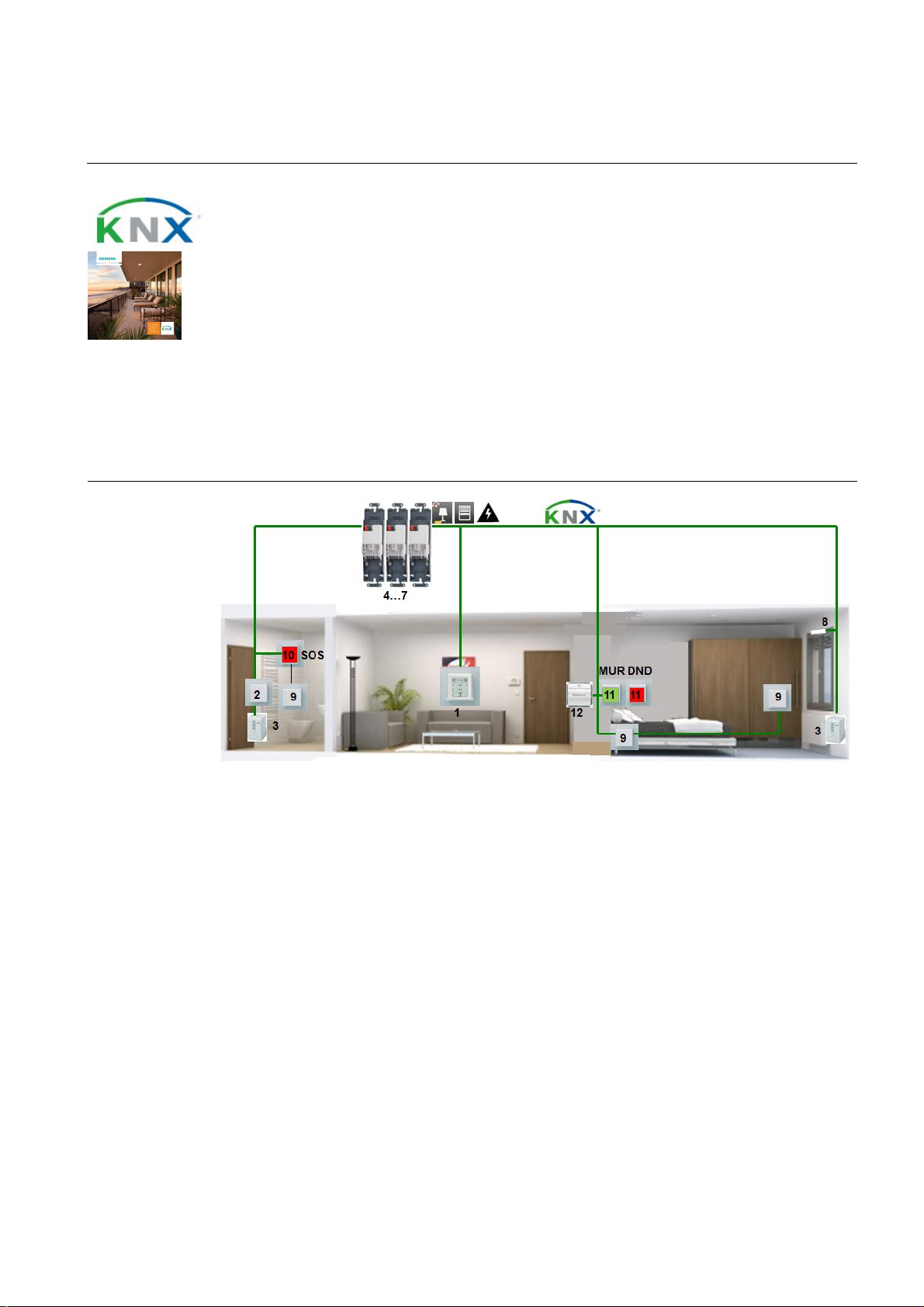
Application Manual
Nr. 06
Synco™
Radiator in
the
room
and
the
bathroom
, sun protection, presence
-
The AP 562/02 drives the radiator valve. It receives the positioning signal from
Hotel rooms – room automation
dependent switching off of lighting and power supply
Features
· Individual room temperature control, heating
· Two control loops for the room and the bathroom
· Window contact – central detection of open windows
· Detection of presence via hotel card switch
· Pr esence- and time-dependent control of HVAC, lighting, sun protect ion, and power
supply to the room
· Central operation and display of HVAC, li ghting, and sun protection
· Pushbutt ons f or "SOS", "Make up room ", and "Do not disturb"
Room setup
& Gamma
1. UP 227 room operator unit: The UP 227 acquires the room temperature and sends the temper ature
value, the setpoint shift and the operating mode to the AP 562/02 via the KNX bus. The UP 227 can also
be used to control the lighting and the bli nds.
2. AQR2532 room sensor with AQR2570 basic mo dule: The AQR acquir es and controls the room
temperature in the bathroom via the radiator.
3. AP 562/02 valve actuator:
the UP 227 or the AQR controller.
4. AP 118 automation module box: The AP 118 has a s ock et for room automation m odules type RS or RL.
5. RS 525/23 universal dimmer: The RS 52 5/23 features a relay contact to dim a lighting group up to 250
VA.
6. RL 521/23 blind actuator: The RL 521/23 features 2 relay contacts to control blinds.
7. RS 510/23 binary output, 2-fold: The RS 510/23 features 2 relay contacts to switch electric circuits.
8. S 290 door/window contact: The window contact causes the room operating mode to change to
Protection when th e wind ow is op en.
9. DELTA pushbutton: The pushbutton is c onnected to the UP 220 and is used to control the lighting.
35
Page 36

Application Manual
Nr. 06
Synco™
Hotel rooms – room automation
10. DELTA pushbutton with "Bell" symbol (SOS): The pushb utton is con nected to the UP 220 an d is used
to trigger the al arm function.
11. DELTA pushbutton, 2-fold, with labeling field (MUR, DND): One of the pushbuttons can be used to ac-
tivate si gnal lamp DND ( Do not disturb) outside and inside the r oom. The oth er pushbutton is used t o activate the MUR function (Make up room). This signal is sent to the KNX bus via the UP 220 pushbutton interface.
12. DELTA hotel card switch: When the card is inserted, the hotel card switch causes the room operating
mode to change from Precomfort to Comfort and electric circuits are switched on. When the card is
removed, the room operating mode retur ns to Precomfort. El ectric circuits and lighting groups are
switched off. This signal is fed to the KNX bus via the UP 220 pushbutton i nterface.
Device list Key Product no. and description Stock number
1 UP 227 room oper ator unit 5WG1 227-2AB11
2 AQR2570 room sensor, basic module S55720-S203…206
AQR2532 room sensor, t emperature S55720-S136
3 AP 562/02 valv e ac tuator 5WG1 562-7AB02
4 AP 118 automation modu l e b ox 5WG1 118-4AB01
5 RS 525/23 universal dimmer, 1 x 250 W 5WG1 525-2AB23
6 RL 521/23 blind actuator, 1 x 6 A 5WG1 521-4AB23
7 RS 5 10/23 bin ary output, 2 x 10 A 5WG1 510-2AB23
8 S 290 door/window contact 5WG1 290-7AB11
UP 220/21 I/O pushbutton interface, 2 inputs/outputs 5WG1 220-2AB21
9 R ocker, neutral 5TG6 201
Insert, universal switch 5TA2 156
UP 220/21 I/O pushbutton interface, 2 inputs/outputs 5WG1 220-2AB21
& Gamma
10 Rocker, with "Bell" symbol (SOS) 5TG6 207
Insert, universal switch 5TA2 156
UP 220/21 I/O pushbutton interface, 2 inputs/outputs 5WG1 220-2AB21
11 Rocker, double, with lab eling field (MUR, DND ) 5TG6 212
Insert, pushbutton, 2-fold, 2 NO contacts 5TD2 111
12 DELTA hotel card switch with insert 5TG4 820
UP 220/21 I/O pushbutton interface, 2 inputs/outputs 5WG1 220-2AB21
Optional Key Product no. and description Stock number
13 N 125/12 power supply 5WG1 125-1AB12
14 AP 257/32 weather stati on 5WG1 257-3AB32
15 N 151 IP viewer 5WG1 151-1AB01
16 UP 588 color touch panel 5WG1 588-2AB13
Variants Key Product no. and description Stock number
1a AQR2570 room sensor, basic module S55720-S203…206
AQR2532 room sensor, t emperature S55720-S136
1b UP 204 Contouch room controller 5WG1 204-2AB11
2a AQR2535 room sensor, temperature, humidity S55720-S141
4a AP 641 room control box 5WG1 641-3AB01
36
Page 37
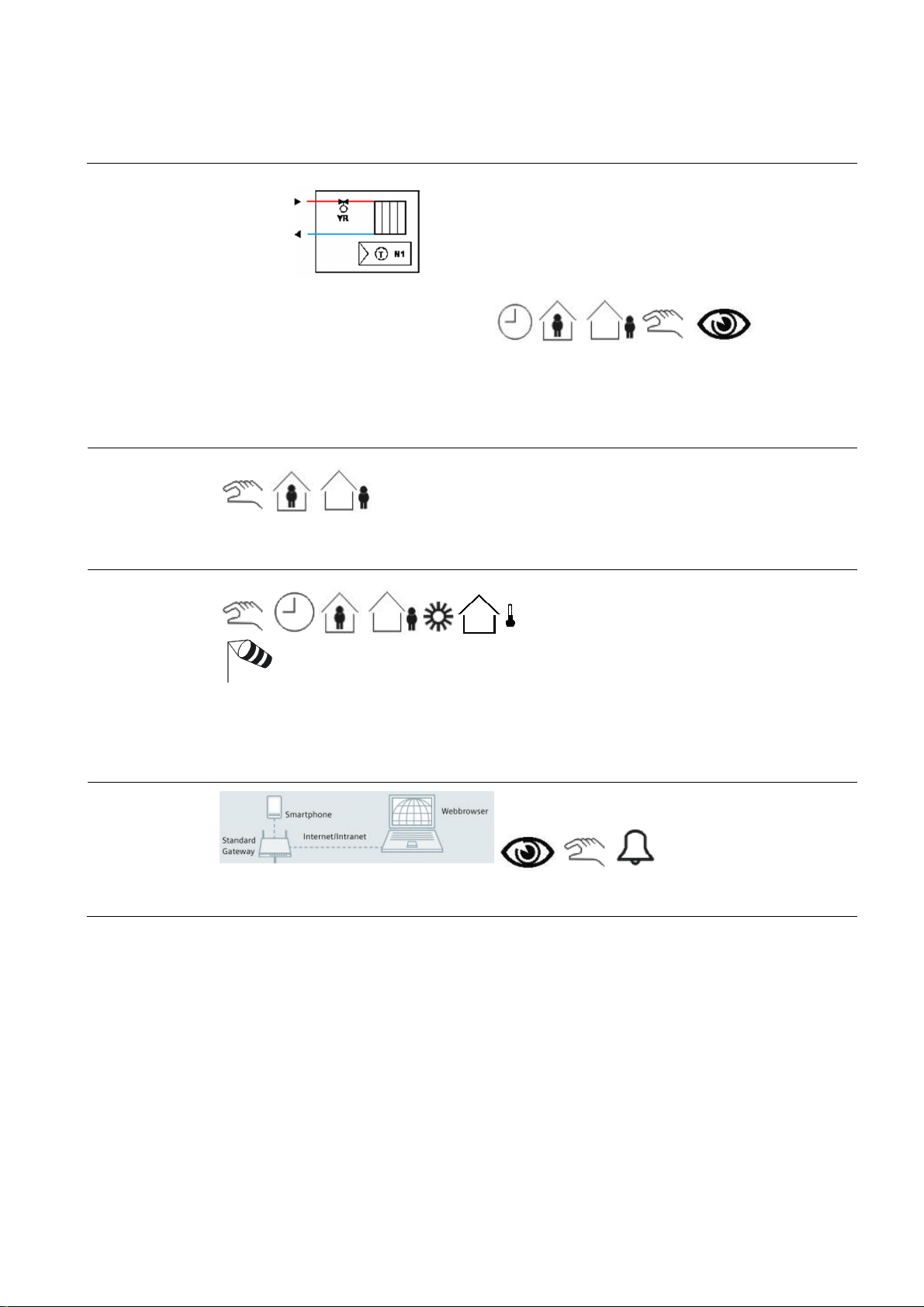
Application Manual
Nr. 06
Synco™
lighting off when the room
When a room is not b ooked (or, if desired , when the guest is absent), a weather st ation outs ide the bui lding prot ects
Hotel rooms – room automation
Room HVAC control
The temperature in every room is acquired and controlled. During nonoccupancy times (rooms not booked), the
room temperatur es are automatically lowered via th e in tegrat ed h otel booking system. Open w indows are always
automatically d etected and the temperatures of such rooms ar e lowered to save heating energy. The room tem peratures are also slightly lowered during the d ay, if the guest is not pr esent.
Lighting control
Presence detectors (hot el card switc hes) help save energ y by automatically s wi tching the
is not occupied.
Blinds control
& Gamma
Radiator heati ng
· Heating
· Setpoint shift
· On/of, PW M or 3-position control of radiator/f loor heat-
ing system valves
Remote control
up to 4 façades from extreme sunli ght in the summer. This func tion helps to keep the rooms cool. The weather
station also protec ts the blinds from dam age caused b y s trong win ds or other natural influences. On sunny wi nter
days, the weather station raises the blinds to let solar radiation make a natural heat contribution.
When the guest is present, t he blinds can be controlled via the pushbuttons and automatic operation is off.
Integration of a w ebserver facilitates remote control an d monitoring on a PC or smartphone via webbr owser.
37
Page 38

Application Manual
Nr. 06
Synco™
winter days, the b linds are
Hotel rooms – room automation
Function
description
Description of functions
Individual room temperature control
The room operator unit (UP 227) acquires and controls the room temperature and sends its positioning
signal t o th e r ad iator’s val ve actuator.
In the bathroom, the AQR acquires and controls the
room temperature and sends its positioning signal to
the radi ator’s valv e ac tuator.
Window contact
If one or several windows of a room are op ened, the
operating mode changes automatically to Protection.
This means that heating or cooling en er gy is saved
since the system does not try to compensate for
energy losses.
Time program and hotel booking syst em
Time programs for up to 110 rooms or room groups
can be defined on the t ouc h panel (UP 58 8).
A time program sets the periods of time the room is
not used. During these time periods, the operating
mode is set to Protection, resulting in a lower temperature setpoint. After that, the setpoint is raised to the
Econom y l evel .
Room aut omation can also communicate with th e
hotel’s booking system. When the guest checks in,
the room temperature is prematuraly raised to the
Comfort l evel. During the periods of time the hotel is
closed or in non-booked rooms, valu able heating
energy is automatically saved by chan ging the operating mode to Economy.
Presence-dependent heating control
When the presence detector (hotel c ard switch) signals room occupancy, the room t emperature is raised
to the Comfort level. Then, it is lowered again to the
Precomfort level.
Presence-dependent lighting control
When the room is no longer occupied, the lighting is
automatically switched off after a delay time.
& Gamma
Blinds control
The weather stat ion (AP257/32) with its built-in GPS
receiver measur es solar radiation and controls shading to protect the façade against sunlight. Up to 4
façad es can be selected f or automatic and individual
control.
In cold winter nights, the blinds are l ow ered to improve the building’s thermal insulat ion. On sunny
raised, allowing sunlight to
enter the room s o that ener gy is gain ed.
When the r oom is occupied, automatic operation is
deactivated. The blinds can then be controlled via the
pushbuttons.
Protecti on of bli nds
The weather station acquires continuousl y the wind
speed. If strong winds occur, the blinds are rais ed t o a
secure p osi ti on.
Remote control a nd monitoring
Using a webbrowser, all rooms can be controlled and
monitored via webserver (OZW). The following parameters can be monitored:
· Current room temperatures
· Current room temperature setpoints
· Current operating modes
· Heating plant parameters (temperatures,
fault state, etc .)
· Room occupancy
· State of blinds
· State of windows
If required, the following parameters can be changed:
· The state of blinds (up/down)
· The room operating modes
· The room temperature setpoints
· Heating plant parameters (setpoints, oper-
ating modes)
Secondary
documents
The Appl ication S heets listed below describ e individual controller app lications and contain detailed infor mation.
They can be downloaded from the Internet at www.siemens.com/hit
Applic ati on no. Name of appl ication Prod uct no.
Gamma Application Sheet,
Lighting
L00001 N 5 HQ
Gamma Application Sheet,
Shading
B00002 AP2 HQ
Central and manual switching of lighti ng N 512/11
Shading of façad es AP 257/32
38
Page 39
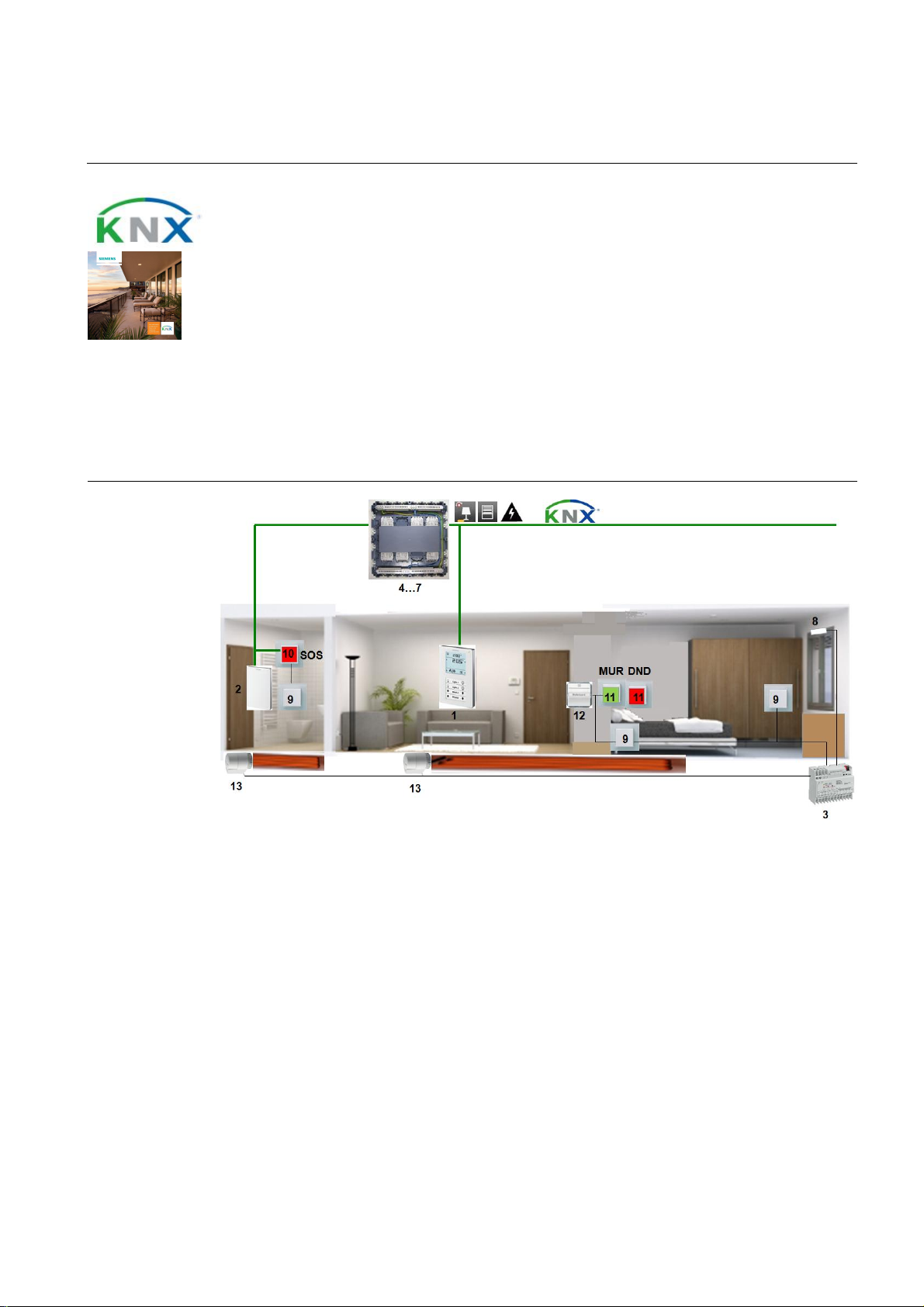
Application Manual
Nr. 07
Synco™
Floor heating
in
the
room and
the
bathroom, sun protection, presence
-
outputs t o
RS or
Hotel rooms – room automation
dependent switching off of lighting and power supply
Features
· Individual room temperature control, heating
· 2 control loops for the room and the bathroom
· Window contact – central detection of open windows
· Detection of presence via hotel card switch
· Pr esence- and time-dependent control of HVAC, lighting, sun protect ion, and power
supply to the room
· Central operation and display of HVAC, li ghting, and sun protection
· Pushbutt ons f or "SOS", "Make up room ", and "Do not disturb"
Room setup
& Gamma
1. QMX3.P37 room operator unit: The QMX3.P37 acquires the room temperature and sends the
temperature value, the setpoint shift and the operating mode to the N 605 via the KNX bus. The
QMX3.P37 can also be used to control the lighting and the blinds.
2. QMX3.P70 room operator unit: The QMX3.P70 acquires the room temperature and sends the
temperature value, the setpoint shift and the operating mode t o the N 605 via the KNX bus.
3. N 605 thermal drive actuator: The N 605 features 6 inputs to connect pushbuttons and 6
control electrothermal actuators ST A23.
4. AP 641 room control box: The AP 641 features 8 sockets for room autom ation modules type
RL.
5. RS 525/23 universal dimmer: Th e RS 525/23 features a relay contac t to dim a lig hting group up to
250 VA.
6. RL 521/23 blind actuator: The RL 521/23 features 2 relay contacts to control blinds .
7. RS 510/23 binary output, 2-fold: The RS 510/23 features 2 relay contacts to switch electric circuits.
8. S 290 door/win dow contact: The window contact causes the room operating mode to change to
Protection when th e wind ow is op en.
39
Page 40

Application Manual
Nr. 07
Synco™
2
Hotel rooms – room automation
9. DELTA pushbutton: The pushbutton can be c onnected to the KNX i nterface of the AQR and is
used to control the lighting.
10. DELTA pushbutton with "Bell" symbol (SOS): The pushbutton is used to trigg er the alarm func-
tion.
11. DELTA pushbutton, 2-fold, with labeling field (MUR, DND): One of the pushbu ttons can be used
to activat e s ignal lam p DN D (Do not disturb) outside and ins ide the room. The other pushbut ton is
used to activate the MUR function (Make up room). This signal is fed to the KNX bus via the N 605.
12. DELTA hotel card switch: When the card is inserted, the hotel card switch causes the room
operating mode to change from Precomfort to Comfort and electric circuits ar e switched on. When
the card is removed, the room operating mode returns to Precomfort. Electric c ircuits and lighting
groups are switched off. This signal is fed to the KNX bus via the N 605.
13. STA23 el ectrothermal actuator: The ST A23 adjus ts t he valve accordin g to the positioning signal it
receives from the controller.
Device list Key Product no. and description Stock number
1 QM X3.P 37 room op erator uni t, display an d operati on,
temperature
2 QM X3 .P70 room operator unit, temp erature, humidity, CO
3 N 605 thermal drive actuator 5WG1 605-1AB01
4 AP 6 41 room control box 5WG1 641-3AB01
5 RS 525/23 universal dimmer, 1 x 250 W 5WG1 525-2AB23
6 RL 521/23 blind actuator, 1 x 6 A 5WG1 521-4AB23
7 RS 5 10/23 bin ary output, 2 x 10 A 5WG1 510-2AB23
8 S 290 door/window contact 5WG1 290-7AB11
9 R ocker, neutral 5TG6 201
Insert, universal switch 5TA2 156
10 Rocker, with "Bell" symbol (SOS) 5TG6 207
Insert, universal switch 5TA2 156
UP 220/21 I/O pushbutton interface, 2 inputs/out puts 5WG1 220-2AB21
11 Rocker, double, with lab eling field (MUR, DND ) 5TG6 212
Insert, pushbutton, 2-fold, 2 NO contacts 5TD2 111
12 DELTA hotel card switch with insert 5TG4 820
13 STA23 el ec tr ot h erm al actuator S55174-A 10 1
& Gamma
S55624-H108
S55624-H104
Optional
Variants Key Product no. and description Stock number
Key Product no. and description Stock number
14 N 125/12 power supply 5WG1 125-1AB12
15 AP 257/32 weather stati on 5WG1 257-3AB32
16 N 151 IP viewer 5WG1 151-1AB01
17 UP 588 color touch panel 5WG1 588-2AB13
18a UP 220/31 I/O pushbutton interface, 4 inp uts/outputs 5WG1 220-2AB31
2a QMX3.P30 room operator unit, temperature S55624-H103
40
Page 41
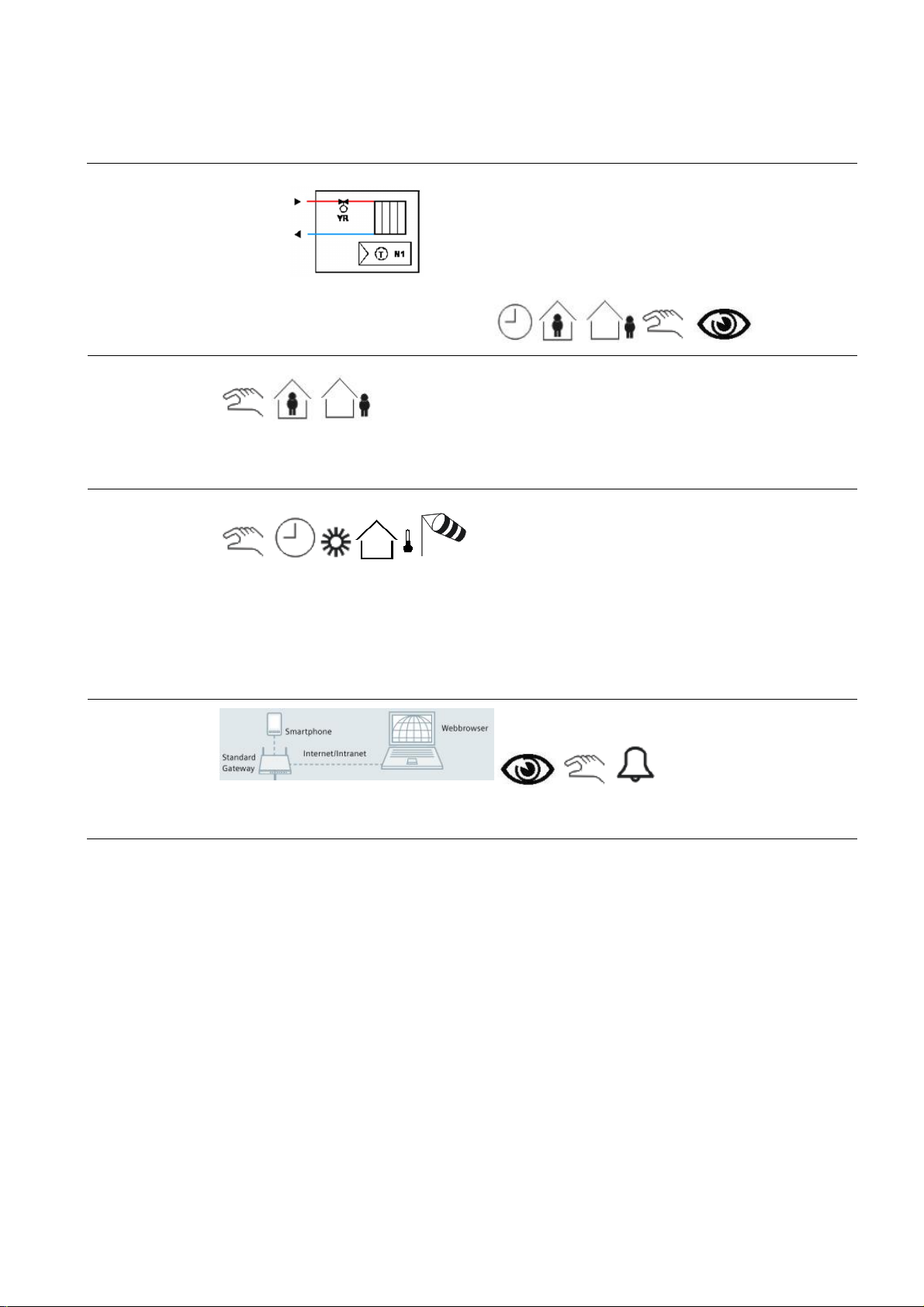
Application Manual
Nr. 07
Synco™
Hotel rooms – room automation
Room HVAC control
Lighting control
When the room is no l onger occupied, the lightin g is automatically s w itched off after a delay time.
Blinds control
The weather station (AP257/ 32) with its built-in GPS receiver measures solar radiation and controls shading to
protect t he façade against sunlight. Up to 4 façades can be selected for automatic and individual control.
In cold winter nig hts, the blinds are l owered to improve the building’s thermal insulation. On sunny wi nter days, the
blinds are raised, allowing sunlight to enter the r oom so that energy is gained.
When the r oom is occup ied, automatic operation is deactivat ed. The blinds can then b e controll ed via the pushbuttons.
& Gamma
Radiator heati ng
· Heating
· Setpoint shift
· On/off, PW M or 3-position control of radiator/floor heat-
ing system valves
Remote control
Integration of a w ebserver facilitates remote control an d monitoring on a PC or smartphone via webbr owser.
41
Page 42

Application Manual
Nr. 07
Synco™
winter days, the b linds are
Hotel rooms – room automation
Function
description
Description of functions
Individual room temperature control
The room operator unit (P37) acquires and controls
the room temperature and sends its positioning signal
to the valve actuator.
In the bathroom, the room sensor (P70) acquires and
controls the temperature and sends its positioning
signal to the valve actuator
Window contact
If one or several windows of a room are op ened, the
operating mode changes automatically to Protection.
This means that heating or cooling en er gy is saved
since the system does not try to compensate for
energy losses.
Time program and hotel booking syst em
Time programs for up to 110 rooms or room groups
can be defined on the t ouc h panel (UP 58 8).
A time program sets the periods of time the room is
not used. During these time periods, the operating
mode is set to Protection, resulting in a lower temperature setpoint. After that, the setpoint is raised to the
Econom y l evel .
Room aut omation can also communicate with th e
hotel’s booking system. When the guest checks in,
the room temperature is prematuraly raised to the
Comfort l evel. During the periods of time the hotel is
closed or in non-booked rooms, valu able heating
energy is automatically saved by chan ging the operating mode to Economy.
Presence-dependent heating control
When the presence detector (hotel c ard switch) signals that the room is occupied, the room temperature
is raised to the Comfort level. Then, it is lowered
again t o the Precomfort level.
Presence-dependent lighting control
When the room is no longer occupied, the lighting is
automatically switched off after a delay time.
& Gamma
Blinds control
The weather stat ion (AP257/32) with its built-in GPS
receiver measur es solar radiation and controls shading to protect the façade against sunlight. Up to 4
façad es can be selected f or automatic and individual
control.
In cold winter nights, the blinds are l ow ered to improve the building’s thermal insulat ion. On sunny
raised, allowing sunlight to
enter the room s o that ener gy is gain ed.
When the r oom is occupied, automatic operation is
deactivated. The blinds can then be controlled via the
pushbuttons.
Protecti on of bli nds
The weather station acquires continuousl y the wind
speed. If strong winds occur, the blinds are rais ed t o a
secure p osi ti on.
Remote control a nd monitoring
Using a webbrowser, all rooms can be controlled and
monitor ed via webs erver (IP vi ewer). The following
parameters can be monitored:
· Current room temperatures
· Current room temperature setpoints
· Current operating modes
· Heating plant parameters (temperatures,
fault state, etc .)
· Room occupancy
· State of blinds
· State of windows
If required, the following parameters can be changed:
· The state of blinds (up/down)
· The room operating modes
· The room temperature setpoints
· Heating plant parameters (setpoints, oper-
ating modes)
Secondary
documents
The Appl ication S heets listed below describ e individual controller app lications and contain detailed infor mation.
They can be downloaded from the Internet at www.siemens.com/hit
Applic ati on no. Name of application Prod u ct no.
Gamma ApplicationSheet,
Lighting
L00001 N 5 HQ
Gamma ApplicationSheet,
Shading
B00002 AP2 HQ
Central and manual switching of lighti ng N 512/11
Shading of façad es AP 257/32
42
Page 43
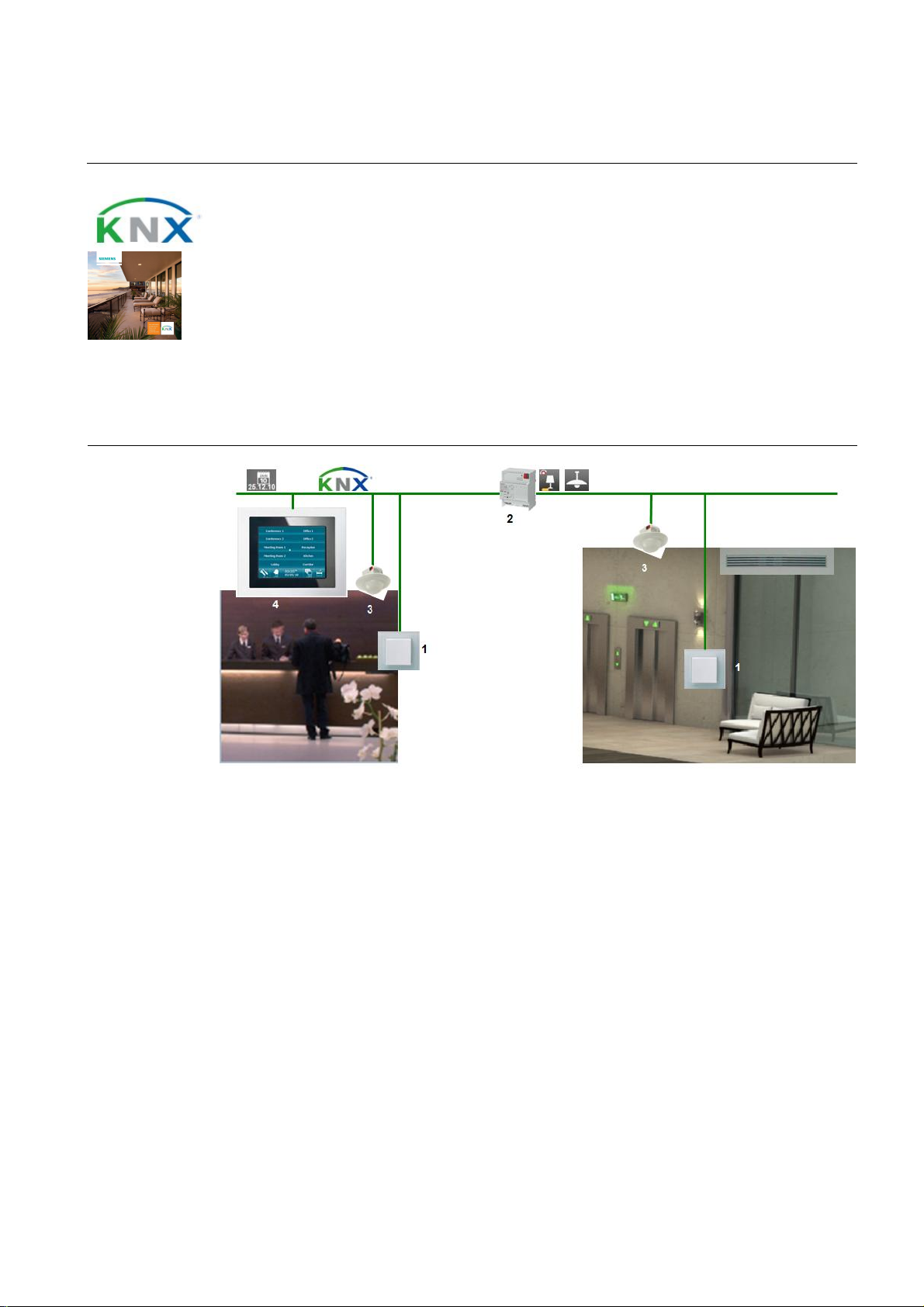
Application Manual
Nr. 08
Synco™
Air conditioning plant with
indoor air quality
andlighting control
Reception area – room automation
Features
· Room-supply air temperature control/CO2control
· Automati c data ex change between room HVAC and primary plant
· VAV cont roller to optimize the ventilation system
· Rem ote control of indiv idual rooms or groups of rooms
· Dem and-compensated production of heat and cooli ng energy thanks to automatic data
exchange with heati ng and refrigeration controll er
· Constant light control
· Efficiency class A conforming to EN 15232
Room setup
& Gamma
1. AQR2532 room sensor with AQR2576 basic mo dule: The AQR sends information about the room
temperature and the indoor air quality to the ven tilation controller, which controls the temp erature and the
proportion of fr esh air in the supply air.
2. N 141/02 KNX/ D A LI gateway: The N141 transmits the KNX signal to the DALI bus to switch and dim the
lighting. In the other direction, status information, such as error messages or operati ng times of l amps, is
sent to the KNX bus.
3. UP258E21 presence detector with constant light control: The UP 258E21 acquires ro om occup ancy
and brightness. This information is then fed to the room thermostat and the KNX/DALI gateway.
4. UP 588 color touch panel: The UP 588 is us ed to control and monitor HVAC, the lighting and the blinds.
43
Page 44
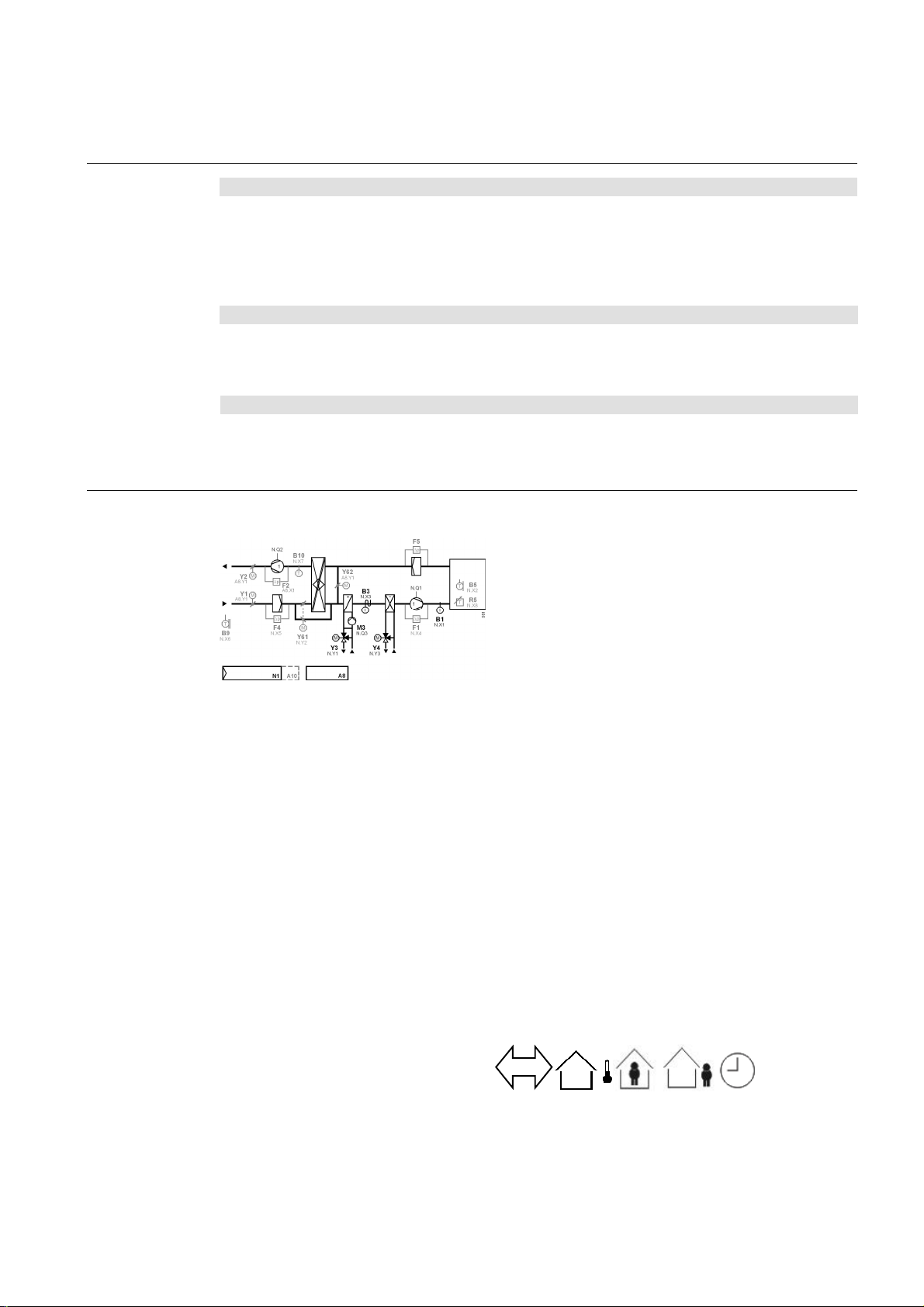
Application Manual
Nr. 08
Synco™
2
2
e reported by the presence detector or
Reception area – room automation
Device list
Optional
Variant s Key Product no. and description Stock number
Ventilation control
Key Product no. and description Stock number
1 AQR2576 room sensor, b asic module with CO
AQR2532 room sensor, t emperature S55720-S136
2 N 141/02 KNX/DALI gateway 5WG1 141-1AB02
3 UP258E21 pr esence detector with const ant light control 5WG1 258-2EB21
4 UP 588 color touch panel 5WG1 588-2AB13
Key Product no. and description Stock number
5 N 125/12 power supply 5WG1 125-1AB12
6 N 151 IP viewer 5WG1 151-1AB01
5a OZW772.x web server OZW772.x
1a QMX3.P70 room operator unit, temperature, humidity, CO
1b QMX3.P3 0 room operator unit, temperature S55624-H103
2a N 141/31 KNX/DALI gateway, twin 5WG1 141-1AB31
Room-supply air temperatu re cascade control with p late
heat recovery system, recirculated air damper, air
heating coil and air cooling coil
· 7-day time switch with holiday/special day program
· Recirculated air operation (Precomfort) and outside
air operation (Comfort)
· Control of supply and extract air fans
· Room- (extract air)-supply air temperature cascade
ECE01 U2B HQ
A
control w ith minimu m an d maximum limitation of
supply air temperature
· Control of suppl y air tem perature via the heat recover y
system, t he air heati ng coil valve and the air cooling
coil val ve in sequence
· Frost protection with frost protection sensor on the
air side and controller-internal 2-phas e frost protection
function
· Monitoring of supply and extract air fans with
differential pressure s witches
· Monitoring of supply and extract air filters with
differential pressure s witches
· Sustained mode during nonoccupancy times
· Night cooling with outside air
· Summer/winter compensation, preheat function,
activat ion of air heat ing coil pum p at low outside
temper atures
· Heat recovery system with Maximum Economy
Changeover (MEU)
· Control of air heating coil pump, with pump kick
· Fault relay for all fault status messages
& Gamma
S55720-S203…206
S55624-H104
The temperature is acquired in every room and controlled via the supply air. The ventil ation controller c ontrols th e
supply air temperature and the proportion of fresh air. The h eating pl ant is controlled depending on the heat reques t
from th e ventilation controller plus the outsid e temper ature. The refrigeration plant is controlled depending on the
cooling energy request from th e ventilati on controll er . Nonoccupancy times ar
can be set in a time program. During these peri ods of time, the room temperatures are automatically lowered.
44
Page 45
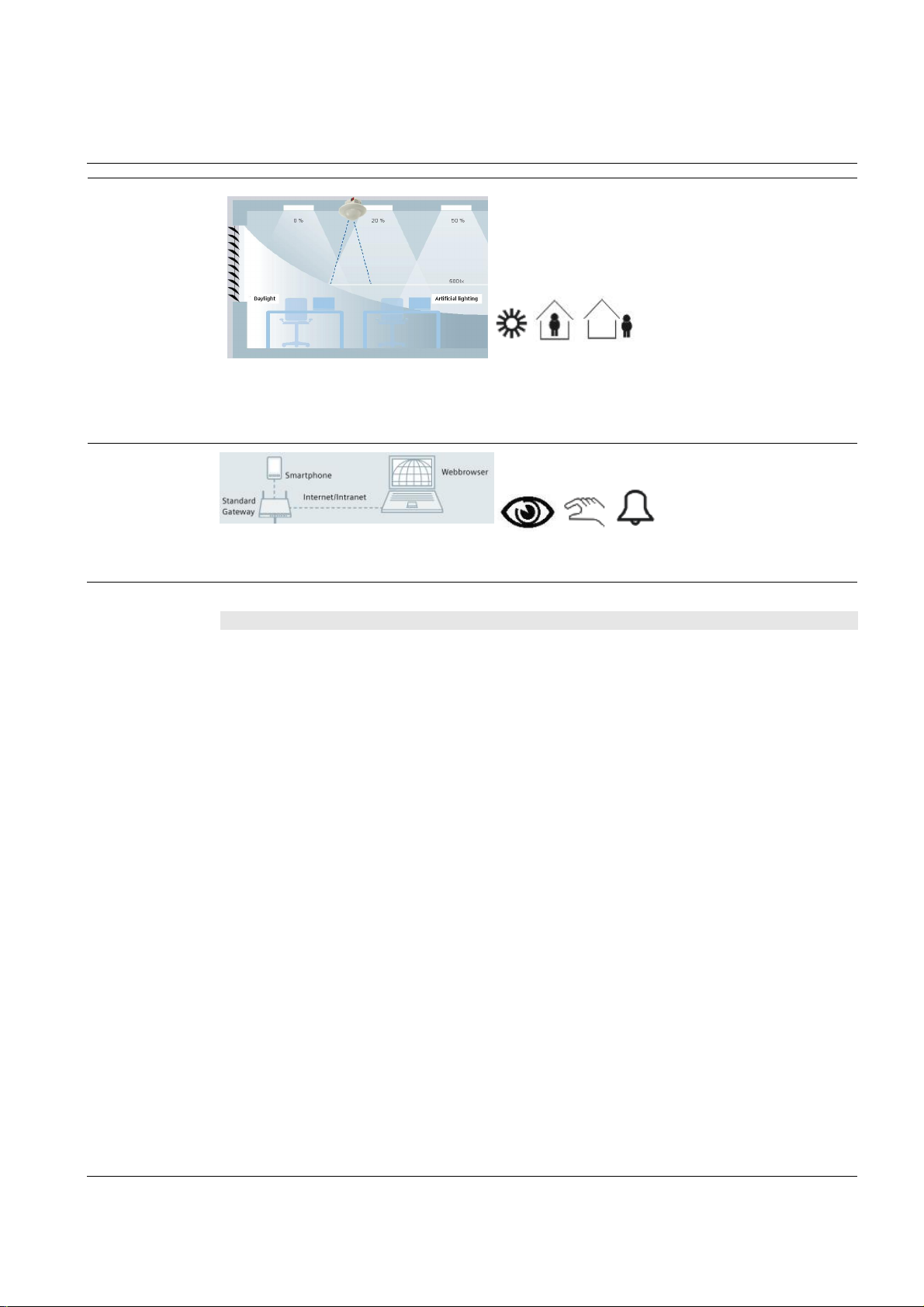
Application Manual
Nr. 08
Synco™
lighting off when the room
Reception area – room automation
Lighting control
Presence detectors (hot el card switc hes) help save energ y by automatically s wi tching the
is not occu pied. A brightness s ensor incorporat ed in the presence detector helps w hen switc hing and dimming
lights, ensuring that the room is al ways optimally illuminated, usin g as little as pos sible artificial light.
Remote control
Integration of a w ebserver facilitates remote control an d monitoring on a PC or smartphone via webbr owser.
& Gamma
Function
description
Description of functions
Indoor air quality control
The CO2 sensor acquires the indoor air quality and
forwards i ts value t o th e ventilation contr oller which
controls the proportion of fresh air.
Demand-dependent supply air t emperature
control
The primary ventilation controller (RMU) controls the
supply air temperature and the volum etric air f low
depend ing on the room ’s deman d for heat/cooling
energy.
Constant light control
Constant light control maintains the room lighting at a
const ant br i gh tness level b y adding artif ic i al light to
daylight. Br ightness is automatically and continu ously
adapted by dimmi ng up/down th e lighting groups.
Offset ad justments allow th e configuration of c ons tant
light control with only one presence det ector. M anu al
switching and dim ming is made possible via the
pushbutton. In this case, lighting control is stopped
and the brightness level in the room is m aintained as
long as pr esenc e is detected .
Presence-dependent lighting control
The presence det ector (UP258E21) allows up to 4
lighting groups to be switc hed and controlled and
detects presenc e within its range. If persons are
detect ed, lighting is switch ed on at the required
brightness level. When persons leave the room, the
lightin g is switch ed off again or dimmed. To extend
the monitored range, a master-slave configuration can
be implemen ted.
Remote control a nd monitoring
Using a webbrows er, the following p ar ameters can be
monitored via webserver (O ZW):
· Current temperatures
· Current temperature setpoints
· Current operating modes
· Ventilation plant parameters (temperatures,
errors, alarms)
If required, the following parameters can be
changed:
· The operating modes
· The temperature setpoints
· The time program
· Ventilation plant parameters (setpoints, op-
erating m od es)
Using a webbrowser, all rooms can be controlled and
monitor ed via webs erver (IP vi ewer). The following
parameters can be viewed/changed, if required:
· The state of lighting (on/off)
· Status information of lamps, such as error
messages or the num ber of operating hours
Display of energy efficiency
The OZW772 webserver is able to display the HVAC
system’s energy efficiency, which reminds the user if
– from the point of view of energy efficiency – settings
beyond the permitted limits were made. If nonefficient
operating states oc cur, the user is notified via e-mail
or smartphone app. The limit values can be set by the
user.
45
Page 46

Application Manual
Nr. 08
Synco™
with webbr ow ser
Reception area – room automation
Secondary
documents
The Appl ication S heets listed below describ e individual controller app lications and contain detailed infor mation.
They can be downloaded from the Internet at www.siemens.com/hit
Applic ati on no. Name of appl ication Prod uct no.
Synco Application Sheet,
Central O perating and Monitoring
AECE01 U2B HQ
Synco Application Sheet,
Central O perating and Monitoring
OWAL03 772 HQ
Gamma Application Sheet,
Lighting
L00004 U P2 HQ
& Gamma
Room-supply air temper ature cascade contr ol with plate
heat rec overy system, recirculated air damper, air heating coil and air cooling coil
Local pl ant operati on and monitoring via local netw ork
Daylight- and presence-dependent lighting control
(using DALI)
RMU720B
OZW 772
UP 258E21
46
Page 47
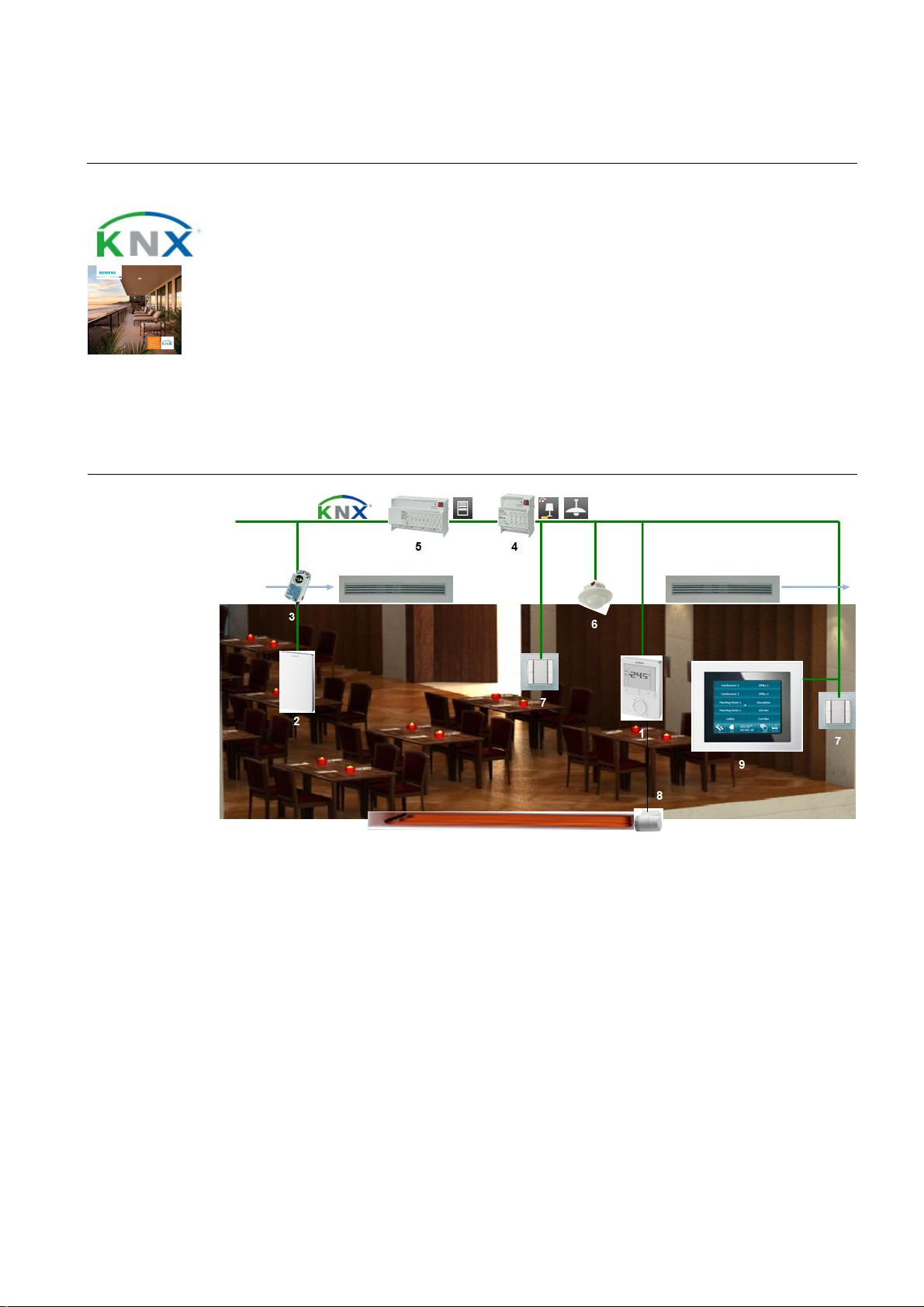
Application Manual
Nr. 09
Synco™
V
AV plant with
indoor air quality
a
nd DALI
c
onstant
li
ght contr ol
Restaurant area – room automation
Features
· Fully integrated VAV application with temperature, CO2, and volumetric air flow control
· Automatic data exchange between room HVAC and primary pl ant
· VAV cont roller to optimize the ventilation system
· Rem ote control of indiv idual rooms or groups of rooms
· Dem and-compensated production of heat and cooli ng energy thanks to automatic data
exchange with prim ary plant
· Constant light control
· Efficiency class A conforming to EN 15232
Room setup
& Gamma
1. RDG400KN room thermostat: The RDG400KN acquires the room temperature and calculates the
request for heat/cooling energy sent to the heatin g/refrigeration and VAV contr ollers. It also controls valve
actuator STA23 of the floor heating system.
2. QMX3.P70 room operator unit: T he QMX3.P70 acquires the in door air quality and sends its value to the
ventilation controller which adjusts the amount of f resh air required.
3. GDB181.1E/KN VAV comp act controller : The GDB.. controls the VAV dampers. The setpoints of the
volumetr ic air flow are shif ted depending on th e amount of air demanded by the r oom thermostat.
4. N 141/02 KNX/ D A LI gateway: The N141 transmits the KNX signal to the DALI bus to switch and dim the
lighting. In the other direction, status information, such as error messages or operati ng times of l amps, is
sent to the KNX bus.
5. N 523/11 blind actuator: The N 523/02 features 8 ch annels to control up to 8 blind motors.
6. UP258E21 presence detector with constant light control: The UP 258E21 acquires ro om occup ancy
and brightness. T his infor mation is t hen forwarded to th e room thermostat and the KNX/DALI gateway.
7. UP 223/2 pushbutton, triple, neutral: The UP 223/2 is used to control th e lighting and/or the blinds.
47
Page 48

Application Manual
Nr. 09
Synco™
2
Restaurant area – room automation
8. STA23 electrotherma l actuator: The STA23 adjusts the valve acc ording to the positioning signal it
receives from the controller.
9. UP 588 color touch panel: The UP 588 is us ed to control and monitor HVAC, the lighting and the blinds.
Device list Key Product no. and description Stock number
1 RDG 400KN room therm ostat S55 770-T165
Optional
2 QM X3 .P70 room operator u nit, temperature, hu midity,
3 GDB181.1E/KN VAV compact controller S55499-D134
4 N 141/02 KNX/DALI gateway 5WG1 141-1AB02
5 N 523/11 blind actuator, 8 x 6 A 5WG1 523-1AB11
6 UP25 8E21 presenc e d etector with c onstant light c ontrol 5W G1 258- 2EB21
7 UP 223/2 pushbutton, triple, neutr al 5WG1 223-2DB12
8 UP 588 color touch panel 5WG1 588-2AB13
Key Product no. and description Stock number
9 N 125/12 power supply 5WG1 125-1AB12
10 N 151 IP viewer 5WG1 151-1AB01
11 OZW 772. x web server OZW 772. x
12 RMB795B central control unit S55370-C162…C167
13 AP 257/22 weather stati on 5WG1 257-3AB22
CO
UP 117/12 bus coupling unit (BTM) 5WG1 117-2AB12
& Gamma
S55624-H104
Variants Key Product no. and description Stock number
1a RDU341 room thermostat S55770-T106
3a GLB181.1E/KN VAV compact controller S55499-D135
4a N 141/31 KNX/DALI gateway twin 5WG1 141-1AB31
7a UP 223/3 pushbutt on, triple, with status LED, neutral 5WG1 223-2DB13
7b Rocker, 2-fold, neutr al 5TG6 205
UP 116/31 DELTA bus coupling unit, 2-fold 5WG1 116-2AB31
5a / 7c UP 520/03 blind actuator, 1 x 6 A 5WG1 520-2AB03
UP 221/2 pushbutton, 1-fold, neutral 5WG1 221-2DB12
48
Page 49
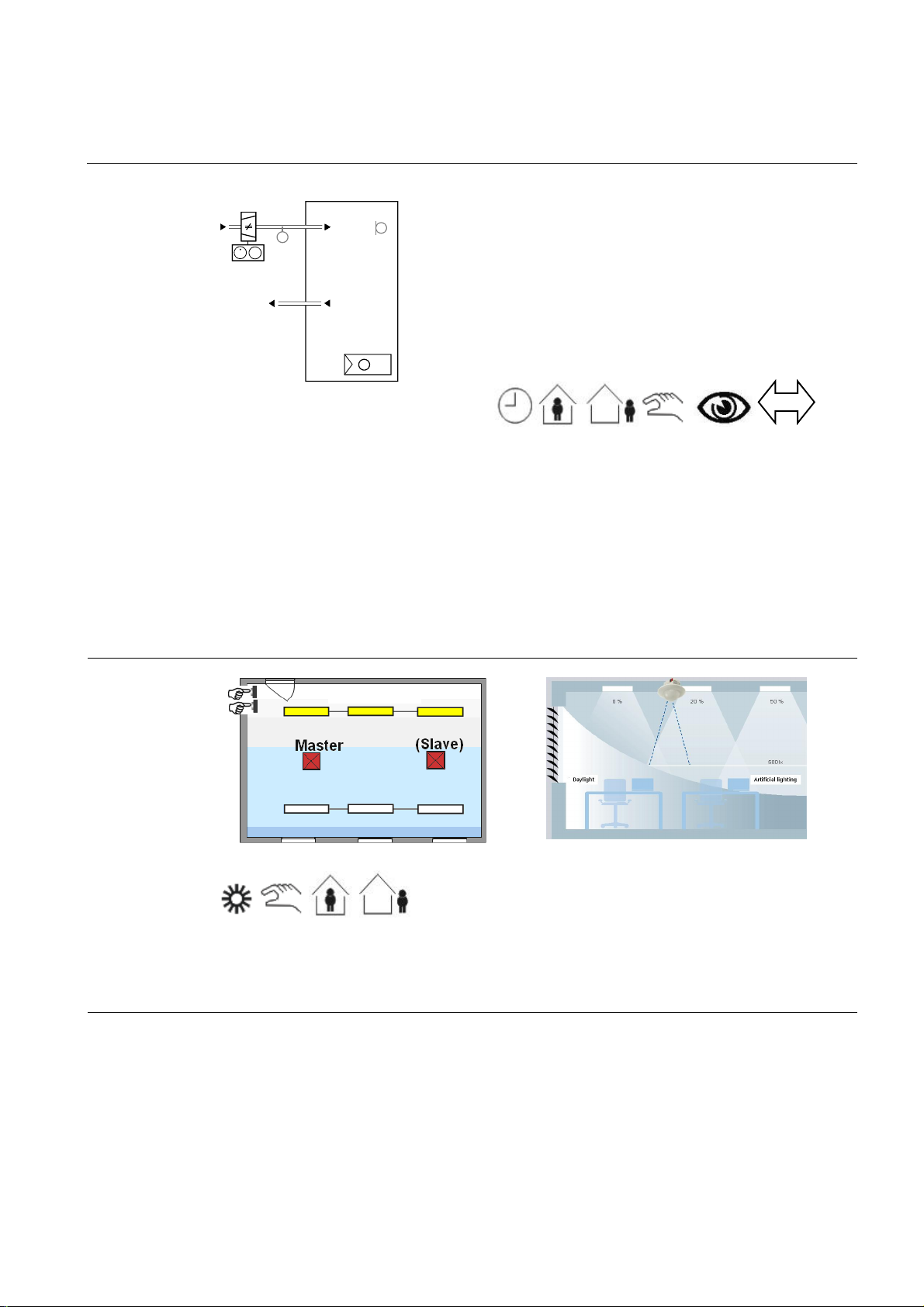
Application Manual
Nr. 09
Synco™
YV
lighting off when the room
Restaurant area – room automation
Room HVAC control
T
(B1)
MV MV
TB0001 DG4 HQ
The tem peratur e is acquired in every room and contr olled via the supply air and the floor heating system. T he
heat/c ooling energy requ ests from all rooms ar e forwarded to the h eating/ref rigerat ion plant and the individual VAV
controll ers. The ventilation controll er controls th e supply air t emperat ure and the amount of air demanded by the
VAV controller. The heati ng plant is controlled depending on the heat request from the ventilation controller and the
room thermostats plus the outside temp erature. The refrig eration plant is contr olled depending on the coolin g energy request from t he ventilation controller. Nonoccupancy tim es are detected by presence detectors and can be set
for the night and ev ery room in a time program. During these periods of time, th e room temperatures are automatically lowered. Open windows are automatically detected and th e t emperature of these rooms is l ow ered to save
heating energy.
T
(B1)
N1
T
& Gamma
3192S07
VAV plant
· Heating or cooling
· DC 0...10 V or 3-posit ion contr ol of VAV boxes or
damper ac tu ators
· Automatic or manual changeover of heating/cooling
mode
· Automatic changeover of heating/cooling mode via
supply air temperature (via KNX, only RD G400KN)
· Multifunctional inputs for keycard contact, external sen-
sor, etc.
Lighting control
Presence detectors (hot el card switc hes) help save energ y by automatically s wi tching the
is not occu pied. A brightness s ensor incorporat ed in the presence detector helps w hen switc hing and dimming
lights, thus ensuring that the room is always optimally illuminated, using as little as possible art ificial ligh t.
49
Page 50
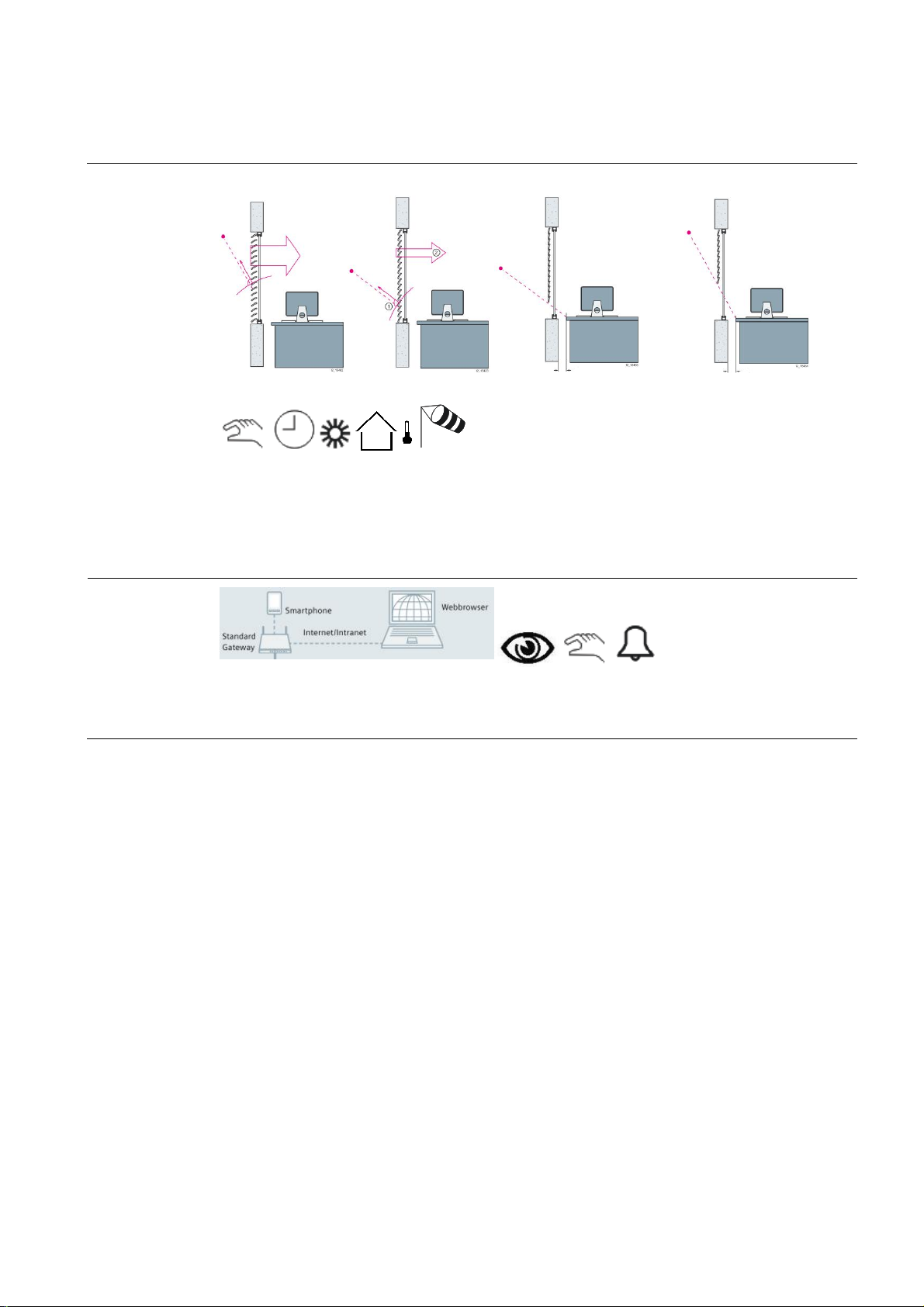
Application Manual
Nr. 09
Synco™
winds or other natu ral influ en
Restaurant area – room automation
Blinds control
A weather station outside the building protects up to 8 façades f rom extreme solar radiation in the summer. This
function helps to keep the rooms cool. T he weather station also protects the blinds from damage caus ed by strong
ces an d controls t h em at dusk an d according to temperatures to s ave heating energy
during wi nter nights . Finally, sun tracking control and shadow outlin e t racking allow a maxi m um of natural light t o
enter th e rooms, offering op timum working c onditions.
& Gamma
Remote control
Integration of a w ebserver facilitates remote control an d monitoring on a PC or smartphone via webbr owser.
50
Page 51

Application Manual
Nr. 09
Synco™
Restaurant area – room automation
Function
description
Description of functions
Individual room temperature control
The room thermostat (RDU/RDG) acquires the temperature and controls valv e actuator STA23 of t he
floor heating system. When the room calls for
heat/c ooling energy, the room t hermost at sends a
heat request to the heating controller and/or a r equest
for mor e warm/cold air to the VA V control ler.
indoor air quality control
The CO2 sensor acquires the indoor air quality and
forwards its signal to the ventilation controller which
controls the proportion of fresh air.
Demand-dependent supply air t emperature
control
The primary ventilation controller (RMU) controls the
supply air temperature and the volum etric air f low
depend ing on the request for h eat/cooli ng energy
from the room thermostat and the request for volumetric air flow from the VAV controller. The pressure
setpoin ts of the ventilation system are shifted depending on the room’s demand for supply air.
Time program for every room
Time pr ograms f or up to 10 room s or room groups
can be defined in the central c ontrol unit (RMB). A
time program sets the periods of time the r oom is not
used. During these time p eriods, the operating mode
is set to Economy, resulting in a lower temperature
setpoin t. Hence, valuabl e h eating energy can be
saved during the n ight and on days of rest. After that,
the setpoint is raised to the Precomfort level.
Presence-dependent heating control
When th e p resenc e detector signals room occupancy,
the room temperature is raised to the Comfort level.
Then, it is lowered again to the Pr ecomfort level.
Constant light control
Constant light control mai ntains room lighting at a
const ant br i gh tness level b y adding artif ic i al light to
daylight. Br ightness is automatically and continu ously
adapted by dimmi ng up/down th e lighting groups.
& Gamma
Offset ad justments allow th e configuration of c ons tant
light control with only one presence det ector. M anu al
switching and dim ming is made possible via the
pushbutton. In this case, lighting control is stopped
and the brightness level in the room is m aintained as
long as pr esenc e is detected .
Presence-dependent lighting control
The presence det ector (UP258E21) allows up to 4
lighting groups to be switc hed and controlled and
detects presenc e within its range. If persons are
detect ed, lighting is switch ed on at the required
brightness level. When the persons leave the room ,
the lighti ng is switched off again. To extend th e monitored range, a master-slave configuration can be
implemented.
Blinds control
The weather stat ion (AP257/22) with its built-in GPS
receiver offers efficient control to protect the façade
against sunlight. A utomatic and individual control of
up to 8 faç ades can be pr ovided.
Sun trac king control and sh adow outlin e t racking are
another 2 f unctions that ensure maximum usage of
daylight and minimum glare in the room. Sun tracking
control continuous ly adjusts the slats in a way that
their position is always at a right angle in relation to
the sun. Shadow outline tracking controls the position
of the blinds such that the edge of the shadow always
maintains the same distance to the window . This
optimi z es d aylight usage, thus r educing th e amount of
energy required for the lighting.
In cold winter nights and when nobody is present in
the room, the blinds are lowered to improve the bui lding’s thermal insulation. On sunny winter days, the
blinds are raised, allowing sunlight to enter the room
so that energy is gained.
.
Protecti on of bli nds
The weather station acquires continuousl y the wind
speed. If strong winds occur, the blinds are rais ed t o a
secure p osi ti on.
Remote control a nd monitoring
Using a webbrowser, all rooms can be controlled and
monitored via webserver (OZW). The following parameters can be monitored:
· Current room temperatures
· Current room temperature setpoints
· Current operating modes
· Heating plant parameters (temperatures, er-
rors, alarms)
If required, the following parameters can be changed:
51
Page 52

Application Manual
Nr. 09
Synco™
with webbr ow ser
Restaurant area – room automation
· The room operating modes, individually or
in groups
· The room temperature setpoints, individually or in groups
· The time program for every room or for
groups of rooms
· Heating plant parameters (setpoints, operating modes)
Using a webbrowser, all rooms can be controlled and
monitor ed via webs erver (IP vi ewer). The following
parameters can be viewed/changed, if required:
· The state of lighting (on/off)
· Room occupancy
Second ary
documents
The Appl ication S heets listed below describ e individual controller app lications and contain detailed infor mation.
They can be downloaded from the Internet at www.siemens.com/hit
Applic ati on no. Name of appl ication Prod uct no.
Synco Application Sheet,
Individual Rooms
TB0001 DG4 HQ
Synco Application Sheet,
Central ly Managed Rooms
QCA001 MB7 HQ
& Gamma
· Status information from lamps, such as er-
ror mess ages or number of operating hours
· State of blinds (raised/lowered)
Display of energy efficiency
The OZW772 webserver is able to display the HVAC
system’s energy efficiency, which reminds the user if
– from the point of view of energy efficiency – settings
beyond the permitted limits were made. If nonefficient
operating states oc cur, the user is notified via e-mail
or smartphone app. The limit values can be set by the
user.
VAV plant, single duct RDG400KN
Central control of room temperature control
equipment
RMB795B
Synco Application Sheet,
Central O perating and Monitoring
OWAL03 772 HQ
Gamma Application Sheet,
Lighting
L00004 U P2 HQ
Gamma Application Sheet,
Shading
B00003 AP2 HQ
Local pl ant operati on and monitoring via local netw ork
Daylight- and presence-dependent lighting control
(via DALI)
Shading of façades including sun trac king control and
shadow outline tracking
OZW 772
UP 258E21
AP 257/22
52
Page 53
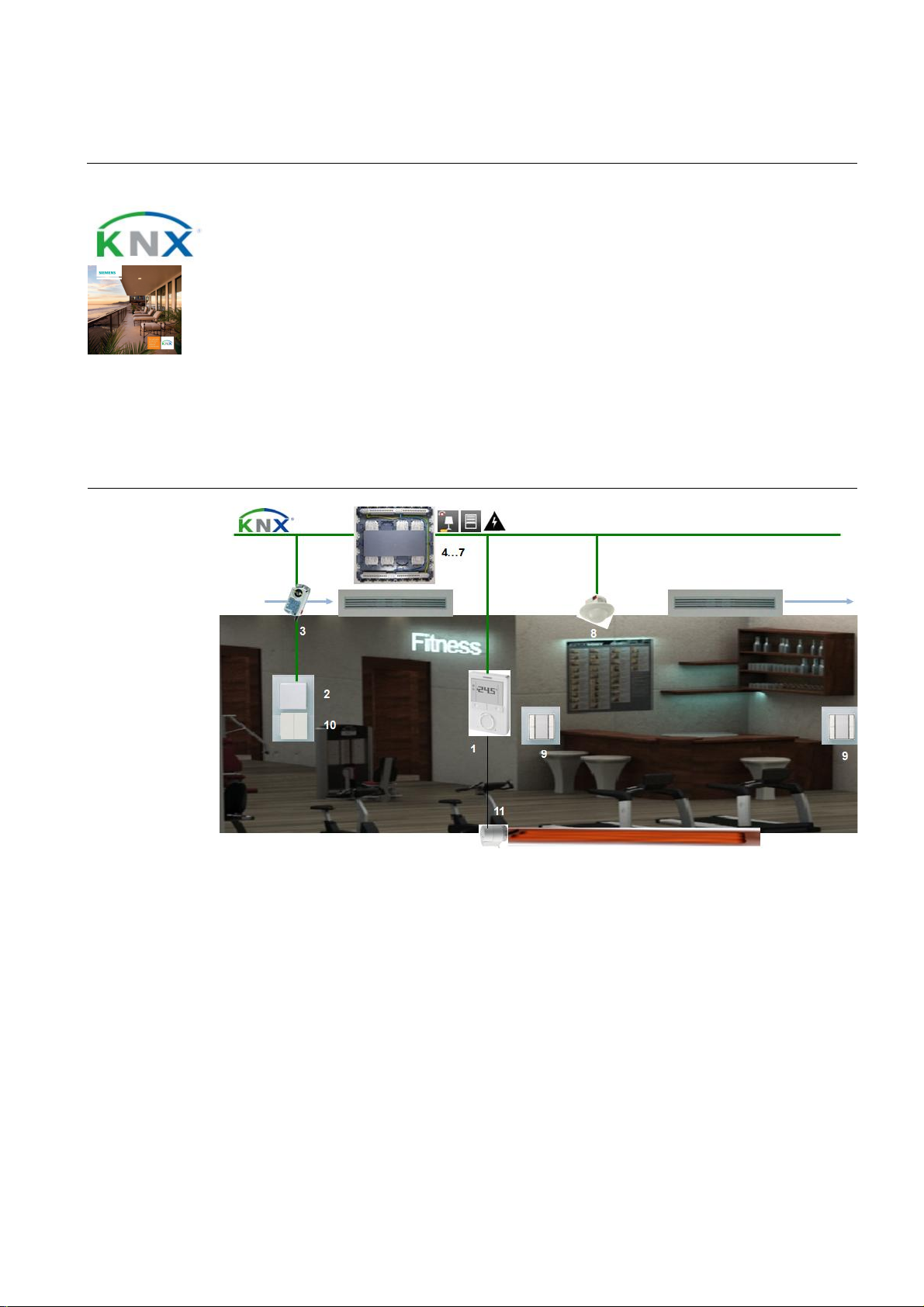
Application Manual
Nr. 10
Synco™
V
AV plant with
indoor air quality
a
nd DALI
c
onstant
li
ght contr ol
Fitness room – room automation
Features
· Fully integrated VAV application with temperature, CO2, and volumetric air flow control
· Automatic data exchange between room HVAC and primary pl ant
· VAV cont roller to optimize the ventilation system
· Rem ote control of indiv idual rooms or groups of rooms
· Dem and-compensated production of heat and cooli ng energy thanks to automatic data
exchange with prim ary plant
· Constant light control
· Efficiency class A conforming to EN 15232
Room setup
& Gamma
1. RDG400KN room thermostat: The RDG40 0KN acquires the room temperature and calculates the request for
heat/cooling energy sent to the heating/refrigerati on and VAV controllers . It also controls valve actuator STA23
of the floor heating system.
2. AQR2532 room sensor with AQ R 2576 basic module: The AQR acquires the indoor air quality and sen ds its
value to the ventilation controller, which controls the proportion of fresh air in the s upply air.
3. GDB181.1E/KN V AV co mp act control ler: The GDB.. controls the VAV dampers. Its setpoints of the
volumetr ic air flow are shif ted depending on th e amount of air demanded by the r oom thermostat.
4. AP 641 room control box: The AP 641 features 8 sockets for room automation modules type RS or RL.
5. RS 525/23 universal dimmer: Th e RS 525/23 features a relay contact to dim a lighting group up to 250 VA.
6. RL 521/23 blind actuator: The RL 521/23 features 2 relay contacts to control blinds .
7. RS 510/23 binary output, 2-fold: The RS 510/23 features 2 relay contacts to switch electric circuits.
8. UP258E21 presence detector with constant light cont rol: The UP258E21 acquires room occupancy and
brightness. This information is fed to the room thermostat and the KNX/DALI gateway.
53
Page 54

Application Manual
Nr. 10
Synco™
2
Fitness room – room automation
9. DELTA pushbutton: The p ushbutton with DELTA bus c oupling unit is us ed to control the lighting and/or the
blinds.
10. DELTA pushb utto n: The pushbutton is c onnected to the KNX interface of the AQR and is used to control the
lightin g and/or the blinds.
11. STA23 el ectrothermal actuator: The ST A23 adjusts t he valve according to the posit ioning sig nal it receives
from the controller.
Device list Key Product no. and description Stock number
1 RDG 400KN room therm ostat S55 770-T165
2 AQR2576 room sensor, basic module with CO
AQR2532 room sensor, t emperature S55720-S136
3 GDB181.1E/KN VAV compact controller S55499-D134
4 AP 6 41 room control box 5WG1 641-3AB01
5 RS 525/23 universal dimmer, 1 x 250 W 5WG1 525-2AB23
6 RL 521/23 blind actuator, 1 x 6 A 5WG1 521-4AB23
7 RS 5 10/23 bin ary output, 2 x 10 A 5WG1 510-2AB23
8 UP25 8E21 presenc e d etector with c onstant light c ontrol 5W G1 258- 2EB21
9 R ocker, 2- fold, neutr al 5TG6 205
UP 116/31 DELTA bus coupling unit, 2-fold 5WG1 116-2AB31
10 Rocker, 2-fold, neutr al 5TG6 205
Insert, pushbutton, 2-fold, 2 NO contacts 5TD2 111
11 STA23 el ec tr ot h erm al actuator S55174-A101
& Gamma
S55720-S203…206
Optional
Variants Key Product no. and description Stock number
Key Product no. and description Stock number
12 N 125/12 power supply 5WG1 125-1AB12
13 N 151 IP viewer 5WG1 151-1AB01
14 UP 588 color touch panel 5WG1 588-2AB13
15 RMB795B central control unit S55370-C162…C167
16 OZW 772. x web server OZW 772. x
17 AP 257/22 weather stati on 5WG1 257-3AB22
1a RDU341 room thermostat S55770-T106
3a GLB181.1E/KN VAV controller S55499-D135
4a AP 118 automati on modul e b ox 5WG1 118-4AB01
7a UP 223/2 pushb utton, triple, neutral 5WG1 223-2DB12
UP 117/12 bus coupling unit (BTM) 5WG1 117-2AB12
7b UP 223/ 2 pushbutt on, triple, with status LED, neutral 5WG1 223-2DB13
54
Page 55
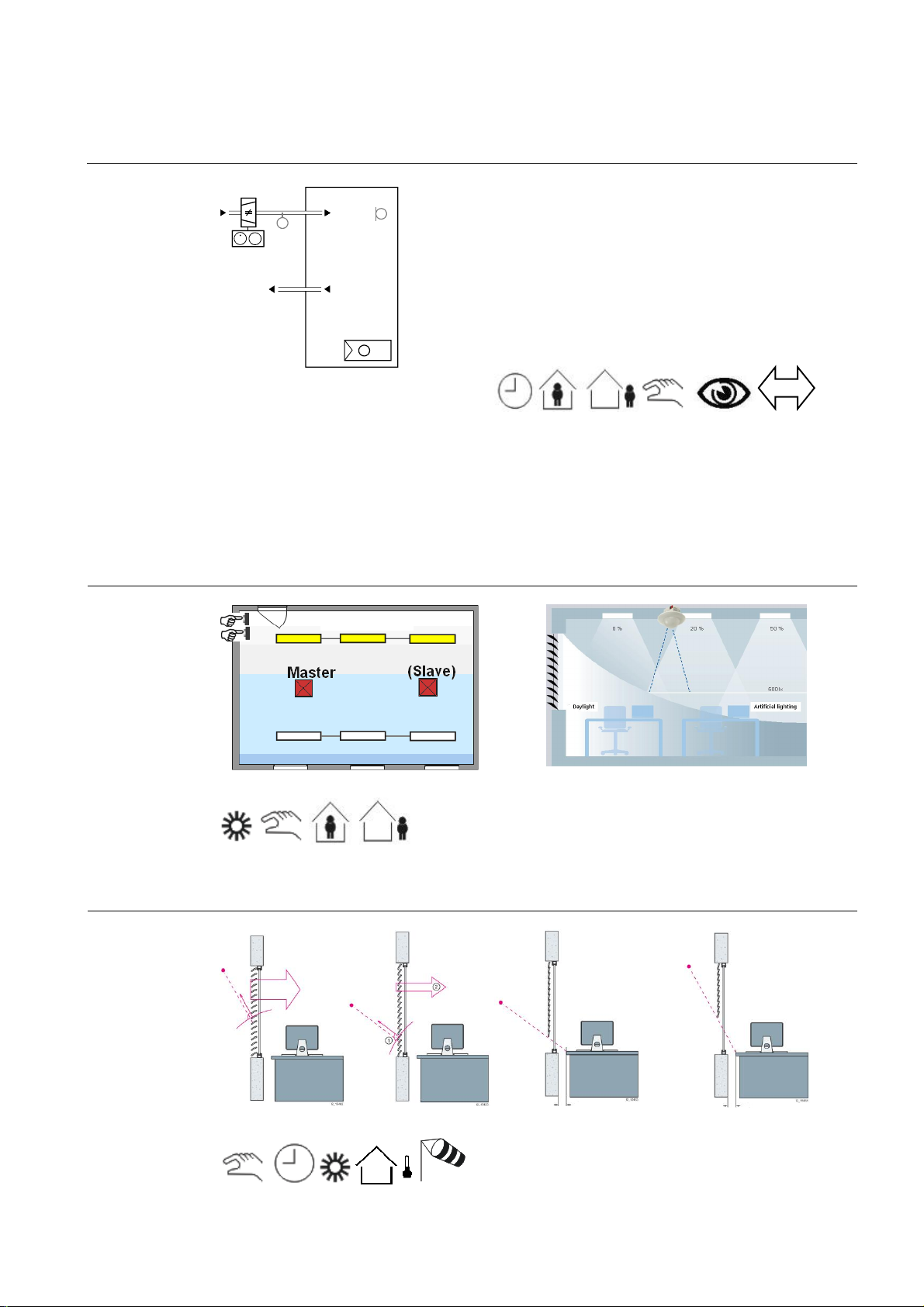
Application Manual
Nr. 10
Synco™
YV
lighting off when the room
Fitness room – room automation
Room HVAC control
T
(B1)
MV MV
T
TB0001 DG4 HQ
The tem peratur e is acquired in every room and contr olled via the supply air and the floor heating system. T he
heat/c ooling energy requ ests from all rooms ar e forwarded to the h eating/ref rigerat ion plant and the individual VAV
controll ers. The ventilation controll er controls th e supply air t emperat ure and the amount of air demanded by the
VAV controller. The heating plant is controlled depending on the heat request from the ventilation controller and
room thermostats plus the outside temp erature. The refrig eration plant is contr olled depending on the coolin g energy request from the ventilation controller. Nonoccupancy t imes during the night can be set for every room in a time
program. During these periods of ti me, the room temper atures are automaticall y l owered. Open windows are au tomatic ally detected and th e t emperature of these r ooms is low ered to save heating energy. T he room tem peratur es
are also slightly lowered dur ing the day, if the guest is not present.
(B1)
& Gamma
3192S07
T
N1
VAV plant
· Heating or cooling
· DC 0...10 V or 3-posit ion contr ol of VAV boxes or
damper ac tu ators
· Automatic or manual changeover of heating/cooling
mode
· Automatic changeover of heating/cooling mode via
supply air temperature (via KNX, only RD G400KN)
· Multifunctional inputs for keycard contact, external
sensor, etc.
Lighting control
Blinds control
Presence detectors (hot el card switc hes) help save energ y by automatically s wi tching the
is not occu pied. A brightness s ensor incorporat ed in the presence detector helps w hen switc hing and dimming
lights, ensuring that the room is al ways optimally illuminated, usin g as little as pos sible artificial light.
55
Page 56
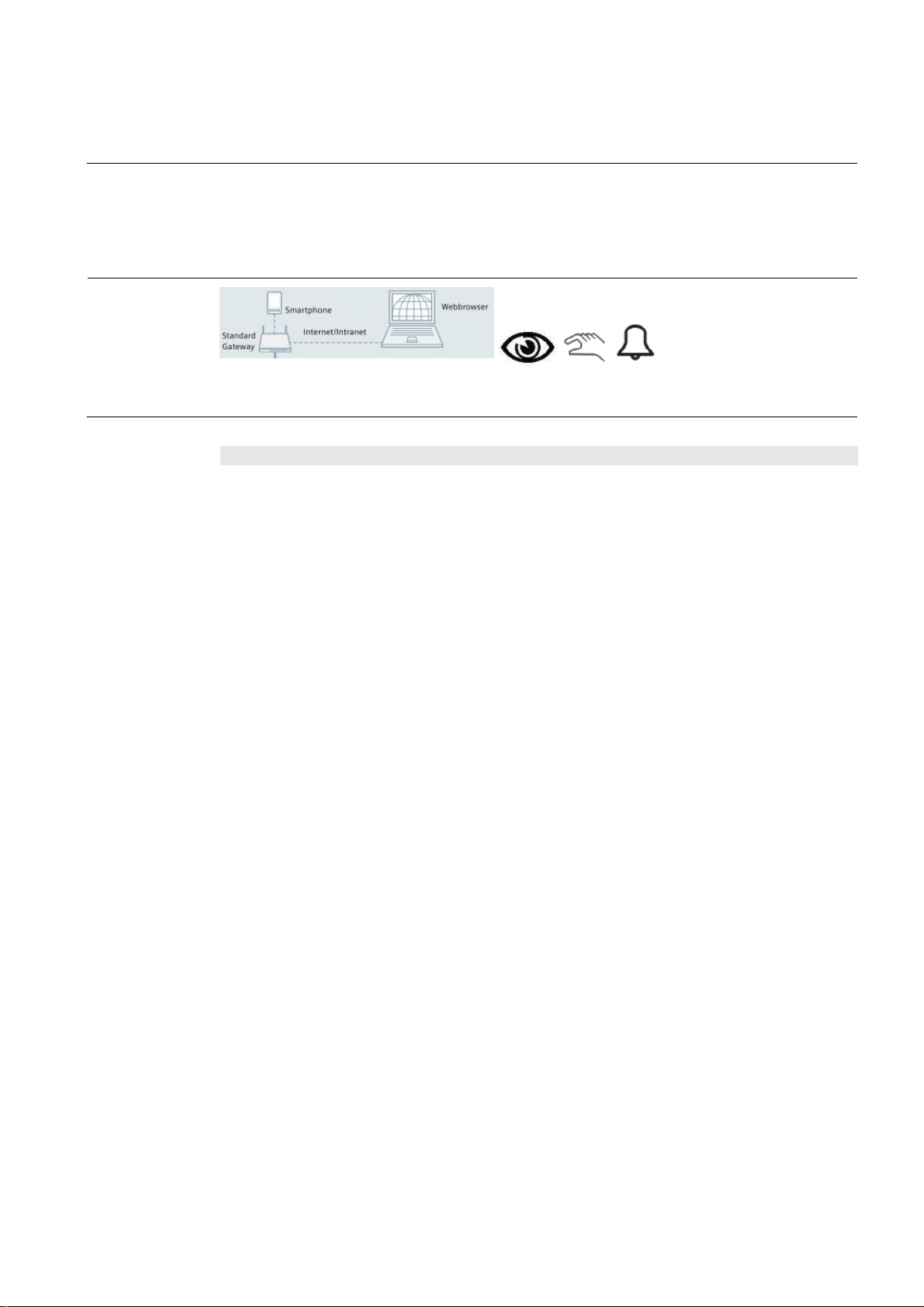
Application Manual
Nr. 10
Synco™
winds or other natu ral influ ences a
Fitness room – room automation
A weather station outside the building protects up to 8 façades f rom extreme solar radiation in the summer. This
function helps to keep the rooms cool. T he weather station also protects the blinds from damage caus ed by strong
during wi nter nights . Finally, sun tracking control and shadow outlin e t racking allow a maxi m um of natural light t o
enter th e rooms, offering op timum working c onditions.
Remote control
Integration of a w ebserver facilitates remote control an d monitoring on a PC or smartphone via webbr owser.
Function
description
Description of functions
Individual room temperature control
The room thermostat (RDU/RDG) acquires the temperature and controls valv e actuator STA23 of t he
floor heating system. When the room calls for
heat/c ooling energy, the room t hermost at sends a
heat request to the heating controller and/or a r equest
for mor e warm/cold air to the VA V control ler.
Indoor air quality control
The CO2 sensor acquires the indoor air quality and
forwards its signal to the ventilation controller which
controls the proportion of fresh air.
Demand-dependent supply air t emperature
control
The primary ventilation controller (RMU) controls the
supply air temperature and the volum etric air f low
depend ing on the request for h eat/cooli ng energy
from the room thermostat and the request for volumetric air flow from the VAV controller. The pressure
setpoin ts of the ventilation system are shifted depending on the room’s demand for supply air.
Time program for every room
Time pr ograms f or up to 10 room s or room groups
can be defined in the central c ontrol unit (RMB). A
time program sets the periods of time the r oom is not
used. During these time p eriods, the operating mode
is set to Economy, resulting in a lower temperature
setpoin t. Hence, valuabl e h eating energy can be
saved during the n ight and on days of rest. After that,
the setpoint is raised to the Precomfort level.
Presence-dependent heating control
When th e p resenc e detector signals room occupancy,
the room temperature is raised to the Comfort level.
Then, it is lowered again to the Pr ecomfort level.
& Gamma
nd controls them at dusk and according to temperatures to s ave heating energy
Constant light control
Constant light control mai ntains room lighting at a
const ant br i gh tness level b y adding artif ic i al light to
daylight. Br ightness is automatically and continu ously
adapted by dimmi ng up/down th e lighting groups.
Offset ad justments allow th e configuration of c ons tant
light control with only one presence det ector. M anu al
switching and dim ming is made possible via the
pushbutton. In this case, lighting control is stopped
and the brightness level in the room is m aintained as
long as pr esenc e is detected .
Presence-dependent lighting control
The presence det ector (UP258E21) allows up to 4
lighting groups to be switc hed and controlled and
detects presenc e within its range. If persons are
detected, the light ing is switched on at the r equired
brightness level. When the persons leave the room ,
the lighti ng is switched off again. To extend th e monitored range, a master-slave configuration can be
implemented.
Blinds control
The weather stat ion (AP257/22) with its built-in GPS
receiver offers efficient control to protect the façade
against sunlight. A utomatic and individual control of
up to 8 faç ades can be pr ovided.
Sun trac king control and sh adow outlin e t racking are
another 2 f unctions that ensure maximum usage of
daylight and minimum glare in the room. Sun tracking
control continuous ly adjusts the slats in a way that
their position is always at a right angle in relation to
the sun. Shadow outline tracking controls the position
of the blinds such that the edge of the shadow always
maintains the same distance to the window . This
optimi z es d aylight usage, thus r educing th e amount of
energy required for the lighting.
56
Page 57

Application Manual
Nr. 10
Synco™
with webbr ow ser
Fitness room – room automation
In cold winter nights and when nobody is present in
the room, the blinds are lowered to improve the bui lding’s thermal insulation. On sunny winter days, the
blinds are raised, allowing sunlight to enter the room
so that energy is gained.
Protecti on of bli nds
The weather station acquires continuousl y the wind
speed. If strong winds occur, the blinds are rais ed t o a
secure p osi ti on.
Remote control a nd monitoring
Using a webbrowser, all rooms can be controlled and
monitored via webserver (OZW). The following parameters can be monitored:
· Current room temperatures
· Current room temperature setpoints
· Current operating modes
· Heating plant parameters (temperatures,
errors, alarms)
If required, the following parameters can be changed:
· The room operating modes, individually or
in groups
· The room temperature setpoints, individually or in groups
· The time program for every room or for
groups of rooms
· Heating plant parameters (setpoints, operating modes)
& Gamma
Using a webbrowser, all rooms can be controlled and
monitor ed via webs erver (IP vi ewer). The following
parameters can be viewed/changed, if required:
· The state of lighting (on/off)
· Room occupancy
· The state of blinds (raised or lowered)
Display of energy efficiency
The OZW772 webserver is able to display the HVAC
system’s energy efficiency, which reminds the user if
– from the point of view of energy efficiency – settings
beyond the permitted limits were made. If nonefficient
operating states oc cur, the user is notified via e-mail
or smartphone app. The limit values can be set by the
user.
Second ary
documents
The Appl ication S heets listed below describ e individual controller app lications and contain detailed infor mation.
They can be downloaded from the Internet at www.siemens.com/hit
Applic ati on no. Name of appl ication Prod uct no.
Synco Application Sheet,
Individual Rooms
TB0001 DG4 HQ
Synco Application Sheet,
Central ly Managed Rooms
QCA001 MB7 HQ
Synco Application Sheet,
Central O perating and Monitoring
OWAL03 772 HQ
Gamma Application Sheet,
Lighting
L00004 U P2 HQ
Gamma Application Sheet,
Shading
B00003 AP2 HQ
VAV plant, single duct RDG400KN
Central control of room temperature control
equipment
Local pl ant operati on and monitoring via local netw ork
Daylight- and presence-dependent lighting control
(using DALI)
Shading of façades including sun trac king control and
shadow outline tracking
RMB795B
OZW 772
UP 258E21
AP 257/22
57
Page 58
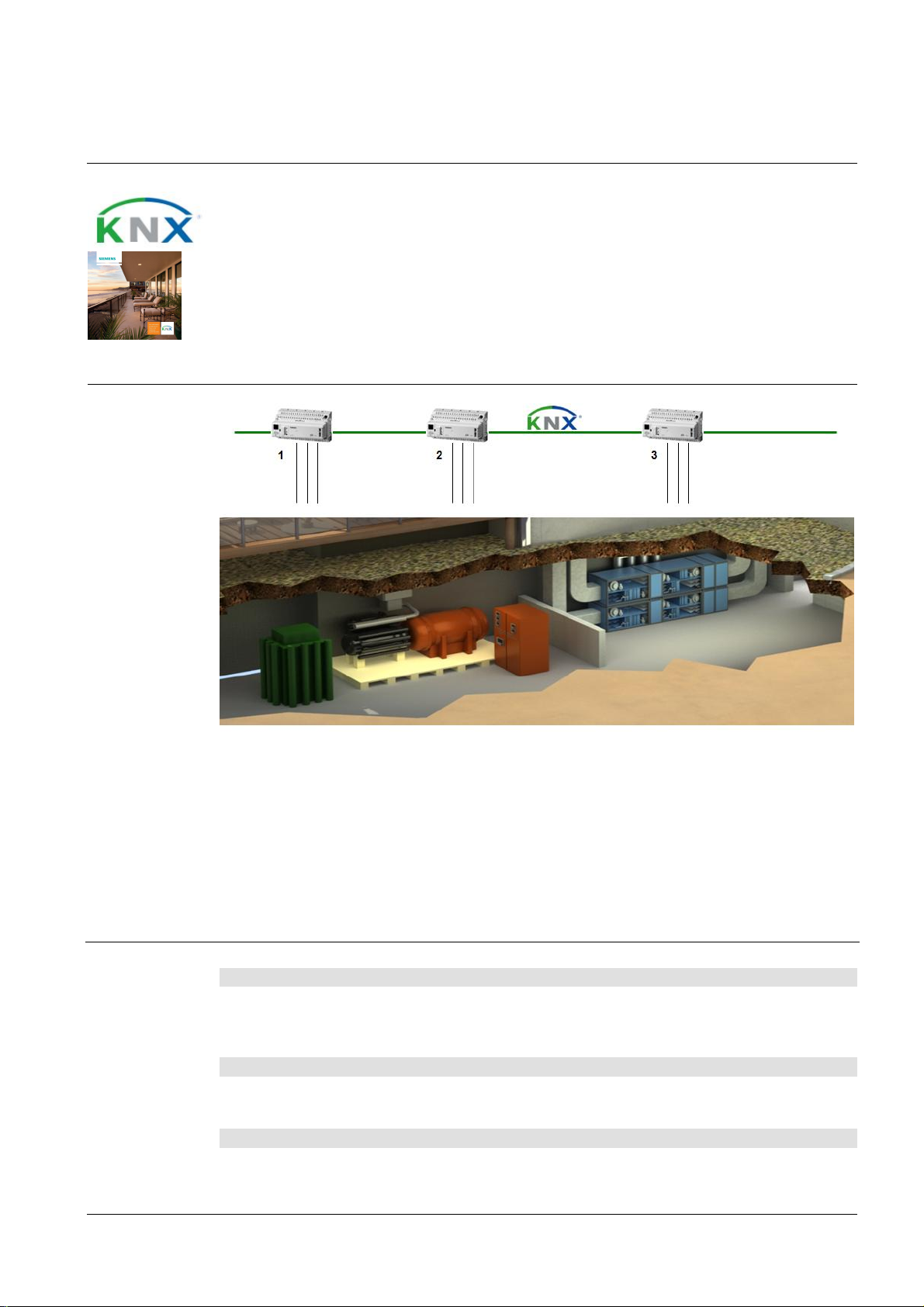
Application Manual
Nr. 11
Synco™
Heat,refrigeration and air handling
Energy center – primary control
Features
· Dem and-compensated producti on of heat, cooling energy, and supply air
· Setpoint compensation depending on demand and out si de temperature
· Together with room aut omation: Prerequisit e to attain efficiency class A conforming to
EN 15232
Room setup
& Gamma
1. RMH760B heating controller: The RMH760B controls the heating plant depending on the h eat reques t
from th e ventilation plant an d the rooms.
2. RMU72 0B refriger ation controller: The RMU720B controls the refrigeration plant depending on the
cooling energy request from th e ventilati on plant and the rooms.
3. RMU720B ventilation controller: The RMU720B cont rols the primary ventilati on plant depending on the
heat/cooling en ergy and proportion of fresh air requests from the rooms.
Device list Key Product no. and description Stock number
1 RMH760B heating controller RMH760B-x
2 RMU720B universal controller RMU720B-x
3 RMU720B universal controller RMU720B-x
Optional
Variants Key Product no. and description Stock number
Key Product no. and description Stock number
4 Plug-in type operator unit RMZ790
5 Extension module (4 UE, 2 AA, 2 DA)
4a Detached op erator unit with 3 m c able RMZ791
RMZ788
58
Page 59
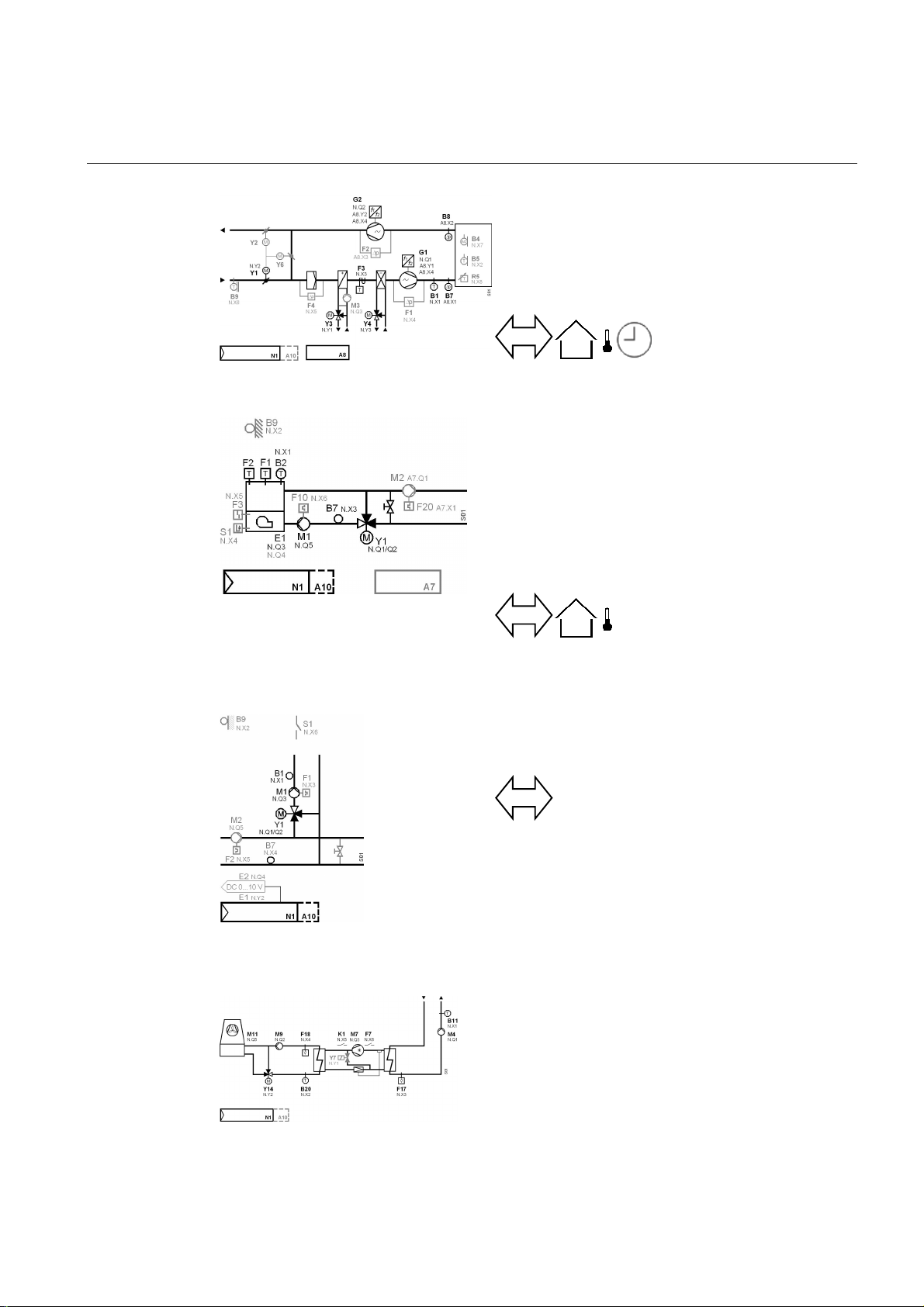
Application Manual
Nr. 11
Synco™
monitoring input for
Eenergy center – primary control
Ventilation control
ADCE06 U2B HQ
Heating control
& Gamma
Supply air temperature contr ol for VAV systems
· Control of speed-controlled fans with differential pressure control
· Control of air dampers depending on indoor air q uality
· Control of suppl y air tem perature via the heat recover y
system, the valve of the air cooling c oil and the valve of
the air cooling coil in sequence
Weather-compensated boiler temperature control with controlled maintained boiler r eturn temperature
· Weather-compensated boiler temperature control
· Maintained boiler return temperature with own mixing
valve
· C ontrol of boiler pump depending on boiler operating
mode
· Control of a 1- or 2-stage burner
· Control of boiler temperature by modulating burner with
modulating DC 0…10 V control
Refrigeration control
HB0001 H6B HQ
H0F001 H6B HQ
CBA001 U2B HQ
Demand -compensated precontrol for external consumers
· Demand-compensated precontrol
Demand-depe ndent chilled water ge ner ati on
· On/ off of pl ant depending on th e request from consu m-
ers (request via KNX)
· Plant on via external contact (demand)
· C ontrol of chilled water pu mp, with pump kick and mon-
itoring of volumetric flow
· Control of r ecooling pu mp, with p ump kick and m onitor-
ing of volumetric flow
· C ontrol of chilled water flow temperature through activation of recooling pump an d switchi ng on of refrigeration machine
· Control of recooling temperature via recooling valve
and activation of recooling fans
· Control of refrigeration machine via on/off command
compr essor, refrigeration valve and
fault status signal from the refrigeration machine. The
59
Page 60
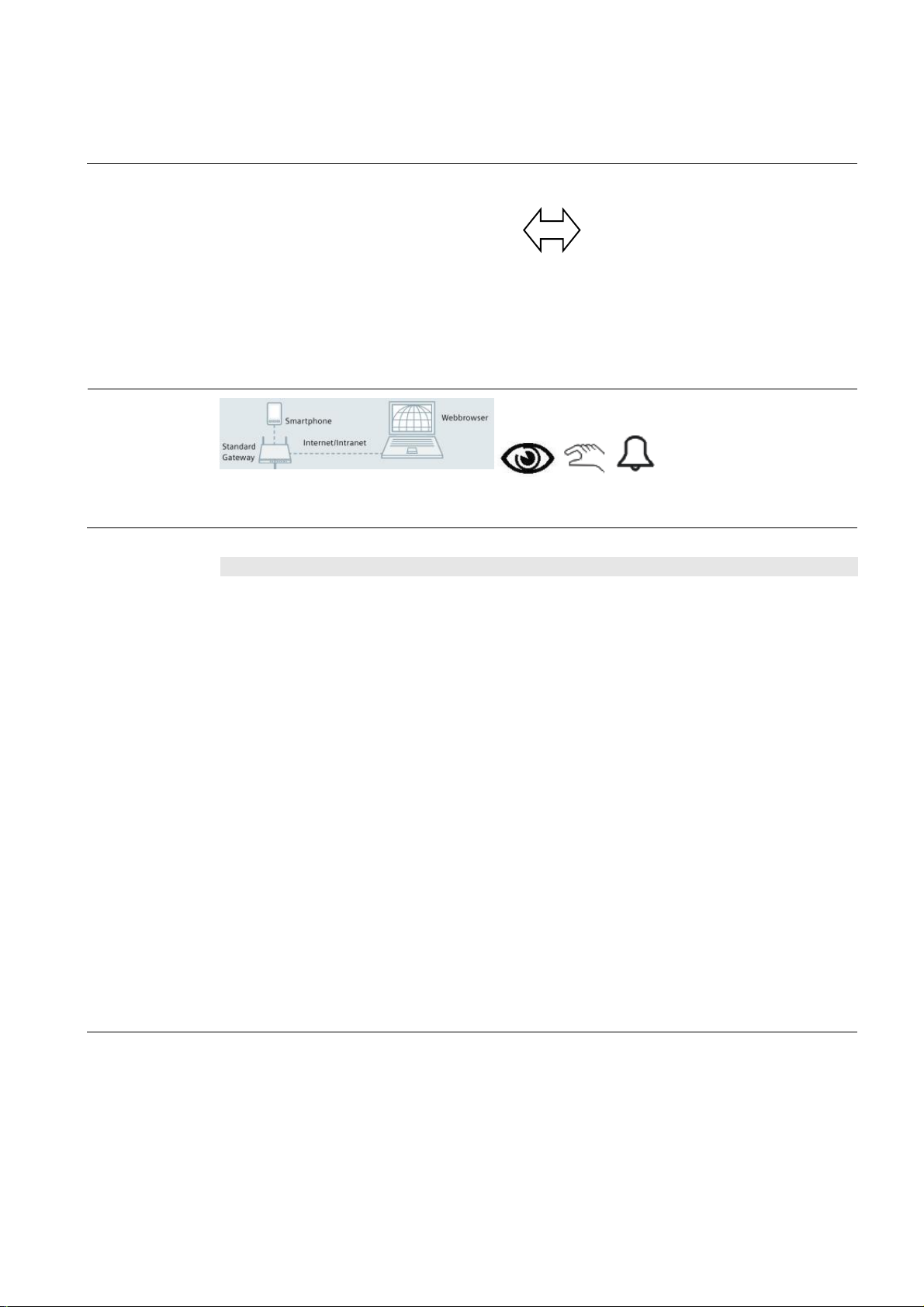
Application Manual
Nr. 11
Synco™
when requested by the
Energy center – primary control
The temperature is acquired in every r oom and controlled via the supply air, the radiator and the floor heating system. Th e h eat/cooling energy requests from all rooms ar e forwarded to the h eating/r efrigerat ion and ven tilation
controll ers. The ventilation controll er controls th e s upply air t emperat ure and the amount of air demanded. The
heating plant is controlled depending on the heat r equest from the ventilation controller and room thermostats plus
the outside temp erature. The refr igeration plant is controlled depending on the cool ing energy request from the
ventilation controller and room thermostats.
Remote control
Integration of a w ebserver facilitates remote control an d monitoring on a PC or smartphone via webbr owser.
Function
description
Description of functions
Demand-dependent supply air temperature con-
trol
The primary ventilation controller (RMU) controls the
supply air temperature and the volum etric air f low
depend ing on the request for h eat/cooli ng energy
from the room thermostat (RDG) and th e request for
volumetric air flow from the VAV controller (GDB).
The pressure set points of th e ventilation system are
shifted depending on the room’s demand for supply
air.
Demand-compensated production of heat/
cooling energy
Heat (R MH) or cooli ng energ y (RMU) is supplied only
primary ventilation controller
(RMU) or the room thermos tats (RDG, RDF) or the
room controller (RXB) (demand-compensated control).
Weather-compensated heating control
The weather station (AP 257/22 or AP 257/32) sends
the outside temperature sign al to the heating controller (RMH). Its flow temperature setpoint is shifted
depend ing on the outside temperature to adjus t the
amount of heat to be provided.
& Gamma
refrig eration machine can be switched on only if w ater
passes through t he evaporator and the condenser
Remote control a nd monitoring
Using a webbrows er, the following p ar ameters can be
monitored via webserver (O ZW):
· Current temperatures
· Current setpoints
· Current operating modes
· Heating plant parameters (temperatures, er-
rors, alarms)
If required, the following parameters can be changed:
· The operating modes
· The temperature setpoints
· The time program
Display of energy efficiency
The OZW772 webserver is able to display the HVAC
system’s energy efficiency, which reminds the user if
– from the point of view of energy efficiency – settings
beyond the permitted limits were made. If nonefficient
operating states oc cur, the user is notified via e-mail
or smartphone app. The limit values can be set by the
user.
60
Page 61

Application Manual
Nr. 11
Synco™
with webbr ow ser
Eenergy center – primary control
Secondary
documents
The Appl ication S heets listed below describ e individual controller app lications and contain detailed infor mation.
They can be downloaded from the Internet at www.siemens.com/hit
Applic ati on no. Name of appl ication Prod uct no.
Synco - Application Guide
0-92242
Synco Application Sheet,
Ventilation/Air Conditioning
ADCE06 U2B HQ
Synco Application Sheet,
Boiler with boiler pump
HB0001 H6B HQ
Synco Application Sheet,
Primar y controller for external
consumers
H0F001 H6B HQ
Synco Application Sheet,
Cooling
CBA001 U2B HQ
Synco Application Sheet,
Central O perating and Monitoring
OWAL03 772 HQ
& Gamma
Combin ation of the d evices to a system
(application 1)
Supply air temperature control for VAV systems RMU720B
Demand-compensated boiler temp erature control with
controlled maintained boiler return temperature
Demand-compensated pr ec ontrol f or external
consumers
Demand-depend ent chilled water generation RMU720B
Local pl ant operati on and monitoring via local netw ork
RMU730B, …
RMH760B
OZW 772
61
Page 62

Page 63

Siemens Switzerland Ltd
Building Technologies Division
International Headquarters
Gubelstrasse 22
6301 Zug
Switzerland
Tel +41 41 724 24 24
Siemens Building Technologies
Brunel House
Sir William Siemens Square, Frimley
Camberley
Surrey, GU16 8QD
United Kingdom
Tel +44 1276 696000
Siemens Ltd
Building Technologies Division
22/F, AIA Kowloon Tower, Landmark East
100 How Ming Street
Kwun Tong, Hong Kong
Tel +852 2870 7888
The information in this document contains general descriptions of technical options available,
which do not always have to be present in individual cases. The required features should therefore
be specified in each individual case at the time of closing the contract.
© Siemens Switzerland Ltd, 2013 • BT_0024_EN
Our world is undergoing changes that force us to think
in new ways: demographic change, urbanization, global
warming and resource shortages. Maximum efficiency
has top priority – and not only where energy is concerned.
In addition, we need to increase comfort for the well-being
of users. Also, our need for safety and security is constantly
growing. For our customers, success is defined by how
well they manage these challenges. Siemens has the
answers.
“We are the trusted technology partner for
energy-efficient, safe and secure buildings and
infrastructure.”
www.siemens.com/synco www.siemens.com/gamma
 Loading...