

Page 1
SIMATIC
Safety Instrumented System
SIMATIC SIS compact Readme
V9.0 incl. SP2 (Online)
Version: 2019-03-27 (online)
Security information
1
Readme
Overview
General information
Notes on Installation and
Usage
Software components in
SIMATIC SIS compact
Change history SIMATIC SIS
compact Readme (Online)
2
3
4
5
6
V9.0 SP2
A5E45887791-AA
Page 2
Legal information
Warning notice system
This manual contains notices you have to observe in order to ensure your personal safety, as well as to prevent
damage to property. The notices referring to your personal safety are highlighted in the manual by a safety alert
symbol, notices referring only to property damage have no safety alert symbol. These notices shown below are
graded according to the degree of danger.
DANGER
indicates that death or severe personal injury will result if proper precautions are not taken.
WARNING
indicates that death or severe personal injury may result if proper precautions are not taken.
CAUTION
indicates that minor personal injury can result if proper precautions are not taken.
NOTICE
indicates that property damage can result if proper precautions are not taken.
If more than one degree of danger is present, the warning notice representing the highest degree of danger will be
used. A notice warning of injury to persons with a safety alert symbol may also include a warning relating to property
damage.
Qualified Personnel
The product/system described in this documentation may be operated only by personnel qualified for the specific
task in accordance with the relevant documentation, in particular its warning notices and safety instructions. Qualified
personnel are those who, based on their training and experience, are capable of identifying risks and avoiding
potential hazards when working with these products/systems.
Proper use of Siemens products
Note the following:
WARNING
Siemens products may only be used for the applications described in the catalog and in the relevant technical
documentation. If products and components from other manufacturers are used, these must be recommended or
approved by Siemens. Proper transport, storage, installation, assembly, commissioning, operation and
maintenance are required to ensure that the products operate safely and without any problems. The permissible
ambient conditions must be complied with. The information in the relevant documentation must be observed.
Trademarks
All names identified by ® are registered trademarks of Siemens AG. The remaining trademarks in this publication
may be trademarks whose use by third parties for their own purposes could violate the rights of the owner.
Disclaimer of Liability
We have reviewed the contents of this publication to ensure consistency with the hardware and software described.
Since variance cannot be precluded entirely, we cannot guarantee full consistency. However, the information in this
publication is reviewed regularly and any necessary corrections are included in subsequent editions.
Siemens AG
Division Process Industries and Drives
Postfach 48 48
90026 NÜRNBERG
GERMANY
A5E45887791-AA
Ⓟ 03/2019 Subject to change
Copyright © Siemens AG 2019.
All rights reserved
Page 3

Table of contents
1 Security information......................................................................................................................................5
2 Overview.......................................................................................................................................................7
3 General information ......................................................................................................................................9
4 Notes on Installation and Usage.................................................................................................................13
4.1 Released operating systems..................................................................................................13
5 Software components in SIMATIC SIS compact ........................................................................................15
6 Change history SIMATIC SIS compact Readme (Online) ..........................................................................17
SIMATIC SIS compact Readme V9.0 incl. SP2 (Online)
Readme, V9.0 SP2, A5E45887791-AA 3
Page 4

Table of contents
SIMATIC SIS compact Readme V9.0 incl. SP2 (Online)
4 Readme, V9.0 SP2, A5E45887791-AA
Page 5

Security information
Siemens provides products and solutions with industrial security functions that support the
secure operation of plants, systems, machines and networks.
In order to protect plants, systems, machines and networks against cyber threats, it is
necessary to implement – and continuously maintain – a holistic, state-of-the-art industrial
security concept. Siemens’ products and solutions constitute one element of such a concept.
Customers are responsible for preventing unauthorized access to their plants, systems,
machines and networks. Such systems, machines and components should only be connected
to an enterprise network or the internet if and to the extent such a connection is necessary and
only when appropriate security measures (e.g. firewalls and/or network segmentation) are in
place.
For additional information on industrial security measures that may be implemented, please
visit
https://www.siemens.com/industrialsecurity.
Siemens’ products and solutions undergo continuous development to make them more secure.
Siemens strongly recommends that product updates are applied as soon as they are available
and that the latest product versions are used. Use of product versions that are no longer
supported, and failure to apply the latest updates may increase customer’s exposure to cyber
threats.
1
To stay informed about product updates, subscribe to the Siemens Industrial Security RSS
Feed under
https://www.siemens.com/industrialsecurity.
SIMATIC SIS compact Readme V9.0 incl. SP2 (Online)
Readme, V9.0 SP2, A5E45887791-AA 5
Page 6

Security information
SIMATIC SIS compact Readme V9.0 incl. SP2 (Online)
6 Readme, V9.0 SP2, A5E45887791-AA
Page 7

Overview
2
Note
Read these notes carefully; they contain important information and additional details about
SIMATIC SIS compact.
The information given in the readme files takes precedence over all the manuals.
You have received the SIMATIC SIS compact software version V9.0 incl. SP2.
SIMATIC SIS compact is tailored for use in a dedicated "Safety Instrumented System (SIS)"
based on selected system components of SIMATIC PCS 7 and the SIMATIC Safety product
portfolio.
● Based on robust, industrial standard SIMATIC hardware and software components
● Modern system architecture including Operator Station and Safety Matrix
● Simple and quick system optimizations in runtime
● For all sectors of the process industry
● Efficient engineering
● Flexible and simple integration of field devices and drives based on PROFIBUS
● Homogeneously integrated safety technology, certified by the TÜV (German Technical
Inspectorate)
● Support for open source interfaces based on international standards such as OPC
● High availability through redundancy at all levels
We wish you every success and hope you enjoy working with SIMATIC SIS compact.
Your SIS compact team
SIMATIC SIS compact Readme V9.0 incl. SP2 (Online)
Readme, V9.0 SP2, A5E45887791-AA 7
Page 8

Overview
SIMATIC SIS compact Readme V9.0 incl. SP2 (Online)
8 Readme, V9.0 SP2, A5E45887791-AA
Page 9

General information
Information about SIMATIC SIS compact on the Internet
You can find all the available documents and manuals SIMATIC SIS compact on the Industry
Online Support:
3
● Internet link (
Navigate to the following folder:
● Technical documentation SIMATIC PCS 7 -> PCS 7 V9.0 -> Software Manuals for SIMATIC
PCS 7 V9.0 SP2 -> SIMATIC PCS 7 Product Documentation -> SIMATIC SIS compact
There you will find the following documents:
● System manual "CPU 410SIS"
● Operating Instructions "SIMATIC SIS compact V9.0 SP2"
● Readme "SIMATIC SIS compact V9.0 incl. SP2 (Online)"
Information on Support and Service in the Industry Online Support:
All information on Support and Service is available in the Industry Online Support:
● Internet link (https://support.industry.siemens.com)
Here, you can also subscribe to the newsletter, which keeps you constantly up-to-date with
current information about our products.
Contents of the Readme files
The SIMATIC SIS compact V9.0 incl. SP2 Readme file is available in different versions:
1. SIMATIC SIS compact Readme (offline)
This is the version that is installed by the SIS compact setup application.
This file only contains general notes and links to documents on the internet.
http://www.siemens.com/pcs7-documentation)
2. SIMATIC SIS compact Readme (online)
This is the document which contains specific information on the installation and use of
SIMATIC SIS compact .
This file is only available on the internet so that we can keep it up to date.
You can find the current version of this document for download under the entry ID
109760509 in the Industry Online Support:
– Internet link (https://support.industry.siemens.com/cs/ww/en/view/109760509)
SIMATIC SIS compact Readme V9.0 incl. SP2 (Online)
Readme, V9.0 SP2, A5E45887791-AA 9
Page 10

General information
Note
SIMATIC SIS compact is based on selected system components of SIMATIC PCS 7. This
means you must also observe the general information on installation and use of
SIMATIC PCS 7. You can find the current version of the PCS 7 Readme (online) for download
under the entry ID 109760505 in the Industry Online Support:
● Internet link (https://support.industry.siemens.com/cs/ww/en/view/109760505)
It is vital that you use the information from the most recent version of the SIMATIC SIS compact
Readme (online) before you begin the installation or use of SIMATIC SIS compact. The
information in the SIMATIC SIS compact Readme (online) supersedes the information in the
PCS 7 Readme (online).
Each of the products comes with product-specific information in the form of readme files.
The information contained in these readme files also applies to the use of the products with
SIMATIC SIS compact.
Electronic manuals and help system
The complete SIMATIC SIS compact documentation and the system components of
SIMATIC PCS 7 is available in multiple languages at the following Internet site:
● Internet link (http://www.siemens.com/pcs7-documentation)
Note
Help system
SIMATIC SIS compact V9.0 incl. SP2 uses the help system of SIMATIC PCS 7.
Timeliness of online documents
Documents available online may be more up-to-date than the version of documents installed by
the setup application. The statements in documents available online should therefore be given
priority over installed documents.
Information on modified documents
In order to keep yourself informed about changes to the SIMATIC SIS compact readme and the
other documentation, we recommend that you activate the relevant notification in the Industry
Online Support:
● Internet link (https://support.industry.siemens.com)
Notes on the documentation on SIMATIC S7 F Systems and SIMATIC Safety Matrix
The setup of SIMATIC SIS compact V9.0 incl. SP2 allows the installation of
SIMATIC S7 F Systems and SIMATIC Safety Matrix.
SIMATIC SIS compact Readme V9.0 incl. SP2 (Online)
10 Readme, V9.0 SP2, A5E45887791-AA
Page 11

General information
Additional documents and manuals on these products are provided in Software Media Package
SIMATIC SIS compact V9.0 incl. SP2 on the two data carriers supplied additionally:
● SIMATIC S7 F-Systems (CD)
● SIMATIC Safety Matrix (CD)
SIMATIC SIS compact Readme V9.0 incl. SP2 (Online)
Readme, V9.0 SP2, A5E45887791-AA 11
Page 12

General information
SIMATIC SIS compact Readme V9.0 incl. SP2 (Online)
12 Readme, V9.0 SP2, A5E45887791-AA
Page 13

Notes on Installation and Usage
4.1 Released operating systems
The following operating systems are supported in SIS compact V9.0 incl. SP2:
● Windows 7 Professional SP1 (64-Bit, only English Windows language version)
● Windows 7 Ultimate / Enterprise SP1 (64-Bit)
● Windows 10 Enterprise 2015 LTSB (64-Bit)
4
SIMATIC SIS compact Readme V9.0 incl. SP2 (Online)
Readme, V9.0 SP2, A5E45887791-AA 13
Page 14

Notes on Installation and Usage
4.1 Released operating systems
SIMATIC SIS compact Readme V9.0 incl. SP2 (Online)
14 Readme, V9.0 SP2, A5E45887791-AA
Page 15
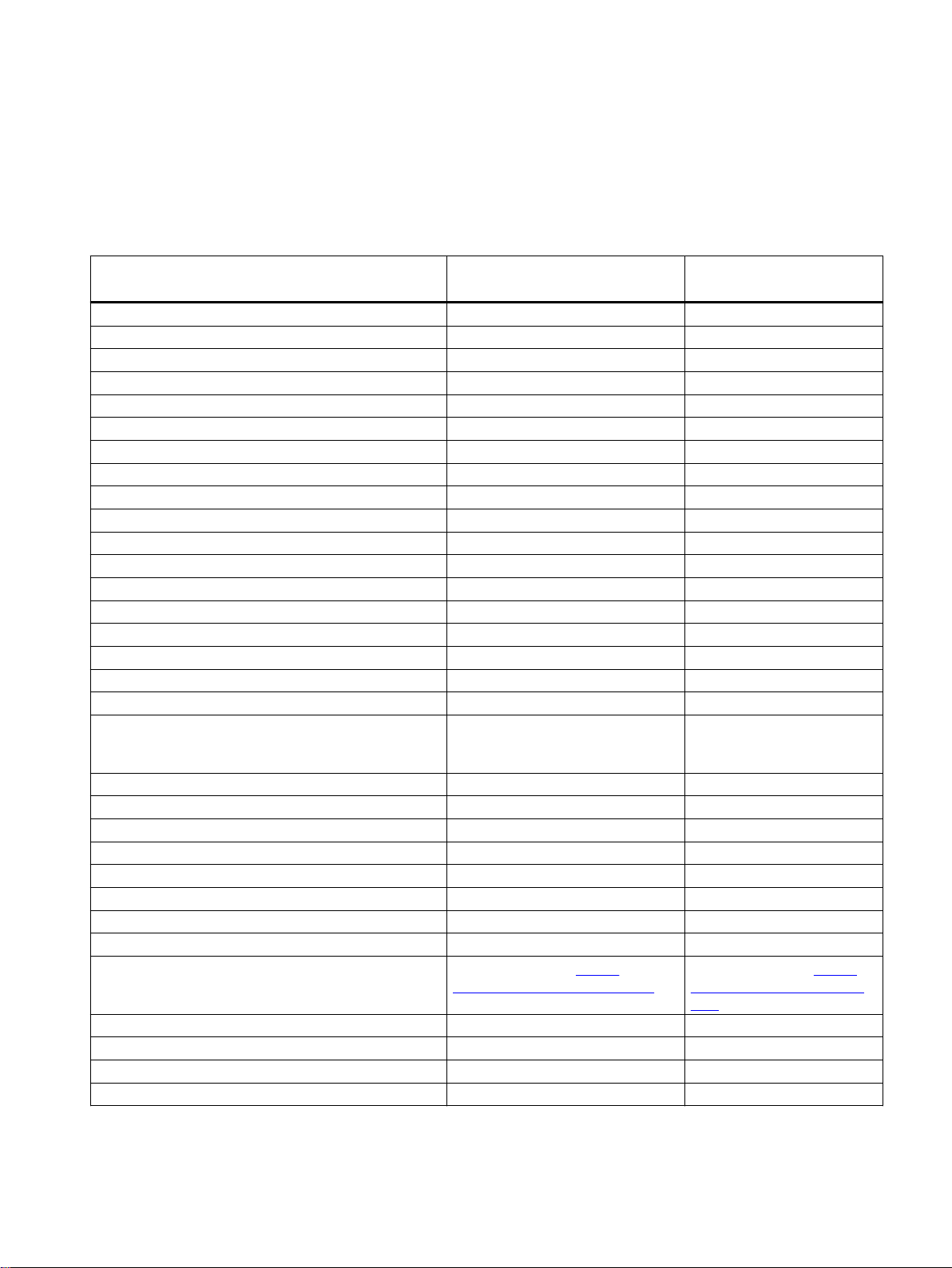
Software components in SIMATIC SIS compact
5
SIMATIC SIS compact DVD
SW components
_Product Information
Automation License Manager V5.3 + SP4 + Upd2 V5.3 + SP4 + Upd4
STEP 7 Basis V5.6 + Upd3 V5.6 + SP1 + Upd1
CFC V9.0 + SP1 V9.0 + SP3
S7-SCL V5.6 + HF1 V5.6 + Upd1
TH V9.0 + SP1 V9.0 + SP3
IEA-PO V9.0 + SP1 V9.0 + SP3
SIMATIC PCS 7 Basis Library V9.0 + SP1 V9.0 + SP2
SIMATIC PCS 7 Advanced Process Library V9.0 + SP1 V9.0 + SP2 + Upd1
PLCSIM V5.4 + SP8 V5.4 + SP8 + Upd1
SIMATIC WinCC V7.4 + SP1 + Upd4 V7.4 + SP1 + Upd10
Information Server Ready Component Version 2014 SP3 Version 2014 SP3 + Upd3
Process Historian Ready Component Version 2014 SP3 Version 2014 SP3 + Upd3
OpenPCS 7 V9.0 + Upd1 V9.0 + Upd2
AS-OS-Engineering V9.0 + SP1 V9.0 + SP3
PV InsInfo Server V9.0 + SP1 V9.0 + SP3
PCS 7 Basis Faceplates V9.0 + SP1 V9.0 + SP2
PCS 7 Advanced Faceplates V9.0 + SP1 V9.0 + SP2
SIMATIC NET PC-Software V14 + SP1 + Upd2 V14 + SP1 + Upd11 (includes
SIMATIC NET SOFTNET-IE RNA V14 V14
SIMATIC Management Agent V9.0 + Upd1 V9.0 + SP1
SIMATIC PUD Manager V1.1 + Upd1 V1.1 + Upd1
SIMATIC S7 F Systems V6.2 + Upd1 V6.2 + Upd1
SIMATIC S7 F Configuration Pack V5.5 + SP13 V5.5 + SP13
SIMATIC Safety Matrix V6.2 + SP2 + Upd2 V6.3
SIMATIC Logon V1.6 V1.6 + Upd1
SIMATIC PDM V9.1 + Upd2 V9.1 + Upd4
SIMATIC PDM Devices Internet download (https://
PCS 7 System Documentation V9.0 + SP1 V9.0 + SP1
PCS 7 Tools V9.0 + SP1 V9.0 + SP2
SQL Server 2014 SP2 2014 SP2
SIS compact V9.0 incl. SP1 SIS compact V9.0 incl. SP2
Upd2 + Upd6 + Upd7 + Upd9
+ Upd10)
Internet download (https://
www.siemens.com/simatic-pdm)
www.siemens.com/simaticpdm)
SIMATIC SIS compact Readme V9.0 incl. SP2 (Online)
Readme, V9.0 SP2, A5E45887791-AA 15
Page 16
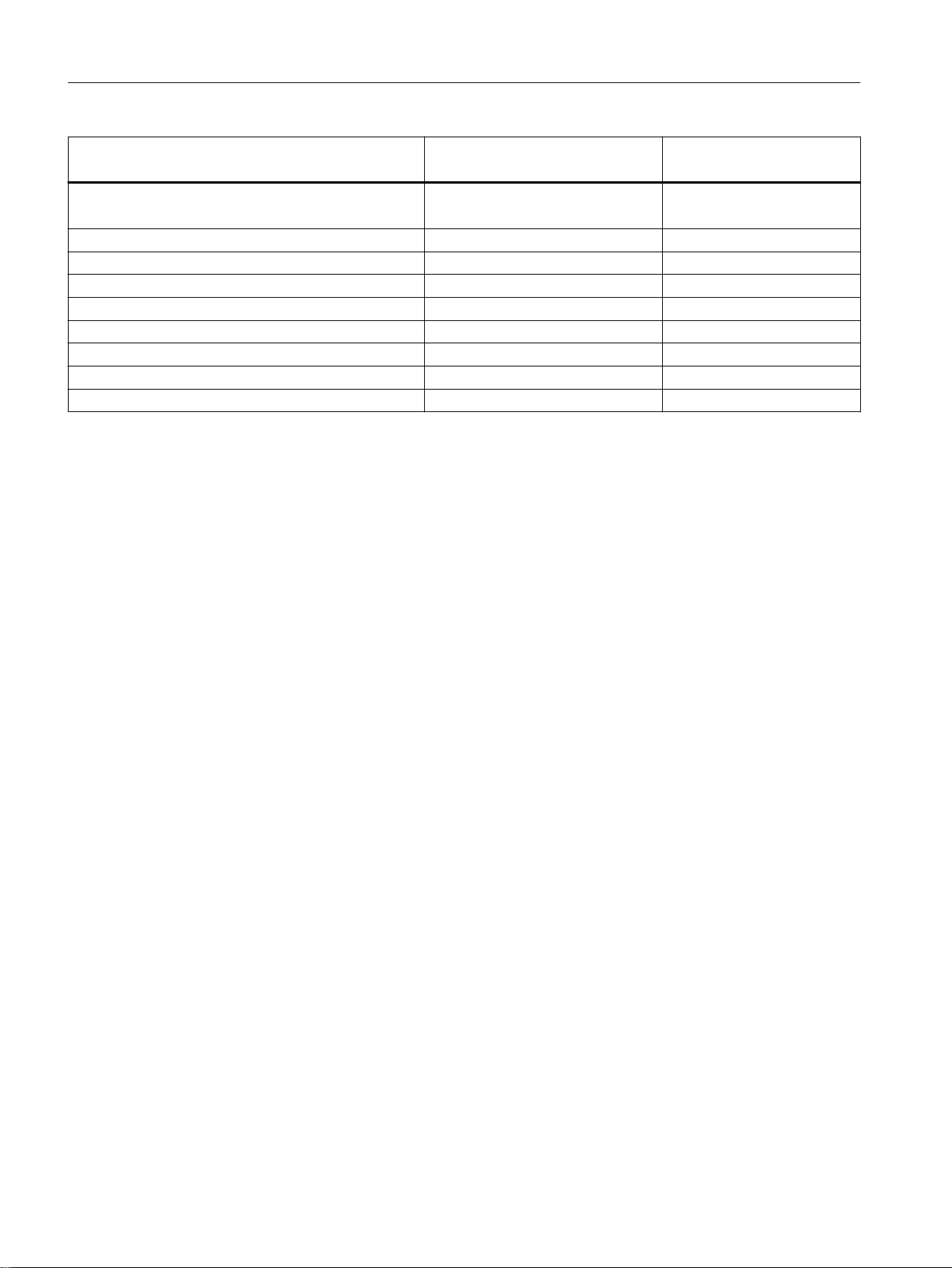
Software components in SIMATIC SIS compact
SIMATIC SIS compact DVD
SW components
Additional_Products :
(manual installation required)
DiagMonitor V5.0 + SP2 + Upd1 V5.1
MTU V1.0 V1.0
S7 Block Privacy V1.0 + SP4 V1.0 + SP4
SIMATIC Assessment Suite - Data Collector SAS-DC_2017_1 SAS-DC_2018_2
Miscellaneous :
PKZIP V14.4 V14.4
DotNetFramework V4.6.2 V4.6.2
SIS compact V9.0 incl. SP1 SIS compact V9.0 incl. SP2
DVD 2/2 DVD 2/2
SIMATIC SIS compact Readme V9.0 incl. SP2 (Online)
16 Readme, V9.0 SP2, A5E45887791-AA
Page 17
Change history SIMATIC SIS compact Readme (Online)
Changes since delivery release SIMATIC SIS compact V9.0 incl. SP2
Version Edition Change
2019-03-27 (ONLINE) 03/2019 Delivery version SIMATIC SIS compact V9.0 incl. SP2
6
SIMATIC SIS compact Readme V9.0 incl. SP2 (Online)
Readme, V9.0 SP2, A5E45887791-AA 17
Page 18

Change history SIMATIC SIS compact Readme (Online)
SIMATIC SIS compact Readme V9.0 incl. SP2 (Online)
18 Readme, V9.0 SP2, A5E45887791-AA
 Loading...