

Siemens SIMATIC NET MM900, SIMATIC NET MM992-4LD, SIMATIC NET MM991-4, SIMATIC NET MM991-4LD, SIMATIC NET MM992-4 Compact Operating Instructions
...Page 1

Page 2

Page 3

SIMATIC NET
Industrial Ethernet switches
MM900 media modules for SCALANCE
XR-500M
Compact Operating Instructions
Legal information
Qualified Personnel
personnel
qualified
Proper use of Siemens products
WARNING
Siemens products may only be used for the applications described in the catalog and in the
must be complied with. The information in the relevant documentation must be observed.
The product/system described in this documentation may be operated only by
for the specific task in accordance with the relevant documentation, in particular its
warning notices and safety instructions. Qualified personnel are those who, based on their
training and experience, are capable of identifying risks and avoiding potential hazards when
working with these products/systems.
Note the following:
relevant technical documentation. If products and components from other manufacturers are
used, these must be recommended or approved by Siemens. Proper transport, storage,
installation, assembly, commissioning, operation and maintenance are required to ensure that
the products operate safely and without any problems. The permissible ambient conditions
© Siemens AG 2011 - 2015. All rights reserved
A5E03275846-04, 11/2015
1
Page 4
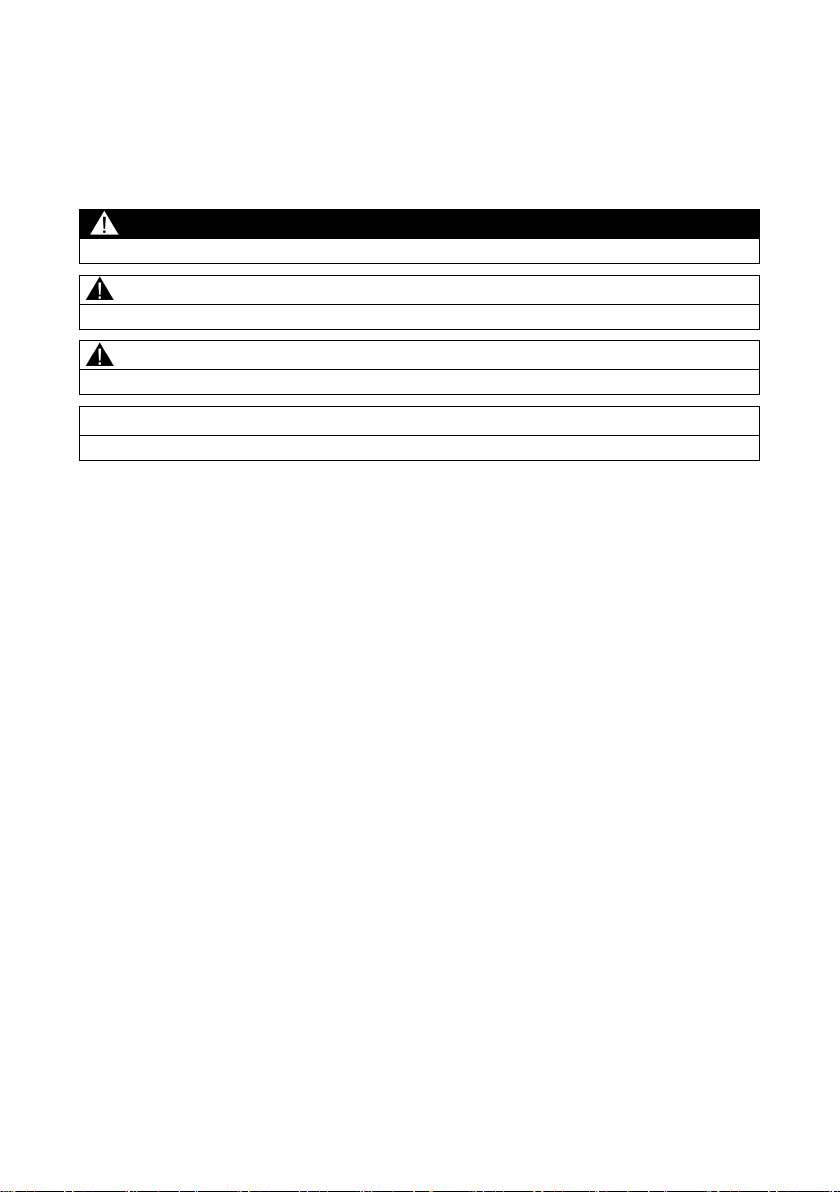
Warning notice system
DANGER
indicates that death or severe personal injury will result if proper precautions are not taken.
WARNING
indicates that death or severe personal injury may result if proper precautions are not taken.
CAUTION
indicates that minor personal injury can result if proper precautions are not taken.
NOTICE
indicates that property damage can result if proper precautions are not taken.
This manual contains notices you have to observe in order to ensure your personal safety, as
well as to prevent damage to property. The notices referring to your personal safety are
highlighted in the manual by a safety alert symbol, notices referring only to property damage
have no safety alert symbol. These notices shown below are graded according to the degree of
danger.
If more than one degree of danger is present, the warning notice representing the highest
degree of danger will be used. A notice warning of injury to persons with a safety alert symbol
may also include a warning relating to property damage.
MM900 media modules for SCALANCE XR-500M
2 A5E03275846-04, 11/2015
Page 5

Table of contents
1 Introduction ..................................................................................................3
2 Description ...................................................................................................4
3 Installation ...................................................................................................6
4 Technical data ..............................................................................................9
5 Dimension drawings ................................................................................... 15
6 Approvals ................................................................................................... 17
1
Introduction
Purpose of the compact operating instructions
Validity of these compact operating instructions
Note
Additional literature
When working with m
instructions of the SCALANCE XR
You will find the compact operating instructions of the SCALANCE XR-500M product
group on the supplied CD.
2.1 Type designation ....................................................................... 4
2.2 Product characteristics .............................................................. 5
2.3 Unpacking and checking ........................................................... 6
4.1 Mechanical and electrical data .................................................. 9
4.2 Cable lengths of the MM900 media modules for
SCALANCE XR-500M ............................................................. 13
4.3 Other properties ...................................................................... 15
Based on the compact operating instructions, you will be able to install and connect
up the MM900 media module correctly.
These compact operating instructions apply to the MM900 product group of the
SCALANCE X-500 product line as of product version 1.
edia modules, you should also read the compact operating
-500M product group.
MM900 media modules for SCALANCE XR-500M
A5E03275846-04, 11/2015
3
Page 6
Description
2
Description
2.1
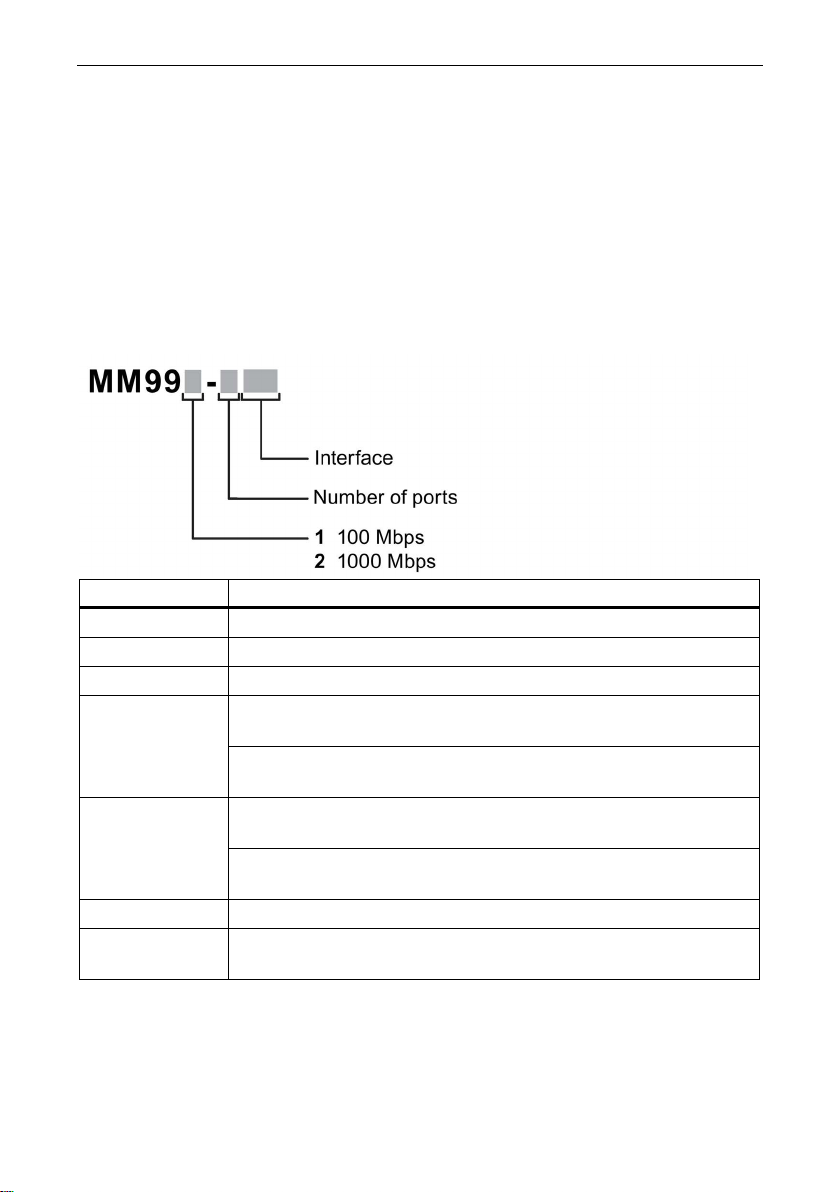
Type designation
Structure of the type designation
Interface
Property
CU
10/100/1000 Mbps RJ-45 port electrical.
CUC
10/100/1000 Mbps RJ-45 port electrical with securing collar.
SFP
100/1000 Mbps SFP media module.
up to max. 3 km.
up to max. 750 m.
up to max. 26 km.
up to max. 10 km.
PoE
10/100/1000 Mbps PoE port electrical, max. 60 W.
The type designation an MM900 media module for SCALANCE X-500 consists of
several parts with the following meaning:
[-] 100 Mbps ST port optical, multimode fiber-optic cables,
1000 Mbps SC port optical, multimode fiber-optic cables,
LD 100 Mbps ST port optical, single mode fiber-optic cables,
1000 Mbps SC port optical, single mode fiber-optic cable,
PoEC 10/100/1000 Mbps PoE port electrical, with securing collar, max.
60 W.
MM900 media modules for SCALANCE XR-500M
4 A5E03275846-04, 11/2015
Page 7

2.2
Product characteristics
Media modules
Type
Properties
Article number
mode fiber-optic cable, up to max. 5 km.
8AA0
mode FO cable, up to max. 750 m.
8AA0
mode FO cable, up to max. 10 km.
8AA0
8AA0
trical
8AA0
trical with securing collars
8AA0
cal, max 60 W
8AA0
cal with securing collars, max 60 W
8AA0
Components of the product
Description
MM991-4 4 x 100 Mbps, ST ports optical, multi-
MM991-4LD 4 x 100 Mbps, ST ports optical, single
mode fiber-optic cable, up to max. 26 km.
MM992-4 4 x 1000 Mbps, SC ports optical, multi-
MM992-4LD 4 x 1000 Mbps, SC ports optical, single
MM992-4SFP 4 x 100 / 1000 Mbps, SFP media module 6GK5 992-4AS00-
MM992-4CU 4 x 10/100/1000 Mbps, RJ-45 ports elec-
MM992-4CUC 4 x 10/100/1000 Mbps, RJ-45 ports elec-
MM992-4PoE 4 x 10/100/1000 Mbps, PoE ports electri-
MM992-4PoEC 4 x 10/100/1000 Mbps, PoE ports electri-
The following components are supplied with an MM900 media module:
● MM900 media module
● Compact operating instructions
6GK5 991-4AB00-
6GK5 991-4AC008AA0
6GK5 992-4AL00-
6GK5 992-4AM00-
6GK5 992-4SA00-
6GK5 992-4GA00-
6GK5 992-4QA00-
6GK5 992-4RA00-
MM900 media modules for SCALANCE XR-500M
A5E03275846-04, 11/2015
5
Page 8
Installation
2.3
Unpacking and checking
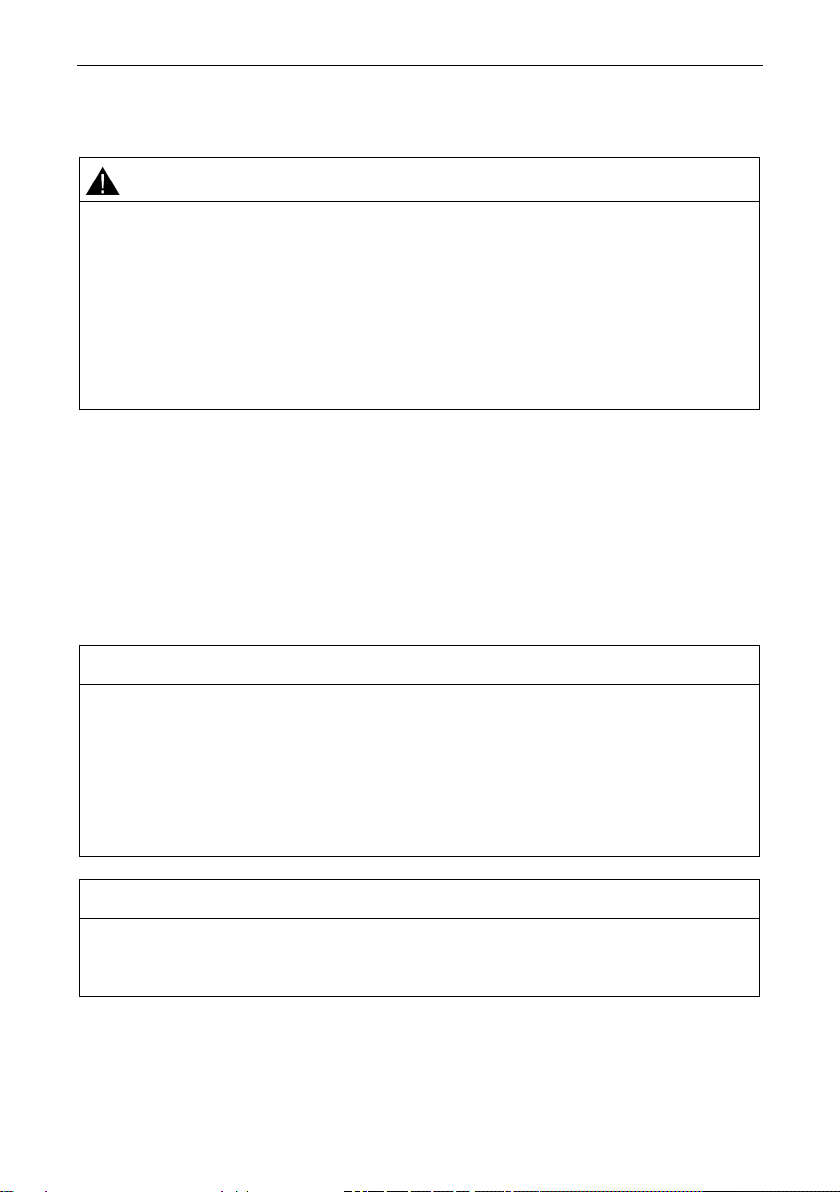
WARNING
Do not use any parts that show evidence of damage
3
Installation
NOTICE
Failure of the data traffic due to contamination of optical plug-in connections
Close unused optical sockets and plugs as well as pluggable transceivers and slots
NOTICE
Use only approved media modules
If you use damaged parts, there is no guarantee that the device will function
according to the specification.
If you use damaged parts, this can lead to the following problems:
• Injury to persons
• Loss of the approvals
• Violation of the EMC regulations
Use only undamaged parts.
1. Make sure that the package is complete.
2. Check all the parts for transport damage.
If the consignment is incomplete or if there is damage to the exterior, contact your
supplier or your local Siemens office.
Optical sockets and plugs are sensitive to contamination of the end face.
Contamination can lead to the failure of the optical transmission network.
with the supplied protective caps.
Remove the protective caps only immediately before you use the plug-in
connection.
In the module slots of SCALANCE XR500, use only approved media modules
"MM900" of the X-500 IE switch product line.
MM900 media modules for SCALANCE XR-500M
6 A5E03275846-04, 11/2015
Page 9
Installation
Note
Slots for PoE modules
PoE modules can only be used in slots1, 2 and 3.
Note
The names and labeling of the media modules differ
Example: The device is called, for example MM992
the labeling on the device is 9924AS.
Note
Factory settings of the media modules
When inserting a media module, the parameters of the ports are set to the factory
defaults. Fir
for the ports.
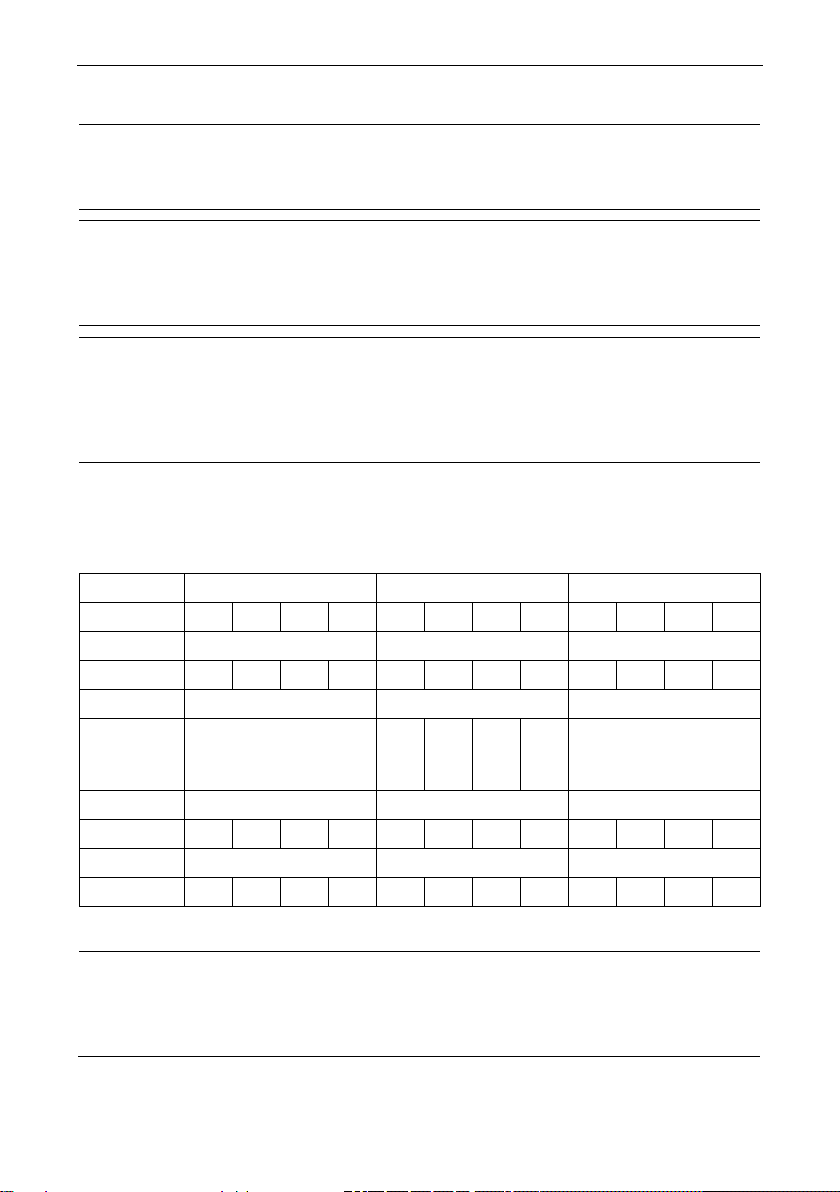
Identification of the media module slots and ports
Slot
1 2 3
Slot
4 5 6
Port
P1
P2
P3
P4
P1
P2
P3
P4
P1
P2
P3
P4
(SFP+)
Slot
7 8 9
Port
P1
P2
P3
P4
P1
P2
P3
P4
P1
P2
P3
P4
Slot
10
11
12
Port
P1
P2
P3
P4
P1
P2
P3
P4
P1
P2
P3
P4
Note
Slot number
In modular devices, the MM900 media modules can be assigned a slot number to aid
orientation. The slot number labels ship with the modular devices.
-4SFP [6GK5 992-4AS00-8AA0],
st plug a media module into the device, and then assign the parameters
The following table shows the arrangement of the slots and ports of a SCALANCE
XR552-12M:
Port P1 P2 P3 P4 P1 P2 P3 P4 P1 P2 P3 P4
Slot 0,
P1 P2 P3 P4
port
With a SCALANCE XR528-6M, there are total of six slots and four SFP+ ports.
MM900 media modules for SCALANCE XR-500M
A5E03275846-04, 11/2015
7
Page 10
Installation
Plugging in media module
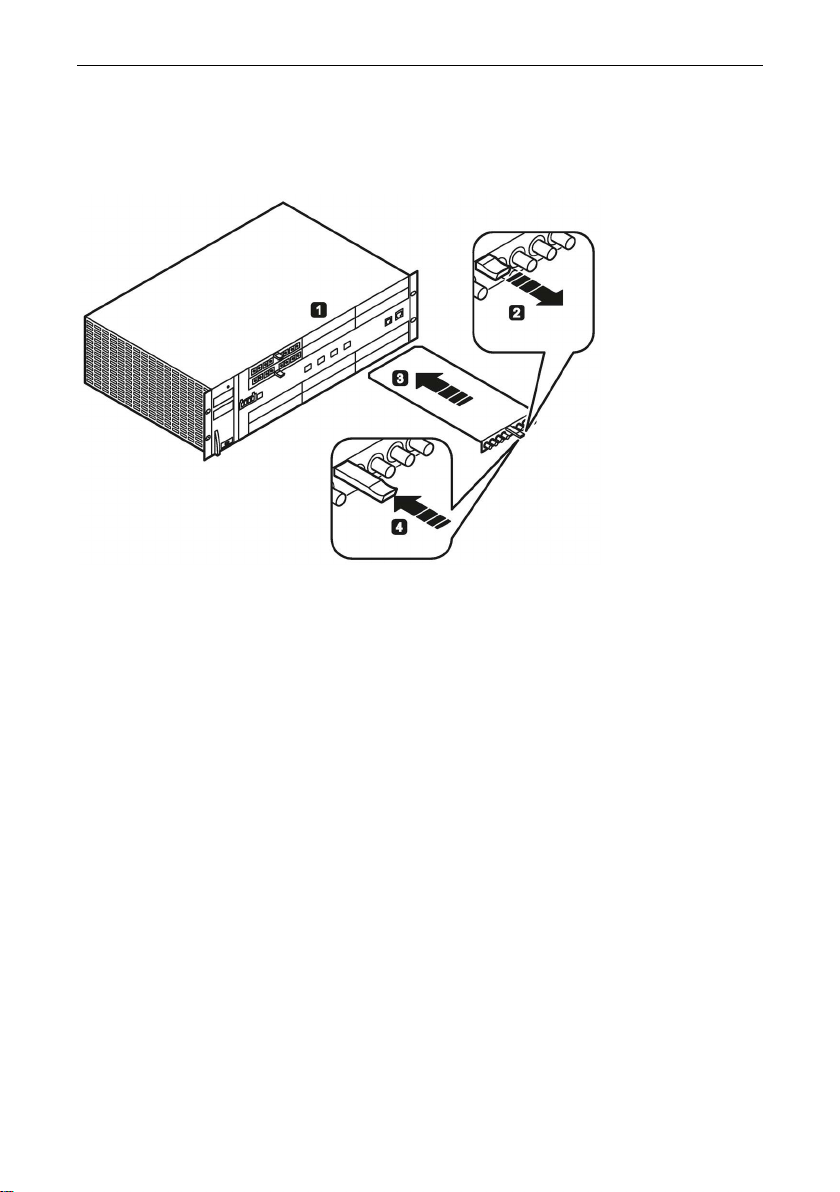
Figure 3-1 Plugging a media module into a SCALANCE XR552-12M. SCALANCE
XR528-6M is used analogously.
Follow the steps below to plug an MM900 media module into a SCALANCE XR500:
1. Remove the dummy covers of the device slot into which you want to insert a
media module.
2. Pull the handle out of the media module. The media module cannot be installed
unless the handle is pulled out.
3. Place the media module in the guide rails of the device slot. The media module is
correctly installed when it locks easily into the device and the front panel of the
module is flush with the front of the device.
4. Push the handle back into the module. The media module is then locked in place.
MM900 media modules for SCALANCE XR-500M
8 A5E03275846-04, 11/2015
Page 11

Technical data
Pulling a media module
NOTICE
Operating the device only with closed module slots
4
Technical data
4.1
Mechanical and electrical data
Device variants
Note
Degree of protection of the media modules
Note that the media modules do not have a d
protection is only relevant for the basic devices.
To pull a media module, follow the same steps as when plugging, but in the reverse
order:
1. Pull out the handle of the media module.
2. Pull the media module out of the device slot.
3. Close the device slot with a dummy cover if you are not plugging in another
module.
The device meets degree of protection IP20, if all the module slots have either
media modules inserted or are closed by dummy covers. Do not start up the
device with open module slots since the ingress of objects can lead to damage.
The following technical specifications apply to the following device:
● MM900 media module for SCALANCE XR-500M
MM900 media modules for SCALANCE XR-500M
A5E03275846-04, 11/2015
egree of protection. The degree of
9
Page 12

Technical data
Interfaces
Media module
Interfaces
MM992-4CU
4 x 10/100/1000 Mbps, RJ-45 ports electrical.
MM992-4CUC
4 x 10/100/1000 Mbps, RJ-45 ports electrical with securing collar.
MM992-4SFP
4 x 100/1000 Mbps, SFP media module.
MM992-4PoE
4 x 10/100/1000 Mbps, PoE ports electrical, max 60 W.
4PoEC
max 60 W.
up to max. 750 m.
up to max. 10 km.
Construction
Media module
Dimensions and weight
Value
MM992-4LD
(W x H x D)
(W x H x D)
Weight
387 g
MM992-
MM991-4 4 x 100 Mbps, ST ports optical, multimode fiber-optic cable,
MM991-4LD 4 x 100 Mbps, ST ports optical, single mode fiber-optic cable,
MM992-4 4 x 1000 Mbps, SC ports optical, multimode FO cable,
MM992-4LD 4 x 1000 Mbps, SC ports optical, single mode FO cable,
MM992-4CU
MM992-4CUC
MM992-4SFP
MM991-4
MM991-4LD
MM992-4
MM992-4PoE
MM992-
4PoEC
4 x 10/100/1000 Mbps, PoE ports electrical, with securing collar,
up to max. 5 km.
up to max. 26 km.
Dimensions
Weight 300 g
Dimensions
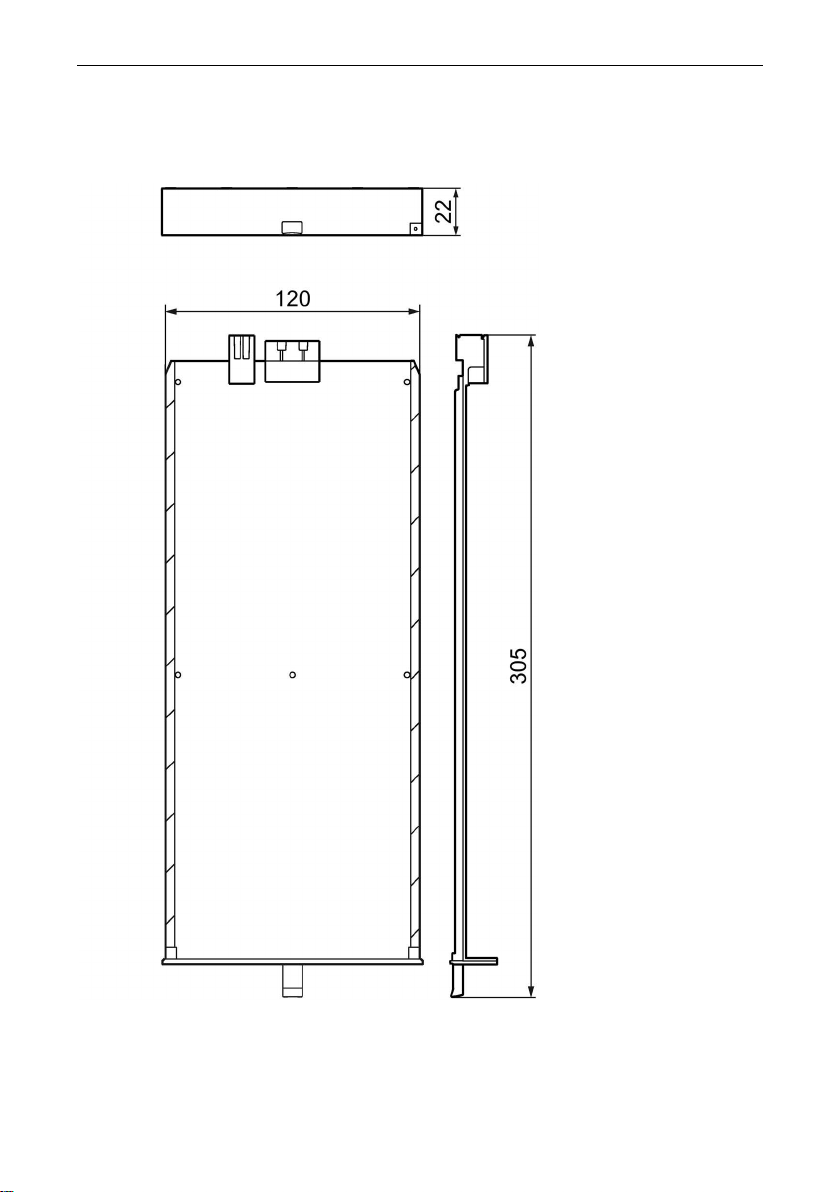
120 x 22 x 305 mm
120 x 22 x 305 mm
MM900 media modules for SCALANCE XR-500M
10 A5E03275846-04, 11/2015
Page 13

Permitted ambient conditions
Environmental conditions
perature
Operating temperature
0 to +60 °C
in operation at 25 °C
2000 m at max. 56 °C
Electrical data
Media module
Current consumption*
Maximum power consumption*
MM992-4CUC
MM992-4PoEC
(at 60 W PoE load)
(at 60 W PoE load)
MM991-4
0.20 A
4.8 W
MM992-4
0.13 A
3.12 W
MM992-4LD
0.15 A
3.6 W
Note
Fusing and signal contacts with media modules
The MM900 media modules do not have th
contacts. The fuses and the signaling contacts exist in the SCALANCE device.
Technical data
Transportation/storage tem-
Maximum relative humidity
Operating altitude above
sea level depending on
-40 to +70 °C
< 95 % no condensation
•
• 3000 m at max. 50 °C
ambient temperature
MM992-4CU
0.14 A 3.36 W
MM992-4SFP 0.02 A 0.48 W
MM992-4PoE
2.89 A
69.36 W
MM991-4LD 0.16 A 3.84 W
* At 24 VDC rated voltage of the basic device
eir own fuses and have no signaling
MM900 media modules for SCALANCE XR-500M
A5E03275846-04, 11/2015
11
Page 14
Technical data
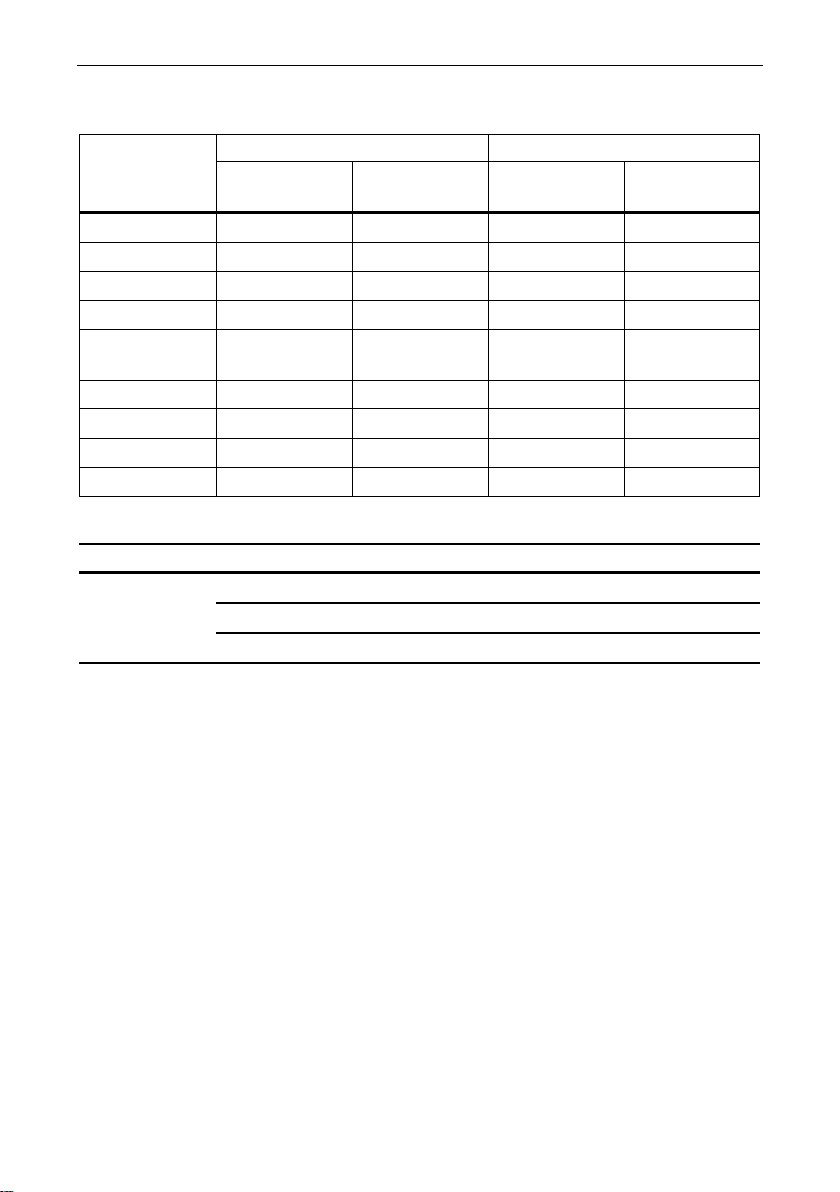
Electrical data: Transmitter output (optical) and receiver input
Media module
Transmitter output (optical)
Receiver input
min. [dBm]
max. [dBm]
Sensitivity min.
[dBm]
Input power
max. [dBm]
MM992-4CU
- - -
-
MM992-4CUC
- - -
-
MM992-4SFP
- - -
-
4PoEC
MM991-4
-19
-14
-32
-3
MM991-4LD
-15
-8
-34
-3
MM992-4
-9.5
-4
-17
-3
MM992-4LD
-9.5
-3
-21
-3
Electrical data: Galvanic isolation with PoE modules
Media module
Electrical isolation
Between ports P1 to P4
No
Between ports and ground
Yes
Between ports and power input
Yes
MM992-4PoE - - - MM992-
MM992-4PoE
MM992-
4PoEC
- - - -
MM900 media modules for SCALANCE XR-500M
12 A5E03275846-04, 11/2015
Page 15

4.2
Cable lengths of the MM900 media modules for SCALANCE XR-500M
Permitted cable lengths (copper cable)
Media module
Property
Lead
Permitted cable
length
Plug 180
cord
Plug 180
+ 10 m TP cord
plug 180
Technical data
MM992-4CU
MM992-4CUC
MM992-4PoE
MM9924PoEC
4 x 10/100/1000
Mbps,
RJ-45 ports electrical with and without
securing collar
IE TP torsion cable
with
IE FC Outlet RJ-45
+ 10 m TP cord
IE TP torsion cable
with IE FC RJ-45
IE FC TP marine/trailing/flexible
cable
with IE FC Outlet
RJ-45 + 10 m TP
IE FC TP marine/trailing/flexible
cable
with IE FC RJ-45
IE FC TP standard
cable with
IE FC Outlet RJ-45
IE FC TP standard
cable
with IE FC RJ-45
0 ... 45 m
+ 10 m TP cord
0 ... 55 m
0 ... 75 m
+ 10 m TP cord
0 ... 85 m
0 ... 90 m
+ 10 m TP cord
0 ... 100 m
MM900 media modules for SCALANCE XR-500M
A5E03275846-04, 11/2015
13
Page 16

Technical data
Permitted cable lengths (fiber-optic cable) for the SFP media module
Media module
Property
Max. permittted cable length
SFP media module
ceiver used
Permitted cable lengths (fiber-optic cable - Fast Ethernet)
Media module
Property
Fiber
FO cable lengths
up to max. 5 km
0-5 km
1200 MHz*km)
up to max. 26 km
0-26 km
Permitted cable lengths (fiber-optic cable - gigabit Ethernet)
Media module
Property
Fiber
FO cable lengths
0-350 m
1200 MHz*km)
0-750 m
1200 MHz*km)
up to max. 10 km
0-10 km
MM992-4SFP 4 x 100/1000 Mbps,
MM991-4 4 x 100 Mbps,
BFOC ports optical,
multimode glass,
MM991-4LD 4 x 100 Mbps,
BFOC ports optical,
single mode glass,
MM992-4 4 x 1000 Mbps,
SC ports optical,
multimode glass,
up to max. 750 m
50/125 µm
multimode fiber
9/125 µm
single mode fiber
62.5/125 µm
multimode fiber
50/125 µm
multimode fiber
Depending on the SFP trans-
(1 dB/km at 1310
nm;
(0.5 dB/km at 1310
nm)
(3.1 dB/km at 850
nm;
(2.5 dB/km at 850
nm;
MM992-4LD 4 x 1000 Mbps,
SC ports optical,
single mode glass,
MM900 media modules for SCALANCE XR-500M
14 A5E03275846-04, 11/2015
9/125 µm
single mode fiber
(0.5 dB/km at 1310
nm)
Page 17

4.3
Other properties
Device version (power supply)
MTBF
MM992-4CUC
MM991-4LD
> 70 years
MM992-4LD
> 75 years
MM992-4
> 85 years
MM992-4SFP
> 170 years 1)
MM992-4PoEC
1)
empty
5
Dimension drawings
Table 4-1 Mean time between failure (MTBF)
Dimension drawings
MM992-4CU
MM991-4, > 90 years
MM992-4PoE
> 200 years
> 75 years
MM900 media modules for SCALANCE XR-500M
A5E03275846-04, 11/2015
15
Page 18
Dimension drawings
View from the front, top, and side (right)
Dimensions are specified in mm.
MM900 media modules for SCALANCE XR-500M
16 A5E03275846-04, 11/2015
Page 19
6
Approvals
Note
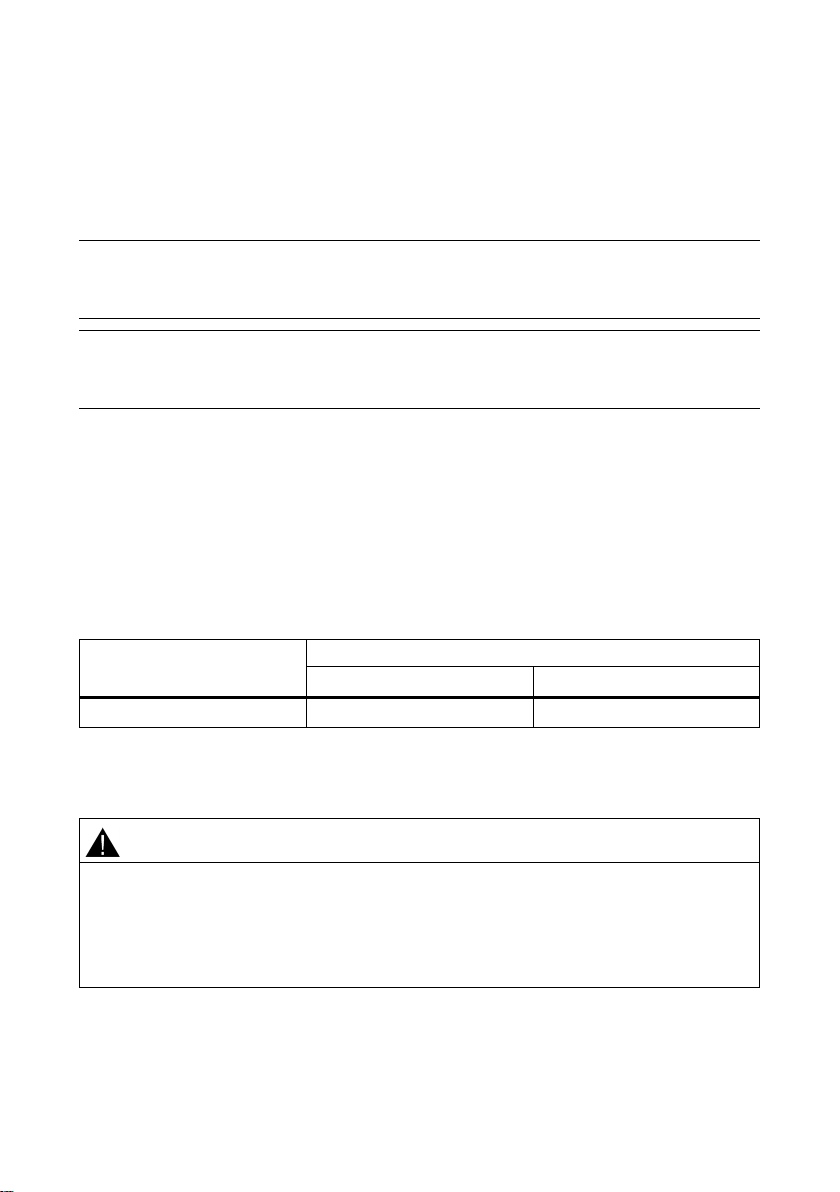
Note that the media modules meet the requirements of the approvals only in
combination with the devices.
Note
The specified approvals apply only when the corresponding mark is printed on the
product.
EC directives
EMC directive (electromagnetic compatibility)
Field of application
Requirements
Emission
Immunity to interference
Industry
EN 61000-6-4 : 2007
EN 61000-6-2 : 2005
C-TICK
WARNING
Personal injury and property damage can occur
The SIMATIC NET products described in these Operating Instructions have the
approvals listed below.
SIMATIC NET products meet the requirements and aims of the following EC
directives.
The SIMATIC NET products described in these operating instructions meet the
requirements of EC directive 2004/108/EC "Electromagnetic Compatibility" for the
following areas of application:
The product meets the requirements of the AS/NZS 2064 standard (Class A).
The installation of expansions that are not approved for SIMATIC NET products or
their target systems may violate the requirements and regulations for safety and
electromagnetic compatibility.
Only use expansions that are approved for the system.
MM900 media modules for SCALANCE XR-500M
A5E03275846-04, 11/2015
17
Page 20

Approvals
Keep to the installation guidelines
You can always find the latest documentation on the Internet
Working on the product
Note
The product was tested with a device that also complies with the standards
listed above.
If the product is operated with a device that does not meet these standards,
there is no guarantee that the corresponding values will be adhered to.
●
The product meets the requirements if you adhere to the installation and safety
instructions contained in this documentation and in the following documentation
when installing and operating the product.
●
The current descriptions of the currently available products can always be found
on the Internet under the specified entry IDs/Internet pages:
– SIMATIC NET Industrial Ethernet Network manual
ID = 27069465
(http://support.automation.siemens.com/WW/view/en/27069465
)
– EMC Installation Guideline, Planning Guide
ID = 28518276
(http://support.automation.siemens.com/WW/view/en/28518276
–
)
To protect the product from electrostatic discharge, personnel must first
discharge any electrostatic charge from their body before touching the
product.
MM900 media modules for SCALANCE XR-500M
18 A5E03275846-04, 11/2015
Page 21
Approvals
ATEX (explosion protection directive)
WARNING
FM
When using SIMATIC NET products in hazardous area zone 2, make absolutely
sure that the associated conditions in the following document are adhered to:
"SIMATIC NET Product Information Use of subasseblies/modules in a Zone 2
Hazardous Area".
You will find this document
• on the data medium that ships with some devices.
• on the Internet pages of Siemens Industry Online Support.
Enter the document identification number C234 as the search term.
SIMATIC NET products meet the requirements of the EC directive:94/9/EC
"Equipment and Protective Devices for Use in Potentially Explosive Atmospheres".
ATEX classification:
II 3 G Ex nA IIC T4 Gc
KEMA 07ATEX0145 X
The products meet the requirements of the following standards:
● EN 60079-15 (electrical apparatus for potentially explosive atmospheres; Type of
protection "n")
● EN 60079-0 (Explosive atmospheres - Part 0: Equipment - General requirements)
You will find the current versions of the standards in the currently valid ATEX
certificates.
The product meets the requirements of the standards:
● Factory Mutual Approval Standard Class Number 3611
● FM Hazardous (Classified) Location Electrical Equipment:
Non Incendive / Class I / Division 2 / Groups A,B,C,D / T4 and
Non Incendive / Class I / Zone 2 / Group IIC / T4
MM900 media modules for SCALANCE XR-500M
A5E03275846-04, 11/2015
19
Page 22

Approvals
cULus Approval for Information Technology Equipment
cULus Approval Hazardous Location
EU declaration of conformity
See also
cULus Listed I. T. E.
Underwriters Laboratories Inc. complying with
● UL 60950-1 (Information Technology Equipment)
● CSA C22.2 No. 60950-1-03
cULus Listed I. T. E. FOR HAZ. LOC.
Underwriters Laboratories Inc. complying with
● UL 60950-1 (Information Technology Equipment)
● ANSI/ISA 12.12.01-2007
● CSA C22.2 No. 213-M1987
Approved for use in
Cl. 1, Div. 2, GP A, B, C, D T4
Cl. 1, Zone 2, GP IIC T4
Report no. E240480
You will find EC declaration of conformity for these products on the Internet pages of
Siemens Industry Online Support.
ID = 57026840 (http://support.automation.siemens.com/WW/view/en/57026840)
http://support.automation.siemens.com/WW/view/en/67218133
(http://support.automation.siemens.com/WW/view/en/67218133
MM900 media modules for SCALANCE XR-500M
)
20 A5E03275846-04, 11/2015
Page 23
Approvals
Media module
Fulfills FDA and IEC requirements
MM992-4CUC
-
MM992-4CU
-
MM992-4SFP
-
MM992-4PoE
-
MM992-4PoEC
-
MM991-4
CLASS 1 LED PRODUCT
MM991-4LD
CLASS 1 LASER
MM992-4
CLASS 1 LASER
MM992-4LD
CLASS 1 LASER
MM900 media modules for SCALANCE XR-500M
A5E03275846
Trademarks
All names identified by ® are registered trademarks of
in this publication may be trademarks whose use by third parties for their own purposes could
violate the rights of the owner.
Disclaimer of Liability
We have reviewed the contents of this publication to ensure consistency with t
software described. Since variance cannot be precluded entirely, we cannot guarantee full
consistency. However, the information in this publication is reviewed regularly and any
necessary corrections are included in subsequent editions.
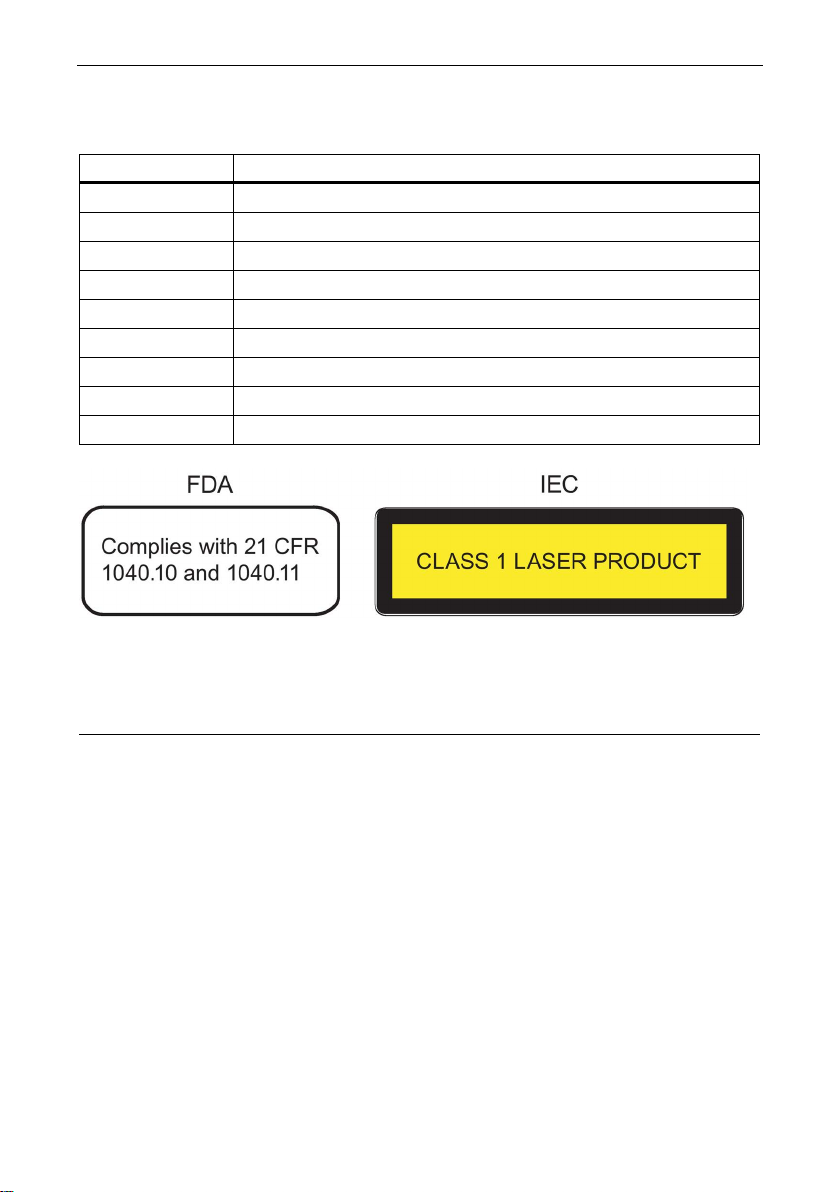
The following MM900 media modules meet the FDA and IEC requirements listed
below:
Figure 6-1 FDA and IEC approvals
Siemens AG. The remaining trademarks
he hardware and
Siemens AG
Division Process Industries and Drives
Postfach 48 48
90026 NÜRNBERG
MM900 media modules for SCALANCE XR-500M
A5E03275846-04, 11/2015
-04, 11/2015
21
 Loading...