

Page 1

30
PROGRAMMING MANUAL
AND SD-232
,
.
Nov. 1, 1984
Page 2
SET-38
is
programmed from
the Key pad in
conjunction with the
feature
General
The STORE button is used at the end of each procedure or during
a procedure to store the programmed information in the instru-
ment's memory.
Pressing the
button in response
will leave the programmed information
to a particular prompt
in tact.
If nothing was
programmed, it will remain blank. It is, therefore, used to
skip prompts,which require
no response during a change proce-
dure.
The
Pressing the button several times will erase several entries.
entered by
reasons.
mistake or
the
procedure which is
is used to
.
is used to terminate a procedure that was
requires to
button is pressed during a programming
not finished, the program will default to .
erase the last character entered.
be terminated for other
what was originally programmed (if anything).
The
button will display information concerning another
feature button when that feature button is also pressed after
pressing the
button.
The first item to be programmed on each SET-30 will be a mask.
MASK 0 is used for SATURN
or SATURN III.
is used for SD-192, SD-232, or SD-192MX.
MASK 2 is used for SD-80
If after programming the mask is
reprogrammed, the programmed
data will be lost (it will revert to standard data base).
To display the mask press the DISPLAY button twice.
(This will
also indicate what type of set after programming.)
Page 3
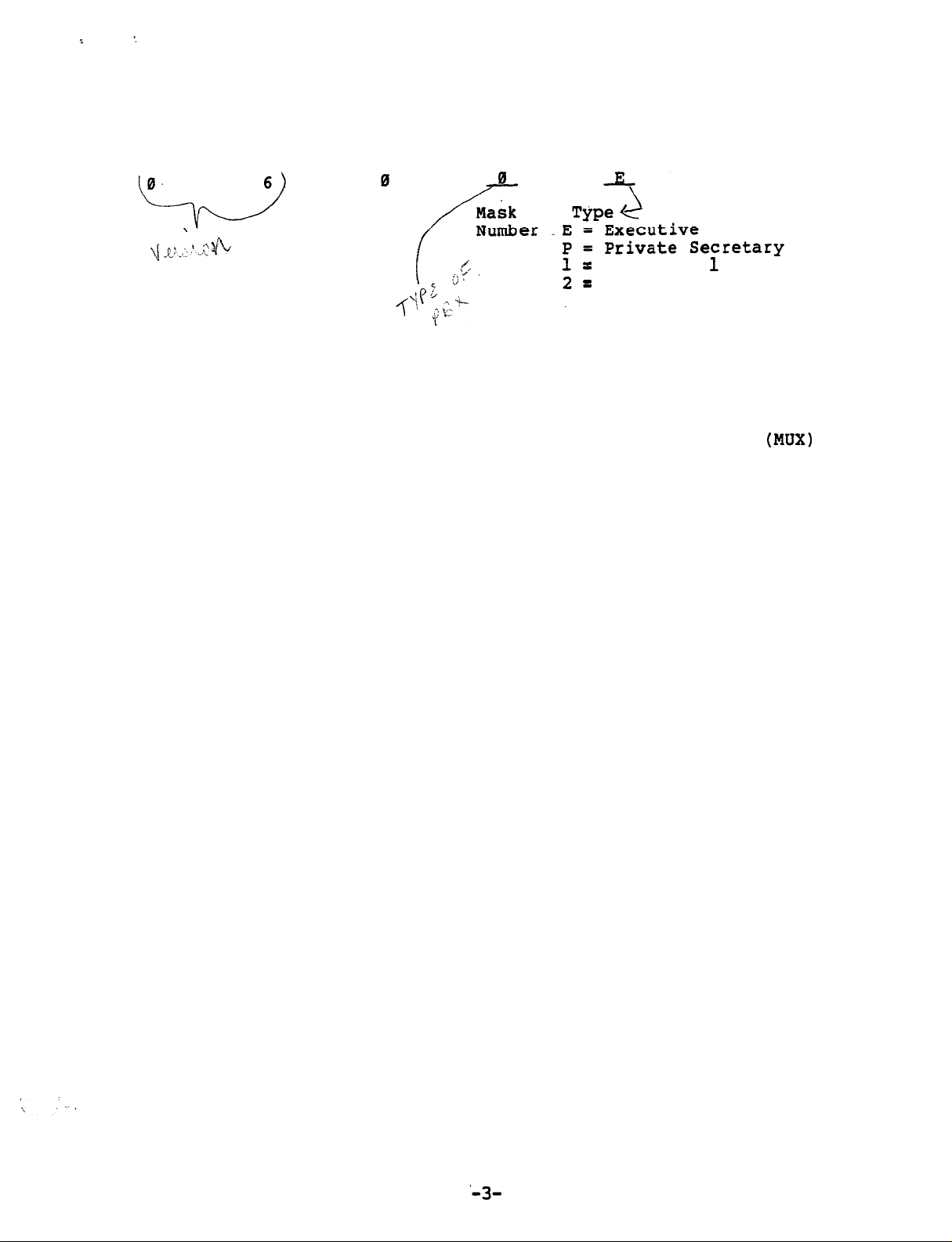
Part of the display will be a number as shown'below:
Secretary
Secretary 2
PROGRAMMING
Before programming, fill out
next several pages or the tables in the regular SET-30 documentation.
Separate sets of tables are provided for Multiplexer
Groups (one or two secretaries
tive/Private Secretary combinations.
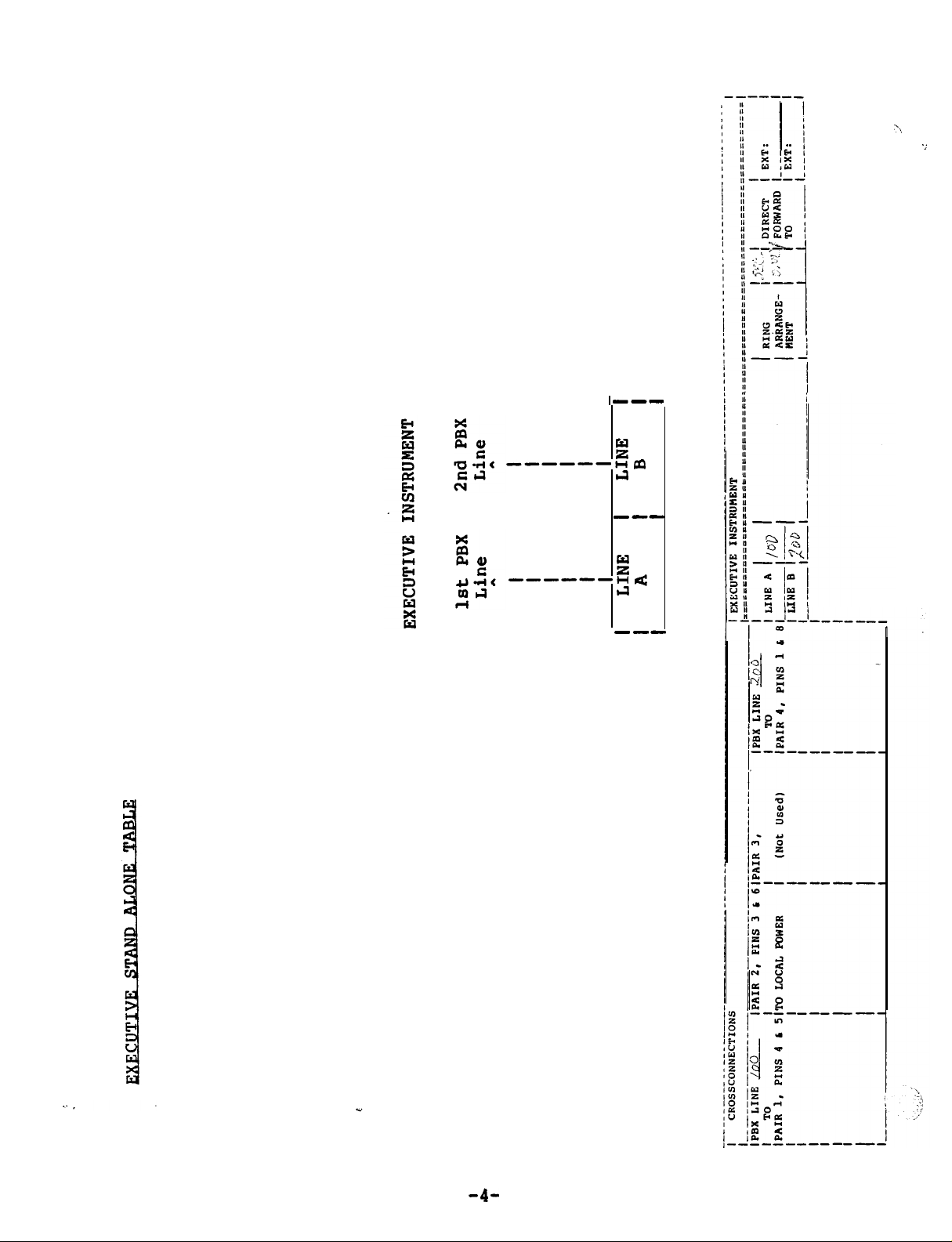
For stand-alone executive phones,
tive/Private Secretary table which is applicable.
the database tables shown on the
and many executives) and Execu-
use the portion of the Execu-
Page 4
Page 5
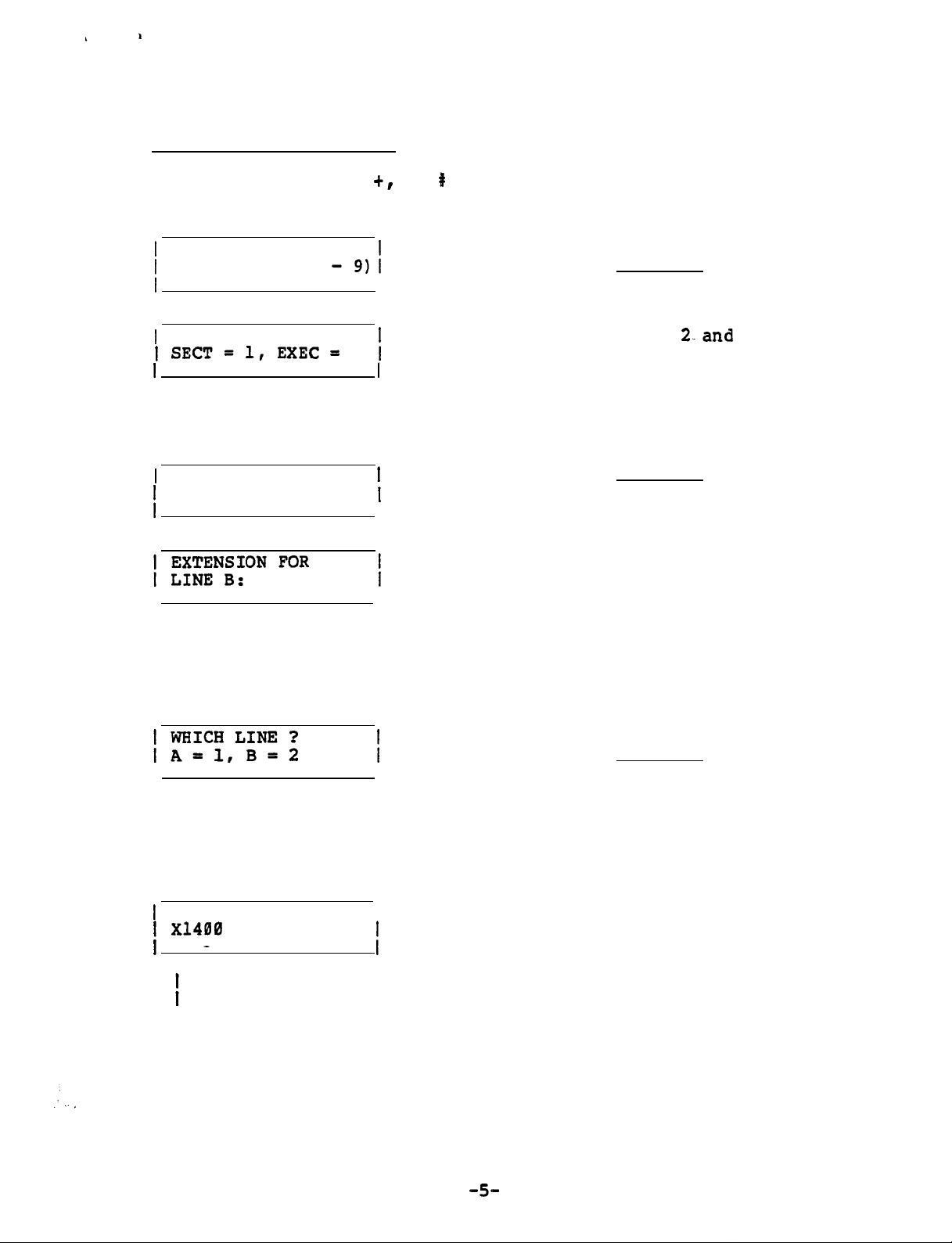
EXECUTIVE (Stand-Alone)
0,
Press STORE, FEATURE
buttons in sequence.
INVALID display between buttons.).
SELECT MASK (0
Enter and STORE
I
SELECT MODEL
Press
STORE and COM (3rd ivory button in bottom row) in sequence
EXTENSION FOR
2
Enter 2-and
Enter and STORE
LINE A:
I
(Normally not used) Enter STORE
(Disregard
STORE
To display the programmed lines
, perform the following procedure:
Press DISPLAY and COM (3rd ivory button in bottom row) in sequence
Enter
and STORE
Not applicable at
EXECUTIVE Station Line requested (A or B)
I
I
I
V V
LINE Al
A
Extension number of requested line (XNONE if none is assigned)
Page 6
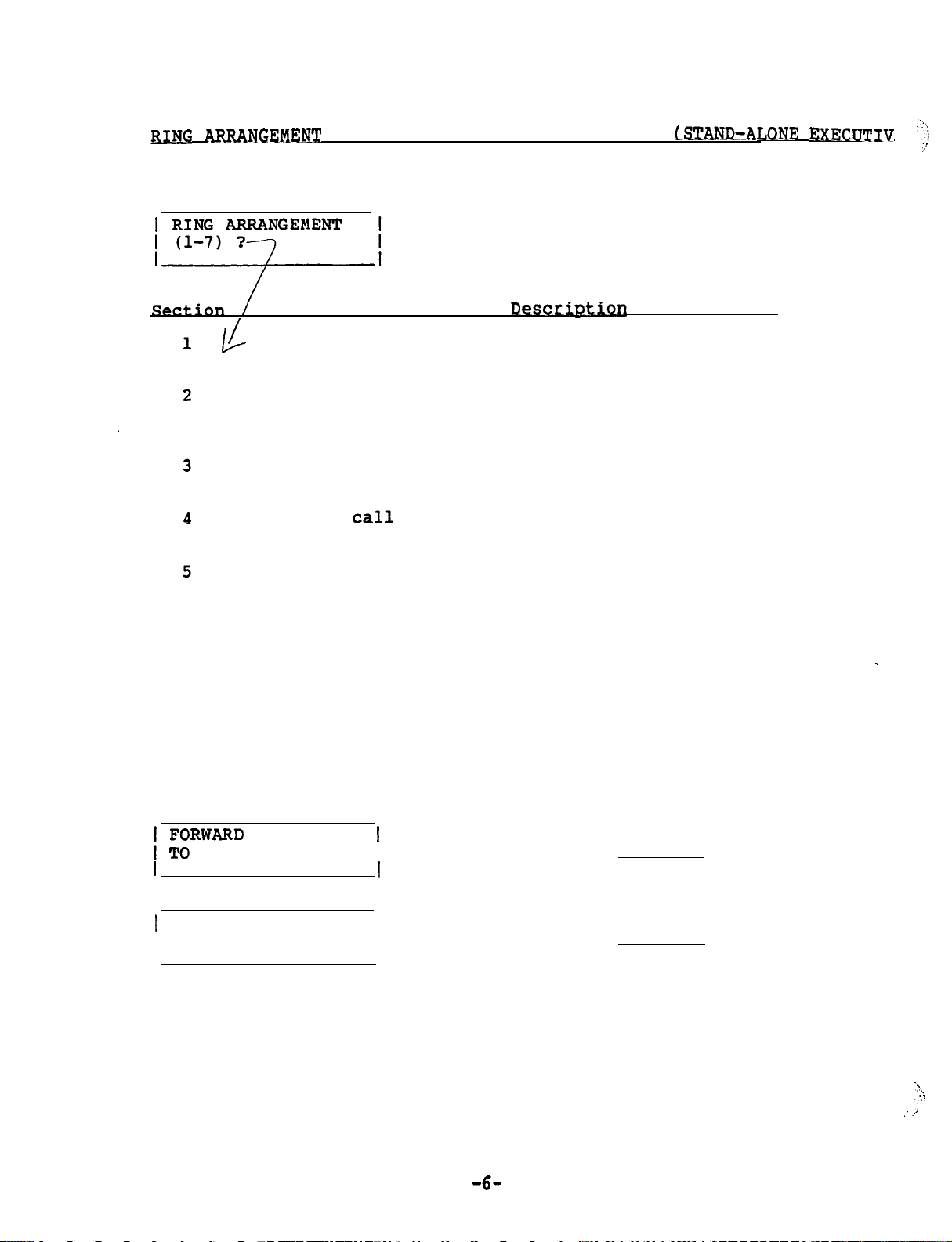
ARRANGEMENT AND DIRECT FORWARD DESTINATIONS
Press STORE
and
DIRECT FORWARD buttons in sequence
Ring arrangement need not be entered.
Press STORE
If no ring arrangement is programmed,
automatically defaults to arrangement 1.
. .
Duplicate ringing. Rings both secretary's and
executive's phones.
Delayed duplicate ringing.
phone.
After two rings, the call also rings at
Rings of executive's
the secretary's phone.
Executive answers. Rings only at executive's
phone.
Full
screening. Rings only
at
secretary's
phone.
Overflow call screening.
executive's phone.
Subsequent calls will ring
Rings first call at
at the secretary's phone as long as the executive's
phone is busy.
it
Primary line call screening.
primary line, and rings at the secretary's phone.
Line B designated as secondary line, and rings at
executive's phone when idle. If line B is busy,
calls ring at secretary's phone.
7
LINE A
Secondary line call screening.
are reversed.
FORWARD LINE B
I TO
Line A designated as
Same as 6 but A and B
I
I
Enter and STORE
Enter and--STORE
Page 7

To display Ring Arrangement and Direct Forward Destination perform the
following procedures:
Press DISPLAY and DIRECT FORWARD buttons in sequence
station to which chosen
line is forwarded
I
V
I AFWD to 1400
1 DUPLICATE RING
A
I
Ring Arrangement used
-Enter
and STORE
Page 8
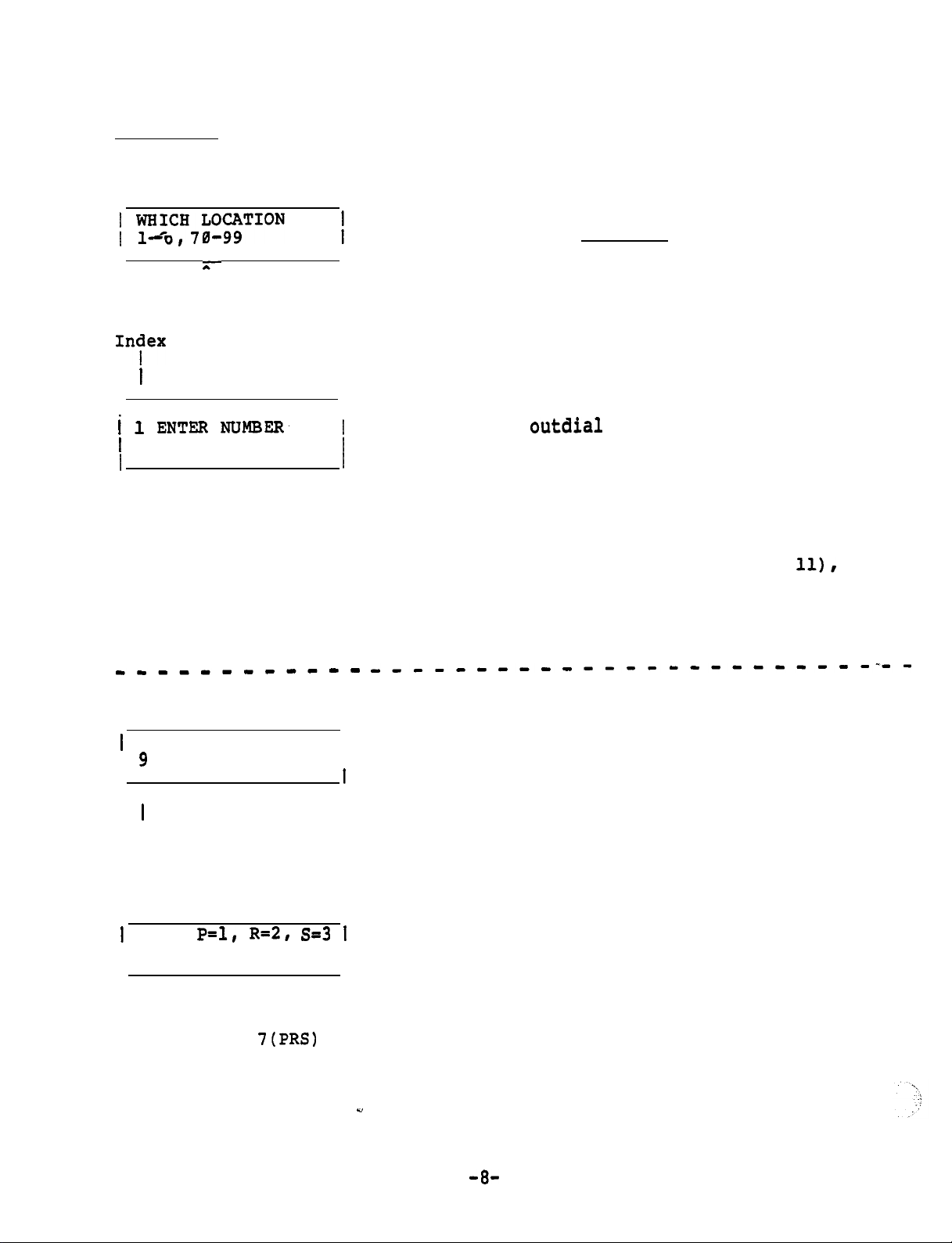
SPEED DIAL
Press STORE
I
Speed Dial Indexes
being programmed
and
SPEED DIAL buttons in sequence
I
I
56 digits maximum
(only last 12 will
be displayed in
bottom row as entered
Enter but do not press
STORE unless you want to skip
the next step (just change name,
not telephone number).
If the instrument is to merely
digits, enter the telephone number and STORE (preceded
by the PBX trunk group access code
for the trunk group to be used,
unless the instrument is connected
directly to CO trunks).
If additional commands are
required (see Table page
perform the procedure in the
dotted lines between the digits
where an additional command is
required. Several commands may
be programmed in succession.
Press SPEED DIAL button
1 ENTER (ALPHA)
I
I
A
Number programmed so far
Note: Each numbered Key except
has two letters and a dash).
.
USE:
I
Display shows the result of
pressing the
the previous step
Continue the procedure until the command sequence is finished.
three,
another entry is necessary.
key in
I
0 and 1 has three letters (0 Key
Press tone pad Key which
corresponds to the alpha
character desired.
In order to select one of the
Press Key pad number which
corresponds to the desired
letter shown on left, but do
not press STORE button.
Page 9
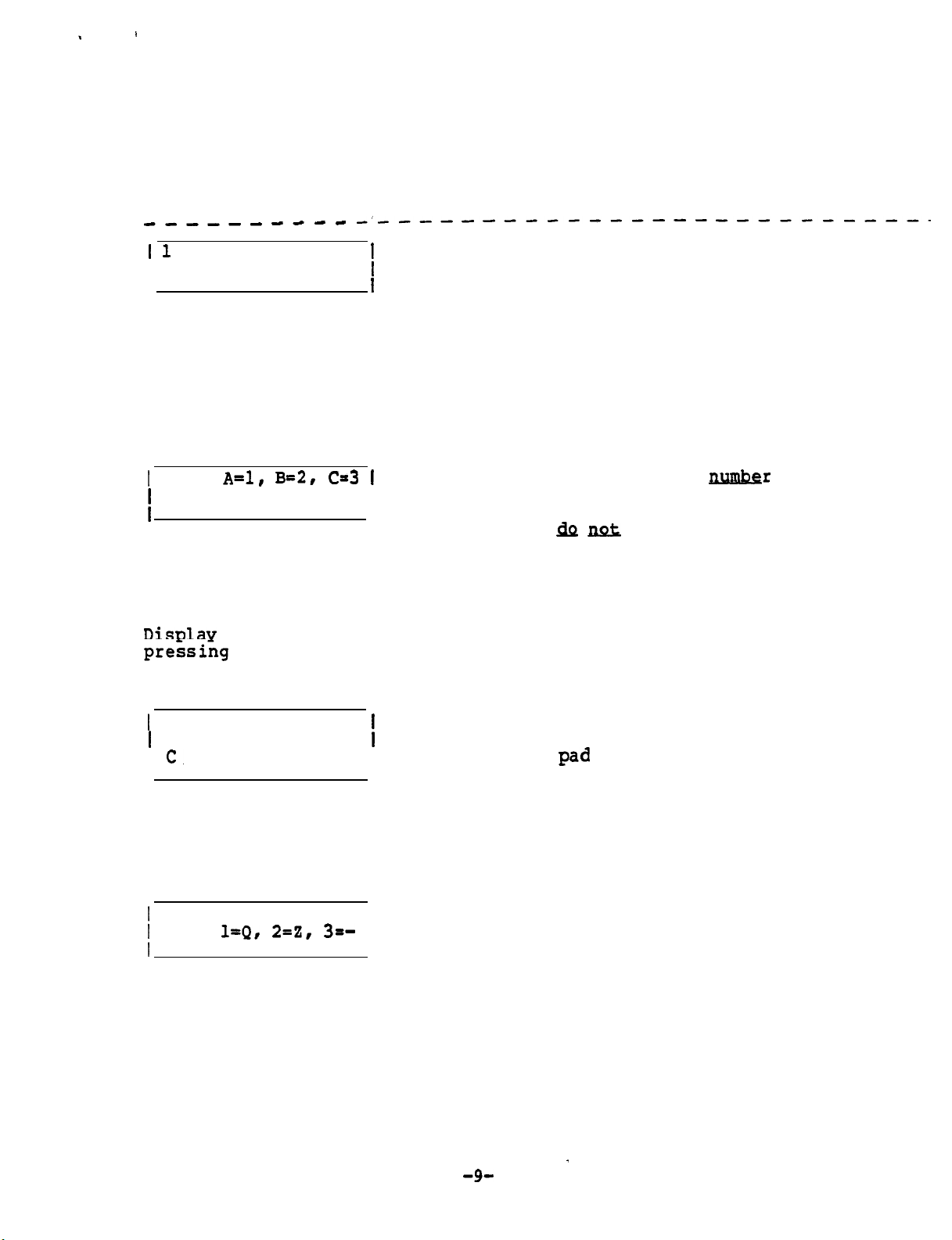
Press the SPEED DIAL button each time a change from numbers to
alpha characters or vice versa is required.
When the entire string of numbers and alpha characters is
finished, press the STORE button..
ENTER NAME
‘Press tone pad Key which
corresponds to the first
I
letter or number of name
(Key 1 is used for space).
If no name is desired,
press STORE.
Note: Each numbered Key except 0 and 1 has three letters (0 Key
has two letters and a dash).
In order to select one of
the three, another entry is necessary.
USE:
Press Key pad
which
corresponds to the desired
I
letter shown on left, but
press STORE button
unless name is finished.
If a number was selected in
the previous step, press
Key 4.
shows the result of
the 2 (ABC) key in
the previous step.
ANSWER PHRASE?
I
I
Enter next letter on tone
Display shows the result of pressing the
3 key in the previous step to select the
third letter of the three choices.
USE:
I
Select desired character
I
Display shows the result of pressing the
8 (QZ-) key in the previous step
Continue the procedure until the name is finished (12 characters
including spaces maximum),
then press the STORE button.
Page 10
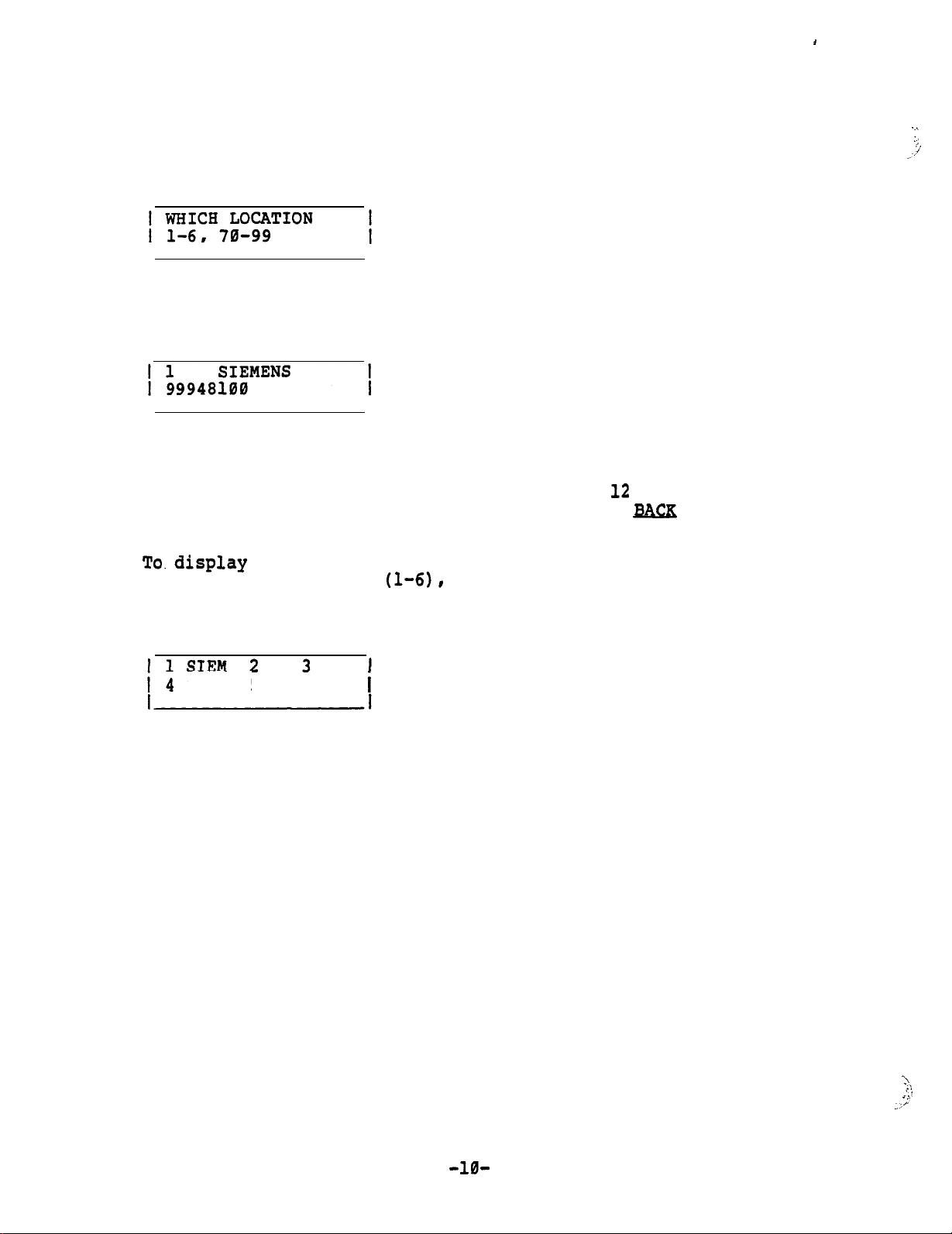
To display SPEED DIAL numbers perform the following procedure:
Press DISPLAY and SPEED DIAL buttons in sequence
Enter index'to be displayed
Index Name
I I
V V
Number dialed
Note:
The display will show only the last
(trunk group access code and address)
more than 12 digits are used, press the
to view the remaining numbers.
the first four letters of the names for the first
six speed call indexes
Press SPEED DIAL button
5 6
digits. If
button
perform the following procedure:
Page 11
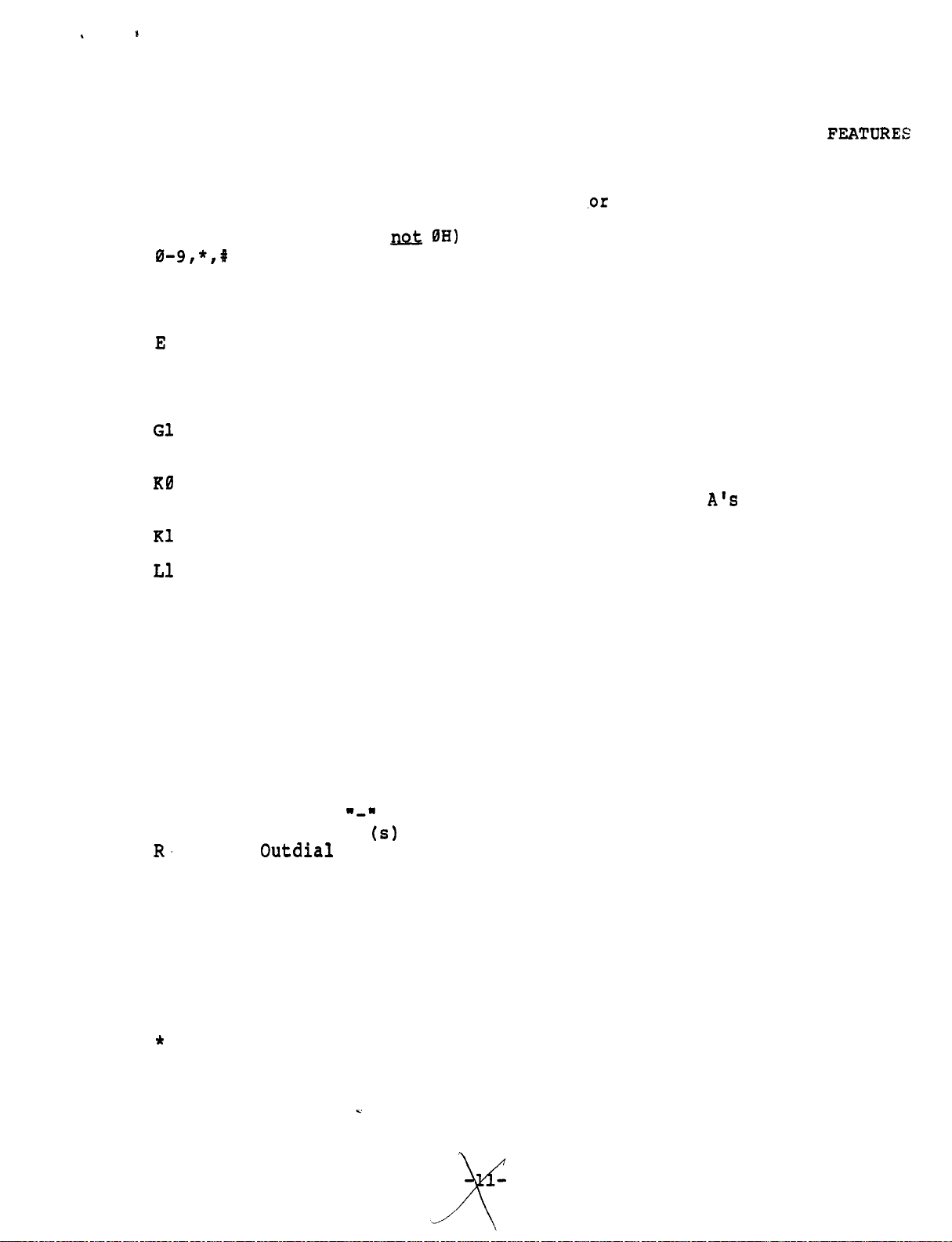
This Table Is Used For Programming SPEED DIAL And Access to P
BX
SUMMARY OF FEATURE SEQUENCE CODES
The following codes as used in feature +
OH
On hook (OH
speed dial sequences
DTMF tones
A
B
C
D
Any tone detect
Busy tone detect
Control tone detect
Dial tone detect
Insert the extension number of the active line
F
GI
GL
GR
or 2
H
J
to 9
Timed Hookflash/Connect
Get an idle line and connect
Get a line --
now active or idle
Get ringing line and connect
Get line 1 or 2
Hang-up
Jam display with blanks
Allows user entry of digits,
digits equal the number of digits in LINE
number.
An underline cursor will be displayed.
Allows user entry of 1 to 9 digits.
and proceeds after total
extension
A underline cursor
will be displayed.
to 6
Chain a speed dial location *
L70 to 99
NA
Terminate if no tone.
NB Terminate if no busy tone.
NC Terminate if no control tone.
ND Terminate if no dial tone.
NI
NR
Nu
Terminate if selected line not idle.
Terminate if selected line not ringing.
Terminate if selected line not in use
P Pause
S
Stored name remains until hang-up.
U Display an underline cursor after name.
W Wait for call back ringing.
X Ignore automatic dial tone detection.*
for clarity.*
to be forwarded.
GF
Display
Get line
forwarding destination(s) as programmed.
Normally used in SPEED DIAL storage only, do not use
in feature sequence.
Page 12
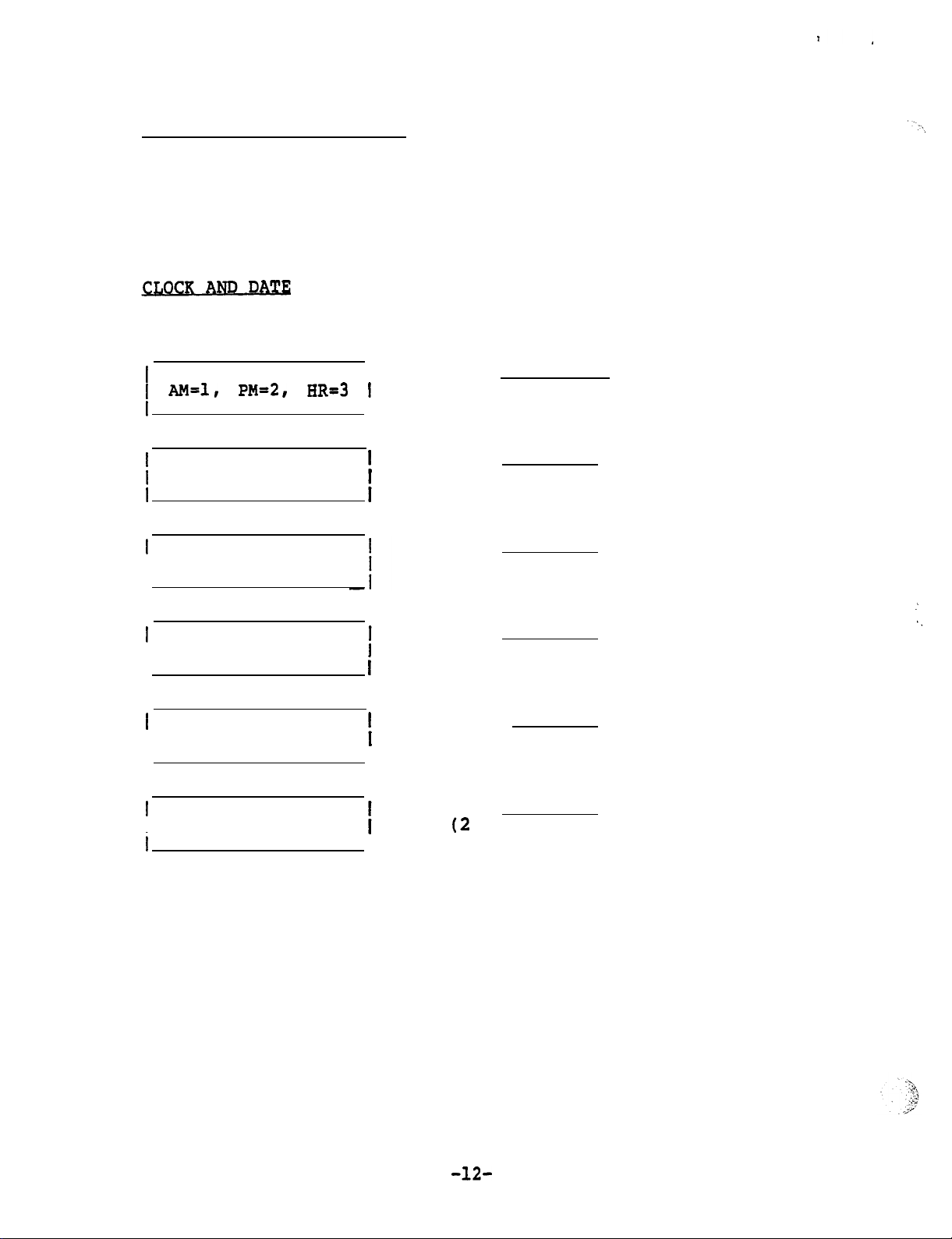
LOUDNESS and TONE of RING
Press Volume
To increase loudness, press the VOLUME
To decrease loudness, press the VOLUME 'button.
To change the tone
desired tone is received.
Press STORE and DISPLAY buttons in sequence
SELECT MODE
ENTER HOUR
ENTER MINUTES
I
or Volume
, press tone pad buttons 1 through 9 until
I
I
button. Instrument will ring.
button.
Enter
Enter and STORE
(24-hour time if 3 was chosen in
last step)
Enter and STORE
and STORE
ENTER MONTH
I
i
ENTER DAY
I
ENTER YEAR
I
Enter
(Numeral)
Enter and STORE
Enter
digits)
I
and STORE
and STORE
Page 13
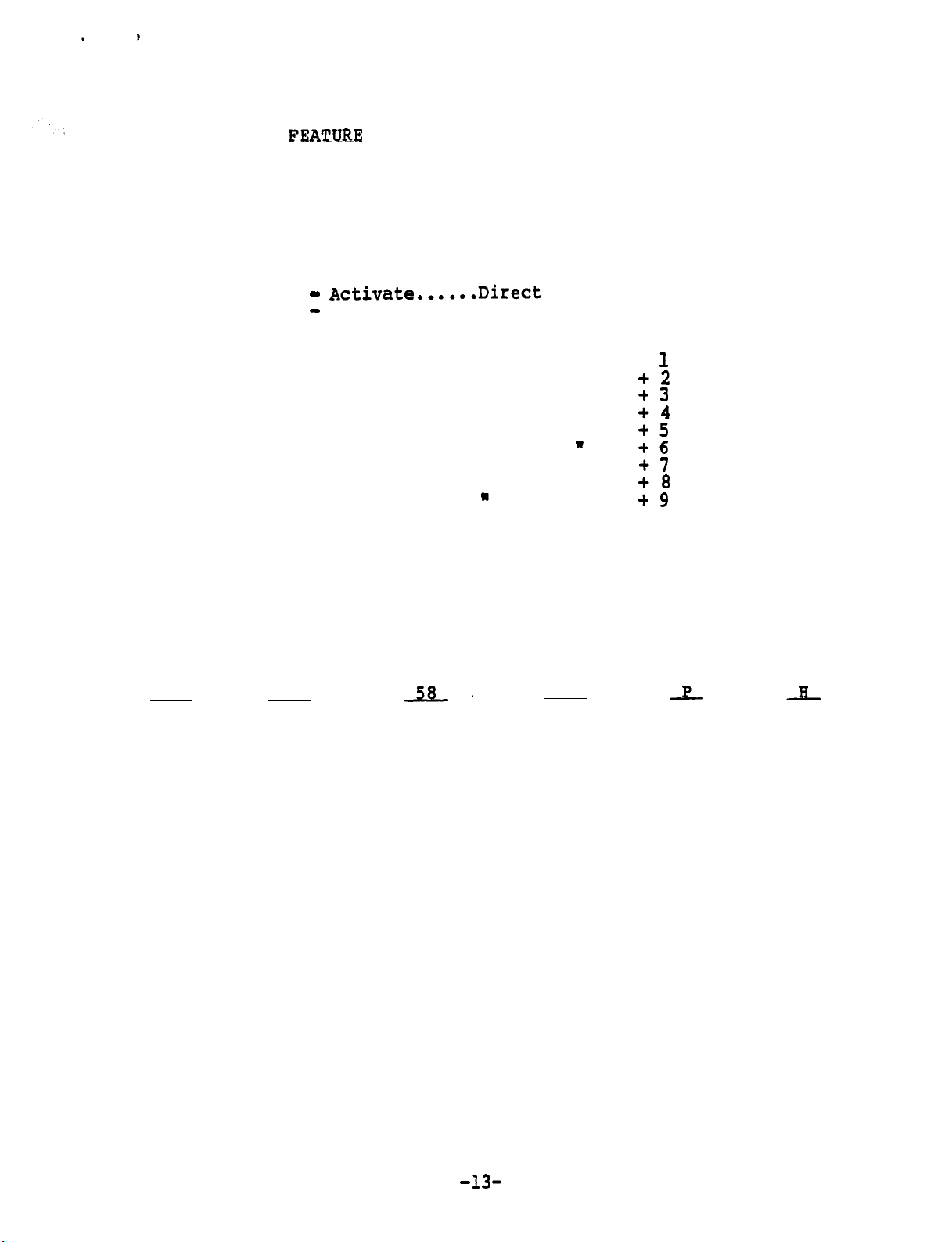
PROGRAMMABLE
BUTTONS
Fourteen PBX features may be programed to be accessed by a single
button or a combination of two buttons.
Conference Call
Call Park
Pick Up
. . . . . . . . . . . . . . . . . . . . . .
. . . . . . . . . . . . . . . . . . . . . . . .
Direct Forward
Direct Forward
. . . . . . . . . . . . . . . .
Deactivate....Direct Forward Button
Any nine
PBX features
Note:
Even the CONF, PARK, and PICKUP buttons listed above may
Conference Button
Call Park Button.
Pick Up Button
Forward Button
FEATURE + button +
W
W
W
W
W
W
W
W
W
W
W
W
W
W
be programmed with a different feature, but the label
would have to be changed.
The table two pages ahead is used to program a string of commands
for SET-30
Example of
GL
to perform.
a command string for Call Forwarding.
ND
KO
Get a Terminate PBX
Line if no Access
Dial Tone Code
for the
Allow Pause Hang
user to
-dial digits
equal to
UP
call number in
Forwarding user's station
Feature
number
(Dial it)
In order to save time it is recommended that the table on the
next page be used for this purpose.
It shows the command string
for the most commonly used features.
Page 14
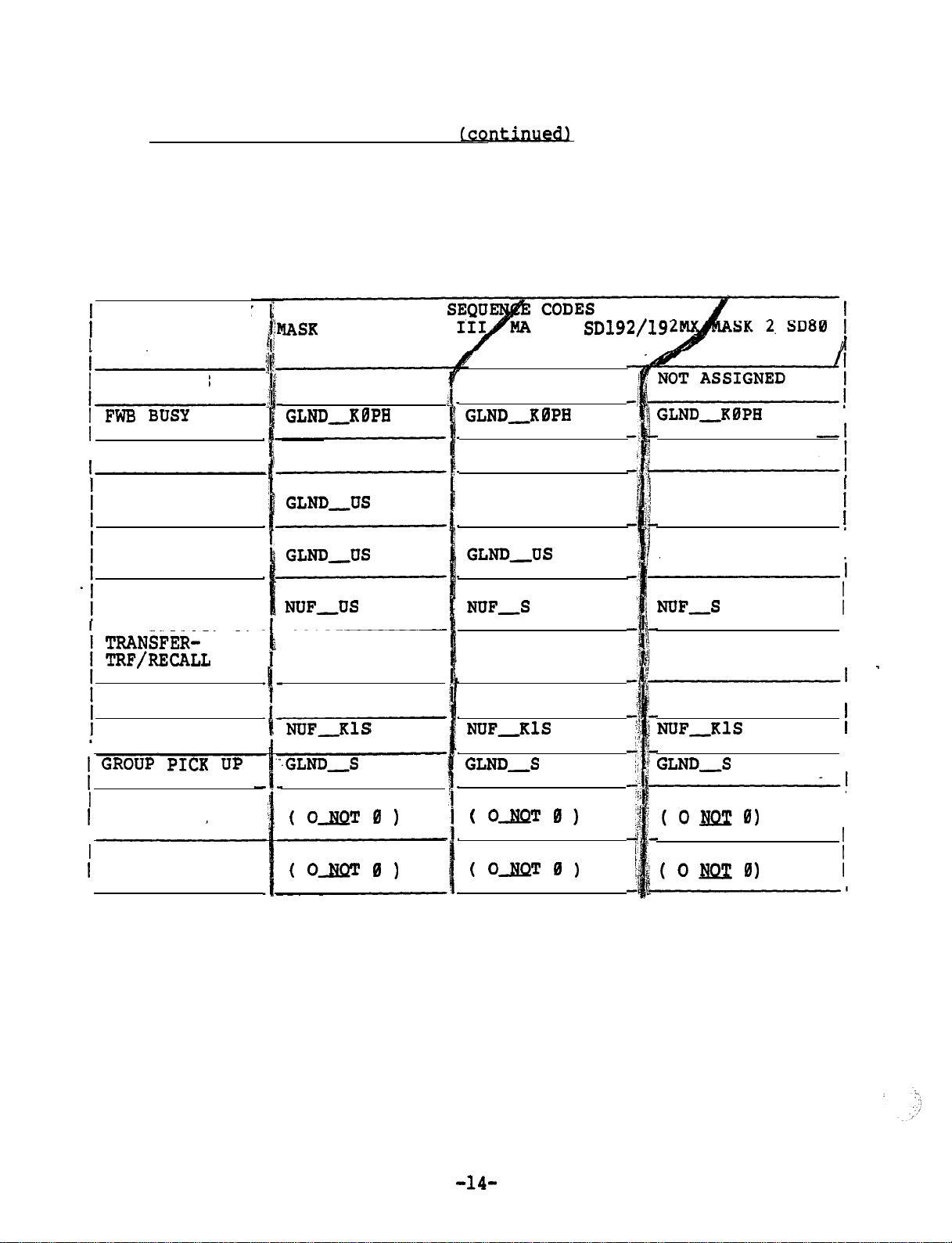
PROGRAMMABLE FEATURE BUTTONS
.
Copy the command string except for the access code.
code of the particular PBX with which the SET-30 is to be used.
The existing command string can also be displayed first and then
copied with the new access code.
FEATURE ACCESS SEQUENCE CODES
FEATURE OR KEY
AND FEATURE
NAME
FWN NO ANS GLND,KBPH
I FWC CANCEL
IND SPEED
(THRU SWITCH)
GRP SPEED
(THRU SWITCH)
HLD PBX
(SWITCH HOLD)
0 SATURN II/
GLND,PH
SK 1
GLND,KBPH
GLND,PH
NOT ASSIGNED
Use the access
GLND,PH
NOT ASSIGNED
NOT ASSIGNED
I
I
I
CONFERENCE
CALL PARK
NUFUS
NUFKBS
NUFUS
NUFKBS
NUFUS
NUFKBS
I
I
I
DIRECT FORWARD
(ACTIVATE)
DIRECT FORWARD
(DEACTIVATE)
I
In order for the end user not to accidentally reprogram the command
string, a security Key (code) has to be entered to program the features.
The SET-30 remains in the feature programming mode until timeout or
until the HANG UP button is pressed.
GFNUNDRPOH
GFNUND,POH
GFNUNDRPOH
GFNUND,POH
The security key is:
GFNUNDRPOH
GFNUND,POH
STORE
FEATURE +
0
STATUS
I
I
'Disregard INVALID display between buttons.
Page 15
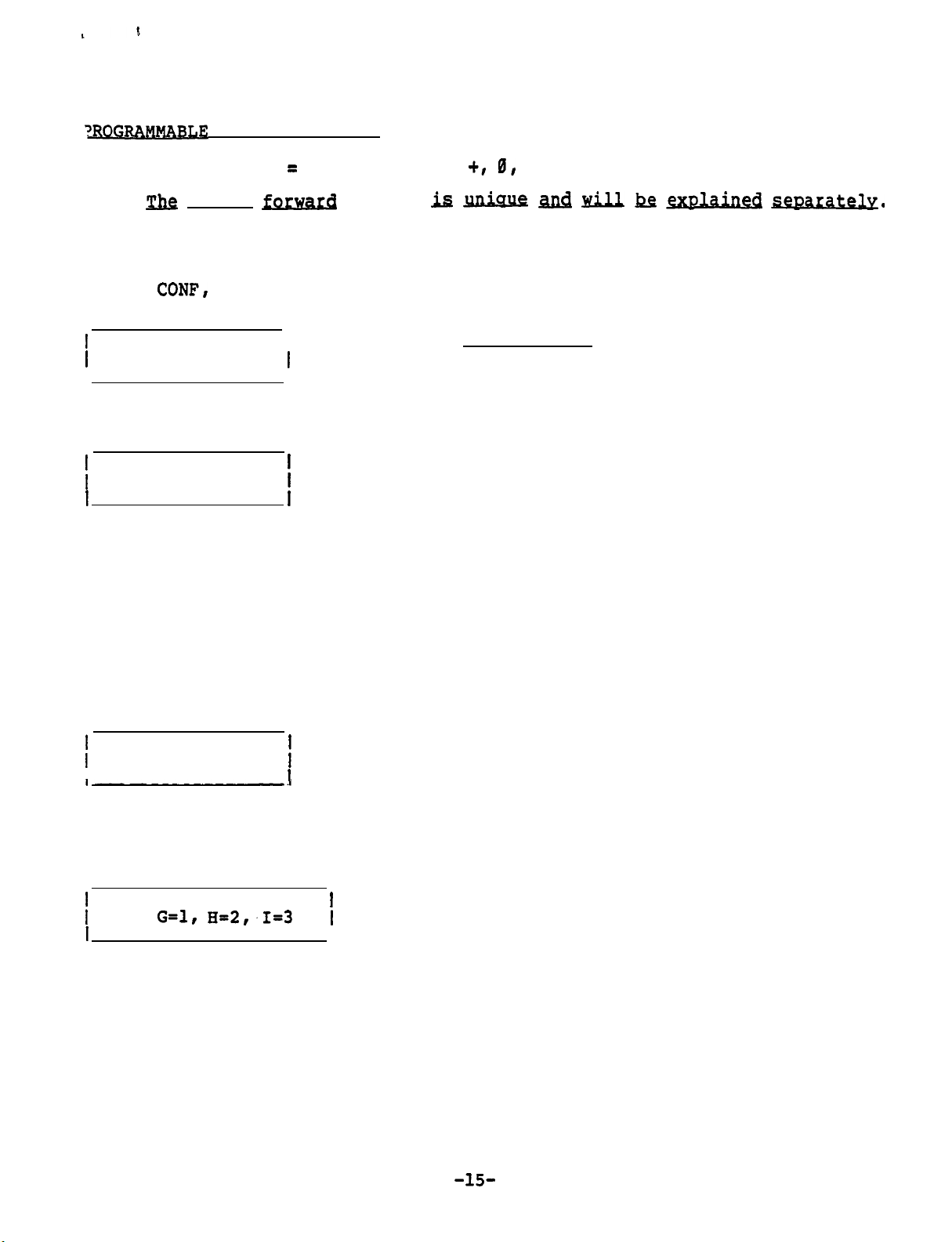
FEATURE BUTTON
S (continued)
Enter security key
Note: j&z direct forward feature
STORE, FEATURE STATUS
Press STORE and FEATURE button.
If the
FEATURE
If the
SELECT PBX
+ button was pressed,
PARK, or PICKUP was pressed, skip the next step.
I
Enter (Do not press STORE)
a feature number is also selected.
FEATURE (l-9)
Feature number (if used)
Request a string of commands
1 ENTER NUMBER
(See table on preceding page).
If the string of commands starts
with numbers,
If the string of commands starts
with alpha characters, press the
SPEED DIAL button and the next
display shown will appear.
enter the numbers.
Press the SPEED DIAL button each
time the command string changes
from numbers to alpha characters
or visa versa.
Press tone pad key which corresponds to
1 ENTER (ALPHA)
the alpha character desired.
I
Note: Each number key except 0 and 1 has three letters (0 key has two
letters and a dash).
In order to select one of the three, another
entry is necessary.
Press key pad number which corresponds
USE:
I
to the desired letter shown on left, but
do not press STORE button.
Display above shows the
result of pressing the 4
(GHI) key in the previous step.
Page 16
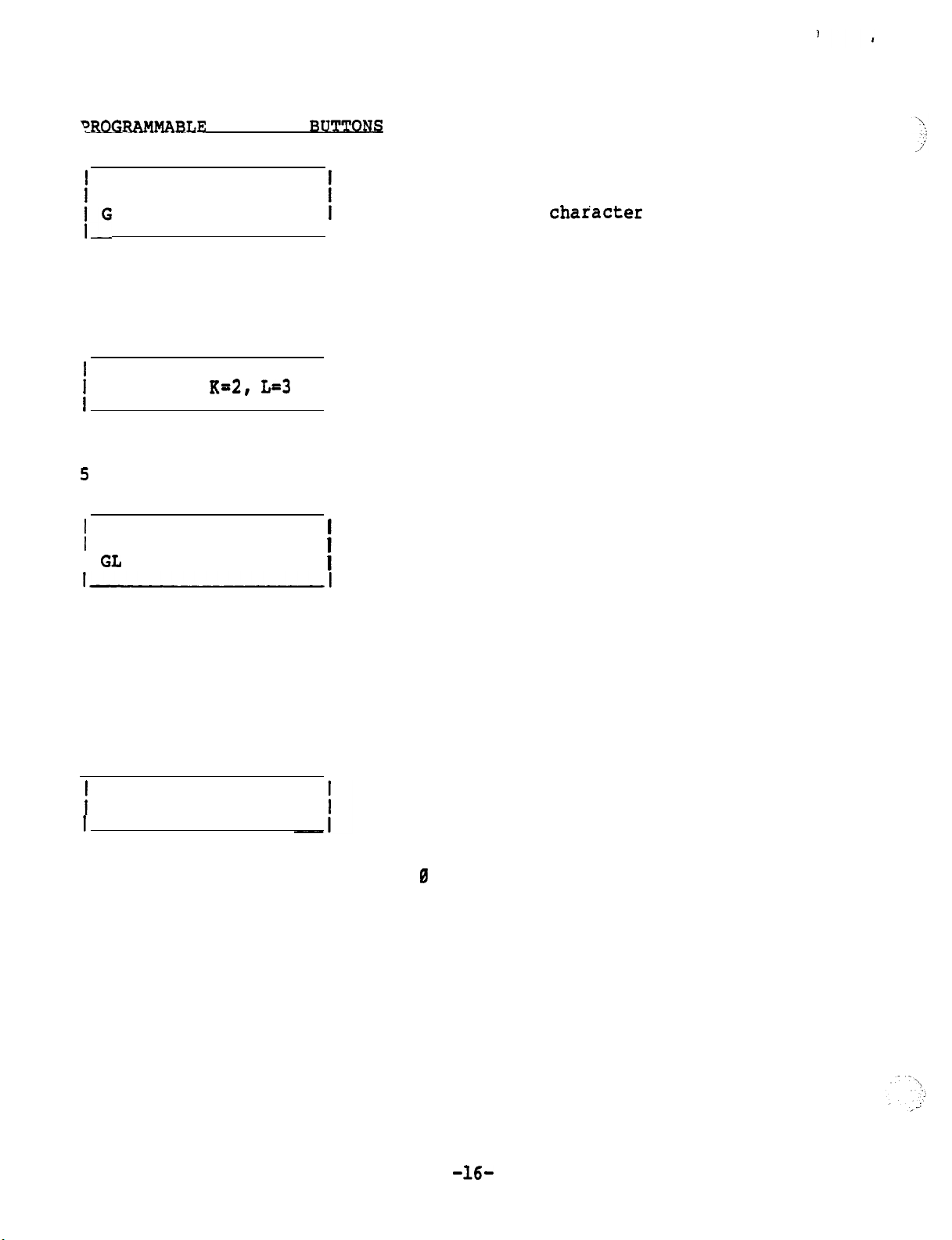
FEATURE
1 ENTER (ALPHA)
I
Display above shows the
result of pressing the 1
key in the previous step.
USE: J-l,
Display above shows the
result of pressing the
(JKL) key in the previous step.
1 ENTER (ALPHA)
I GL
I
I
(continued)
Press key pad number which corresponds
to the next alpha character desired.
(If the next
the SPEED DIAL button first, then enter
the number.
Press key pad number which corresponds to
the desired letter shown on left, but do
not press STORE button.
is a number, press
Display above shows the
result of pressing the 3
key in the previous step.
Note: The command up to this point is "Get a Line, now active of idle".
Continue the procedure until the command sequence is finished, then press
the STORE button.
Press tone pad key which corresponds to
ENTER NAME
Note:
Each numbered key except
two letters and a dash).
another entry is necessary.
If the number 1 was selected to be used a number or a space,'the
display will be different.
the first letter of number of the name
(key 1 is pressed twice for space)
and 1 has three letters (0 key has
In order to select one of the three,
Page 17
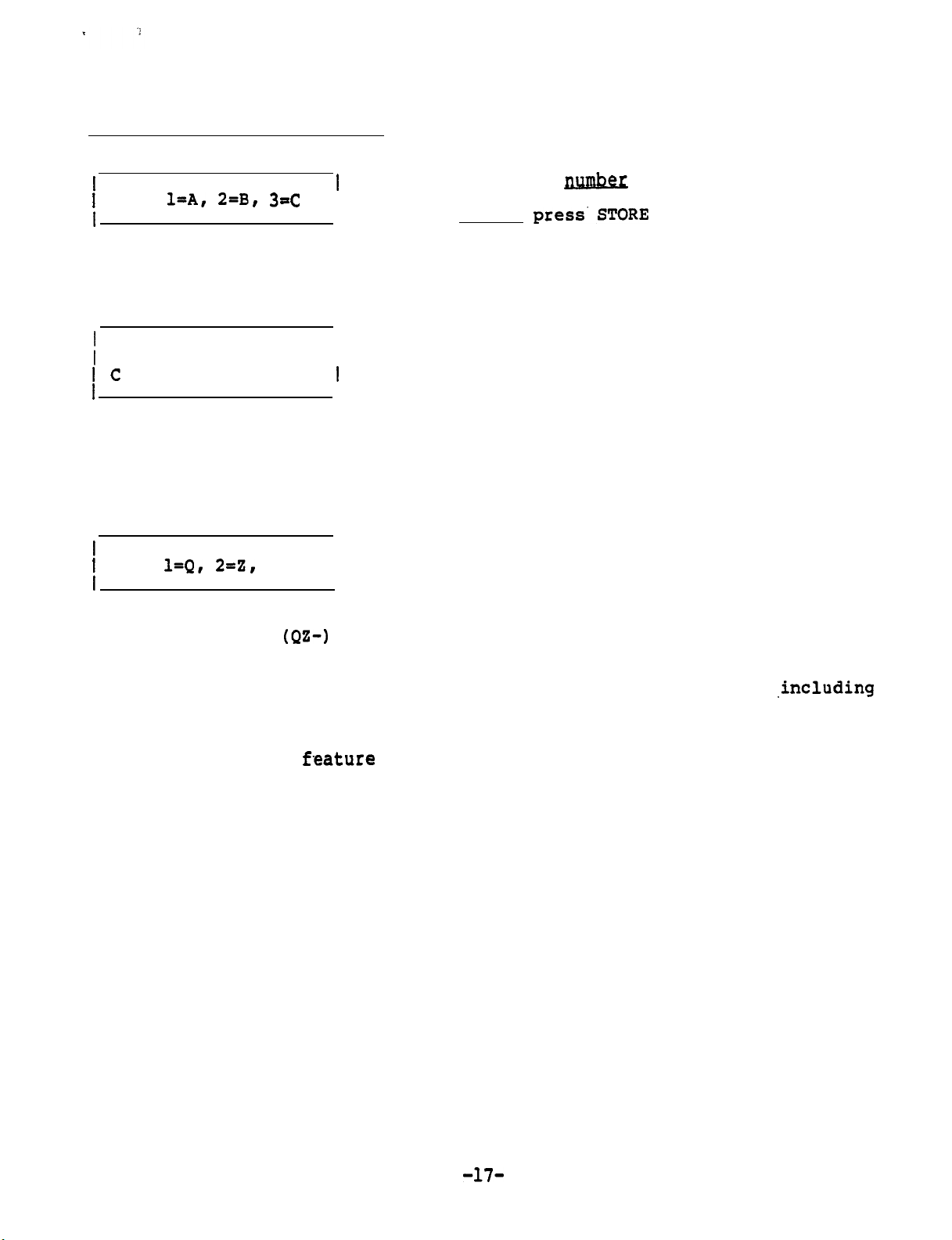
PROGRAMMABLE FEATURE BUTTONS (continued)
Press key pad number which corresponds
USE:
I
to the desired letter shown on left,
but do not
name is finished.
Display shows the result
of pressing the 2 (ABC)
If a number was selected in the previous
step, press key 4.
key in the previous step
button unless
ENTER NAME
I
Enter next letter on tone pad
I
Display shows the result
of pressing the 3 key in
the previous step to
select the third letter
of the three choices.
USE:
3=-
1
I
Display shows the result
of pressing the 8
key in the previous step
Continue the procedure until the same is finished (12 characters
spaces and dashes maximum),
For the DIRECT FORWARD feature,
one to activate the
the same button is used.
Select desired character
then press the STORE button.
two command strings have to be programmed,
and one to deactivate the feature,.although
After entering the feature programming security key (code), perform the
following steps:
Page 18
FEATURE RUTTONS
Direct Forward Activate
.
(continued1
Press STORE, FEATURE
and
buttons in sequence.
Using the same procedure described on
* ENTER NUMBER
I
I
previous
and press STORE.
enter the command string
Using the same procedure
* ENTER NAME
previous pages,
enter the feature name
and press STORE.
To display the feature, press the DISPLAY, FEATURE
and * buttons in
sequence.
Direct Forward Deactivate
Press STORE, FEATURE
.
an uttons in sequence.
Using the same procedure described above,
ENTER NUMBER
enter the command string and press STORE.
Using the same procedure described above,
ENTER NAME
I
To display the feature, press the DISPLAY, FEATURE
enter the feature name and press STORE. .
and
sequence.
buttons in
Page 19
PROGRAMMABLE FEATURE
(continued)
No
te:
When the FEATURE + button is pressed,
the first three letters of
the feature name are displayed for features 1 through 6. In order
for the user to recognize the feature, the first three letters
should clearly show the entire feature. 'When using the feature,
the entire name is displayed.
Examples of Feature names:
FWN
FWB
Fwc
UN1
To display the feature
Press
DISPLAY
If the FEATURE + button was pressed,
BUSY
CANCEL
ZONE ONE
, perform the following procedure:
and feature button
a feature number is also selected.
If one of the other buttons was pressed, skip the next step.
SELECT PBX
Enter
FEATURE (l-9)
Feature Feature
Number Name
I
V V
4 UNA
ZONE ONE
I
COMMAND STRING
I
Page 20

SET-30 PROGRAMMING
This exercise contains four different SET-30 configurations.
Complete the database tables in the back of this booklet for each of
the configurations.
The database tables also contain some wiring information for easy
identification of each station.
After completion of the database tables
ations.
RINGING ARRANGEMENT
Selection
1
2
Duplicate ringing.
phones.
Delayed duplicate ringing.
After two rings,
phone.
Executive answers.
Full call screening.
Overflow call screening.
phone. Subsequent calls will ring at the secretary's phone
as long as the executive's phone is busy.
Rings both secretary's and executive's
the call also rings at the secretary's
Rings only at executive's phone.
, program each of the configur-
Description
Rings at executive's phone.
Rings only at secretary's phone.
Rings first call at executive's
6
7
Primary line call screening.
line, and rings at the secretary's phone. Line B designated
as secondary line,
If line B is busy,
Secondary line call screening. Same as 6, but A and B are
reversed.
and rings at executive's phone when idle.
calls ring at secretary's phone.
Line A designate as primary
Page 21

EXECUTIVE
Exercise
The following Executive/Private Secretary combination will be used.
Extension 1300 will appear on Line A of both instruments.
Answer Phrase is Siemens.
Extension will ring at Secretary.
Direct Forward Destination is Ext. 200.
Extension 1301 will appear on Line B of both instruments.
Answer Phrase is JANE DOE.
Extension will ring at Secretary.
Direct Forward Destination is Ext. 211.
The executive’s ring arrangement is full screening of
SECRETARY INSTRUMENT
PBX LINE
I
PBX LINE
PINS 4 6
SECRETARY SET
EXECUTIVE SET* iLOCAL POWER AND
I
2, PINS 3
EACH
LOCAL
2 ON BOTH
----
l
IF CONNECTED
ON BOTH INSTRUMENTS.
PAIRS 4
BUTTON OF EACH OF THE
LINE
BUTTON OF
AS
SHOWN, THE
REVERSED To HAVE DIFFERENT LINES ON THE FIRST LINE
EACH
INSTRUMENTS AND (IF USED) AGAIN ON THE SECOND
OF THE
---
I
i
IS
SAME LINES
INSTRUMENTS.
I
I------
WILL APPEAR ON THE SAME LINE BUTTONS
EXECUTIVE
PBX LINE
I
3, PINS 2
SECRETARY SET
To ,PAI:'4, PINS 1
3.
LINE
2
.
so To
---
SET*
I.--
SECRETARY INSTRUMENT
I I I
.
l
I
;
I_
I RING HERE
-------
I
FORWARD
I
I
DIRECT
I
--
i
HA
NA
I
Page 22

Exercise
The following Executive/Private Secretary combination will be used.
Extension 1300 will appear on Line A of both instruments.
Answer Phrase is Siemens.
Extension will ring at Secretary.
Direct Forward Destination is Ext. 200.
Extension 1301 will appear on Line B of the executive’s instrument only.
(Direct Forward Destination is Ext.
The executive’s ring arrangement is duplicate ringing.
SECRETARY INSTRUHENT
I '
-I __________
I LINE
I A
PBX LINE ,
i
PAIR 1,
I’
PAIR I, PINS 4 L
DF EXECUTIVE SET* ILOCAL POWER AND
IF CONNECTED
ON BOTH INSTRUMENTS.
PAIRS
BUTTON OF EACH OF THE
LINE BUTTON OF EACH OF THE lW0 INSTRURENTS.
CROSSCONNECTIONS
To
PINS
SECRETARY SET
AND ALSO TO
AS SHOWN,
L 4 MAY BE REVERSED Tk'HAVE DIFFERENT LINES ON THE FIRST LINE
EACH
L
LOCAL
INSTRUMENT
ICROSSCONNECTING
I INSTRUMENTS IS
THE SAME LINES WILL APPEAR ON THE SAME LINE BUTTONS
2, PINS 3 L
CONNECTING
2
INSTRUHENTS AND (IF USED) AGAIN ON THE SECOND
EXECUTIVE
I
I I I
3, PINS 2 L 7lPBX LINE __
SECRETARY SET
2
SET
'I
I
PINS 1 L
I
4, PINS 1 L
EXECUTIVE SET*
l
I
I SECRETARY INSTRUMENT
I EXT 1
2
--IT--I
--
I
I
I I
------- ----
I
I
____ ---- ____ --
------
I-------- DIRECT
FORWARD I-=--
TO
EXT:
Page 23

ON ROTH
THIRD PBX LINE TO EXECUTIVE
Exercise
The following Executive/Private Secretary combination will be used.
Extension 1300 will appear on Line A of both instruments.
Answer Phrase is Siemens.
Extension Will ring at Secretary.
Direct Forward Destination is Ext. 200.
Extension 1301 will appear on Line B of the Secretary’s instrument only.
Direct Forward Destination is Ext.
Extension 1302 will appear on Line B of the executive’s instrument only.
Direct Forward Destination is Ext
I
The executive’s ring arrangement is delayed duplicate ringing.
I
SECRETARY INSTRUMENT
I
.
I LINE I
CROSSCONNECTIONS
LINE
i
i
PINS 4
SECRETARY SET
AND ALSO To
PINS 4
EXECUTIVE SET
-----
510NE INSTRUMENT To
IINSTRUMENTS IS
---------------
I
2
6lPAIR 3. PINS
BOTH
I
I
2
SET
2
SET
EXECUTIVE INSTRUblENT
LINE
I
___
1
I-I-_-- I-----
71PBX LINE __
710F EXECUTIVE SET
, PINS 1
-- ---- I--
--
I
l
--------------------
I SECRETARY INSTRUMENT
1
I I I
I EXT 2
--
I
LINE
I--.-.--
I
I-.--
INSTRUMENT
I I
l
I
ANSWER I-
I PHRASE
SECOND PBX
I
I
-----
I
I
RING
TO
I I
I I
DIRECT
FORWARD
__
EXT:
EXT:
----I
I
I
Page 24

PRIVATE
Press STORE, FEATURE +, 0,
display between buttons.)
SELECT MASK (
SELECT MODEL
SECT-l, EXEC-2
SECRETARY
PRIVATE=3
Press STORE and
WIRED FOR INTERCOM?
NO=2
2 OR
(3rd ivory button in bottom row) in sequence
buttons in sequence. (Disregard INVALID
I
i
I
I
I
Enter and STORE
Enter
Enter
Enter
1
3
and STORE
and STORE
and STORE
EXTENSION FOR
LINE Xl:
i I
I
EXTENSION FOR
LINE A:
EXTENSION FOR
LINE B:
Enter and STORE
(Executive's first extension number)
I
I
I
Enter and STORE
(Executive's second extension number)
Note
extension is used or if the executive's
second extension is private.
Enter and STORE
(Secretary's first extension number)
Enter and STORE
(Secretary's secondary extension number)
: Enter
and STORE if only one
Page 25

(continued
To display the programmed lines
Press
I WHICH LINE ?
INTERCOM
COM
DISPLAY
wired
YES or NO
V
YES
and COM (3rd ivory
Line requested (A or
V
LINE A
, perform the following procedure:
bottom row) in sequence
Enter and
STORE
I Xl400
Extension number of requested line (XNONE if none is assigned)
HEADSET IN
Press STORE
SELECT HANDSET
and
OF
HANGUP
buttons in sequence
Enter
and STORE
Page 26

PRIVATE
(continued)
ANSWER PHRASE (Programmed at Secretary Stations only)
Press the STORE and STATUS buttons in sequence
EXECUTIVE'S LINE NUMBER
(1st display shows highest)
I
If the extension does not ring here,
enter BACK, and next extension will
be displayed.
V
2 BACK, UP, DN?
I x01
Last two digits of
EXECUTIVE'S LINE NUMBER
If the extension rings here, press
the VOLUME button.
Note: Pressing the VOLUME
removes
the extension from
button
this secretary station
I
ANSWER PHRASE?
I
Press tone pad key which corresponds
to the first letter or number of the
answer phrase (key 1 is pressed twice
for space).
Note : Each numbered key except 0 and 1 has three letters (0 key has two
letters and a dash). In order to select one of the three, another
entry is necessary. If the number 1 was selected to be used as a
number or a space, the display will be different.
Press key pad number which corresponds
USE:
I
3-C
to the desired letter shown on left,
but do not press STORE button unless
Display shows the result of phrase is finished.
pressing the 2 (ABC) key in
If a number
selected in the
the previous step vious step, press key 4.
ANSWER PHRASE?
Enter next letter on tone pad
I c
I
Display shows the result of
pressing the 3 key in the
previous step to select the
third letter of the three choices.
Page 27

USE:
I
I
Select desired character
(continued)
Display shows the result of
pressing the 8
key in
the previous step.
Continue the procedure until the phrase is finished (12 characters
including spaces maximum),
then press the STORE button.
RING HERE?
YES-l,
Enter
DELAY=3
and STORE
Note : Delayed is used if the call goes to a conventional instrument (2500)
first and rings the secretary if not answered within a given time,.
1 BACK, UP, DN?
I x00
Next lower executive extension is displayed.
Repeat the procedure above for this extension.
Page 28

DIRECTED
STORE and DIRECT FORWARD buttons in sequence
FORWARD LINE A
Enter and STORE
I TO
FORWARD LINE B
Enter and STORE
I TO
To display DIRECT FORWARD, perform the following procedure:
Press DISPLAY and DIRECT FORWARD buttons in sequence
WHICH LINE?
Enter and STORE
Line being displayed
I
V
AFWD TO 1400
I
Station to which chosen line is forwarded
I
Page 29

CUTIVE
SECRETARY)
Press STORE, FEATURE+, 0,
display between buttons.)
SELECT MASK (0-9)
SELECT MODEL
SECT-l,
Press STORE and COM (3rd ivory button in bottom row) in sequence
I
EXTENSION FOR
LINE B:
I
buttons in sequence. (Disregard INVALID
Enter‘
Enter 2
i
I
Enter
Enter and STORE
and STORE
and STORE
and STORE
Note :
To display the programmed lines , perform the following procedure:
Press DISPLAY and COM (3rd ivory button in bottom row) in sequence
Not applicable at
EXECUTIVE Station Line requested (A or B)
COM = NO
Extension number of requested line (XNONE if none is assigned)
If an extension is a private line, enter
LINE ?
I
V V
LINE A
I
I
i
I
I
Enter
for extension number.
and STORE
Page 30

IVE.(with
(continued)
NG
AND DIRECT FORWARD
Unplug the line cord of the Secretary set associated with this station
and plug it back in.
Press STORE and DIRECT FORWARD buttons in sequence
Select number from table below,
enter number and STORE.
If just STORE is pressed,
I
1
Duplicate ringing.
Rings both secretary's and executive's
defaults to arrangement 1.
phones.
2
Delayed duplicate ringing.
After two rings,
the call also rings at the secretary's
Rings at executive's phone.
phone.
Executive answers. Rings only at executive's phone.
Full call screening.
Overflow call screening.
Rings only at secretary's phone.
Rings first call at executive's
phone. Subsequent calls will ring at the secretary's phone
as long as the executive's phone is busy.
6
Primary line call screening.
Line A designate as primary
line, and rings at the secretary's phone. Line B designated
as secondary line,
and rings at executive's phone when idle.
If line B is busy, calls ring at secretary's phone.
7
Secondary line call screening. Same as
but A and
B are
reversed.
Enter
LINE A
(Used only for private EXECUTIVE
I
which are not answered by secretary.
and STORE
lines
For lines answered by secretary, enter
STORE only.
LINE B
Enter and STORE
I
To display Ring Arrangement and Direct Forward Destination perform
the following procedures:
DISPLAY and DIRECT FORWARD buttons in sequence
Page 31

(with
SECRETARY
) (continued)
A-l, B-2
i AEWD TO 1400
1 DUPLICATE RING
Ring Arrangement used
LINE
Station to which chosen
line is forwarded
I
V
i
I
Enter
and STORE
Page 32

SE
The following
stations will be used in a Multiplexer
2 con-
figuration (two secretaries and several executives).
Station extension numbers 1320 through
1326 (already programmed in
the PBX data base as tone phones).
The station numbers will be distributed as shown below:
Ext 1320 to Secretary 1
Ext 1321 to Secretary 2
Ext 1322 to Executive 1, Line A
Ext 1323 to Executive 1, Line B
Ext 1324 to Executive 2, Line A
Ext 1325 to Executive 2, Line B
Ext 1326 to single-line (2500 type) phone
The Answer Phrases and secretary destinations (ring) will be as shown below:
ER
1320
--------------------------
1323
1324
1325
---------------------------
1326
The Direct Forward destinations will be as shown below:
CT
FORWARD
1320 ALL LINES TO 1220
1321
1322
1323
1324
1325
1326
All stations will use handsets.
Ring Arrangement for the Executive Stations will be
"Full Call
Screening".
Page 33

The following Speed Dial numbers will be programmed:
Telephone Network Address:
Using trunk group
1
Internal extension number 1220
access code 81
The following features will be programed:
Direct Forward
access code 48
Direct Forward Deactivate, access code 46
Call Forward
Feature name:
Call Forward
No Answer, Key pad button
access code 42
NO ANS
Busy, Key pad button 2, access code 41
Feature name: FWB BUSY
Call Forward
Feature name: Ewe
Cancel, Key pad button 3, access code 46
CANCEL
Call Park, PARK button, access code 72
Feature name:
994-7541
Page 34

I I
I
I
3
3
I I
I
I
2
I
I I
3
3
I 4
3
I
I
I
3
5
I
I
1 6
I
1 7
I
I
I
I f
I
3
3
I
7. I
I
I
I
I
I
I
I
I. I
I
I
I
I
I I
3
4
4
4
3
I
4
4
4 6
4
I 7
.I
4
5
I
I
I
4
I
8
Page 35

Page 36

(continued)
1
Page 37

2
Page 38

MUX
2
I
I
1 (pins 4
MUX card in the I
I l
I
2 (pins 3
I
I
3 (pins 2
to pair 11 of
card in the
to pair
to
5)
6)
7) of
(continued)
I
I
I
I
I l
4 (pins 1
8)
are not
.
I
I
I
Page 39

EXECUTIVE
I
If single-line
enter ruder
----- --
/LINE A
B I
---
B
PAIR1
k
I of
I
I PAIR
I""-- :--
I --
I
PAIR
I --
B
A
B
I--
4
I
I
5
PINS 3
PAIR2
I of
I
I
PAIR3
6
30 I of
2
7 I PINS 1
I
PAIR4
I If Single-line I RING
8 I Phone Use
I
I--I”“-- :--I--
PAIR
i--I
PAIR
PAIR
I-I
1--
I
I
I--
I--
I PAIR
I I
i--
I
I ARRANGE- I (Private Lines
-- --
I
I
I
I
I
I
I
l
I
I
---
I
I
I
-==
I
I
I
I
I
I
i
I
I
i
I
I
A
B
A
B
I""-- ;--
I --I""-I PAIR
I PAIR-
I PAIR
------
;- --
PAIR
------------
I I
I""-
------ --
I--
I I
_----I-----------------
i
I
I
Page 40

Note:
Secretary 1 has T
R connected
pair 9 of the multiplexer.
Press STORE, FEATURE
buttons in sequence.
(Disregard INVALID display
between buttons.)
SELECT MASX (0-9)
I
Enter and STORE
SELECT MODEL
SECT
SECRETARY
PRIVATE = 3
1, EXEC
or
I
I
Enter 1
Enter 1
and STORE
and STORE
Press STORE and COM (5th ivory button in bottom row) in sequence
WIRED FOR INTERCOM?
YES
I
1, NO
2
I
Enter
and STORE
If answer is yes (1) secretary has 4 line buttons and 1 intercom button.
If answer is no (2) secretary has 5 line buttons and no intercom button.
AUTO ANSWER COM?
I
YES
NO
EXTENSION FOR‘
I
LINE 1:
EXTENSION FOR
Enter
Enter and STORE
Enter and STORE
and STORE
LINE 2:
EXTENSION FOR
I
LINE 32:
I
I
Enter and STORE
Page 41

(continued)
If fewer than 32 lines
has been programmed and stored.
To display and programmed lines
Press DISPLAY and COM (5th ivory button in bottom row) in sequence
WHICH LINE
(01 to 32)
Intercom wired
Yes or No Line requested
LINE 8
I
Extension number of requested line (XNONE if none is assigned)
Xl400
I
are
programmed
, perform the following procedure:
, press HANG UP button after last line
Enter and STORE
Press STORE and HANGUP buttons in sequence
SELECT HANDSET
OR HEADSET = 2
1
Enter
I
and STORE
Page 42

(continued)
ANSWER
Press the
EXECUTIVE'S LINE
(1st display
shows highest)
I
I
Last two digits of
EXECUTIVE'S LINE
NUMBER
ANSWER PHRASE?
Note: Each numbered. key except
two letters and a dash). In order to select one of the three,
another entry is necessary.
be used as a number or a space,
(Programmed at
and STATUS buttons in
UP, DN?
If the'extension does not
ring here,
next extension will be
displayed.
If the extension rings here,
press the VOLUME
Note: Pressing the VOLUME
button removes the
extension from this
secretary station.
Press tone pad key which
corresponds to the first
letter
answer
pressed twice for space).
and
1 has three letters (0 key has
If the number 1 was selected to
the display will be different.
only)
enter BACK, and
or
number of the
button.
1 is
Press key pad number which
USE:
Display shows the result of
pressing the 2 (ABC) key in
the previous step.
I
Display shows the result of pressing the
3
key
in the previous step to select the
third letter of the three choices.
I
USE:
1 (continued)
I
I
corresponds to the desired
letter shown on left, but
do not press STORE button
unless phrase is finished.
If a number was selected in
the previous step, press
key 4.
Enter next letter on tone
Select desired character
Page 43

Display shows the result of pressing the
8
key in the previous step
Continue the procedure until
spaces maximum),
then press the STORE button.
RING HERE? YES-1
Note:
DELAYED=3
Delayed is used if the call goes to a conventional instrument (2500)
the phrase is finished (12
I
Enter
I
I
and STORE
first and rings the secretary if not answered within a given
BACK, UP, DN?
I
Next lower executive extension is displayed.
Repeat the procedure above for this extension.
characters including
time.
Page 44

(continued)
Press STORE and DIRECT FORWARD buttons
Display when just STORE
was entered in last step
I
V
I
If all lines. are' to be
forwarded to the same
station,
ENTER and STORE
If lines
different destinations,
Enter STORE
ENTER and STORE
i
FORWARD LINE 2
I To
Repeat with every line to be forwarded.
ENTER and STORE
to
Enter STORE to skip lines.
To display DIRECT FORWARD, perform the following procedure
Press DISPLAY and DIRECT FORWARD button in sequence
Line being displayed
I
V
SFWD to 1400
LINE ?
01 to 32
Station to which chosen line is forwarded
I
ENTER and STORE
Page 45

2
of two with several
Note:
In order to program Secretary
to be programmed first.
Also, the intercom and power connections to the
stations have to be complete.
Press STORE,
between buttons. )
Secretary
FEATURE
SELECT MASK
SELECT MODEL
SECT
SECRETARY
PRIVATE
3
has
2
2 or
connected to pair
Secretary 1
buttons in sequence.
of the multiplexer.
Enter and STORE
Enter 1
Enter 2
extension assignments have
at both secretary
(Disregard INVALID display
and STORE
and STORE
Unplug Secretary
programmed extension numbers
2 data
bases.
To assure proper transfer,
instrument‘ and plug it back in. This
sion at Secretary 2.
transfers
from Secretary 1 data base to Secretary
display at least one exten-
Page 46

Press
and
(5th ivory button in bottom row) in sequence
WHICH LINE
Enter and STORE
Intercom wired
Yes or No
I
Lined requested
I
V V
I COM
I Xl400
Extension number of requested line (XNONE
I
YES
LINE 8
I
none is assigned)
Press STORE and HANGUP buttons in sequence
SELECT HANDSET
OR HEADSET
2
1
ENTER and STORE
I
Page 47

(Programmed at Secretary Stations only)
Press the STORE and STATUS buttons in sequence
EXECUTIVE'S LINE
(1st display
shows highest)
If the extension does not ring here,
enter BACK, and next extension will
be displayed.
I
I 2 BACK, UP, DN?
I
If the extension rings here, press
the VOLUME button.
I
Note: Pressing the VOLUME button
I
Last two digits of
removes the extension
this secretary station.
from
EXECUTIVE'S LINE
NUMBER
Press tone pad key which corresponds
ANSWER PHRASE?
to the first letter or number of the
answer
phrase (key 1 is pressed twice
for space).
Note:
Each numbered key except
two letters and a dash).
and
In order to select one of the three,
another entry is necessary.
be used as a number or a
1 has three letters (0 key has
If the number 1 was selected to
the display will be different.
Press key pad number which
USE:
I
I
ponds to the desired letter shown
on left, but do
not
press STORE
button unless phrase is finished.
If a number was selected in the
Display shows the result of previous step, press Key 4.
pressing the 2 (ABC) key in
the previous step
Page 48

I ANSWER PHRASE?
I c
Enter next letter on tone pad
. .
Display shows the result of pressing
the 3 key in the previous step to select
the third letter of the three choices.
I I
i USE:
I
i
Select desired character
Display shows the result of pressing
the 8 (QZ-) key in the previous step
Continue the procedure until the phrase is finished (12 characters including
spaces maximum),
RING HERE? YES-1
DELAYED-3
then press the STORE button.
Enter and STORE
Note: Delayed is used if the call goes to a conventional instrument (2500)
first and rings the secretary. if not answered within a given time.
DN?
Next lower executive extension is displayed.
Repeat the procedure above for this extension.
Page 49

press STORE and DIRECT FORWARD buttons in sequence
FORWARD ALL
If- all lines are to be
forwarded to the same
To
station,
Enter.-
If lines are forwarded to
different destinations,
Enter STORE
Display when just STORE
was entered in last step
LINE 1
ENTER
I
FORWARD LINE 2
ENTER and STORE
To
I
Repeat with every line to be forwarded
Enter STORE to skip lines.
and STORE
and STORE
To display DIRECT FORWARD, perform the following procedure
Press DISPLAY and DIRECT FORWARD buttons in sequence
WHICH LINE ?
I
ENTER and STORE
Line being displayed
I
5FWD to 1400
I
Station to which chosen line is forwarded
To program Executive Stations 1 and 2 go back to the procedures on page 27.
Page 50

I
--
l
.----
I--
I I
l
---
II
a-
--I
---
I
---
I
l
l
---
I
---
Page 51

SET
INSTALLATION MANUAL
Nov. 1, 1984
Page 52

SET-30 INSTAUAZION
The
following
programming procedures
outlined in the SET-30 Documentation
a
PROGRAMMING
the installation and
Package.
It is intended to provide the craftsperson with a quick over-
view of the steps- which have to be taken to install and
program
a SET-30.
For
more detailed information,
refer
to the Documentation
Package.
Page 53

AUTOCOM
SET-30
SPECIFICATIONS
Number of Loops
PBX Loop Resistance
Type
Power Loop Resistance
Power Loop Distance
Voltage
Hold
Response
Tones
Keys
Display
Speakerphones
Handset
Data Retention
FCC Specification
MULTIPLEXER
PBX Loop Type
PBX Lines
Secretary Stations
Power Connection
2 + Intercom
1200 Ohm maximum
Loop Start
120 Ohm maximum
2200 FT @ 24 GA
24 to 56 VDC
Non-polarity Sensitive
Hard hold on all lines
300
Hz
12 DTMF
32 5x7 matrix, alphanumeric character,
LCD technology
Integral
Half Duplex
Standard K-type with modular connection
6 Years without power
Meets
or exceed parts:
15 subpart Class
A
68 (network connection)
Loop Start
8 (32 with 4 multiplexers)
1 (2 on Multiplex II version)
42-56 VDC, 200 MA plus 200 MA per
phone maximum
Polarity sensitive
All specifications and prices are subject to change without notice.
Page 54

FORM
__
Note:
These items are supplied
ITEM
-----------------------------
-------------------------
I
NOMENCLATURE
PN-X5051-Al00
Multiplexer 1
PN-X5051-Al.02
3
Multiplexer PN-X5051-A103 2
I-I
I 4 I Power buffer Card
PN-X5051-Al.04
i 5'
I
Local Power Adapter
I 6 I Card Cage Assembly
PN-X5051-Al05
I I
I-I
by
Siemens
DESCRIPTION
Programmable SET-30 Telephone
I
See
I
I Single Secretary Multiplexer
w/8 power
I
Dual Secretary Multiplexer
I
power
I
I
For up to 25
I
Provides fused power
I-II
Power supply for one SET-30
I
Holds up to 13 multiplexer
I assemblies.
Requires power
QUANTITY I
I
I
i
I
I
I I
Page 55

SET-30 can be programmed to operate
in any of
shown below:
1.
2 dedicated line buttons stand-alone EXECUTIVE station.
2.
2 dedicated line buttons plus intercom
station (with private or group secretary).
3.
2 dedicated line buttons plus
SECRETARY station, (serving one EXECUTIVE station).
the
button
button PRIVATE
EXECUTIVE
4 nondedicated line buttons plus intercom ‘button‘
4.
G
ROU
P
SECRETARY station, serving to 32 EXECUTIVE stations or
nonexecutive stations (2500) phones).
5.
5 non-dedicated line buttons
SECRETARY station
serving up to 32 EXECUTIVE stations or
(without
intercom)
GROUP
nonexecutive stations (2500 phones).
The first or only
programmed as SECRETARY 1.
is used,
it is programmed as SECRETARY 2.
secretary station of
this type is
If a second secretary
station
Stand-Alone EXECUTIVE stations are connected to the PBX only.
One EXECUTIVE, one SECRETARY combinations are connected to the PBX
only with an intercom line between the two stations.
If one
SECRETARY
station screens calls for more than one EXECUTIVE
station a Multiplexer I card is required.
If two SECRETARY stations
stations,
a Multiplexer II card is required.
Each Multiplexer group may use up
(of the
same
type).
(both) screen
to four 8-port multiplexer cards
calls for EXECUTIVE
SET-30 is powered locally, using an AC to DC converter,
or con-
nected to a multiplexer card, or connected to a power buffer card.
Each power buffer
card
supplies power
for 25 instruments,
individually fused at 400 ma @ 48V.
A 16-slot card cage
is used to house‘ multiplexer and power buffer
cards.
Multiplexer cards for the same group are placed in adjacent slots.
Each multiplexer group is separated by an "empty" slot.
If power buffer cards are used,
they may be placed in any
cupied slot, including the "empty" slot between multiplexer groups.
Page 56

Power to the cage for the multiplexer
ground from a separate power supply.
and buffer cards is -48v and
'Total
Each multiplexer of buffer card is connected'via a
the MDF (female amphenol connector at
200 ma @ 48V X (number of multiplexer
cards
buffer ports used)
number of multiplexer
cable to
end),
and
Page 57

SET-30 uses 4-pair wiring (using RI-45 connector)
CUTIVE St-
First pair (pin
circuit.
Second pair (pins
Third pair (pins
Fourth pair (pins
.
T
R for
PBX
.
.
Connected to PBX station
Power (local or from buffer)
used
T
R for
circuit.
PRX
Second line Gould normally not be used
.
Connected to PBX station
in this configuration.
Stand-alone
I
I
I
EXECUTIVE
I Line:
SET-30E
SET-306
con
Page 58

ecutive
First pair (pins
Second pair (pins
Third pair (pins
Fourth pair (pins
T
R for 1st PBX
to PBX
station circuit
.
Connected
and
crossconnected to first pair -(pins
of secretary station.
Power (local or from buffer)
crossconnected to
of
T
R
Connected to
PRX
PBX station
.
Crossconnected to
of secretary station,
(optional).
pair (pins
third
secretary
circuit.
unless
it is a private line.
Note:
In the configuration above,
are crossconnected between the executive
secretary station as
will appear on the first button of both instruments, and
the second extension number on the second button of both
instruments.
To have the extension numbers on one of the two instru-
ments reversed, pair 1 at that station is crossconnected
to pair. 4 of the other
station is crossconnected to
station.
First pair (pins
Second pair (pins
Third pair (pins
Fourth pair (pins
if both PBX station circuits
shown,
the first extension number
station,
T 6 R for
to PBX
station
and pair 4 at
pair
t PBX
of the other
Connected
station circuit
and
that
and
crossconneeted to first pair (pins
of executive station.
Power (local or from buffer)
crossconnected to third
pair (pins
station.
T
R for 2nd PBX
.
(optional).
Connected to PBX station circuit.
Crossconnected to fourth pair (pins
of executive station,
unless
it is a private line.
Page 59

One Private Secretary Serving One Executive with Two Common
Lines and Dedicated Intercom
PBX
I
I I I-
I
I I I
I I
I
SET-30E
I I
l
I---
SET 30-E
I
I corn
I
PRIVATE SECRETARY EXECUTIVE
Page 60

I OR II WIRING
Note:
Different multiplexer cards are used for single and dual
secretary applications.
Each PBX station circuit to appear at a
an
EXECU
TIVE
station is wired to a line pair on the multiplexer
SECRETARY station and
and the particular line on the EXECUTIVE'instrument where it is
to appear (pair 1 or 4 of the 4-pair modular connector).
Each PBX station circuit to appear at a SECRETARY station and a
conventional telephone (2500 set) is also wired to a line pair
on the multiplexer
tional instruments merely forwarded
and the line of the instrument.
to a secretary are
(Conven-
con-
nected to the PBX only).
A PBX station circuit appearing at a SECRETARY station only is
wired to a line pair on the multiplexer only.
A PBX station
circuit appearing at an EXECUTIVE station only
(never to be answered by a secretary) is wired to the par-
ticular line on the EXECUTIVE instrument where it is to appear
(pair 1 or 4 of the cl-pair modular connector).
The INTERCOM pairs of all instruments are wired in parallel and
in addition to pair 11
of one of the multiplexer cards in the
multiplexer group.
The T&R pair (pair
SECRETARY
is wired to pair
1 on the
of one of the multiplexer cards
modular connector) of
in 'the multiplexer group.
The T&R pair (pair
1 on the
modular connector) of
SECRETARY II (if used) is wired to pair 10 of one of the multi-
plexer cards in the multiplexer group.
Power for each instrument (pair 2 of the 4-pair modular connector) may be obtained locally, from the multiplexer
card, or a
power buffer card.
-10-
Page 61

One group Secretary Serving Two Executives with Two Common
Lines and Dedicated Intercom, and Serving Non-Executives as a
Message Center with Group Lines to which they can forward their
calls.
I
!
I
I I I I
I I
I I
I
I
9 I
I I
I
I
I
I
I DECODE
I
IA IS IC ID I
I
I
I I I
I I
I
I I I I
LINE
I I
I I I I
I I I
1
I
I
I I
I
I
I
I
Cal I
I
I
I
I
11
I
I I
I
I I
I I
I I
I
I
I
I I
I I I
I
I
I
I
I I
I I I I
I I I I
I
I
I
I
I
I I
I I
I I I I I I
I
I
I
IINTERI
IIBET-3OE
I
I
I
I
I
I
I
I
I
I
IINTERI
I cm I
I
I
I
I
I
I
I
I
I
I
I
I
I
I
I
I
I
I
I
I
I
I
I
I
I
I
I
I
I
I
I
I
I
I
I
I
I
I
One group Secretary Serving
Lines and Dedicated
Intercom,
EXECUTIVE
EXECUTIVE 2
NON
TYPE
TO
Executives with Two Common
and Two Non-Executives
with
Delayed Ring.
I
I
I
I
I
I
I I I I I I
I
I I I I
I
I
9 I 11 I
I DECODE
I
IA
I I I I I
I
I
,
I I I
I I
I
I
I
I
I
I I
I
I
SECRETARY
I I I I
LIN
1
I
ID I
I I
IINTERI
I
I
I
I
I
I I
I I
I
I I I
I I
I I
I I
I
I
I
I
I I
I I I I I
I
EXECUTIVE
IINTERI
I I
I I
I I
I
I I
I
I I
I I
I I I
I I
I I I
I
I
;----I-
I
I I I I
I I
SET-30E
EXECUTIVE 2
I
I
I
I
I I
I I
I
I
I
I
I
I
I
TYPE
I
I
I
I
I
I
I
I
I
I
I
I
I
I
I
I
I
I
I
I
I
I
I
I
NON EXECUTIVES
Page 62

Two group Secretaries
serving Two
Lines and Dedicated Intercom, and Serving
executives with Two
Non-Executives as a
Message Center with Group Lines to which they can forward their
calls.
I-
I i
SST-JOE
I
i i
2500
I I
USING
TYPE SETS
TO
I
I
II
I 2
SET-30E
con
(CALL
i
I
ID
cat I
DECODE
I
II
ID I
can I
I
I
Two secretaries serving Two Executives with Two Common Lines
and Dedicated Intercom, and Two Non-Executives with Delayed
Ring.
I
III I
I
I
I
LINE
9
I-
IC ID I
I
I
II
I DECODE
I
I i
I
I
+
I
I
I
I
I
I
-II
I
I
I
I
I
I
NON
at
Page 63

I0000000
I
I
i
I
2-t-1
I
40-I-l
I
I
I I
I-I-I-I431 I I
I-I-I-l-1441
I
-i-l-l-l-l-l461
I
I I I I I I
-------
I IIIIIII
I
I
I
I I I
I
I
I
I
I
II
---
I
I
I
. .
Typical Multiplexer 1 Configuration
i i i i i i
III III
i i
I
---
Id, I
A(31
i
-i
I
i
IC ID
I i
I
i
i
I
i
Page 64

1234567
I0000000 0
2
3 G-j-l
4
5
I I
u-i-i
I
I
I
I I
I I
i
i-i-i-i-i,
I-
I
I
-l-l-l-l-l4 I
I
l-
l-l-l-l-l-l-l- 9
I
I
I
I I I
I
1
1
I
-----
I
I
I I
-I
I I 1
I I
i
I I I 1 I I I
I
8
I
II I
i
i
I
2 T&R
I
I
i
I
i
I
-i
I
i
Typical Multiplexer
I I I I I I I
i
-i
I
I
I
Configuration
I an I
I
I
I
-14-
Page 65

MULTIPLEXER I OR II PIN OUT
Line 1
Line
2
Line 3
Line 4
Line 5
Line 6
Line 7
Line 8
Secretary 1
Secretary 2(Mux 2 only)
Intercom
Not Used
Not Used
Not Used
Not Used
Not Used
Not Used
Power 1
Power 2
Power 3
Power 4
Power 5
Power 6
Power 7
Power 8
In
In
In
In
In
In
In
In
out
out
In/Out
1
2
3
6
7
8
9
12
13
14
15
16
17
18
19
24
25
Polarity Insensitive
Polarity Insensitive
Polarity Insensitive
Polarity Insensitive
Polarity Insensitive
Polarity Insensitive
Polarity Insensitive
Polarity Insensitive
Polarity Insensitive
Polarity Insensitive
Polarity Insensitive
not used
not used
not used
not used
not used
not used
*Polarity Insensitive
*Polarity Insensitive
*Polarity Insensitive
*polarity Insensitive
*Polarity Insensitive
*Polarity Insensitive
*Polarity Insensitive
*Polarity Insensitive
Power Buffer Card Connections
Power
Power
Power
Power
Power
Power
Power
Power
Power
Power
Power
Power
Power
Power
Power
Power
Power
Power
Power
Power
Power
Power
Power
Page 66

G
Key strips for each type of SET-36 are included with the User's
. Guide.
Select the correct strip for
the programmed
SET
-30.
Type the extension(s) programmed for a Private Secretary or
on the strip (Secretary 1
Remove
the hand-set from the instrument and insert the
into the slot at the lower
or 2 use the pre-typed
strips).
strip
right corner of the bottom hand-set
well
After the programming of all instruments,
system initialization prior to
instruments,
except Secretary
operation,
and then plug them back in.
This ensures that each Secretary data base
stored in the appropriate EXEC telephone,
ensure proper
unplugthe Secretary
transmitted and
thereby
proper intercom link between telephones.
allowing
-16-
 Loading...