

Page 1
BK_FRONT.FM
18.7.99
ACHTUNG! Schnittkante ggf. auf Titelseite U1 nach außen versetzen wg. Falz-Ausklappseite
s
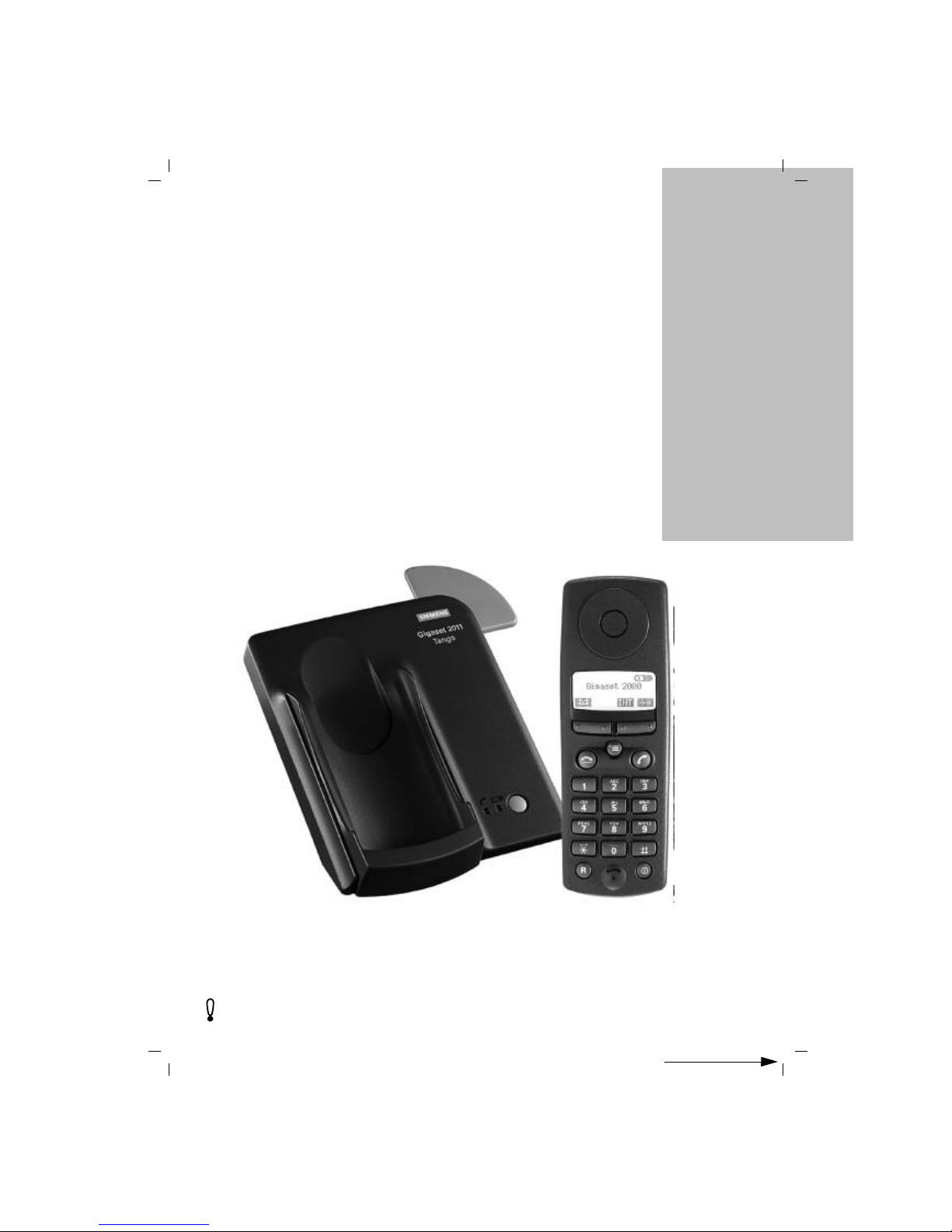
The cordless digital
DECT telephone system
expandable to 6 handsets
Operating instructions
Before starting up the equipment, pease read these
operating instructions with the safety notes!
Gigaset 2011 Tango: A30852-X1106-B307-2-7619
Gigaset 2011
Tango
Page 2

-II
KAP00.FM5
18.7.99
Gigaset 2011 Tango: A30852-X1106-B307-2-7619
Dear Customer,
By purchasing your Gigaset 2011 Tango, you now own a cordless telephone which combines the ad-
vantages of "cordless telephone use" with the convenience of a high-quality telephone. It is suitable
for private use both at home and in the office.
The device is designed on the basis of state-of-the-art digital technology and according to the new
European standard for cordless telephones (DECT). Among other things, DECT technology offers a
high level of security against unauthorized persons listening in on calls as well as a high level of digital quality. Your Gigaset 2011 Tango can easily be expanded to form a small telephone system in
which you can make both internal and external calls.
The outstanding features of the Gigaset 2011 Tango include:
● Menu-driven operation
● "Telephone directory" containing up to 100 call numbers
● Lock function to prevent unauthorized use
● Ability to expand the phone for the use of up to six handsets at a single base station for private
use and the operation of a handset at several base stations.
Signposts
In addition to these signposts, the table of contents and index at the beginning and end of this manual will provide further help in the optimum use of this device.
Switching the telephone on(➔ page 1).
Making a call (➔ page 10).
Registering new handsets at the base
station (➔ page 48).
Internal calls (➔ page 14).
Making the first call
Using additional handsets
Quick reference guide
(➔ page 68).
The quickest way
U2
Page 3
-I
KAP00.FM5
18.7.99
Gigaset 2011 Tango: A30852-X1106-B307-2-7619
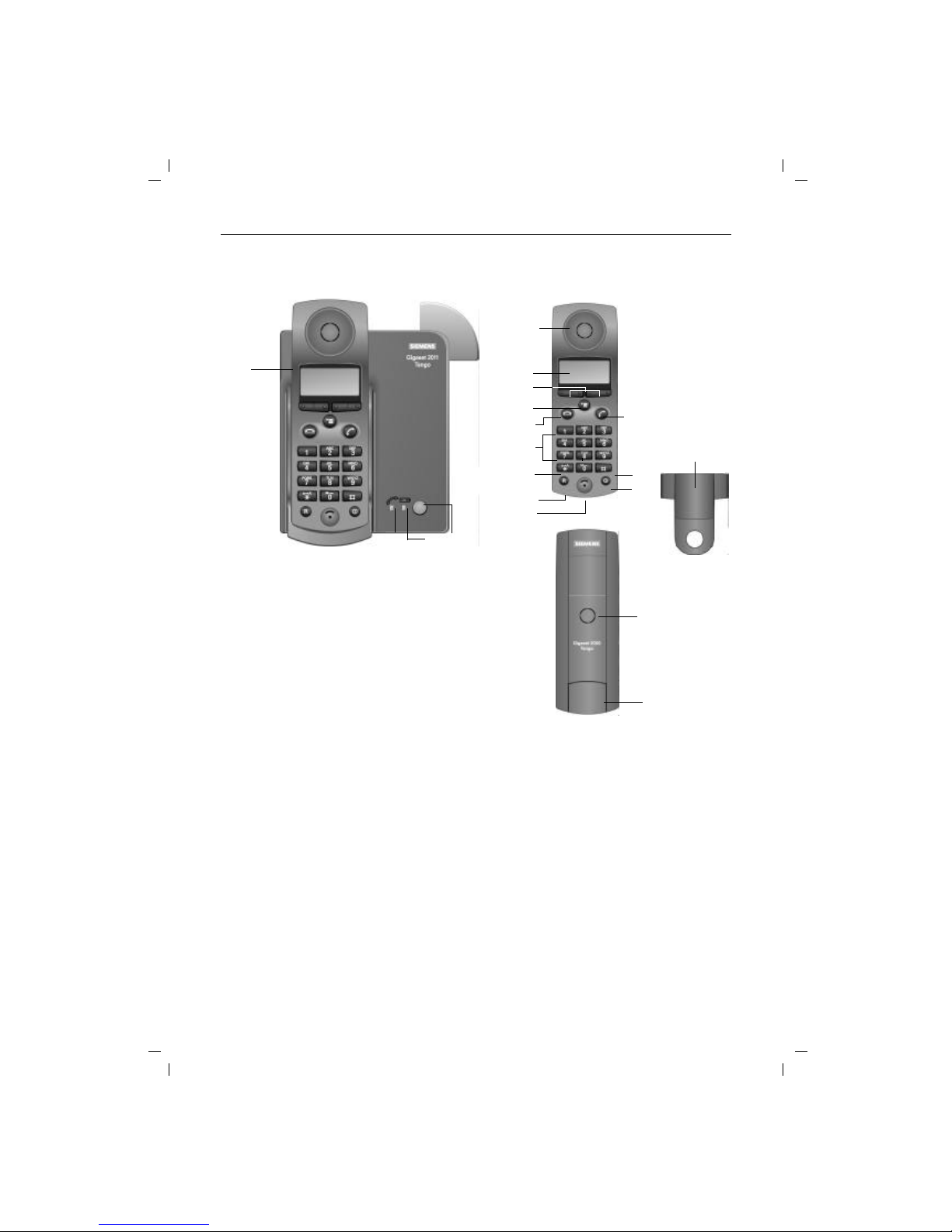
Overview: Gigaset 2011 Tango
1
2
3
4
Charging unit
Paging key (calling handsets)
Left LED for display "Line busy"
Right LED for display "Charge batteries"
5
6
7
8
9
10
11
12
13
14
15
16
17
18
19
Earpiece
Display
Display keys
Menu key
On-hook key
Dialling pad
Star key
Signal key
Microphone
ON/OFF/PROTECTED key
Hash key
Off-hook key
Ringer loudspeaker
Battery compartment/cover
Carrying clip
1
23 4
5
6
7
8
10
11
12
13
15
14
16
17
18
19
9
U3
Page 4
0
KAP00.FM5
18.7.99
Gigaset 2011 Tango: A30852-X1106-B307-2-7619
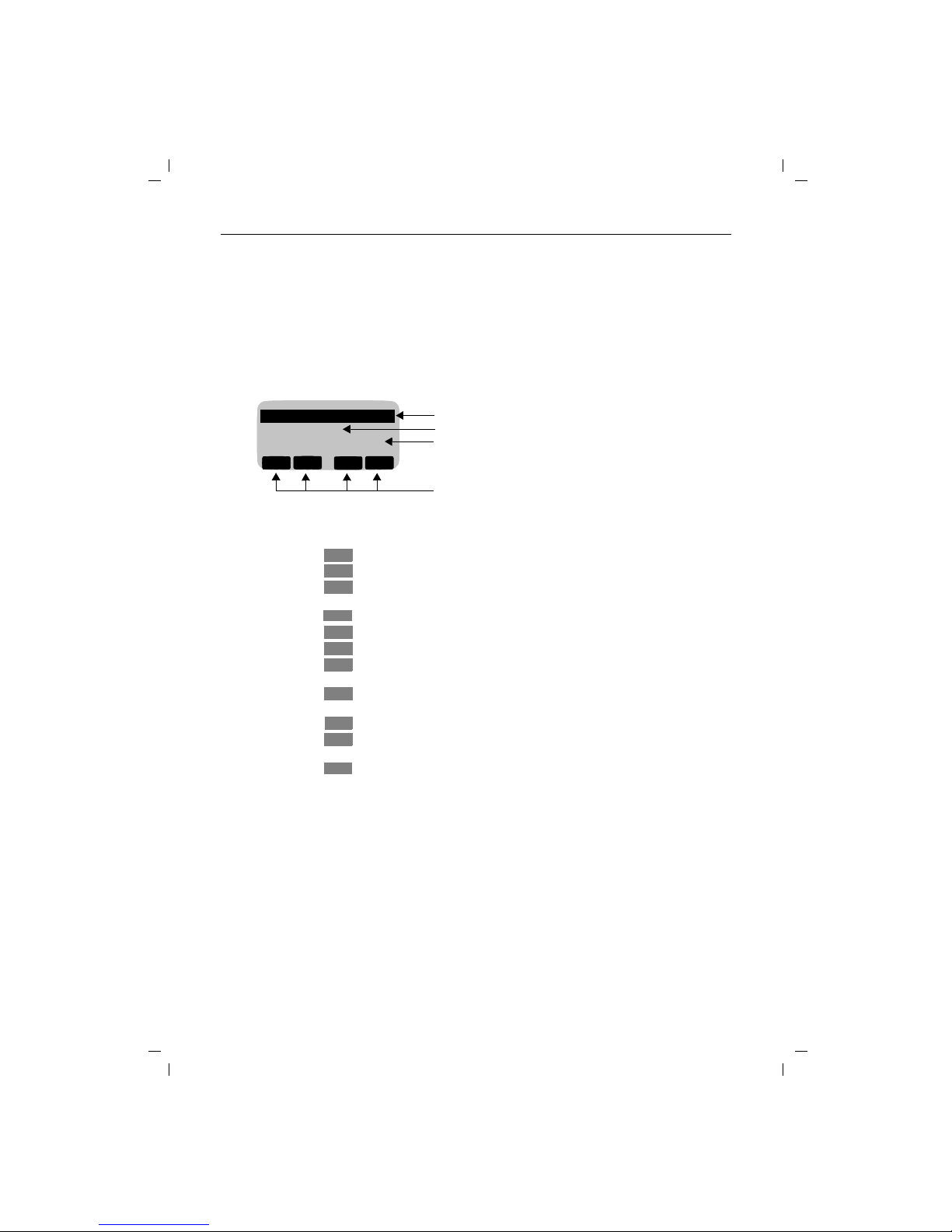
Overview: Key functions and display symbols
Key function
Display
Functions of display keys on handset
Display symbols
.
to call up menu; cancel = return to previous menu or main
menu; end a procedure without saving
Menu items that can be opened with "OK"
Menu items that can be reached with
Z
Menu end (pressZto scroll to 1st menu item or Yto
scroll to the previous menu item)
Current meaning of the display keys
WEITER
Ringer Volume
Ringer Tone
---------------------
OK
Y
Z {
Move to next menu item
Return to previous menu item
Go back and delete during entry (e.g. when entering names/call num-
bers/macros, etc.)
Selecting a menu item; confirmation of the entry/setting to be saved
Access to directory
Go back to previous menu
Go back in stages (input prompt) without deleting; go back to previous
setting (e.g. volume, etc.)
Go forward in stages forward (insertion mark) without deleting; move
on to next setting (e.g. volume, etc.)
Redial
Opening the sub-menu for the menu item (e.g. telephone directory en-
try)
Activate internal connection
l
Lock = ON
n
Ringer = settings
U
Battery 100%
charged
m
Lock = OFF
r
Ringer = OFF
V
Battery 66%
charged
(
Aut. call acceptance
q
Volume/tones = settings
e
Battery 33%
charged
v
Aut. light
T
Range boundary
Z
Y
X
OK
d
{
<
>
z
W
[
U4
Page 5
I
KAP01.FM5
18.7.99
Gigaset 2011 Tango: A30852-X1106-B307-2-7619
Safety precautions
● Do not submerge batteries in water; do not throw
them into fire.
● Do not dispose of old, defective batteries with normal
household garbage.
● Batteries become warm during charging. This is nor-
mal and not dangerous
● Do not use any third-party charging units. The batter-
ies could be damaged.
● Use only the supplied power adapter number
C39280-Z4-C59 (220/230V version) or
C39280-Z4-C69 (110/120V version).
● Do not confuse the plugs of the base station. Abnor-
mally high voltages could be imposed across the
charging contacts for brief intervals, such as during
thunder storms.
● The handset may not be operated in rooms with ex-
plosion hazards.
Only use approved nickel-cadmium (NiCd) and
nickel-metal-hydride (NiMH) batteries
(➔ page 62)!
Never use other batteries or ordinary (non-rechargeable) batteries! These batteries can short
circuit or destroy the battery unit (dangerous).
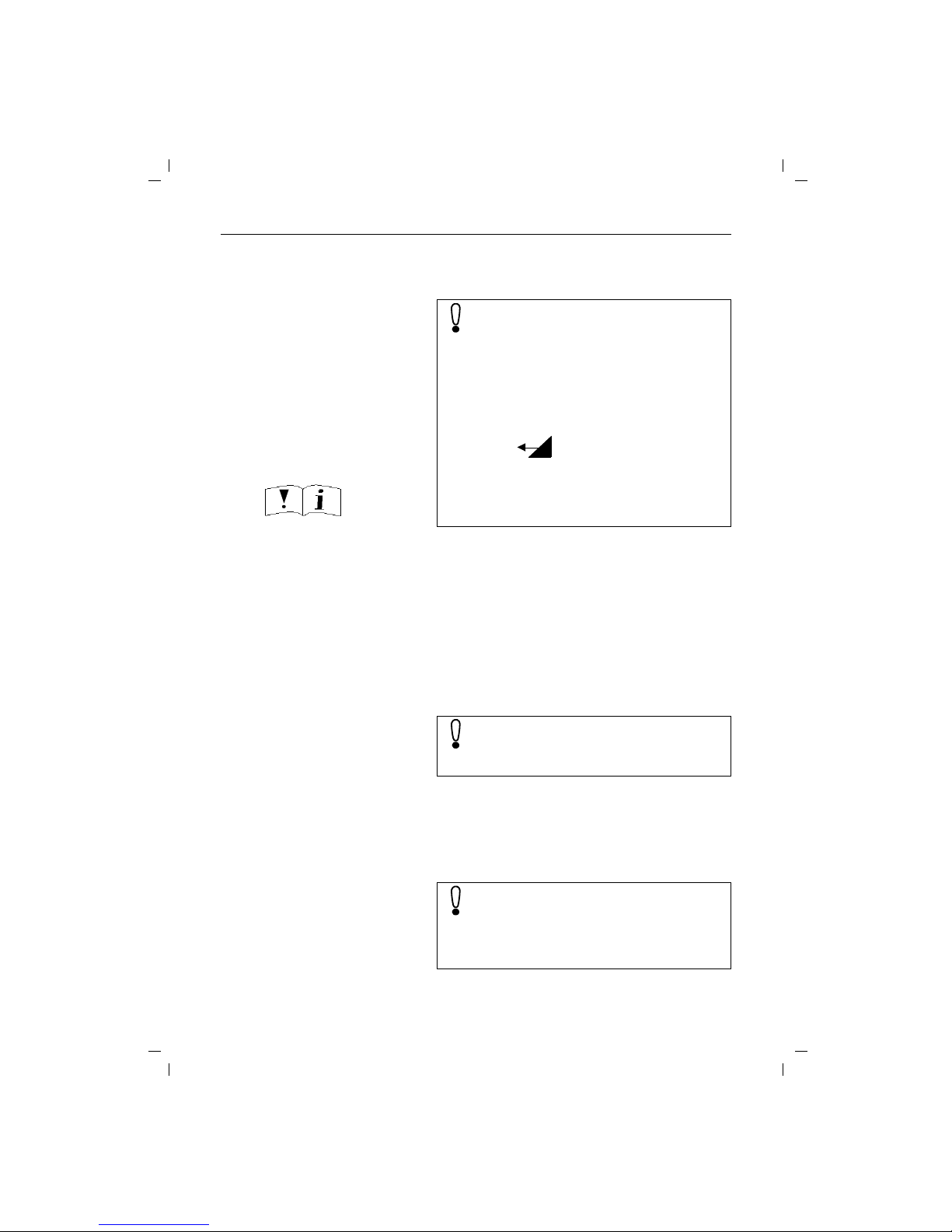
The following labels are found on the battery
compartments of the handset and charging unit:
Check that the socket into which you insert the
plug-in power unit has the correct voltage. If
your plug-in power unit does not have the right
voltage, please contact Siemens.
Research has demonstrated that cordless telephones (DECT) which are switched on can interfere with the operation of medial equipment.
When using a mobile telephone in medical institutions, the regulations of the institution in question must be observed.
B
_
+
Only use rechargeable batteries with the poles aligned
as shown!
Type according to instructions
Page 6

II
KAP01.FM5
18.7.99
Gigaset 2011 Tango: A30852-X1106-B307-2-7619
Certification and CE marking
The Siemens Gigaset2011 Tango meets
the requirements contained in EU guideline:
89/336/EEC "Electromagnetic Compatibility"
The handset of the Siemens Gigaset2000C Tango
carries the "CE" symbol
Page 7

Contents
III
GIG2011T.IVZ
18.7.99
Gigaset 2011 Tango: A30852-X1106-B307-2-7619
Stepwise startup .......................................................................................................................... 1
Step 1: Observe the safety precautions ......................................................................................... 1
Step 2: Check the contents of the package ................................................................................... 1
Step 3: Connecting the base station .............................................................................................. 1
Step 4: Inserting the batteries into the handset ............................................................................. 2
Step 5: Charging the batteries ....................................................................................................... 3
Step 6: Check signaling method .................................................................................................... 3
Menu-driven operation ................................................................................................................ 4
Operating modes ......................................................................................................................... 6
ON/OFF/PROTECTED modes ........................................................................................................ 6
Signaling method ........................................................................................................................... 7
Incoming calls .............................................................................................................................. 8
Accepting calls ............................................................................................................................... 8
External call-waiting during internal calls ..........................................................................................9
Ending a call ................................................................................................................................... 9
External outgoing calls .............................................................................................................. 10
Calling external subscribers ......................................................................................................... 10
No answer or line busy ................................................................................................................ 11
Redial ........................................................................................................................................... 11
Dialing using the directory ............................................................................................................ 12
Device control using dual-tone multifrequency signaling (DTMF) ..................................................13
Dialing a DSS number from a locked handset .............................................................................. 13
Ending a call ................................................................................................................................. 13
Collective ringing and internal calls ......................................................................................... 14
Making collective calls to all handsets from the base station ...................................................... 14
Making collective calls from one handset to all other handsets ................................................... 14
Making internal calls ..................................................................................................................... 14
Allowing internal parties to listen in on a call ............................................................................... 15
Ending an internal call .................................................................................................................. 15
Switching off the microphone (mute function) ............................................................................. 15
Internal consultation calls and transferring calls ................................................................... 16
Consultation calls ......................................................................................................................... 16
Transferring calls ............................................................................................................................17
Creating and managing the directory ...................................................................................... 18
Entering/copying/editing/deleting call numbers/names ..................................................................19
Delete directory ............................................................................................................................ 21
Available memory ......................................................................................................................... 21
Input function ............................................................................................................................. 22
The input field .............................................................................................................................. 22
Entering letters, special characters, and digits ............................................................................. 24
Base station settings ................................................................................................................. 26
Service function ........................................................................................................................... 26
Switching the base station ringer off and setting the ringer volume ........................................... 26
Setting the base station ringer tone ...............................................................................................27
Singposts
Overviews
Safety precautions
Page 8

Contents
IV
GIG2011T.IVZ
18.7.99
Gigaset 2011 Tango: A30852-X1106-B307-2-7619
Handset settings ........................................................................................................................ 28
Setting the handset volume ......................................................................................................... 28
Ringer settings ...............................................................................................................................29
Activating/deactivating the call duration display ........................................................................... 29
Selecting a language ......................................................................................................................30
Activating/deactivating automatic backlight ................................................................................. 30
Automatic call acceptance ............................................................................................................ 30
Activating/deactivating notification and warning tones ................................................................ 31
Baby alarm .....................................................................................................................................32
The Gigaset 2011 Tango lock functions .................................................................................... 33
Activating/deactivating the Gigaset 2011 Tango lock for outgoing calls ...................................... 33
Emergency calls when the Gigaset 2011 Tango is locked ........................................................... 33
Barred numbers for handsets ........................................................................................................35
Activating/deactivating the call number lock ..................................................................................37
Setting trunk access for the handsets ............................................................................................38
Lock functions on the handset ................................................................................................. 39
Activating/deactivating the handset lock ...................................................................................... 39
Handset display with active lock ....................................................................................................41
Short cuts ................................................................................................................................... 42
Descriptions with example ........................................................................................................... 42
Short cut menu ............................................................................................................................ 42
New entry ......................................................................................................................................43
Editing an entry ............................................................................................................................ 45
Deleting an entry .......................................................................................................................... 45
Displaying an entry ....................................................................................................................... 45
Deleting all entries .........................................................................................................................46
Available Memory ........................................................................................................................ 46
Starting a short cut ....................................................................................................................... 46
Default short cuts ......................................................................................................................... 47
Operating more than one handset ........................................................................................... 48
Registering/de-registering more than one handsets at the base station ...................................... 48
Registering a Gigaset 2000C Tango handset at a base station .................................................... 48
De-registering a handset from a base station .............................................................................. 49
Ring priority for incoming calls ..................................................................................................... 49
Operating in a telephone system ............................................................................................. 52
Activating/deactivating the automatic attenuation function ......................................................... 52
Possible signaling method settings .............................................................................................. 52
Analog trunks ............................................................................................................................... 53
Operation at more than one base station ............................................................................... 55
Procedure for operating at more than one base station ............................................................... 55
Selecting the best station ............................................................................................................ 55
Setting the preferred station ........................................................................................................ 56
Base station names ........................................................................................................................57
De-registering a base station ....................................................................................................... 57
Code numbers and factory defaults ......................................................................................... 58
Changing the system code, changing the PIN ............................................................................. 58
Resetting the base station to factory defaults ............................................................................. 59
Resetting the Gigaset 2000C Tango handset to factory defaults ................................................... 60
Page 9

Contents
V
GIG2011T.IVZ
18.7.99
Gigaset 2011 Tango: A30852-X1106-B307-2-7619
Notes on operation .................................................................................................................... 61
Installing the base station ............................................................................................................. 61
Notes on operating the handset ................................................................................................... 61
Technical data ................................................................................................................................64
Connecting the telephone socket ................................................................................................ 65
Maintenance notes ...................................................................................................................... 65
Third party use/disposal ............................................................................................................... 65
Procedure in the case of malfunctions ...........................................................................................66
Overview: signal tones ...................................................................................................................67
Quick reference guide handset Gigaset 2000C Tango ........................................................... 68
Index ............................................................................................................................................ 70
Page 10
Stepwise startup
1
Kap02.fm5
Gigaset 2011 Tango: A30852-X1106-B307-2-7619
18.7.99
Stepwise startup
Step 1: Observe the safety precautions
Step 2: Check the contents of the package
The factory package contains:
● a Gigaset 2011 Tango base station,
● a Gigaset 2000C Tango handset,
● a phone cord,
● a power cord with RJ-11 plug and plug-in power sup-
ply C39280-Z4-C59 (220/230V) or C39280-Z4-C69
(110/120V),
● cover for handset battery compartment,
● carrying clip for the handset,
● two batteries,
● instructions.
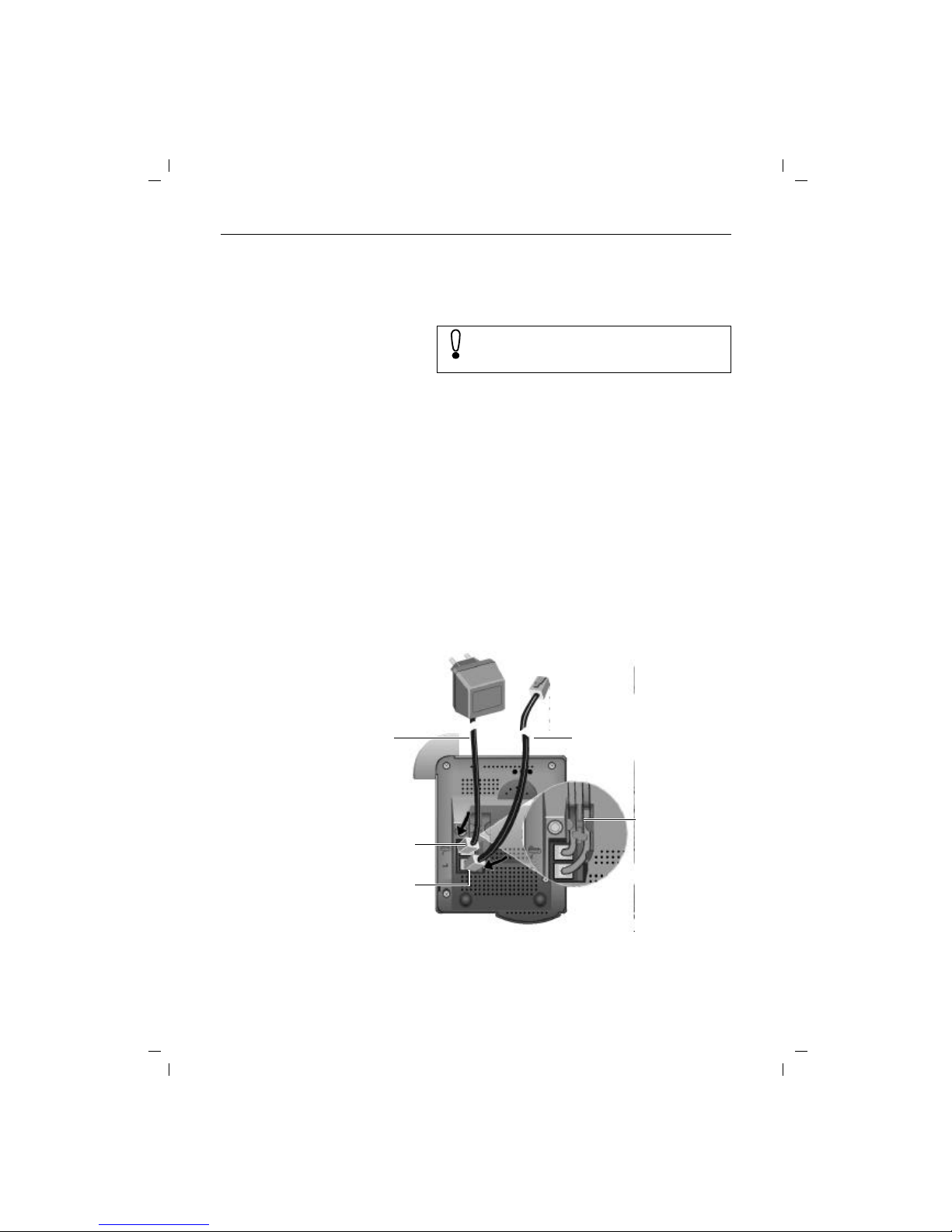
Step 3: Connecting the base station
It is essential that you read the safety precautions at the begining of this manual before startup!
phone cord
phone cord RJ-11 plug
Plug-in power supply and
220/230V or
110/120Vsocket
Underside of base station case
power cord RJ-11 plug
power cord
cord channel for
power and phone
cords
Page 11
Stepwise startup
2
Kap02.fm5
18.7.99
Gigaset 2011 Tango: A30852-X1106-B307-2-7619
Phone cord
Insert the RJ-11 plug on your phone cord into the base station. The jack on the bottom of the base station is marked
with the symbol.
Insert the phone plug on your phone cord into your phone
socket.
Power cord
Insert the RJ-11 plug on your power cord into the base
station. The jack on the bottom of the base station is
marked with the symbol.
Insert the power cord plug-power supply into a 220/230V
socket (C39280-Z4-C59) or a 110/120V socket (C39280Z4-C69).
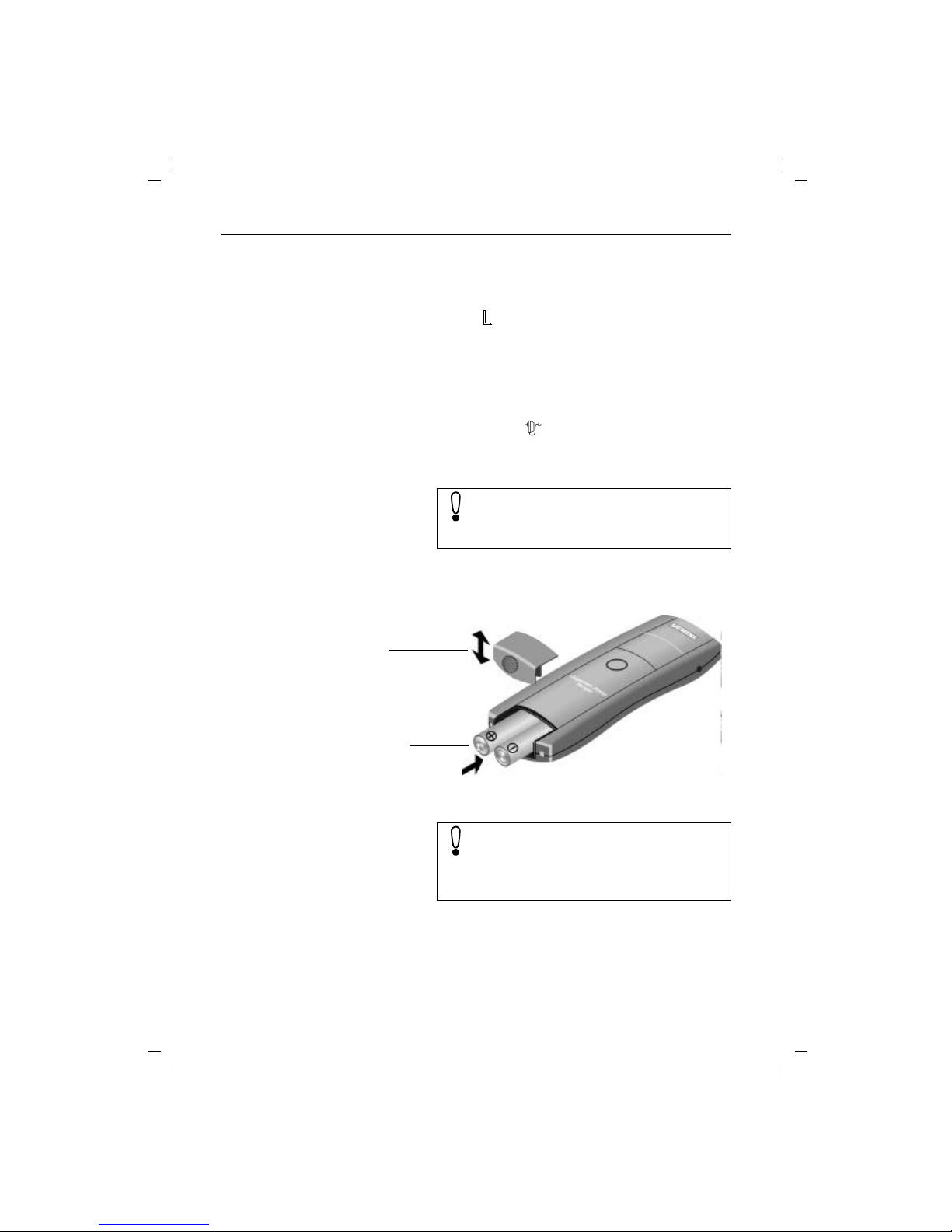
Step 4: Inserting the batteries into the handset
The handset is powered by two batteries.
Hold the handset with the keypad side facing down.
Slot the batteries into the battery compartment.
Slide the cover of the battery compartment from above
into the grooves in the handset and close the compartment.
For safety reasons, the phone must only be operated with the supplied Siemens
C39280-Z4-C59 adaptor for 220/230V voltage or
C39280-Z4-C69 adaptor for 110/120V.
Batt. compartment cover
Batt. comp. and batteries
Make sure that the +/– battery poles are aligned
correctly. The +/– marks on the plate must be
aligned with the +/– marks on the batteries.
The handset will not work if the batteries are incorrectly inserted and it may be damaged.
Page 12

Stepwise startup
3
Kap02.fm5
Gigaset 2011 Tango: A30852-X1106-B307-2-7619
18.7.99
Step 5: Charging the batteries
To charge the batteries, place the handset in the handset
rest on the base station. The charging contacts on the bottom of the handset must come into contact with the bottom of the base station and its charging contacts. It does
not matter whether the keypad is facing up or down.
If you have correctly inserted the mobile unit for charging,
the LED under the battery symbol on the base station will
light up.
Step 6: Check signaling method
Telephone lines can use the following signaling methods:
● dial pulsing (DP)
● dual-tone multifrequency signaling (DTMF)
The factory default for your Gigaset 2011 Tango is DTMF.
Checking your own telephone’s signalling method
Setting the phone to dial pulsing (DP)
(
t
means: browse using
x
, confirm usingu )
You can now make calls with your Gigaset 2011
Tango.
You must charge the batteries before you can
make any calls or settings. We recommend that
the batteries be charged for 16 hours without interruption, e.g. overnight, for the initial startup.
For more information on the use of the batteries
(➔ page 62).
c
Press the off-hook key (corresponds to picking up the
handset on an ordinary phone). You will hear the dial tone.
o
Press any digit, e.g. 2. If you can still hear the dial tone
you will have to set the signaling method to dial pulsing
(DP).
Z
OK
.
t
Service Select the "Service" menu item.
#1
Start the setting procedure
o
Enter the four-digit base code (factory default:"0000")
(➔ page 7).
u
@33
x
Set dial pulsing (DP).
REDIAL
SET
The other signaling method settings are intended for the operation of the Gigaset 2011 Tango
in telephone systems (➔ page 52 ).
Page 13
Menu-driven operation
4
4
KAP03A.FM5
18.7.99
Gigaset 2011 Tango: A30852-X1106-B307-2-7619
Menu-driven operation
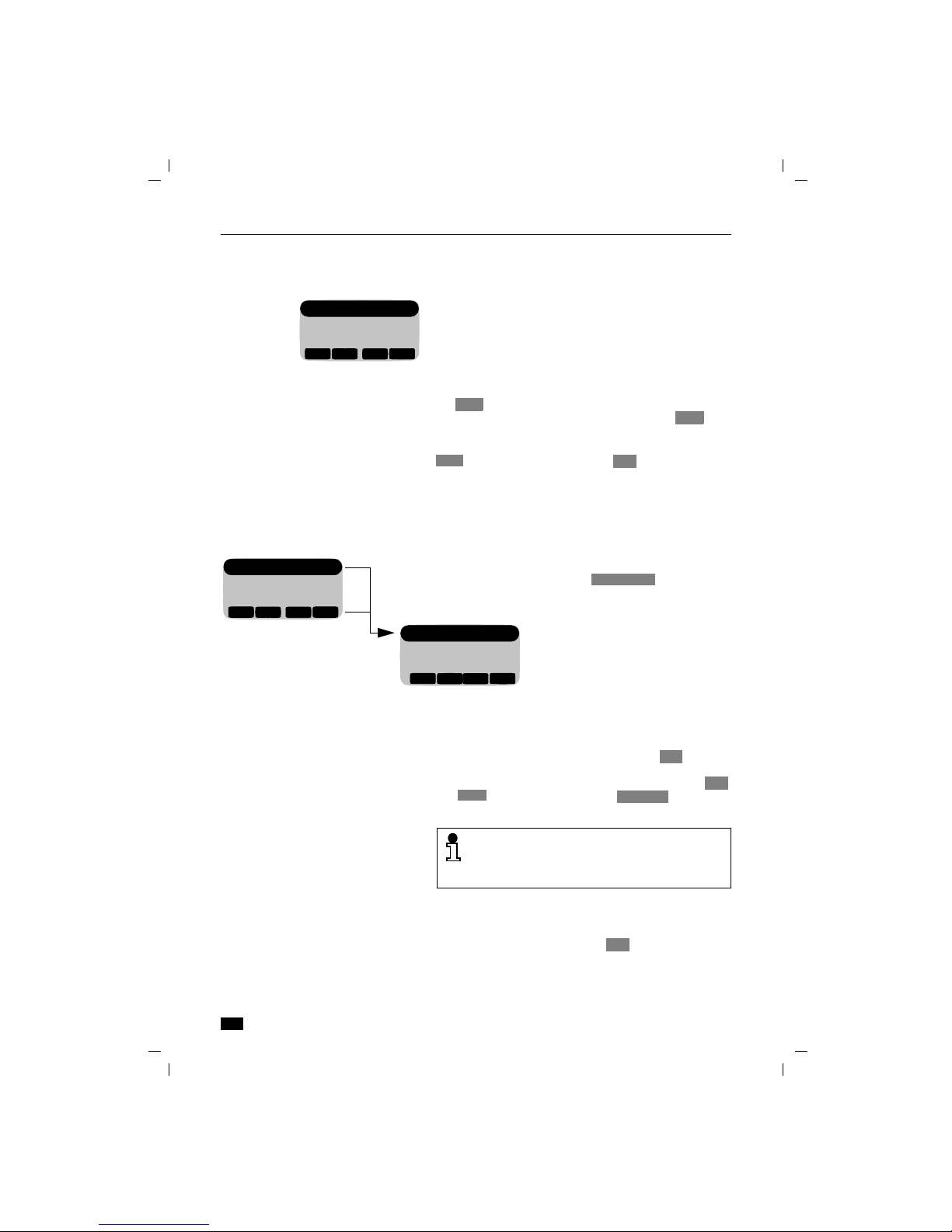
Menu structure
Moving to higher menu levels and leaving a menu
When you are in the top menu level, you can leave the
menu by pressing .. If you are at a lower menu level,
you can move up one level by pressing the display
key without saving any settings made. If you have reached
the end of a menu – indicated by a broken line – the
and display keys become the display key,
which allows you to leave this menu level.
Calling up an additional menu
Some menus, e.g. Redial, have an additional menu which
can be called up by pressing the display key.
By pressing the
.
key, you can call up the local menu of
the Gigaset 2000C Tango Comfort handset.
When the menu has been called up by pressing ., the
first menu level appears. Three lines of available menu
options are shown in the display. The top menu option is
highlighted. This menu option is selected.
You can move down to the next menu item by pressing
the display key. The broken line indicates the end of
the menu. If this line is selected and you press you
will go back to the top of the menu.
Confirm the selection of the menu item by pressing the
display key. By pressing the display key, you
can go back to the menu item, from which you moved to
a submenu. To leave the menu from the top level, press
the . key. The off-line appears.
Handset Lock
Short Cut
Baby Alarm
WEITER
▲
▼
{
OK
Z
Z
OK
{
The menu structure is hierarchical.
If, for example, you select the option in the
top menu, you will access a sub-menu with settings.
Settings
Service
__________
WEITER
▲
▼
{
OK
Handset Volume
Ringer Options
Register
WEITER
▲
▼
{
OK
Settings
You can leave all functions without implementing changes by pressing the on-hook key a
and return to the "off-line display". (Panic function).
{
{
OK
Go Back
W
Page 14

Menu-driven operation
5
5
KAP03A.FM5
18.7.99
Gigaset 2011 Tango: A30852-X1106-B307-2-7619
Presentation in the user manual
The selection of a function in one of the menus or submenus is depicted using symbols. For example, the following entries must be made to obtain the confirm beep:
Abbreviated presentation
In the descriptions of procedures in this manual, the path
to the "target menu item" is presented in abbreviated
form.
Abbreviated presentation where the menu is called
up using a display key
If, for example, you want to call up "New Entry" in the directory menu using the display key, it is presented
as follows:
Light gray menu items have no significance in the Gigaset
2011 Tango.
.
Press menu key,
x
u
Move down to and confirm.
x u
Move on to and confirm.
x u
Continue down to and confirm.
x u
Then on to and confirm.
x
/
u
Switch the confirm beep on or off by pressing /
and store.
or
u
Leave the menu without making any changes.
Z
OK
Settings
Z
OK
Handset Settings
Z
OK
Beeps
Z
OK
Confirm Beep
ON
OFFOKOFF
ON
{
.
t
Settings
t
Handset SettingstBeeps
t
Confirm beep
x
/
u
Switch the confirm beep on or off by pressing /
and store.
or
u
Leave the menu without implementing any changes.
ON
OFFOKOFF
ON
{
W
u
d
u
W
t
New Entry
Page 15
Operating modes
6
KAP04.FM5
18.7.99
Gigaset 2011 Tango: A30852-X1106-B307-2-7619
Operating modes
ON/OFF/PROTECTED modes
You can switch your handset to
● protected mode,
● off,
● and on (again).
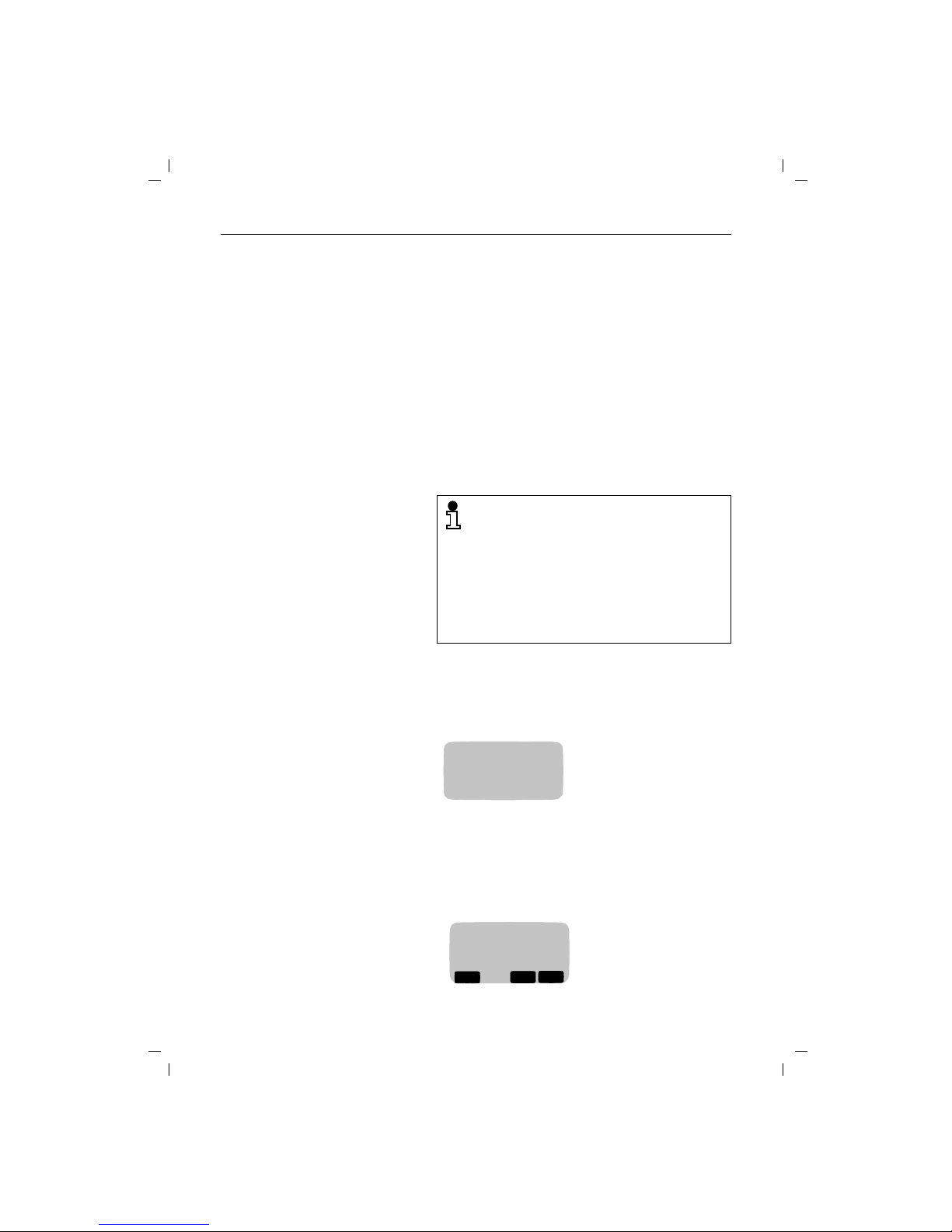
In protected mode, the keypad is locked to prevent unintended use. Incoming calls are received automatically. If
you want to make an outgoing call, you will have to unlock
the keypad first.
When the handset is switched off, incoming calls are not
signaled.
Switching the handset to protected mode
Switching on the handset
When the handset is in protected mode:
PROTECTED mode is useful, for example, if you
carry your telephone in a bag.
To preserve the batteries, we recommend that
you switch off the handset if you move outside
the base station radio range.
If the handset has been switched on and outside the radio range for a longer period of time,
you can speed up the process of "finding" the
base station again by switching the handset off
for a moment and switching it on again.
h
Press the handset button briefly. You will hear a positive
confirmation beep. In protected mode, the following
message appears on the display:
:
U
Keypad
locked
h
Press the handset key briefly. You will hear the positive
confirmation beep. The following message appears on
the display when the handset is switched on:
:
U
Base 1
d
z
[
Page 16

Operating modes
7
KAP04.FM5
18.7.99
Gigaset 2011 Tango: A30852-X1106-B307-2-7619
When the handset is switched off:
Switching off the handset
Signaling method
The PTT operates telephone connections with two different signaling methods:
● Dial pulsing (DP)
● Dual-tone multifrequency signaling (DTMF)
The factory default setting for your Gigaset 2011 Tango is
DTMF.
Checking the signaling method of your telephone line
Setting the signaling method
(
t
means: browse using
x
, confirm usingu )
h
Press the handset key briefly. You will hear the positive
confirmation beep. The display flashes. Wait until it stops
flashing. The handset is switched on.
or
Place the handset back into the base station. The message appears on the display. The handset is switched on.
h
Press the handset key until the display message is
cleared. You will hear the positive confirmation beep.
c
Press the off-hook key. You will hear the dial tone.
o
Press any digit, e.g. 2. If you still hear the same dial tone,
you must switch the signaling method to dial pulsing
(DP).
Z
OK
.
t
Service Call up the "Service" menu item.
#1
Start the setting procedure
o
Enter the four-digit base code (factory default: "0000")
(➔ page 7).
u
@33
x
Set to dial pulsing (DP).
or
u
@37
x
Set to DTMF. A flash time of 100ms is set.
REDIAL
SET
REDIAL
SET
Page 17
Incoming calls
8
KAP05.FM5
18.7.99
Gigaset 2011 Tango: A30852-X1106-B307-2-7619
Incoming calls
Accepting calls
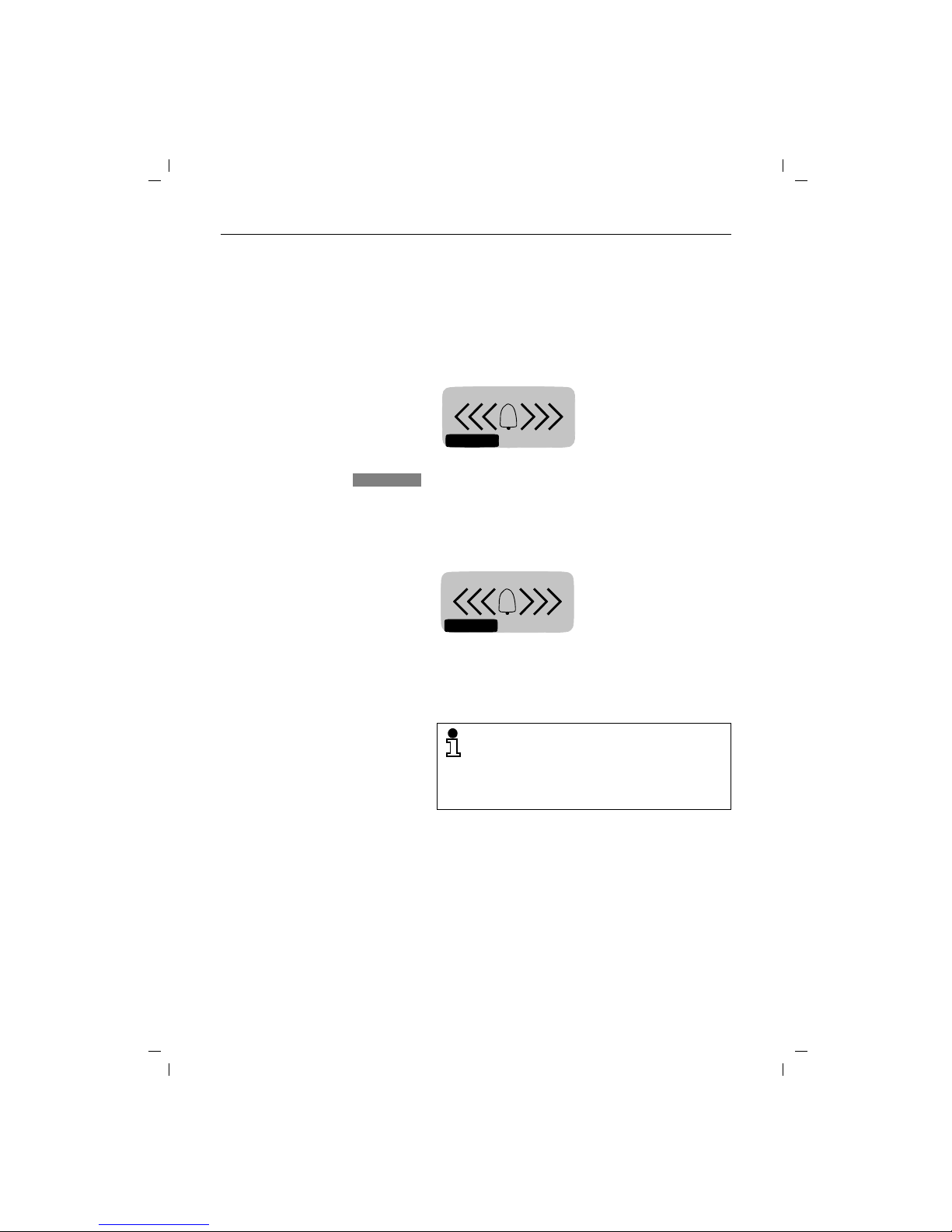
An incoming call is indicated by the ringer (bell symbol).
You will know that it is an external call when you the fol-
lowing message appears on your handset display
You will know that you are receiving an internal call if you
see the following message on your handset display (the
example shows an incoming call from a second handset):
If the handset is in the charging unit:
If the handset is not in the charging unit:
:
u
You can switch off the ring tone. Calls can be accepted as
long as the call symbol is displayed.
External call
RNG OFF
RNG OFF
:
Internal call 2
RNG OFF
Remove the handset from the charging unit. You are connected.
The automatic acceptance of calls by removing
the handset from the charging unit is an adjustable setting (➔ page 30). If you have switched
this function off, you must press the c button
when you have removed the handset from the
charging unit.
c
Press the off-hook key on the handset. You are connected.
Page 18

Incoming calls
9
KAP05.FM5
18.7.99
Gigaset 2011 Tango: A30852-X1106-B307-2-7619
External call-waiting during internal calls
If you are on an internal call with a second handset and a
external call arrives, this is indicated by the call-waiting
function. Your internal call is terminated when you accept
the external call.
The arrival of the external call is indicated as follows on
the display:
Ending a call
:
u
You accept the call immediately.
or
a
Disconnect the internal call. You will hear the ring tone.
c
Accept the external call.
RUFAUS
EXT. INT.
2
TALK
TALK
Replace the handset in the base station or charging unit.
The line is disconnected.
or
a
Disconnect ("on-hook").
If the handset was in protected mode, it remains in this mode after you press a.
Page 19
External outgoing calls
10
KAP06.FM5
18.7.99
Gigaset 2011 Tango: A30852-X1100-B301-2-7619
External outgoing calls
Calling external subscribers
You will hear the ring tone.
Dialing with call number checking (en-bloc dialing)
En-bloc dialing allows you to check the external call
number entered before it is dialed and correct it, if necessary, using the display key before the line is seized.
(For instructions on how to edit the call number, "Input
function" ➔ page 22).
(
t
means: browse using
x
, confirm usingu )
The call number is dialed.
You can also leave this additional menu without dialing by
pressing the display key.
c
Press the off-hook key. You will hear the dial tone.
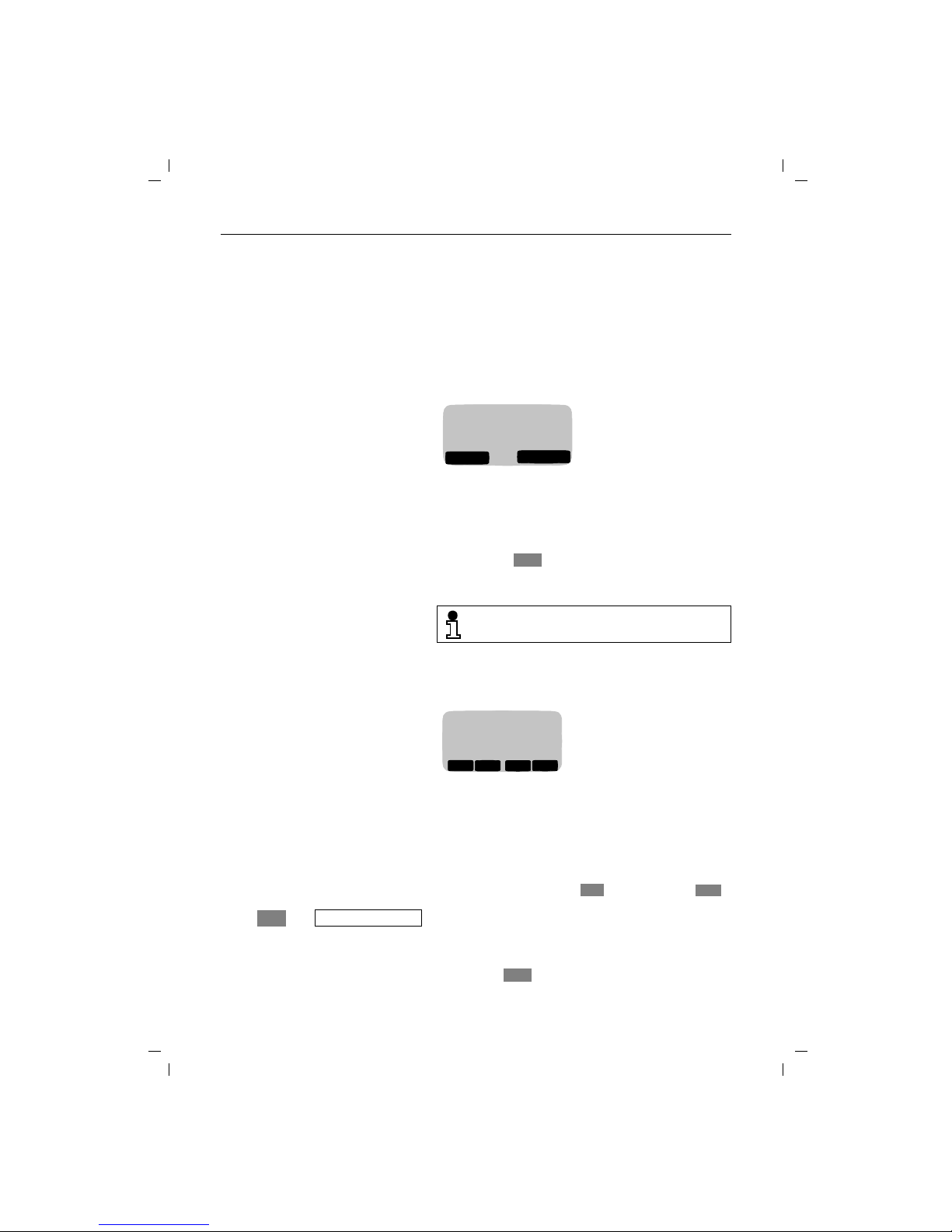
o
Enter the desired call number on the dialling keypad. The
number you have entered is shown on the display, e.g.:
:
RUFAUS
INT
PAUSE
Extern
123456
The maximum length of call numbers that you
can enter is 22 digits.
X
o
Enter the desired call number. The number you have entered is shown on the display, e.g.:
:
You can correct the number entered using the enter function.
c
Press the off-hook key within 30 seconds to seize the
line. The call number is dialed. You will then hear the ring
tone.
or
123456
_
WEITER
<
>
X
W
Z
OK
u
t
Dial
W
{
Page 20

External outgoing calls
11
KAP06.FM5
18.7.99
Gigaset 2011 Tango: A30852-X1100-B301-2-7619
Manually inserting a pause
If you repeatedly get the busy symbol following automatic
dialing from the telephone directory, e.g. after the country
code, you can enter a pause (three seconds), e.g. between the trunk or country code and the call number:
(
t
means: browse using
x
, confirm usingu )
No answer or line busy
Redial
Repeating the last number dialed
You can call up a list with numbers for redial by pressing
the display key. You will be presented with a list of
the last five different numbers you called, including numbers which were dialed from the directory.
(
t
means: browse using
x
, confirm usingu )
Z
OK
u
t
Pause
W
The dial pause "P" is shown on the display.
:
0043P123456
_
WEITER
▲
▼
X
W
Replace the handset in the base station or charging unit.
The call is disconnected.
or
a
Disconnect call ("on-hook").
You can use the redial function to repeat this
call.
z
x
Select the desired call number.
c
Press the off-hook key. The number is dialled.
or
Z
Z
OK
u
t
Dial number
W
You can enter additional digits while the number
is being dialed.
Page 21

External outgoing calls
12
KAP06.FM5
18.7.99
Gigaset 2011 Tango: A30852-X1100-B301-2-7619
Dialing using the directory
You can store up to 100 call numbers with corresponding
names in your handset directory (➔ page 19). You can
search for names and dial the numbers directly from the
directory.
(
t
means: browse using
x
, confirm usingu
)
The number is dialed.
You can also leave this additional menu without dialing by
pressing the display key.
x
Call up directory.
:
x
Browse to desired entry.
or
2 … 9
Enter letter
e.g. the letter "B" – press digit key 2 twice.
The directory moves to the first entry starting with the letter "B". If there is no such entry in the directory, it will stay
on the current entry and you will hear the error beep.
c
Press the off-hook key within 30 seconds. The call
number is dialed. You will hear the ring tone.
or
d
ALPHA
BRAVO
CHARLIE
WEITER
▲
▼
{
W
Z
Z
OK
u
t
Dial number
W
{
Page 22
External outgoing calls
13
KAP06.FM5
18.7.99
Gigaset 2011 Tango: A30852-X1100-B301-2-7619
Device control using dual-tone multifrequency signaling (DTMF)
If your telepone is connected to a line with dial pulsing
(DP), you can switch to dual-tone multifrequency signaling
(DTMF) once the connection has been set up.
Precondition: an external connection exists.
(
t
means: browse using
x
, confirm usingu )
Dialing a DSS number from a locked handset
If the handset has been locked for external calls (➔ page
39) and a DSS number is stored (➔ page 39), it is possible
to dial this direct number despite the lock.
Ending a call
Z
OK
.
t
Switch to Tone
Select and confirm.
When you have switched to DTMF, you can
switch between the two signaling methods during the connection using the R signal key.
When the line is disconnected, the telephone
will automatically return to the original signaling
method.
Any digits or symbols that you enter after
switching signaling methods are not stored in
the memory for redialing.
o
Press any key on the handset. The direct number is dialed.
It is not possible to dial a DSS number from a
locked handset,
● if "unrestricted trunk access or outward re-
stricted trunk access" is set (➔ page 38), or
● if the base station is locked
(➔ page 33).
Replace the handset in the loading unit. The line is disconnected.
or
a
Disconnect (on-hook key).
Page 23

Collective ringing and internal calls
14
KAP07.FM5
18.7.99
Gigaset 2011 Tango: A30852-X1106-B307-2-7619
Collective ringing and internal calls
Making collective calls to all handsets from the base station
It can be useful to make a collective call from the base station, for example, to locate mislaid handsets. It is not possible to make internal calls during a collective call from the
base station.
End call prematurely
Making collective calls from one handset to all other handsets
If your phone has several handsets, it is possible to make
a collective call from each handset to all the other accessible handsets. The first internal party who accepts the
call is connected to you.
Making internal calls
If your telephone has more than one handset (➔ page 52),
you can call the other handsets free of charge.
Checking your own internal number
?
Press the paging key on the base station. All accessible
handsets will be called for approximately 30 seconds.
?
Press the paging key on the base station.
or
c
Disconnect the line by pressing the on-hook key on the
handset.
x
Press the internal key.
x
You will hear the internal ring tone. All accessible handsets will be called.
[
COLL.CALL
x
Press the internal key.
[
o
Enter the number of the handset you wish to call (1 to 6).
You will hear the internal ring tone. The handset you dialed is being called.
x
Press the internal key.
The internal call number
of the handset from
which you are calling is
shown on the display.
[
RUFAUS
Intern
2
COLL.CALL
SET
Page 24

Collective ringing and internal calls
15
KAP07.FM5
18.7.99
Gigaset 2011 Tango: A30852-X1106-B307-2-7619
Allowing internal parties to listen in on a call
It is possible to enable an internal party to listen in on a
call with an external party from his/her handset.
Disconnect internal party again
Ending an internal call
Switching off the microphone (mute function)
It is possible to switch the microphone off during external
calls. This allows you to consult other people in the room
while the external party is on hold. The external party cannot hear what you are saying and will hear music.
(
c
An external connection is already set up.
x
Set up an internal connection.
[
1...6
Dial the internal party (1... 6). An external call is under way.
The internal party answers. Hold your conversation.
x
R
The external call is resumed and the internal party can listen in.
SET
x
R
The internal party is disconnected and hears the busy
tone.
or
a
The internal party hangs up by pressing the on-hook key.
SET
Replace the handset in the base station or charging unit.
The line is disconnected.
or
a
Disconnect line ("on-hook").
x
Set up an internal connection.
[
The microphone is switched off. Hold consultation with
people in the room. The external party will hear music.
R
Switch the microphone back on. You are reconnected
with the external party.
Page 25

Internal consultation calls and transferring calls
16
KAP08.FM5
18.7.99
Gigaset 2011 Tango: A30852-X1106-B307-2-7619
Internal consultation calls and transferring calls
During a external call it is possible to:
● hold a consultation call with an internal party,
● transfer the external call to the internal party.
Consultation calls
When more than one handsets are in operation
If more than one handset is in operation (➔ page 52), you
can make a consultation call to an internal party during a
call with an external party. The external party cannot hear
your conversation with the internal party and will hear music while on hold.
(
End consultation/continue external call
When a telephone system is in operation
You can make a consultation call to a party in your telephone system during an external call. Please check the
operating instructions for the telephone system.
Consultation calls and call transfer are only possible if more than one handset is in operation
(➔ page 52).
x
Set up an internal connection.
[
o
Enter the number of the handset which you wish to call
(1 to 6). You will hear the internal ring tone. The handset
is being called. The external call is held.
R
End the internal consultation call. You are now reconnected to the external party.
R
Set up a consultation call. You will hear the dial tone. The
external call is held.
o
Enter the desired extension number. The relevant party is
called.
R
End the internal consultation call. You will be reconnected
with the external party.
Page 26

Internal consultation calls and transferring calls
17
KAP08.FM5
18.7.99
Gigaset 2011 Tango: A30852-X1106-B307-2-7619
Transferring calls
When more than one handsets are in operation
It is possible to transfer an external call to an internal party
when more than one handset is in operation (➔ page 52).
(
When a telephone system is in operation
If a telephone system is in operation, you can transfer an
external call to another internal party. Please check the operating instructions for the telephone system.
x
Set up an internal connection.
[
o
Enter the number of the handset to which you want to
transfer the call (1 to 6). You will hear the internal ring
tone. The handset is being called. The external call is
held.
either
Wait until the internal party answers and inform him/her
about the external call you are about to transfer.
a
Transfer the external call by pressing the on-hook key.
or
a
Do not wait until the internal party answers and transfer
the external call directly by pressing the on-hook key.
Instead of pressing a, you can also replace
your handset in the charging unit.
If you have transferred the external call and the
internal party does not accept the call within 30
seconds, an automatic recall is carried out.
If you have transferred the external call and the
internal party is busy, an automatic recall is carried out immediately.
If you accept the recall, you will be reconnected
to the external party. A recall is accepted in the
same way as all other calls (➔ page 8).
R
Setup a consultation call. You will hear the dial tone. The
external call is held.
o
Enter the desired extension number. The party in question is called.
a
Transfer the external call by pressing the on-hook key.
Page 27

Creating and managing the directory
18
KAP08A.FM5
18.7.99
Gigaset 2011 Tango: A30852-X1106-B307-2-7619
Creating and managing the directory
You can store up to 100 entries in the electronic directory.
The entries comprise:
● call numbers (maximum 32 digits), and
● names (maximum 16 characters).
When you call up the directory, the names are presented
in alphabetical order. You can browse through it at your
ease and dial directly from it (➔ page 12).
You can call up the directory and its entries by pressing
the display key. To manage the directory – e. g.
change or delete entries – call up the directory menu in
the directory by pressing the key.
The following menu items are available in the directory
menu:
● Dial number
● New Entry
● Edit Entry
● Delete Entry
● Display Entry
Copy Entry (not available with Gigaset 2011 Tango)
● Delete Directory
Copy Directory (not available with Gigaset 2011 Tan-
go)
● Available Memory
In the following descriptions, the calling up of the individual menu items is presented in abbreviated form:
(
t
means: browse using
x
, confirm usingu
)
d
W
Z
OK
u
d
u
W
t
e.g. New Entry
Page 28

Creating and managing the directory
19
KAP08A.FM5
18.7.99
Gigaset 2011 Tango: A30852-X1106-B307-2-7619
Entering/copying/editing/deleting call numbers/names
New Entry
To add a new entry to the directory, select "New Entry".
(
t
means: browse using
x
, confirm usingu
)
When you select the "New Entry" menu item, the input
function is active. You can enter the name and number as
described in the chapter "Input function" ➔ page 22.
Inserting a pause
You can insert a pause, e.g. after the "international code"
when entering call numbers in the "content" field.
A "P" is inserted into the call number.
You must store your entry when it is complete or if you
want to delete your entry, cancel the procedure. To do this
call up "Save Entry" or "Cancel" in the additional menu.
or
Display special character
If there is a special character in the call number, e.g. "P",
you can display its meaning. Place the input prompt on
the character:
The explanation is shown on the display: Character "P":
Pause.
Checking for double entries
To prevent an entry appearing in the directory more than
once, it is possible to have new entries checked.
If there is an identical number in the directory, the name
of the double entry is shown on the display.
Z
OK
u
d
u
W
t
New Entry
The names are sorted in alphabetical order.
With : or # as the first letter of the name,
you can move entries to the top of the directory
list.
u
t
Insert function
t
Pause
W
u
t
Save Entry
W
u
t
Cancel
W
u
t
Show Function
W
u
t
Check Duplicate
W
Page 29

Creating and managing the directory
20
KAP08A.FM5
18.7.99
Gigaset 2011 Tango: A30852-X1106-B307-2-7619
Copying numbers
You can copy the last number dialed into the directory.
Call up the "Copy Number" menu item in the additional
menu.
(
t
means: browse using
x
, confirm usingu
)
Continue as described in the above section "Directory",
"New Entry" ➔ page 19 and add a name to the selected
number.
Editing an entry
It is possible to edit existing entries.
Call up the "Edit Entry" option in the additional menu.
(
t
means: browse using
x
, confirm usingu
)
The "Entry function" is active. Correct the entry as described in the rules for the "Entry function" ➔ page 22.
Process and save entry
The options provided under "New Entry" are also available
in the additional menu.
u
Call up redial by pressing the display key.
x
Select the desired number from the five available redial
numbers.
zZZ
OK
u
t
Copy Number
W
Call up the directory and
x
select the entry to be editi.ed.
d
Z
Z
OK
u
t
Edit Entry
W
It is not possible to add new entries if the directory is full. You must first delete an existing entry.
Page 30

Creating and managing the directory
21
KAP08A.FM5
18.7.99
Gigaset 2011 Tango: A30852-X1106-B307-2-7619
Delete entry
You can delete individual entries from the directory.
Call up the "Delete Entry" menu item in the additional
menu.
(
t
means: browse using
x
, confirm usingu
)
Delete directory
The "Delete Directory" menu item allows you to delete all
of the directory data from the memory.
(
t
means: browse using
x
, confirm usingu
)
Available memory
It is possible to show the percentage of memory available
for your entries.
(
t
means: browse using
x
, confirm usingu
)
The available memory percentage is displayed for approximately two seconds e.g. "Memory: 99% available":
u
Call up the directory and
x
select the entry to be deleted.
d
Z
Z
OK
u
t
Delete Entry
W
x
The entry is deleted when you confirm. A confirmation
beep is sounded and the message "Entry Deleted" appears on the display.
OK
Z
OK
u
d
u
W
t
Delete Directory
o
x
Enter the PIN and confirm. The message "Delete all entries?" appears on the display.
x
If you confirm by pressing , all entries are deleted.
the message "All entries deleted" is shown on the display.
You can cancel the procedure by pressing .
OK
YES
YES
NO
Z
OK
u
d
u
W
t
Available Memory
U
Memory:
99% available
Page 31

Input function
22
KAP08B.FM5
18.7.99
Gigaset 2011 Tango: A30852-X1106-B307-2-7619
Input function
The input function is activated when names or call numbers are entered or edited, e.g. new entries in the directory.
The input field
The lines in the input field are divided for entries or edits
as follows:
● Line 1 for "name" (16 characters)
● Lines 2 and 3 for "content" (32 characters)
If the entry or edit is only made in the "content" lines, the
"name" line remains empty or contains information such
as the redial number.
Adding, deleting, and moving characters
Adding
Characters are always added to the left of the input
prompt.
Deleting
Characters to the left of the input prompt are deleted by
pressing the display key.
Moving
The input prompt is moved using the and display keys.
Moving from the "name" line to the "content" lines
X
<
>
To move to the "name" line,
shift the input prompt to
the left of the first place in
the "content" line".
To move to the "content"
line, shift the input prompt
to the right of the last place
in the "name" line.
sssssssssssssss
_
ssssssssssssssss
ssssssssssssssss
ssssssssssssssss
_
sssssssssssssss
ssssssssssssssss
Page 32

Input function
23
KAP08B.FM5
18.7.99
Gigaset 2011 Tango: A30852-X1106-B307-2-7619
Example of a new directory entry
Select "New entry" in the directory menu to obtain the following output on the display:
Detailed instructions on making an entry can be found in
the chapter "Entering letters, special characters, and digits" on ➔ page 24.
If you have entered the name in full and wish to add the
corresponding telephone number, move the entry
mark to the second line ("content") using the display
key and enter the number.
You can also make corrections while making new entries.
_
ssss<Name> sssss
<Tel. number > ss
ssssssssssssssss
s
WEITER
M
_
ssssssssssssss
s<Tel. number> ss
ssssssssssssssss
No character has been
entered yet.
The first character, in
this case an "M", has
been entered.
WEITER
W
WEITER
<
WEITER
>
X
W
>
WEITER
<
W
White s ssssssssss
0
_
ssssssssssssss
ssssssssssssssss
The first digit, in this
case a "0", has been entered.
WEITER
<
WEITER
>
X
W
Page 33

Input function
24
KAP08B.FM5
18.7.99
Gigaset 2011 Tango: A30852-X1106-B307-2-7619
Example of field boundaries
If 16 characters have already been entered in the "name"
field and 32 characters have already been entered in the
"content" field and you enter another character, the last
character in each field will be moved to the right and lost.
If, in this example, the last "e" were to be replaced by an
"l", the entry mark would have to be set to this place because the next place is in the second line and does not belong to the "name" field.
Entering letters, special characters, and digits
Name entry field
Character set
The following table shows how often a key has to be
pressed to enter a specific character (letter, digit, and special character).
For example, in the case
of the double name
Smith-Macallister, if the
missing "t" is inserted in
Smith, the last "r" of Macallister will disappear.
Smih-Macallister
089P1234567
_
sssss
ssssssssssssssss
Smit_-Macalliste
089P1234567
ssssss
ssssssssssssssss
h
WEITER
<
WEITER
>
X
W
WEITER
<
WEITER
>
X
W
123
4%6
789
@
:
To make entries in the "name" field", use the digit keys
as an alphanumeric keypad. The letters are assigned to
the digit keys in groups of three or four. Special characters, such as é, ö, ñ etc. are entered by pressing the key
for the relevant letter group several times. To enter a
space, full stop, and hyphen, press the 0 digit key.
You can shift from lower case to upper case by pressing
the "*" key. The shift will apply to one character, after
which the default lower case setting is restored.
a, b, c, d....x, y, z Depending on the position of the digit key, letters are in-
put by briefly pressing the key. For example, if you wish
to enter the letter "R", you must press the 7 key three
times in succession, as "R" is the third letter assigned to
this key.
Page 34

Input function
25
KAP08B.FM5
18.7.99
Gigaset 2011 Tango: A30852-X1106-B307-2-7619
Default setting = lower case
Shift to upper case by pressing "*"
Content input field
An additional menu is provided for entering special
characters in the "content" field. This is indicated in the
descriptions of corresponding functions.
key
1. press
2. press
3. press
4. press
5. press
6. press
7. press
8. press
1 ä ö ü ß 1 ,
2 a b c 2 ä à â ç
3 d e f 3 ë é è ê
4 g h i 4 ï î
% j k l 5
6 m n o 6 ö ñ ó ô
7 p q r s 7 ß
8 t u v 8 ü ú ù û
9 w x y z 9
@
s
. _ 0 + : ? !
: a }A
*
/ ( ) = & @
# #
key
1. press
2. press
3. press
4. press
5. press
6. press
7. press
8. press
1 Ä Ö Ü 1
2 A B C 2 Ä À Â Ç
3 D E F 3 Ë É È Ê
4 G H I 4 Ï Î
% J K L 5
6 M N O 6 Ö Ñ Ó Ô
7 P Q R S 7
8 T U V 8 Ü Ú Ù Û
9 W X Y Z 9
@
s
. _ 0 + : ? !
: a }A
*
/ ( ) = & @
# #
Page 35

Base station settings
26
KAP09.FM5
18.7.99
Gigaset 2011 Tango: A30852-X1106-B307-2-7619
Base station settings
You can program your Gigaset 2011 Tango to suit your own
individual requirements. The settings are made from a
registered handset.
Service function
Base station settings are introduced using the "Service"
menu function.
(
t
means: browse using
x
, confirm usingu
)
Switching the base station ringer off and setting the ringer volume
It is possible to define whether the ringers should be signaled on the base station or only on the handset. You can
set the ringer volume for the ringer on the base station.
There are seven volume levels available:
The factory default is level 6 (loud).
(
t
means: browse using
x
, confirm usingu
)
Z
OK
.
t
Service
Level 0 = Switch off base station ringer.
Calls will only be signaled on the
handset.
Level 1 ... Level 6 = Ringer volume low ... loud
It is also possible to set the ringer volume on the
handset (➔ page 29).
Z
OK
.
t
Service
Call up "Service" menu item.
#
:
%
Start setting procedure. The ringer setting is sounded.
The set volume is indicated on the display:
:
o
x
Press the digit for the desired volume (1 to 6) or 0 to
switch the ringer off and store setting.
(Example: ringer volume 6
is set)
RUFAUS
*5 6
SET
REDIALSET
SET
Page 36

Base station settings
27
KAP09.FM5
18.7.99
Gigaset 2011 Tango: A30852-X1106-B307-2-7619
Setting the base station ringer tone
It is possible to define the tone used to signal calls at the
base station. You can choose from a range of six tones.
The factory default is level 1.
(
t
means: browse using
x
, confirm usingu
)
To set the ringer tone, the base station ringer
must be switched on.
The ringer tone can also be set for the handset
(➔ page 29).
Z
OK
.
t
Service
Call up the "Service" menu item.
#:6
Start setting procedure. The selected ringer tone is
sounded. The set tone level is indicated on the display:
:
o
x
Enter the applicable digit for the required ringer tone (1 to
6) and save.
(Example: tone level 1 is
set)
RUFAUS
*6 1
SET
REDIAL
SET
SET
Page 37

Handset settings
28
KAP10.FM5
18.7.99
Gigaset 2011 Tango: A30852-X1106-B307-2-7619
Handset settings
You can program your handset to suit your own individual
requirements. All settings are made directly on the handset.
Setting the handset volume
The handset has three volume settings:
The factory default is level 1 (normal).
(
t
means: browse using
x
, confirm usingu
)
Level 1 ... Level 3 = handset volume normal ... loud
This setting can also be adjusted during a call.
Z
OK
.
t
Settings
t
Handset volume
The following appears on your display:
:
x
or x
Set handset volume and
u
store,
or
u
quit the function without implementing any changes.
(Example: handset volume
is set to 2)
WEITER
Handset vol. 2
WEITER
<
> {
OK
>
<
OK
{
The set volume is shown on the display.
U
Base 1
Handset vol 2
d
z
[
Page 38

Handset settings
29
KAP10.FM5
18.7.99
Gigaset 2011 Tango: A30852-X1106-B307-2-7619
Ringer settings
You can set the ringer on your handset to suit your individual requirements.
(
t
means: browse using
x
, confirm using
u
)
The options are changed the same way:
Activating/deactivating the call duration display
In the case of external calls (➔ page 10), the call duration
display is started approximately 12 seconds after the last
digit is dialed. The display remains visible for about four
seconds after the call is finished. The call duration display
can be switched on and off.
(
t
means: browse using
x
, confirm usingu )
Z
OK
.
t
Settings
t
Ringer Options
t
followed by:
Option Description Default value
Sets the handset’s ringer volume:
level 0 = off, level 6 = loud (7 levels)
6 (loud)
Sets the handset’s ringer tone –
10 levels are available
1
Ringer Volume
Ringer Tone
x
or x
Change the option.
u
or u
Store the setting or quit the function without implementing any changes.
>
<
OK
{
If several handsets are being operated in one
room, it is easier to distinguish their ringers if
they are set to different tones.
Z
OK
.
t
Service Call up the "Service" menu item.
# 1
Start setting procedure.
o
Enter the four-digit system code (factory default "0000").
u
9 6
The current setting is shown on the handset display:
@
x
Switch off the call duration display.
or
1
x
Switch on the call duration display (factory default).
REDIAL
(Example: the call duration
display is on.)
RUFAUS
96 1
SET
REDIAL
SET
SET
SET
Page 39

Handset settings
30
KAP10.FM5
18.7.99
Gigaset 2011 Tango: A30852-X1106-B307-2-7619
Selecting a language
You can chose one of the following seven languages for
the messages on your display:
German, English, French, Italian, Spanish, Portuguese,
Dutch.
(
t
means: browse using
x
, confirm usingu )
Activating/deactivating automatic backlight
If the automatic backlight is set, the display backlight is activated automatically when you press a key or when a call
is signaled (factory default.
(
t
means: browse using
x
, confirm usingu
)
Automatic call acceptance
If the automatic call acceptance function is active, calls
are accepted if the handset is removed from the charging
unit (factory default).
(
t
means: browse using
x
, confirm usingu
)
Z
OK
.
t
Settings
t
Handset SettingstLanguage
:
x
or x
Select a language.
u
or u
Store setting or leave active language.
WEITER
Y
Z
{
OK
✓German
English
French
Z
Y
OK
{
Z
OK
.
t
Settings
t
Handset SettingstAuto Backlight
u
/
x
Switch the automatic backlight on or off by pressing the
/ key and save. Symbol for ON = v, symbol
for OFF = w .
or
x
Quit the function without implementing any changes.
ON
OFFOKOFF
ON
{
Z
OK
.
t
Settings
t
Handset SettingstAuto Talk
u
/
x
Switch the automatic call acceptance function on or off by
pressing the / button and save. Symbol for ON
= (, symbol for OFF =).
or
x
Quit the function without implementing any changes.
ON
OFFOKOFF
ON
{
Page 40

Handset settings
31
KAP10.FM5
18.7.99
Gigaset 2011 Tango: A30852-X1106-B307-2-7619
Activating/deactivating notification and warning tones
It is possible to switch the following notification tones on
and off:
● Key confirmation
● Battery warning
● Range warning
● Positive confirmation
● Error beep
● In range beep
(
t
means: browse using
x
, confirm using
u
)
All tones can be activated/deactivated in the same way:
Z
OK
.
t
Settings
t
Handset SettingstBeeps
t
followed by:
Tone Description Default
Confirms each key stroke on
Warns when the battery charge is too low on
Warns if the handset is too far away from the
base station
off
Confirms correctly completed settings on
Signals an incorrect entry on
Sounds when a handset which was too far from the
base station has moved back into range
off
Key beeps
Batt. Low Beep
Range Warning
Confirm Beep
Error Beep
In Range Beep
u
/
x
Switch the beep on or off by pressing
the / key and save.
or
x
Quit the menu without implementing any changes.
ON
OFFOKON
OFF
{
Page 41

Handset settings
32
KAP10.FM5
18.7.99
Gigaset 2011 Tango: A30852-X1106-B307-2-7619
Baby alarm
A registered handset can also be used as a baby alarm. If
this function is switched on, an internal call is made to a
second handset if noise above a specified volume is detected. The call lasts approximately one minute and then
the baby alarm switches back to "BabyAlarm active" until
the noise level exceeds the specified level again.
Activating/deactivating the baby alarm
(
t
means: browse
x
, confirmu )
or
To deactivate the baby alarm function, press the
display key.
Setting the volume level for the baby alarm
It is possible to set the voice level at which the baby alarm
function is activated.
(
t
means: browse using
x
, confirm usingu )
Z
OK
.
t
Baby Alarm
o
The entry function is active (➔ page 22). Enter the internal number to be called.
The baby alarm function cannot be used if the handset is
locked.
u
t
Store
W
u
t
Cancel
W
OFF
Z
OK
.
t
Settings
t
Handset SettingstBabyAlarm Level
A value of 1 corresponds to a sensitive baby alarm,
whereas a value of 3 will require a higher volume to be activated.
x
or x
Set Alarm Level and
u
or u
Store setting or quit without implementing changes.
>
<
OK
{
● Do not place the handset in the charging
unit if the baby alarm is activated as the microphone will be covered.
● This function must only be used if the bat-
teries are fully charged.
● Standby times are reduced when the baby
alarm is activated.
● Warning beeps, such as the battery and in
range warnings, should be deactivated before you switch on the baby alarm so that
the baby is not disturbed by them.
Page 42

The Gigaset 2011 Tango lock functions
33
KAP13.FM5
18.7.99
Gigaset 2011 Tango: A30852-X1106-B307-2-7619
The Gigaset 2011 Tango lock functions
Activating/deactivating the Gigaset 2011 Tango lock for outgoing calls
It is possible to lock the Gigaset 2011 Tango for outgoing
calls.
If emergency numbers are stored, they can be dialed even
if the lock is active.
It is possible to receive calls while the lock function is on.
The factory default for this function is deactivated.
(
t
means: browse
x
, confirmu
)
Emergency calls when the Gigaset 2011 Tango is locked
Emergency calls can be dialed
● even if the Gigaset 2011 Tango is locked for outgoing
calls, or
● if the handset is only set for "outward-restricted trunk
access" (➔ page 38).
You can program four emergency call numbers.
Emergency call numbers can have up to 16 digits.
You can also lock individual handsets for outgoing external calls (➔ page 39).
Z
OK
.
t
Service Call up the "Service" menu item.
# 2 4
Start the setting procedure.
o
Enter the four-digit system code (factory default "0000").
1
x
Switch on the lock.
or
@
x
Switch off the lock.
SET
SET
Page 43

The Gigaset 2011 Tango lock functions
34
KAP13.FM5
18.7.99
Gigaset 2011 Tango: A30852-X1106-B307-2-7619
Displaying and storing emergency numbers
(
t
means: browse
x
, confirmu
)
Deleting all emergency numbers
(
t
means: browse
x
, confirmu
)
Z
OK
.
t
Service Call up the "Service" menu item.
# 2%
Start the setting procedure.
o u
Enter the four-digit system code (factory default "0000")
(➔ page 7). The first emergency number stored in the
memory is shown on the display:
:
:
u
Display the next emergency number.
or
x
Quit the display.
or
o
Enter the emergency number to be stored in the displayed memory slot (1 to 4). If a number is already stored
there, the new number will overwrite the old one.
u
Display the next number. The emergency numbers you
have entered are programed for storage.
or
x
End procedure. Store all entries.
REDIAL
(Example: no emergency
number stored)
RUFAUS
1
~
SET
REDIAL
SET
(Example: emergency
number 999 stored)
RUFAUS
1 999
SET
REDIAL
SET
REDIAL
SET
REDIAL
SET
Z
OK
.
t
Service Call up the "Service" menu item.
# 2 7
Start the setting procedure.
o
Enter the four-digit system code (factory default "0000").
x
Delete all emergency numbers.
SET
Page 44

The Gigaset 2011 Tango lock functions
35
KAP13.FM5
18.7.99
Gigaset 2011 Tango: A30852-X1106-B307-2-7619
Barred numbers for handsets
By storing barred numbers for each registered handset,
you can prevent certain external call numbers or types of
number from being dialed if the call number lock is activated (➔ page 37). Thus, for example, you can bar all call
numbers starting with 00 (international calls), and special
rate numbers, e.g. numbers starting with 0900.
You can store up to three barred numbers for each handset. Barred numbers can have up to eight digits.
Displaying or storing barred numbers
(
t
means: browse using
x
, confirm usingu
)
Z
OK
.
t
Service Call up the "Service" menu item.
# 8%
Start the setting procedure.
o
Enter the four-digit system code (factory default "0000")
(➔ page 7). The registered handsets or their internal call
numbers are shown on the display:
:
o
Enter the internal call number of the desired handset (1
to 6).
u
Select the first barred number for the selected handset.
The barred number is shown on the display:
:
:
(Example: handsets 1, 2,
and 3 are registered)
RUFAUS
1 2 3
SET
REDIAL
SET
REDIAL.
(1st example: no barred
number stored)
RUFAUS
1 ~
SET
REDIAL
SET
(2nd example: barred
number 00 stored)
RUFAUS
1 00
SET
REDIAL
SET
Page 45

The Gigaset 2011 Tango lock functions
36
KAP13.FM5
18.7.99
Gigaset 2011 Tango: A30852-X1106-B307-2-7619
Deleting all barred numbers
(
t
means browse using
x
, confirm usingu
)
u
Display the next barred number.
or
o
Enter a barred number for the displayed memory slot (1
to 3). If a barred number is already stored, the new
number overwrites the old one.
u
Display the next barred number. The barred number you
entered is stored.
or
x
End procedure:
REDIAL
REDIAL
SET
The barred numbers only take effect if the call
number lock is switched on (➔ page 37).
Z
OK
.
t
Service Call up the "Service" menu item.
# 8 7
Start the setting procedure.
o
Enter the four-digit system code (factory default "0000")
(➔ page 7). The registered handsets, i.e. their internal call
numbers, which have a barred number stored are shown
on the display:
:
o
Enter the internal call number of the desired handset (1
to 6).
x
Delete all barred numbers for the selected handset.
(Example: barred numbers
are stored for handsets 1, 4,
and 5)
RUFAUS
1 4 5
SET
REDIAL
SET
SET
The delete function must be repeated for each
handset.
Page 46

The Gigaset 2011 Tango lock functions
37
KAP13.FM5
18.7.99
Gigaset 2011 Tango: A30852-X1106-B307-2-7619
Activating/deactivating the call number lock
You can activate and deactivate the call number lock separately for each registered handset. Other handsets are
not affected by the lock.
Calls can still be accepted on the handset even if the call
number lock is switched on.
The factory default setting is off.
(
t
means: browse using
x
, confirm usingu
)
Z
OK
.
t
Service Call up the "Service" menu item.
# 8 4
Start the setting procedure.
o
Enter the four-digit system code (factory default "0000")
(➔ page 7). The registered handsets, i.e. their internal call
numbers, are shown on the display:
:
o
Enter the internal call number of the desired handset (1
to 6).
1
x
Switch on the call number lock for the selected handset.
or
@
x
Switch off the call number lock for the selected handset.
(Example: handsets 1, 2,
and 3 are registered)
RUFAUS
1 2 3
SET
REDIAL
SET
SET
SET
Page 47

The Gigaset 2011 Tango lock functions
38
KAP13.FM5
18.7.99
Gigaset 2011 Tango: A30852-X1106-B307-2-7619
Setting trunk access for the handsets
You can define for each registered handset whether external calls can be made from it or not. A distinction is made
between:
● Unrestricted trunk access (factory default) – exter-
nal calls allowed, and
● Outward restricted trunk access (authorization for
incoming calls) – external calls cannot be made but in-
coming calls can be accepted.
(
t
means: browse using
x
, confirm usingu
)
Z
OK
.
t
Service Call up the "Service" menu item.
# 1
Start the setting procedure.
o
Enter the four-digit system code (factory default "0000")
(➔ page 7).
u
: 1
Prepare to select the desired handset.
o
Enter the handset internal call number (1 to 6). The current status of the selected handset is shown on the display:
:
1
x
Set "Unrestricted trunk access".
or
@
x
"Outward restricted trunk access".
REDIAL
(Example: handset
2 =1
=
unrestricted trunk access)
RUFAUS
*12 1
SET
REDIAL.
SET
SET
SET
Page 48

Lock functions on the handset
39
KAP14.FM5
18.7.99
Gigaset 2011 Tango: A30852-X1106-B306-2-7619
Lock functions on the handset
It is possible to lock both the entire Gigaset 2011 Tango
telephone and individual handsets against unauthorized
use. Depending on the type of lock you select, DSS or
emergency numbers can still be called from the handset.
Activating/deactivating the handset lock
You can lock your handset for outgoing external calls to
protect it against unauthorized use.
It is possible to accept calls on a locked handset.
(
t
means: browse using
x
, confirm usingu )
DSS number for handset lock
You can store one DSS number which can be dialed when
the handset is locked. The DSS number can be a number
where you can be reached in your absence.
Z
OK
.
t
Handset Lock
t
Lock on/off
When you select the handset lock you will be requested
to enter your PIN.
o
x
Enter the PIN (factory default "0000") and confirm.
u
/
x
Switch the handset lock on or off by pressing the /
key and save.
The message "Handset locked" is shown on the display.
If you have already entered a DSS number, this will be displayed.
or
x
Quit the menu without implementing any changes.
OKONOFFOKOFF
ON
{
The DSS number must not be the same as a
barred number.
The DSS number cannot be dialed from a locked
handset,
● if "outward-restricted trunk access" is set
(➔ page 38), or
● if the Gigaset 2011 Tango lock is activated
➔ page 33.
If the Gigaset 2011 Tango lock is activated, it is
only possible to dial emergency numbers.
Exception: DSS number = emergency number.
Page 49

Lock functions on the handset
40
KAP14.FM5
18.7.99
Gigaset 2011 Tango: A30852-X1106-B306-2-7619
Display or store a DSS number
(
t
means: browse using
x
, confirm usingu )
Deleting a DSS number
(
t
means: browse using
x
, confirm usingu )
Save the change you have made.
Dialing a DSS number
Z
OK
.
t
Handset Lock
t
DSS Number
When you select the handset lock you will be requested
to enter your PIN.
o
x
Enter the PIN (factory default "0000") and confirm.
o
The "entry function" is active. Enter a DSS number (see
chapter "Entry Function" ➔ page 22).
x
x
x
With the help of the additional menu, you can
save the DSS number by selecting
by selecting e.g. insert a pause,
cancel the procedure by selecting .
OK
W
Z
OK
Save Entry
Insert Function
CancelZOK
.
t
Handset Lock
t
DSS number
When you select the handset lock you will be requested
to enter your PIN.
o
x
Enter the PIN (factory default "0000") and confirm.
The "entry function" is activated. Delete the DSS number
("Entry Function" ➔ page 22).
u
t
Save Entry
OK
X
W
The handset is locked. The DSS number is shown on the
display.
o
Press any key. The DSS number is dialed.
a
End the call by pressing the on-hook key.
Page 50

Lock functions on the handset
41
KAP14.FM5
18.7.99
Gigaset 2011 Tango: A30852-X1106-B306-2-7619
Handset display with active lock
Display with locked handset
Display with system lock
Display with call number lock
Display with outward-restricted trunk access or internal access
The handset lock is
switched on and there is
no DSS number stored.
U
Handset locked
The handset lock is
switched on and a DSS
number is stored (➔ page
40).
U
Handset locked
12345678
The seizure of the line with
or without prior entry of a
call number results in the
opposite display.
RUFAUS
EXTERN
–––
J
Any attempt to dial a
barred number is rejected
with an error tone and
shown on the display. "No."
shows the barred number.
RUFAUS
EXTERN
No.
J
SET
In the case of outward-restricted trunk access
(➔ page 38), an error tone
is output and shown on the
display if the line is seized.
RUFAUS
EXTERN
–––
J
Page 51

Short cuts
42
KAP14A.FM5
18.7.99
Gigaset 2011 Tango: A30852-X1106-B307-2-7619
Short cuts
Descriptions with example
A short cut is a short command which can involve one or
more commands. A series of commands involving, for example, the storing of a call number as directory entry can
be stored as a short cut. A short cut consists of "Func-
tions" and has a name which is used to call it up from a
list of short cuts and execute it.
A short cut created using the entry function could be inserted in the short cuts list under the name "diversion"
and called up by selecting:
(
t
means: browse using
x
, confirm usingu )
Short cut menu
When you call up the short cut function, a list is available
containing all of the available short cuts. If the list is empty, a broken line is shown. The "Short cut menu" is called
up by pressing the display key. The following options are available:
● Start
● New Entry
● Edit Entry
● Delete Entry
● Display Entry
Copy Entry (not possible with Gigaset 2011 Tango)
● Delete Memory
Copy Memory (not possible with Gigaset 2011 Tango)
● Default ShortCuts
● Available Memory
Z
OK
.
t
Short cut
t
Diversion
W
Page 52

Short cuts
43
KAP14A.FM5
18.7.99
Gigaset 2011 Tango: A30852-X1106-B307-2-7619
New entry
To create a short cut, call up the short cut function in the
main menu. If no short cut has previously been created,
the "Shortcut List" will contain a broken line. You can create a new short cut using the "New Entry" option in the
"Short Cut menu".
(
t
means: browse using
x
, confirm usingu
)
When you select "New Entry" you can access a field for
"name" and "content". First give the new short cut a name.
Entries for a short cut follow the rules described in the
chapter "Input function" ➔ page 22.
Function list
To make it possible to enter "Characters" (special characters) in the "content" field in addition to digits, call up the
"Insert Function" option in the additional menu.
A list of functions is displayed from which you can
choose. Each function which can occur in a command line
is presented in this list as plain text. The available functions and their meanings are explained in the following table.
In order to create the "deviation" short cut, the special
character "N" is required for "request number". As this
character can not be entered on the keypad for the "content" field, it must be obtained from the "Function List".
Z
OK
.
t
Short cut
u
t
New Entry
W
u
t
Insert Function
W
Function Meaning
C Request PIN code
N Request number
P Insert Pause
Q Request Acknowledgement
B Base Prompt
I INT Key
S SET Key
W Redial Key
E On-hook Key
M Switch to tone
R Recall key
4 Dial 4
Page 53

Short cuts
44
KAP14A.FM5
18.7.99
Gigaset 2011 Tango: A30852-X1106-B307-2-7619
The numerical values and the *, # symbols are entered directly on the keypad.
Displaying a function
To find out the meaning of a special character, set the entry mark on the character and call up the "Display Function" menu item. An explanatory text is shown on the display.
Saving a short cut
You can save the short cut when all of the values have
been entered.
Cancel procedure
You can also delete the entry by selecting "Cancel".
Checking for double entries
To avoid having a short cut feature several times under different names in your list, you can have the list checked automatically. An identical entry is shown on the display.
WEITER
Diversion s ssssss
_
sssssssssssssss
ssssssssssssssss
WEITER
<
WEITER
>
X
W
WEITER
Diversion s ssssss
*21*
_
sssssssssss
ssssssssssssssss
WEITER
<
WEITER
>
X
W
u
t
Insert Function
t
Request Number
W
WEITER
Deviation s ssssss
*21*N#
_
ssssssssss
ssssssssssssssss
WEITER
<
WEITER
>
X
W
u
t
Show Function
W
u
t
Save Entry
W
u
t
Cancel
W
u
t
Check Duplicate
W
Page 54

Short cuts
45
KAP14A.FM5
18.7.99
Gigaset 2011 Tango: A30852-X1106-B307-2-7619
Editing an entry
You can edit any entry in the short cuts list at any time.
(
t
means: browse using
x
, confirm usingu
)
The entry function is active. Proceed as with "New Entry".
Deleting an entry
You can also delete short cuts from the list.
(
t
means: browse using
x
, confirm usingu
)
The entry is deleted and the short cuts list is displayed
again.
Displaying an entry
You can show all short cuts on the display in order to
check the entries.
(
t
means: browse using
x
, confirm usingu
)
See
The short cut "name" and "content" will be shown on the
display. You can return to the short cuts list by pressing
the display key.
Z
OK
.
t
Short cut
x
Select the entry to be edited and call up the "Edit Entry"
menu option.
u
t
Edit Entry
Z
W
Z
OK
.
t
Short cut
x
Select the entry to be deleted from the list and call up the
"Delete Entry" menu option.
u
t
Delete Entry
Z
W
Z
OK
.
t
Short cut
x
Select the entry you wish to display from the list and call
up the "Display Entry" menu option.
u
t
Display Entry
Z
W
Go Back
Page 55

Short cuts
46
KAP14A.FM5
18.7.99
Gigaset 2011 Tango: A30852-X1106-B307-2-7619
Deleting all entries
You can delete all entries in the short cuts list.
(
t
means: browse using
x
, confirm usingu )
Available Memory
You can display the percentage of memory available for
further entries using this function.
(
t
means: browse using
x
, confirm usingu )
A message with the requested information, for example
"Memory: 70% available" is displayed.
Starting a short cut
If one or more short cuts have been created, you can select them and start them when you are both "off-line" and
"on-line" (after pressing the off-hook key).
(
t
means: browse using
x
, confirm usingu
)
The active status is shown on the display until the short
cut is completed. A typical message would read "Short
cut active: deviation".
The display message will only be interrupted if, for example, the user is requested to enter the PIN.
Z
OK
.
t
Short cut
u
t
Delete Memory
W
o
You will be requested to enter the PIN (factory default
"0000 ").
x
When you have entered the correct PIN, you can delete
all entries by pressing the display key and return to
an empty short cuts list.
or
x
You can cancel the procedure by pressing the display
key, or by pressing the .menu key.
YES
YES
NO
NO
Z
OK
.
t
Short cut
u
t
Available Memory
W
Z
OK
.
t
Short cut
x
Select the desired short cut from the list and call up the
"Start" menu option.
u
t
Start
Z
W
Page 56

Short cuts
47
KAP14A.FM5
18.7.99
Gigaset 2011 Tango: A30852-X1106-B307-2-7619
Default short cuts
A list of "Default short cuts" is already loaded in your short
cuts list. The list contains the following short cuts:
Restoring default short cuts
If one or more default short cuts have been deleted or
changed, they can be reloaded.
Procedure
(
t
means: browse using
x
, confirm usingu )
All of the default short cuts can be loaded into the short
cuts list by pressing the display key.
You can quit the procedure by pressing the display key. The system short cuts are arranged alphabetically in an existing short cuts list.
Name Sequence Meaning
Base lock S#24CBS Switch base lock on/off
Base Ringer Vol. S#*5BS Change base ringer volume
Base Tone Ringer S#*6BS Change base tone ringer
Call barring off S#84CB0S Switch off call barring for any handset
Call barring on S#84CB1S Switch on call barring for any handset
Total units S#83C*BS Request call charges for all handsets
(not available with Gigaset 2011 Tango)
Unit check S#22BS Check petty cash (not available with Gigaset 2011
Tango)
Z
OK
.
t
Short cut
u
t
Default short cuts
W
Load
Cancel
Page 57

Operating more than one handset
48
KAP15.FM5
18.7.99
Gigaset 2011 Tango: A30852-X1106-B307-2-7619
Operating more than one handset
Registering/de-registering more than one handsets at the base station
You can operate up to six handsets from the Gigaset 2000
Tango family at a Gigaset 2011 Tango base station.
The handset supplied with your telephone is already registered at the base station with the internal call number
1 and base number 1.
Each additional handset that you purchase must be registered at the base station. We recommend that when you
are registering other handsets at the base station, to keep
the base number 1 for this base station.
Registering a Gigaset 2000C Tango handset at a base station
Prepare the base station
Register the handset
To avoid unauthorized users from registering a handset at
your base station, you must carry out the following procedure within one minute.
(
t
means: browse using
x
, confirm usingu )
You can only register handsets from the Gigaset
Tango family. It is not possible to register other
Gigaset handsets.
If you want to operate your handset at more
than one base station (up to six) (➔ page 52),
you must repeat the following procedure at
each base station.
?
Press the base station paging key until you hear the logon
tone (after approximately ten seconds).
Z
OK
.
t
Settings
t
Register
t
Base 1
or
x
u
If another base is available, at which the handset should
be registered.
o
x
Enter four-digit base code and confirm (factory default:
"0000"). The handset looks for the base available for registration.
The available internal numbers are shown on the display.
2 … 6
Enter the desired internal number for your handset.
The registration procedure is complete. The message "In-
ternal" appears on the display with the internal number.
Z
OK
OK
Page 58

Operating more than one handset
49
KAP15.FM5
18.7.99
Gigaset 2011 Tango: A30852-X1106-B307-2-7619
De-registering a handset from a base station
(
t
means: browse using
x
, confirm usingu )
Ring priority for incoming calls
It is possible to set how incoming calls should be signaled
when operating several handsets. A distinction is made
between:
● Collective call (factory default) – incoming calls are
signaled to all handsets. You can exclude individual
handsets from the collective call and reinclude previ-
ously excluded handsets.
● Ring priority – an incoming external call is first signal-
ed to a prioritized handset. If this party does not ac-
cept the call, the system automatically switches to
"collective call" after an adjustable number of rings.
Switching between collective ringing and ring priority
(
t
means: browse using
x
, confirm usingu )
Z
OK
.
t
Service Call up the "Service" menu item.
# 7 2
Start the setting procedure.
o
Enter the four-digit base code (factory default: "0000")
(➔ page 7). All registered handsets are shown on the display.
o
x
Enter the internal call number of the desired handset (1
to 6) and confirm by pressing
x
.
SET
SET
Z
OK
.
t
Service Call up the "Service" menu item.
# 1
Start the setting procedure.
o
Enter the four-digit base code (factory default: "0000")
(➔ page 7).
u
: 2 3
The current setting is shown on the display
:
1
x
Set collective ringing.
or
2
x
Set ring priority.
REDIAL.
(Example:
1
= collective
ringing is set)
RUFAUS
*23 1
SET
REDIAL
SET
SET
SET
Page 59

Operating more than one handset
50
KAP15.FM5
18.7.99
Gigaset 2011 Tango: A30852-X1106-B307-2-7619
Excluding or reintegrating a handset from/into collective ringing
(
t
means: browse using
x
, confirm usingu )
Selecting a handset for ring priority
(
t
means: browse using
x
, confirm usingu )
Z
OK
.
t
Service
Call up the "Service" menu item.
# 1
Start the setting procedure.
o
Enter the four-digit base code (factory default: "0000")
(➔ page 7).
u
: 2 1
The current setting is shown on the display. Handsets
which are in collective ringing mode are indicated by their
internal call numbers and excluded handsets are indicated by a space:
:
:
o
x
Enter the internal call number of the desired handset (1
to 6) and confirm. If the handset is already in collective
ringing mode it is excluded. If it was previously excluded
it is reintegrated into the collective ringing.
REDIAL
(Example 1:
handsets
1,
2,3,4 are in coll. ringing)
RUFAUS
*21 1234
SET
REDIAL
SET
(Example 2:
handset 3 is
not in collective ringing)
RUFAUS
*21 124
SET
REDIAL
SET
SET
Z
OK
.
t
Service
Call up the "Service" menu item.
# 1
Start the setting procedure.
o
Enter the four-digit base code (factory default: "0000")
(➔ page 7).
u
: 2 2
The current setting is shown on the display:
:
o
x
Enter the internal call number of the desired handset (1
to 6) and confirm.
REDIAL
(Example: handset
1
has
ring priority)
RUFAUS
*22 1
SET
REDIAL
SET
SET
Page 60

Operating more than one handset
51
KAP15.FM5
18.7.99
Gigaset 2011 Tango: A30852-X1106-B307-2-7619
Setting the number of rings for ring priority
(
t
means: browse using
x
, confirm usingu )
Z
OK
.
t
Service
Call up the "Service" menu item.
# 1
Start the setting procedure.
o
Enter the four-digit base code (factory default: "0000")
(➔ page 7).
u
: 6
The current setting is shown on the display:
:
o
x
Enter the desired number of rings (two to nine) and confirm.
REDIAL
(Example:
3
rings are set)
RUFAUS
*6 3
SET
REDIAL
SET
SET
Page 61

Operating in a telephone system
52
KAP16.FM5
18.7.99
Gigaset 2011 Tango: A30852-X1106-B307-2-7619
Operating in a telephone system
To be able to operate your Gigaset 2011 Tango in a telephone system, you must first
1. switch off the "Automatic Attenuation" function,
2. check the signaling method,
3. enter the analog trunk or MSI,
4. enter the pause lengths after the analog trunk or MSI.
Activating/deactivating the automatic attenuation function
Possible signaling method settings
The factory default setting for the signaling method is
DTMF/Flash 100 ms.
This may have to be changed to operate the device in telephone systems or in PSTNs in some countries.
Setting dial pulsing (DP) or dual-tone multifrequency signaling
(
t
means: browse using
x
, confirm usingu )
.
t
Service
Call up the "Service" menu item.
#1
Start the setting procedure.
o
Enter the four-digit base code (factory default: "0000")
(➔ page 58).
u
4@@x
Switch off the automatic attenuation function (for operation behind telephone systems).
or
u
4@1x
Switch on the automatic attenuation function (for PSTN
connection).
REDIAL
SET
REDIAL
SET
Please also consult the instructions for use supplied with your telephone system.
Z
OK
.
t
Service
Call up the "Service" menu item.
#1
Start the setting procedure.
o
Enter the four-digit base code (factory default: "0000")
(➔ page 58).
u
@33x
Set dial pulsing (DP).
or
u
@37x
dual-tone multifrequency signaling DTMF/Flash 100 ms.
REDIAL
SET
REDIAL
SET
Page 62

Operating in a telephone system
53
KAP16.FM5
18.7.99
Gigaset 2011 Tango: A30852-X1106-B307-2-7619
Setting the flash time in dual-tone multifrequency signaling (DTMF)
(
t
means: browse using
x
, confirm usingu )
Analog trunks
For through connection to the public telephone network
you must set:
● the analog trunk
● the pause length after the analog trunk (if a pause is
necessary after entry of the analog trunk)
If the telephone system is connected as a subsystem to
a main system, you must set the:
● the analog trunk
● the MSI
● the pause length after the analog trunk/MSI
Deleting the analog trunk/MSI
(
t
means: browse using
x
, confirm usingu )
Z
OK
.
t
Service
Call up the "Service" menu item.
#1
Start the setting procedure.
o
Enter the four-digit base code (factory default: "0000")
(➔ page 58).
u
930x
Set a flash time of 80 ms.
or
u
936x
Set a flash time of 100 ms (factory default).
or
u
933x
Set a flash time of 300 ms.
or
u
934x
Set a flash time of 600 ms.
REDIAL
SET
REDIAL
SET
REDIAL
SET
REDIAL
SET
For the pause length to be entered after the analog trunk/MSI, please consult the documentation about your telephone system.
Z
OK
.
t
Service
Call up the "Service" menu item.
#1
Start the setting procedure.
o
Enter the four-digit base code (factory default: "0000")
(➔ page 58).
u
2%3
x
Delete analog trunk/MSI
REDIAL
SET
Page 63

Operating in a telephone system
54
KAP16.FM5
18.7.99
Gigaset 2011 Tango: A30852-X1106-B307-2-7619
Entering the analog trunk and the MSI
The analog trunk and MSI have one to three characters
and can comprise the digits @ to 6 and the :, #,
and R keys.
(
t
means: scroll using
x
, accept usingu )
Modify the pause length according to the analog trunk/MSI
(
t
means: browse using
x
, confirm usingu )
Z
OK
.
t
Service
Call up the "Service" menu item.
#@
Start the setting procedure.
o
Enter the four-digit base code (factory default: "0000")
(➔ page 58).
u
Select the analog trunk.
or
u
u
Select the MSI.
o
Enter the analog trunk or the MSI. If more than one analog trunk or MSI is available, you can enter the next analog
trunk/MSI by pressing
u
.
x
Store setting.
REDIAL
REDIAL
REDIAL
REDIAL
SET
Z
OK
.
t
Service
Call up the "Service" menu item.
#1
Start the setting procedure.
o
Enter the four-digit base code (factory default: "0000")
(➔ page 58).
u @24
x
Select pause length of 1 second.
or
u @2%
x
Select pause length of 2 seconds.
or
u @2@
x
Select pause length of 3 seconds (factory default).
or
u @21
x
Select pause length of 6 seconds.
REDIAL
SET
REDIAL
SET
REDIAL
SET
REDIAL
SET
Page 64

Operation at more than one base station
55
KAP17.FM5
18.7.99
Gigaset 2011 Tango: A30852-X1106-B307-2-7619
Operation at more than one base station
You can register and operate your handset at up to 6 Gigaset Tango base stations.
This offers the following advantages:
● You can operate the same handset at base stations in
different locations (e.g. in the office and at home).
● You can extend the range or the area in which you can
call with the same handset in large areas.
Procedure for operating at more than one base station
We recommend following the procedure below:
1. Register your handset at the required base stations
(➔ page 48) and assign the required base station
numbers (1to6).
2. Register your handset at all base stations with the
same internal call number, provided this is not yet as-
signed.
Selecting the best station
Normally, radio contact is automatically reestablished if
you move your handset from one base station radio area
to another. You can select the best station, to which your
handset can set up the best radio connection.
A Gigaset Tango handset can only be registered
at Gigaset Tango base stations.
Please note the following when operating at
more than one base station:
● Ongoing calls are interrupted or cleared
down when you move from one base station radio range to another.
● Internal calls can only be made within the ra-
dio range of a base station, i.e. not to handsets that are in another base station radio
range.
● If you are out of range of a base station for
several minutes, and your handset is
switched on, when you reenter the range it
may take up to 20 minutes to "find" the base
station again. In such cases, switch the mobile unit off for a brief time and then on
again (➔ page 6).
Page 65

Operation at more than one base station
56
KAP17.FM5
18.7.99
Gigaset 2011 Tango: A30852-X1106-B307-2-7619
Setting the preferred station
We recommend that you define a preferred base station
if the handset is located in an overlap area between two
or more base station radio areas.
There are two ways of setting the preferred station:
● you can specify a base station at which the handset
should operate permanently ("fixed"). This prevents
automatic change to other base stations,
● you specify a station at which the handset should
"preferably" operate. In this case, the handset
searches for the preferred station. The best station is
then selected if the preferred station is not found
within 30 s.
Selecting the fixed station
(
t
means: browse using
x
, confirm usingu )
(
Searching for the preferred station
(
t
means: browse using
x
, confirm usingu )
Z
OK
.
t
Select Base
(Example: "Base 2" is
the fixed station,
indicated by "✔")
x
Select a base station.
u
t
Fixed Selection Select the setting.
Base 1
✔Base 2
Base 3
WEITER
Y
Z
{
W
Z
W
Z
OK
.
t
Select Base
(Example: "Base 2" is
the preferred station,
indicated by "*")
x
Select the preferred base station.
u
t
Priority Select. Select the setting.
Base 1
*Base 2
Base 3
WEITER
Y
Z
{
W
Z
W
Page 66

Operation at more than one base station
57
KAP17.FM5
18.7.99
Gigaset 2011 Tango: A30852-X1106-B307-2-7619
Base station names
You can change the preset base station names ("Base1",
"Base 2" ... "Base 6"). In a company, one station can be
called "Purchasing", for example, and another "Stock".
(
t
means: browse using
x
, confirm usingu )
Activate "Change Base Name" in the additional menu.
The input function is active (➔ page 22).
If you change a name, save it with "Save Name".
You can exit the relevant menu levels at any time without
making any changes by pressing .
De-registering a base station
This menu option is for de-registering the handset if the
base station is no longer available, i.e. if it is defective or
at a remote location.
Activate "De-register" in the additional menu.
Z
OK
.
t
Settings
t
Base Settings
x
Select the base station you want to rename.
Z
u
t
Change Base Name
W
u
t
Save Name
W
The menu item "ISDN Config." does not apply
to Gigaset 2011 Tango.
{
.
t
Settings
t
Base Settings
x
Select the base station you want to de-register.
Z
u
t
De-register Base
W
With this function, the registration data is only
deleted in the handset.
To ensure that your handset is de-registered at
the base station, the de-registration must be
performed at your base station (➔ page 49).
Page 67

Code numbers and factory defaults
58
KAP17A.FM5
18.7.99
Gigaset 2011 Tango: A30852-X1106-B307-2-7619
Code numbers and factory defaults
Changing the system code, changing the PIN
To protect your personal settings, Gigaset 2011 Tango has
a four-digit system code and an eight-digit handset PIN
(personal identification number). The factory defaults are:
● System code: "0000"
● Handset PIN: "0000"
You need to know the system code in order to create basic settings or to lock the telephone for outgoing calls.
The PIN primarily protects settings on your handset(s);
it has no effect on the basic functions of the base station.
For security reasons, a new system code and a new PIN
should be entered.
If several handsets are operated (➔ page 52), the same
system code is valid for each one.
Changing the system code
(
t
means: browse using
x
, confirm usingu )
Incorrect entries can be modified. Do do this,
follow the input function rules described from
➔ page 22 onwards.
When entering a new system code or PIN you
must not forget the number entered. Otherwise intervention in the device is necessary. If
this happens, please contact Siemens.
Z
OK
.
t
Service
Call up menu item.
#8:
Start setting procedure.
o
Enter the current system code (factory default "0000").
o
Enter the new four-digit system code. Note carefully the
number entered.
o
Enter the new system code again to confirm.
x
Store the setting.
SET
Page 68

Code numbers and factory defaults
59
KAP17A.FM5
18.7.99
Gigaset 2011 Tango: A30852-X1106-B307-2-7619
Changing the handset PIN
Changing the PIN prevents unauthorized persons from,
for example, deleting entries from your telephone book.
(
t
means: browse using
x
, confirm usingu )
Resetting the base station to factory defaults
You can use this procedure to reset the following settings
to factory defaults:
● Signaling method (DTMF/flash 100 ms) ➔ page 52
● Pause length following analog trunk/MSI ( 3 seconds)
➔ page 54
● Call allocation (collective call) ➔ page 49
The following stored data can be deleted:
● Analog trunk/MSI
(
t
means: browse using
x
, confirm usingu
)
Z
OK
. t Settings
t
Handset Settings tChange PIN
Once "Change PIN" has been confirmed, you are requested to enter the current PIN.
o
Enter the current PIN (factory default "0000"). Enter the
new PIN and note carefully the number entered.
o
Enter the new PIN again to confirm.
x
Store the new PIN.
OK
The stored system code (➔ page 58) is not deleted.
All registered handsets remain registered.
Z
OK
.
t
Service
Call up menu item.
# 1
Start setting procedure.
o
Enter the four-digit system code (factory default "0000")
(➔ page 58).
u
2 %0
x
Reset the base station to the factory default.
REDIAL
SET
Page 69

Code numbers and factory defaults
60
KAP17A.FM5
18.7.99
Gigaset 2011 Tango: A30852-X1106-B307-2-7619
Resetting the Gigaset 2000C Tango handset to factory defaults
You can use this procedure to reset the following settings
to factory defaults:
(
t
means: browse using
x
, confirm using u
)
●
DSS number, redial,
Baby Alarm,
Deleted
●
Auto Talk, Auto Backlight ON
●
Ringer volume 6
●
Ringer tone 1
●
Handset volume 1
●
Range warning, in-range beep OFF
●
Error beep, confirm beep, batt. low
beep, key beeps
ON
The stored handset PIN (➔ page 59) is not deleted.
Z
OK
.
t
Settings
t
Handset SettingstInitialization
o
You are requested to enter the PIN (factory
default "0000").
x
Confirming the PIN resets the settings to factory defaults.
OK
Page 70

Notes on operation
61
KAP18.FM5
18.7.99
Gigaset 2011 Tango: A30852-X1106-B307-2-7619
Notes on operation
Installing the base station
Installation site/installation area
● A power socket must be located at the installation
site.
● In order to avoid interference, the base station should
not be in the direct vicinity of other electronic equip-
ment such as HiFi, office or microwave equipment.
● Place the base station on a level, non-slip surface. The
device feet do not normally leave marks. However,
due to the variety of varnishes used on furniture, the
possibility of marks cannot be entirely ruled out.
● Radio transmission between the base station and
handsets complies with the DECT standard. Gigaset
2011 Tango thus observes all relevant regulations.
However, if there is interference to the picture or
sound of your satellite equipment, consult your spe-
cialist satellite dealer.
● Depending on ambient conditions, the maximum ra-
dio range between the base station and the handset
is approx. 300 m outdoors, and approx. 50 m indoors.
If the range warning is activated for the handset
(➔ page 31), a signal will sound when you move out-
side the radio range.
Temperature/ambient conditions
● The base station is designed for operation in protect-
ed areas with a temperature range
from +5 °C to +45 °C.
● The base station should not be installed in damp ar-
eas (such as bathrooms or laundry rooms), or close to
heat sources, or in direct sunlight.
Notes on operating the handset
For users who wear hearing aids
If you wear a hearing aid, please note that radio signals
can interfere with hearing aids, and if sufficiently loud, can
cause a very unpleasant humming sound.
Page 71

Notes on operation
62
KAP18.FM5
18.7.99
Gigaset 2011 Tango: A30852-X1106-B307-2-7619
Using rechargeable batteries
The following should be noted when using
rechargeable batteries:
● Only use the rechargeable battery types supplied (AA
nickel-cadmium batteries). When replacing recharge-
able batteries, the following can be used:
Saft RC6, Panasonic P-60 AA/1P, Philips R6 NC-P,
UCAR RC6, Eveready RC6, DAIMON ACCU 1000,
Sanyo N-3U, Varta Rechargeable Accu Plus Ni-Cd 1.2V,
No. 5006.
● Nickel-metal-hydride (NiMH) rechargeable batteries
can significantly increase the time for which Gigaset
2000C Tango can be used. The following can be used:
Sanyo HR-3U (1300 mAh), GP GP120 AAHC,
Emmerich CE R 6, Energizer EMH-1100AAC,
Varta VH1101AA,
● Using other battery types or non-rechargeable batter-
ies may cause malfunctions or even damage the
equipment. The manufacturer shall assume no liability
in this case.
When installing and using the rechargeable batteries,
please follow the rules below:
● Charge new batteries thoroughly. We recommend
charging the batteries for approximately 16 hours
without interruption (overnight for example). During
the first week of operation, continually place the
handset in the charging unit for recharging.
To ensure maximum lasting power from your
NiMH batteries observe the following: once the
batteries have been fully charged for the first
time, the handset prematurely indicates that the
batteries are running low (e). Continue to use
the handset until the battery symbol = appears and the batt. low beep sounds (caution:
max. operating time remaining is 10 minutes). In
this way the handset recognizes the extended
capacity of the rechargeable batteries and will in
future display the correct battery charging status.
Opening the battery compartment resets the
display to the capacity of the batteries delivered
with the telephone.
Never use ordinary batteries.
Page 72

Notes on operation
63
KAP18.FM5
18.7.99
Gigaset 2011 Tango: A30852-X1106-B307-2-7619
● New batteries do not usually reach their full capacity
until they have been in normal use for several days. Al-
though the battery LED indicates that the handset’s
batteries have been charged (LED off), you must as-
sume during this initial phase that the capacity may
not reach it’s maximum.
● Standby time:
– Up to 70 hours (NiCd, 650 mAh)
– Up to 110 hours (NiMH, 1110 mAh)
– Up to 130 hours (NiMH, 1300 mAh)
● When the telephone is in use
– Up to 7 hours (NiCd, 650 mAh)
– Up to 11 hours (NiMH, 1100 mAh)
– Up to 13 hours (NiMH, 1300 mAh)
● After they have initially been thoroughly charged, the
rechargeable batteries are fully operative. For normal
operation, we recommend that the handsets are not
placed in the charging unit each time a call is complet-
ed. The rechargeable batteries should be discharged
from time to time.
Caution: partially discharged batteries only offer lim-
ited operating time.
● Make sure that the contacts do not touch metal or oily
objects.
● Battery charging times
– Charging time in the handset
NiCd approx. 4–5 hours
NiMH, 1100 mAh approx. 8–9 hours
– Charging time in the charging unit
backup battery compartment
NiCd approx. 24 hours
NiMH, 1100 mAh approx. 40 hours
● The LED display lights up occasionally to indicate that
trickle charging is taking place.
Mounting the carrying clip onto the handset
Hold the handset with the keypad facing the palm of your
hand. You will see two small holes on the sides, level with
the display. Place the clip in one hole and then insert it into
the opposite hole until it clicks into place.
Page 73

Notes on operation
64
KAP18.FM5
18.7.99
Gigaset 2011 Tango: A30852-X1106-B307-2-7619
Technical data
Standard: DECT, GAP
Number of channels: 120 duplex channels
Radio frequency range: 1910 MHz to 1930 MHz
Duplex method: Time-division multiplexing, 10 ms frame length
Channel grid: 1728 kHz
Bit rate: 1152 kbit/s
Modulation: GFSK
Voice coding: 32 kbit/s
Transmitted power: 10 mW, average output per channel
Range: up to 300 m outdoors,
up to 50 m in buildings
Base station power supply: 230 V +6% –15% (C39280-Z4-C59 AC adapter)
120 V +10% –10% (C39280-Z4-C69 AC adapter)
Base station power consumption: In standby mode and when the telephone is in use ap-
prox. 3 W, during charging approx. 5 W
Handset operating times
(with fully charged battery):
NiCd
NiMH, 1100 mAh
NiMH, 1300 mAh
Stand-by: Talk time:
up to 70 hours up to 7 hours
up to 110 hours up to 11 hours
up to 130 hours up to 13 hours
Charging time in base station: Approx. 5 hours (NiCd batteries)
Permitted ambient conditions
for operation:
+5 °C to +45 °C
20 % to 75 % relative humidity
Signaling method: DP (dial pulsing) / DTMF (dual tone multifrequency)
Signal key function: Programmable, default flash 100 ms
Base station dimensions: approx. 90 x 125 x 140 mm (L x B x D)
Handset dimensions: approx. 163 × 55 × 25 mm (L × B × D)
Weight: Base station 210 g
Handset with rechargeable batteries approx. 165 g
Cable lengths: Telephone connecting cord approx. 3 m
Power cord approx. 3 m
Plugs: TSV 6/6 (power cord)
European plug (C39280-Z4-C59 AC adapter)
US flat plug (C39280-Z4-C69 AC adapter)
Page 74

Notes on operation
65
KAP18.FM5
18.7.99
Gigaset 2011 Tango: A30852-X1106-B307-2-7619
Connecting the telephone socket
Only use a Siemens telephone connecting cable. Cables
by other manufacturers may have a different pin assignment.
The telephone cable socket is connected on the underside of the base station as follows:
Maintenance notes
Simply wipe the handset and base station with a damp
cloth or an antistatic wipe.
Third party use/disposal
Gigaset 2011 Tango telephone should only be passed onto
third parties if the instructions for use are included.
When the system or batteries have reached the end of
their service life, they should be disposed of in an environmentally friendly manner in accordance with relevant legislation.
3
2
1
4
5
6
1
2
3
4
5
6
Free
Free
a
b
Free
Free
Never use a dry cloth as this causes static discharge.
Page 75

Notes on operation
66
KAP18.FM5
18.7.99
Gigaset 2011 Tango: A30852-X1106-B307-2-7619
Procedure in the case of malfunctions
Not every malfunction means that there is an actual defect in your telephone. In some situations you may save
time and money if you can eliminate the cause of simple
faults yourself. The information below will help you do
this.
Symptom Cause Remedy
No display appears Handset is not switched on. Switch on the handset.
Battery is empty. Replace the battery with a backup
battery or recharge it.
Cannot seize the dial-up line;
no dial tone
The plug on the power cord
is not connected properly.
Check the plug on the base station
and telephone socket; if necessary
remove it and plug it back in
(➔ page 1).
The plug on the power cord
is not connected properly.
Check the plug on the base station
and the socket; if necessary remove it and plug it back in (➔ page
1).
The dial-up line is being used
by another handset.
Wait until the dial-up line is free.
Cannot set up a radio link to
the base station-symbol on
the handset flashes.
Handset is not registered. Register the handset at the base
station (➔ page 48).
The plug on the AC power
adapter cord is not connected properly.
Check the plug on the base station
and the socket; if necessary remove it and plug it back in.
Base station or handset does
not ring.
Ringer volume is set to low. Adjust the base station (➔ page
26) or handset (➔ page 29) ringer
volume.
The ring assignment is not
set correctly.
Adjust the ring assignment
(➔ page 49).
No connection after dialing a
call number; dial tone can
still be heard.
Wrong signaling method. Reset the signaling method
(➔ page 7).
With telephone systems:
no connection or wrong connection after dialing from a
memory.
Analog trunk/MSI not entered
Enter analog trunk/MSI (➔ page
53).
Page 76

Notes on operation
67
KAP18.FM5
18.7.99
Gigaset 2011 Tango: A30852-X1106-B307-2-7619
Overview: signal tones
tuuuuut
tuuuut tuuuut
tuuuut
tut tut tut
tut tut
tuuuut
tut
tuuut
tuuuuut
tuuut
tuuut
0.8 s tone
0.8 s pause
Recall:
3 x 0.2 s tone repetition following 0.8 s pause
Internal dial tone:
0.5 s tone
0.5 s pause
Internal busy tone
0.5 s tone
30 s pause
Batt. low
beep/batteries
almost empty:
4 x short tones
Batt. low beep/radio
range is being exited:
Short tone sychronized with the external call
Call waiting tone:
Page 77

Quick reference guide handset Gigaset 2000C Tango
68
KAP19.FM5
18.7.99
Gigaset 2011 Tango: A30852-X1106-B307-2-7619
Quick reference guide handset Gigaset 2000C Tango
Switch handset to
ON/OFF/PROTECTED:
h
Accepting a call: Call rings: remove the handset from the charging unit or
press the off-hook key c (it is possible to set the automatic call acceptance function).
External call: Press c, then dial the call number.
Or: o dial call number, then press c.
Internal call: Press . Then press 1...6 dial internal call
number.
Transferring an external call to an
internal party:
Press . Then press 1...6 dial internal call
number. Press a before or after internal party answers.
Accepting an external call
internally:
Call rings: remove the handset from the charging unit or
press the off-hook key c (it is possible to set automatic
call acceptance function). Internal call. Press R to accept external call on hold.
Internal consultation: Press . Then press 1...6 dial internal call
number. Consult internal party. Press R to return to external call.
Redial function: Press
u
. Select desired number using and
then press.
Setting handset volume: Press .. Select "Settings" and "Handset Volume"
menu options and confirm. Regulate the volume using
x
or x and confirm by pressing u
.
Setting ringer volume: Press .. Select "Ringer" and "Ringer Volume" sub-
menu options and confirm. Regulate the volume using
x
or x and confirm by pressing u
.
INT
INT
INT
z
Z
>
<
OK
>
<
OK
Page 78

69
KAP19.FM5
18.7.99
Gigaset 2011 Tango: A30852-X1106-B307-2-7619
Notes:
Page 79

Index
70
GIG2011T.SIX
23.04.1998
Gigaset 2011 Tango: A30852-X1106-B307-2-7619
A
Activating, macro .......................................... 46
Additional menu, calling up ............................. 4
Alphanumeric keypad .................................... 24
Analog trunk ..................................................54
Automatic backlight, activating/deactivating . 30
Automatic call acceptance, activating/
deactivating ................................................... 30
B
Baby alarm activating/deactivating ................32
Baby alarm, setting volume level .................. 32
Barred numbers
deleting ................................................... 36
details ..................................................... 35
displaying ................................................ 35
storing ..................................................... 35
Base station
collective call .......................................... 14
connecting ................................................ 1
de-registering a handset ......................... 49
installation site ........................................61
installation surface ..................................61
more than one, details ............................55
resetting to factory defaults ................... 59
ring pitch ................................................. 27
ringer volume .......................................... 26
rings ........................................................26
settings ................................................... 26
Base station ring pitch .................................. 27
Basic settings
signaling method .................................... 52
Batteries
charging .................................................... 3
inserting in the handset ............................ 2
Battery charging time .................................... 63
Battery duration in standby mode ................. 63
Battery duration when the telephone
is in use .................................................. 63
C
Call number checking .................................... 10
Call number lock, activating/deactivating ...... 37
Calls
accepting (lifting the handset) .................. 8
connecting .............................................. 17
ending ..................................................... 15
ending (replacing the handset) ...........9, 13
external .....................................................8
incoming ...................................................8
internal ......................................................8
outgoing .................................................. 10
transferring ............................................. 17
Character set .................................................25
Charging time ................................................63
Checking your internal number ......................14
Collective call .................................................49
from a handset ........................................14
from the base station ..............................14
Connecting ....................................................17
Consistency ...................................................19
Consultation call ............................................16
Contents of the package .................................1
D
DECT .............................................................64
Deleting
analog trunk/MSI .....................................53
barred numbers .......................................36
directory ..................................................21
directory entry .........................................21
emergency number .................................34
Deleting analog trunk/MSI ............................. 53
De-registering a handset ...............................49
De-registering the handset ............................49
Device control ................................................13
Dial pause, manual ........................................11
Dial pulsing (DP) ..............................................3
Dialing
DSS number ............................................13
en-block dialing ........................................ 10
with call number checking .......................10
with the directory ....................................12
Digits .............................................................24
Directory
alphanumeric keypad ..............................24
creating/managing ...................................18
deleting ...................................................21
deleting entry .......................................... 21
double entry ............................................19
editing an entry .......................................20
memory ...................................................21
new entry ................................................19
Disposal .........................................................65
Double entry ..................................................19
DSS number
deleting ...................................................40
details ......................................................39
dialing ...............................................13, 40
storing ..................................................... 40
DTMF (dual-tone multifrequency signaling) ... 3,
13
Dual-tone multifrequency signaling (DTMF) .. 3,
13
Index
Page 80

Index
71
GIG2011T.SIX
23.04.1998
Gigaset 2011 Tango: A30852-X1106-B307-2-7619
E
Emergency numbers
deleting ................................................... 34
details ..................................................... 33
displaying ................................................ 34
saving ..................................................... 34
En-block dialing ............................................. 10
External and internal calls ............................... 8
F
Factory defaults ......................................59, 60
Fault clearance ..............................................66
Flash ............................................................. 53
Function, macro ............................................ 43
G
GAP ............................................................... 64
Gigaset 2000C handset menu structure ......... 4
H
Handset
collective call .................................... 14, 49
de-registering at the base station ........... 49
listening in .............................................. 15
lock ......................................................... 39
locking .................................................... 39
operating modes ....................................... 6
PIN ..........................................................59
quick reference guide ............................. 68
resetting to factory defaults ................... 60
ring priority .............................................. 49
saving a DSS number ............................. 40
searching for ...........................................14
switching off .............................................7
switching on ............................................. 7
switching to protected mode ................... 6
Handset displays with active lock .................41
Handset operating modes ............................... 6
Handset volume, setting ...............................28
I
Incoming calls ................................................. 8
Input function ................................................22
character set ...........................................25
example ..................................................23
input field ................................................ 22
letters, digits and special characters ...... 24
Internal access .............................................. 41
L
Language, selecting .......................................30
Letters ...........................................................24
Lifting the handset ...........................................8
Line busy ....................................................... 11
Listening-in function ......................................15
Lock
barred numbers .......................................35
base station .............................................33
emergency numbers ...............................33
trunk access ............................................38
Lock functions ........................................ 33, 39
Locking the handset ......................................39
Locking, displays ...........................................41
M
Macro
checking for double entries .....................44
deleting all entries ...................................46
deleting an entry .....................................45
details ......................................................42
displaying an entry ..................................45
displaying available memory ...................46
displaying memory ..................................46
editing an entry .......................................45
function list .............................................. 43
menu .......................................................42
new entry ................................................43
saving ......................................................44
starting .................................................... 46
Maintenance notes ........................................65
Malfunctions, procedure ................................66
Manually inserting a pause ............................11
Memory
directory ..................................................21
Memory, macro .............................................46
Menu
presentation .............................................. 5
Menu-driven operation ....................................4
Mounting the carrying clip onto the handset .63
MSI ................................................................54
Mute function ................................................15
Page 81

Index
72
GIG2011T.SIX
23.04.1998
Gigaset 2011 Tango: A30852-X1106-B307-2-7619
N
New entry, directory ..................................... 19
Notes
for users who wear hearing aids ............ 61
rechargeable batteries ............................62
O
Operation at more than one base station ..... 55
Outgoing calls, external ................................ 10
Outward-restricted trunk access .............38, 41
P
Paging ........................................................... 14
Pause length according analog trunk/MSI ..... 54
Personal identification number ..................... 58
Phone cord ...................................................... 2
Phone plug ...................................................... 2
PIN
changing ................................................. 59
details ..................................................... 58
forgetting ................................................ 58
Power cord ...................................................... 2
Power supply unit ........................................... 2
Protected mode .............................................. 6
Q
Quick reference guide ................................... 68
R
Rechargeable batteries
important notes ...................................... 62
Redial ............................................................ 11
Registering
at a base station ..................................... 48
preparing the base station ......................48
Replacing the handset ..............................8, 13
Ring priority ................................................... 49
Ringer volume
base station ............................................ 26
Ringer, setting ............................................... 29
Rings
base station ............................................ 26
number of rings for collective ringing ..... 51
S
Searching for handset ................................... 14
Selecting best station ................................... 55
Service function ............................................ 26
Setting
handset volume ......................................28
language ................................................. 30
ringer ...................................................... 29
Settings
base station .............................................26
dial pulsing (DP) ......................................... 3
dual-tone multifrequency signaling (DTMF)
3
PIN ..........................................................58
system code ............................................58
Short cuts ......................................................42
Signaling method
at a telephone system ............................. 52
checking ....................................................3
details ........................................................7
setting .................................................. 3, 7
Special characters ..........................................24
Standby time .................................................64
Starting, macro ..............................................46
Startup
in 6 steps ................................................... 1
Station
naming ....................................................57
selecting, best .........................................55
setting, preferred ....................................56
station selection ......................................56
Station names ................................................57
Subscriber
calling external .........................................10
internal calling ..........................................14
no answer ...............................................11
System code
changing ..................................................58
details ......................................................58
forgetting ................................................. 58
T
Telephone socket, connecting .......................65
Telephone system .........................................54
operating in a ........................................... 52
Third party use ...............................................65
Tones, activating/deactivating ........................31
Transferring, calls ..........................................17
Trunk access ..................................................38
U
Unrestricted trunk access ..............................38
Page 82

KAP20.FM5
18.7.99
Gigaset 2011 Tango: A30852-X1106-B307-2-7619
Issued by
Private Communications Systems Group
Hofmannstraße 51, D-81359 Munich
© Siemens AG 1998. All rights reserved.
Subject to availability.
Right of modification reserved.
Siemens Aktiengesellschaft
Order No.: A30852-X1106-B307-2-7619
Printed in Germany
4/98
U6
 Loading...