

Page 1

Documentation
HiPath 500, HiPath 2000, HiPath 3000, HiPath 5000
HiPath 4000, HiPath OpenOffice ME
OpenStage 60/80
OpenStage 60/80 T
Quick Reference Guide
Communication for the open minded
Siemens Enterprise Communications
www.siemens.com/open
Page 2
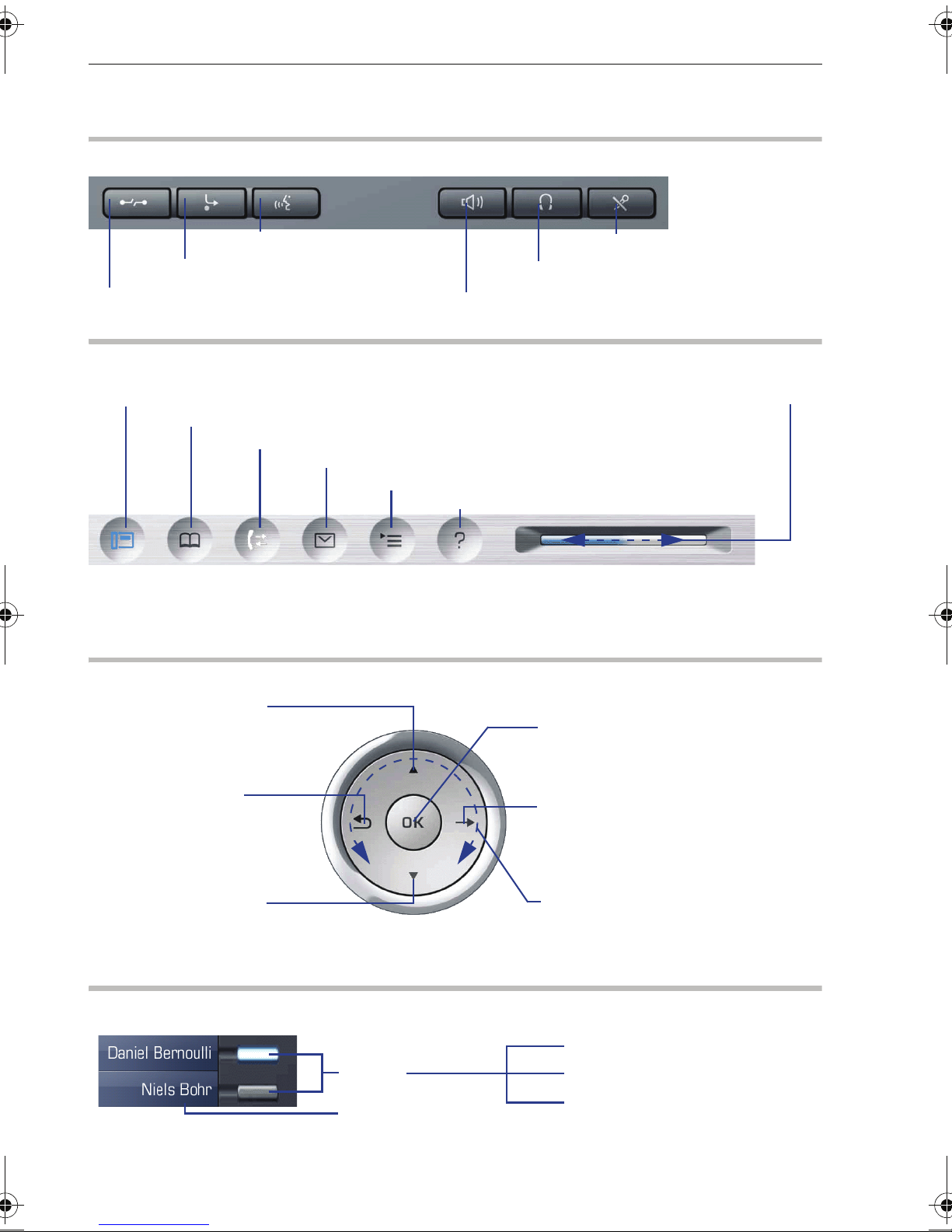
Using Your Telephone
Using Your Telephone
Function Keys and Audio Keys
q Start voice dialing
r Activate/deactivate forwarding
s End (disconnect) call
Mode keys and TouchSlider
t Telephony interface
u Phonebooks
w Call lists
x Voicemails
Shining blue: mode is active
Shining white:
for call lists: new entry in call list
for voicemails: new voicemail
TouchGuide
o Turn headset on/off
n Turn speaker on/off
Run finger over TouchSlider:
Depending on situation, set
volumes for ringer or
speaker
v Service/Applications menu
y Help function
p Turn microphone on/off
X
Press m key:
- Scroll upwards
Hold down:
- Scroll to beginning of list
Press
h key:
- Cancel function
- Delete character
left of cursor
- Go up a level
Press
l key:
- Scroll downwards
Hold down:
- Scroll to end of list
Programmable sensor keys on the display
Keys
Label
Press
i key:
- Confirm input
- Perform action
g key:
Press
- Call up the context menu
- Go down a level
Run finger over inner edge of ring W:
- Scroll through lists and menus
- Adjust volume
S inactive
R lit
T flashing
2
Page 3
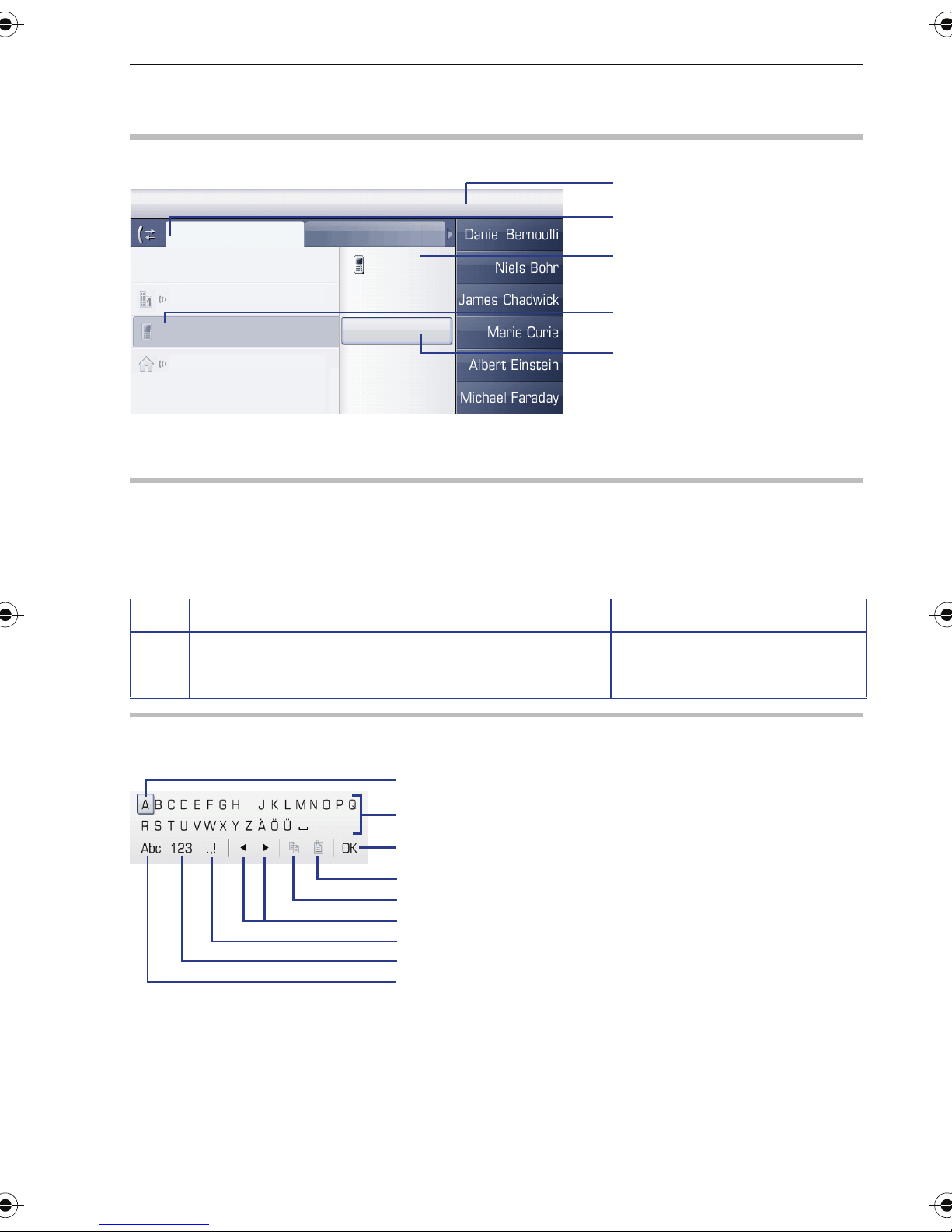
Display
Components
10:23 Mon 10/23/06
Missed
List options
Dialed
Dial
54321
Using Your Telephone
Status bar
Ta b ( ac t i v e )
Context menu
Marie Curie
Einstein, A
Joseph von Fr.
Details
Delete
Selected entry
(e.g. call lists)
Selected entry
in context menu
Entering Phone Numbers and Text
Keypad
In situations where text entry is possible, you can use the dial keys to enter text, punctuation and special characters. To do this, press the numerical keys repeatedly.
Extra asterisk and pound key functions:
Key Function during text input Function when held down
*
#
Display keyboard
Depending on the context, the display keyboard is displayed with different elements.
Write special characters Deactivate the ring tone.
Switch between upper/lower case and digit entry. Activate telephone lock.
Using the display keyboard:
WShift focus to another element
g Shift focus to "OK"
i Select element
Element in focus
Letters, digits, punctuation or special characters
Changes
Copy content of active field to the clipboard
Insert clipboard contents at cursor position
Move cursor left/right
Switch to punctuation and special characters
Switch to number input
Switch to upper/lower case
3
Page 4

Important Operating Procedures HiPath 4000
Important Operating Procedures
^
\
[
Z
Lift handset
Replace handset
Conduct call
Ring tone/call waiting tone
j
f
g
Z
Enter text or number
Select entry
Open context menu
Next step in procedure
HiPath 4000
In Idle State
Answering a call with the handset
Z Z ^
Answering a call in speakerphone mode
Z Z n
Dialing from the caller list
w ("Missed" tab, press repeatedly for "Dialed", "Received", "Forwarded")
Z f desired entry i
Activating callback
j destination phone number i Z if no answer or busy: f "Callback" i
Saving a phone number to a key
S Hold down programmable key Z f "Assign function" i Z f "Change?" i
Z f "Selected dialing?" i Z f "Save?" i Z D Z In "Settings" tab f "User" i
Z f "Service menu" i Z f "Destinations?" i Z f "Selected dialing?" i
Z S press programmable key Z "Enter new number?" i Z j phone number
Z "Completed?" i Z "Use Destination Number?" i Z "Save?" i
Dialing a saved number
S saved phone number Z ^
4
Page 5

HiPath 4000 Important Operating Procedures
Saving a function to a key
S Hold down programmable key Z f "Assign function" i Z f "Change?" i
Z f select function i Z f "Save?" i
Redialing a number
^ or n Z f "Last number redial?" i Z ^
Programming call forwarding
r Z f "Edit call forwarding" i Z f select desired forwarding type (all calls, busy, no
reply, fixed, internal calls, external calls, busy/no reply)
i Z f "Destination" i
Z j phone number i Z f selected forwarding, e.g. "all calls" i Z f "On" i
Z f "Save & exit" i
Turning fixed call forwarding on/off for all calls
r
5
Page 6

Important Operating Procedures HiPath 4000
During Calls with a Party A
Switching to speakerphone mode
Hold down n Z \ (US only: n Z \)
Consultation
g Z "Consultation?" i Z j
phone number for party B
i Z [ party B Z g
Z "Release and return?" i Z [ party A
Accepting call waiting
Z call waiting tone Z f"Answer camp-on?" i Z [ party B Z f party B Z g
Z f "Release and return?" i Z [ party A
Start conference
g Z "Consultation" i Z j
phone number for party B
i Z [ party B Z g
Z f "Conference?" i Z [ party A and B
Start conference on call waiting
Z call waiting tone Z f "Answer camp-on?" i Z [ party B Z g
Z f "Conference?" i Z [ party A and B
Blind transfer
g Z f "Consultation?" i Z j destination phone number Z \
Transfer after consultation
g Z "Consultation?" i Z j
phone number for party B
Z [ party B Z \
6
Page 7

HiPath 500/2000/3000/5000, HiPath OpenOffice ME Important Operating Procedures
HiPath 500/2000/3000/5000,
HiPath OpenOffice ME
In Idle State
Answering a call with the handset
Z Z ^
Answering a call in speakerphone mode
Z Z n
Rejecting a call
Z Z f "Reject call" i
Dialing from the caller list
w ("Missed" tab, press repeatedly for "Dialed", "Received", "Forwarded")
Z f desired entry i
Activating callback
j destination phone number i Z if no answer or busy: f "Callback" i
Saving a phone number to a key
S Hold down programmable key Z f "Assign function" i Z f "Change key?" i
Z f "Destinations" i Z f "Station no." i Z Stn number: j phone number i
Z "Save" i Z "Exit" i
Dialing a saved number
S saved phone number Z ^
Saving a function to a key
S Hold down programmable key Z f "Assign function" i Z f "Change?" i
Z f select function i Z f "Exit" i
Programming call forwarding
r Z f "Edit call forwarding" i
Z f selecting forwarding type (all calls, internal calls, external calls) i
Z f "Destination" i Z j phone number i Z f selected forwarding, e.g. "all calls" i
Z g Z f "On" i Z f "Save & exit“ i
Turning call forwarding on/off for all calls
r
7
Page 8

Important Operating Procedures HiPath 500/2000/3000/5000, HiPath OpenOffice ME
During Calls with a Party A
Consultation
g Z "Consultation" i Z j
phone number for party B
i Z [ party B Z f party B Z
g Z "Release and return" i Z [ party A
Start conference
g Z "Start conference" i Z j
phone number for party B
i Z [ party B Z g
Z f "Conference" i Z [ party A and B
Blind transfer
g Z f "Consultation?" i Z j destination phone number Z \
Transfer after consultation
g Z "Consultation?" i Z j
phone number for party B
Z [ party B Z \
8
Page 9

Reference No.:
A31003-S2000-U116-1-7619
Communication for the open minded
Siemens Enterprise Communications
www.siemens.com/open
© Siemens Enterprise
Communications GmbH & Co. KG
Hofmannstr. 51,
D-81359 München
The information provided in this document
contains merely general descriptions or characteristics of performance which in case of
actual use do not always apply as described
or which may change as a result of further
development of the products. An obligation
to provide the respective characteristics shall
only exist if expressly agreed in the terms of
contract. Subject to availability. Right of
modification reserved. The trademarks used
are owned by Siemens Enterprise
Communications GmbH & Co. KG or their respective owners.
 Loading...