

Siemens OpenStage 15 T, OpenStage 30 T, optiPoint 500 basic, optiPoint 500 advance, optiPoint 500 standard Quick Reference Manual
...Page 1
Documentation
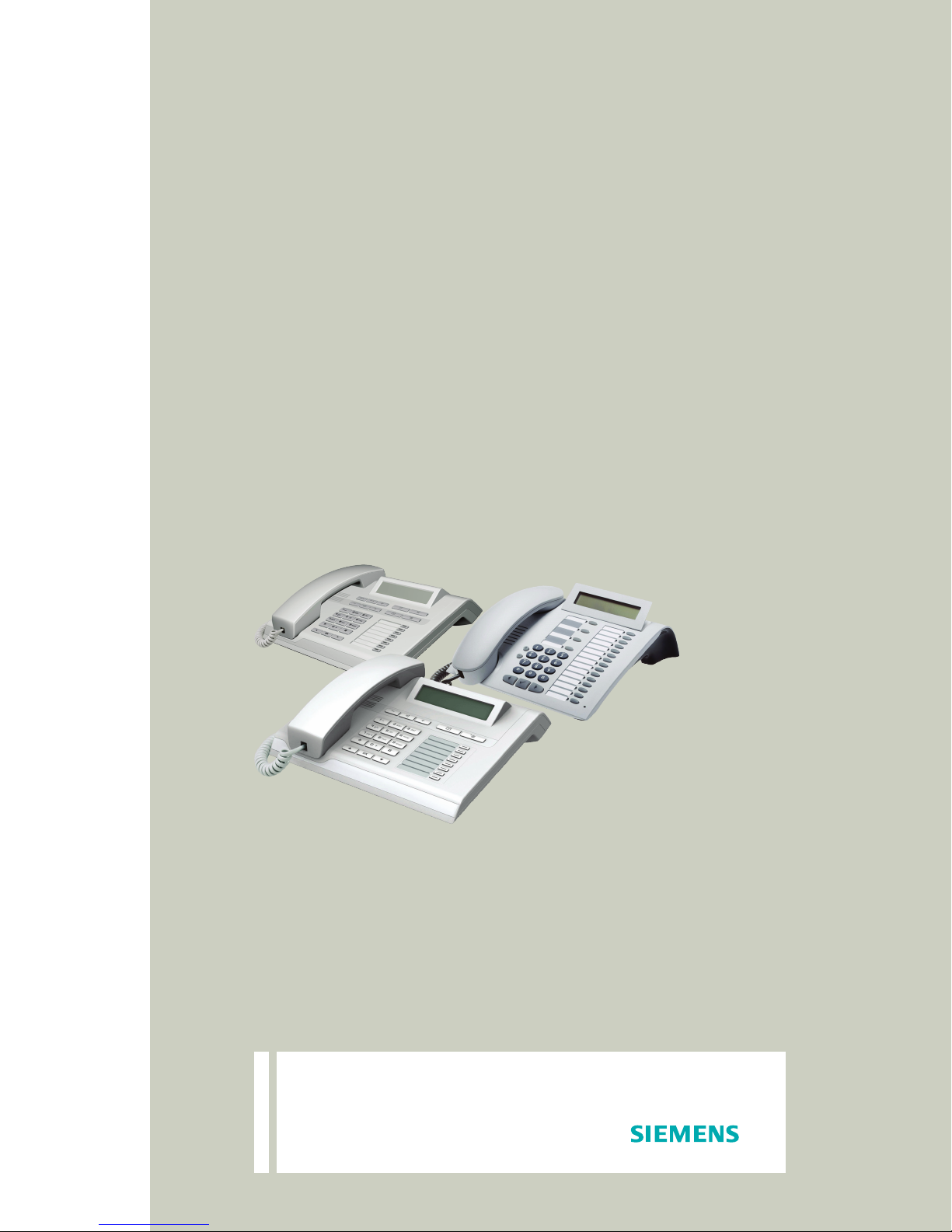
HiPath 1100
System Telephones
OpenStage 15 T
OpenStage 30 T
optiPoint 500 economy
optiPoint 500 basic
optiPoint 500 standard
optiPoint 500 advance
Quick Reference Guide
Siemens Enterprise Communications
www.siemens-enterprise.com
Page 2

Explanation of symbols
The key symbols show the optiPoint telephone user interface.
The functions on OpenStage and optiPoint telephones are comparable.
Symbol Explanation
ll, q, p ... Enter numbers, keys, password, internal or
external numbers, etc.
w Signaling with a short beep
n/t Lift/Replace the handset
s Start conversation
Service Menu
or
N
Service Menu
Programmable key is ON
Programmable key deleted
Blinking Programmable key
< > and : Navigation keys
- + Setting keys
Speaker
or
n
Speaker on/off
O Mailbox key (OpenStage only)
Numbering Plan
Description HiPath 1120 HiPath 1150 HiPath 1190
External line 801 to 808 801 to 832 801 to 845
Extension, including S
Group of external lines 0, 890 to 899
Internal subscriber group 770 to 779
Hunt Groups (HG) 780 to 789
UCD subscriber group 790 to 799
Carrier 9
EVM - Default internal number 790
EVM - Message Ports 7491 to 7492
EVM - Virtual ports 744 t o 74 7
Fax/DID - Virtual message ports 740 t o 74 3
0
11 t o 3 0 11 t o 6 0
610 to 645
101 to 240
USB/CAPI line 10 100
Substitution for * and # 75 and 76 (accordingly)
2
Page 3
Display indications
O
30 T
1
2
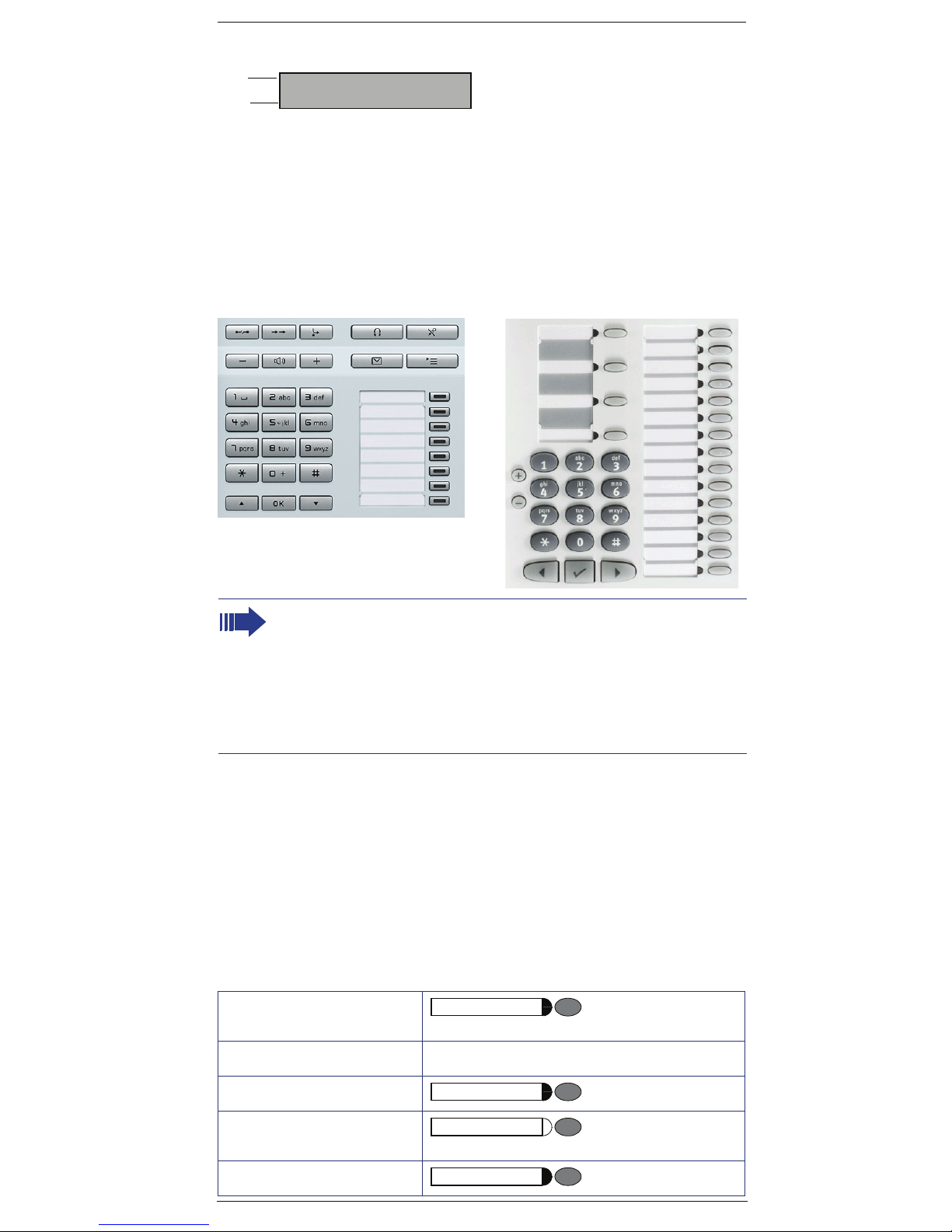
• Line 1 displays time, date, requests, error messages and confirmation messag-
• Line 2 displays the internal number, system name, and available options that
08:30 MON 20.APR 09
27 HiPath 1100>
es, as appropriate.
can be selected by pressing =. If the ">" appears on the right, it means there
are more options available. Options can be accessed using < and :
(optiPoint 500: :, < and >).
Configuring the keys
The key layout is shown below. The remaining keys are available for programming.
penStage
Release
optiPoint 500 advance
Service
Redial
Mute
Speaker
End
The Mute key will function as Internal when Automatic seizure of an external line is activated. In all other cases, the Mute key functions as Mute.
See the User Manual (A31003-K1160-B801-*) or the HiPath 1100 Manager
for information on how to program keys. Labels for programmable keys can
be printed/changed using the "Printing Labels" service on the HiPath 1100
Manager.
System telephone settings can be configured individually according to each
user’s preferences. For further information on how to configure a system
telephone, see the manual included with the unit.
Feature
Features can be selected as follows:
1. Using the navigation keys in the Main Menu
2. Using the Service Menu key then browsing the feature option list
3. Using the Service Menu key and the appropriate feature code
4. Using a Programmable key
5. Using the feature code
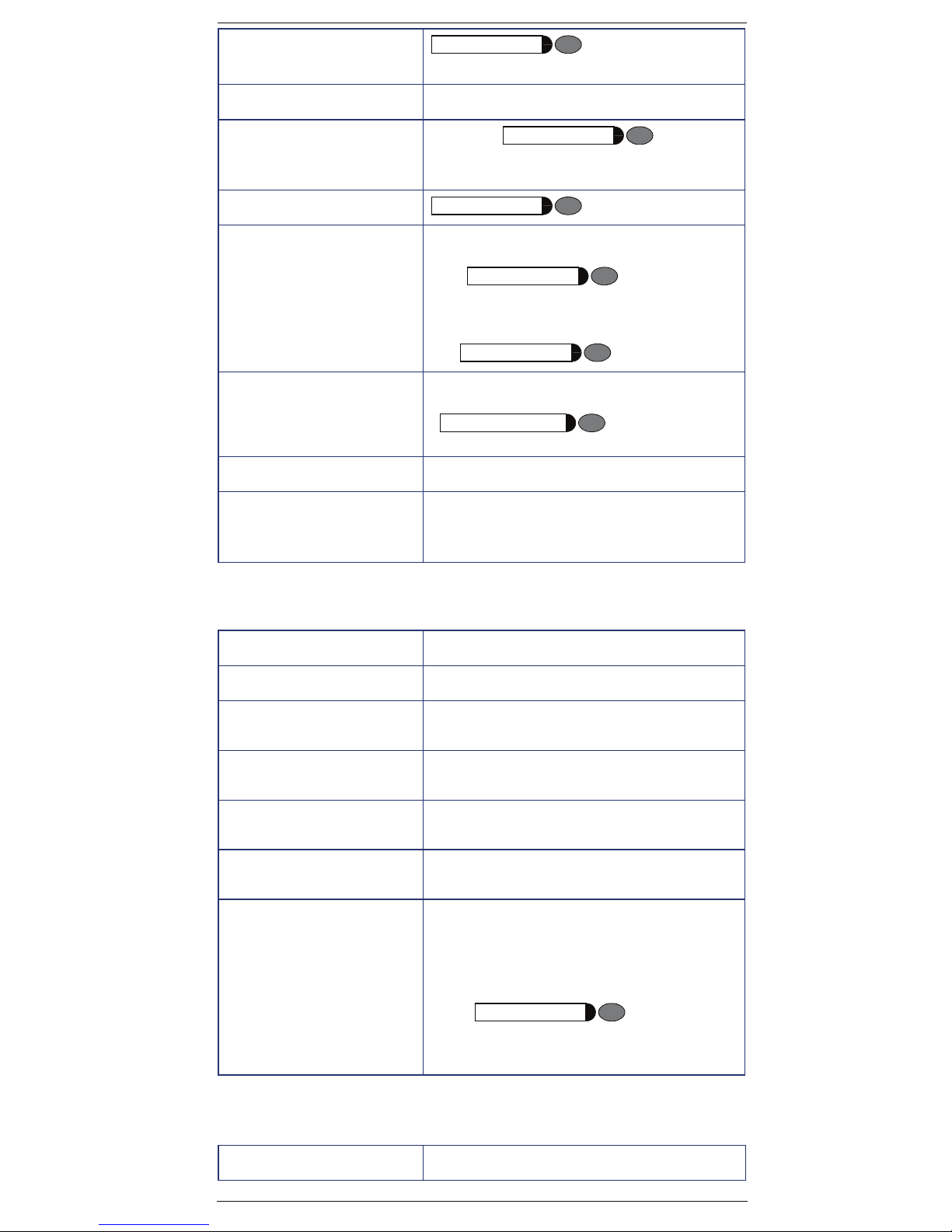
System telephone functions
Accessing a mailbox key programmed for
Mailbox
MWI
Call charge consultation qji
Call forwarding
Call forwarding
Deactivation
Parking
Call forwarding
Call forwarding
Parking
3
p
d to m slot
Page 4
Parking
Resuming a call
Parking
d to m slot
Caller List
Programming a feature for a
key
Redial
Speaker Activate/deactivate speakerphone
Headset Activate/deactivate headset
Checking relay status qmheh
Admin of extension names
(1 optiPoint or OpenStage
with system display)
rlf < > list :
qme < >
feature to be programmed and
Redialing
Activate/deactivate speaker
s
Activate headset
qmhxmi
System Speed Dial or extension/group
Select a key
:
Speaker
Speaker
p PIN extension
Seizure of an external line
Feature Code
External call
External call using a group of
external lines
Seizure of a specific external
line
Internet Access
Activation
Internet Access
Deactivation
External line reservation
Busy
dp
lmd.lmm p external line
lde.lhi p
qhmg p external line
rhmg p external line
1)Wait for
s
or
2)Wait
wtPhone rings n p external
Service Menu
qil
Functions used when making calls
Feature Code
tPhone rings n p external s
4
Page 5
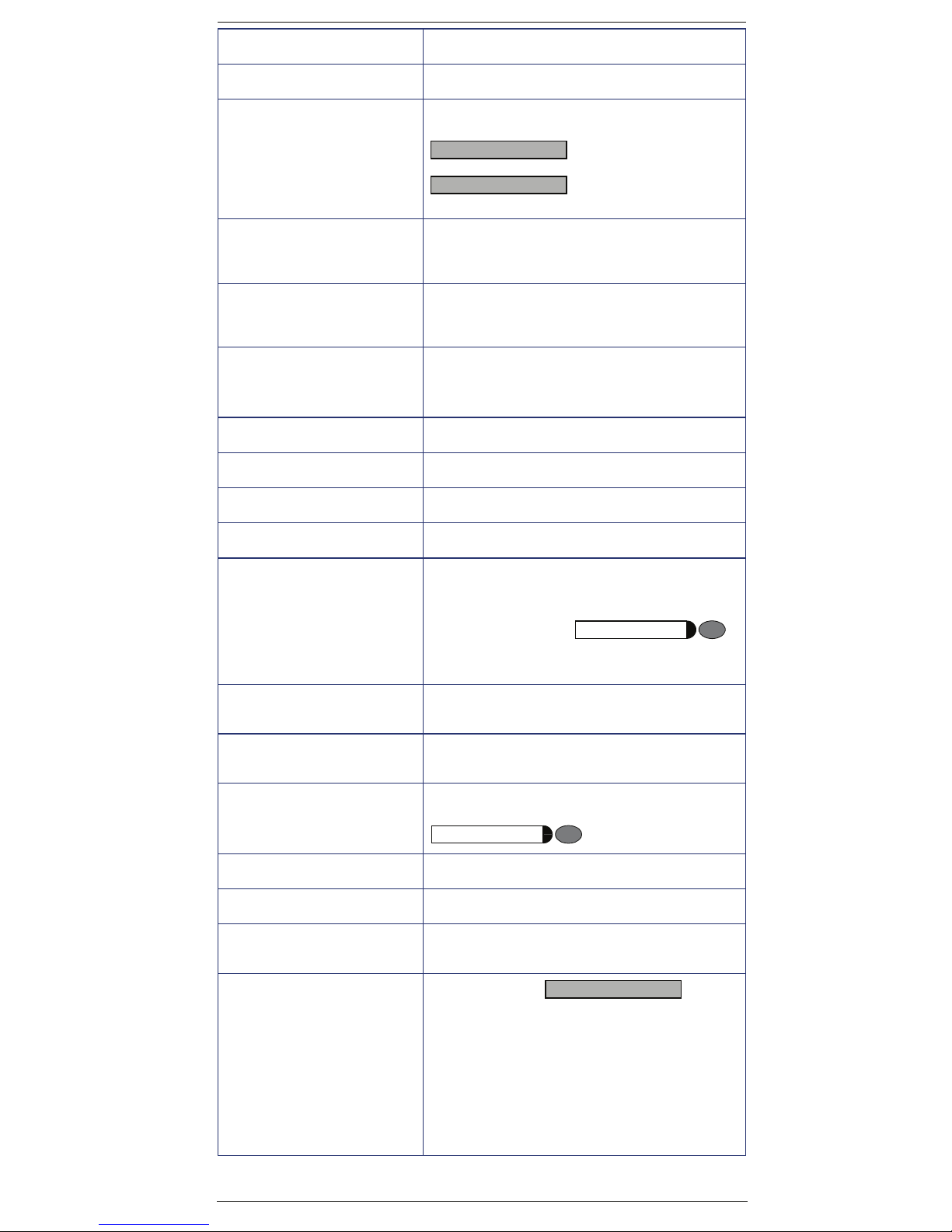
System speed dialing qk + ddd . fhm
Individual speed dialing qk + qd.qh s
Individual speed dialing
Programming
Speakerphone autoanswering mode
Activation
Speakerphone autoanswering mode
Deactivation
Direct communication call qld p extension with a system telephone
Internal call
Calling a call group (CG)
Calling a Hunt Group (HG) kld . klm
UCD subscriber group kmd . kmm
qmf + qd.qh
CHANGE?
SAVE?
: p number
: wait w
qmjwait for w
rmj wait w
wait for
ws record message
p extension
kkd . kkmV
Urgent call
(busy extension)
Hotline
(If programmed)
Warmline
(If programmed)
Override
Busy extension
LCR Bypass qhi p Carrier + number s
View timeout rji
Silent monitoring
busy extension
Recall
Activation
(Extension does not answer or
is busy)
1) n p (busy) Wait for w s
or
n p (extension)
2
qil s
Service Menu
ns
n Wait s
p (busy)
Service menu
qmhh p busy extension s
no answer
p
1)
qil w .
qjf s
RECALL?
:
or
Wait. Phone rings
or
2) Wait for
Wait. Phone rings
w t.
5
n s
n s
Page 6
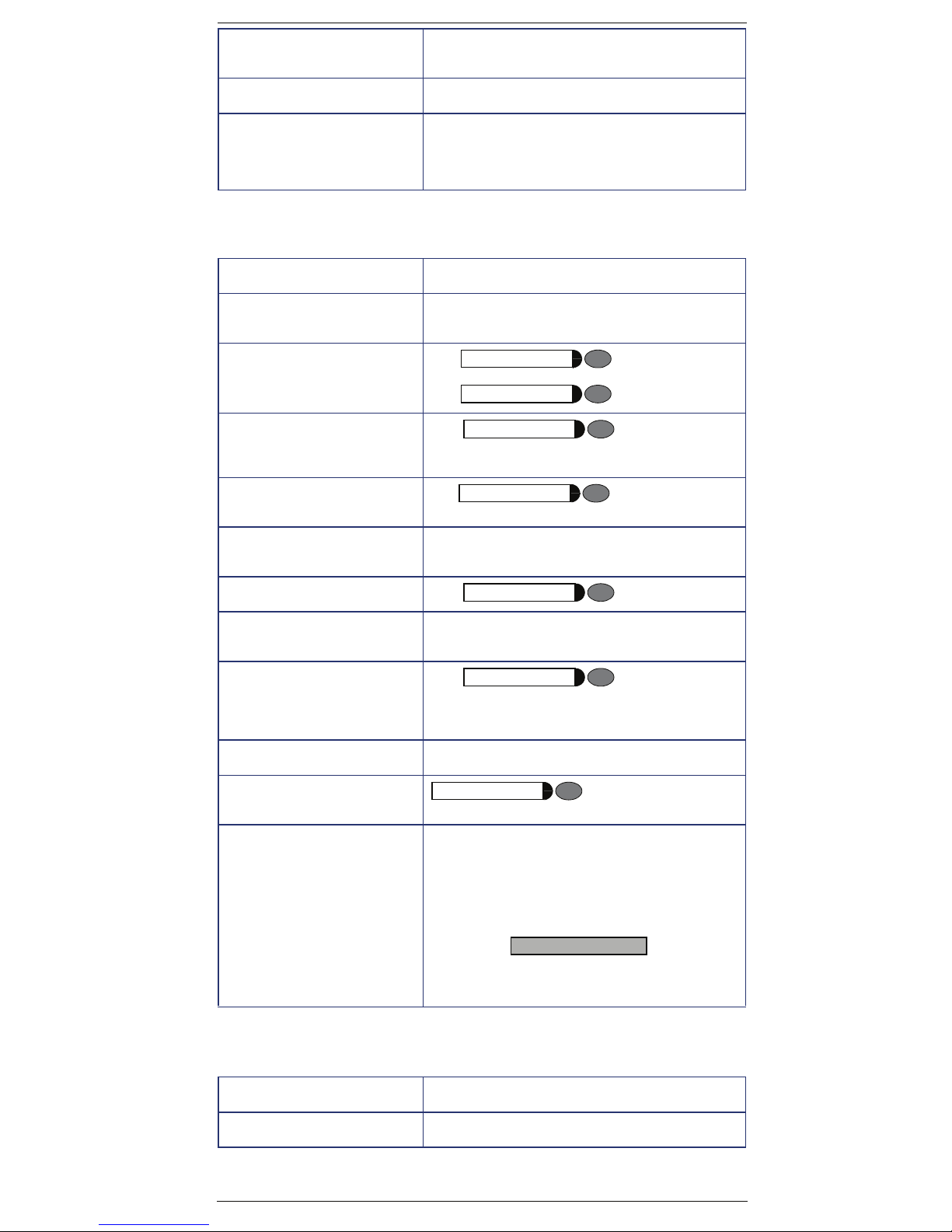
Callback
Deactivation
Carrier m
ril
Using a temporary MSN to
make a call
qhe p MSN slot or MSN number
p external line p external number
Functions used during calls
Feature Code
Account code
Conference
Consultation
(To end a consultation, wait for
the call to be disconnected)
Parking s qij+d.
Retrieving a parked
call
qjd p account code r p
number
Consultation
s p number
Service menu
s qg s
Consultation
s p s
Service menu
m
rij + d.m s
General Parking st
Retrieving a parked external
call
To g g l e
(Use after consultation, for answering a second or urgent
call)
Suffix dialing s + p data
Retrieving a call on hold
Transfer
(When an external analog line
programmed as “Type of answering signal” or a digital line
is being used, you must wait
for an answer before transferring the call. For transfers
without consultation, there is
no need to wait before answering)
Gen. Parking
qjg + p line s
Service menu
s qf s
Service menu
if busy or no answer
Internal
qd
s p extension t
External
s < > :
number (s)
p
TRANSFER?
Functions used when receiving calls
Feature Code
Accessing a mailbox
p Voice mail group
6
Page 7
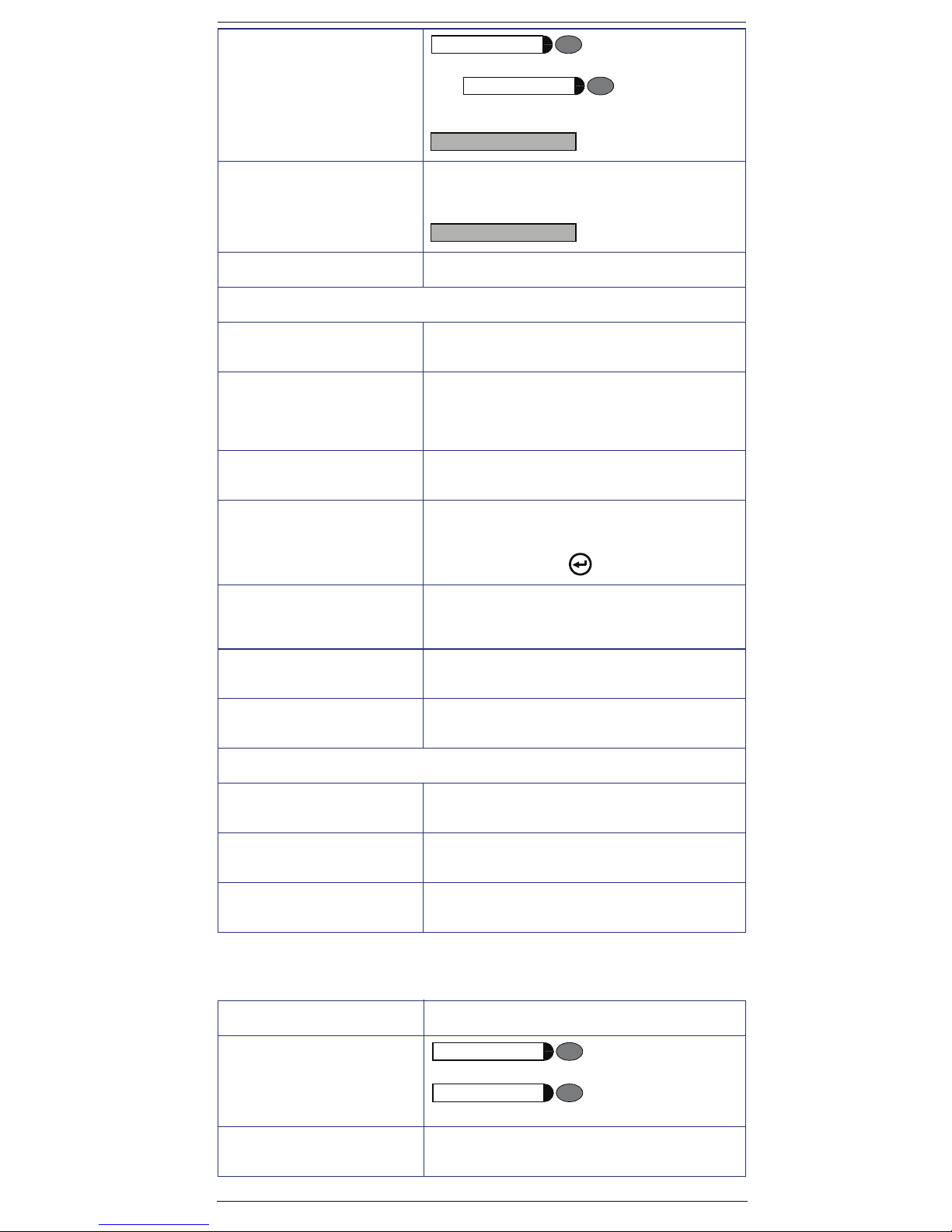
Answering Call
waiting
Service menu
or
Service menu
s qf s
or
qii
CALL WTNG?
Group pickup qik
or
CALL 4 PCKP GRP?
Individual pickup qim p extension
Call forwarding on an analog line:
Call forwarding to external
number
Internal call forwarding qee p extension, voice mail group, call
Call forwarding
Deactivation
Call forward no answer or
busy
Activation
qee p external :
group
or Fax/DID
:
ree
qeh p extension,voice mail group ,
Call
group or external line
:
:
Call forward no answer or
busy
Deactivation
Do not disturb
Activation
Do not disturb
Deactivation
EVM:
Consultation at the extension
being used
Consultation from another extension
Consultation from an external
extension
reh
qmk
rmk
kmd VM group p password
kmd VM group p password p exten-
sion s
s p your external number + q p pass-
word p extension
Miscellaneous functions
Feature Code
Entrance telephone
Door opener
Service menu
or
Service menu
sion
qje
qje p exten-
General alarm
Deactivation
rmheh p password
7
Page 8

Electronic lock password
change
qmhg p current password p new
password
p confirm new password w
Electronic lock
Activation
Electronic lock
Deactivation
Busy signal when extension
is busy
Activation
Busy signal when extension
is busy
Deactivation
System programming mode
Activation
Deactivating features
(call forwarding, do not disturb, data protection, alarm
clock, callback and speakerphone auto-answering)
Language/Country settings qmhef p country code
Call Group (CG) and Hunt
Group (HG) Login
qjj p password
rjj p password
qmhee :
rmhee
qmi p password p codes
rd
qli p group (if it belongs to more than
one group)
Call Group (CG) and Hunt
Group (HG) Logout
Room monitor
(Babyphone)
Music on Hold
Activation
Music on Hold
Deactivation
Remote configuration
HiPath 1100 Manager
Remote configuration
Using an MF telephone
rli p group (if it belongs to more than
one group)
qll
qmhed Music
rmhed
qmmf
1) The local programming extension is talking to
the remote programmer:
qmme wt
Remote programmer must provide:
p password p programming codes.
2) The remote programmer dials the system and
is attended by the Fax/DID feature:
qmi p password p programming
codes.
Data protection
Activation
Data protection
Deactivation
qhmd
rhmd
8
Page 9

Relay
Activation (only for HiPath 1120)
qmd
Relay
Activation (only for HiPath 1120)
Night service
Activation
Night service
Deactivation
Call Waiting tone
Activation
Call waiting tone
Deactivation
COS (Class of service)
Changeover
rmd
qhh p password
rhh p password
n rlk w t
n qlk w t
qidl p extension p password s
Alarm clock
Feature Code
Alarm clock
(Daily)
Alarm clock
(Daily, except weekends)
qhje p time (e.g 1230) :
qhjf p time (e.g 1230) :
Alarm clock
(After a specified time period)
Alarm clock
(For a specified date and time)
Alarm clock
Deactivation
qhjg p time (e.g 1230) :
qhjh p date/time (e.g 24121830) :
rhj :
UCD subscriber group functions
Feature Code
Agent available
Agent unavailable rhdf
Calling a UCD subscriber
group
Logging into a UCD subscriber
group
Logging out of a UCD subscriber group
qhdf
kmd.kmm
qhde p group (if the extension be-
longs to more than one group)
rhde
UCD agent in service qhdg
UCD agent out of service rhdg
Show queue size to UCD
agent
qhdi
9
Page 10
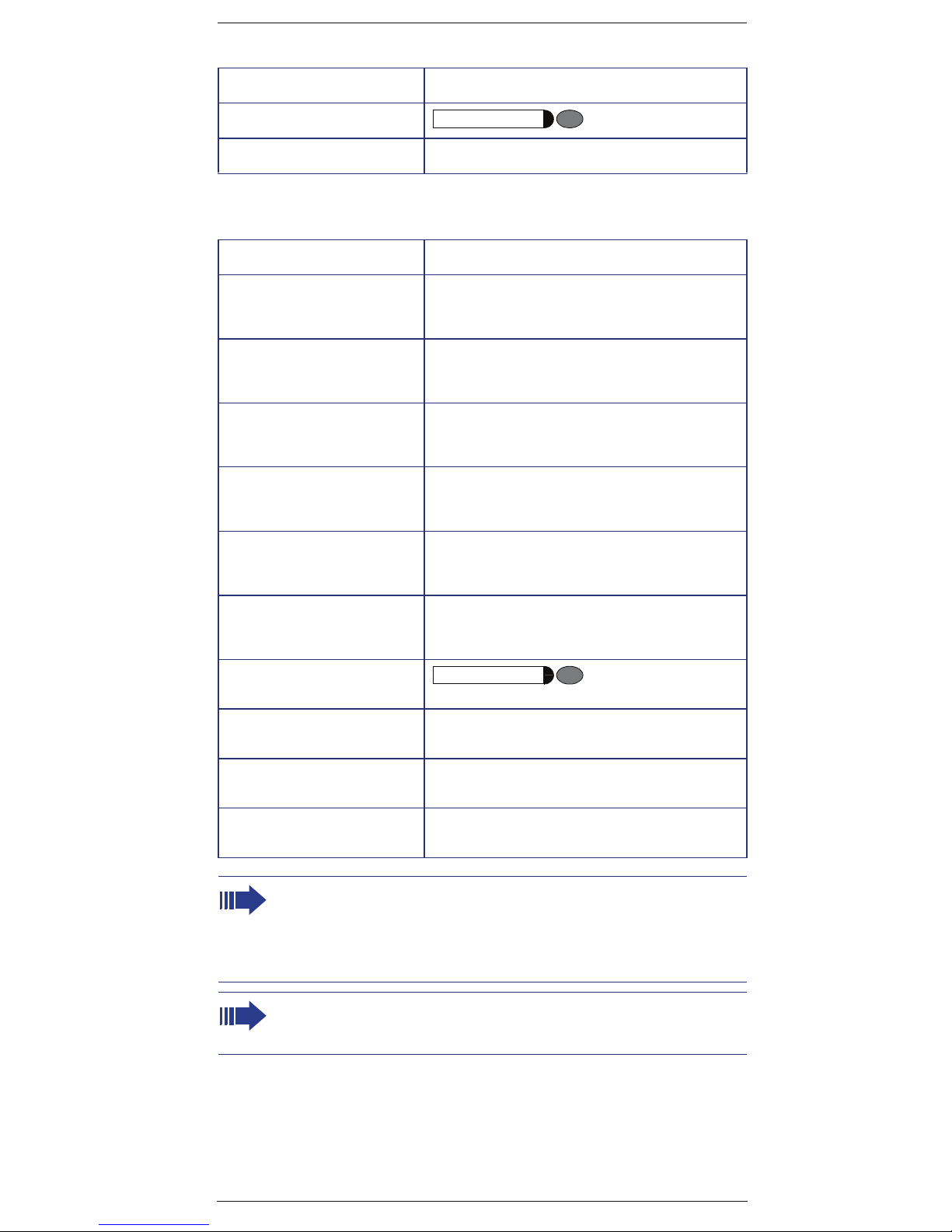
Satellite PABX
Feature Code
Flash on external analog line
Operation as a Satellite PABX lmd.lmm p line number
Service menu
qie
Special functions for ISDN lines
Feature Code
Immediate call forwarding
for MSN
Activation
Immediate call forwarding
for MSN
Deactivation
Call forwarding - no answer,
for MSN
Activation
Call forwarding - no answer,
for MSN
Deactivation
Call forwarding for MSN when
the line is busy
Activation
qjhe p external w p MSN
rjhe w
qjhf p external wp MSN
rjhf w
qjhg p external wp MSN
Call forwarding - Busy, for
MSN
Deactivation
Caller ID
(Trace)
Restriction for sending MSN
Activation
Restriction for sending MSN
Deactivation
Using features provided by
a carrier over an ISDN Network
Note 1:
For Korea the numbering plan changes as follows:
a) Access to the group of external lines is done with digit "9" instead of "0"
b) Calling an operator terminal is done with digit "0" instead of "9"
c) Group call pickup is done with sequence "*0" instead of "*57"
d) Recovery of a parked call is done with sequence "*57" instead of "*0"
Note 2:
Feature Codes can be changed with the HiPath 1100 Manager. An expert
should be consulted in this case.
rjhg w
Service menu
qlh
qlj
rlj
qidg p external p ISDN code
10
Page 11

This device has been manufactured in accordance with
our certified environmental management system (ISO
14001). This process ensures that energy consumption
and the use of primary raw materials are kept to a minimum, thus reducing waste production.
Siemens Enterprise Communications
www.siemens-enterprise.com
Copyright © Siemens Enterprise
Communications GmbH & Co. KG
Hofmannstr. 51
80200 München
Deutschland
Siemens Enterprise
Communications GmbH & Co. KG
is a Trademark Licensee of
Siemens AG
Reference No:
A31003-K1270-U107-3-7619
The information provided in this
document contains merely general
descriptions or characteristics of
performance which in case of actual
use do not always apply as described or which may change as a
result of further development of the
products.
An obligation to provide the respective characteristics shall only exist if
expressly agreed in the terms of
contract. Availability and technical
specifications are subject to change
without notice. OpenScape,
OpenStage and HiPath are registered trademarks of Siemens Enterprise Communications GmbH & Co.
KG.
All other company, brand, product
and service names are trademarks
or registered trademarks of their respective holders.
 Loading...