

Page 1
Release 1.0
Service Repair Documentation
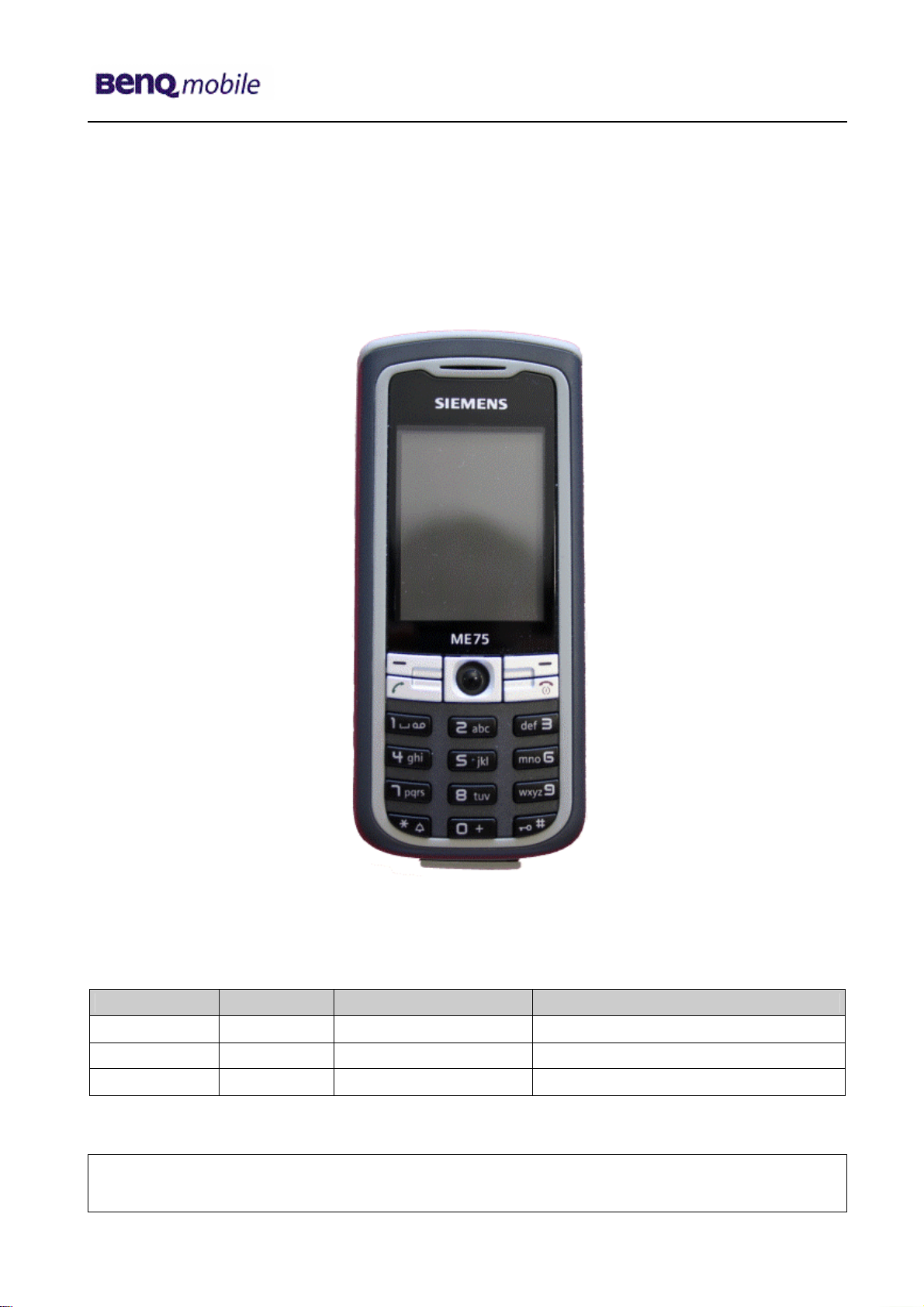
Level 3 (Basic) – ME75
Release Date Department Notes to change
R 1.0 13.10.2005 BenQ Mobile CC S CES New document
Technical Documentation
TD_Repair_L2.5L_ME75_R1.0.pdf Page 1 of 13
Company Confidential
2005©BenQ
10/2005
Page 2
Release 1.0
Table of Content
1 Introduction ...............................................................................................................................3
1.1 PURPOSE ...............................................................................................................................3
1.2 SCOPE ...................................................................................................................................3
1.3 TERMS AND ABBREVIATIONS ...................................................................................................3
2 List of available level 2.5light parts.........................................................................................4
3 Hardware requirements ............................................................................................................4
4 ME75 Board layout....................................................................................................................5
5 SIM Card Problems ...................................................................................................................6
6 IO Connector Problems ............................................................................................................7
7 B to B connector Problems......................................................................................................8
8 Battery connector Problems ....................................................................................................9
9 Camera Connector Problems.................................................................................................10
10 Main keypad illumination Problems ......................................................................................13
Technical Documentation
TD_Repair_L2.5L_ME75_R1.0.pdf Page 2 of 13
Company Confidential
2005©BenQ
10/2005
Page 3
Release 1.0
1 Introduction
1.1 Purpose
This Service Repair Documentation is intended to support Service partners to carry out repairs on
BenQ repair level 3. The described failures shall only be repaired in BenQ authorized local
workshops.
The level 3 (former Level 2.5light) partners are obliged to repair level 3 classified boards, up to their
repair level, under consideration of this repair instruction.
All repairs have to be carried out in an ESD protected environment and with ESD protected
equipment/tools. For all activities the international ESD regulations have to be considered.
Assembling/disassembling has to be done according to the latest ME75 Level 1-2 repair
documentation. It has to be ensured that every repaired mobile Phone is checked according to the
latest released General Test Instruction document (both documents are available in the Technical
Support section of the C-market).
Check at least weekly C-market for updates and consider all ME75 related Customer Care
Information
ME75 Partnumber on IMEI label: S30880-S6980-#xxx
, while # may be any letter (A-Z) and xxx may be any number from 100, 101, 102....
Scrap Handling: All Scrap information given in this manual are related to the
SCRAP-Rules and instructions.
Attention: Consider the new "LEAD-FREE" soldering rules (available in the communication
market), avoid excessive heat.
1.2 Scope
This document is the reference document for all BenQ mobile authorised Service Partners which are
released to repair BenQ mobile phones up to level 2.5 light.
1.3 Terms and Abbreviations
Technical Documentation
TD_Repair_L2.5L_ME75_R1.0.pdf Page 3 of 13
Company Confidential
2005©BenQ
10/2005
Page 4
Release 1.0
2 List of available level 2.5light parts
(according to Component Matrix V1.09 - check C-market for updates)
Product ID Order Number Description CM
ME75 S2931 L36315-Z77-C218 JOYSTICK
ME75 V2650 L36197-F5008-F492 IRDA 115.2 KBIT
ME75 X1400 L36334-Z97-C336 CONNECTOR BATTERY 3-POL R65
ME75 X1504 L36334-Z93-C303 IO-JACK SLIM 12-POL
ME75 X1604 L50634-Z97-C406 CONNECTOR SIM CARD READER R65 (B)
ME75 X2202 L36334-Z97-C205 CONNECTOR DISPLAY 10POL
ME75 X2705 L50634-Z97-C383 CONNECTOR BOARD TO BOARD 12-POL. X75
ME75 X3651 L50634-Z97-C379 CONNECTOR CAMERA-SOCKET
ME75 X3800 L36334-Z93-C297 CONNECTOR ANTENNA 6mm
3 Hardware requirements
(according to L2.5L-L2.5 General soldering information V1.3 - check C-market for updates)
Jigs, Tools and working materials for all described repairs:
hot air blower
soldering gun
tweezers
flux
solder
ME75 dome sheet jig
Technical Documentation
10/2005
TD_Repair_L2.5L_ME75_R1.0.pdf Page 4 of 13
Company Confidential
2005©BenQ
Page 5

Release 1.0
r
4 ME75 Board layout
Upper board side
Lower board side
IO Jack
Slim
Connector
Display
Connector
Battery
Joystick
Connector
Bord to Bord
Connector
Antenna
Technical Documentation
TD_Repair_L2.5L_ME75_R1.0.pdf Page 5 of 13
Connector
SIM Card
Reade
IRDA
Company Confidential
2005©BenQ
Connector
10/2005
Page 6

Release 1.0
y
y
r
y
y
5 SIM Card Problems
Fault Symptoms
Customer: GRT:
Handset does not accept SIM card SIM Card Problems
SIM Card Problems
Watch for oxidation and
damaged pads of the
SIM Card reader
okay
Check the status of the
EMI Filter visually
not
oka
Check the status of the
SIM Card reader visually
Exchange
SIM Card reade
Connector SIM Card Reader
Use soldering iron to remove defective component. Avoid excessive heat! Watch surrounding components!
Resolder new component afterwards.
E-commerce order number: L50634-Z97-C406
E-commerce order name: CONNECTOR SIM CARD READER R65 (B)
Soldering temperature: ~ 360°C TIP Temp.
IRIS Diagnose Code: 43300 Interface/SIM Card reader/Mechanical Damage
not
oka
Use the resistor test
function of a multimeter
to check connection
between spring
contacts and soldering
contacts.
The value must be ~0
okay
okay
not
oka
okay
Back to customer
without repair
not
oka
caused by customer
SCRAP - has to be send
separately to WSC
Exchange the
damaged Filter
- check for twisted or
bent contacts
- check for dry joints
Continue with
higher repair level
Technical Documentation
10/2005
TD_Repair_L2.5L_ME75_R1.0.pdf Page 6 of 13
Company Confidential
2005©BenQ
Page 7

Release 1.0
y
y
r
y
y
6 IO Connector Problems
Fault Symptoms
Customer: GRT:
Charging Problems No connection to GRT
Problems with external loudspeaker or microphone when using a
car kit
Problems with accessories connected at the IO connector
IO connector Problems
Watch for oxidation and
damaged pads of the
IO connector
not
oka
okay
not
oka
not
oka
Check the dust inside
the IO connector
okay
Check the status of the
IO connector visually
okay
Exchange
IO connecto
Connector IO Jack
Use soldering iron to remove defective component. Avoid excessive heat! Watch surrounding
components! Resolder new component afterwards.
E-commerce order number: L36334-Z93-C303
E-commerce order name: IO-JACK SLIM 12-POL
Soldering temperature: ~ 360°C TIP Temp.
IRIS Diagnose Code: 46100 Interface/Charging Connector/Mechanical Damage
not
oka
Use the resistor test
function of a multimeter
to check connection
between spring
contacts and soldering
contacts.
The value must be ~0
okay
47300 Interface/Data Interface/Mechanical Damage
4B100 Interface/Headset Connector/Mechanical Damage
Back to customer
without repair
caused by customer
SCRAP - has to be send
separately to WSC
Clean IO connector
- check for twisted or
bent contacts
- check for dry joints
Continue with
higher repair level
Technical Documentation
10/2005
TD_Repair_L2.5L_ME75_R1.0.pdf Page 7 of 13
Company Confidential
2005©BenQ
Page 8

Release 1.0
y
y
7 B to B connector Problems
not
oka
Back to customer
without repair
caused by customer
SCRAP - has to be send
separately to WSC
- check for twisted or
bent contacts
- check for dry joints
Fault Symptoms
Customer: GRT:
Upper slider keyboard malfunction Keyboard malfunction
Upper slider keypad illumination does not work Current measured failed
Display problems
B to B connector problems
Watch for oxidation and
damaged pads of the
B to B connector
okay
not
oka
Check the status of the
B to B connector visually
okay
Exchange
B to B
connector
Continue with
higher repair level
Connector Board to Board
Use hot air blower to remove defective component. Avoid excessive heat! Watch surrounding
components! Resolder new component afterwards.
E-commerce order number: L50634-Z97-C340
E-commerce order name: BOARD TO BOARD 30-POL
Soldering temperature: ~ 360°C TIP Temp.
IRIS Diagnose Code: 32100 Keys / Main / No Function
32200 Keys / Main / Reduced Functionality
36000 Keys / Illumination
Technical Documentation
10/2005
TD_Repair_L2.5L_ME75_R1.0.pdf Page 8 of 13
Company Confidential
2005©BenQ
Page 9

Release 1.0
y
y
y
y
8 Battery connector Problems
Fault Symptoms
Customer: GRT:
Mobile does not switch on No connection to GRT
Battery connector problems
Watch for oxidation and
damaged pads of the
battery connector
not
oka
okay
not
oka
Check the status of the
battery connector
visuall
okay
Exchange
battery
connector
not
oka
Use the resistor test
function of a multimeter
to check connection
between spring
contacts and soldering
contacts. The value
must be ~ 0.
okay
Connector BATTERY
Use hot air blower to remove defective component. Avoid excessive heat! Watch surrounding
components! Resolder new component afterwards.
E-commerce order number: L36334-Z97-C213
E-commerce order name: CONNECTOR BATTERY 3-POL
Soldering temperature: ~ 360°C TIP Temp.
IRIS Diagnose Code: 13000 Battery/Mechanical Damage
Technical Documentation
Back to customer
without repair
caused by customer
SCRAP - has to be send
separately to WSC
- check for twisted or
bent contacts
- check for dry joints
Continue with
higher repair level
10/2005
TD_Repair_L2.5L_ME75_R1.0.pdf Page 9 of 13
Company Confidential
2005©BenQ
Page 10

Release 1.0
y
y
y
y
9 Camera Connector Problems
not
oka
okay
Back to customer
without repair
caused by customer
SCRAP - has to be send
separately to WSC
- check for twisted or
bent contacts
- check for dry joints
Continue with
higher repair level
Fault Symptoms
Customer: GRT:
Camera malfunction Tbd.
Camera connector Problems
Watch for oxidation and
damaged pads of the
camera connector
okay
not
oka
Check the status of the
camera connector
visuall
Exchange
camera
connector
not
oka
Use the resistor test
function of a multimeter
to check connection
between spring
contacts and soldering
contacts.
The value must be ~0
Connector CAMERA
Use hot air blower to remove defective component. Avoid excessive heat! Watch surrounding
components! Resolder new component afterwards.
E-commerce order number: L50634-Z97-C379
E-commerce order name: CONNECTOR CAMERA-SOCKET
Soldering temperature: ~ 360°C TIP Temp.
IRIS Diagnose Code: BA000 Accessories / Camera
Technical Documentation
10/2005
TD_Repair_L2.5L_ME75_R1.0.pdf Page 10 of 13
Company Confidential
2005©BenQ
Page 11

Release 1.0
y
y
10 IRDA Problems
not
oka
Back to customer
without repair
caused by customer
SCRAP - has to be send
separately to WSC
- check for twisted or
bent contacts
- check for dry joints
Fault Symptoms
Customer: GRT:
No infrared connection possible Tbd.
IRDA Problems
Watch for oxidation and
damaged pads of the
IRDA
okay
not
oka
Check the status of the
IRDA visually
okay
Exchange
IRDA
Continue with
higher repair level
IRDA
Use hot air blower to remove defective component. Avoid excessive heat! Watch surrounding
components! Resolder new component afterwards.
E-commerce order number: L36197-F5008-F492
E-commerce order name: IRDA 115.2 KBIT
Soldering temperature: ~ 360°C TIP Temp.
IRIS Diagnose Code: 41100 Interfaces / IRDA / No Function
41300 Interfaces / IRDA / Mechanical Damage
Technical Documentation
10/2005
TD_Repair_L2.5L_ME75_R1.0.pdf Page 11 of 13
Company Confidential
2005©BenQ
Page 12

Release 1.0
y
y
y
y
11 Display Problems
not
oka
okay
Back to customer
without repair
caused by customer
SCRAP - has to be send
separately to WSC
- check for twisted or
bent contacts
- check for dry joints
Continue with
higher repair level
Fault Symptoms
Customer: GRT:
Display problems Current measured failed
Display Problems
Watch for oxidation and
damaged pads of the
Display connector
okay
not
oka
Check the status of the
Display connector
visuall
Exchange
display
connector
not
oka
Use the resistor test
function of a multimeter
to check connection
between spring
contacts and soldering
contacts.
The value must be ~0
Connector DISPLAY
Use hot air blower to remove defective component. Avoid excessive heat! Watch surrounding
components! Resolder new component afterwards.
E-commerce order number: L50634-Z97-C380
E-commerce order name: CONNECTOR DISPLAY 20POL
Soldering temperature: ~ 360°C TIP Temp.
IRIS Diagnose Code: 21000 Display / Performance
22000 Display / Background Illumination
Technical Documentation
10/2005
TD_Repair_L2.5L_ME75_R1.0.pdf Page 12 of 13
Company Confidential
2005©BenQ
Page 13

Release 1.0
y
y
12 Joystick Problems
not
oka
Back to customer
without repair
caused by customer
SCRAP - has to be send
separately to WSC
- check for twisted or
bent contacts
- check for dry joints
Fault Symptoms
Customer: GRT:
Joystick malfunction Tbd.
Joystick problems
Watch for oxidation and
damaged pads of the
joystick
okay
not
oka
Check the status of the
joystick visually
okay
Exchange
joystick
Continue with
higher repair level
Joystick
Use hot air blower to remove defective component. Avoid excessive heat! Watch surrounding
components! Resolder new component afterwards.
E-commerce order number: L36315-Z77-C218
E-commerce order name: JOYSTICK
Soldering temperature: ~ 360°C TIP Temp.
IRIS Diagnose Code: 32100 Keys / Main / No Function
32200 Keys / Main / Reduced Functionality
Technical Documentation
10/2005
TD_Repair_L2.5L_ME75_R1.0.pdf Page 13 of 13
Company Confidential
2005©BenQ
 Loading...