

Page 1
More Information Available Online
PoE
MXCWAPT
Access point setup
Choose Region
Access point setup
Choose Region
PoE
MXCWAPT
MXCW640
Access point setup
Microphone unit setup
00
SB930
MXC400
Choose Region
Access point setup
Microphone unit setup
00
Choose Region
00
Searching...
A comprehensive online user guide is available at pubs.shure.com.
Microflex®Complete Wireless
Getting Started
MXCW
Quick Setup
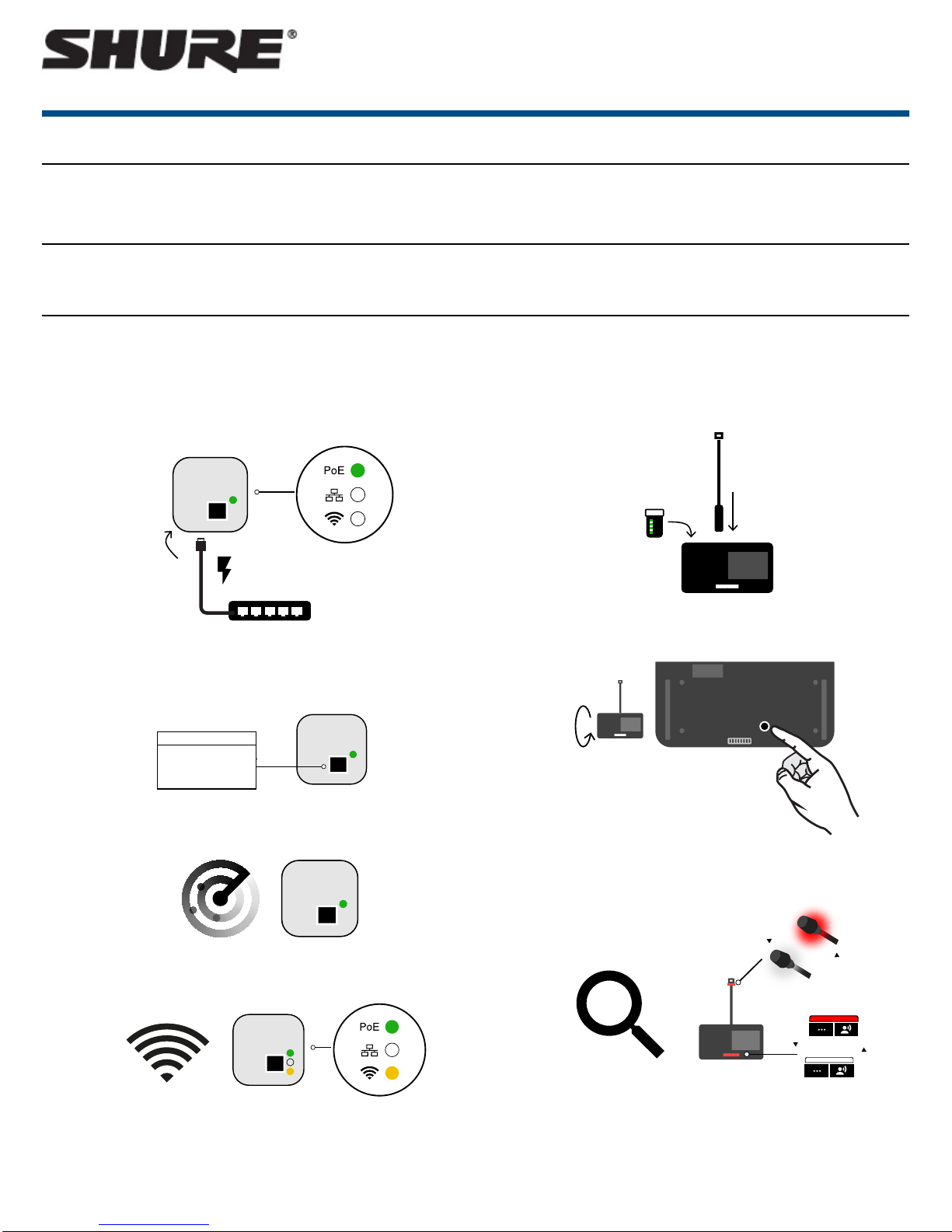
System access point (MXCWAPT) setup
1. Connect the access point to a Power over Ethernet (PoE) source to turn
on the device.
2. If prompted, select the operating region on the menu for RF coordination
(some model variations).
Wireless microphone devices (MXCW640) setup
1. Insert the Shure SB930 rechargeable battery and connect the MXC400
series microphone.
2. Press the power button on the bottom of the device.
3. Wait while the access point scans the area.
4. The best Wi-Fi channel is automatically selected.
3. Wait while the microphone device searches for the default access point
network (00).
1/8©2017 Shure Incorporated
Page 2
00
PoE
MXCWAPT
MXCW640
Access point setup
Microphone unit setup
00
SB930
MXC400
Choose Region
Test the audio
Access point setup
Microphone unit setup
00
Choose Region
Test the audio
00
00
Shure IncorporatedMXCW Quick Setup
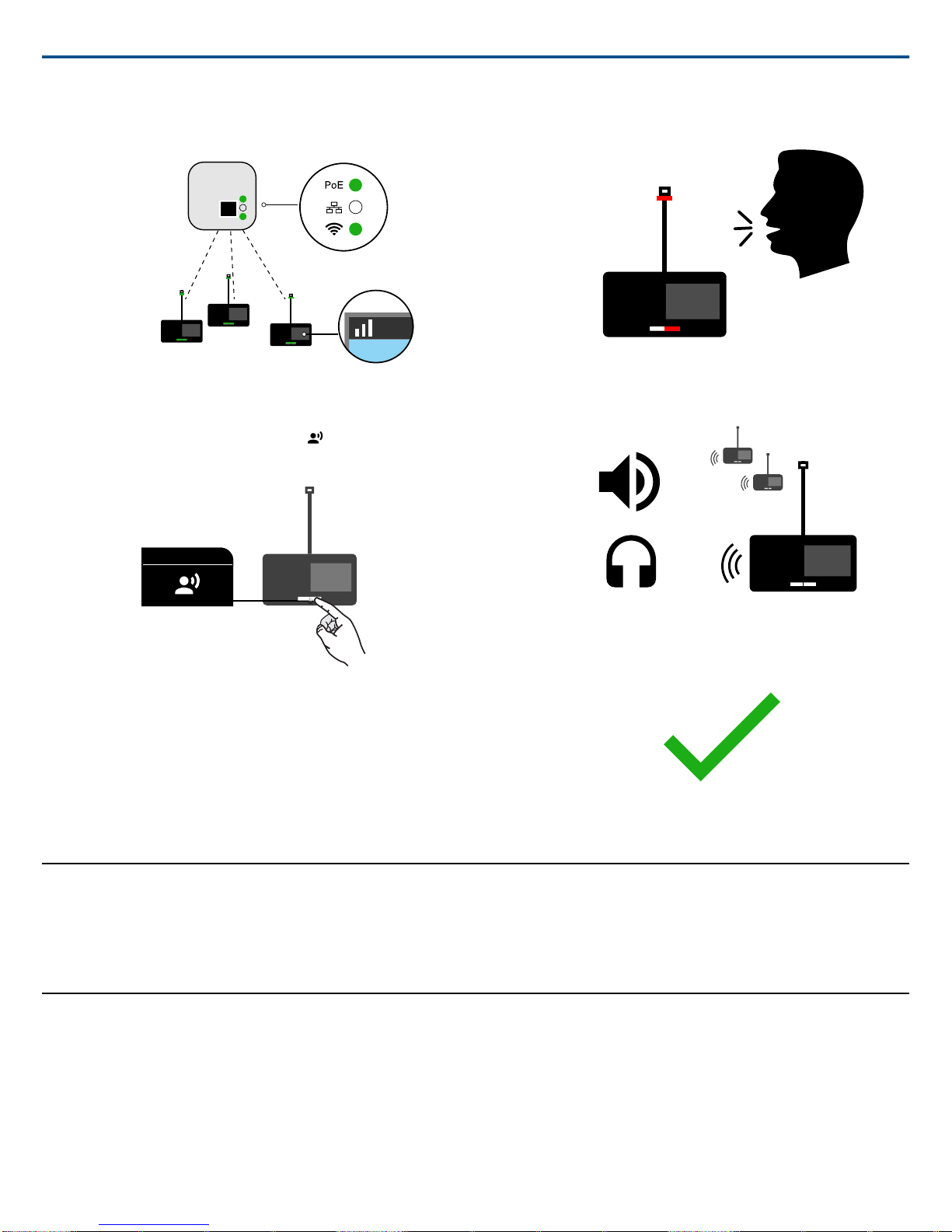
4. The devices are ready when the LEDs briefly flash green and the
touchscreen displays the home-screen.
Perform a Soundcheck
1.
On one of the microphone devices, press the speak button to activate
the microphone.
2. Speak into the microphone to check the audio.
3. Listen to the sound check on the other devices' loudspeakers or headphone jacks.
4. For more information, visit pubs.shure.com for the full user guide.
Device Installation and Positioning
Visit to the online user guide for detailed templates, best practices, and instructions to install the device in a variety of ways:
• Junction box
• Walls
• Ceiling tile
• Microphone stand
Open the Web Application
The web application provides system setup, live device monitoring, and meeting controls from a computer or tablet.
1. Connect a computer or tablet to the access point network and subnet.
2. Find the access point IP address:
2017/11/172/8
Page 3
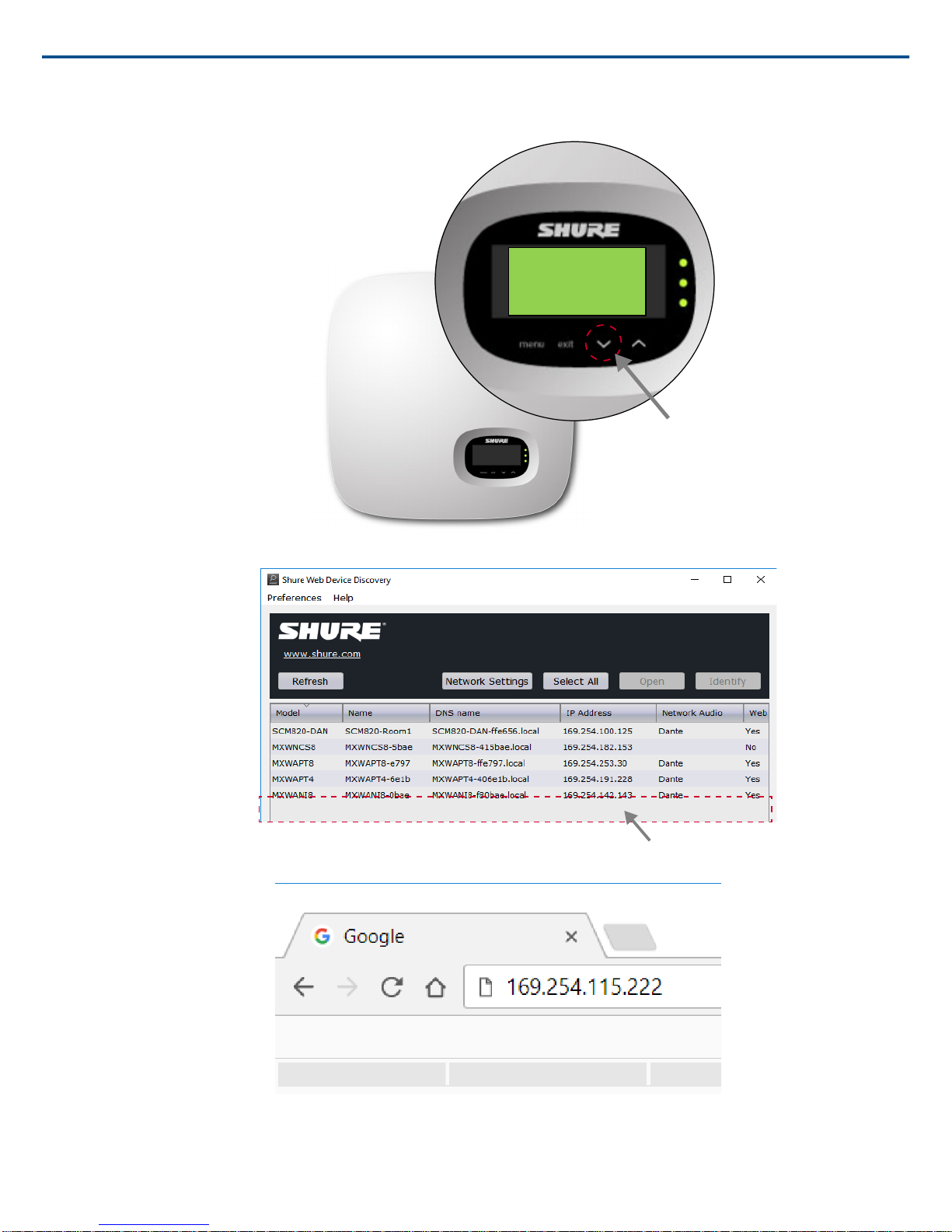
On the hardware: On the access point menu, scroll down to the IP address screen.
IP ADDRESS
192.254.115.222
MXCWAPT MXCWAPT-a64ee5 MXCWAPT-a64ee5.local 169.254.115.222 Dante Yes
⁃
Shure IncorporatedMXCW Quick Setup
⁃ From the computer: Use the Shure Device Discovery app to view and access devices on the network. Download the app for free from shure.com.
3. Open the device in a browser.
3/82017/11/17
Page 4
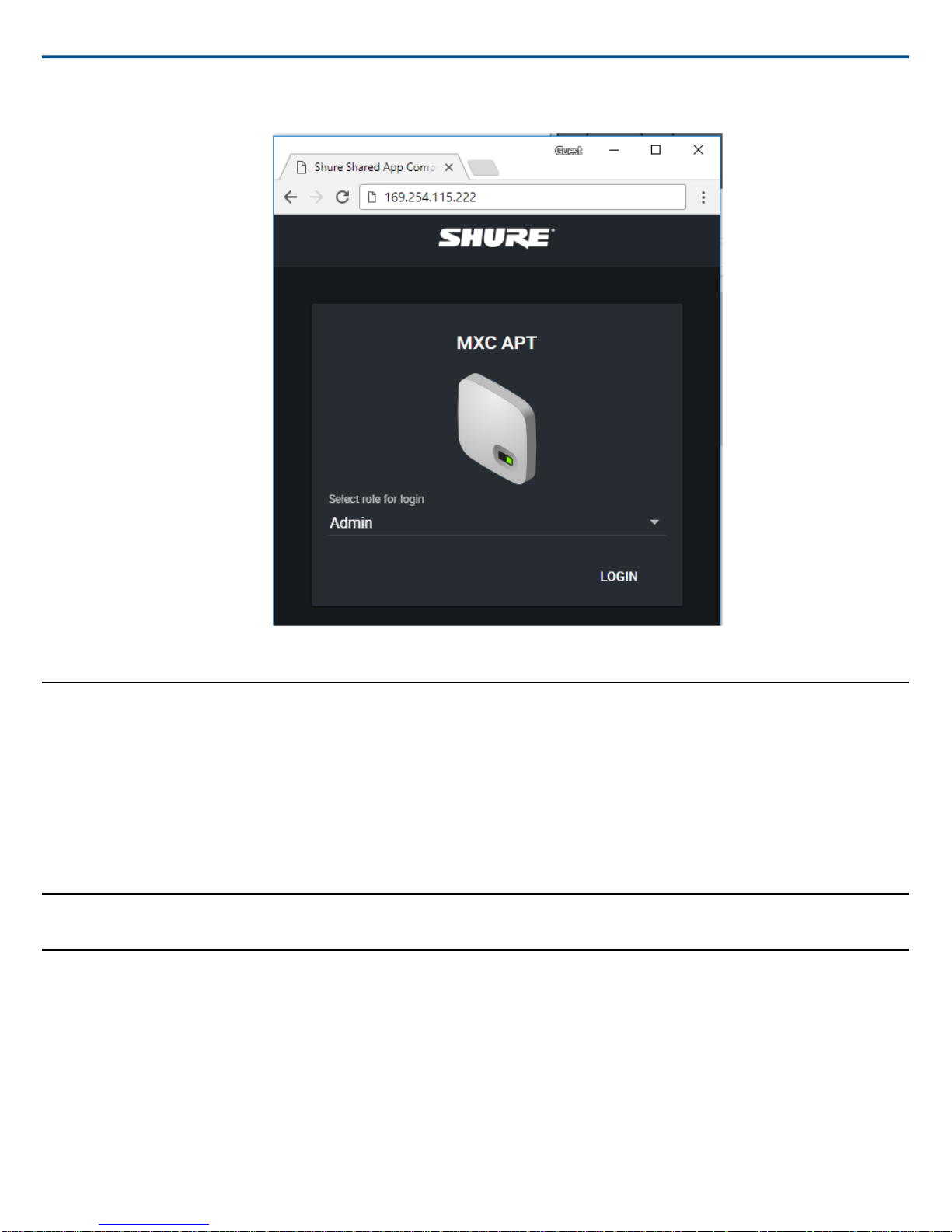
4. Sign into the application as the admin.
Shure IncorporatedMXCW Quick Setup
Default System Settings
MXCW is designed for plug-and-play operation with default settings.
Default system settings:
Maximum System Size
125 wireless microphone devices
Wireless Network Name (SSID)
00
Default meeting settings:
Microflex Complete Wireless Specifications
Important Product Information
Safety Information
IMPORTANT SAFETY INSTRUCTIONS
1. READ these instructions.
2. KEEP these instructions.
3. HEED all warnings.
4. FOLLOW all instructions.
5. DO NOT use this apparatus near water.
6. CLEAN ONLY with dry cloth.
Meeting Mode
• Automatic (push to speak)
• No queue when the list is full
Maximum Total Speakers
8
Maximum Delegate Speakers
8
2017/11/174/8
Page 5
Shure IncorporatedMXCW Quick Setup
7. DO NOT block any ventilation openings. Allow sufficient distances for adequate ventilation and install in accordance with the manufacturer’s instructions.
8. DO NOT install near any heat sources such as open flames, radiators, heat registers, stoves, or other apparatus (including amplifiers) that produce heat.
Do not place any open flame sources on the product.
9. DO NOT defeat the safety purpose of the polarized or grounding type plug. A polarized plug has two blades with one wider than the other. A grounding type
plug has two blades and a third grounding prong. The wider blade or the third prong are provided for your safety. If the provided plug does not fit into your
outlet, consult an electrician for replacement of the obsolete outlet.
10. PROTECT the power cord from being walked on or pinched, particularly at plugs, convenience receptacles, and the point where they exit from the apparatus.
11. ONLY USE attachments/accessories specified by the manufacturer.
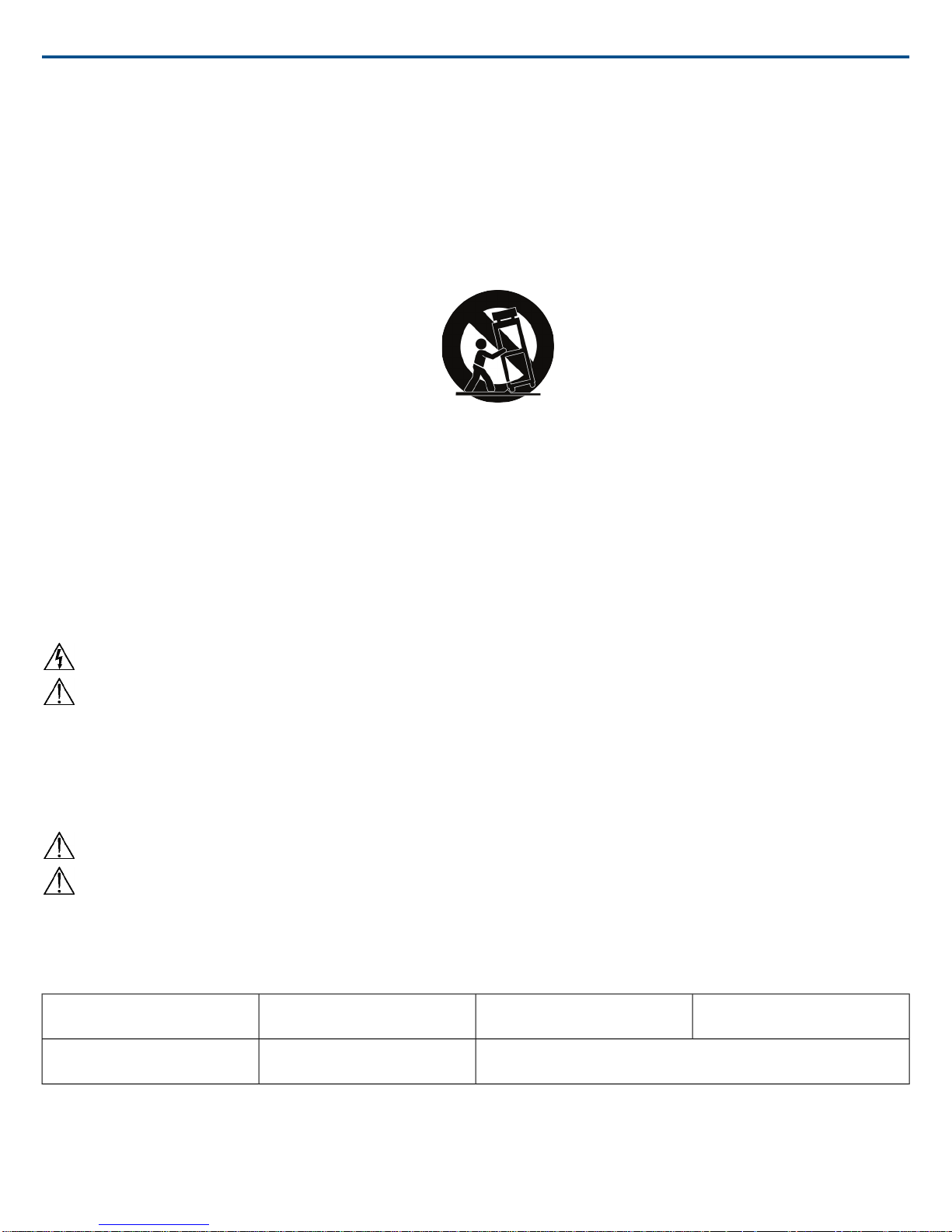
12. USE only with a cart, stand, tripod, bracket, or table specified by the manufacturer, or sold with the apparatus. When a cart is used, use caution when
moving the cart/apparatus combination to avoid injury from tip-over.
13. UNPLUG this apparatus during lightning storms or when unused for long periods of time.
14. REFER all servicing to qualified service personnel. Servicing is required when the apparatus has been damaged in any way, such as power supply cord or
plug is damaged, liquid has been spilled or objects have fallen into the apparatus, the apparatus has been exposed to rain or moisture, does not operate
normally, or has been dropped.
15. DO NOT expose the apparatus to dripping and splashing. DO NOT put objects filled with liquids, such as vases, on the apparatus.
16. The MAINS plug or an appliance coupler shall remain readily operable.
17. The airborne noise of the Apparatus does not exceed 70dB (A).
18. Apparatus with CLASS I construction shall be connected to a MAINS socket outlet with a protective earthing connection.
19. To reduce the risk of fire or electric shock, do not expose this apparatus to rain or moisture.
20. Do not attempt to modify this product. Doing so could result in personal injury and/or product failure.
21. Operate this product within its specified operating temperature range.
This symbol indicates that dangerous voltage constituting a risk of electric shock is present within this unit.
This symbol indicates that there are important operating and maintenance instructions in the literature accompanying this unit.
WARNING:Voltages in this equipment are hazardous to life. No user-serviceable parts inside. Refer all servicing to qualified service personnel. The safety
certifications do not apply when the operating voltage is changed from the factory setting.
SAFETY PRECAUTIONS
The possible results of incorrect use are marked by one of the two symbols—"WARNING" and "CAUTION"—depending on the imminence of the danger and
the severity of the damage.
WARNING: Ignoring these warnings may cause severe injury or death as a result of incorrect operation.
CAUTION: Ignoring these cautions may cause moderate injury or property damage as a result of incorrect operation.
WARNING
LISTENING TO AUDIO AT EXCESSIVE VOLUMES CAN CAUSE PERMANENT HEARING DAMAGE. USE AS LOW A VOLUME AS POSSIBLE.Over exposure to excessive sound levels can damage your ears resulting in permanent noise-induced hearing loss (NIHL). Please use the following guidelines established
by the Occupational Safety Health Administration (OSHA) on maximum time exposure to sound pressure levels before hearing damage occurs.
90 dB SPL
at 8 hours
110 dB SPL
at ½ hour
95 dB SPL
at 4 hours
115 dB SPL
at 15 minutes
100 dB SPL
at 2 hours
120 dB SPL
Avoid or damage may occur
105 dB SPL
at 1 hour
WARNING:This product contains a chemical known to the State of California to cause cancer and birth defects or other reproductive harm.
Note: Use this product only with an agency approved power supply which meets local regulatory requirements (e.g., UL, CSA, VDE, CCC, INMETRO).
WARNING
• Battery packs may explode or release toxic materials. Risk of fire or burns. Do not open, crush, modify, disassemble, heat above 140°F (60°C), or incinerate.
5/82017/11/17
Page 6

Shure IncorporatedMXCW Quick Setup
• Follow instructions from manufacturer
• Only use Shure charger to recharge Shure rechargeable batteries
• WARNING: Danger of explosion if battery incorrectly replaced. Replace only with same or equivalent type.
• Never put batteries in mouth. If swallowed, contact your physician or local poison control center
• Do not short circuit; may cause burns or catch fire
• Do not charge or use battery packs other than Shure rechargeable batteries
• Dispose of battery packs properly. Check with local vendor for proper disposal of used battery packs.
• Batteries (battery pack or batteries installed) shall not be exposed to excessive heat such as sunshine, fire or the like
Warning: Before charging, make sure the product is at room temperature, between 0 to 45°C (32 to 113°F).
1. 經審驗合格之射頻電信終端設備,非經許可,公司、商號或使用者均不得擅自變更頻率、加大功率或變更原設計之特性及功能。
2. 射頻電信終端設備之使用不得影響飛航安全及干擾合法通信;經發現有干擾現象時,應立即停用,並改善至無干擾時方得繼續使用。所謂合法通信,係指依
電信法規定作業之無線電信。
3. 輸入、製造射頻電信終端設備之公司、商號或其使用者違反本辦法規定,擅自使用或變更無線電頻率、電功率者,除依電信法規定處罰外,國家通訊傳播委
員會並得撤銷其審驗合格證明。
4. 減少電磁波影響,請妥適使用
Important Product Information
The equipment is intended to be used in professional audio applications.
Changes or modifications not expressly approved by Shure Incorporated could void your authority to operate this equipment.
Note: This device is not intended to be connected directly to a public internet network.
EMC conformance to Environment E2: Commercial and Light Industrial. Testing is based on the use of supplied and recommended cable types. The use of
other than shielded (screened) cable types may degrade EMC performance.
This device complies with part 15 of the FCC Rules. Operation is subject to the following two conditions: (1) This device may not cause harmful interference,
and (2) this device must accept any interference received, including interference that may cause undesired operation.
Information to the user
This equipment has been tested and found to comply with the limits for a Class B digital device, pursuant to Part 15 of the FCC Rules. These limits are designed
to provide reasonable protection against harmful interference in a residential installation. This equipment generates uses and can radiate radio frequency energy
and, if not installed and used in accordance with the instructions, may cause harmful interference to radio communications. However, there is no guarantee that
interference will not occur in a particular installation. If this equipment does cause harmful interference to radio or television reception, which can be determined
by turning the equipment off and on, the user is encouraged to try to correct the interference by one or more of the following measures:
• Reorient or relocate the receiving antenna.
• Increase the separation between the equipment and the receiver.
• Connect the equipment to an outlet on a circuit different from that to which the receiver is connected.
• Consult the dealer or an experienced radio/TV technician for help.
This Class B digital apparatus complies with Canadian ICES-003. Cet appareil numérique de la classe B est conforme à la norme NMB-003 du Canada.
This device complies with Industry Canada licence-exempt RSS standard(s). Operation of this device is subject to the following two conditions: (1) this device
may not cause interference, and (2) this device must accept any interference, including interference that may cause undesired operation of the device.
Le présent appareil est conforme aux CNR d'Industrie Canada applicables aux appareils radio exempts de licence. L'exploitation est autorisée aux deux conditions
suivantes : (1) l'appareil ne doit pas produire de brouillage, et (2) l'utilisateur de l'appareil doit accepter tout brouillage radioélectrique subi, même si le brouillage
est susceptible d'en compromettre le fonctionnement.
This equipment complies with FCC radiation exposure limits set forth for an uncontrolled environment. This equipment should be
installed and operated with minimum distance 20 cm between the radiator & your body.
MXCWAPT WLAN Specifications
802.11g
• 2.4 GHz
• OFDM
• RF Output Power 18.2 dBm (EIRP)
Antenna Information
Type = Custom, soldered to PCB
Gain = +4.38dBi at 2.4 GHz
Gain = +6dBi at 5 GHz
2017/11/176/8
Page 7
Shure IncorporatedMXCW Quick Setup
802.11a
• 5.15 - 5.35 GHz, 5.47 - 5725 GHz
• OFDM
• RF Output Power21.6 dBm (EIRP)
MXCW640 WLAN Specifications:
802.11g
• 2.4 GHz
• OFDM
• RF Output Power16.2 dBm (EIRP)
802.11a
• 5.15 - 5.35 GHz, 5.47 - 5725 GHz
• OFDM
• RF Output Power19.1 dBm (EIRP)
Japanese Radio Law and Japanese Telecommunications Business Law Compliance. This device is granted pursuant to the Japanese Radio Law (電波法) and
the Japanese Telecommunications Business Law (電気通信事業法). This device should not be modified (otherwise the granted designation number will become
invalid).
本製品が 5GHz 帯で使用するチャンネルは、下記の W52 、 W53 、 W56 の 3 タイプです。
W52
W53
W56
5,180 MHz36
5,200 MHz40
5,220 MHz44
5,240 MHz48
5,260 MHz52
5,280 MHz56
5,300 MHz60
5,320 MHz64
5,500 MHz100
5,520 MHz104
5,540 MHz108
5,560 MHz112
5,580 MHz116
5,600 MHz120
5,620 MHz124
5,640 MHz128
5,660 MHz132
5,680 MHz136
5,700 MHz140
W52 と W53 の帯域の電波は屋内でのみ使用可能です。
運用に際しての注意
この機器の使用周波数帯では、電子レンジ等の産業・科学・医療用機器のほか工場の製造ライン等で使用されている移動体識別用の構内無線局(免許を要す
る無線局)及び特定小電力無線局(免許を要しない無線局)並びにアマチュア無線局(免許を要する無線局)が運用されています。
1. この機器を使用する前に、近くで移動体識別用の構内無線局及び特定小電力無線局並びにアマチュア無線局が運用されていないことを確認して下さい。
2. 万一、この機器から移動体識別用の構内無線局に対して有害な電波干渉の事例が発生した場合には、速やかに使用周波数を変更するか又は電波の発射を
停止した上、下記連絡先にご連絡頂き、混 信回避のための処置等(例えば、パーティションの設置など)についてご相談して下さい。
7/82017/11/17
Page 8
Shure IncorporatedMXCW Quick Setup
3. その他、この機器から移動体識別用の特定小電力無線局あるいはアマチュア無線局に対して有害な電波干渉の事例が発生した場合など何かお困りのこと
が起きたときは、保証書に記載の販売代 理店または購入店へお問い合わせください。代理店および販売店情報は Shure 日本語ウェブサイト
http://www.shure.co.jp でもご覧いただけます。
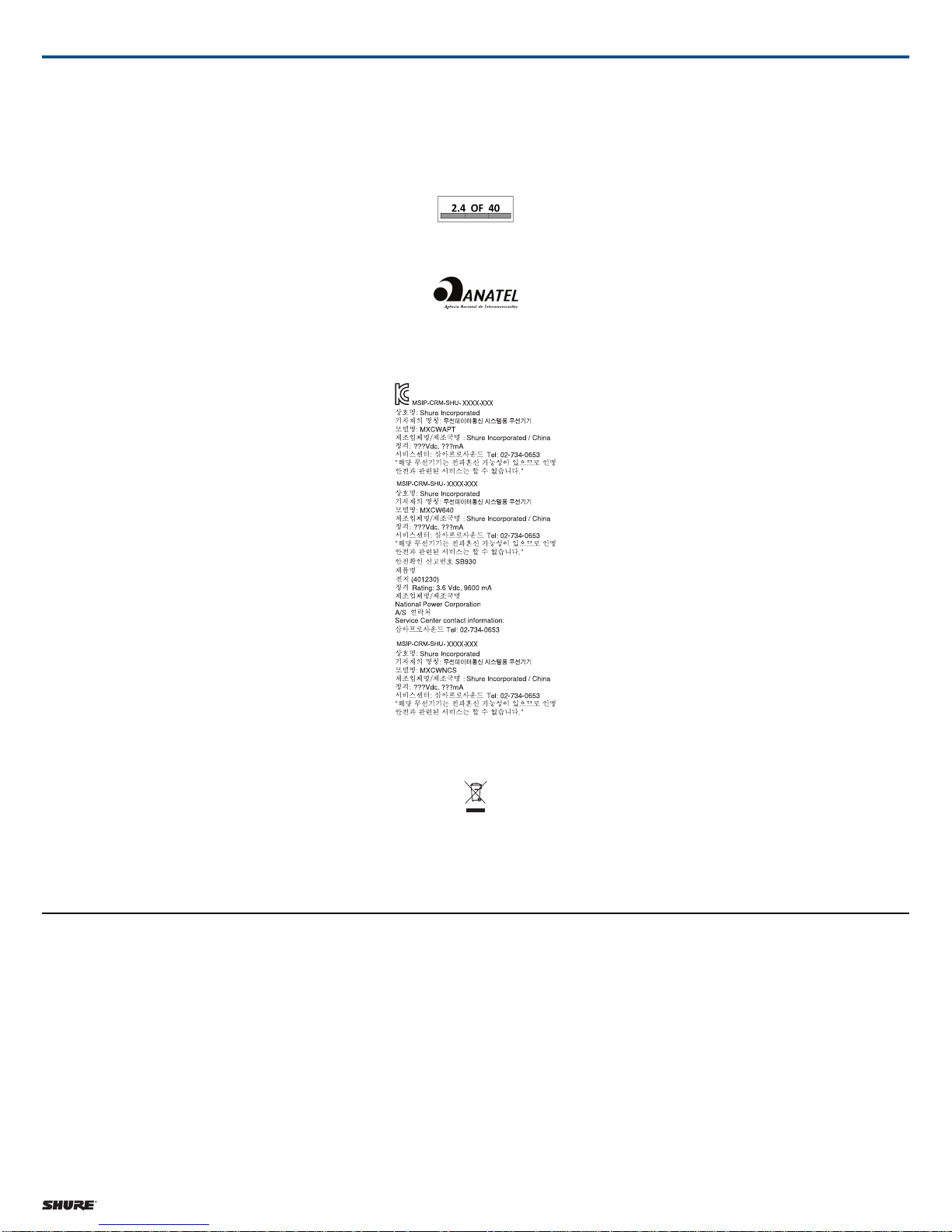
現品表示記号について
現品表示記号は、以下のことを表しています。 この無線機器は 2.4GHz 帯の電波を使用し、変調方式は「 DS-SS 」方式および「 FH-SS 」方式、想定与干
渉距離は 40m です。 2,400MHz ~ 2,483.5MHz の全帯域を使用し、移動体識別装置の帯域を回避することはできません。
Este equipamento opera em caráter secundário, isto é, não tem direito a proteção contra interferência prejudicial, mesmo de estações do mesmo tipo, e não
pode causar interferência a sistemas operando em carater primario” Este produto está homologado pela ANATEL, de acordo com os procedimentos regulamentados pela Resolução 242/2000, e atende aos requisitos técnicos aplicados. Para maiores informações, consulte o site da ANATEL - http://www.anatel.gov.br
Environmentally friendly disposal
Old electrical appliances must not be disposed of together with the residual waste, but have to be disposed of separately. The disposal at the communal collecting
point via private persons is for free. The owner of old appliances is responsible to bring the appliances to these collecting points or to similar collection points.
With this little personal effort, you contribute to recycle valuable raw materials and the treatment of toxic substances.
Certifications
Hereby, Shure Incorporated declares that the radio equipment is in compliance
with Directive 2014/53/EU. The full text of the EU declaration of conformity
is available at the following internet address: http://www.shure.com/europe/compliance
Authorized European representative:
Shure Europe GmbH
Headquarters Europe, Middle East & Africa
Department: EMEA Approval
Jakob-Dieffenbacher-Str. 12
75031 Eppingen, Germany
Phone: +49-7262-92 49 0
Fax: +49-7262-92 49 11 4
Shure Incorporated 5800 West Touhy Avenue Niles, IL 60714-4608 USA Phone: +1-847-600-2000 Email: [email protected]
Email: [email protected]
Note: See the label located on the bottom side of the charger enclosure for
the FCC marking, the CE marking, the RCM marking, and the electrical ratings.
Trademarks
Audinate®, the Audinate logo and Dante are trademarks of Audinate Pty Ltd.
8/8
 Loading...