

Page 1
Model D4386
Multi Application Live Center
Instruction Sheet
Phone #: (360) 734-3482 • Tech Support: [email protected] • Web: www.woodstockint.com
Introduction
The D4386 Multi Application Live Center has
heavy-duty dual bearings and is ideal for
high speed-turning work or CNC applications.
Works on machines with MT2 tailstocks.
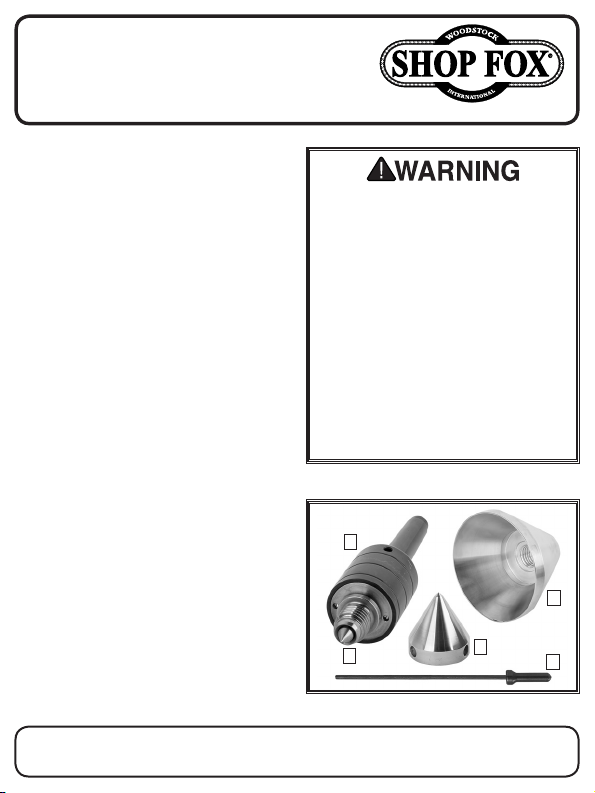
Inventory (Figure 1)
Description Qty
A. Live Center Body ............................. 1
B. Bull Nose Reversible Cone ................... 1
C. 60° Full Point Cone ........................... 1
D. Center Spur Point ............................. 1
E. Knockout Rod .................................. 1
Specifications
• Live Center Thread ...................... ¾"-10
• Bull Nose Cone Diameter ................. 3⅜"
• 60° Full Point Cone Diameter ........... 1⅝"
• Tailstock Taper Size ....................... MT2
Failure to follow these guidelines could
result in serious personal injury:
• ALWAYS WEAR ANSI-APPROVED EYE AND
EAR PROTECTION when woodturning.
• ALWAYS WEAR ANSI-APPROVED RESPIRATORY PROTECTION when working near
airborne dust particles from turning.
• ALWAYS WEAR ANSI-APPROVED PROTECTIVE GLOVES when handling sharp chisels and gouges.
• DO NOT use live center if there is noticeable vibration while turning.
• Back off tailstock pressure if live center
feels hot to the touch after running.
• Disconnect machine from power before
fitting or removing live center.
• Always follow all safety guidelines set
forth by the machine manufacturer.
Installing Cone and Center Point
1. Insert knockout rod (see Figure 1) through
hole in live center body.
Note: If knockout rod does not go through
body, slowly rotate threaded center back
and forth until knockout rod is completely
through.
2. Thread either cone clockwise onto live
center and tighten by hand.
COPYRIGHT © DECEMBER, 2019 BY WOODSTOCK INTERNATIONAL, INC.
WARNING: NO PORTION OF THIS MANUAL MAY BE REPRODUCED IN ANY SHAPE OR FORM WITHOUT
THE WRITTEN APPROVAL OF WOODSTOCK INTERNATIONAL, INC.
A
D
Figure 1. Model D4386 inventory.
B
C
Printed in Taiwan#20798KS
E
Page 2
D4386 Multi Application Live Center Instructions
3. Insert center spur point into live center.
4. Remove knockout rod from live center
body.
CAUTION: DO NOT use live center on a
lathe or CNC with knockout rod inserted
into live center body.
Removing Cone and Center Point
1. Insert knockout rod through hole in live
center body.
Note: If knockout rod does not go through
body, slowly rotate threaded center back
and forth until knockout rod is completely
through.
2. Rotate cone counterclockwise by hand and
remove from live center.
3. Remove knockout rod and insert into
tapered end of tailstock.
4. Lightly tap center spur point with
knockout rod until point drops out of live
center.
Serious injury or death can occur from
getting entangled in, crushed between,
or struck by rotating parts on a machine!
Rotating workpieces can come loose and
strike operator or bystanders with deadly
force if they are improperly secured,
rotated too fast, or are not strong enough
for the rotational forces required for
turning. Improper tool setup or usage can
cause tool kickback or grabbing, resulting in impact injury or entanglement. To
reduce the risk of operator (or bystander)
injury or death, anyone operating the
machine MUST completely heed all hazards and warnings in this instruction
manual.
DO NOT use live center if it feels hot to
the touch after running. Allow live center
to cool and back off pressure to the tailstock. Continuing to run the live center
when it is overheating could result in
premature bearing failure and equipment
damage.
 Loading...