

Page 1
A
-
+
B
SP 220
Dual Speakerphone
Sennheiser
A
B
3.5 mm
3.5 mm
-
+
-
+
-
+
100%
The LED lights up for a few
seconds when the next
charging level is reached
before turning off again.
5s off
USB
A
or
-
+
A
or
-
+
AB
&
Dual
USB
USB
3.5 mm
-
+
Volume
max
USB
Conferencing
across devices
3.5 mm
III
-
+
-
+
II
I
A
or
Safety
Guide
-
+
-
+
Quick
Guide
in music mode:
stereo sound
3.5 mm
A
-
+
B
-
+
A
-
+
B
AB
&
Dual
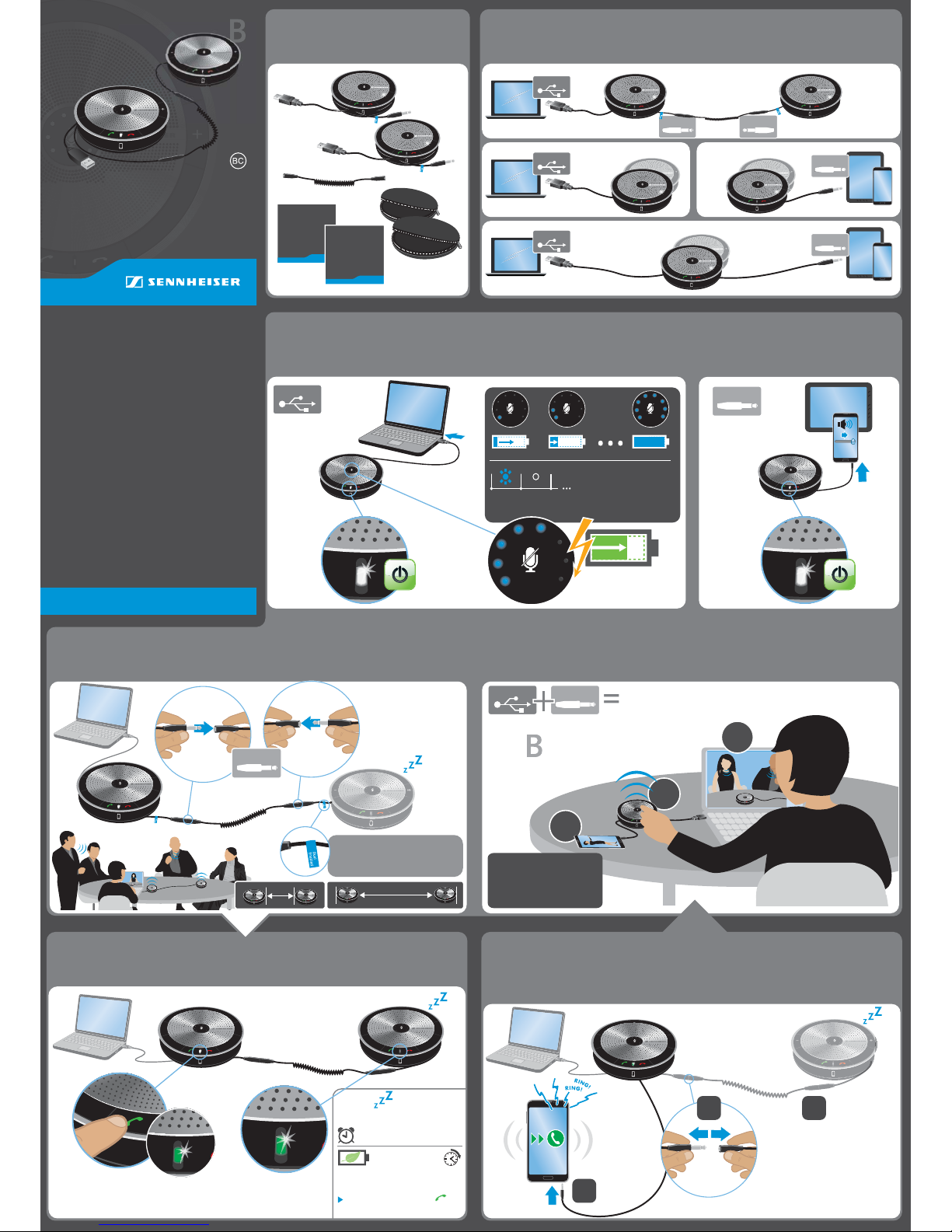
Setting up a
conference call (plug & play):
When connected to USB and
3.5 mm jack, all calls are merged
into a conference call (
I+II+III
).
audio signal
e.g. incoming call
LED green = call
LED purple = music
AB
&
Dual
A
or
-
+
USB
3.5 mm
Conference
across devices
1
2
Returns to
sleep mode
after disconnecting.
For best results,
set mobile
volume to max.
3
AB
&
-
+
-
+
-
+
A
-
+
B
3.5 mm
BA
>40 cm
-
+
-
+
BA
<210 cm
-
+
-
+
Dual
SP 20 and SP 20 ML speakerphones
do not support dual operation.
Only SP 220 (SP 20 D)
speakerphones can be linked.
!
Sleep mode
Speakerphone B switches on automatically
as soon as an audio signal is available.
Speakerphone will automatically power OFF
if running on batteries and idle for > 1 hour.
To reactivate:
Press and hold the green button for 2s.
LED lights up green shortly.
wakes up within 5s
> 1 h
Battery
save mode
SP 20 D*
SP 20 D*
*2x SP 20 D + Dual cable = SP 220
Waking up second speakerphone
Quick GuideEN
Connection possibilities
Package contents
Connecting via USB cable & charging the battery
Changing from dual connection to conferencing across devices
Connecting via audio cable
Connecting to a computer & a mobile device Connecting the second speakerphone
Page 2
-
+
Mute
off
Mute
on
-
+
+
-
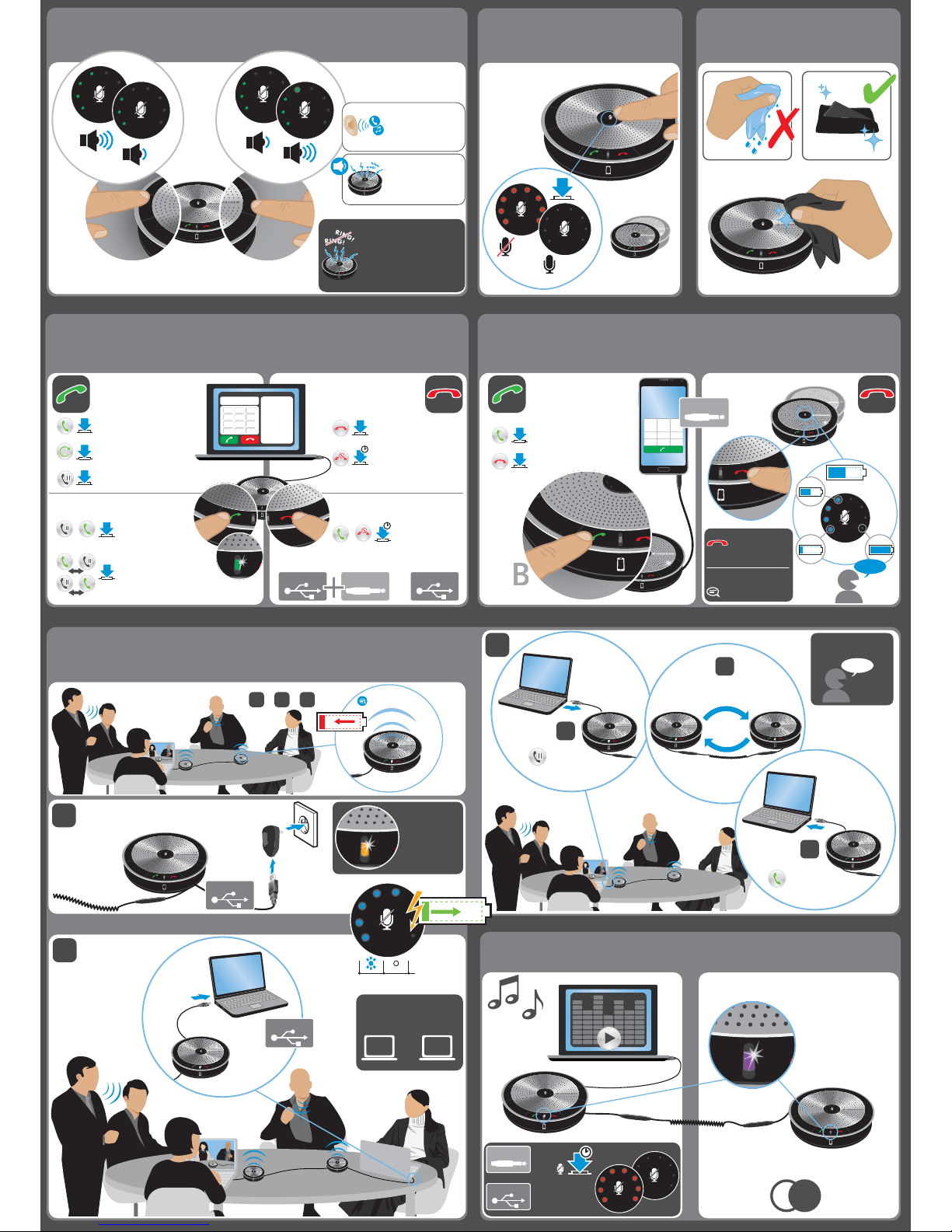
Volume –
Volume +
Mute/Unmute ringtone
(only during incoming call):
Mute ringtone: Press & hold
the “–” button for 2 seconds.
Unmute ringtone:
Press and hold the “+” button
for 2 seconds.
Active call/
Music listening:
Increases or reduces
the speech or
music volume
While idle
(no active call or
music listening):
Increase or reduce
the tone volume.
-
+
-
+
-
+
AB
&
Dual
Swaps between the
held and active call
Accepts the
incoming call and
puts an active call on hold
Managing multiple calls
call 1 call 2
Redials the last number
Puts an active call on hold
2 x
2 x
Accepts/Initiates a call
2 x
+45 561 800 00
Bauer, Chloe
Brown, Scott
Dickens, Chris
Martinez, Pat
King, Michael
Meyers, Daniel
Smith, John
Thomson, Mary
123
456
789
*
0#
-
+
incoming call/
active call
USB USB
3.5 mm
Rejects the incoming
call and continues
the active call
Managing multiple calls
call 1 call 2
Ends a call for devices
connected via USB
Rejects a call
1s
Accepts a call
Initiates a call
Ends a call
1 2 3
4 5 6
7 8 9
* 0 #
GHI
ABC
JKL
TUV
DEF
MNO
WXYZ
PQRS
-
+
-
A
or
A
or
AB
&
Dual
AB
&
Dual
*
not included
Use an optional
external power supply*
Connect a
second computer
-
+
?
100%
20 h
When using 3.5 mm only,
button does not
end calls, but shows the
remaining battery power.
Below 30 min talk time,
automatic voice prompts:
“Battery level low“
3.5 mm
c
call & music volume
is synchronised
AB
&
Dual
mute & unmute
is synchronised
Check
battery level
a
-
+
-
+
-
+
B
-
+
Up to 20 hours of talk time
when batter is full charged.
20 h
B
-
+
*
USB
When idle
(no call or music),
yellow indicates
charging only
-
+
-
+
-
+
B
-
+
“Battery level low“
5s off
USB
You can either use the first
or the second computer
for calls and music.
or1 2
b
-
+
-
+
-
+
LEDs turn off.
Call will be placed on hold*.
1
A
-
+
2
A
-
+
B
-
+
3
B
-
+
Call will resume*.
*Depending on the softphone.
Swap speakerphones
A and B
-
+
A
or
MONO
B
-
+
AB
&
Dual
Stereo mode
left
speaker
A
right
speaker
B
STEREO
L R
Press & hold
the mute
button .
Music mode
activates
automatically.
3.5 mm
USB
5s
Music
mode ON
Music
mode OFF
To charge second speakerphone B, follow:
c
a
b
or or
-
+
Using with a USB device
Adjusting the volume
Muting the microphone
Listening to music
Charging the battery of the second speakerphone
Cleaning the product
When ONLY using a MOBILE DEVICE
Page 3
Important safety instructions
Read the instruction manual, safety guide, quick guide (as
supplied) carefully and completely before using the product.
Always include this safety guide when passing the product on
to third parties.
Do not use an obviously defective product.
Preventing damage to health and accidents
Always maintain a distance of at least 3.94“ (10 cm) between
the speaker and the cardiac pacemaker or implanted defibrillator
since the product generates permanent magnetic fields.
Keep the product, accessories and packaging parts out of reach
of children and pets to prevent accidents and choking hazards.
Preventing damage to the product and malfunctions
Always keep the product dry and do not expose it to extreme
temperatures (hairdryer, heater, e xtended exposure to sunlight,
etc.) to avoid corrosion or deformation.
Use only attachments/accessories/spare parts supplied or
recommended by Sennheiser.
Only clean the product with a soft, dry cloth.
SP 20/SP 220:
Safety instructions for the Lithium-Polymer battery pack
WARNING
In extreme cases, abuse or misuse of Lithium-Polymer
battery pack can lead to:
• explosion
• fire
• heat
• smoke or gas
Dispose of defective products with built-in rechargeable
batteries at special collection points or return them to
your specialist dealer.
Only use rechargeable batteries recommended by
Sennheiser and the appropriate chargers.
Only charge rechargeable batteries at ambient
temperatures between 10°C/50°F and 40°C/104°F.
Switch rechargeable battery-powered products off
after use.
When not using rechargeable batteries for extended
periods of time, charge them regularly (about every
3 months).
Do not heat above 60°C/140°F, e.g. do not expose to
sunlight or throw into a fire.
Intended use/Liability
This compact speakerphone is an accessory for PCs with softphones
or mobile phones and tablet PCs (SP 20/SP 220 only). It is intended
for small conferences with up to 4 participants (SP 220: up to
12 participants) in one room.
It is considered improper use when this product is used for any
application not named in the associated product guides.
Sennheiser does not accept liability for damage arising from abuse
or misuse of this product and its attachments/accessories.
Sennheiser is not liable for damages to USB devices that are not
consistent with the USB specifications.
SP 20/SP 220: Sennheiser is not liable for damages resulting
from loss of connection due to fully discharged or over aged
rechargeable batteries.
Safety Guide
Sennheiser Communications A/S
SP 220
SP 20
SP 10
Speaker phone
EN
Learn more about office equipment & supplies we have.
 Loading...