

Page 1
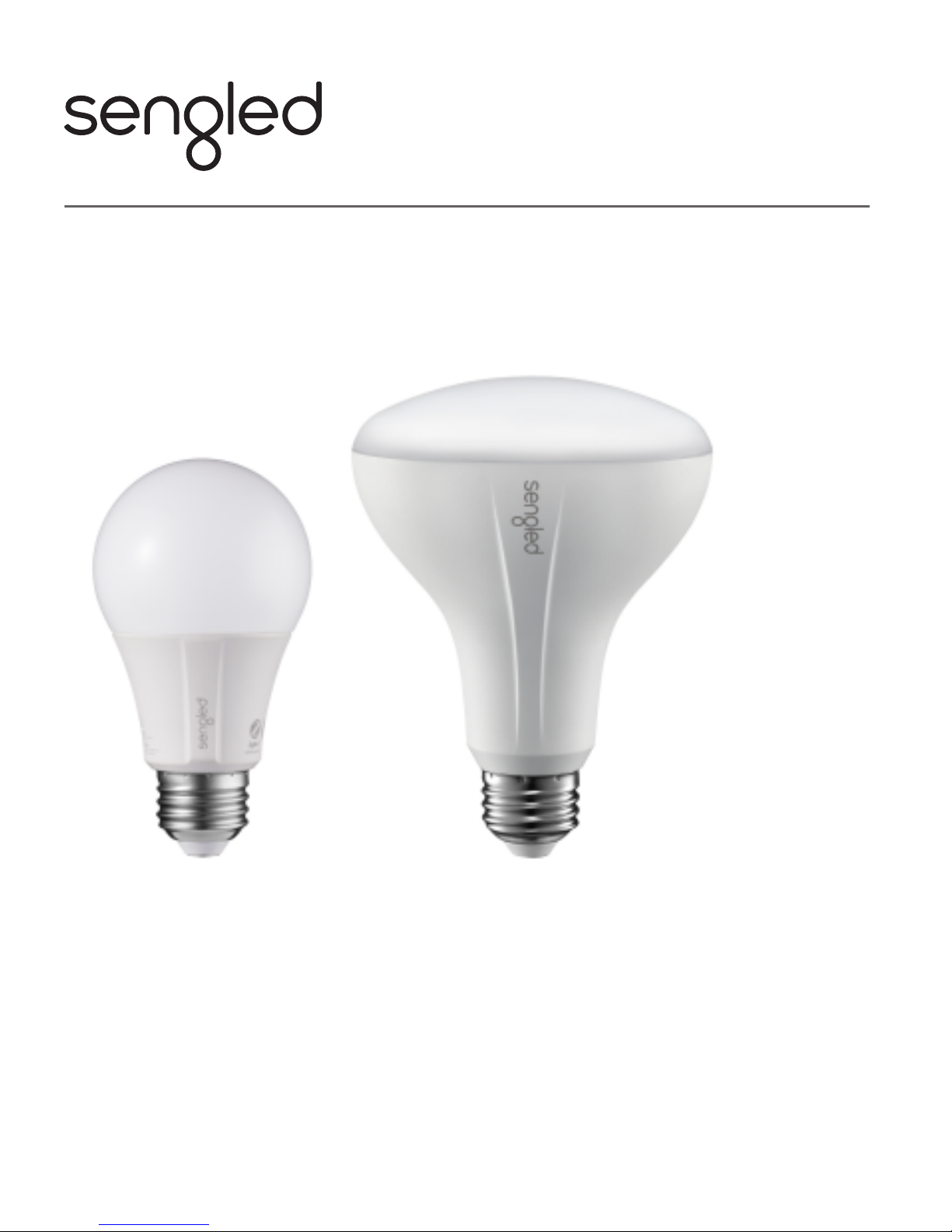
Models:
• A19 Soft White Bulbs ............... E11-G13
• A19 Daylight Bulbs .................... E11-G14
• BR30 Soft White Bulbs ............... E12-N13, E12-N14
• BR30 Daylight Bulbs .................... E12-N14A, E12-N15
USER GUIDE
Sengled Element Classic LED Bulbs
Page 2

Introduction:
Sengled Element Classic LED bulbs offer an easy solution to
having app-controllable smart lighting in your home. These
bulbs enable you to control your lights in multiple ways.
Note: A hub is required to control these bulbs.
Important Safety Information:
Before installing the Sengled Element Classic LED bulbs,
please read and follow all precautions, including:
• Turn OFF the light switch controlling the light socket,
before attempting to replace the light bulb.
• WARNING: RISK OF ELECTRIC SHOCK. Do not attempt
to disassemble bulb.
• Not suitable for use with standard wall dimmers.
• Suitable for use in operating environment between
-4°F and 104°F (-20°C and 40°C).
• NOT FOR USE IN EMERGENCY LIGHTING.
Page 3
Installation Instructions:
1
3
With power off, twist your Sengled Element Classic
LED bulb into the socket.
4
Turn on power.
5
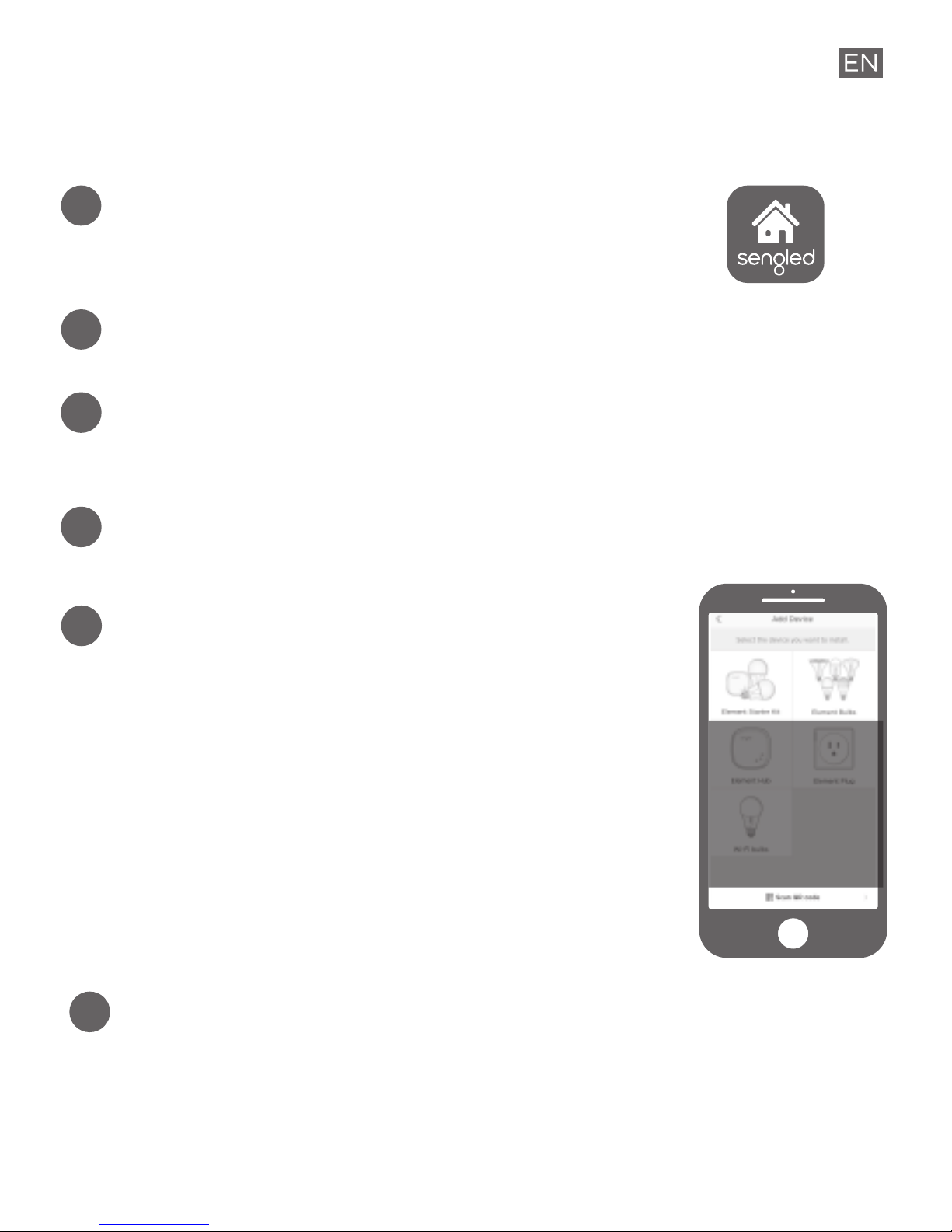
Open the Sengled Home App, go to
Devices and use + to add a new device.
a. Select Element Starter Kit if you
have a kit. Add Hub first, then the
individual pre-paired Element bulbs
will show up in device name and
room assignment pages.
b. Select Element Bulbs if you already
have an Element Hub installed.
6
Ensure your Sengled Home app can discover the
bulb. If you have trouble or concerns with this
step, please refer to the user manual available at
support.sengled.com.
Download the latest version of the
Sengled Home App from the Apple App
Store or Google Play Store.
2
Register a Sengled account using Sengled Home App.
a. b.
Page 4

Operation:
The following outlines some of the popular operational
modes for Sengled Element Classic LED bulbs.
Additional benefits are available through the Sengled
Home app. If you have questions please refer to
support.sengled.com for the Element Classic LED bulbs
user manual or Sengled Home app user manual.
Turning the bulb on and off
Element Classic LED bulbs can be controlled through a
variety of means:
• Manually via a wall switch
• Through Sengled Home App
• Through partner programs like Alexa,
Google Assistant, IFTTT, etc.
Dimming
Element Classic LED bulbs can be dimmed only
through the Sengled Home app via a slide bar.
Scheduling
Schedules can be created with Sengled Home App.
Some popular patterns are:
• Sleep/wake up routines (to gradually dim or brighten
the lights)
• Vacation routines (to have lights randomly on/off
while you are away)
A
BB
C
Page 5

Voice Control
• Set up Amazon Alexa by adding Sengled Home
Skill. (Check the in-app how-to page)
• Set up Google Assistant by adding Sengled Home
Skill. (Check the in-app how-to page)
Third Party Control
Utilize a third-party program (like IFTTT) to control
your lights. (Check the in-app how-to page)
D
E
Page 6

Frequently Asked Questions:
1. Can bulbs be used in sockets with dimmers?
No, bulbs are designed to be used in on/off
sockets only.
2. Can this product be used outdoors?
No, this bulb is designed to for indoor use only.
3. Are Sengled Element Classic LED bulbs compatible
with Sengled Element Hub or other smart lighting
hubs?
Yes, a hub is required to control Element Classic
LED bulbs. Compatible hubs include:
• Sengled Element Hub
• Amazon Echo Plus
• SmartThings Hub
If your hub is not listed, please refer to
support.sengled.com for the latest list of supported hubs.
4. Can Element Classic bulbs be used simultaneously
with other Sengled Element bulbs?
Yes, a single Sengled Hub can support up to 64 bulbs
of the Sengled Element family (Element Classic,
Element Plus, Element Color Plus, PAR38, 100W and
Element Smart Plug).
Page 7
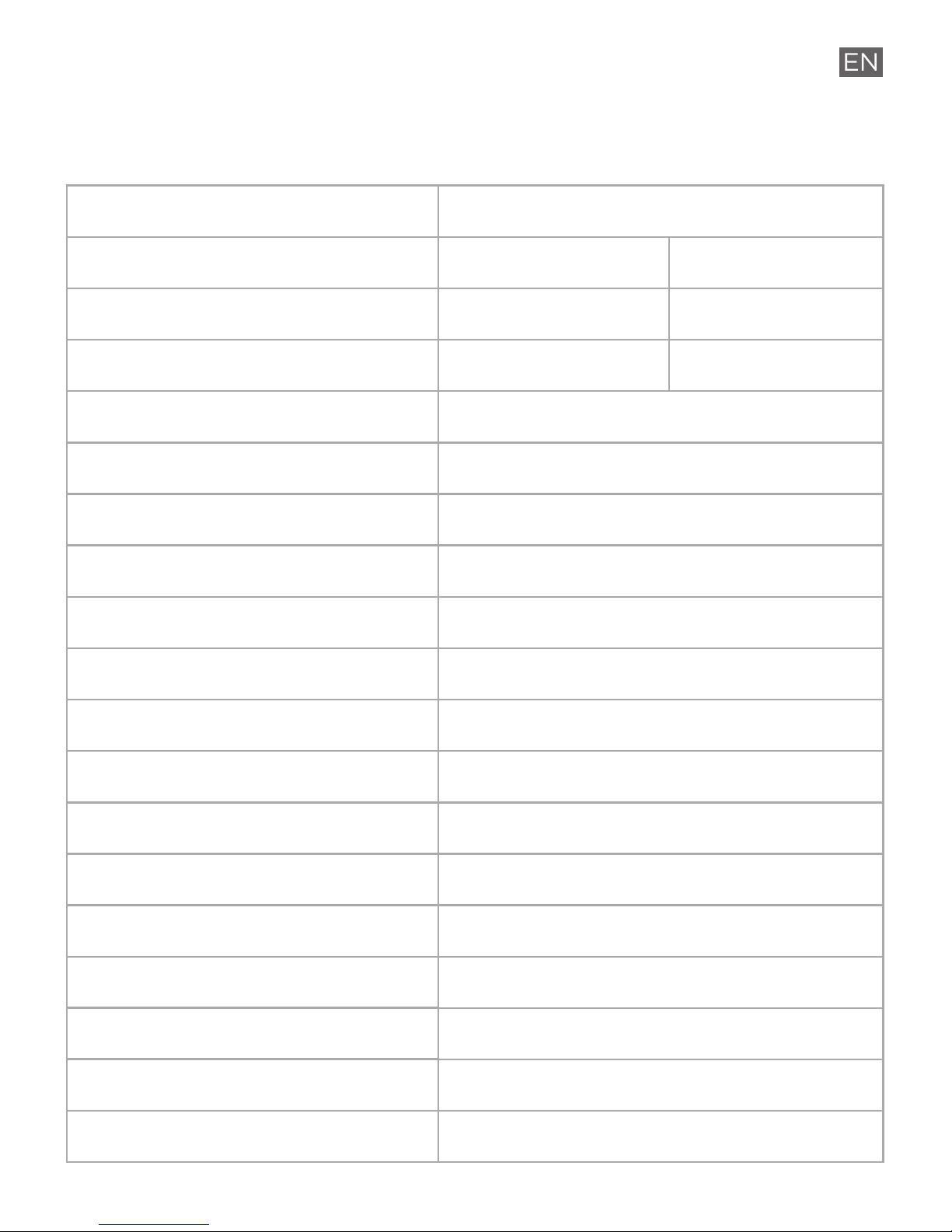
Soft White
E11-G13
2700K
Daylight
E11-G14
5000K
Product Specifications:
Lamp Type
Element Classic Light Bulbs
Model Number
Color Temperature
Socket
Brightness
Power Consumption
Replacement power
Dimmer Switch Compatible
Lifetime (hours)
Color Rendering Index (CRI)
Beam Angle
Warranty
Voltage
Operation temperature
Operation humidity
Diameter
Height
Weight
E26
800 Lumens
9W (rated)
60W
No
25,000
90
240 degrees
3 years
110-130 Vac
-4~104°F
0–95%
2.4 in (61 mm)
4.5 in (113 mm)
2.9 oz (82g)
A19 Bulb
Page 8
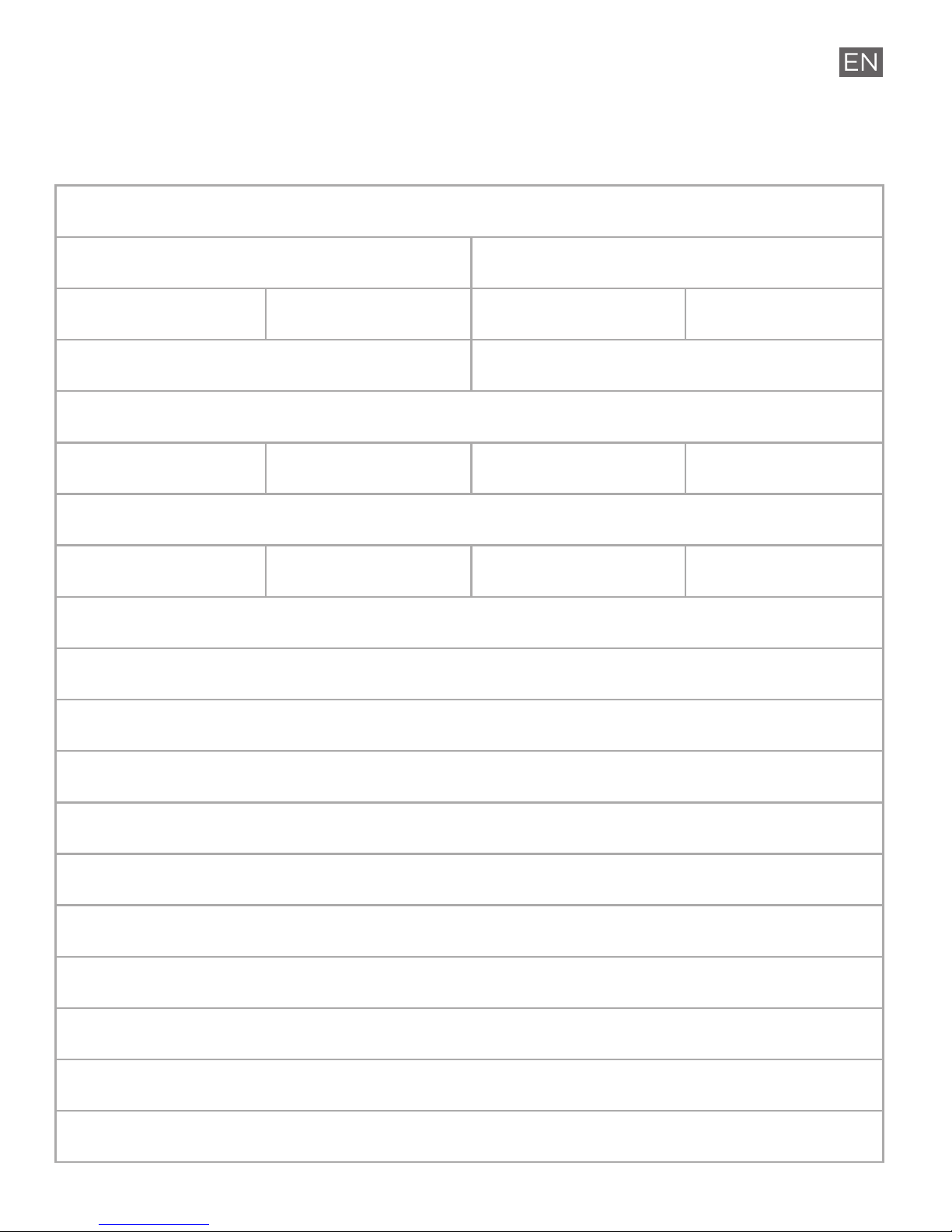
BR30 Bulb
E26
9W (rated)
No
25,000
90
110 degrees
3 years
110-130 Vac
-4~104°F
0–95%
3.7 in (94 mm)
5.1 in (130 mm)
4.1 oz (116g)
65W 65W 65W
5000K2700K
Soft White Daylight
E11-G13 E11-G14E12-N13 E12-N14
650 Lumens 940 Lumens800 Lumens 650 Lumens
75W
Page 9

Limited Warranty:
3-year limited warranty from original purchase date.
To learn more about the Limited Warranty for Sengled
products, please visit www.sengled.com/warranty.
Support:
If you encounter any issue with Sengled LED
products, please visit www.sengled.com for support
and troubleshooting information.
Page 10

FEDERAL COMMUNICATION COMMISSION (FCC) STATEMENT FOR USERS
This device complies with part 15 of the FCC Rules. Operation is subject to
the following two conditions:
1) This device may not cause harmful interference, and
2) This device must accept any interference received, including interference
that may cause undesired operation.
SECTION 15.21
The user’s manual or instruction manual for an intentional or unintentional
radiator shall caution the user that changes or modifications not expressly
approvedbythepartyresponsible for compliance could void
theuser’sauthority tooper ate thee uipment.Incases where the manual is
provided only in a form other than paper, such as on a computer disk or over
the Internet, the information required by this section may be included in the
manual in that alternative form, provided the user can reasonably be
expected to have the capability to access information in that form.
FEDERAL COMMUNICATION COMMISSION INTERFERENCE STATEMENT,
SECTION 15.105(b)
This equipment has been tested and found to comply with the limits for a
class B digital device, pursuant to part 15 of the FCC Rules. These limits are
designed to provide reasonable protection against harmful interference in a
residential installation. This equipment generates uses and can radiate radio
frequency energy, and if not installed and used in accordance with the
instructions, may cause harmful interference to radio communications.
However, there is no guarantee that interference will not occur in a particular
installation. If this equipment does cause harmful interference to radio or
television reception, which can be determined by turning the equipment off
and on, the user is encouraged to try to correct the interference by one or
more of the following measures:
•Reorient or relocate the receiving antenna.
• Increase the separation between the equipment and receiver.
• Connect the equipment into an outlet on a circuit different from that to
which the receiver is connected.
• Consult the dealer or an experienced radio/TV technician for help.
© 2018 Sengled, Incorporated. All rights reserved. Sengled is a trademark of
Sengled, Incorporated, registered in the United States and other countries.
Specifications are subject to change without notice. Other trademarks and
trade names are the property of their respective owners.
 Loading...