

Page 1
2.4GHz Wireless Outdoor/Indoor
Color Camera (Night Vision/Audio) User Guide (SM-823T)
Thank you for purchasing 2.4GHz Wireless Color Camera with night vision and audio.
This is a convenient wireless outdoor/indoor security camera for home or business use.
1 x Wireless outdoor/indoor color camera (SM-823T), antenna and mounting hardware
1 x 12V power AC adapter
Package Contents
Hardware Basics
Setting up the Camera and Receiver
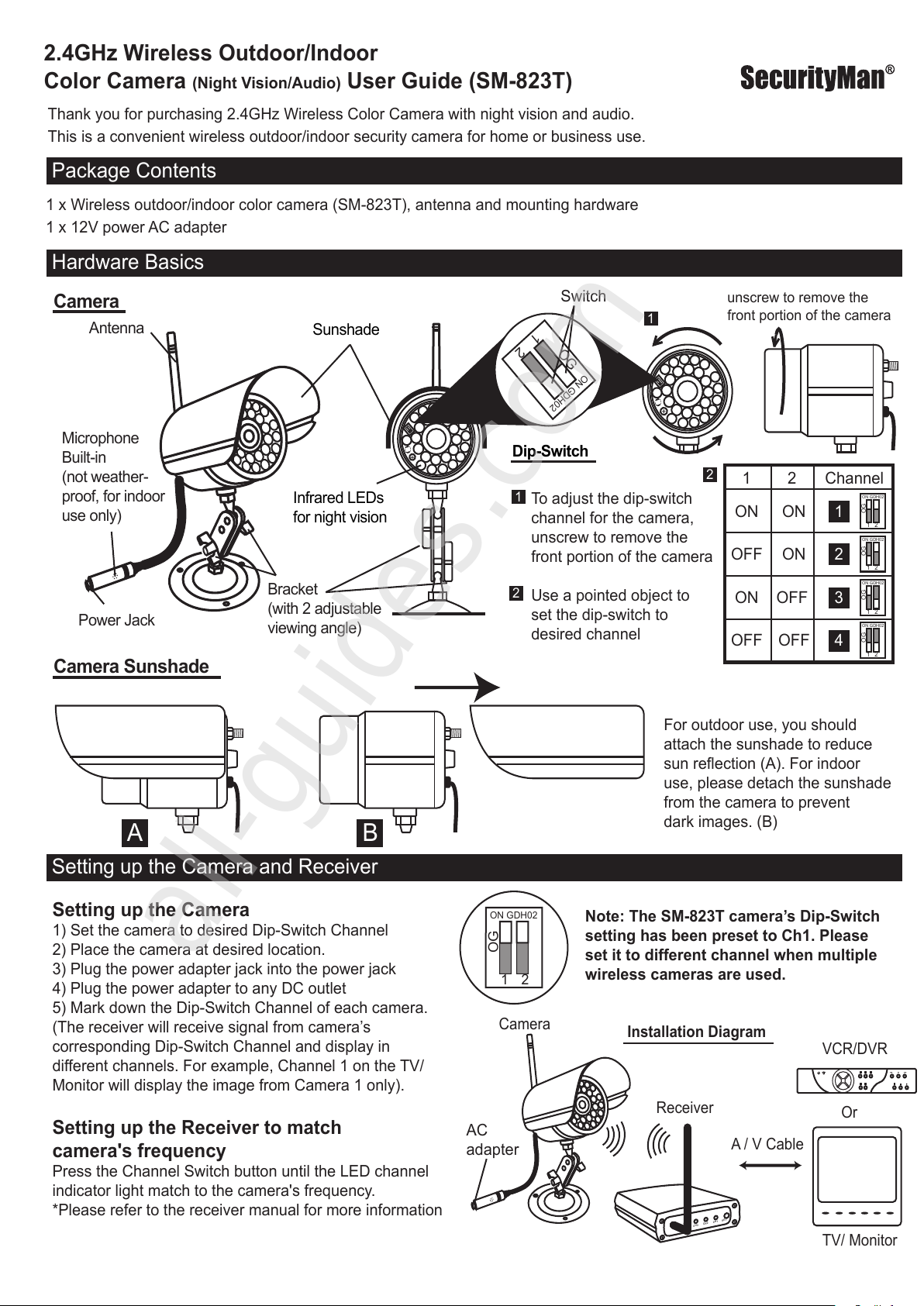
Antenna
Camera
Power Jack
Microphone
Built-in
(not weather-
proof, for indoor
use only)
Bracket
(with 2 adjustable
viewing angle)
Sunshade
Dip-Switch
1
2
OG
O
N
G
DH0
2
Infrared LEDs
for night vision
1
2
O
G
O
N
G
D
H
0
2
ON GDH02
1 2
OG
1 2 Channel
ON ON 1
ON GDH02
1 2
OG
OFF ON 2
ON GDH02
1 2
OG
ON OFF 3
ON GDH02
1 2
OG
OFF OFF 4
To adjust the dip-switch
channel for the camera,
unscrew to remove the
front portion of the camera
Use a pointed object to
set the dip-switch to
desired channel
For outdoor use, you should
attach the sunshade to reduce
sun reflection (A). For indoor
use, please detach the sunshade
from the camera to prevent
dark images. (B)
Setting up the Camera
1) Set the camera to desired Dip-Switch Channel
2) Place the camera at desired location.
3) Plug the power adapter jack into the power jack
4) Plug the power adapter to any DC outlet
5) Mark down the Dip-Switch Channel of each camera.
(The receiver will receive signal from camera’s
corresponding Dip-Switch Channel and display in
different channels. For example, Channel 1 on the TV/
Monitor will display the image from Camera 1 only).
Setting up the Receiver to match
camera's frequency
Press the Channel Switch button until the LED channel
indicator light match to the camera's frequency.
*Please refer to the receiver manual for more information
1
2
O
G
ON GD
H
02
1
2
OG
O
N
G
D
H
02
1
1
2
2
unscrew to remove the
front portion of the camera
Camera Sunshade
A B
A / V Cable
Receiver
Camera
Installation Diagram
TV/ Monitor
VCR/DVR
Or
AC
adapter
C
H
4
C
H
3
C
H
2
C
H
1
S
E
T
Note: The SM-823T camera’s Dip-Switch
setting has been preset to Ch1. Please
set it to different channel when multiple
wireless cameras are used.
Switch
All manuals and user guides at all-guides.com
all-guides.com
Page 2
All manuals and user guides at all-guides.com
 Loading...