

Page 1

. . . . . . . . . . . . . . . . . . . . . . . . . . . . . . . . . . . . . . . . . . . . . . . . .
Cheetah 9LP Famil y:
. . . . . . . . . . . . . . . . . . . . . . . . . . . . . . . . . . . . . . . . . . . . . . . . .
ST39102LW/LC
. . . . . . . . . . . . . . . . . . . . . . . . . . . . . . . . . . . . . . . . . . . . . . . . .
ST34502LW/LC
. . . . . . . . . . . . . . . . . . . . . . . . . . . . . . . . . . . . . . . . . . . . . . . . .
. . . . . . . . . . . . . . . . . . . . . . . . . . . . . . . . . . . . . . . . . . . . . . . . .
Product Manual, Volume 1
. . . . . . . . . . . . . . . . . . . . . . . . . . . . . . . . . . . . . . . . . . . . . . . . .
Page 2

Page 3

. . . . . . . . . . . . . . . . . . . . . . . . . . . . . . . . . . . . . . . . . . . . . . . . .
Cheetah 9LP Famil y:
. . . . . . . . . . . . . . . . . . . . . . . . . . . . . . . . . . . . . . . . . . . . . . . . .
ST39102LW/LC
. . . . . . . . . . . . . . . . . . . . . . . . . . . . . . . . . . . . . . . . . . . . . . . . .
ST34502LW/LC
. . . . . . . . . . . . . . . . . . . . . . . . . . . . . . . . . . . . . . . . . . . . . . . . .
. . . . . . . . . . . . . . . . . . . . . . . . . . . . . . . . . . . . . . . . . . . . . . . . .
Product Manual, Volume 1
. . . . . . . . . . . . . . . . . . . . . . . . . . . . . . . . . . . . . . . . . . . . . . . . .
Page 4

© 1997, 1998 Seagat e Technology, Inc. All rights reserved
Publication number: 83329240, Rev. C
August 1998
Seagate, Seagate Technology, and the Seagate logo are registered trademar ks of Seagate Technology,
Inc. Cheetah, SeaFAX, SeaFONE, SeaBOARD, and SeaTDD are either trademarks or registered trademarks of Seagate Technology, Inc. or one of its subsidiaries. All other trademarks or registered trademarks are the property of their respective owners.
Seagate reserves the right to chang e, without notice, product offerings or specifications. No part of this
publication may be reproduced in any form without written permission of Seagate Technology, Inc.
Page 5

Revision status summary sheet
Revision Date Writer/Engineer Sheets Affected
Rev. A 04/16/98 L. Newman/J. Nowitzke 1/1, v thru viii, 1-82
Rev . B 07/13/98 L. Newman/J. Nowitzke Adds ST34502 models. Changes on pages
8, 43, 45, 51, 52, 59, 63, and 64.
Rev. C 08/14/98 L. Newman/J. Nowitzke Add Multimode output and input character-
istics data to section 9.
Notice.
Product Manual 83329240 is Volume 1 of a two volume document with the SCSI Interface information in
the Volume 2 SCSI Interface Product Manual, part number 77738479.
If the SCSI Interface information is needed the Volume 2 Interface Manual should be ordered,
part number 77738479.
Page 6

Page 7

Cheetah 9LP Product Manual, Rev. C v
Contents
1.0 Scope . . . . . . . . . . . . . . . . . . . . . . . . . . . . . . . . . . . . . . . . . . . . . . . . . . . . . . . . . . . . . . . . . . . . . . . . . . 1
2.0 Applicable standards and reference documentation. . . . . . . . . . . . . . . . . . . . . . . . . . . . . . . . . . . . 3
2.1 Standards. . . . . . . . . . . . . . . . . . . . . . . . . . . . . . . . . . . . . . . . . . . . . . . . . . . . . . . . . . . . . . . . . 3
2.1.1 Electromagnetic compatibility. . . . . . . . . . . . . . . . . . . . . . . . . . . . . . . . . . . . . . . . . . 3
2.1.2 Electromagnetic susceptibility. . . . . . . . . . . . . . . . . . . . . . . . . . . . . . . . . . . . . . . . . . 3
2.2 Electromagnetic compliance . . . . . . . . . . . . . . . . . . . . . . . . . . . . . . . . . . . . . . . . . . . . . . . . . . 3
2.3 Reference documents . . . . . . . . . . . . . . . . . . . . . . . . . . . . . . . . . . . . . . . . . . . . . . . . . . . . . . . 4
3.0 General descr iption . . . . . . . . . . . . . . . . . . . . . . . . . . . . . . . . . . . . . . . . . . . . . . . . . . . . . . . . . . . . . . . 5
3.1 Standard features. . . . . . . . . . . . . . . . . . . . . . . . . . . . . . . . . . . . . . . . . . . . . . . . . . . . . . . . . . . 7
3.2 Media characteristics . . . . . . . . . . . . . . . . . . . . . . . . . . . . . . . . . . . . . . . . . . . . . . . . . . . . . . . . 7
3.3 Performance. . . . . . . . . . . . . . . . . . . . . . . . . . . . . . . . . . . . . . . . . . . . . . . . . . . . . . . . . . . . . . . 7
3.4 Reliability . . . . . . . . . . . . . . . . . . . . . . . . . . . . . . . . . . . . . . . . . . . . . . . . . . . . . . . . . . . . . . . . . 7
3.5 Unformatted and formatted capacit ies . . . . . . . . . . . . . . . . . . . . . . . . . . . . . . . . . . . . . . . . . . . 8
3.6 Programmable drive capacity. . . . . . . . . . . . . . . . . . . . . . . . . . . . . . . . . . . . . . . . . . . . . . . . . . 8
3.7 Factory installed accessories. . . . . . . . . . . . . . . . . . . . . . . . . . . . . . . . . . . . . . . . . . . . . . . . . . 8
3.8 Options (factory installed). . . . . . . . . . . . . . . . . . . . . . . . . . . . . . . . . . . . . . . . . . . . . . . . . . . . . 8
3.9 Accessories (user installed). . . . . . . . . . . . . . . . . . . . . . . . . . . . . . . . . . . . . . . . . . . . . . . . . . . 8
4.0 Performance characteristics . . . . . . . . . . . . . . . . . . . . . . . . . . . . . . . . . . . . . . . . . . . . . . . . . . . . . . . 9
4.1 Internal drive characteristics (transparent to user) . . . . . . . . . . . . . . . . . . . . . . . . . . . . . . . . . . 9
4.2 SCSI performance characteristics (visible to user) . . . . . . . . . . . . . . . . . . . . . . . . . . . . . . . . . 9
4.2.1 Access time . . . . . . . . . . . . . . . . . . . . . . . . . . . . . . . . . . . . . . . . . . . . . . . . . . . . . . . 9
4.2.2 Format comm and exec ution time (minutes) . . . . . . . . . . . . . . . . . . . . . . . . . . . . . . . 9
4.2.3 Generalized performance characteristics. . . . . . . . . . . . . . . . . . . . . . . . . . . . . . . . . 9
4.3 Start/stop time . . . . . . . . . . . . . . . . . . . . . . . . . . . . . . . . . . . . . . . . . . . . . . . . . . . . . . . . . . . . 10
4.4 Prefetch/multi-segmented cache control . . . . . . . . . . . . . . . . . . . . . . . . . . . . . . . . . . . . . . . . 10
4.5 Cache operation. . . . . . . . . . . . . . . . . . . . . . . . . . . . . . . . . . . . . . . . . . . . . . . . . . . . . . . . . . . 10
4.5.1 Caching write data . . . . . . . . . . . . . . . . . . . . . . . . . . . . . . . . . . . . . . . . . . . . . . . . . 11
4.5.2 Prefetch operation . . . . . . . . . . . . . . . . . . . . . . . . . . . . . . . . . . . . . . . . . . . . . . . . . 12
5.0 Reliability specifications . . . . . . . . . . . . . . . . . . . . . . . . . . . . . . . . . . . . . . . . . . . . . . . . . . . . . . . . . 13
5.1 Error rates . . . . . . . . . . . . . . . . . . . . . . . . . . . . . . . . . . . . . . . . . . . . . . . . . . . . . . . . . . . . . . . 13
5.1.1 Environmental interference. . . . . . . . . . . . . . . . . . . . . . . . . . . . . . . . . . . . . . . . . . . 13
5.1.2 Read errors. . . . . . . . . . . . . . . . . . . . . . . . . . . . . . . . . . . . . . . . . . . . . . . . . . . . . . . 13
5.1.3 Write errors. . . . . . . . . . . . . . . . . . . . . . . . . . . . . . . . . . . . . . . . . . . . . . . . . . . . . . . 13
5.1.4 Seek errors. . . . . . . . . . . . . . . . . . . . . . . . . . . . . . . . . . . . . . . . . . . . . . . . . . . . . . . 13
5.2 Reliability and service. . . . . . . . . . . . . . . . . . . . . . . . . . . . . . . . . . . . . . . . . . . . . . . . . . . . . . . 1 4
5.2.1 Mean time bet ween failure . . . . . . . . . . . . . . . . . . . . . . . . . . . . . . . . . . . . . . . . . . . 14
5.2.2 Field failure rate vs time . . . . . . . . . . . . . . . . . . . . . . . . . . . . . . . . . . . . . . . . . . . . . 14
5.2.3 Preve ntive maintenance. . . . . . . . . . . . . . . . . . . . . . . . . . . . . . . . . . . . . . . . . . . . . 15
5.2.4 Service life . . . . . . . . . . . . . . . . . . . . . . . . . . . . . . . . . . . . . . . . . . . . . . . . . . . . . . . 15
5.2.5 Service philosophy . . . . . . . . . . . . . . . . . . . . . . . . . . . . . . . . . . . . . . . . . . . . . . . . . 15
5.2.6 Service tools. . . . . . . . . . . . . . . . . . . . . . . . . . . . . . . . . . . . . . . . . . . . . . . . . . . . . . 15
5.2.7 Hot plugging Cheetah 9LP disc drives . . . . . . . . . . . . . . . . . . . . . . . . . . . . . . . . . . 15
5.2.8 S.M.A.R.T. . . . . . . . . . . . . . . . . . . . . . . . . . . . . . . . . . . . . . . . . . . . . . . . . . . . . . . . 16
5.2.9 Product warranty. . . . . . . . . . . . . . . . . . . . . . . . . . . . . . . . . . . . . . . . . . . . . . . . . . . 17
6.0 Physical/electrical specifications . . . . . . . . . . . . . . . . . . . . . . . . . . . . . . . . . . . . . . . . . . . . . . . . . . 19
6.1 AC power requirements . . . . . . . . . . . . . . . . . . . . . . . . . . . . . . . . . . . . . . . . . . . . . . . . . . . . . 19
6.2 DC power requirements. . . . . . . . . . . . . . . . . . . . . . . . . . . . . . . . . . . . . . . . . . . . . . . . . . . . . 19
6.2.1 Conduct ed noise immunity . . . . . . . . . . . . . . . . . . . . . . . . . . . . . . . . . . . . . . . . . . . 20
6.2.2 Power sequencing . . . . . . . . . . . . . . . . . . . . . . . . . . . . . . . . . . . . . . . . . . . . . . . . . 20
6.2.3 12 V - Current profile . . . . . . . . . . . . . . . . . . . . . . . . . . . . . . . . . . . . . . . . . . . . . . . 20
6.3 Power dissipation. . . . . . . . . . . . . . . . . . . . . . . . . . . . . . . . . . . . . . . . . . . . . . . . . . . . . . . . . . 2 2
6.4 Environmental limits. . . . . . . . . . . . . . . . . . . . . . . . . . . . . . . . . . . . . . . . . . . . . . . . . . . . . . . . 22
6.4.1 Temperature. . . . . . . . . . . . . . . . . . . . . . . . . . . . . . . . . . . . . . . . . . . . . . . . . . . . . . 22
Page 8

vi Cheetah 9LP Product Manual, Rev. C
6.4.2 Relative humidity . . . . . . . . . . . . . . . . . . . . . . . . . . . . . . . . . . . . . . . . . . . . . . . . . . .23
6.4.3 Effective altitude (sea level). . . . . . . . . . . . . . . . . . . . . . . . . . . . . . . . . . . . . . . . . . .24
6.4.4 Shock and vibration . . . . . . . . . . . . . . . . . . . . . . . . . . . . . . . . . . . . . . . . . . . . . . . . .24
6.4.5 Air cleanliness . . . . . . . . . . . . . . . . . . . . . . . . . . . . . . . . . . . . . . . . . . . . . . . . . . . . .26
6.4.6 Acoustics . . . . . . . . . . . . . . . . . . . . . . . . . . . . . . . . . . . . . . . . . . . . . . . . . . . . . . . . .26
6.4.7 Electromagnetic susceptibility . . . . . . . . . . . . . . . . . . . . . . . . . . . . . . . . . . . . . . . . .26
6.5 Mechanical specifications . . . . . . . . . . . . . . . . . . . . . . . . . . . . . . . . . . . . . . . . . . . . . . . . . . . .27
7.0 Defect and error management . . . . . . . . . . . . . . . . . . . . . . . . . . . . . . . . . . . . . . . . . . . . . . . . . . . . .29
7.1 Drive internal defects. . . . . . . . . . . . . . . . . . . . . . . . . . . . . . . . . . . . . . . . . . . . . . . . . . . . . . . .29
7.2 Drive error recovery procedures . . . . . . . . . . . . . . . . . . . . . . . . . . . . . . . . . . . . . . . . . . . . . . .29
7.3 SCSI systems errors . . . . . . . . . . . . . . . . . . . . . . . . . . . . . . . . . . . . . . . . . . . . . . . . . . . . . . . .30
8.0 Installation . . . . . . . . . . . . . . . . . . . . . . . . . . . . . . . . . . . . . . . . . . . . . . . . . . . . . . . . . . . . . . . . . . . . . 3 1
8.1 Drive ID/option select header . . . . . . . . . . . . . . . . . . . . . . . . . . . . . . . . . . . . . . . . . . . . . . . . .31
8.1.1 Notes for Figures 8, 9, and 10. . . . . . . . . . . . . . . . . . . . . . . . . . . . . . . . . . . . . . . . .34
8.1.2 Function description. . . . . . . . . . . . . . . . . . . . . . . . . . . . . . . . . . . . . . . . . . . . . . . . .35
8.2 Drive orientation . . . . . . . . . . . . . . . . . . . . . . . . . . . . . . . . . . . . . . . . . . . . . . . . . . . . . . . . . . .36
8.3 Cooling . . . . . . . . . . . . . . . . . . . . . . . . . . . . . . . . . . . . . . . . . . . . . . . . . . . . . . . . . . . . . . . . . .36
8.3.1 Air flow. . . . . . . . . . . . . . . . . . . . . . . . . . . . . . . . . . . . . . . . . . . . . . . . . . . . . . . . . . .36
8.4 Drive mounting . . . . . . . . . . . . . . . . . . . . . . . . . . . . . . . . . . . . . . . . . . . . . . . . . . . . . . . . . . . .37
8.5 Grounding . . . . . . . . . . . . . . . . . . . . . . . . . . . . . . . . . . . . . . . . . . . . . . . . . . . . . . . . . . . . . . . .3 7
9.0 Interface requiremen ts. . . . . . . . . . . . . . . . . . . . . . . . . . . . . . . . . . . . . . . . . . . . . . . . . . . . . . . . . . . .39
9.1 General description. . . . . . . . . . . . . . . . . . . . . . . . . . . . . . . . . . . . . . . . . . . . . . . . . . . . . . . . .39
9.2 SCSI interface messages supported. . . . . . . . . . . . . . . . . . . . . . . . . . . . . . . . . . . . . . . . . . . .39
9.3 SCSI interface commands supported . . . . . . . . . . . . . . . . . . . . . . . . . . . . . . . . . . . . . . . . . . .40
9.3.1 Inquiry Vital Product data. . . . . . . . . . . . . . . . . . . . . . . . . . . . . . . . . . . . . . . . . . . . .43
9.3.2 Mode Sense data. . . . . . . . . . . . . . . . . . . . . . . . . . . . . . . . . . . . . . . . . . . . . . . . . . .44
9.4 SCSI bus conditions and miscellaneous features supported . . . . . . . . . . . . . . . . . . . . . . . . .47
9.5 Synchronous data trans fer . . . . . . . . . . . . . . . . . . . . . . . . . . . . . . . . . . . . . . . . . . . . . . . . . . .48
9.5.1 Synchro nous data transfer periods supported. . . . . . . . . . . . . . . . . . . . . . . . . . . . .48
9.5.2 REQ/ACK offset. . . . . . . . . . . . . . . . . . . . . . . . . . . . . . . . . . . . . . . . . . . . . . . . . . . .48
9.6 Physical interface . . . . . . . . . . . . . . . . . . . . . . . . . . . . . . . . . . . . . . . . . . . . . . . . . . . . . . . . . .48
9.6.1 DC cable and connector . . . . . . . . . . . . . . . . . . . . . . . . . . . . . . . . . . . . . . . . . . . . .48
9.6.2 SCSI interface physical description . . . . . . . . . . . . . . . . . . . . . . . . . . . . . . . . . . . . .50
9.6.3 SCSI interface cable requiremen ts . . . . . . . . . . . . . . . . . . . . . . . . . . . . . . . . . . . . .50
9.6.4 Mating connectors . . . . . . . . . . . . . . . . . . . . . . . . . . . . . . . . . . . . . . . . . . . . . . . . . .51
9.7 Electrical description . . . . . . . . . . . . . . . . . . . . . . . . . . . . . . . . . . . . . . . . . . . . . . . . . . . . . . . .59
9.7.1 Multimo de—S E and LV D alternatives . . . . . . . . . . . . . . . . . . . . . . . . . . . . . . . . . . .59
9.8 Terminator requirements. . . . . . . . . . . . . . . . . . . . . . . . . . . . . . . . . . . . . . . . . . . . . . . . . . . . .61
9.9 Terminator power . . . . . . . . . . . . . . . . . . . . . . . . . . . . . . . . . . . . . . . . . . . . . . . . . . . . . . . . . .61
9.10 Disc drive SCSI timing. . . . . . . . . . . . . . . . . . . . . . . . . . . . . . . . . . . . . . . . . . . . . . . . . . . . . . .62
9.11 Drive activity LED . . . . . . . . . . . . . . . . . . . . . . . . . . . . . . . . . . . . . . . . . . . . . . . . . . . . . . . . . .63
10.0 Seagate Technology support services. . . . . . . . . . . . . . . . . . . . . . . . . . . . . . . . . . . . . . . . . . . . . . .65
Page 9

Cheetah 9LP Product Manual, Rev. C vii
List of Figures
Figure 1. Cheetah 9LP family drive (ST39102LW shown) . . . . . . . . . . . . . . . . . . . . . . . . . . . . . . . . . . . 1
Figure 2. Cheetah 9LP family drive. . . . . . . . . . . . . . . . . . . . . . . . . . . . . . . . . . . . . . . . . . . . . . . . . . . . . 6
Figure 3. Typical Cheetah 9LP family drive +12 V current profile . . . . . . . . . . . . . . . . . . . . . . . . . . . . . 21
Figure 4. Locations of PCBA components listed in Table 3 . . . . . . . . . . . . . . . . . . . . . . . . . . . . . . . . . 23
Figure 5. Recommended mounting . . . . . . . . . . . . . . . . . . . . . . . . . . . . . . . . . . . . . . . . . . . . . . . . . . . . 25
Figure 6. ST39102LW and ST34502LW mounting configuration dimension s. . . . . . . . . . . . . . . . . . . . 27
Figure 7. ST39102LC and ST34502LC moun ting configu ration dime nsions . . . . . . . . . . . . . . . . . . . . 28
Figure 8. J6 jumper header. . . . . . . . . . . . . . . . . . . . . . . . . . . . . . . . . . . . . . . . . . . . . . . . . . . . . . . . . . 32
Figure 9. J5 jumper header (on LW models only) . . . . . . . . . . . . . . . . . . . . . . . . . . . . . . . . . . . . . . . . . 33
Figure 10. J2 option select header . . . . . . . . . . . . . . . . . . . . . . . . . . . . . . . . . . . . . . . . . . . . . . . . . . . . . 34
Figure 11. Air flow (suggested) . . . . . . . . . . . . . . . . . . . . . . . . . . . . . . . . . . . . . . . . . . . . . . . . . . . . . . . . 36
Figure 12. ST39102LW and ST34502LW drive phys ical interface (68-pin J1 SCSI I/O connect or) . . . . 49
Figure 13. ST39102LC and ST34502LC d rive physical interface (80-pin J1 SCSI I/O connector) . . . . . 49
Figure 14. SCSI daisy chain interface cabling for LW drives. . . . . . . . . . . . . . . . . . . . . . . . . . . . . . . . . . 52
Figure 15. Nonshielded 68 pin SCSI device connector used on LW drives . . . . . . . . . . . . . . . . . . . . . . 53
Figure 16. Nonshielded 80 pin SCSI “SCA-2” connector, used on LC drives . . . . . . . . . . . . . . . . . . . . . 54
Figure 17. LVD output signals. . . . . . . . . . . . . . . . . . . . . . . . . . . . . . . . . . . . . . . . . . . . . . . . . . . . . . . . . 60
Figure 18. Typical SE-LVD alternative transmitter receiver circuits . . . . . . . . . . . . . . . . . . . . . . . . . . . . 60
Page 10

Page 11
Cheetah 9LP Product Manual, Rev. C 1
1.0 Scope
This manual describes Seagate Technology®, Inc. Cheetah 9LP™ disc drives.
Cheetah 9LP drives support the small computer system interface (SCSI) as described in the ANSI SCSI,
SCSI-2, and SCSI-3 (Fast-20 and Fast-40) interface specifications to the extent described in this manual. The
SCSI Interface Product Manual
this and other families of Seagate drives.
From this point on in this product manual the reference to Cheetah 9LP models is referred to as “the drive”
unless references to individual models are necessary.
(part num ber 77738479) descr ibes general SCSI interface characteristics of
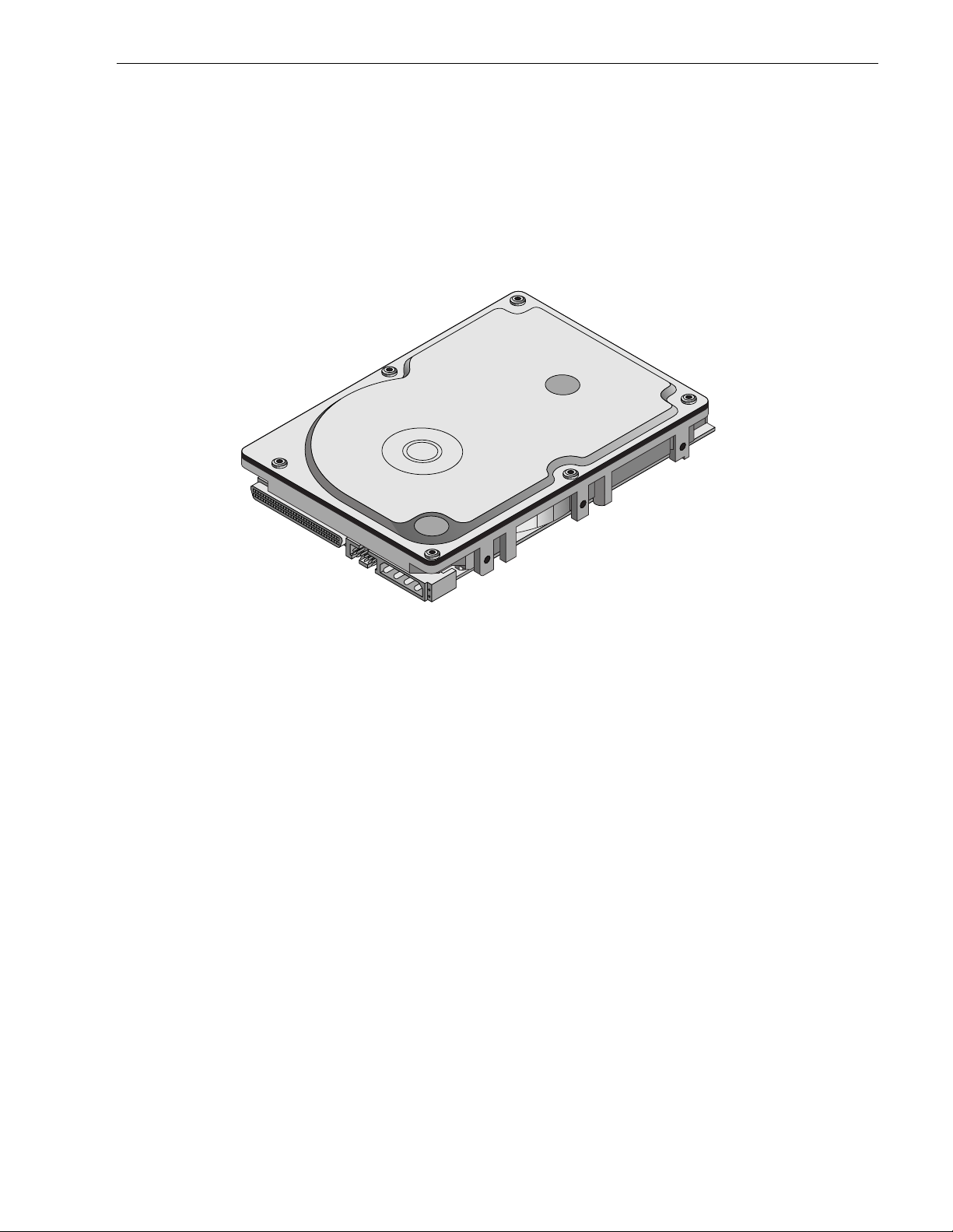
Figure 1. Cheetah 9LP family drive (ST39102LW shown)
Page 12

Page 13

Cheetah 9LP Product Manual, Rev. C 3
2.0 Applicable standards and reference documentation
The drive has been developed as a system peripheral to the highest standards of design and construction. The
drive depends upon its hos t equipment to provide adeq uate power and environment in order to a chieve optimum performance and compliance with applicable industry a nd governmental regulations. Special attention
must be given in the areas of safety, power distribution, shielding, audible noise control, and temperature regulation. In par ticular, the drive must be securely m ount ed in o rder to guarante e th e spec ified pe rformanc e characteristics. Mounting by bottom holes must meet the requirements of Section 8.4.
2.1 Standards
The Cheetah 9LP family com pl ies with Seagate standards as no ted in th e app ropri ate sec tions of t his Ma nual
and the Seagate
The Cheetah 9LP disc drive is a UL recognized component per UL1950, CSA certified to CSA C22.2 No. 950M89, and VDE certified to VDE 0805 and EN 60950 .
2.1.1 Electromagnetic compatibility
The drive, as delivered, is designed f or s ystem integr ation and installation into a suitable enclosure prior to use.
As such the drive is supplied as a subassembly and is not subjec t to Subpart B of Part 15 of the FCC Rules
and Regulations nor the Radio Interference Regulations of the Canadian Department of Communications.
The design characteristics of the drive serve to minimize radiation when installed in an enclosure that provides
reasonable shielding. As such, the drive is capable of meeting the Class B limits of the FCC Rules and Regulations of the Canadian Department of Communications when properly packaged. However, it is the user’s
responsibility to assure that the drive meets the appropriate EMI requirements in their system. Shielded I/O
cables may be required if the enclosure do es not provide adeq uate shielding. If the I /O cables are extern al to
the enclosure, shielded cables should be used, with the shields grounded to the enclosure and to the host controller.
SCSI Interface Product Manual
, part number 77738479 (Vol. 2).
2.1.2 Electromagnetic susceptibility
As a component assem bly, the drive is not required to me et any suscep tibility perform ance requi rements. It is
the responsibility of those integrating the dri ve within their systems to perform t hose t ests req uired a nd des i gn
their system to ensure that equipm ent operating in the same system as the drive or external to the system
does not adversely affect the perf ormance of the drive. S ee Section 5.1.1 and Table 2, DC power requirements.
2.2 Electromagnetic compliance
Seagate uses an independen t laboratory to confirm com pliance to the directives/standard(s) for CE Marking
and C-Tick Marking. The drive was tested in a representative system for typical applications. The selected system represents the most popular characteristics for test platforms. The system configurations include:
• 486, Pentium, and PowerPC microprocessors
• 3.5-inch floppy disc drive
• Keyboard
• Monitor/display
• Printer
• External modem
•Mouse
Although the test system with this Seagate m odel com pli es to the direct ives/standard(s), we cannot guarantee
that all systems will comply. The computer manufacturer or system integrator shall confirm EMC compliance
and provide CE Marking and C-Tick Marking for their product.
Electromagnetic compliance for the European Union
If this model has the CE Marking it complies with the European Union requirements of the Electromagnet ic
Compatibility Directive 89/336/EEC of 03 M ay 198 9 as amended by Directive 92/31/EEC of 28 April 1992 and
Directive 93/68/EEC of 22 July 1993.
Page 14

4 Cheetah 9LP Product Manual, Rev. C
Australian C-Ti ck
If this model has the C-Tick Marking it complies with the Australia/New Zealand Standard AS/NZS3548 1995
and meets the Electromagnetic Compatibility (EMC) Framework requirements of Australia’s Spectrum Management Agency (SMA).
2.3 Reference documents
Cheetah 9LP Installation Guide
SCSI Interface Product Manual
ANSI small computer system interface (SCSI) document numbers:
X3.131-1994 SCSI-2
X3.253-1995 SCSI-3 Parallel Interface
T10/1142D Rev. 14 SPI-2 (SCSI-3 Parallel Interface version 2)
SFF-8046 Specification for 80-pin connector for SCSI disk drives
Package Test Specification Seagate P/N 30190-001 (under 100 lb.)
Package Test Specification Seagate P/N 30191-001 (over 100 lb.)
Specification, Acoustic Test Requirements, and Procedures Seagate P/N 30553-001
In case of conflict between this document and any referenced document, this document takes precedence.
Seagate P/N 83329230
Seagate P/N 77738479
Page 15
Cheetah 9LP Product Manual, Rev. C 5
3.0 General description
Cheetah 9LP drives combine magnetoresistive (MR) heads, partial response/maximum likelihood (PRML) read
channel electronics, embedded servo technology, and a wide Ultra2 SCSI interface to provide high performance, high capacity data storage for a variety of systems including engineering workstations, network servers, mainframes, and supercomputers.
Ultra SCSI and Ultra2 SCSI use negotiated transfer rates. These transfer rates will occur only if your host
adapter support s these data transfer rates and is com patible with the required hardware requirement s of the
I/O circui t type. T his dr ive also op erates at SCSI-1 a nd SC SI-2 da ta transfer ra tes for backward comp atibility
with non-Ultra/Ultra2 SCSI host adapters.
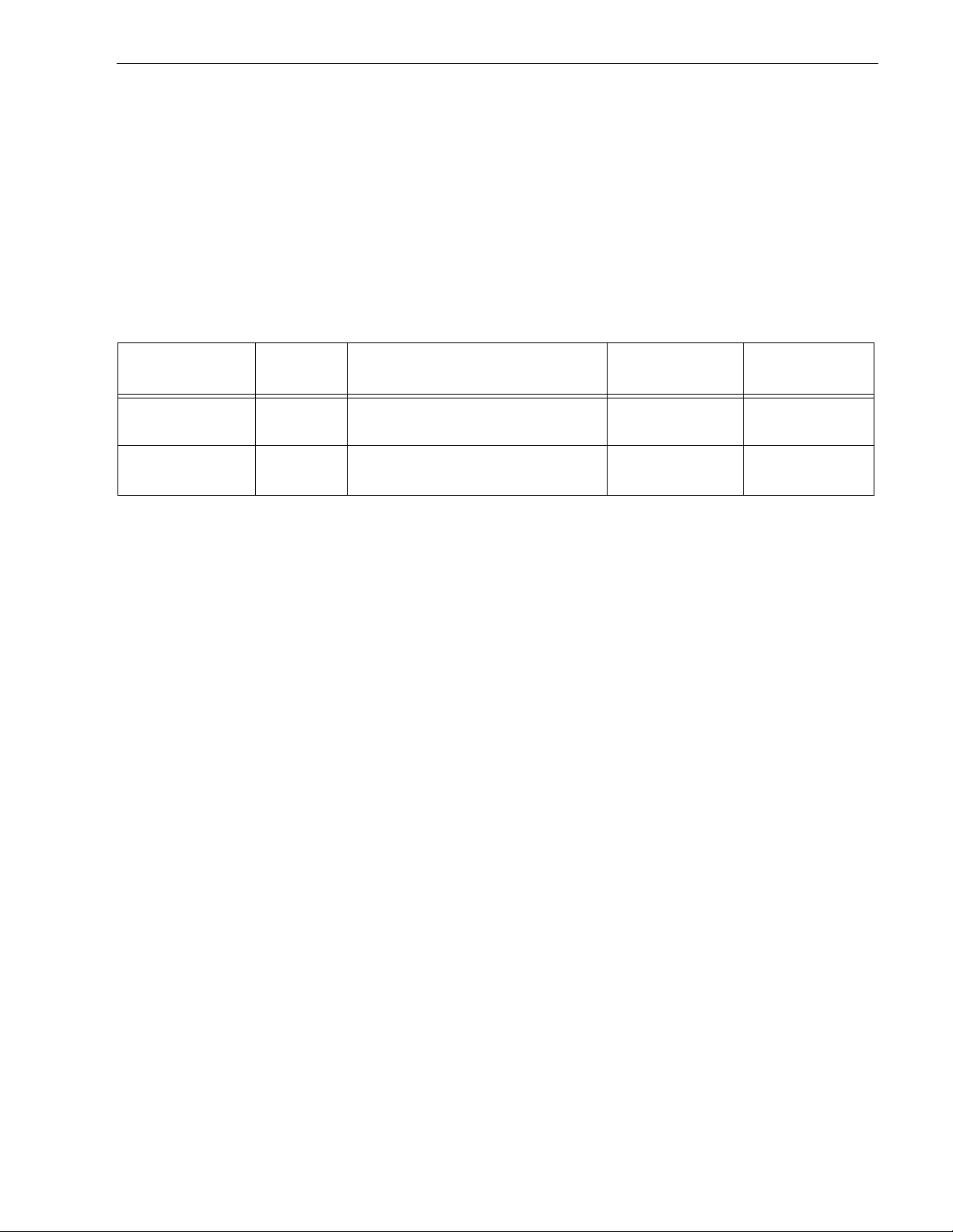
Table 1 lists the features that differentiate the two Cheetah 9LP models.
Table 1: Drive model number vs. differentiating features
Model number
ST39102LW
ST34502LW
ST39102LC
ST34502LC
Number
of heads I/O circui t type [1]
12 Single-ended (SE) and low voltage
differential (LVD)
12 Single-ended (SE) and low voltage
differential (LVD)
Number of I/O
connector pins
Number of I/O
data bu s bits
68 16
80 16
[1] See Section 9.6 for details and definitions.
The drive records and recovers data on approximately 3.0-inch (84 mm) non-removeable discs.
The drive supports the Small Computer System Interface (SCSI) as describe d in the ANSI SCSI-2/SCSI-3
interface specifications to the extent described in this manual (volume 1), which defines the product performance characteristics of the Cheetah 9LP family of drives, and the
SCSI Interface Product Manual
(volume 2),
part number 77738479, which describes the general interface characteristics of this and other families of
Seagate SCSI drives.
The drive’s interface supports multiple initiators, disconnect/reconnect, self-configuring host software, and
automatic features that relieve the host from the necessity of knowing the physical characteristics of the targets
(logical block addressing is used).
The head and disc assembly (HDA) is sealed at the factory. Air circulates within the HDA through a nonreplaceable filter to maintain a contamination-free HDA environment.
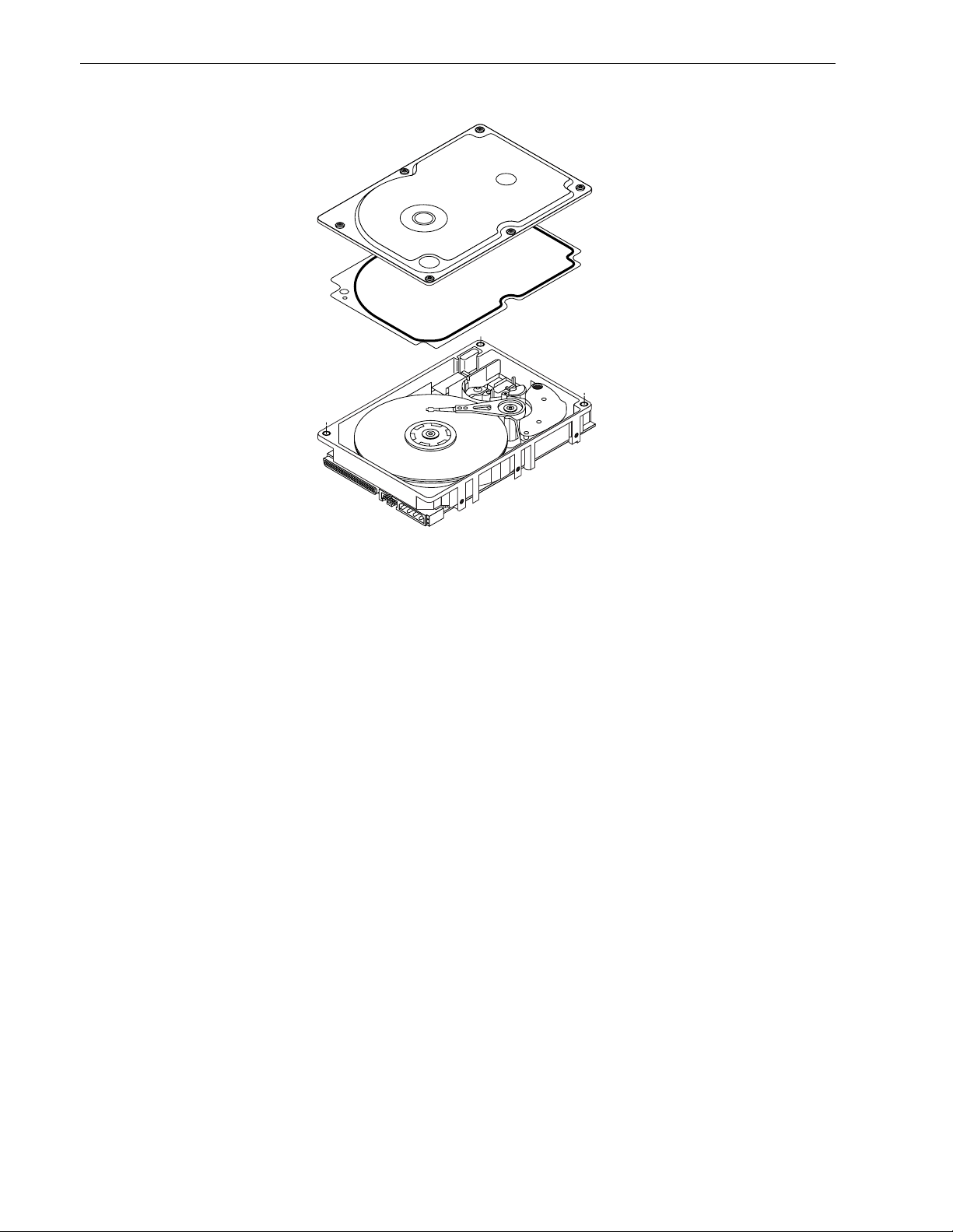
Refer to Figure 2 for an exploded view of the drive. This exploded view is for information only—never disassemble the HDA and do not attempt to service items in the sealed enclosure (heads, med ia, actuator, etc.) as this
requires special facilities. The drive contains no replaceable parts. Opening the HDA voids your warranty.
Cheetah 9LP dr ives use a dedi cated land ing zone at the inne rm os t radius of the media to elim inate the poss ibility of destroying or degrading data by landing i n the data zone. The d rive automatically go es to t he landi ng
zone when power is removed.
An automatic shipping lock prevents potential damage to the heads and discs that results from movement during shipping and handling. The shipping lock autom atically diseng ages when power is applied t o the drive and
the head load process begins.
Cheetah 9LP drives decode track 0 location data from the servo data embedded on each surface to eliminate
mechanical transducer adjustments and related reliabilit y conce r n s.
A high-performance actuator assembly with a low-inertia, balanced, patented, s traight-arm design provides
excellent performance with minimal power dissipation.
Page 16
6 Cheetah 9LP Product Manual, Rev. C
Figure 2. Cheetah 9LP family drive
Page 17

Cheetah 9LP Product Manual, Rev. C 7
3.1 Standard features
The Cheetah 9LP family has the following standard features:
• Integrated Ultra/Ultra2 SCSI controller
• Multimode SCSI drivers and receivers—single-ended (SE) and low voltage differential (LVD)
• 16 bit I/O data bus
• Asynchronous and synchronous data transfer protocol
• Firmware downloadable via SCSI interface
• Selectable even byte sector sizes from 180 to 4,096 bytes/sector
• Programmable sector reallocation scheme
• Flawed sector reallocation at format time
• Programmable auto write and read reallocation
• Reallocation of defects on command (post format)
• Enhanced ECC correction capability up to 185 bits
• Sealed head and disc assembly
• No preventative maintenance or adjustment required
• Dedicated head landing zone
• Embedded servo design
• Self diagnostics performed when power is applied to the drive
• 1:1 Interl eave
• Zoned bit recording (ZBR)
• Vertical, horizontal, or top down mounting
• Dynamic spindle brake
• 1,024 kbyte data buffer (or 4,096 kbyte option)
• Hot plug compatibility (Section 9.6.4.2 lists proper host connector needed) for “LC” model drives
• SCAM (SCSI Configured AutoMagically) plug-n-play level 2 compliant, factory set to level 1
3.2 Media characteristics
The media used on t he drive has a diameter of app roximately 3 .0 inches (84 m m ) . The alum inum substrate is
coated with a thin film magnetic material, overcoated with a proprietar y protec tive layer for improved durability
and environmental protection.
3.3 Performance
• Supports industry standard Ultra2 SCSI interface
• Programmable multi-segmentable cache buffer (see Section 3.1)
• 10,025 RPM spindle. Average latency = 2.99 ms
• Command queuing of up to 64 commands
• Background processing of queue
• Supports start and stop commands (spindle stops spinning)
3.4 Reliability
• 1,000,000 hour MTBF
• LSI circuitry
• Balanced low mass rotary voice coil actuator
• Incorporates industr y -standa rd Self-Monitoring, Analysis and Reporting Technology (S.M.A.R.T. )
• 5-year warranty
Page 18

8 Cheetah 9LP Product Manual, Rev. C
3.5 Unformatted a n d formatted capacities
Formatted capacity depends on the number of spare reallocation sectors reserved and the number of bytes per
sector. The following table shows the standard OEM model capacities:
Formatted
data block size
512 bytes/sector [1] Unformatted
ST39102 010F59C8h (9.10 GB) [2] 11.27 GB
ST34502 0087A25Bh (4.55 GB) [2] 5.63 GB
Notes.
[1] Sector size selectable at format time. Users having the necessary equipment may modify the data block
size before issuing a format command and obtain di fferent formatted cap acities than those listed. See
Mode Select Command and Format Command in the
SCSI Interface Product Manual
, part number
77738479.
[2] User available capacity depends on spare reallocation scheme selected, the number of data tracks per
sparing zone, and the number of alternate sectors (LBAs) per sparing zone.
3.6 Programmable drive capacity
Using the Mode Select command, the drive can change its capacity to something less than maximum. See
Table 5.2.1-13 in the
SCSI Interface Product Manual
, part number 77738479, Rev. H. Refer to the Parameter
list block descriptor number of blocks field. A value of zero in the number of blocks field indicates that the drive
shall not change t he capacity it is current ly formatted to have. A number in the num ber of blocks field that is
less than the max imum number of LB As changes the total drive capac ity to the value in the block d escriptor
number of blocks field. A value greater than the m aximum number of LBAs is rou nded d own to the ma ximum
capacity.
3.7 Factory installed accessories
OEM Standard dr ives are shipped with the
Cheetah 9LP Installation Guide
, part number 83 329230 (unless
otherwise specified). The factory also ships with the drive a small bag of jumper plugs used for the J2, J5, and
J6 option select jumper headers.
3.8 Options (factory installed)
All customer reques ted options are inco rporated during prod uction or packaged at the manufactur ing facility
before shipping. Some of the options available are (not an exhaustive list of possible options):
• Other capacities can be ordered depending on sparing scheme and secto r size requested.
• 4 Mbyte optional buffer size.
• Single unit shipping pack. T he drive is n ormally ship ped in bulk packaging to provide m aximum protecti on
against transit damage. Units shipped individually require additional protection as provided by the single unit
shipping pack. Users planning single unit distribution should specify this option.
•The
Cheetah 9LP Installation Guide
, part number 833292 30, is usually included with each standard OEM
drive shipped, but extra copies may be ordered.
3.9 Accessories (user installed)
The following accessories are available. All accessories may be installed in the field.
• Single unit shipping pack.
Page 19

Cheetah 9LP Product Manual, Rev. C 9
4.0 Performance characteristics
4.1 Internal drive characteristics (transparent to user)
ST39102 ST34502
Drive capacity 9.10 4.55 G Byte (form atted, rounded off values)
Read/write heads 12 6
Bytes/track 104,840–159,008 104,840–159,008 Bytes (average, rounded off values)
Bytes/surface 939 939 Mbytes (unformatted, rounded off values)
Trac ks/surf ace (total) 6,962 6,962 Trac ks (user accessible)
Trac ks/inch 8,962 8,962 TPI
Peak bits/inch 183 183 KBPI
Internal data rate 152-231 152-231 Mbits/sec (variable with zone)
Disc rotational speed 10,025 10,025 r/min (+
Average rotational latency 2.99 2.99 ms ec
4.2 SCSI performance characteristics (visible to user)
The values given in Section 4.2.1 apply to all models of the Che etah 9LP family unless otherwise specified.
Refer to Section 9.10 and to the
SCSI Interface Product Manual
, part number 77738 479, for additional timing
details.
0.5%)
4.2.1 Access time [5]
Including controller overhead
(without disconnect) [ 1] [3]
Drive level
Read Write
msec
Aver age – Typical [2] 5.4 6.2
Single Track – Typical [2] 0.8 1.1
Full Stroke – Typical [2] <12.2 <13.2
4.2.2 Format comman d execution time (minutes) [1]
ST39102 and ST34502
Maxim um (with verif y) 30
Maximum (no verify) 15
4.2.3 Generalized performance characteristics
Minimum sector interleave 1 to 1
Data buffer transfer rate to/from disc media (one 512-byte sector):
Min. [3]* 19.0 MByte/sec
Avg. [3] 23.95 MByte/sec
Max. [3] 28.9 MByte/sec
SCSI interface data transfer rate (asynchronous):
Maximum instantaneous one byte wide 5.0 Mbytes/sec [4]
Maximum instantaneous two bytes wide 10.0 Mbytes/sec [4]
Synchronous transfer rate for SCSI Fast-40 (Ultra2 SCSI):
In single-ended (SE) interface mode 5.0 to 40 Mbytes/sec
In low voltage differential (LVD) interface mode 5.0 to 80 Mbytes/sec
Page 20

10 Cheetah 9LP Product Manual, Rev. C
Sector Sizes:
Default 512 byte user data blocks
Variable 180 to 4,096 bytes per sector in even number of bytes per sector.
If n (number of bytes per sector) is odd, then n-1 will be used.
Read/write consecutive sectors on a track Yes
Flaw reallocation performance impact (for flaws reallocated at format time using
the spare sectors per sparing zone reallocation scheme.)
Overhead time for head switch (512 byte sectors) in sequential mode 0.8 msec
Overhead time for one track cylinder switch in sequential mode 1.2 msec (typical)
Average rotational latency 2.99 msec
Notes for Section 4.2.
[1] Execution time measured from receipt of the last By te of the Command Descriptor Block (CDB) to the
request for a Status Byte Tr ansf er to the Initiator (excluding connect/disconnect).
[2] Typical access times are measured under nom inal conditions of temperature, voltage, and horizontal ori-
entation as measured on a representative sample of drives.
[3] Assumes no errors and no sector has been relocated.
[4] Assumes system ability to suppor t the rates listed and no cable loss.
[5] Access time = controller overhead + average seek time.
Access to data = controller overhead + average seek time + latency time.
4.3 S tart/stop time
After DC power at nominal voltage has been applied, the drive becomes ready within 30 seconds if the Motor
Start Opt ion is disabled (i.e. the m otor star ts as soon as the power has be en applied). If a recoverable error
condition is detected during the star t sequence, the drive executes a recovery procedure which may cause the
time to become ready to exceed 30 seconds. During spin up to read y time the drive responds to some commands over the SCSI interface in less than 3 seconds after application of power. Stop time is less than 30 seconds from removal of DC power.
Negligible
If the Motor Start Opt ion is enabled, the internal cont roller accepts the comm ands listed in the SC SI Interface
Product Manual less than 3 seconds after DC power has been applied. After the Motor Start Command has
been received the drive becomes ready for normal operations within 30 seconds typically (excluding an error
recovery procedure). The M otor Star t Command can also be used to command the drive to stop the spindle
SCSI Interface Product Manual
(see
There is no power control switch on the drive.
4.4 Prefetch/multi-segmented cache control
The drive provides prefetch (read look-ahead) and multi-segmented cache control algorithms that in many
cases can enhance system performance. “Cache” as used herein refers to the drive buffer storage space when
it is used in cache operations. To select prefetch and cache features the host sends the Mode Select command
with the proper values in the applicable bytes in Mode Page 08h (see
number 77738479. Prefetch and cache operation are independent features from the standpoint that each is
enabled and disabled independently via the Mode Select command. However, in actual operation the prefetch
feature overlaps cache operation somewhat as is noted in Section 4.5.1 and 4.5.2.
All default cache and prefetch Mode parameter values (Mode Page 08h) for standard OEM versions of this
drive family are given in Ta bles 8.
4.5 Cache operation
In general, 840 Kbytes (3,700 kbytes of the 4,096 kbytes on units with this option) of the physical buffer space
in the drive can be used as storage space for cache operations. The buffer can be divided into logical segments (Mode Select Page 08h, byte 13) from which data is read and to which data is written. The drive maintains a table of logical block disk m edium addresses of the data s tored in each segment of t he buffer. If cache
operation is enabled (RCD bit = 0 in Mode Page 08h, byte 2, bit 0. See
, part number 77738479).
SCSI Interface Product Manual,
SCSI Interface Product Manual,
part
part
Page 21

Cheetah 9LP Product Manual, Rev. C 11
number 77738479), data requested by the host with a Read command is retrieved from the buffer (if it is there),
before any disc access is initiated. If cache operation is not enabled, the buffer (still segmented with required
number of segments) is still used, but only as circular buffer segments during disc medium read operations
(disregarding Prefetch operation for the moment). That is, the drive does not check in the buffer segments for
the requested read data, but goes directly to the medium to retrieve it. The retrieved data merely passes
through some buffer segment on the way to the host. On a cache miss, all data transfers to the host are in
accordance with buffer-full ratio rules. On a cache hit the drive ignores the buffer-full ratio rules. See explanations associated with Mode page 02h (disconnect/reconnect control) in the
The following is a simplified description of a read operation with cache operation enabled:
Case A - A Read command is received and the first logical block (LB) is already in cache:
1. Drive transfers to the initiator the first LB requested plus all subsequent contiguous LBs that are already in
the cache. This data may be in multiple segments.
2. When the requested LB is reached that is not in any cache segment, the drive fetches it and any remaining
requested LBs from the disc and puts them in a segment of the cache. The drive transfers the remaining
requested LBs from t he cac he to the hos t in accordance with the disc onnect /recon nect specifica tion m entioned above.
3. If the prefetch feature is enabled, refer to Section 4.5.2 for operation from this point.
Case B - A Read command requests data, the first LB of which is not in any segment of the cache:
1. The drive fetches the requested LBs from the disc and transfers them into a segment, and from there to the
host in accordance with the disconnect/reconnect specification referred to in case A.
2. If the prefetch feature is enabled, refer to Section 4.5.2 for operation from this point.
SCSI Interface Product Manual
.
Each buffer segment is actually a self-contained circular storage (wrap-around occurs), the length of which is
an integer number of disc medium sectors. The wrap-around capability of the individual segments greatly
enhances the buffer’ s ov erall performance as a cache storage, allowing a wide range of user selectable configurations, which includes their use in the prefetch operation (if enabled), even when cache operation is disabled
(see Section 4.5.2). The number of segm ents may be selected using the Mode Select com mand, but the size
can not be directly selected. Size is s el ected on ly as a by-product of sele cting t he s egm ent number specification. The size in Kbytes of each segment is not reported by the Mode Sense command page 08h, bytes 14 and
15. The value 0XFFFF is always reported. If a size specification is sent by the host in a Mode Select command
(bytes 14 and 15) no new segment size is set up by the drive, and if the STRICT bit in Mode page 00h (byte 2,
bit 1) is set to on e, the drive responds as it doe s for any attempt to change unchan geable parameters (see
SCSI Interface Product Manual,
of segments from 1 to 16. Default is three segments.
4.5.1 Caching write data
Write caching is a write operation by the drive that makes use of a drive buffer storage area where the dat a t o
be written to the medium is stored in one or more segments while the drive performs the write command.
If read caching is enabled (RCD=0), then data written to the medium is retained in the cache to be made available for future read cache hi ts. The s am e buffer space and s egm entat ion is used as set up for read f unct ions.
The buffer segmentation scheme is set up or changed indep endently, having nothing to do with the st ate of
RCD. When a write command is issued, if RCD=0, the cache is first checked to see if any logical blocks that
are to be written are already stored in the cache from a previous read or write command. If there are, the
respective cache segments are cleared. The new data is cached for subsequent Read commands.
If the number of write dat a logical blocks exceeds the size of the segment being wr itten into, when the end of
the segment is reached, the data is written into the beginning of the same cache segment, overwriting the data
that was written there at the beginning of the operation. Howev er, the drive does not overwrite data that has not
yet been written to the medium.
part number 77738479). The drive supports operation of any integer number
If write caching is enabled (WCE=1), then t he drive may return GOOD status on a wri te command after the
data has been transferred into the cache, but before the data has been written to the medium. If an error occurs
while writing the dat a to the medium, and G OOD status has already bee n returned, a deferred error will be
generated.
Page 22

12 Cheetah 9LP Product Manual, Rev. C
The Synchronize Cache command may be used to force the drive to write all cached write data to the medium.
Upon completion of a Synchronize Cache command, all data received from previous write commands will have
been written to the medium.
Tables 8 show Mode default settings for the drives.
4.5.2 Prefetch operation
If the Prefetch feature is enabled, data in contiguous logical blocks on the disc i mm edi ately beyond that wh ich
was requested by a Read command can be retrieved and stored in the buffer for immediate transfer from the
buffer to the host on subsequent Read commands t hat reques t those logical blocks (this is true even if cache
operation is disabled). Though the prefetch operation uses the buffer as a cache, finding the requested data in
the buffer is a prefetch hit, not a cache operation hit. Prefetch is enabled using Mode Select page 08h, byte 12,
bit 5 (Disable Read Ahead - DRA bit). DRA bit = 0 enables prefetch. Since data that is prefetched replaces data
already in some buffer segment(s), the host can limit the amount of prefetch data to optimize system performance. The max prefetch field (bytes 8 and 9) limits the amount of prefetch. The drive does not use the
Prefetch Ceiling field (bytes 10 and 11).
During a prefetch operation, the drive crosses a cylinder bo undary to fetch more data only if the Di scontinuity
(DISC) bit is set to one in bit 4 of byte 2 of Mode parameters page 08h.
Whenever prefetch (read look-ahead) is enabled (enabled by DRA = 0), it operates under the control of ARLA
(Adaptive Read Look-Ahead). If the host uses software interleave, A RLA enables prefetch of contiguous blocks
from the disc when it sens es that a prefetch hit will likely occur, even if two consecutive read operations were
not for phy sically contiguous bloc ks of data (e .g. “software interleav e”). ARLA disables prefetch when it decides
that a prefetch hit will not likely occur. If the host is not using software interleave, and if two sequential read
operations are not for contiguous blocks of data, ARLA disables prefetch, but as long as sequential read operations request contiguous blocks of data, ARLA keeps prefetch enabled.
Page 23

Cheetah 9LP Product Manual, Rev. C 13
5.0 Reliability specifications
The following reliability specifications assume correct host/drive operational interface, including all interface
timings, power supply voltages, environmental requirements and drive mounting constraints (see Section 8.4).
Seek Errors
Less than 10 in 10
Read Error Rates [1]
Recovered Data Less than 10 errors in 10
Unrecovered Data Less than 1 sector in 10
Miscorrected Data Less than 1 sector in 10
MTBF 1,000,000 hours
Service Life 5 years
Preventive Maintenance None required
Note.
[1] Error rate specified with automatic retries and data correction with ECC enabled and all flaws reallocated.
5.1 Error rates
The error rates stated in this specification assume the following:
• The drive is operated per this specification using DC power as defined in this manual (see Section 6.2).
• The drive has been formatted with the SCSI FORMAT command.
• Errors caused by media defects or host system failures are excluded from error rate computations. Refer to
Section 3.2, “Media Characteristics.”
• Assume random data.
8
seeks
12
bits transferred (OEM default settings)
15
bits transferred (OEM default settings)
21
bits transferred
5.1.1 Environmental interference
When evaluating systems operation under conditions of Electromagnetic Interference (EMI), the performance
of the drive within the system shall be considered acc eptable if the drive does not g enerate an unrecoverable
condition.
An unrecoverable error, or unrecoverable condition, is defined as one that:
• Is not detected and corrected by the drive itself;
• Is not capable of being detected from the error or fault status provided through the drive or SCSI interface; or
• Is not capable of being recovered by normal drive or system recovery procedures without operator intervention.
5.1.2 Read errors
Before determination or measurement of read error rates:
• The data that is to be used for measurement of read error rates must be v erifi ed as being written correctly on
the m edia.
• All media defect induced errors must be excluded from error rate calculations.
5.1.3 Write errors
Write errors can occur a s a result of media defects, environmental interference, or equipment malfunc tion.
Therefore, write errors are not predictable as a function of the number of bits passed.
If an unrecoverable write error occurs because of an equipment malfunction in the drive, the error is classified
as a failure affecting MTBF. Unrecoverable write errors are those which cannot be corrected within two
attempts at writing the record with a read verify after each attempt (excluding media defects).
5.1.4 S eek errors
A seek error is defined as a failure of the drive to position the heads to the address ed track. There s hal l be no
more than ten recoverable seek errors in 10
8
physical seek operations. After detecting an initial seek error, the
drive automatically performs an error recovery process. If the error recovery process fails, a seek positioning
error (15h) is reported with a Medium error (3h) or Hardware error (4h) reported in the Sense Key. This is an
Page 24

14 Cheetah 9LP Product Manual, Rev. C
unrecoverable seek error. Unrecoverable seek errors are classified as failures for MTBF calculations. Refer to
Section 5.1.1.2 of the
SCSI Interface Product Manual,
part number 77738479, for Request Sense information.
5.2 Reliability and service
You c an enhance th e reliabilit y of Ch eetah 9LP disc dri ves by ensuring that the dr ive receives adequate cooling. Section 6.0 provides tem perature measurem ents and other i nformation that may be used t o enhance t he
service life of the drive. Section 8.3.1 provides recommended air-flow information.
5.2.1 Me an time between failure
The production disc dri ve shall achieve an MTBF of 1,000,000 hours w hen operated in an environment that
ensures the case temperatures specified in Section 6.4.1, Table 3 are not exceeded. Short-term excursions up
to the specification limits of the operating environment will not af fect MTBF perform ance. Continual or sustained operation at case temperatures above the values shown in Table 3 may degrade product reliability.
The MTBF target is specified as device power-on hours (POH) for all drives in service per failure.
Estimated power-on operating hours in the period
MTBF per measurement period =
Number of drive failures in the period
Estimated power-on operation hours means power-up hours per disc drive times the total number of disc drives
in service. Each disc drive shall have accumulated at least nine months of operation. Data shall be calculated
on a rolling average base for a minimum period of six months.
MTBF is based on the following assumptions:
• 8,760 power-on hours per year.
• 250 average on/off cycles per year.
• Read/seek/write operation 20% of power-on hours.
• Operations at nominal voltages.
• Systems will provide adequate cooling to ensure the case te mperatures specified in Section 6.4.1 are not
exceeded.
Drive failure means any stoppage or substandard performance caused by drive malfunction.
A S.M.A.R.T. predictive failure indicates that the drive is deteriorating to an imminent failure and is considered
an MTBF hit.
5.2.2 Field failure rate vs time
The expected field failure rate is listed below. Drive utilization will vary . An estimated range of utilization is:
• 720 power-on hours (POH) per month.
• 250 on/off cycles per year.
• Read/seek/write operation 20% of power-on hours.
• Systems will provide adequate cooling to ensure the case te mperatures specified in Section 6.4.1 are not
exceeded.
Month 1 2,364 PPM
Month 2 1,422 PPM
Month 3 1,403 PPM
Month 4 1,391 PPM
Month 5 1,317 PPM
Month 6 1,255 PPM
Month 7 1,162 PPM
Month 8+ 1,025 PPM
Failure rate is calculated as follows:
• No system-induced failures are counted
• PPM targets include 30% no defect found and handling failures
• Based on 1,000,000 MTBF and 720 power-on hours per month
• Month 1’s rate includes a 300 PPM installation failure
Page 25

Cheetah 9LP Product Manual, Rev. C 15
5.2.3 Pre ventive maintenance
No routine scheduled preventive maintenance shall be required.
5.2.4 S ervi ce life
The drive shall have a useful service life of five years. Depot repair or replacement of major parts is permitted
during the lifetime (see Section 5.2.5).
5.2.5 Service philos ophy
Special equipment is required to repair the drive HDA. In order to achieve the above service life, repairs must
be performed only at a properly equipped and st affed service and repai r facility. Tr oubleshooting and r epair of
PCBs in the field is not rec ommended, because of the extensive diagnost ic equipment required for effective
servicing. Also, there are no spare parts available for this drive. Drive warranty is voided if the HDA is opened.
5.2.6 S ervi ce too ls
No special tools are required for site installation or recommended for site maintenance. Refer to Section 5.2.5.
The depot repair philosophy of the drive precludes the necessity for special tools. Field repair of the drive is not
practical since there are no user purchasable parts in the drive.
5.2.7 Hot plugging Cheetah 9LP disc dr i ves
The ANSI SPI-2 (T10/1142D) docum ent defines the physical requirements for removal and insertion of SCSI
devices on the SCSI bus. Four cases are addressed. The cases are differentiated by the state of the SCSI bus
when the removal or insertion occurs.
Case 1 - All bus devices powered off during removal or insertion
Case 2 - RST signal asserted continuously during removal or insertion
Case 3 - Current I/O processes not allowed during insertion or removal
Case 4 - Current I/O process allowed during insertion or removal, except on the device being changed
Seagate Cheetah 9LP d isc dri ves suppor t all four hot plugging c ases. Provision shal l be made by the system
such that a device being insert ed makes power and ground connections pri or to the connection of any device
signal contact to the bus. A device being removed shall maintain power and ground connections after the disconnection of any device signal contact from the bus (see SFF-8046, SCA-2 specification).
It is the responsibility of the systems integrator to assure that no hazards from temperature, energy, vol tage, or
ESD potential are presented during the hot connect/disconnect operation .
All I/O processes for the SCSI device being inser ted or removed shall be quiesce nt. All SCSI devices on the
bus shall have receivers that conform to the SPI-2 standard.
If the device being hot plugged uses single-ended (SE) drivers and the bus is currently operating in low voltage
differential (LVD) mode, then all I /O p roce sses for al l devices on the bus must be completed, and the bus q uiesced, before attempting to hot plug. Following the insertion of the newly installed device, the SCSI host
adapter must issue a B us Rese t, followed by a synchronous transfer negotiation. Failure to perform the SCSI
Bus Reset could result in erroneous bus operations.
The SCSI bus termination and termination power source shall be external to the device being inserted or
removed.
End users should not mix devices with high voltage differential (HVD) drivers and receivers and devices with
SE, LVD, or multimode drivers and receivers on the same SCSI bus since the common mode voltages in the
HVD environment may not be controlled to safe levels for SE and LVD devices (see ANSI SPI-2).
The disc drive spindle must come to a complete stop pri or to completely removing the drive from the cabinet
chassis. Use of the Stop Spindle command or partial withdrawal of the drive, enough to be disconnected from
the power source, prior to removal are methods for insuring that this requirement is met. During drive insertion,
care should be taken to avoid exceeding the limits stated in Section 6.4.4, "Shock and vibration" in this manual.
Page 26

16 Cheetah 9LP Product Manual, Rev. C
5.2.8 S.M.A.R.T.
S.M.A.R.T. is an acronym for Self-Monitor ing Analysis and Re por ting Technology. This technology is intended
to recognize conditions that indicate a drive failure and is designed to provide sufficient warning of a failure to
allow data back-up before an actual failure occurs.
Note. The firmware will monitor specific attributes for degradation over time but cannot predict instantaneous
drive failures.
Each attribute has been selecte d to m onitor a spec ific s et of failure conditions in th e operat ing pe rformanc e of
the drive, and the thresholds are optimized to minimize “false” and “failed” predictions.
Controlling S.M.A.R.T.
The operating mode of S.M.A.R.T. is controlled by the DEXCPT bit and the PERF bit of the “Informational
Exceptions Control Mode Page” (1Ch). The DEXCPT bit i s used to e nable or disable the S.M.A.R.T. process.
Setting the DEXCPT bit will disable all S.M.A.R.T. functions. When enabled, S.M.A.R.T. will collect on-line data
as the drive performs normal read/write operations. When the PERF bit is set, the drive is considered to be in
“On-line Mode Only” and will not perform off-line functions.
The process of measuring of f-line attributes and saving data can be forced by the RTZ command. Forcing
S.M.A.R.T. will reset the timer so that the next scheduled interrupt will be two hours.
The drive can be interrogated by the host to determine the time remaining before the next scheduled measurement and data logging process will occur. This is accomplished by a log sense command to log page 0x3E.
The purpose is to allow the customer to control when S.M.A.R.T. interruptions occur. As described above, forcing S.M.A.R.T by the Rezero Unit command will reset the timer.
Performance impact
S.M.A.R.T. attribute data will be saved to the disc for the purpose of recreating the events that caused a predictive failure. The drive will measure and save parameters once every two hours subject t o an idle period on the
SCSI bus. The process of measuring off-line attribute data and saving data to the disc is uninterruptable and
the maximum delay is summarized below:
Maximum processing delay
On-line only delay Fully enabled delay
DEXCPT = 0, PERF = 1 DEXCPT = 0, PERF = 0
S.M.A.R.T. delay times 50 milliseconds 300 millisecond s
Repor tin g c on t rol
Reporting is controlled in the Informational Exceptions Control Page (1Ch). Subject t o the repor ting method,
the firmware will issue a 01-5D00 sense c ode to t he ho st. The e rror code is preserved through bus resets and
power cycles.
Determining rate
S.M.A.R.T. m onitors t he rate at which errors occur and signals a pre dictive failure if the rate of degraded error
rate increases to an unacceptable level. To determine rate, error events are logged and compared to the number of total operations for a given attribute. The interval defines the number of operations over which to measure the rate. The counter that keeps track of the current number of operations is referred to as the Inter val
Counter.
S.M.A.R.T. measures error rate, hence for each attribute the occurrence of an error is recorded. A counter
keeps track of the number of errors for the current interval. This counter is referred to as the Failure Counter.
Error rate is simply the number of errors per operation. The algorithm that S.M.A.R.T. uses to record rates of
error is to set thresholds for t he number of errors and the interval. If the number of errors exceeds the threshold
before the interval expires, then the error rate is considered to be unacceptable. If the number of errors does
not exceed the threshold before the interval expires, then the error rate is considered to be acceptable. In either
case, the interval and failure counters are reset and the process starts over.
Page 27

Cheetah 9LP Product Manual, Rev. C 17
Predictive failures
S.M.A.R.T. signa ls predi c tive failures when the drive is p erforming unac cept ably for a period of tim e. The firmware keeps a running count of the number of times the error rate for each attribute is unacceptable. To accomplish this, a counter is incremented whenever the error rate is unacceptable and decremented (not to exceed
zero) whenever the error rate is acceptable. Should the counter continually be incremented such that it reaches
the predictive threshold, a predictive failure is signaled. This counter is referred to as the Failure History
Counter. There is a separate Failure History Counter for each attribute.
5.2.9 P roduct warranty
Beginning on the date of shipment to customer and continuing for a period of five years, Seagate warrants that
each product (including components and subassemblies) or spare part that fails to function properly under normal use due to defect in materials on workmanship or due to nonconformance to the applicable specifications
will be repaired or replaced, at Sea gate’s option and at no charge to customer, if returned by customer at customer’s expense to Seagate’s designated facility in accordance with Seagate’s warranty procedure. Seagate
will pay for transporting the rep air or replacement item to customer. For more detailed warranty information
refer to the Standard terms and condition s of Purchase for Seagate products.
Shipping
When transpor ting or shipping a drive, a Seagate approved container must be us ed. Keep your original box.
They are easily identified by the Seagate-approved package label. Shipping a drive in a non-approved container voids the drive warranty .
Seagate repair centers may refuse recei pt of components improperly packaged or obviously dam aged in transit. Contact your Authorized Seagate Distributor to purchase additional boxes. Seagate recommends shipping
by an air-ride carrier experienced in handling computer equipment.
Product repair and return information
Seagate customer service cent ers are the only facilities authorized to service Seagate drives. Seagate does
not sanction any third-party repair facilities. Any unauthorized repair or tampering with the factory-seal voids
the warranty.
Page 28

Page 29

Cheetah 9LP Product Manual, Rev. C 19
6.0 Physical/electrical specifications
This section provides information relating to the physical and electrical characteristics of the Cheetah 9LP
drive.
6.1 AC power requirements
None.
6.2 DC power requirements
The voltage and current requirements for a single drive are shown in the following table. V al ues indicated apply
at the drive power connector. The table shows current values in Amperes.
T able 2: DC power require me nts
Notes
SE mode LVD mode
ST39102 ST34502
ST39102 ST34502
Voltage +5V [8] +12 V +5V[8] +12 V +5V [8] +12 V + 5 V[8] +12 V
Regulation [5] ±5% ±5%[2] ±5% ±5%[2] ±5% ±5%[2] ±5% ±5%[2]
Maximum operating current DC3σ [1] 1.02 0.84 0.85 0.60 1.09 0.84 0.93 0.60
Average idle current DCX
[1][9] 0.78 0.60 0.71 0. 39 0.80 0.60 0.73 0. 39
Maximum starting current
(peak DC) DC3σ
(peak AC) AC3σ
[3] [6]
[3]
0.94 1.7
2.3
0.84 1.7
2.3
0.96 1.7
2.3
0.86 1.7
2.3
Delayed motor start (max) DC3σ [1][4] 0.72 0.03 0 .65 0.03 0.74 0.03 0.64 0.03
Peak operating current
Typica l DCX
Maximum DC3σ
Peaks (avg) DC3σ
[1][7]
[1]
0.91
1.02
1.14
0.74
0.84
2.2
0.84
0.85
1.06
0.53
0.6
1.93
0.98
1.09
1.37
0.74
0.84
2.2
0.91
0.93
1.33
0.53
0.6
1.93
[1] Measured with average reading DC ammeter. Instantaneous +12 V current peaks will exceed these val-
ues.
[2] For +12 V, a –10% tolerance is permissible during initial star t of spindle, and must return to ±5% before
10,000 rpm is reached. The ±5% must be maintaine d after the drive signifies that its power-up sequence
has been completed and that the drive is able to accept selection by the host initiator.
[3] See +12 V current profile in Figure 3.
[4] This condition occurs when the Motor Sta rt Option is enabled and the drive has not yet received a Start
Motor co mmand.
[5] See Section 6.2.1 “Co nducted Noise Immunity.” Specified voltage tolerance is inclusive of ripple, noise,
and transient response.
[6] At power up, the motor current regulator limits the 12 volt current to an average of less than 1.8 amperes,
although instantaneous pe aks may exceed this value. These peaks should m easure 5 msec duration or
less.
[7] Operating condition is defined a s a third stroke seek at OD and read one track. Comman d issued every
0.04 2 secon d s.
[8] No terminator power.
[9] During idle, the drive heads are re located every 60 seconds to a random location within the band from
track zero to one-fourth of maximum track. This results in a random var iation in +12 volt idle current of
0.0152 Amperes 0.182 Watts).
General Notes from Table 2:
1. Minimum current loading for each supply voltage is not less than 2% of the maximum operating current
shown.
2. The +5 and +12 volt supplies shall employ separate ground returns.
Page 30

20 Cheetah 9LP Product Manual, Rev. C
3. Where power is provided to multiple drives from a common supply , careful consideration for individual drive
power requirements should be noted. Where multiple units are powered on simultaneously, the peak starting current must be available to each device.
4. Parameters, other than spindle start, are measured after a 10-minute warm up.
6.2.1 Con du cted noise immunity
Noise is specified as a per iodic and random distri bution of frequencies covering a band from DC to 10 MHz.
Maximum allowed noise values given below are peak to peak measurements and apply at the drive power connector.
+5 V = 150 mV pp from 0 to 100 kHz and 100 mV pp from 100 kHz to 10 MHz.
+12 V = 150 mV pp from 0 to 100 kHz and 100 mV pp from 100 kHz to 10 MHz.
6.2.2 Power sequencing
The drive does not req uire power sequencing. T he dr ive protects against ina dvertent wr iting duri ng power-up
and down. Daisy-chain operation requires that power be maintained on the SCSI bus terminator to ensure
proper termination of the peripheral I/O cables. To automatically delay motor start based on the target ID (SCSI
ID) enable the Delay Motor Start option and disable the Enable Motor Start option on the J2 connector. See
Section 8.1 for pin selection informat ion. To de lay the motor until the drive receives a Start Unit com mand,
enable the Enable Remote Motor Start option on the J2 connector.
6.2.3 12 V - Current profile
Figure 3 identifies the drive +12 V current profile. The current during the various times is as shown:
T0 - Power is applied to the drive.
T1 - C ontr oller se l f tests are pe rfo rmed.
T2 - Spindle begins to accelerate under current limiting after performing drive internal
diagnostics. See Note 1 of Table 2.
T3 - The spindle is up to speed and the head-arm restraint is unlocked.
Note. A ll times and currents are typical. See Table 2 for maximum current requirements.
Page 31

Cheetah 9LP Product Manual, Rev. C 21
+12 Volt Current during spindle start – Typical Amperes
2.5
Peak AC
2.0
Peak DC
1.5
A
Min. AC
1.0
0.5
0
T0 T1 T3
T2
0.0 2 4 6 8 10 12 14 16
Seconds
Figure 3. T ypical Cheetah 9LP family drive +12 V current profile
Page 32

22 Cheetah 9LP Product Manual, Rev. C
6.3 Power dissipation ST39102
For drives using single-ended interface circuits, typical operating random read power dissipation is 13.4 watts
(46 BTUs per hour) of DC power average at nominal voltages. Typical power dissipation under idle conditions
is 11.1 watts (38 BTUs per hour).
For drives using low voltage differential interface circuits, typical operating random read power dissipation is
13.8 watts (47 BTUs per hour) of DC power average at nominal voltages. Typical power dissipation under idle
conditions is 11.2 watts (38 BTUs per hour).
ST34502
For drives using single-ended interface circuits, typical operating random read power dissipation is 10.6 watts
(36 BTUs per hour) of DC power average at nominal voltages. Typical power dissipation under idle conditions
is 8.3 watts (28 BTUs per hour).
For drives using low voltage differential interface circuits, typical operating random read power dissipation is
10.9 watts (37 BTUs per hour) of DC power average at nominal voltages. Typical power dissipation under idle
conditions is 8.4 watts (28.7 BTUs per hour).
6.4 Environment al limi ts
Temperature and humidity values experienced by the drive must be such that condens ation does not occur on
any drive part. Altitude and atmospheric pres sure specifications are referenced to a standard day at 58.7°F
(14.8°C). Maximum wet bulb temperature is 82°F (28°C).
6.4.1 Temperature
a. Operat ing
With cooling designe d to m aintain the case temperatures of Table 3, the dr ive meets al l spec ificat ions over
a 41°F to 122°F (5°C to 50°C) drive ambient temperature range with a maximum tempe rature gradient of
36°F (20°C) per hour. The enclosure for the drive should be designed such that the temperatures at the
locations specified in Table 3 are not exceeded. Air flow may be needed to achieve these temperature values (see Section 8.3 and 8.3.1). Op eration at case temperatures above these values may adversely affect
the drives ability to meet specifications.
The MTBF specification for the drive is based on operating in an environment that ensures th at the case
temperatures specified in Table 3 are not exceeded. Occasional excursions to drive ambient temp eratures
of 122°F (50°C) or 41°F (5°C) may occur without impact to specified MTBF. Air flow may be needed to
achieve these temperatures (see Section 8.3.1). Continual or sustained operation at case temperatures
above these values may degrade MTBF.
To confirm that the required cooling for the Cheetah electronics and HDA is provided, place the drive in its
final mechanical configuration, perform random write/read operations. After the temperatures stabilize,
measure the case temperature of the components listed in Table 3 (see note [2]).
The maximum allowable HDA case tem perature is 60°C. Operation of the dr ive at t he m ax imum c ase temperature is intended for short time periods only. Continuous operation at the elevated temperatures will
reduce product reliability.
T able 3: PCBA and HDA te mpe rat ures
Items in
Figure 4
Maximum allowable
case temperature (
operating
°
C)
Maximum allowable
case [3] temperatures (°C)
to meet MTBF spec.
HDA [2] 60 45
1 (U12) 80 60
2 (U1) 68 48
3 (U5) 76 56
4 (U14) 71 51
Page 33

Cheetah 9LP Product Manual, Rev. C 23
Notes.
[1] Section 8.3. 1 describes the air-flow patt erns used when gen erating the 1 million hour s MTBF gui de-
lines in column 2. Air flow was opposite that shown in Sect ion 8 .3.1. Loc al air velocity was 0.92 m/ sec
(180 lfpm). Inlet air temperature to t he drive was 77° F (25°C), plus 9°F (5°C) tempe rature rise in the
test enclosure (86°F/30°C ambient local to the drive).
[2] Measure HDA temp at point labeled “HDA” on Figure 4.
[3] PCB mounted integrated circuit case.
b. Non-operat ing
–40° to 158°F (–40° to 70°C) package ambient with a maximum gradient of 36°F (20°C) per hour. This
specification assumes that the drive is packaged in the shipping container designed by Seagate for use with
drive.
HDA Temp.
Check Point
Model “LC” PCBA
1
U11
2
U1
U18
U14
U12
U4
U3
4
J1A
U20
1.0"
U7
U6
U5
.5"
Model “LW” PCBA
J6
J4
1
U11
2
U1
U18
U14
U12
U4
U3
4
3
J1
J6
J4
U20
U7
J2
U6
U5
3
Figure 4. Locations of PCBA components listed in Table 3
6.4.2 R elative h umidi ty
The values below assume that no condensation on the drive occurs.
a. Operating
5% to 95% non-condensing relative humidity with a maximum gradient of 10% per hour.
b. Non-operat ing
5% to 95% non-condensing relative humidity.
Page 34

24 Cheetah 9LP Product Manual, Rev. C
6.4.3 Effective altitude (sea level)
a. Operating
–1,000 to +10,000 feet (–305 to +3,048 meters)
b. Non-operat ing
–1,000 to +40,000 feet (–305 to +12,210 meters)
6.4.4 Shock and vibration
Shock and vibration limits speci fied in this doc um ent are measured directly on t he d rive ch assis. If the drive is
installed in an enclosure to which the stated shock and/or vibration criter ia is applied, resonances may occur
internally to the enclosure resulting in drive movement in excess of the stated limits. If this situation is apparent,
it may be necessary to modify the enclosure to minimize drive movement.
The limits of shock and vibration defined within this document are specified with the drive mounted by any of
the four methods shown in Figure 5 , and in accordanc e with the restrictions of Section 8.4. Orientation of the
side nearest the LED may be up or down.
6.4.4.1 Shock
a. Operating—normal
The drive, as installed for normal operation, shall operate error free while subjected to intermittent shock not
exceeding 2.0 Gs at a m aximum duration of 11 msec (half s inewave). Shock may be applied in the X, Y, or
Z axis.
b. Operat ing—abnormal
Equipment, as installed for nor mal operation, does not incur physical damage while subjected to inte rmittent shock not exceeding 10 Gs at a max imum duration of 11 msec (half sinewave). Shock occurring at
abnormal levels may promote degraded operational performance dur ing the abnormal shock period. Specified operational performance will continue when normal operating shock levels resume. Shock may be
applied in the X, Y, or Z axis. Shock is not to be repeated more than two times per second.
c. Non-operating
The limits of non-operating shock shall apply to all conditions of handling and transportation . This includes
both isolated drives and integrated drives.
The drive subjected to nonrepetitive shock not exceeding 75 Gs at a maximum duration of 11 msec (half
sinewave) shall not exhibit device damage or performanc e degradation. Shock m ay be applied in the X, Y,
or Z axis.
The drive subjected to nonrepetitive shock not exceeding 140 Gs at a maximum duration of 2 msec (half
sinewave) does not exhibit device damage or performance degradation. Shock may be applied in the X, Y,
or Z axis.
d. Packaged
Disc drives shipped as loose load (not pa lletized) general freight will be packaged to w ithstand drops from
heights as defined in the table below. For additional details refer to Seagate specifications 30190-001
(under 100 lbs/45 kg) or 30191-001 (over 100 lbs/45 Kg).
Pack age size Packa ged/product weight Drop height
<600 cu in (<9,800 cu cm) Any 60 in (1524 mm)
600-1800 cu in (9,800-19,700 cu cm) 0-20 lb (0 to 9.1 kg) 48 in (1219 mm)
>1800 cu in (>19,700 cu cm) 0-20 lb (0 to 9.1 kg) 42 in (1067 mm)
>600 cu in (>9,800 cu cm) 20-40 lb (9.1 to 18.1 kg) 36 in (914 m m)
Drives packaged in single or multipacks with a gross weight of 20 pounds (8.95 kg) or less by Seag ate for
general freight shipment shall withstand a d rop test from 48 inches (1,070 mm) agai nst a concrete floor or
equivalent.
Page 35

Cheetah 9LP Product Manual, Rev. C 25
Z
Y
X
Figure 5. Recommended mounting
X
Z
Y
Page 36

26 Cheetah 9LP Product Manual, Rev. C
6.4.4.2 Vibration
a. Operat ing - normal
The drive as installed for normal operation, shall comply with the complete specified performance while
subjected to continuous vibration not exceeding
5-350 Hz @ 0.5 G
Vibration may be applied in the X, Y, or Z axis.
b. Operat ing - abnor ma l
Equipment as installe d for normal operation shall not incur physical damage while subjected to p eriodic
vibration not exceeding:
15 minutes of duration at major resonant frequency
5-350 Hz @ 0.75 G (X, Y, or Z axis)
Vibration occuring at these levels may degrade operational performance during the abnormal vibration
period. Specified operational performance will continue when normal operating vibration levels are
resumed. This assumes system recov e ry routines are a vailable .
c. Non-operating
The limits of non-operating vibration shall apply to all conditions of handling and transportation. This
includes both isolated drives and integrated drives.
The drive shall not incur physical damage or degraded performance as a result of continuous vibration not
exceedi n g
5-22 Hz @ 0.040 inches (1.02 mm) displacement
22-400 Hz @ 2.00 G
Vibration may be applied in the X, Y, or Z axis.
6.4.5 Air cleanliness
The drive is designed to operate in a typical office environment with minimal environmental control.
6.4.6 Acoustics
Sound power during idle mode shall be 4.4 bels typical when measured to ISO 7779 specification.
There will not be any disc rete tones more than 10 dB above the masking noise on typical drives when m ea-
sured according to Seagate specif ication 30553-0 01. The re will not be a ny tones more than 24 dB above the
mas king noise on any drive .
6.4.7 Electromagnetic susceptibility
See Section 2.1.2.
Page 37

Cheetah 9LP Product Manual, Rev. C 27
6.5 Mechanical specifications
The following nominal dimensions are exclusive of the decorative front panel accessory. However, dimensions
of the front panel are shown in figure below. Refer to Figures 6 and 7 for detailed mounting configuration
dimensions. See Section 8.4, “Drive mounting.”
Height: 1.000 in 25.4 mm
Width: 4.000 in 101.6 mm
Depth: 5.75 in 146.05 mm
Weight: 1.3 pounds (ST39102)
1.2 pounds (ST34502)
S
-Z-
-Z-T//
A
M
[1]
L
H
B
C
0.589 kilograms
0.540 kilograms
J
Notes:
[1]
R
K
-Z-
Mounting holes are 6-32 UNC 2B, three
on each side and four on the bottom.
Max screw penetration into side of drive
is 0.15 in. (3.81 mm). Max screw
tightening torque is 6.0 in-lb (3.32 nm)
with minimum full thread engagement of
0.12 in. (3.05 mm).
-X-U
A
1.028
B
P
G
F
[1]
E
D
-X-
5.787
C
4.000
D
3.750
E
.125
F
1.750
G
1.625
H
1.122
J
4.000
K
.250
L
1.638
M
.181
P
1.625
R
.265
S
.315
T
.015
U
.015
Figure 6. ST39102LW and ST34502LW mounting conf iguration dimensions
Dimension Table
Inches
max
max
± .010
± .010
± .010
± .010
± .020
± .020
± .010
± .010
± .010
± .020
± .020
± .010
± .040
max
max
26.10
147.00
101.60
92.25
44.45
41.28
28.50
101.60
41.60
41.28
Millimeters
max
max
± .25
± .25
3.18
± .25
± .25
± .50
± .50
± .25
6.35
± .25
± .25
4.60
± .50
± .50
6.73
± .25
7.00
± 1.02
0.38
max
0.38
max
Page 38

28 Cheetah 9LP Product Manual, Rev. C
K
S
-Z-
-Z-T//
A
M
[1]
L
H
B
R
-Z- -X-N
C
-Z-
J
Notes:
Mounting holes are 6-32 UNC 2B, three
[1]
on each side and four on the bottom.
Max screw penetration into side of drive
is 0.15 in. (3.81 mm). Max screw
tightening torque is 6.0 in-lb (3.32 nm)
with minimum full thread engagement of
0.12 in. (3.05 mm).
A
1.028
B
5.787
C
4.000
D
3.750
E
.125
F
1.750
G
1.625
H
1.122
J
4.000
K
.250
L
1.638
M
.181
N
.040
P
1.625
R
2.618
S
.276
T
.015
U
.015
Dimension Table
Inches
-X-
U
P
G
F
[1]
E
D
-X-
Figure 7. ST39102LC and ST34502LC mounting configuration dimensio ns
max
max
± .010
± .010
± .010
± .010
± .020
± .020
± .010
± .010
± .010
± .020
max
± .020
± .010
± .040
max
max
Millimeters
26.10
147.00
101.60
92.25
3.18
44.45
41.28
28.50
101.60
6.35
41.60
4.60
1.20
41.28
66.50
7.00
0.38
0.38
max
max
± .25
± .25
± .25
± .25
± .50
± .50
± .25
± .25
± .25
± .50
max
± .50
± .25
± 1.02
max
max
Page 39

Cheetah 9LP Product Manual, Rev. C 29
7.0 Defect and error management
The drive, as delivered, complies with this specification. The read error rate and specified storage capacity are
not dependent upon use of defect management routines by the host (initiator).
Defect and error management in the SCSI system involves the drive internal defect/error managem ent and
SCSI systems error considerations (errors in communications between Initiator and the dri ve). Tools for use in
designing a defect/error management plan are briefly o utlined in this section, with references to other sections
where further details are given.
7.1 Dri ve inte rnal defects
During the initial drive format operation at the factory, media defects are identified, tagged as being unusable,
and their locations recorded on the drive primar y defects list (referred to as the “P” list and also as the ETF
defect list). At factory format time, these known defects are also reallocated, that is, reassigned to a new place
on the medium and the loc ation listed in the defects reallocation table. The “P” list is not altered after factory
formatting. Locations of defects found and reallocated during error recovery procedures after drive shipment
are listed in the “G” list (defects growth list). The “P” and “G” lists may be referenced by the initiator using the
Read Defect Data command (see Section 5.2.1.2 in the
77738479).
7.2 Drive error recovery procedures
Whenever an error occurs during drive operation, the d rive, if programmed to do so, performs error recovery
procedures to attempt to recover the data. The error recovery procedures used depend on t he options previously set up in the error recovery parameters mode page. Error recovery and defect management may involve
the use of several SCSI commands, the details of which are descr ibed in the
The drive implements selectable error recovery time limits such as are required in video applications. For additional information on this, refer to Table 5.2.1-22 in the
Mode Select/Mode Sense Error Recovery parameters.
SCSI Interface Product Manual,
SCSI Interface Product Manual.
SCSI Interface Product Manual
which describes the
part number
The error recovery scheme supported by the drive provides a means to control the total error recovery time for
the entire command in addition to controlling the recovery level for a single LBA. The total amount of time spent
in error recovery for a command can be limited via the Recovery T ime Lim it bytes in the Error Recover y Mo de
Page. The tot al amount of t ime spent in error recovery for a singl e LBA can be li mited via the Read Retry Count
or Write Retry Count bytes in the Error Recovery Mode Page.
The drive firmware error recovery algorithms consist of 12 levels for read recoveries and 5 levels for writes.
Table 4 equat es the Read and Write Retr y Count with the maximum possible recovery time for read and write
recovery of individual LBAs. The times given do not include time taken to perform reallocations, if reallocations
are performed. Reallocations are performed when the ARRE bit (for reads) or AWRE bit (for writes) is one, the
RC bit is zero, and the Recovery Time Limit for the comm and has not yet been met. Tim e needed to perform
reallocation is not counted against the Recovery Time Limit.
The Read Continuous (RC) bit, when set to one, requests the disc dr ive to transfer the requested data length
without adding delays (for retries or ECC correction) that may be required to i nsure data integrity. The disc
drive may send erroneous data in order to maintain the continuous flow of data. The RC bit should only be
used when data integrity is not a concer n and speed is of utmost impor tance. If the Recovery Time Limit or
retry count is reached during error recover y, the state of the RC b it is examined. If the RC bit is set, the dr ive
will transfer the unrecovered data with no error indication and continue to execute the remaining comma nd. If
the RC bit is not set, the d rive will s top data transfer with the last good LBA , and repor t a “Check Co ndition,
Unrecovered Read Error.”
Page 40

30 Cheetah 9LP Product Manual, Rev. C
Table 4: Read and write retry count maximum recovery times [1]
Read retry
count [1]
0 65.7 0 35.8
1 77.6 1 53.7
2 89.6 2 59.7
3 113.4 3 77.6
4 149.3 4 185.1
5 197. 0 5 (default) 226.9
6 244. 8
7 334. 3
8 394. 0
9 441. 8
10 549.2
11 2,009.2
12 (default ) 4,283.8
Maximum reco very ti me per
LBA (cumulative, msec)
Writ e re try
count
Maximum recovery ti me per
LBA (cumulative, msec)
[1] These values are subject to change.
Setting these retry coun ts to a value below the default setting could result in an increased unrecovered
error rate which may exceed the value given in this product manual. A setting of zero (0) will result in the
drive not performing error recovery.
For example, suppose the Read/Wr ite Recovery page has the RC bit set to 0, read retr y count set to 4,
and the recovery time limit field (Mode Sense page 01, bytes 10 and 11) set to FF FF hex (maximum). A
four LBA Read command is allowed to take up to 209 msec recovery time for each of the four LBAs in the
command. If the recovery time limit is set to 00 C8 hex (200 msec decimal) a four LBA read command is
allowed to take up to 200 msec for all error recovery within that command. The use of the Recover y Time
Limit field allows finer granularity on control of the time spent in error recov e ry. T he recovery time limit only
starts counting when the dr ive is executing error recovery and it restar ts on each command. Therefore,
each command’s total recovery time is subject to the recovery time limit. Note: A recovery time limit of 0
will use the drive’s defaul t value of FF FF. Minimum recovery time limit is achieved by setting the Recovery
Time Limit field to 00 01.
7.3 SCSI system s errors
Information on the reporting of operational errors or faults across the interface is given in the
Product Manual,
Manual
. Several of the messages are used in the SCSI systems error management system. The Request
part number 77738479. Messa ge Protocol System is described in the
SCSI Interface Product
SCSI Interface
Sense command retur ns information to the host about numerous kinds of errors or faults. The Receive Diagnostic Results reports the results of diagnostic operations performed by the drive.
Status returned by the drive to the Initiator is described in the
SCSI Interface Product Manual
. Status reporting
plays a role in the SCSI systems error management and its use in that respect is described in sections where
the various commands are discussed.
Page 41

Cheetah 9LP Product Manual, Rev. C 31
8.0 Installation
Note. The se dri ves are designed t o b e us ed only on single-ended (SE) or low voltage differential (LVD) bus-
ses. Do not install these drives on a high voltage differential (HVD) bus.
The first thing to do when installing a drive is to set the drive SCSI ID and set up certain operating options. This
is usually done by installing smal l shor ting jum pers on t he pins of connec tors J2 and J6 on t he PC BA (or J 1Auxiliary on the LW model), or via the drive to host I/O signals on the LC model. Some users connect cables to
J6 or J5-Auxiliary and perform the set-up using remote switches.
If your system is “SCAM” (SCSI Configured Auto Magically) compliant, the system assigns the drive SCSI ID
over the interface, so there is no need to be concerned about drive SCSI ID. Setting the drive SCSI ID jumpers
doesn’t hurt anything, but is not necessary.
If your system is not “SCAM” compliant you do need to set the drive SCSI ID using the ID jumpers.
Configure drive opt ions
For option jumper locations and definitions refer to Figures 8, 9, and 10. Drive default mode parameters are not
normally needed for installation. Refer to Section 9.3.2 for default mode parameters if they are needed.
• Ensure that the SCSI ID of the drive is not the same as the host ada pter. Most host adapters use SCSI ID 7
because ID 7 is the highest priority on both 8 and 16 bit data buses.
• If multiple devices are on the bus set the drive SCSI ID to one that is not presently used by other devices on
the bus.
• If the drive is the only device on the bus, attach it to the end of the SCSI bus cabl e. The user, system integrator, or host equipment manufacturer must provide external terminators.
Note. For additional information about ter m inator requirem ent s, refer to Sections 9.8 and 9.9.
• Set all appropriate option jumpers for desired operation prior to power on. If jumpers are changed after
power has been applied, recycle the drive power to make the new settings effective.
• Installation instructions are provided by host system document ation or with any additiona lly purchased drive
installation software. If necessary see Section 10 for Seagate support ser vic es telephone numbers.
• Do not remove the manufacturer’s installed labels from the drive and do not cover with additional labels, as
the manufacturer labels contain information required when ser vicing the product.
Formatting
• It is not necessary to low level format this drive. The drive is shipped from the factory low level formatted in
512 byte sectors.
• Reformat the drive if a different spare sector allocation scheme is selected.
• High level f ormatting the drive involves assigning one or more partitions or logical drives to the drive volume.
Follow the instructions in the system manuals for the system into which the drive is to be installed.
8.1 Dri ve ID/optio n select heade r
Figures 8 and 9 show views of the drive ID select jumper connectors. Figure 10 shows the option select jumper
connector for all models. Figure 8 shows the drive’s J5-auxiliary jumper connector. Both J5-auxiliar y and J6
have pins for selecting drive ID and for connecting the remote LED cable. Only one o r the other should be
used, although using both at the same time would not damage the drive. The notes following the figures
describe the functions of the various jumper positions on the connectors J2, J5-Auxiliar y and J6. Suggested
part number for the jumpers used on J2 is Molex 52747-0211 (Seagate part number 77679052). A bag with the
two jumper plug types is shipped with the standard OEM drives.
Page 42

32 Cheetah 9LP Product Manual, Rev. C
Drive
Front
Jumper Plug
(enlarged to
show detail)
Pin 1
[1]
J6
R
Reserved
L
E
E
A2A1A
A
S
D
0
3
SCSI ID = 0 (default)
SCSI ID = 1
SCSI ID = 2
SCSI ID = 3
SCSI ID = 4
SCSI ID = 5
SCSI ID = 6
SCSI ID = 7
[4]
SCSI ID = 8
SCSI ID = 9
SCSI ID = 10
SCSI ID = 11
SCSI ID = 12
SCSI ID = 13
SCSI ID = 14
SCSI ID = 15
Shipped with cover installed.
Host
[4]
Alternate
Usage Plug:
+5V
[6]
Reserved
Pins
1197531
6842
Ground
Do not install jumpers;
retain cover.
Dashed area is optional host circuitry (external to the drive)
[4]
connected to host supplied optional usage plug.
Do not connect anything to pins 13-20.
Figure 8. J6 jumper header
Drive Activity LED
Page 43

Cheetah 9LP Product Manual, Rev. C 33
Drive HDA (rear view, PCB facing downward)
68 Pin
SCSI I/O Connector
J1
[4]
Pin 1
+5V Ground
Pin 1
[2]
SCSI ID = 0 (default)
SCSI ID = 1
SCSI ID = 2
SCSI ID = 3
SCSI ID = 4
SCSI ID = 5
SCSI ID = 6
SCSI ID = 7
SCSI ID = 8
SCSI ID = 9
SCSI ID = 10
SCSI ID = 11
SCSI ID = 12
SCSI ID = 13
SCSI ID = 14
SCSI ID = 15
J5
A3A2A
1197531
Host
Alternate
Usage Plug
Reserved
N.C.
[4]
12 10 8 6 4 2
+5V
+5V
Dashed area is optional host circuitry (external to the
drive) connected to host supplied optional usage plug.
N.C.
Ground
Drive Activity LED
A
1
0
A0A1A2A
3
[1] [2]
1P2P3P4P
J1-DC Power
For ID selection use
jumpers as shown or
connect a cable for
remote switching as
shown below.
Pins 1, 3, 5, and 7 are
optional connections to
switching circuits in host
equipment to establish
drive ID.
Remote Switches
Pins 2, 4, 6, and 8 are
normally not grounded.
They are driven low (ground)
for 250 ms after a Reset
or PWR ON to allow drive to
read SCSI ID selected.
PCB
Figure 9. J5 jumper header (on LW models only)
Page 44

34 Cheetah 9LP Product Manual, Rev. C
*
Additional notes on these
functions in section 8.1.2.
Jumper
Positions
Force single-ended bus mode
Delay Motor Start
Enable Remote Motor Start
Write Protect
Parity Disable
Reserved
Term. Power to SCSI Bus
SEDSMEWPP
J2
D
Pin 1
R
R
E
EST
S
P
[3]
(applies to “LW” model only;
reserved on “LC” model)
J2
Jumper Plug
J6
J2
(enlarged to
show detail)
Drive
Front
Figure 10. J2 option select header
8.1.1 Notes for Figures 8, 9, and 10.
[1] Notes explaining the functions of the various jumpers on jumper header connectors J2, J5, and J6 are
given here and in Section 8.1.2. Th e term “
default
” means as standard OEM units are configured with a
jumper on those positions whe n shipped from factory. “Off” means no jumper is installed; “On ” means a
jumper is installed. OFF or ON underlined is factory
default
condition.
The PCBA on LC m odels does not have connector J5. The J5 connector signals conform to SFF-80 09
Revision 2.0, Unitized Connector for Cabled Drives, signal assignments for auxiliary connectors.
[2] These signals are also on 80-pin J1 I/O connector. See Tables 15 and 16.
[3] Voltage supplied by the drive.
Page 45

Cheetah 9LP Product Manual, Rev. C 35
8.1.2 Function description
J2
jumper
installation Jumper function description
SE
On Forces drive to use single-ended I/O drivers/receivers only.
Off Drive can operate on the interface in low voltage differential mode or single-ended, depend-
ing on the voltage state of the I/O “DIFFSNS” line. Default is SE jumper not installed.
DS ME
Off
Off Spindle starts immed iately after power up - Default setting.
Off On Drive spindle does not start until Start Unit command received from host.
On O ff Spindle Startup is delayed by SCSI ID times 12 seconds after power is applied, i.e., drive 0
spindle starts immediately when DC power connected, drive 1 starts after 12 second delay,
drive 2 starts after 24 second delay, etc.
On On Drive spindle starts when Start Unit command received from host. Delayed start feature is
overridden and does not apply when ME jumper is installed.
WP
On Entire drive is write protected.
Off
Drive is not write protected. Default is WP jumper not installed.
PD
On Parity checking and parity error reporting by the drive is disabled.
Off
Drive checks for parity and reports result of parity checking to host.
Default is PD jumper not installed.
RES
Off
Reserved jumper position. Default is no RES jumper installed.
TP1 (Does not appl y to “LC” model)
Off The drive does not supply terminator power to external terminators or to the SCSI bus I/O
calbe.
On Drive supplies power to SCSI bus I/O cable. When drives have differential I/O circuits, a
jumper on the TP1 position may be needed to power external terminators (see system documentation). These drives do not have terminator circuits on the drive.
Page 46

36 Cheetah 9LP Product Manual, Rev. C
8.2 Dri ve orientati on
The balanced rotary arm actuator design of the drive allows it to be mounted in any orientation. All drive performance characterization, however, has been done with the drive in horizontal (discs level) and vertical (drive on
its side) orientations, and these are the two preferred mounting orientations.
8.3 Cooling
Cabinet cooling must be designed by the customer so that the ambient temp erature immedi ately surrounding
the drive will not exceed temper ature conditions specified in Section 6 .4.1, “Temperature.” Specific consideration should be given to make sure adequate air circulation is present around the printed circuit board (PCB) to
meet the requirements of Section 6.4.1, “Temperature.”
8.3.1 Air flow
The rack, cabinet, or drawer environment for the drive must provide heat removal from the electronics and
head and disc assembly (HDA). You should confirm that adequate heat removal is provided using the temperature measurement guidelines described in Section 6.4.1.
Forced air flow may be required to keep temperatures at or below the specified case temperatures of Table 3,
in which case the drive should be oriented, or air flow directed, so that the least amount of air flow resistance is
created while providing air flow to the electronics and HDA. Also, the shortest possible path between the air
inlet and exit should be chosen to minimize the travel length of air heated by the drive and other heat sources
within the rack, cabinet, or drawer environment.
If forced air is determined to be neces sary, possible air-flow patterns are shown in Figure 11. The ai r-flow patterns are created by one or more fans, either forcing or drawing air as shown in the illustrations. Conduction,
convection, or other forced air-flow patterns are acceptable as long as the temperature measurement guidelines of Section 6.4.1 are met.
Above unit
Note. Air flows in the direction shown (back to front)
or in reverse direction (front to back)
Under unit
Note. Air flows in the direction shown or
in reverse direction (side to side)
Figure 11. Air flow (suggested)
Above unit
Under unit
Page 47

Cheetah 9LP Product Manual, Rev. C 37
8.4 Dri ve moun ting
When mounting the dri ve using the bot tom holes (x-y plane in Figure 5) care m ust b e t aken to ens ure that t he
drive is not physically distorted due to a stiff non-flat mounting surface. The allowable mounting surface stiffness is 80 lb/in (14.0 N/mm). The fol lowing equation and paragraph define the allowable mounting surface stiffness:
k * x = F < 15lb = 67N
where ‘k’ represents the mounting surface stiffness (units of lb/in or N/mm), and ‘x’ represents the out-of-plane
mounting surface distor tion (units of inches or millimeters). T he out-of-plane distor tion (‘x’) is determined by
defining a plane with t hree of the four mount ing points fixed and evaluating the out-of-plan e deflection of the
fourth mounting point when a known force (F) is applied to the fourth point.
Note. B efore mounting the drive in any kind of 3.5-inch to 5.25-inch adapter frame, verify with Seagate Tec h-
nology that the drive can mee t the shock and vibration specifications given herein while mounted in
such an adapter frame. Adapter frames that are available may not have a mechanical structure capable of mounting the drive so that it can meet the shock and vibration specifications listed in this manual.
8.5 Grounding
Signal ground (PCBA) and HDA ground are connected t ogether in the dr ive and cannot be separated by the
user. The equipment in which the drive is mounted is conne cted direc tly to the HDA and PCBA with no el ectr ically isolating shock mounts. If it is desired for the system chassis to not be connected t o the HDA/PCBA
ground, the systems integrator or user must provide a n onconductive (electrically isol ating) method of mounting the drive in the host equipment.
Increased radiated emissions m ay result if you do not provide the maxi mum surface area ground connection
between system ground and drive ground. This is the system designer’s and integrator’s responsib ility.
Page 48

Page 49

Cheetah 9LP Product Manual, Rev. C 39
9.0 Interface requirements
This section partially describes the interface requirements as implemented on the drives.
9.1 General description
This section descr ibes in essentially general terms the interface requirem ents supported by the Cheetah 9LP.
No attempt is made to describe all of t he minute deta ils o f conditions and constraints that must b e c onsid ered
by designers when designing a system in whi ch this family of drives can properly operate. Seagate d eclares
that the drives operate in accordance with the appropriate ANSI Standards referenced in various places herein,
with exceptions as noted herein or in the Seagate
SCSI Interface Product Manual
9.2 SCSI interface messages supported
Table 5 lists the messages supported by the SCSI-2 and SCSI-3 modes of the Cheetah 9LP family drives.
T able 5: SCSI messages supported by Cheetah 9LP famil y drives
Message name Message code
Abort 06h Y
Abort-tag 0Dh Y
Bus device reset 0Ch Y
Clear ACA 16h N
Clear queue 0Eh Y
Command complete 00h Y
Continue I/O process 12h Y
Disconnect 04h Y
Extended messages 01h[1] Y
Identify 80h-FFh Y
Ignore wide residue (two bytes) 23h Y
Initiate recovery 0Fh N
Initiator detected error 05h Y
Linked command complete 0Ah Y
Linked command complete with flag 0Bh Y
Message parity error 09h Y
Message reject 07h Y
Modify data pointer [1] N
No operation 08h Y
Queue tag messages (two bytes)
ACA 24h N
Head of queue tag 21h Y
Ordered queue tag 22h Y
Simple queue tag 20h Y
Release recovery 10h N
Restore pointers 03h Y
Save data pointer 02h Y
Synchronous data transfer req. [1] Y
Target transfer disable 13h Y
Terminate I/O process 11h Y
Wide data transfer request [1] Y
Notes.
[1] Extended messages (see the
SCSI Interface Product Manual,
part number 77738479).
, part number 77738479.
Supported by
SCSI-2/3
Page 50

40 Cheetah 9LP Product Manual, Rev. C
9.3 SCSI interface commands supported
Table 6 following lists the SCSI interface commands that are supp orted in the SCSI-2, and SCSI-3 modes of
the drive. Cheetah 9LP Family drives can be changed back and forth between SCSI-1 and SCSI-2/SCSI-3
modes using the Change Definition Command . OEM standard drives are shipped set to operate in SCSI-2/
SCSI-3 mode.
T able 6: Commands supported by Cheetah 9LP famil y drive
Command name
Command
code
Supported by
SCSI-2/3
Change definition 40h Y
Compare 39h N
Copy 18h N
Copy and verify 3Ah N
Format unit [1] 04h Y
DPRY bit supported N
DCRT bit supported Y
STPF bit supported Y
IP bit supported Y
DSP bit supported Y
IMMED bit supported Y
VS (vendor specific) N
Inquiry 12h Y
Date code page (C1h) Y
Firmware numbers page (C0h) Y
Implemented operating def page (81h) Y
Jumper settings page (C2h) Y
Supported Vital product data page (00h) Y
Unit serial number page (80h) Y
Lock-unlock cache 36h N
Log select 4Ch Y
PCR bit Y
DU bit N
DS bit Y
TSD bit Y
ETC bit N
TMC bit N
LP bit N
Log sense 4Dh Y
Cache statistics page (37h) Y
Non-medium error page (06h) Y
Pages supported list (00h) Y
Read error counter page (03h) Y
Veri fy error counter page (05h) Y
Write error counter page (02h) Y
Factory log page (3Eh) Y
Mode select (same pages as Mode Sense 1Ah) 15h Y [2]
Mode select (10) (same pages as Mode Sense 1Ah) 55h Y
Mode sense 1Ah Y [2]
Caching parameters page (08h) Y
Control mode page (0Ah) Y
Disconnect/reconnect (02h) Y
Page 51

Cheetah 9LP Product Manual, Rev. C 41
T able 6: Commands supported by Cheetah 9LP famil y drive (Continued)
Command
Command name
code
Error recovery page (01h) Y
Format page (03h) Y
Information exceptions control page (1Ch) Y
Notch and Partition Page (0Ch) N
Power condition page (1Ah) Y
Rigid disc drive geometry page (04h) Y
Unit attention page (00h) Y
Verify error recovery page (07h) Y
Xor Control page (10h) N
Mode sense (10) (same pages as Mode Sense 1Ah) 5Ah Y
Prefetch 34h N
Read 08h Y
Read buffer (modes 0, 2, 3 supported) 3Ch Y
Read capacit y 25h Y
Read defect data 37h Y
Read extended 28h Y
DPO bit supported Y
FUA bit supported Y
Read long 3Eh Y
Reassign blocks 07h Y
Receive diagnostic results 1Ch Y
Supported diagnostics pages (00h) Y
Translate page (40h) Y
Release 17h Y
Release (10) 57h Y
Request sense 03h Y
Actual retry count bytes Y
Extended sense Y
Field pointer bytes Y
Reserve 16h Y
3rd party reser ve Y
Extent reservation N
Reserve (10) 56h Y
3rd part reserve Y
Extent reservation N
Rezero unit 01h Y
Search data equal 31h N
Search data high 30h N
Search data low 32h N
Seek 0B h Y
Seek extended 2Bh Y
Send diagnostics 1Dh Y
Supported diagnostics pages (00h) Y
Translate page (40h) Y
Set limits 33h N
Start unit/stop unit (spindle ceases rotating) (1Ch) 1Bh Y
Synchronize cache 35h Y
Supported by
SCSI-2/3
Page 52

42 Cheetah 9LP Product Manual, Rev. C
T able 6: Commands supported by Cheetah 9LP famil y drive (Continued)
Command name
Command
code
Supported by
SCSI-2/3
Test unit ready 00h Y
Verify 2Fh Y
BYTCHK bit Y
Write 0Ah Y
Write and verify 2Eh Y
DPO bit Y
Write buffer (modes 0, 2, supported) 3Bh Y
Firmware download option (modes 5, 7 suppor ted) [3] Y
Write extended 2Ah Y
DPO bit Y
FUA bit Y
Write long 3Fh Y
Write same 41h Y
PBdata N
LBdat a N
XDRead 52h N
XDWrite 50h N
XPWrite 51h N
[1] The drive can format to any even number of bytes per sector from 180 to 4,096
[2] Tables 8 show how individual bits are set and which are changeable by the host.
[3] WARNING: A power loss during flash programming can result in fir m ware corr uption. Thi s usu ally makes
the drive inoperable.
Page 53

Cheetah 9LP Product Manual, Rev. C 43
Table 7 l ists the Standard Inquiry command data that the drive should return to the initiator per the format given
SCSI Interface Product Manual,
in the
T able 7: Cheetah 9LP family drive Standard Inquiry data
Bytes Data (HEX)
0-15 00 00 [02]1[02]28B 00 [01] [3E] 53 45 41 47 41 54 45 20 VENDOR ID
16-31 53 54 [33] [39] [31] [30] [32] [4C] [57]
32-47 R# R# R# R# S# S# S# S# S# S# S# S# 00 00 00 00
48-63 00 00 00 00 00 00 00 00 00 00 00 00 00 00 00 00
64-79 00 00 00 00 00 00 00 00 00 00 00 00 00 00 00 00
80-95 00 00 00 00 00 00 00 00 00 00 00 00 00 00 00 00
96-111 00 43 6F 70 79 72 69 67 68 74 20 28 63 29 20 [31] COPYRIGHT
5
112-127 [39] [39] [38]
128-143 72 69 67 68 74 73 20 72 65 73 65 72 76 65 64 20
1
[]
01 means SCSI-1 implemented;
20 53 65 61 67 61 74 65 20 41 6C 6C 20 NOTICE
part number 77738479, Sect ion 5.1.1.3.
3
20 20 20 20 20 20 20 PRODUCT ID
02 means SCSI-2/SCSI-3 implemented. Default is 02.
2
The drive can be changed between these two configurations:
[]
01 means response data in SCSI-1 format and has co mpa tib ility with Common Command Set data.
02 means response data in SCSI-2/SCSI-3 format (default is 02).
R# Four ASCII d igits represent ing the last four digits of the product Fi rm ware Rele ase num ber. This informa-
tion is also given in the V ital Product Data pa ge C0h, t ogether with ser vo RAM and ROM rel ease numbers.
S# Eight ASCII digits representing the eight digits of the product serial number.
3
Bytes 18 through 24 reflect model of drive. Shown here are hex values for Model ST39102LW.
[]
For ST34502 drives, bytes 18 through 22 are 33 34 35 30 32.
For “LW” models, bytes 23 and 24 are 4C 57.
For “LC” models, bytes 23 and 24 are 4C 43.
5
Copyright Year - changes with actual year.
[]
9.3.1 Inquiry Vital Product data
Instead of the standard Inquiry data shown in Table 7, the initiator can request several Vital Product Data
pages by setting the Inquiry com mand EVPD bit to one. The
SCSI Interface Product Manual,
part number
77738479, Section 5.1.1.3.1 lists the Vital Produc t Data pag es and des cr ib es their formats. A separate Inquiry
command must be sent to the drive for each Vital Product Data page the initiator wants the drive to send back.
Page 54

44 Cheetah 9LP Product Manual, Rev. C
9.3.2 Mode Sense data
The Mode Sense com mand provides a me ans for the drive to repor t its operating parameters to t he initiator.
The drive maintains four sets of Mode parameters, Default values, Saved values, Current values and Changeable values.
Default values are hard coded in the drive firm ware that is stored i n flash EPROM no nvolatile memory o n the
drive PCBA. Default values can be changed only by downloading a complete set of new firmware into the flash
EPROM. An initiator can reques t and receive from the dr ive a list of d efault values and use those in a Mode
Select command to set up new current and saved values, where the values are changeable.
Saved values are stored on the disk media using a Mode Select command. Only parameter values that are
allowed to be changed can be changed by this method. See “Changeable values” defined below. Par ameters in
the saved values list that are not chan geable by the Mode Selec t command get t heir values from the default
values storage.
Current values are volatil e values currently being used by the drive to control its operation. A Mode Select command can be used to c han ge t hese values (only t hose t hat are c han geable). Or i ginally, they are installed from
saved or default values after a power on reset, hard reset, or Bus Device Reset message.
Changeable values form a bit mask, stored in nonvolatile memory, that dictates which of the current values and
saved values can be changed by a Mode Select command. A “one” allows a change to a corresponding bit; a
“zero” allows no change. For example, in Table 8 refer to Mode page 01, in the row entitled “CHG”. These are
hex numbers representing the changeable values for mode page 01. Note that bytes 04, 05, 06, and 07 are not
changeable, because those fields are all zeros. If some changeable code had a hex value EF, that equ ates to
the binary pattern 1110 1111. If there is a zero in any bit position in the field, it means that bit is not changeable. Bits 7, 6, 5, 3, 2, 1, and 0 are changeable, because those bits are all ones. Bit 4 is not changeable.
Though the drive always reports non-zero values in bytes 00 and 01, those pa rticular bytes are never changeable.
The Changeable values list can only be changed by downloading new firmware into the flash EPROM.
On standard OEM dr ives the Saved values are taken from the default values list and stored into the saved val-
ues storage location on the media prior to shipping.
When a dr ive is powered up, it takes saved values from the m edia and stores them t o the current values stor-
age in volatile memory. It is not possible to change the current values (or the saved v alues) with a Mode Select
command before the drive is up to speed and is “ready.” An attempt to do so results in a “Check Condition status being returned.
Note. B ecause there may be several different versions of drive control firmware in the total popu lation of
drives in the field, the Mode Sense values given in the following tables may not exactly match those of
some drives.
Page 55

Cheetah 9LP Product Manual, Rev. C 45
The following tables list the values of the data bytes returned by the drive in response to the Mode Sense command pages for SCSI-2/SCSI-3 implementation (see the
SCSI Interface Product Manual
, part number
77738479).
Definitions: DEF = Default value. Standard drives are shipped configured this way.
CHG = Changeable bits; indicates if current and saved values are changeable.
Note. S aved values for OEM drives are normally the same as the default values.
Table 8: Mode sense data, ST39102 values (SCSI-2/3 implementation)
Bytes 00010203040506070809101112 1314151617181920212223
Mode
Sense
Data
Mode
Page
01 DEF
01 CHG 81 0A FF FF 00 00 00 00 FF 00 FF FF
02 DEF 82 0E 80 80 00 0A 00 00 00 00 00 00 00 00 00 00
02 CHG 82 0E FF FF 00 00 00 00 00 00 00 00 87 00 00 00
03 DEF 83 16 14 D0 00 00 00 0A 00 00 00 D6 02 00 00 01 00 24 00 2C 40 00 00 00
03 CHG
04 DEF 84 16 00 1B 32 0C 00 00 00 00 00 00 00 00 00 00 00 00 00 00 27 3D 00 00
04 CHG
07 DEF 87 0A 00 0C E8 00 00 00 00 00 FF FF
07 CHG 87 0A 0F FF 00 00 00 00 00 00 FF FF
08 DEF 88 12 14 00 FF FF 00 00 FF FF FF FF 80 03 00 00 00 00 00 00
08 CHG 88 12 B5 00 00 00 FF FF FF FF 00 00 A0[1] FF 00 00 00 00 00 00
0A DEF 8A 0A 02 00 00 00 00 00 00 00 00 00
0A CHG 8A 0A 03 F1 00 00 00 00 00 00 00 00
9F 00 10 08 01 0F 59 C8 00 00 02 00
<------------------------------Mode Page Headers and Parameter Data Bytes---------------- ------------>
81 0A C0 0C E8 00 00 00 05 00 FF FF
83 16 00 00 00 00 00 00 00 00 00 00 00 00 00 00 00 00 00 00 00 00 00 00
84 16 00 00 00 00 00 00 00 00 00 00 00 00 00 00 00 00 00 00 00 00 00 00
1A DEF 9A 0A 00 00 00 00 00 01 00 00 00 04
1A CHG 9A 0A 00 00 00 00 00 00 00 00 00 00
1C DEF 9C 0A 00 00 00 00 00 00 00 00 00 01
1C CHG 9C 0A 8D 0F 00 00 00 00 00 00 00 00
00 DEF 80 02 00 00
00 CHG 80 02 77 40
Read capacity data
01 0F 59 C8 00 00 02 00
[1] Though byte 12, bit 7 (A0) is shown as chan geable, the FSW function governed by that bit is not imple-
mented by this drive.
Page 56

46 Cheetah 9LP Product Manual, Rev. C
Table 9: Mode sense data, ST34502 values (SCSI-2/3 implementation)
Bytes 00010203040506070809101112 1314151617181920212223
Mode
Sense
Data
Mode
Page
01 DEF
01 CHG 81 0A FF FF 00 00 00 00 FF 00 FF FF
02 DEF 82 0E 80 80 00 0A 00 00 00 00 00 00 00 00 00 00
02 CHG 82 0E FF FF 00 00 00 00 00 00 00 00 87 00 00 00
03 DEF 83 16 0A 68 00 00 00 0A 00 00 00 D6 02 00 00 01 00 24 00 2C 40 00 00 00
03 CHG
04 DEF 84 16 00 1B 32 06 00 00 00 00 00 00 00 00 00 00 00 00 00 00 27 3D 00 00
04 CHG
07 DEF 87 0A 00 0C E8 00 00 00 00 00 FF FF
07 CHG 87 0A 0F FF 00 00 00 00 00 00 FF FF
08 DEF 88 12 14 00 FF FF 00 00 FF FF FF FF 80 03 00 00 00 00 00 00
08 CHG 88 12 B5 00 00 00 FF FF FF FF 00 00 A0[1] FF 00 00 00 00 00 00
0A DEF 8A 0A 02 00 00 00 00 00 00 00 00 00
0A CHG 8A 0A 03 F1 00 00 00 00 00 00 00 00
9F 00 10 08 00 87 A2 5C 00 00 02 00
<------------------------------Mode Page Headers and Parameter Data Bytes---------------- ------------>
81 0A C0 0C E8 00 00 00 05 00 FF FF
83 16 00 00 00 00 00 00 00 00 00 00 00 00 00 00 00 00 00 00 00 00 00 00
84 16 00 00 00 00 00 00 00 00 00 00 00 00 00 00 00 00 00 00 00 00 00 00
1A DEF 9A 0A 00 00 00 00 00 01 00 00 00 04
1A CHG 9A 0A 00 00 00 00 00 00 00 00 00 00
1C DEF 9C 0A 00 00 00 00 00 00 00 00 00 01
1C CHG 9C 0A 8D 0F 00 00 00 00 00 00 00 00
00 DEF 80 02 00 00
00 CHG 80 02 77 40
Read capacity data
00 87 A2 5B 00 00 02 00
[1] Though byte 12, bit 7 (A0) is shown as chan geable, the FSW function governed by that bit is not imple-
mented by this drive.
Page 57

Cheetah 9LP Product Manual, Rev. C 47
9.4 SCSI bus conditions and miscellaneous features supported
Asynchronous SCSI bus conditions suppor ted by the drive are listed below. These conditions cause the SCSI
device to perform certain ac tions and can alter the SCSI bus phase s equ enc e. Other miscel laneou s operating
features supported are also listed here. Refer to the
SCSI Interface Product Manual,
part num ber 7773 8479,
for details.
Table 10: SCSI bus conditions and other miscellaneous features
Condition/feature supported by:
SCSI-2/SCSI-3 Conditions or feature
N Adaptive Caching
Y Arbitrating System
Y Asynchronous Data Transfer
N Asynchron ous Event Notific ati on
Y Attention Condition
N Auto Conti ngent Allegiance Condi ti on
Y Contingent Allegiance Condi tion
Y Deferred Error Handling
Y Disconnect/Reconnect
N High vo lt age differential (HVD) interface av ailable
Y Low voltage differential (LVD) interface a vailable
Y Parameter Rounding (controlled by the Round bit in Mode Select page 0)
Y Queue tagging (up to 64 Queue tags supported)
Y Reporting actual retry count in Extended Sense bytes 15, 16 and 17.
Y Reset Condition
Y Segmented Caching
Y SMP = 1 in Mode Select command needed to sav e RPL and Rotational
Offset bytes ( See Table 5.2.1-25 in 77738479)
Y Synchronous Data Transfer
N Zero Latency Read
SCSI-2/SCSI-3 Status supported
YGood
Y Check Condition
Y Condition Met/Good
YBusy
Y Intermediate/Good
Y Intermediate/Condition Met/Good
Y Reservation Conflict
Y Queue Full
N ACA Active
Page 58

48 Cheetah 9LP Product Manual, Rev. C
9.5 Synchronous data transfer
9.5.1 Synchronous data transfer periods supported
Table 11 and Section 9.5.2 list Synchronous Data transfer periods suppor ted by the drive. The data transfer
period to be used by the drive and the initiator is established by an exchange of messages during the Message
Phase of operation. See the section on m essage protocol in the
SCSI Interface Product Manual,
part number
77738479.
T able 11: Synchronous data transfer periods
M (decimal)
Transfer period
(nanoseconds)
10 25
T ransfer rate
(megatransfers/second)
1
40.0
12 50 20.0
25 100 10.0
50 200 5.0
1. This transfer rate is only allowed when using the LVD interface.
9.5.2 RE Q/ACK offset
The maximum value supported by the Cheetah 9LP family drives for REQ/ACK offset is 15 (0Fh).
9.6 Physical interface
This section descri bes the connectors, cables, signals, terminators and bus t iming of the DC and SCSI I/O
interface. See Section 9.8 and Section 9.9 for additional terminator information.
Figures 12 and 13 show the locations of the DC power connector, SCSI interface connector, drive select headers, and option select headers.
Details of the physical, electrical and logical characteristics are given in sections following, while the SCSI
operational aspects of Seagate drive interfaces are given in the
SCSI Interface Product Manual
, part number
77738479.
9.6.1 DC cable and connector
ST39102LW and ST34502LW drives receive DC power through a 4 pin connector (see Figure 14 for pin
assignment) mounted at the rear of the main PCBA. Recommended part numbers of the mating connector are
listed below, but equivalent parts may be used.
Typ e of cabl e Connector Contacts (20-14 AWG)
14 AWG MP 1-480424-0 A M P 60619-4 (Loose Piec e)
AMP 61117-4 (Strip)
ST39102LC and ST34502LC drives receive power through the 80-pin I/O connector. See Tables 15 and 16.
Page 59

Cheetah 9LP Product Manual, Rev. C 49
J1
Pin 1
Pin 1A
J1
Pin 1
68 Pin
SCSI I/O
Connector
J5
Pin
1P
2P
3P
4P
Pin 1P
J5
Pin 1A
J1-DC Power
J2
Power
+12V
+12V ret
+ 5V ret
+ 5V
J1-DC Power
1P2P3P4P
PCB
J6
Figure 12. ST39102L W and ST34502LW drive ph ysical interface ( 68-pin J1 SCSI I/O connector)
80-pin
SCSI I/O
Connector
Pin 1
J2
J6
Figure 13. ST39102LC and ST34502LC drive physical interface (80-pin J1 SCSI I/O connect or)
Page 60

50 Cheetah 9LP Product Manual, Rev. C
9.6.2 S CSI interface physical description
The drive models described by this product manual suppor t the physical interface requirements of the SCSI-3
Parallel Interface-2 (SPI-2) standards as defined in American National Standard document X3T1 0/1 142D revision 14, and op erate compatibly at the interface with devices that support earlier SCSI-2 and SCSI-3 standards. It should be noted that this is only true if the systems engineering has been correctly done, and if earlier
SCSI-2 and SCSI-3 devices respond in an acceptable manner (per applicable SCSI Standards) to reject newer
SCSI-3 protocol extensions that they don’t support.
The drives documented in this manual support single-ended and low voltage differential physical interconnects
(hereafter referred to as SE and LVD, respectively) as described in the ANSI SPI -2 standard. These drives
implement driver and receiver circuits that can operate either SE or LVD. However, they cannot switch dynamically between SE and LVD operation.
The drives typically operate on a daisy-chain interface in which other SCSI devices are also operating. Devices
on the daisy chain must all operate in the same mode, either SE or LVD, but not a mixture of these. On the
interface daisy chain, all signals are common between all devices on the chain, or bus, as it is also called. This
daisy chain of SCSI devices must be term inated at both ends wi th the proper impedance in order to operate
correctly. Do not terminate inter mediate SCSI devices. In some cases, the SCS I devices at each end h ave
onboard termination circuits that can be enabled by installation of a jumper plug (TE) on the device. These ter-
mination circuits receive power from either a source internal to the device, or from a line in the interface cable
specifically powered for that purpose. ST39102L C, ST39102LW, ST34502LC, and ST34502LW drives do not
have onboard termination circuits. Some type of external termination circuits must be provided for these drives
by the end user or designers of the equipment into which the dri ves will be integrated. See Standard X3T10/
1142D, sections 6.4 and 6.5 for the maximum number of devices that can successfully operate at various interface transfer rates on SE and LVD daisy chains.
“LC” model drives plug into PCBA or bulkhead connectors in the host. They may be connected in a daisy-chain
by the host backplane wiring or PCBA circuit runs that have adequate DC current carrying cap acity to s upp ort
the number of drives plugged into the PC BA o r bulkhead c onnect ors. A single 80-pin I/O c onn ec tor cable cannot support the DC current needs of several drives, so no daisy chain cables beyond the bulkhead connectors
should be used. A single drive connected via a cable to a host 80-pin I/O connector is not recommended.
Table 12 shows the interface transfer rates supported by the various drive models defined in this manual.
Table 12: Interface transfer rates supported
Interface typ e /
drive models
SE ST39102LC
ST39102LW
ST34502LC
ST34502LW
LVD ST39102LC
ST39102LW
ST34502LC
ST34502LW
Maximum transfer rate
Asynchronous Fast-5 Fast-10 Fast-20 Fast-40
yes yes yes yes no
yes yes yes yes yes
9.6.3 S CSI interface cable requirements
The characteristics of cables used to connect SCSI-3 parallel interface devices are discussed in detail in section 6 of ANSI Standard X3T10 /1142D. The cable characteristics that must be considered when in terconnecting the drives described in this manual in a SCSI-3 parallel, daisy-chain interconnected system are:
• characteristic impedance (see Section 6.1)
• propagation delay (see Section 6.1)
• cumulative length (see Sections 6.4 and 6.5)
• stub length (see Sections 6.4 and 6.5)
• device spacing (see Sections 6.4 and 6.5)
Page 61

Cheetah 9LP Product Manual, Rev. C 51
To minimize discontinuances and signal reflections, cables of different impedances should not be used in the
same bus. Implementations may require trade-offs in shielding effectiveness, cable length, number of loads
and spacing, transfer rates, and cost to achieve satisfactory system operation. If shielded and unshielded
cables are mixed within the same SCS I bus, the effect of impedan ce mismatc h must be c arefully cons idered.
Proper impedance matching is especially important in order to maintain adequate margin at FAST-20 and
FAST-40 SC SI transfer rates.
ST39102LC and ST34502LC:
The 80-pin connector option is intended for use on drives that plug directly into backplane connector in the host
equipment. In such installations, all backplane wiring segments are subject to the electromagnetic concepts
presented in Standard X3T10/1142D, section 6. For ST39102LC and ST34502LC drives, installations with connectors on cables are not recommended.
9.6.4 Ma tin g connecto rs
Part numbers for the different type connectors that mate with the various Cheetah 9LP I/O connectors are
given in the sections following.
9.6.4.1 Mating connectors for ST39102LW and ST34502LW drives
The nonshielded cable connector shall be a 68 conductor connector consisting of two rows of 34 male contacts
with adjacent contacts 0.050 inch (1.27 mm) apart.
Recommended mating flat cable connector part numbers are:
Amp Model 786096-7 Female, 68-pin, panel mount
Amp Model 786090-7 Female, 68-pin, cable mount
Amp Model 749925-5 (50 mil conductor centers, 28 or 30 AWG wire)
Use two, 34 conductor, 50 mil center flat cable with this connector.
This type connector can only be used on cable ends. [1]
Amp Model 88-5870-294-5 W/O Strain Relief (25 mil conductor centers, 30 AWG wire).
Use either on cable ends or in cable middle section for daisy-chain
installat ions [1].
Amp Model 1-480420-0 Power connector 4 circuit housing
Berg 69307-012 12-position, 2 x 6, 2 mm receptacle housing
[1] See Figure 14.
The drive device connector is a nonshielded 68 conductor conne ctor consisting of two rows of 34 female pins
with adjacent pins 50 mils apart. The connector is keyed by means of its shape (see Figure 15).
9.6.4.2 Mating connectors for
ST39102
LC and ST34502LC drives
The nonshielded connector shall be an 80-conductor connector consisting of two rows of 40 contacts with adjacent contacts 50 (1.27 mm) mils apart (see Fig ure 16). I/O connection using a cable is not recommended. The
length and size of the host equipment DC power carrying conduc tors from the DC power source to the host
equipment 80-pin disk drive interface connector(s) should be strictly designed according to proper power transmission design concepts. No poss ibility for the equipment user to attach an 80-pin cable/connec tor should be
allowed, since the length of the DC power carrying conductors could not be controlled and therefore could
become too long for safe power transmission to the drive. Daisy-chain 80-conductor cables should especially
not be allowed, since the power-carrying conductors on the 80-conductor interface were not intended to support a series of drives.
To insure that both drive connector and host equipment mating connec tor mate proper ly, both drive connector
and host equipment mating connect or must meet the provisions of “SFF-8 046 S pecif ication for 80-pin connector for SCSI Disk Drives.”
Page 62

52 Cheetah 9LP Product Manual, Rev. C
Recommended mating 80-position PCBA m ount connectors:
Straight-in connector Hot plug version (with ground guide -pin)
Seagate P/N: 77678703
Amp US P/N:
or
Amp US P/N:
or
2-557103-1
94-0680-02-1
2-557103-2
94-0680-02-2
787311-1 with polarization
787311-2 without polarization
Amp Japan P/N: 5-175475-9
Righ t -angle to PCBA connec t ors
Seagate P/N: 77678559 Amp US P/N: 2-557101-1 Amp Japan P/N: 5-175474-9
For additional information call Amp FAX service at 1-800-522-6752.
“LW” Model
Drive
Terminator
[6]
SCSI ID 1
[2]
SCSI ID 0
[2]
[7]
2 through X
SCSI devices [4]
Pin 1
(check your
adapter for Pin 1 location)
SCSI ID 7 [5]
[1]
Host Adapter
PCB
[3]
[1] Closed end type 68-pin connec tor used. Terminators enabled.
[2] Open end type (in-line application) connector used.
[3] Host need not be on the end of the daisy-chain. Another device can be on the end with the terminator, the
host having no terminator.
[4] Total interface cable length must not exceed that specified in ANSI document X3T10/1142D (including
host adapter/initiator). The cable length restriction limits the total number of devices allowed.
[5] SCSI ID7 has highest arbitration priority, then ID15 to ID8 (ID 8 very lowest).
[6] Last drive on the daisy chain.
[7] Open-end type 68-pin connec tor used. If end device, use external terminator and closed-end type 68-pin
connector.
Figure 14. SCSI daisy chain interface cabling for LW drives
Page 63

Cheetah 9LP Product Manual, Rev. C 53
3.650±.005
.100
(2.54)
.155
.050
.022
.346
1.650 .3937 .600
.519
(13.18)
1.816
(46.13)
Position 1
.315
(8.00)
.270
.0787 .200
.020 .047
.60
(15.24)
Pos.
1
Pos.
1
3
4
12
.20
(5.08)
.085
(2.16)
typ
x 45° chamfer
typ
.315 ± .010
(8.00)
.218
(5.54)
Pos. 68
.050
(1.27)
1.650
(41.91)
.980
(24.89)
1.368
(37.74)
Pos. 35
.0787
(2.00)
Pos.
2
3.650
(92.71)
Figure 15. Nonshielded 68 pin SCSI device connector used on LW drives
.840 ± .005
.767
(19.48)
(21.34)
+.001
–.002
dia
.083
(2.1)
Trifurcated Pins
(4 places)
Page 64

54 Cheetah 9LP Product Manual, Rev. C
7.00
(.276)
Pin 1
0.15
62.15
(2.447)
0.15
Housing
MYM
–Y–
± 0.15
(± .005)
MYM
57.87
(2.278)
Grounding
0
–0.15
+ .000
[
– .006
Pins
[
C
of Datum Y
L
12.70
(.500)
2.15±0.10
2 places
X
End View
Front View
Insert mating
I/O connector
Top View
Contact
0.50
(.020)
0.3
(.012)
1.27
(.05)
Typ
MYM
Pin 1 Pin 40
Pin 41 Pin 80
C
L
X
of Datum Y
Figure 16. Nonshielded 80 pin SCSI “SCA-2” connector, used on LC drives
Grounding
Pins
Back View
Page 65

Cheetah 9LP Product Manual, Rev. C 55
T able 13: LW 68-conductor single-ended (SE) P cable signal/pin assignments [13]
Note. A minus sign preceding a signal name indicates that signal is active low.
Signal
name [1]
Connector
contact
number [3]
Connector
contact
number [3]
Signal
name [ 1 ]
GND 1 35 –DB12
GND 2 36 –DB13
GND 3 37 –DB14
GND 4 38 –DB15
GND 5 39 –DBP1
GND 6 40 –DB0
GND 7 41 –DB1
GND 8 42 –DB2
GND 9 43 –DB3
GND1044–DB4
GND1145–DB5
GND1246–DB6
GND1347–DB7
GND1448–DBP
GND1549GND
GND1650GND
TermPwr1751TermPwr
TermPwr1852TermPwr
Reserved 19 53 Reserved
GND2054GND
GND2155–ATN
GND2256GND
GND2357–BSY
GND2458–ACK
GND2559–RST
GND2660–MSG
GND2761–SEL
GND2862–C/D
GND2963–REQ
GND3064–I/O
GND3165–DB8
GND3266–DB9
GND3367–DB10
GND3468–DB11
Notes [ ]: See page following Tab l e 16.
Page 66

56 Cheetah 9LP Product Manual, Rev. C
T able 14: LW 68-conductor LVD P cable signal/pin assig nme nts [13]
Note. A minus sign preceding a signal name indicates that signal is active low.
Signal
name [1]
Connector
contact
number [3]
Connector
contact
number [3]
Signal
name [ 1 ]
+DB12 1 35 –DB12
+DB13 2 36 –DB13
+DB14 3 37 –DB14
+DB15 4 38 –DB15
+DBP1 5 39 –DBP1
+DB0 6 40 –DB0
+DB1 7 41 –DB1
+DB2 8 42 –DB2
+DB3 9 43 –DB3
+DB4 10 44 –DB4
+DB5 11 45 –DB5
+DB6 12 46 –DB6
+DB7 13 47 –DB7
+DBP 14 48 –DBP
Ground 15 49 Ground
DIFFSNS [8] 16 50 Ground
TermPwr1751TermPwr
TermPwr1852TermPwr
Reserved 19 53 Reserved
Ground 20 54 Ground
+ATN 21 55 –ATN
Ground 22 56 Ground
+BSY 23 57 –BSY
+ACK 24 58 –ACK
+RST 25 59 –RST
+MSG 26 60 –MSG
+SEL 27 61 –SEL
+C/D 28 62 –C/D
+REQ 29 63 –REQ
+I/O 30 64 –I/O
+DB8 31 65 –DB8
+DB9 32 66 –DB9
+DB103367–DB10
+DB113468–DB11
Notes [ ]: See page following Tab l e 16.
Page 67

Cheetah 9LP Product Manual, Rev. C 57
T able 15: LC 80-pin single-ended (SE) I/O connector pin assignments [13]
Note. A minus sign preceding a signal name indicates that signal is active low.
Connector
Signal
name [1]
contact
number [3]
Signal
number [3]
Contact
name[1]
12 V CHARGE 1 41 12 V GND
12 V 2 42 12 V GND
12 V 3 43 12 V GND
12 V 4 44 MATED 1
NC [10] 5 45 NC [10]
NC [10] 6 46 DIFFSNS [8]
–DB11 7 47 GND
–DB10 8 48 GND
–DB9 9 49 GND
–DB8 10 50 GND
–I/O 11 51 GND
–REQ 12 52 GND
–C/D 13 53 GND
–SEL 14 54 GND
–MSG 15 55 GND
–RST 16 56 GND
–ACK 17 57 GND
–BSY 18 58 GND
–ATN 19 59 GND
–DBP 20 60 GND
–DB7 21 61 GND
–DB6 22 62 GND
–DB5 23 63 GND
–DB4 24 64 GND
–DB3 25 65 GND
–DB2 26 66 GND
–DB1 27 67 GND
–DB0 28 68 GND
–DP1 29 69 GND
–DB153070GND
–DB143171GND
–DB133272GND
–DB123373GND
+5 V3474MATED 2
+5 V35755 V GND
+5 V36765 V GND
NC [10] 37 77 ACTIVE LED OUT [4] [9]
RMT-START [5] [9 ] 38 78 D LYD-START [6] [ 9 ]
SCSI ID (0) [7] [9] 39 79 SCSI ID (1) [7] [9]
SCSI ID (2) [7] [9] 40 80 SCSI ID (3) [7] [9]
Notes [ ]: See page following Tab l e 16.
Page 68

58 Cheetah 9LP Product Manual, Rev. C
Table 16: LC 80-pin single-ended (LVD) I/O connector pin assignments [13]
Note. A minus sign preceding a signal name indicates that signal is active low.
Connector
Signal
name [1]
contact
number [3]
Signal
number [3]
Contact
name[1]
12 V CHARGE 1 41 12 V GND
12 V 2 42 12 V GND
12 V 3 43 12 V GND
12 V 4 44 MATED 1
NC [10] 5 45 NC [10]
NC [10] 6 46 DIFFSNS [8]
–DB11 7 47 +DB11
–DB10 8 48 +DB10
–DB9 9 49 +DB9
–DB8 10 50 +DB8
–I/O 11 51 +I/O
–REQ 12 52 +RE Q
–C/D 13 53 +C/D
–SEL 14 54 +SEL
–MSG 15 55 +MSG
–RST 16 56 +RST
–ACK 17 57 +ACK
–BSY 18 58 +BSY
–ATN 19 59 +ATN
–DBP 20 60 +DBP0
–DB7 21 61 +DB7
–DB6 22 62 +DB6
–DB5 23 63 +DB5
–DB4 24 64 +DB4
–DB3 25 65 +DB3
–DB2 26 66 +DB2
–DB1 27 67 +DB1
–DB0 28 68 +DB0
–DBP1 29 69 +DP1
–DB153070+DB15
–DB143171+DB14
–DB133272+DB13
–DB123373+DB12
+5 V3474MATED 2
+5 V35755 V GND
+5 V CHARGE 36 76 5 V GND
NC [10] 37 77 ACTIVE LED OUT [4] [9]
RMT_ START [5] [9 ] 38 78 DLYD_S TART [6] [9]
SCSI ID (0) [7] [9] 39 79 SCSI ID (1) [7] [9]
SCSI ID (2) [7] [9] 40 80 SCSI ID (3) [7] [9]
Notes [ ]: See page following this table.
Page 69

Cheetah 9LP Product Manual, Rev. C 59
Notes [ ] for Tables 13 through 16.
[1] See Section 9.6.4.1 for detailed electrical characteristics of these signals.
[2] The conductor number refers to the conductor pos ition when usin g 0.025-inch (0.635 mm) centerl ine flat
ribbon cable. Other cables types may be used to implement equivalent contact assignments.
[3] Connector contacts are on 0.050 inch (1.27 mm) centers.
[4] Front panel LED signal; indicates drive activity for host front panel hard drive activity indicator.
[5] Asser te d by host to enable Motor Start option (enables start ing m otor via SCSI bus command).
[6] Asserted by host to enabl e Del ayed Motor Start option (motor starts at power on or after a dela y of 12 sec-
onds times drive ID). This and [3] above are mutually exclusive options.
[7] Binary code on A3, A2, A1 and A0 asser t ed by host to set up SCSI bus ID in drive.
[8] GND provides a means for differential devices to detect the presence of a single ended device on the bus.
Drive will not operate I/O bus at Ultra2 SCSI data rates if this is grounded.
[9] Signals [4] through [7] are used in place of installing jumpers and cables on option select connectors J2
and J6. See Section 8.1.1 notes.
[10] “NC” means no connection.
[11] The co nductor number refers to the conductor position (right to left in Figu re 14) when using 0.050 inch
(1.27 mm) centerline flat ribbon cable. Other cable types may be used to impl ement equivalent contact
assignments.
[12] Connector contacts are on 0.100 inch (2.54 mm) centers.
[13] 8 bit devices which are connected to the 16 data bit LVD I/O shall leave the following signals open: –DB8,
–DB9, –DB10, –DB11, –DB12, –DB13, –DB14, –DB15, and –DBP1.
8 bit devices which are connected to the 16 data bit single-ended (SE) I/O shall have the following signals
open: DB8, –DB9, –DB10, –DB11, –DB12, –DB13, –DB14, –DB15, and –DBP1.
All other signals should be connected as shown.
9.7 Electrical descr iption
ST39102LW, ST39102LC, ST34502LW, and ST34502LC dri ves are multimode devices. That is, their I/O circuits can operate as either single-ended or low voltage differential drivers/receivers (selectable using the I/O
“DIFFSENS” line).
See ANSI Standard X3T10/1142D for details electrical specifications.
9.7.1 Mu ltimode— SE and LVD alternatives
When the interface “DIFFSNS” line is between +0.35 V a nd +0 .5 V, the drive interface circuits operate singleended and up to an d including 20 M transfers/s (Fast-20 or Ultra SCSI). When “DIFFSNS” is be tween +0.7 V
and +1.9 V, the drive interface circuits operate low voltage differential and up to and includ ing 40 M transfers/s
or less (Fast-40 or Ultra2 SCSI).
This multimode design does not allow dynamically changing transmission modes. Drives must operate only in
the mode for which the installation and interface cabling is designed. Multimode I/O circuits used by these
drives do not operate at high voltage differential levels and should never be exposed to high voltage differential
environments unless the common mode voltages in the environment are controlled to safe levels for singleended and low voltage differential devices (see the ANSI SPI-2 specification X3T10/1142D).
Multimode signals
Multimode circuit SE alternative signal characteristics are the sam e as described elsewhere in Section 9.7.1.
The SE alternative for these circuits is selected as described above. SE cables and termination must be used.
“LC” and “LW” model drives do not have onboard term inators. The Multimode signal lines (either SE or LVD)
should be terminated with 110 ohm active terminator circuits at each end of the total cable. Termination of the
I/O lines must be provided for by the Host equipment designers or end users.
The SE and differential alternatives are mutually exclusive.
Output characteristics
Each signal (V
) driven by LV D in terface drivers shall have the following output characteristics when measured
s
at the disc drive connector:
Page 70

60 Cheetah 9LP Product Manual, Rev. C
Steady state Low level output voltage* = –.95 V = < Vs = < –1.55 V (signal negation/logic 0)
Steady state High level output voltage* = –.95 V = < V
Differential voltage = +
0.6 V minimum with common-mode voltage ranges 0.700 V = < Vcm = < 1.800 V.
= < 1.55 V (signal assertion/logic 1)
s
*These voltages shall be measured between the output terminal and the SCSI device’s logic ground reference.
The output characteristics shall additionally conform to EIA RS-485.
LVD Differential
Driver
Signal +
Signal –
LVD Differential
Driver
Signal +
Signal –
| = .6V
|V
0
Figure 17. L VD output signals
1.55V
.95V +15ma
.95V
1.55V –15ma
–15ma
+15ma
= True / Logic 1 / Assertion
V
0
= False / Logic 0 / Negation
V
0
Input characteristics
Each signal (Vs) received by LVD interface receiver circuits shall have the following input characteristics when
measuared at the disk drive connector:
Steady state Low level output voltage* = 0.030 V = < V
Steady state High level output voltage* = –3.6 V = < V
Differential voltage = +
0.30 V minimum with common-mode voltage ranges 0.700 V = < Vcm = < 1.800 V.
= < 3.6 V (signal negation/logic 0)
s
= < –0.030 V (signal assertion/logic 1)
s
(X3T10/1142D revision 13, p. 152)
*These voltages shall be measured between the output terminal and the SCSI device’s logic ground reference.
Input characteristics shall additionally conform to EIA RS-485-983.
VCCA VCCB
LVD Signal Drivers
LVD
Receiver
LVD Signal Drivers
Single
Ended
Receiver
Single
Ended
Negation
Driver
Single
Ended
Assertion
Driver
Single
Ended
Ground
Driver
Single
Ended
Circuitry
Ground
Single Ended:
LVD:
GND
+Signal
Figure 18. Typical SE-LVD alternative transmitter receiver circuits
–Signal
–Signal
Page 71

Cheetah 9LP Product Manual, Rev. C 61
9.7.1.1 Single-ended drivers/receivers
The maximum total cable length allowed with drives using single-ended I/O driver and receiver circuits
depends on several factors. Table 17 lists the m aximum lengths allowed for different configurations of drive
usage. These values are from the SPI-2 document. All device I/O lines must have equal to or less than 25 pf
capacitance to ground, measured at the beginning of the stub
.
Table 17: Cable characteristics for single-ended circuits
T ransmission li ne impedance
I/O transfer rate
<
10M transfers/s 16 (wide SCSI bus) 6 meters (19.7 ft) 90 + 6 Ohms 90 + 10 Ohms
20M transfers/s 4 (wide SCSI bus) 3 meters (9.8 ft) 90 + 6 Ohms 90 + 10 Ohms
<
20M transfers/s 8 (wide SCSI bus) 1 .5 meters (4.9 ft) 90 + 6 Ohms 90 + 10 Ohms
<
Maximum number of
devices on the bus
maximum cab le
length allo wed
REQ/ACK Other signals
A stub length of no more than 0.1 meter (0.33 ft) is allowed off the mainline interconnection with any connected
equipment. The stub length is measured from the transceiver to the connection to the mainline SCSI bus.
Single-ended I/O cable pin assignments for LW drives are shown in Table 14.
Single-ended I/O pin ass ignment s for the LC m odel are s hown in Table 15. The LC mod el does not require an
I/O cable. It is designed to connect directly to a back panel connector.
9.7.1.2 Low voltage differential I/O circuits
The maximum total cable length for use with drives using LVD I/O drivers and receiver circuits is 12 meters
(39.37 ft.). A stub leng th of no more than 0.1 meter is al lowed off the mainline interconnec tion with any connected equipment. LVD I/O pin assignments for LW model drives are shown in tables 13 and 14. LVD I/O pin
assignments for LC model drives are shown in tables 15 and 16.
9.7.1.3 General cable characteristics
A characteristic impedance of 100 ohm + 10% is recommended for unshielded flat or twisted pair ribbon cable.
However, most available cables have a somewhat lower characteristic impedance. To Minimize discontinuities
and signal reflections, cables of different impedances should not be used in the same bus. Implementations
may require tradeoffs in shielding effectiveness, cable length, the number of l oads, transfer rates, and cost to
achieve satisfactory system operation. If shielded and unshielded cables are mixed within the same SCSI bus,
the effect of impedance mismatch must be carefully considered. Proper impedance matching is especially
important in order to maintain adequate margin at fast SCSI transfer rates.
9.8 Terminator requirements Caution: These drives do not have onboard internal ter minat ors. The user, systems integrator or host equip-
ment manufacturer must provide a terminator arrangement external to the drive when termination is
required. For LW drives, terminator modules can be purchased that plug between the S CSI I/O
cable and the drive I/O connector or on the end of a shor t I/O cable stub extending past the last
cable connector. LC drives are designed to be plugged into a backpanel connector without cabling.
9.9 Terminator power LW drives
You ca n configure terminator power from the drive to the SCSI bus or have the host adaptor or other device
supply terminator power to the external term inator. See Section 8.1 for illustrations that show how to place
jumpers for this configuration.
LC drives
These drives cannot furnish term inator power because no conductors in the 80-pin I/O connector are devoted
to terminator power.
Page 72

62 Cheetah 9LP Product Manual, Rev. C
9.10 Disc drive SCSI timing
T able 18: Disc drive SCSI timing
These values are not current Cheetah 9LP values, but are listed for information only.
Description
Waveform
symbol [1]
Waveform
table [1] Typical timing
Target Select Time (no Arbitration) T00 N/A <1 µs
Target Select Time (with Arbitration) T01 4.5-1,2 1.93 µs
Target Select to Command T02 4.5-1 3.77 µs
Target Select to MSG Out T03 4.5-2 1.57 µs
Identify MSG to Command T04 4.5-3 3.36 µs
Command to Status T05 4.5-5 Command Dependent
Command to Data (para. In) T06 4.5-9 Command Dependent
Command to Data (para. Out) T07 4.5-10 Command Dependent
Command to Data (Write to Data Buffer) T08 4.5-10 Command Dependent
Command to Disconnect MSG T09 4.5-6 Command Dependent
Disconnect MSG to Bus Free T10 4.5-6,14 0.52 µs
Disconnect to Arbitration (for Reselect)
T11 4.5-6 Command Dependent
This measures disconnected CMD overhead
Target win Arbitration (for Reselect) T12 4.5-7 3.00 µs
Arbitration to Reselect T 13 4.5-7 1.60 µs
Reselect to Identify MSG In T14 4.5-7 1.39 µs
Reselect Identify MSG to Status T15 4.5-8 Command Dependent
Reselect Identify MSG to Data (media) T16 4.5-11 Command Dependent
Data to Status T17 4.5-15 Command Dependent
Status to Command Complete MSG T18 4.5-5,8,15 0.98 µs
Command Complete MSG to Bus Free T19 4.5-5,8,15 0.51 µs
Data to Save Data Pointer MSG T20 4.5-14 4.00 µs
Save Data Pointer MSG to Disconnect MSG T21 4.5-14 0.79 µs
Command Byte Tr ansf er T22 4.5-4 0.04 µs
Next Command Byte Access: 4.5-4
Next CDB Byte Access (Byte 2 of 6) T23.6.2 4.5-4 0.58 µs
Next CDB Byte Access (Byte 3 of 6) T23.6.3 4.5-4 0.12 µs
Next CDB Byte Access (Byte 4 of 6) T23.6.4 4. 5-4 0.12 µs
Next CDB Byte Access (Byte 5 of 6) T23.6.5 4.5-4 0.12 µs
Next CDB Byte Access (Byte 6 of 6) T23.6.6 4.5-4 0.12 µs
Next CDB Byte Access (Byte 2 of 10) T23.10.2 4.5-4 0.59 µ s
Next CDB Byte Access (Byte 3 of 10) T23.10.3 4.5-4 0.11 µ s ±1 µs
Next CDB Byte Access (Byte 4 of 10) T23.10.4 4.5-4 0.12 µ s ±1 µs
Next CDB Byte Access (Byte 5 of 10) T23.10.5 4.5-4 0.11 µ s ±1 µs
Next CDB Byte Access (Byte 6 of 10) T23.10.6 4.5-4 0.11 µ s ±1 µs
Next CDB Byte Access (Byte 7 of 10) T23.10.7 4.5-4 0.13 µ s ±1 µs
Next CDB Byte Access (Byte 8 of 10) T23.10.8 4.5-4 0.12 µ s ±1 µs
Next CDB Byte Access (Byte 9 of 10) T23.10.9 4.5-4 0.12 µ s ±1 µs
Page 73

Cheetah 9LP Product Manual, Rev. C 63
T able 18: Disc drive SCSI timing (Continued)
These values are not current Cheetah 9LP values, but are listed for information only.
Description
Waveform
symbol [1]
Waveform
table [1] Typical timing
Next CDB Byte Access (Byte 10 of 10) T23. 10.10 4.5-4 0.12 µs ±1 µs
Data In Byte Transfer (parameter) T24 4.5-12 0.04 µ s
Data Out Byte T ransfer (parameter) T25 4.5-13 0.04 µs
Next Data In Byte Access (parameter) T26 4.5-12 0.12 µs
Next Data Out Byte Access (parameter) T27 4.5-13 0.12 µs
Data In Byte Transfer (media) [2] T28 4.5-12 0.04 µs
Data Out Byte T ransfer (media) [2] T29 4.5-13 0.04 µs
Next Data In Byte access (media [2] T30 4.5-12 0.12 µs
Next Data Out Byte access (media [2] T31 4.5-13 0.12 µs
MSG IN Byte Transfer T32 4.5-5,7,8,14,15 0.04 µs
MSG OUT Byte Transfer T33 4.5-2 0.0 4 µs
STATUS Byte Transfer T34 4.5-5,8,15 0.04 µs
Synchronous Data Transfer Characteristics:
Request Signal Tr ansf er Period [3] – – various (800 ns max)
Notes.
[1] See the
SCSI Interface Product Manual,
part number 77738479, Section 4.5
[2] Maximum SCSI asynchronou s interface transfer rate is given in Section 4.2.3 of this manual.
[3] Synchronous Transfer Period is determined by negotiations between an In itiator and a Dri ve. The Drive is
capable of setting periods as given in Section 9.5. See also Sections 3.1.5.2 and 3.5.3.2 of the
face Product Manual,
for a description of synchronous data transfer operation.
SCSI Inter-
9.11 Drive activity LED
The following table provides drive activity LED status.
Table 19: Drive activity LED status
Spindle status Command status LED status
Spinning up with DC power appl ied N/A On until spinup is complete
Spun down Start Unit On while processing th e comma nd
Powered down by removal of DC power N/A Off due to absense of po wer
Spun up Stop Unit On while processi ng the command
Spun down No command activity Off
Spun down Write/Read Buff er On while processing the command
Spun down SCSI Bus Reset On while processing the reset
Spun down Test Unit Ready On while processing the command
Spun up No command activity Off
Spun up Write/Read On while processing the command
Spun up SCSI Bus Reset On while processing the reset
Spun up Test Unit Ready On while processing the command
Spun up Format with Immediate opt ion on On while the command is initially processed
Spun up Format without Imm edidate LED toggles on/off on each cylinder boundary
Page 74

Page 75

Cheetah 9LP Product Manual, Rev. C 65
10.0 Seag ate Technology support servi ces Presales support
To determine which Seagate products are best su ited for your specific application, contact us about configuration and compatibility and for current product availability. Yo u can leave a voice message after business hours
or send an e-mail message—we reply during business hours.
Disc Drives 1-877-271-3285 or 405-936-1210 Fax: 405-936-1683
(8:00 A.M. to 12:15 P.M., 1:30 P.M. to 6:00 P.M., central time, M–F)
e-mail: DiscPresales@Seagate.com
Tape Products 1-800-626-6637 or 715-641-2500 Fax: 714-641-2410
(6:00 A.M. to 5:00 P.M., pacific time, M–F)
e-mail: Tape_Sales_Support@Seagate.com
Note. You can purchase select tape products and tape ac cesso ries t hrough S eagate E xpres s 24 hours da ily
by calling 1-800-531-0968 or by faxing your order to 972-481-4812.
Technical support services
If you need assistance installing your drive, consult your dealer. Dealers are familiar with their unique system
configurations and can hel p you with s ystem conf li cts an d other technical issues. If you need additional assistance with your Seagate
listed below.
®
drive or other Seagate products, use one of the Seagate technical support services
SeaFONE®1-800-SEAGATE
Seagate’s 800 number (1-800-732-4283) allows toll-free access to automated self-help services, providing
answers to commonly asked questions, troubleshooting tips, and specifications for disc drives and tape drives.
This service is available 24 hours daily and requires a touch-tone phone. International calle rs can reach this
automated self-help service by dialing 405-936-1234.
Online services
Using a modem, you can obtain troubleshooting tips, free utility programs, drive specifications and ju mpe r settings for Seagate’s entire product line. You can also download software for installing and analyzing your drive.
SeaNET
You can obtain technical information about Seagat e products over the Internet from Se agate’s World Wide
Web home page (http://www.seagate.com) or Seagate’s ftp server (ftp://ftp.seagate.com). You can also send
e-mail with your questions to DiscSupport@Seagate.com or TapeSupport@Seagate.com.
SeaBOARD
SeaBOARD is a com puter bulletin board system that contain s informa tion about Seagate disc a nd tape dr ive
products and is available 24 hours daily. Set your communications software to eight data bits, no parity, and
one stop bit (8-N-1).
Location Phone number
Australia 61-2-9756-2359
France 33 1-48 25 35 95
Germany 49-89-1409331
Tai wan 886-2-2719-6075
Thailand 662-531-8111
UK 44-1628-478011
USA Disc: 405-936-1600; Tap e: 405-936-1630
®
Page 76

66 Cheetah 9LP Product Manual, Rev. C
FAX se rv i ces
SeaF A X
You c an use a touch-tone telephone t o access Sea gate’s automated FAX system to receive technical suppor t
information by return FAX. This service is available 24 hours daily.
Location Phone number
Australia 61-2-9756-5170
Germany 49-89-14305102
UK 44-1628-894084
USA 1-800-SEAGATE or Disc: 405-936-1620; Tape: 405-936-1640
Technical support FAX
You c an FAX questions or comments to technical supp ort specialists 24 ho urs daily. Responses are sent during business hours.
Location Phone number
Australia 61-2-9725-4052
France 33 1-46 04 42 50
Germany 49-89-14305100
Hong Kong 852-2368 7173
Japan 81 -3-5 462-2979
Korea 82-2-556-4251/7395
Singapore 65 -4 88-7528
Tai wan 886-2-2715-2923
UK 44-1628-890660
USA Disc: 405-936-1685; Tap e: 405-936-1683
®
Direct-support services
Technical support
For one-on-one help, you can talk to a technical s upport specialist during local business hours. Before calling,
note your syste m conf igu ration and drive model n umbe r (ST
Location Phone number
A.M
Australia 61-2-9725-3366 (9:00
France 33 1-41 86 10 86 (9:30
Germany 49-89-1409332 (9:30
Hong Kong 852-2368 9918 (9:00
Korea 82-2-531-5800 (9:00
Singapore 65 -488-7584 (9:00
. to 5:00 P.M., eastern time, M–F)
A.M
. to 12:30 P.M., 2:00 P.M. to 5:00 P.M., M–F)
A.M
. to 12:30 P.M., 2:00 P.M. to 4:00 P.M., M–F)
A.M
. to 12:00 P.M., 2:00 P.M. to 5:30 P.M., M–F)
A.M
. to 12:00 P.M., 1:00 P.M. to 6:00 P.M., M–F)
A.M
. to 12:00 P.M., 2:00 P.M. to 5:00 P.M., M–F)
Taiwan 886-2-2514-2237
A.M
UK 44-1628-894083 (10:00
. to 1:00 P.M., 2:00 P.M. to 5:00 P.M., M–F)
USA Please dial 1-800-SEAGATE or 405-936-1234 for the specific product telephone number.
A.M
(8:00
. to 12:15 P.M., 1:30 P.M. to 6:00 P.M., central time, M–F)
SeaTDD™405-936-1687
Using a telecommunications device for the deaf (TD D), you can send q uestions or comment s 24 hours daily
and exchange messages with a technical suppor t specialist from 8:00
P.M
. (central time) Monday through Friday.
xxxx
).
A.M
. to 12:15 P.M. and 1:30 P.M. to 6:00
Page 77

Cheetah 9LP Product Manual, Rev. C 67
Customer service centers
Seagate direct OEM, Distribution, and Systems Integrator customers should contact their Seagate service representative for warranty information. Other customers should contact their place of purchase. Seagate offers
comprehensive customer support for all Seagate drives. These services are available worldwide.
Location Phone number FAX number
Asia Pacific and Australia 65-485-3595 65-488-7503
Middle East and Africa 31-2031-67222 31-2065-34320
Europe 31-2031-67222 31-2065-34320
European toll-free phone numbers are available for y ou to contact customer service representatives
A.M
between 8:30
center is located in Amsterdam, The Netherlands.
Location Toll-free phone number
Austria 0 800-20 12 90
Belgium 0 800-74 876
Denmark 80 88 12 66
France 0 800-90 90 52
Germany 0 800-182 6831
Ireland 1 800-55 21 22
Italy 1 677 90 695
Netherlands 0 800-732 4283
Norway 800-113 91
Poland 00 800-311 12 38
Spain 900-98 31 24
Sweden 0 207 90 073
Switzerland 0 800-83 84 11
Turkey 00 800-31 92 91 40
United Kingdom 0 800-783 5177
Japan 81-3-5462-2904 81-3-5462-2979
USA 1-800-468-3472 405-949-6740
Other Americas (Brazil, Canada, Mexico) 405-949-6706 405-949-6738
. and 5:00 P.M. (European central time) Monday through F riday. The European call
Manufacturer’s representatives
Brazil
MA Informatica 55-21-516-6649 55-21-516-5280
Canada
Memofix
Adtech
Mexico
Abicom Seamax SA DE CV 525-546-4888 525-546-4888
Southern Europe
Caesar Italia 39-688-18149 39-688-02103
905-660-4936
905-812-8099
1-800-624-9857
905-660-4951
905-812-7807
Page 78

Page 79

Cheetah 9LP Product Manual, Rev. C 69
Index
bytes/surface
bytes/track
9
9
Symbols
+5 and +12 volt supplies 19
Numerics
68 conductor connector 51
68-pin connector
80 conductor connector
80 conductor interface
80 pin connector option
80 pin I/O connector
52
57, 58
51
51
51
A
AC power 19
access time
accessories
acoustics
activity indicator
acti vity LE D
actuator
actuator assembly
address
air circulation
air cleanliness
air flow
suggested
air inlet
altitude
altitude and atmospheric pressure
ambient
ambient temperature
ANSI SCSI do cuments
arbitration priority
asynchronous interface transfer rate
audible noise
Australia/New Zealand Standard
automatic retry
automatic shipping lock
average idle current
average latency
average rotational latency
9
8
26
63
7, 36
10
22, 36
36
24
23
36
26
36
3
13
59
7
5
22, 36
52
19
4
5
9, 10
4
B
background processing 7
42
50
5
44
backward compatibility
bits/inch
buffer
buffer segment
buffer-full
buffer-full ratio
bulkhead connector
bus device reset message
bytes per sector
9
10, 11, 12
11, 12
11
11
22
63
C
cabinet cooling 36
48
cable
10, 11, 12
cache
8
60
10, 40
48
10
36
20
7
11
10
11
3
45
3
22, 23
3
20
20, 21
44, 45
10
22
44
12
11
44
7
10
59
9
20
12
26
19
8
40
19, 20
12
12
10
cache buffer
cache miss
cache mode
cache operation
cache operation hit
cache segment
caching write data
Canadian Department of Communications
capacities
capacity, drive, programmable
case temperature
CE Marking
change definition command
changeable bit
changeable value
check condition
circuits
class B limit
command
command descriptor block (CDB)
command queuing
condensation
conducted noise immunity
connect/disconnect
connector
connector contact
consecutive read operation
contiguous blocks of data
continuous vibration
controller
controller overhead
controlle r self test
cooling
C-Tick Marking
current
current lim it ing
current profile
current requirements
current value
cylinder boundary
D
daisy-chain 20, 50, 52
50
13
51
9
48
7
48
80 conductor
data correction
data transfer period
data transfer protocol
data transfer rate
DC cable and connector
DC current
3
Page 80

70 Cheetah 9LP Product Manual, Rev. C
DC power 10, 13, 22, 35, 48
19
5
15
12
7
31
29
51
29
51
19, 59
31
31
31
29
DC power carrying conductor
51
12
11
63
9
8
44
14
27, 37
13
36
62
48
15
48
35
9
5
11
DC power connector
DC power requirements
DC power source
dedicated landing zone
default
default mode parameter
default value
defect/error management
delayed motor start option
delayed start
depot repair
depot repair philosophy
diagnostics
differential I/O circuit
differentiating features
dimensions
disable read ahead
disc access
disc media
disc rotational speed
disconnect/reconnect
discontinuity (DISC) bit
DRA bit
drive
drive activity
drive activity LED
drive capacity
drive default mode parameter
drive failure
drive firmware
drive ID
drive ID select jumper connector
drive ID/option select header
drive interface connector
drive internal
drive internal defects and errors
drive malfunction
drive mounting
drive orientation
drive power
drive primary defects list
drive SCSI timing
drive select header
drive spindle
drive transfer
drive volume
drive warranty
dynamic spindle brake
34, 35
44, 45
35
15
20
27
11
9
26
12
11
59
control
specification
programmable
14
31
20
constraints
31
35
11
31
E
ECC 13
22
13
39
26
7
48, 59
13
13
30
13
3
26
3
ECC correction capability
electrical characteristics
electromagnetic compatibility
electromagnetic interference (EMI)
electromagnetic susceptibility
36
29
29
10
7
3
3
embedded servo
EMC com plia nce
EMI requirements
environment
environmental control
environmental interference
environmental limits
environmental requirements
13
44
13
43
EPROM
equipment malfunction
error
error management system
error rate
error rate calculation
error recovery
ETF defect list
European Union requirements
EVPD bit
execution time
extended messages
F
fault status 13
FCC rules and regulations
42
44
8
15
10
31
27
45, 46
59
10
59
9
field repair
firmware
flat ribbon cable
flaw reallocation
format
format command
format time
formatted
formatting
front panel
front panel LED
FSW function
3
G
gradient 23
37
19
ground return
grounding
H
hard reset 44
36
13
36
23
31
See
HDA
hardware error
5, 15, 22, 36, 37
HDA
temperature
head and disc assembly.
heat removal
heat source
high level format
13
Page 81

Cheetah 9LP Product Manual, Rev. C 71
host 12, 29, 35, 42, 50, 52
host adapter
adapter/initiator
host backplane wiring
host equipment
DC power
host I/O signal
host system
host system malfunction
host/drive operational interface
hot plug
humidity
31
31
7, 15
22, 23
37, 51
51
31
52
50
13
13
I
I/O connector 50
7
31
22
9
29
8
13
9
43
60
52
31
39
43
19
7
identified defect
idle condition
Input characteristics
inquiry command
inquiry vital product data
installation
installation guide
installat ion ins t r uc ti o ns
instantaneous current peak
integrated Ultra1/Ultra2 SCSI controller
interface cable length
interface data
interface requirements
interface timing
interleave
internal data rate
J
J1-auxiliary 31
jumper
jumper function description
jumper header
jumper plug type
8, 31, 34, 35, 59
35
34
31
L
landing zone 7
11
LB
63
LED
logical
logical block
logical characteristics
logical segment (mode select page 08h)
low level fo rma t
low voltage differential (LVD) drivers and receivers
LVD
LVD interface receiver circuits
LVD output signals
10
59, 60
10, 11, 12
48
31
60
60
10
M
magnetoresistive heads 5
mating connector
48, 51
mating flat cable connector
maximum current requirements
maximum operating current
maximum starting current
ME jumper
mean time between failure.
media
media defect
media defect induced error
medium error
message protocol
message protocol system
messages
SCSI interface
miscellaneous features
mode page 01
mode page 08h
mode parameter
page 08h
mode select command
mode select page 08h
mode sense command
mode sense command page 08h
mode sense data
mode sense value
model number table
motor start command
motor start delay option
motor start option
mounting configuration
mounting configuration dimensions
mounting constraints
mounting point
mounting surface
mounting surface distortion
mounting surface stiffness
MR heads
MTBF
multimode drivers and receivers
multiple segment
multi-segmented cache control
35
7, 44
13
13
44
10
44
12
37
5
13, 14, 22
48
39
44
44
5
10, 19, 59
37
11
51
19
19
See
13
30
47
10, 11, 44
12
44, 45
10
59
27
13, 37
37
37
20
MTBF
11
27, 28
7
10
N
noise 20
audible
nominal voltage
non-operating
temperature
non-operating vibration
7
nonshielded 68 conductor connector
3
22
23, 24, 26
23
26
51
O
office environment 26
operating
operating environment
operating option
operating parameter
23, 24, 26
31
44
14
Page 82

72 Cheetah 9LP Product Manual, Rev. C
operator intervention 13
option jumper
option jumper location
option select header
option select jumper
options
orientation
out-of-plane deflection
out-of-plane distortion
Output characteristics
overhead time
31
8
10, 24, 36
10
48
31
31
37
37
59
P
package size 24
20
20
10
12
10
13
4
31
24
48
51
14
10, 12
9
12
package test specification
packaged
parity
parity checking
parity error
partition or logical drive
PCB
PCBA
PCBA circuit run
PD jumper
peak bits/inch
peak starting current
performance characteristics
performance degradation
peripheral I/O cable
physical buffer space
physical characteristics
physical damage
physical interface
physically contiguous blocks of data
power
power connector
power control switch
power dissipation
power distribution
power sequencing
power supply voltage
power-carrying conductor
power-on
power-on operating hours
power-on reset
power-up
power-up hours
prefetch
prefetch (read look-ahead)
prefetch ceiling field
prefetch data
prefetch field
prefetch hit
prefetch mode
prefetch of contiguous blocks
prefetch operation
24
35
35
35
15, 34, 36
35
9
23
50
temperature
31, 37, 44, 48, 50, 52
26
48, 49
20, 35
19, 20
22
3
20
31, 59
44
20, 35
14
10, 11, 12
12
12
12
10
10, 12
12
prefetch segmented cache control
43
See
13, 15
PCB
8
5
preventive maintenance
printed circuit board.
PRML read channel electronics
product data page
programmable drive capacity
R
radio interference regulations 3
11
read
11
13
19
7
24
11, 12
13, 29
11
29
9
60
23
31
15
48
11
17
4
14
22
13
13
25
30
30
14
read command
read data
read error
read error rate
read operation
read power dissipation
read retry count
read/write head
44
ready
receive diagnostic results
receiver circuits
recommended mounting
recoverable seek error
reference documents
regulation
relative h umidity
reliabilit y
reliability and service
reliability specifications
remote switch
repair facility
repair information
REQ/ACK offset
request sense command
request sense information
resonance
retrieved data
S
S.M.A.R.T. 7, 16
47
49
13
51
47
9
safe power transmission
3
safety
7, 31
31, 35
44, 45
40
39
31
59
29
10, 13, 50
saved value
SCAM
SCSI
commands
format commands
interface data transfer rate
messages
SCSI bus cable
SCSI bus condition
SCSI bus ID
SCSI bus phase sequence
SCSI command
SCSI I/O connector
SCSI ID
SCSI interface
10
Page 83

Cheetah 9LP Product Manual, Rev. C 73
SCSI interface cable 50
SCSI interface commands supported
9
30
60
23
12
35
40
13
19
52
31
8
48
12
11
22
SCSI interface connector
SCSI interface data
SCSI Interface Product Manual
SCSI systems error
SCSI systems error consideration
SCSI systems error management
SCSI-1 mode
SCSI-2/SCSI-3
SCSI-2/SCSI-3 mode
59
SE
Seagate support service
sector
sector interleave
sector size
sector sizes
seek error
seek positioning error
segment
segment number
self-contained
Self-Monitoring Analysis and Reporting Technology.
SE-LVD alternative
sense key
sequential read operations
service
servo data
shielding
shipping
shipping container
shock
shock mount
signal ground
single unit shipping pack
single-ended (SE) drivers and receivers
single-ended interface circuit
site installation
software interleave
spare part
spindle
spindle startup
standard day
standards
start motor command
start unit command
start/stop time
status
stop spindle
stop time
storage capacity
straight-in connector
strict bit in Mode page 00h
11
life
philosophy
tools
24
and vibration
30
40
45
9
8
10
13
10, 11
11
11
See S.M.A. R.T.
13
13, 15
15
15
5
3
17
24
37
37
15
15
20
35
22
3
10
10
10
29
40
3, 4, 5
29
30
7
supply voltage
support services
synchronous data transfer
synchronous data transfer operation
synchronous data transfer period
synchronous transfer period
system chassis
system recovery procedures
19
37
65
48
63
13
48
T
technical support services 65
temperature
ambient
case
gradient
non-operating
PCB and HDA
regulation
See also
termination
terminator enable jumper TE
terminator power
terminator requirements
TP1 position
tracks/inch
tracks/surfa ce , to tal
transfer period
transmitter receiver circuits
troubleshooting
typical access time
10, 22, 36
22
22
22
3
cooling
20
35
9
48
65
61
23
22
10
9
52
31, 61
60
U
Ultra SCSI 5
5, 7
13
14
7
13
Ultra/Ultra2 SCSI controller
5
8
13
Ultra2 SCSI
Ultra2 SCSI interface
unformatted
unrecoverable condition
unrecoverable error
unrecoverable seek error
Unrecoverable write error
V
vibration 24, 26
44
43
vital product data
volatile m emory
voltage
10, 19
W
warranty 7, 17
wet bulb temperature
wide Ultra2 SCSI interface
13
35
11
11
WP jumper
wrap-around
write caching
write error
22
5
63
Page 84

74 Cheetah 9LP Product Manual, Rev. C
unrecoverable 13
35
11
29
write operation
write protect
write retry count
Z
zoned bit recording (ZBR) 7
Page 85

Page 86

Seagate Technology, Inc.
920 Disc Drive, Scotts Valley, California 95066-4544, USA
Publication Number: 83329240, Rev. C, Printed in USA
 Loading...