

Page 1
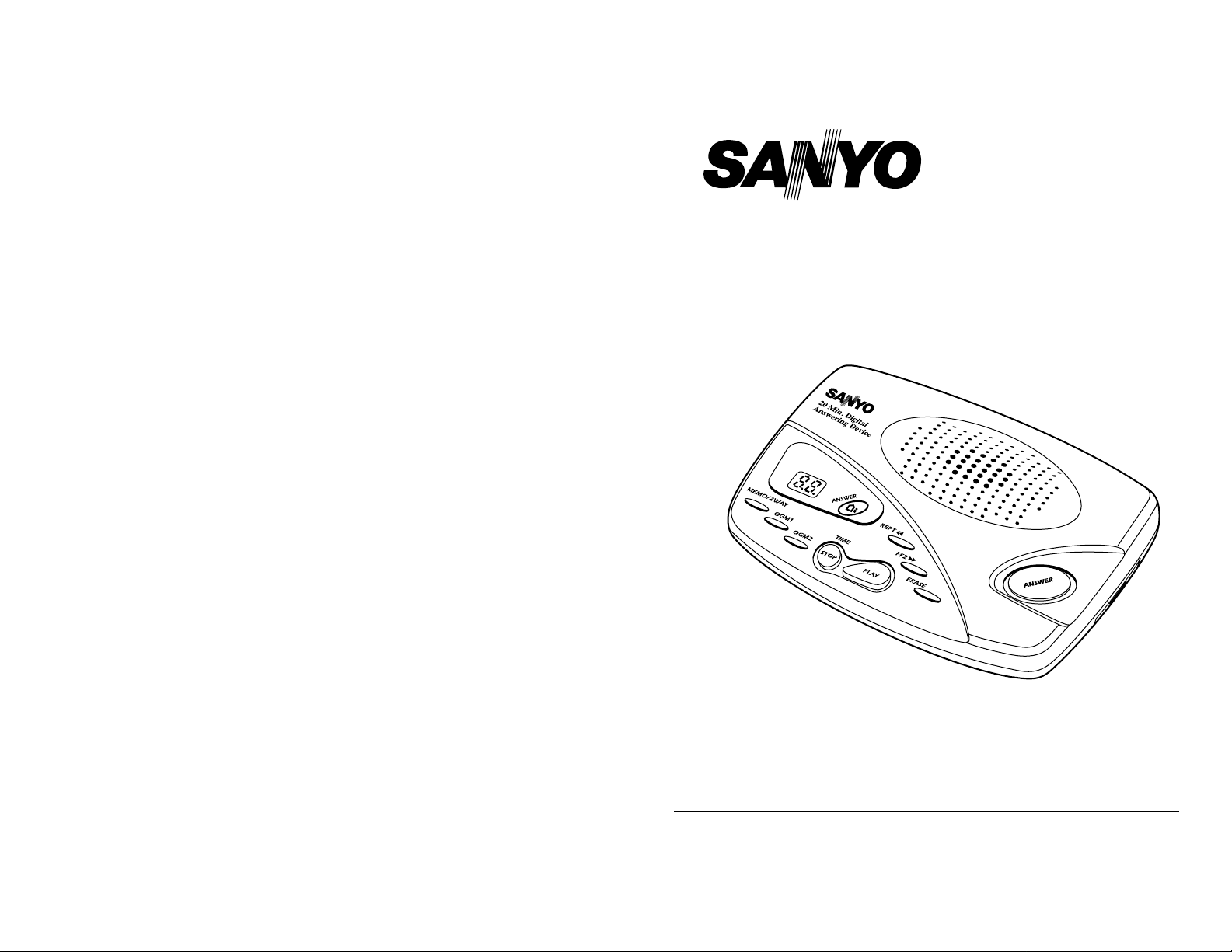
OWNER‘S INSTRUCTION MANUAL
Model DAS 201
Fully Digital Answering System
Please read this operation manual before using your
new telephone and keep it for further reference
Page 2

QUICK INSTRUCTIONS
• Setting the Time
– Press ‘STOP/TIME’ to enter the setting mode
– Then Press the FF Key or the REPT Key to adjust the Weekday
– Press ‘STOP/TIME’ again to set the Weekday
– Repeat to set Hours and Minutes
• Playing the Current Time
– Press
‘
STOP/TlME’
• Recording the Outgoing Message (OGM)
– Press ‘OGM1’
– Speak clearly into the microphone with your message
– Press ‘STOP/TIME’ to stop recording
– Repeat the process for ‘OGM2’
• Recording a Memo
– Press ‘MEMO/2WAY’ for 2 seconds
– Speak clearly into the microphone with your message
– Press ‘STOP/TIME’ to stop recording
• 2 Way Recording
– Press ‘MEMO/2WAY’ for 4 seconds
– Speak into your telephone in a normal fashion
– Press ‘STOP/TIME’ to stop recording
• Playing a Memo
– Press ‘MEMO/2WAY’
• Setting to Answer/Record Mode or Answer Only Mode
– If system is in Answer Only Mode, Press ‘ANSWER’ for about 2 seconds.
– The DAS 201 will beep and OGM1 will play.
– Repeat the process to return the system to ANSWER ONLY MODE.
– The DAS 201 will beep and OGM2 will play
• Playing Messages
1. Playback Press ‘PLAY’
2. Pause Message Press ‘PLAY’
3. Resume Playback from Pause Any one of the following keys will
resume Playback: PLAY/FF /
REPT /ERASE/STOP
2
QUICK INSTRUCTIONS CONT’D
4. Repeat Message Press ‘REPT ’ once to replay
current message, twice to replay
the previous message
5. Resume Playback from Pause Any one of the following keys will
resume Playback: PLAY/FF /
REPT /ERASE/STOP
6. Erase Single Message Press ‘ERASE’
7. Stop Playback Press ‘STOP/TIME’
8. Erase and Save ALL Messages Press and Hold ‘ERASE’ to erase
ALL Messages
To restore or save all messages,
Press and Hold ‘ERASE’ again.
• Security Code Remote Control
– Refer to “Remote Control Functions Table” on Page 11/12.
3
Page 3
4
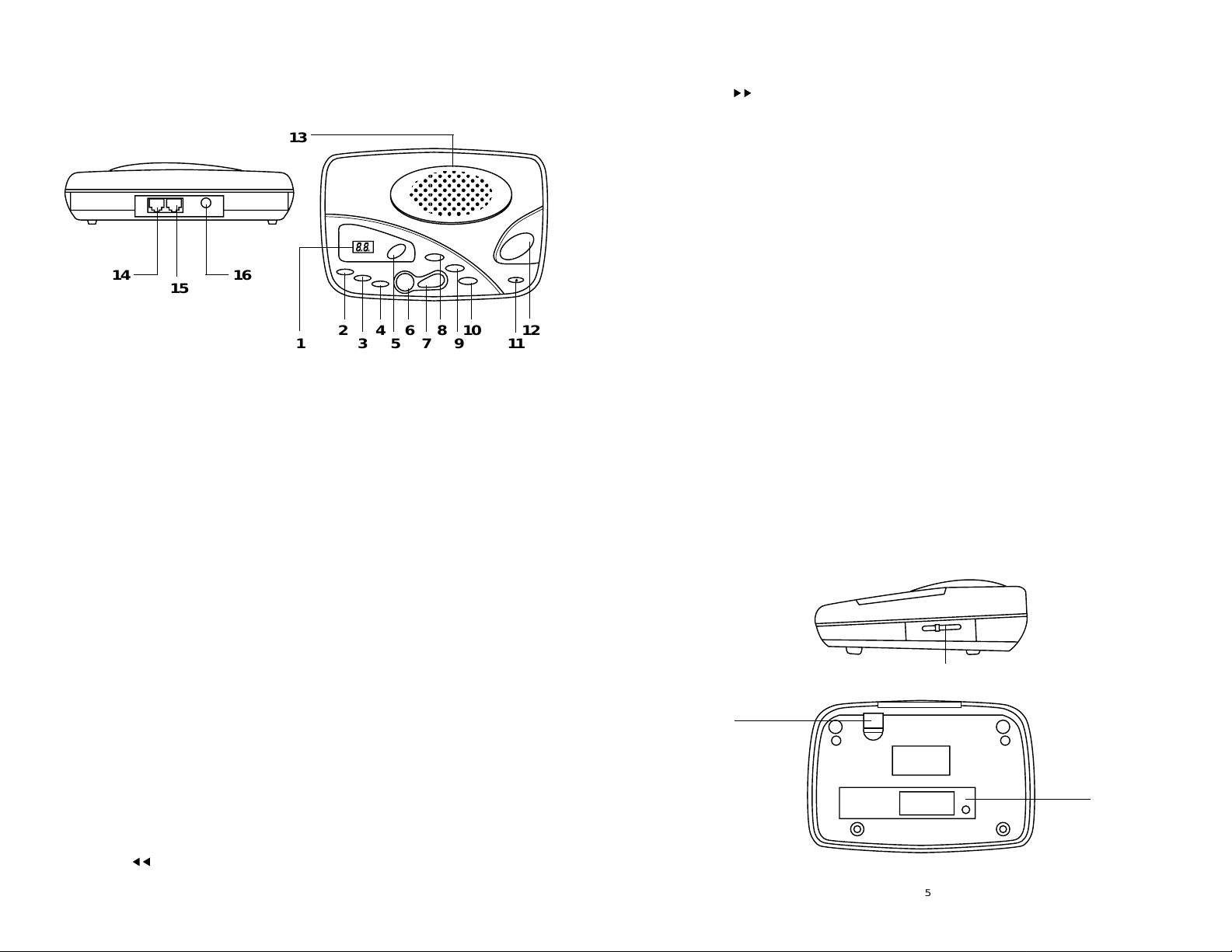
1. Message LED Indicator – Indicates the DAS 201 Answering Machine’s
current status.
• ‘A1’ or ‘A2’ flashes four times on the display to indicate that there is no
outgoing message (greeting) recorded.
• ‘CL’ flashes once on the display to indicate that the time is not set
• A ‘Number’ displayed before playing your messages back indicates the
total number of messages currently in the DAS-201’s Memory.
• A ‘Number’ displayed while playing your messages back indicates the
sequential number of the message currently being played.
2. MEMO/2WAYKey –Allows you to leave messages for other family members
when you leave the house. Also allows you to record both sides of a
conversation you are having on the telephone.
3/4. OGM1/OGM2 Keys –The DAS 201 allows you to record two outgoing
messages. OGM1 is a conventional message, and OGM2 is an “answer
only” message. The DAS 201 will automatically switch to the OGM2 message if your memory is full, and the unit is unable to take a message.
5. ANSWER LED Indicator – Lights up when the DAS 201 is ready to answer
calls.
6. STOP/TIME Key – Stops current operation, plus allows you to set
the time.
7. PLAY Key – Press to play recorded messages.
8. REPT Key – Repeats the previously played message.
LOCATION AND FUNCTION OF CONTROLS
14
15
16
1
2345678910
11
12
13
5
9. FF Key – Skips to the next sequential message.
10. ERASE Key – Can be used to erase a single message or all
messages in memory.
11. Microphone Hole – Used to record outgoing messages and memos.
12. ANSWER Key – Used to set the Answer Mode On or Off.
13. Speaker
14. MODULAR LINE JACK – Used to connect the DAS 201 to your household
phone jack.
15. MODULAR PHONE JACK – Used to connect the DAS 201 to
your telephone.
16. Adapter Receptacle – Used to connect the DAS 201 to the supplied DC
power adapter.
17. Volume Control (VOL) – Used to adjust the speaker volume.
18. BATTERY COVER – Houses the Memory Backup Batteries. (Batteries not
included)
19. Adapter Cord Holder – Prevents the DC adapter cord from
falling out. (Adapter not included)
17
19
18
REPT
MEMO/2WAY
OGM1
OGM2
FF
TIME
STOP
ERASE
PLAY
ANSWER
Page 4

6
Answering Machine
Telephone
AC Adapter
Line Cords
Fig. 3
Fig. 1 Fig. 2
INSTALLATION
1. The DAS 201 includes a modular telephone line cord with a modular plug at
each end. Insert one plug into the LINE input jack on the DAS 201, and the
other end into your household telephone jack (Fig.1). You may have to unplug
your telephone to do this.
2.To use a phone in the same area of the DAS 201, simply plug the telephone
into the TEL input jack on the DAS 201 (Fig. 2).
3.Connect the AC Power Adapter (DC9V 300mA) to any standard electrical
outlet (AC 110 V) and plug the other end into the DC power input jack on the
DAS 201 (Fig. 3). (AC power adapter included)
Battery Installation – Install the batteries for saving memory after the DAS 201
AC adaptor has been connected and the time / day has been programmed.
Installing the batteries before these procedure are done will not let you program
the time / day into the DAS 201.
If the battery power is low or batteries are not installed, the low battery icon
“Lo” will flash on the LCD display. You need to replace or install batteries
per instructions.
BATTERY INSTALLATION
Your DAS 201 Answering Machine is equipped with Battery Backup. In the event
of a power failure, the Battery Backup will prevent the loss of saved messages.
Please follow these simple instructions to install your batteries.
PLEASE READ BEFORE OPERATION
After plugging in the AC Adapter, the DAS 201 will automatically turn on, and the
LED will display the numbers 0 to 60. After about 60 seconds, you will hear a long
beep. The LED will then indicate the following.
1. A1 or A2 flashes four times indicating that there is no outgoing message
(greeting) recorded.
2. CL flashes once indicating that the DAS 201 time and date have not been
set up.
3. 0 flashes indicating there are no incoming messages in the memory.
4. If ER flashes once, this indicates that the DAS 201 needs to be reset. Please
disconnect the unit from power, and then re-connect it.
7
Unscrew the
Battery Cover
Remove the
Battery Cover
Insert 4 Fresh
‘AAA’ Batteries
as per the
Diagram.
Replace the
Battery Cover,
and Tighten the
Screw.
MNO
WXY
JKL
TUV
456
PRS
789
#
0
OPER
*
ABC DEF
123
GHI
Page 5

OPERATING INSTRUCTIONS
A. Setting the Timer
When the DAS 201’s LED displays ‘CL’, the timer needs to be set using the
following procedure
– Press the ‘STOP/TIME’ key for approximately 2 seconds, and release when
the DAS 201 announces the Weekday.
– Press the ‘FF ’key or the ‘REPT ’ key to select the correct day of
the week.
– Press the ‘STOP/TIME’ key again to set the Weekday and advance the
setting mode to the Hour setting.
– Repeat these steps for Hours and Minutes.
– After the Minutes are set, the exact time will be announced.
Note: If no key is pressed within 8 seconds, the DAS 201 will return to normal
mode.
B. Playing the Current Time
– Press the ‘STOP/TIME’ key for 1 second. The current time will be
announced.
C. Recording an Outgoing Message (OGM)
– OGM1 should be a conventional message, requesting the caller to leave a
message. Complete the following steps to record your OGM1 message:
• Press the ‘OGM1’ key and hold for approximately 2 seconds and release.
After a long beep, the LED will indicate ‘A1’, and then ‘0’.
• At the end of the beep, speak in a clear voice directly into the
microphone, which is located on the bottom right hand corner of the
DAS 201’s top panel.
• When you have completed your OGM1 message, press ‘STOP/TIME’.
• The LED will indicate ‘A1’, and the OGM1 message will playback.
• If you are satisfied with the message, press ‘STOP/TIME’.
• If you are not satisfied with the message, repeat this process and
rerecord your message.
– OGM2 should be an Answer-Only message. This is used when you prefer
not to take messages, and is automatically activated if the DAS 201’s
memory is full. To record an OGM2 message, follow the above instructions,
using the OGM2 button in place of the OGM1 button.
D. Playing your Outgoing Message (OGM)
– To play your OGM, simply press and release the ‘OGM1’, or ‘OGM2’
buttons. The OGM will play, and the DAS 201 will return to normal mode.
E. Recording a Memo
– The DAS 201’s Memo function allows you to leave a message for another
member of your business or household, when you are going to be away.
Complete the following steps to record your Memo message:
• Press the ‘MEMO/2WAY’ key, and hold it for approximately 2 seconds.
8
OPERATING INSTRUCTIONS CONT’D
After a short beep, the LED will display ‘00’.
• At this time, release the ‘MEMO/2WAY’ key. A long beep will sound, and
the unit will begin recording.
• At the end of the beep, speak in a clear voice, directly into the
microphone.
• Stop the recording by pressing the ‘STOP/TIME’ key.
F. Recording a Two-Way Conversation
– The DAS 201’s 2-Way Record function allows you to record important
conversations you have on the telephone. Complete the following steps to
use the 2-Way Record function:
• Press the ‘MEMO/2WAY’ key, and hold it for approximately 4 seconds.
• The LED will display ‘2R’ and 2-Way Recording will begin.
• At the end of your conversation, or when you wish to stop recording,
simply press the ‘STOP/TIME’ key.
G. Playing Memos and 2 Way Conversations
– To play these messages, press the ‘MEMO/2WAY’ key. Recordings will be
played in sequence.
H. Setting to Answer/Record Mode or Answer Only Mode
– Note: When power is on, system is always in either one of these 2 modes.
• If system is in Answer Only Mode, Press ‘ANSWER’for about 2 seconds.
• The DAS 201 will beep and OGM1 will play.
• The DAS 201 is now in Answer/Record Mode.
• Repeat the process to return the system to ANSWER ONLY MODE.
• The DAS 201 will beep and OGM2 will play
I. Ring and Toll Saver
– The DAS 201 will normally begin recording an incoming call after the sec-
ond ring. However, if there are no unplayed messages on the system, the
DAS 201 will not answer until after the fourth ring. This feature allows you to
call into your answering machine, and determine, without a toll, if there are
any unplayed messages on the system (i.e. If the phone rings three times,
there are no unplayed messages).
J. Recording Incoming Calls
– When the DAS 201 is in Answer/Record mode, it will answer the telephone
after the second (or fourth) ring, then will play your OGM1 message. At the
end of the OGM1 message a beep will sound, indicating to your caller that
they may begin speaking. The DAS 201 allows callers to leave a message.
At the end of the message, the DAS 201 will sound a long beep, indicating
that the recording time is over.
9
Page 6

OPERATING INSTRUCTIONS CONT’D
K. Playing All Messages
– The LED will display the total number of messages in the DAS 201’s
memory. The following details the playback procedures:
• Playback Press ‘PLAY’
• Pause Message Press ‘PLAY’
• Resume Playback from Pause Any one of the following
keys will resume Playback:
PLAY/FF /REPT /
ERASE/STOP
• Repeat Message Press ‘REPT ‘once to replay
current message, twice to
replay the previous message.
• Erase Single Message Press ‘ERASE’
• Stop Playback Press ‘STOP/TIME’
• Erase and Save ALL Messages Press and hold ‘ERASE’for
about 2 seconds. Along beep
will sound, and ALL messages
will be erased. To RESTORE all
messages, Press and hold
‘ERASE’ again for about 2
seconds. Along beep will sound
and messages will be restored.
L. Call Screen
– The DAS 201 can be used to screen incoming calls. Simply set the unit to
Answer mode by pressing the ‘ANSWER’ key. When an incoming call
occurs, adjust the volume control so that you can hear the incoming caller
leaving their message. If you wish to speak to the caller, simply pick up the
receiver. The DAS 201 will automatically stop recording.
M. Remote Control Security Code
– The Security Code is set to a factory default of ‘159’. This code can be
changed to any number between 000 and 999. To change your security
code perform the following steps:
• Press the FF key for approximately 2 seconds and release to display
the current security code. The DAS 201 will then display the first digit of
the security code. Use the FF and the REPT to increase or
decrease the number of the first digit. Once you have arrived at the
desired number, press the ‘ANSWER’ key to confirm your selection.
• Repeat the process for the second and third digits.
• If no key is pressed within 8 seconds, the setup procedure will
be aborted.
• When complete, press the ‘STOP/TIME’ key to conclude the procedure.
10
N. Call Breakthrough (CBT)
– The DAS 201 is equipped to alert you to an Urgent call. With CBT, incom-
ing callers who know your CBT code will have the ability to bypass the
Outgoing message and cause the DAS 201 to sound a short alarm. This is
designed to alert you to an Urgent call, if you are home screening your calls.
The CBT code has a factory default of ‘267’. This code can be changed to
any
number between 000 and 999. To change your CBT code perform the
following steps:
• Press the REPT key for approximately 2 seconds and release to
display the current CBT code. The DAS 201 will then display the
first digit of the CBT code. Use the FF and the REPT keys to
increase or decrease the number of the first digit. Once you have arrived
at the desired number, press the ‘ANSWER’key to confirm your selection.
• Repeat the process for the second and third digits.
• If no key is pressed within 8 seconds, the setup procedure will
be aborted.
• When complete, press the ‘STOP/TIME’ key to conclude the procedure.
O. Remote Control Function Operation
– The DAS 201 allows you to perform many of its functions from a remote
telephone. To perform these remote functions, just follow these
simple steps:
• Call the Answering Machine.
• When the machine answers press ‘*’ to skip the OGM. A long beep
will sound.
• Enter the security code (factory default ‘159’) to enter the Remote Control
Mode.
• Enter the key combination for the desired function as per the
following table:
KEY(S) REMOTE FUNCTION
*
Skip OGM Play
1 Play OGM1
2 Play OGM2
3 Room Monitoring (listens to room DAS 201 is in)
4 Repeat or Play Memos
5 Play All Messages or Pause/Play
6 Forward or Play New Messages
7 Erase Individual Messages
8 Stop or Save All Messages
9 Set to Answering Machine OFF Mode
11
OPERATING INSTRUCTIONS CONT’D
Page 7

OPERATING INSTRUCTIONS CONT’D
O. Remote Control Function Operation (cont’d)
KEY(S) REMOTE FUNCTION
*1 Record OGM1
*2 Record OGM2
*3 Record a Memo
*4 Change CBT Code
6 Change Security Code
*7 Erase Ail Messages
*8 Set to ANSWER ONLY Mode
* Set to ANSWER/RECORD Mode
# End Remote Operation
P. Call Breakthrough Operation (CBT)
– To alert someone to an Urgent Call in the area that the DAS 201 is being
used, follow these steps.
• Call the Answering Machine
• When the DAS 201 answers, press ‘*’ to skip the OGM.
• When the OGM stops, enter the CBT Code (factory default ‘267’)
• A two-beep alarm tone sounds on the DAS 201, indicating an Urgent Call.
The user can then simply pick up the phone to end the tone and take
the call.
• The CBT tone ends after 45 seconds. At that time the DAS 201 switches
into ANSWER/RECORD mode, and the you can leave a message.
• In ANSWER ONLY mode, the call is terminated after the 45 seconds.
• If, during your call, you wish to terminate the CBT function, press the
‘#’ key. If you wish to reactivate CBT, press the ‘6’key.
12
TROUBLESHOOTING GUIDE
1 Will not operate Are the power supply and telephone line
cords plugged into the DAS 201 and the
appropriate power/telephone jacks of your
residence/business?
2 LED indicator lights are off Is the phone line cord or power supply
properly plugged in?
3 Cannot turn on Answer key Have you recorded an outgoing message
(OGM1/OGM2)?
4 Will not record the Incoming Is your memory full? The DAS 201 will
message record up to 20 minutes of messages
5 Cannot operate remote Is your security code correct?
control
6 Cannot play the current Does the clock need to be set or reset?
tlme
7 Cannot hear message/ Have you checked to ensure a proper
Playbacks very loud volume setting is made?
8 LED indicates “88” or Please unplug unit and plug it back in. This
number of keys will not resets the DAS 201.
operate
Page 8

THE CANADIAN INDUSTRY STATEMENT
“Notice: To ensure Industry Canada label identifies certified equipment. This
certification means that the equipment meets certain telecommunications
network protective, operational and safety requirements. Industry Canada does
not guarantee the equipment will operate to the user’s satisfaction.
Before installing this equipment, users should ensure that it is permissible to be
connected to the facilities of the local telecommunications company. The
equipment must also be installed using an acceptable method of connections.
The customer should be aware that compliance with the above conditions may
not prevent degradation of service in some situations.
Repairs to certified equipment should be made by an authorized Canadian
maintenance facility designated by the supplier. Any repairs or alterations made
by the user to this equipment, or equipment malfunctions, may give the telec
ommunications company cause to request the user to disconnect
the equipment.”
CAUTION: “Users should not attempt to make such connections themselves, but
should contact the appropriate electric inspection authority, or electrician, as
appropriate.”
“Notice: The Ringer Equivalence Number (REN) assigned to each terminal
device provides an indication of the maximum number of terminals allowed to be
connected to a telephone interface. The termination on an interface may consist
of any combination of devices subject only to the requirement that the sum of the
Ringer Equivalence Numbers of all the devices does not exceed 5.”
The REN assigned to this device is 0.3.
14
CARE
• Keep the unit dry.
• Handle the TAD carefully. Do not drop it.
• Do not use or store the TAD in temperature extremes.
• Keep the TAD away from dust and dirt.
• Do not modify or tamper with the TAD’s internal components. Doing so might
invalidate the TAD’s warranty and void your Industry Canada authorization to
operate it. If the trouble is harming the TAD lines, the phone company might
ask you to disconnect the TAD until you fix the problem .
15
IMPORTANT SAFETY INSTRUCTIONS
When using your answering machine, basic safety precautions should always be
followed to reduce the risk of fire, electric shock and injury to persons, including
the following:
1. Do not use this product near water, for example, near a bath tub, wash bowl,
kitchen sink or laundry tub, in a wet basement or near a swimming pool.
2. Use only the batteries indicated in the manual. Do not dispose of batteries in
a fire. They may explode. Check with local codes for possible special
disposal instructions.
Save these instructions
Page 9

16
WARRANTY APPLICATION
New, unused Sanyo Communications products purchased in Canada through a Sanyo Authorized
Dealer are warranted against manufacturing defects in materials and workmanship for ONE
YEAR covering parts and labour, from the date of purchase by the original retail purchaser. This
warranty only applies in favour of the original retail purchaser of the warranted product.
SANYO CANADA INC.’S RESPONSIBILITY
During the warranty period, SANYO Canada Inc. will repair, or at our option, replace a
Communications product which shows evidence of a manufacturing defect in materials or
workmanship. Replacement PARTS are warranted for the remaining portion of the
warranty period.
WHAT IS NOT COVERED
(a) Communications products purchased outside Canada.
(b) Communications products purchased in a used condition.
(c) Problems due to product set-up and installation.
(d) Adjustments that are outlined in the Operating Manual.
(e) Accessory items including antenna, and batteries,
(f) Damage in or due to transportation.
(g) Damage due to improper maintenance, accident, abuse, misuse or negligence.
(h) Damage caused by lightning and power surges.
ORIGINAL RETAIL PURCHASER’S RESPONSIBILITY
You, the original retail purchaser, must present your original, dated bill-of-sale together with this
warranty to SANYO Canada Inc. or to an authorized Sanyo Service Depot when you make a
claim under this warranty.
You, the original retail purchaser, are responsible for any costs of TRANSPORTING the product
to and from SANYO Canada Inc. or an authorized Sanyo Service Depot. You also are
responsible for the cost of any MAINTENANCE necessary in respect of the product.
WARRANTY BECOMES VOID
This warranty becomes void if the product’s serial numbers are altered or removed or if any repair
to the product is made other than by SANYO Canada Inc. or by an authorized Sanyo Service
Depot.
LIMITATIONS
(a). SANYO Canada Inc. reserves the right to change or improve the design of the model of
the product warranted hereunder without incurring any obligation to make any
modifications to or to install any improvement in or on the product.
(b). In no event shall SANYO Canada Inc. or any of its Authorized Dealers be liable for special
or consequential damage arising from the use of this product.
STATUTORY WARRANTIES
The above provisions do not preclude the operation of any applicable provincial statute which in
certain circumstances may not allow some of the limitations and exclusions described in this
Warranty. Where any terms of this Warranty are prohibited by such a statute, they shall be
deemed null and void but the remainder of this warranty shall remain in effect.
HOW TO OBTAIN WARRANTY SERVICE
Please contact the Sanyo Authorized Dealer from whom the product was purchased, or contact
us directly at:
SANYO Canada Inc.
300 Applewood Cres.
Concord, Ont. L4K 5C7
(905) 760-9944
1-800-263-2244
99/06
 Loading...