

Page 1
Thank you for purchasing this Samsung product.
To receive more complete service, please register your product at www.samsung.com
Model Serial No.
USER MANUAL
7 SERIES
Questo manuale d’istruzione è fornito da trovaprezzi.it. Scopri tutte le offerte per Samsung RU7450
55" (UE55RU7450UXZT)
o cerca il tuo prodotto tra le migliori offerte di Televisori
Page 2
Before Reading This User Manual
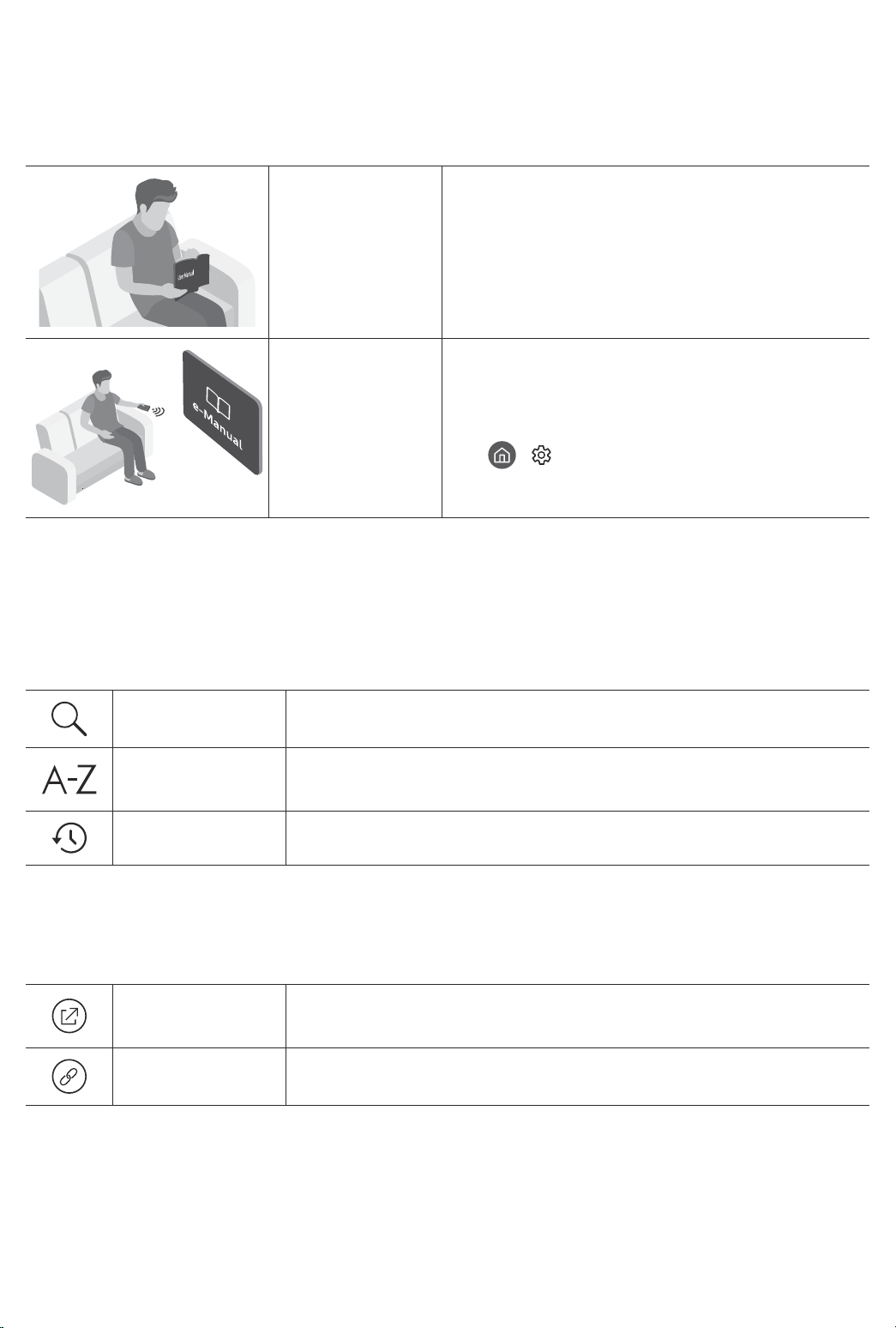
This TV comes with this user manual and an embedded e-Manual.
Before reading this user manual, review the following:
User Manual
e-Manual
On the website (www.samsung.com), you can download the manuals and see its contents on your PC or mobile
device.
Read this provided user manual to see information
about product safety, installation, accessories,
initial configuration, and product specifications.
For more information about this TV, read the
e-Manual embedded in the product.
• To open the e-Manual,
> Settings > Support > Open e-Manual
Learning the e-Manual's assistance functions
• Some menu screens cannot be accessed from the e-Manual.
Search
Index
Recent pages
Select an item from the search results to load the corresponding page.
Select a keyword to navigate to the relevant page.
– The menus may not appear depending on the geographical area.
Select a topic from the list of recently viewed topics.
Learning the functions of the buttons that appear on e-Manual topic
pages
Try Now
Link
Allows you to access the corresponding menu item and try out the feature
right away.
Access an underlined topic referred to on an e-Manual page immediately.
English - 2
Page 3
Warning! Important Safety Instructions
Please read the Safety Instructions before using your TV.
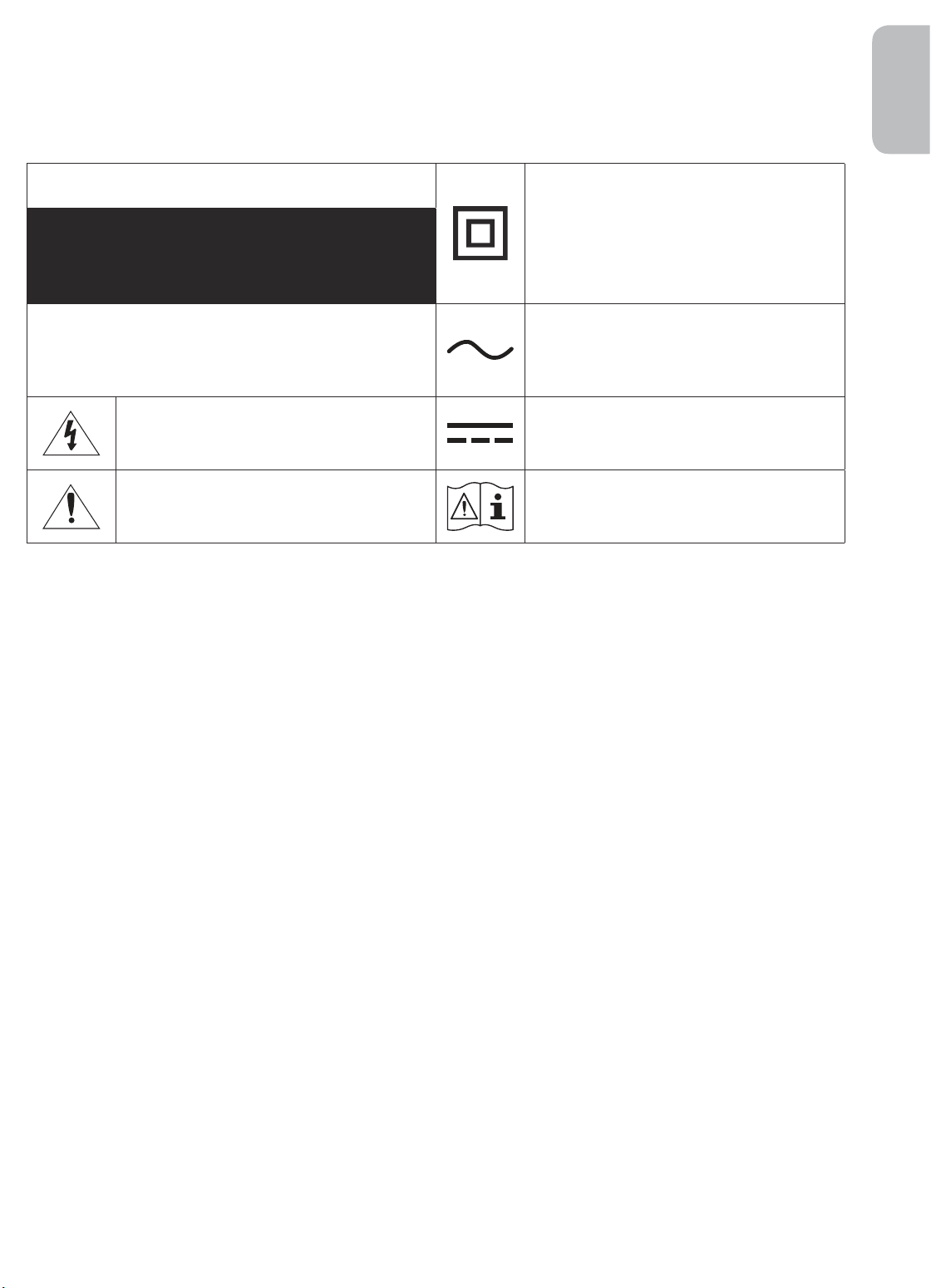
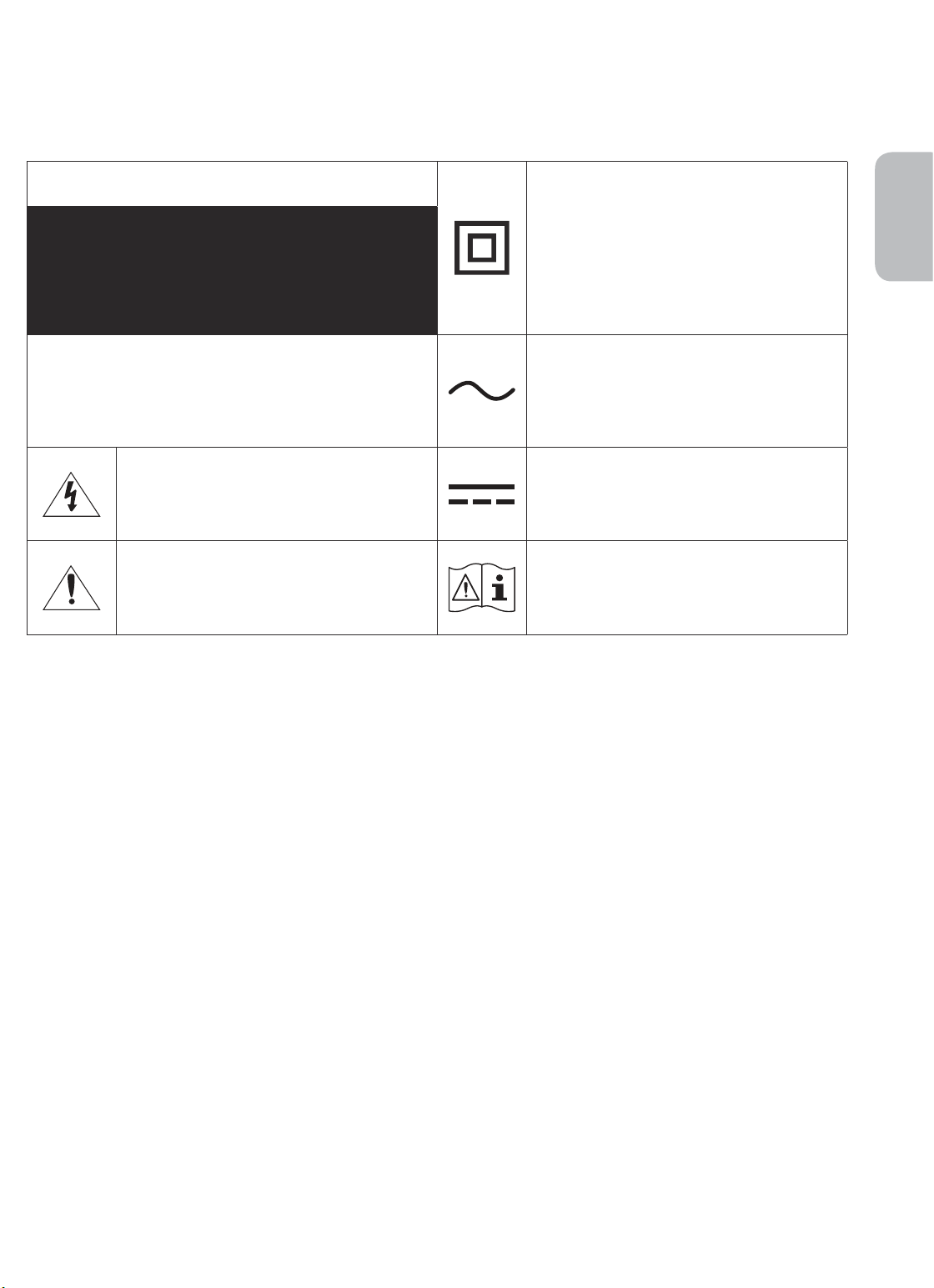
Refer to the table below for an explanation of symbols which may be on your Samsung product.
English
CAUTION
RISK OF ELECTRIC SHOCK. DO NOT OPEN.
CAUTION: TO REDUCE THE RISK OF ELECTRIC SHOCK, DO
NOT REMOVE COVER (OR BACK). THERE ARE NO USER
SERVICEABLE PARTS INSIDE. REFER ALL SERVICING TO
QUALIFIED PERSONNEL.
This symbol indicates that high voltage is
present inside. It is dangerous to make any kind
of contact with any internal part of this product.
This symbol indicates that this product has
included important literature concerning
operation and maintenance.
Class II product: This symbol indicates that a
safety connection to electrical earth (ground)
is not required. If this symbol is not present on
a product with a mains lead, the product MUST
have a reliable connection to protective earth
(ground).
AC voltage: Rated voltage marked with this
symbol is AC voltage.
DC voltage: Rated voltage marked with this
symbol is DC voltage.
Caution. Consult instructions for use: This
symbol instructs the user to consult the user
manual for further safety related information.
• The slots and openings in the cabinet and in the back or bottom are provided for necessary ventilation. To
ensure reliable operation of this apparatus and to protect it from overheating, these slots and openings
must never be blocked or covered.
– Do not place this apparatus in a confined space, such as a bookcase or built-in cabinet, unless proper
ventilation is provided.
– Do not place this apparatus near or over a radiator or heat register, or where it is exposed to direct
sunlight.
– Do not place vessels (vases etc.) containing water on this apparatus, as this can result in a fire or
electric shock.
• Do not expose this apparatus to rain or place it near water (near a bathtub, washbowl, kitchen sink, or
laundry tub, in a wet basement, or near a swimming pool, etc.). If this apparatus accidentally gets wet,
unplug it and contact an authorised dealer immediately.
• This apparatus uses batteries. In your community, there might be environmental regulations that require
you to dispose of these batteries properly. Please contact your local authorities for disposal or recycling
information.
• Do not overload wall outlets, extension cords, or adaptors beyond their capacity, since this can result in fire
or electric shock.
• Power-supply cords should be placed so that they are not likely to be walked on or pinched by items placed
upon or against them. Pay particular attention to cords at the plug end, at wall outlets, and at the point
where they exit from the appliance.
English - 3
Page 4

• To protect this apparatus from a lightning storm, or when left unattended and unused for long periods of
time, unplug it from the wall outlet and disconnect the antenna or cable system. This will prevent damage
to the set due to lightning and power line surges.
• Before connecting the AC power cord to the DC adaptor outlet, make sure that the voltage designation of
the DC adaptor corresponds to the local electrical supply.
• Never insert anything metallic into the open parts of this apparatus. This may cause a danger of electric
shock.
• To avoid electric shock, never touch the inside of this apparatus. Only a qualified technician should open
this apparatus.
• Be sure to plug in the power cord until it is firmly seated. When unplugging the power cord from a wall
outlet, always pull on the power cord's plug. Never unplug it by pulling on the power cord. Do not touch the
power cord with wet hands.
• If this apparatus does not operate normally - in particular, if there are any unusual sounds or smells coming
from it - unplug it immediately and contact an authorised dealer or Samsung service centre.
• Be sure to pull the power plug out of the outlet if the TV is to remain unused or if you are going to leave the
house for an extended period of time (especially when children, elderly, or disabled people will be left alone
in the house).
– Accumulated dust can cause an electric shock, an electric leakage, or a fire by causing the power cord
to generate sparks and heat or by causing the insulation to deteriorate.
• Be sure to contact an authorised Samsung service centre for information if you intend to install your TV in
a location with heavy dust, high or low temperatures, high humidity, chemical substances, or where it will
operate 24 hours a day such as in an airport, a train station, etc. Failure to do so may lead to serious damage
to your TV.
• Use only a properly grounded plug and wall outlet.
– An improper ground may cause electric shock or equipment damage. (Class l Equipment only.)
• To turn off this apparatus completely, disconnect it from the wall outlet. To ensure you can unplug this
apparatus quickly if necessary, make sure that the wall outlet and power plug are readily accessible.
• Store the accessories (batteries, etc.) in a location safely out of the reach of children.
• Do not drop or strike the product. If the product is damaged, disconnect the power cord and contact a
Samsung service centre.
• To clean this apparatus, unplug the power cord from the wall outlet and wipe the product with a soft, dry
cloth. Do not use any chemicals such as wax, benzene, alcohol, thinners, insecticide, aerial fresheners,
lubricants, or detergents. These chemicals can damage the appearance of the TV or erase the printing on
the product.
• Do not expose this apparatus to dripping or splashing.
• Do not dispose of batteries in a fire.
• Do not short-circuit, disassemble, or overheat the batteries.
• There is danger of an explosion if you replace the batteries used in the remote with the wrong type of
battery. Replace only with the same or equivalent type.
* Figures and illustrations in this User Manual are provided for reference only and may differ from the actual
product appearance. Product design and specifications may change without notice.
CIS languages (Russian, Ukrainian, Kazakhs) are not available for this product, since this is manufactured for
customers in EU region.
English - 4
Page 5
Contents
Before Reading This User Manual ---------------------------------------------------------------------------- 2
Warning! Important Safety Instructions
01 What's in the Box?
02 TV Installation
Mounting the TV on a wall
Providing proper ventilation for your TV
Safety Precaution: Securing the TV to the wall to
prevent falling
---------------------------------------------------------------------------- 9
---------------------------------------------------------------------------- 7
03 The Samsung Smart Remote
About the Buttons on the Samsung Smart Remote
Pairing the TV to the Samsung Smart Remote
Installing batteries into the Samsung Smart Remote
---------------------------------------------------------------------------- 3
---------------------------------------------------------------------------- 8
English
---------------------------------------------------------------------------- 10
---------------------------------------------------------------------------- 11
---------------------------------------------------------------------------- 11
04 Running the Initial Setup
Using the TV Controller
---------------------------------------------------------------------------- 12
05 Connecting to a Network
Network Connection - Wireless
Network Connection - Wired
---------------------------------------------------------------------------- 13
---------------------------------------------------------------------------- 13
06 Troubleshooting and Maintenance
Troubleshooting
What is Remote Support?
Eco Sensor and screen brightness
Caring for the TV
---------------------------------------------------------------------------- 14
---------------------------------------------------------------------------- 16
---------------------------------------------------------------------------- 16
---------------------------------------------------------------------------- 17
07 Specifications and Other Information
Specifications
Environmental Considerations
Decreasing power consumption
Licences
---------------------------------------------------------------------------- 18
---------------------------------------------------------------------------- 18
---------------------------------------------------------------------------- 19
---------------------------------------------------------------------------- 19
English - 5
Page 6
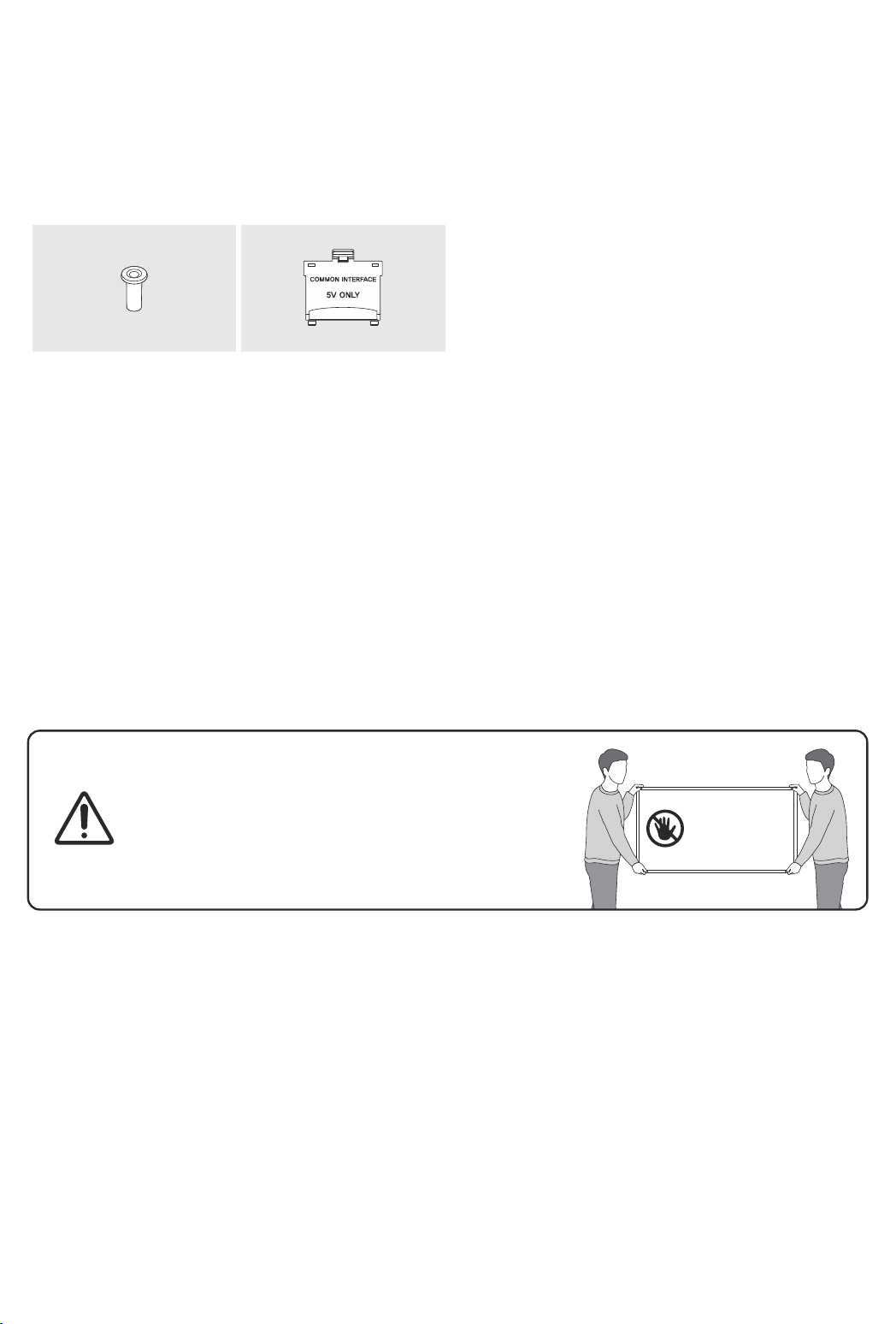
01 What's in the Box?
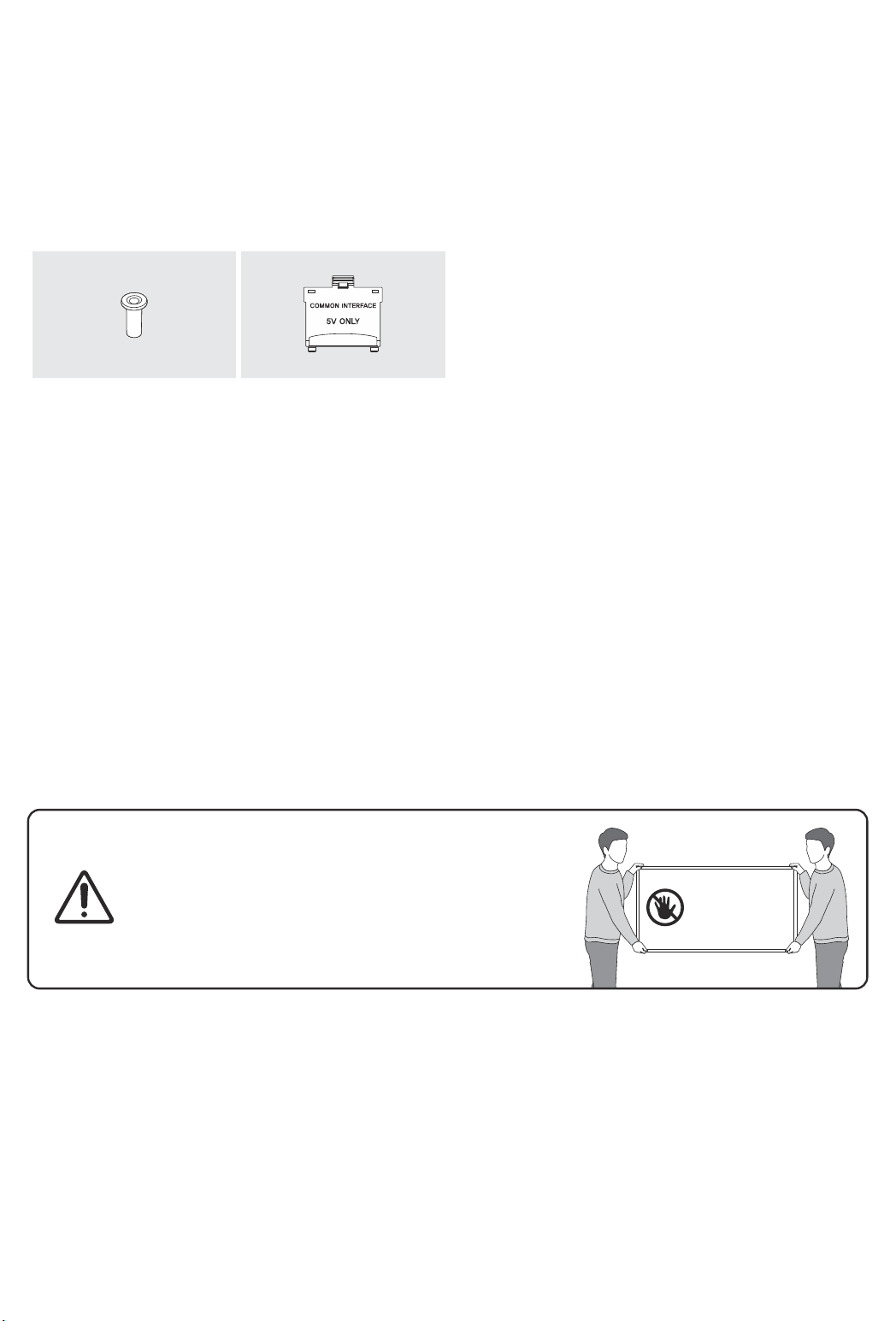
Make sure the following items are included with your TV. If any items are missing, contact your dealer.
• Samsung Smart Remote & Batteries (AAA x 2)
• User Manual
x 4
Wall Mount Adapter CI Card Adapter
• The items’ colours and shapes may vary depending on the models.
• Cables not included can be purchased separately.
• Check for any accessories hidden behind or in the packing materials when opening the box.
An administration fee may be charged in the following situations:
(a) An engineer is called out at your request, but it is found that the product has no defect (i.e., where the
user manual has not been read).
(b) You bring the unit to a Samsung service centre, but it is found that the product has no defect (i.e., where
the user manual has not been read).
You will be informed of the administration fee amount before a technician visits.
• Warranty Card / Regulatory Guide (Not available in
some locations)
• TV Power Cable
Warning: Screens can be damaged from direct pressure
when handled incorrectly. We recommend lifting the
TV at the edges, as shown.
Do Not Touch
This Screen!
English - 6
Page 7
02 TV Installation
Mounting the TV on a wall
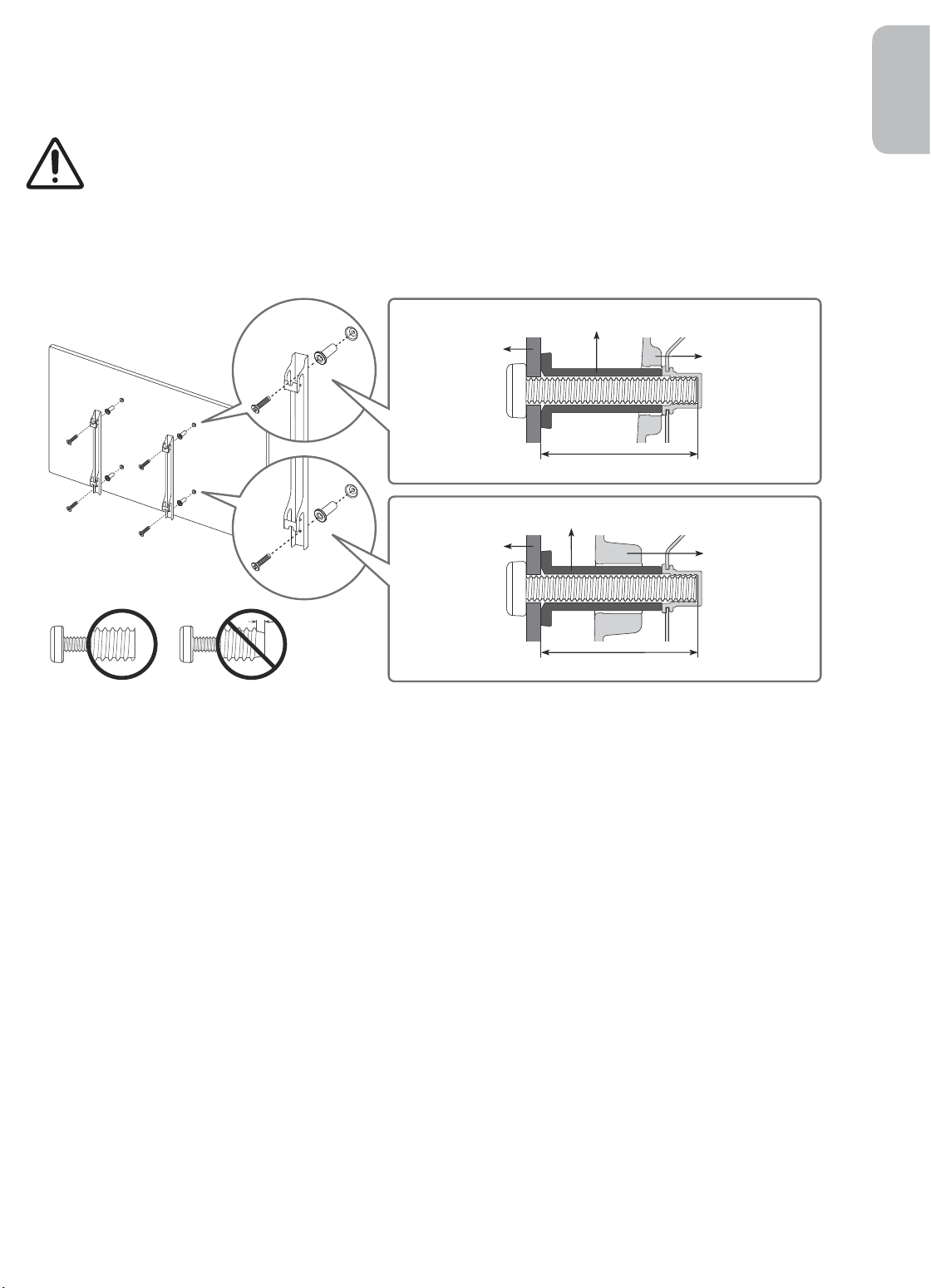
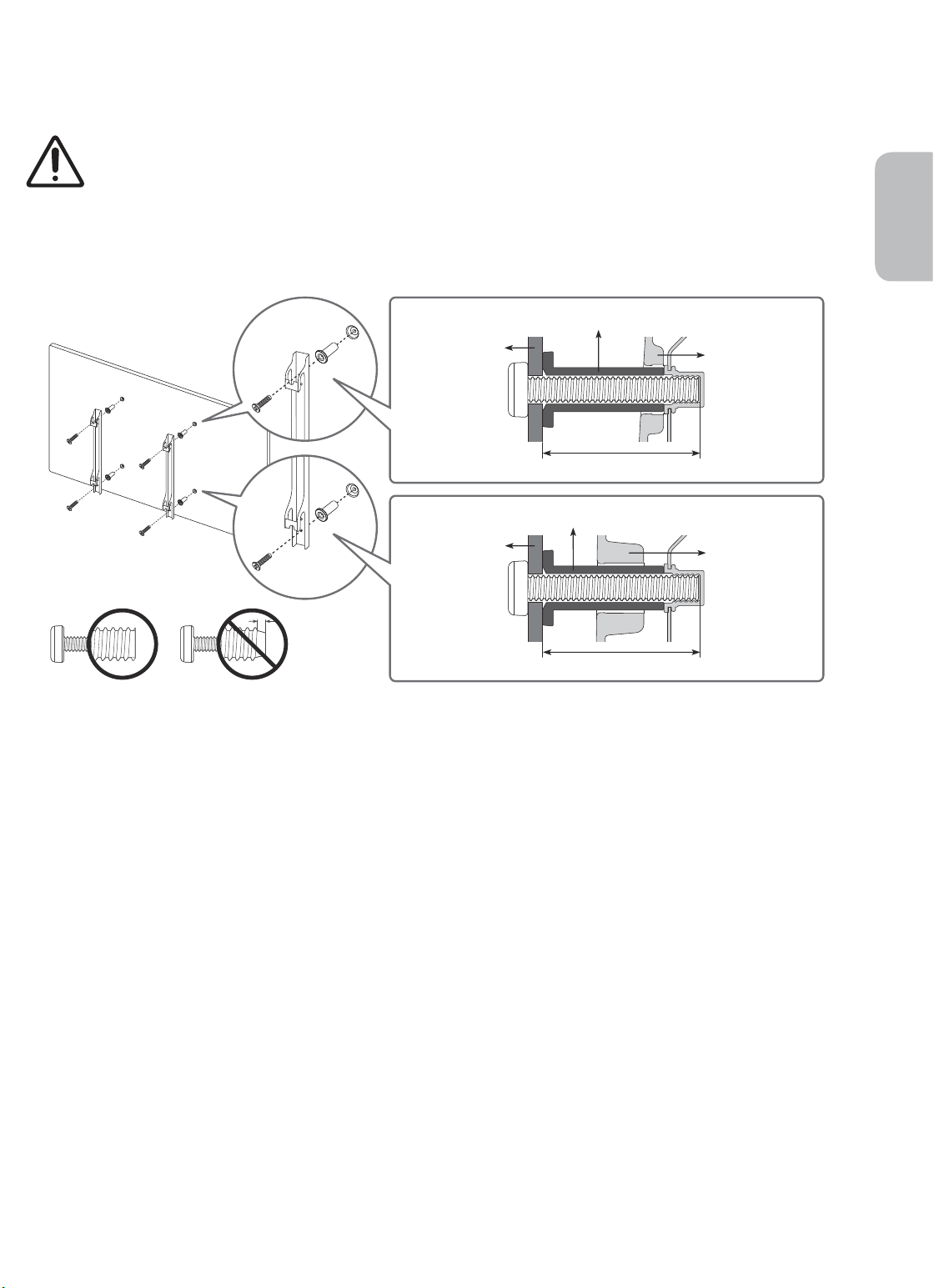
If you mount this TV on a wall, follow the instructions exactly as set out by the manufacturer. Unless
it is correctly mounted, the TV may slide or fall and cause serious injury to a child or adult and
serious damage to the TV.
For models providing wall mount adapters, install them as shown in the figure below before installing the wall
mount kit.
• Refer to the installation manual included with the Samsung wall mount kit.
Wall mount Adapter
English
Wall mount
bracket
C
Wall mount Adapter
Wall mount
bracket
C
• Samsung Electronics is not responsible for any damage to the product or injury to yourself or others if you
choose to install the wall mount on your own.
• You can install your wall mount on a solid wall perpendicular to the floor. Before attaching the wall mount
to surfaces other than plaster board, contact your nearest dealer for additional information. If you install
the TV on a ceiling or slanted wall, it may fall and result in severe personal injury.
• Standard dimensions for wall mount kits are shown in the table on the next page.
• If you are installing a third-party wall mount, note that the length of the screws you can use to attach the
TV to the wall mount is shown in column C in the table on the next page.
• When installing a wall mount kit, we recommend you fasten all four VESA screws.
• If you want to install a wall mount kit that attaches to the wall using two top screws only, be sure to use a
Samsung wall mount kit that supports this type of installation. (You may not be able to purchase this type
of wall mount kit, depending on the geographical region.)
TV
TV
English - 7
Page 8
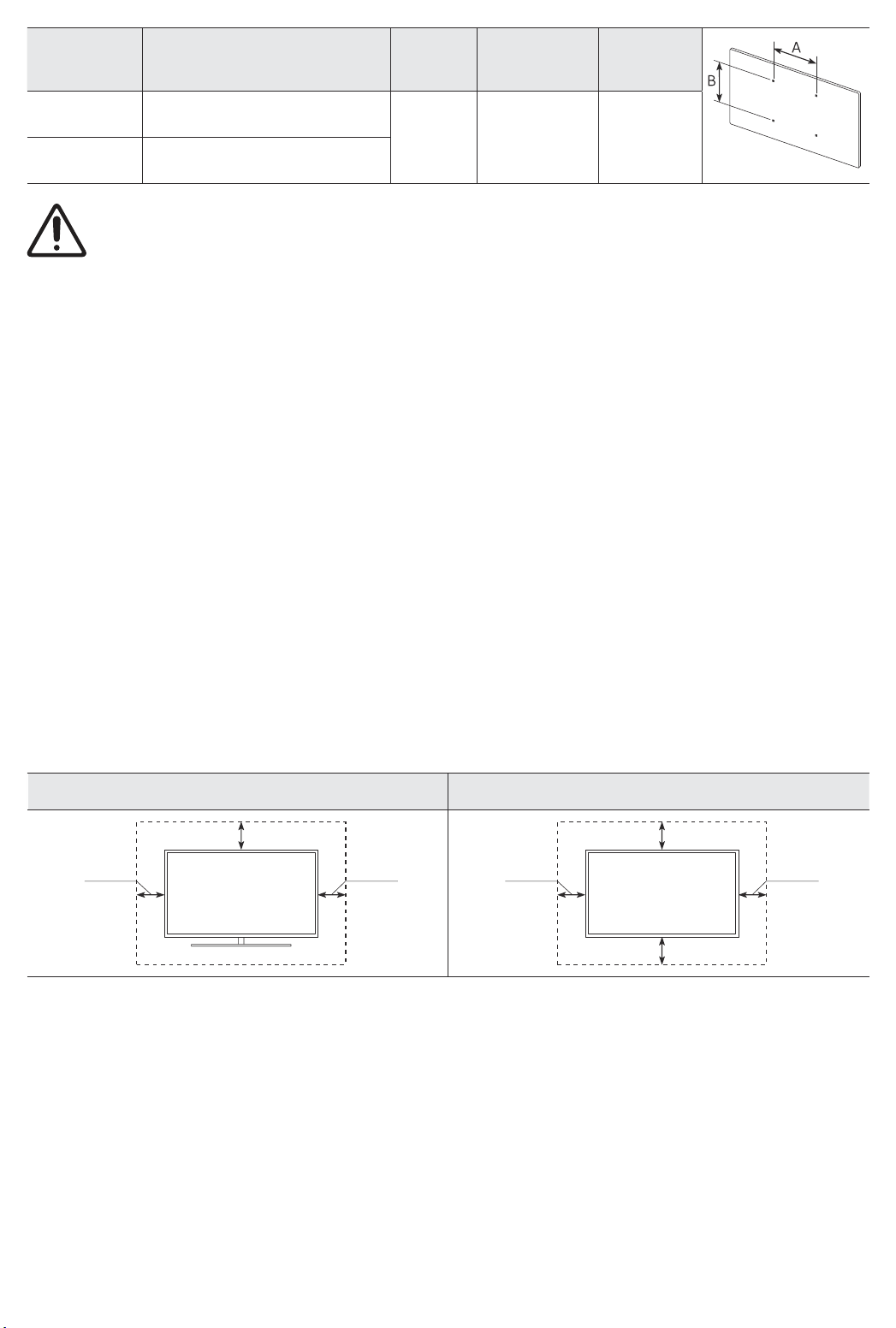
TV size in
inches
43-55 200 x 200
65 400 x 400
• Do not use screws that are longer than the standard dimension or do not comply with the VESA standard
screw specifications. Screws that are too long may cause damage to the inside of the TV set.
• For wall mounts that do not comply with the VESA standard screw specifications, the length of the screws
may differ depending on the wall mount specifications.
• Do not fasten the screws too firmly. This may damage the product or cause the product to fall, leading to
personal injury. Samsung is not liable for these kinds of accidents.
• Samsung is not liable for product damage or personal injury when a non-VESA or non-specified wall mount
is used or when the consumer fails to follow the product installation instructions.
• Do not mount the TV at more than a 15 degree tilt.
• Always have two people mount the TV onto a wall.
VESA screw hole specs (A * B)
in millimetres
Do not install your wall mount kit while your TV is turned on. This may result in personal injury from
electric shock.
C (mm)
43-45 M8 4
Standard
Screw
Quantity
Providing proper ventilation for your TV
When you install your TV, maintain a distance of at least 10 cm between the TV with other objects (walls,
cabinet sides, etc.) to ensure proper ventilation. Failing to maintain proper ventilation may result in a fire or a
problem with the product caused by an increase in its internal temperature.
• When you install your TV with a stand or a wall mount, we strongly recommend you use parts provided by
Samsung Electronics only. Using parts provided by another manufacturer may cause difficulties with the
product or result in injury caused by the product falling.
Installation with a stand Installation with a wall mount
10 cm
10 cm10 cm
10 cm
10 cm10 cm
10 cm
English - 8
Page 9
Safety Precaution: Securing the TV to the wall to prevent falling
Caution: Pulling, pushing, or climbing on the TV may cause the TV to fall. In particular,
ensure your children do not hang on or destabilise the TV. This action may cause the TV
to tip over, causing serious injuries or death. Follow all safety precautions provided in the
Safety Flyer included with your TV. For added stability and safety, you can purchase and
install the anti-fall device as described below.
WARNING: Never place a television set in an unstable location. The television set may fall, causing
serious personal injury or death. Many injuries, particularly to children, can be avoided by taking
simple precautions such as:
• Using cabinets or stands recommended by the manufacturer of the television set.
• Only using furniture that can safely support the television set.
• Ensuring the television set is not overhanging the edge of the supporting furniture.
• Not placing the television set on tall furniture (for example, cupboards or bookcases) without
anchoring both the furniture and the television set to a suitable support.
• Not placing the television set on cloth or other materials that may be located between the
television set and supporting furniture.
• Educating children about the dangers of climbing on furniture to reach the television set or its
controls.
If you are retaining and relocating the television set that you are replacing with this new set, you
should apply the same precautions to the old set.
English
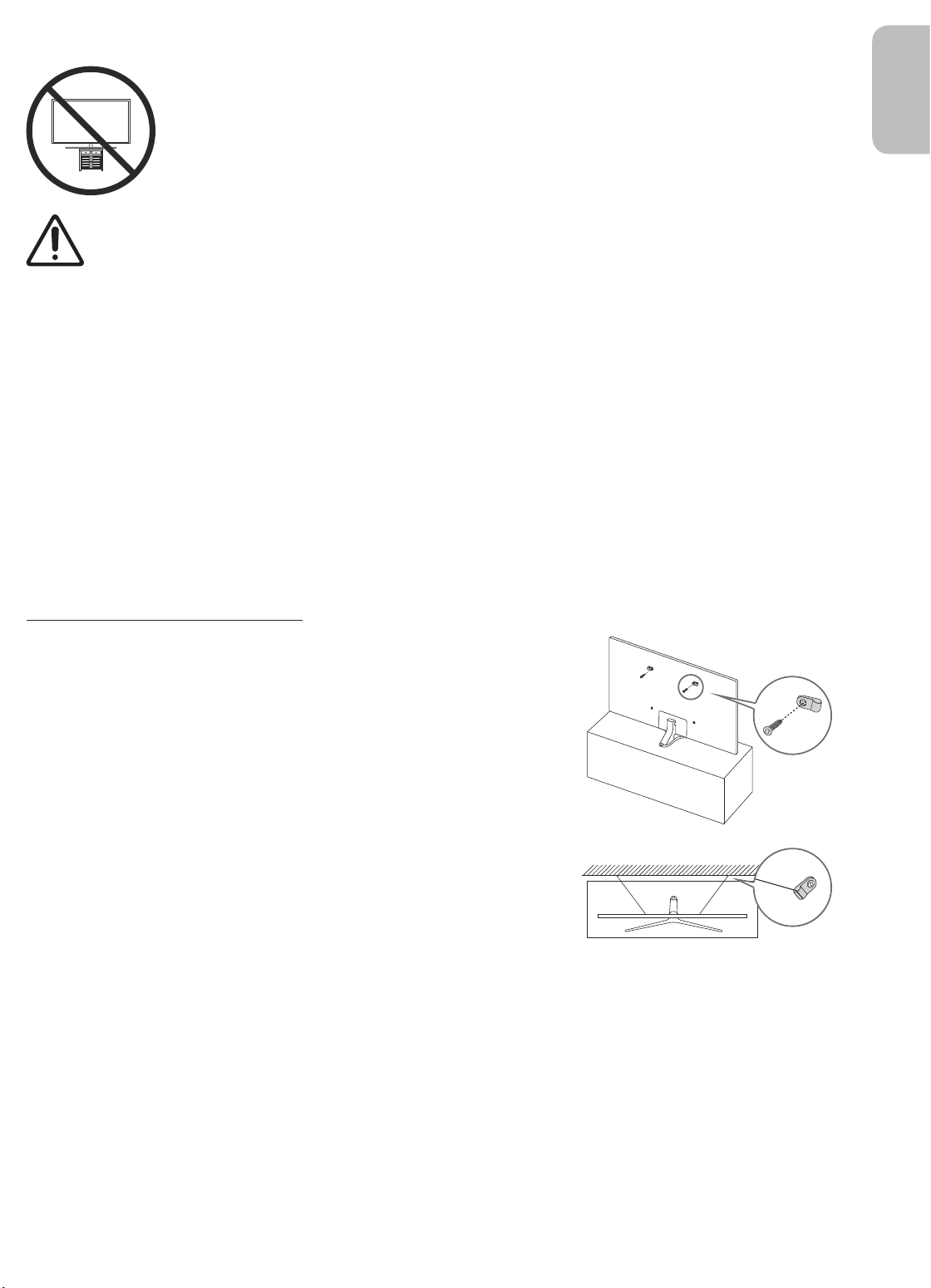
Preventing the TV from falling
1. Using the appropriate screws, firmly fasten a set of brackets to the
wall. Confirm that the screws are firmly attached to the wall.
– You may need additional material such as wall anchors
depending on the type of wall.
2. Using the appropriately sized screws, firmly fasten a set of brackets
to the TV.
– For the screw specifications, refer to the standard screw part in
the table under "Mounting the TV on a wall".
3. Connect the brackets fixed to the TV and the brackets fixed to the
wall with a durable, heavy-duty string, and then tie the string tightly.
– Install the TV near the wall so that it does not fall backwards.
– Connect the string so that the brackets fixed to the wall are at
the same height as or lower than the brackets fixed to the TV.
• The product colour and shape
may vary depending on the
model.
English - 9
Page 10
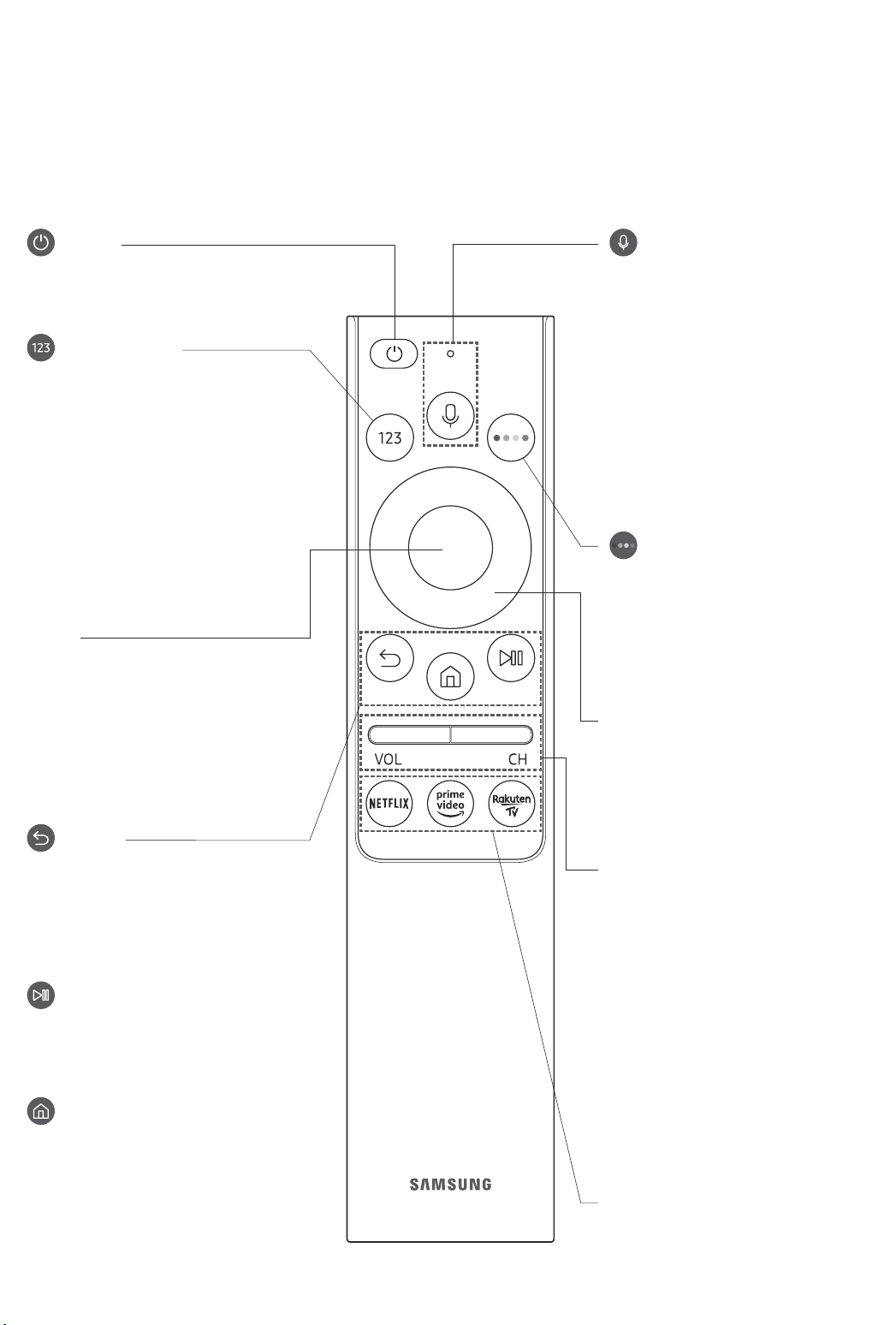
03 The Samsung Smart Remote
About the Buttons on the Samsung Smart Remote
• The images, buttons, and functions of the Samsung Smart Remote may differ depending on the model.
• The Universal Remote function operates normally only when you use the Samsung Smart Remote that
comes with the TV.
(Power)
Press to turn the TV on or off.
(Number button)
When pressed, a number strip appears
on the bottom of the screen. Select
numbers and then select Done to enter
a numeric value. Use to change the
channel, enter a PIN, enter a ZIP code,
etc.
• When pressed for 1 second or more,
the TTX menu appears.
Select
Selects or runs a focused item. When
pressed while you are watching a
broadcast programme, detailed
programme information appears.
(Bixby)
Runs Bixby. Press and hold the button,
say a command, and then release the
button to run Bixby.
When you press the button, the Explore
Now menu appears at the bottom of the
screen.
• The supported Bixby's languages
and features may differ by
geographical region.
(Colour button)
Use these coloured buttons to access
additional options specific to the feature
you are using.
Directional pad (up/down/left/right)
Moves the focus and changes the values
seen on the TV's menu.
(Return)
Returns to the previous menu. When
pressed for 1 second or more, the
running function is terminated. When
pressed while you are watching a
programme, the previous channel
appears.
(Play/pause)
When pressed, the playback controls
appear. Using these controls, you
can control the media content that is
playing.
(Smart Hub)
Returns to the Home Screen.
English - 10
VOL (Volume)
Move the button up or down to adjust
the volume. To mute the sound, press
the button. When pressed for 1 second or
more, the Accessibility Shortcuts menu
appears.
CH (Channel)
Move the button up or down to change
the channel. To see the Guide screen,
press the button.
• When pressed for 1 second or more,
the Channel List screen appears.
Press each button to run its function.
Page 11
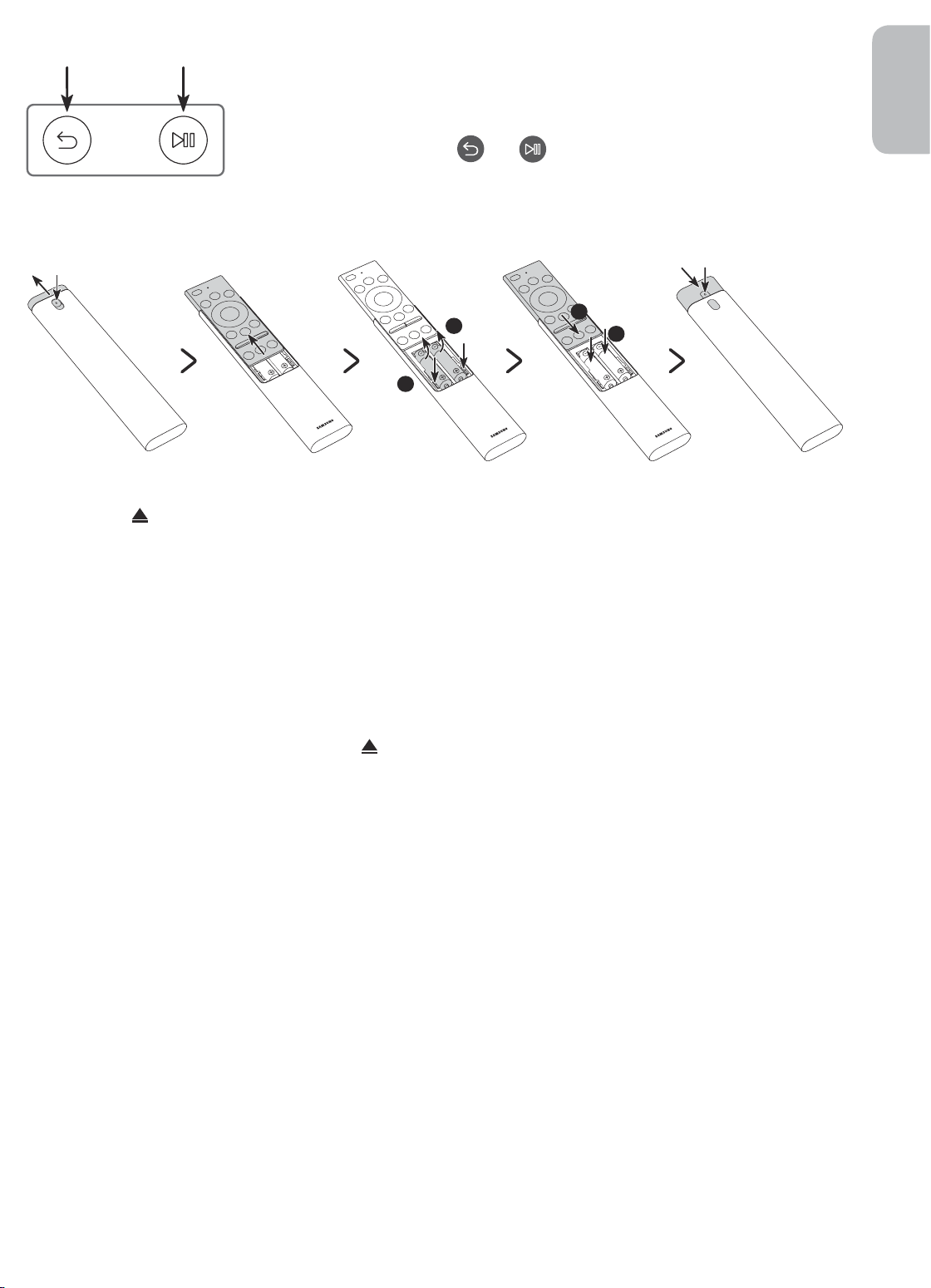
Pairing the TV to the Samsung Smart Remote
When you turn on the TV for the first time, the Samsung Smart Remote pairs
to the TV automatically. If the Samsung Smart Remote does not pair to the TV
automatically, point it at the remote control sensor of the TV, and then press
and hold the buttons labelled
simultaneously for 3 seconds or more.
and as shown in the figure on the left
Installing batteries into the Samsung Smart Remote
English
2
1
1. Press the button at the top rear of the Samsung Smart Remote. The body will pop out slightly from the
body cover.
2. Turn the remote over, and then slide the body of the remote upwards until the battery compartment is
revealed.
3. If there are batteries in the remote, press the r and l buttons on both sides of the battery compartment to
remove the existing batteries.
4. Insert two new batteries (1.5V AAA type) into the battery compartment making sure that the batteries'
polarities (+, -) are oriented correctly. When done, slide the body of the remote until it is nearly in its
original position.
5. Turn the remote over, press and hold the button on the top rear, and then slide the body of the remote
down into place.
• Alkaline batteries are recommended for longer battery life.
2
1
English - 11
Page 12
04 Running the Initial Setup
When you turn on your TV for the first time, it immediately starts the Initial Setup. The Initial Setup allows you
to configure the basic settings for the TV to operate, such as broadcast reception, channel search, and network
connection, at one time.
• Before starting the Initial Setup, be sure to connect external devices first.
• To use the TV's smart features, the TV must be connected to the Internet.
• To perform Initial Setup using the SmartThings app, you must connect your mobile device via Wi-Fi.
• If the pop-up for setup does not appear automatically in the SmartThings app on your mobile device,
continue setup manually after adding the TV using Add Device on the dashboard of the SmartThings app.
• The SmartThings app is available for mobile devices running Android 6.0 or higher or iOS 10 or higher.
• Noise may occur temporarily when the TV communicates with mobile devices.
You can also start the Initial Setup using the TV's menu (
Follow the instructions displayed on the Initial Setup screen and configure the TV's basic settings to suit your
viewing environment.
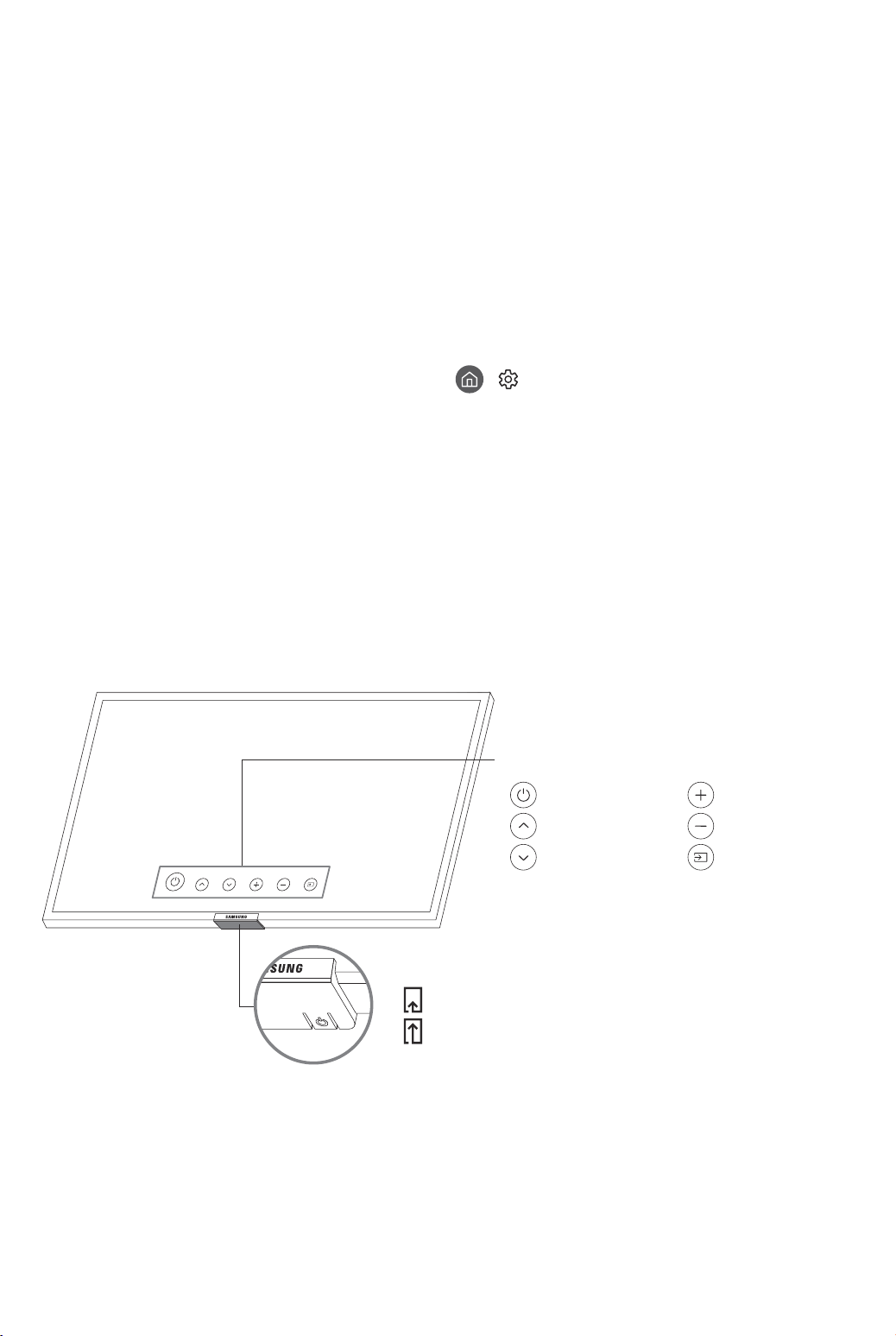
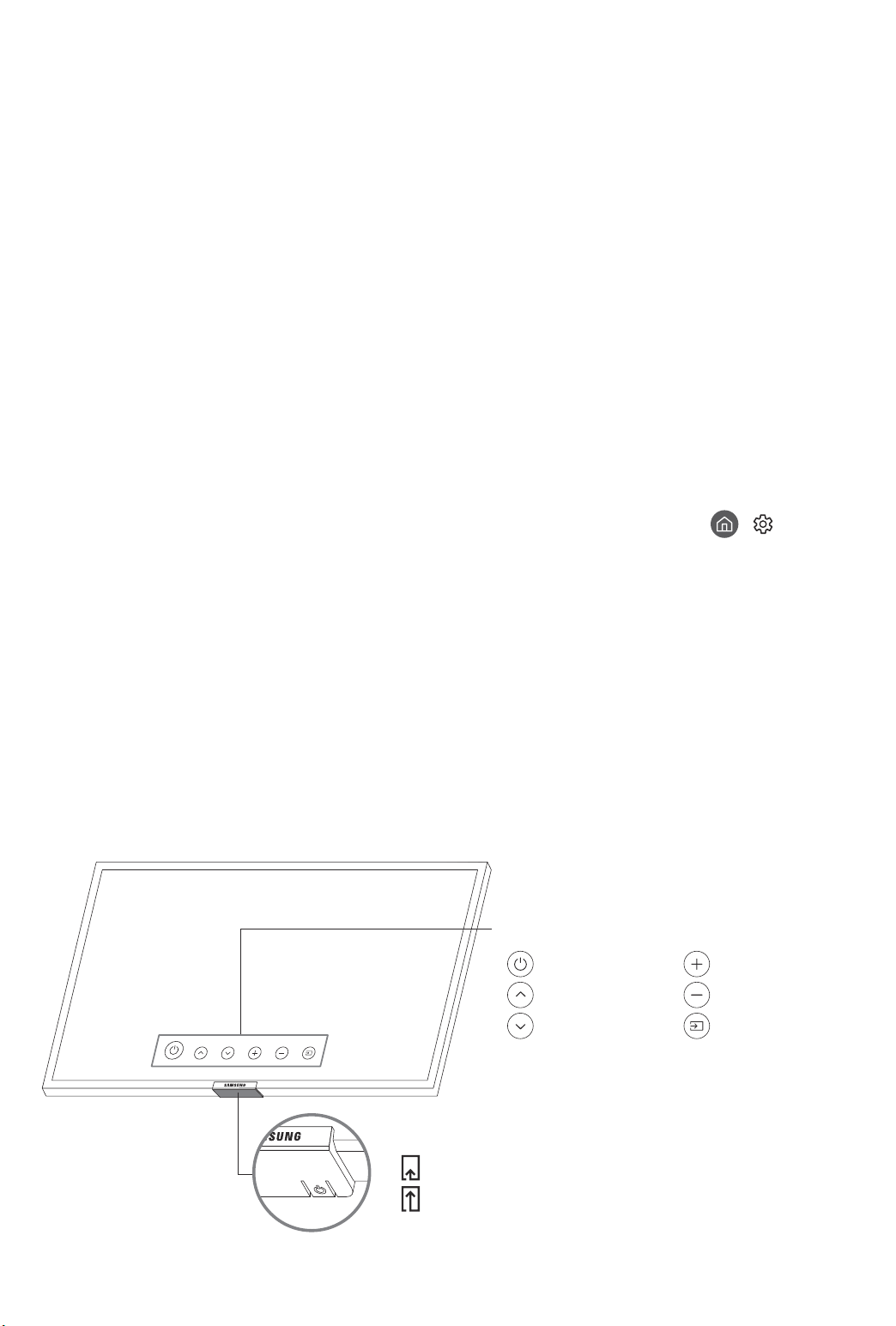
Using the TV Controller
You can turn on the TV with the TV Controller button at the bottom of the TV, and then use the Control menu.
The Control menu appears when the TV Controller button is pressed while the TV is On. For more information
about its usage, refer to the figure below.
• The screen may dim if the protective film on the SAMSUNG logo or the bottom of the TV is not detached.
Please remove the protective film.
> Settings > General > Reset).
Control menu
:
Power off
:
Channel Up
:
Channel Down
TV Controller button / Remote control sensor
Press: Move
Press & Hold: Select
The TV Controller button is located on the bottom of the TV.
:
Volume Up
:
Volume Down
:
Source
English - 12
Page 13
05 Connecting to a Network
Connecting the TV to a network gives you access to online services, such as Smart Hub, as well as software
updates.
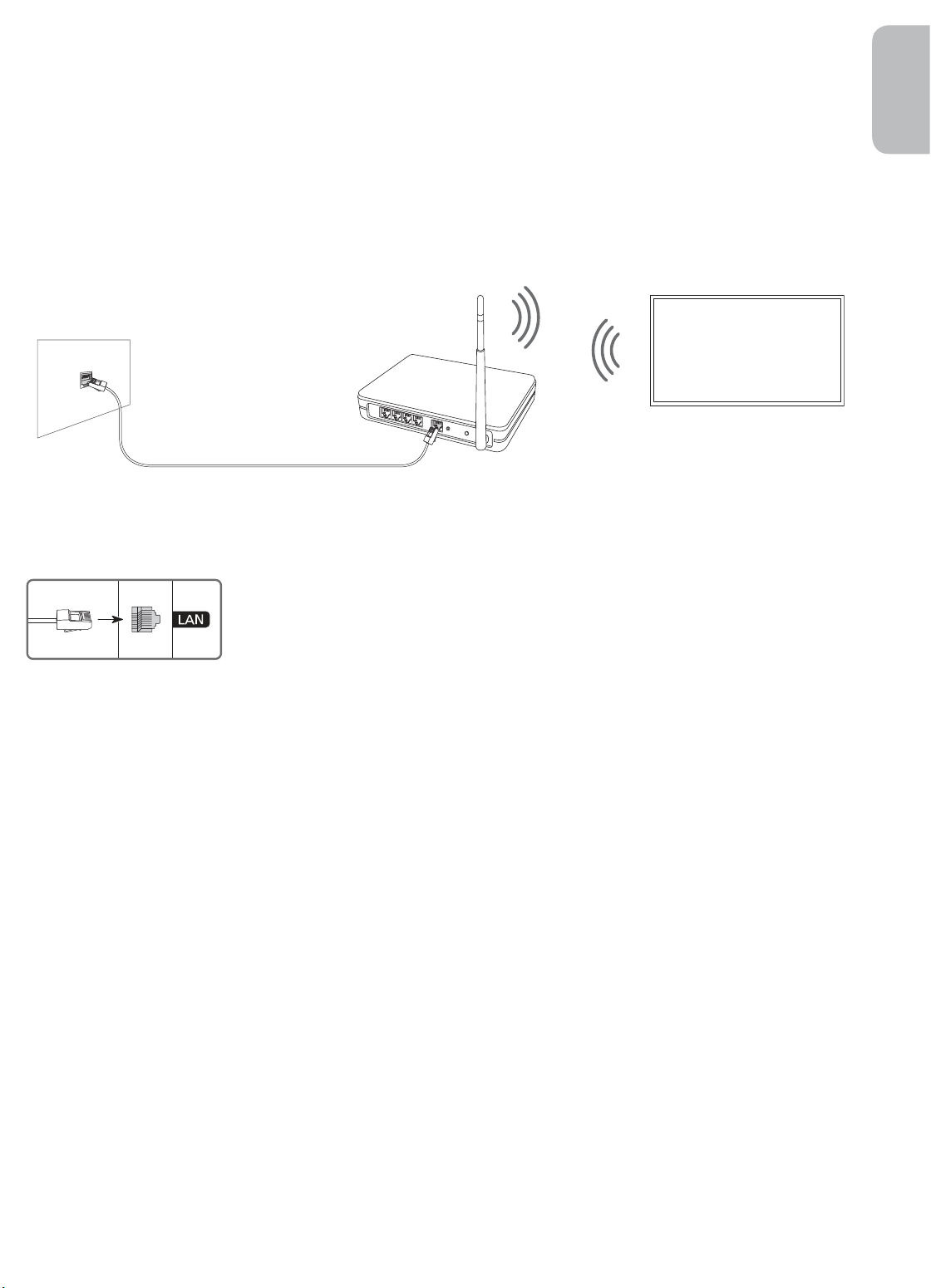
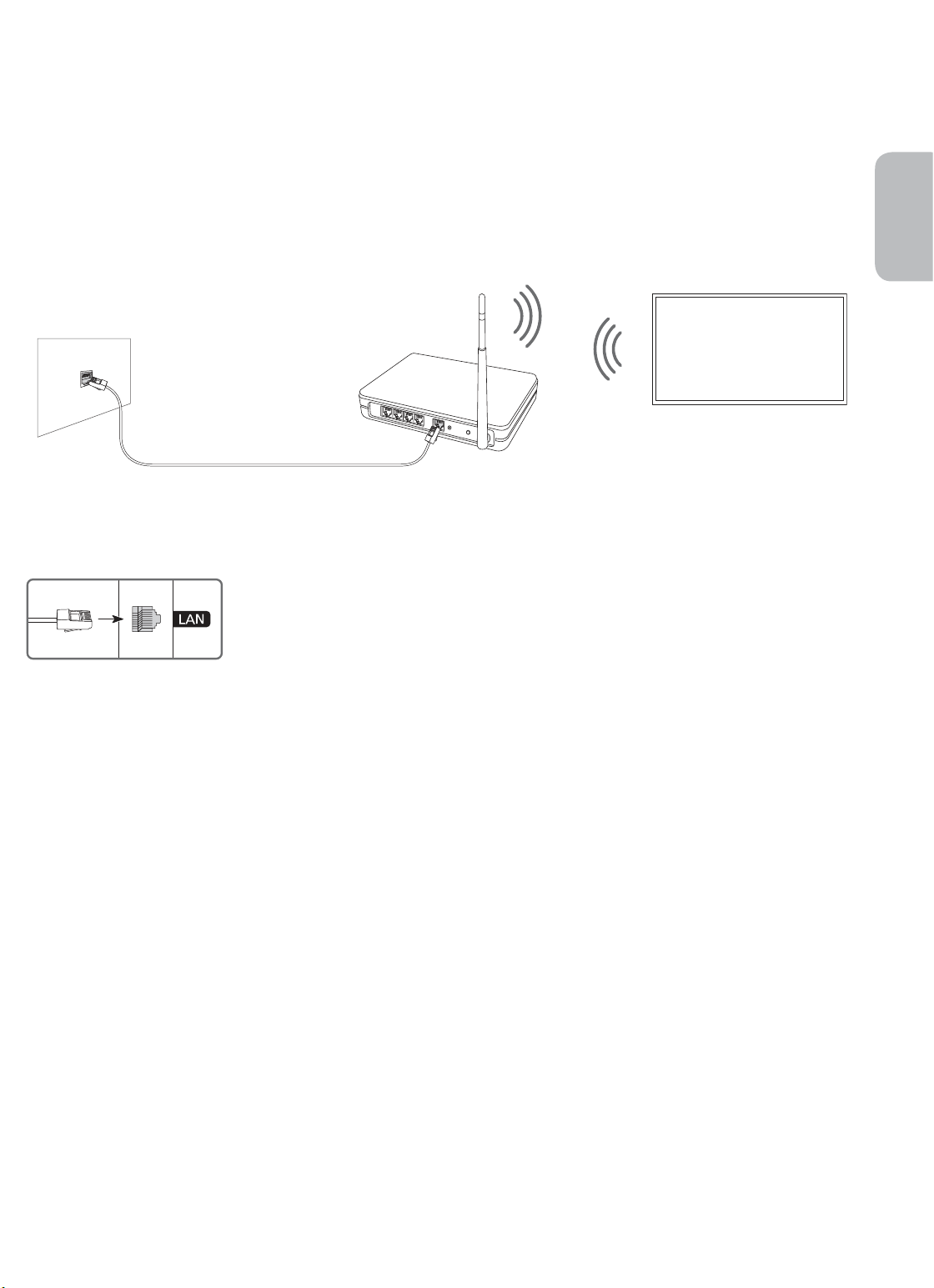
Network Connection - Wireless
Connect the TV to the Internet using a standard access point or modem.
Wireless IP access point or
The LAN Port on the Wall
LAN Cable (Not Supplied)
modem with a DHCP Server
English
Network Connection - Wired
Connect your TV to the network using a LAN cable.
• The TV will not be able to connect to the Internet if your network speed is
below 10 Mbps.
• Use Cat7 (*STP Type) cable for the connection.
* Shielded Twisted Pair
English - 13
Page 14
06 Troubleshooting and Maintenance
Troubleshooting
If the TV seems to have a problem, first review this list of possible problems and solutions. Alternatively, review
the Troubleshooting Section in the e-Manual. If none of these troubleshooting tips apply, please visit “www.
samsung.com” and click on Support, or contact the Samsung service centre listed on the back cover of this
manual.
• This TFT LED panel is made up of sub pixels which require sophisticated technology to produce. There may
be, however, a few bright or dark pixels on the screen. These pixels will have no impact on the performance
of the product.
• To keep your TV in optimum condition, upgrade to the latest software. Use the Update Now or Auto update
functions on the TV's menu (
The TV won’t turn on.
• Make sure that the AC power cord is securely plugged in to the TV and the wall outlet.
• Make sure that the wall outlet is working and the power indicator at the bottom of the TV is lit and glowing
a solid red.
• Try pressing the TV Controller button at the bottom of the TV to make sure that the problem is not with the
remote control. If the TV turns on, refer to “The remote control does not work”.
> Settings > Support > Software Update > Update Now or Auto update).
There is no picture/video/sound, or a distorted picture/video/sound from an external
device, or “Weak or No Signal” is displayed on the TV, or you cannot find a channel.
• Make sure the connection to the device is correct and that all cables are fully inserted.
• Remove and reconnect all cables connected to the TV and the external devices. Try new cables if possible.
• Confirm that the correct input source has been selected (
• Perform a TV self diagnosis to determine if the problem is caused by the TV or the device (
> Support > Self Diagnosis > Start Picture Test or Start Sound Test).
• If the test results are normal, reboot the connected devices by unplugging each device's power cord and
then plugging it in again. If the issue persists, refer to the connection guide in the user manual of the
connected device.
• If you are not using a cable box or satellite box, and your TV is receiving TV signals from an antenna or a
cable wall connector, run Auto Tuning to search for channels (
Tuning Settings) > Auto Tuning).
– The Auto Tuning Settings may not appear depending on the model or geographical area.
– If you are using a cable box or satellite box, please refer to the cable box or satellite box manual.
> Source).
> Settings
> Settings > Broadcasting > (Auto
English - 14
Page 15
The CI+ does not work.
• Your Samsung TV conforms to the CI+ 1.4 standards.
• Where a CI+ Common Interface module is incompatible with this device, then please remove the module
and contact the CI+ operator for assistance.
The remote control does not work.
• Check if the power indicator at the bottom of the TV blinks when you press the remote's Power button. If it
does not, replace the remote control's batteries.
• Make sure that the batteries are installed with their poles (+/–) in the correct direction.
• Try pointing the remote directly at the TV from 1.5-1.8 m away.
• If your TV came with a Samsung Smart Remote (Bluetooth Remote), make sure to pair the remote to the TV.
The cable box or satellite box remote control doesn’t turn the TV on or off or adjust the
volume.
• Programme the cable box or satellite box remote control to operate the TV. Refer to the cable box or
satellite box user manual for the SAMSUNG TV code.
The TV settings are lost after 5 minutes.
English
• The TV is in the Retail Mode. Change the Usage Mode in the General Menu to Home Mode (
> General > System Manager > Usage Mode > Home Mode).
> Settings
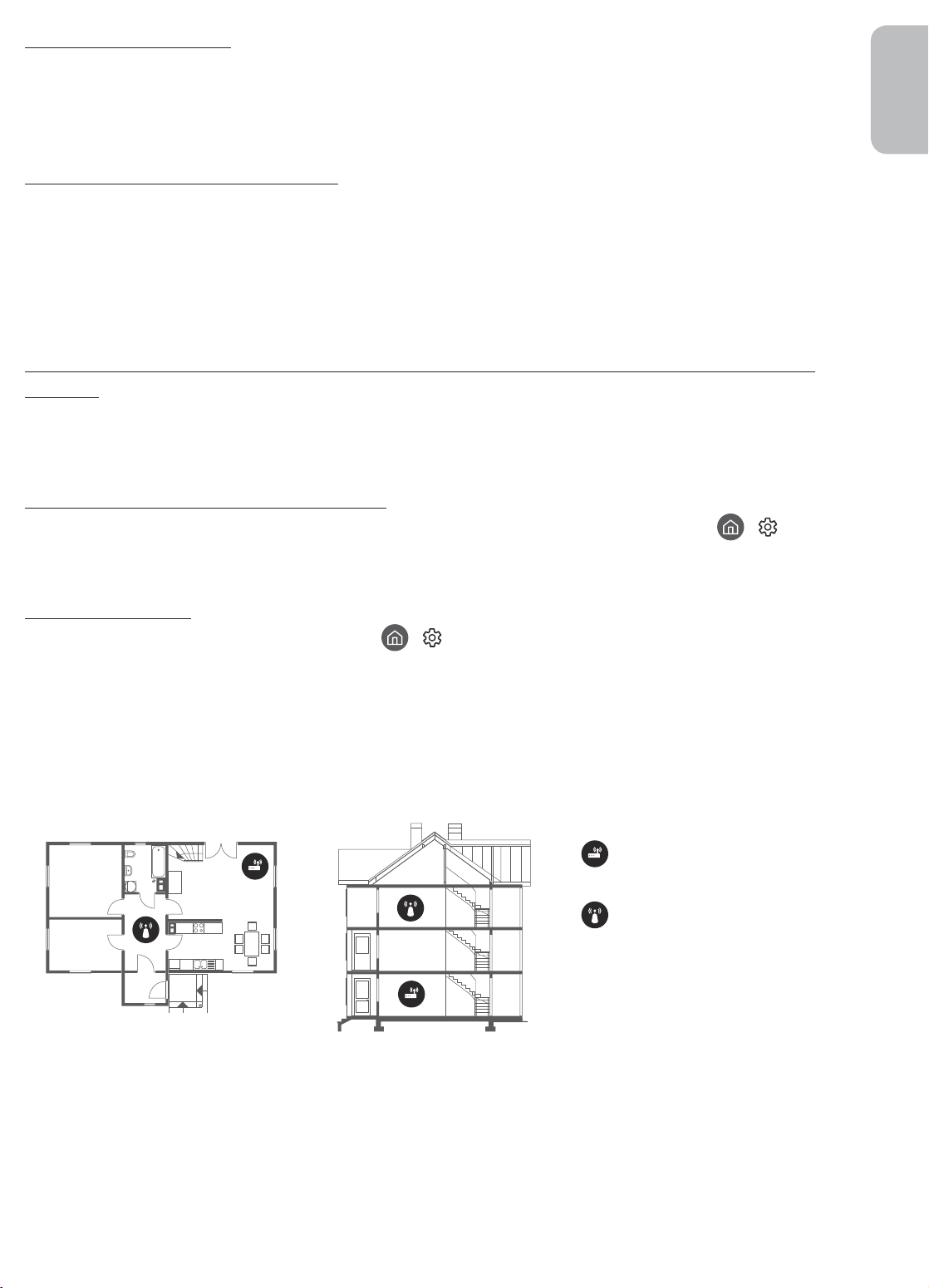
Intermittent Wi-Fi
• Make sure the TV has a network connection (
• Make sure the Wi-Fi password is entered correctly.
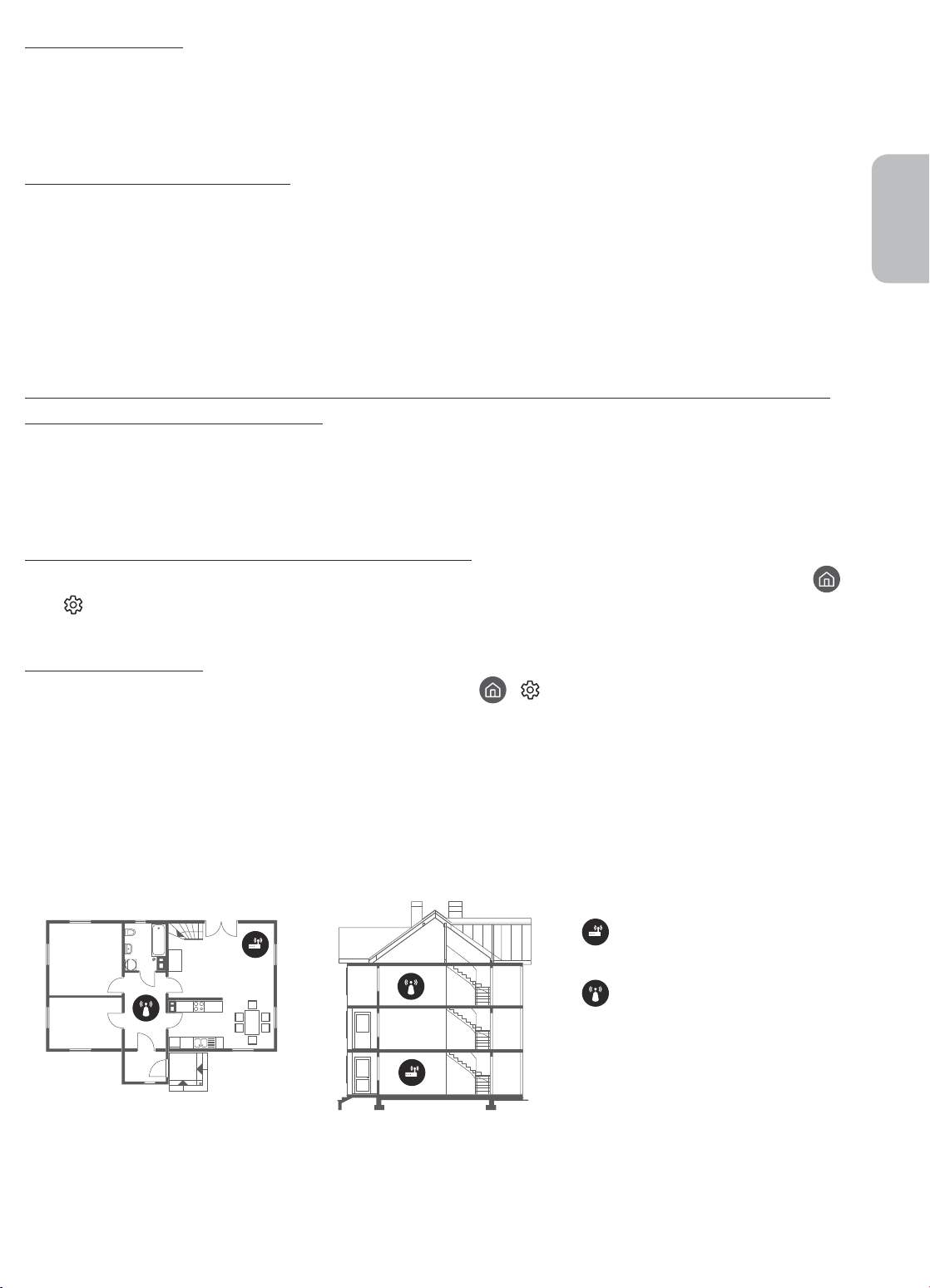
• Check the distance between the TV and the modem or access point. The distance should not exceed 15.2 m.
• Reduce interference by not using or turning off wireless devices. Also, verify that there are no obstacles
between the TV and the modem or access point. (The Wi-Fi strength can be decreased by appliances,
cordless phones, stone walls/fireplaces, etc.)
Single story Multi story
> Settings > General > Network > Network Status).
Wireless access point
Wireless repeater
• Contact your Internet Service Provider (ISP) and ask them to reset your network circuit to re-register the
MAC addresses of your new modem or access point and the TV.
English - 15
Page 16
Video Apps problems (Youtube etc)
• Change the DNS to 8.8.8.8. Select
DNS setting > Enter manually > DNS Server > enter 8.8.8.8 > OK.
• Reset by selecting
> Settings > Support > Self Diagnosis > Reset Smart Hub.
> Settings > General > Network > Network Status > IP Settings >
What is Remote Support?
Samsung Remote Support service offers you one-on-one support with a Samsung Technician who can
remotely:
• Diagnose your TV
• Adjust the TV settings for you
• Perform a factory reset on your TV
• Install recommended firmware updates
How does Remote Support work?
You can easily get Samsung Remote Support service for your TV:
1. Call the Samsung service centre and ask for remote support.
2. Open the menu on your TV and go to the Support section. (
3. Select Remote Management, then read and agree to the service agreements. When the PIN screen
appears, provide the PIN number to the technician.
4. The technician will then access your TV.
> Settings > Support)
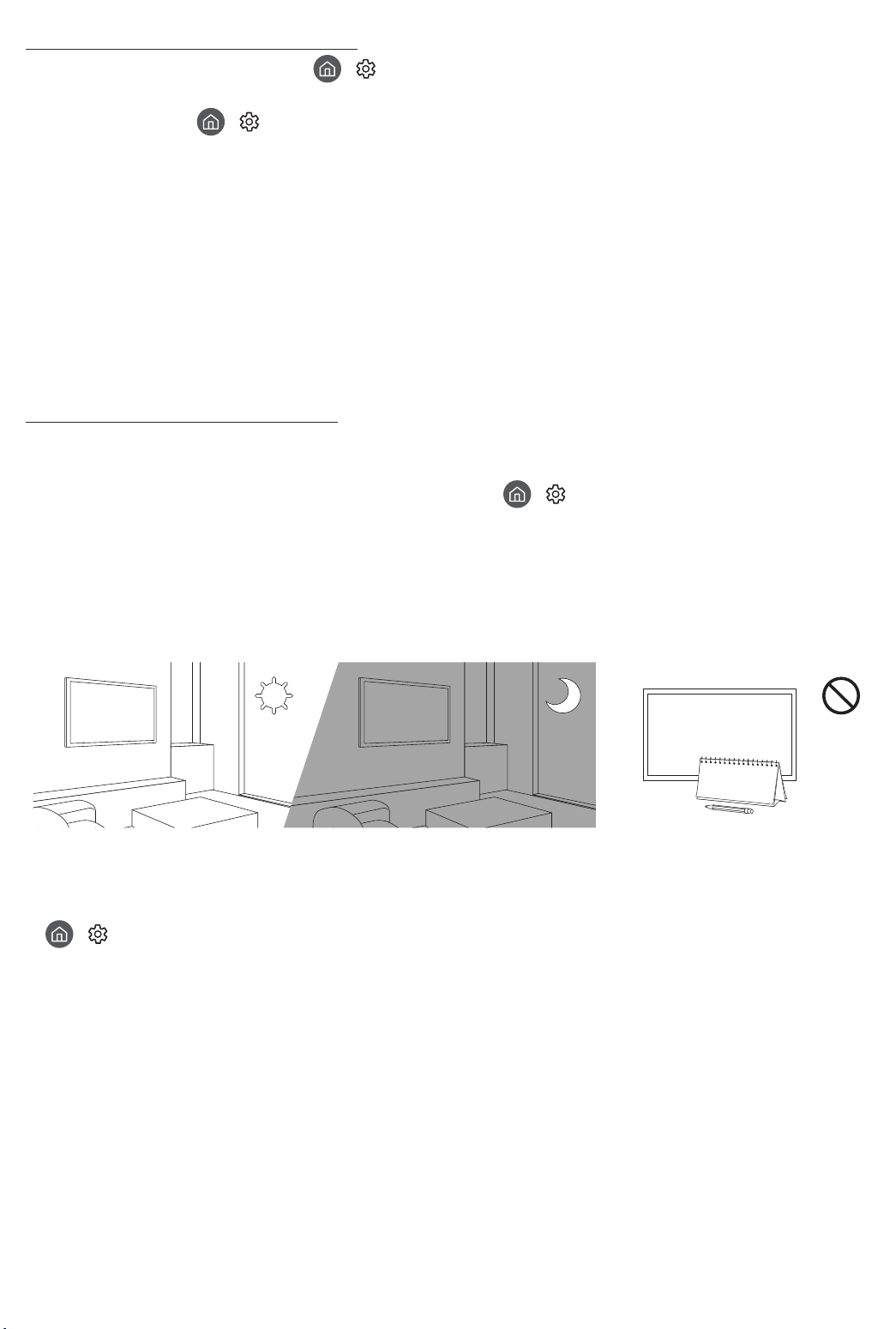
Eco Sensor and screen brightness
Eco Sensor adjusts the brightness of the TV automatically. This feature measures the light in your room and
optimises the brightness of the TV automatically to reduce power consumption. If you want to turn this off, go
to
> Settings > General > Eco Solution > Ambient Light Detection.
• If the screen is too dark while you are watching TV in a dark environment, it may be due to the Ambient
Light Detection function.
• The eco sensor is located at the bottom of the TV. Do not block the sensor with any object. This can decrease
picture brightness.
English - 16
Page 17
Caring for the TV
• If a sticker was attached to the TV screen, some debris can
remain after you remove the sticker. Please clean the debris off
before watching TV.
• The exterior and screen of the TV can get scratched during
cleaning. Be sure to wipe the exterior and screen carefully using
a soft cloth to prevent scratches.
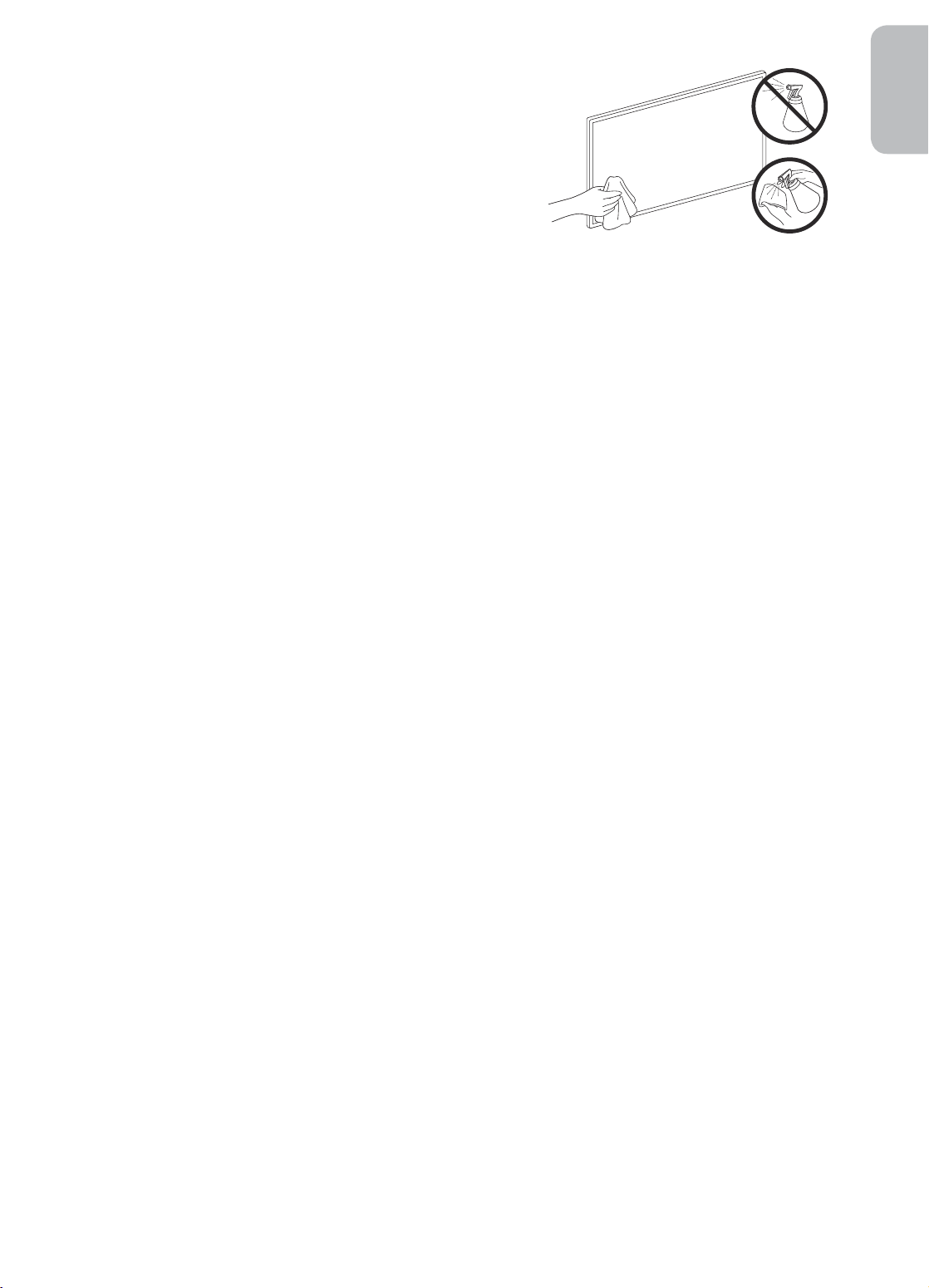
• Do not spray water or any liquid directly onto the TV. Any liquid
that goes into the product may cause a failure, fire, or electric
shock.
• To clean the screen, turn off the TV, then gently wipe away
smudges and fingerprints on the panel with a micro-fiber
cloth. Clean the body or panel of the TV with a micro-fiber cloth
dampened with a small amount of water. After that, remove the
moisture with a dry cloth. While cleaning, do not apply strong
force to the surface of the panel because it can damage the
panel. Never use flammable liquids (benzene, thinner, etc.) or a
cleaning agent. For stubborn smudges, spray a small amount of
screen cleaner on a micro-fiber cloth, and then use the cloth to
wipe away the smudges.
English
English - 17
Page 18
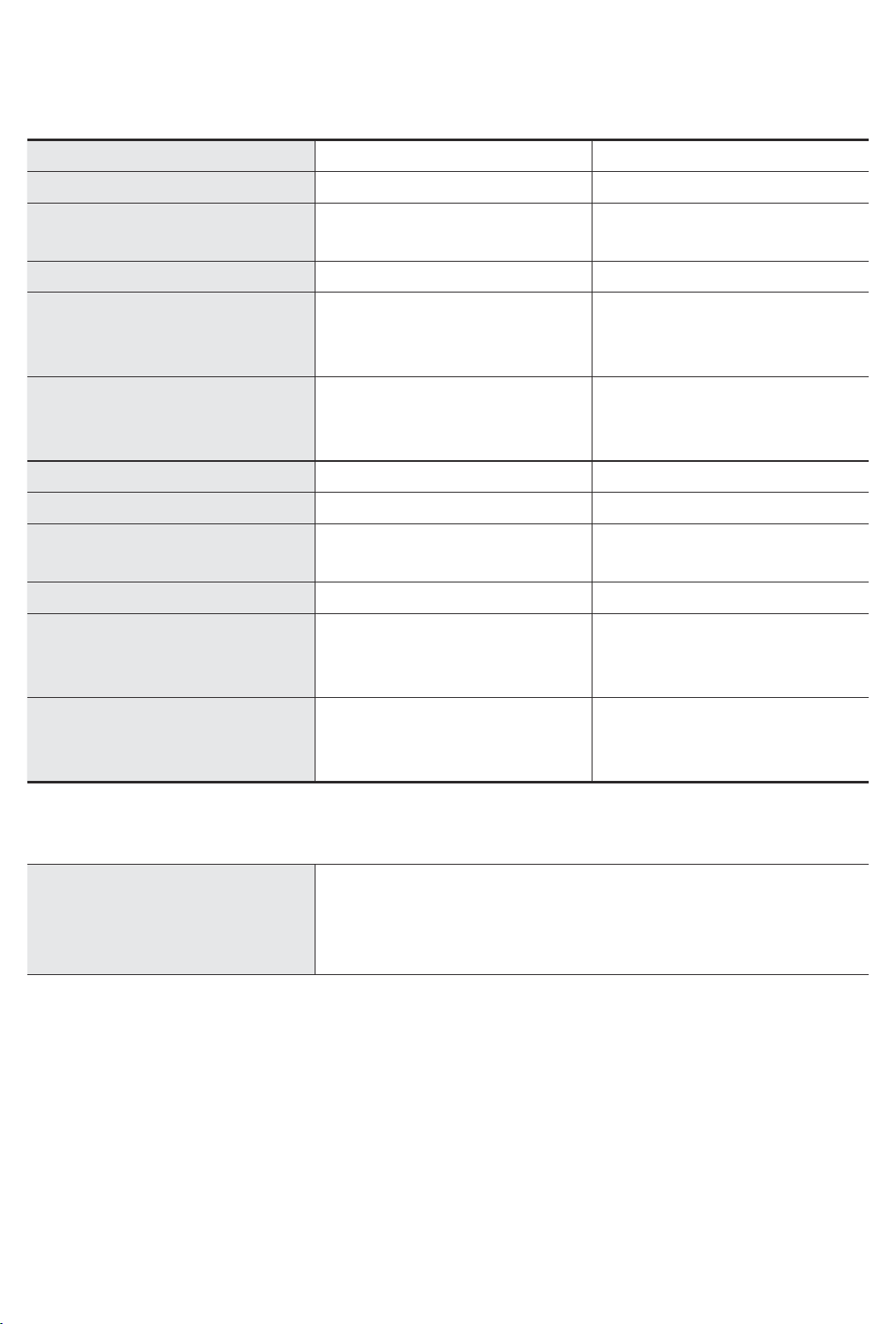
07 Specifications and Other Information
Specifications
Model Name UE43RU7450 / UE43RU7470 UE50RU7450 / UE50RU7470
Display Resolution
Screen Size
Measured Diagonally
Sound (Output)
3840 x 2160 3840 x 2160
43 inches
108 cm
20 W 20 W
50 inches
125 cm
Dimensions (W x H x D)
Body
With stand
970.2 x 563.2 x 58.1 mm
970.2 x 648.0 x 343.7 mm
1124.8 x 650.2 x 59.0 mm
1124.8 x 735.8 x 346.7 mm
Weight
Without Stand
With Stand
9.5 kg
12.1 kg
13.8 kg
16.5 kg
Model Name UE55RU7450 / UE55RU7470 UE65RU7450 / UE65RU7470
Display Resolution
Screen Size
Measured Diagonally
Sound (Output)
3840 x 2160 3840 x 2160
55 inches
138 cm
20 W 20 W
65 inches
163 cm
Dimensions (W x H x D)
Body
With stand
1238.6 x 714.2 x 58.6 mm
1238.6 x 800.0 x 360.6 mm
1457.5 x 837.3 x 59.0 mm
1457.5 x 922.8 x 387.3 mm
Weight
Without Stand
With Stand
17.2 kg
19.7 kg
25.1 kg
28.0 kg
Environmental Considerations
Operating Temperature
Operating Humidity
Storage Temperature
Storage Humidity
• The design and specifications are subject to change without prior notice.
• For information about the power supply, and more information about power consumption, refer to the
label-rating attached to the product.
• Typical power consumption is measured according to IEC 62087.
• You can see the label-rating attached to the back of the TV. (For some models, you can see the label-rating
inside the cover terminal.)
10°C to 40°C (50°F to 104°F)
10% to 80%, non-condensing
-20°C to 45°C (-4°F to 113°F)
5% to 95%, non-condensing
English - 18
Page 19
Decreasing power consumption
When you shut the TV off, it enters Standby mode. In Standby mode, it continues to draw a small amount of
power. To decrease power consumption, unplug the power cord when you don't intend to use the TV for a long
time.
Licences
The terms HDMI and HDMI High-Definition Multimedia Interface, and the HDMI Logo are trademarks or
registered trademarks of HDMI Licensing LLC in the United States and other countries.
English
Recommendation - EU Only
Hereby, Samsung Electronics, declares that this equipment is in compliance with Directive 2014/53/EU.
The full text of the EU declaration of conformity is available at the following internet address: http://www.
samsung.com go to Support > Search Product Support and enter the model name.
This equipment may be operated in all EU countries.
BT max transmitter power : 100mW at 2.4GHz – 2.4835GHz
Wi-Fi max transmitter power : 100mW at 2.4GHz–2.4835GHz
For information on Samsung’s environmental commitments and product-specific regulatory obligations, e.g.
REACH, WEEE, Batteries, visit
http://www.samsung.com/it/aboutsamsung/sustainability/environment/our-commitment/data/
WARNING - TO PREVENT THE SPREAD OF FIRE, KEEP CANDLES OR OTHER ITEMS WITH OPEN
FLAMES AWAY FROM THIS PRODUCT AT ALL TIMES.
English - 19
Page 20
Correct Disposal of This Product (Waste Electrical & Electronic Equipment)
(Applicable in countries with separate collection systems)
This marking on the product, accessories or literature indicates that the product and its electronic
accessories (e.g. charger, headset, USB cable) should not be disposed of with other household
waste at the end of their working life. To prevent possible harm to the environment or human
health from uncontrolled waste disposal, please separate these items from other types of waste
and recycle them responsibly to promote the sustainable reuse of material resources.
Household users should contact either the retailer where they purchased this product, or
their local government office, for details of where and how they can take these items for
environmentally safe recycling.
Business users should contact their supplier and check the terms and conditions of the purchase
contract. This product and its electronic accessories should not be mixed with other commercial
wastes for disposal.
Correct disposal of the batteries in this product
(Applicable in countries with separate collection systems)
This marking on battery, manual or packaging indicates that the batteries in this product should
not be disposed of with other household waste at the end of their working life. Where marked,
the chemical symbols Hg, Cd or Pb indicate that the battery contains mercury, cadmium or lead
above the reference levels in EC Directive 2006/66. If batteries are not properly disposed of, these
substances can cause harm to human health or the environment.
To protect natural resources and to promote material reuse, please separate batteries from other
types of waste and recycle them through your local, free battery return system.
English - 20
Page 21

left blank.
Page 22
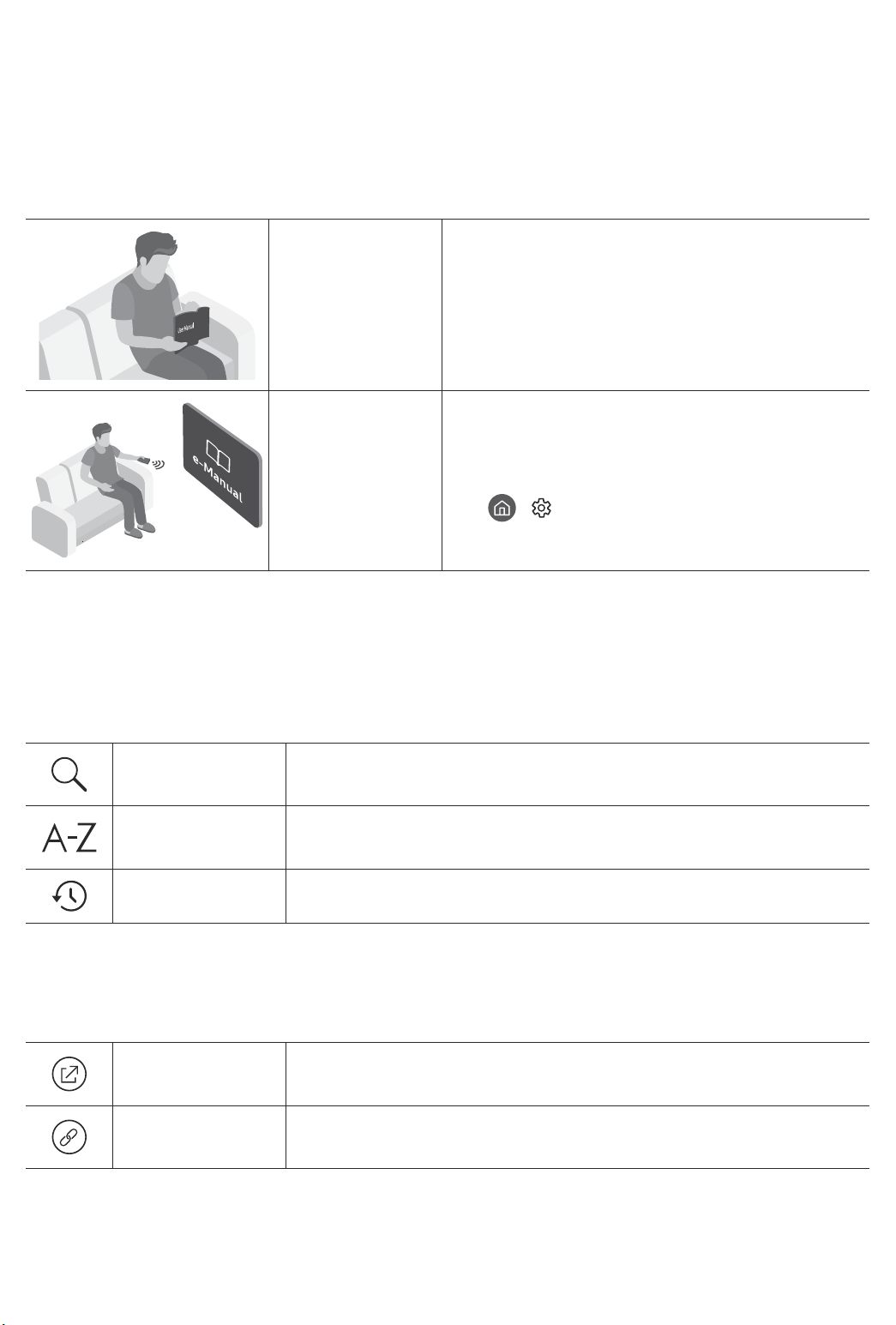
Prima di leggere questo manuale dell'utente
Samsung dichiara che questo TV è conforme all’art. 3quinquies D.L. 16/2012 convertito con modifiche da L.
44/2012 e successivamente modificato da L. 11/15”
Questo TV viene venduto con un manuale dell'utente ed un manuale elettronico.
Prima di leggere questo manuale, vedere:
Manuale
dell'utente
e-Manual
Nel sito web (www.samsung.com) è possibile scaricare i manuali e visualizzarne i contenuti sul proprio PC o
dispositivo mobile.
Leggere questo manuale in dotazione per
visualizzare le informazioni sulla sicurezza dei
prodotti, installazione, accessori, configurazione
iniziale e specifiche del prodotto.
Per maggiori informazioi su questo TV, leggere il
e-Manual incorporato nel prodotto.
• Per accedere al e-Manual,
> Impostazioni > Supporto > Apri
e-Manual
Conoscere le funzioni di assistenza dell'e-Manual
• Alcune schermate del menu non sono accessibili dal manuale elettronico.
Ricerca
Indice
Visti di recente
Scegliere una voce dall'elenco dei risultati per caricare la pagina
corrispondente.
Selezionare una parola chiave per consultare la relativa pagina.
– I menu possono differire in base all'area geografica di appartenenza.
Selezionare un argomento dall'elenco di argomenti visualizzati di recente.
Conoscere le funzione dei tasti visualizzati nelle pagine degli argomenti
dell'e-Manual
Prova ora
Collega
Permette di accedere alla voce del menu corrispondente e di provare
immediatamente la funzione.
Accedere immediatamente all'argomento evidenziato di una pagina del
e-Manual.
Italiano - 2
Page 23
Avvertenza! Istruzioni importanti di sicurezza
Leggere le Istruzioni di sicurezza prima di usare il televisore.
Per una spiegazione sui simboli che possono comparire sui prodotti Samsung vedere la tabella sotto.
ATTENZIONE
RISCHIO DI SCARICHE ELETTRICHE.NON APRIRE.
ATTENZIONE: PER RIDURRE IL RISCHIO DI SCOSSE
ELETTRICHE, NON RIMUOVERE IL COPERCHIO (O IL
PANNELLO POSTERIORE). NON CONTIENE PARTI
RIPARABILI DALL'UTENTE. RIVOLGERSI A UN TECNICO
DELL'ASSISTENZA QUALIFICATO.
Questo simbolo indica che all'interno sono
presenti tensioni pericolose. E' pericoloso
toccare in qualsiasi modo le parti interne di
questo prodotto.
Questo simbolo indica la disponibilità di
informazioni importanti nella letteratura del
prodotto relative al funzionamento e alla
manutenzione del dispositivo.
Prodotto di Classe II: Questo simbolo indica
che non è necessaria alcuna connessione di
sicurezza ad una presa di corrente dotata
di messa a terra. Qualora questo simbolo di
interesse non fosse presente su un prodotto
dotato di cavo di alimentazione, ciò indica che
il prodotto DEVE prevedere una connessione
affidabile ad un polo di messa a terra.
Tensione CA: La tensione nominale
contraddistinta con questo simbolo è di tipo CA.
Tensione CC: La tensione nominale
contraddistinta con questo simbolo è di tipo CC.
Attenzione. Leggere le Istruzioni per l'uso:
Questo simbolo indica all'utente la necessità di
consultare il manuale dell'utente per ottenere
ulteriori informazioni sulla sicurezza.
Italiano
• Sul retro o sul fondo del telaio sono presenti aperture di ventilazione. Per evitare il surriscaldamento del
dispositivo e garantirne un funzionamento ottimale, non ostruire o coprire in nessun caso le aperture di
ventilazione.
– Non posizionare il prodotto all'interno di uno spazio limitato, come per esempio una libreria o un vano
a incasso, privo di adeguata ventilazione.
– Non esporre il prodotto a luce solare diretta né collocarlo vicino o sopra un radiatore o una griglia di un
impianto di riscaldamento.
– Non collocare sul prodotto recipienti pieni d'acqua (come vasi, ecc...); la mancata osservanza di questa
precauzione può causare incendio o scarica elettrica.
• Non esporre il prodotto alla pioggia né posizionarlo vicino a una fonte d'acqua (per esempio nei pressi di
una vasca, un lavabo, un lavello, un lavatoio, una piscina, sopra una superficie bagnata, ecc.). Se il prodotto
entra a contatto con l'acqua, scollegarlo dalla presa elettrica e rivolgersi immediatamente a un rivenditore
autorizzato.
• Questo prodotto utilizza batterie. Seguire le normative locali in vigore per il corretto smaltimento delle
batterie. Contattare l'autorità locale per richiedere informazioni sulle modalità di riciclo e smaltimento.
• Non sovraccaricare le prese a parete, le prolunghe e gli adattatori oltre la loro capacità per evitare rischi di
incendio o scariche elettriche.
• I cavi di alimentazione devono essere posizionati in modo da non poter essere calpestati o schiacciati da
oggetti posizionati sopra o contro di essi. Prestare particolare attenzione ai cavi e alle spine, in prossimità
delle prese elettriche e nel punto in cui escono dall'apparecchio.
Italiano - 3
Page 24

• Per proteggere l'apparecchio in caso di fulmini, o se è stato lasciato incustodito o non utilizzato per un
lungo periodo di tempo, scollegarlo dalla presa a parete e scollegare il sistema via cavo/antenna. Questa
precauzione proteggerà il prodotto dai danni causati da fulmini e picchi di corrente.
• Prima di collegare il cavo di alimentazione CA all'adattatore CC, verificare che la tensione dell'adattatore CC
corrisponda alla tensione erogata localmente.
• Non inserire mai oggetti metallici nelle aperture dell'apparecchio. La mancata osservanza di questa
precauzione può provocare scariche elettriche.
• Per evitare il pericolo di scosse elettriche, non toccare mai le parti interne dell'apparecchio. L'apparecchio
può essere aperto solo da un tecnico qualificato.
• Inserire saldamente la spina del cavo di alimentazione nella presa elettrica. Nello scollegare la spina di
alimentazione dalla presa a parete, afferrarla per la spina e non per il cavo. Non scollegare mai la presa
tirando il cavo di alimentazione. Non toccare il cavo di alimentazione con le mani bagnate.
• Se l'apparecchio funziona in modo anomalo, in particolare se emette odori o rumori insoliti, scollegarlo
immediatamente dall'alimentazione e contattare un rivenditore o un Centro di assistenza autorizzato
Samsung.
• Estrarre la spina dalla presa di corrente qualora il TV rimanga inutilizzato o si intenda abbandonare
l'abitazione per un lungo periodo di tempo (in particolare in presenza di minori, anziani o persone
diversamente abili non sorvegliati).
– La polvere accumulata può causare scariche elettriche, perdite di corrente o incendio a causa del calore
o delle scintille generate dal cavo di alimentazione o dal degrado della guaina isolante.
• Contattare un Centro di assistenza autorizzato Samsung qualora si installi il televisore in un locale molto
polveroso o in presenza di temperature molto alte o molto basse, elevata umidità, presenza di sostanze
chimiche o in caso di funzionamento 24 ore su 24, per esempio in aeroporti, stazioni ferroviarie, ecc.. La
mancata osservanza di questa precauzione può causare gravi danni al televisore.
• Utilizzare solo una spina e una presa opportunamente collegate a terra.
– Una messa a terra inadeguata può causare scosse elettriche o danni al prodotto. (Solo dispositivi di
Classe I.)
• Per spegnere completamente questo apparecchio, scollegare la spina dalla presa di corrente a parete. Per
poter scollegare rapidamente il televisore dalla presa di corrente in caso di necessità, assicurarsi che la
spina del cavo di alimentazione sia sempre rapidamente accessibile.
• Tenere gli accessori (per esempio le pile) in un luogo sicuro lontano dalla portata dei bambini.
• Non far cadere o colpire il prodotto. Se il prodotto risulta danneggiato, scollegare il cavo di alimentazione e
rivolgersi ad un Centro di assistenza autorizzato Samsung.
• Per pulire il prodotto, scollegare il cavo di alimentazione dalla presa di corrente e pulirlo con un panno
morbido e asciutto. Non usare prodotti chimici quali cera, benzene, alcol, solventi, insetticidi, deodoranti
per l'ambiente, lubrificanti o detergenti. Tali sostanze chimiche infatti possono danneggiare l'aspetto del
televisore o cancellare le scritte riportate sul prodotto.
• Non esporre il prodotto a gocce o spruzzi d'acqua.
• Non gettare le batterie nel fuoco.
• Non disassemblare, surriscaldare o far entrare le batterie in cortocircuito.
• Sostituendo le batterie esauste del telecomando con un tipo di batterie di voltaggio errato vi è il pericolo di
esplosione. Sostituire solo con batterie dello stesso tipo o equivalenti.
* Le figure e le illustrazioni presenti in questo Manuale dell'utente sono fornite unicamente a titolo di
riferimento e possono differire da quelle del prodotto attuale. Le specifiche e il design del prodotto possono
variare senza preavviso.
Le lingue CSI (russo, ucraino, kazako) non sono disponibili poiché il prodotto è destinato solo alla vendita nei
paesi europei.
Italiano - 4
Page 25
Indice
Prima di leggere questo manuale dell'utente ---------------------------------------------------------------------------- 2
Avvertenza! Istruzioni importanti di sicurezza
01 Contenuto della confezione
02 Installazione TV
Montaggio del televisore a parete
Garantire un'adeguata ventilazione al televisore
Precauzioni di sicurezza: Fissaggio del televisore alla
parete per impedirne la caduta
03 Samsung Smart Remote
Conoscere i tasti del Samsung Smart Remote.
Abbinamento del televisore al telecomando
Samsung Smart Remote
Installazione delle batterie nel telecomando
Samsung Smart Remote
---------------------------------------------------------------------------- 11
---------------------------------------------------------------------------- 11
---------------------------------------------------------------------------- 7
---------------------------------------------------------------------------- 9
---------------------------------------------------------------------------- 3
Italiano
---------------------------------------------------------------------------- 8
---------------------------------------------------------------------------- 10
04 Eseguire la funzione Initial Setup (Impostazione iniziale)
Uso di Controller TV
---------------------------------------------------------------------------- 12
05 Connessione alla rete
Connessione di rete - Wireless
Connessione di rete - Cablata
---------------------------------------------------------------------------- 13
---------------------------------------------------------------------------- 13
06 Risoluzione dei problemi e manutenzione
Risoluzione dei problemi
Cos'è l'Assistenza remota?
Sensore Eco e luminosità dello schermo
Manutenzione del televisore
---------------------------------------------------------------------------- 14
---------------------------------------------------------------------------- 16
---------------------------------------------------------------------------- 16
---------------------------------------------------------------------------- 17
07 Specifiche e altre informazioni
Specifiche
Caratteristiche ambientali
Riduzione del consumo energetico
Licenze
Diagrammi a blocchi
---------------------------------------------------------------------------- 18
---------------------------------------------------------------------------- 18
---------------------------------------------------------------------------- 19
---------------------------------------------------------------------------- 19
---------------------------------------------------------------------------- 21
Italiano - 5
Page 26
01 Contenuto della confezione
Controllare che nell'imballaggio del televisore siano contenuti i seguenti componenti. Se eventuali componenti
risultano mancanti, contattare il rivenditore.
• Samsung Smart Remote & Pile (2 tipo AAA)
• Manuale dell'utente
x 4
Adattatore supporto a
parete
• La forma e il colore dei componenti possono variare in base al modello.
• Eventuali cavi non forniti possono essere acquistati separatamente.
• Una volta aperta la confezione, verificare che non vi siano accessori nascosti dietro o all'interno dei
materiali di imballaggio.
Nelle seguenti condizioni è possibile che vengano addebitati costi amministrativi:
(a) l'uscita del tecnico in seguito a una chiamata non porta all'individuazione di alcun difetto nel prodotto
(ovvero laddove l'utente non abbia letto il manuale dell'utente).
(b) l'utente ha consegnato l'unità ad un Centro di assistenza Samsung ma non è stato individuato alcun
difetto nel prodotto (ovvero laddove l'utente non abbia letto il manuale dell'utente).
Prima dell'uscita del tecnico l'utente viene informato delle spese amministrative.
Adattatore scheda CI
• Scheda di garanzia / Guida alle normative (non
disponibili in tutti i paesi)
• Cavo alimentazione TV
Italiano - 6
Avvertenza: Una pressione diretta sulla superficie
del pannello provocata da una manipolazione non
corretta può danneggiare lo schermo. Si raccomanda
di sollevare il televisore afferrandolo per i bordi, come
mostrato.
Non toccare lo
schermo!
Page 27
02 Installazione TV
Montaggio del televisore a parete
Il montaggio a parete di questo TV deve seguire le specifiche stabilite dal produttore. In caso di
installazione non corretta, il TV potrebbe scivolare dalla struttura o cadere, causando gravi lesioni a
bambini e adulti eventualmente presenti e gravi danni al prodotto.
Per i modelli dotati di adattatori per staffe a parete, installarli come mostrato nelle figure sottostanti prima di
installare il kit di montaggio a parete.
• Vedere il manuale di installazione fornito insieme al kit di montaggio a parete Samsung.
Adattatore supporto a parete
Italiano
Staffa supporto
a parete
C
Adattatore supporto a parete
Staffa supporto
a parete
C
• Samsung Electronics non può essere ritenuta responsabile per lesioni personali o danni al prodotto causati
da una installazione a parete eseguita autonomamente dall'utente.
• Installare la staffa su una parete solida perpendicolare al pavimento. Prima di fissare la staffa di montaggio
a una parete non in cartongesso, contattare il rivenditore di zona per richiedere ulteriori informazioni.
Una installazione a soffitto o su pareti inclinate può provocare la caduta del televisore e causare lesioni
personali anche gravi.
• Nella tabella a pagina seguente, vengono indicate le dimensioni standard dei kit di fissaggio a parete.
• Se si installa una staffa da parete di altri produttori, notare che la lunghezza delle viti da usare per fissare il
TV alla staffa è indicata nella colonna C della tabella a pagina successiva.
• Nell'installare il kit di fissaggio a parete, si consiglia di serrare tutte le quattro viti della staffa VESA.
• Per installare un kit di fissaggio a parete usando solo le due viti superiori, assicurarsi di usare un kit
Samsung che preveda questo tipo di installazione. (l'acquisto di tale tipo di kit potrebbe risultare difficile in
base alla regione di appartenenza).
TV
TV
Italiano - 7
Page 28
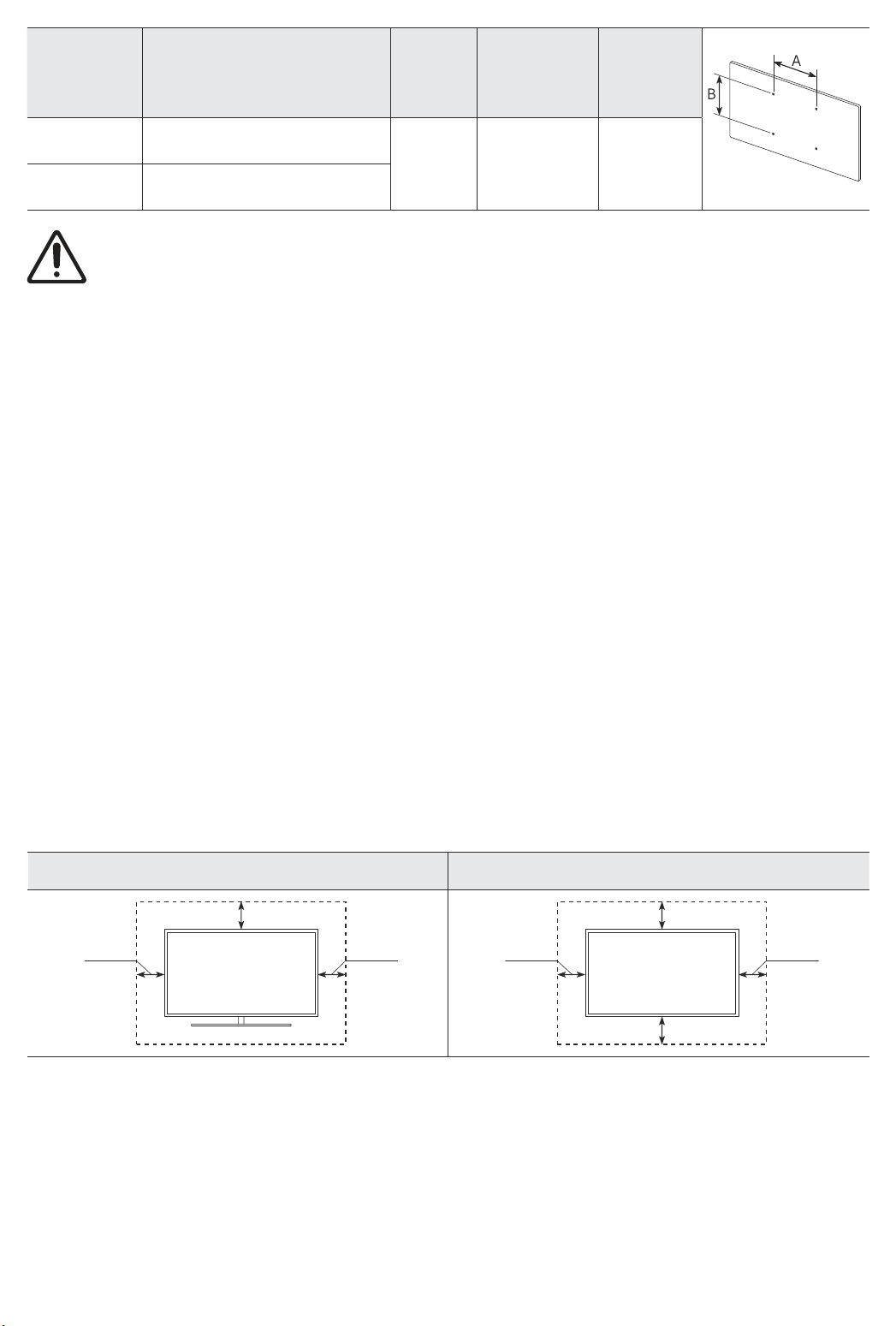
Dimensione
del televisore
in pollici
43-55 200 x 200
65 400 x 400
• Non utilizzare viti più lunghe delle dimensioni standard o non conformi alle specifiche dello standard VESA.
Viti troppo lunghe possono danneggiare i componenti interni del televisore.
• Per sistemi di montaggio a parete non conformi allo standard VESA, la lunghezza delle viti potrebbe
differire in base alle specifiche del sistema di montaggio usato.
• Non serrare eccessivamente le viti. Ciò potrebbe danneggiare il prodotto o causarne la caduta con
conseguente rischio di lesioni. Samsung non può essere ritenuta responsabile per tali incidenti.
• Samsung non potrà essere ritenuta responsabile per eventuali danni o lesioni personali qualora vengano
usati sistemi di montaggio a parete non conformi allo standard VESA o l'utente non segua le istruzioni di
installazione fornite.
• Non installare il televisore con una inclinazione superiore ai 15 gradi.
• E' necessario che l'installazione a parete del televisore sia eseguita da due persone.
Specifiche alloggiamento viti
VESA (A * B) in millimetri
Non installare il kit di montaggio a parete mentre il televisore è acceso.La mancata osservanza di
questa precauzione può causare lesioni personali causate da scariche elettriche.
C (mm) Vite standard Quantità
43-45 M8 4
Garantire un'adeguata ventilazione al televisore
Per garantire un’adeguata ventilazione all'apparecchio, durante l'installazione del televisore lasciare una
distanza minima di 10 cm tra il televisore e gli elementi circostanti (pareti, pannelli del vano TV, ecc...). Una
ventilazione inadeguata può causare l'innalzamento della temperatura interna del prodotto e il rischio di
incendio.
• Se il televisore viene installato su un piedistallo o una staffa a parete, utilizzare solo componenti forniti
da Samsung Electronics. L'uso di componenti di altri produttori può causare malfunzionamenti o lesioni
personali per la caduta del prodotto.
Installazione con piedistallo Installazione con supporto a parete
10 cm
10 cm10 cm
10 cm
10 cm10 cm
10 cm
Italiano - 8
Page 29
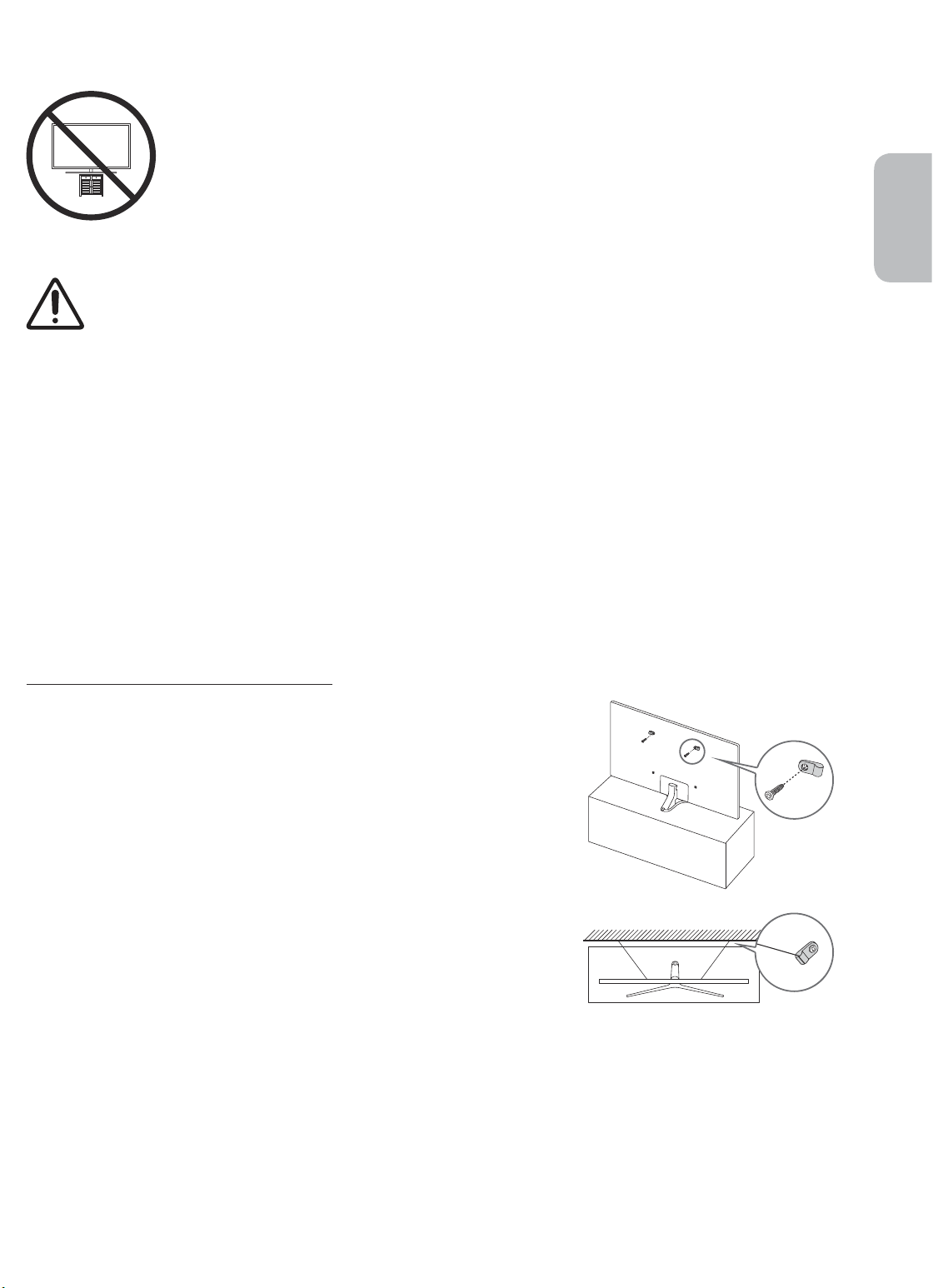
Precauzioni di sicurezza: Fissaggio del televisore alla parete per
impedirne la caduta
Attenzione: Tirare, spingere o arrampicarsi sul televisore sono azioni che possono
provocarne la caduta. In particolare, si raccomanda di non far giocare i bambini con il
televisore poiché potrebbero appendervisi o destabilizzarlo. Se ciò dovesse verificarsi, il
televisore potrebbe cadere provocando lesioni personali gravi e perfino mortali. Seguire
tutte le precauzioni di sicurezza descritte nella documentazione allegata al televisore.
Per una maggiore stabilità e sicurezza del prodotto, è possibile acquistare e installare il
dispositivo anticaduta come segue.
AVVERTENZA: Non posizionare mai il televisore in una posizione instabile. Il televisore potrebbe
cadere e provocare serie lesioni personali e perfino la morte. Molte lesioni, particolarmente nei
bambini, possono essere evitate prendendo delle semplice precauzioni come:
• Utilizzare armadietti o piedistalli raccomandati dal costruttore del televisore.
• Utilizzare solo elementi d'arredo e mobili in grado di sostenere in sicurezza il televisore.
• Accertarsi che il televisore non sporga dal bordo del mobile sul quale è collocato.
• Non posizionare il televisore su un elemento d'arredo alto (quale ad esempio una credenza o una
libreria) senza ancorare entrambi, mobile e televisore, ad un supporto adeguato.
• Non appoggiare mai il televisore su panni o altri materiali a loro volta appoggiati sopra mobili
d'arredo o strutture di sostegno.
• Spiegare e far comprendere ai bambini i pericoli ai quali possono andare incontro
arrampicandosi su un mobile per raggiungere il televisore o i suoi elementi di controllo.
Se si sta spostando il televisore e si sta sostituendo il kit con uno nuovo, prestare le stesse
precauzioni usate in precedenza con il kit precedente.
Italiano
Prevenire la caduta del televisore
1. Usando le viti corrette, fissare saldamente le staffe alla parete.
Assicurarsi che le viti siano fissate saldamente alla parete.
– A seconda del tipo di parete, potrebbe essere necessario
utilizzare anche dei sistemi di ancoraggio.
2. Usando le viti corrette, fissare saldamente le staffe al TV.
– Per le specifiche delle viti, vedere la parte relativa alle viti
standard in "Montaggio del televisore a parete".
3. Collegare le staffe fissate al televisore a quelle fissate alla parete
utilizzando un cavo resistente, quindi legarlo saldamente.
– Installare il televisore il più vicino possibile alla parete in modo
che non possa cadere all'indietro.
– Collegare il cavo in modo che le staffe fissate alla parete si
trovino alla stessa altezza o leggermente più in basso rispetto
alle staffe fissate al TV.
• La forma e il colore del
prodotto possono variare in
base al modello.
Italiano - 9
Page 30
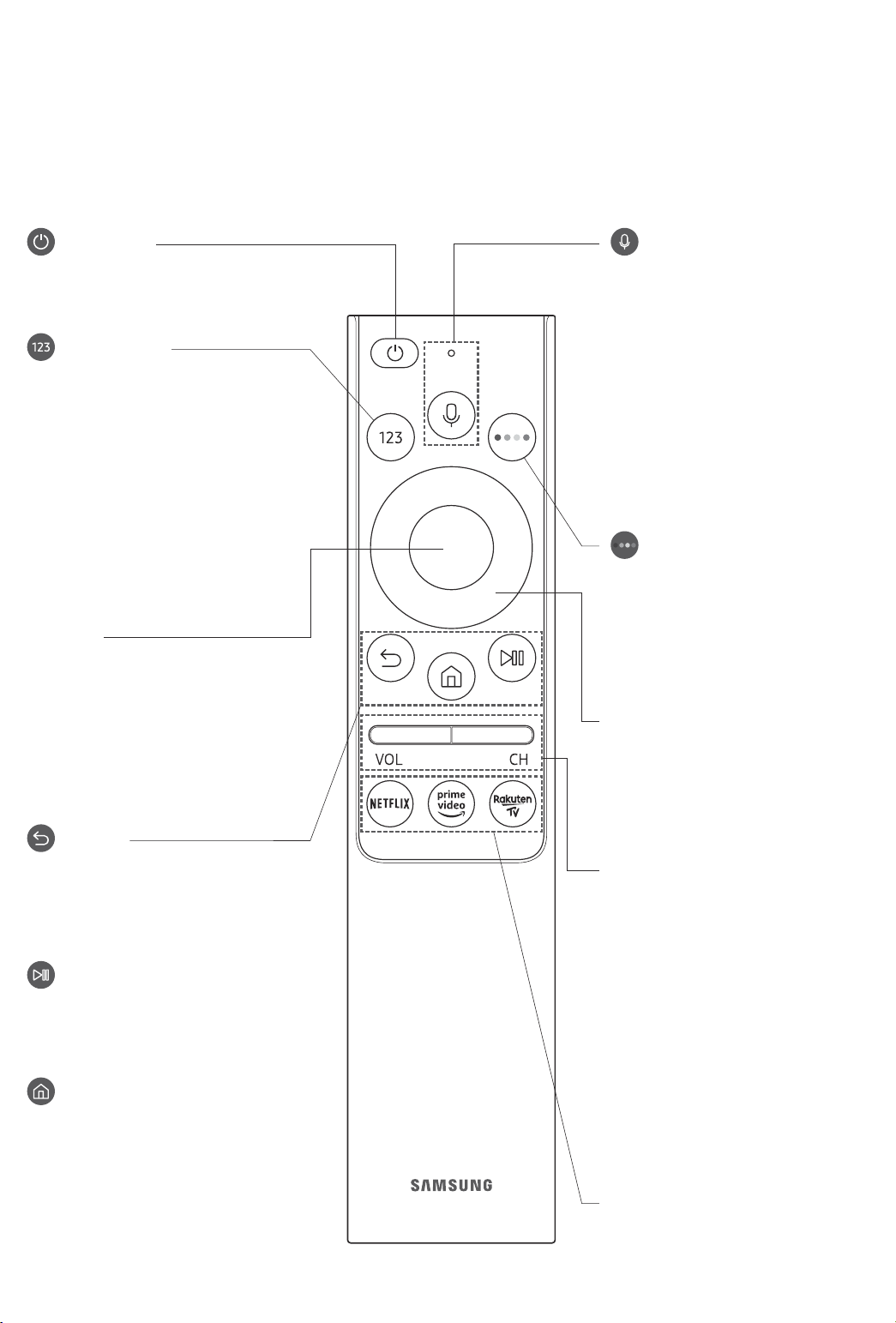
03 Samsung Smart Remote
Conoscere i tasti del Samsung Smart Remote.
• Le immagini, i tasti e le funzioni del Samsung Smart Remote possono differire in base al modello.
• La funzione Configurazione telecomando universale viene eseguita regolarmente solo se si usa il Samsung
Smart Remote fornito in dotazione al TV.
(Accensione)
Premere per accendere e spegnere il
televisore.
(tasto Numero)
Se premuto visualizza una striscia
numerica nella parte bassa della
schermata. Selezionare i numeri quindi
selezionare Fatto per digitare un valore
numerico. Usare per cambiare il canale
visualizzato, digitare un PIN, un CAP, ecc.
• Se premuto per 1 o più secondi, viene
visualizzato il menu TTX.
Selezione
Seleziona o esegue un elemento
evidenziato. Se premuto durante la
visione di un programma, ne visualizza
le informazioni dettagliate.
(Bixby)
Esegue Bixby. Tenere premuto il tasto,
pronunciare un comando vocale, quindi
rilasciare il tasto per eseguire Bixby.
Premendo il tasto, in basso nello
schermo viene visualizzato il menu
Esplora ora.
• Le lingue e le funzioni di Bixby
supportate possono variare da
regione geografica a regione.
(tasto Colore)
Utilizzare i tasti colorati per accedere
a ulteriori opzioni specifiche per la
funzione in uso.
Tastiera direzionale (su/giù/sinistra/
destra)
Sposta il focus e cambia i valori nel
Menu TV.
(Ritorna)
Ritorna al menu precedente. Se premuto
per 1 o più secondi, la funzione in
esecuzione viene terminata. Se premuto
durante la visione di un programma,
visualizza il canale precedente.
(Riproduci/pausa)
Se premuto, compaiono i controlli di
riproduzione. Usando questi controlli, è
possibile controllare la riproduzione dei
contenuti.
(Smart Hub)
Torna alla Schermo Principale.
Italiano - 10
VOL (Volume)
Spostare il tasto Su o Giù per regolare il
volume. Per escludere l'audio, premere
il tasto. Se premuto per 1 o più secondi,
viene visualizzato il menu Collegamenti
di accessibilità.
CH (Canale)
Spostare il tasto Su o Giù per cambiare
il canale visualizzato. Per visualizzare la
schermata della Guida, premere il tasto.
• Se premuto per 1 o più secondi, viene
visualizzata la schermata Elenco
canali.
Premere ogni tasto per provarne la
funzione.
Page 31
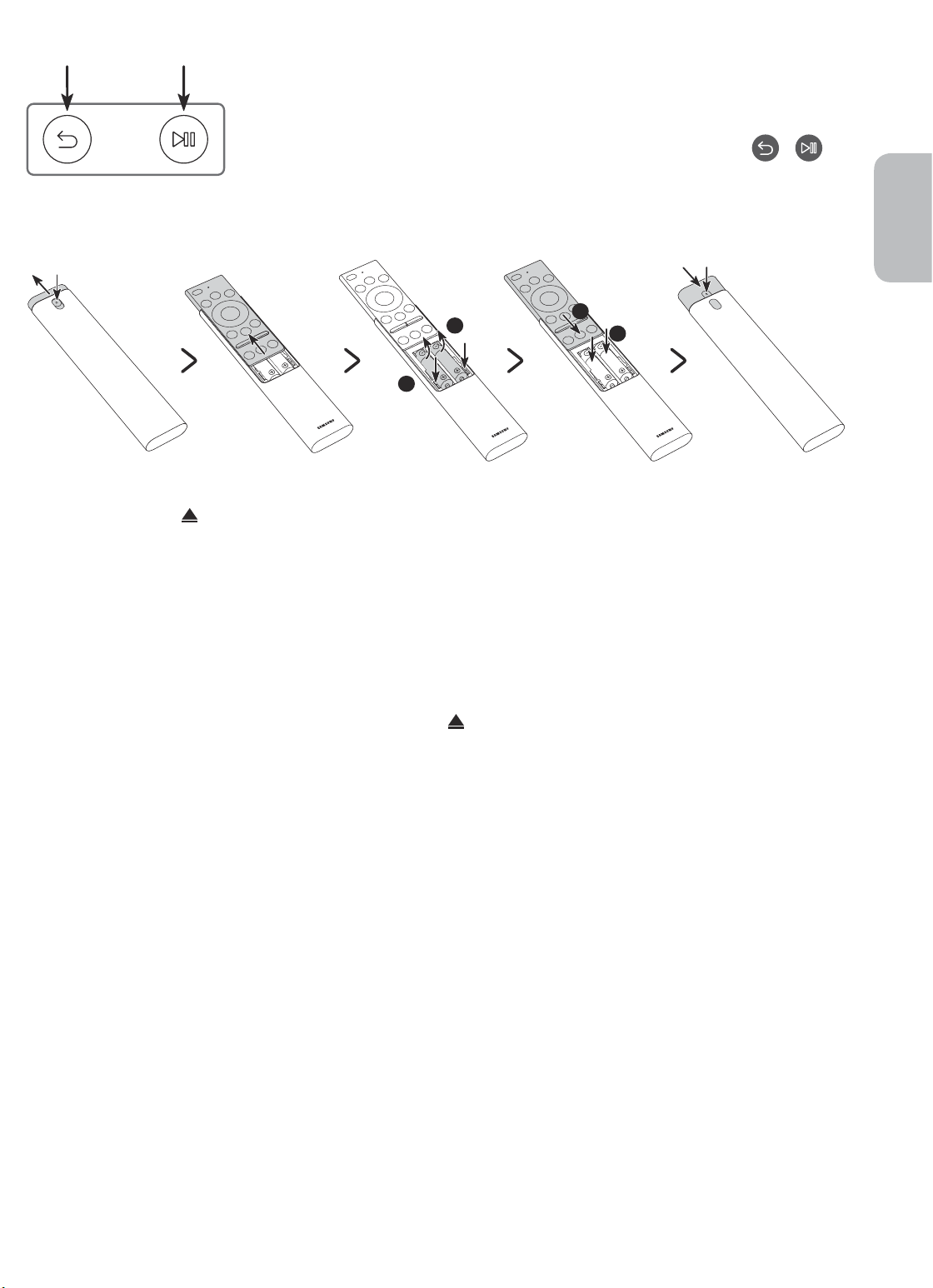
Abbinamento del televisore al telecomando Samsung Smart Remote
Quando si accende il televisore per la prima volta, il telecomando Samsung
Smart Remote si abbina al televisore automaticamente. Se l'abbinamento
automatico tra Samsung Smart Remote e TV non riesce, puntare il dispositivo
verso il sensore del televisore e premere contemporaneamente i tasti
riportati nel disegno sottostante per almeno 3 secondi.
e
Installazione delle batterie nel telecomando Samsung Smart Remote
Italiano
2
1
1. Premere il tasto nella parte superiore posteriore del Samsung Smart Remote. Il corpo scatterà
leggermente fuori dal coperchio.
2. Capovolgere il telecomando e far scorrere il corpo del telecomando verso l'alto fino a rivelare il comparto
batterie.
3. Se vi sono batterie nel telecomando, premere i tasti r e l sui entrambi i lati del comparto batterie per
rimuoverle.
4. Inserire due nuove batterie (1,5V AAA) nel comparto batterie rispettando le corrette polarità (+, -). Al
termine, far scorrere il corpo del telecomando fino a riportarlo nella posizione originale.
5. Capovolgere il telecomando, tenere premuto il tasto
corpo del telecomando verso il basso.
• Per una maggiore durata della batterie si consiglia l'uso di batterie alcaline.
nella parte superiore posteriore e far scorrere il
2
1
Italiano - 11
Page 32
04 Eseguire la funzione Initial Setup
(Impostazione iniziale)
Quando si accende il televisore per la prima volta, il televisore esegue automaticamente la funzione Initial
Setup (Impostazione iniziale). Initial Setup (Impostazione iniziale) permette di configurare le impostazioni base
del televisore, come la ricezione dei canali, la ricerca dei canali e la connessione di rete in un'unica volta.
• Prima di attivare la funzione Initial Setup (Impostazione iniziale), assicurarsi di collegare prima i dispositivi
esterni.
• Per utilizzare le funzioni smart del TV, il televisore deve essere collegato a Internet.
• Per eseguire Impostazione iniziale usando la app SmartThings, collegare prima il dispositivo mobile tramite
Wi-Fi.
• Qualora la finestra a comparsa della funzione di impostazione non venga visualizzata automaticamente
nella app SmartThings del dispositivo mobile, continuare l'impostazione manualmente dopo aver aggiunto
il TV in Aggiungi dispositivo nella dashboard della app SmartThings.
• La app SmartThings è disponibile su dispositivi mobile che eseguono il sistema operativo Android 6.0 o
successivi e iOS 10 o successivi.
• Si possono notare interferenze temporanee quando il TV comunica con i dispositivi mobile.
È possibile attivare la funzione Initial Setup (Impostazione iniziale) usando il menu del TV (
Impostazioni > Generali > Reset).
Seguire le istruzioni visualizzate nella schermata Initial Setup (Impostazione iniziale) e configurare le
impostazioni base del TV per regolare le condizioni ambientali di visione.
>
Uso di Controller TV
Per accendere il TV premere il tasto Controller TV posto sul fondo del TV quindi usare il Menu di controllo.
Il Menu di controllo compare alla pressione del tasto Controller TV mentre il TV è acceso. Per maggiori
informazioni sul suo uso, vedere la figura sotto.
• Lo schermo potrà risultare affievolito se la pellicola protettiva apposta sul logo SAMSUNG sul fondo del TV
non viene rimossa. Rimuovere la pellicola protettiva.
Menu di controllo
:
Spegni
:
Canale succ.
:
Can. prec.
Tasto Controller TV / Sensore del telecomando
:
Aum. vol.
:
Dim. vol.
:
Sorgente
Italiano - 12
Premere: Sposta
Tenere premuto: Seleziona
Il tasto Controller TV è situato sul fondo del TV.
Page 33
05 Connessione alla rete
La connessione a Internet del televisore consente di accedere a servizi online quali Smart Hub, così come di
scaricare gli aggiornamenti software non appena disponibili.
Connessione di rete - Wireless
Collegare il TV ad Internet usando un router o un modem standard.
Router Wireless IP o modem
Porta LAN a parete
Cavo LAN (non in dotazione)
con un server DHCP
Connessione di rete - Cablata
Collegare il TV alla rete mediante un cavo LAN.
• Se la velocità di rete è inferiore a 10Mbps, il televisore non sarà in grado di
collegarsi a Internet.
• Utilizzare il cavo Cat 7 (tipo *STP) per la connessione.
* Shielded Twisted Pair
Italiano
Italiano - 13
Page 34
06 Risoluzione dei problemi e manutenzione
Risoluzione dei problemi
Se il televisore funziona in modo anomalo, controllare per prima cosa l'elenco dei possibili problemi e soluzioni.
In alternativa, consultare la sezione Risoluzione dei problemi nell'e-Manual. Se nessuna delle soluzioni fornite
si dimostra utile per risolvere il problema, visitare il sito “www.samsung.com” quindi fare clic su Supporto,
oppure chiamare il numero del Centro di assistenza Samsung riportato sul retro di copertina di questo
manuale.
• Questo schermo LED TFT utilizza un pannello composto da sotto pixel la cui produzione richiede una
speciale tecnologia. Tuttavia, sullo schermo alcuni pixel potrebbero risultare più luminosi o più scuri.
Questo fenomeno non ha alcun impatto sulle prestazioni del prodotto.
• Per mantenere il televisore in condizioni ottimali si consiglia di aggiornare il software alla versione più
recente. Usare la funzione Aggiorna ora o la funzione Aggiornamento automatico nel menu del TV (
Impostazioni > Supporto > Aggiornamento software > Aggiorna ora o Aggiornamento automatico).
Il televisore non si accende.
• Verificare che la spina del cavo di alimentazione CA sia correttamente collegata alla presa a parete e al
televisore.
• Assicurarsi che la presa a parete sia regolarmente funzionante e che la spia della alimentazione sul
televisore sia accesa, che sia fissa e di colore rosso.
• Premere il tasto Controller TV sul fondo del televisore per verificare che il problema non sia il telecomando.
Se il televisore si accende, vedere la sezione "Il telecomando non funziona".
>
Non viene visualizzata alcuna immagine/video/audio o viene visualizzata una immagine/
video/audio distorti da un dispositivo esterno o sullo schermo del televisore compare il
messaggio “Segnale debole o assente” oppure è impossibile trovare il canale.
• Verificare che la connessione al dispositivo sia corretta e che tutti i cavi siano correttamente collegati.
• Rimuovere e ricollegare tutti i cavi collegati al televisore e ai dispositivi esterni. Se possibile, collegare
nuovi cavi.
• Confermare di aver selezionato la sorgente di ingresso corretta (
• Eseguire una diagnosi del televisore per determinare se la causa del problema è il televisore o il dispositivo
(
> Impostazioni > Supporto > Auto diagnosi > Avvia test immagine o Avvia test audio).
• Se i risultati del test sono normali, riavviare i disposiivi collegati scollegando i loro cavi di alimentazione
e ricollegandoli. Se il problema persiste, consultare la guida ai collegamenti contenuta nella guida
dell'utente dei dispositivi collegati.
• Qualora non si utilizzi un ricevitore via cavo o satellitare ed il TV riceva segnali da una antenna o da un cavo,
eseguire la funzione Sintonizzazione automatica per cercare i canali (
(Impostazioni Sintonizzazione automatica) > Sintonizzazione automatica).
– Il Impostazioni Sintonizzazione automatica potrebbe non essere supportato in base al modello
posseduto o all'area geografica di appartenenza.
– Se si utilizza un ricevitore via cavo o satellitare, vedere il manuale del ricevitore in uso.
> Sorgente).
> Impostazioni > Trasmissione >
Italiano - 14
Page 35
CI+ non funziona.
• Il TV Samsung è conforme agli standard CI+ 1.4.
• Qualora il modulo CI+ Common Interface non sia compatibile con questo dispositivo, rimuovere il modulo e
contattare un operatore CI+ per richiedere assistenza.
Il telecomando non funziona.
• Controllare se la spia di accensione del televisore lampeggia premendo il tasto di Accensione del
telecomando. Se non lampeggia, sostituire le pile del telecomando.
• Verificare che le batterie siano state inserite nel verso giusto rispettando la polarità (+/-).
• Puntare il telecomando verso il televisore a una distanza di 1,5-1,8.
• Se il televisore è dotato di Samsung Smart Remote (telecomando Bluetooth), accertarsi che sia stato
abbinato al televisore.
Il telecomando del ricevitore via cavo o satellitare non riesce ad accendere o spegnere il
televisore o a regolare il volume.
• Programmare il telecomando del ricevitore via cavo o satellitare in modo che possa controllare le funzioni
del televisore. Consultare il manuale dell'utente del ricevitore via cavo o satellitare per il codice del
televisore SAMSUNG.
Le impostazioni TV vengono perse dopo 5 minuti.
• La TV è in modalità Modalità di rivendita. Cambiare Modalità d'uso nel menu Generali a Modalità Casa (
Impostazioni > Generali > Gestione sistema > Modalità d'uso > Modalità Casa).
>
Italiano
Wi-Fi intermittente
• Accertarsi che la TV sia dotata di una connessione di rete ( > Impostazioni > Generali > Rete > Stato
rete).
• Verificare che la password Wi-Fi sia stata digitata correttamente.
• Verificare la distanza tra il TV ed il modem o il router. La distanza non deve essere maggiore di 15,2 m.
• Ridurre le interferenze non utilizzando o spegnendo i dispositivi wireless. Inoltre verificare che tra il TV ed
il router o il modem non vi siano ostacoli. (la forza del segnale Wi-Fi può essere influenzata da apparecchi,
telefoni cordless, pareti/camini, ecc)
Piano unico Multipiano
Router wireless
Ripetitore wireless
• Contattare il proprio ISP e richiedere la reimpostazione del circuito di rete per registrare nuovamente gli
indirizzi MAC del proprio Modem/Router e TV.
Italiano - 15
Page 36
Problemi con applicazioni video (Youtube ecc)
• Cambiare il DNS in 8.8.8.8. Selezionare
Impostaz. DNS > Immetti manualmente > Server DNS > digitare 8.8.8.8 > OK.
• Reimpostare selezionando
> Impostazioni > Supporto > Auto diagnosi > Ripristina Smart Hub.
> Impostazioni > Generali > Rete > Stato rete > Impost. IP >
Cos'è l'Assistenza remota?
Il Servizio di Assistenza remota Samsung supporta il cliente a livello individuale attraverso un tecnico Samsung
che remotamente:
• Effettua la diagnosi del televisore
• Regola le impostazioni del televisore per conto del cliente
• Esegue il ripristino del televisore alle impostazioni di fabbrica
• Installa gli aggiornamenti firmware consigliati
Come funziona l'assistenza da remoto?
È possibile ottenere facilmente l'assistenza Samsung Remote Support per il proprio TV:
1. Chiamare il Centro di assistenza Samsung e richiedere assistenza remota.
2. Accedere al menu del TV, quindi andare alla sezione Supporto. (
3. Selezionare Gestione remota quindi leggere ed accettare i termini del contratto di assistenza. Quando
viene visualizzata la schermata di immissione del PIN, fornire il PIN al tecnico.
4. Il tecnico avrà quindi accesso al televisore.
> Impostazioni > Supporto)
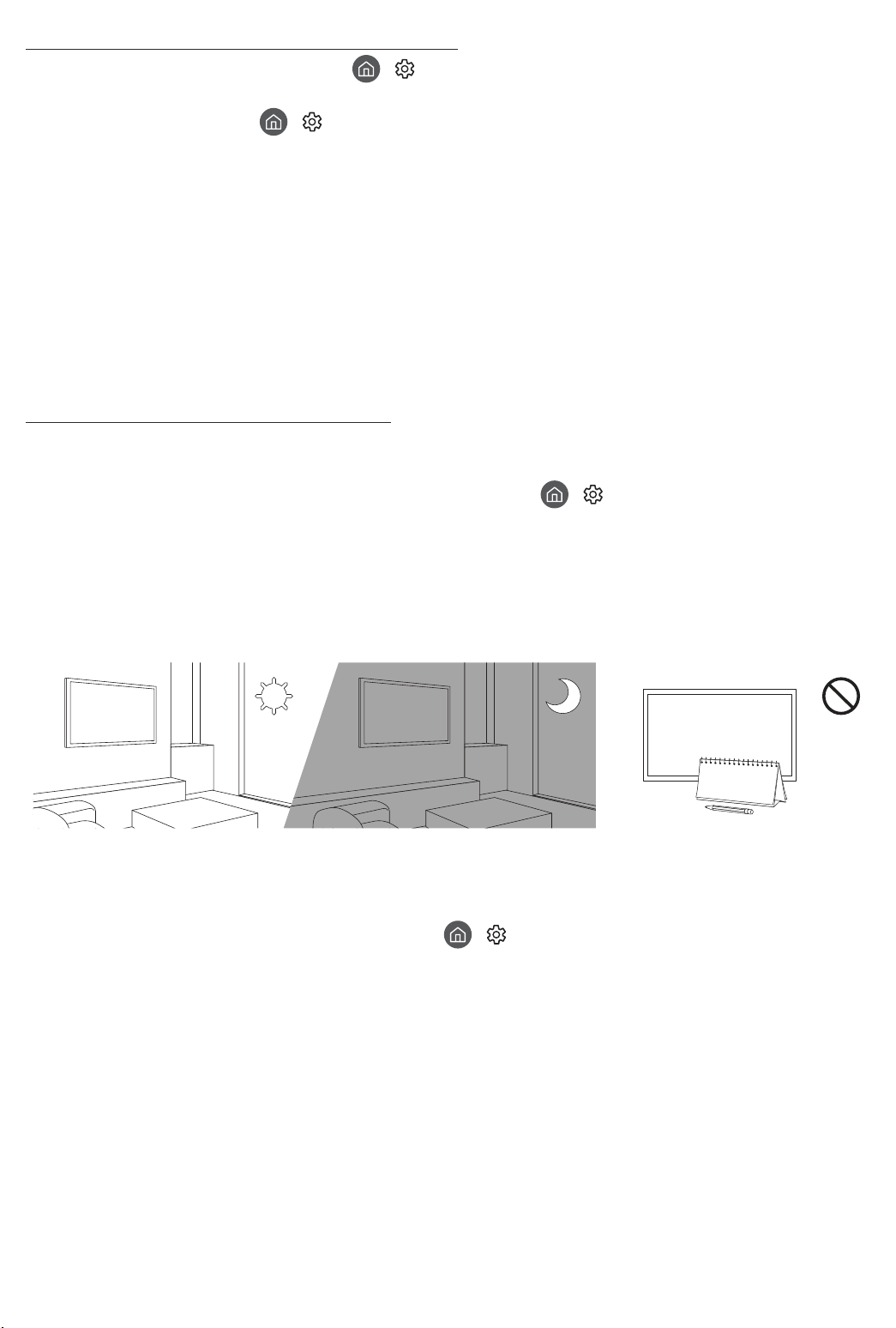
Sensore Eco e luminosità dello schermo
La funzione Sensore Eco regola la luminosità del televisore in modo automatico. Questa funzione misura la
luce ambientale ottimizzando automaticamente la luminosità del televisore allo scopo di ridurre il consumo
energetico. Per disattivare questa funzione, accedere a
Rilevamento luce ambientale.
• Se lo schermo risulta troppo scuro durante la visione del televisore in un ambiente scarsamente illuminato,
ciò potrebbe essere causato dall'attivazione della funzione Rilevamento luce ambientale.
• Il sensore eco è posto sul fondo del televisore. Prestare attenzione a non ostruire il sensore. Ciò potrebbe
causare una riduzione indesiderata della luminosità dell'immagine.
> Impostazioni > Generali > Soluzione Eco >
Italiano - 16
Page 37
Manutenzione del televisore
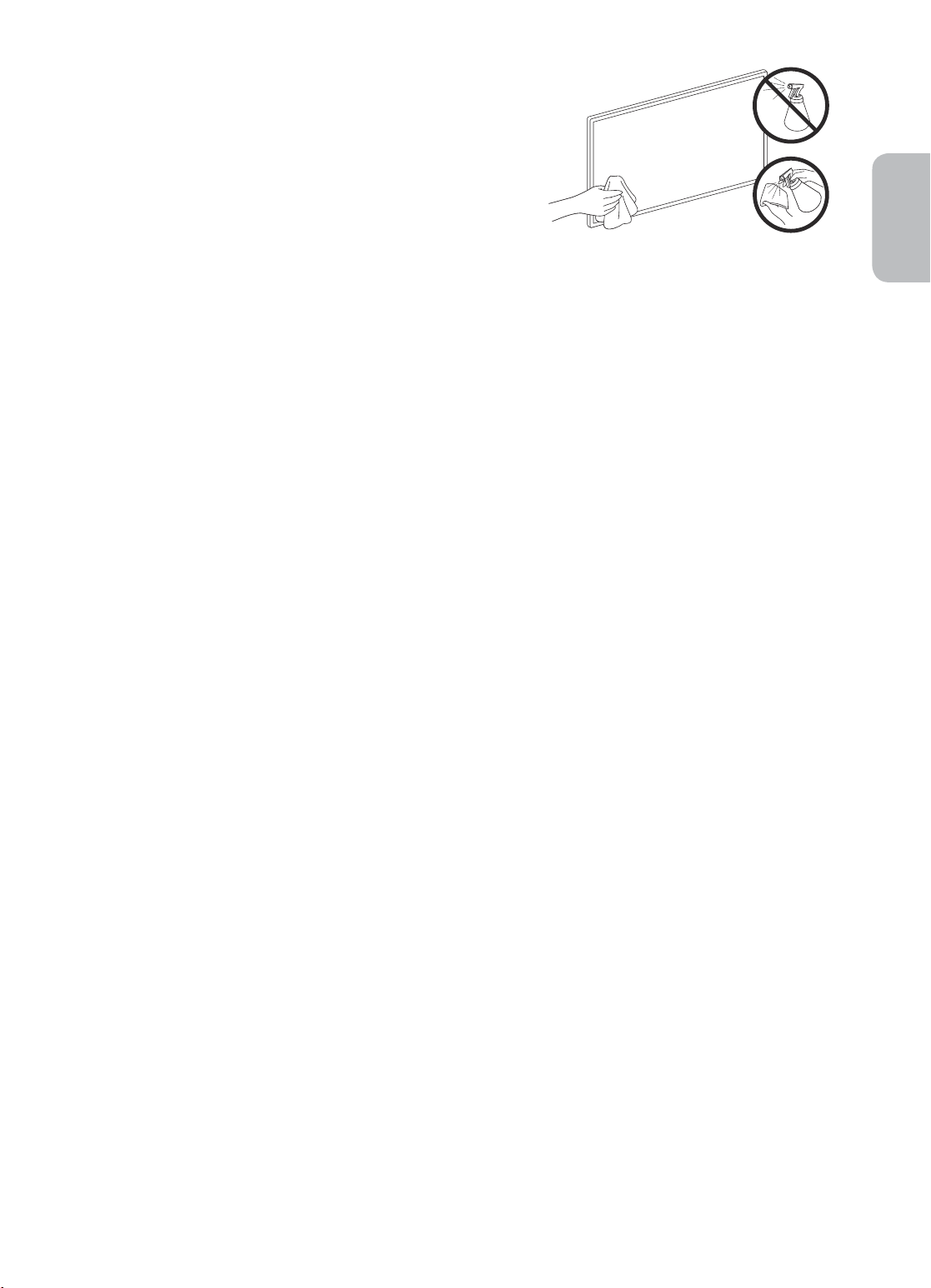
• Se allo schermo del televisore è stato apposto un adesivo,
rimuovendolo possono rimanere dei residui. Eliminare i residui
prima di usare il televisore.
• Il telaio e lo schermo del televisore possono graffiarsi durante
la pulizia. Usare un panno morbido per non graffiare il telaio e lo
schermo durante la pulizia.
• Non spruzzare acqua o soluzioni detergenti direttamente sul
televisore. Qualsiasi liquido che riesca a penetrare all'interno del
prodotto può provocare guasti, incendio o una scossa elettrica.
• Per pulire il televisore, spegnerlo quindi rimuovere
delicatamente dallo schermo eventuali impronte o macchie
utilizzando un panno in microfibra. Pulire il televisore con un
panno morbido in microfibra inumidito in acqua. Al termine
asciugare il televisore con un panno asciutto. Durante la pulizia,
non premere eccessivamente sulla superficie poiché potrebbe
danneggiare il pannello. Non utilizzare liquidi infiammabili
(per es. benzene o diluenti) né soluzioni detergenti. Per i residui
più difficili da rimuovere, spruzzare una piccola quantità di
detergente per schermi su un panno in microfibra e pulire con
esso le macchie residue.
Italiano
Italiano - 17
Page 38
07 Specifiche e altre informazioni
Specifiche
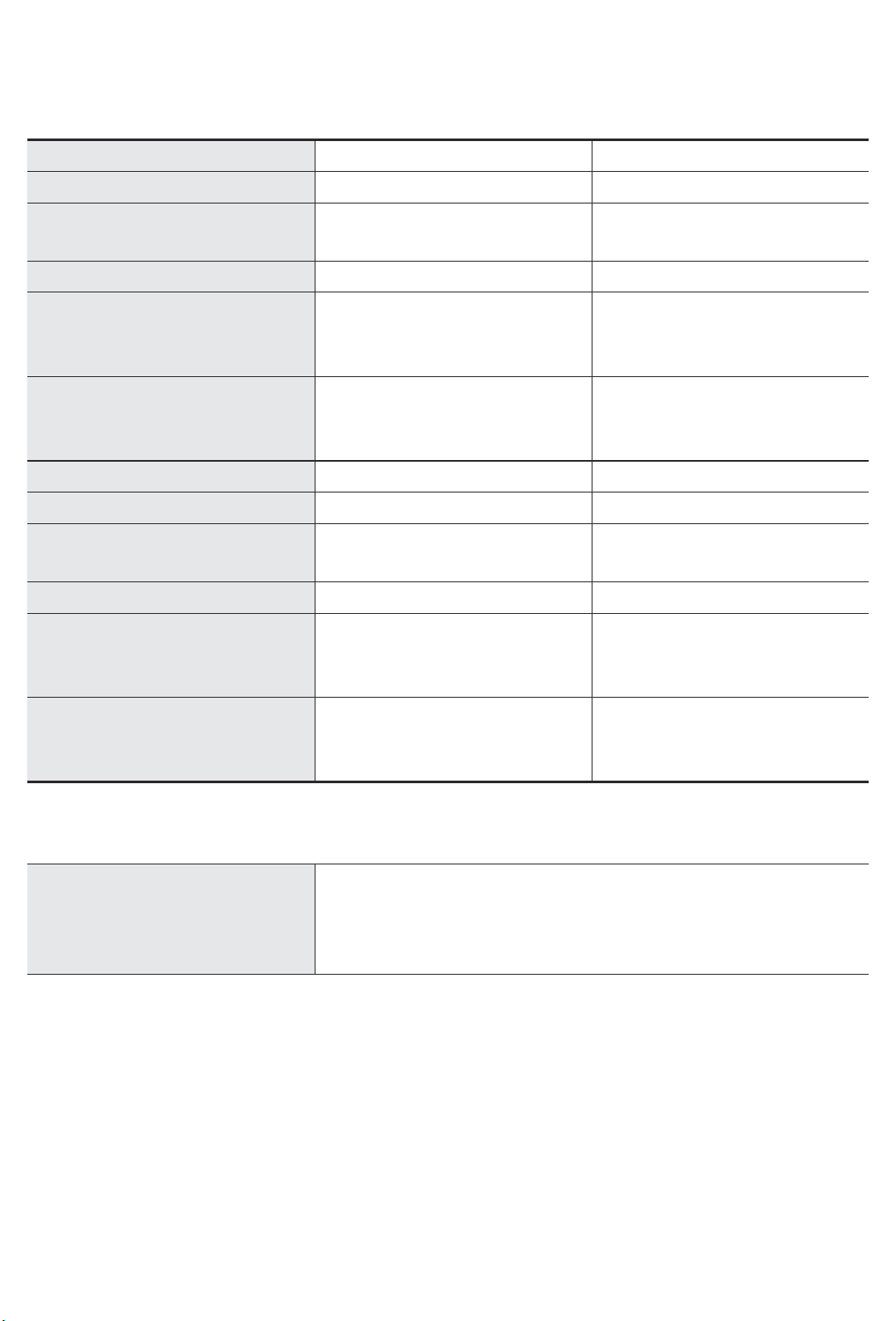
Modello UE43RU7450 / UE43RU7470 UE50RU7450 / UE50RU7470
Risoluzione del display
Dimensione schermo
Misurato diagonalmente
Audio (Uscita)
3840 x 2160 3840 x 2160
43 pollici
108 cm
20 W 20 W
50 pollici
125 cm
Dimensioni (L x A x P)
Corpo
Con piedistallo
970,2 x 563,2 x 58,1 mm
970,2 x 648,0 x 343,7 mm
1124,8 x 650,2 x 59,0 mm
1124,8 x 735,8 x 346,7 mm
Peso
Senza piedistallo
Con piedistallo
9,5 kg
12,1 kg
13,8 kg
16,5 kg
Modello UE55RU7450 / UE55RU7470 UE65RU7450 / UE65RU7470
Risoluzione del display
Dimensione schermo
Misurato diagonalmente
Audio (Uscita)
3840 x 2160 3840 x 2160
55 pollici
138 cm
20 W 20 W
65 pollici
163 cm
Dimensioni (L x A x P)
Corpo
Con piedistallo
1238,6 x 714,2 x 58,6 mm
1238,6 x 800,0 x 360,6 mm
1457,5 x 837,3 x 59,0 mm
1457,5 x 922,8 x 387,3 mm
Peso
Senza piedistallo
Con piedistallo
17,2 kg
19,7 kg
25,1 kg
28,0 kg
Caratteristiche ambientali
Temperatura di esercizio
Umidità di esercizio
Temperatura di stoccaggio
Umidità di stoccaggio
• Design e specifiche sono soggetti a modifiche senza preavviso.
• Per informazioni riguardanti l'alimentazione elettrica e il consumo di corrente, consultare l'etichetta
apposta al prodotto.
• Il consumo elettrico tipico viene misurato conformemente allo standard IEC 62087.
• Notare l'etichetta delle specifiche tecniche fissata sul retro del TV. (in alcuni modelli, l'etichetta delle
specifiche tecniche è situata sul retro del coperchio dei terminali).
Da 10 a 40°C (Da 50 a 104 °F)
Dal 10% al 80%, senza condensa
Da -20 a 45°C (Da -4 a 113 °F)
Dal 5% al 95%, senza condensa
Italiano - 18
Page 39
Riduzione del consumo energetico
Quando si spegne, il televisore entra in modalità Standby. In modalità Standby continua a consumare una
piccola quantità di energia. Per ridurre il consumo energetico, scollegare il cavo di alimentazione dalla presa a
parete in caso di inutilizzo prolungato del televisore.
Licenze
The terms HDMI and HDMI High-Definition Multimedia Interface, and the HDMI Logo are trademarks or
registered trademarks of HDMI Licensing LLC in the United States and other countries.
Raccomandazioni - Solo UE
Italiano
Con la presente, Samsung Electronics dichiara che questo apparecchio è conforme alla Direttiva 2014/53/UE.
Il testo completo della Dichiarazione di conformità UE è disponibile al seguente indirizzo internet: http://www.
samsung.com accedere a Supporto > Cerca Supporto Prodotto quindi digitare il nome del modello.
L'uso di questo apparecchio è consentito in tutti i paesi europei.
Max potenza trasmissione BT: 100mW a 2,4GHz – 2,4835GHz
Max potenza trasmissione Wi-Fi: 100mW a 2,4GHz–2,4835GHz
Per maggiori informazioni sull'impegno di Samsung nella salvaguardia ambientale e sulle normative specifiche
dei prodotti, e.g. REACH, RAEE, Batterie, visitare la pagina
http://www.samsung.com/it/aboutsamsung/sustainability/environment/our-commitment/data/
AVVERTENZA - PER EVITARE IL PERICOLO DI INCENDIO, NON AVVICINARE MAI AL PRODOTTO
CANDELE ACCESE O ALTRE FIAMME LIBERE.
Italiano - 19
Page 40
Corretto smaltimento del prodotto (rifiuti elettrici ed elettronici)
(Applicabile nei Paesi con sistemi di raccolta differenziata)
Il simbolo riportato sul prodotto, sugli accessori o sulla documentazione indica che il prodotto e
i relativi accessori elettronici (quali caricabatterie, cuffia e cavo USB) non devono essere smaltiti
con altri rifiuti al termine del ciclo di vita. Per evitare eventuali danni all'ambiente o alla salute
causati dallo smaltimento dei rifiuti non corretto, si invita l'utente a separare il prodotto e i
suddetti accessori da altri tipi di rifiuti, conferendoli ai soggetti autorizzati secondo le normative
locali.
Gli utenti domestici, in alternativa alla gestione autonoma di cui sopra, potranno consegnare
l’apparecchiatura che si desidera smaltire al rivenditore, al momento dell’acquisto di una nuova
apparecchiatura di tipo equivalente. Presso i rivenditori di prodotti elettronici con superficie
di vendita di almeno 400 m2 è inoltre possibile consegnare gratuitamente, senza obbligo di
acquisto, i prodotti elettronici da smaltire con dimensioni inferiori a 25 cm.
Gli utenti professionali (imprese e professionisti) sono invitati a contattare il proprio fornitore e
verificare i termini e le condizioni del contratto di acquisto. Questo prodotto e i relativi accessori
elettronici non devono essere smaltiti unitamente ad altri rifiuti commerciali.
Corretto smaltimento delle batterie del prodotto
(Applicabile nei Paesi con sistemi di raccolta differenziata)
Il simbolo riportato sulla batteria o sulla sua documentazione o confezione indica che le batterie
di questo prodotto non devono essere smaltite con altri rifiuti al termine del ciclo di vita. Dove
raffigurati, i simboli chimici Hg, Cd o Pb indicano che la batteria contiene mercurio, cadmio o
piombo in quantità superiori ai livelli di riferimento della direttiva CE 2006/66. Se le batterie non
vengono smaltite correttamente, queste sostanze possono causare danni alla salute umana o
all'ambiente.
Per proteggere le risorse naturali e favorire il riutilizzo dei materiali, separare le batterie dagli
altri tipi di rifiuti e utilizzare il sistema di conferimento gratuito previsto nella propria area di
residenza.
Italiano - 20
Page 41
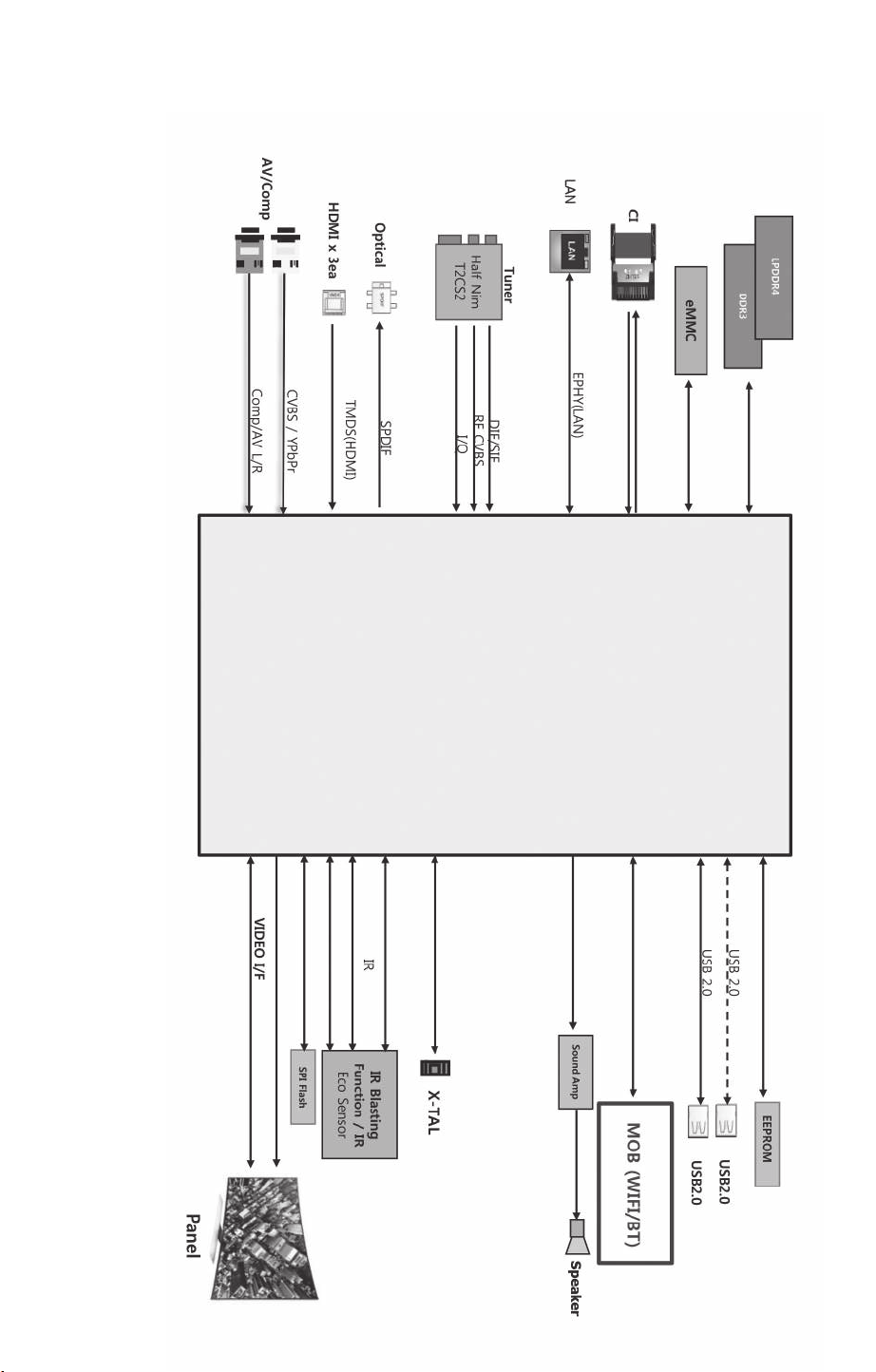
Diagrammi a blocchi
Page 42
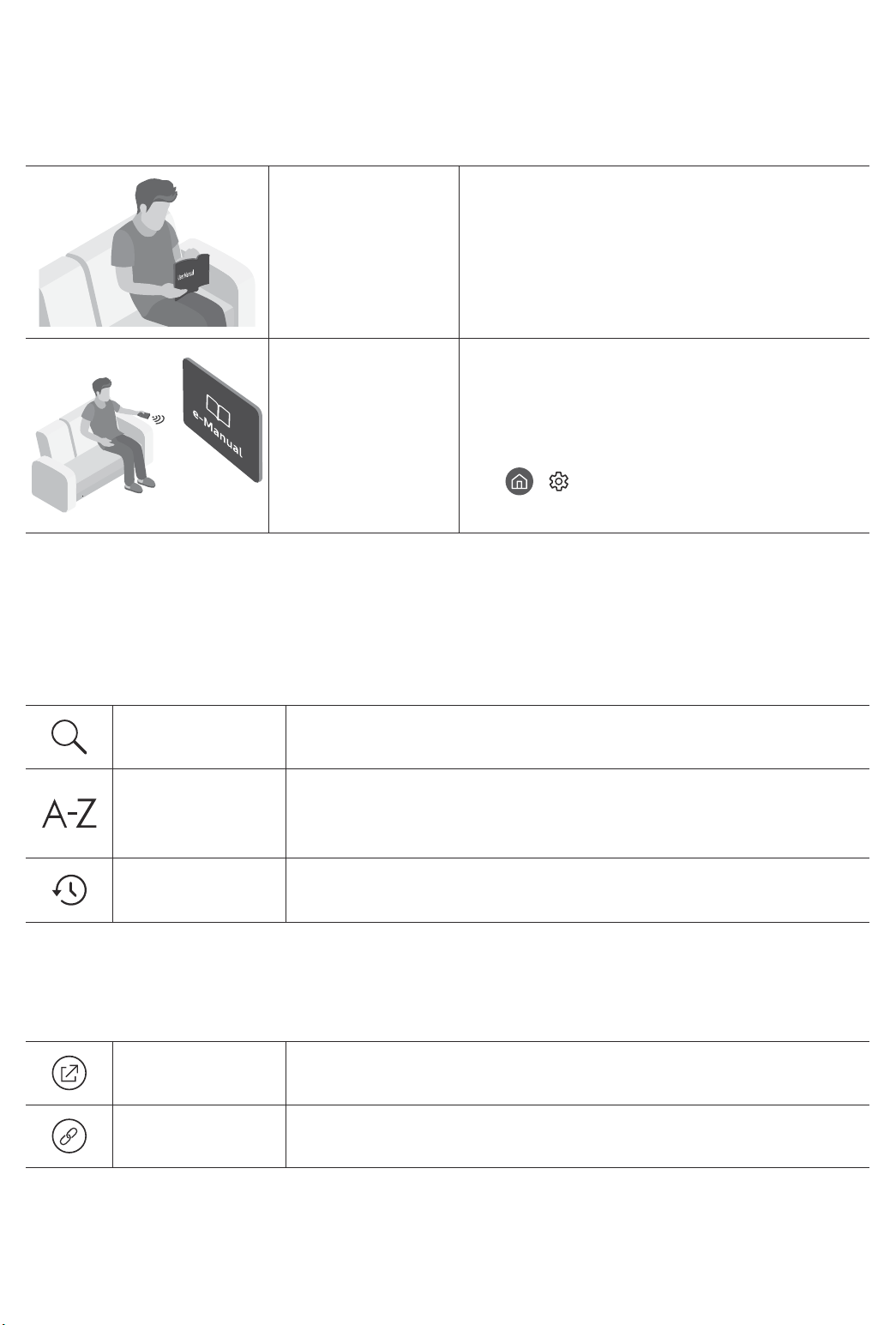
Vor dem Lesen der Bedienungsanleitung
Dieser Fernseher wurde mit dieser Bedienungsanleitung und einem eingebetteten e-Manual geliefert.
Überprüfen Sie die Folgendes, ehe Sie die Bedienungsanleitung lesen:
Benutzerhandbuch
e-Manual
Auf der Website (www.samsung.com) können Sie die Handbücher herunterladen und ihren Inhalt auf einem PC
oder Mobilgerät anzeigen.
Lesen Sie dieses Handbuch, um Informationen zu
Fragen der Sicherheit, Installation, des Zubehörs,
der Ersteinrichtung und zu den technischen
Daten des Geräts anzuzeigen.
Weitere Informationen zu diesem Fernsehgerät
erhalten Sie in dem in das Gerät eingebetteten
e-Manual.
• So öffnen Sie das e-Manual.
> Einstellungen > Unterstützung >
e-Manual öffnen
Lernen der Assistenzfunktionen des e-Manual
• Auf manche Menübildschirme können Sie über das e-Manual nicht zugreifen.
Suchen
Index
Kürzlich
angesehen
Hiermit wählen Sie einen Treffer in der Liste mit den Suchergebnissen
aus, um die entsprechende Seite zu laden.
Hiermit wählen Sie ein Stichwort aus, um zur entsprechenden Seite zu
navigieren.
– Die Menüs werden, je nach Region, möglicherweise nicht angezeigt.
Hiermit wählen Sie ein Thema aus der Liste der kürzlich angesehenen
Themen aus.
Lernen der Funktionen für die auf den Themenseiten des e-Manuals
angezeigten Tasten
Jetzt testen
Verknüpfung
Hiermit können Sie die entsprechende Menüoption auswählen und die
Funktion sofort ausprobieren.
Hiermit können Sie sofort auf ein unterstrichenes Thema zugreifen, das
mit einer e-Manual-Seite verbunden ist.
Deutsch - 2
Page 43
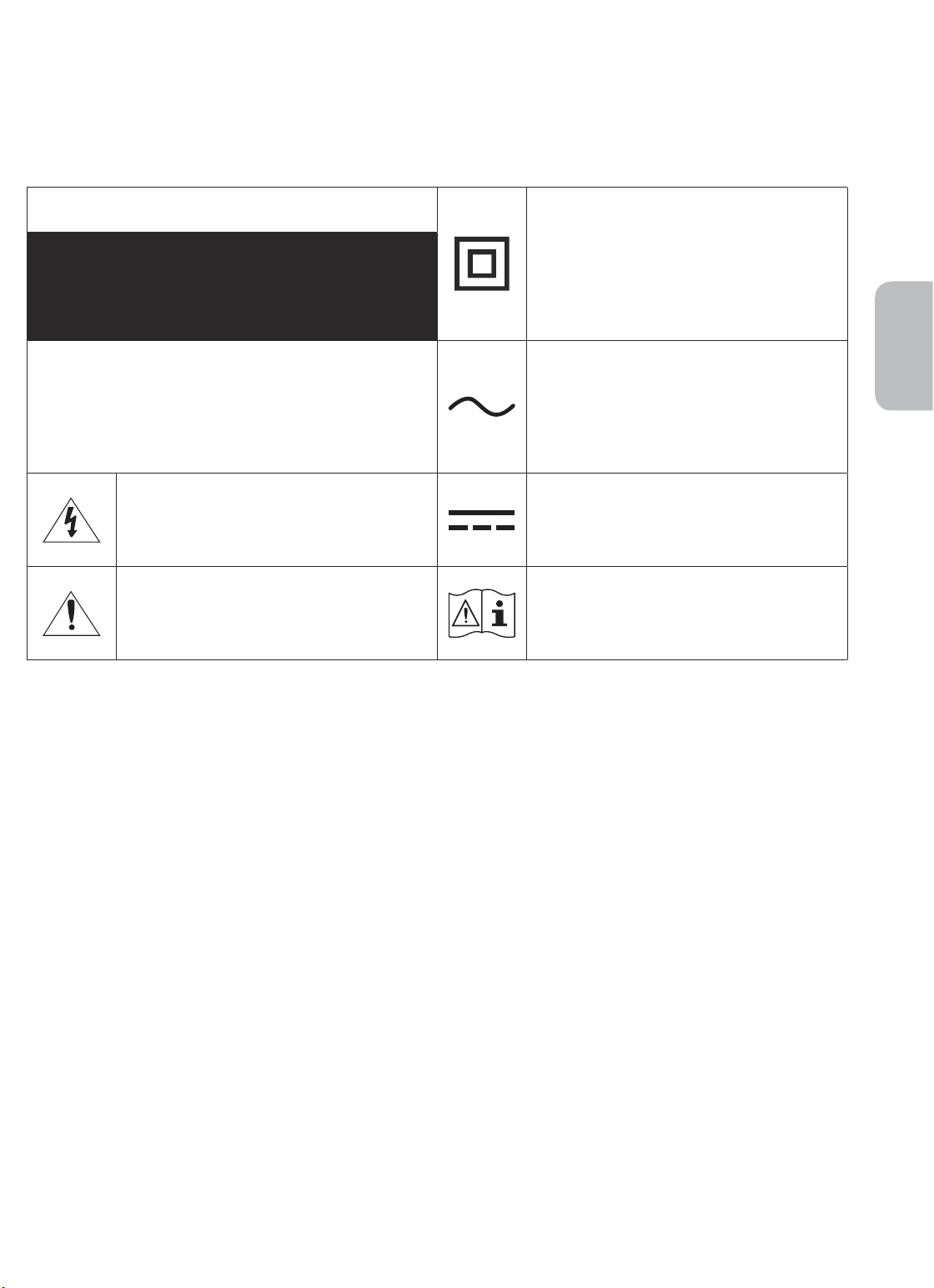
Achtung! Wichtige Sicherheitshinweise
Lesen Sie die Sicherheitshinweise sorgfältig, bevor Sie das Fernsehgerät verwenden.
In der folgenden Tabelle finden Sie eine Erklärung für die Symbole, die Sie möglicherweise auf Ihrem SamsungProdukt sehen.
ACHTUNG
GEFAHR DURCH STROMSCHLAGNICHT ÖFFNEN
ACHTUNG: UM DAS RISIKO EINES STROMSCHLAGS ZU
VERRINGERN, DÜRFEN SIE DIE ABDECKUNG (ODER
RÜCKSEITE) NICHT ÖFFNEN. ES BEFINDEN SICH IM
INNEREN KEINE TEILE, DIE VON BENUTZERN GEWARTET
WERDEN KÖNNEN. ALLE WARTUNGSARBEITEN SIND
QUALIFIZIERTEM FACHPERSONAL ZU ÜBERLASSEN.
Dieses Symbol zeigt an, dass im Inneren
Hochspannung vorhanden ist. Es ist gefährlich,
Teile im Inneren dieses Bildschirms zu
berühren.
Dieses Symbol weist darauf hin, dass diesem
Gerät wichtige Anweisungen zum Betrieb und
zur Wartung beigefügt sind.
Produkt der Klasse II: Dieses Symbol zeigt
an, dass das Gerät einen elektrischen
Erdungsanschluss (Masse) nicht benötigt.
Wenn dieses Symbol auf einem Produkt mit
Netzkabel nicht vorhanden ist, MUSS das
Produkt über eine zuverlässige Verbindung mit
der Erde (Masse) verfügen.
Wechselspannung: Bei einer mit diesem
Symbol gekennzeichneten Nennspannung
handelt es sich um eine Wechselspannung.
Gleichspannung: Bei einer mit diesem Symbol
gekennzeichneten Nennspannung handelt es
sich um eine Gleichspannung.
Achtung! Gebrauchsanweisung beachten:
Dieses Symbol weist den Benutzer an, weitere
sicherheitsrelevante Informationen der
Gebrauchsanweisung zu entnehmen.
Deutsch
• Die Schlitze und Öffnungen im Gehäuse und in der Rückwand oder im Boden sind wichtig und dienen der
Belüftung. Um den zuverlässigen Betrieb des Geräts zu gewährleisten und es vor Überhitzung zu schützen,
dürfen diese Öffnungen keinesfalls blockiert oder bedeckt werden.
– Stellen Sie das Gerät nicht an Orten mit beengten Platzverhältnissen auf, wie z.B. in einem Bücherregal
oder einem Einbauschrank. Dies ist nur dann zulässig, wenn für ausreichende Belüftung gesorgt wird.
– Außerdem darf das Gerät keinesfalls in der Nähe oder oberhalb eines Heizstrahlers oder -körpers
aufgestellt werden oder an Orten, an denen es direkter Sonneneinstrahlung ausgesetzt ist.
– Stellen Sie keine mit Flüssigkeit gefüllten Behälter (Vasen usw.) auf das Gerät, da dies zu einem Brand
oder Stromschlag führen kann.
• Setzen Sie das Gerät keinesfalls dem Regen aus und stellen Sie es nicht in der Nähe von Wasser auf
(Badewanne, Küchenspüle, feuchter Keller, Schwimmbecken usw.). Falls das Gerät dennoch Nässe
ausgesetzt war, trennen Sie es von der Stromversorgung und wenden Sie sich umgehend an den
nächstgelegenen Händler.
• Für dieses Gerät werden Batterien benötigt. Entsorgen Sie die Batterien ordnungsgemäß und in
Übereinstimmung mit den für Sie geltenden Umweltschutzbestimmungen. Bitte wenden Sie sich bei
Fragen zur ordnungsgemäßen Entsorgung an Ihre örtlichen Behörden.
• Überlasten Sie Steckdosen, Verlängerungskabel und Netzteile keinesfalls, da dies zu einem Brand oder
Stromschlag führen kann.
• Netzkabel müssen so verlegt werden, dass niemand auf das Kabel treten kann oder es durch Gegenstände
gequetscht wird, die auf dem Kabel stehen oder gegen das Kabel drücken. Insbesondere ist auf Stecker,
Netzteile und die Kabeldurchführung am Gerätegehäuse zu achten.
Deutsch - 3
Page 44

• Trennen Sie das Gerät aus Sicherheitsgründen bei einem Gewitter oder bei längerer Nutzungspause vom
Netz und von der Antenne bzw. vom Kabelsystem. Auf diese Weise werden Schäden durch Blitzschlag oder
Spannungsstöße vermieden.
• Stellen Sie sicher, dass die Nennspannung des Gleichstromnetzteils für die örtliche Stromversorgung
geeignet ist, bevor Sie das Netzkabel an die Stromversorgung anschließen.
• Führen Sie niemals Metallgegenstände in die Öffnungen des Geräts ein. Dies kann zu Stromschlägen führen.
• Berühren Sie zur Vermeidung von Stromschlägen keinesfalls Bauteile im Inneren des Geräts. Das Gerät darf
nur von einem qualifizierten Techniker geöffnet werden.
• Stellen Sie sicher, dass der Netzstecker fest in der Steckdose sitzt. Ziehen Sie das Netzkabel nie am Kabel
selbst, sondern stets am Stecker aus der Steckdose. Ziehen Sie niemals am Kabel, um den Netzstecker aus
der Steckdose zu ziehen. Berühren Sie das Netzkabel niemals mit feuchten Händen.
• Wenn das Gerät nicht einwandfrei funktioniert, insbesondere beim Auftreten ungewöhnlicher Geräusche
oder Gerüche aus dem Inneren, trennen Sie es unverzüglich von der Stromversorgung und wenden Sie sich
umgehend an Ihren nächstgelegenen Händler oder das nächste SamsungKundendienstzentrum.
• Ziehen Sie unbedingt den Netzstecker aus der Steckdose, wenn das Gerät längere Zeit nicht verwendet
werden soll oder Sie längere Zeit außer Haus sind (insbesondere wenn Kinder und ältere Personen allein im
Haus bleiben).
– Staubablagerungen können Stromschläge, Kurzschlüsse oder Brände verursachen, da sie zu
Funkenbildung, übermäßiger Erwärmung und Beschädigung der Isolierung am Netzkabel führen
können.
• Wenden Sie sich für weiterführende Informationen an ein autorisiertes Kundendienstzentrum, wenn das
Gerät an einem Ort mit hoher Konzentration an Staubpartikeln, außergewöhnlich hohen oder niedrigen
Temperaturen, hoher Luftfeuchtigkeit oder in unmittelbarer Nähe zu Chemikalien aufgestellt oder z.B.
an einem Bahnhof oder Flughafen im Dauerbetrieb verwendet werden soll. Eine nicht fachgerechte
Aufstellung kann zu schweren Schäden am Gerät führen.
• Verwenden Sie nur ordnungsgemäß geerdete Stecker und Steckdosen.
– Eine fehlerhafte Erdung kann zu Stromschlägen oder Schäden am Gerät führen. (Nur Geräte der Klasse I.)
• Um dieses Gerät vollständig abzuschalten, müssen Sie den Netzstecker aus der Steckdose ziehen. Um
sicherzustellen, dass Sie das Gerät bei Bedarf schnell vom Netz trennen können, müssen die Steckdose und
der Netzstecker jederzeit leicht zugänglich sein.
• Bewahren Sie die Zubehörteile (Batterien usw.) an einem sicheren Ort außerhalb der Reichweite von
Kindern auf.
• Lassen Sie das Gerät nicht fallen, und setzen Sie es keiner Schlag- oder Stoßeinwirkung aus. Wenn
das Gerät beschädigt ist, trennen Sie es vom Stromnetz und wenden Sie sich an ein Samsung
Kundendienstzentrum.
• Ziehen Sie zum Reinigen den Netzstecker aus der Steckdose, und wischen Sie das Gerät mit einem weichen,
trockenen Tuch ab. Verwenden Sie keine Chemikalien wie Wachs, Benzol, Alkohol, Verdünner, Insektizide,
Luftverbesserer, Schmiermittel oder Reinigungsmittel. Diese Chemikalien können die Oberfläche des
Geräts beschädigen und aufgedruckte Kennzeichnungen lösen bzw. entfernen.
• Setzen Sie das Gerät niemals Regen oder Feuchtigkeit aus.
• Entsorgen Sie Batterien niemals in einem Feuer.
• Schließen Sie die Batterien nicht kurz, nehmen Sie sie nicht auseinander und setzen Sie sie keiner Hitze aus.
• Wenn Sie die für die Fernbedienung mitgelieferten Batterien durch neue Batterien des falschen Typs
ersetzen, besteht Explosionsgefahr. Setzen Sie nur Batterien des gleichen oder eines gleichwertigen Typs ein.
* Die Abbildungen und Illustrationen in diesem Handbuch dienen nur zur Information und können vom
tatsächlichen Aussehen des Geräts abweichen. Änderungen an Ausführung und technischen Daten vorbehalten.
Einige GUS-Sprachen (Russisch, Ukrainisch, Kasachisch) stehen für dieses Produkt nicht zur Verfügung, da das
Gerät für Kunden in der EU hergestellt wurde.
Deutsch - 4
Page 45
Inhalt
Vor dem Lesen der Bedienungsanleitung ---------------------------------------------------------------------------- 2
Achtung! Wichtige Sicherheitshinweise
01 Lieferumfang
02 Installation des Fernsehgeräts
Montieren des Geräts an der Wand
Ausreichende Belüftung Ihres Geräts
Sicherheitshinweis: Befestigen des Geräts an der
Wand, damit es nicht kippt
---------------------------------------------------------------------------- 9
03 Die Samsung Smart Remote
Über die Buttons auf der Samsung Smart Remote
Koppeln des Fernsehgeräts mit der
Samsung Smart Remote
Einsetzen der Batterien in die
Samsung Smart Remote
---------------------------------------------------------------------------- 11
---------------------------------------------------------------------------- 11
---------------------------------------------------------------------------- 3
---------------------------------------------------------------------------- 7
---------------------------------------------------------------------------- 8
Deutsch
---------------------------------------------------------------------------- 10
04 Ausführen der Ersteinrichtung
Verwenden des TV-Steuerungs
---------------------------------------------------------------------------- 12
05 Verbinden mit einem Netzwerk
Netzwerkverbindung – Drahtlos
Netzwerkverbindung – Kabel
---------------------------------------------------------------------------- 13
---------------------------------------------------------------------------- 13
06 Fehlerbehebung und Wartung
Fehlerbehebung
Was ist Fernunterstützung?
Öko-Sensor und Bildschirmhelligkeit
Pflegen des Fernsehgeräts
---------------------------------------------------------------------------- 14
---------------------------------------------------------------------------- 16
---------------------------------------------------------------------------- 16
---------------------------------------------------------------------------- 17
07 Technische Daten und weitere Informationen
Technische Daten
Umgebungsbedingungen
Verringern des Stromverbrauchs
Lizenzen
---------------------------------------------------------------------------- 19
---------------------------------------------------------------------------- 18
---------------------------------------------------------------------------- 18
---------------------------------------------------------------------------- 19
Deutsch - 5
Page 46
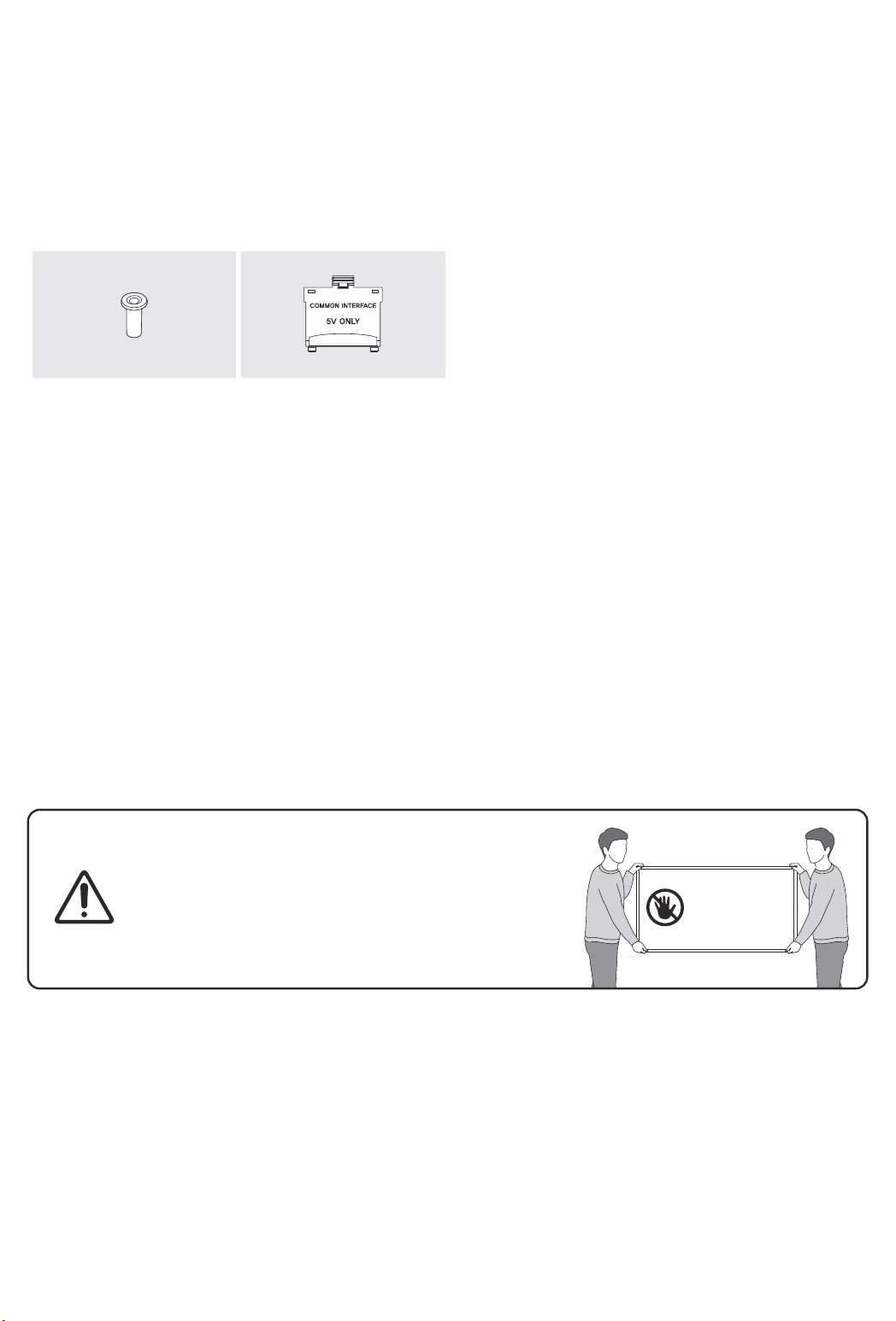
01 Lieferumfang
Vergewissern Sie sich, dass die folgenden Teile im Lieferumfang des Geräts enthalten sind. Falls Komponenten
fehlen sollten, setzen Sie sich bitte mit Ihrem Händler in Verbindung.
• Samsung Smart Remote & 2 Batterien (Typ AAA)
• Benutzerhandbuch
x 4
Adapter für die
Wandhalterung
• Farbe und Form der Teile können sich je nach Modell unterscheiden.
• Nicht mitgelieferte Kabel können gesondert erworben werden.
• Kontrollieren Sie beim Öffnen der Verpackung, ob Zubehör hinter oder in den Verpackungsmaterialien
versteckt ist.
Für Reparaturen an Ihrem Gerät fallen Gebühren an, wenn:
(a) auf Ihren Wunsch ein Techniker zu Ihnen geschickt wird, aber es wird festgestellt, dass kein Defekt des
Geräts vorliegt (d.h. wenn das Benutzerhandbuch nicht gelesen wurde).
(b) Sie das Gerät in ein SamsungKundendienstzentrum bringen, aber es wird festgestellt, dass kein Defekt
des Geräts vorliegt (d.h. wenn das Benutzerhandbuch nicht gelesen wurde).
Die Höhe eventuell anfallender Gebühren wird Ihnen vor dem Besuch eines Technikers mitgeteilt.
CI-Kartenadapter
• Garantiekarte/Rechtshinweise (nicht überall
verfügbar)
• Netzkabel des Fernsehgeräts
Deutsch - 6
Warnung: Der Bildschirm kann aufgrund direkter
Krafteinwirkung während eines unsachgemäßen
Transports beschädigt werden. Wir empfehlen daher,
das Gerät beim Tragen wie in der Abbildung gezeigt an
den Ecken zu halten.
Fassen Sie das
Gerät nicht am
Bildschirm an!
Page 47
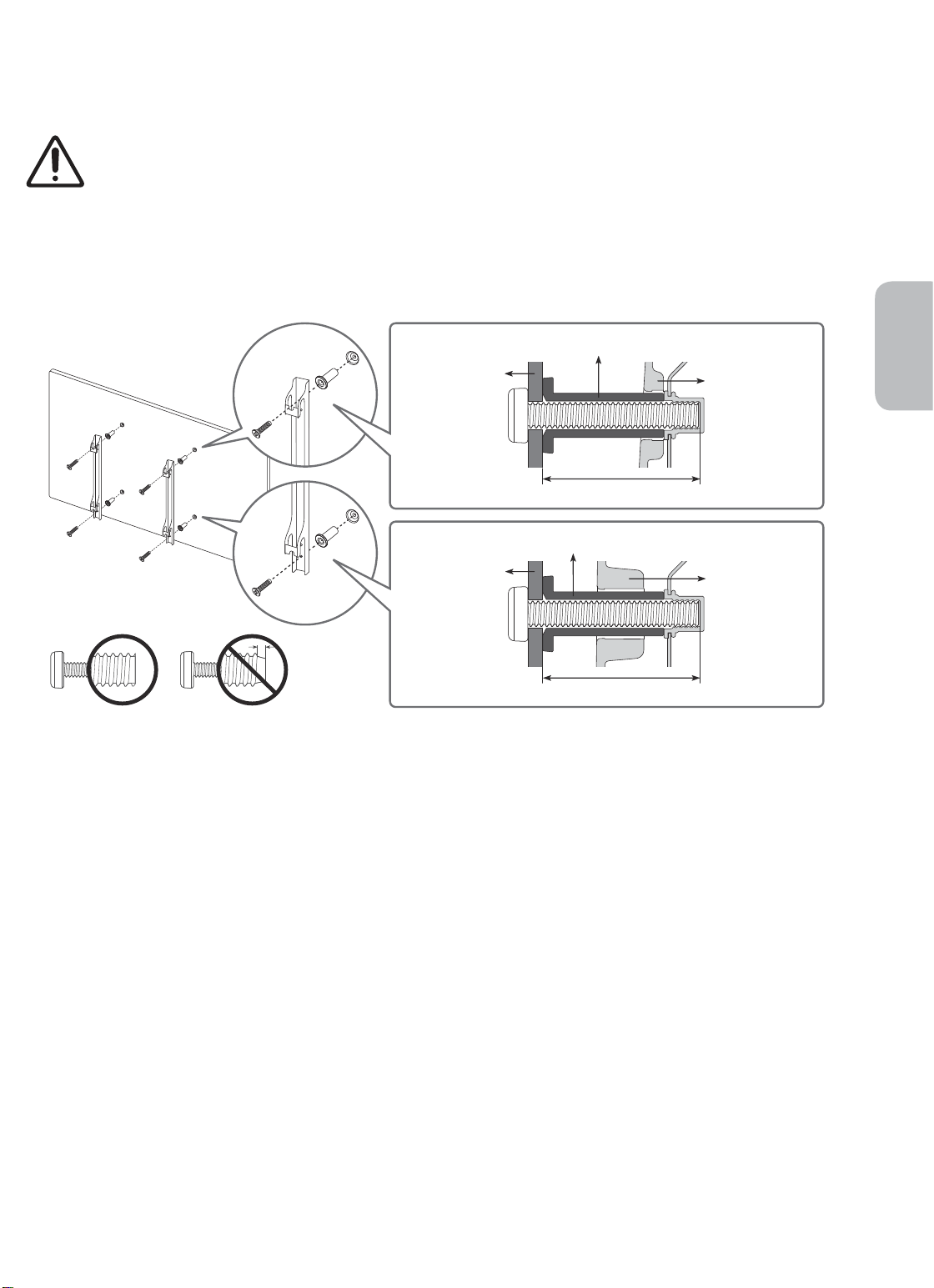
02 Installation des Fernsehgeräts
Montieren des Geräts an der Wand
Wenn das Fernsehgerät an einer Wand montiert werden soll, müssen die Anweisungen des
Herstellers unbedingt eingehalten werden. Wenn das Fernsehgerät nicht ordnungsgemäß montiert
ist, könnte es herunterfallen, ein Kind oder einen Erwachsenen ernsthaft verletzen und beschädigt
werden.
Bei Modellen mit Wandhalterungsadaptern bringen Sie zuerst den Adapter (siehe nachfolgende Abbildungen)
und dann die Wandhalterung an.
• Weitere Informationen erhalten Sie in der Installationsanleitung für die Samsung-Wandhalterung.
Adapter für die Wandhalterung
Deutsch
Wandhalter-
ungselement
C
Adapter für die Wandhalterung
Wandhalter-
ungselement
C
• Samsung Electronics haftet nicht für Schäden an Geräten, Gegenständen oder Personen, wenn die Montage
der Wandhalterung vom Kunden selbst durchgeführt wird.
• Montieren Sie die Wandhalterung an einer festen Wand, die senkrecht zum Boden steht. Bevor Sie
die Wandhalterung an anderen Flächen als Gipskarton anbringen, wenden Sie sich bitte an Ihren
nächstgelegenen Händler, um weitere Informationen einzuholen. Bei Montage des Fernsehgeräts an einer
Decke oder schrägen Wand kann das Fernsehgerät herunterfallen und Verletzungen verursachen.
• Die Standardabmessungen der Wandhalterung finden Sie in der Tabelle auf der nächsten Seite.
• Wenn Sie die Wandhalterung eines Drittanbieters montieren, müssen Sie beachten, dass die Länge der
Schrauben, mit denen Sie das Fernsehgerät an der Wandhalterung befestigen können, in Spalte C der
Tabelle auf der nächsten Seite dargestellt ist.
• Bei der Installation der Wandhalterung empfehlen wir, alle vier VESA-Schrauben festzuziehen.
• Wenn Sie eine Wandhalterung installieren möchten, die nur mit den beiden oberen Schrauben an der
Wand befestigt werden soll, dürfen Sie nur eine Samsung-Wandhalterung verwenden, die diese Art von
Installation unterstützt. (Je nach Region ist eine solche Wandhalterung im Handel möglicherweise nicht
erhältlich.)
Fernsehgerät
Fernsehgerät
Deutsch - 7
Page 48
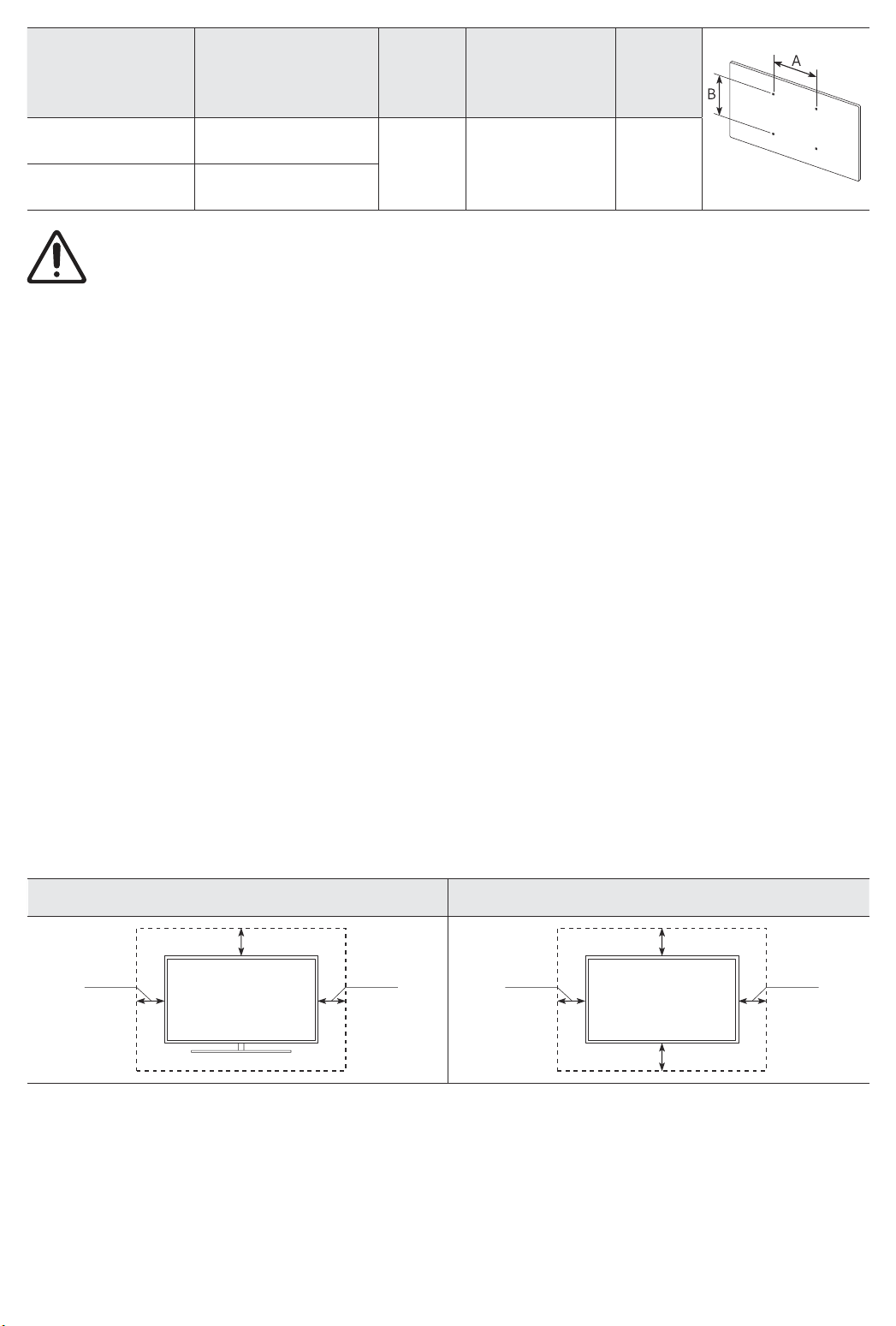
Bildschirmdiagonale
in Zoll
43-55 200 x 200
65 400 x 400
Befestigen Sie die Wandhalterung nicht, während das Fernsehgerät eingeschaltet ist.Sie könnten
dabei einen Stromschlag erhalten und sich verletzen.
• Verwenden Sie keine Schrauben, die länger sind als in der VESA-Standardspezifikation für Schrauben
angegeben. Zu lange Schrauben können Schäden an den inneren Bauteilen des Bildschirms verursachen.
• Bei Wandhalterungen, die nicht der VESA-Standardspezifikation für Schrauben entsprechen, hängt die
Länge der Schrauben von der Spezifikation der Wandhalterung ab.
• Ziehen Sie die Schrauben nicht zu fest an. Dadurch kann das Gerät beschädigt werden oder herunterfallen
und so Verletzungen verursachen. Samsung haftet nicht bei derartigen Unfällen.
• Samsung haftet nicht für Geräteschäden oder Verletzungen, wenn eine Wandhalterung verwendet
wird, die nicht dem VESA-Standard entspricht oder nicht spezifiziert ist, oder wenn der Verbraucher die
Montageanleitung für das Produkt nicht befolgt.
• Montieren Sie den Bildschirm nicht in einem Winkel von mehr als 15 Grad.
• Nehmen Sie die Wandmontage des Fernsehgeräts nur zu zweit vor.
Daten der VESA-
Gewindebohrung
(A * B) in mm
C (mm)
43-45 M8 4
Standardschraube
Menge
Ausreichende Belüftung Ihres Geräts
Halten Sie beim Aufstellen des Geräts einen Abstand von mindestens 10 cm zu anderen Objekten (Wänden,
Schrankwänden usw.) ein, um eine ausreichende Belüftung zu gewährleisten. Wenn Sie nicht für eine
ausreichende Lüftung sorgen, können aufgrund des Temperaturanstiegs im Innern des Bildschirms ein Brand
oder ein Problem mit dem Gerät die Folge sein.
• Wenn Sie einen Standfuß oder eine Wandhalterung einsetzen, empfehlen wir Ihnen dringend,
ausschließlich Teile von Samsung Electronics zu verwenden. Wenn Sie Teile eines anderen Herstellers
verwenden, kann es zu Problemen mit dem Gerät oder zu Verletzungen kommen, weil das Gerät
herunterfällt.
Installation mit Standfuß Installation mit Wandhalterung
10 cm
10 cm10 cm
10 cm
10 cm10 cm
10 cm
Deutsch - 8
Page 49
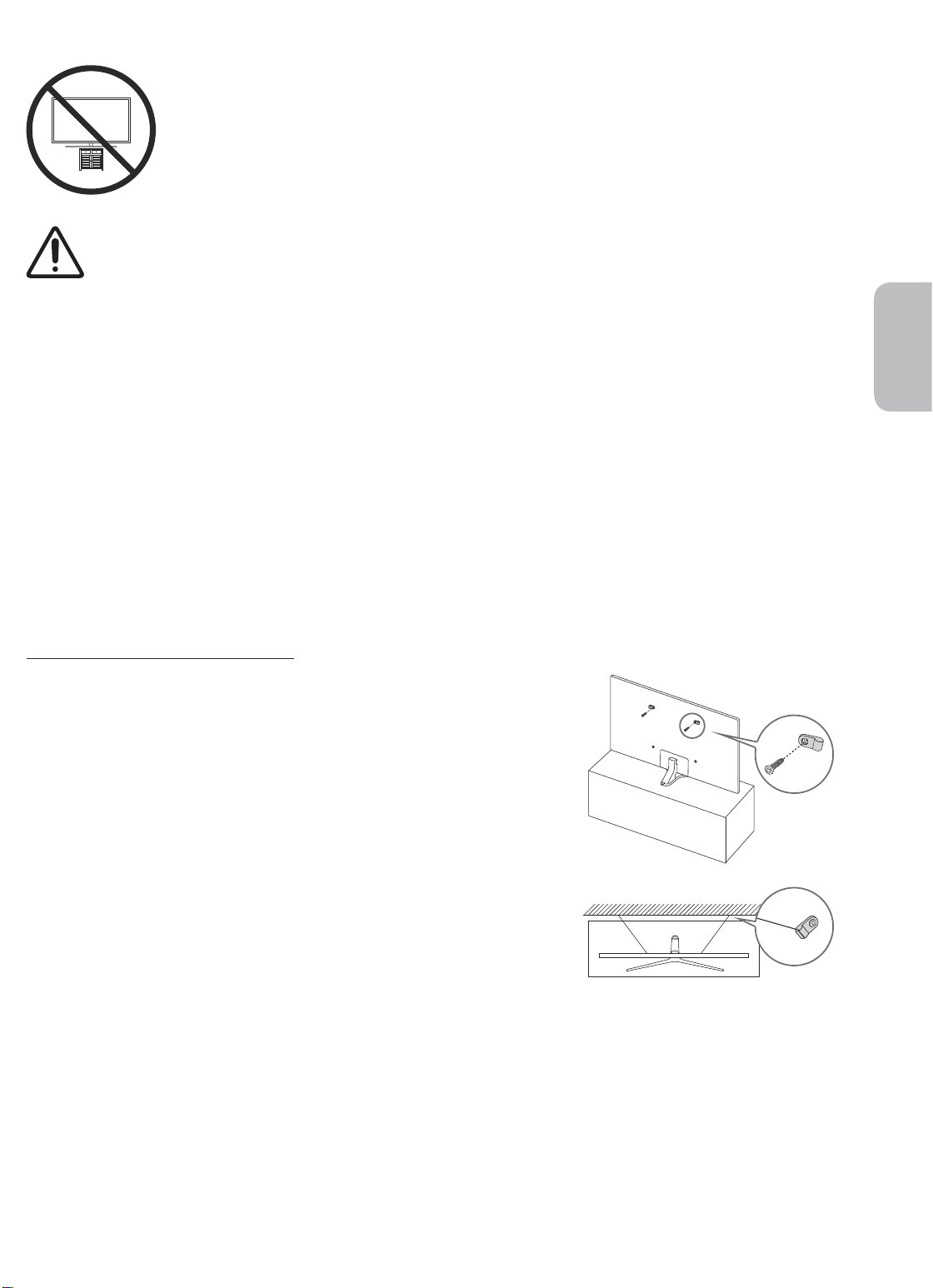
Sicherheitshinweis: Befestigen des Geräts an der Wand, damit es nicht kippt
Achtung: Das Fernsehgerät kann umkippen, wenn Sie daran ziehen, es schieben oder sich
daran festhalten. Stellen Sie insbesondere sicher, dass sich keine Kinder an das Fernsehgerät
hängen oder es in sonstiger Weise destabilisieren. Dies kann dazu führen, dass das Gerät
herunterfällt und schwere oder tödliche Verletzungen verursacht. Beachten Sie alle
Anweisungen der Ihrem Fernsehgerät beigefügten Sicherheitshinweise. Für mehr Stabilität
und Sicherheit können Sie wie unten beschrieben den Kippschutz erwerben und anbringen.
ACHTUNG: Stellen Sie einen Fernseher niemals in einer instabilen Position auf. Das Fernsehgerät
könnte umfallen und schwere Verletzungen oder den Tod verursachen. Viele Verletzungen,
insbesondere bei Kindern, können durch einige einfache Vorkehrungen vermieden werden:
• Verwenden Sie vom Hersteller des Fernsehgeräts empfohlene Schränke oder Standfüße.
• Verwenden Sie ausschließlich Möbel, die das Gewicht des Fernsehgeräts sicher tragen können.
• Stellen Sie sicher, dass das Fernsehgerät nicht über den Rand der tragenden Möbel hinausragt.
• Stellen Sie das Fernsehgerät nicht auf hohe Möbelstücke (z. B. Hochschränke oder Regale), ohne
das Möbelstück und den Fernseher an einer geeigneten Halterung zu befestigen.
• Legen Sie zwischen das Fernsehgerät und das tragende Möbelstück keine Tücher und keine
andere Materialien.
• Informieren Sie Kinder über die Gefahren, wenn sie auf Möbel klettern, um das Fernsehgerät
oder seine Bedienelemente zu erreichen.
Wenn Sie das Fernsehgerät, das Sie durch dieses neue Gerät ersetzen, behalten und an anderer
Stelle verwenden möchten, müssen Sie für das alte Gerät dieselben Vorsichtsmaßnahmen
anwenden.
Deutsch
Verwenden des Kippschutzes
1. Befestigen Sie eine Reihe von Halterungen mit den entsprechenden
Schrauben an der Wand. Vergewissern Sie sich, dass die Schrauben
gut halten.
– Je nach Ausführung der Wand benötigen Sie zum Befestigen
weiteres Material, wie z.B. Dübel.
2. Befestigen Sie eine Reihe von Halterungen mit entsprechend großen
Schrauben am Fernsehgerät.
– Die technischen Daten der Schraube finden Sie bei der
Standardschraube in der Tabelle unter „Montieren des Geräts an
der Wand“.
3. Verbinden Sie die Halterungen am Fernsehgerät und die
Halterungen an der Wand mit einem stabilen und reißfesten Kabel
miteinander, das Sie dann festziehen.
– Stellen Sie das Fernsehgerät in der Nähe der Wand auf, damit es
nicht nach hinten kippen kann.
– Achten Sie darauf, dass die Halterungen an der Wand höchstens
auf derselben Höhe wie die Halterungen am Gerät liegen, wenn
Sie sie mit dem Kabel miteinander verbinden.
• Form und Farbe des
Bildschirms können je nach
Modell unterschiedlich sein.
Deutsch - 9
Page 50
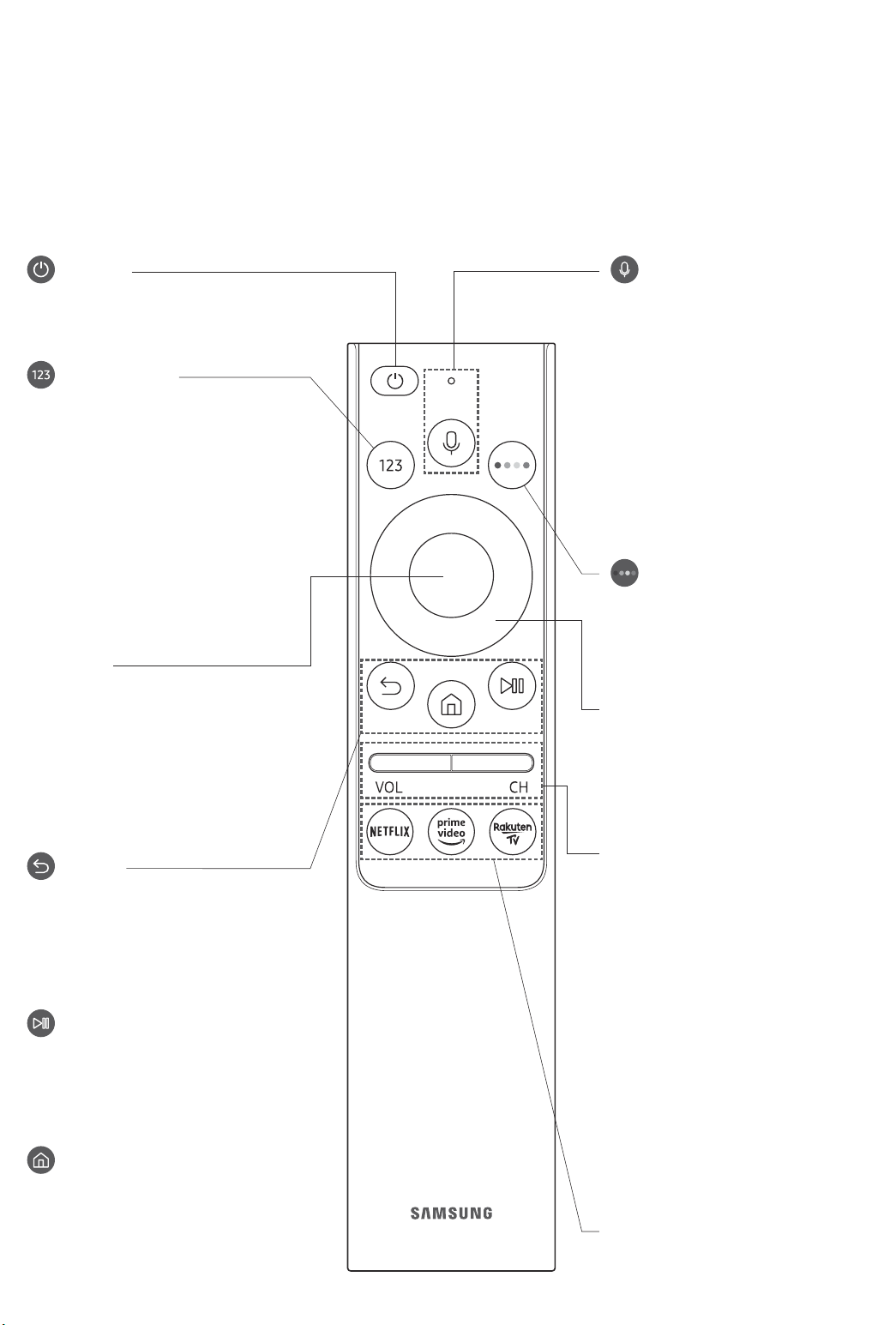
03 Die Samsung Smart Remote
Über die Buttons auf der Samsung Smart Remote
• Das Aussehen, die Tasten und die Funktionen der Samsung Smart Remote können sich je nach Modell
unterscheiden.
• Die Funktion als Universalfernbedienung - Einrichten steht nur dann normal zur Verfügung, wenn Sie die
mit Ihrem Fernsehgerät gelieferte Samsung Smart Remote verwenden.
(Ein/Aus)
Drücken Sie diese Taste, um das
Fernsehgerät ein- und auszuschalten.
(Taste Nummer)
Nach dem Drücken der Taste wird
am unteren Bildschirmrand eine
Zahlenreihe angezeigt. Wählen Sie
zuerst Zahlen aus und dann Fertig, um
einen numerischen Wert einzugeben.
Hiermit können Sie den Sender
wechseln und eine PIN oder Postleitzahl
usw. eingeben.
• Wenn Sie die Taste mehr als 1
Sekunde lang drücken, wird das
Menü TTX angezeigt.
Auswählen
Hiermit können Sie ein markiertes
Element auswählen oder starten. Wenn
Sie diese Taste beim Anzeigen einer
Sendung drücken, werden detaillierte
Informationen zur Sendung angezeigt.
(Bixby)
Starten Sie die Bixby. Halten Sie die
Taste gedrückt, sagen Sie einen Befehl
und lassen Sie dann die Taste los, um
Bixby zu starten.
Wenn Sie die Taste drücken, wird das
Menü Jetzt erkunden unten auf dem
Bildschirm angezeigt.
• Die unterstützten Sprachen und
Funktionen für Bixby können sich je
nach Region unterscheiden.
(Taste Farbe)
Mit diesen Farbtasten können
Sie Zusatzoptionen zu der aktuell
verwendeten Funktion aufrufen.
Navigationsfeld (oben/unten/links/
rechts)
Hiermit verschieben Sie den Fokus und
ändern die auf dem Gerät angezeigten
Menüwerte.
(Zurück)
Zurück zum vorherigen Menü. Wenn
Sie die Taste länger als 1 Sekunde
drücken, wird die laufende Funktion
beendet. Wenn die Taste beim
Fernsehen gedrückt wird, wechselt das
Fernsehgerät zum vorherigen Sender.
(Wiedergabe/Pause)
Durch Drücken dieser Taste wird die
Wiedergabesteuerung angezeigt. Mit
der Wiedergabesteuerung können Sie
die Wiedergabe der Medieninhalte
steuern.
(Smart Hub)
Hiermit kehren Sie zum Erster
Bildschirm zurück.
Deutsch - 10
VOL (Lautstärke)
Bewegen Sie die Taste nach oben oder
unten, um die Lautstärke einzustellen.
Drücken Sie die Taste, um den Ton
auszuschalten. Wenn Sie die Taste
mindestens 1 Sekunde lang drücken,
wird das Menü Schnelltasten für
Barrierefreiheit angezeigt.
CH (Kanal)
Bewegen Sie die Taste nach oben oder
unten, um den Sender zu wechseln.
Drücken Sie die Taste, um das Fenster
mit dem TV-Programm anzuzeigen.
• Wenn Sie die Taste mehr als 1
Sekunde lang drücken, wird die
Senderliste angezeigt.
Drücken Sie jede einzelne Taste, um ihre
Funktion zu testen.
Page 51
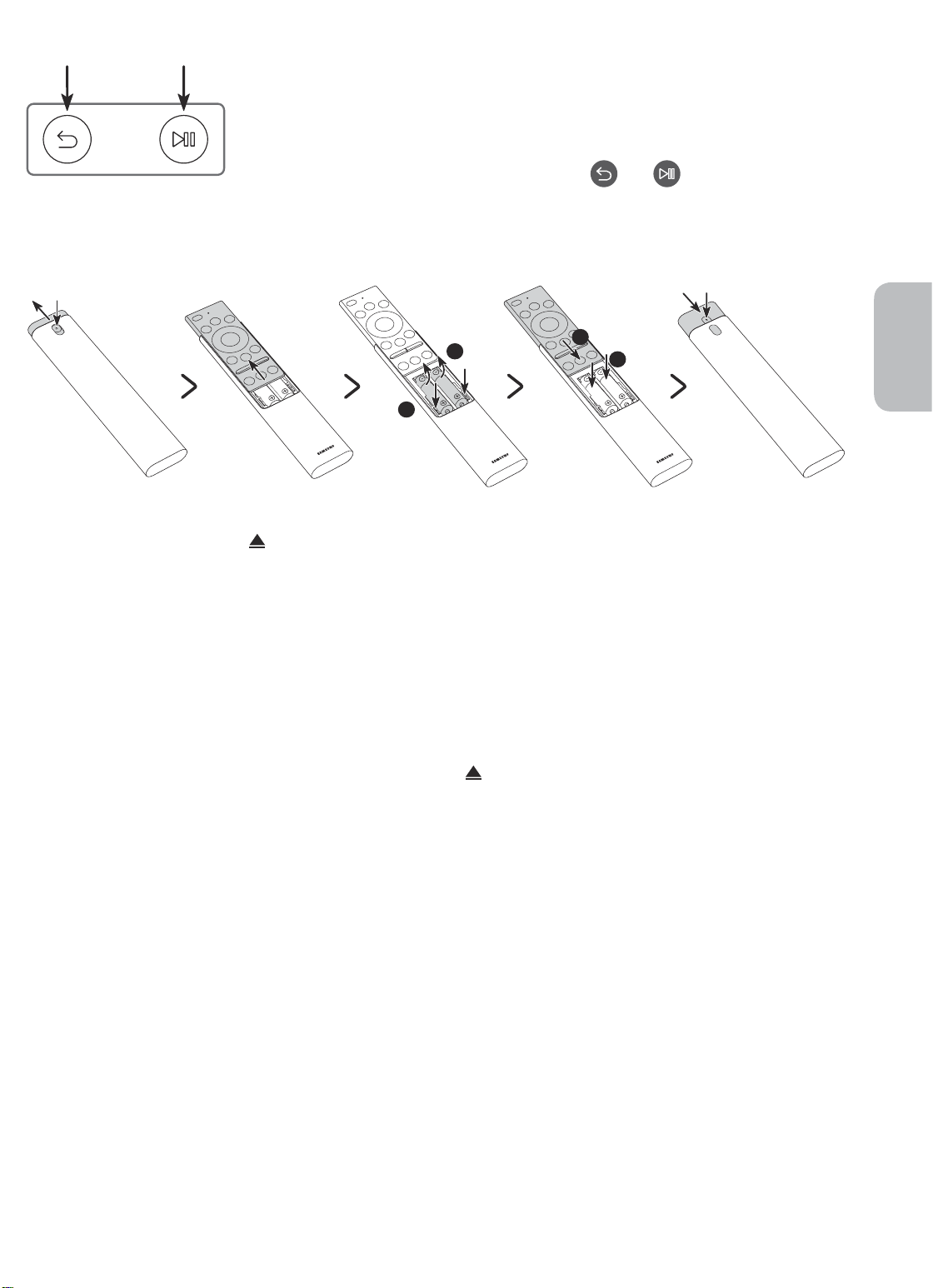
Koppeln des Fernsehgeräts mit der Samsung Smart Remote
Wenn Sie das Fernsehgerät erstmalig einschalten, führt das Fernsehgerät
automatisch das Kopplungsverfahren mit der Samsung Smart Remote durch.
Wenn die Samsung Smart Remote nicht automatisch mit dem Fernsehgerät
gekoppelt wird, zeigen Sie auf den Fernbedienungssensor des Fernsehers, und
halten Sie dann die Tasten mit der Beschriftung
links) gleichzeitig mindestens 3 Sekunden lang gedrückt.
und (siehe Abbildung
Einsetzen der Batterien in die Samsung Smart Remote
2
1
2
1
Deutsch
1. Drücken Sie auf die Taste oben auf der Rückseite der Samsung Smart Remote. Das Gehäuse löst sich
leicht vom Gehäuse.
2. Drehen Sie die Fernbedienung um und schieben Sie das Gehäuse der Fernbedienung so weit nach oben, bis
das Batteriefach offen vor Ihnen liegt.
3. Drücken Sie, falls sich Batterien in der Fernbedienung befinden, auf die Knöpfe r und l zu beiden Seiten
des Batteriefachs, um die vorhandenen Batterien zu entnehmen.
4. Legen Sie zwei neue Batterien (1,5 V, Typ AAA) in das Batteriefach ein und achten Sie darauf, dass die
Batterien entsprechend der Polung (+, -) eingesetzt sind. Wenn Sie fertig sind, schieben Sie das Gehäuse
der Fernbedienung zurück, bis es sich fast in seiner ursprünglichen Position befindet.
5. Drehen Sie die Fernbedienung um, halten Sie die Taste oben auf der Rückseite gedrückt und schieben
Sie dann das Gehäuse der Fernbedienung wieder nach unten.
• Auf Grund der längeren Lebensdauer werden Alkali-Batterien empfohlen.
Deutsch - 11
Page 52
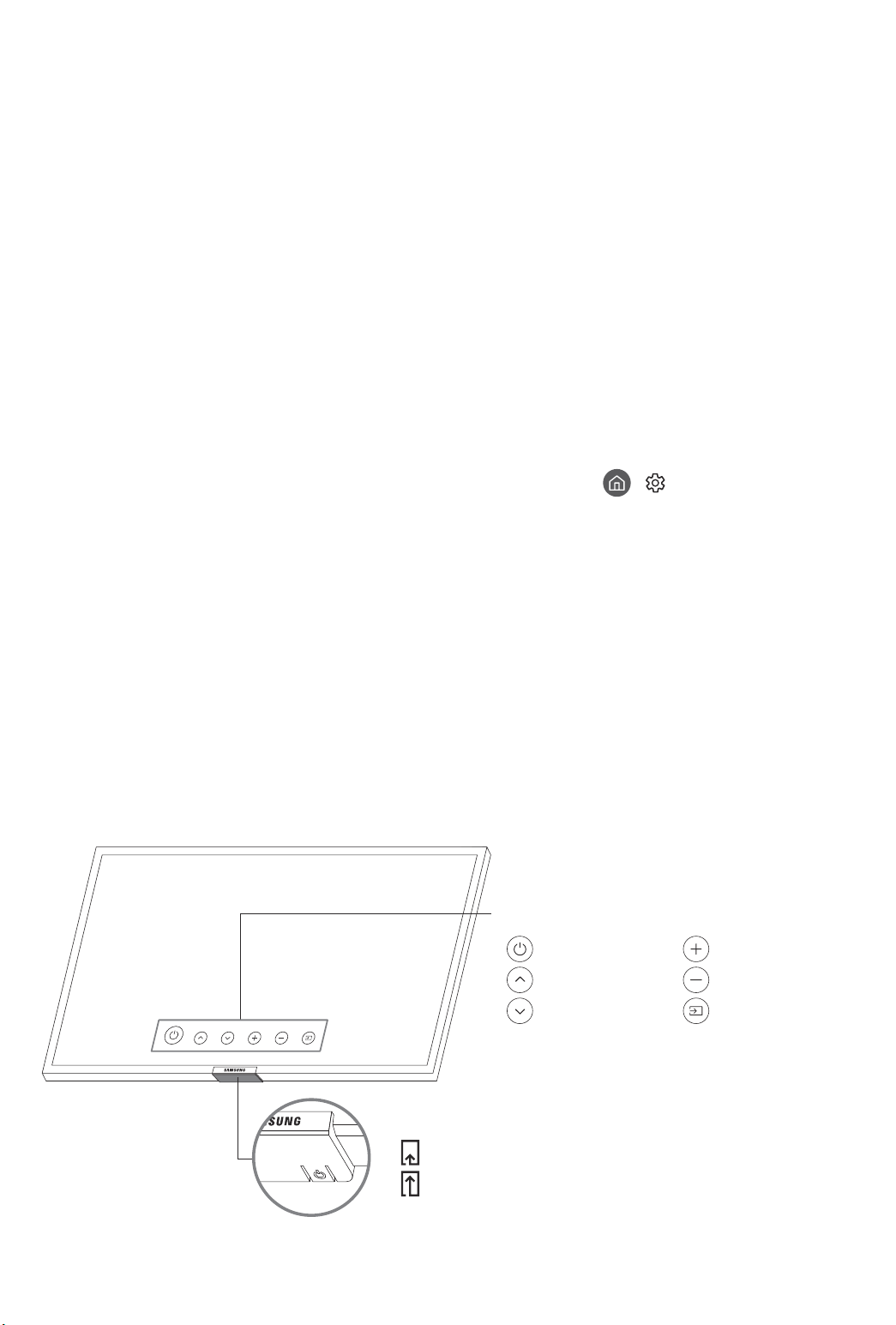
04 Ausführen der Ersteinrichtung
Wenn Sie das Fernsehgerät zum ersten Mal einschalten, wird sofort die Ersteinrichtung gestartet. Mit der
Ersteinrichtung können Sie die Grundeinstellungen für den Betrieb des Fernsehgeräts konfigurieren, z. B.
Senderempfang, Kanalsuche und Netzwerkverbindung.
• Bevor Sie mit der Ersteinrichtung beginnen, stellen Sie sicher, dass Sie die externen Geräte angeschlossen
sind.
• Um die Smart-Funktionen des Fernsehers zu nutzen, muss das Fernsehgerät mit dem Internet verbunden
sein.
• Damit Sie die Ersteinrichtung mit der SmartThings-App durchführen können, müssen Sie Ihr Mobilgerät
über Wi-Fi verbinden.
• Wenn das Einrichtungsfenster in der SmartThings-App Ihres Mobilgeräts nicht automatisch angezeigt wird,
setzen Sie den Vorgang zum Einrichten manuell fort, nachdem Sie den Fernseher mit dem Befehl Gerät
hinzufügen im Dashboard der SmartThings-App hinzugefügt haben.
• Die SmartThings-App ist auf Mobilgeräten für Android 6.0 oder höher und iOS 10 oder höher verfügbar.
• Bei der Kommunikation des Fernsehgeräts mit mobilen Geräten kann vorübergehend Rauschen auftreten.
Sie können die Ersteinrichtung auch über das Menü des Fernsehers starten (
> Zurücksetzen).
Befolgen Sie die Anweisungen unter „Ersteinstellung“ und konfigurieren Sie die Grundeinstellungen des
Fernsehgeräts so, dass er an die bei Ihnen herrschenden Lichtverhältnisse angepasst ist.
> Einstellungen > Allgemein
Verwenden des TV-Steuerungs
Sie können das Fernsehgerät mit dem TV-Steuerung unten am Gerät einschalten und dann das
Steuerungsmenü verwenden. Das Steuerungsmenü wird angezeigt, wenn Sie den TV-Steuerung-Knopf bei
laufendem Fernseher drücken. Weitere Informationen über die Verwendung erhalten Sie in der nachfolgenden
Abbildung.
• Möglicherweise erscheint der Bildschirm dunkler, wenn der Schutzfilm auf dem SAMSUNG-Logo oder auf
der Unterseite des Fernsehgeräts nicht abgezogen wird. Bitte entfernen Sie die Schutzfolie.
Steuerungsmenü
:
Ausschalten
:
Sender (+)
:
Sender (-)
:
Lauter
:
Leiser
:
Quelle
Deutsch - 12
TV-Steuerung Knopf / Fernbedienungssensor
Drücken: Verschieben
Drücken & Halten: Auswählen
Der Knopf für den TV-Steuerung befindet sich auf der Unterseite des
Fernsehgeräts.
Page 53
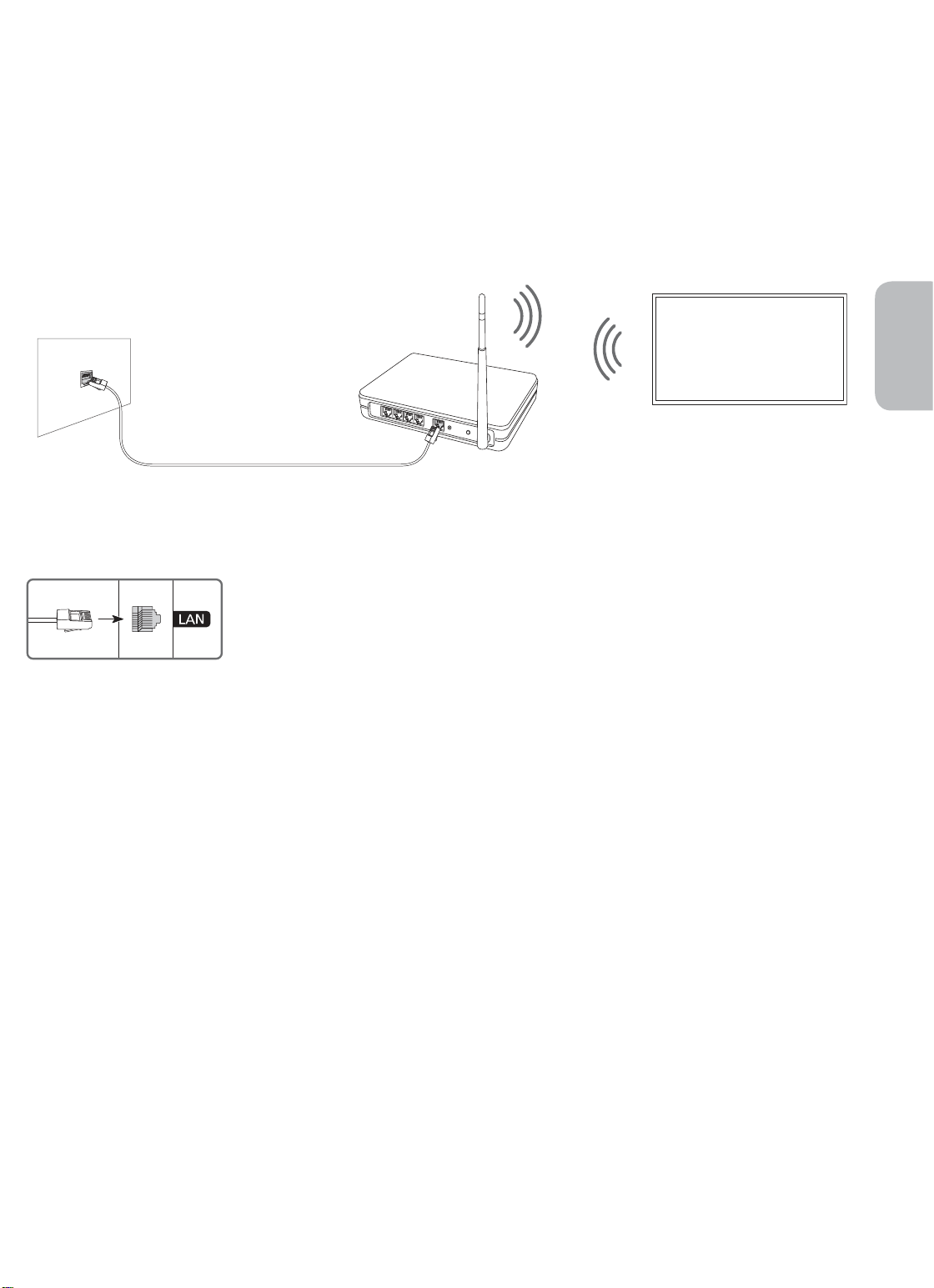
05 Verbinden mit einem Netzwerk
Durch Verbinden des Geräts mit einem Netzwerk erhalten Sie Zugriff auf Software-Updates und OnlineDienste wie Smart Hub.
Netzwerkverbindung – Drahtlos
Verbinden Sie das Gerät über einen normalen Zugangspunkt oder ein Modem mit dem Internet.
IP-Drahtloszugangspunkt
LAN-Anschluss an der Wand
LAN-Kabel (nicht im Lieferumfang enthalten)
oder -modem mit DHCP-
Server
Deutsch
Netzwerkverbindung – Kabel
Verbinden Sie das Fernsehgerät über ein LAN-Kabel mit Ihrem Netzwerk.
• Wenn die Netzwerkgeschwindigkeit weniger als 10 Mbit/s beträgt, kann das
Fernsehgerät keine Verbindung zum Internet aufbauen.
• Verwenden Sie ein Cat7-Kabel (STP*-Typ) für die Verbindung.
* Shielded Twisted Pair
Deutsch - 13
Page 54
06 Fehlerbehebung und Wartung
Fehlerbehebung
Wenn das Fernsehgerät scheinbar ein Problem aufweist, schlagen Sie zunächst in dieser Liste der möglichen
Probleme und Lösungen nach. Schlagen Sie alternativ im e-Manual unter „Fehlerbehebung“ nach. Wenn keiner
dieser Tipps zur Fehlerbehebung weiterhilft, besuchen Sie die Website „www.samsung.com“, und klicken Sie
dort auf „Support“ oder wenden Sie sich an das auf der letzten Seite dieser Bedienungsanleitung angegebene
SamsungKundendienstzentrum.
• Der Bildschirm dieses TFT-LED-Geräts arbeitet mit Subpixeln und wurde mit Hilfe hochentwickelter
Fertigungstechnologien produziert. Allerdings kann es vorkommen, dass einige wenige Pixel zu hell oder
zu dunkel sind. Diese Pixelfehler haben keinen Einfluss auf die Geräteleistung.
• Aktualisieren Sie die Firmware auf die neuste Version, um die optimale Leistung Ihres Fernsehgeräts zu
erhalten. Verwenden Sie die Funktionen Jetzt aktualisieren oder Automatisches Update im Menü des
Fernsehgeräts (
Automatisches Update).
Der Fernseher kann nicht eingeschaltet werden.
• Vergewissern Sie sich, dass das Netzkabel sicher mit der Wandsteckdose und dem Fernsehgerät verbunden
ist.
• Stellen Sie sicher, dass die Steckdose funktioniert und die Netzanzeige unten am Fernsehgerät
durchgehend rot leuchtet.
• Drücken Sie den TV-Steuerung unten am Fernsehgerät, um auszuschließen, dass ein Problem mit der
Fernbedienung vorliegt. Wenn das Fernsehgerät eingeschaltet werden kann, lesen Sie den Abschnitt „Die
Fernbedienung funktioniert nicht“.
> Einstellungen > Unterstützung > Software-Update > Jetzt aktualisieren oder
Bild/Video/Ton eines externen Geräts werden gar nicht oder nur verzerrt ausgegeben,
auf dem Fernsehgerät wird „Kein Signal oder schlechtes Signal“ angezeigt oder es werden
keine Sender gefunden.
• Stellen Sie sicher, dass der Anschluss an das Gerät richtig durchgeführt wurde und dass alle Kabel
vollständig eingesteckt sind.
• Unterbrechen Sie kurzzeitig alle Kabelverbindungen zwischen dem Fernsehgerät und den externen
Geräten. Probieren Sie es wenn möglich mit neuen Kabeln.
• Bestätigen Sie, dass die richtige Eingangsquelle ausgewählt wurde (
• Führen Sie eine TV-Selbstdiagnose durch, um zu bestimmen, ob das Problem durch den Fernseher oder
das Gerät verursacht wird (
Tontest starten).
• Wenn die Testergebnisse normal sind, starten Sie die angeschlossenen Geräte neu. Trennen Sie dazu
kurzzeitig die Netzkabel der einzelnen Geräte von der Steckdose. Wenn das Problem weiterhin besteht, lesen
Sie in der Bedienungsanleitung des angeschlossenen Geräts die Informationen zum Anschließen des Geräts.
• Wenn Sie keinen Kabel- oder Satelliteneeceiver verwenden und Ihr Fernsehgerät TV-Signale von einer
Antenne oder einem Kabelanschluss empfängt, starten Sie Automatischer Sendersuchlauf, um nach
Kanälen zu suchen (
Automatischer Sendersuchlaufs).
– Die Automatischer Sendersuchlauf werden, je nach Modell bzw. Region, möglicherweise nicht angezeigt.
– Wenn Sie einen Kabel- oder Satellitenreceiver verwenden, schlagen Sie bitte im Handbuch des Kabel-
oder Satellitenrceivers nach.
Deutsch - 14
> Einstellungen > Senderempfang > (Automatischer Sendersuchlauf) >
> Einstellungen > Unterstützung > Eigendiagnose > Bildtest starten oder
> Quelle).
Page 55
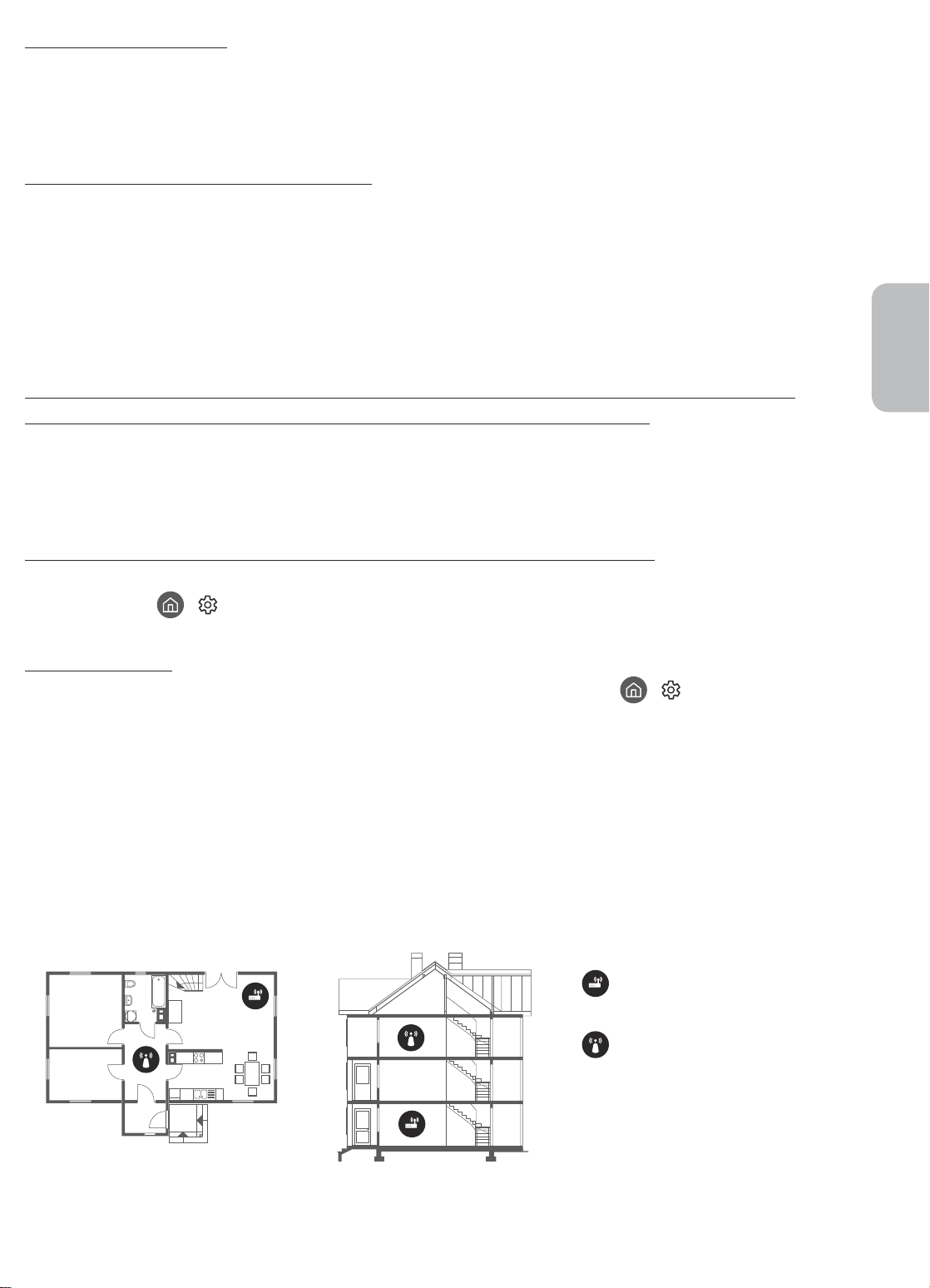
CI+ funktioniert nicht.
• Ihr Samsung TV entspricht dem Standard CI+ 1.4.
• Wenn das CI+CommonInterface-Modul mit diesem Gerät nicht kompatibel ist, entfernen Sie es bitte und
wenden Sie sich an den Anbieter des Moduls.
Die Fernbedienung funktioniert nicht.
• Kontrollieren Sie, ob die Netzanzeige unten am Fernsehgerät blinkt, wenn Sie auf die Einschalttaste der
Fernbedienung drücken. Wenn dies nicht der Fall ist, ersetzen Sie die Batterien der Fernbedienung.
• Achten Sie beim Einsetzen der Batterien auf die richtige Polung (+/-).
• Richten Sie die Fernbedienung aus einer Entfernung von 1,5-1,8m direkt auf das Gerät.
• Wenn Ihr Fernseher mit einer Samsung Smart Remote (Bluetooth-Fernbedienung) geliefert wurde, müssen
Sie die Fernbedienung mit dem Fernsehgerät koppeln.
Mit der Fernbedienung des Kabel- oder Satelitenreceivers kann das Gerät nicht ein-/
ausgeschaltet werden, und die Lautstärke lässt sich nicht einstellen.
• Programmieren Sie die Fernbedienung des Kabel- oder Satellitenreceivers so, dass sie das Fernsehgerät
anspricht. Den Code für das SAMSUNG-Fernsehgerät finden Sie in der Bedienungsanleitung Ihres Kabeloder Satellitenreceivers.
Deutsch
Die Einstellungen des Fernsehgeräts gehen nach 5 Minuten verloren.
• Der Fernseher befindet sich im Vorführmodus. Ändern Sie den Einsatzmodus im Menü Allgemein in
Privatmodus (
> Einstellungen > Allgemein > Systemmanager > Einsatzmodus > Privatmodus).
Wi-Fi-Aussetzer
• Stellen Sie sicher, dass das Fernsehgerät mit einem Netzwerk verbunden ist ( > Einstellungen >
Allgemein > Netzwerk > Netzwerkstatus).
• Stellen Sie sicher, dass das Wi-Fi-Kennwort richtig eingegeben wurde.
• Überprüfen Sie den Abstand zwischen dem Fernsehgerät und dem Modem oder Zugangspunkt. Der
Abstand darf 15,2m nicht überschreiten.
• Störungen können Sie reduzieren, indem Sie Drahtlosgeräte nicht verwenden bzw. abschalten. Stellen
Sie außerdem sicher, dass sich keine Hindernisse zwischen dem Fernsehgerät und dem Modem oder
Zugangspunkt befinden. (Die Stärke des Wi-Fi-Signals kann durch Haushaltsgeräte, schnurlose Telefone,
Steinmauern/Kamine usw. verringert werden.)
Einstöckig Mehrstöckig
Drahtloszugangspunkt
WLAN-Repeater
• Wenden Sie sich an Ihren Internetanbieter (Internet Service Provider, ISP) und bitten Sie darum, dass Ihr
Netzwerkbereich zurückgesetzt wird, damit die MAC-Adressen Ihres neuen Modems oder Zugangspunkts
und des Fernsehgeräts neu registriert werden.
Deutsch - 15
Page 56
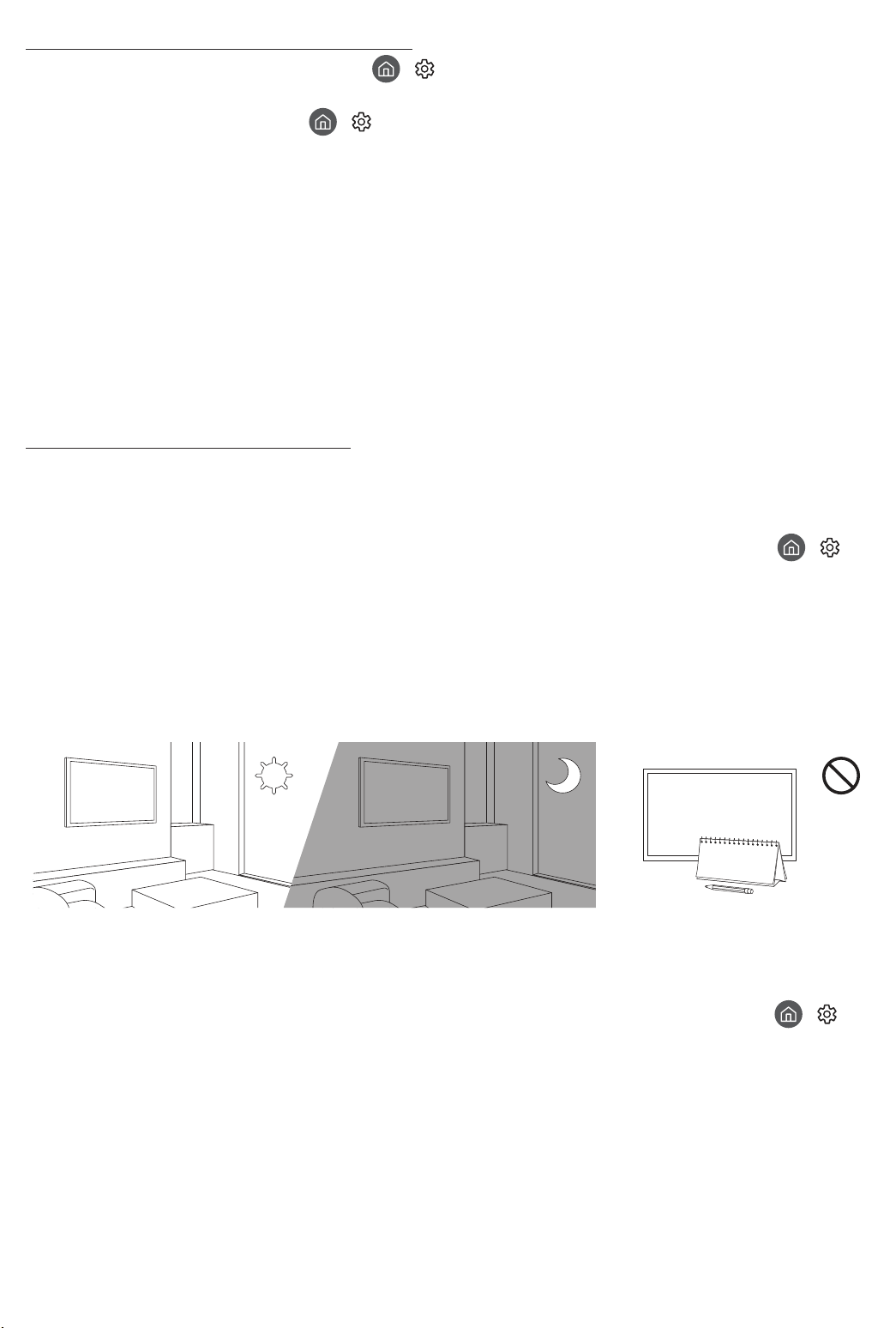
Probleme mit Video-Apps (Youtube usw.)
• Ändern Sie die DNS in 8.8.8.8. Wählen Sie
> IP-Einst. > DNS-Einst. > Manuell eingeben > DNS-Server > und geben Sie 8.8.8.8 > OK ein.
• Zurücksetzen durch Auswahl von
zurücksetzen.
> Einstellungen > Unterstützung > Eigendiagnose > Smart Hub
> Einstellungen > Allgemein > Netzwerk > Netzwerkstatus
Was ist Fernunterstützung?
Der Samsung Remote Support-Service bietet Ihnen individuelle Unterstützung durch einen SamsungTechniker, der (aus der Ferne):
• Eine Diagnose Ihres Fernsehgeräts durchführt
• Die Einstellungen für Ihr Fernsehgerät anpasst
• Ihr Fernsehgerät auf die werksseitigen Standardwerte zurücksetzt
• Empfohlene Firmware-Updates für Sie installiert
Wie funktioniert Remote Support?
Sie können den Samsung Remote Support-Service für Ihr Fernsehgerät ganz unkompliziert in Anspruch
nehmen:
1. Rufen Sie das SamsungKundendienstzentrum an, und bitten Sie um Fernunterstützung.
2. Öffnen Sie das Menü auf Ihrem Fernsehgerät, und navigieren Sie zum Bereich Unterstützung. (
Einstellungen > Unterstützung)
3. Wählen Sie Fernverwaltung. Anschließend können Sie den Servicevertrag lesen und ihm zustimmen. Wenn
das PIN-Fenster angezeigt wird, nennen Sie dem Techniker Ihre PIN.
4. Der Techniker wird dann auf Ihr Fernsehgerät zugreifen.
>
Öko-Sensor und Bildschirmhelligkeit
Mit Hilfe des Öko-Sensors kann die Helligkeit des Fernsehgeräts automatisch eingestellt werden. Mit dieser
Funktion werden die Lichtverhältnisse im Zimmer automatisch gemessen, und die Helligkeit des Bildschirms
wird optimiert, um den Energieverbrauch zu senken. Sie können diese Funktion deaktivieren unter
Einstellungen > Allgemein > Öko-Lösung > Umgebungslichterkennung.
• Es kann auf die Umgebungslichterkennung zurückzuführen sein, wenn der Bildschirm beim Fernsehen in
dunkler Umgebung zu dunkel ist.
• Der Öko-Sensor befindet sich auf der Unterseite des Geräts. Achten Sie darauf, dass der Sensor nicht
verdeckt wird. Dadurch kann sich die Helligkeit des Bilds verringern.
>
Deutsch - 16
Page 57
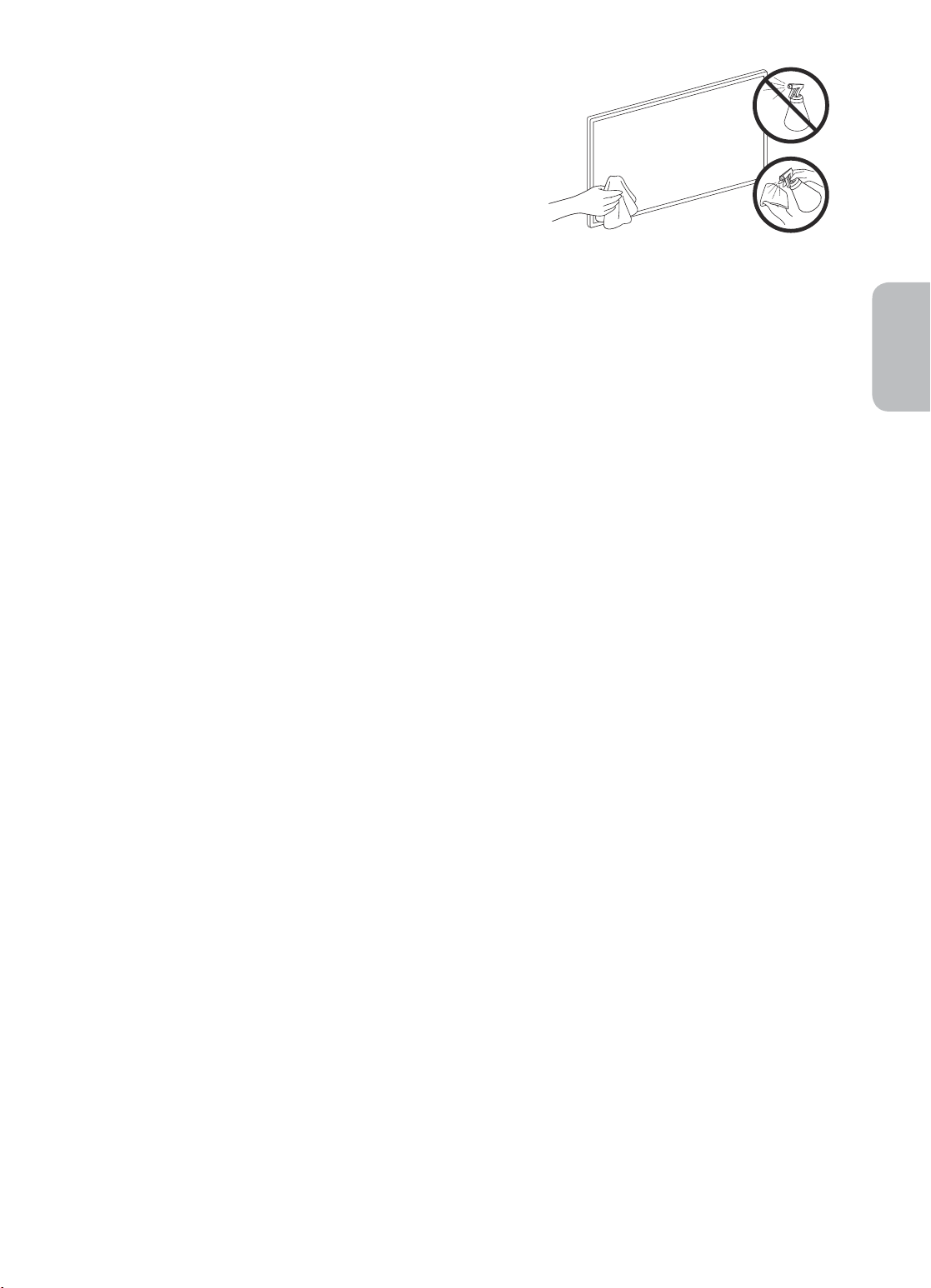
Pflegen des Fernsehgeräts
• Wenn am Fernsehbildschirm ein Aufkleber angebracht
wurde, können beim Entfernen des Aufklebers einige wenige
Rückstände zurückbleiben. Bitte entfernen Sie diese Rückstände,
ehe Sie das Gerät verwenden.
• Beim Reinigen können Kratzer auf dem Gehäuse und dem
Bildschirm des Geräts entstehen. Wischen Sie das Gehäuse und
den Bildschirm vorsichtig mit einem weichen Tuch ab, um Kratzer
zu vermeiden.
• Spritzen Sie weder Wasser noch Reinigungsmittel direkt auf das
Gerät. Jede Flüssigkeit, die in den Bildschirm eindringt, kann zu
einer Funktionsstörung, einem Brand oder einem Stromschlag
führen.
• Schalten Sie das Fernsehgerät zum Reinigen aus. Wischen
Sie Schmutzflecken und Fingerabdrücke auf dem Bildschirm
vorsichtig mit einem Mikrofasertuch ab. Reinigen Sie
die Gehäuse und den Bildschirm des Geräts mit einem
Mikrofasertuch, das Sie mit einer kleinen Menge Wasser
angefeuchtet haben. Entfernen Sie die Feuchtigkeit
anschließend mit einem trockenen Tuch. Bringen Sie beim
Säubern keine starke Kraft auf die Bildschirmoberfläche auf, weil
dies Schäden am Bildschirm verursachen könnte. Verwenden
Sie niemals entzündliche Flüssigkeiten (z. B. Benzol, Verdünner)
oder Reinigungsmittel. Sprühen Sie bei hartnäckigen Flecken
eine kleine Menge Bildschirmreiniger auf ein Mikrofasertuch und
wischen Sie die Flecken dann mit dem Tuch ab.
Deutsch
Deutsch - 17
Page 58
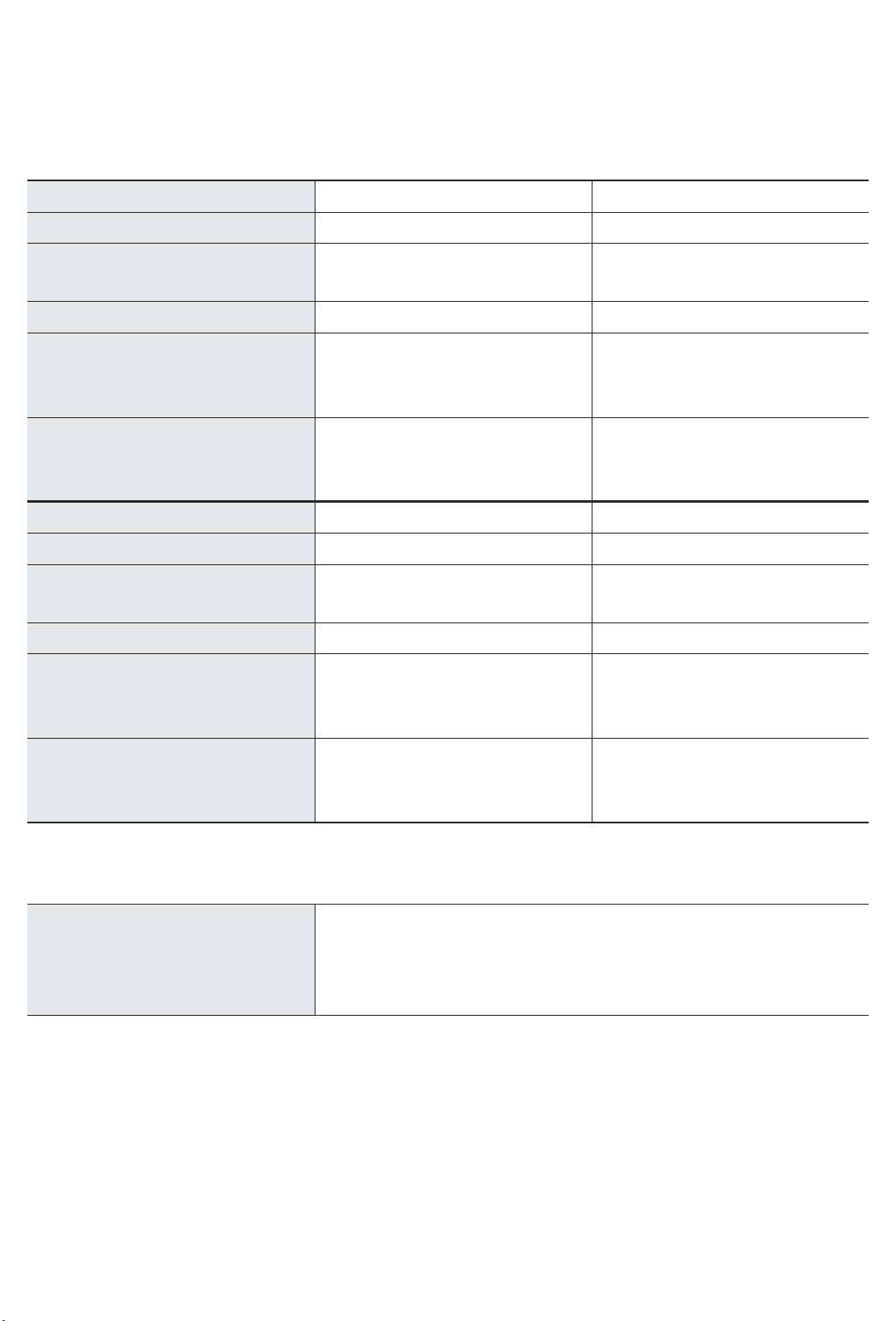
07 Technische Daten und weitere
Informationen
Technische Daten
Modell UE43RU7450 / UE43RU7470 UE50RU7450 / UE50RU7470
Anzeigeauflösung
Bildschirmgröße
Diagonal gemessen
Ton (Ausgang)
Abmessungen (B × H × T)
Gehäuse
Mit Fuß
Gewicht
Ohne Standfuß
Mit Standfuß
Modell UE55RU7450 / UE55RU7470 UE65RU7450 / UE65RU7470
Anzeigeauflösung
Bildschirmgröße
Diagonal gemessen
Ton (Ausgang)
Abmessungen (B × H × T)
Gehäuse
Mit Fuß
1238,6 x 800,0 x 360,6 mm
3840 x 2160 3840 x 2160
43 Zoll
108 cm
20 W 20 W
970,2 x 563,2 x 58,1 mm
970,2 x 648,0 x 343,7 mm
9,5 kg
12,1 kg
3840 x 2160 3840 x 2160
55 Zoll
138 cm
20 W 20 W
1238,6 x 714,2 x 58,6 mm
1124,8 x 650,2 x 59,0 mm
1124,8 x 735,8 x 346,7 mm
1457,5 x 837,3 x 59,0 mm
1457,5 x 922,8 x 387,3 mm
50 Zoll
125 cm
13,8 kg
16,5 kg
65 Zoll
163 cm
Gewicht
Ohne Standfuß
Mit Standfuß
17,2 kg
19,7 kg
25,1 kg
28,0 kg
Umgebungsbedingungen
Temperatur (im Betrieb)
Luftfeuchtigkeit (im Betrieb)
Temperatur (bei Lagerung)
Luftfeuchtigkeit (bei Lagerung)
• Änderung der technischen Daten und des Gerätedesigns vorbehalten.
• Informationen zur Stromversorgung und zum Energieverbrauch finden Sie auf dem Produktaufkleber mit
den technischen Nenndaten.
• Der typische Stromverbrauch wird gemäß IEC 62087 gemessen.
• Sie finden den Produktaufkleber auf der Hinterseite des Fernsehgeräts. (Bei manchen Modellen finden Sie
den Produktaufkleber unter der Abdeckung für die Anschlussklemmen.)
10°C bis 40°C (50°F bis 104°F)
10% bis 80%, nicht kondensierend
-20°C bis 45°C (-4°F bis 113°F)
5% bis 95%, nicht kondensierend
Deutsch - 18
Page 59
Verringern des Stromverbrauchs
Wenn Sie das Gerät ausschalten, wechselt es in den Standby-Modus. Im Standby-Modus verbraucht es
weiterhin eine gewisse Menge an Strom. Wenn Sie das Fernsehgerät längere Zeit nicht verwenden, sollten Sie
daher den Netzstecker aus der Steckdose ziehen, um den Stromverbrauch zu senken.
Lizenzen
The terms HDMI and HDMI High-Definition Multimedia Interface, and the HDMI Logo are trademarks or
registered trademarks of HDMI Licensing LLC in the United States and other countries.
Deutsch
Empfehlung - Nur EU
Hiermit erklärt Samsung Electronics, dass diese Anlage mit der Richtlinie 2014/53/EU konform ist.
Der vollständige Text der EU-Konformitätserklärung ist unter folgender Internetadresse abrufbar: http://www.
samsung.com Gehen Sie auf „Support“ > Suchen Sie „Produkt-Support“ und geben Sie den Modellnamen ein.
Dieses Gerät kann in allen Ländern in der EU verwendet werden.
BT maximale Sendeleistung: 100 mW bei 2,4 GHz - 2,4835 GHz
Wi-Fi maximale Sendeleistung: 100mW bei 2,4GHz bis 2,4835GHz
Informationen zum Samsung Umweltversprechen und den produktspezifischen gesetzlichen Pflichten (z.B.
REACH, WEEE, Batterien) erhalten Sie auf
http://www.samsung.com/it/aboutsamsung/sustainability/environment/our-commitment/data/
ACHTUNG: SORGEN SIE DAFÜR, DASS DAS GERÄT NIEMALS IN DIE NÄHE VON KERZEN,
OFFENEM FEUER ODER SONSTIGEN GEGENSTÄNDEN MIT OFFENEN FLAMMEN GELANGT.
ANDERNFALLS BESTEHT BRANDGEFAHR.
Deutsch - 19
Page 60
Ordnungsgemäße Entsorgung dieses Geräts (Elektro- und Elektronik-Altgeräte)
(Anwendbar in Ländern mit Systemen zur getrennten Sammlung von Wertstoffen)
Diese Kennzeichnung auf dem Bildschirm, dem Zubehör oder der Dokumentation bedeutet, dass
der Bildschirm sowie das elektronische Zubehör (z.B. Ladegerät, Headset, USB-Kabel) am Ende
ihrer Lebensdauer nicht im normalen Hausmüll entsorgt werden dürfen. Entsorgen Sie diese
Geräte bitte getrennt von anderen Abfällen, um der Umwelt bzw. der menschlichen Gesundheit
nicht durch unkontrollierte Müllbeseitigung zu schaden. Recyceln Sie den Bildschirm, um die
nachhaltige Wiederverwertung von stofflichen Ressourcen zu fördern.
Private Nutzer sollten den Händler, bei dem das Produkt gekauft wurde, oder die
zuständigen Behörden kontaktieren, um in Erfahrung zu bringen, wie sie den Bildschirm auf
umweltfreundliche Weise recyceln können.
Gewerbliche Benutzer wenden sich an ihren Lieferanten und überprüfen die Konditionen Ihres
Kaufvertrags. Der Bildschirm und seine elektronischen Zubehörteile dürfen nicht zusammen mit
anderem Gewerbemüll entsorgt werden.
Ordnungsgemäße Entsorgung der Batterien in diesem Gerät
(Anwendbar in Ländern mit Systemen zur getrennten Sammlung von Wertstoffen)
Diese Kennzeichnung auf der Batterie, dem Handbuch oder der Verpackung bedeutet, dass die
Batterien am Ende ihrer Lebensdauer nicht im normalen Hausmüll entsorgt werden dürfen. Die
Kennzeichnung mit den chemischen Symbolen „Hg“, „Cd“ oder „Pb“ bedeutet, dass die Batterie
Quecksilber, Cadmium oder Blei in Mengen enthält, die die Grenzwerte der EU-Direktive 2006/66
übersteigen. Wenn Batterien nicht ordnungsgemäß entsorgt werden, können diese Substanzen
die Gesundheit von Menschen oder die Umwelt gefährden.
Zum Schutz der natürlichen Ressourcen und zur Förderung der Wiederverwertung von
Materialien trennen Sie die Batterien von anderem Müll und führen Sie sie Ihrem örtlichen
Recyclingsystem zu.
Deutsch - 20
Page 61

belassen.
Page 62

belassen.
Page 63

belassen.
Page 64
Contact SAMSUNG WORLD WIDE
If you have any questions or comments relating to Samsung products, please contact the Samsung service centre.
-01
Country
AUSTRIA 0800 72 67 864 (0800-SAMSUNG) www.samsung.com/at/support
BELGIUM 02-201-24-18
BOSNIA 055 233 999 www.samsung.com/support
ALBANIA 045 620 202 www.samsung.com/al/support
BULGARIA
CROATIA 072 726 786 www.samsung.com/hr/support
CZECH
DENMARK 707 019 70 www.samsung.com/dk/support
FINLAND 030-6227 515 www.samsung.com/fi/support
FRANCE 01 48 63 00 00 www.samsung.com/fr/support
GERMANY 06196 77 555 77 www.samsung.com/de/support
CYPRUS 8009 4000 only from landline, toll free
GREECE
HUNGARY 0680SAMSUNG (0680-726-7864) www.samsung.com/hu/support
ITALIA 800-SAMSUNG (800.7267864) www.samsung.com/it/support
LUXEMBURG 261 03 710 www.samsung.com/be_fr/support
MONTENEGRO 020 405 888 www.samsung.com/support
SLOVENIA 080 697 267 (brezplačna številka) www.samsung.com/si/support
NETHERLANDS 088 90 90 100 www.samsung.com/nl/support
NORWAY 21629099 www.samsung.com/no/support
POLAND
PORTUGAL 808 207 267 www.samsung.com/pt/support
ROMANIA
SERBIA 011 321 6899 www.samsung.com/rs/support
SLOVAKIA 0800 - SAMSUNG (0800-726 786) www.samsung.com/sk/support
SPAIN 91 175 00 15 www.samsung.com/es/support
SWEDEN 0771 726 786 www.samsung.com/se/support
SWITZERLAND 0800 726 78 64 (0800-SAMSUNG)
UK 0330 SAMSUNG (7267864) www.samsung.com/uk/support
IRELAND (EIRE) 0818 717100 www.samsung.com/ie/support
LITHUANIA 8-800-77777 www.samsung.com/lt/support
LATVIA 8000-7267 www.samsung.com/lv/support
ESTONIA 800-7267 www.samsung.com/ee/support
TURKEY 444 7 7 11 www.samsung.com/tr/support
Samsung Service Centre
*3000 Цена в мрежата
0800 111 31, Безплатна телефонна линия
800 - SAMSUNG (800-726786) www.samsung.com/cz/support
Samsung Electronics Czech and Slovak, s.r.o. V Parku 2323/14, 148 00 - Praha 4
80111-SAMSUNG (80111 726 7864) only from land line
(+30) 210 6897691 from mobile and land line
801-172-678* lub +48 22 607-93-33*
* (opłata według taryfy operatora)
*8000 (apel in retea)
08008-726-78-64 (08008-SAMSUNG) Apel GRATUIT
Atenţie: Dacă efectuaţi apelul din reţeaua Digi (RCS/RDS),
vă rugăm să ne contactaţi formând numărul Telverde fără
ultimele două cifre, astfel: 0800872678.
Web Site
www.samsung.com/be/support (Dutch)
www.samsung.com/be_fr/support (French)
www.samsung.com/bg/support
www.samsung.com/gr/support
www.samsung.com/pl/support
www.samsung.com/ro/support
www.samsung.com/ch/support (German)
www.samsung.com/ch_fr/support (French)
© 2019 Samsung Electronics Co., Ltd. All rights reserved.
 Loading...