

Page 1

Quick-Reference Guide
Samsung Voice Mail
(SVM-400E, SVMi-2E, SVMi-4E, SVMi-8E, SVMi-16E)
Your Voice Messaging System
Home Page
Page 2

Accessing Your Mailbox (Subscriber Services Menu)
Home Page
From Your Desk
• Press the button labeled MESSAGE or VMMSG
OR
•
Dial SVM Access Code: _________________
(You will be prompted to enter your Passcode)
• Enter your Password: _________________
(Default Password: 0000)
From Off-Site (Home, Cell Phone)
• Dial the phone number that is answered by the SVM. _________________
(Your Company’s Main Greeting)
•
At the Main Greeting dial [#] plus your Subscriber (or Mailbox) number.
(Subscriber and Mailbox Number usually match your extension number)
• Enter your Password: _________________
(Default Password: 0000)
From Another Subscriber’s Phone
• Press the button labeled MESSAGE or VMMSG or dial SVM Access Code.
• Dial [✱] followed by [#] and your Extension / Mailbox Number.
(You will be prompted to enter your Passcode)
• Enter your Password: _________________
(Default Password: 0000)
Alternate Off-Site for DID Users (Home, Cell Phone)
• Dial your DID phone number.
(Your Personal Greeting will answer in approximately 4-6 rings)
• During your Personal Greeting dial [#] directly followed by your password.
(Default Password: 0000)
Page 3
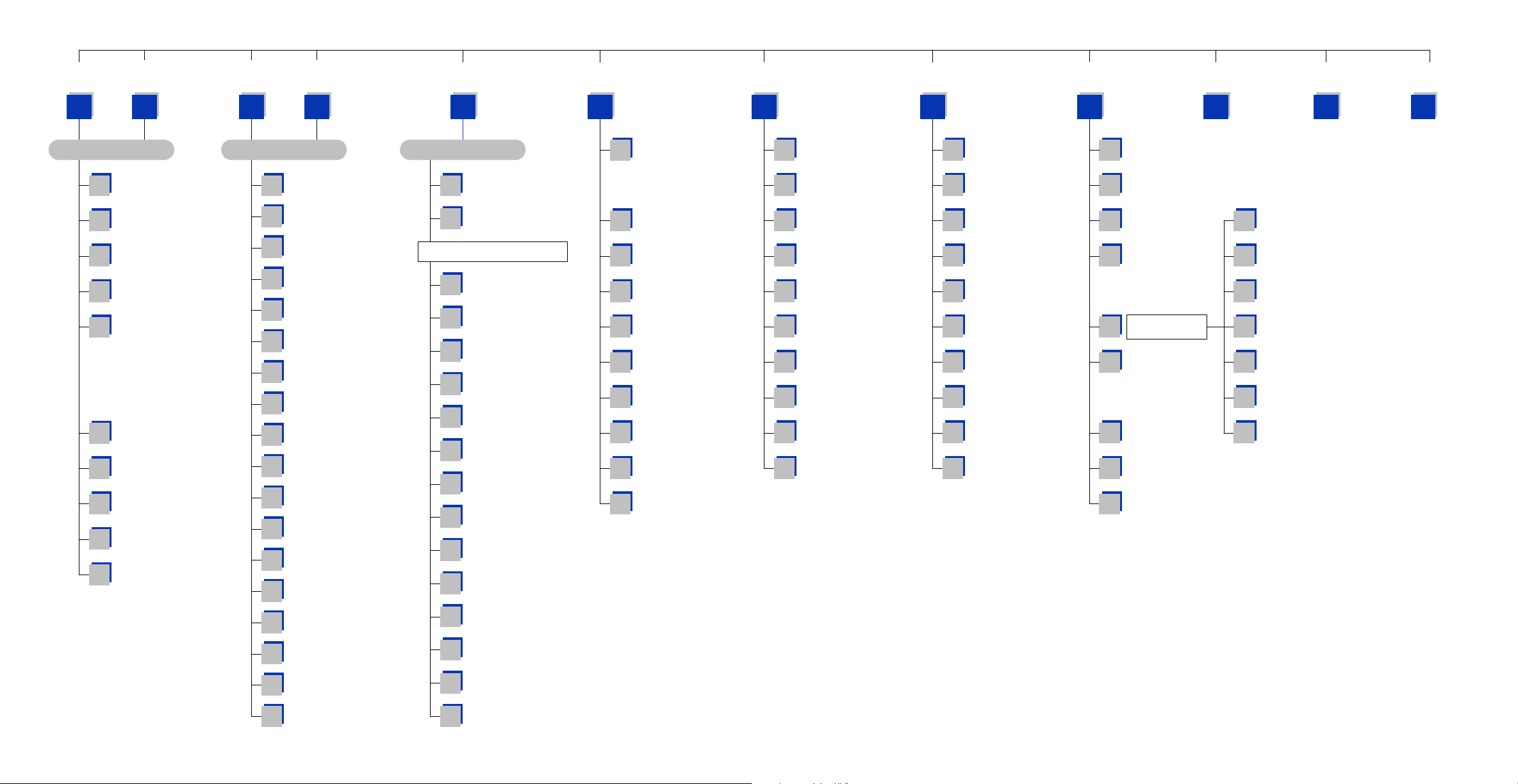
Group New
Home Page
Messages
Group Saved
Messages
Listen to New
Messages
Review Saved
Messages
Record & Send
Messages
Access
Manager
Personal
Greetings
Mailbox
Administration
Personal
Services
Pause, Resume
Subscriber Menu
Play Menu
Options
Exit
Subscriber Menu
11 33
Group Messages Menu
Group
1
Urgent Messages
Group
2
Callback Requests
Group
3
Reminders
Group
4
Private Messages
Group
5
Fax Only Messages
Pause, Resume
8
Menu Prompting
Group
9
A Specific Sender
Play
#
Message Inventory
Play
0
Menu Options
Cancel, Return
to Subscriber Menu
*
1 3
Listen Menu
Play
1
Message
Play Previous
11
Message
Save
2
Message
Discard
3
Message
Reply to Sender
4
Place
5
Call to Sender
Deliver Copy
55
of Fax Message
Forward a
6
Copy of Message
Rewind
7
5 Seconds
Change
77
Playback Volume
Pause, Resume
8
Message Playback
Fast Forward
9
5 Seconds
Change
99
Playback Speed
Skip to
#
Next Message
Scan Messages
##
Play
0
Menu Options
Play Message
00
Information
Cancel, Return
to Subscriber Menu
*
2
Record Menu
For a Directory
#
of Subscribers
To Create a
##
Reminder
"Enter the Recipient's Number"
Review
1
Recording
Stop, Append to
2
Recording
Discard Recording
3
and Rerecord
Set
4
Delivery Options
Specify
5
Future Delivery
SEND Message,
6
Then Copy
Rewind
7
5 Seconds
Change
77
Playback Volume
Pause, Resume
8
Record/Playback
Fast Forward
9
5 Seconds
Change
99
Playback Speed
SEND Message,
#
Then Exit Record
Play
0
Menu Options
Cancel, Return
to Subscriber Menu
*
4 5 6 #
Follow Me
1
Block All Calls
3
Call Forwarding
4
Call Screening
5
Find Me
6
Auto Set
7
Night Intercept
Pause, Resume
8
Menu Prompting
Play
#
Access Coverage
Play
0
Menu Options
Cancel, Return
to Subscriber Menu
*
Assign and/or Edit
1
Primary Greeting
Assign and/or Edit
2
Busy Greeting
Assign and/or Edit
3
Blocking Greeting
Assign and/or Edit
4
Night Greeting
Assign and/or Edit
5
Screened Greeting
Edit Only
6
Personal Greetings
Edit Only
7
Mailbox Greeting
Pause, Resume
8
Menu Prompting
Play
0
Menu Options
Cancel, Return
to Subscriber Menu
*
Change
1
Message Alert
Change
2
Pager Notification
Review Deleted
3
Messages
Review Undelivered
4
Messages
Auto Play
5
New Messages
Auto Play Message
6
Information
Pause, Resume
8
Menu Prompting
Record & Send
9
Broadcast Message
Play
0
Menu Options
Cancel, Return
to Subscriber Menu
*
Review
1
Workload
Edit Stored
2
Telephone Numbers
Change
3
Weekly Schedule
Place a
5
Direct Call
7
8
#
0
*
Personal
Administration
Pause, Resume
Menu Prompting
Record
a Reminder
Play
Menu Options
Cancel, Return
to Subscriber Menu
8
Change
1
Password
Record
2
Name
Enter Diretory
3
Name
Extended
4
Prompting
Pause, Resume
8
Menu Prompting
Play
0
Menu Options
Cancel, Return
to Services Menu
*
SVM Subscriber Services Menu
NOTE: All options shown MAY NOT be authorized. If an option is not authorized, please speak to your System Administrator.
0
*
Page 4

First Time Easy Set-Up
Home Page
There are five easy setup options required for optimum performance.These can be done
after you log in.
Change Your Password:.............................................................................[#][7][1]
1
1
2
2
3
3
4
4
Required to Log In as a Subscriber. Password length can be from 1 to 8 digits.
Default password is 0000.
Record Your Name:.......................................................................................[#][7][2]
This recorded name plays to your callers when they are transferred throught
the Auto Attendant.It is also used by the Automated Directory so the caller can
verify they spelled your name correctly.
Enter Your Dial-By-Name Directory Name:...............................[#][7][3]
You will be asked to first spell and enter and accept your Last Name, then your
First Name on the Telephone Keypad. This is used by the Automated Directory
for callers who do not know your extension number but do know your name.
Record Your Primary (No-Answer) Greeting:.................................[5][1]
This is your Personal Greeting that plays to your callers when you do not answer
your phone*.
5
5
Record Your Mailbox Greeting:..................................................................[5][7]
This Greeting is only used if you do not have a Primary Greeting recorded
and/or another Subscriber transfers a caller directly into your Mailbox.
*There are other Personal Greetings available that can be scheduled to play for Busy,Forward
All (DND), and Night Call Conditions. Ask your System Administrator for more information on
Call Condition Greetings.
Page 5
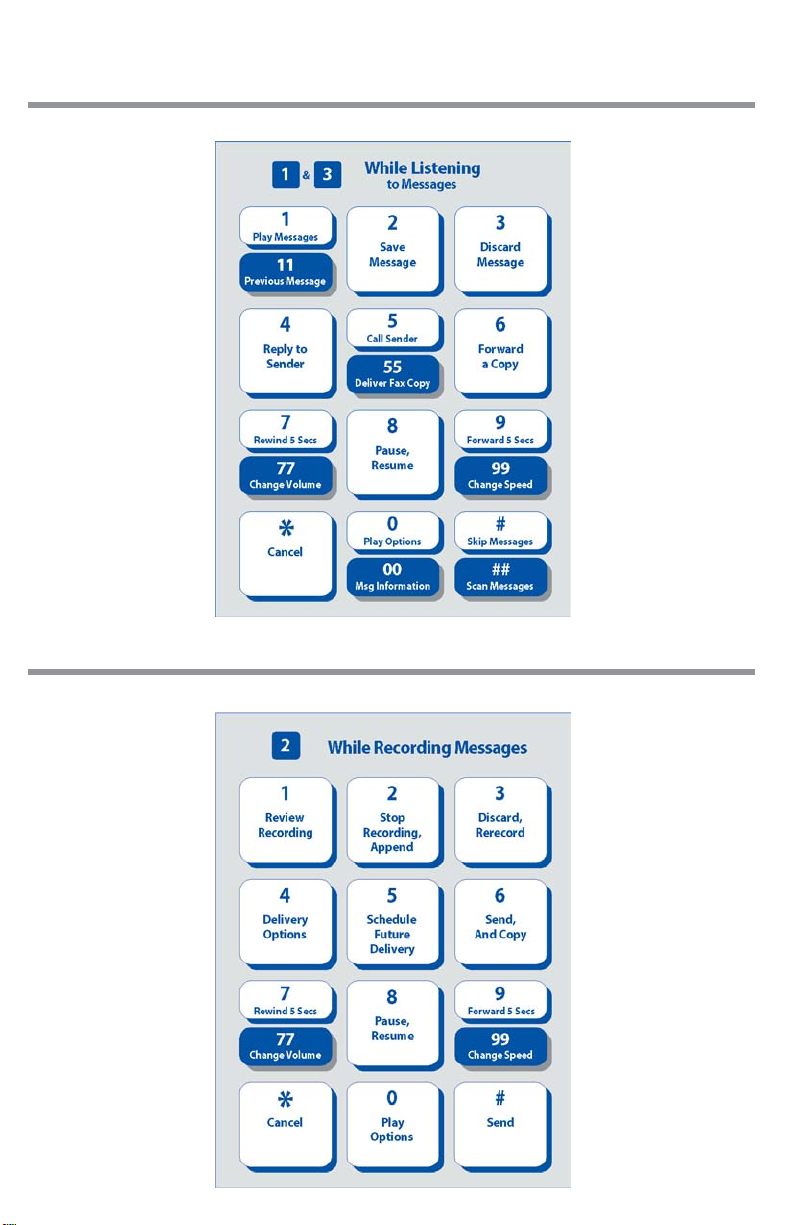
Functions While Listening to a Message
Home Page
Functions While Recording and Sending a Message
Page 6

Quick Reference Index
Home Page
AUTO PLAY OF MESSAGE INFORMATION..................................................[6][6]
Time & Date Stamp Information. This option can be turned on/off.
AUTO PLAY NEW MESSAGES...........................................................................[6][5]
Plays new messages after you log in. This option can be turned on/off.
DIRECT CALL
Used for make out going calls while logged in.
EXTENDED PROMPTING..............................................................................[#][7][4]
This option can be turned on/off.
FIND ME
Calls you at a series of numbers in your stored number list.
FOLLOW ME
Changes the number where you are taking your calls.
LISTEN TO NEW MESSAGES...................................................................................[1]
LISTEN TO SAVED MESSAGES...............................................................................[3]
MESSAGE ALERT
When enabled the system will call you to let you know you have new messages. This option can be turned on/off.
PAGER NOTIFICATION
When enabled the system will call your Pager to let you know you have
new messages. This option can be turned on/off.
QUICK MEMO.....................................................................................[#][MAILBOX #]
Quickly send a message to another Subscriber.
RECORD AND SEND A MESSAGE.........................................................................[2]
REMINDER................................................................................................................[#][#]
Quickly send a message to yourself.
STORED TELEPHONE NUMBERS
Enter a list of numbers used by Follow Me,Find Me, and all Notifications.
UNDELETE MESSAGES........................................................................................[6][3]
Deleted messages can be recovered any time before Daily Maintenance
time, scheduled by the System Administrator.The default time is 3 a.m.
*
.........................................................................................................[#][5]
*
..................................................................................................................[4][6]
*
...........................................................................................................[4][1]
*
..................................................................................................[6][1]
*
.......................................................................................[6][2]
*
...................................................................[#][2]
*Must be Authorized by System Administrator.
 Loading...